RSS
 

Archive for February, 2017

CP+ 2017: You want a Fujifilm GFX 50S (and we have the shots to prove it)

24 Feb

The Fujifilm GFX 50S is one of the most talked-about recent camera launches, and for good reason. Announced at Photokina last year, it’s Fujifilm’s first medium-format camera since the days of film.

It’s based around a familiar 51.4MP sensor, uses a new G-mount and offers weather sealing. With its late February launch imminent, we’ve just taken delivery of a production camera, in Yokohama. Take a look at some of the first images from this potentially groundbreaking new system.

See our Fujifilm GFX 50S sample gallery

Articles: Digital Photography Review (dpreview.com)

 
Comments Off on CP+ 2017: You want a Fujifilm GFX 50S (and we have the shots to prove it)

Posted in Uncategorized


StyleShoots Live robotic photography studio uses AI to shoot and process photos

24 Feb

A new robotic ‘smart studio’ device aims to increase brands’ photography efficiency and productivity by replacing, to a certain degree, professional human photographers with artificial intelligence and a robotic camera/lighting system. Called StyleShoots Live, this smart studio is equipped with robotic lighting, a Canon 1DX Mark II camera, and machine intelligence for shooting, processing and exporting photos and video automatically.

StyleShoots, the Dutch company behind the smart studio, unveiled the product on Wednesday, saying it is ‘designed to create instantly edited video and stills for fashion lifestyle and eCommerce shoots in minutes.’ This is made possible via a large steel enclosure in which a model is posed. A variety of technologies then make technical decisions, adjusting lighting and camera settings as necessary to shoot content that matches brand-specified customized styles.

The resulting content is automatically processed, including things like cropping images to certain aspect ratios or stitching together multiple videos. The final content can then be reviewed by the human in charge and, if approved, exported for various platforms. A human is given control over the entire process via a built-in iPad Pro with a Live View mode of the model.

Speaking about the smart studio, StyleShoots’ Head of Product Anders Jorgensen said:

‘Fashion brands need to keep their customers engaged with fresh content every day – and video shared on social media is the most powerful form of storytelling. To keep up with the continuous demand, StyleShoots Live creates stills and video ready for publishing on Instagram, Facebook, Snapchat, and websites within minutes – without any manual editing or post production.’

Of course, such a studio raises concerns about technology and its potential ability to replace human photographers with machines. In response to that concern, StyleShoots explained in a long FAQ sheet that it didn’t design its smart studio to be a replacement for humans. ‘To run a fashion shoot,’ the company explained, ‘you need a creative eye to compose the shot, pose the model and style the clothes — a robot can’t do that (yet).’

Source: StyleShoots

Articles: Digital Photography Review (dpreview.com)

 
Comments Off on StyleShoots Live robotic photography studio uses AI to shoot and process photos

Posted in Uncategorized


Fujifilm updates X-mount lens roadmap

24 Feb

Fujifilm’s creation of cine lenses and a medium-format system doesn’t mean it’s forgotten its stills-shooting X-mount audience. The company has announced an updated lens roadmap, adding an ultra-wide zoom and a telephoto prime lens, both due in 2018.

The updated roadmap positions the ‘Ultra Wide Angle Zoom’ fractionally to the left of the existing 10-24mm F4 R OIS (15-36mm equiv), suggesting it’s likely to cover a similar range but presumably with a different aperture value. Meanwhile, the ‘Telephoto Prime’ lens seems pinned around the 200mm (300 equiv) point.

The X-mount versions of the MK cine zooms are also added to the roadmap, joining the 80mm F2.8 R LM OIS WR Macro as being expected in 2017.

 The latest version of the Fujifilm X-mount lens roadmap can be found here.

Articles: Digital Photography Review (dpreview.com)

 
Comments Off on Fujifilm updates X-mount lens roadmap

Posted in Uncategorized


Cosina announces development of three Voigtlander E-mount lenses

24 Feb
From left to right: Nokton classic 35mm F1.4, Nokton 40mm F1.2, Macro APO-Lanthar 65mm F2.

Cosina has announced the development of three manual focus Voigtländer prime lenses for Sony E-mount: the MACRO APO-LANTHAR 65mm F2 Aspherical, the Classic Nokton 35mm F1.4, and NOKTON 40mm F1.2 Aspherical. All three lenses offer complete E-mount support and will transmit EXIF data, will work with in-body image stabilization and allow automatic magnification when focusing.

Originally announced at Photokina 2016, the Macro APO-Lanthar 65mm F2 is one of the brightest Macro lenses for full-frame, and offers a reproduction ratio of 1:2. The Classic Nokton 35mm F1.4 is a redesign of the M-mount version, with optimization for the Sony’s sensor. Finally, the Nokton 40mm F1.2 is the fastest 40mm for full-frame format, and will be one of the fastest E-mount lenses available.

Pricing and release dates for all three lenses are currently unavailable.

Articles: Digital Photography Review (dpreview.com)

 
Comments Off on Cosina announces development of three Voigtlander E-mount lenses

Posted in Uncategorized


Pentax announces development of 50mm F1.4, adds lenses to K-mount roadmap

23 Feb

Pentax is displaying a prototype version of a new 50mm F1.4 for K-mount at CP+ 2017, and has also added an 85mm F1.4 and an unspecified telephoto zoom to their roadmap.

Press Release

RICOH to Exhibit One Reference Product at CP? 2017 Camera and Imaging Show

TOKYO, February 22, 2017 ?RICOH COMPANY, LTD and RICOH IMAGING COMPANY, LTD. is pleased to inform the exhibition of one reference product — interchangeable lens currently under development — at CP + 2017 , one of the largest and most comprehensive camera and imaging show in Asia. This annual event will be held from February 23rd to February 26th at the PACIFICO YOKOHAMA convention center in Japan.

Reference of Products
Interchangeable lens for PENTAX K mount digital cameras
Model name: D FA?50mmF1.4(tentative)
Product information:
?An image circle accommodating the image size of 35mm full-frame digital cameras
?High-performance Star (?)-series lens with high-resolution , high-contrast images and beautiful bokeh (defocus) effect
?Price: Not decided
?Market launch: Not decided
Notes:
Model name, design, specification are all tentative and subject to change without notice. Price and marketing launch date will be announced at later date.

Articles: Digital Photography Review (dpreview.com)

 
Comments Off on Pentax announces development of 50mm F1.4, adds lenses to K-mount roadmap

Posted in Uncategorized


Tips for Making Your Own Oscar-Worthy Film

23 Feb

It’s that time of year – the stars will soon be on the red carpet, and the golden statues given once again. It’s Oscar Season!

The 2017 Academy Award nominations run the gamut of filmmaking, but they all have one thing in common – they are filmed beautifully, feature perfect lighting, and capture breathtaking audio.

We’ve compiled a list of some of our favorite Oscar nominations and winners, of this year and years past, along with some tips for using Photojojo gadgets when creating your own Oscar-worthy piece of cinema.

(…)
Read the rest of Tips for Making Your Own Oscar-Worthy Film (906 words)


© Meg for Photojojo, 2017. |
Permalink |
No comment |
Add to
del.icio.us

Post tags:


Photojojo

 
Comments Off on Tips for Making Your Own Oscar-Worthy Film

Posted in Equipment


Why Getting Outside Your Comfort Zone is Good for Your Photography

23 Feb

Getting outside your comfort zone is good for your photography. The single, biggest factor that has helped me to improve my photography was becoming comfortable with being uncomfortable. This has been across all areas of photographic work, from weddings, corporate through to my absolute passion, travel photography.

googletag.cmd.push(function() {
mobile_slots.push( googletag.defineSlot( “/1005424/_dPSv5topic-rhs(300×250)”, [300, 250], “pb-ad-124309” ).addService( googletag.pubads() ) ); } );

Getting Outside Your Comfort Zone 15

Let me explain. From the very beginning I had the same concerns as many beginners in photography, where do I even start? I had built-up an imaginary wall about how I would understand the theory and mechanics of the photographic process as well as being creative in how I approached my photo work. All questions that only served to stop me from getting out there and experimenting so that I could learn by doing and implementing the theory I had poured over so many times.

The moment I let go of concern over the results I would achieve, and more importantly, what other people thought of my images, was the moment I felt free to experiment and make mistakes. That’s where the real learning happens, as I soon discovered.

Play the long game plan

I also realized early on, that becoming proficient in photography is a long game plan. It doesn’t happen overnight. It also requires effort and focus to be able to approach each challenge with a willingness to keep trying until understanding and outcome produce results that meet expectation. After my first year of taking photos, I had improved, and that improving continues to this day. Why? Because I continue to push myself outside of my comfort zone to improve as an image maker.

There is nothing better on the road to discovery and learning than feeling like you have a good understanding of what you are doing while enjoying the breakthroughs of understanding. And ultimately, capturing the images you set out to. However, it is important to remember that staying comfortable in what you are doing and how you are doing it, will reduce your growth and further understanding of different types of photography or more specifically, different approaches.

Getting Outside Your Comfort Zone 20

A few years ago this theory was clarified for me while I was working in Antarctica. We were fortunate to have two National Geographic Photographers on the ship with us who were generous enough to do a couple of presentations during days at sea. One point, in particular, helped me to understand in a different way, what I had already been doing since the early days of my image making. And the beauty is, you can apply this approach to most scenarios, be it landscape, travel, wedding, portrait, or commercial photography.

The 80/20 rule

Devote 80% of your image making time to getting the images you set out to do. Play it safe to a certain degree to be sure you come home with your planned shots. Then for the remaining 20% of the time, throw caution to the wind and experiment with no expectation of any outcome. If you think about this approach, 20% of your image making time adds up to quite a bit. Pushing yourself with the 20% will not necessarily lead you to capture amazing new images every time, but it will allow you to have little discoveries along the way that can add up to thinking of new ways or approaches for the future.

Experimenting with shutter speed, white balance, aperture, ISO, focal length, and movement are all options that can result in new ways of doing and seeing things. Ultimately, this will help you to understand the best approach to a given scenario with controlled, positive results.

Getting Outside Your Comfort Zone 10

The list of possibilities is endless. But without regard for the outcome, you are left with a more innocent, concern-free approach to getting creative and pushing the limits of your knowledge and current space of understanding.

Side benefits of learning outside your comfort zone

The side benefits of further learning of my chosen craft, even if they seem unrelated, have also helped with my ability to shoot under pressure. In regards to my travel photography, I have attributed my ability to get solid images under challenging circumstance with limited time, to having shot and assisted on a lot of weddings. For me, weddings have proven to be the ultimate space for growth with my image making ability, and it is easy to see why.

When shooting weddings you have no control over weather, lighting, time of day, or the environment you are shooting in. You have the responsibility of capturing images in often very challenging environments. It also means you are shooting a lot, with purpose, which I’ve always been a big advocate of for helping improve your photography.

Now I’m not suggesting to go out and shoot a few weddings just to help improve your photography in other areas. Photographing weddings is something you have to want to do. You especially have to respect the responsibility that comes with taking on such a big day in people’s lives. You have no second chance and have to be at the top of your game to consistently get it right. Over time, though, assisting or working as a second shooter for an established wedding professional would be a good way to test the waters to see if this is an area of photography you would like to pursue.

Getting Outside Your Comfort Zone 23

Some practical exercises

You can, of course, replicate these same scenarios without the time pressure or expectation of outcome only a client can have.

An option would be to visit and photograph the interiors of some local churches to gain an understanding of what it means to shoot in low light. Then slowly walk from the inside of the church to the outside (assuming this is during daylight hours) and adjust your exposure to achieve correctly exposed images over what will be a massive change in light levels. This is an extreme example but there will absolutely be situations in the future where the learnings gained from this type of exercise will be put to good use.

Getting Outside Your Comfort Zone 02

Getting Outside Your Comfort Zone 01

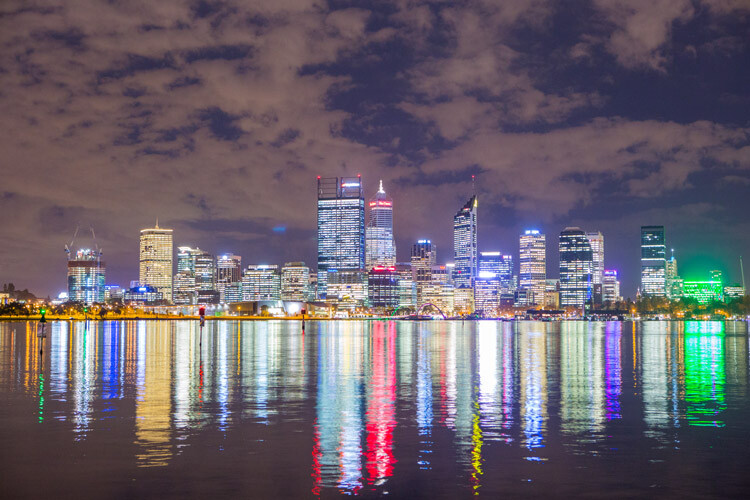
Another great exercise is to visit a city (which could be yours) and set up your camera just before sunset when there is still plenty of light. Then slowly take images of the same scene over the next two hours as the sun sets and the lights come on in the city. The best option for this exercise is to have your camera on a tripod so the scene remains the same and you are able to get a solid idea of how the changing light conditions affect your results.

This exercise not only helps you to understand the process of changing exposure on your camera but gives you a solid idea of the mix between natural and man-made light during the change over from night to day.

Getting Outside Your Comfort Zone 06

Getting Outside Your Comfort Zone 07

Getting Outside Your Comfort Zone 08

Getting Outside Your Comfort Zone 09

Getting Outside Your Comfort Zone 11

Visit your local beach maybe an hour and a half before sunset and take images during the changing light conditions. You will see a number of things during this experiment as there are big changes in lighting and color. You will have a greater understanding of what you need to do to continue making correctly exposed images based on the changing lighting conditions which would be different to the city example I gave earlier. Look closely at the changing color and corresponding white balance and the effect it has on your images.

To take this a step further, take your kids or some friends down to the beach and use them to experiment with taking portraits at this time of day.

Getting off Automatic

If you are currently using your camera on an automatic setting, you can start to experiment with a more manual approach to your image making. Let’s assume for a moment, you are using automatic settings for everything on your camera, aperture, ISO, and shutter speed.

Play with aperture

One option would be to experiment with Aperture Priority (setting your camera so you take control of the aperture). You can experiment and start to see what different effects you will have in your images by using specific apertures. Set up an object, focus on it and then cycle through all of the different apertures to see what happens. This is a fantastic exercise to apply to portraiture so you have a better understanding of what results you will achieve based on your chosen aperture.

Getting Outside Your Comfort Zone 31

85mm lens on a full frame camera, ISO 2000, 1/50th, at f/18.

Getting Outside Your Comfort Zone 32

Shot with an 85mm lens on a full frame camera, ISO 2000, 1/320th, at f/8.

Getting Outside Your Comfort Zone 33

85mm lens on a full frame camera, ISO 2000, 1/2500th, at f/2.8.

Play with focal length

Changing focal lengths on a fixed subject is also a great exercise to help develop your learning. The portraits below are perfect examples of a fixed subject with fixed camera settings. The only change was moving backward while zooming in (going to a longer focal length) the subject. The difference between the resulting images is clear.

Getting Outside Your Comfort Zone 35

24mm lens on a full frame camera, ISO 1000, 1/250th, at f/5.6.

Getting Outside Your Comfort Zone 36

50mm lens on a full frame camera, ISO 1000, 1/250th, at f/5.6.

Getting Outside Your Comfort Zone 34

210mm lens on a full frame camera, ISO 1000, 1/250th, at f/5.6.

Play with shutter speed

The same can be done with shutter speed. A popular subject for longer exposures is waterfalls, allowing you to blur the water to achieve a misty look. Keep in mind, a tripod is essential for this type of image. When you have time, find a local waterfall or flowing stream (preferably on an overcast day). Set up your camera on a tripod and cycle through the shutter speeds to see the differing results you will achieve based on long and short exposures and the effect it has on the water.

Getting Outside Your Comfort Zone 14

Practice, practice, practice

The above exercises may seem a little boring, but it is only through continued practice that you will understand with confidence, what you need to do to achieve the images you want. Over time, and through experience, it becomes an instinctive response to what is in front of you based on knowing, or having an idea of what result you are after.

There are many benefits to exploring locations in your area. You are able to revisit them on a number of occasions during different weather, times of day, and different seasons. You can really test yourself and build your understanding and experience in dealing with these differing light and brightness scenarios.

Travel photography

The other area where you may have limited time and no control over the variables earlier mentioned is travel photography. Often when traveling, these limitations will leave you feeling a level of pressure to get the image. It is the practice, understanding, and development you implement before you go traveling that will help you capture images with confidence, even when the time of day and lighting are not at their best.

Getting Outside Your Comfort Zone 29

Getting Outside Your Comfort Zone 30

For example, if you’re traveling to Africa to photograph wildlife, you’ll be using long lenses a lot more than if you are doing a church tour of Italy where wide lenses would often be the order of the day. The important thing here is to push yourself and get out there as much as possible to replicate, as best you can, the type of shooting you will be doing in order to build that skill set before you travel.

Getting Outside Your Comfort Zone 26

Getting Outside Your Comfort Zone 25

Challenges of travel

Travel also often leaves you tired due to the realities of what you need to do to get to your location or full days trying to see and experience as much as possible. Try to be as healthy and fit before you go in order to maximize all the photo opportunities traveling can bring. There is nothing worse than coming home feeling like you have missed opportunities due to needing to rest or not using your time efficiently.

Successful travel photographers are always well-researched and prepared to go as much as possible. The know that they need to maximize their time in order to come home with a full body of work that will help justify all that goes into a travel gig. This usually means starting before sunrise and working through to night time to capture specific locations in all their various forms.

This has been the case for me on many occasions. When working in Antarctica and South Georgia, we had a lot of exploring time in the zodiacs (small inflatable boats). On one particular occasion, we were advised of a one hour cruise which turned into 3.5 hours due to the many photo opportunities we had. It was a cold day and snowed the entire time. That added to the challenge of shooting, often with a long lens from a moving craft amongst 10 other people also working hard to get the shot in the confines of a small boat. Once we were all loaded safely back on board, almost all participants went inside immediately, either for a warm shower or warm drink, and rightly so, it was very cold.

Getting Outside Your Comfort Zone 17

Getting Outside Your Comfort Zone 21

Another photographer and I stayed outside the ship to see if there were any other photo opportunities that presented themselves before we pulled anchor and continued on our way. The images above were just a few that made the effort completely worthwhile. We pushed ourselves and were rewarded with many great images which no one else captured. We were only outside for a further 30 minutes, however, the response from fellow passengers upon seeing our images confirmed we had made the right decision to continue pushing on and taking advantage of the conditions in front of us. This has been a consistent factor with all of my photography based trips over the years.

When you travel, you are surrounded by so many photographic opportunities. Remember to take full advantage of these and everything that travel offers. Of course the most important thing is to enjoy yourself, however, if images are a top priority, be sure to take advantage of the time you have and be out and about as much as possible.

Getting Outside Your Comfort Zone 40

Conclusion

It is also worth researching other photographers to see what they have done in the same locations you are planning to visit. Look at what you like and don’t like, then try and photograph the same scene in a way not yet done by others.

Growth in photography, as with most things, comes from pushing yourself to improve, going beyond your comfort zone and identifying areas you can experiment with and learn from.

googletag.cmd.push(function() {
tablet_slots.push( googletag.defineSlot( “/1005424/_dPSv4_tab-all-article-bottom_(300×250)”, [300, 250], “pb-ad-78623” ).addService( googletag.pubads() ) ); } );

googletag.cmd.push(function() {
mobile_slots.push( googletag.defineSlot( “/1005424/_dPSv4_mob-all-article-bottom_(300×250)”, [300, 250], “pb-ad-78158” ).addService( googletag.pubads() ) ); } );

The post Why Getting Outside Your Comfort Zone is Good for Your Photography by Damian Caniglia appeared first on Digital Photography School.


Digital Photography School

 
Comments Off on Why Getting Outside Your Comfort Zone is Good for Your Photography

Posted in Photography


Buyer’s Guide: Canon EOS Rebel T7i (800D) vs EOS 77D vs EOS 80D

23 Feb

In February, Canon announced the EOS Rebel T7i (800D) and EOS 77D, adding two new choices to the company’s already confusing lineup. In this article we’ll break down what separates the T7i, 77D and the existing EOS 80D – and which is the best one for your needs.

Spec comparison

  Rebel T7i/800D EOS 77D EOS 80D
MSRP (body only) $ 749  $ 899 $ 1199
Sensor 24.2MP APS-C CMOS
Processor Digic 7 Digic 6
ISO range ISO 100-25600
(expands to 51200)
ISO 100-12800
(expands to 25600)
AF system  Dual Pixel + 45-pt all-cross-type
Shutter speed 30 – 1/4000 sec 30 – 1/8000 sec 
X-sync 1/200 sec 1/250 sec
LCD size/type 3″ fully-articulating (1.04M-dot) 
Viewfinder mag/coverage 0.82x / 95% 0.95x / 100%
(‘Intelligent’)
Control dials One Two
Max Continuous 6 fps  7 fps
Video 1920 x 1080 @ 60p/30p/24p
Mic jack No Yes
Headphone jack No Yes
Bluetooth Yes No
Battery life (CIPA) 600 shots 960 shots
Battery grip No Optional
Weather-sealing No Yes
Dimensions 131 x 100 x 76mm 131 x 100 x 76mm 139 x 105 x 79mm
Weight (CIPA) 532 g  540 g 730 g

In most respects, the 80D is the better of the three cameras, which is what you’d expect given its price premium. Let’s break it down into various areas for a closer look.

Body & Design

What really sets these three models apart are style and build quality. The EOS Rebel T7i is very much a Rebel. It’s compact, plastic and has a single control dial and small-ish optical viewfinder. The T7i, along with the other two cameras in this comparison, has a 3″ fully articulating touchscreen LCD.

The Rebel T7i’s top-plate controls are all located on the right side. The EOS 77D adds an LCD info display in the place of the mode dial, which moves to the left.
The optical viewfinder, LCD and most of the controls are the same on the T7i as they are on the 77D. The 77D adds a second control dial around the directional controller (with a lock switch) as well as an AF-On button for fans of back-button focus.

As you’d expect, the 80D is bigger and better in terms of build quality. The body is weather-sealed and the shutter is rated to 100,000 cycles (Canon doesn’t say how long the Rebel and 77D will last, but it’s probably safe to say ‘not as long’.) Its pentaprism ‘Intelligent Viewfinder’ has 100% coverage and the ability to overlay all kind of information on top of the scene, such as focus point layout, composition grids and an electronic level. The grip is larger and, unlike the other two models, a battery grip is an optional extra. The 80D also offers a headphone jack, in addition to the mic jack found on the other two models.

The controls on the 77D are quite similar to those on the 80D. The 80D has a larger viewfinder and no labels on its directional controller. It lacks the Wi-Fi button found on the 77D.
Again, the 77D closely resembles its big brother. The 80D has additional buttons, though, for AF, drive and metering.

The Guts

The Rebel T7i, EOS 77D and EOS 80D share the same 24MP APS-C CMOS sensor. However, the Rebel and 77D have Canon’s latest Digic 7 processor, compared to the Digic 6 on the 80D. Canon claims that the Digic 7 provides a full-stop improvement in JPEG high ISO noise levels compared to Digic 6, though comparing the Digic 7-powered EOS M5 against the 80D seems to contradict that. In addition, the native ISO range tops out at 25600 on Digic 7 vs 12800 on Digic 6. All three cameras can further expand their maximum ISO by a full stop. 

Canon says that the Digic 7 also improves subject-tracking performance, and when we reviewed the EOS M5 mirrorless camera, we found it to be a step above the EOS 80D. It’s probably a safe assumption that the Rebel T7i and EOS 77D will perform as well as the M5 when live view shooting.

Digics aside, all three cameras use the same Dual Pixel CMOS AF system, which we’ve found to be effective for both stills and video. They also share a 45-point, all-cross-type phase-detect system for shooting through the viewfinder as well as a 7560-pixel RGB+IR metering sensor that uses ‘Color Tracking’ to detect skin color and assist in focusing.

When shooting through the viewfinder on all three cameras you’ll get 45 all-cross-type points, with the center-point being dual-cross-type. Dual Pixel AF has phase-detect pixels built into the CMOS sensor, which allows for fast AF in live view and video. The phase-detect area covers 80% of the frame, as illustrated above.

Features

This is the area in which the three cameras start to diverge, though not dramatically. Let’s start at the bottom with the Rebel T7i/800D.

The T7i offers Full HD video capture at 60p, 30p and 24p, as well as the PAL equivalents at bit rates of up to 60Mbps. You get manual exposure control and Auto ISO while capturing video, though it’s not clear if the T7i will let you adjust exposure compensation in those situations (signs point to ‘yes’). Manual audio level controls are available, plus a wind filter.

You get to take advantage of Dual Pixel AF’s solid subject tracking performance and easy rack-focusing courtesy of the touchscreen display. There’s also a time-lapse movie mode and an HDR movie mode (shudder). Something that the Digic 7 allows for is 5-axis digital image stabilization, which is a feature the 80D’s Digic 6 does not support.

In terms of continuous shooting, the T7i can take up to 27 Raw, 23 Raw+JPEG or an unlimited number of JPEGs at 6 fps, assuming that you’re using a high-speed UHS-I card. Battery life sits at 600 shots per charge (CIPA standard).

And then there’s Wi-Fi, which is Canon’s most advanced system yet. You get the usual Wi-Fi connectivity using the Canon Connect app, as well as NFC for quick pairing with Android phones. What’s new is Bluetooth support, which not only makes pairing easy, but also maintains a constant connection so you can quickly turn your phone into a remote. When using the app with Bluetooth there’s a shutter release button for shooting, plus a four-way controller for playback. If you want full-on remote control with live view, the app will automatically switch over to Wi-Fi.

Canon’s new BR-E1 Bluetooth remote is compatible with the Rebel T7i/800D and the EOS 77D. Notice the W/T buttons, which can be used with the available PZ-E1 power zoom adapter (that only works with the EF-S 18-135mm PZ at this time).

Something new the T7i/800D brings to the table is Feature Assistant, which is very similar to the Guide feature on the Nikon D3000-series. When you rotate the mode dial, the LCD displays visual representations of what each mode does. Once you’ve selected a mode, you’ll get a slider that illustrates the effect of aperture or shutter speed adjustment. It’s pretty well-done for those who learn toward the beginner end of the spectrum. This feature is also available on the EOS 77D, though it’s hidden by default.

So what features do you gain by stepping up to the EOS 77D, aside from the physical ones? Not a whole lot. You gain interval and bulb timers and a few more custom controls (due to the extra physical buttons). Everything else, including burst rate and battery life, is identical.

Moving up to the 80D mostly provides better performance and even more custom controls. Performance-wise, the max shutter speed rises to 1/8000 sec, the x-sync speed to 1/250 sec, and the burst rate to 7 fps. Battery life is rated at 960 shots per charge, and that’s without the optional grip.

Feature-wise you gain a lot more control over autofocus settings, and an AF micro-adjustment tool is also available. What are you missing out on by having a slightly older camera? Really it’s just Bluetooth and the 5-axis digital IS in movie mode (we can’t imagine your average 80D buyer using the Feature Assistant very often).

So which is best for you?

The difficult decision isn’t so much between the 77D and the 80D – the differences are pretty clear-cut. If you need something with much superior build quality, faster burst rates and more controls over autofocus, then it’s your choice. While the 80D’s live view subject tracking abilities may fall below that of the 77D (and T7i), image quality should be similar, despite Canon’s claims to the contrary.

The Rebel T7i / EOS 800D showing off its new UI.

The choice between the Rebel T7i/800D vs the 77D is where it’s a bit more challenging. Obviously, budget will be one thing any buyer will consider. If you’re pinching pennies then you’re probably going to choose the Rebel. If you’re willing to spend about $ 150 more, then we think that the EOS 77D is the better choice. It’s not any larger, the extra control dial saves a lot of hassle and the LCD info display is a nice touch. And, if you’re enthusiastic about video, having a mic jack will come in very handy.


If you’re trying to make this exact decision right now, or just want to propose alternatives, then head down to the comment section below. Let us know if we missed anything in this comparison, too!

Articles: Digital Photography Review (dpreview.com)

 
Comments Off on Buyer’s Guide: Canon EOS Rebel T7i (800D) vs EOS 77D vs EOS 80D

Posted in Uncategorized


Throwback Thursday: the Canon EF 24-70mm F2.8L

23 Feb
Photo by Daniel Dionne

This week the Sigma ‘Art’ line gained a lens many had been clamoring for: a 24-70mm F2.8 zoom, which nowadays seems a required lens for many professional shooters. This week we go back to where it started: the original Canon 24-70mm F2.8L.

Look across all camera systems and you’ll find that they all offer some sort of constant aperture 24-70mm or ‘normal’ zoom equivalent that covers this range. There’s a good reason for it. This zoom range covers the wide area and the mild telephoto area, rather than all wide or all tele. It’s a flexible range, and appeals to photographers of many different disciplines.

The odd thing is, the 24-70 is only 15 years old. In 2002 the very first 24-70, Canon’s F2.8L, replaced its already highly regarded 28-70mm F2.8L. Since then, the 28-70 zoom has faded away and is typically only seen as a variable-aperture kit zoom, or affordable constant-aperture zoom lens. Everyone since has gone crazy for the 24-70.

Unusually, the 24-70 F2.8 was ‘longest’ at its wide-angle end. Photo by Cburnett.

The original had some very interesting design quirks. The zoom is ‘reversed’, meaning the barrel is at its maximum extension at 24mm, and is at its shortest at 70mm. With the lens hood mounted behind this extending element, the lens shade was able to provide the right amount of coverage for all focal lengths, as its extension relative to the front element is shortest at 24mm, and longest at 70mm, getting out of the way when wide, and providing extra shade when shooting at 70mm. 

The 24-70 is at its most compact at its full telephoto end. Photo by Cburnett.

Now, the term ’24-70′ is fairly ubiquitous, and is almost generic. Wedding shooters and photojournalists have led the way adopting it, attracted to its versatile field of view and constant aperture. By 2007 Nikon had released their own 24-70 F2.8 to replace their 28-70 F2.8. Sony came shortly after with the alpha mount 24-70 in 2008. Third party manufacturers followed suit, releasing their versions in the 2010’s.

The Mark II version of Canon’s 24-70mm F2.8 arrived in 2012.

When photographers ask questions like ‘what lens should I choose for this shoot,’ or ‘I only have a budget for one lens, what should I get,’ plenty of people will recommend a 24-70. What’s really amazing is how its popularity can be traced to a single lens introduced just fifteen years ago.

Articles: Digital Photography Review (dpreview.com)

 
Comments Off on Throwback Thursday: the Canon EF 24-70mm F2.8L

Posted in Uncategorized


4 Refraction Ideas to Use Your Creativity

23 Feb

The application of science to photography is a great way of getting creative results with your work. The camera itself is, of course, a product of scientific endeavor. One that brings everyone here to learn more about it. Inside the camera are a series of optics that use refraction to render the image onto your camera sensor, though refraction can be used even more creatively in photography.

googletag.cmd.push(function() {
mobile_slots.push( googletag.defineSlot( “/1005424/_dPSv5topic-rhs(300×250)”, [300, 250], “pb-ad-124309” ).addService( googletag.pubads() ) ); } );

To take refraction photographs you will need to find an object that produces this effect, such as a glass ball. The effect happens when light passes through an object of denser mass, and the light is bent as it goes through.

4 Refraction Ideas to Use Your Creativity

Flags such as the Union Jack make great subjects for refraction.

Objects that cause refraction

Any transparent object that has a different mass to air will cause refraction. The most useful objects that refract are those which are spherical. While it’s possible to get refraction through transparent plastic objects, for the best image quality you’ll want to be shooting through glass.

As you can read in my previous article: 7 Tips for Doing Crystal Ball Refraction Photography, glass balls are a favorite for this type of effect, though not everyone has one on hand. There are other objects that you can use for refraction such as; wine glasses, marbles, and water drops.

7 Tips for Doing Crystal Ball Refraction Photography

This photo was taken through the bottom of a drinking glass. The bobbles at the bottom refracted the light.


1 – Refraction using a glass ball

The glass ball is probably the most popular item used in refraction and is what you immediately think of if someone says refraction photography. This is a great piece of extra kit to have in your camera bag and can do wonders for creating a unique looking landscape photo.

The ball can also be good for architecture and even portrait photos if you now how to use it properly. You need to think of the ball as an external fish-eye lens. The ball then needs to be carefully placed on a wall, so it’s elevated to the same level as the object you’re shooting.

7 Tips for Doing Crystal Ball Refraction Photography

The ferris wheel is refracted inside this glass ball, the bokeh shapes compliment the scene well.

2 – Marbles are small glass balls, great for refraction!

A smaller alternative to a glass ball is the marble. Photographing a marble is in many ways the same as photographing its larger counterpart. The key difference is that it’s much smaller, and using a macro lens becomes important. There are a few key points you need to consider when photographing a marble versus a glass ball.

  • The glass may not be as good quality, leading to a poorer image inside the marble.
  • There will be more distortion and a smaller sweet spot where the image is clear.
  • The weight is significantly less making them much easier to carry around.
  • The small size often makes them easier to place on a surface without falling off, they sit in smaller divots.
  • You will need a lens capable of macro photography to best photograph with marbles.
7 Tips for Doing Crystal Ball Refraction Photography

The much smaller size of a marble enables you to place it in otherwise inaccessible locations.

3 – Make a splash with water droplets

A glass ball is not the only medium you can use to create refraction, water makes a great alternative. The key to using water in this way is photographing it as a droplet. There are a few ways to do this, you could try all of them!

  • Water droplet photography – If you’ve never tried this type of photography before I highly recommend it, it’s a lot of fun. Introducing a background image such as a flag will lead to that object being refracted inside the water drop!
  • Tap droplet photography – This is almost identical to the first example, this time you capture the droplet mid-flight. Once again you will want to have a background image behind the water drop. Follow the steps recommended in the water droplet article, and replace the water bag with a tap and voila. Here are some great examples of this type of photo.
7 Tips for Doing Crystal Ball Refraction Photography

These water droplets were placed on glass using a syringe, with the flag of Malaysia is behind them.

  • Naturally occurring water drops – Water drops on spider webs, or on flower petals are spherical, and will therefore refract. So get out there after it’s rained, or if you’re not patient there is always the not so natural watering can or syringe to create your own.
  • CDs and water drops – Placing water drops onto a CD using a syringe will create a great effect. Think of all those mini rainbows! To take this type of image you will need to place water droplets on a CD. Then compose your image, and turn the lights off. Finally, move a flashlight around the CD during a long exposure, doing light painting.
  • Water droplets on glass – This is similar to placing water drops on a CD, but you will use a strobe to light up the scene. Place your water drops onto a glass pane, with your image in the background below it.
7 Tips for Doing Crystal Ball Refraction Photography

The drop of water from a tap is caught mid-flight.

4 – Make that wine glass multi-task!

The real reason wine glasses are round is because they can be used for refraction photography! Okay, they are for wine, but that doesn’t mean photographers can’t use them as well.

The spherical nature of this type of glass means filling them with water will allow you to see a refracted image inside the glass. The wine glass is, of course, better than the glass ball for placing on a flat surface, as it’s not going to roll off. You can use a wine glass in portrait photos as well. In that scenario, the wine glass acts as a great prop, which also shows the refracted image in the background.

7 Tips for Doing Crystal Ball Refraction Photography

This wine glass filled with water shows the effect of refraction.

Get out and give refraction a try

There are multiple ways you can go about starting a series of refraction photos, and this type of photography makes a very interesting project. Let’s see your work if you have taken these types of photos before.

Are there any other refraction type photos you can recommend? Those who have never tried this technique before, give it a go! The community looks forward to seeing your photos, and it could become your project for the year!

The light is refracted through these water droplets when placed on a CD.

googletag.cmd.push(function() {
tablet_slots.push( googletag.defineSlot( “/1005424/_dPSv4_tab-all-article-bottom_(300×250)”, [300, 250], “pb-ad-78623” ).addService( googletag.pubads() ) ); } );

googletag.cmd.push(function() {
mobile_slots.push( googletag.defineSlot( “/1005424/_dPSv4_mob-all-article-bottom_(300×250)”, [300, 250], “pb-ad-78158” ).addService( googletag.pubads() ) ); } );

The post 4 Refraction Ideas to Use Your Creativity by Simon Bond appeared first on Digital Photography School.


Digital Photography School

 
Comments Off on 4 Refraction Ideas to Use Your Creativity

Posted in Photography