RSS
 

Archive for February, 2017

UHS-III SD card interface capable of 624MB/s bursts announced

25 Feb

The SD Card Association has announced the UHS-III standard that allows for maximum data rates twice as fast as the current UHS-II interface. The new interface will allow cards to transfer data at up to 624MB/s and will be used in both SD and Micro SD cards.

The UHS-III interface on future devices will be fully backwards compatible with existing SD cards. The cards themselves will include a second row of pins, so will be physically identical to current UHS-II.

The adoption of UHS-III branding may cause further confusion with the U3 speed rating that appears on many current cards. This may be mitigated if UHS-III cards prove to be capable of higher guaranteed sustained write speeds, allowing them to wear the ‘V60’ or faster ‘video speed class’ branding announced in 2016.

Although an increasing number of cameras (including many recent Fujifilm models, the Olympus E-M1 Mark II and Panasonic GH5) can make full use of the faster maximum transfer speeds of UHS-II cards, we’ve not yet seen any cards that can promise to sustain writing of data at faster than the 30MB/s promised by U3 ratings. This means all the x-hundred megabyte per second write speeds promised on current cards are useful only for bursts of stills: any camera trying to record video at data rates of above 30MB/s (240 mbps) run the risk of stuttering during recording.

Articles: Digital Photography Review (dpreview.com)

 
Comments Off on UHS-III SD card interface capable of 624MB/s bursts announced

Posted in Uncategorized


Uno II interchangeable camera backpack has four swappable interior panels

25 Feb

Bag maker NIID has launched a Kickstarter campaign in hopes of funding the Uno II, a backpack geared toward photographers and other creatives. It calls the Uno II the first ever interchangeable backpack, allowing owners to swap the interior bag component with an alternative ‘panel.’ A total of four panels are offered, one designed for a variety of camera gear, one for art supplies, one for work items (the standard panel) and one for sports gear.

Typically, different activities require different types of bags, and that can result in owning a few different backpacks that take up space. Uno II aims to solve that via a two-part design: an exterior zippered component that swaddles the interior panel, and the interior panel which contains pockets and slots for various items. When assembled and zipped, Uno II becomes an ordinary backpack with shoulder straps.

The camera panel can, for example, be used to transport a camera body and a couple lenses, a small tripod, and other smaller items like storage cards or spare batteries. Similarly, the work panel is made for holding items like tablets and laptops, while the sports panel can accommodate workout clothes and more. The art panel differs quite substantially, featuring elastic bands to hold brushes, pencils, paints, and similar things, as well as a mesh pocket for smaller items.

The Uno II is made with linen-textured Eco-polyester with a water-repellant coating, anti-theft zippers, a small hanging clip for attaching things like keys, a Flex Power Dock, and a rain shield for use in heavy rain. This model bag will also be offered, if the campaign is successful, in both a smaller 20L capacity and a larger 30L capacity.

Thus far, the company has exceeded its $ 15,000 goal with nearly $ 53k in funding and 27 days remaining in the campaign. NIID is offering backers a single early bird Uno II backpack with a standard panel in exchange for an $ 89 or greater pledge. Shipping to backers is estimated to start this upcoming June.

Articles: Digital Photography Review (dpreview.com)

 
Comments Off on Uno II interchangeable camera backpack has four swappable interior panels

Posted in Uncategorized


Huawei announces Honor VR 360-degree camera

24 Feb

VR is widely viewed as the ‘next big thing’ and everybody wants their piece of the pie. Chinese manufacturer Huawei is no exception and at an event in Beijing the company has announced the release of a clip-on 360-degree camera for smartphones. It will be developed by Insta360 and marketed under Huawei’s sub-brand as the Honor VR Camera.

“We’re thrilled to partner with Huawei to grow the global community of 360-degree and VR creators,” said JK Liu, founder and CEO of Insta360. “Like us, Huawei is committed to reinventing photography, and they believe in our products as the best way to introduce users to the future of the camera.”

Technical specifications are scarce at the moment but we know the camera offers 3K photography and seamless livestreaming. As part of the partnership, Insta360 also developed an app for capturing, sharing and livestreaming 360-degree content.

Looking at the specs and images it is fair to assume the Honor VR camera will be based on the brand new Insta360 Air for Android camera, which comes with an F2.4 aperture, 3008 x 1504 photo resolution and 2560 x 1280 video at 30 frames per seconds. Like the Honor VR it connects to Android smartphones via a USB micro or Type-C connector. We have just received an Insta360 Air, so look out for a review soon. The Huawei VR should be available ‘soon,’ we expect to hear more detail at Mobile World Congress which starts on Sunday. 

Ming Zhao, president of Honor Huawei Business Unit, holds up an Honor VR Camera.

Articles: Digital Photography Review (dpreview.com)

 
Comments Off on Huawei announces Honor VR 360-degree camera

Posted in Uncategorized


Get your pictures in front a NASA photo editor by entering Astronomy Photographer of the Year 2017

24 Feb
Serene Saturn Winner Planets, Comets & Asteroids 2016 © Damian Peach (UK)

The Insight Astronomy Photographer of the Year 2017 competition is set to open next week offering space photographers the chance to have their work judged by a picture editor from NASA as well as to win the top prize of £10,000. The competition is open to professional and amateur photographers who can choose from nine categories in which to enter their images. Entry is free but restricted to ten images in total all of which need to have been taken since January 1st 2016.

The winner of each category will receive a £1500 prize while those in runner-up positions get £500 and Commended images win £250. There are an additional two special awards for The Sir Patrick Moore Award Best Newcomer and for Robotic Scope Image of the Year – both of which earn the photographer £750.

Joining the judging panel this year is photographer Rebecca Roth, the Image Coordinator and Social Media Specialist at NASA’s Goddard Space Flight Center in Maryland. She will judge alongside a collection of astronomers and astro-photographers as well as presenters from the BBC Sky at Night TV program. Photographer Wolfgang Tillmans is also on the judging panel.

The competition is open for entries from Monday February 27th and closes on Friday April 7th. It is run by the Royal Observatory Greenwich in the UK along with the BBC’s Sky at Night magazine. The Royal Observatory is a charitable organization and has some terms regarding additional uses beyond the realms of the competition that entrants should acquaint themselves with before submitting their work.

For more information see the Royal Museums Greenwich website and the terms and conditions page.

Press release

INSIGHT ASTRONOMY PHOTOGRAPHER OF THE YEAR 2017 ANNOUNCES COMPETITION DATES AND WELCOMES REBECCA ROTH OF NASA TO THE JUDGING PANEL

The Royal Observatory Greenwich, in association with Insight Investment and BBC Sky at Night Magazine, announces the dates for the Insight Astronomy Photographer of the Year 2017 competition – its annual global search for the most beautiful and spectacular visions of the cosmos, whether they are striking pictures of vast galaxies millions of light years away, or dramatic images of the night sky much closer to home.

Now in its ninth year, the hugely popular competition will open to entrants on Monday 27 February giving them a chance of taking home the grand prize of £10,000. Entrants will have until Friday 7 April to enter up to ten images into the various categories of the competition via www.rmg.co.uk/astrophoto.

The competition also welcomes Rebecca Roth of NASA to the judging panel. Based in Washington D.C. Rebecca is a photographer, photo editor and social media specialist, currently working as the Image Coordinator and Social Media Specialist at NASA’s Goddard Space Flight Center. Rebecca has worked at NASA for nearly 8 years and is charged with sharing amazing images of our universe with the media and with the public through channels such as Instagram, Twitter and Facebook. Prior to working at NASA, Rebecca worked as a photojournalist and photo editor for outlets including National Geographic Television & Film, Roll Call Newspaper, and USA Weekend Magazine. Of her latest role as a judge for the Insight Astronomy Photographer of the Year 2017, Rebecca has said, “At NASA Goddard, we build spacecraft and instruments, and invent new technology to study the Earth, the sun, our solar system, and the universe – a favorite part of my job is sharing images of these spacecraft and the images they produce with the public. This will be an exciting and unique opportunity to see the spectacular images of space captured by the public themselves and discovering their photographic interpretations of the night sky and beyond.”

Insight Astronomy Photographer of the Year 2017 has nine main categories:

– Skyscapes: Landscape and cityscape images of twilight and the night sky featuring the Milky Way, star trails, meteor showers, comets, conjunctions, constellation rises, halos and noctilucent clouds alongside elements of earthly scenery.

– Aurorae: Photographs featuring auroral activity.

– People and Space: Photographs of the night sky including people or a human interest element.

– Our Sun: Solar images including solar eclipses and transits.

– Our Moon: Lunar images including lunar eclipses and occultation of planets.

– Planets, Comets and Asteroids: Everything else in our solar system, including planets and their satellites, comets, asteroids and other forms of zodiacal debris.

– Stars and Nebulae: Deep space objects within the Milky Way galaxy, including stars, star clusters, supernova remnants, nebulae and other intergalactic phenomena.

– Galaxies: Deep space objects beyond the Milky Way galaxy, including galaxies, galaxy clusters, and stellar associations.

– Young Astronomy Photographer of the Year: Pictures taken by budding astronomers under the age of 16 years old.

There are also two special prizes: The Sir Patrick Moore Prize for Best Newcomer is awarded to the best photo by an amateur astrophotographer who has taken up the hobby in the last year and who has not entered an image into the competition before, and Robotic Scope, acknowledges the best photo taken using one of the increasing number of computer-controlled telescopes at prime observing sites around the world which can be accessed over the internet by members of the public.

Entries to the competition must be submitted by 7 April 2017, and the winning images will be showcased in the annual free exhibition at the Royal Observatory Greenwich from 14 September 2017.

Photographers can enter online by visiting www.rmg.co.uk/astrophoto and each entrant may submit up to ten images to the competition.

Articles: Digital Photography Review (dpreview.com)

 
Comments Off on Get your pictures in front a NASA photo editor by entering Astronomy Photographer of the Year 2017

Posted in Uncategorized


Kamerar Lens Zoom Kit for iPhone 7 Plus review

24 Feb

Kamerar Zoom Lens Kit for iPhone 7 Plus review

If you’re shopping for accessory lenses, for most iPhone models the choice can be overwhelming. The lenses on offer range from cheap plastic variants for very little money to hefty high-quality glass in metal bodies that require a three-figure investment. However, the situation is slightly different for Apple’s current flagship, the iPhone 7 Plus. Because of the unique design of its dual-camera there are currently still very few attachment lenses on the market. That said, we’ve had a chance to have a closer look at one of the first available options, the Kamerar Zoom Lens kit. 

For $ 50 the kit includes a protective case for the iPhone, two lens modules that slide into the case and two small protective lens-cases. The first module combines a fisheye-adapter for the iPhone’s wide-angle lens with a tele-converter for the longer lens in the dual-cam. The fisheye offers a 160 degree angle of view and the converter comes with a 1.5x zoom factor, giving the 7 Plus tele lens a total zoom factor of 3x when compared to the wide-angle. The second module has two macro lenses that apply a 10x magnification to both iPhone camera lenses. 

The complete kit consists of the phone case and two lens modules with a little protective case for each.

Operation and build quality

Apart from the little plastic rails that the lens modules slide on, the Kamerar-case looks like most plastic phone cases and offers access to all ports. The case’s slightly shiny tile design is pretty much a matter of taste, but with its understated gray tones should work for most. 

Build-quality is pretty much in line with the price point. The plastic material looks a little cheap but the construction of the individual pieces is solid. Attaching and removing the lens modules is very easy but moving them in position in front of the iPhone camera and back requires a little bit of force. When not in use the lens modules can be stored in their cases, protecting them from scratching.

One important thing to consider when shooting with the Kamerar kit has nothing to do with the lenses but with the iPhone camera. As we found in our review, below a certain brightness threshold the iPhone 7 Plus camera switches from its tele lens to the wide-angle and applies digital zoom. When shooting with just the phone this switch is hardly noticeable and you usually only find out when looking at images on a big screen or checking EXIF-data.

However, the impact is much more noticeable with the Kamerar lenses attached. If you are using the tele-converter in low light and the iPhone camera switches to the wide-angle, you end up with a 2x digitally zoomed version of the fisheye image, which isn’t really what you want. To avoid this it’s best to use the kit with a camera app that lets you force the camera to use the tele-lens, even in lower light, for example Camera+ or Manual Camera.

Image Quality

Image quality varies between the conversion lenses. The tele-converter is capable of producing surprisingly sharp images, but photos taken with the fisheye look noticeably softer when viewed up close. All pictures are perfectly usable for social media and similar purposes though. The macro converters produce decent results as well, though as you would expect, the tele-version offers visibly better magnification.

When using the macro lenses the challenge mainly lies in keeping the device as still as possible. You have to get very close to the subject for the lenses to focus and motion on any axis will lead to camera shake and/or focus shift, and therefore blurry images. Overall the Kamerar Zoom Lens kit offers good image quality, especially when considering the affordable price point. 

The two samples below illustrate how the fisheye allows you to capture large objects or the interior of small rooms when there is no space to go further back. The fisheye images look a little soft up close, but color and tonality hardly change compared to the standard image without attachment lens.

 iPhone 7 Plus wideangle, ISO 20, 1/2660
 iPhone 7 Plus wide-angle with Kamerar fisheye, ISO 20, 1/3546

The tele-converter only offers a 1.5x zoom factor over the iPhone’s built-in tele lens. The difference in terms of angle of view is not massive but the lens is certainly useful when photographing objects further away and the image output is surprisingly sharp. Again, the attachment lens doesn’t noticeably alter tones and color. 

 iPhone 7 Plus tele lens, ISO 20, 1/595s
 iPhone 7 Plus tele lens with Kamerar tele-converter, ISO 20, 1/736s

The Macro lenses allow you to get really close to your subjects and, with the right subjects, for some interesting shots. Just make sure you have plenty of light and / or hold the camera very still, otherwise you’ll inevitably end up with shaky images. If the focus plane is in the right place, the macro lenses are capable of capturing detailed images though.

 iPhone 7 Plus wide-angle with Kamerar 10x macro converter, ISO 40, 1/17 sec
  iPhone 7 Plus tele lens with Kamerar 10x macro converter, ISO 320, 1/50 sec

With the macro module, the fact that the the iPhone camera switches lenses in lower light can actually work in your favor. The wide-angle has a shorter minimum-focus distance and combined with a 2x digital zoom captures the subject larger in the frame than tele + macro. 

iPhone 7 Plus wide-angle with Kamerar 10x macro converter and 2x digital zoom, ISO 32, 1/25 sec

Conclusion

The Kamerar Zoom Lens Kit is currently one of the few options for mobile photographers who want to use attachment lenses on the iPhone 7 Plus dual-camera. It’s entirely made out of plastic but feels solid and is very easy to use. As far as smartphone accessory lenses go, the image quality is decent across all four lenses. The kit is currently available for $ 35 on Amazon.com. Whether attachment lenses have been part of your arsenal for a long time, or you just feel like trying them out, at this price point you can’t go wrong with the Kamerar Kit. 

What we like:

  • Easy to use design
  • Affordable kit
  • Relatively good image quality

What we don’t like:

  • Unexpected results when iPhone camera app switches to wide-angle in low light
  • A little force is needed to move lenses into position
  • Macro lenses require a very steady hand

Sample Gallery

There are 14 images in our Kamerar Zoom Lens Kit samples gallery. Please do not reproduce any of these images on a website or any newsletter / magazine without prior permission (see our copyright page). We make the originals available for private users to download to their own machines for personal examination or printing (in conjunction with this review), we do so in good faith, please don’t abuse it.

Unless otherwise noted images taken with no particular settings at full resolution.

$ (document).ready(function() { SampleGalleryV2({“containerId”:”embeddedSampleGallery_9473139005″,”galleryId”:”9473139005″,”isEmbeddedWidget”:true,”standalone”:false,”selectedImageIndex”:0,”startInCommentsView”:false,”isMobile”:false}) });
Articles: Digital Photography Review (dpreview.com)

 
Comments Off on Kamerar Lens Zoom Kit for iPhone 7 Plus review

Posted in Uncategorized


CP+ 2017 – Fujifilm Interview: ‘We hope that the GFX will change how people view medium format’

24 Feb
Toshihisa Iida, General Manager of Fujifilm’s Optical Device and Electronic Imaging Products Division, posing with the new medium-format GFX 50S.

We’re at the CP+ 2017 show, in Yokohama Japan where Fujifilm is preparing to ship its long-awaited medium format GFX 50S. 

We sat down with three Fujifilm executives, Toshihisa Iida, (general manager of Fujifilm’s Optical Device and Electronic Imaging Products Division), Makoto Oishi, (manager of Fujifilm’s Sales and Marketing Group, Optical Device and Electronic Imaging Products division), and Shinichiro Udono, (Senior Manager for the Sales and Marketing Group of the Optical Device and Electronic Imaging Division), to learn more about the GFX, some of the challenges of creating a medium-format system, and future plans for GX and X series development.

Now that the GFX is ready, and about to ship, this must be quite exciting for you.

Yes, absolutely. For the past four or five years we’ve been concentrating on the APS-C format, and a lot of people were asking us when we’d enter the larger format market. Once some time had passed, and we’d produced a good number of APS-C lenses, we started to look more seriously at large format to attract more customers. That was about two years ago.

The GFX 50S is a mirrorless medium-format camera built around a 43.8 X 32.9mm CMOS sensor. Although the camera borrows a lot of design cues from its smaller X Series cousins, the GFX offers a very different handling experience. Despite being based around such a large sensor, the combination of camera and 63mm prime lens is surprisingly lightweight and very well-balanced. 

Since the development announcement at Photokina we’ve received a lot of positive feedback from photographers. We started a program called the ‘GFX Challenge’, where we loaned GFX cameras to photographers from various fields, in order to get feedback. Based on that feedback we refined the camera’s software. Now that we’re almost ready to ship, I can’t wait to get feedback from customers.

What kind of changes resulted from the Challenge feedback?

Most feedback was more or less as we’d expected. Photographers were surprised by how small and light the camera was. We made a few changes on the firmware side, mostly small refinements, like how the dials work, for example, to make it less likely that you’ll make an accidental control input (etc.)

What were the biggest technical challenges that you faced when moving from APS-C to medium format?

The sensor size is 4X as large, so speed and responsiveness were two major challenges. Readout speed, processing and autofocus.

Makoto Oishi shows off the 50MP medium-format sensor used in the GFX 50S.

The GFX does not offer phase-detection – are the lenses designed to support this in the future?

Yes, definitely.

You’re joining Ricoh in the medium format market, and some long-established brands like Hasselblad and Phase One. Are you expecting other manufacturers to enter this market too?

We don’t know. Obviously, the other brands are focusing on full-frame at the moment. Obviously though we’d welcome any brand that joins this category, because it will increase awareness, and help the category as a whole.

When you were planning a product like the GFX, did you come up with any predictions about the growth of the medium-format market?

At the moment we’re just focusing on making the best product we can. We hope that the GFX will change how people view medium format, and this will help to grow the entire category.

What’s your medium-term strategy for growth in this product line? Will there be longer product cycles, for instance?

Obviously the sales volume will be lower, so the product life cycle will probably be longer. But whenever we have the right combination of the right hardware, the right sensor and the right processor, we’ll introduce a new camera.

When you were planning the GFX, what kind of photographers did you have in mind?

After our experience with the GFX challenge, we actually see a much wider potential audience than we’d originally thought. It will depend on what kinds of lenses we introduce. For example, we didn’t think that street photographers would use medium format much, but [based on feedback] we hope that we can reach a broader audience.

You have a six-lens roadmap for GFX right now – how will this lineup evolve?

After the announcement of the GFX we started to get a lot of requests from photographers about other lenses. For example a lot of photographers are asking us for telephoto lenses, in the 200-300mm range. Nature photographers for example. Also people are asking for a wide-angle, like a 15mm equivalent, and an equivalent to the 70-200mm on full-frame.

Fujifilm’s recently updated lens roadmap for the APS-C X Series, including new lenses coming next year. We’re told that ultra-wide and fast tele lenses have been requested for the GFX platform, too. 

If you do develop those kinds of longer lenses, aimed at wildlife photographers, presumably the autofocus system will need to be able to keep up?

The autofocus algorithm in the GFX is the same as in the X Series, but performance is different. The readout speed of the sensor is critical, and that’s not the same. Compared to the X Series, the speed is more limited.

Is this something you’ll be working on in the future?

Yes absolutely.

When you started coming up with the concept for a medium format camera, did you ever consider using a non-mirrorless design?

When we started studying the possible design, we were aware that some of our customers wanted a rangefinder-style camera. ‘It’s a Fujifilm medium-format, it has to be a rangefinder!’ However, at least in our first-generation camera, we wanted to reach a wider audience. We concluded that a mirrorless design would be much more versatile. Mirrorless gives us more freedom, and more flexibility.

The GFX’s 50MP sensor is 4X larger than the APS-C sensors in Fujifilm’s X Series cameras. This entails a lot of extra processing power, which is one of the reasons why the GFX sensor has a conventional bayer pattern filter array. 

Was it easier, ultimately, to design around a mirrorless concept?

There are fewer mechanical parts, which is simpler. No mirror or pentaprism also means smaller size and weight.

Did you design this camera with the intention that customers could use adapted lenses from other systems?

Yes of course. We made the flange-back distance short enough to accommodate mount adapters for legacy lenses. We are making two adapters, one for H (Hasselblad) mount, and one for view cameras.

When will we begin to see mirrorless cameras take over the professional market?

There are several things that mirrorless manufacturers need to focus on. Number one is speed, still, to attract sports photographers. Also viewfinder blackout, we need to innovate there. Maybe one more processor and sensor generation should be enough to make mirrorless beat DSLRs in every respect.

By the time of the Tokyo 2020 olympics, will there be mirrorless cameras on the sidelines?

I think so, yes.

From Fujifilm?

Hopefully!

Can you tell us about the new Fujinon cine lenses that you’ve released?

Yesterday we announced new Fujinon cine lenses, in what we’re calling the ‘MK series. Fully manual zooms, and manual focus. Initially we’re introducing them in E-Mount versions, but X mount will follow. They’re designed to cover Super 35. The flange-back distance of E and X mount are very similar, so we can use the same optics.

The new Fujinon MK18-55mm T2.9 and 50-135mm T2.9 cover the Super 35 imaging area (~APS-C) and are being released in Sony E and Fujifilm X mount.

We have an optical devices division, which markets broadcast and cinema lenses, and I really want to maximize synergies between the broadcast and photography divisions.

Fujinon is well-known in cinema lenses, but until now, the lenses have been very big and very expensive. But now we’re looking at a new kind of video customer, who’s getting into the market via mirrorless. Mostly they’re using SLR lenses, which aren’t perfect. So a lot of those customers are looking for more affordable cinema lenses.

Do you see most potential in the E-mount, for video?

Yes, we think so. But obviously we’re releasing these lenses in X-mount too, and increasing movie quality in the X Series is very important. Traditionally, Fujifilm has been more of a stills company, but when we introduced the X-T2, we had a lot of good feedback about the 4K video, especially about color. Of course we need to do more, and we need to develop more technology, but I think there’s a lot of potential.

For now, Fujifilm tells us that they see most potential in videographers using Sony’s E-mount mirrorless cameras, but the company has ambitious plans to expand the video functionality of its X Series range. 

Moving on to the X100F – what was the main feedback from X100T users, in terms of things that they wanted changed?

A lot of customers wanted improved one-handed operability. So we moved all the buttons to the right of the LCD, like the X-Pro 2. And the integrated ISO and shutter speed dial, for instance.

The lens remains unchanged – why is this?

We looked into whether we should change it, but it would have affected the size of the camera, and we concluded that the form-factor is one of the most important selling-points of the X100 series. Of course we evaluated the image quality, with the new 24MP sensor, but concluded that it was still good.

If it ain’t broke, don’t fix it. The X100F features the same 23mm F2 lens as its predecessors, but Fujifilm ran the numbers and saw no reason to update the lens for 24MP. We do wish there was a 28mm version, though.  

Do your customers ask you for an X100-series camera with a 28mm lens?

Yes, of course. That’s why we have the 28mm wide converter for the X100, and the X70. And there’s potential to expand the fixed-lens APS-C camera range more.

Will X-Trans continue in the next generation of APS-C sensors?

For APS-C, definitely. For the GFX format, we’ll probably continue with the conventional bayer pattern. If you try to put X-Trans into medium format, the processing gets complicated, and the benefit isn’t very big.

How big is the extra processing requirement for X-Trans compared to bayer?

X-Trans is a 6×6 filter arrangement, not 4×4, it’s something like a 20-30% increase in processing requirement. 


Editor’s note:

It’s exciting to pick up and use a production-quality GFX 50S, after writing about it for so many months, and Fujifilm’s senior executives are understandably keen to get the camera in the hands of photographers. Due to ship in just a few days, the GFX looks like a hugely impressive product,. We’ll have to wait for Raw support to take a really detailed look at what the camera can do, but our early shooting suggests that image quality really is superb. 

$ (document).ready(function() { SampleGalleryV2({“containerId”:”embeddedSampleGallery_3125129958″,”galleryId”:”3125129958″,”isEmbeddedWidget”:true,”standalone”:false,”selectedImageIndex”:0,”startInCommentsView”:false,”isMobile”:false}) });

It was interesting to learn a little about the feedback process, by which Fujifilm gathered notes, impressions, and suggestions from professional photographers after the launch of the GFX last year. The end result is a very nicely balanced camera, both literally (it’s surprisingly lightweight) and figuratively. Although obviously very different to the X series APS-C models, the GFX is simple to figure out, and easy to shoot with. When Mr Iida says that he hopes that ‘the GFX will change how people view medium format’, part of this comes down to handling. 

It was also interesting to hear that Fujifilm considered other types of design for the GFX. Are there concept renderings somewhere of an SLR design, or a rangefinder? Probably. Will we ever see a medium-format SLR or mirrorless from Fujifilm? Personally, I wouldn’t be surprised if the company releases a rangefinder styled medium-format mirrorless. An X-Pro 2-style camera with a medium-format sensor and a hybrid viewfinder? Yes please.

For now though, the GFX is quite enough camera to be getting on with. Beyond medium-format, indeed beyond still imaging, Fujifilm is eyeing the video market. While Fujinon cine lenses have been popular in the film industry for decades, Mr Iida has his eye on a new generation of videographers, who are growing up using mirrorless cameras like Sony’s a7S and a7R-series. This makes sense, but it’s interesting that the new Fujinon zooms will also be manufactured in X mount versions. This level of confidence from Fujifilm in its X series’ video capabilities is good to see, and bodes well for future product development. 

Articles: Digital Photography Review (dpreview.com)

 
Comments Off on CP+ 2017 – Fujifilm Interview: ‘We hope that the GFX will change how people view medium format’

Posted in Uncategorized


CP+ 2017: Hands-on with new Voigtländer E-mount primes

24 Feb

CP+ 2017: Hands-on with new Voigtländer E-mount primes

Voigtländer announced three new lenses at this year’s CP+ show in Yokohama, for the Sony E Mount. We’re at the show, and we made our way to the Voigtländer booth earlier to take a closer look at the Nokton classic 35mm F1.4, Nokton 40mm F1.2, and Macro APO-Lanthar 65mm F2 (pictured above). 

CP+ 2017: Hands-on with new Voigtländer E-mount primes

This is the Macro APO-Lanthar 65mm F2, which like all Voigtländer primes, is finished to a very high standard. A physical aperture ring with well-placed 1/3EV detents is positioned – rangefinder style – at the far end of the lens, and a broad, knurled focusing ring further back, towards the camera. The red, green and blue flashes are a nod to the older and much sought-after 125/2.5 APO-Lanthar.

CP+ 2017: Hands-on with new Voigtländer E-mount primes

Electrical contacts communicate EXIF to the camera body, which is a big advantage in manual lenses.

CP+ 2017: Hands-on with new Voigtländer E-mount primes

At its minimum focusing distance, the 62mm can achieve a maximum magnification of 1:2. Not quite ‘true’ macro, but not bad. As you can see though, despite its modest focal length, the lens extends considerable when in its near-macro focus range. 

CP+ 2017: Hands-on with new Voigtländer E-mount primes

At infinity on the other hand, it’s a pleasantly compact short telephoto prime.

CP+ 2017: Hands-on with new Voigtländer E-mount primes

The Macro APO-Lanthar 65mm F2 Aspherical was announced at Photokina 2016 as a concept, but is now moving towards production. Pricing and availability has yet to be confirmed.

CP+ 2017: Hands-on with new Voigtländer E-mount primes

Here is the Nokton 40mm F1.2 Aspherical – a fast, ‘normal’ prime lens for the Sony E mount. Cosmetically similar to the 65mm macro, the 40mm is more compact, obviously much brighter lens. 

CP+ 2017: Hands-on with new Voigtländer E-mount primes

The fastest 40mm ever made for full frame (in case you’ve been waiting for one) the 40mm Nokton is based on an older VM (Leica M) mount lens, but has been ‘optimized’ for Sony E mount.

CP+ 2017: Hands-on with new Voigtländer E-mount primes

Again, electrical contacts ensure that EXIF information is recorded to the camera. According to Voigtländer’s (slightly imprecisely translated) press release, the 40mm Nokton features a ‘weak aperture stop click release mechanism’ for smooth, clickless aperture progression in video shooting. Full disclosure – we couldn’t figure out how to engage it, but it’s been a very long day. 

CP+ 2017: Hands-on with new Voigtländer E-mount primes

A close focusing distance of 40cm isn’t amazing, but that’s one of the tradeoffs of such a fast maximum aperture. Again, pricing and availability of the 40mm Nokton has yet to be confirmed, but we’ll update this story if and when the information becomes available. 

CP+ 2017: Hands-on with new Voigtländer E-mount primes

Another design adapted from an older lens, the Nokton classic 35mm F1.4 is an E-mount version of the M-mount Nokton that Voigtländer has been selling for some time. This lens was only on show under glass, so we didn’t get to handle it. We’d expect it to be built to the same high standard as the older M-mount version though.

CP+ 2017: Hands-on with new Voigtländer E-mount primes

Another view of the Nokton 35mm, showing off its minimalist design.

CP+ 2017: Hands-on with new Voigtländer E-mount primes

Again, in the rangefinder style, the Nokton classic features a slim aperture ring positioned at the front of the lens. A broad focusing ring makes up most of the lens’s length. 

Articles: Digital Photography Review (dpreview.com)

 
Comments Off on CP+ 2017: Hands-on with new Voigtländer E-mount primes

Posted in Uncategorized


How to Create Good Black and White Portraits

24 Feb

The most difficult question I often ask myself is, “Do I convert this image to black and white or leave it in color?” This question is particularly difficult with people, because black and white portraits look really good.

googletag.cmd.push(function() {
mobile_slots.push( googletag.defineSlot( “/1005424/_dPSv5topic-rhs(300×250)”, [300, 250], “pb-ad-124309” ).addService( googletag.pubads() ) ); } );

My go to rule is that if the colors in the image do not match, are not complementary, or simply do not look good, then I convert my image to black and white.

Tips to Making Black and White Portraits

A lot of people prefer black and white images and because of that I always send to my models/clients one black and white image and one edited image in color. I basically force myself to convert all my images to black and white, and in some cases, I get surprised because the result looks really good.

Black and white is less forgiving

Flaws in monochrome images will automatically stand out than in color ones. This is because sometimes color distracts the viewer and it can give the impression that the image is perfect even if the composition, facial expression of the model, or lighting are not the best.

With black and white portraits, you will need to pay more attention to light, composition, contrast, and the whole scene in general.

Tips to Making Black and White Portraits

Lighting for black and white

Contrasty lighting is what makes a black and white image pop. If you look at the work of famous photographers like Ansel Adams, his images stand out because of the light contrast. Fine art photographer, Joel Tjintjelaar, explains very well separation and the grey scale, tonal contrast, separation and presence and depth. Black and white is all about presence and depth. Most of the time this can be created and enhanced using the dodge and burn tools in Photoshop.

It is important to study the work of others. For example, Peter Coulson is a photographer who takes stunning black and white portraits.

When taking portraits in natural light, always use a shallow depth of field to centre the attention on the eyes and avoid slow shutter speed as the image needs to be completely sharp.

Tips to Making Black and White Portraits

Taking images during the magic hour will give a very flattering result as the light will be very soft. In studio sessions, a large softbox or window light will give you very soft light. For more contrasty results, the best solution outdoors is to photograph during the middle of the day and in studio is to use a beauty dish.

The difference will mainly play in the shadows and it will depend on how dark do you want your shadows to be.

Tips to Making Black and White Portraits

Plan for black and white

Most of the time, the best solution is to have black and white in mind for the final image because you will automatically pay more attention to light and shapes around your model. You also need to tell your model that this is your intention because the pose and facial expression will be more important and emphasized.

Black and white portraits are all about facial expression and transmitting emotions. The eyes of the model should always be the centre of attention and facing the light source to create a little sparkle of light (called catch lights), this makes the difference. You can also create a second sparkle if you use a light reflector. You don’t necessarily need an assistant to hold the reflector, you can ask the model to hold it or you can hold it yourself with one hand.

Tips to Making Black and White Portraits

Studio portraits in black and white can be much more creative because you fully control the amount of light in the room. You can control the direction and intensity of that light towards your model. Try to get creative by only lighting one part of the face, by using objects or using a black background to isolate your subject.

Post-processing

Black and white work is not only desaturating an image, it is much more complex. The work flow I usually use is I start by editing my image in color and playing around with the contrast of colors. I adjust my exposure, the sharpness, do skin work and then I do my first dodge and burn. Afterward, I convert my image to black and white using the channel mixer and it is quite simple because the different filters will give you different results.

https://digital-photography-school.com/tips-making-natural-light-portraits/

The most important part of post-processing is using dodge and burn to give life to your image. Brighting and darkening up key areas of the image is the most important step, take your time to do it well. The result will depend on you, so don’t hesitate to do it several times before you are completely satisfied. I recommend using a Wacom Tablet for full control. Finish your post-processing by creating a vignette to add another feel of dimension.

Conclusion

Black and white portraits look amazing when they are done properly. The result will depend on how good you can control and define the light around your subject. In other words, how defined is your contrast between the different tones.

Always think about black and white when the colors in the RAW image do not look good, when when your model has a very strong facial expression, and when you have good looking light whether it’s outdoors or indoors.

Please share your comments and black and white portraits in the section below.

Tips to Making Black and White Portraits

googletag.cmd.push(function() {
tablet_slots.push( googletag.defineSlot( “/1005424/_dPSv4_tab-all-article-bottom_(300×250)”, [300, 250], “pb-ad-78623” ).addService( googletag.pubads() ) ); } );

googletag.cmd.push(function() {
mobile_slots.push( googletag.defineSlot( “/1005424/_dPSv4_mob-all-article-bottom_(300×250)”, [300, 250], “pb-ad-78158” ).addService( googletag.pubads() ) ); } );

The post How to Create Good Black and White Portraits by Yacine Bessekhouad appeared first on Digital Photography School.


Digital Photography School

 
Comments Off on How to Create Good Black and White Portraits

Posted in Photography


CP+ 2017: Ricoh teases upcoming D FA* 50mm F1.4

24 Feb

CP+ 2017: Ricoh teases upcoming D FA* 50mm F1.4

Ricoh has added two prime lenses to its full-frame lens roadmap for the Pentax K-1: the forthcoming D FA* 50mm F1.4 and 85mm F1.4. Although details are scant, we did sneak a peek at the 50mm, which was showcased in a plexiglass box on the show floor.

Here it is – the forthcoming D FA* 50mm F1.4 ‘reference lens’.

CP+ 2017: Ricoh teases upcoming D FA* 50mm F1.4

If you look closely at the gold ring on the lens barrel, a strip of tape has been used to cover up some lettering, after the lens name. We wonder whether it conceals ‘WR’. We’d expect flagship primes to be weather-sealed, but it’s possible that this aspect of the specification has yet to be finalized.

CP+ 2017: Ricoh teases upcoming D FA* 50mm F1.4

Although this appears to be a cosmetically (more or less) final lens, it stayed firmly under plexiglass. We asked really nicely, but this was as close as we could get. 

CP+ 2017: Ricoh teases upcoming D FA* 50mm F1.4

Designed to cover a full-frame imaging circle, the 50mm and 85mm primes will, according to Ricoh, deliver ‘high-contrast images and [a] beautiful bokeh (defocus) effect’.

CP+ 2017: Ricoh teases upcoming D FA* 50mm F1.4

The FA* denotes flagship, reference lenses, which should represent the pinnacle of image quality for the K-mount when they are eventually released. 

CP+ 2017: Ricoh teases upcoming D FA* 50mm F1.4

We’ll add more details (and images) if we can persuade someone to lift up the box and show us the lens at close quarters, but for now, here’s a picture of a Pentax KP that’s been cut in half, just to tide you over.

Articles: Digital Photography Review (dpreview.com)

 
Comments Off on CP+ 2017: Ricoh teases upcoming D FA* 50mm F1.4

Posted in Uncategorized


How to Capture Mood and Atmosphere in Your Photos

24 Feb

Why is it so difficult to capture the cozy ambiance of a cafe in a picture? Or the casual atmosphere of a warm bonfire with friends on a summer night? Learning how to capture mood and atmosphere of a scene is a skill that is elusive for many photographers.

googletag.cmd.push(function() {
mobile_slots.push( googletag.defineSlot( “/1005424/_dPSv5topic-rhs(300×250)”, [300, 250], “pb-ad-124309” ).addService( googletag.pubads() ) ); } );

A man fishing, in a photo that has been taken to capture the mood and emotion of the scene.

This is because the finished product isn’t only about getting the technical settings and composition correct. The image needs to evoke something in the senses; it has to capture the visceral aspects of a scene, the sights, sounds and smells so that every time you look at the picture, you are brought right back into the moment.

As always, rules in photography are made to be broken. So this list is meant to help you explore the creative aspect of how to capture mood rather than a firm lecture on how x will help you accomplish y.

Here’s a rundown of some of the things to consider when you’re trying to capture the mood, atmosphere, and emotion of a setting. Your goal; looking at the picture later brings you right back into the moment.

Candid Versus Posed

Photography is artificial. That little black box that you use to take pictures necessarily is always between you and the subject. That’s why it is really impressive to see photographers who can take incredibly natural pictures – almost as if a camera wasn’t even involved in the process.

Two boys canoeing, in a photo taken to capture the mood and atmosphere of the shot.

When capturing a moment, your goal should be to take a candid photo, where your subject(s) are unaware of the camera. This helps to create a final image where the viewer feels like a fly on the wall. A picture where everyone is staring straight at the camera, on the other hand, pulls the viewer out of the moment and draws attention to the artificiality of the process.

Walk into a room with a camera and you can see how everyone changes the way they smile, their posture, etc. Everyone wants to look good for the camera. But by being super aware of the camera, the mood of the moment is lost.

Of course, it’s not always an option to take a candid photo. This is where you need to have the skill to make a natural picture by giving direction or helping the subject feel comfortable to the point that the shot looks real, rather than staged.

Consider the Lighting

Lighting always plays a huge role in your image. To capture the atmosphere of a specific moment, your goal should be to emphasize that lighting as much as possible. Typically, a warm or cozy setting will involve soft lighting. For example, with a summer evening comes soft orange light and a radiant glow outlining people lit by the sun.

So how can you show this? Experiment with shooting with the sun behind your subjects. A camera on automatic mode will struggle with this and will make your overall exposure too dark. Try either adjusting your exposure compensation to shoot a brighter picture, or go full manual and explore the creative possibilities!

Shooting into the sun also often results in lens flare – and you can use this effect to your benefit as well. Lens flare can help add a real mood of summer and warmth to a picture.

A warm, summery picture of a couple driving a car - capture the mood and atmosphere of the shot.

Low light pictures can also really stand out. The soft glow of a bonfire or candlelight often throws deep and intriguing shadows. To capture this, you need to consider the direction of the light. Someone looking away from the light source will have their face in deep shadow – and it likely won’t make for a very interesting image. But, by turning them back towards the light, you can really bring out texture and personality.

In low light, your camera will often tell you there isn’t enough light and will flip on the pop-up flash. What should you do then?

Ditch the On-Camera Flash

Using the flash on your camera is a sure way to add an unnatural feeling to an otherwise warm and cozy atmosphere. The main reason for this is because there are different temperatures of light. Some types of light look warmer; some look colder.

The light from your flash is balanced to match the type of light you’d find under the midday sun (daylight). Light from a bonfire or candle, however, contains a lot more orange. The light from your flash will look very blue in comparison, and this mismatch of colors is easy to recognize in the finished image.

Light from the flash is also on nearly same the angle as the image. Since we don’t normally view people or objects with light coming from the same angle as our eyes, this looks strange. This also has the effect of removing the shadows and textures that give the image a sense of dimension.

Of course, the reason your camera will want to use flash is because there isn’t much available light. This brings us conveniently right to the next point…

Use a Wide Aperture

If you can’t add light with flash, you’ll need to find another way to collect enough light to capture the image. This can be done by opening up the camera’s aperture. Aperture is measured by f-stops, with a lower f-stop number (like f/4) meaning that the lens is opened wider to let in more light.

A boy looking at a lantern, where the photo has been taken in low light - capture the mood and atmosphere

Prime lenses, or lenses that don’t don’t zoom, can typically open to a wider aperture. For this reason, they are an ideal choice for capturing the atmosphere of a setting when there isn’t much light to work with.

Besides just gathering more light, a wide aperture will give your image a more precise point of focus (shallow depth of field). Whether the focus is on a person or a detail, the viewer gets a sense of being close and intimate with the scene.

The bokeh, or out of focus area created by using a wide aperture, also throws the background into a creamy blur, which both helps to remove any clutter from the shot and lets our imagination wander to fill in the blanks.

Show the Setting and Environment

A man on a sailboat, with the photo taken to show the setting and capture mood

Whether you are using a wide aperture or not, you’ll want to show the setting the get a clear sense of content. Capture the details that make the setting memorable and put everything into context.

A technique I like to use is to include an object or person in the foreground of the shot. By framing the shot with foreground elements, I can create the illusion of being a participant in the event. This technique also gives a strong sense of depth to the image, which can help make it a more memorable photo.

A man on a mountain, taking a photograph

Capturing Emotions

More often than not, our fondest memories are closely tied together with the people we experienced them with.

For this reason, a good way to capture the essence of a moment is to get a shot of people interacting with each other. It can be through buoyant smiles, a tight hug, or a tear of joy rolling down a cheek.

A soccer player is nervous as her team takes penalty shots - capture mood

It isn’t always so easy to spot these little moments, and they also tend to disappear quickly. Likewise, it takes a bit of observation and creativity to find the moments that really bring out the drama or happiness of a scene.

Bringing out the Textures

Maybe you can’t capture sound and smell with a photo – but you can appeal to those senses by bringing attention to details that are familiar and remind us of a distinct sound or smell.

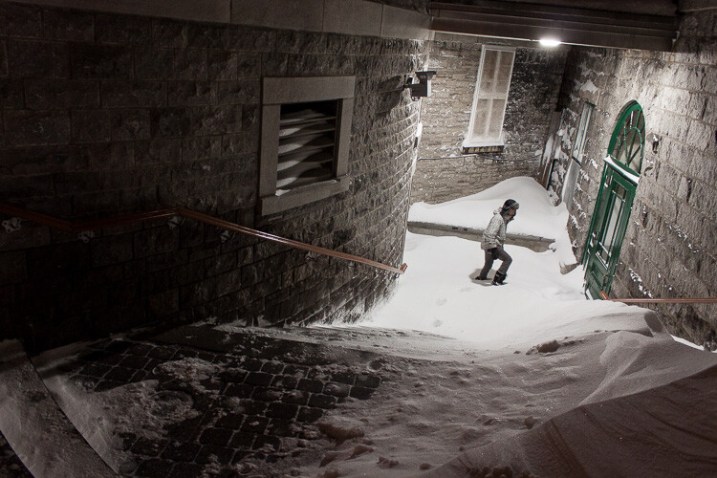
The sharp texture of stone or the gritty feeling of sand are very familiar to us, so having those textures prominent in a picture helps us experience the image more strongly.

A man explores a snowy entranceway, with sharp textures giving the photo a mood

Editing Your Photos

Often, you can really bring out the mood of a shot during the editing process. Whether you are using Photoshop or a simpler editing program, here are some tips for emphasizing the style you want in your final image.

Consider how color influences your photo

Color is important for establishing the mood of an image. Muted or darker colors can give a feeling of reflection, sadness, or calm. Brighter and vibrant colors, on the other hand, suggest happiness.

Color temperature

A picture’s white balance can be set or adjusted to bring make an image feel hotter or colder. The difference between a warm summer evening and a cool winter’s night should be evident in your pictures.

White balance works on a sliding scale from yellow to blue. Experiment to find the right setting for your image. If you shoot in RAW, you will be able to freely adjust your white balance without any quality loss in your picture. If you shoot JPG, there won’t be nearly as much leeway.

A photo edited in two different ways, showing how white balance can influence the mood of an image

The strong blue tones in the original image on the left feel calming and introspective, while the edit on the right feels much more energetic. These two versions also give a very different impression of how warm or cold the morning was.

The Film Look and Experimenting with Black and White

Some editing styles can help invoke a sense of nostalgia. The “film look” adds a feeling of timelessness to a picture, even to those who are too young to remember the days of taking and developing pictures on film.

An image of a snowboarder, edited in a nostalgic and retro style

The editing of this picture gives it a retro feel, as though it was taken several decades earlier.

If you want to play around with this style, there are many different presets and filters that can get you started. This style will typically desaturate colors, remove some contrast, and add some grain.

Converting your image to black and white can also give your photos this sense of nostalgia. Play around with your edit and see what you can come up with!

An image edited in black and white to give it a feeling of melancholy and emotion

A black and white edit on this image makes the mood feel much more melancholic or thoughtful.

So good luck with your practice of taking images that capture the mood, atmosphere, and emotion of a scene. Until scientists invent a time-machine, it’s the best way we have to travel back and experience a friendly place or memory once again.

googletag.cmd.push(function() {
tablet_slots.push( googletag.defineSlot( “/1005424/_dPSv4_tab-all-article-bottom_(300×250)”, [300, 250], “pb-ad-78623” ).addService( googletag.pubads() ) ); } );

googletag.cmd.push(function() {
mobile_slots.push( googletag.defineSlot( “/1005424/_dPSv4_mob-all-article-bottom_(300×250)”, [300, 250], “pb-ad-78158” ).addService( googletag.pubads() ) ); } );

The post How to Capture Mood and Atmosphere in Your Photos by Frank Myrland appeared first on Digital Photography School.


Digital Photography School

 
Comments Off on How to Capture Mood and Atmosphere in Your Photos

Posted in Photography