RSS
 

Archive for February, 2017

Robot Home Companion: 12 High-Tech Assistants Making Life Easier

02 Feb

[ By SA Rogers in Gadgets & Geekery & Technology. ]

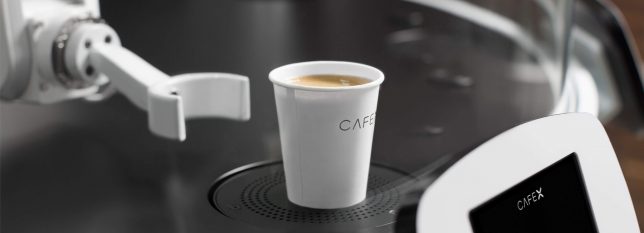
robot-barista

They can’t quite measure up to R2D2, but a new array of consumer robots offer all sorts of practical advantages, including companionship, soothing babies back to sleep, playing with pets, folding laundry and making the perfect latte. All 12 of these robot home companions have passed the concept stage into fully-operational products, and many of them are already up for sale.

Cargo Carrier: Gita Bot

gita-cargo-robot

gita-cargo-robot-2

gita-3

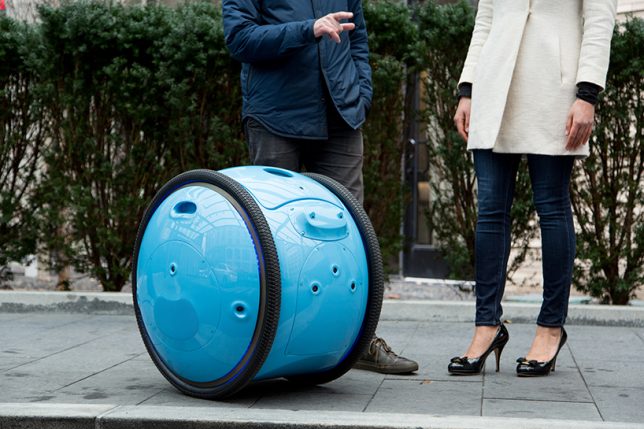
From the same company who gave us the Vespa scooter comes Gita, a cargo bot that’ll carry your stuff for you, follow you ask you walk, stop when you do, slow down when necessary and even keep up if you start running. You could use it to haul groceries home from the neighborhood market, deliver packages or as a travel aide; a display screen lets you know when the battery is getting low. One thing that’s not clear is how it manages stairs.

Scooter Bot: Segway Advanced Personal Robot

segway-robot

segway-robot-2

segway-robot-3

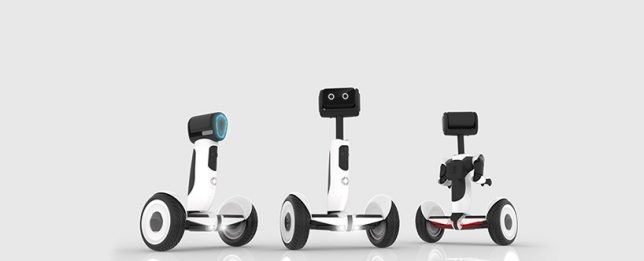
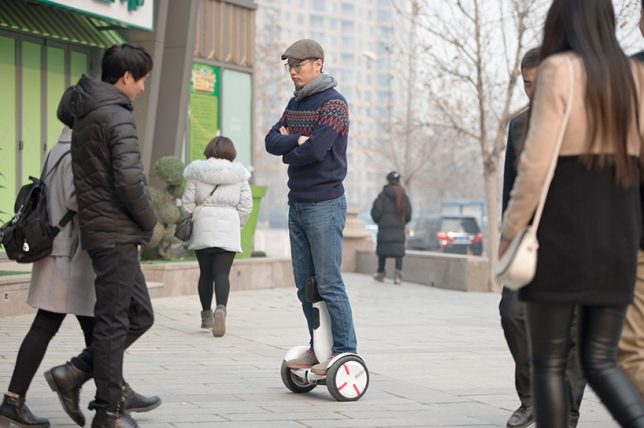
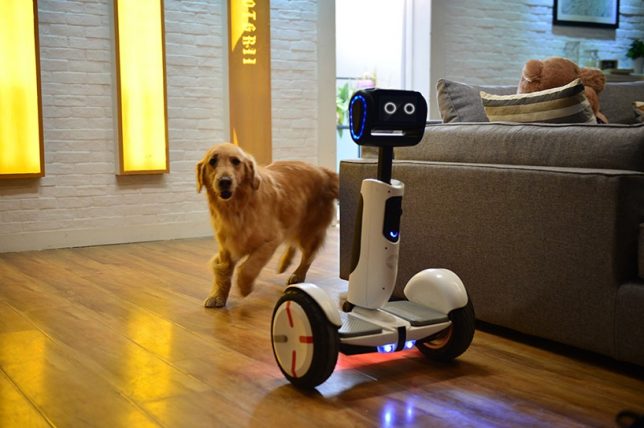
Recently renamed ‘Loomo,’ the Segway ‘Advanced Personal Robot’ is a cross between a robot companion and a functional scooter, capable of recognizing individuals and following them until it’s needed. It’s able to stay in balance while carrying loads, and its microphones listen for voice commands. Sensors keep it from bumping into objects and help it map your home and other surroundings so it can navigate itself. It’s currently still in development.

Cute Companion: Kuri Home Robot

kuri-home-robot-1

kuri-home-robot-2

kuri-home-robot-3

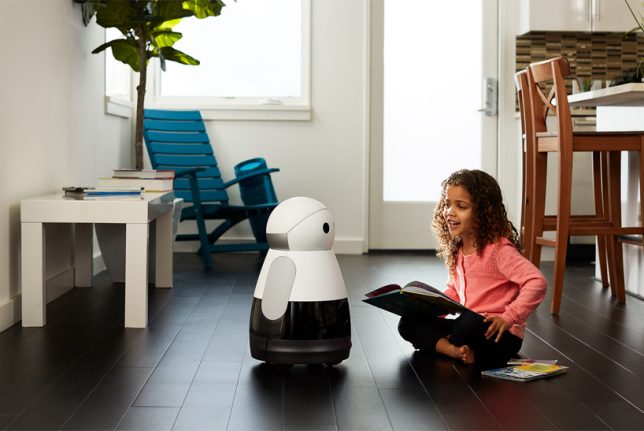
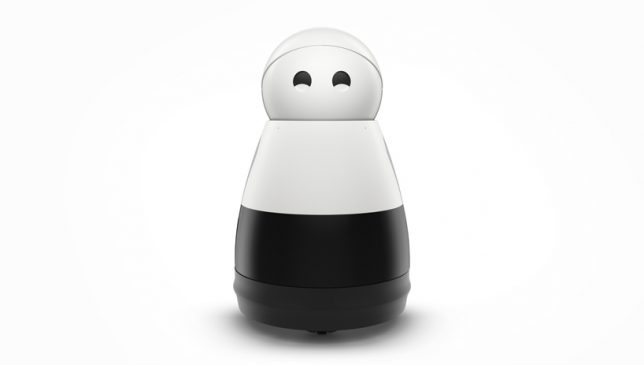
This 20-inch-tall, 14-pound personal companion robot chirps, blinks and ‘smiles’ in response to your attention, and it’s able to recognize specific people, understand context and surroundings, play music, read books, project video, tell you the weather and perform other useful everyday tasks. The Kuri bot responds to verbal commands and can also be controlled and maintained through a smartphone app.

Pet Entertainer: Rolling Bot by LG

lg-rolling-bot

rolling-bot-lg-2

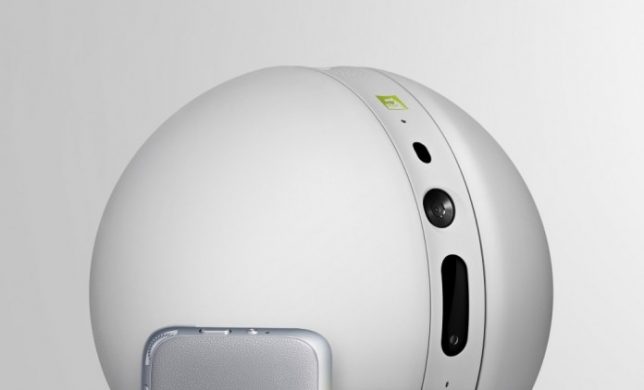
This little bot may not have as much personality as the Kuri, but it’s got some seriously useful functions if you’re the kind of homeowner and/or pet owner who wants to keep a close eye on things while you’re gone. The Rolling Bot by LG is part security system, part pet toy, part smart home gadget with a built-in camera and the capability to roll itself through your home, turning lights on and off, sending you video footage, or entertaining your dogs and cats with dancing and lasers. You can control it through your phone to talk to your pets through it, too.

Next Page – Click Below to Read More:
Robot Home Companion 12 High Tech Assistants Making Life Easier

Share on Facebook


[ By SA Rogers in Gadgets & Geekery & Technology. ]

[ WebUrbanist | Archives | Galleries | Privacy | TOS ]


WebUrbanist

 
Comments Off on Robot Home Companion: 12 High-Tech Assistants Making Life Easier

Posted in Creativity


GoPro Karma drone goes back up for sale with battery latch fix

02 Feb

Back in early November, GoPro recalled its newly released Karma drone, citing an issue that caused the drone to potentially lose power while in operation. The company announced the relaunch on its blog today, saying the ‘new’ Karma drone is nearly identical to the original model, with only one exception: the battery latch has been redesigned, solving the power loss issue some owners experienced.

Karma features a top speed of 35mph / 56kph and a maximum operating distance of 9,840ft / 3,000m. The drone is compatible with the HERO5 Session and HERO4 Black and Silver cameras via a separately offered harness. Karma by itself is available for $ 799.99 USD, while the drone bundled with the HERO5 Black is $ 1,099.99 USD.

The drone is available now in the U.S., but won’t be arriving for sale in international markets until this upcoming Spring season.

Via: GoPro Blog

Articles: Digital Photography Review (dpreview.com)

 
Comments Off on GoPro Karma drone goes back up for sale with battery latch fix

Posted in Uncategorized


Quick Review of the Kupo Click Stackable Light Stand

02 Feb

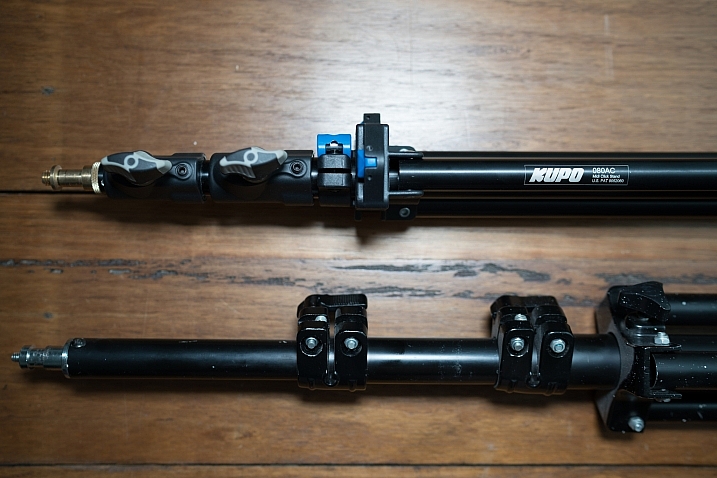
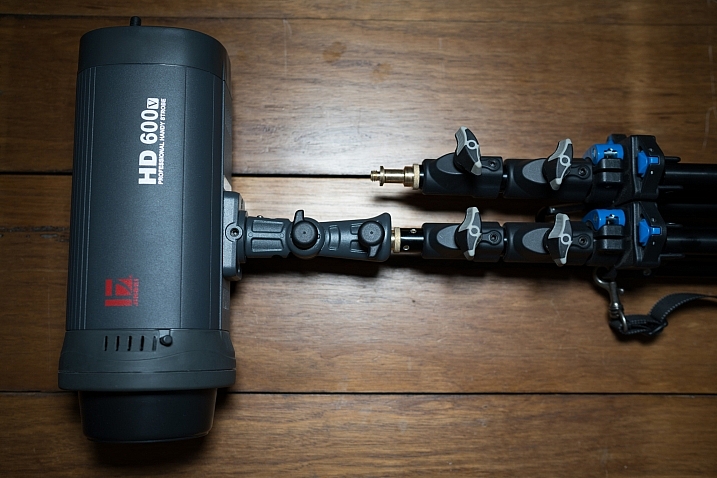
I’ve recently started using a pair of Jinbei HD600 studio lights for my photography and what I love about them is that they are self-contained units. They don’t have any requirements for power cables, etc., as they’re battery powered, wireless studio lights. What was starting to bug me, though, was that I only had heavy light stands to mount them on. Not a problem when you’re working in a studio, but when you have to visit a client to do a headshot or a quick portrait of someone, having to take a C-Stand along isn’t always ideal (especially if you’re on public transport).

I wanted to stick with Kupo gear as I’m very happy with the quality and innovation of their products, so I asked the crew at ProTog what my options were. They suggested I hold out for the Kupo CLICK stackable lighting stands. I did and I’m very happy I did. Here’s my review…

Check out the Kupo Click Light Stands on Amazon or on B&H Photo’s website.

Kupo click light stand

My wish list

I had a few simple ideal specs for the stands that I was after:

  • I wanted them to be light enough to sling over my shoulder when I was on the go.
  • They need to not suffer from bad build quality due to being light weight.
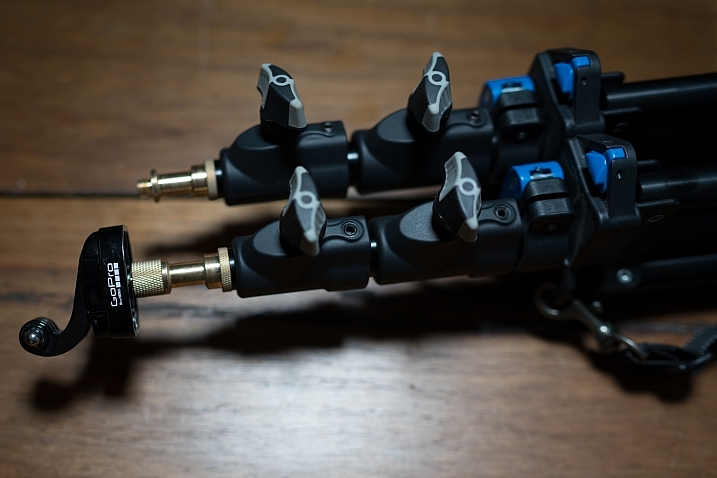
  • I wanted to be able to quickly use them for either a well-placed strobe on an outdoor shoot, a quick portrait in an office or studio, and maybe even to mount a GoPro on to run a quick timelapse of a session.

Features of the Kupo Click

The Kupo Click had everything I wanted in a portable light stand. Let’s take a look through the feature list.

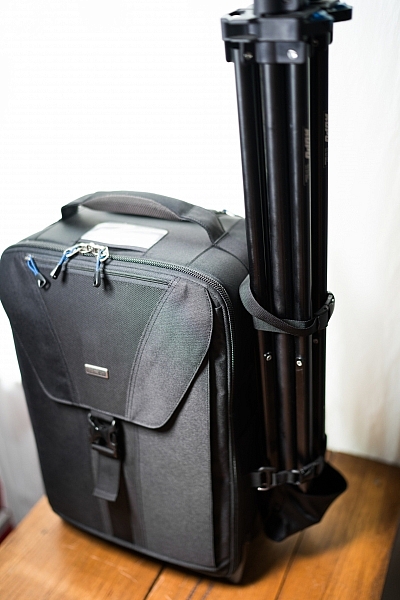
  • Coming in at 1.3kg (2.9 pounds), the weight was just fine, easily able to attach a pair of stands to the side of my ThinkTank Airport TakeOff roller.
  • In terms of load, the diminutive stands were capable of holding a 5kg (11 pounds) payload, more than I’d need to place atop the aluminum light-weights.
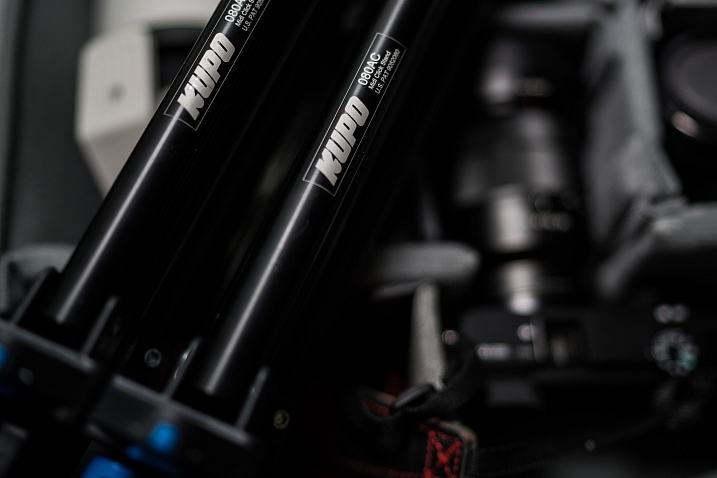
  • The tubes are also double pinned to the threaded ends, this makes them a lot less likely to fail when compared with my old stands, after a few months of heavy use, the stands haven’t loosened up in the slightest.

Kupo click light stand

Kupo click light stand

The Click

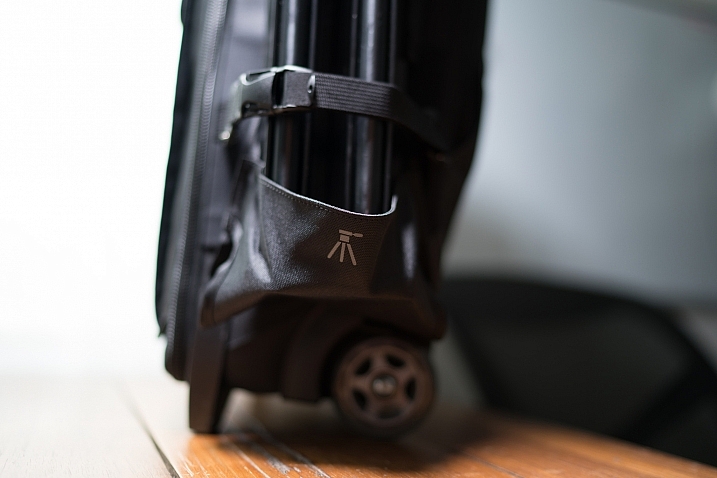
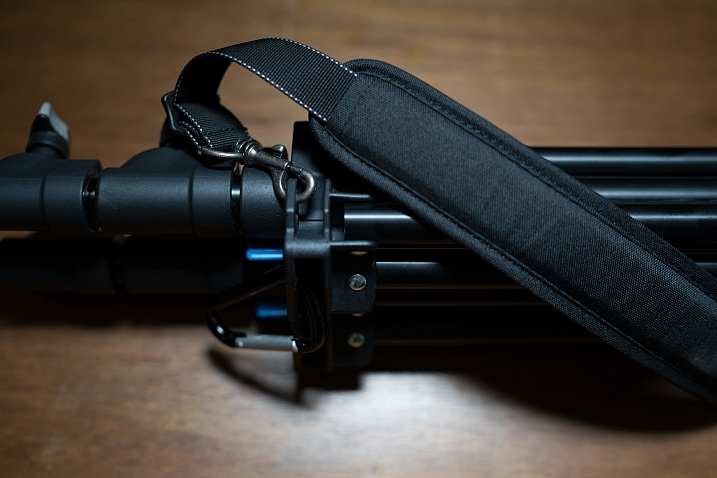
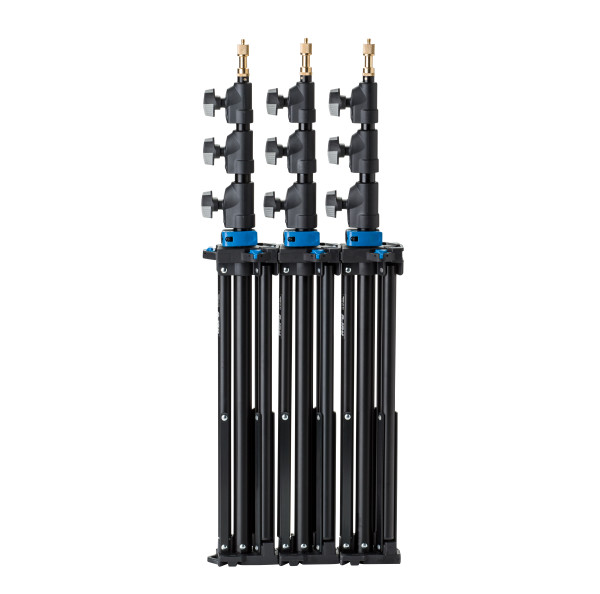
The Kupo Click light stands allow you to click them together either side by side or on top of each other. So you can essentially have one of them flat on each side of your bag with some little attachment straps, or you can have them side by side (above) and sitting in the tripod cup on your rolling camera bag, or you can use a strap (sold separately, I didn’t get one as I used a regular strap with a clip attached to sling mine over my shoulder, see below)

Kupo click light stand

Kupo click light stand

Kupo click light stand

The stands have a sweet built-in air damper that prevents damage to your lights if you accidentally undo the locks by cushioning the column on release. I have tested this and it works. The midsection is better than the top section at slowing descent, but it certainly does slow down the inevitable crash and ultimately a replaced flash tube!

Attaching your lights

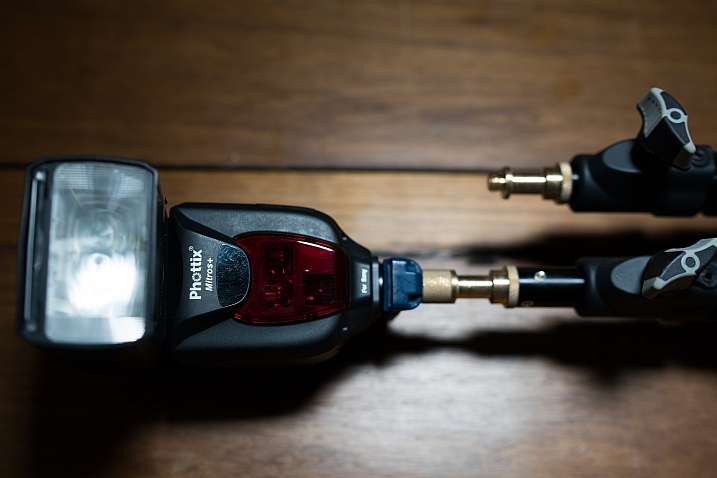
The stands are equipped with a 5/8″ top stud with a 3/8″ threaded, plus a removable 1/4″-20 threaded top, this lets you mount a whole raft of lighting gear, as well as Sony ActionCam / GoPro mounts (The 1/4 20″ adaptor) which I like to use often on a shoot, or just to pop a camera up high for some reason or other – you can attach a regular ball head and mount your camera on that.

Kupo click light stand

Kupo click light stand

Kupo click light stand

Bottom line

I’ve had these stands a few months now and have had many chances to use them and abuse them. They pack away well, they’re all the things I was after in a light stand. I can’t fault these stands and for the price, I’d say they’re one of the best on the market and well worth your hard earned coin. Five stars.

googletag.cmd.push(function() {
tablet_slots.push( googletag.defineSlot( “/1005424/_dPSv4_tab-all-article-bottom_(300×250)”, [300, 250], “pb-ad-78623” ).addService( googletag.pubads() ) ); } );

googletag.cmd.push(function() {
mobile_slots.push( googletag.defineSlot( “/1005424/_dPSv4_mob-all-article-bottom_(300×250)”, [300, 250], “pb-ad-78158” ).addService( googletag.pubads() ) ); } );

The post Quick Review of the Kupo Click Stackable Light Stand by Sime appeared first on Digital Photography School.


Digital Photography School

 
Comments Off on Quick Review of the Kupo Click Stackable Light Stand

Posted in Photography


Adorama introduces Canon RT radio controlled TTL studio head and hotshoe flash

02 Feb

$ (document).ready(function() { SampleGalleryV2({“containerId”:”embeddedSampleGallery_9533390039″,”galleryId”:”9533390039″,”isEmbeddedWidget”:true,”standalone”:false,”selectedImageIndex”:0,”startInCommentsView”:false,”isMobile”:false}) });

Camera store Adorama has announced that it is to introduce a new line of monoblock studio heads that are designed to work directly with Canon’s RT radio TTL flash system. The company claims that the Orlit Rovelight RT 610 TTL Wireless Monolight, with its RT system built-in, is the first of its kind. The head can also be used with all Canon and Nikon DSLRs using the Orlit TR-611C and TR-612N TTL Transceivers that have been launched alongside the head. These transceivers allow TTL control of the head even with Nikon cameras.

The Orilt Rovelight RT 610 TTL is a 600Ws head with a guide number of 201ft/61m @ ISO 100 that features modes for Canon’s ETTL and Nikon’s iTTL metering systems. It is powered by a rechargeable 6000mAh lithium ion battery pack that Adorama claims is good for 450 full-power flashes per charge. The longest recycle time will be 2.5 seconds at full power, but the head offers output settings down to 1/256th in 1/3EV steps across the nine-stop range. There is said to be a variance of only 150 K across the output range from the standard color temperature of 5500 K, and a high speed sync mode allows for shutter speeds of up to 1/8000sec. The modeling bulb is a 20W LED that has a 3200 K tungsten color balance and three brightness levels.

The head accepts Bowens S-type modifiers and has an integrated umbrella shaft slot. The flash control system can be divided into five groups, while 16 channels are provided to avoid interference with other systems in the vicinity.

The new studio head can also be controlled by or work alongside the company’s Orlit RT-600C TTL Speedlite. This new flash unit can sit in the camera’s hotshoe to act as a master or it can join a group of other RT flashes as a slave. The unit has a guide number of 160ft/48m @ ISO 100.

The new studio head, flash unit and transceivers will ship later this month but can be ordered now on the Adorama website.

  • Orlit Rovelight RT 610 TTL Wireless Monolight – $ 699.95
  • Orlit RT-600C TTL Speedlite – $ 169.95
  • Orlit TR-611C Transceiver – $ 69.95
  • TR-612N TTL Transceiver – $ 69.95

Press release

Adorama Announces Orlit, and “The First Canon RT Wireless Compatible Monolight”

Adorama, one of the world’s largest photography, video, audio, imaging and electronics retailers, has announced Orlit, the brand new line of TTL flash solutions for photographers. Available exclusively at Adorama, the line consists of the Orlit Rovelight RT 610 TTL Wireless Monolight, the first monolight to ship with the Canon RT radio system built in; the Orlit RT-600C TTL Speedlight for Canon, ideal for Canon users who want to use the unique Canon 600EX-RT wireless radio system; and the Orlit TR-611C and TR-612N TTL Transceivers, which enable shooters to achieve a more extensive and powerful lighting solution with wireless control for Orlit Canon and Nikon systems.

Optimized for exceptional, true TTL performance, the all-new Orlit flash lighting line is now available for pre-order, exclusively from Adorama, and will begin shipping in February 2017. The Orlit product line-up includes:

Orlit Rovelight RT 610 TTL Wireless Monolight: The only 600ws wireless TTL monolight that breaks the Canon RT radio barrier and also works with Nikon wireless systems. The Orlit RT610 TTL brings additional professional radio-based and infrared remote flash options to loyal Canon RT users, who can now use the Canon 600EX-RT as a master and the Orlit RT610 as the slave.

With an outstanding Guide Number of 201 (ft. at ISO 100), and manual levels from full to 1/256 power with fine 0.1 stop graduations, this monolight from Orlit boasts a bright 20 watt LED modeling lamp with a tungsten 3200K color temperature. The HSS Mode allows sync shutter speeds up to 1/8000, while Freeze Mode achieves an additional reach of 1/19000 to capture split second moments.

The Orlit Rovelight RT 610 user interface features a large, full-color LCD display, simplified menu system, and a generous power and function control dial. Future technologies and camera sync are firmware updated through the USB port.

The Orlit Rovelight RT 610 TTL Wireless Monolight is now available for preorder and retails for $ 699.95 USD.

Orlit RT-600C TTL Speedlite for Canon:

This versatile Canon RT/ETTL wireless radio-compatible speedlight, which transmits both the Canon RT radio and optical systems, can act as a master to up to five independent groups or slave unit for remote power control. A Guide Number of 160 (ft. @ ISO 100, at 200mm zoom) in combination with the compact and lightweight design of the flash makes the Orlit Speedlite a top choice for professional Canon shooters.

Using the Orlit Speedlite for Canon is a breeze, with a flash head that rotates 180 degrees in any direction and tilts over 90 degrees for any type of bounce or modifier use. The head zooms automatically or manually from 20-200mm, ensuring the necessary coverage without light spill. The Orlit RT-600C also has a holder to place color balancing gels before the flash head. Like the Orlit Rovelight, the Orlit RT 600C user interface features a clear LCD display with a simplified but extensive menu system, with future technologies incorporated via firmware updates.

The Orlit RT-600C TTL Speedlite for Canon is now available for preorder and retails for $ 169.95 USD.

Orlit TR-611C TTL Transceiver & Orlit TR-612N TTL Transceivers:

Designed for Canon and Nikon cameras, respectively, adding 980ft/300m of remote lighting freedom. Using an Orlit transceiver on the camera’s hot shoe, Canon and Nikon photographers can easily adjust the exposure for the Orlit Rovelight RT610 TTL Monolight, while the Canon TR-611C adds control to the Orlit RT600C Speedlite.

This TTL wireless flash transmitter from Orlit can trigger one or more receivers for studio flash and speedlights. Featuring direct group access, multi-group triggering, stable signal transmission, and sensitive reaction, photographers can achieve wide flexibility and control over their strobist setups. And with the Orlit TTL Transceivers, high speed synchronization is available for most Orlit camera flashes, with a max speed up to 1/8000s.

The Orlit TR-611C & TR-612N TTL Transceivers are now available for preorder and will each retail for $ 69.95 USD.

Designed with Users in Mind
The Orlit TR-611C and TR-612N Transceivers feature an efficiently designed user interface with a clear LCD display, simplified but extensive menu system, and are graced by soft menu touch control buttons for all options. Future technologies are firmware updated through the USB port.

The Future of TTL Flash is Now
Coming soon, the Orlit smartphone app seamlessly integrates the latest in wireless command into studio life. A rich array of screens give touch control to the myriad of Orlit features without going near the set, from the convenience of a smartphone.

Articles: Digital Photography Review (dpreview.com)

 
Comments Off on Adorama introduces Canon RT radio controlled TTL studio head and hotshoe flash

Posted in Uncategorized


Fujifilm Instax Mini 8 teardown reveals what makes the camera tick

02 Feb

The folks at All About Circuits have published a teardown of the Fujifilm Instax Mini 8 camera, revealing a glimpse at the components found within. Disassembly is simple, and mostly involves removing a series of screws, after which point DIYers are presented with ‘a surprising amount of circuitry.’

Within the camera, All About Circuits discovered a micro-controller, DC buck converter, and a pulse transformer, as well as a xenon flash tube, a light emitter and sensor, and a couple of transformers. This was a surprise to the publication’s Mark Hughes, who said, ‘I expected to find a flash charging and firing circuit similar to the type found in a disposable camera.’

We can forgive All About Circuits for calling the camera the ‘Insta- X Mini 8,’ because we love peering into the inner workings of cameras we wouldn’t have the nerve to dissect ourselves. Details about the hardware are available in the full teardown here.

Via: All About Circuits

Articles: Digital Photography Review (dpreview.com)

 
Comments Off on Fujifilm Instax Mini 8 teardown reveals what makes the camera tick

Posted in Uncategorized


An Unconventional Composition Technique to Improve Your Photos

01 Feb

Last month I sat down and reread Michael Freeman’s book, “The Photographer’s Mind.” which I do occasionally. I find that by revisiting the words of other photographers I remind myself of the multitude of tools available to us. There’s so much we can do to create fresh and amazing photographs.

One of those ways is to push our skills and update our thinking. I think I’ve read through Freeman’s book about two or three times now. Every few years I take it off the shelf again. His books are insightful and interesting to read. Freeman offers up unique ideas for composition using both conventional and unconventional techniques. The books are readily available. You can also check out our review of one of Freeman’s other books here; “The Photographer’s Eye”. In this article, let’s journey through one of the concepts he discusses in his book, “Engineered Disorder”.

An Unconventional Composition Technique to Improve Your Photos

The details of the image are broken up into sections by the heavy shadows.

What is Engineered Disorder?

Freeman explains that Engineered Disorder is the active effort of a photographer to use non-conventional methods of composing photographs. Essentially, we are breaking the rules to create interesting images. Engineered Disorder means that we forget about conventional methods like unifying elements within the frame. We might allow ourselves to create uncluttered compositions. In one chapter Freeman talks about different methods of creating Engineered Disorder and bucking the system. He mentions using techniques such as disconnects, disruptive foreground, breaking the frame, superimposed layers and extremes of contrast. Maybe these terms sound complicated and a little too complex to understand, but they don’t have to be.

Let’s break down one of these techniques and see what’s involved in creating Engineered Disorder. We will discuss the use of extreme lighting or chiaroscuro to create disconnect within an image. It’s one of my favorite techniques. I love to include deep blacks and bright highlights in my compositions.

Chiaroscuro

Chiaroscuro – chi·a·ro·scu·ro – the treatment of light and shade in drawing, painting, and photography.

Using this technique means that we employ very hard lighting to break up the unity of a composition. The image becomes a series of pieces that communicate meaning but are broken up by dark shadows and bright highlights. Conventional composition techniques would say that using this type of technique makes for a bad photograph, but remember we are pushing the elements of composition.

An Unconventional Composition Technique to Improve Your Photos

The strong shadows in this image hide some details from the viewer. The leaf can only be viewed in pieces. This means a viewer has to pause and take in each part of the image separately and then piece together the whole scene. Making a viewer stop and study your image is important. Given the number of photographs out there you want to make viewers take some time to digest your images rather than scan through and move on. 


Experimenting with dark and light

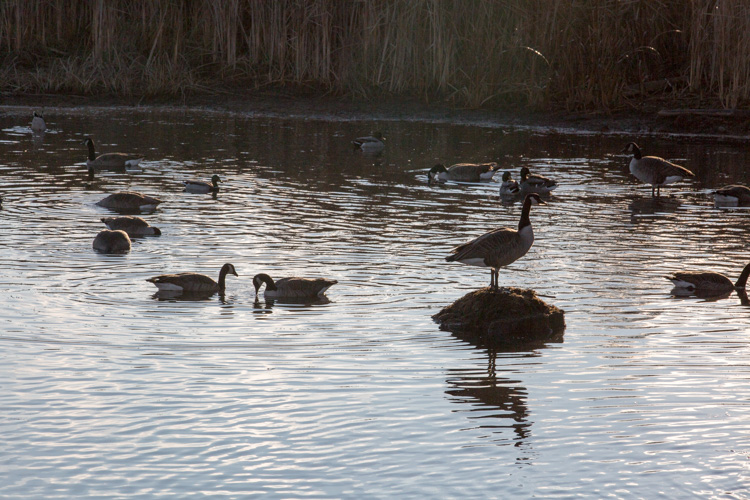
Consider my careful experimentation with Chiaroscuro. This image portrays the common Canada goose in a much more unique fashion. In the opening moments of golden hours, these geese become elegant shadows. The different sections of light and dark create interesting graphic qualities within the image.

An Unconventional Composition Technique to Improve Your Photos

In this second image, I’ve used auto tone to create a more conventional image. While the actual shot is very similar, these two different treatments create considerably different photographs. Which one do you prefer?

An Unconventional Composition Technique to Improve Your Photos

A more conventional exposure.

Other examples

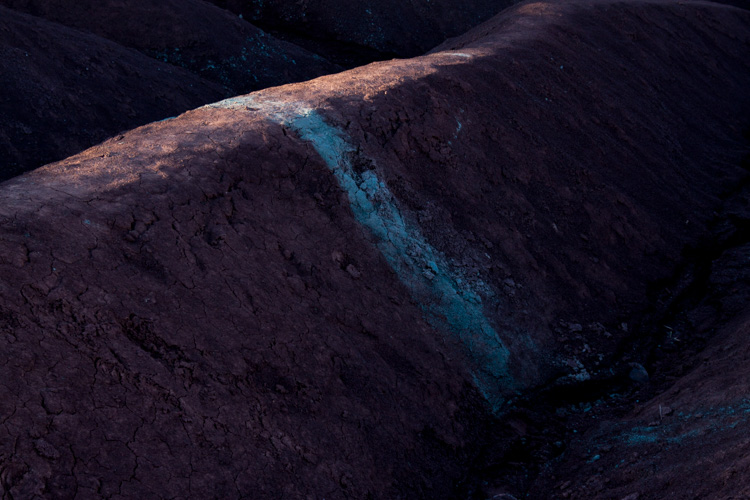
Here’s another example of Chiaroscuro. This is a photograph of a unique area near my home. Everyone calls this place The Badlands. The red and gray clay create these beautiful graphic designs which draw visitors to the area. The hills are in danger of being destroyed by visitors, but the area is truly beautiful. The shadows and the light create beautiful diagonal lines in this particular image.

An Unconventional Composition Technique to Improve Your Photos

This are is now off limits to visitors because of the damage caused by walking on the hills.

In this final image, the light and darks highlight different circular objects. Perhaps this image isn’t as disconnected as the others but it still presents a unique treatment for the door of a fishing boat. The image focuses on graphic design elements of the boat rather than the uses of the vessel. The image has been turned into an abstract and most viewers will need to analyze the image before they can determine the exact subject matter.

An Unconventional Composition Technique to Improve Your Photos

Conclusion – your turn

Experimenting with different techniques is never a bad thing. You can learn and improve your photos by playing with unconventional techniques. Creating these images certainly pushed the dynamic capabilities of my camera. Exposing for deep shadows can be a challenge all on its own, but it’s a lot of fun to try out these different techniques.

While we’ve only discussed one of the methods for creating Engineered Disorder, these three examples clearly highlight the technique. It’s better to fully understand just one compositional method rather than scratching the surface of several techniques. Give it a try, and go a little bit extreme. Break away from the conventional and search for ways to compose images that harness the power of Engineered Disorder in your photography. Please share your results in the comments below.

googletag.cmd.push(function() {
tablet_slots.push( googletag.defineSlot( “/1005424/_dPSv4_tab-all-article-bottom_(300×250)”, [300, 250], “pb-ad-78623” ).addService( googletag.pubads() ) ); } );

googletag.cmd.push(function() {
mobile_slots.push( googletag.defineSlot( “/1005424/_dPSv4_mob-all-article-bottom_(300×250)”, [300, 250], “pb-ad-78158” ).addService( googletag.pubads() ) ); } );

The post An Unconventional Composition Technique to Improve Your Photos by Erin Fitzgibbon appeared first on Digital Photography School.


Digital Photography School

 
Comments Off on An Unconventional Composition Technique to Improve Your Photos

Posted in Photography


How to Take Amazing Night Photos

01 Feb

Have you ever been interested in taking night shots, but never known where to begin?

Night photography can be intimidating, even for seasoned photographers who are used to taking shots during the day.

Well, now you can learn how to take amazing photos from dusk till dawn with our brand new Night Photography video course – launched in the last few hours.

Night photography course eml 01

In this online video course by regular dPS writer Jim Hamel you will learn:

  • How to master exposure at night to take your photos from average to amazing
  • The secrets to finding the best subject matter and locations
  • The must-have gear to get these stunning shots
  • Detailed retouching techniques to make your photos pop
  • What to look for and how to set up your shot
  • All the technical aspects to nailing the shot

This is our biggest course ever – with 9 learning modules, 11 practical ‘field work’ videos and over 6 hours of videos so you can learn everything you need to know to take beautiful photos at night.

Here’s just a taste of what’s inside:

Best of all – if you pick it up today you can take advantage of a wonderful early bird offer.

Early Bird Offer – Save 50% and receive a Bonus

As part of our early bird special on this course, we’re offing 50% off the regular price. Normally $ 99 – today you can pick up our new night photography course for just $ 49!

In addition to that great saving we are also including a “The Complete Guide to Shooting the Night Sky”, a 40 page ebook dedicated to photographing stars. This great eBook is yours free if you buy but only for a limited time.

Discover the Secrets to Great Night Photography Today

We’re so excited to share this course with you today. Everyone we’ve shown it to loves what Jim teaches.

The early bird price and bonus is only available at this price for the next 3 weeks, so grab it while you can here and start your journey to learning how to take amazing night photography images.

We Guarantee You’ll Love this Course

Like all dPS products our Night Photography Course comes with a 60 day money back guarantee. While we’re confident you’ll love this course if for any reason you decide it isn’t for you please just contact our support team within 60 days and we’ll refund your money – you can even keep the bonus eBook as our gift to you for checking out the course.

googletag.cmd.push(function() {
tablet_slots.push( googletag.defineSlot( “/1005424/_dPSv4_tab-all-article-bottom_(300×250)”, [300, 250], “pb-ad-78623” ).addService( googletag.pubads() ) ); } );

googletag.cmd.push(function() {
mobile_slots.push( googletag.defineSlot( “/1005424/_dPSv4_mob-all-article-bottom_(300×250)”, [300, 250], “pb-ad-78158” ).addService( googletag.pubads() ) ); } );

The post How to Take Amazing Night Photos by Darren Rowse appeared first on Digital Photography School.


Digital Photography School

 
Comments Off on How to Take Amazing Night Photos

Posted in Photography


This instant camera is made almost entirely of cardboard

01 Feb

$ (document).ready(function() { SampleGalleryV2({“containerId”:”embeddedSampleGallery_9055945704″,”galleryId”:”9055945704″,”isEmbeddedWidget”:true,”standalone”:false,”selectedImageIndex”:0,”startInCommentsView”:false,”isMobile”:false}) });

A Ukrainian startup is looking to fund mass production of Jollylook, a camera made mostly of cardboard and paper that accepts Fujifilm Instax mini cartridges. The camera exists in prototype form now, and contains no electronic parts – a specially designed shutter and hand crank used to start the development process are operated manually. 

Jollylook folds up into an ordinary-looking cardboard box (a little bigger than the box an iPhone comes in, its developer says) when not in use. To start using it, the front unit containing the lens is extended. Set the aperture, raise the viewfinder, frame your shot and fire.

Jollylook’s makers state that Kickstarter funds will be used to create molds for the camera’s lenses, organize production and help with marketing efforts. They’re closing in on their $ 15,000 goal fast with a full month to go. Backers who pledge at least $ 35 are promised one Jollylook camera and an Instax mini film cartridge. Shipping is estimated for June 2017.

$ (document).ready(function() { SampleGalleryV2({“containerId”:”embeddedSampleGallery_3471604241″,”galleryId”:”3471604241″,”isEmbeddedWidget”:true,”standalone”:false,”selectedImageIndex”:0,”startInCommentsView”:false,”isMobile”:false}) });

Jollylook – The First Cardboard Vintage Instant Camera!

Jollylook is a simple fold out camera for analog photos, made entirely from recycled paper and cardboard. No electronics, batteries or chargers – some paper, a pair of lenses and a cartridge for instant mini photos. Environment friendly – Jollylook uses less materials than used in the packaging of a regular camera. The camera body, the shutter and aperture are made of thick paper and laminated cardboard. Jollylook is as dangerous to the environment as a banana peal!

On January 31st, 2017 – Jollylook, a Ukrainian team of instant photography enthusiasts, starts a 30-days crowdfunding campaign on Kickstarter.com, to bring Jollylook – The First Cardboard Vintage Instant Film Camera to instant photo lovers.

Oleg Khalip, co-founder and author of the idea: “Once I was showing my son what’s inside the analog camera and how analog photography works, I thought then – “what if the package itself transformed and fulfilled the function of the camera and the picture turned out immediately?!” There was no problem with instant photos technology, people solved this problem long time ago. What remained to create was an analog camera that would be simple and contained in the package, worked properly and allowed to take pictures and get instant results. I had to study the structure of many analog cameras, before being able to make the shutter – the most difficult part in the development was the shutter (no existing structure worked for Jollylook, so I had to invent a new shutter). After picking the right lens and calculating the aperture, we created a folding “accordion” camera body from paper, then the case where the instax cartridge is placed, and we moved to the design, here there where no doubts – it had to be retro with a little steampunk look. Then we had difficulties with the unit for getting the photo out from the cartridge but after testing many options, we achieved a perfect result, photographs are now developed and pulled out with a rotating handle.”

“When moments of life that we see freeze on paper – it is magic!” – says Oleg.

The crowdfunding campaign with a goal of $ 15 000 will last for 30 days and the first mass produced Jollylook cameras are expected in June 2017.

The advantages of Jollylook:

Vintage Design – retro with a little steampunk.

Foldout and Compact – a little bigger than an iphone box.

A Great Gift – can be used immediately and instantly.

A Great Toy – Jollylook is a great teaching toy for children. Your kid can take it apart and see how it works.

A Great Souvenir – even after use Jollylook is beautiful on the shelf!

Fun – entertaining and positive emotions.

Beautiful Photos – using Instax mini film you get 10 instant classic color or monochrome analog unique photos. (the cartridges can be changed many times easily and quickly )

Environment friendly – easily recyclable, as dangerous to the environment as a banana peal!

Specifications:

  • Lens – a meniscus lens with a focal length of 110 mm (4.33 in), allows to take photos from portrait to landscape. Can be moved up to shoot through the pinhole.
  • Viewfinder – a Fresnel lens
  • Aperture – a switchable diaphragm with manual adjustment for the seven values: f/8, f/11, f/16, f/22; f/32; f/45; f/64 + pinhole.
  • Shutter – automatic with shutter speed of 1/250 or 1/160 and manual shutter mode with the possibility to control the exposure time manually.
  • Pinhole – a round hole in a copper foil 0.6 mm (0.023 in) in diameter, located on the diaphragm disk
  • 10 shots per instax mini cartridge (the cartridge can be changed many times)
  • Storage conditions – store in a dry and dark place at room temperature.
  • Conditions of use – use at temperatures between 10 – 35 °C (50 -95 ?) in dry weather.
  • Size when folded 85 x 127 x 48 mm (311?32 x 5 x 157?64 in)
  • Takes Fujifilm “instax mini” instant film cartridge
  • Photo size 46(W) x 62(H) mm

Articles: Digital Photography Review (dpreview.com)

 
Comments Off on This instant camera is made almost entirely of cardboard

Posted in Uncategorized


Exclusive interview: Olympus R&D on continued E-M1 Mark II development

01 Feb
Conference room to conference room: Setting up for a cross-Pacific meeting.

Over the years, Olympus has steadily released firmware updates to its previous flagship, the OM-D E-M1. It currently sits at firmware version 4.3, and in the interim, updates have added features such as Live Composite and Live Boost II, and also included functional improvements to such aspects as continuous autofocus performance, image display lag time and more.

Bearing this in mind, it stands to reason that Olympus would be planning a similar treatment with regards to the E-M1 Mark II. Since its surprise reveal at Photokina 2016, and particularly since we’ve published our full review, we’ve emailed back and forth with both feedback and feature requests for Olympus Tokyo to consider in future firmware updates. This all culminated in an international video conference call last week, where we learned a great deal about just what Olympus’ has in store.

“I would like to promise that we will be improving and evolving [the E-M1 Mark II] with firmware upgrades.” – Mr. Takao Takasu, E-M1 Mark II Product Development

It’s important to point out that the Olympus engineers we met with are understandably unable to confirm specifics such as when (or if) certain improvements will come to the E-M1 II, but they are at the very least committed to confirming some items that they are ‘working on.’ The most notable of these include:

  • Adding ‘Auto ISO’ capability to manual video shooting
  • Allowing for control of autofocus racking speed while shooting video
  • Clarifying and enhancing customizability of continuous autofocus behavior beyond the current -2 to +2 ‘tight to loose’ scale
  • Working on the AF algorithm to improve tracking performance
  • Enable the ability to enter playback and menus while the buffer is clearing

To see considerations as significant as refinement of the autofocus algorithm this early in a product cycle is encouraging. Olympus is adamant (and, given what we’ve found in our full review, rightfully so) that the E-M1 II is part of a system that can appeal to professional shooters looking for a more compact kit without sacrificing anything in terms of overall speed. Admittedly the smaller Four Thirds sensor lags behind many cheaper APS-C and Full Frame solutions with regards to low light and noise performance, but no other camera offers 18fps Raw burst shooting with continuous autofocus, and the smaller sensor in the E-M1 II is precisely what allows the camera to do so.

“We will try to improve playback function during data recording.”- Mr. Katsuhisa Kawaguchi, Continuous Shooting

In addition to letting us know what they’re working on for future firmware upgrades, Olympus gave us some further insight into some of the E-M1 II’s headline capabilities.

With regard to autofocus during burst shooting, the camera is able to capture and analyze phase-detection autofocus information of the image that has just been captured to use it in tandem with Live View autofocus information for more accurate prediction of subject movement – this is all meant to improve tracking performance.

The in-body image stabilization system currently allows around 5.5 stops of image stabilization at 40mm (80mm equiv.) focal length, with shorter focal lengths reducing overall effectiveness, as with shorter focal lengths, you have ever lengthening exposure times where body shake – as opposed to hand shake – becomes dominant (this is true of all IS systems). Smaller amplitude and higher-frequency shaking from hand shake is far easier to engineer for in terms of sensor movement than high amplitude, slow-frequency shake from a photographer’s whole body.

“Our [image stabilization] becoming very, very sensitive. But we are not satisfied with the current performance and will continue to improve.” – Mr. Hisashi Takeuchi, Image Stabilization System

There are, of course, reports of users getting sharp shots at shutter speeds ranging from 2-10 seconds, though these users are also bracing against larger body movements by leaning on a wall, or placing elbows on a desk.

As with its predecessor, weather sealing and durability was a big point of emphasis on the E-M1 Mark II.

That being said, the engineers stated that they are aiming to push image stabilization technology even farther than the 6.5 stops afforded when the E-M1 II is paired with an image stabilized lens, such as the 300mm F4 Pro or 12-100mm F4 Pro. We asked them how they aim to do this, and were greeted with a wry smile or two – certainly indicative of some confidence in their ongoing development. 

Olympus was also able to tell us that the E-M1 II was ‘benchmarked’ against competitors’ models, with a concerted effort being made to improve upon them. In this vein, particular attention was paid to speed of image playback (which is blazingly fast, and highly important considering the burst speeds), JPEG tonality, noise reduction and overall quality (important for quickly filing photos on, say, breaking news assignments), and run-and-gun movie capability, especially in terms of movie image stabilization.

“We have achieved high quality 4K shooting without a tripod or stabilizer.” – Mr. Kazuhiro Haneda, Video

It’s clear that Olympus is proud of the E-M1 Mark II, and is serious about tackling its shortcomings with firmware upgrades wherever possible. One thing they won’t be able to fix with firmware is one of the E-M1 II’s biggest criticisms: the price remains prohibitively high for many. 

But given what Olympus is already aiming to tackle, those investing in the Olympus system for the long term are likely to be rewarded. It’s become more common practice over the past few years to bring updates to camera models (particularly flagships) throughout the product cycle. It’s encouraging to see Olympus continue this going forward, not only in terms of usability and technical improvements, but perhaps new features as well – we’ll just have to wait and see.

Articles: Digital Photography Review (dpreview.com)
 
Comments Off on Exclusive interview: Olympus R&D on continued E-M1 Mark II development

Posted in Uncategorized


How to Use Graduated Neutral Density Filters for Landscape Photography

01 Feb

Since the camera was invented, we have tried to copy one of the greatest wonders of our body; the human eye. Unfortunately, despite being over 100 years since the first time that we captured light, we are still far from overcoming Mother Nature.

Why? Because in the visible spectrum your eye sees much better than your camera.

How to Use Graduated Neutral Density Filters for Landscape Photography

Dynamic Range

The parameter that describes this behavior is called Dynamic Range. This basically defines the difference between the minimum and maximum value of brightness that a device (like your eye or the sensor of your camera) is able to record. In the real world, Dynamic Range defines the ability of your camera to see details in very dark areas and very clear (bright) areas of the scene.
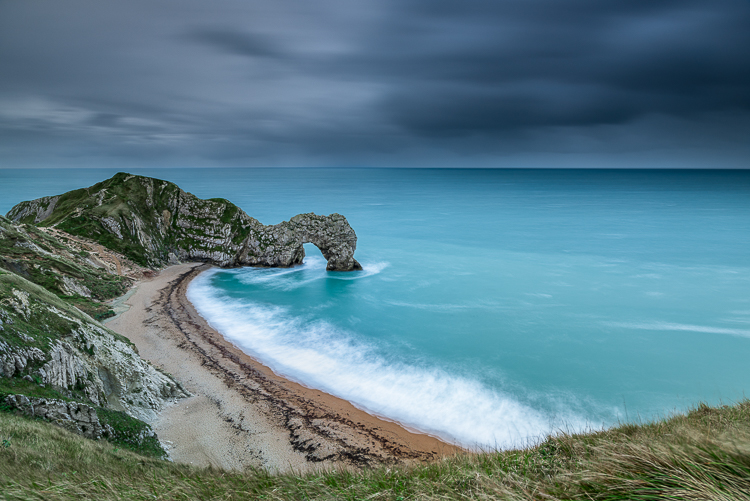
If you’re wondering how much more your eye sees, the answer is staggering. Your eyes have about twice as much range that they can see and capture.

How to Use Graduated Neutral Density Filters for Landscape Photography

The problem

That’s why when you look at a marvelous sunset with your eyes you’re able to see all the details in the scene (in both the sky and the land). But as soon as you try to capture it with your camera, you’ll get an overexposed sky or a underexposed foreground. The Dynamic Range of your camera is only able to capture detail in one of those areas so you have to choose.

But if even the best cameras have a Dynamic Range which is only half that of the human eye. So how can we hope to shoot a beautiful sunset or a wonderful sunrise and capture all the marvelous details?

There are different methods to overcome this problem, but my favorite is the use of Graduated Neutral Density filters (GND).

graduated neutral density filters

What is a Graduated Neutral Density Filter?

A Graduated Neutral Density Filter is one made of two distinct parts; a completely transparent area, and a darker section. By setting the darkest part of the filter to correspond with the brightest portion of the scene, you can reduce the exposure difference (dynamic range) in the frame.

To reduce the exposure difference is to reduce the dynamic range of the scene, and thus allow your camera to simultaneously capture detail in both bright and dark areas of the scene. Basically, to make an analogy, GND filters are like a kind of sunglasses for your camera.

Types of GND filters

Graduated Neutral Density Filters are typically distinguished by the type of transition that exists between the transparent and dark areas of the filter. For this reason, we can identify three families of GNDs:

  1. Hard-edge filters, which are characterized by a clear boundary (it’s obvious where one begins and the other ends) between the transparent and dark areas. They are therefore used when the separation between the bright and dark areas of your scene is very defined, such as the horizon at sea.
  2. Soft-edge filters are characterized by a soft transition (they change from light to dark more gradually) and are therefore used when the transition between light and dark areas is not so clear. A classic example is a shot in a mountainous area.
  3. Reverse filters, which are nothing more than hard-edge GNDs with the dark area that fades away the more you move from the line of separation to the upper border of the filter (meaning it’s darker in the middle than on the edge). Basically, they were invented to better manage sunrises and sunsets, where the light is more intense on the horizon line (middle). If you love seascapes like me, this filter will be one of your best friends forever!

How to Use Graduated Neutral Density Filters for Landscape Photography

Which to buy?

Another distinction is between filters is the construction material. Higher quality filters are made of optical glass. Putting an inexpensive resin filter in front of a lens worth hundreds (or thousands) of dollars is not a great idea.

Finally, GND filters are distinguished by graduation, or their ability to block light through the darkest area. Essentially how dark they are at the extreme. Normally in landscape photography, this difference is between one and four stops during sunset and sunrise, depending on weather conditions. This is the reason why you will find these gradations almost exclusively on the market.

Shop for Graduated Neutral Density filters on Amazon.com or on B&H Photo Video’s site (they ship worldwide).

How to use a GND filter in the field

The use of GND filters in the field is very simple; try to take exposure readings in the darkest and in the brightest areas of the scene (usually the sky). The exposure difference will indicate the intensity of the filter to be used. Let’s assume that the light meter reading for the sky is 1/250th, and the one for the rocks in the foreground is 1/30th. The difference between those readings is three stops (250th > 125th > 60th > 30th), so to balance the exposure you must use a 0.9 (3-stop) GND.

At this point, just mount the filter with its dark side over the brightest part of the scene. This is why a GND screw-in filter does not make sense. You would not have the possibility to align the dark area in accordance with the scene as well as a drop-in style filter.

How to Use Graduated Neutral Density Filters for Landscape Photography

To avoid having to hold the filter with your hands (that could be a problem if you are going to use them together with other filters) you can buy a holder, that once mounted in front of your lens will do the job for you. There are many valid solutions on the market, but the best one (in my opinion) is the V5 Pro Holder by NiSi filters. This is the only one that lets you simultaneously install three different filters and a polarizer without any vignetting issues (as wide as 16mm on full frame cameras).

At this point, the limited Dynamic Range of your image will be just a bad memory!

How to Use Graduated Neutral Density Filters for Landscape Photography

googletag.cmd.push(function() {
tablet_slots.push( googletag.defineSlot( “/1005424/_dPSv4_tab-all-article-bottom_(300×250)”, [300, 250], “pb-ad-78623” ).addService( googletag.pubads() ) ); } );

googletag.cmd.push(function() {
mobile_slots.push( googletag.defineSlot( “/1005424/_dPSv4_mob-all-article-bottom_(300×250)”, [300, 250], “pb-ad-78158” ).addService( googletag.pubads() ) ); } );

The post How to Use Graduated Neutral Density Filters for Landscape Photography by Francesco Gola appeared first on Digital Photography School.


Digital Photography School

 
Comments Off on How to Use Graduated Neutral Density Filters for Landscape Photography

Posted in Photography