RSS
 

Archive for October, 2016

How to Make a Sketch Inside a Photograph

25 Oct

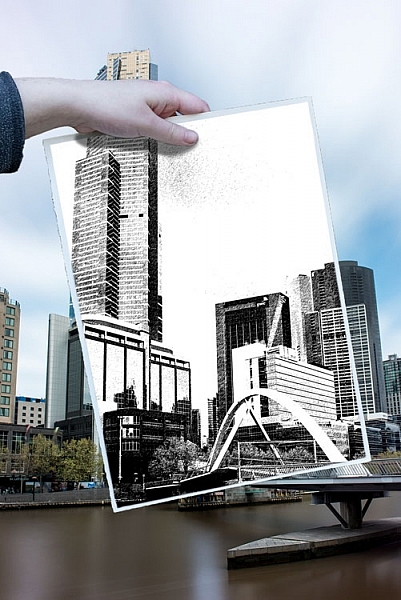
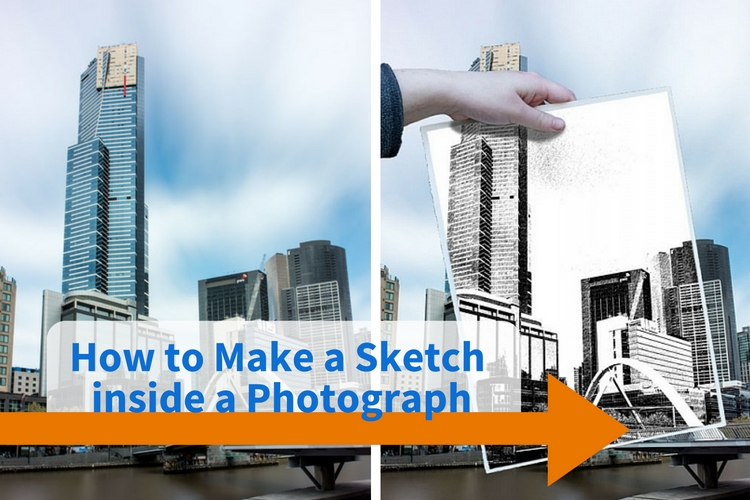
This is one of those tutorials that’s great to play around with, maybe do it once or twice. But in the end, the thing they are great for is that they always teach you something. It may not be much, but it might help you think in a different way, or learn a skill you didn’t know about. This one is about how to make a sketch inside a photograph.
how-to-make-a-sketch-inside-a-photograph


This is a simple tutorial that can help you learn how to use layers, and combine images. There are so many things you can do with layers, but  in this example, we are going to work on putting a drawing of a scene in front of the photograph. Of course, it isn’t a real drawing, but one that is created from the image using the artistic filters in Photoshop.

The image

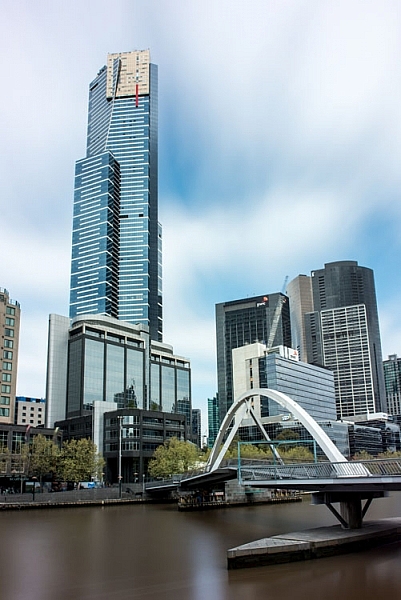
Deciding which image you are going to use can be harder than you think. It could take a while to find one that will work well, one with lots of contrast is good. You want an image that will stand out when you put the drawing over the top of it.
How to Make a Sketch inside a Photograph

Open the image and process it normally to get it ready. If you have several layers flatten or merge all of them, and copy that new merged layer so there are two. To copy the layer press Ctrl/Cmd+J.

Turn off the top layer by clicking on the eye icon next to the thumbnail. That will make it disappear, or turn off temporarily.
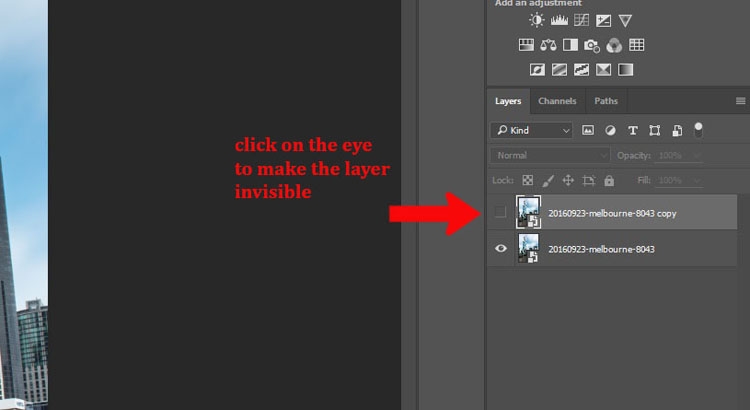
How to Make a Sketch inside a Photograph - hide layer

Click the bottom layer to select it as the one that you will change into a drawing.

Making the drawing

Go up to the Main Menu and click Filters > Filter Gallery, or use the keyboard shortcut Ctrl/Cmd+F.
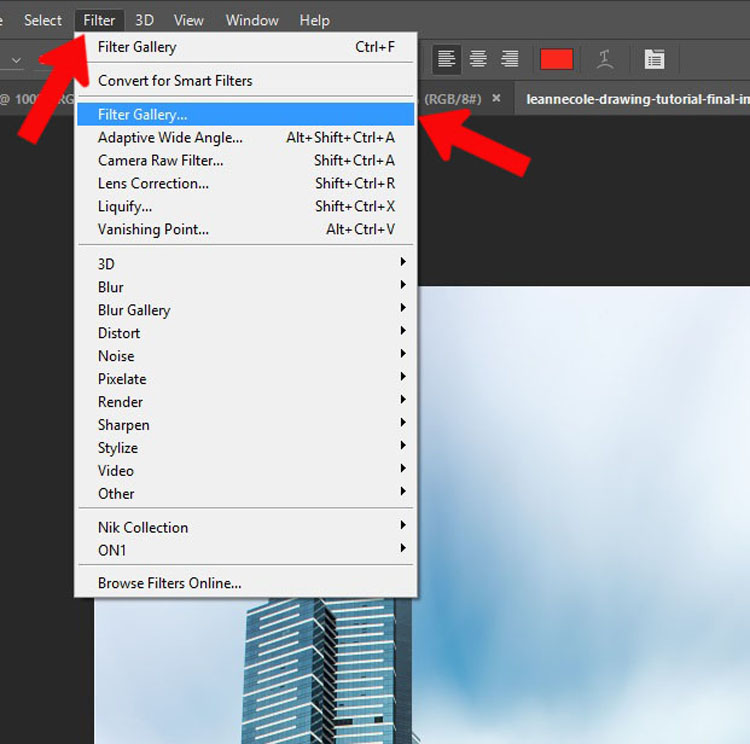
How to Make a Sketch inside a Photograph - filter gallery

If you can’t bring up the Filter Gallery or click on it in the menu, it may be because your image is either 16 or 32 Bits, so you will need to change it to 8 Bits.

To change the image to 8 Bits select from the top menu bar: Image > Mode > 8 Bits/Channel. You should now be able to use the Filters Gallery.
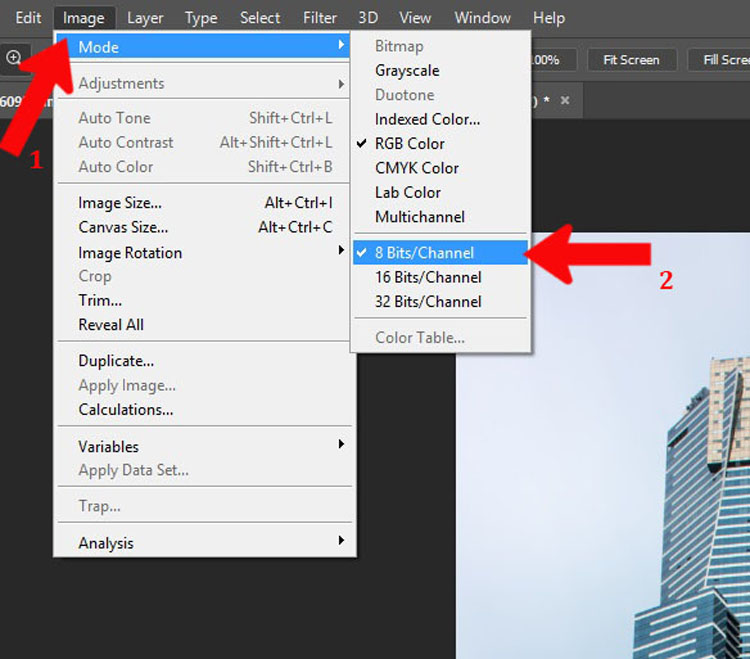
How to Make a Sketch inside a Photograph - 8 bits

There are loads of options in the gallery to give you an artistic look. Select the one you like. For this example, I used the Graphic Pen found in the sketch section. If you don’t like any of the ones that Photoshop has to offer, you can look for artistic actions (google search) that may give you a better drawing.
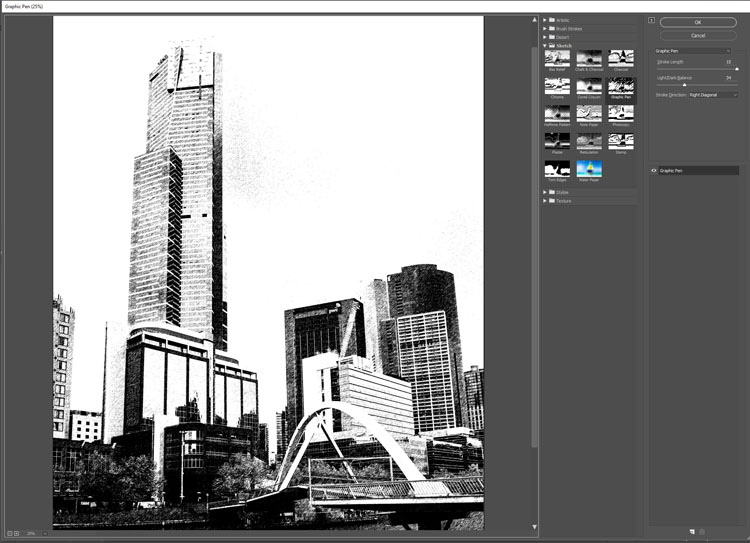
How to Make a Sketch inside a Photograph - sketch filter

Adding the hand

I took several images of my daughter holding a piece of paper. It’s good to get a large variety, and if you have the time, shoot in different lighting conditions as well.
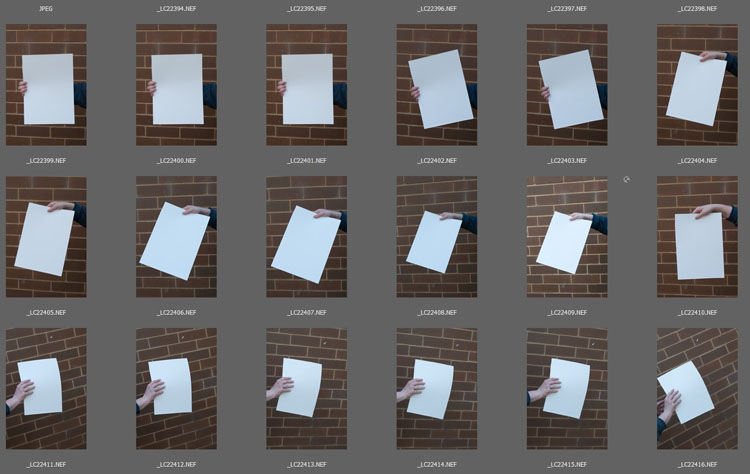
How to Make a Sketch inside a Photograph - hands

Choose an image of the hand holding the paper. Open it in Photoshop and use the Quick Selection tool to select the hand and paper. It doesn’t have to be exact, as long as everything you need is selected. Once you have the hand on the image you can fine-tune it.
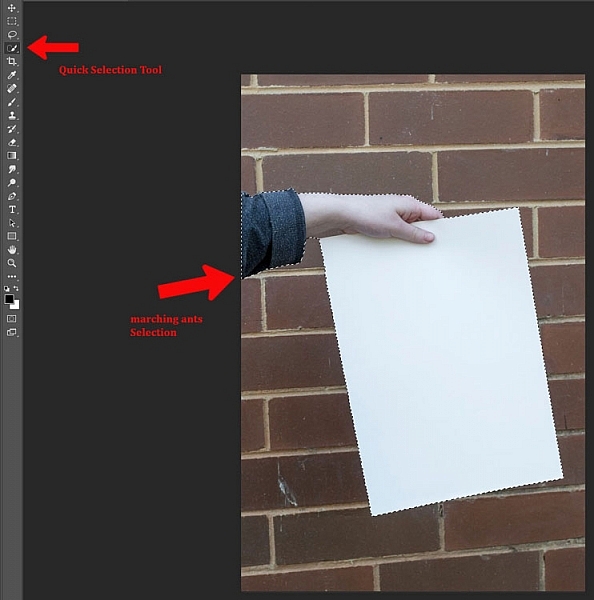
How to Make a Sketch inside a Photograph - selection of hand and paper

Press Ctrl/Cmd+C, then Ctrl/Cmd+V. This will copy and paste the selection onto a new layer (in the same document). However, if you go back over to your original image and pressCtrl/Cmd+V it will paste the hand onto your image as a new layer. Use the move tool, the top one in the tool bar.
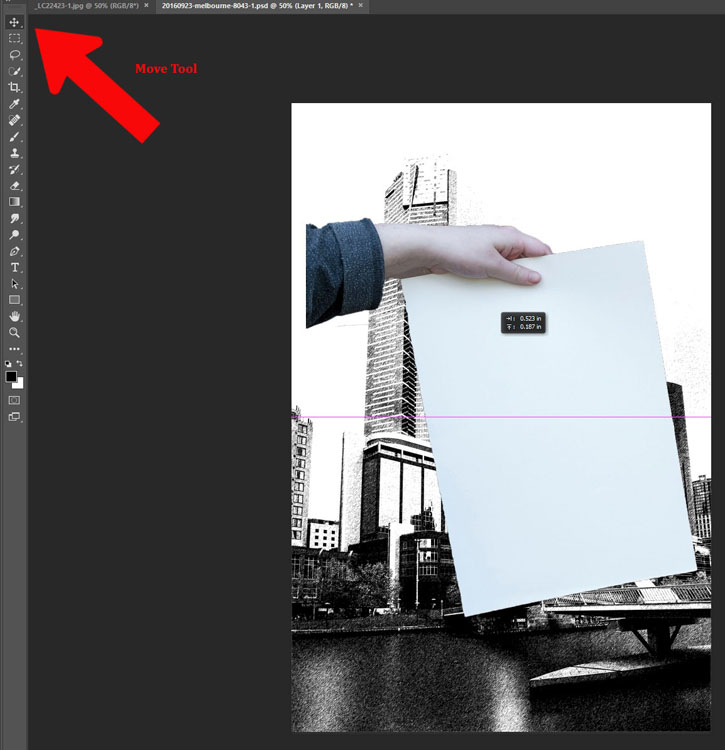
How to Make a Sketch inside a Photograph

Size and position the hand

If you are lucky the hand will be the correct size, however, if it isn’t you may have to resize it. You might also have to change the angle. Free transform will allow you to do that, press Ctrl/Cmd+T to activate it. If you click on the corners you can make it bigger or smaller (hold Shift down to keep the proportions the same!). If you hover around the corners you will see a small curve appear with arrows on either end, this will allow you to rotate it to the desired angle.
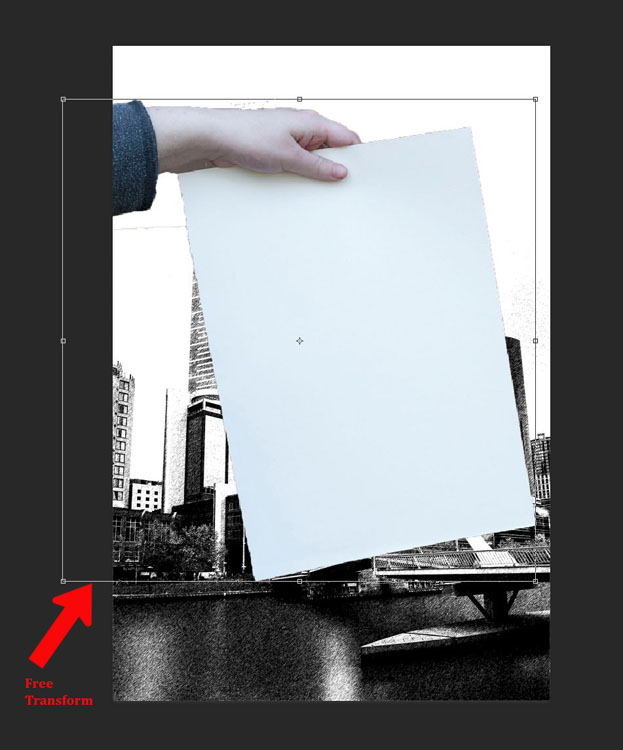
How to Make a Sketch inside a Photograph - transform tool

The hand looks a little odd because it needs a shadow. Take note of your original image and how the shadow was placed. You also need to look at the main image, it will look a bit off if the light is coming from a different direction than the image of the hand.

Creating the drawing on the paper

To get the image on the piece of paper you need to ensure the layer that is the photograph is still not visible. It should still be invisible from when you did the drawing.

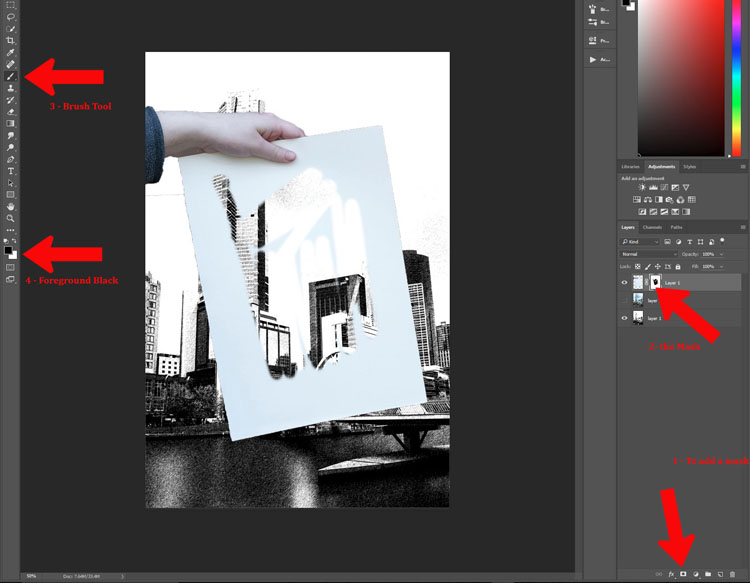
Add a mask to the layer with the hand and paper. At the bottom of the layers panel click on the mask icon, looks like a white rectangle with a round black circle in it. It should be down in the bottom right corner.

Next, make sure the layer mask is selected. If there are white lines around the outside of the mask (not the image thumbnail, it means the mask is selected.

Select the Brush Tool and make sure the foreground colour is set to black. Go down the tool bar and find the foreground and background colours. If white is on top click on the arrow above it to make it black (if other colors are showing hit D on your keyboard to set to the defaults of black and white).
How to Make a Sketch inside a Photograph

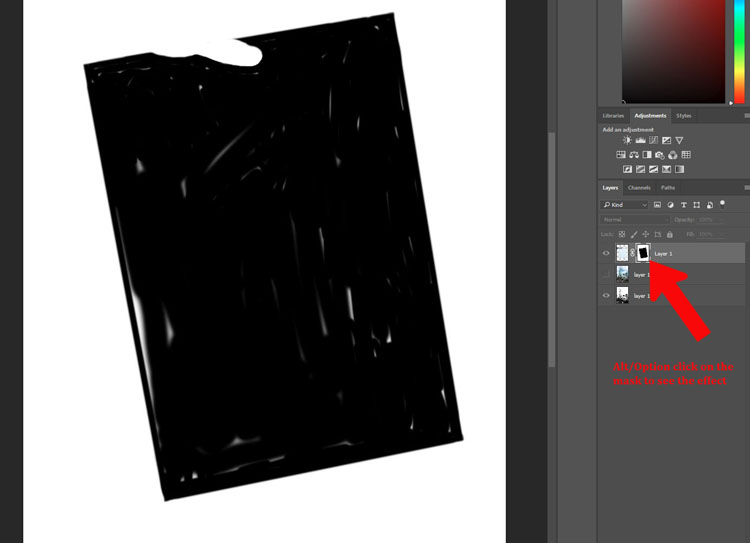
You could mask out the whole sheet of paper, or leave an edge around the image. For this tutorial, I left a border intentionally. Once you think you have gotten the whole image, press Alt (PC) or Option (Mac), and click the mask. You should then be able to see what you have masked – the black areas are the mask, so make sure there are no white spots left. Brush over any white bits and remove them. If you realize that you are painting white, then the foreground color is wrong. Press X and it will reverse the color so you can go back to painting with black.
How to Make a Sketch inside a Photograph

Putting the photograph back

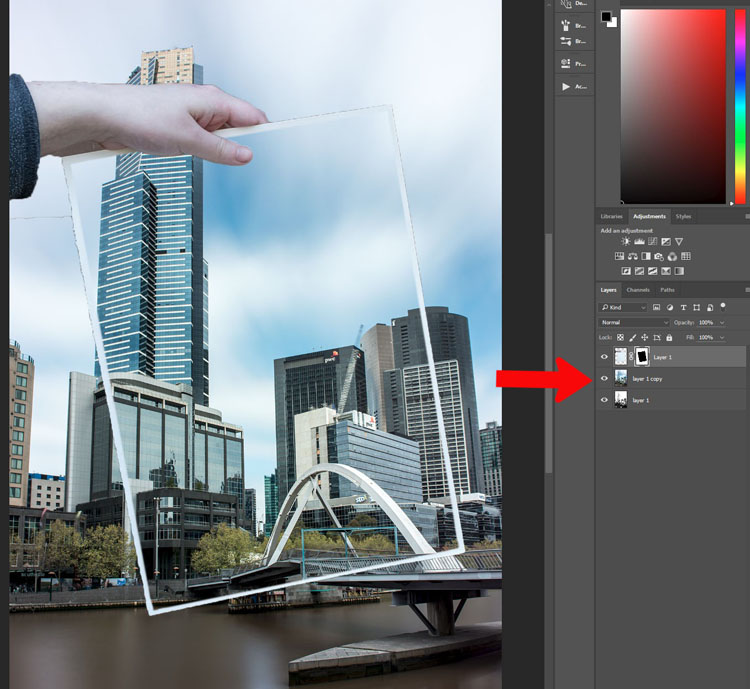
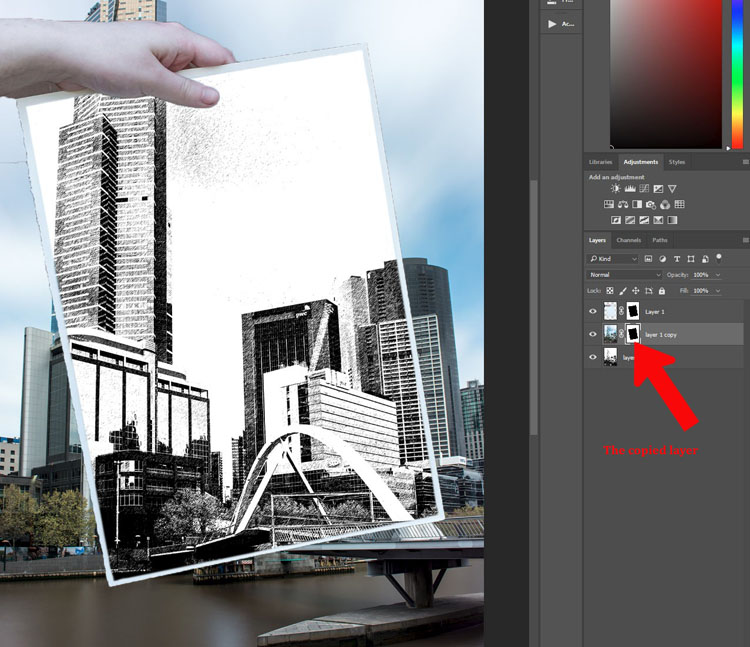
Once you have the drawing showing through the paper, you need to make the photograph appear again. Click on the eyeball icon next to the image so it is visible. You will notice the whole drawing has disappeared, it is now behind the photograph. You will need to do another mask so you can see the drawing on the paper again.

The beauty of this image is that you can use the same mask that you used for the paper layer.

If you go to the layer mask that you used to show the drawing, press Ctrl/Cmd and click on the mask you will see it make a selection (marching ants around the selected areas). Press Ctrl/Cmd+C, to copy that selection. Then, make sure the photograph layer is selected and click the layer mask icon to create a new one. You should get a new layer mask the same as the other one. (Alternately you can click and hold Alt/Opt, and grab the layer mask from the paper layer and drag it over to the image layer. That will copy the same mask over for you).
How to Make a Sketch inside a Photograph

How to Make a Sketch inside a Photograph

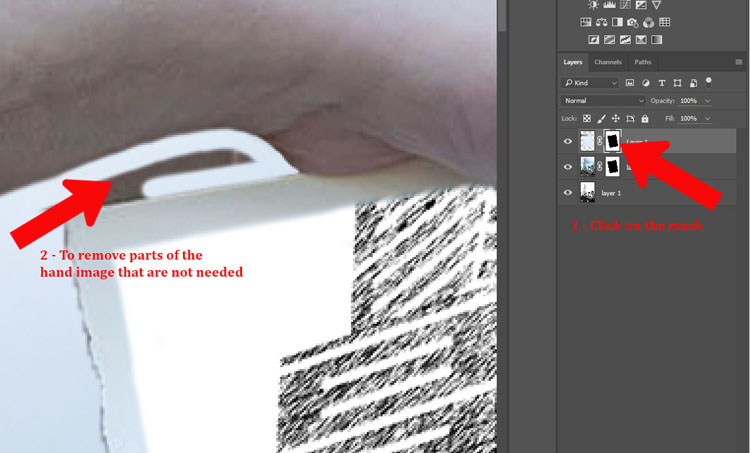
It is time to remove the parts that don’t really belong. You can use the mask that you had for the hand layer. Use your brush tool and remember to make black the foreground colour. You can now mask out the parts of the hand that you didn’t mean to select when you did the quick selection (zoom in close, you can also use the refine edge function).
leannecole-drawing-tutorial-13

Fine tuning

The hand can look a little weird, so next you need to add a shadow that the hand would have created. This will make it more believable looking.

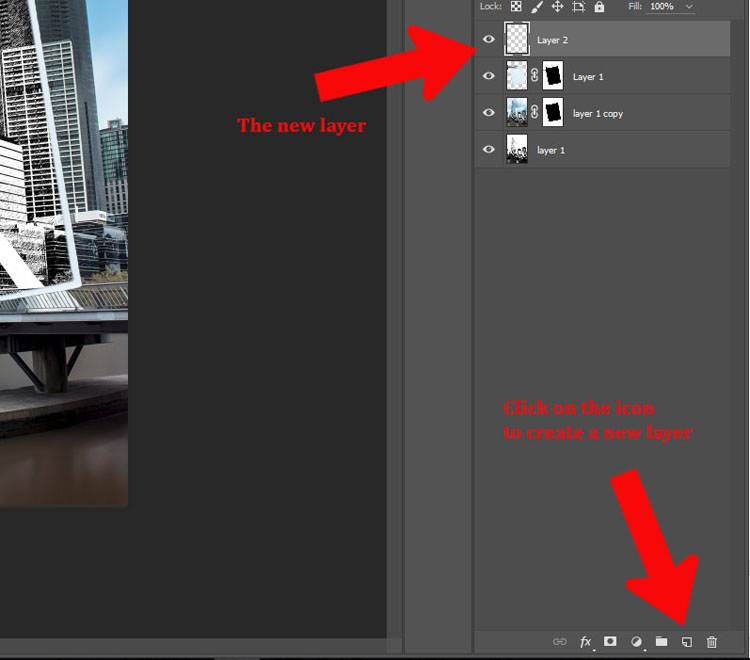
Add a new layer by clicking the icon at the bottom of the layers panel. It is the square outline with the folded corner, usually located next to the trash can. Alternatively, you can go to Menu > Layer > New Layer.
How to Make a Sketch inside a Photograph - new layer

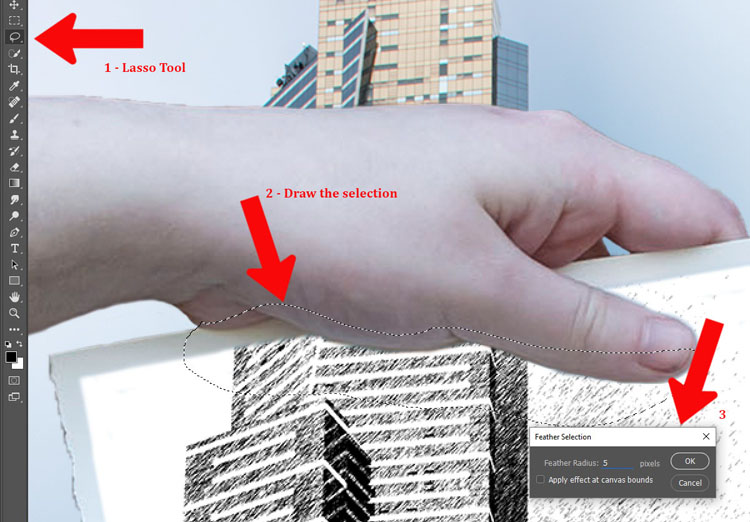
You will need to use the lasso tool. It is also helpful to zoom in so you can see what you are doing. The zoom tool is also in the tool panel, or you can press the letter Z which will make it appear. Click the image to zoom in, or to zoom out press the Alt or Option key and click the image. (Note: Press B to get the brush back.)

On the new layer, draw under the hand with the lasso tool to get the shadow. You don’t have to be exact as it is not going to be really dark. Go up to Menu > Select > Modify > Feather. In the popup window enter the amount of feathering you want. 5 pixels was the setting selected for this image. Alternatively you can press Shift+F6.
How to Make a Sketch inside a Photograph

Add in the shadow area

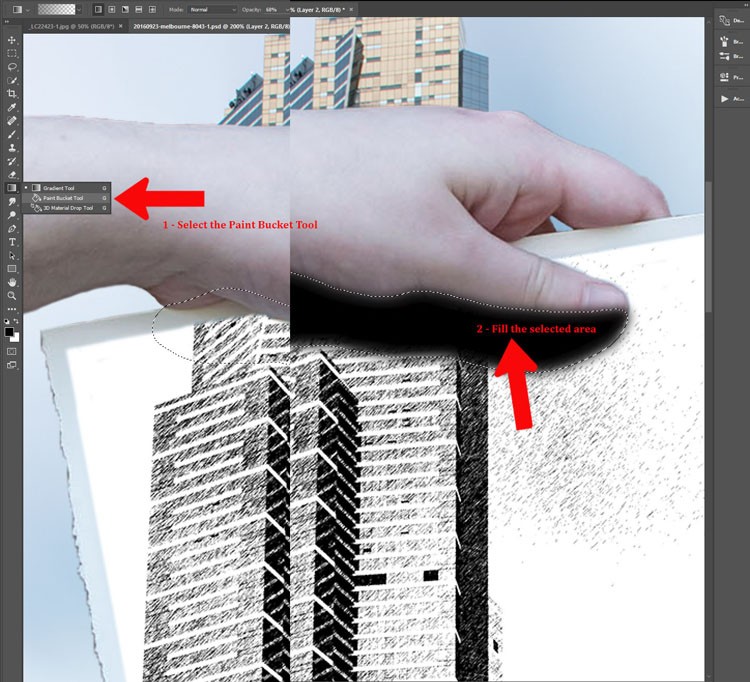
Fill the selected area with black using the Paint Bucket Tool. Make sure that the foreground colour is black.
How to Make a Sketch inside a Photograph

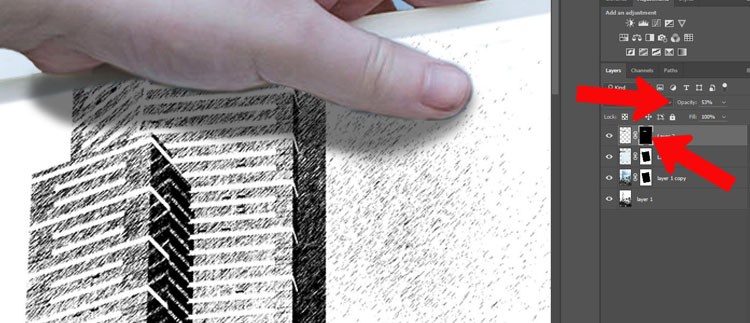
You may need to add a mask to remove any parts of the hand that you don’t need. You can also change the opacity of the layer so the shadow isn’t as dark. The opacity slider is located at the top of the layers panel near the blending modes. Adjust to where you think the shadow looks natural.
How to Make a Sketch inside a Photograph

To deselect hit Ctrl/Cmd+D.

How to Make a Sketch inside a Photograph

The image is now done.

Conclusion

I don’t know how many of these you would do, but some of the techniques used to create it can be used for many other things. Try doing this tutorial a few times, then see how you can use some of the processes in different ways. Don’t forget to share your images so we can see what you have done.

googletag.cmd.push(function() {
tablet_slots.push( googletag.defineSlot( “/1005424/_dPSv4_tab-all-article-bottom_(300×250)”, [300, 250], “pb-ad-78623” ).addService( googletag.pubads() ) ); } );

googletag.cmd.push(function() {
mobile_slots.push( googletag.defineSlot( “/1005424/_dPSv4_mob-all-article-bottom_(300×250)”, [300, 250], “pb-ad-78158” ).addService( googletag.pubads() ) ); } );

The post How to Make a Sketch Inside a Photograph by Leanne Cole appeared first on Digital Photography School.


Digital Photography School

 
Comments Off on How to Make a Sketch Inside a Photograph

Posted in Photography


Starling vortex wins £10,000 Landscape Photographer of the Year prize

25 Oct

2016 Take a View Landscape Photographer of the Year winners

Landscape Photographer of the Year 2016 Matthew Cattell – Starling Vortex, Brighton, East Sussex, England

The winners of the 2016 Take a View Landscape Photographer of the Year competition have been announced, with a shot of a flock of starlings flying in front of Brighton Pier taking the top prize. The competition, which accepts entries from around the world of pictures taken in the UK, is in its tenth year, and is run by landscape photographer Charlie Waite.

There are ten main categories for manipulated and un-manipulated images taken by adults and by those 17 years and under, as well as additional competitions for supported by sponsors – such as railway company Network Rail’s Line in The Landscape, Adobe and the Visit Britain tourist service. The top prize is £10,000 and category winners receive £1000 or £500 for the youth prizes.

Commended and runner up photographers get their images published in the Landscape Photographer of the Year book, and an exhibition of selected images runs at London’s Waterloo station for 12 weeks from 21st November.

For more information and to see more of the winning images visit the Take A View website. You can also read our interview with Charlie Waite.

2016 Take a View Landscape Photographer of the Year winners

Adult Classic view – Winner Dougie Cunningham – Shelter from the Storm, Loch Stack, Sutherland, Scotland

2016 Take a View Landscape Photographer of the Year winners

Adult Classic view – Highly commended Scott Robertson – Binnein Beag through Steall, Scottish Highlands

2016 Take a View Landscape Photographer of the Year winners

Adult Classic view – Runner-up Scott Robertson – Stob Dearg, Buachaille Etive Mor, Glencoe, Scotland

2016 Take a View Landscape Photographer of the Year winners

Network Rail ‘Lines in the Landscape’ Award – Winner Francis Taylor – Sunshine breaks through, Ribblehead Viaduct, North Yorkshire, England

2016 Take a View Landscape Photographer of the Year winners

The Sunday Times Magazine Award – Winner Rachael Talibart – Maelstrom, Storm Imogen, Newhaven, East Sussex, England

2016 Take a View Landscape Photographer of the Year winners

Adult Living the view – Winner Martin Birks – Chrome Hill, Peak District, Derbyshire, England

2016 Take a View Landscape Photographer of the Year winners

The GREAT Britain #OMGB Award – Winner Mark Gilligan – Finding Gold, Wast Water, Cumbria, England

2016 Take a View Landscape Photographer of the Year winners

The Adobe Prize – Winner Damian Ward – Caister-on-Sea, Norfolk, England

2016 Take a View Landscape Photographer of the Year winners

Adult Your view – Winner Tony Higginson – Shifting sands, Silverdale, Lancashire, England

2016 Take a View Landscape Photographer of the Year winners

Adult Your view – Runner-up Daniel Pecena – A82, Glen Coe, Highland, Scotland

2016 Take a View Landscape Photographer of the Year winners

Young Landscape Photographer of the Year 2016 Hannah Faith Jackson – Mirror Bar, Glasgow, Scotland

2016 Take a View Landscape Photographer of the Year winners

Youth Living the view – Winner Rowan Ashworth – Sunset Explorer, Hushinish, Isle of Harris, Scotland

Articles: Digital Photography Review (dpreview.com)

 
Comments Off on Starling vortex wins £10,000 Landscape Photographer of the Year prize

Posted in Uncategorized


Beauty in Decay: Moody Murals Bring Human Faces Back to Abandoned Places

25 Oct

[ By SA Rogers in Art & Installation & Sound. ]

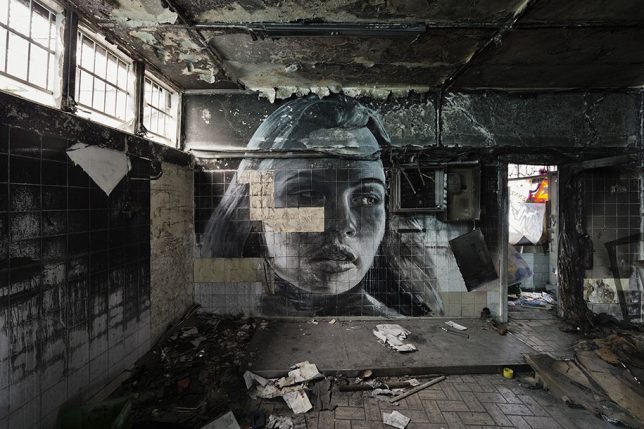
rone-murals-abandoned-places-1

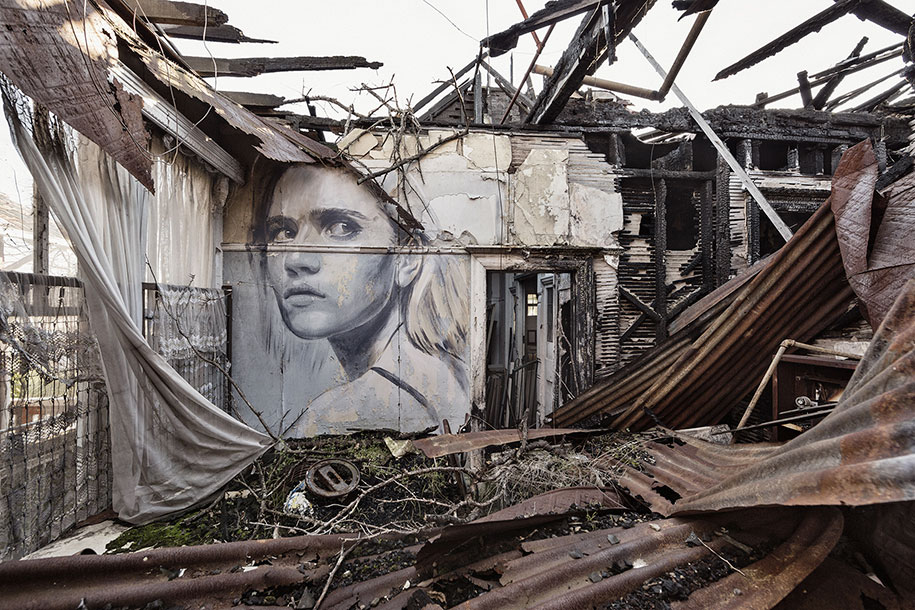
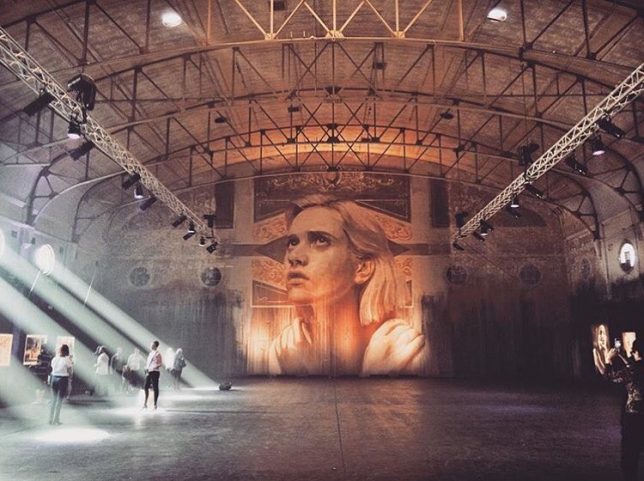
Abandoned places are often steeped in a mixture of emotional impressions, commingling a sense of loss and a confrontation of our own mortality with slivers of hopefulness for a new future, as nature begins to take over what we’ve left behind. As we move through these deteriorating spaces, strewn with the belongings of former inhabitants who seem to have simply disappeared, we wonder who they were and why the spaces that once sheltered them as they went about their lives have come to this. It’s these emotional qualities that make a new series of murals by Australian street artist Rone all the more poignant and powerful.

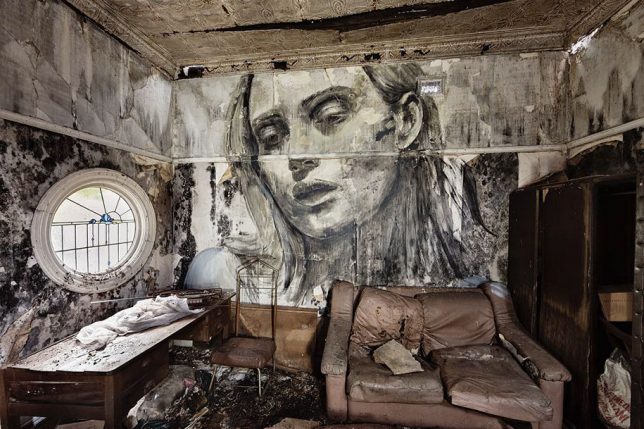
rone-murals-abandoned-places-2

rone

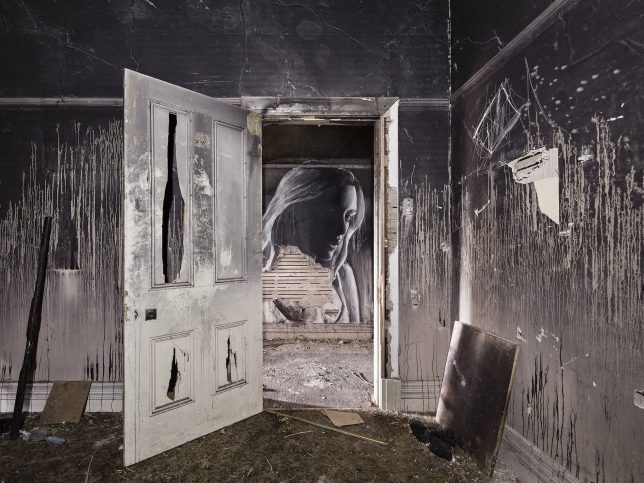
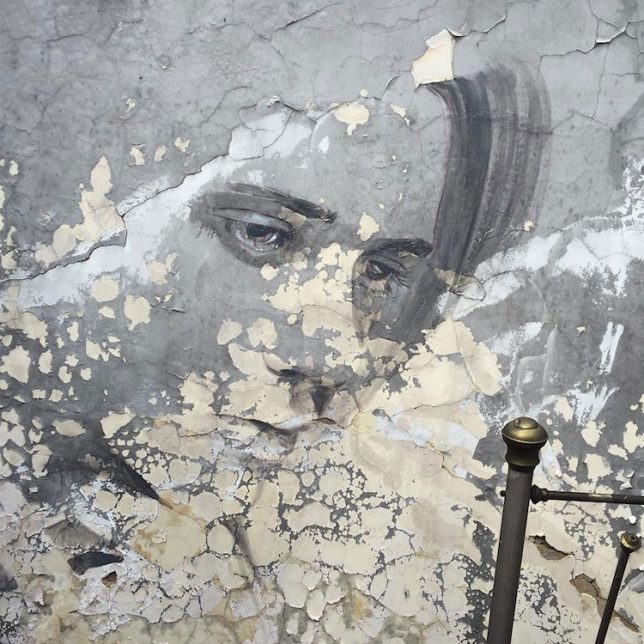
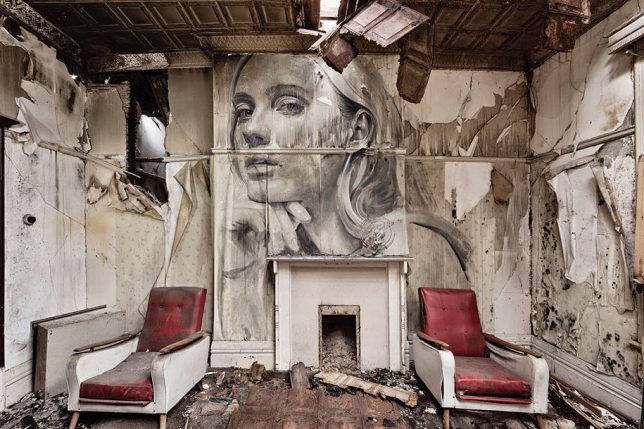
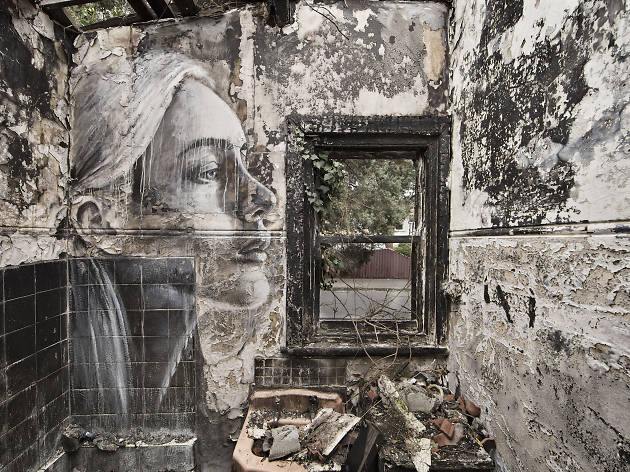
Entitled ‘Empty,’ the series places the artist’s signature portraits of women on the walls of abandoned interiors, deepening their emotional weight. Much of the subjects’ glamour is stripped away as their skin takes on the texture of peeling paint, the lines of their faces are interrupted by fallen tiles and their gazes are pointed down at the destruction of their environments.

rone-murals-abandoned-places-3

rone-murals-abandoned-places-4

For the Melbourne-based artist, this series represents a shift from the smooth, clean surfaces of his canvases and even the more clear-cut exterior walls upon which his murals are typically painted. But Rone has always found meaning in the temporary nature of these installations, as the artworks are gradually worn away by the elements or painted over by vandals and other artists.

rone-murals-abandoned-places-5

rone-murals-abandoned-places-6

rone-murals-abandoned-places-7

Rone exhibited ‘Empty’ at the soon-to-be-demolished Star Lyric Theatre building in Melbourne, presenting photographs of the murals in situ along with works on canvas and paper. The artist also painted a new mural directly onto the back wall of the theater, stretching nearly 33 feet from floor to ceiling. It’s a fitting way for the decaying Art Nouveau building to go out, with Rone’s canvases lining its blackened and stained surfaces. See more photos of the installation at Street Art News.

Share on Facebook


[ By SA Rogers in Art & Installation & Sound. ]

[ WebUrbanist | Archives | Galleries | Privacy | TOS ]


WebUrbanist

 
Comments Off on Beauty in Decay: Moody Murals Bring Human Faces Back to Abandoned Places

Posted in Creativity


Oldest existing Nikon I camera goes up for auction with original lens and case

25 Oct

$ (document).ready(function() { SampleGalleryV2({“containerId”:”embeddedSampleGallery_1322935571″,”galleryId”:”1322935571″,”isEmbeddedWidget”:true,”standalone”:false,”selectedImageIndex”:0,”startInCommentsView”:false,”isMobile”:false}) });

The oldest known Nikon camera in existence has gone up for auction at WestLicht. This particular Nikon I, serial number 60924, was made in April 1948 and is notable as being the third camera produced by Nikon. WestLicht describes the camera’s condition as ‘B+,’ and says it includes the original Nikkor-H 2/5cm no.70811 with a matching Nikon cap in ‘fantastic original condition.’

The Nikon I still has its original shutter, according to WestLicht, as well as engravings that indicate the serial number, ‘Nippon Kogaku Tokyo’ and ‘Made in Occupied Japan.’ In addition to the camera itself, the auction includes the original double-strap carrying case; WestLicht describes the case as ‘extremely rare.’ 

The auction’s starting price is €90,000, with WestLicht estimating the camera will sell for between €160,000 to €180,000 (about $ 174,000 to $ 195,750). 

Articles: Digital Photography Review (dpreview.com)

 
Comments Off on Oldest existing Nikon I camera goes up for auction with original lens and case

Posted in Uncategorized


Swedish court rules drone photography is surveillance and requires a permit

25 Oct

Sweden’s Supreme Administrative Court has issued a ruling that classifies drone photography as surveillance, thus meaning operators of drones with cameras would need to obtain a surveillance license – an unlikely case for members of the public. Swedish drone owners are understandably upset with the ruling, stating that it will effectively kill an entire industry. Local media outlets also find it troubling, since no exceptions are made for journalistic applications.

UAS Sweden, an organization of Swedish drone operators, plans to try to convince lawmakers that the decision is an overreaction that will have a tremendous negative impact on their industry. Either way, the policy will likely be difficult to enforce. Swedish newspaper Aftonbladet points out that local police seem unlikely to prioritize any reports of suspected unauthorized surveillance. 

Articles: Digital Photography Review (dpreview.com)

 
Comments Off on Swedish court rules drone photography is surveillance and requires a permit

Posted in Uncategorized


5 Tips for Portraits of Musicians That Will Help You Hit All the Right Notes

25 Oct

I’d like to share a few tips for portraits of musicians that will help you avoid the awkward photos that make any musician cringe.

portraits of musicians

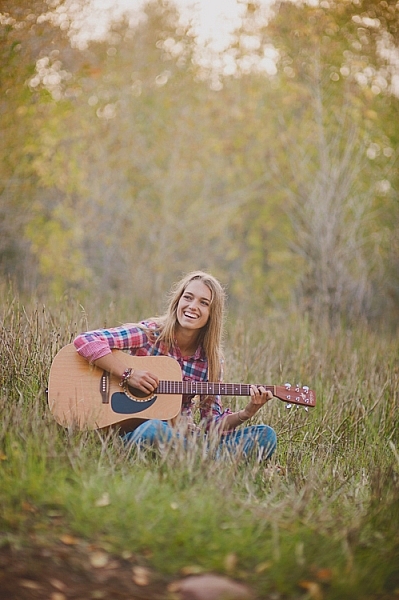
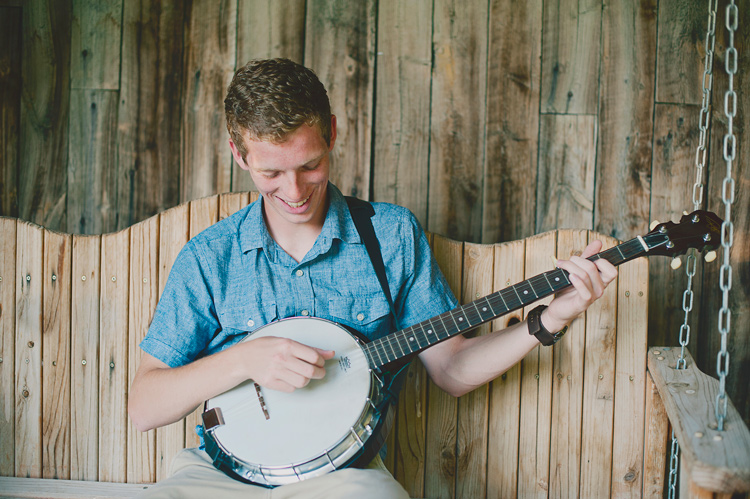
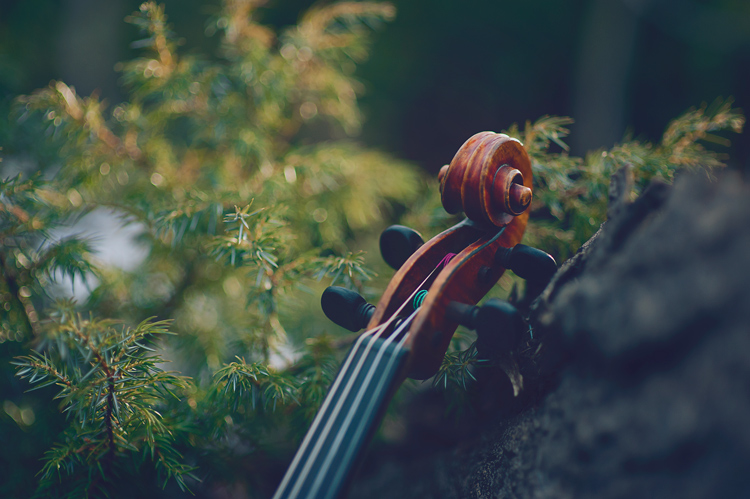
Sometimes we are lucky enough as photographers to be asked to photograph someone with one of their most prized possessions: their musical instrument. Most people that want to be photographed with their instrument really and truly love it, and it’s a part of who they are. As a musician myself, I love photographs with gorgeous instruments in them, and I am especially bothered by photos that don’t capture those instruments naturally. Sometimes I’ll come across a photo that makes me cry out, “Why?? Nobody would EVER hold their instrument like that!!” You can still be creative with your photos without making them awkward.

portraits of musicians

1. Trust the musician

If you aren’t familiar with the instrument you’re photographing, it is especially important to trust the musician. This isn’t the time to try every posing trick that you can come up with, ending up with flutes on top of the head, or cellos held under the chin.

Ask your subject how they hold their instrument naturally. You can ask how they hold their instrument while playing, or when they’re relaxing between songs. If it’s a big instrument, like a piano, ask them how they would stand next to it before they perform, or how they sit by it when they’re thinking about what to practice. Ask them to demonstrate how they carry their instrument from one place to another. These might seem like silly questions, but you can really get a sense of what positions and holds are natural, then you can build from there.

portraits of musicians

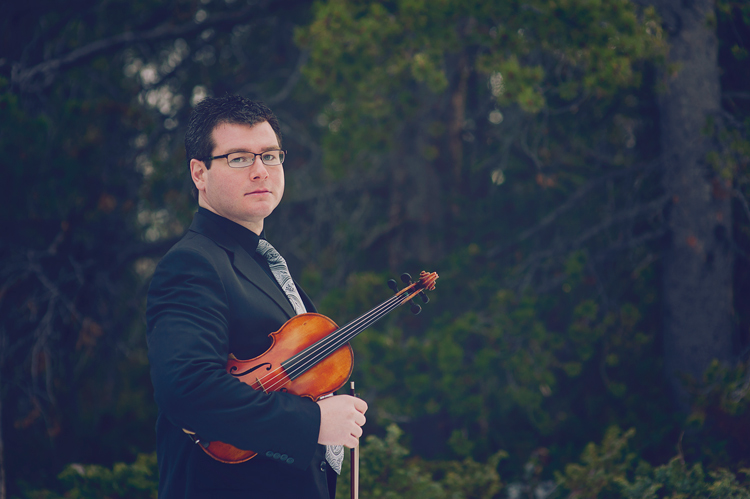
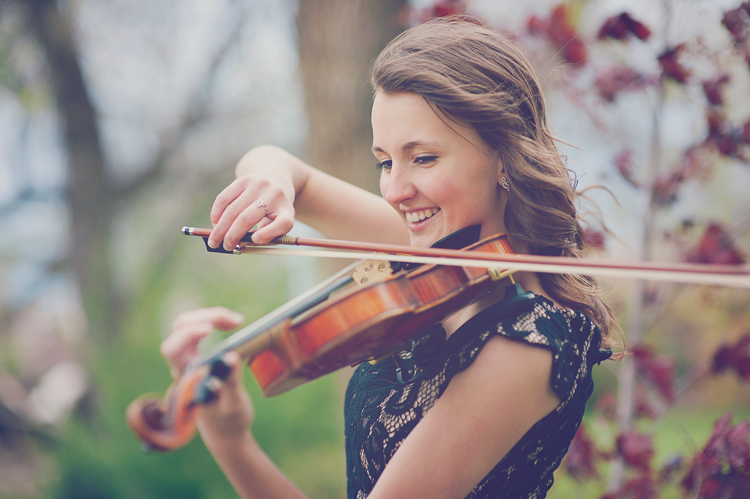
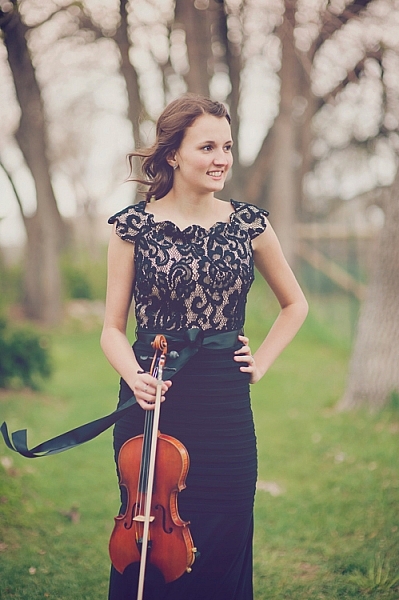
As an example, a violinist may tell you that she holds her violin under her right arm when resting. You could take that position, ask her to sit on a chair in a formal pose holding the violin under her arm and get a beautiful portrait of a girl and her violin. The key is to remember that they are much more expert at how to naturally pose with their instrument than you likely are. However, if you do happen to know their instrument well, feel free to use your knowledge to get beautiful natural poses.

2. Do your homework

portraits of musicians

Before a session with a musician, you could watch some videos on YouTube to see how people interact specifically with the instrument you’ll be photographing. Find a professional musician who plays the same instrument. Look at their website to see what kind of photos they have with their instruments. You may have a client who is very shy and need more guidance posing, so it’s helpful to have a few ideas ahead of time. Be prepared for challenges that an instrument might bring, such as unwanted reflections in brass, immobility of harps or pianos, sensitivity to temperature or weather, and have a plan.

3. Ask the musician to play for you

portraits of musicians

If you can get your subject to give you a little performance during the photo session, you will get some great action shots. It usually helps loosen them up a little bit too, and brings out some natural smiles. Remind them that it doesn’t matter if they make mistakes because your camera doesn’t catch any audio. It will only capture the perfect moments of their playing. Also, remind them that you aren’t there to judge their skill, you just want to capture the relationship they have with their instrument. Move around as they play, and catch the beautiful moment from every angle you can, close, and far.

4. Get close-ups of the action

portraits of musicians

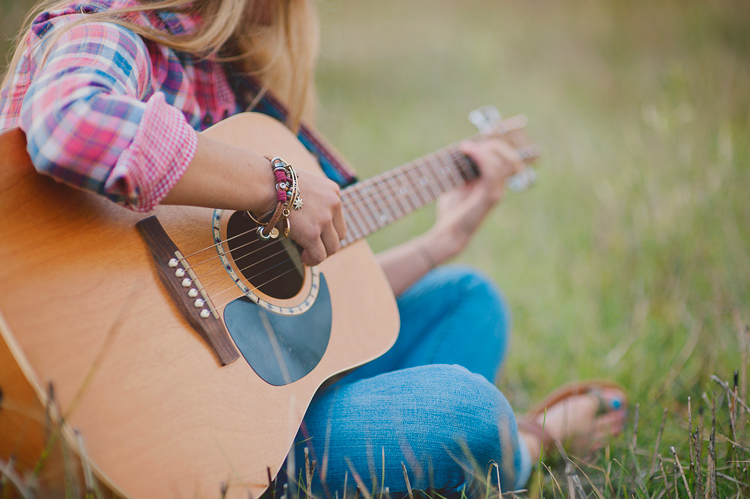
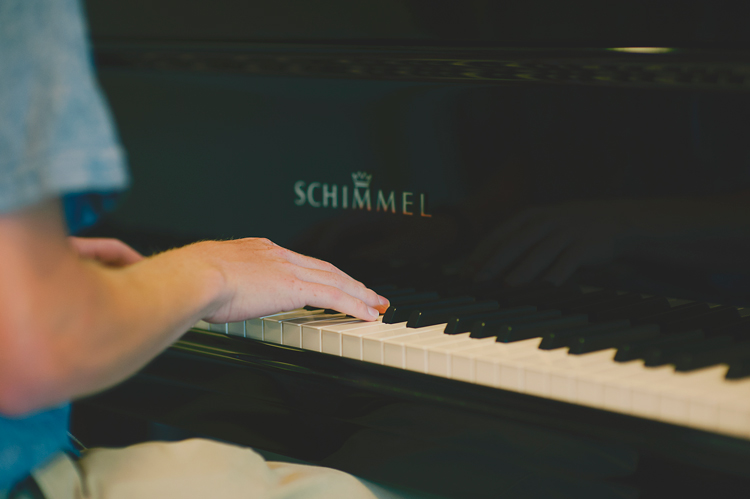
Hands are the main part of playing most instruments. Get in close on the hands as they play. These shots often end up being some of my very favorites. Try focusing on the hands as you shoot down the neck of a guitar, the fingers on a flute, or hands that are frozen in mid-air during a drum solo. Getting in close on these details can create beautiful action photos that really tell the story. If their hands are moving too quickly for you to focus, ask them to freeze for a moment in that position while you get the shot.

5. Make the instrument the star

portraits of musicians

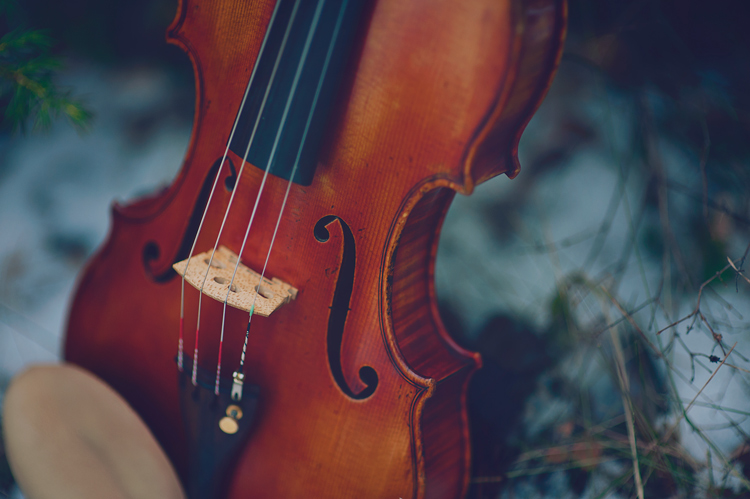
Take a few photos of the instrument by itself, too. Musicians love their instruments, and they will love photos that show their beauty. Make sure to ask permission to touch their instrument, and to set it down, move it, or anything you might want to do for the shot that could potentially harm it in any way. You can even ask the owner to do all of the touching and moving, and you can move yourself around to get the photo that you want.

Tell the musician what you have in mind, and they will most likely be on board, and be happy to help you get some amazing instrument photos. Instruments can be extremely expensive, and even more importantly, can have sentimental value that can never be compensated. Keep this in mind throughout the session, whether your subject is in the photo with the instrument, or not. Never ask them to do something that could harm or damage the instrument.

portraits of musicians

portraits of musicians

Conclusion

Every time I’ve been asked to create photos for album covers for musicians, head shots for websites, art to print and frame, or just to capture someone’s favorite hobby, my goal is to create a photo that they will love. One that will stay true to what they would naturally do with their instruments.

I hope these tips can help you create beautifully genuine musician portraits too. I would love to see your musician portraits in the comments!

googletag.cmd.push(function() {
tablet_slots.push( googletag.defineSlot( “/1005424/_dPSv4_tab-all-article-bottom_(300×250)”, [300, 250], “pb-ad-78623” ).addService( googletag.pubads() ) ); } );

googletag.cmd.push(function() {
mobile_slots.push( googletag.defineSlot( “/1005424/_dPSv4_mob-all-article-bottom_(300×250)”, [300, 250], “pb-ad-78158” ).addService( googletag.pubads() ) ); } );

The post 5 Tips for Portraits of Musicians That Will Help You Hit All the Right Notes by Melinda Smith appeared first on Digital Photography School.


Digital Photography School

 
Comments Off on 5 Tips for Portraits of Musicians That Will Help You Hit All the Right Notes

Posted in Photography


Facebook is planning to relax censorship rules for newsworthy images

25 Oct
 Image: Nick Ut/The Associated Press

Last month Norway’s largest newspaper, Aftenposten, published an open letter on its front page, accusing Facebook CEO Mark Zuckerberg of ‘abuse of power.’ The letter was published as a response to Facebook removing the famous ‘Napalm Girl’ image, taken by photographer Nick Ut, from the newspaper’s Facebook page on the grounds of a blanket ban on nudity in all images posted on the social network.

The picture had been used in an article about the seven most iconic images in the history of war. After receiving a wave of intense criticism following the incident, Facebook has announced in a blog post that it will be relaxing its photo censorship rules around news events:

‘In the weeks ahead, we’re going to begin allowing more items that people find newsworthy, significant, or important to the public interest — even if they might otherwise violate our standards. We will work with our community and partners to explore exactly how to do this, both through new tools and approaches to enforcement. Our intent is to allow more images and stories without posing safety risks or showing graphic images to minors and others who do not want to see them.’

We will have to wait and see how exactly this will be defined but it’s fair to assume that Nick Ut’s picture would have been considered historically significant and therefore safe under the revised guidelines. 

We should expect any changes to take effect within the next few weeks as Facebook is working on replacing its filter algorithms. The company says it will be working closely with experts, publishers, journalists, photographers, law enforcement officials and safety advocates to achieve this. 

What do you think? Is this a step in the right direction for Facebook? Let us know in the comments.

Articles: Digital Photography Review (dpreview.com)

 
Comments Off on Facebook is planning to relax censorship rules for newsworthy images

Posted in Uncategorized


Architectural Interventions: 12 Radical Modern Changes to Historic Buildings

25 Oct

[ By SA Rogers in Architecture & Houses & Residential. ]

architecture-intervention-main

Honoring the historic significance of deteriorating buildings while reinventing them for modern contexts and usage, these architectural interventions don’t try to erase signs of aging and damage or blend the demarcation between old and new. Cracks in stone manors are filled with glass, elegant Parisian facades are recreated in stark concrete, rusted steel volumes are lowered right into the empty shells of ruined brick houses. Whether renovating or reimagining the original structures, these projects preserve history and highlight the passage of time instead of demolishing or disguising it.

Astley Castle Renovation by Witherford Watson Mann, Warwickshire, England

architecture-intervention-astley-1

architecture-intervention-astley-2

architecture-intervention-astley-4

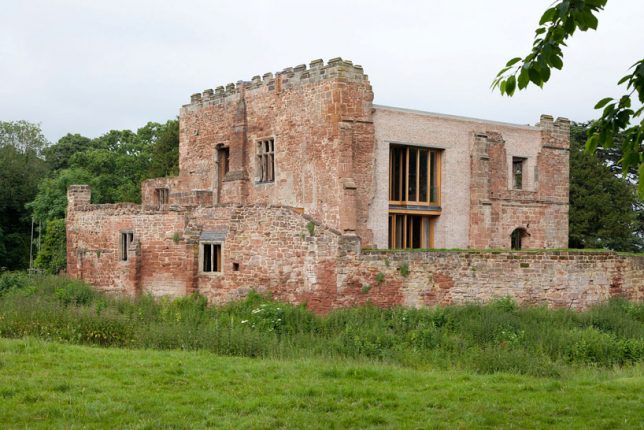
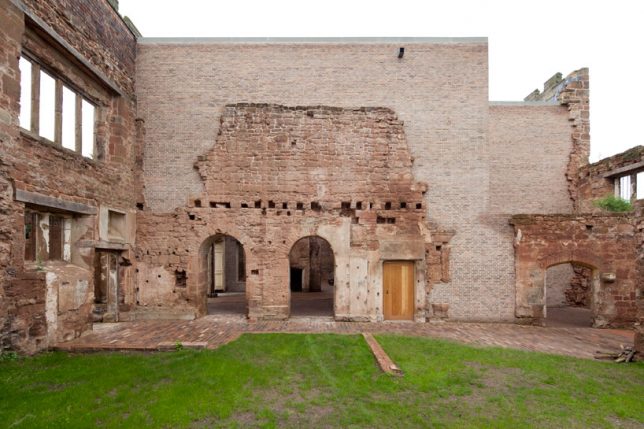
Ashley Castle, a former fortified manor for England’s Royal Family that fell into abandoned ruin for decades, comes back to life in the hands of London-based Witherford Watson Mann Architects, who repaired the damaged parts of the space with an insert that simultaneously blends and contrasts with the existing walls. The new brick follows the uneven breaks in the original masonry, preserving it not as it originally looked, but as it looked prior to the renovation, with all its years of history and wear.

Blencowe Hall by Donald Insall Associates, England

All images copyright nicholas yarsley (wizzwam ltd).

architecture-intervention-main

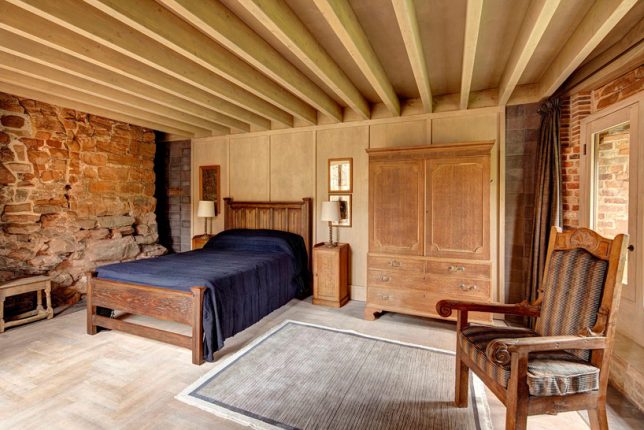
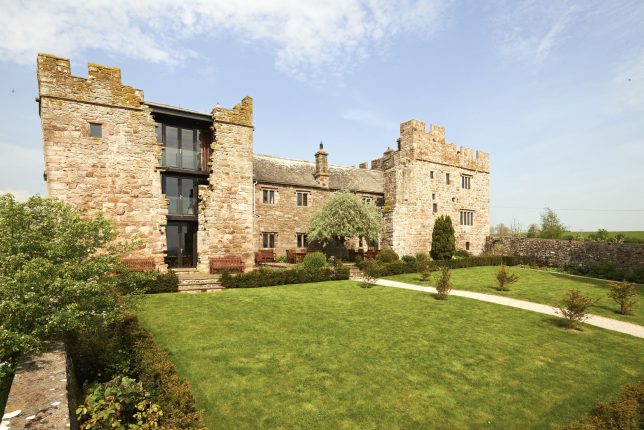
A similar approach fills a crack in Blencowe Hall in Cumbria, enabling a deteriorating former manor house to become a luxury hotel in the countryside. The south tower was missing a roof and had sustained a large breach in its east wall. Donald Insall Associates worked with local architect Graham Norman to insert a steel frame and glazed wall into the reach, retaining it “as part of the story of the building.”

The Dovecote Studio by Haworth Tompkins, England

architecture-interventions-dovecote

architecture-intervention-dovecote-2

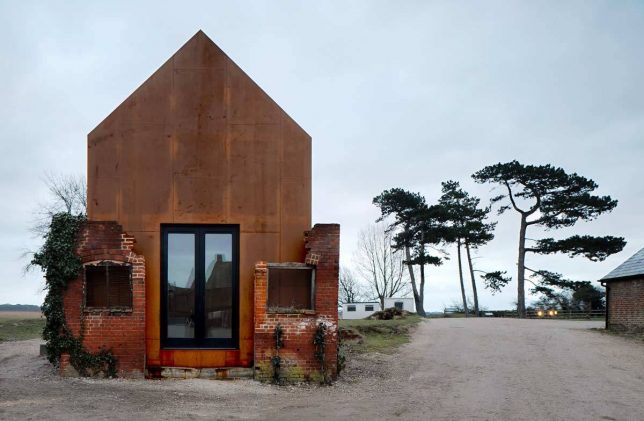
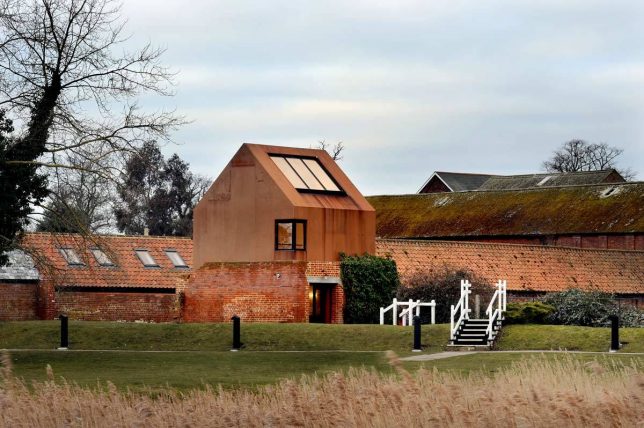
The Dovecote Studio is another example of radically preserving ruins that are deemed “too damaged to save” with some creative thinking. Studio Haworth Tompkins filled the empty shell of an abandoned building with a cortex steel building, which reads as an entirely separate structure within the original envelope but complements the red of the old brick as it rusts. The whole thing was preassembled and literally dropped inside by a crane. It now acts as housing for artists in residence, rehearsal space and temporary exhibition space at the internationally renowned music campus at Snape Maltings.

Kew House by Piercy & Company, London

architecture-intervention-kew-1

architecture-intervention-kew-2

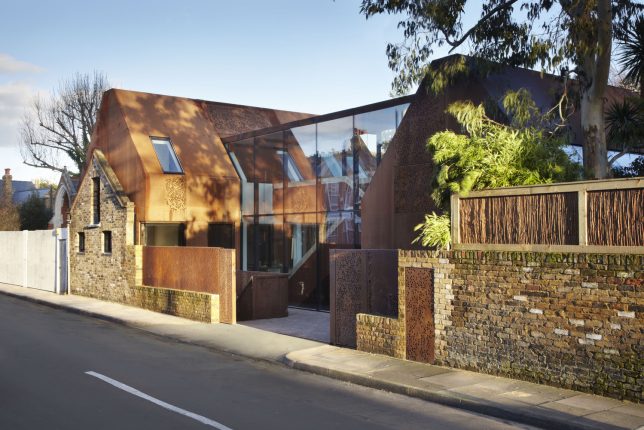
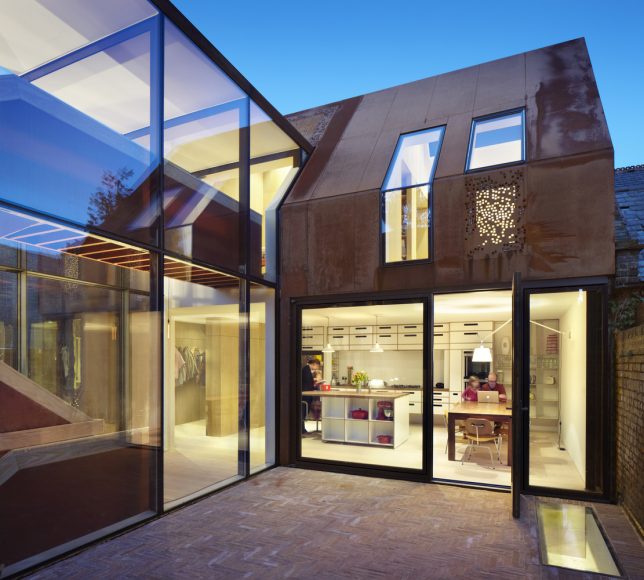
Very little was left of the original buildings that stood on this street within the Kew Green Conservation Area of southwest London, yet the new construction honors it all the same, incorporating it into the exterior facade. A nineteenth century stable wall acts as the defining architectural feature of the street-fronting side of a new four-bedroom family house by Piercy&Company, retaining its sense of history while allowing the construction of a modern home for modern needs.

Next Page – Click Below to Read More:
Architectural Interventions 12 Radical Modern Changes To Historic Buildings

Share on Facebook


[ By SA Rogers in Architecture & Houses & Residential. ]

[ WebUrbanist | Archives | Galleries | Privacy | TOS ]


WebUrbanist

 
Comments Off on Architectural Interventions: 12 Radical Modern Changes to Historic Buildings

Posted in Creativity


Got Reach? Tamron SP 150-600mm F5-6.3 G2 sample gallery

24 Oct

Tamron’s newly updated SP 150-600mm F5-6.3 G2 telephoto lens is weather sealed and sports a number of upgrades, including improved image quality over its previous iteration. The real question is how does it hold up in the real-world? We took the lens to the streets – and to the roof deck – to get a feel for its performance in this sample image gallery.  

See our Tamron 150-600mm F5-6.3 G2
real-world sample gallery

Articles: Digital Photography Review (dpreview.com)

 
Comments Off on Got Reach? Tamron SP 150-600mm F5-6.3 G2 sample gallery

Posted in Uncategorized


Bright Ideas for Dark Art: Murals by Skurk Play Tricks with Light & Night

24 Oct

[ By WebUrbanist in Art & Street Art & Graffiti. ]

painted-angler-fish-art

The deep sea anglerfish is a disturbing monstrosity that uses lights to lure in its prey and is the featured backdrop of a recent work of graffiti best experienced at night.

day-lit-night-art

Existing wall lamps serve as the lures in this case, while the fish itself is positioned to swallow up anyone brave enough to venture down the stairs from above.

night-light-painting

Hailing from New Zealand but living in Bergen, Norway, street artist Skurk hand-cuts stencils and paints large-scale murals around different themes but often involving light and shadow. The works are also site-specific, made to interact with and respond to conditions in a given physical context.

sillhouette-art

In some cases, his silhouettes seem to be cast like shadows. In other instances, the idea of electrical lighting takes various forms, like a bulb being plugged into an available (vent) socket.

light-socket-art

Share on Facebook


[ By WebUrbanist in Art & Street Art & Graffiti. ]

[ WebUrbanist | Archives | Galleries | Privacy | TOS ]


WebUrbanist

 
Comments Off on Bright Ideas for Dark Art: Murals by Skurk Play Tricks with Light & Night

Posted in Creativity