RSS
 

Archive for September, 2016

3Doodler Pro: New 3D-Printing Pen Works with Nylon, Wood & Copper

21 Sep

[ By WebUrbanist in Gadgets & Geekery & Technology. ]

3doodler pen

A new model of 3D sculpture-drawing tool from WobbleWorks operates using extrusion like its predecessor, but has expanded to allow users to print with new materials like wood, copper, bronze, nylon and polycarbonate.

3d sculpture

Users can draw shapes in the air which solidify as the extruded materials cool to create complex works of art and design.

3d doodler

Each of the materials in the new range of offerings is combined with plastic to form a filament that can be heated and shaped as before. Now, however, these works can be modified post-production per the new material line (e.g. wood sanded or bronze polished).

3d model

The new device features dials to control temperature and speed as well as a fan for cooling materials as they are deployed for rapid setting. Housed in a carbon fiber shell, the device can be used to draw scale models, household decor, creative crafts and fun sculptures. The gadget also comes with a portable battery pack.

3d vase drawing

“When we started the 3Doodler journey back in 2013, we had world-leading architects telling us ‘I want to do this’,” said WobbleWorks co-founder and CEO Maxwell Bogue, referring to  “a quick wave of the pen in the air, with plastic solidifying in its wake. With new materials like polycarbonate, that dream is a reality.” In the future, technologies like this could be employed in medical and other fields as well.

Share on Facebook


[ By WebUrbanist in Gadgets & Geekery & Technology. ]

[ WebUrbanist | Archives | Galleries | Privacy | TOS ]


WebUrbanist

 
Comments Off on 3Doodler Pro: New 3D-Printing Pen Works with Nylon, Wood & Copper

Posted in Creativity


Hands-on with Nikon’s latest kit at Photokina

21 Sep

AF-S Nikkor 105mm F1.4E ED

Nikon’s stand at Photokina is split fairly equally between displays of its DSLRs and demonstrations of its new KeyMission 360, 170 and 80 cameras. We took a look at everything they had to offer, starting with the Nikkor 105mm F1.4E ED. It’s as big as it is beautiful. At 106mm long and 95mm across, it’s quite a handful. That said, it didn’t feel disproportionate when mounted on a D5, despite its 985 g (2.17 lbs) weight.

AF-S Nikkor 105mm F1.4E ED

The ‘E’ in the lens’ name means it offers an electromagnetic diaphragm. This not only operates faster than apertures operated by mechanical coupling, which is ideal when shooting at high frame rates, but also means many recent Nikon cameras can control the aperture even when they’re in live view mode, which is great news for video shooters.

Nikon D3400

Also on show is Nikon’s D3400, the company’s latest entry-level DSLR. It looks a lot like the D3300 and shares many of its specifications, with it still being built around a 24MP APS-C sensor. Without AA filter, in this instance.

Nikon D3400

The big news with the D3400 is the inclusion of Bluetooth Low Energy, which it uses to stay constantly connected to a smartphone. The iOS version of the SnapBridge app is now available, to which the camera can upload images automatically. The camera also includes a significantly boosted battery life (1200 shots per charge), but some of this will stem from the use of a less powerful built-in flash.

KeyMission 360

Originally announced back at CES in January, the KeyMission 360 is about to become available. Nikon says the two >180 degree lenses that combine to give 360 degree coverage are one of the aspects of the company’s expertise that it can bring to the sector.

KeyMission 360

From the top, it’s apparent just how small the camera is. In part the lenses have to be mounted close to one another in order for them to provide an overlapping field of view.

KeyMission 170

A slightly more conventional action cam, the KeyMission 170 offers a wide-angle lens that provides the field of view that the name implies. Rather than needing a special housing, the camera is itself already waterproof and shockproof, though an additional accessory is available to allow the 170 to be submerged to much greater depths.

KeyMission 170

The KeyMission 170 includes a standard tripod thread but Nikon says it will offer an accessory to adapt this so the camera can be used with common mounts designed for GoPro cameras.

KeyMission 80

They KeyMission 80 is a wearable style camera with a (you guessed it) 80 degree field of view, and is designed to be used in a vertical orientation. On the front is a 12MP 1/2.3″ CMOS sensor that’s capable of 1080/30p video – no 4K here.

KeyMission 80

On the back there’s a rear-facing 4.9MP selfie camera and a 1.75″ touchscreen. The whole camera is waterproof to about 1m/3.2ft, shockproof to 1.8m/6 ft and freezeproof to 14 F/-10 degrees C.

Whither the DLs?

Despite looking high and low, we couldn’t find any sign of the much-anticipated DL compacts. Prototypes are not yet available, we were told. We’re still looking forward to them, though, and are hoping there’ll be more news at Photo Plus Expo next month.

Articles: Digital Photography Review (dpreview.com)

 
Comments Off on Hands-on with Nikon’s latest kit at Photokina

Posted in Uncategorized


Lens Review: Sigma 18-35mm f/1.8 DC HSM Art Lens

21 Sep

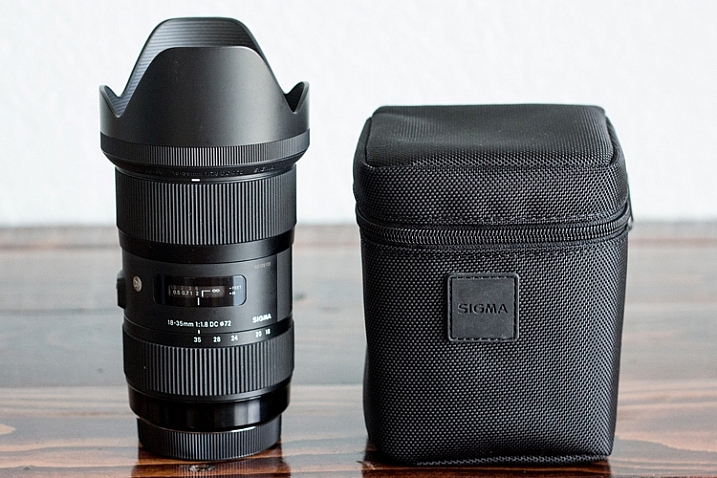
In the world of photography, there are several different schools of thought when it comes to third party lenses. Some photographers love them, some photographers choose to only purchase lenses made by their camera manufacturer. Personally, I have never had a problem with third party lenses, and they make up about half of my current camera bag. So when I had the chance to try out the Sigma 18-35mm f/1.8 DC HSM lens for APS-C cameras for about a month, I happily jumped on the opportunity to put it to good use!

sigma-lens-review-8

Lens Features and Build

Right out of the box, it was evident that this lens is something special. Sigma 18-35mm f/1.8 Art Lens offers a focal range that makes it useful for a number of different genres of photography such as weddings, portraits, and family photography. As an added bonus, it offers a fast constant aperture (f/1.8) that’s practically unheard of in similar zoom lenses.

Sigma’s Art line has been getting a lot of buzz over the past couple of years for being high-quality lenses at an affordable price point, and this one certainly did not disappoint. Some third party lenses can have the tendency to feel plastic-y, but this lens is made of Thermally Composite Material, which both looks and feels sturdy and professional.

sigma-lens-review-9

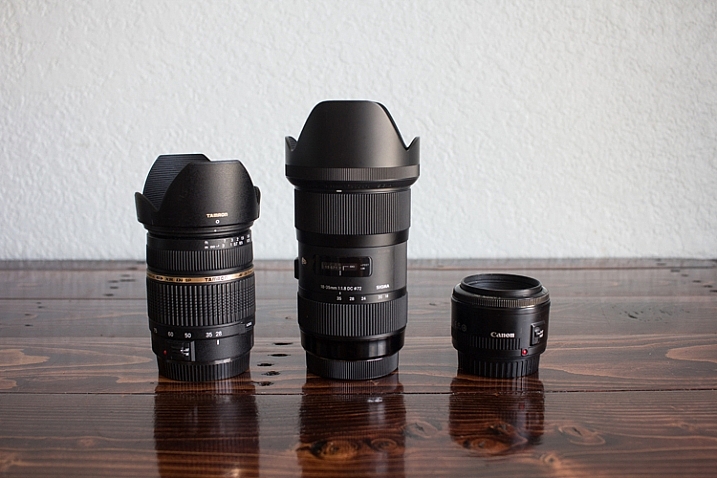
For size comparison: Left: the Tamron 28-75mm f/2.8 | Center: the Sigma 18-35mm f/1.8 | Right: the Canon 50mm f/1.8

This particular lens was physically larger than I expected based on other lenses in my bag, and it felt quite a bit heavier than I imagined as well. One weekend I took this lens to an RC air show, and several people commented to me that they wished they’d brought a telephoto lens like I had! It definitely isn’t a particularly small and compact lens. In terms of functionality, the zoom was heads above any other lens I own in terms of smoothness, and the auto-focus is fast and silent.

Sharpness Test

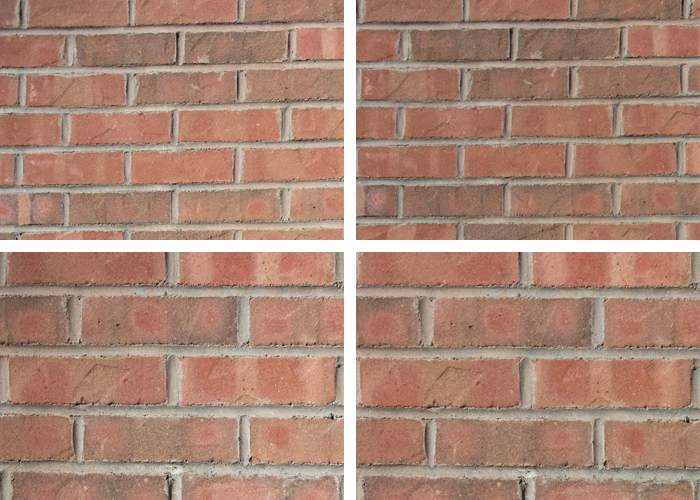
In order to test edge-to-edge sharpness of this lens, I used a tripod to photograph a brick wall at different focal lengths and apertures. Then I zoomed in and compared the top left-hand corner of each image to check for sharpness and vignetting.

Clockwise from Upper Left: 18mm at f/1.8, 18mm at f/16, 35mm at f/16, 35 mm at f/1.8. I cropped to include only the upper left hand corner of each image to check for edge to edge sharpness.

Clockwise from upper left: 18mm at f/1.8; 18mm at f/16; 35mm at f/16; 35 mm at f/1.8. I cropped to include only the upper left-hand corner of each image to check for edge-to-edge sharpness.

When shooting wide open, some consumer lenses have a tendency towards vignetting and/or have a loss of sharpness towards the edge of the image that can be very frustrating as a photographer. In this case, I noticed no discernible difference in sharpness along the edge of the image whether I was shooting at f/1.8 or f/16, even when zooming in significantly on the image. I also didn’t notice any vignetting even when shooting at small apertures. In fact, any vignetting that you see on any of the images in this article was added in the post-processing phase.

I was really pleased with the performance of this lens, and had no issues with its edge-to-edge sharpness, vignetting, or lens creep, in the month that I tested it out.

In the Field: People Photography

sigma-lens-review-1

Newborn photography

I’m primarily a child and family portrait photographer, so those genres were the first places that I put the Sigma 18-35mm f/1.8 to the test. In terms of newborn photography, I typically shoot on location in the client’s home for newborn sessions. While I find this works very well for the comfort of both mom and baby, the one variable that can sometimes be difficult is the available natural light. In the case of photographing newborns in unpredictable lighting situations, having a zoom lens with such a fast aperture is a huge asset.

sigma-lens-review-2

Kids photography

Next, I took the lens to the park with my kids, my nieces, and my nephew. Half of these kiddos were just about to move across the US, and so I wanted to be sure to take a few photos of them all together for our family. The Sigma 18-35mm stayed on my camera nearly the entire time we were at the park because it transitioned from a few semi-posed portraits to candid images of the kids playing together so seamlessly.

sigma-lens-review-3

Single portraits

Though I typically prefer using a 50mm lens on the 60D for portraits (which is closer to 85mm when considering the crop factor), I was surprised at how useful the 18-35mm lens was for single-person portraits as well. The thing that I really loved about this lens was that with my kids, I often have to choose whether I want to photograph an event with a portrait bent, or a photojournalism one because sometimes there’s just not enough time to do both.

If we head to the fire station with the girls, I can capture portraits of them in the fire gear with my 50mm lens, or I can capture pullbacks of them with the trucks with my 24mm lens. I could have taken my zoom lens, but it doesn’t have the ability to shoot as wide open as I often prefer in portraits. The Sigma 18-35mm lens is the best of all worlds–it’s wide enough to shoot pullbacks with the firetrucks and offers the functionality to zoom in and shoot portraits with a beautiful smooth bokeh at the aperture that I prefer.

Overall, this is a really fantastic and functional lens for people photography. Whether you’re interested in portraits or weddings, this lens can handle nearly any people photography situation absolutely beautifully.

In the Field: Nature and Landscapes

sigma-les-review-10

Though my real passion is in people photography, there are lots of other genres of photography that I enjoy as a hobbyist. I figured that in reviewing this lens, it only made sense to put it through some of those paces as well.

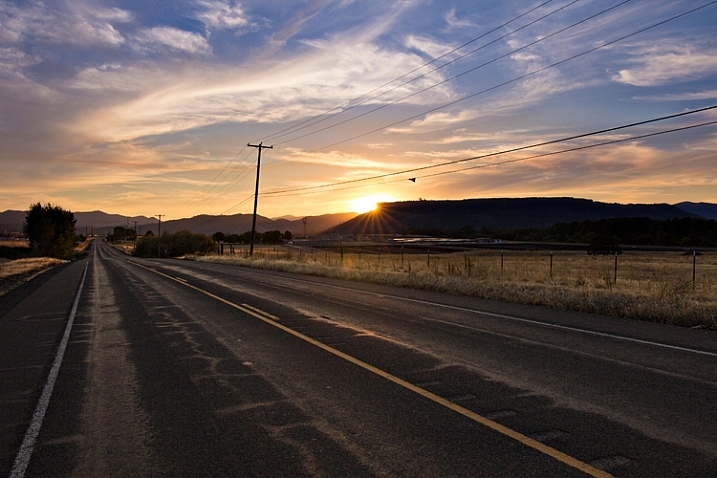
Whether photographing wide landscapes or flower blooms up close, this lens didn’t disappoint. I should mention that this lens features a maximum aperture of f/16, which may or may not be sufficient for someone who specializes primarily in landscapes. For me, as someone who shoots people photography but occasionally wants to be able to photograph a beautiful sunset or landmark, a maximum aperture of f/16 is more than sufficient.

sigma-lens-review-7

I did notice that even when shooting during the golden hour, this lens doesn’t tend towards large sun flares. Rather, it tends towards smaller sunbursts or small flares, which I find to be a benefit for both nature photography and for photographing people during the golden hour.

sigma-lens-review-5

Astrophotography

Lastly, I decided to use this lens to try out astrophotography. I’ve dabbled with photographing the moon before. But I haven’t had much success photographing stars because I just didn’t have the right lens that offered both a fairly wide angle and a fast aperture.

I was really pleased with the results of shooting the Sigma at 18mm, f/2.2, and 1600 ISO. Though I did notice some minor lens coma, it was far less noticeable than any other lens I’ve ever tried at similar settings. Again, astrophotography is not my specialty. However, it is something that I’ve enjoyed experimenting with on occasion, and it’s a bonus to me that a lens I’d primarily use for photographing people could also be used in this way as well!

sigma-lens-review-4

Overall Impressions

This is a really fantastic lens. If I owned it, I’m certain that it would get a ton of use. I could absolutely envision it as being my “walking around” lens that is attached to my camera most of the time.

That said, the one thing that would prevent me from purchasing it is that at $ 799, it’s more than I typically like to spend for a lens that only works for APS-C cameras. My photography budget is definitely not unlimited, so I think long and hard before I make any new purchases. When I do make a purchase, I typically try to choose lenses and other equipment that will serve me now, while also being good investments as I look to the future. I love my Canon 60D, and it currently suits all of my photographic needs just fine. However, I can’t say with 100% certainty that I would never eventually upgrade to a full-frame camera.  So I would be hesitant to invest this significantly in a lens that would not be able to transition with me.

All that said, this is where it is absolutely crucial that you consider your own approach to photography. Not every photographer in the world needs or wants a full-frame camera, and that is perfectly fine. If you are fairly certain that you don’t have plans to transition to full-frame in the near future, then I really cannot recommend this lens highly enough. It is well-made, high quality, and useful in so many different situations. Kudos to Sigma for producing a really extraordinary product with the Sigma 18-35mm f/1.8 DC HSM Art Lens!

googletag.cmd.push(function() {
tablet_slots.push( googletag.defineSlot( “/1005424/_dPSv4_tab-all-article-bottom_(300×250)”, [300, 250], “pb-ad-78623” ).addService( googletag.pubads() ) ); } );

googletag.cmd.push(function() {
mobile_slots.push( googletag.defineSlot( “/1005424/_dPSv4_mob-all-article-bottom_(300×250)”, [300, 250], “pb-ad-78158” ).addService( googletag.pubads() ) ); } );

The post Lens Review: Sigma 18-35mm f/1.8 DC HSM Art Lens by Meredith Clark appeared first on Digital Photography School.


Digital Photography School

 
Comments Off on Lens Review: Sigma 18-35mm f/1.8 DC HSM Art Lens

Posted in Photography


SanDisk 1TB SDXC card prototype unveiled at Photokina

20 Sep

Western Digital has introduced the first ever 1TB SDXC card, doing so under its recently acquired SanDisk brand. Though the card will not be available on the market anytime soon, the prototype does serve to highlight the next level in SD card capacity. This isn’t the first time SanDisk has unveiled a high-capacity prototype at Photokina; in 2014, the company unveiled its then-prototype for a 512GB SDXC card.

‘Just a few short years ago the idea of a 1TB capacity point in an SD card seemed so futuristic – it’s amazing that we’re now at the point where it’s becoming a reality,” said Stargate Studios CEO Sam Nicholson. ‘…High-capacity cards allow us to capture more without interruption, streamlining our workflow, and eliminating the worry that we may miss a moment because we have to stop to swap out cards.’

Though Western Digital is showcasing the prototype at Photokina, it has not stated when it anticipates the card being available commercially, nor what consumers can expect to pay.

Via: SanDisk

Articles: Digital Photography Review (dpreview.com)

 
Comments Off on SanDisk 1TB SDXC card prototype unveiled at Photokina

Posted in Uncategorized


How to Process a Black and White Landscape Photo Using Lightroom

20 Sep

The process of converting a color landscape photo into a black and white image using Lightroom goes beyond changing the treatment to black and white. That’s just the start. From there you have to tweak and refine, using all tools that Lightroom gives you, to craft an image that matches the vision you carry in your mind.
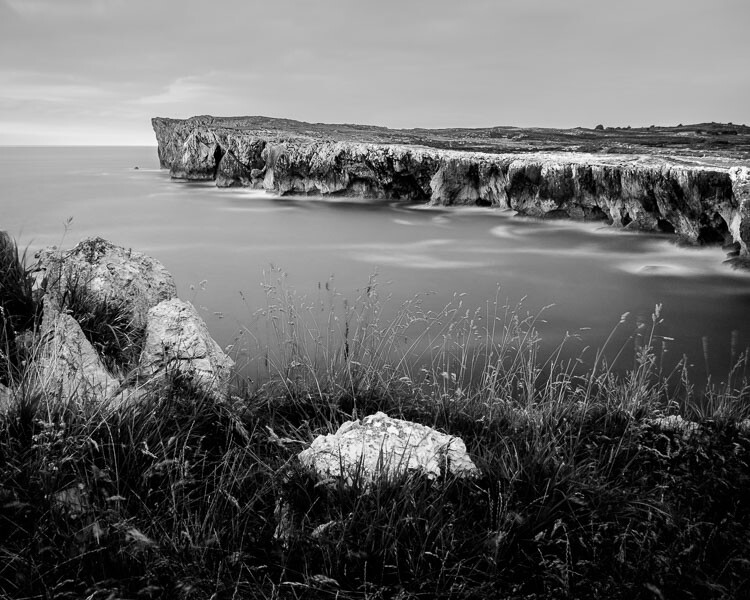
Black & white landscape in Lightroom

A good way of showing you how this works is to take you step by step through the process that I use when converting a landscape photo to black and white in Lightroom. You’ll see the techniques that I use. and more importantly, the reasoning behind them. This should give you the insight you need to use these tools on your own images.

1. Make sure you have a good image for black and white

The first step is to make sure that you are working with a photo that suits a black and white treatment. Good black and white photos have strong composition that make use of texture, line and tonal contrast.

It’s a good idea to convert only your best landscape photos to black and white. It will take you some time to convert a photo, so why waste it on anything less than your best work?

2. Prepare the color photo

First, open your photo in Lightroom’s Develop module. Then, I do two things before converting a color landscape photo to black and white.

  1. Use the Spot Removal tool to get rid of any dust spots.
  2. Set White Balance to Auto so that the color balance of the photo is more or less neutral. Photos with strong color casts are harder to successfully convert to black and white.

If you are converting a photo that you have already processed in color it’s a good idea to make a Virtual Copy and work on that. This way you don’t lose the work you have done on the original color version.
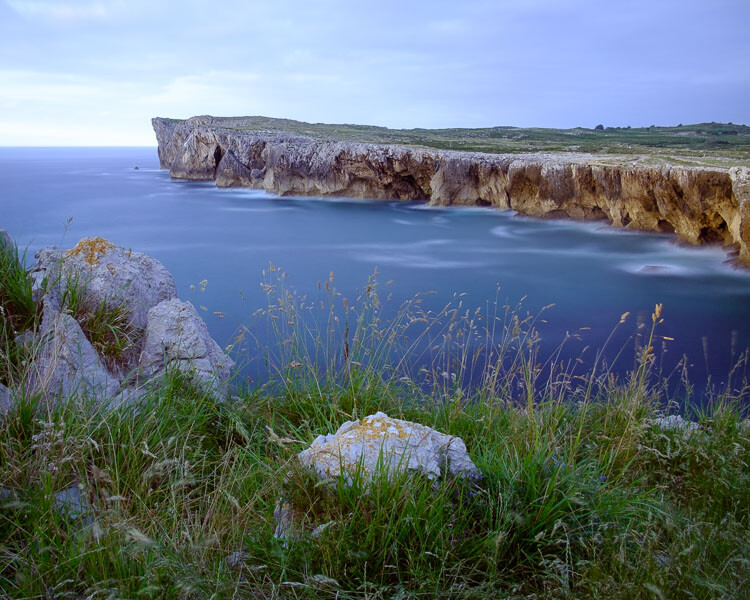
Black & white landscape in Lightroom

Here’s the color photo that I am going to convert to black and white.

3. Analyze your photo

This takes practice and becomes easier the more you convert photos to black and white. The idea is to make some big picture decisions about what you want to achieve with your conversion. With my photo I can see that:

  • The sky is too bright, and I would like to make it darker.
  • The distant cliffs have beautiful texture that I would like to bring out
  • So do the grass and stones in the foreground.
  • The sea and sky are smooth, creating a visual contrast against the heavily textured parts of the photo.
  • There is good tonal contrast between the grass and stones in the foreground.

This analysis helps me set some goals for the conversion.

4. Convert the image to black and white

There are three ways to convert the photo to black and white using Lightroom. They all do the same thing, so it doesn’t matter which of these methods you use:

  1. Set Treatment to Black & White in the Basic Panel.
  2. Use the keyboard shortcut; V .
  3. Click on B&W in the HSL/Color/B&W panel.

The conversion is likely to look quite flat. That’s okay – it’s easy to add some contrast.
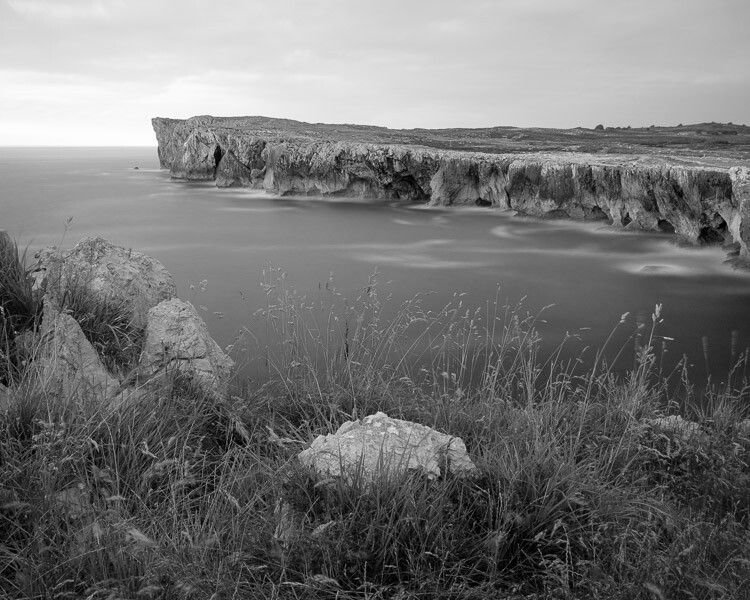
Black & white landscape in Lightroom

Now go to the B&W tab in the HSL / Color / B&W panel. It will look like one of the these two examples below depending on your Preference settings in Lightroom:
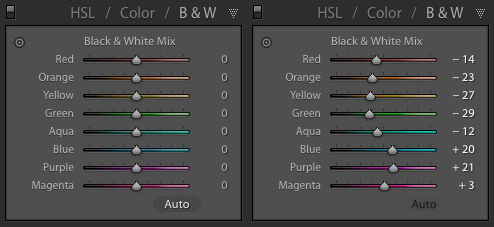
Black & white landscape in Lightroom

If you go to the Presets tab in Preferences (see below) you’ll see a tick box titled Apply auto mix when first converting to black and white. If this is unchecked, all the sliders will be zeroed, as in the screenshot on the left (above). If it is ticked, Lightroom takes a guess at what settings to use to make a good conversion and you’ll see something like the screenshot on the right (above).
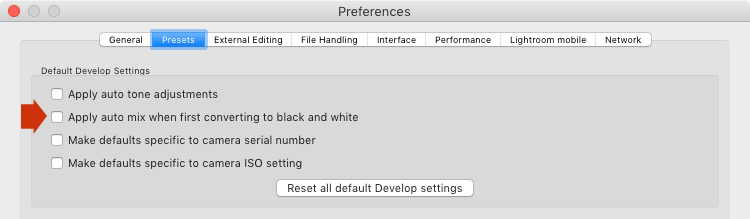
Black & white landscape in Lightroom

My preference is to leave the box unticked.

When I convert the image to black and white I go to the HSL / Color / B&W panel and click the Auto button at the bottom of the B&W tab. If I like the result, I leave it there. If I don’t, I use the undo command (Ctrl-Z on a PC, Cmd-Z on a Mac) to undo it.

In this case, I liked the result of pressing the Auto button, so I left the settings as they were. I rarely do any work more than this in the HSL / Color / B&W panel.
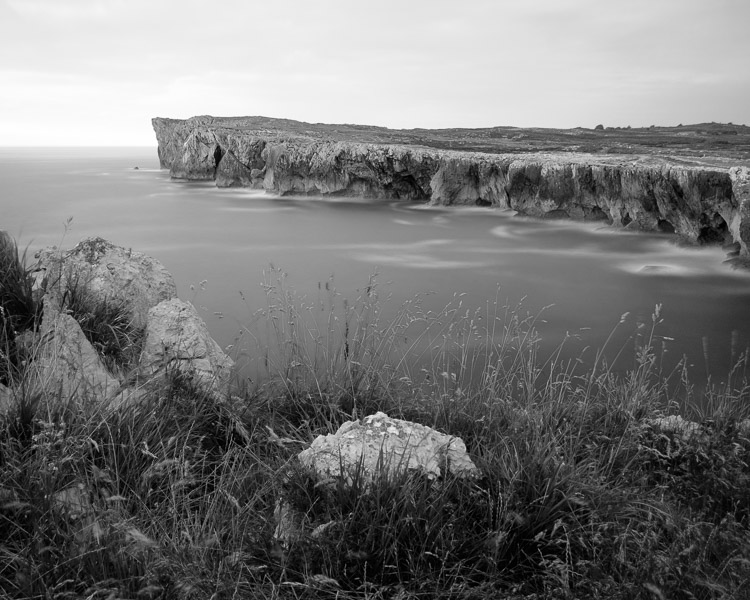
Black & white landscape in Lightroom

5. Basic panel adjustments

Now it’s time to make some global adjustments in the Basic panel. Global adjustments are those that apply to the entire image.

The image is flat so the first step is to increase contrast.

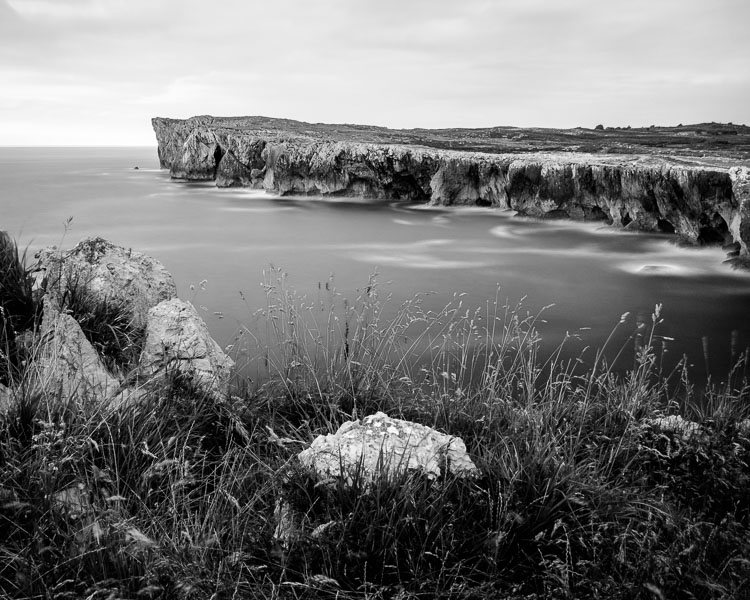
Going back to the analysis I did earlier, I can see that I want to emphasize the textures in the photo. Clarity is the ideal tool for this. Increasing Clarity also increases contrast. You should adjust both Clarity and Contrast sliders to get the best overall effect, without overdoing it. You can also use the Highlights and Shadows sliders to adjust the brightness of the lightest and darkest tones in the image individually.

In the end I set Contrast to +40, Clarity to +60, Shadows to -13 and Highlights to -49. Remember that every image is different, and that these settings only apply to this one.
Black & white landscape in Lightroom

6. Make local adjustments.

Now it’s time to make some local adjustments. Local adjustments are those that just affect part of the image. Lightroom gives you three tools to do this – the Radial filter, the Graduated filter and the Adjustment Brush.

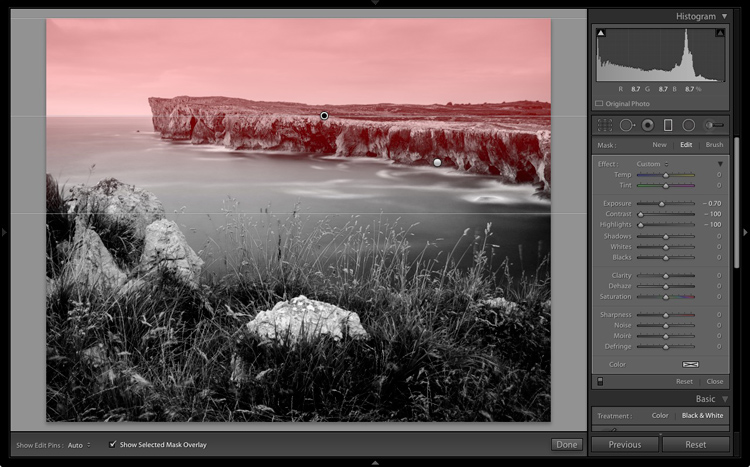
I want to make the sky darker in this photo, so I will do that with a Graduated filter. This screenshot shows the location of the Graduated filter (the area affected by the local adjustment is shown in red).
Black & white landscape in Lightroom

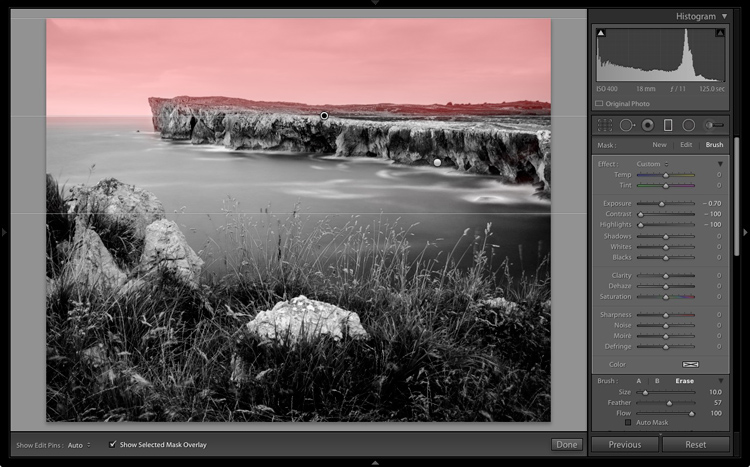
I used the brush to erase part of the Graduated filter so that the sea and cliffs weren’t affected.
Black & white landscape in Lightroom

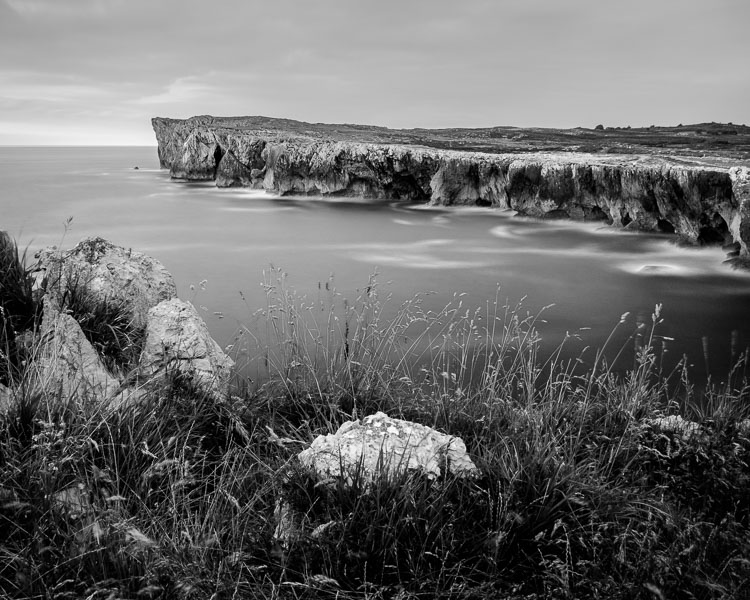
I set Exposure to -0.70, Contrast to -100 and Highlights to -100. Again, the settings required depend on your photo.

My aim here was to make the clouds darker and reduce the contrast so that they appeared smoother. The contrast in this image is in the cliffs, the sea and the foreground, not the sky. Less contrast in the sky means that it won’t compete with those areas for attention.
Black & white landscape in Lightroom

The next local adjustment is on the cliffs in the background. I used the Adjustment Brush for this. Here’s the area affected by the local adjustment (shown in red again).
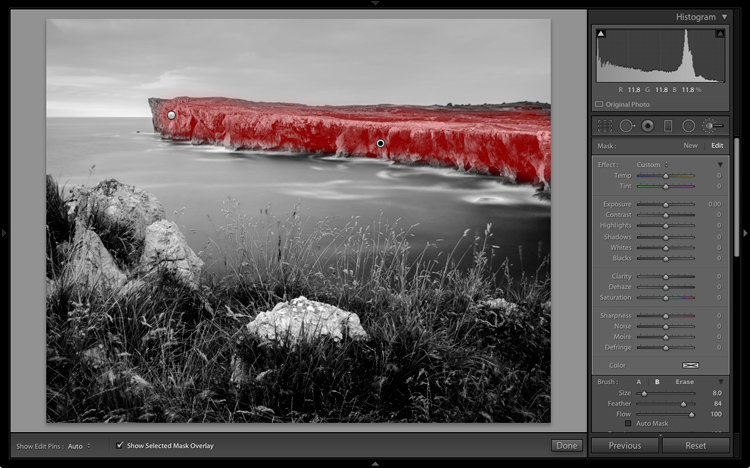
Black & white landscape in Lightroom

I set Clarity to +86 and Shadows to +16.
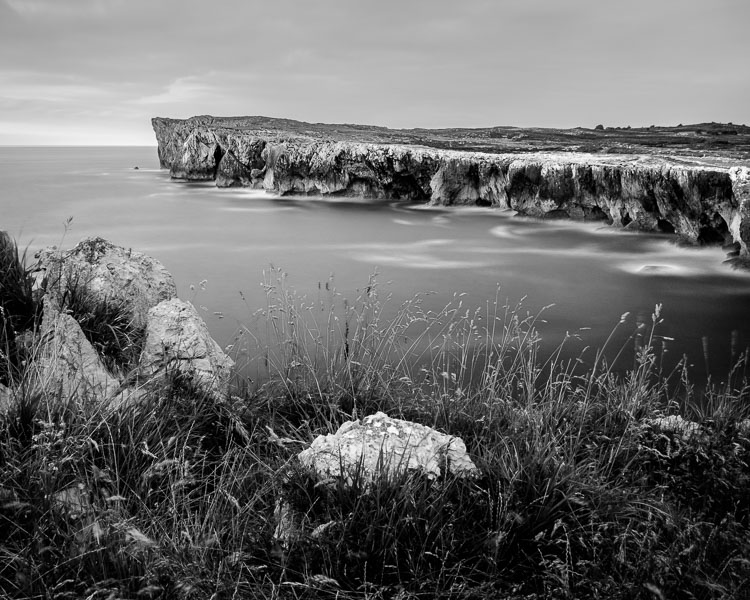
Black & white landscape in Lightroom

You may remember that in my analysis I decided that I wanted to make the foreground darker to emphasize the tonal contrast between the grass and the rocks. I’m going to use the Adjustment Brush for this as well.

First, I added an Adjustment Brush to make the grass darker. Here’s the area affected (shown in red).
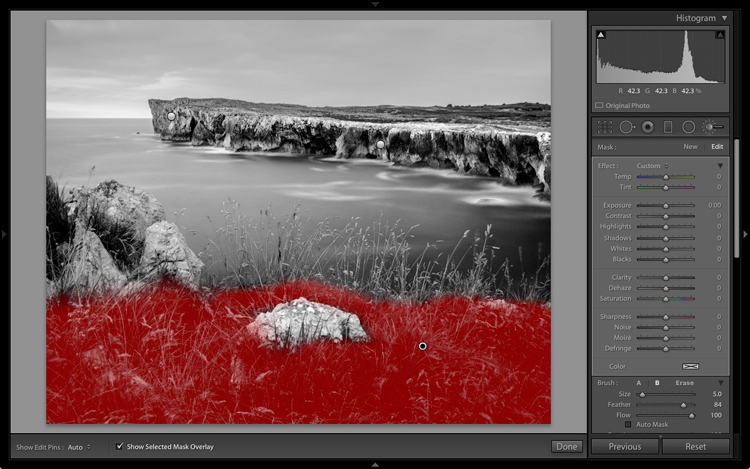
Black & white landscape in Lightroom

I set Highlights to -64, Shadows to -48.
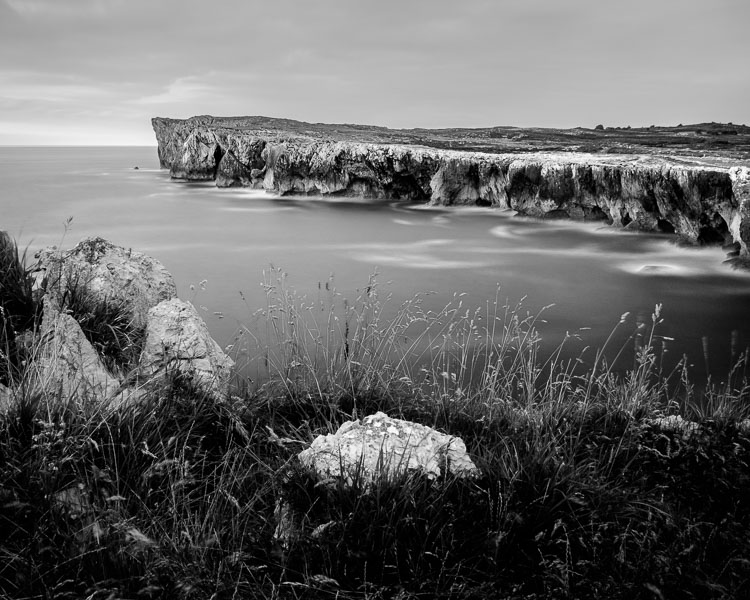
Black & white landscape in Lightroom

That left a light patch in the bottom left corner, and a dark patch under the stone in the center. I used the Adjustment Brush two more times, to make the light patch darker and the dark bit lighter, creating a more even tone across the bottom of the image.

Then I used the Adjustment Brush on the stones, with a Clarity adjustment to bring out the texture. Below is the result of all those adjustments.
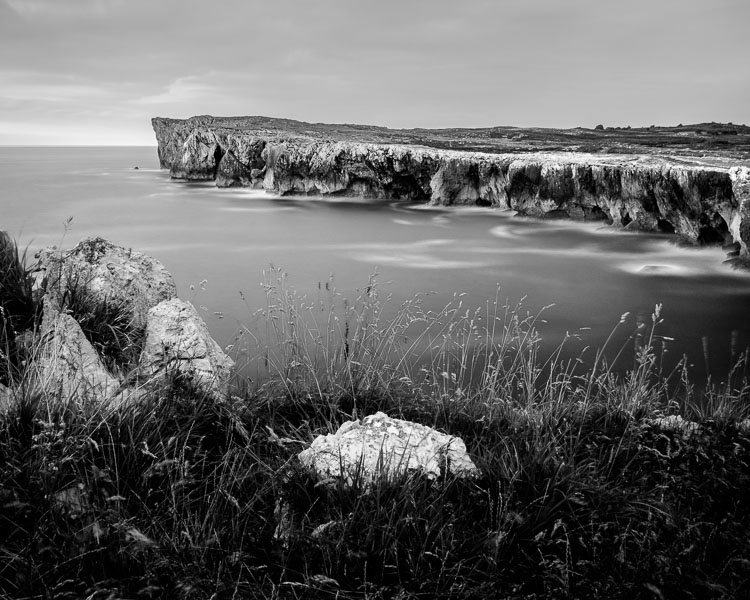
Black & white landscape in Lightroom

Next I used the Adjustment Brush again and selected the sea and the sky.
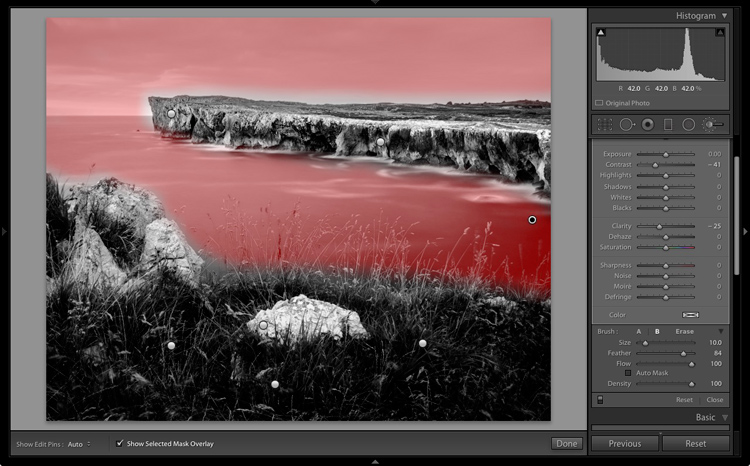
Black & white landscape in Lightroom

Then I set Contrast to -41 and Clarity to -25. The idea was to remove some of the contrast and texture from these areas, to emphasize the smoothness and lack of texture and set up a stronger visual contrast against the heavily textured cliffs and foreground.

Black & white landscape in Lightroom

That’s it. The final image could certainly be refined a little further, but it’s important to pick a point at which to stop so that you don’t spend too much time on the conversion. Where this point is depends on how much of a perfectionist you are, and how much time you are willing to devote to a single image.

Here’s the initial black and white conversion and the final result together so you can see the difference more clearly.

Black & white landscape in Lightroom

Original color image.

Black & white landscape in Lightroom

First version of black and white conversion.

Black & white landscape in Lightroom

Final image.

There are lots of ways you can convert landscape photos to black and white in Lightroom. I’ve only touched on the topic here, so if you have anything to add please let us know in the comments.


Mastering Lightroom

If you want to know more about processing black & white photo in Lightroom then please check out my ebook Mastering Lightroom: Book Three – Black & White.

googletag.cmd.push(function() {
tablet_slots.push( googletag.defineSlot( “/1005424/_dPSv4_tab-all-article-bottom_(300×250)”, [300, 250], “pb-ad-78623” ).addService( googletag.pubads() ) ); } );

googletag.cmd.push(function() {
mobile_slots.push( googletag.defineSlot( “/1005424/_dPSv4_mob-all-article-bottom_(300×250)”, [300, 250], “pb-ad-78158” ).addService( googletag.pubads() ) ); } );

The post How to Process a Black and White Landscape Photo Using Lightroom by Andrew S. Gibson appeared first on Digital Photography School.


Digital Photography School

 
Comments Off on How to Process a Black and White Landscape Photo Using Lightroom

Posted in Photography


Polaroid puts Snap Touch digital instant camera on display

20 Sep

Polaroid licensee C&A Marketing is showing an upgraded version of its original Polaroid Snap digital instant camera. The Polaroid Snap Touch adds a 3.5″ LCD touchscreen on the back of the camera for easier framing and control of the menus and settings. Images are captured on a new and improved 13 MP CMOS sensor and the new model is capable of recording 1080p Full-HD video. Images and video footage are saved on a microSD card up to 128GB in size. 

Remote connectivity through Bluetooth to the Polaroid Print app for iOS or Android allows for printing from other devices, such as smartphones or tablets, and the app also offers editing functions including a range of filters and digital stickers. 

As before, at the heart of the camera there is an integrated printer that uses using ZINK Zero Ink Printing Technology, allowing for 2×3” prints in under a minute. Up to ten images can be queued, so that you can keep shooting while printing is still in progress. Selfie shooters will appreciate the self-timer and a pop-up selfie mirror for easy framing.  The Polaroid Snap Touch is available in several colors and can now be preordered for $ 179.99. 

Articles: Digital Photography Review (dpreview.com)

 
Comments Off on Polaroid puts Snap Touch digital instant camera on display

Posted in Uncategorized


Photokina 2016: Hands-on with Phase One 45mm F3.5 and 150mm F2.8 ‘Blue Ring’ lenses

20 Sep

Hands-on with Phase One 45mm F3.5 and 150mm F2.8

Phase One is showing off two new ‘Blue Ring’ lenses at this year’s Photokina tradeshow in Cologne, Germany. We visited the Phase One booth earlier and got our hands on them.

First up is the new 150mm LS F2.8 IF, which offers a focal length equivalent to 64mm on full-frame, making it a useful portrait prime. At first glance this is an enormous lens, but a lot of its apparent size is actually the detachable hood.

Hands-on with Phase One 45mm F3.5 and 150mm F2.8

F2.8 is fast for a medium-format lens, which should ensure nice shallow depth of field when used wide-open for portraits. Here’s a view straight down the front of the lens. See what we mean about that big hood?

Hands-on with Phase One 45mm F3.5 and 150mm F2.8

With the hood removed, the 150mm becomes a good deal smaller. The new lens can synchronize with flash at shutter speeds of up to 1/1000sec and can focus as close as 100cm/3.2ft. It uses 8 elements in 7 groups and accepts 105mm screw-in filters. It could be yours for only $ 6990/€5990.

Hands-on with Phase One 45mm F3.5 and 150mm F2.8

Next up is the 45mm LS F3.5, which Phase One tells us will offer extremely good edge-to-edge sharpness, even wide-open. Aimed at landscape photographers, the 45mm (and indeed the 150mm) offers a simple auto/manual focus clutch switch. Shifting to manual focus is as easy as pulling the focus ring towards the camera.

Hands-on with Phase One 45mm F3.5 and 150mm F2.8

Like the 150mm, the 45mm features a leaf shutter inside the lens itself, and it can synchronize with flash at shutter speeds of up to 1/1600sec. Construction comprises 10 elements in 7 groups.

Hands-on with Phase One 45mm F3.5 and 150mm F2.8

Equivalent to a 28mm field of view on full-frame, the new 45mm F3.5 has a closest focusing distance of 55cm/1.8ft. It is available now for $ 5990/€5290.

Hands-on with Phase One 45mm F3.5 and 150mm F2.8

This is Lau Norgaard, VP of R&D at Phase One. He’s pretty pleased with his new lenses – what do you think? Let us know in the comments.

Articles: Digital Photography Review (dpreview.com)

 
Comments Off on Photokina 2016: Hands-on with Phase One 45mm F3.5 and 150mm F2.8 ‘Blue Ring’ lenses

Posted in Uncategorized


Hands-on with the Panasonic Lumix DMC-G85

20 Sep

Hands-on with the Panasonic Lumix G85

The new Lumix DMC-G85/G80 sits somewhere between the GX8 and the G7. It provides a much more advanced user experience and more rugged magnesium body than the G7 but without the 20MP resolution of the GX8. While the shape is very much like the G7 the build is significantly more solid and the grip feels more substantial. Panasonic has weather- and dust-proofed the body and introduced a new shutter unit that reduces shutter shock in mechanical mode and which offers an electronic first curtain mode for the first time.

Hands-on with the Panasonic Lumix G85

The rear screen is the same 1040k-dot unit touch LCD that is used in the G7, and it features the same vari-angle hinge too. The viewfinder is also the same 2360k OLED but Panasonic has increased the magnification from 0.7x to 0.74x to make the view feel a bit bigger – which it does. The eye relief is also increased from 17.5mm to 20mm, to help glasses wearers. The layout of the back of the camera is much in the style of the G7, GX8 and the GH4, so will be familiar to those already using the Lumix system.

Hands-on with the Panasonic Lumix G85

The top plate is pretty standard Lumix fare, with the dual control wheels on either side of the grip that can be customized for a range of preferences and activities. The head houses a built-in flash unit that can be used as an active or silent commander with the company’s wireless flash system.

Hands-on with the Panasonic Lumix G85

The dial on the left of the top plate provides access to some of the drive functions of the camera. The high drive mode allows shooting at up to 9fps for 200 JPEGs or 40 Raw files, and the 4K symbol indicates where we find the 4K Photo modes. The new icon of a flower and a mountain is the Post Focus setting that now doubles as a focus stacking mode.

The camera shoots a 4K clip running the focus from the closest to the farthest point in the scene, and in Post Focus the user can choose which part of the scene they’d like to be in focus. The same clip can be used to create a focus stack of either all the clips or clips just covering a particular range within the scene – so you can have full control of what is in and out of focus. The mode is only good for static subjects though. An addition to all the 4K modes is Bulk Save – which simply saves all the frames from any 4K Photo/Post Focus clip as 8MP JPEG files on the memory card.

Hands-on with the Panasonic Lumix G85

The base features the battery chamber with an additional cover that suggests that a mains power adapter will be available to run the camera from a household supply. The battery used to power the G85 is the same DMW-BLC12E 1200mAh unit that is used in the GX8. The contacts on show here are designed to connect with the optional battery grip DMW-BGG1.

Hands-on with the Panasonic Lumix G85

The Lumix DMC-G85 uses a 16MP Live MOS sensor that operates without a low-pass filter in the same way that the GX85 does. Panasonic has included the new Dual IS 2 5-axis in-body image stabilization system in this camera and claims it compensates for 5-stops. The system in the GX85 only claims 4-stops. The new system can combine with in-lens Mega OIS when it is available to alter the principle source of stabilization between the body and the lens according to the type of shake it expects from the focal length in use. The camera’s 4K video features are much the same as the G7’s but now include unlimited recording outside the EU and 60p/30p recording in PAL areas.

Hands-on with the Panasonic Lumix G85

Weather-sealed covers on the side of the camera reveal a micro HDMI port along with USB, microphone and a cabled remote release socket. There is no headphone socket unfortunately, but now we can stream to an HDMI monitor while recording 4:2:2 to the memory card. On the other side of the camera you’ll find the SD card slot – which has moved from the battery compartment so that it can be accessed when the grip is attached.

Hands-on with the Panasonic Lumix G85

The grip provides duplicates of the top plate dials for adjusting apertures and shutter speeds, designed to feel just like their counterparts as well as to perform the same tasks. Even the exposure compensation button has made the trip, while a back-button offers AF/AE lock.

Hands-on with the Panasonic Lumix G85

The optional grip DMW-BGG1 adds considerable bulk to the G85, making it much taller than the GH4, but it also makes the camera much more comfortable to hold in the upright position. It houses an extra battery that can be accessed automatically when the body battery is exhausted or when the user switches between the cells via the menu system.

Panasonic claims that a new economy mode allows the usual expected 320 shots per charge to be extended to up to 900 shots by reducing the amount of time displays are on. The economy mode shuts off the rear screen during shooting and works most effectively for those who use the viewfinder.

Read our Panasonic Lumix DMC-G85 First Impression Review

Articles: Digital Photography Review (dpreview.com)

 
Comments Off on Hands-on with the Panasonic Lumix DMC-G85

Posted in Uncategorized


Drone Design: 14 Autonomous Gadgets Taking Tech to New Heights

20 Sep

[ By SA Rogers in Gadgets & Geekery & Technology. ]

drone-design-millennium-falcon-2

Their efficiency in the real world is yet to be established, but if these drone concepts and fully-realized creations are any indication, some of us could be looking at losing our jobs to robots in a range of industries over the net couple decades. From emergency responders to face-recognizing cameras, many of these autonomous flying gadgets take over tasks currently completed by pilots, construction workers, delivery drivers and videographers – but sometimes, they’re just for selfies.

Mercedes-Benz Electric Vision Van with Rooftop Drones

drone-design-mercedes-1

drone-design-ercedes-2

Designed for last-mile delivery in urban and suburban contexts, the all-electric ‘Vision Van’ by Mercedes-Benz is the first of its kind to feature built-in aerial drones that enable multiple package deliveries in a single neighborhood at the same time. This theoretically reduces the number of vehicles in any given residential area and makes the delivery process totally emissions-free. The van also features blue LED lighting on the lower body and slide-out shelving units. It certainly takes windowless vans to another level.

ROAM-e Mini Selfie Drone

drone-design-roam-e

drone-design-roam-e-2

What would have been seen as undeniably dystopian in previous decades is now packaged as a selfie assistance tool. The ROAM-e drone can be programmed with facial recognition technology so it follows you around like a puppy, snapping your photo or streaming live video all the while. Admittedly, the video function could be helpful, standing in for a camera operator in all sorts of settings and going where they can’t go (unless they’re secretly superheroes). The drone can be collapsed and folded to the side of a water bottle an two hours of swappable charging keeps the drone in the air for up to 20 minutes (for longer videos, switch out the battery.)

PowerEgg Drone

drone-design-power-egg

drone-design-power-egg-2

A small egg-shaped device sprouts propellers and turns into a personal camera drone at the push of a button. The PowerEgg by PowerVision is clean, simple and easy to transport, featuring a 360-degree panoramic 4K HD camera, advanced sensors for indoor navigation and real-time, long-range video transmission. You can snag one yourself for $ 1,288.

Drone Ambulance by Argodesign

drone-design-ambulance

drone-design-ambulance-2

Could this Drone Ambulance concept by Argodesign save lives by enabling more flying responders to hit the ground faster than a single helicopter? It’s about the size of a compact car and can land in much smaller areas, and a single pilot can manage an entire fleet of them remotely.

Trident Underwater Drone

drone-design-trident

drone-design-trident-2

Explore bodies of water without ever getting wet thanks to the Trident drone by Berkeley robotics company Openrov. No scuba gear and training is required when you send this portable machine down into the water in your place, and it can dive to a depth of 100 meters, sending live HD video to the surface via a thin buoyant tether. It can be controlled from the surface by a laptop or mobile device. The Trident is set to hit the market in November.

Next Page – Click Below to Read More:
Drone Design 14 Autonomous Gadgets Taking Tech To New Heights

Share on Facebook


[ By SA Rogers in Gadgets & Geekery & Technology. ]

[ WebUrbanist | Archives | Galleries | Privacy | TOS ]


WebUrbanist

 
Comments Off on Drone Design: 14 Autonomous Gadgets Taking Tech to New Heights

Posted in Creativity


Sigma adds the 85mm F1.4 Art, 12-24mm Art, 500mm F4 Sport lenses to its Global Vision line

20 Sep

$ (document).ready(function() { SampleGalleryV2({“containerId”:”embeddedSampleGallery_4713538649″,”galleryId”:”4713538649″,”isEmbeddedWidget”:true,”standalone”:false,”selectedImageIndex”:0,”startInCommentsView”:false,”isMobile”:false}) });

Sigma has announced three new full-frame lenses for its Global Vision Line. The long-rumored and long-awaited 85mm F1.4 Art, the 12-24mm F4 Art, and the 500 F4 DG OS HSM Sport.

The 85mm F1.4 Art has been designed with resolution and bokeh in mind. A stronger HSM AF motor produces 1.3x the torque of the previous setup hopes to improve autofocus speed as well. The lens will be available in late October at a price $ 1199.

The Sigma 12-24mm F4 DG HSM Art is a new ultra-wide-angle zoom. It too features the stronger AF module, and also features the largest aspherical glass mold in the industry, which helps produce minimal distortion, flare and ghosting. The lens will be available in late October for $ 1599.

The Sigma 500mm F4 DG OS HSM Sport uses lightweight materials like carbon fiber and magnesium alloy and features a dust and splash resistant construction. In Nikon mount it features a brand-new electronic diaphragm. The Sigma 500mm F4 Sport lens, in Canon and Sigma mounts, will be available in late October. The Nikon mount will be available in late November. The 500mm F4 will retail for $ 5999.

Press Release:

Sigma Adds the 85mm F1.4 DG HSM Art, 12-24mm F4 DG HSM Art, and 500mm F4 DG OS HSM Sport Lenses to Its Global Vision Line

Outstanding optical performance, ultra-wide zoom range, and versatile flagship sports lens headline the Sigma line-up at Photokina 2016

Cologne, Germany – September 19, 2016 – Sigma Corporation of America, a leading camera, DSLR lens, flash and accessories manufacturer, unveiled its new 85mm F1.4 DG HSM Art, 12-24mm F4 DG HSM Art and 500mm F4 DG OS HSM Sport Global Vision lenses at the Photokina 2016 event (hall 4.2, stands B020, B028 and C029).

“We are thrilled to announce three state-of-the-art additions to the Global Vision line. The Sigma 85mm 1.4 Art has been a highly requested lens and we are very confident those customers who have been waiting for us to deliver this lens will be more than pleased with the superior optical performance and zero compromise,” states Mark Amir-Hamzeh, president of Sigma Corporation of America. “In addition, the re-engineered 12-24mm F4 and highly competitive 500mm F4 Sport lens both embody the world-class performance our Global Vision lenses are known for. We look forward to seeing the incredible images our customers will create using these new Sigma lenses.”

Sigma 85mm F1.4 DG HSM Art – The Ultimate Portrait Lens
Delivering the ultimate in creative expression, the new Sigma 85mm F1.4 Art lens is engineered to support the highest resolution sensors on the market with an exceptional degree of sharpness. The high-performance optical system is purpose-built by Sigma R&D to produce the attractive bokeh effect sought after by discerning photographers. The lens’ advanced architecture features two SLD (special low dispersion) glass elements and one glass element with a high rate of anomalous partial dispersion and refraction. A re-engineered AF system brings 1.3X the torque of its predecessor, while other features such as a full-time manual focus override have been added, which can be controlled when the focus ring is rotated, even during continuous AF.

The Sigma 85mm F1.4 DG HSM Art lens supports Canon, Nikon and Sigma mounts. The Nikon mounts feature a brand new electromagnetic diaphragm.

The Sigma 85mm F1.4 Art lens will be available in late October and retails for a recommended street price of $ 1199.00 USD.

Sigma 12-24mm F4 DG HSM Art Ultra-Wide Angle Zoom for the Era of Ultra-High Resolution Digital Cameras
Boasting the renowned Global Vision image quality from center to edge, the new Sigma 12-24mm F4 features the largest aspherical glass mold in the industry, offering photographers an ultra-wide angle zoom with virtually no distortion, flare or ghosting. Encompassing the long history of Sigma wide angle lens development expertise, the new 12-24mm F4 performance highlights include constant F4 brightness and the brand new Sigma AF system with 1.3X torque boost. The 12-24mm F4 features lens elements made with FLD (“F” Low Dispersion) glass, which is equivalent to calcium fluorite in performance. Combined with an optimized power distribution, the result is outstanding image quality from center to edges. With a minimum focus distance of 9.4 inches at 24mm, photographers can compose incredible close-up shots with expansive backgrounds.

The all new Sigma 12-24mm F4 DG HSM Art lens supports Canon, Nikon and Sigma mounts. The Nikon mounts feature the brand new electromagnetic diaphragm.

The Sigma 12-24mm F4 Art lens will be available in late October and retails for a recommended street price of $ 1599.00 USD.

Sigma 500mm F4 DG OS HSM Sport Lens – Pro Fast-Aperture Prime Super Telephoto
The flagship Sigma super telephoto 500mm F4 Sport lens incorporates the very latest in Sigma optical technology and innovation. Designed for the professional sports and wildlife shooter, the ultra-durable lens features magnesium alloy components, a carbon fiber hood, a water and oil resistant front element, and is dust and splash proof. The 500mm F4 features a drop-in rear filter slot for polarizers, UV and other critical filters. To help prevent damage during shooting and maintenance, the lens is also compatible with the exclusive SIGMA Protector LPT-11 (sold separately).

The lens incorporates two FLD and one SLD glass elements, while the optimized power distribution helps minimize spherical aberration and axial chromatic aberration. The optical system also effectively minimizes transverse chromatic aberration, which can affect the edges of the shots taken in the telephoto range. In addition, image quality remains exceptional when the lens is used with a Sigma Telephoto Converter (sold separately).

Other key performance features include Sigma’s two-mode Optical Stabilizer for enhanced performance when shooting handheld for still subjects or panning and tracking for moving subjects. There is also a customizable AF “return” function for setting the focus position of one’s choice and returning to that preset distance.

The all new Sigma 500mm F4 supports Canon, Nikon and Sigma mounts. The Nikon mounts feature the brand new electromagnetic diaphragm.

The Sigma 500mm F4 Sport lens, in Canon and Sigma mounts, will be available in late October. The Nikon mount will be available in late November. The 500mm F4 will retail for a recommended street price of $ 5999.00 USD.

All Sigma Global Vision lenses, including the new 85mm F1.4 DG HSM Art, 12-24mm F4 DG HSM Art, and 500mm F4 DG OS HSM Global Vision lenses, can be updated with the latest lens firmware from a workstation or laptop using the Sigma Optimization Pro software and Sigma USB Dock (sold separately).

Tested for Optimum Performance

Sigma lenses are born of well thought-out design concepts, exceptional Japanese craftsmanship and manufacturing, and advanced lens performance testing and evaluation. To this end, Sigma has developed its own A1 proprietary MTF (modulation transfer function) measuring system using 46-megapixel Foveon direct image sensors. Even the most elusive high-frequency details are within the scope of Sigma’s quality control inspections. Every Global Vision lens is A1 tested, analyzed and approved before leaving the factory, ensuring maximum performance out of the box.

For more information on Sigma’s industry leading testing, please visit http://blog.sigmaphoto.com/2012/a1-mtf-testing-for-new-sigma-lenses/.

About Sigma Corporation
Craftsmanship. Precision. Dedication. Since 1961, Sigma has been devoted the pursuit of advancing photographic technology. Unique to the industry, the family-owned business produces its high-quality, award-winning camera lenses, DSLR cameras, flashes, filters and accessories from its state-of-the-art manufacturing facility located in Aizu, Japan.

In 2012, the company introduced the Sigma Global Vision with three distinct lens lines: Art, Contemporary and Sport. Designed for industry camera mount systems including Canon, Nikon, Olympus, Pentax, Sony and Sigma, each lens is handcrafted and tested in Japan to ensure a high-performance, premium product that is purpose-built to last.

Sigma continues its tradition of imaging excellence with the mirrorless sd Quattro, sd Quattro H and the compact dp Quattro camera line. Leveraging the ultra-high resolution Foveon sensor, the Sigma Quattro cameras are designed to produce the highest quality image with every shot.

For information about Sigma, please visit www.sigmaphoto.com or follow the company on Twitter, Instagram and Facebook.

Articles: Digital Photography Review (dpreview.com)

 
Comments Off on Sigma adds the 85mm F1.4 Art, 12-24mm Art, 500mm F4 Sport lenses to its Global Vision line

Posted in Uncategorized