RSS
 

Archive for July, 2016

A Beginner’s Guide to Minimalist Photography

12 Jul

Minimalism is splitting the world in two. Love it or hate it, it’s a style with a very defined outline, one that has its roots in in the painted arts of the 20th century and that continued to branch out in other domains. These days, minimalism is especially present in design, fashion, and photography. A simple scout around websites such Continue Reading

The post A Beginner’s Guide to Minimalist Photography appeared first on Photodoto.


Photodoto

 
Comments Off on A Beginner’s Guide to Minimalist Photography

Posted in Photography


Photographer captures kayakers with help from drone-mounted Speedlites

12 Jul

Australian adventure photographer and Canon Master Krystle Wright is the subject of a new video from Canon in which she details photographing kayakers with the EOS-1D X Mark II. Wright captures the kayakers dropping down a 60ft waterfall in near darkness with help from a drone rigged with two 600-EX Speedlites.

‘With the way the world is these days, there’s so many images being produced,’ she explains, ‘you really have to push hard to create something that is unique.’ We’d say the unique approach definitely paid off with some memorable shots.

Articles: Digital Photography Review (dpreview.com)

 
Comments Off on Photographer captures kayakers with help from drone-mounted Speedlites

Posted in Uncategorized


2016 iPhone Photography Award winners announced

12 Jul

$ (document).ready(function() { SampleGalleryV2({“containerId”:”embeddedSampleGallery_2881453112″,”galleryId”:”2881453112″,”isEmbeddedWidget”:true,”standalone”:false,”selectedImageIndex”:0,”startInCommentsView”:false,”isMobile”:false}) });

The organizers of the iPhone Photography Awards (IPPAWARDS), one of the longest running mobile photography contests, have announced the winners of the 2016 competition. The grand prize this year goes to an image titled ‘The Man and the Eagle’ by Chinese photographer Siyuan Niu.

“The brave and wise Khalkhas live along the mountains in the south of Xinjiang and are companions with the eagles. They regard eagles as their children and train them for many years to hunt. This 70 year old man is rigid and solemn in front of family and friends, but when he is with his beloved eagle, the corner of his mouth would curve up. When the eagles reach mating age, although he is very reluctant, the man releases the eagles back into nature so that they can thrive. A mild heart and exquisite love are covered by his weather-beaten face. He is a tough man with a tender heart.”

The contest covers a wide range of categories and winning images were selected from thousands of submissions made by photographers from 139 countries. In the gallery above you can see the grand prize winning shot and some of the category winners. Head over to the IPPAWARDS website to see all winning images.

Articles: Digital Photography Review (dpreview.com)

 
Comments Off on 2016 iPhone Photography Award winners announced

Posted in Uncategorized


Bubble Buildings: 13 Structures You’ll Wish You Could Pop

12 Jul

[ By SA Rogers in Architecture & Public & Institutional. ]

bubble buildings dome 4

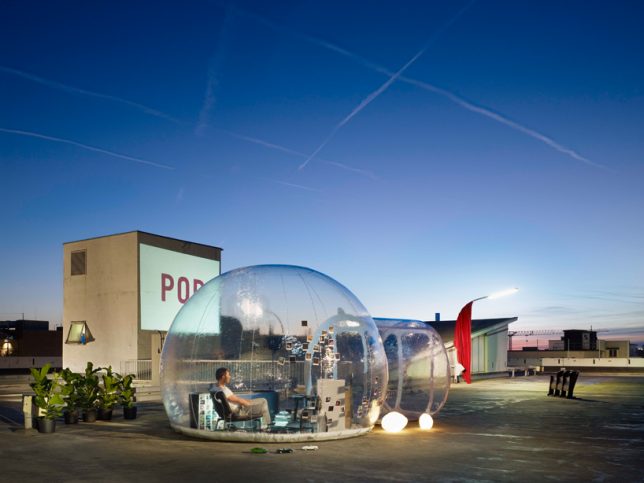
Would the satisfaction that comes with popping bubble wrap scale up as the bubbles get larger and larger, until they’re big enough to cover entire buildings? These blobby bubble-shaped buildings tempt us to find out. Inflatable translucent structures offer space for gardens, bathrooms, museum extensions and even entire parks enclosed to keep out air pollution in a literal representation of the term ‘living in a bubble.’

SKUM Pavilion by Bjarke Ingels Group / BIG

bubble buildings skum 1

bubble buildings skum 2

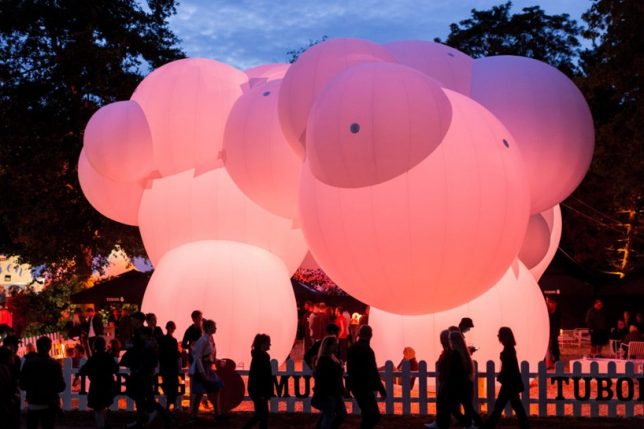
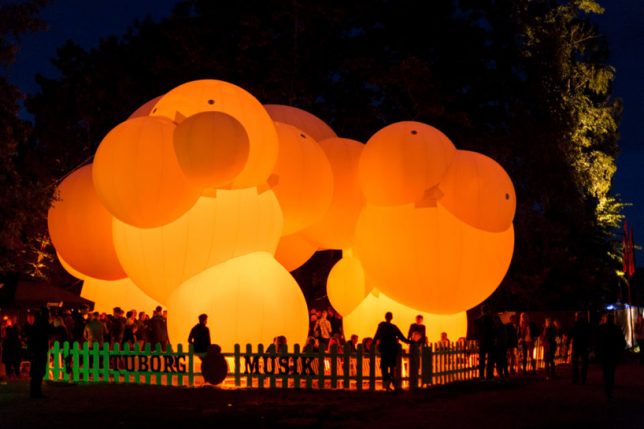
Named ‘SKUM,’ the Danish word for ‘foam,’ this blob-shaped structure is an inflatable balloon pavilion illuminated with colored LED lights by Bjarke Ingels Group / BIG for the CHART Art Fair in Copenhagen. “The idea of using a bouncy castle as material came about because one can create any kind of structure with the material. It is inflatable and easy to pack down and inflate again, but it has been much harder to produce than we thought. The manufacturer almost gave up, and we were under a massive time pressure, but the result is the most beautiful you can imagine.”

Real Bubble Building by DUS Architects

bubble building dus 1

bubble building dus 2

bubble building dus 3

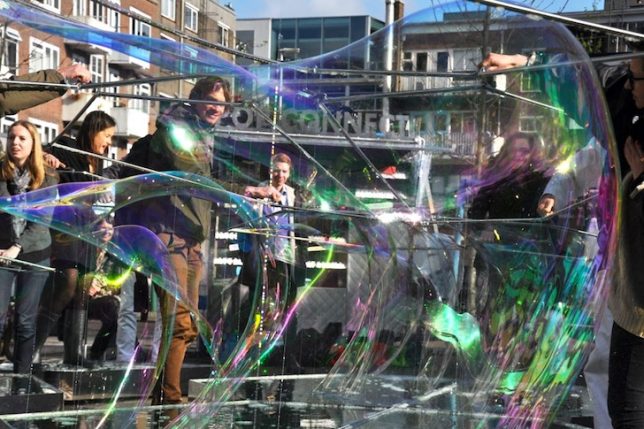
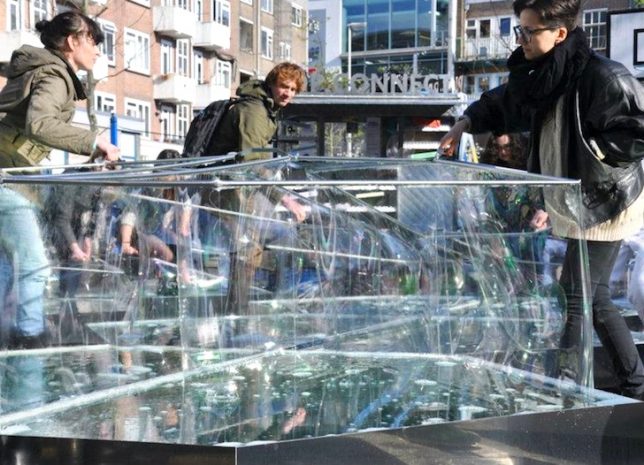
Now here’s a structure that isn’t just bubble-shaped – it’s actually made out of real soap bubbles. Dutch firm DUS created the pavilion in a Rotterdam square using metal frames in five-sided steel pools to create massive geometric bubbles you can stand inside, calling it “the world’s most temporary pavilion.”

Bubble Extension for the Hirschhorn Museum

bubble building extension 1

bubble buildings extension 2

bubble buildings extension 3

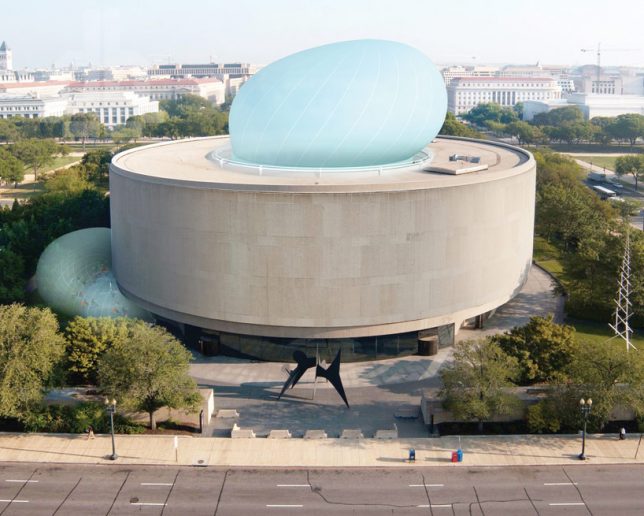
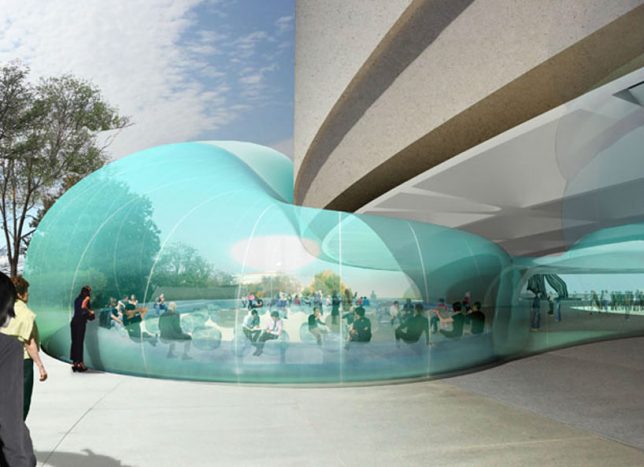
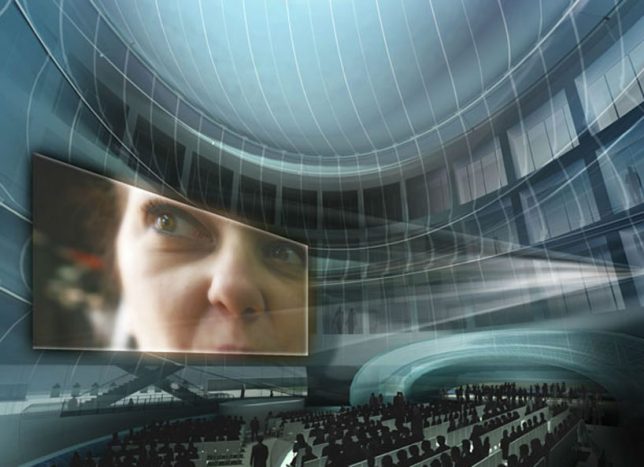
The firm Diller Scofidio + Renfro was all set to add a wild looking inflatable enhancement to the Smithsonian’s Hirshchorn Museum, creating a venue for two months of special programming, but the design was suspended due to costs. You might imagine that a large translucent fabric ‘bubble’ swelling up out of the museum’s internal courtyard would be less expensive than temporarily roofing it and adding additional covered space along the exterior, but the design was pretty complicated, and the museum board was concerned that costly additional issues with its installation would come up.

Transparent Mobile Bathroom

bubble building bathroom

bubble building bathroom 2

bubble building bathroom 3

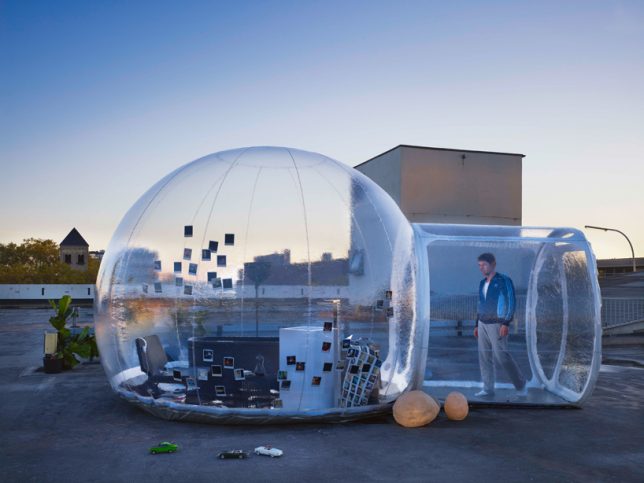
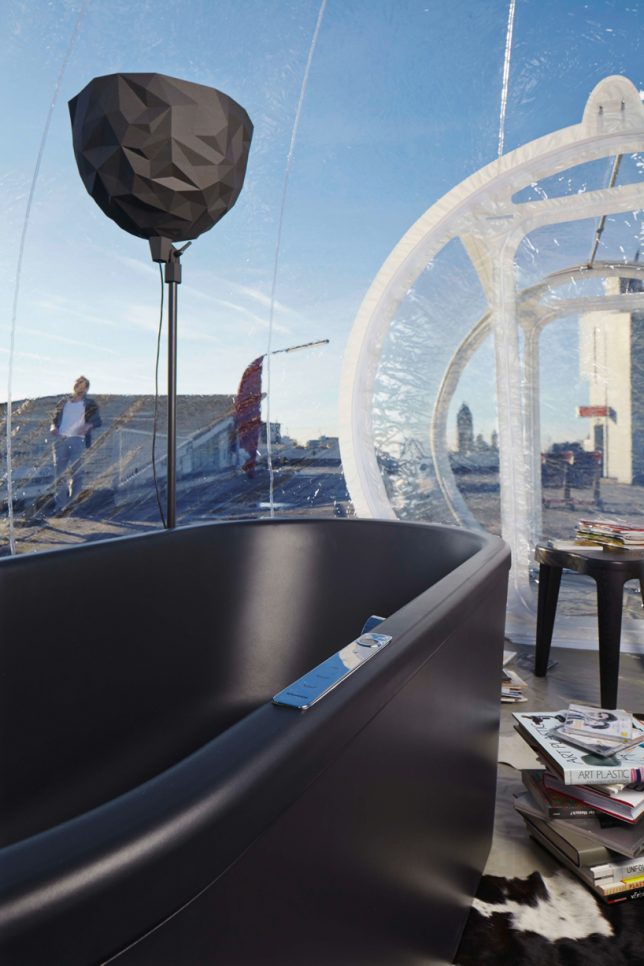
Would you want to take a bath in a totally transparent bubble with a panoramic vista? This inflatable bathroom pod is intended to be placed in the woods or in rooftops as the ‘ultimate bathroom experience,’ designed after polling groups of people about their dream bathroom. The inflatable structure includes a tub, chair, dresser and basin.

Garden Bubbles for Paris in Winter

bubble buildings garden paris 1

bubble buildings paris 2

bubble buildings paris 3

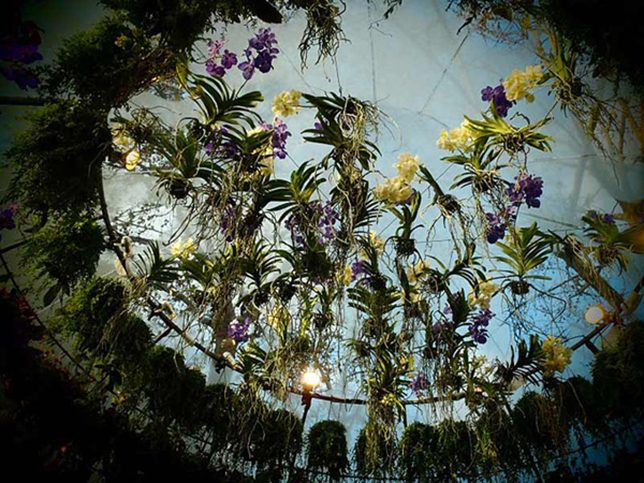
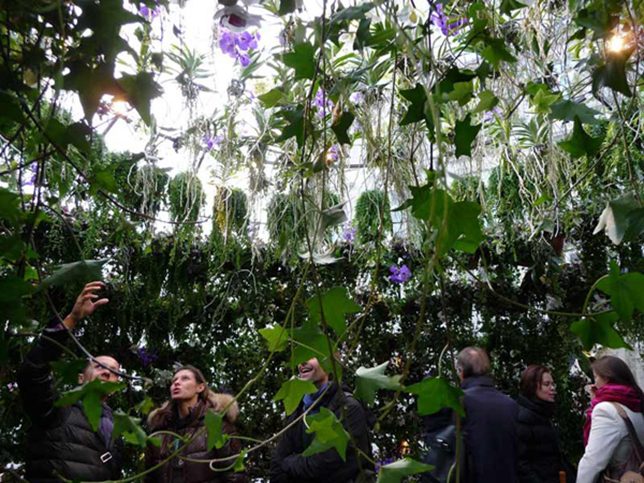
This pop-up art installation in Paris by Amaury Gallon inserted lush greenery back into the city in the middle of winter, providing passersby with 15 minutes of relaxation, beauty and fresh air. Four bubble gardens were placed on city sidewalks, each filled with a different type of plants, including a ‘jungle’ and hundreds of orchids.

Next Page – Click Below to Read More:
Bubble Buildings 13 Structures Youll Wish You Could Pop

Share on Facebook


[ By SA Rogers in Architecture & Public & Institutional. ]

[ WebUrbanist | Archives | Galleries | Privacy | TOS ]


WebUrbanist

 
Comments Off on Bubble Buildings: 13 Structures You’ll Wish You Could Pop

Posted in Creativity


8K Helium Super 35mm sensor on the way from RED

12 Jul

Movie camera manufacturer RED has announced that it will be introducing a new 8K sensor that it is calling Helium. At 29.9×15.77mm the new sensor is much smaller than the current 8K Dragon sensor, which measures 40.96×21.6mm, but both sensors have 8192×4320 pixels.

The attraction of the new Helium sensor is that a wider range of lenses will provide sufficient coverage for its shorter diagonal, even though it is slightly larger than the standard Super 35mm format. It should also be easier to make and may take some of the pressure off the company’s difficult delivery of the larger Dragon 8K VistaVision sized sensor. The Helium is designed to operate in the same Weapon camera, but the company’s CEO Jarred Land also let on that a new camera, the Epic-W, will also come with the new sensor.

The announcement was made in a casual way in Land’s July Update on the Red User forum and via pictures posted on Land’s Instagram and Facebook pages, as well as those of the company designer’s Matthew Tremblay. Little technical detail has been released so far, but it is known that the pixels will be just 3.65 microns and that the sensor will be available in ‘coming months’.

For more information see the RED website and REDuser forum.

Articles: Digital Photography Review (dpreview.com)

 
Comments Off on 8K Helium Super 35mm sensor on the way from RED

Posted in Uncategorized


How to Create Beautiful Light Painting Images With an Illuminated Hoop

12 Jul

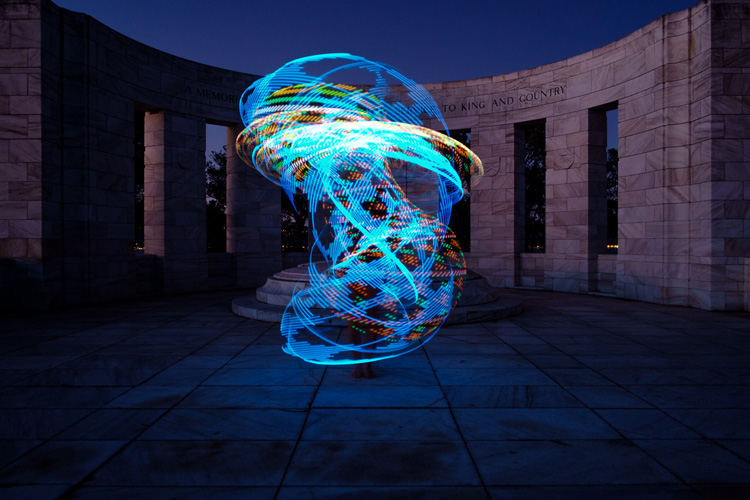
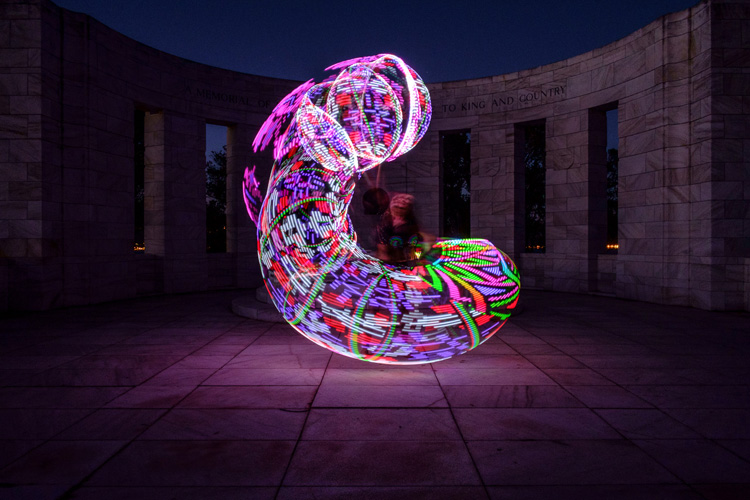
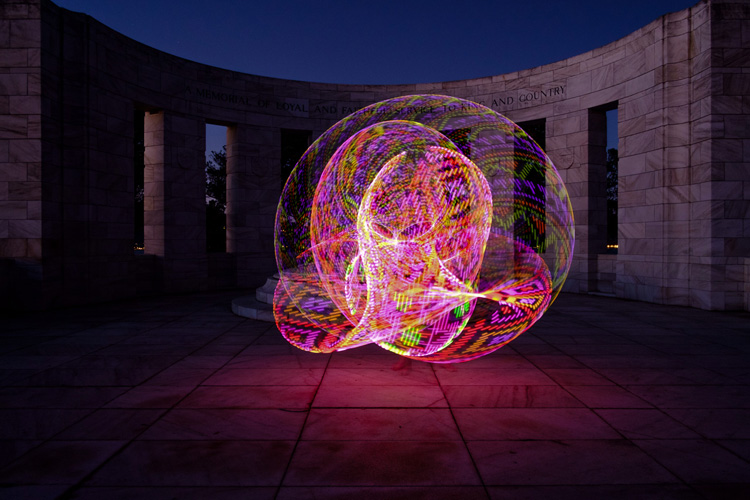
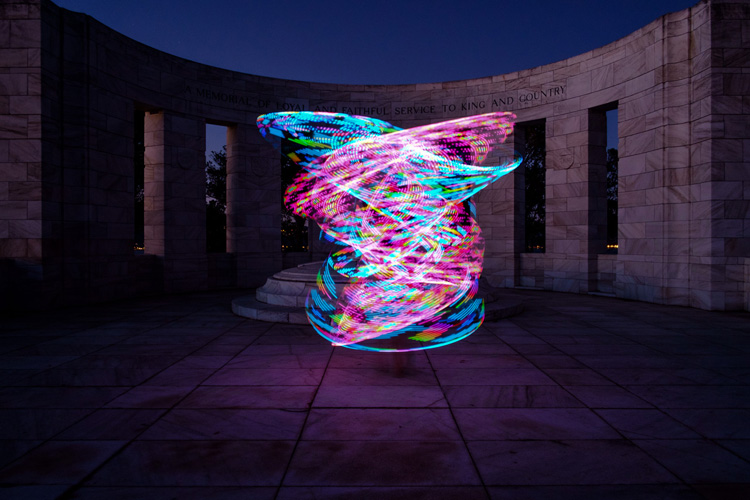
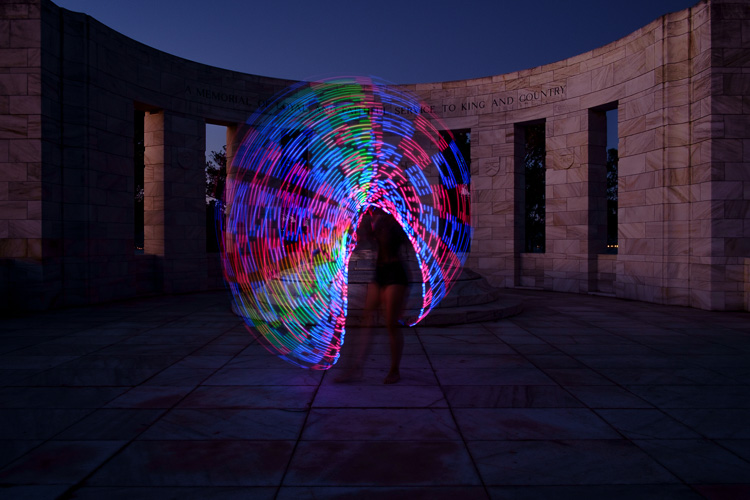
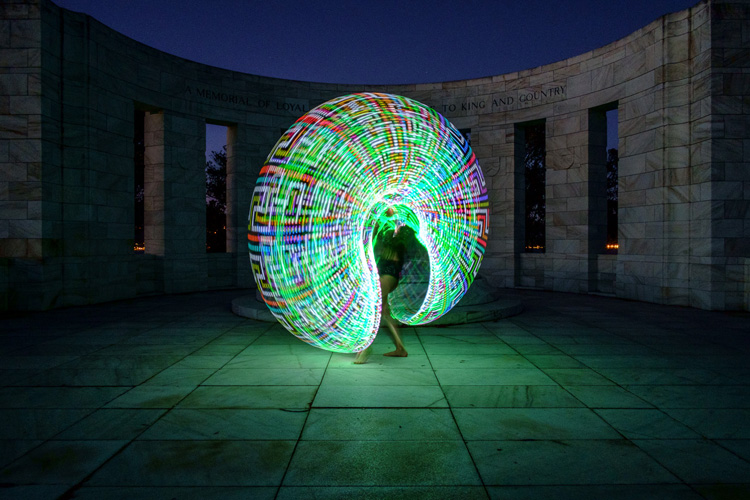
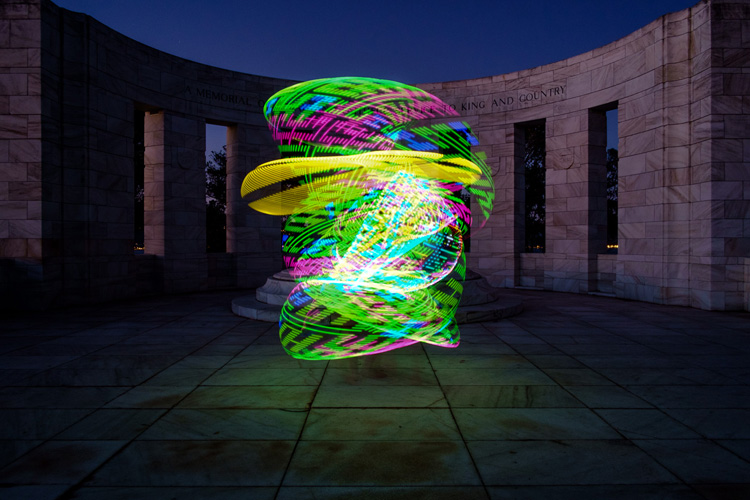
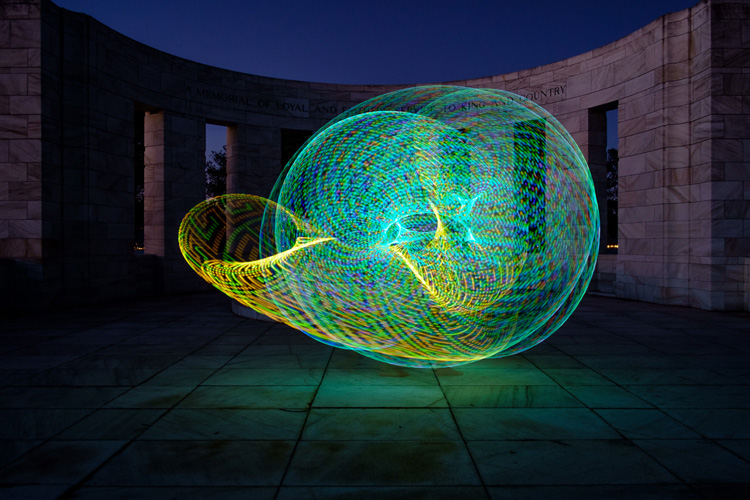
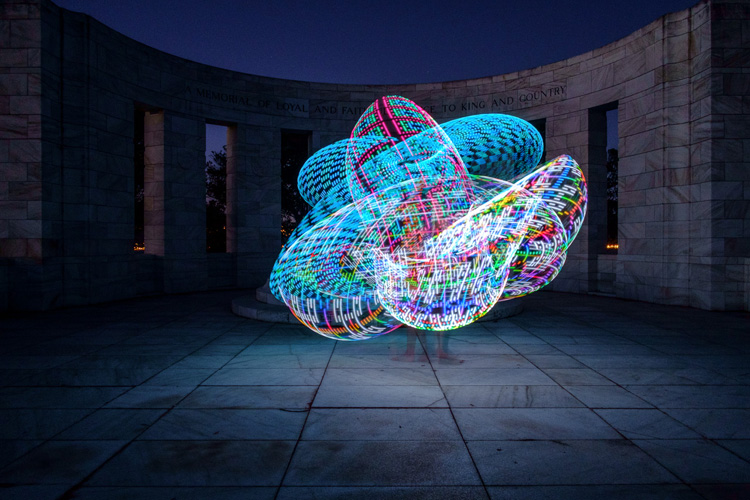
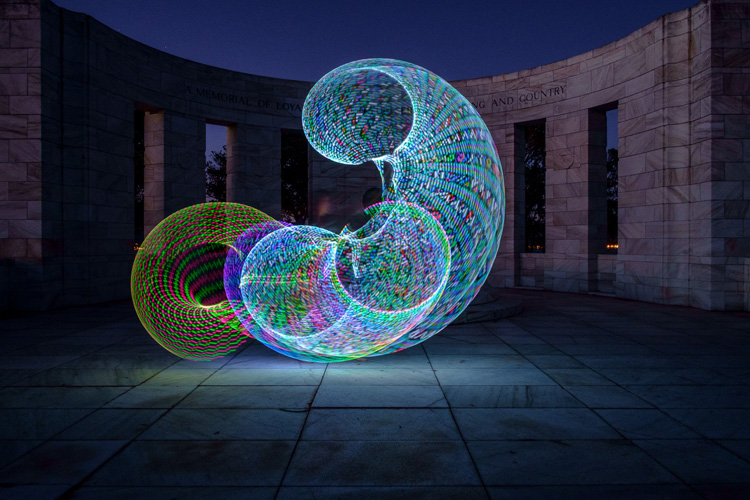
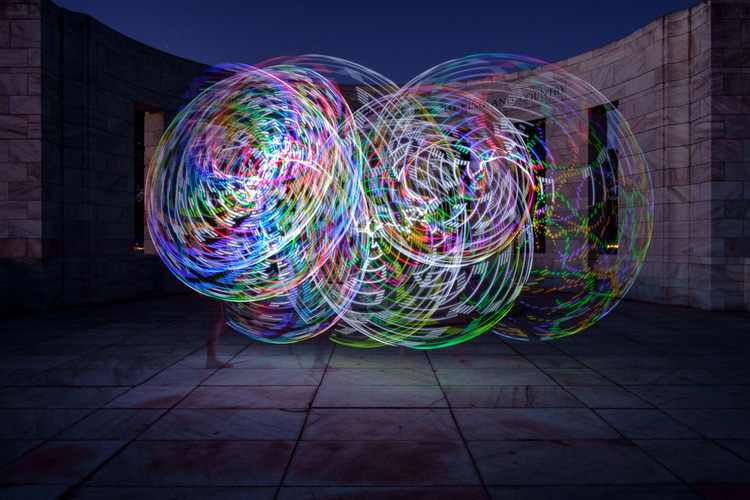
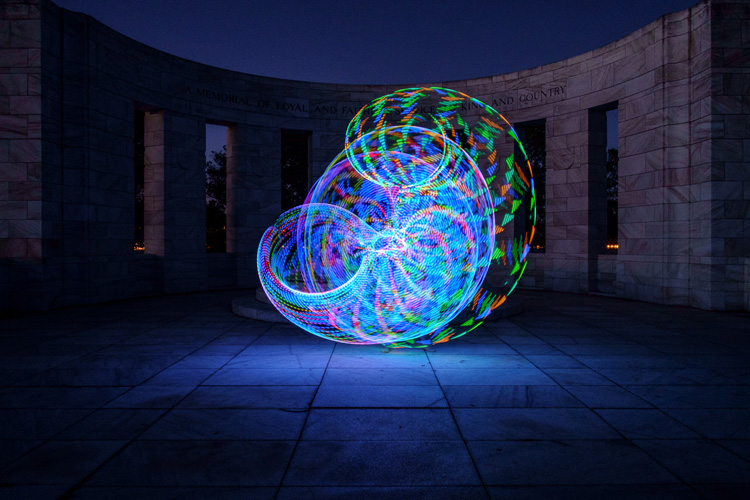
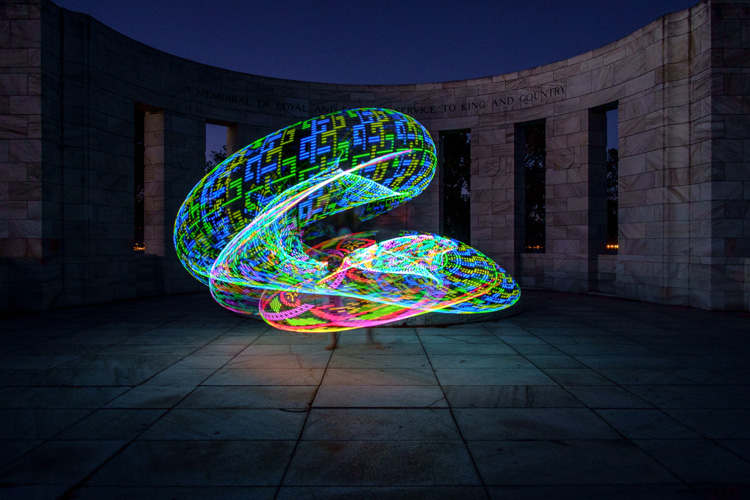
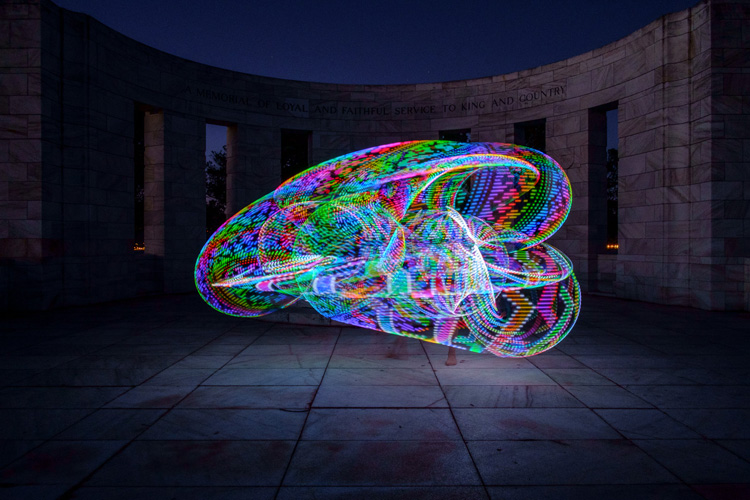
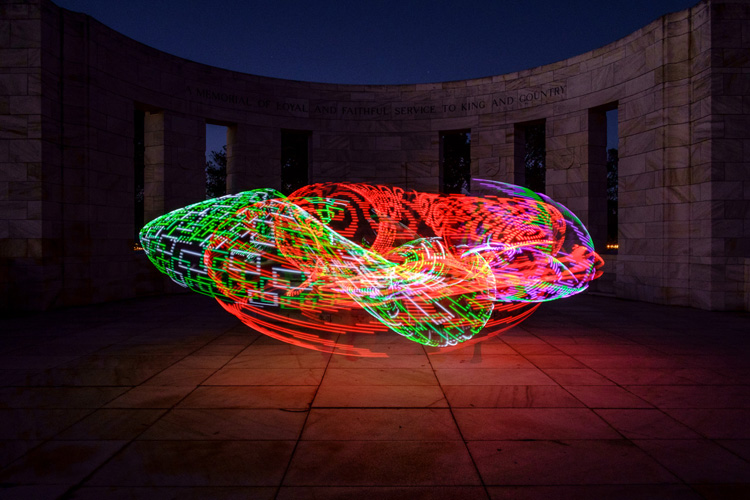
Early last year I collaborated with a friend who is a professional circus performer and hula hooper to create the unique images that you see in this article.

There are lots of good light painting photos around, but the factor that sets these ones apart is that my friend Tess used something called a FutureHoop – a transparent hula hoop that has built-in lights that can be programmed to flash in different colors and patterns. It helps that Tess is a trained dancer and hooper, so she was able to create some beautiful patterns with the FutureHoop.

painting with light

You can try this technique yourself – if not with a FutureHoop then with any number of colored light tubes or similar devices that are available (or make your own). Do a search on Amazon to see what you can find, and use your imagination to reveal their potential.

Whatever you end up using for your painting with light experiments, there are a number of things you need to consider to get the best results. Take care of these and you should be able to create some strong images.

Choose a Location

painting-with-light-7

Pick a good location. You need a dramatic background that complements the painting with light technique you choose to use. For these photos we went to Massey Memorial, built in remembrance of a past New Zealand Prime Minister on a hill in Wellington. I knew it would be a great place to take the photos because the marble pillars form a dramatic background. There was also plenty of room for Tess to move and dance with the FutureHoop.

Take the practicalities into consideration when choosing a background. For example, beaches often make good locations for painting with light photos, but you need to make sure your model can walk around safely in the near dark without tripping over rocks (or falling into the sea). Incidentally, isolated beaches are also a great place to try steel wool spinning, another form of painting with light.

painting with light

Pick a model

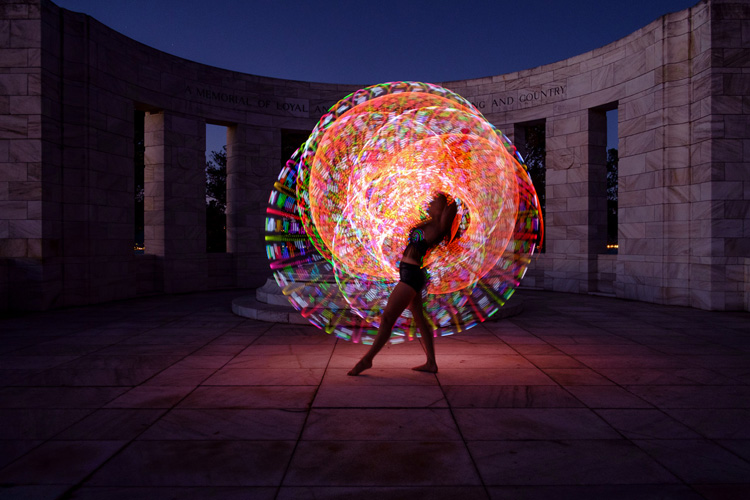
Pick the right model. Tess is a professional performer and I couldn’t have created these photos without her. She had the appropriate costume, including an illuminated bra that can also be programmed to give different color displays.

Her training also meant that she could strike professional poses. The following photo demonstrates this perfectly. Look at the arch of her back, the way her feet are positioned, and how the toes on her left foot are pointed. You can even see the flashing bra.

painting with light

The other thing that helped is that Tess thought about the patterns she would use on FutureHoop, and how she would move the hoop before the shoot. That helped us nail the shoot the first time.

Ask your model to practice, and be prepared to reshoot if necessary. It is possible that you won’t create your best images during the first attempt. During the shoot, look at the photos on the camera’s LCD screen and see what works and what doesn’t. Then you can suggest things that your model can try, or ask her to do something again if you didn’t quite time the photo correctly. Use feedback to refine the images and work towards something beautiful.

painting-with-light-15

Time of Day

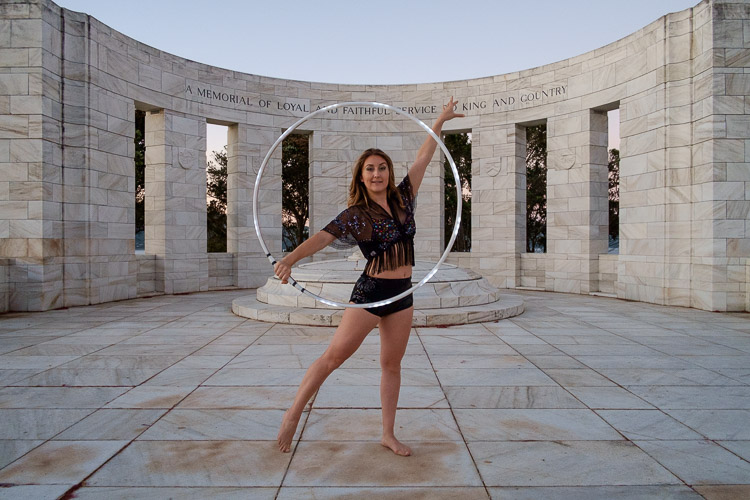
Choose the right time of day. The best time for painting with light is twilight, as it is dark enough for the lights to show, but there is still enough ambient light to subtly illuminate the background, and maintain some color in the sky.

The only difficulty with twilight is that the light fades rapidly, so you have to keep up by changing the exposure settings as you go along. The photos you take earlier on in the shoot, will be different from the ones you take later, as the light is fading. The ratio between the light from the FutureHoop (or whatever devices you are using), which stays constant, and the ambient light, which is fading, changes.

painting with light

painting with light

The two photos above show the difference. The first was taken early in the evening, the second one when it was nearly dark. The pillars in the background in the first are lit by the light of the setting sun. The FutureHoop seems much brighter in the second because the ambient light levels are lower. Note that I darkened the background of the first image in Lightroom to match that of the second one.

This photo shows Tess warming up at the start of the shoot. It was still too bright as this stage for the painting with light photos – you can barely see the light of the FutureHoop.

painting with light

If you shoot at night the exposure should remain constant, but the sky will lack color. On the other hand, the light from the device your model is using could light up the background beautifully if it is close enough. So there may be advantages to working at night, rather than twilight, but in most cases the light during twilight will be better.

Technique and Camera Settings

Get your technique right. You need slow shutter speeds to take this type of photo, so a good tripod to support the camera and a cable release are necessities. I used shutter speeds between two and four seconds for these photos – you may need longer exposures depending on how long it takes your model to move the device you are using through the air. Tess moved quite fast, so the shorter shutter speeds we used worked better.

painting-with-light-16

Set your camera to Manual mode so that the exposure remains constant throughout the series (the moving lights will confuse your camera’s light meter in an automatic exposure mode). It is easy enough to open the aperture, or raise the ISO, if you need to as the light fades.

Use the Raw format to give you maximum leeway in post-processing. Shooting Raw simplifies the shoot greatly as you don’t have to worry about settings such as color profile until you sit down to process the photos.

In this shoot, once the camera was set up, I kept the aperture at f/8 or f/11 and raised the ISO as the light faded. I set the White Balance to Daylight so I could see the natural colors of the FutureHoop and the ambient light. Using auto White Balance may result in some strange color casts as the camera tries to compensate for the colored lights.

painting-with-light-14

Above all, have fun. If you both enjoy the process you create better images. If your model enjoys it she will want to collaborate with you on future ideas. Below are a few more images from our shoot – enjoy and hopefully they give you some ideas.

painting-with-light-6

painting-with-light-13

painting-with-light-12

painting-with-light-11

painting-with-light-10

painting-with-light-9

painting-with-light-8

Any questions? Let us know in the comments and I’ll do my best to answer.

And if you’d like to learn more about the basics of photography, then please check out my ebook Mastering Photography: A Beginner’s Guide to Using Digital Cameras.

googletag.cmd.push(function() {
tablet_slots.push( googletag.defineSlot( “/1005424/_dPSv4_tab-all-article-bottom_(300×250)”, [300, 250], “pb-ad-78623” ).addService( googletag.pubads() ) ); } );

googletag.cmd.push(function() {
mobile_slots.push( googletag.defineSlot( “/1005424/_dPSv4_mob-all-article-bottom_(300×250)”, [300, 250], “pb-ad-78158” ).addService( googletag.pubads() ) ); } );

The post How to Create Beautiful Light Painting Images With an Illuminated Hoop by Andrew S. Gibson appeared first on Digital Photography School.


Digital Photography School

 
Comments Off on How to Create Beautiful Light Painting Images With an Illuminated Hoop

Posted in Photography


Software Review: AfterShot Pro 3 by Corel

12 Jul

ASP3-box_front.jpgI remember seeing a poster on the wall of my fourth grade elementary school class that said, “What’s right isn’t always popular, and what’s popular isn’t always right.” The quote is attributed to Albert Einstein, and while he was most likely speaking with regard to issues of ethics, justice, and social equality, he might as well have been referencing the current state of image editing software.

The king of the hill when it comes to photo editing programs is Adobe, with their extensive suite of applications designed for creative professionals and hobbyists. But just because their software is widely used, does not mean it is the best. Corel, a software company based in Canada, has been making its own image and video editing programs for years, and is a stalwart in the ever-changing software industry with roots that go back to the early days of the personal computer revolution in the mid-1980’s.

The most recent version of their photo-editing software, AfterShot Pro 3 by Corel, may not have the sheer quantity of features offered by Lightroom or Photoshop, but it has a few tricks up its sleeve that make it a very attractive alternative to those looking for a solid solution outside of Adobe’s offerings.
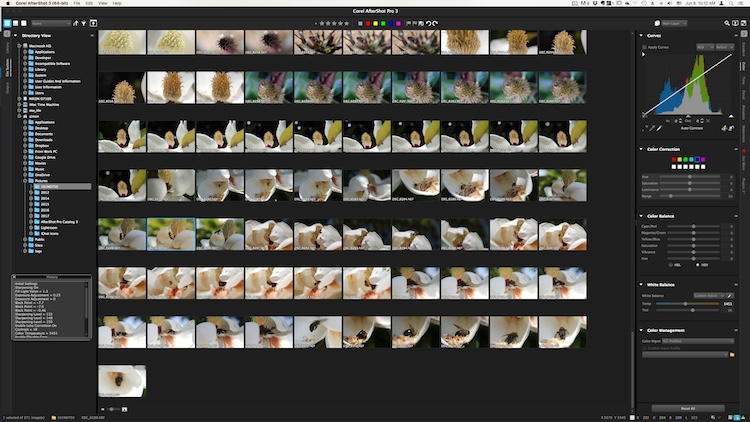
The user interface is instantly familiar to anyone who has used Lightroom or other image editing programs.

The user interface is instantly familiar to anyone who has used Lightroom or other image editing programs.

Overview

At its core, AfterShot Pro 3 is an end-to-end workflow solution that is designed to suit the needs of demanding photographers as well as casual hobbyists. It allows you to sort your images, edit them, and export them for print, sharing, or use in other programs. Its core features are centered on a robust set of tools that allow you to have a great deal of control over several parameters of your images, and adjust fairly basic elements like white balance, exposure, saturation, and contrast, while also giving you fine-grained control over settings like individual RGB color balance, hue/saturation/luminance, and tone curves.

Pixel peepers and image tweakers will find little to complain about here, though some of the tools are a bit lacking compared to those offered by Lightroom. Sharpening and noise removal work quite well, but don’t allow the same degree of control as in Adobe’s software, but there are some automatic “Perfectly Clear” options for noise removal and color adjustments that I have found to be quite useful.

You can of course edit metadata, use presets, and even insert watermarks or access a growing library of plugins, but a proper evaluation of this program isn’t necessarily about comparing features tit-for-tat to see how it stacks up to the competition. Anyone who is looking at sheer numbers of options and adjustment sliders, will likely find everything here that they could ask for. Rather, deciding if this is the right program for you will likely come down to whether it is suited to your own particular way of actually using the features it has.
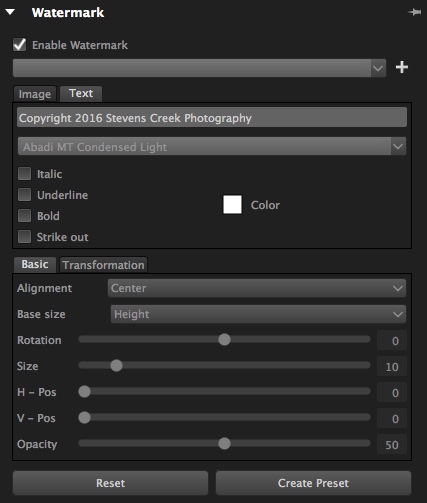
The built-in watermarking tool can accommodate text or allow you to insert a logo or other graphic.

The built-in watermarking tool can accommodate text or allow you to insert a logo or other graphic.

Workflow

AfterShot Pro 3 has its own unique workflow, which does bear some resemblance to how Lightroom and other programs function. But, in order to make full use of the program’s capabilities you might need to learn how to do things in a way that seems strange at first, but will feel like second nature over time.

One of the most notable differences is that AfterShot Pro 3 does not import your pictures into a database, and does not store changes to files in one single master catalog like Lightroom. Instead, it works by leaving your pictures exactly where they are and does not copy them, even from a camera memory card. You must first save your images where you want them, and then as you make edits, a record of all the changes you have made to your image get stored in a unique XMP file.

Instead of keeping a master catalog file with all your edits, a single data file is created for every photo that you have changed. To let someone else edit a photo you have already started, give them the original and the XMP file.

Instead of keeping a master catalog file with all your edits, a single data file is created for every photo that you have changed. To let someone else edit a photo you have already started, give them the original and the XMP file.

This approach may seem counterproductive at first, because you end up with thousands of XMP files instead of one single all-encompassing catalog. However, it makes your editing much more portable and flexible, since you can transfer your photos and their editing instructions across devices, and share them with other users in a way that Lightroom simply does not offer. If I edit an image on my computer and want to hand it off to another team member to tweak even further, all I have to do is send her the original RAW or JPG file, along with the very small related XMP file. She can now open the image on her machine, make changes to any of my edits, and add alterations of her own. I can even edit an image right on my camera’s memory card without ever copying it to a hard drive, and then physically hand that card to someone else who can make further edits or go back and revise any changes I have made.

From this standpoint, AfterShot Pro 3 could be a boon to those who work in a collaborative or fast-paced environment, as well as casual or hobbyist photographers who want a little more flexibility.

Work space

AfterShot Pro 3 also operates in a single combined environment, as opposed to the discrete modular-based approach taken by Lightroom, where you use the Library module to organize and sort your images, the Develop module to make edits, the Print module when making prints, etc. In AfterShot Pro 3 everything happens from within a single module, from organizing your images, to editing them, to adding watermarks, and finally printing or sharing. Neither one is necessarily good or bad, and neither approach can be said to be objectively better than the other, but personally I have found the interface in AfterShot Pro 3 to be a refreshing change from Lightroom, where I am forced to switch between Library and Develop to do simple things, and even the function of quick keys changes depending on which module I am in at the time. Your mileage may vary, but it’s an important distinction to know if you are considering changing over to Corel’s program, or even just trying it out.

Use of Layers and Flexibility
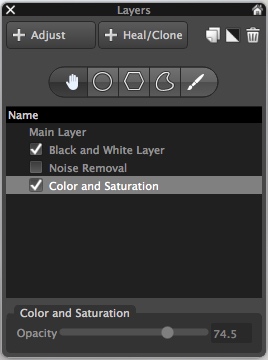
Layers contain a set of edits and can be made more or less opaque, and enabled or disabled at will.

Layers contain a set of edits and can be made more or less opaque, and enabled or disabled at will.

One hugely useful aspect in AfterShot Pro 3, that really stands out from much of the competition, is its intuitive use of layers. You can apply any number of edits in terms of tint, hue, curves, etc., then stash them all into a single layer, which can then be set to anywhere between 100% and 0% opacity. This is an incredibly helpful way of stacking various types of edits on top of one another, and I’m surprised it is not available in Lightroom. For instance, you could easily create a layer wherein you convert your image to black and white, but then set that overall layer opacity to 25%, which would lend a subtle desaturated look to the actual image. You can use multiple layers of edits on a single picture, and even use layers specifically for cloning and healing adjustments as well. It’s a clever, and highly useful way of editing your images, and once you get used to it, you may not ever want to be without it again.

Is the software right for your needs

New in version 3 of the program, is a highlight recovery tool that allows you to coax a bit more out of your RAW files than before, along with other tweaks and improvements compared to earlier iterations. However, as I mentioned in the opening paragraph it’s not really a productive exercise to simply compare a list of features when deciding if an image editor is right for you, since nearly all of them have extensive options that will likely suit your needs.

What matters is whether the program suits your needs and your workflow, and in the case of AfterShot Pro 3 it is certainly worth considering if you are a casual user who wants something with much more power and flexibility, or are simply seeking a worthy (and far cheaper) alternative to one of the more popular editors like Lightroom.

One of my favorite parts of AfterShot Pro 3 is its speed, which honestly could be a make-or-break decision if you are comparing programs. Photos load almost instantly and switching between RAW files is as smooth as butter, which is a far cry from some other programs where you might as well go make some coffee while you wait for a picture to load.
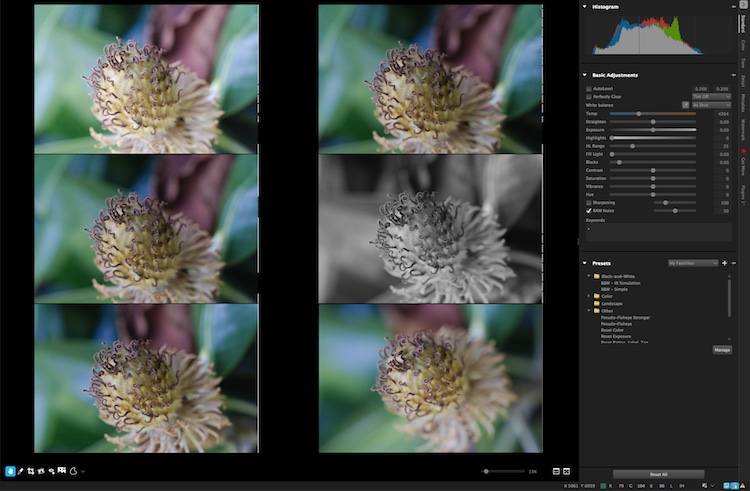
You can view up to six images at once and apply edits to individual photos while in multi-image view.

You can view up to six images at once and apply edits to individual photos while in multi-image view.

In the end, I found Corel’s latest entry into the image-editing fray a worthy competitor that can certainly hold its own against the competition. I especially like that it’s priced well under $ 100, which is a one-time purchase, as opposed to a monthly subscription.

I did find a few things to quibble over, like like its lack of a clarity slider (which can be mitigated by using a combination of other sliders) and a black and white conversion function, that is in my opinion, far behind Lightroom’s use of color filters to take fine-tune control over monochrome conversions. However it is a speedy and full-featured image editing program that is certainly worth checking out.

ASP3-Logo.png

Editor’s note: if you want to check it out Corel has a free trial and you can enter to win a copy right here on dPS. 

googletag.cmd.push(function() {
tablet_slots.push( googletag.defineSlot( “/1005424/_dPSv4_tab-all-article-bottom_(300×250)”, [300, 250], “pb-ad-78623” ).addService( googletag.pubads() ) ); } );

googletag.cmd.push(function() {
mobile_slots.push( googletag.defineSlot( “/1005424/_dPSv4_mob-all-article-bottom_(300×250)”, [300, 250], “pb-ad-78158” ).addService( googletag.pubads() ) ); } );

The post Software Review: AfterShot Pro 3 by Corel by Simon Ringsmuth appeared first on Digital Photography School.


Digital Photography School
 
Comments Off on Software Review: AfterShot Pro 3 by Corel

Posted in Photography


Sony announces FE 50mm F1.4 ZA prime lens

11 Jul

$ (document).ready(function() { SampleGalleryV2({“containerId”:”embeddedSampleGallery_0676890121″,”galleryId”:”0676890121″,”isEmbeddedWidget”:true,”standalone”:false,”selectedImageIndex”:0,”startInCommentsView”:false,”isMobile”:false}) });

Sony has announced its new Planar T* FE 50mm F1.4 ZA lens. This full-frame fast prime features an 11-blade aperture for circular out-of-focus highlights even as you stop down, ‘Advanced Aspheric’ and ED lens elements and Zeiss’ T* coating. Sony says that the lens’ Planar design minimizes distortion. 

The lens is similar in construction to the FE 35mm F1.4. It’s weather-sealed and uses Sony’s Super Sonic Wave Motor for quick and quiet autofocus. A clicked aperture ring can be de-clicked if desired for smooth aperture control in video.
At a recent shooting event in San Diego, we had a chance to go hands with this fast prime (view our gallery here). Despite being a bit heavy, the lens handles beautifully. We were very impressed by sharpness: subjects placed far off-center remained sharp even wide open, despite the 42MP Sony a7R II sensor resolution. Indeed, MTF curves indicate an impressive 60% response is maintained across the frame wide open even at 40 line pairs / mm. Our initial shots also indicate that axial chromatic aberration (green and purple fringing) are very well controlled, and bokeh appears very smooth, both of which add to this lens’ appeal over options like the Sony FE 55mm F1.8 ZA.
The FE 50mm F1.4 ZA lens will be available this month at a price of $ 1500.

Sony Planar T* FE 50mm F1.4 ZA specifications

Principal specifications
Lens type Prime lens
Max Format size 35mm FF
Image stabilisation No
Lens mount Sony FE
Aperture
Aperture ring Yes
Number of diaphragm blades 11
Optics
Elements 12
Groups 9
Special elements / coatings 2 aspherical + 1 ED element + Zeiss T* coating
Focus
Minimum focus 0.45 m (17.72)
Maximum magnification 0.15×
Autofocus Yes
Motor type Ring-type ultrasonic
Full time manual Yes
Focus method Internal
Distance scale No
DoF scale No
Physical
Weight 778 g (1.72 lb)
Diameter 84 mm (3.29)
Length 108 mm (4.25)
Sealing Yes
Colour Black
Filter thread 72.0 mm
Hood supplied Yes
Hood product code ALC-SH143

Press Release:

Sony Releases Full-Frame FE 50mm F1.4 ZA Prime Lens

A quintessential wide-aperture 50mm “normal” lens, the new ZEISS® Planar F1.4 offers high resolution, high-contrast and overall exceptional performance

SAN DIEGO, July 11, 2016 – Sony Electronics, a worldwide leader in digital imaging and the world’s largest image sensor manufacturer, has today introduced a new full-frame lens for their E-mount camera system, the Planar T* FE 50mm F1.4 ZA (model SEL50F14Z).

This 50mm prime lens features a large F1.4 maximum aperture that offers impressive contrast and outstanding resolution that are hallmarks of the ZEISS® brand. It produces these consistently strong qualities throughout the entirety of the frame – from center to corner – and at all aperture settings, even while shooting wide open at F1.4. The cutting edge optical structure includes high-precision AA (Advanced Aspherical) and ED (Extra-low Dispersion) glass elements that reduce spherical and chromatic aberration, as well as a ZEISS® T* Coating that minimizes flare and ghosting creating the classic ZEISS® clarity. Additionally, its Planar design ensures minimal distortion.

The large F1.4 maximum aperture of the FE 50mm F1.4ZA lens provides a level of brightness and speed that are advantageous for dimly lit indoor shots, night scenes, and portraits, while its 11-bladed circular aperture allows for stunning “bokeh”, or background defocus, in images. The lens also features an aperture ring with an adjustable ON/OFF switch, an AF/MF focus mode switch, and a dust and moisture resistant design¹, further increasing its functionality.

The new lens is also equipped with a ring drive SSM (Super Sonic wave Motor) system, which allows it to efficiently lock focus with speed, precision and in near silence, making it particularly useful for shooting movies.

Pricing and Availability – FE 50mm F1.4 ZA Lens

The new FE 50mm F1.4 ZA lens will ship this July for a retail price of $ 1,500 US and $ 1,950 CA. The new FE interchangeable lens will be sold at a variety of Sony authorized dealers throughout North America.

Articles: Digital Photography Review (dpreview.com)

 
Comments Off on Sony announces FE 50mm F1.4 ZA prime lens

Posted in Uncategorized


Hands-on with Sony’s wireless flash system, arriving in August

11 Jul

$ (document).ready(function() { SampleGalleryV2({“containerId”:”embeddedSampleGallery_7699465702″,”galleryId”:”7699465702″,”isEmbeddedWidget”:true,”standalone”:false,”selectedImageIndex”:0,”startInCommentsView”:false,”isMobile”:false}) });

Sony’s wireless radio flash trigger system, introduced back in March, is headed to retailers this August. The system is comprised of a ‘commander’ (FA-WRC1M) and a receiver (FA-WRR1). There can be up to 5 groups, each of which can contain 15 flashes. A standard sync port on the receiver allows for control of studio strobes with ease, though of course you’ll lose TTL capabilities. High Speed Sync (HSS) is also supported. The system has a maximum range of 30m/98ft, and the commander unit sports a large LCD with an intuitive user interface.

What we like

At a recent shooting event in San Diego, CA, I got some brief hands-on time with the new transmitters and receivers, and was pleased with how intuitive the user interface was (not something you can always take for granted with flash systems). For the shot below, I used E-TTL with three flashes (groups) – one (A) at camera right for some harsh side-lighting, one (B) front left of model Eliza as the key, and one (C) directly in front of her for a tiny bit of balance to the overall light. I dialed in my exposure manually to ensure ambient was drowned out, then varied the ratios of groups A, B, and C on the transmitter’s LCD with ease until I got the lighting just as I wanted it. Essentially, it all worked just as I’d expect it to. Adjust flash ratios, groups, Manual power, Flash Exposure Compensation are all very intuitive and direct. Furthermore, the option of triggering studio probes was very handy. Studio shooters: rejoice.

What we’re less pleased with

If you’re an event shooter, I was less pleased with the lack of an AF assist beam on the transmitter. This speaks to a larger problem with Sony mirrorless: no Sony E-mount camera will trigger any off-camera AF assist beam. Red/IR AF assist beams are a boon to any event photographer; for example, I rely on it for fast AF at dim wedding receptions, where all my flashes are off-camera for dramatic lighting. In such scenarios, AF assist beams on transmitters allow the camera’s AF system to focus in near-darkness, obviating the need for a heavy flash on-camera. Sony’s continued lack of any support of off-camera assist beams on transmitters or flashes is unfortunate, given Sony’s desire for acceptance by pros, and considering that in our own lab tests, Sony’s a7R II and a6300 focus incredibly well with red/IR assist beams triggered by Canon/Nikon systems (contrary to the belief of many that on-sensor phase-detect AF systems can’t ‘see’ these beams).

While one can fault both Canon and Nikon for similar oversights in their latest radio triggered flash systems, we find the omission increasingly unforgivable given that 3rd party options like Phottix and Yongnuo do offer AF assist beams on their radio triggers. Yet while these 3rd party options do at least work on Canon and Nikon DSLRs, they fail entirely to trigger AF beams on Sony FE cameras, due to Sony’s continued lack of support of AF assist beams (save for the largely useless one built into the camera).

We’re hopeful that this is something Sony will address in the future. It’s by no means a deal-breaker though for what appears to be a very capable radio trigger system that should find a way into your kit if you shoot with Sony flashes.

Both the commander and receiver will be available in August at $ 350 and $ 200, respectively.

Pricing and Availability – New FE 70-200mm f/2.8 GM OSS G Master lens. Teleconverters and Wireless Lighting Control System

Today, Sony has also released pricing and ship timing for the FE 70-200mm f/2.8 GM OSS G Master lens, 1.4x and 2.0x teleconverters plus their new wireless lighting control system. All products were introduced earlier this year.

One of the most eagerly anticipated lenses of the year, the Sony FE 70-200mm f/2.8 GM OSS G Master lens takes its place as the flagship telephoto zoom in the Sony lens lineup. Featuring built in Optical Stead Shot (OSS) and a fast f/2.8 maximum aperture across the zoom range, the lens will be an ideal fit for nature, sports, travel, fashion, beauty and wedding photographers. This lens will ship this July for a retail price of $ 2,500 US and $ 3,300 CA.

Designed exclusively to fit the 70-200mm F2.8 G Master lens, the new 1.4x and 2.0x teleconverters (models SEL14TC and SEL20TC) will both be sold for the same retail price of about $ 550 US and $ 700 CA, and will ship this July.

The versatile new wireless flash and control system – comprised of the FA-WRC1M wireless radio commander and the FA-WRR1 wireless radio receiver – was designed to meet the growing demands of professional Sony photographers. With a maximum range of 30m (approx. 98 feet) and the ability to control a maximum of 15 separate flash units in 5 different groups, it offers a flexible wireless flash shooting experience with exceptional performance.

The FA-WRC1M commander will be sold for about $ 350 US and $ 480 CA. The FA-WRR1 receiver will be sold for about $ 200 US and $ 280 CA. Both products will ship this August.

The new lenses, teleconverters and wireless lighting system will be sold at a variety of Sony authorized dealers throughout North America.

Articles: Digital Photography Review (dpreview.com)

 
Comments Off on Hands-on with Sony’s wireless flash system, arriving in August

Posted in Uncategorized


Sony Planar T* FE 50mm F1.4 ZA Sample Gallery

11 Jul

Sony has just announced its Planar T* FE 50mm F1.4 ZA lens, a high quality normal for its E-mount Alpha line of cameras. At a shooting event in San Diego, we had a chance to go hands-on. It’s a formidable lens, smaller than the 85mm GM with its 72mm filter thread, but significantly larger than the FE 55mm F1.8 ZA already available for the system.

So what does that extra heft and glass get you besides top notch build quality and ergonomics? Have a look at our gallery where we’ve posted a smattering of real-world portraits at fast apertures shot using Eye AF on the 42MP Alpha 7R II, some shallow focus shots at various apertures to get an idea of axial CA, as well as some infinity horizons at various apertures for the assessment of sharpness (day scene) and coma (night scene).

We’re duly impressed by the lens’ sharpness across the field wide open, lack of axial CA (green/purple fringing just outside the focal plane), and pleasing bokeh, but to keep things objective, we’ll be following up soon with a brief comparison of these attributes against the already stellar FE 55/1.8 ZA. Look for updates to this gallery as well in the coming days.

Articles: Digital Photography Review (dpreview.com)

 
Comments Off on Sony Planar T* FE 50mm F1.4 ZA Sample Gallery

Posted in Uncategorized