RSS
 

Archive for July, 2016

Tag, You’re It! Banksy Shows Softer Side, Makes Mural for Kids

16 Jul

[ By WebUrbanist in Art & Street Art & Graffiti. ]

banksy stick figure art

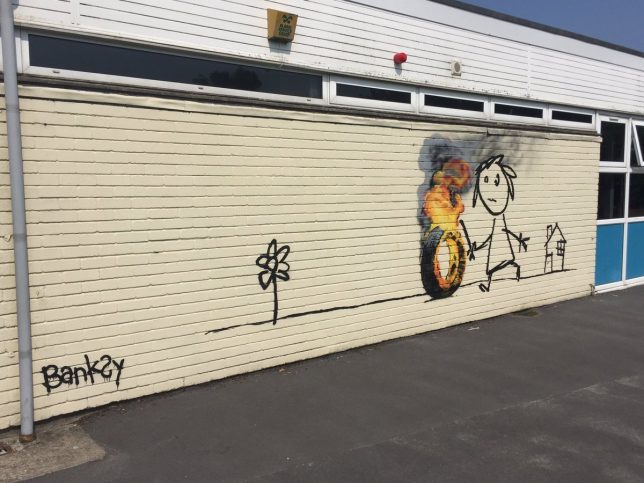
Best known for biting political commentary and poignant artistic critiques, mysterious artist Banksy showed a somewhat friendlier side of his personality in gifting a mural to elementary students who named a building after him.

banksy in bristol

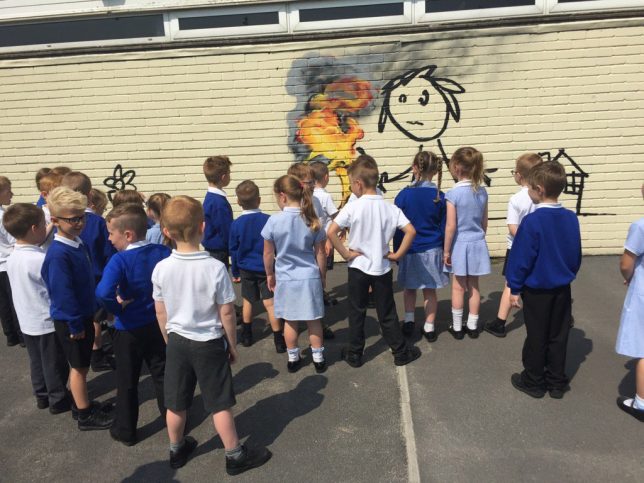
Students at the Bridge Farm Primary School in Bristol, thought to be the anonymous street artist’s hometown, renamed several campus structures in a contest. Among the winners were Blackbeard, Cabot and Banksy.

banksy rolling tire

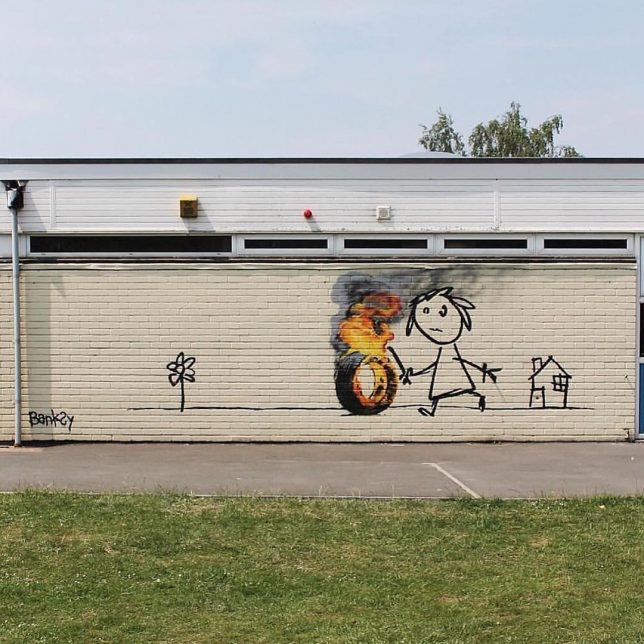
The work itself features a child playing with a hoop, but because it’s Banksy … the hoop was turned into a tire, and the tire was set on fire. Banksy stopping by to make a mural was surprise, but he also left a note, which is even more out of character (though the work has been confirmed authentic):

banksy hand written note

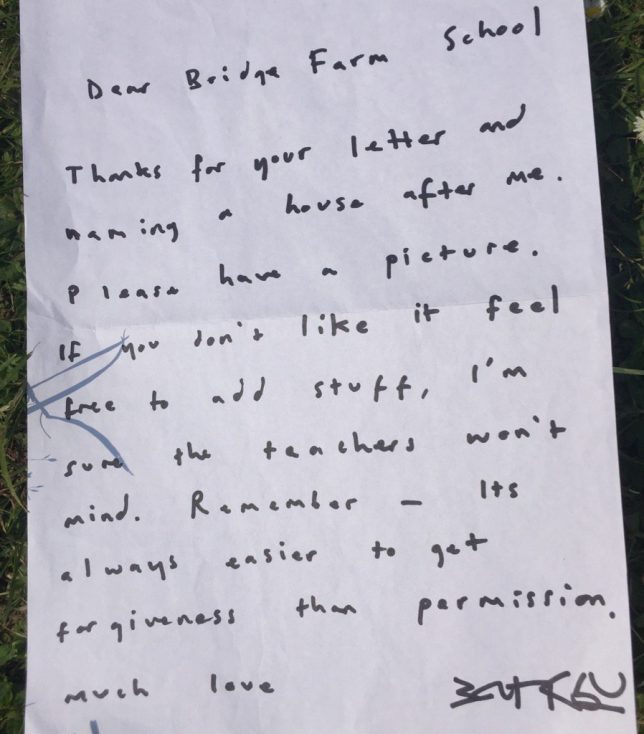
“Dear Bridge Farm School,” the letter reads. “Thanks for your letter and naming a house after me. Please have a picture, and if you don’t like it, feel free to add stuff. I’m sure the teachers won’t mind. Remember, it’s always easier to get forgiveness than permission. Much love, Banksy.”

banksy school mural stick

In a somewhat ironic twist, the school is forbidding children from painting over or around the mural, perhaps out of respect or because if its doubtless high monetary value – either way, one can be sure Banksy would approve should one of those students break the rules (images by Jon Kay via Colossal).

Share on Facebook


[ By WebUrbanist in Art & Street Art & Graffiti. ]

[ WebUrbanist | Archives | Galleries | Privacy | TOS ]


WebUrbanist

 
Comments Off on Tag, You’re It! Banksy Shows Softer Side, Makes Mural for Kids

Posted in Creativity


Concept To Creation: How Professional Photographers Do It

16 Jul

Examples of Concept to Creation from Working Fashion Photographers


Hey FashionPhotographyBlog.com readers.


Thanks for joining us on our “Concept to Creation” series where we walk you through the process of taking an idea into an image. If you were with us last time, we discussed how to turn your inspiration into a concept. Today, we’re going to dive a little further. I’ll help you out with some examples of how working fashion editorial photographers pull their inspiration and translating them into concepts.


Miles Aldridge for Vogue Italia:

Sure, there is a concept in the styling: spring time flowy dresses. There’s continuity between the images because of the bold use of color. But anyone that knows Miles Aldridge’s work knows that’s his style. What ties all these images together? Cats! Without the cats, none of the images would appear to be from the same editorial.

miles-aldridge-vogue-italia-cat-story

miles-aldridge-vogue-italia-cat-story

miles-aldridge-vogue-italia-cat-story

Mert & Marcus for W Magazine:

All the images are shot in the same room. A room that has been flooded. Bingo! There’s your concept.

Mert-&-Marcus-for-W-Magazine

Mert-&-Marcus-for-W-Magazine

Knowing that these guys often pull inspiration from artwork, I wouldn’t be surprised if they were inspired by Pre-Raphaeliate “Ophelia” paintings. I especially wouldn’t be surprised if a big piece of their inspiration came from photographer Gregory Crewdson’s interpretation of these Ophelia images.

ophelia-by-john-everett-millais

Ophelia by John Everett Millais

Ophelia-by-Gregory-Crewdson

Ophelia by Gregory Crewdson


Granted, these examples are more on the extreme end of the spectrum. However, I think it drives the idea across. These images aren’t united because of what the model is wearing. They’re not united because of a dominant color (although, it helps). They’re united because of an idea which brings them together. It takes them out of the real world and brings them into a fantasy land.


This is extremely hard to do on a limited budget. That’s okay! No one is expecting someone with no budget to pull off a shoot like the ones pictured above. Just because you don’t have funds doesn’t mean you cant create a concept on a low/no budget that ties everything together.


Melissa Rodwell for Kurv Magazine:


Not something that would require an extravagant budget like the images pictured above. However, they’re all united in their lighting, clothing, hair, makeup, location and way in which they’re shot. Melissa brings you into this whimsical, etherial world with a simple concept. White.


I know, I know, I’ve said it shouldn’t just be a color that holds your images together. But In these images, it works! Melissa brings you beyond the color white and creates a fantasy world out of it.


melissa-rodwell-kurv-magazinemelissa-rodwell-kurv-magazine

Concept – crucial to binding your images together. You’ll find that any high end magazine only published editorials that has a concept holding the story together.


Hope you all enjoyed the examples of working fashion photographers and their thought processes behind turning inspiration into concepts. Stay tuned because next time, we’ll be discussing the difference between editorial and campaign shoots and how these relate to your shoot concepts.

Until then –


Alana


IMAGE SOURCE:


Feature image: Mert & Marcus for W Magazine

Images 1-3: Miles Aldridge for Vogue Italia

Images 4 & 5: Mert & Marcus for W Magazine

Image 6: John Everett Millais

Image 7: Gregory Crewdson

Images 8-10: Melissa Rodwell for Kurv Magazine


Fashion Photography Blog

 
Comments Off on Concept To Creation: How Professional Photographers Do It

Posted in Uncategorized


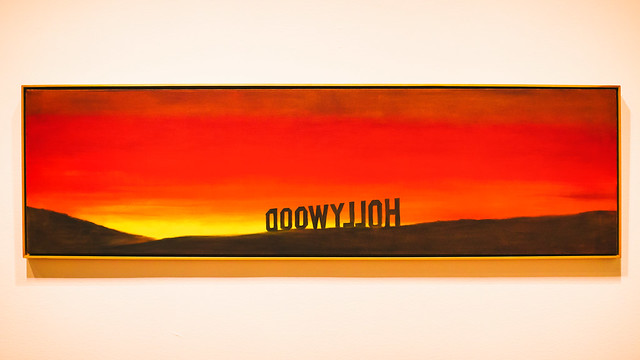
15 Photographs from Ed Ruscha and the Great American West

16 Jul

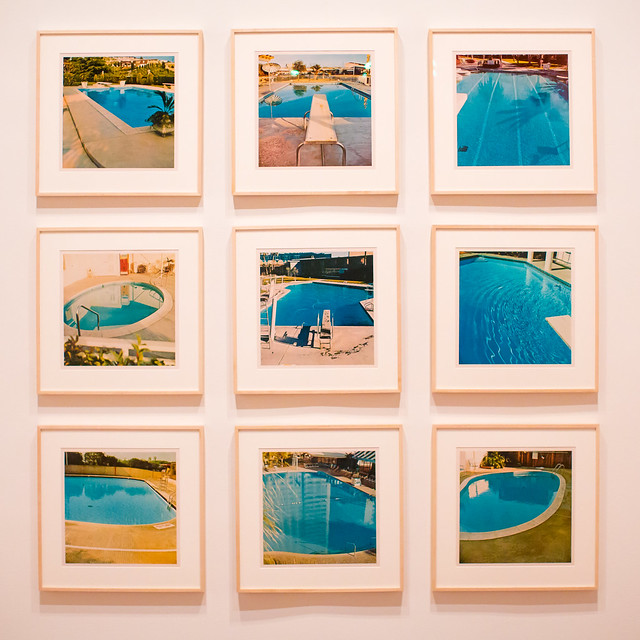
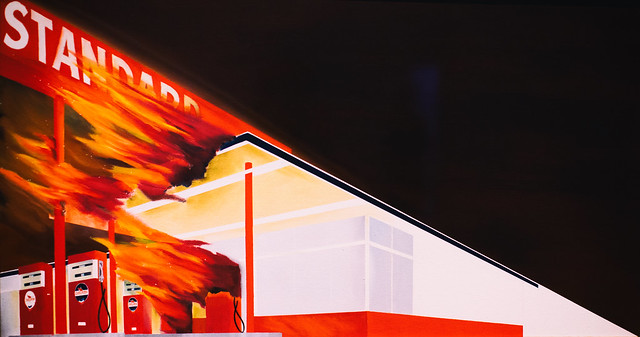
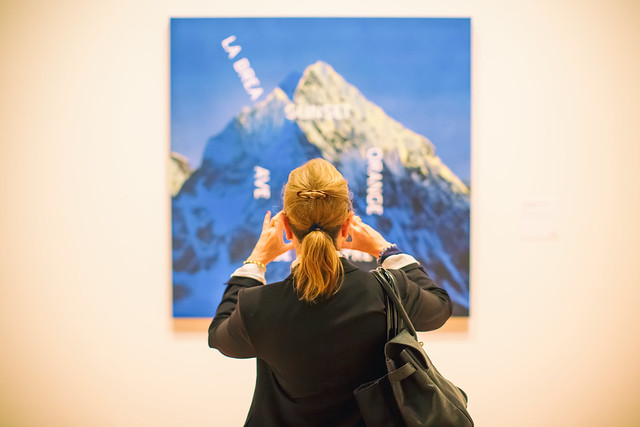
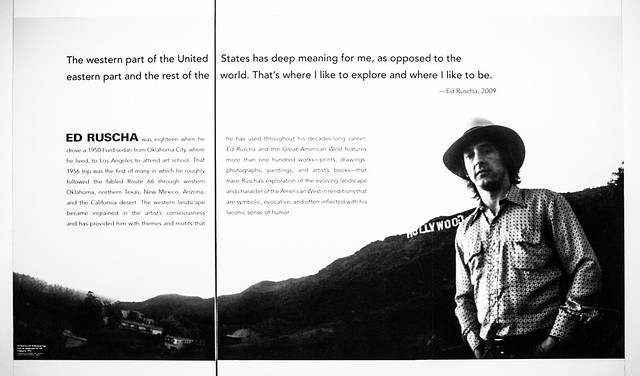
I had a wonderful opportunity to attend the press preview on Thursday for the new exhibition “Ed Ruscha and the Great American West,” which opens today and runs through October 9th at the de Young Museum in San Francisco.

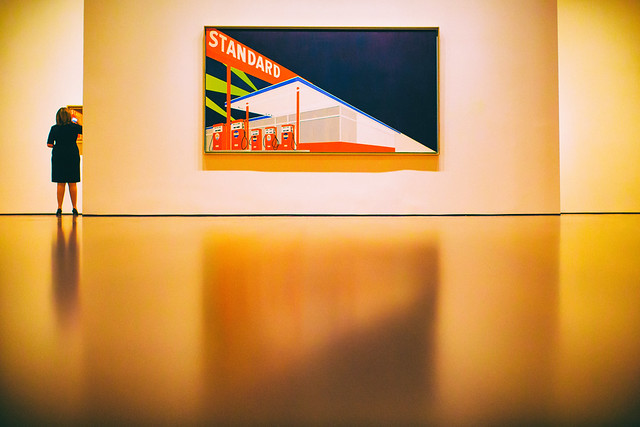
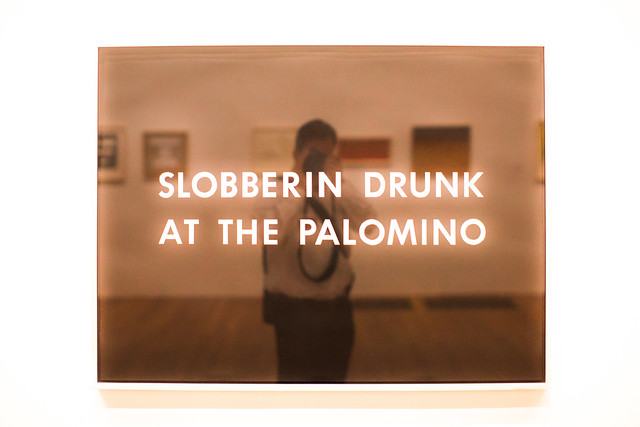
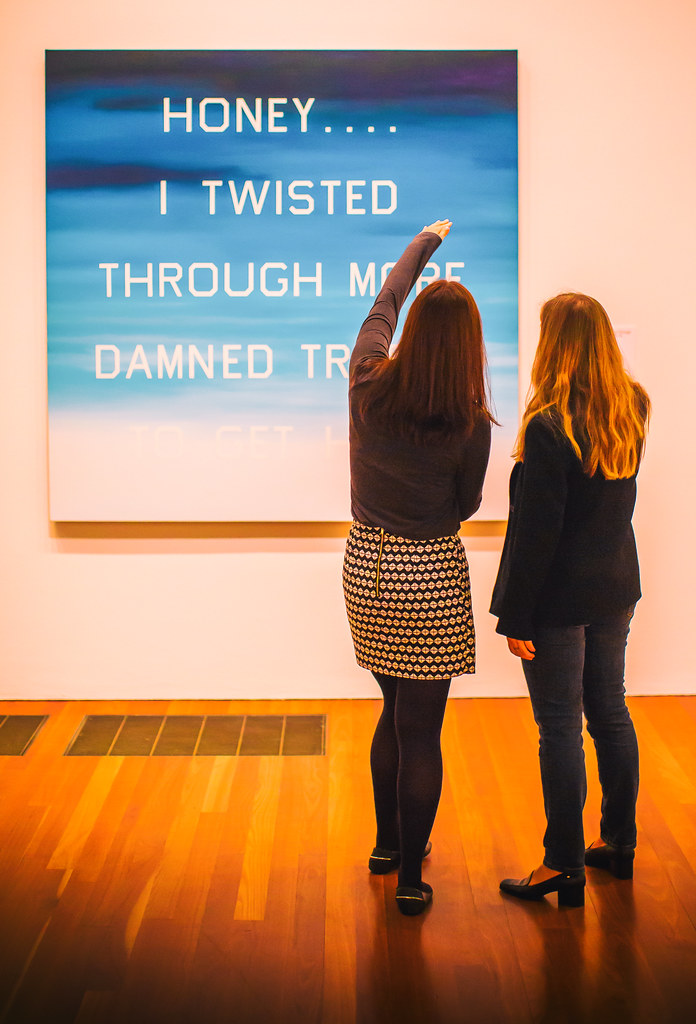
Ed Ruscha has long been a hero of mine. With my own photography focusing on the American Road and my background growing up in Los Angeles, so much of Ruscha’s work has always rung true to me personally and I’ve felt a certain sort of affinity with it. Gas stations, neon signs, old swimming pools, and the images of a uniquely American experience, fill the current Ruscha exhibition. Mixed in with these beautiful, nostalgic and iconic images are the words that further explain this modern life: “Honey . . . . I Twisted Through More Damned Traffic to Get Here,” “God Knows Where,” “Slobberin Drunk at the Palomino” I remember back in high school or was it college once watching X, or maybe the Blasters or the Knitters perform back at North Hollywood’s Palomino, my memory is hazy and alcohol likely was involved.

“In 1956, at the age of 18, Ed Ruscha left his home in Oklahoma and drove a 1950 Ford sedan to Los Angeles, where he hoped to attend art school. His trip roughly followed the fabled Route 66 through the Southwest, which featured many of the sights—auto repair shops, billboards, and long stretches of roadway punctuated by telephone poles—that would provide him with artistic subjects for decades to come.” This may be all the inducement you need to read to get you to this show.

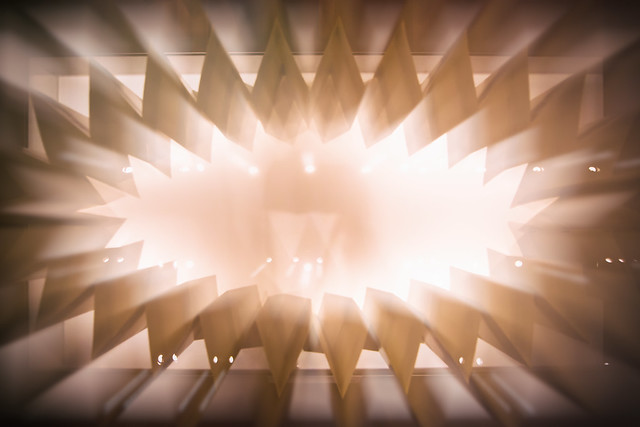
Here are 15 photographs that I took on Thursday at the new exhibit representing my own interpretation.

Standard

Every Building on the Sunset Strip

A Particular Kind of Heaven

Slobberin Drunk at the Palomino

Honey . . . . I Twisted Through More Damn Traffic to Get Here

Hollywood

Poolside, Series of Nine Photographs

God Knows Where

Burning Gas Station

Hollywood, 19698

La Brea, Sunset, Orange, De Longpre

Texas

Ed Ruscha

15 Photos from Ed Ruscha and the Great American West-9

Ed Ruscha and the Great American West Exhibition Store

Complete 15 photo set here, but everything usually looks better on Ello. ?

More Ruscha here.

More de Young Museum here.


Thomas Hawk Digital Connection

 
Comments Off on 15 Photographs from Ed Ruscha and the Great American West

Posted in Photography


Behind the shot: Praia da Adraga at blue hour

16 Jul

If you recognize Nicolas Alexander Otto’s name, it may be because we featured some of his work a while ago. The Germany-based landscape shooter has graciously agreed to share the story behind one of his images, titled ‘The Living Infinite’, a shot he captured on a trip to Portugal’s Praia da Adraga beach. He walks us through everything that went into making the image – from planning the trip to his post-processing technique. 

By Nicolas Alexander Otto

To explain my process, I should start with a little bit of background information. When I have a timeframe set and know that I will be on the road during that period I dive into the planning phase first, trying to make the most of the time I have available. I then try to organize my shooting itinerary accordingly, checking for all the different options available for good light: sunrise and sundown times, same goes for the moon, the tidal schedule and the position of the milky way.

In this particular case I knew I was going to be at the ocean and the moon would set in the western skies during blue hour for three successive days. Hence, I knew I had to be at the Portuguese coastline by then, originally starting from Germany and driving all the way through France and Spain to get there.

My main focus on the trip was a beach called Praia da Adraga, located near Sintra. I planned to get my shot in the early morning hours, knowing the blue hour would provide me with the gentle light necessary and the moon would add that little something to the sky, keeping it from falling flat, although much would depend on cloud coverage.

Knowing my goal I looked up the tidal schedule next and noticed that the waves should be splashing around the famous sea stacks on the beach right around the time the moon would enter my frame. It’s important to note that I had been at that location two times prior to planning this, but tools like Google Earth and the Photographer’s Ephemeris make pre-visualizing shots fairly manageable without prior visits – I highly recommend using them. I checked the weather upon arrival and had to sit out a night of drizzle, already fearing I might not get the shot I had imagined. Luckily, it stopped once I woke up and grabbed my gear.

On Location

The evening before I had already scouted the location and taken some test shots looking for the right composition so I knew I didn’t need much time, just a short break in between showers to reel in my desired shots.

During my third trip to the beach I noticed huge differences compared to my previous visit. A fellow photographer whom I met while walking towards the sea stacks told me that severe winter storms had altered the appearance of the beach, washing away quite a bit of sand rendering the sea stacks much higher than I remembered them, and revealing more rocks in the foreground as well. However, when I looked at where the moon would enter the frame on Photographers Ephemeris I saw that almost none of them would be in my composition.

I knew I had to battle against the rising tide and might face issues with camera shake, especially with my 36MP Nikon D800, so I utilized my heaviest tripod: a 3.4kg Slik 780 DX Pro. If burrowed in the sand a little, it’s almost completely resistant against the incoming surge as long as it’s not much more than knee high.

Composition-wise I went for a classic, dynamic two thirds setup with the waves’ receding flow drawing the viewer’s gaze into the image, right past the sea stacks out onto the ocean and the moon looming overhead in the left third of the frame. I tried to leave at least a little bit of separation between the rocks as their dark surfaces can be heavy and distracting if clumped up, drawing too much of the viewer’s attention to a single area.

It took me some time to get an incoming wave to create those leading lines I had imagined. Sadly, the image ended up being a bit too dark, so I would need to brighten the exposure a little in post processing and work on the contrast. To blame was the fact that dawn had already kicked in and I had to readjust my camera settings each minute, and at that moment I tried adding a ND filter. When an especially promising wave came in, rather than adjusting my settings, I pressed the remote shutter and got exactly the wave patterns I was imagining. No other subsequent exposure came even close to it, unfortunately, thus I had to choose this one despite its technical shortcomings.

It can be quite difficult to capture waves because the shutter speed has to match the their force to shape beautiful streaks of spume, without them stopping or clumping up at a rock, breaking the rhythm of the lines. Oftentimes a shorter exposure doesn’t create any dynamic addition to the image and a longer one would render most of the wave motion invisible.

Here are the settings used for my shot:

Camera: Nikon D800
Lens: Nikkor AF-S 18-35mm F3.5-4.5 G ED
Focal length: 18mm Shutter speed: 3,5 sec
Aperture: F5.0
ISO: 100
Filter: Haida ND64

Post-processing

Exposure adjustments made to brighten the image.

I knew I needed to brighten the image overall, however I did not not want to alter the colors in any way to preserve the natural hues that the magical blur hour light supplied. Also, I knew I had to make local adjustments to the micro contrast, which is why I did not use clarity just yet because I wanted to keep the clouds nice and smooth.

At this point some adjustments to sharpening are made, along with correction for vignetting but none for distortion.

I rarely ever sharpen my whole image which is why I used a mid-range mask here to cover only the stronger contrasted edges of the rocks and sky. Even though I do use lens corrections I almost always dial down the distortion; on the one hand because the Nikon 18-35mm G ED has almost no distortion to begin with and on the other because a little distortion, in my opinion, adds to the dynamism of the image, especially in landscape photography. And for the most part I keep the standard noise reductions settings as is.

Next I imported the image into Photoshop and here you already can see all the different adjustments I made to the image on the right (first switched off so you can see the difference). Before I start working on anything else, I usually get rid of dust spots – thus the base layer is renamed to “clean”, indicating I’ve already cleaned up the image.

As a second step I used Nik Color Efex Pro 4 here for some more global adjustments, and afterwards I used luminosity masks to target specific tonalities of the image, adding more contrast selectively to the sand and sky. Due to the very even overall exposure (not taking into account the rocks), most of the masks are not altered after the tonality selection.

In Color Efex Pro 4 I first used the Pro Contrast and Detail Extractor with these settings:

At this point I wanted to add a bit more contrast to the sky and the foreground without darkening the rocks to prevent having to brighten them up again later in the processing, since that is never a good idea to begin with. The rest of the image benefited from a little more punch overall, though. I also balanced out a little bit of the cyan toning with the ‘Correct Color Cast’ setting, because at this stage I felt like it might be deviating a bit too much from what the scene looked like in my recollection.

The detail extractor is an incredibly powerful filter, which is why I seldom use it at more than 5%. I would also recommend painting the effect in rather than using control points for masking in more complex situations. But in this case, the selections that the program generated suited my needs and I went with it. I tried to prevent the detail extractor from brightening the waves and sky, as it tends to brighten darker parts of the image recovering information in the dark tones. Furthermore, longer exposed skies and waves looking too crisp, for me at least, often kind of defeat the purpose of taking long exposures in the first place. However, the dark rocks were already brightened up a little bit which was a desirable result in this case.

After these adjustments the image already had more punch, but still lacked some differentiation in the narrow tonalities of the sand and the incoming surf – something common with blue hour shots. Additionally, I wanted the sky to be just a bit more dramatic. For this I added different curves layers with various luminosity masks generated with Tony Kuypers famous TK Panel.

First, with a ‘Lights 3’ and a ‘Lights 1’ mask, I emphasized the waves in between the rocks, both grouped together and masked with a gradient in order not to affect the sky (you can see the gradient masks in the first screenshot).

The same procedure was then used to get more detail out of the immediate foreground waves by using a ‘Midtones 3’, and again for the rocks, and foreground using a ‘Darks 2’ mask (this was actually applied later in the workflow and is called ‘contr5’ in the image above).

Next I wanted to introduce a bit more drama to the sky, so I used a ‘Midtones 3’ mask in order to select a wide tonal range in the sky, and darkened them only a small amount to make the undersides of the clouds stand out more.

In the end I darkened the rocks a little – just a tiny amount because I love images with prevalent darker tones – using a ‘Darks 3’ mask (this would’ve also simply been achieved by painting out the detail extractor added earlier).

As a last step I added a minor dodge and burn alteration to call attention to the small water splashes on the right sea stack: a very subtle, almost unnoticeable effect.

My final actions, as per usual, included resizing and converting into RGB color space. Usually I choose 900px for the web, but in this case I chose 1200px for this DPR article, so you can see more of the details.

I hope you enjoyed this behind-the-scenes look at my process!

Articles: Digital Photography Review (dpreview.com)

 
Comments Off on Behind the shot: Praia da Adraga at blue hour

Posted in Uncategorized


How to Accelerate the Development of Your Personal Photographic Style with Lightroom

16 Jul

If you want more Lightroom help from Viktor, get 50% OFF his Four Seasons Lightroom Preset Collection, on now at Snapdeals (only until July 19th, 2016)

Over the years, Lightroom has become the most important tool for my photography. I use it for organizing and editing my photos, as well as publishing them to various channels. But, this hasn’t always been the case.

Images Personal Artistic Style in Lightroom 01

When Adobe introduced Lightroom years ago, 100% of my editing was done in Photoshop. But, gradually over the years with every new version or update of Lightroom, it became a one-stop destination for all of my post-processing activities. Today, Lightroom meets 90% of my photography needs with Photoshop meeting only 10%.

Compared to Photoshop, I love Lightroom because of its nondestructive RAW editing and speed. But, if I had to choose my favorite Lightroom feature, it would be the ability to create presets.

Images Personal Artistic Style in Lightroom 02

Notice patterns and make them into presets

Preset functionality drastically changed the way I approach photo editing and helped me accelerate the development of my personal style. Yet, when presets were first introduced in Lightroom 3, I initially overlooked the feature until I decided to put an extra effort toward increasing the efficiency of my editing.

When I started analyzing the way I take and edit photos, I noticed certain patterns. I recognized that the way I take pictures directly affects the way I process photos in Lightroom.

For example, when shooting landscapes and cityscapes, I always set the exposure for the highlights (sky) that results in underexposed foreground shadow areas. Then, as I begin editing, I start by opening up the shadows, recovering details in the highlights and adding a graduated filter to the sky area. I boost contrast and clarity, increase the saturation and vibrance. This usually results in an oversaturated sky so I only desaturate the blue hues. I also ensure that the vegetation in my photos is not electric green by shifting the green hues toward the yellow spectrum. In the final steps, I add vignetting, increase sharpening and reduce noise.

Images Personal Artistic Style in Lightroom 03

Though these steps soon became second nature, it also meant that I performed anywhere from 20 to 30 identical adjustments to every edited photo. When I realized this, it quickly became obvious that if I recorded the common edits and adjustments as a Lightroom preset, then I could reuse them again and again more efficiently.

When I finally saved the edits listed above, my first preset was born. I named it “Natural” because it fully reflected my photography style in achieving a natural and well-balanced look, with rich colors.

Images Personal Artistic Style in Lightroom 04

Create variations

I then created two more presets, based on the first Natural preset. I shifted the color balance toward warm colors (yellow, orange) to emulate the warm hues of the early morning. I called this one “Sunrise.” Another preset I created was “Overcast” in which I decreased saturation and boosted contrast to imitate cloudy and darker days.

These three presets – Natural, Sunrise and Overcast — were the foundation of my Landscape collection.

Images Personal Artistic Style in Lightroom 05

Over the years, I gradually created new presets while making sure each of them reflected my taste and photography style. At some point, I looked back and realized that I was actually defining and perfecting my own artistic style while also exploring different artistic directions and the future of my work.

Today, I have three main preset collections that cover the different aspects of travel photography: Landscape Collection, Cityscape Collection and People Collection.

Experiment and save

I use the preset-based editing approach on a daily basis because it not only saves me an enormous amount of time editing, it also keeps my artistic style consistent. But, at the same time, I am also able to continue experimenting with new approaches that can be saved as new presets that reflect my evolving style.

I highly recommend that you try a similar approach with your photography.

Images Personal Artistic Style in Lightroom 06

Making your own presets

Here are some actionable steps that can help you jumpstart the process of creating your own presets:

If you’ve been using Lightroom and have a decent sized photo collection, select your favorite photos from the archives and create your own presets based on the edits and adjustments of the selected photos. Continue refining your presets over time to make sure that they are generic enough to work with a variety of photos. Also, keep growing your preset collection, and be sure to organize them by topic and/or style.

For photographers who are just starting out and don’t yet have a sizeable archive, I recommend using someone else’s presets as a starting point. It is fairly common that well-established photographers are willing to sell or give away their Lightroom presets to help budding photographers. Simply find a photographer whose style you like, and use his or her Lightroom presets as the foundation for your future collections.

You can even try to reverse engineer them to figure out how certain effects were achieved. Also, don’t be afraid to modify the presets until you come up with something exciting and unique to you.

Images Personal Artistic Style in Lightroom 07

Conclusion

Developing your personal artistic style in photography is a long, and sometimes chaotic and uncontrollable process. By recording your artistic tastes and versions as Lightroom presets, and by using them as the foundation for your preset-based editing routine, you can accelerate, simplify, and streamline an otherwise extremely complex process.

If you want more Lightroom help from Viktor, get 50% OFF his Four Seasons Lightroom Preset Collection, on now at Snapdeals (only until July 19th, 2016)

googletag.cmd.push(function() {
tablet_slots.push( googletag.defineSlot( “/1005424/_dPSv4_tab-all-article-bottom_(300×250)”, [300, 250], “pb-ad-78623” ).addService( googletag.pubads() ) ); } );

googletag.cmd.push(function() {
mobile_slots.push( googletag.defineSlot( “/1005424/_dPSv4_mob-all-article-bottom_(300×250)”, [300, 250], “pb-ad-78158” ).addService( googletag.pubads() ) ); } );

The post How to Accelerate the Development of Your Personal Photographic Style with Lightroom by Viktor Elizarov appeared first on Digital Photography School.


Digital Photography School

 
Comments Off on How to Accelerate the Development of Your Personal Photographic Style with Lightroom

Posted in Photography


Do You Love What You Do?

16 Jul

Craftsmanship Taking Pride

Utsushi_The-Search-for-Katsuhiras-Tiger_01

There are moments when you get jolted back to what really matters. This short documentation of the process in which classical Japanese metal artist Ford Hallam recreates a lost masterpiece by the 19th century Mito tsuba artist, Hagia Katsuhira is one of them. My jaw was literally on the floor in awe of the commitment and precision – and most of all the beauty of the process itself. The sword-guard that the artist re-created is incredibly beautiful in itself and the journey that Ford Hallam undertook is even more beautiful.


Do you love what you do ?


Is it possible to even remotely approach this level of dedication and precision in your own work? This film made me stop and reflect on all this and I encourage you to invest 30 mins of your time to watch this.


The project and filming was funded by Mr Bob Morrison and took place from June to October 2009.


IMAGE SOURCE:

Feature image & images 1-2: courtesy of Per Zennstrom


Utsushi_The-Search-for-Katsuhiras-Tiger_01


Fashion Photography Blog

 
Comments Off on Do You Love What You Do?

Posted in Uncategorized


‘Our goal is to satisfy everyone’: an interview with Fujifilm execs

16 Jul

Following the launch of the Fujifilm X-T2 last week, we sat down with senior executives from Fujifilm.

  • Yuji Igarashi, general manager of Fujifilm’s Electronic Imaging Division.
  • Takashi Ueno, manager of Fujifilm’s Electronic Imaging Group Sales and Marketing and Optical Device and Electronic Imaging Products Divisions.
  • Ryouichi Takamoto, Optical Device & Electronic Imaging Products Division, Sales and Marketing Staff.

We talked about the X-T2, Fujifilm’s plans for lenses, and why the company is putting a lot of energy into video. 

The following interview is taken from on-record portions of our conversation, and has been edited slightly for flow and clarity. 


Fujifilm now has two flagship product lines – the X-Pro and the X-T. How do you see these two lines as being distinct?

We think that the character of the two cameras is completely different. The X-Pro series are special cameras for snapshooting, reportage and so on. But the X-T2 is a multipurpose camera, so we’re trying to sell the X-T2 to DSLR users, compact camera users – all photo enthusiasts and professional photographers. That’s the target with the X-T2.

The X-Pro 2 doesn’t have a 4K movie function, because we see the X-Pro 2 as being a stills camera. But the X-T2 needed 4K movie.

The X-T2 is compatible with a new ‘Vertical Power Booster Grip’ which can accomodate two batteries, making a maximum of three in total. This takes the X-T2’s endurance to a CIPA-rated total of 1000 shots.  

Apart from the 4K movie function, what other features differentiate the X-T2?

Durability. And that doesn’t just mean toughness, but also battery consumption. That’s why we made the Power Booster grip for the X-T2. And autofocus performance. We want the X-T2 to be able to capture all subjects. The X-Pro 2 doesn’t need such fast AF, because for snap-shooting and portrait shooting it’s not necessary. But our target users for the X-T series include sports photographers.

If you look at the body shape and balance, we have the booster grip for the X-T2 which works well if you’re using telephoto lenses, whereas with the X-Pro 2 it’s designed to be more discrete, and for use with prime lenses. The body style itself is different.

Some of our readers have expressed disappointment that the X-T2 costs more than the X-T1. Why is this?

It’s a combination of two factors. One is the exchange rate, of course [editor’s note: the value of the yen relative to the dollar fluctuated significantly from 2014-16] and the other is the features included in the camera. We’ve added 4K video, a new 24MP sensor, a new shutter and so on. These factors have resulted in an increase in price.

In the X-T2, is the autofocus system different to the X-Pro 2?

Yes, the algorithm is completely different. But we’re planning to add this [improvement] to the X-Pro 2 in FW 2.0, in October. But the AF-C custom functions will only be available in the X-T2.


 The X-T2 offers several Canon-style AF ‘sets’, which allow the camera’s continuous autofocus performance to be tweaked depending on the subject. Although the X-Pro 2’s autofocus will be updated with firmware this autumn, these AF sets will remain unique to the X-T2.

Why did you choose to include 4K video in the X-T2?

The movie function is one of the most important functions of digital cameras. Many of our competitors had offered 4K, but we didn’t. Fujifilm is a popular company in the broadcast industry, because we’ve developed so many lenses for broadcast cameras. So we are familiar with the industry, we just been able to utilize that knowledge [until now].

Video has long been a weak area in the X-series…

Yes. Our X-Trans color filter array is more complicated than that of bayer array, but we have developed a new, very powerful processor – the X Processor Pro. This can read data faster than the processor in previous X-series cameras, which means we could add 4K movie recording to the X-T2. But we don’t think that the X-Pro 2 necessarily needs 4K.

Could 4K movie recording be added to the X-Pro 2 with firmware?

No. Because of hardware issues. We’d need to add a heatsink, which the X-Pro 2 doesn’t have because we wanted to maintain its body size.

Does that explain the slight weight increase from the X-T1 to the X-T2?

Yes.

In adding 4K video to the X-T2, were you responding to existing X-series users’ demands, or to market expectations?

People are taking more movies now. In the past, maybe it was OK for us to release video that was not great, but now, the movie specification is one of the most important reasons why someone might buy a camera. Even if someone takes primarily stills. So the importance of video has grown and grown and we’re trying to make improvements. Hopefully video will be one of our strengths in the future. Every day our X-series photographers are asking us to improve movie quality.

Despite having an articulating rear LCD screen, the X-T2 is limited to physical dial and button-based controls. It seems that touch-sensitivity is still some way off, in high-end X-series cameras.  

Why did you decide not to include a touchscreen on the X-T2?

One reason is that a key feature of the X-series is dial operation. And dial operation and touch operation are completely different, so combining them could be confusing. The typical way of shooting with X-series cameras is with your eye to the viewfinder, and to use a touchscreen you’d have to take your eye away from the finder.

Our priority for the X-T2 for now is to focus on the viewfinder. We’d like the user to use the finder primarily, with dial operation. But the X70 for example we introduced a touch sensitive screen, because that camera doesn’t have a viewfinder.

Will future X-series cameras continue to look much the same, or will you experiment with ergonomic changes?

Dial operation is part of our identity. This concept and style of operation will be maintained in order to distinguish our cameras from competitors. We also think that this design is the most intuitive for general photography.

A lot of our readers continue to be a little disappointed by the AF speed of some of the X-mount lenses. Is this something you’re working on improving?

Lenses like the 35mm F1.4 and 60mm F1.4 use DC coil motors, and the focusing elements are very heavy. For example the weight of the focusing group in the XF 35mm F1.4 is more than 100g. It’s almost unbelievable compared to most current autofocus lenses. On the other hand, in the XF 18-55mm zoom lens, the weight of the focusing group is only around ten grams.

Because of the weight of these groups in this fast prime lenses, we cannot make them focus faster. But that’s why we’re making new F2 lenses. Our 35mm F1.4 is designed for the best image quality, whereas our 35mm F2 – while we also care about image quality – is designed for fast autofocus and lighter overall weight.

Most autofocus lenses have only one focusing element, but our 35mm F1.4 for example, all of the elements in that lens move [to achieve focus].

Still on the topic of lenses, where do you see the biggest gaps in your XF lens lineup, right now?

Long focal length prime lenses, fisheye lenses, and tilt/shift lenses. Of course, the demand for these lenses is very small, and we have to prioritise. Currently we are prioritizing lenses like the 35mm F2, 23mm F2 and 50mm F2.

 Hasselblad’s X1D is a relatively compact medium-format camera. Exactly the same kind of camera, in other words, that Fujifilm used to be known for, back when a roll of Velvia was the memory card of choice for enthusiast photographers.  

Hasselblad just released the X1D – a relatively compact medium format camera. Do you think there is an opportunity for Fujfilm in this market in the future?

We’re keeping our eye on that market, and the full-frame market too, but we’re still focusing on our APS-C range.

Are you interested in attacking the full-frame market in the future?

We’re attacking this market with our X-series. And with X-Trans III, we think that when people actually see what our cameras can deliver, we think there’s a good chance that photographers will use our X-series in the future.

The question of sensor size depends on what the user wants, as an output. If you’re using a medium format camera and you definitely need that for the work you’re doing, maybe APS-C is too small. But for general use, I think our [current] APS-C sensor is comparable to full-frame image quality. I think we can satisfy most people. But in future our goal is to satisfy everyone.

Is Fujfilm committed to the sub-APS-C market anymore, or are you focused now on APS-C?

We still do well with tough cameras. Because smartphones haven’t been able to replace them. So we’ve not completely abandoned that market. As long as there’s opportunity we’ll continue to look into it.

Some manufacturers are moving into virtual reality imaging with products like the Nikon Key Mission, the Samsung Gear and so on. Is this a market segment that Fujifilm is interested in?

At the moment we don’t have anything planned.

When a photographer thinks about Fujifilm as a brand, what kind of qualities do you want them to associate with the company?

Image quality. We are a photography company – not a camera company. That’s what our boss is always saying to us (Toru Takahashi – interviewed in January). That’s very important. We are still a film maker. So image quality and color reproduction. 


Editor’s note:

In many ways, the on-record portions of this interview offer a message consistent with that delivered by Mr Takahashi and Mr Iida when I spoke to them earlier this year. Fujfilm is committing to two flagship APS-C platforms, X-Pro and X-T, and with the release of the X-T2, this strategy has reached a degree of maturity.

The similarities between the two cameras are arguably less interesting than the differences. The X-T2 is the faster of the two, and is designed to appeal to a wider audience. Not necessarily a more professional audience, but perhaps a more commercial one. Several times, the executives I spoke to stressed the importance of satisfying the needs of sports photographers and the inclusion in the X-T2 of Canon-style AF ‘sets’ is clearly intended to ease the hypothetical transition for prospective DSLR defectors. Meanwhile, 4K video (and from what we can tell at present, pretty good 4K video) is of course, a feature that is currently unavailable to most DSLR photographers, regardless of brand.

Whether or not the X-T2 can actually attract these dyed-in-the-wool DSLR shooters is of course another matter altogether. Ironically, I get the sense that it is the rangefinder-style X-Pro and X100-series that have attracted more attention among traditional enthusiasts, possibly because they are so un DSLR-like. Fortunately, the X-T2 is an excellent camera. Both ergonomically and in terms of image quality, the X-T2 continues to impress us in studio and real-world testing, and as we’d expect from a product with this kind of lineage, it’s a pleasure to shoot with. I like how the X-Pro2 looks, but I must say, I greatly prefer how the X-T2 handles.

Publicly, Fujifilm is fully committed to its APS-C system, with its twin flagships, but I’d be very surprised if some of the company’s engineers aren’t looking jealously westward to Sweden, where Hasselblad recently announced the X1D. This, after all, is precisely the kind of medium format camera that Fujifilm used to be known for, back in the film days. Lightweight (ish), easy-to-use, and relatively affordable next to more traditional SLRs.

One of the gentlemen I spoke to last week said that ‘in future our goal is to satisfy everyone’. Only he knows exactly what he meant by that, but it’s fun to speculate. What do you think? Let us know in the comments.

Articles: Digital Photography Review (dpreview.com)
 
Comments Off on ‘Our goal is to satisfy everyone’: an interview with Fujifilm execs

Posted in Uncategorized


Magnum and LensCulture announce inaugural Photography Award winners

16 Jul

Magnum and LensCulture Photography Awards 2016 winners

Harrodsburg © Dougie Wallace / Institute. Street Series Winner, Magnum and LensCulture Photography Awards 2016.

The winners of Magnum’s first photography competition have been announced, honoring a total of 44 photographers from around the globe. Twelve photographers took top honors for series and single image entries in Street, Portrait, Photojournalism, Fine Art, Documentary and Open categories. The competition was open to anyone over 18, and submissions came in from 127 different countries. See above for a look at some of the winning entries and visit LensCulture for more.

Magnum and LensCulture Photography Awards 2016 winners

Six Degrees of Copenhagen © Jens Juul. Portrait Series Winner, Magnum and LensCulture Photography Awards 2016.

Magnum and LensCulture Photography Awards 2016 winners

Kajol with a customer. She thinks she is 17 years but does not know her exact age. She was married at 9 years old. Her aunt sold her to the Kandapara brothel. © Sandra Hoyn, Photojournalism Series Winner, Magnum Photography Awards 2016.

Magnum and LensCulture Photography Awards 2016 winners

C.E.N.S.U.R.A. © Julián Barón, Open Series Winner, Magnum and LensCulture Photography Awards 2016.

Magnum and LensCulture Photography Awards 2016 winners

Dad & Josephine © Aaron Hardin. Fine Art Series Winner, Magnum and LensCulture Photography Awards 2016.

Magnum and LensCulture Photography Awards 2016 winners

Horgos, Serbia, August 30, 2015. At dusk, Roujin Sheikho, on the left, carries her daughter Widad followed by her son Nabih, on the right. This group walks among other refugees from Syria, who are allowed to cross the barbed wire in the dark into Hungary, on their long road to Sweden. © Mauricio Lima. Documentary Series Winner, Magnum and LensCulture Photography Awards 2016.

Magnum and LensCulture Photography Awards 2016 winners

Passover preparations, Mea Shearim. Passover is a holiday in which the Jewish people commemorate their liberation, by God, from slavery in Egypt as well as their freedom as a nation under the leadership of Moses. Passover preparations are very chaotic. There are large centers, scattered in different locations across the neighborhood, where each group of residents burn their old bread to make room for something new. This type of bread is made especially for Passover and is named “Matza.”

I took a large amount of pictures that day and I was exhausted from the weather and heat from the bonfires. The picture presented here is the last picture I took that day, after climbing a small hill to get my shot. © Ofir Barak. Street Single Image Winner, Magnum and LensCulture Photography Awards 2016

Magnum and LensCulture Photography Awards 2016 winners

This photo was shot in a dying coal-mining town, St Charles, which is situated in the beautiful Appalachian Mountains behind the fog. © Hannah Modigh. Portrait Single Image Winner, Magnum and LensCulture Photography Awards 2016.

Magnum and LensCulture Photography Awards 2016 winners

Civilians escape from a fire at a house destroyed by an air attack in Donbass, a village in Luhanskaya, eastern Ukraine, on July 2, 2014. © Valery Melnikov. Photojournalism Single Image Winner, Magnum and LensCulture Photography Awards 2016.

Magnum and LensCulture Photography Awards 2016 winners

Ahmad, a young man in his early twenties, is a member of ISIS (The Islamic State in Iraq and Syria). In February 2015, Kurdish YPG militia arrested him after he was seen and revealed in their territory in the northeastern part of Syria. © Asger Ladefoged. Open Single Image Winner, Magnum and LensCulture Photography Awards 2016.

Magnum and LensCulture Photography Awards 2016 winners

Palm Wine Collector, Kunene Region, Namibia. 2015. © Kyle Weeks. Fine Art Single Image Winner, Magnum and LensCulture Photography Awards 2016.

Magnum and LensCulture Photography Awards 2016 winners

Israeli soldiers shoot tear gas during a demonstration against Israel’s controversial separation barrier in the West Bank village of Nilin. © Cris Toala Olivares. Documentary Single Image Winner, Magnum and LensCulture Photography Awards 2016

Articles: Digital Photography Review (dpreview.com)
 
Comments Off on Magnum and LensCulture announce inaugural Photography Award winners

Posted in Uncategorized


DPReview is partnering with USA Landscape Photographer of the Year 2016

16 Jul

$ (document).ready(function() { SampleGalleryV2({“containerId”:”embeddedSampleGallery_3908548057″,”galleryId”:”3908548057″,”isEmbeddedWidget”:true,”standalone”:false,”selectedImageIndex”:0,”startInCommentsView”:false,”isMobile”:false}) });

USA Landscape Photographer of the Year was founded in 2013 by Charlie Waite, one of the world’s most respected landscape photographers, and this year, the competition is bigger than ever. With a top prize of $ 15,000, the contest spans five main categories, ‘Environmental Value’, ‘My USA’, ‘Black & White’, ‘Classic View’, and ‘Urban’. 

In addition to these five categories, DPReview is partnering with the competition to create a new award – ‘Life in the Landscape’, which will be judged by DPReview’s editors and writers. An additional special award, ‘Wild Landscape’ is sponsored by Future Publishing.

The competition is divided into two main classes –  the USA Landscape Photographer of the Year Award and the Young USA Landscape Photographer of the Year Award. To enter Young USA Landscape Photographer of the Year, you must be 18 or under on the closing date of September 15, 2016. There are 7 categories within each of the two classes and up to 20 images may be entered across some or all of these categories, and photographers can enter the same image in more than one category and / or special award.

To enter a single image costs $ 10, while $ 30 allows you to enter up to 5 images, and $ 45 allows you to enter up to 20 images. Entrants for the Young USA Photographer of the Year Award pay a flat fee of $ 10 for up to 20 images.

For more information about the USA Landscape Photographer of the Year Award, visit www.usapoty.com.

Articles: Digital Photography Review (dpreview.com)
 
Comments Off on DPReview is partnering with USA Landscape Photographer of the Year 2016

Posted in Uncategorized


Apple planning to open imaging research lab in France

16 Jul

It seems Apple is determined to stay at the forefront of smartphone imaging. According to French newspaper Dauphiné Libéré, the iPhone-maker is planning to open a dedicated imaging research laboratory in Grenoble, France. The focus of the new facility will be on image sensors and technology for iOS devices. 

The reports say that an Apple team has been working on imaging at the Minatec European research center in Grenoble for over a year, but now the company wants to establish its own lab and has recently signed a lease for a building that offers 800 square meters of floor space. This will provide space for a team of approximately 30 engineers and the equipment needed for sensor development.

The Dauphiné Libéré article also says that work on iPhone and iPad sensors will be undertaken in collaboration with STMicroelectronics, which previously has been an Apple supplier. It’s good to see smartphone manufacturers investing in imaging, and we may find that the upcoming iPhone 7 generation will come with some technology that has been, at least partially, developed in France.

Articles: Digital Photography Review (dpreview.com)
 
Comments Off on Apple planning to open imaging research lab in France

Posted in Uncategorized