RSS
 

Archive for July, 2016

CASE Remote Air is the world’s smallest smart camera controller

20 Jul

CheeringTech, the maker of the CASE smartphone remote for DSLRs, has launched a crowdfunding campaign on Indiegogo for a lighter and smaller next-generation version, the CASE Remote Air.

CheerinTech says at 2.4″ x 1.6″ x 0.2″ the CASE Remote Air is the world’s smallest smart camera controller. At only 50 grams it is also very lightweight. Like similar devices, it connects to the USB-port of your DSLR and creates a Wi-Fi hotspot that allows for a wireless connection to your smartphone or PC. Using a dedicated app you can then see the camera’s live view image on the display of your smartphone, alter camera parameters, control video shooting or use one of the special modes, such as focus-stacking or time-lapse. In addition, you can download images from the camera to your device, including Raw files.

CASE Remote Air works with many Canon and Nikon DSLRs and can be controlled from Android and iOS mobile devices or PC and Apple computers. You can currently reserve a CASE Remote Air for $ 79 plus shipping. Delivery is expected for October. More information, including a full list of compatible cameras, can be found on the Indiegogo crowdfunding site. 

Articles: Digital Photography Review (dpreview.com)

 
Comments Off on CASE Remote Air is the world’s smallest smart camera controller

Posted in Uncategorized


Tips for Processing Landscape Photos – from Basic Edits to Artistic Interpretation

20 Jul

All professional, and many hobbyist photographers, post-process their photos. There are various reasons why you want to edit your photos, besides the fact RAW files need some level of processing, including:

  • To fix minor errors made when you took the image.
  • To make the image look more like you envisioned when you took it.
  • To add your artistic touch to the image.
  • Because image editing is fun, and is an important part of photography.

Sunrise 0

Landscape photography is often about being in the right spot at the right time. This is not always possible, so a little post-processing might help. “Why make it when you can fake it” seems to have become more and more common.

One question often raised, is how much editing you can do before you have over-processed your photo. Too much and your photo no longer represents the reality of the landscape.

It’s subjective how much editing is acceptable. Some argue the editing has gone way too far and is destroying photography. Others put their heart and soul into image editing. They try to get the most out of every detail in the photo, and to make their personal interpretation.

Landscape photographers are not photojournalists documenting reality. As such there should be plenty of room for an artistic interpretation of landscape photos. In the rest of this article, I’m going to discuss different levels of editing, using one of my own landscape photos as an example.

1. The leave as is approach – no editing

The easiest method is to save your files as JPG and do no editing at all. If you don’t want to buy an image editing software, or you simply don’t care to spend time on post-processing, that’s fine. It’s your decision. You can still enjoy the time you spend out in nature taking photos.

Obviously, with this approach, nobody can accuse your photos of not being real. But unless you learn some basic editing skills and post-process your images, you’re likely not to be regarded as a serious photographer.

Hardly any of the images with most likes on social media and photo sharing sites are unedited. In digital photography capturing the photo is just half the work, the rest is about post-processing techniques.
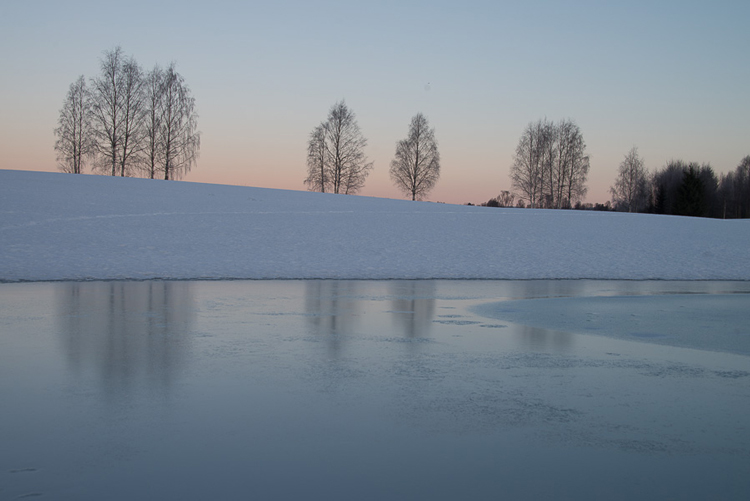
Sunrise 1

2. Basic editing

In my image (above), I realized I was sloppy with the composition when I took it. I had to fix this. Often one adjustment leads to another. Let’s go through the different steps I applied to this image.

The image above is the untouched RAW file straight out of the camera. Some photographers are happy with this result, and leave it there. After a closer look, I found there were several other things with the image I could improve. Because it’s a RAW file, I knew there was a lot of image data to work with.

Basic editing is supposed to enhance what’s already in the photo, not fix what is wrong. Ideally, you should get the shot as technically correct as possible in the camera. One nice thing about digital photography is how easy it is to make small adjustments after the shot. If you fail on the exposure or the horizon is not perfectly straight, no problem, you can fix it

Levelling a tilted horizon and verticals, cropping, and dust spot removal
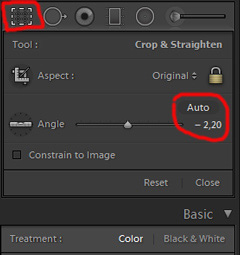
capture-2bWhile you edit, you can make simple adjustments to your composition, like levelling the horizon and cropping. By cropping, you can tighten the composition, and to some extent “move” elements, so they align according to the rule of thirds or golden mean.

In the photo below I have levelled the trees, as they were leaning slightly to the right. I did not notice that when I took the photo. Most photographers will not question if levelling the horizon, cropping, and removing dust spots are acceptable image editing. It’s part of the workflow.
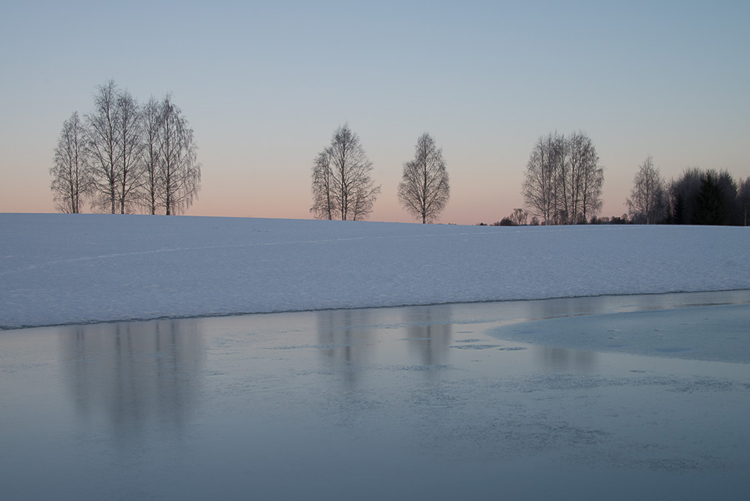
Sunrise 2

Adjusting the White Balance (WB)

I took this image an early morning, at sunrise. The reflections from the clear blue sky gave the scene an overall blue color cast. At the computer, I remembered the scene as being warmer. Warmer is perceived as more pleasing. I could be wrong, because who remembers exactly what colors a scene had at the time they took the image?

Photographers often claim they edit their photos to represent how they saw the scene. It is probably more correct to say they edit their photos the way they wish they saw the scene.
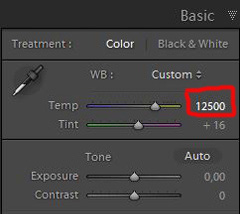
capture-3bSo I decided I wanted my image to have a warmer color tone. I adjusted the White Balance by adding more yellow.

I could have achieved something similar by setting the camera White Balance to the Cloudy preset, at the time I took the image. Changing the White Balance after the shot is another advantage when you shoot your files as RAW. Either way, the result is altered, and to some extent, the reality is changed.

Although the significant impact changing the White Balance can have on an image, it is usually accepted as part of the post-processing workflow.
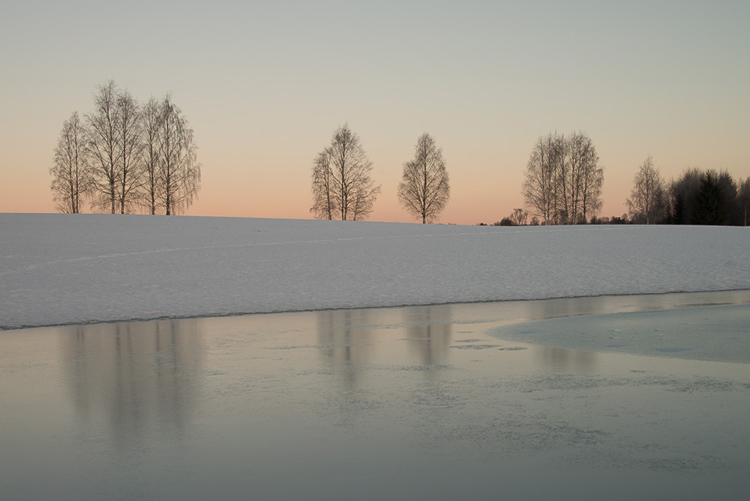
Sunrise 3

Increasing Exposure and Contrast

Because no adjustments are made to the RAW files in camera, the images look unfinished when you open them up on your computer. The preview on the LCD is an embedded JPG version of the photo, which often looks much better.
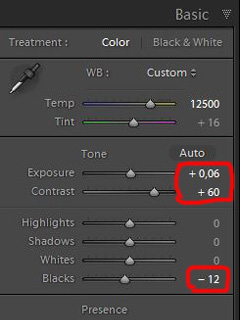
capture-4bEven with modern digital cameras you don’t always hit spot on with the exposure. If you don’t get it right in-camera, with RAW files you can easily correct the exposure one two stops when post-processing.

My image is no exception, it looks flat, and needs a few more adjustments. So I increased the contrast slightly. When you increase contrast, the image tends to get a little darker. To compensate for this, I had to increase the exposure a tiny bit. You can see the result so far below.
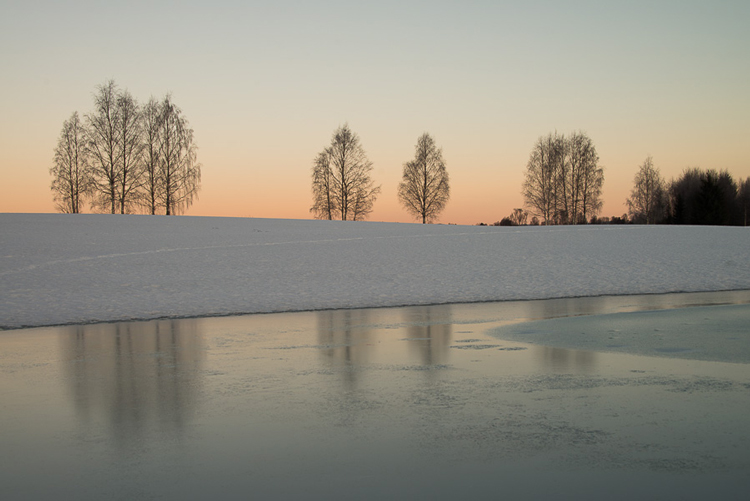
Sunrise 4

Decreasing Highlights and increasing Shadows
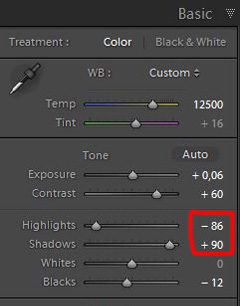
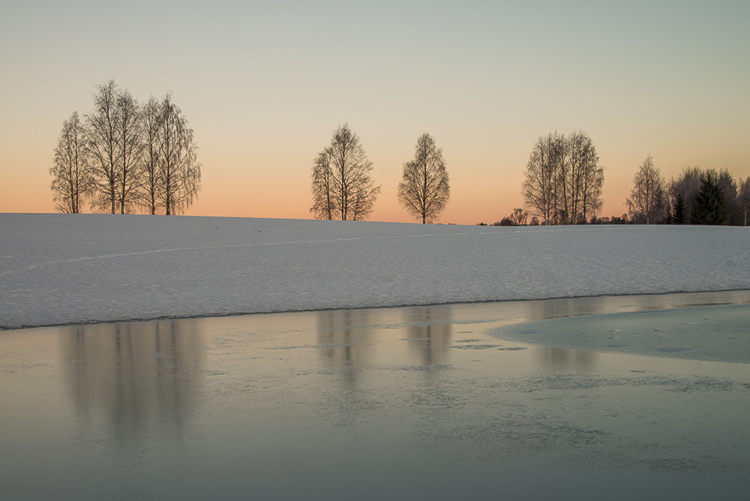
capture-5bOne more thing that bothered me was the black chunk of trees to the far right. The trees have now become too dark with no details in the shadows. I fixed this by increasing the shadows slightly. I also lowered the highlights a little to bring out more of the texture in the ice. In the version below the trees to the right are no longer completely black.

With these last adjustments, the image starts to look pretty decent. So far so good. All of the edits I have done until now are within what most photographers will find acceptable.
Sunrise 5

3. Beyond basic editing

Oversaturated colors

Photos with saturated and vibrant colors are eye catching. If you want attention when you post your images on social media sites, it’s a good idea to boost the colors first.capture-6
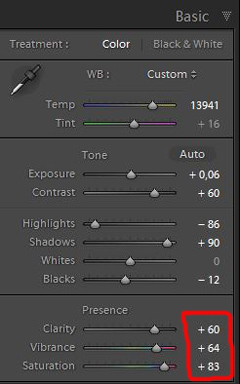
At this stage, it was attempting to make the sunrise more beautiful. To me, it was already an awesome winter morning sunrise. But I felt I could make it even better – with some over-processing.

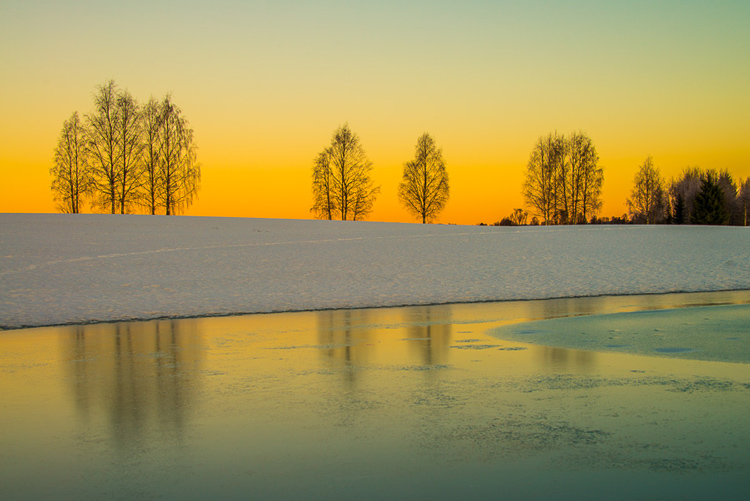
I did this simply by increasing vibrance and saturation significantly. The image now has an entirely different feel. To me, it looks fake. But I bet this version would have received more attention on my social media sites if I posted both versions there. I have seen this happen with some of my other images before.

With this level of editing, the discussions start as to whether or not the image represents a realistic landscape. It can be your artistic interpretation of the scene, but to me it’s not authentic anymore.
Sunrise 6

4. Photo editing artistically

Adding texture for a complete different look

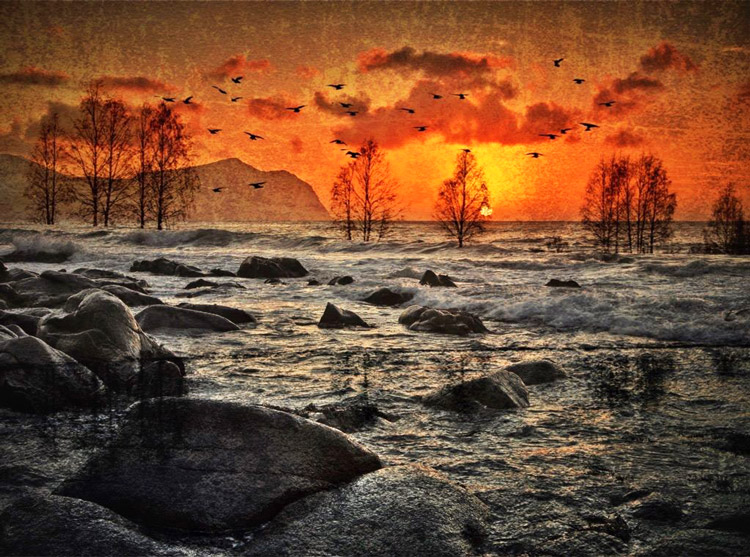
In the next image I have used my artistic freedom as a photographer and artist. I blended in a couple of texture layers and photo filters with the original image. By using textures properly, you can create some interesting effects on your images.

If this is a realistic landscape photo or not, is no longer a relevant question. It’s not, nor is it supposed to be. But you can discuss whether or not you like this style. While all the previous edits were made in Lightroom, the last two versions were made in Photoshop, as Lightroom doesn’t have the layers function which is needed.

Sunrise 7

Composite of several images makes this surreal piece

The last version of my image is a composite. Only a few elements are left from the original, but you can tell it’s still there. The result is so extreme that nobody can blame you for faking a realistic landscape image. Everybody know this is a creative piece of art. Again it’s very subjective whether like the style or not. Compositing is a whole new level of photo editing, it’s not for everyone.

When you create composites, you need many of the same skills as when you photograph. For a balanced composite, you must know about composition techniques and how to deal with light and shadows, as well as colors.
Sunrise 8

Conclusion

With digital photography it’s possible to create the image you want. Your imagination and skills are your only limitations. The general trend is bold and vivid colors get a lot of attention, at least among some photographers. Whether you want to follow this trend or not, is your decision. The fact is that more of the images you see online look similar, due to the same post-processing techniques. It’s getting harder to be recognized online unless you make something different.

As a landscape photographers you have a few challenge to tackle because the elements of nature are limiting. Light and weather conditions might not be as you wish when you’re at your dream scene. Maybe you never come back to the same spot again. In such a situation it’s tempting to fix the light (slightly) in post-production. In other words, to fake reality like I did with the oversaturated image.
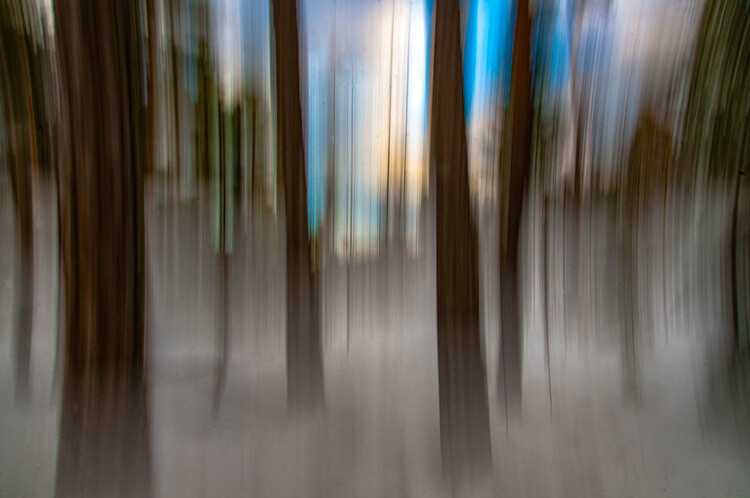
ICM_forest_original_edit

Original edit

ICM_forest_creative_edit

Creative edit

Photography is art, so it’s not wrong if you choose to do so, but be open with what you have done. Don’t pretend you experienced the sunrise of your life if you didn’t. In the end, it’s up to you what you’re comfortable with. Nobody can take away your creative vision.

You can do more advanced editing in Lightroom than I have shown in this tutorial. In Photoshop however the possibilities are endless. You can manipulate, remove, and add content to your images. With such drastic steps, you’re not only altering the reality, but you’re cheating. That’s if you claim your photo is real.

Now it’s your turn. What’s your opinion about how much you can edit landscape photos? Please share your thoughts in the comments below.
Original edit

Original edit

Creative edit

Creative edit

This week we are doing a series of articles to help you do better nature photography. See previous articles here:

  • 3 Habits Every Outdoor Photographer Should Develop to Avoid Missing Shots
  • 5 Tips for Better Nature Photography
  • 27 Serene Images of the Natural World
  • Weekly Photography Challenge – Nature
  • 10 Ideas for Photographing Nature in your Backyard
  • 6 Tips for Capturing Character and Personality in Wildlife Photography
  • 5 Tips for Setting the Focus in Your Landscape Photography
  • 7 Tips for Better Marine Wildlife Photography

googletag.cmd.push(function() {
tablet_slots.push( googletag.defineSlot( “/1005424/_dPSv4_tab-all-article-bottom_(300×250)”, [300, 250], “pb-ad-78623” ).addService( googletag.pubads() ) ); } );

googletag.cmd.push(function() {
mobile_slots.push( googletag.defineSlot( “/1005424/_dPSv4_mob-all-article-bottom_(300×250)”, [300, 250], “pb-ad-78158” ).addService( googletag.pubads() ) ); } );

The post Tips for Processing Landscape Photos – from Basic Edits to Artistic Interpretation by Kim Rormark appeared first on Digital Photography School.


Digital Photography School

 
Comments Off on Tips for Processing Landscape Photos – from Basic Edits to Artistic Interpretation

Posted in Photography


Deep dive: the Canon EOS-1D X Mark II is an underwater ace

19 Jul

Canon 1Dx Mark II Underwater Camera Review

By Backscatter Staff

Backscatter Underwater Video & Photo is the largest underwater imaging equipment supplier in the world. They love the water, and they personally dive and shoot with the gear they sell. This article originally appeared on their website and is reproduced here with their permission.

Backscatter is fortunate to have a large customer base of professional underwater filmmakers. This year our conversations on 4K cinema have revolved around three cameras: Red Weapon/EPIC Dragon, Sony a7R Mark II, and the new Canon EOS-1DX II. We’ve spent many hours underwater with each of these cameras and this article compiles our Canon 1DX II tests from four uniquely skilled underwater professionals.

Canon 1Dx Mark II underwater housing system configured for wide angle.
Nauticam NA-1DXII Underwater Housing, Nauticam 8.5 inch Dome Port, Keldan 8,000 Lumen Video Lights,Canon 1Dx Mark II Camera, Canon 8-15mm Fisheye Lens.

Who is this camera for?

If you’re both an underwater photographer and filmmaker, our test results confirm the Canon 1DX II is hands down the greatest camera we’ve tested to date. It’s a no compromise professional photography camera capable of shooting both 20MP stills at 14fps and 4K 60p video in incredibly low light. While it doesn’t offer the raw video and flexibility of a RED, it shoots broadcast quality 4K motion at a fraction of the size and cost and out performs favorites such as the Sony A7 series in low noise when tasked with the extreme requirements of underwater white balance.

Backscatter has spent over 20 years finding the best underwater cameras and we’ve learned that a chart-topping land camera is not always the best underwater camera. The new Canon 1DX Mark II is a good example. While leading groups such as DxOMark give it a ranking of 21st place, we give the Canon 1DX MK II a clear first place position for underwater applications.

The high ISO and high bit rate of the Canon 1Dx II combine to make smooth blue water transitions without banding or red channel noise even at extreme underwater white balance settings of 50,000K+. This video was shot with Canon 1DX II, Canon 8-15mm lens, and ISO settings from 320-6400. Select HD playback of 4K for full experience. Video by Backscatter staff Berkley White.

Real-world underwater low light performance

ISO performance results can vary greatly between underwater and land environments. Underwater we are forced to use extreme white balance settings of 30,000K – 50,000K or swim around with 10,000 Lumen lights just to illuminate a subject 3 feet from the camera. These underwater requirements can turn land camera test results upside down.

Our previous tests showed the Canon 1Dc was a top performer with a maximum of ISO 1250 for images in blue water and a maximum of ISO 2500 when shooting in high contrast or artificial light. The new Canon 1DX MK II now opens up blue water scenes to ISO 2500 and high contrast shots such as caves or wrecks in ambient light up to ISO 6400 even at extreme white balance settings.

White balance is less of an issue for underwater photography as raw files are easily corrected in post. For this application we do agree that cameras such as the Sony A7 series and Nikon D810 offer better low light performace, but we found the Canon 1DX II’s combination of great white balance capabilities, high bit rate video, and great ISO performance make it the best performing camera for photographer / videographer professionals.

This video was shot at 50 feet underwater with only a manual white balance and no artifical light. Canon remains king when it comes to nailing color underwater with a manual white balance. The live autofocus of the Canon 1DX II was able to stay focused on this grouper, even at lips to lens distances with thin depth of field. Shot with Canon 1DX II and Canon 8-15mm lens. Select HD playback of 4K for full experience. Video by Backscatter Pro Team member Erin Quigley.

The simplicity of underwater white balance – without filters or lights

Most underwater videographers have preferred Canon cameras for a good reason. Red light is lost within the first 10 feet underwater and you’re quickly left with nothing but the blues. To make whites appear white in ambient light, you’ll need an extreme white balance setting of 30,000K – 50,000K or more. Currently only Canon DSLRs offer this extreme white balance range to produce brilliant underwater color in-camera. As our previous testing shows, Sony cameras such as the entire A7 series are unable to white balance below 10 feet without a red filter on the lens as it is limited to 9,900K. Required filter use makes shooting in mixed lighting difficult or logistically impossible underwater. Our latest tests with the new Nikon D500 revealed it to be the best Nikon to date, but it often takes 10 to 20 attempts to register an underwater white balance at depth. RED cameras can white balance without a filter, but even modified with a H2O ELPF can’t match the rich blues that are so easily produced with Canon cameras. 

When performed correctly underwater, a manual white balance with the Canon 1DX II will almost eliminate the need for color correction in post and not burden the underwater videographer with filter maintenance or the requirement to always keep subjects within 3 feet of even the brightest underwater lights. If you want to keep it simple underwater, nothing beats a camera that produces great underwater color with a manual white balance.

While Canon’s new autofocus system stunned us in wide angle and on-land tracking tests, it’s still not quite there for real world underwater macro without further experimentation. Stay tuned for our new tests. Video by Backscatter staff Rusty Sanoian.

Autofocus with underwater cinema? Almost!

Canon’s new Dual Pixel Autofocus performed incredibly well on land and we were excited to put it to the test underwater. This new autofocus system includes Flexizone Mode which offers a manually positioned zone at any point on the screen while the new AF Tracking Mode allows the focus zone to follow a moving subject across the frame. Experienced underwater videographers know that autofocus has only spelled certain death with all large sensor cameras to date. Thus, we were stunned to discover that Flexizone AF Mode was not only fast but extremely accurate in underwater wide angle scenes. For example, Erin Quigley’s video of the grouper was shot in full AF Servo mode even at close focus and low depth of field. We were even able to start a clip two meters away from a subject and push in until the subject touched the dome with smooth focus throughout. Flexizone AF Mode was the most accurate and responsive system we’ve seen for underwater wide angle.

We hoped AF Tracking Mode would shine with the razor thin depth of field in underwater macro scenes. This mode worked surprisingly well on land, but was not a slam dunk underwater. First, underwater housings don’t yet offer the ability to use the touchscreen to select focus points and require the user to position the focus zone with the joystick and activate with the set button. Secondly, water motion and passing particles seemed to cause the focus to hunt enough that we preferred to set and lock focus for most macro subjects. While some of Rusty Sanoian’s Monterey macro video used AF Tracking Mode, the majority was captured by locking focus before each shot. We are currently testing lowering the secondary menu options that Canon has cryptically named “When Active” and “AF Speed” to see if we can make AF Tracking a reliable function for underwater macro.

Experienced underwater videographers should also note that the Canon 1Dx Mark II default setting is for Movie Servo AF to be enabled and thus the camera will AF continuously even when not recording. We recommend modifying the custom controls menu to reprogram the Set or the front Function button to Pause Movie Servo AF and always monitor the LCD to verify AF is paused during low contrast pans. Further, it’s important to note that Pause Movie Servo AF will sometimes turn off after the camera goes to sleep or is cycled on and off causing unwanted AF activation. Underwater camera operators might find it best to turn Movie Servo AF off when shooting a full dive in very low contrast conditions.

Videos shot at 60p then slowed down to 30p has the effect of adding more drama to the image. More importantly, underwater shooters can’t always set up a tripod on a pristine reef and slow motion helps us eliminate camera shake for hand held sequences. Video by Backscatter Pro Team member Dustin Adamson.

Why is 4K 60fps amazing for underwater video? Stability!

We’ve all fallen in love with slow motion videos and the hidden world that is exposed when we slow down real time. The Canon 1DX II would not be considered a slow motion camera on land, but 60fps and 120fps video is about all we need in the fluid underwater environment. On land it may be easy to mount a camera to a tripod for rock steady footage, but we can’t always drop a tripod on a pristine reef. Slowing down reality helps us add stability to our shots. Maybe that clip of the mother humpback with her calf caught you unexpectedly and you had some camera shake? Slowing your 60fps video to 30fps will double your clip length and smooth out your camera wobbles. Maybe you were fighting your tripod when a tiny jaw fish was aerating his eggs? Playback your video at 30fps to get 2x the time on a great macro behavior shot with less camera shake. You’ll pay a price on hard drives when shooting higher frame rates, but you’ll double your chances to get the shot.

Cons of large file sizes and issues with new CFast cards

The Canon 1DX II is outfitted with (1) CF and (1) CFast card slot. All 4K 60P recording longer than 10 seconds must be recorded to the new CFast card. At a blistering 6GB per minute, you’ll need to buy 256GB CFast cards to get roughly 40 minutes of recording time per dive. Newcomers to low compression 4K will also need to upgrade their portable and home hard disks in a major way. Hard drives are inexpensive these days, but CFast cards are bleeding edge and still demand a premium price.

Canon recently issued a firmware update to fix issues with Sandisk CFast cards. Our test pilots didn’t experience any of these Sandisk issues, but one had a catastrophic issue with a Lexar 256GB card that was unrecoverable. Currently Backscatter is only recommending Delkin 256GB CFast cards as they have been the only cards without reported issues. Stay tuned for more feedback from the field.

Which 4K camera is best underwater? 

Canon 1DX II VS. SONY A7 SERIES CAMERAS

In an era where airline baggage fees have people compromising with smaller cameras, the mirrorless Sony a7R Mark II has been a crowd favorite for good reason. Its large sensor produces beautiful low noise 42MP stills, 4K 30p video, and a complete system is easily carried on a plane all at a great price. It performs best when shooting macro scenes where features such as focus peaking and super 35 mode really shine. The Sony a7R Mark II becomes difficult to use for underwater wide angle. The above-mentioned inability to white balance without a filter makes shooting with or without lights on the same dive almost impossible. Advanced photographers will miss an optical viewfinder when trying to compose wide-angle scenes at upward angles. In these situations the mirrorless screen overexposes and only provides a guess on classic underwater photo compositions. Filmmakers will greatly prefer the 800mbps data rate and 60fps of the Canon 1DX II over the Sony’s 100mbps and 30fps when scaling to larger projects. For most people the choice between these two cameras will be a mater of budget, physical size, and ability to overcome the limitations of the Sony a7R Mark II. 

Canon 1DX II VS. RED EPIC DRAGON

If your project has the budget, the RED EPIC DRAGON remains the ultimate “fix it in post camera.” RED continues to offer the greatest dynamic range, bitrate, and lens selection. If your project has skilled editors and colorists, they’ll prefer the flexibility that raw video offers to correct shooting errors and ability to color match a project across a wide range of unpredictable natural light sequences. The H2O OLPF filter and Dragoncolor 2 color space have significantly helped RED reproduce underwater color, but we’d like to see more underwater performance in a system in this price range. While RED remains king of large budget projects, the Canon 1DX II will certainly be the top pick for streamlined underwater productions. Based on our tests, the Canon 1DX II offers better saturated blues and overall lower noise in the blue light (red light starved) underwater environment. Assuming the proper white balance and exposure is attained while in water, the 1Dx Mark II footage looks fantastic out of the camera and is ready to pass to the Director or Producer in the field eliminating the need for expert level grading. If your project is heavy underwater and you have a medium to small budget, the 1Dx Mark II is an easy win.

Canon 1Dx Mark II underwater housing configured for macro.
Nauticam NA-1DXII Underwater Housing, Nauticam Flat Port, Nauticam SMC Macro Lens, Dive & See 5 inch Monitor, Light & Motion Sola Video 2500 Lumen Lights, XIT404 Tripod Plate, XIT404 Tripod Legs, Canon 1Dx Mark II Camera, Canon 100 IS Macro Lens.

We know you have questions – give us a call!

The team here at Backscatter is just like you. We want to spend the least on our personal gear, but still get the most future-proof camera system available. Give our cinema experts a call. We’re happy to walk you through all of the options and guide you towards the best camera for your goals and budget. 


Backscatter Underwater Video & Photo is the largest underwater imaging equipment supplier in the world. Since 1994, Backscatter has supported sport divers, filmmakers, and production companies with gear and technical support from its locations in Monterey, California and Derry, New Hampshire. Backscatter is far from a typical retailer and lives by its motto, “We dive, shoot, and service everything we sell” by publishing hundreds of detailed gear reviews from first hand experience and offering instructional seminars and trips around the world.

Backscatter is the only US retailer with a complete in-house warranty service center for all major underwater brands. Backscatter is the US distributor for Olympus in the scuba diving retail channel and also manufacturers its own line of underwater camera accessories such as the FLIP system of color correction optics for GoPro cameras. For more about Backscatter or articles on equipment and technique, please see http://www.backscatter.com

Articles: Digital Photography Review (dpreview.com)

 
Comments Off on Deep dive: the Canon EOS-1D X Mark II is an underwater ace

Posted in Uncategorized


Trippy mirrored timelapse turns Hong Kong upside down

19 Jul

Skill, dedication, vision: a good timelapse requires all of these things. A really cool subject helps too. ‘The Allegory of the Cave,’ a new timelapse from Visual Suspect, checks all of those boxes. By mirroring Hong Kong’s vibrant cityscapes, its creators aim to play with themes of ‘perception and knowledge as reflection of our reality.’ 

Familiar images of skyscrapers in clouds or boats in a harbor become abstract shapes – where does one image stop and its reflection begin? Is anything real?

See? We told you it was trippy. 

Articles: Digital Photography Review (dpreview.com)

 
Comments Off on Trippy mirrored timelapse turns Hong Kong upside down

Posted in Uncategorized


Photographers to Get (Small) Reward for Their Creative Commons Images

19 Jul

dotspin

Image courtesy: Dotspin

Someone is benefitting from your Creative Commons-licensed images, and it probably isn’t you. Sure, you might get a little thrill out of knowing that you’re helping a designer with a small budget (or a blogger with no budget) to use an attractive image. And if you’re able to see your pictures in use, the validation can be a fun boost. But that’s a big ‘if’ and it’s pretty much where the benefits end. One new company, though, believes that photographers willing to give away their pictures should receive more for their efforts. Dotspin is trying to line up gifts for photographers who apply Creative Commons licenses to their pictures and give them away on social media sites.

The company has been online since the beginning of May and is still in beta. Its aim, says co-founder Gastón Paladini, is to reward photographers for their contributions to the Internet.

“The idea come from a vision to have a more fair web for all. We think that social media users should be recognized for good content (photos) shared and to be protected in a legal way (copyrights).”

Dotspin is connected to both Instagram and Twitter. Having signed in using an account on either one of those services, Dotspin’s users can take a picture, apply their filters and upload it to their account, tagging the image with the hashtag #dotspin.

The hashtag ensures that the photo is also submitted to Dotspin where, by default, it is licensed as Creative Commons. A settings page, however, allows photographers to change the type of license applied. Rather than selecting one of the various Creative Commons licenses in use, they’re asked whether they’re willing to allow modifications and commercial usage in addition to personal use.

The image will appear in Dotspin’s galleries watermarked with a colored dot, but not before the community has voted on it. Users are presented with two random pictures and asked which they prefer. Images that receive a large number of votes receive “dotcredits,” points which they can redeem for rewards.

At the moment those rewards come from Dotspin, based on “some agreements with Amazon.”

“But we think that soon the suppliers and brands will come to us to offer their products on the Dotspin catalogue,” says Gastón.

Put Your Ads in Front of… Picture-Takers

He may be right.  Instagram currently has more than 100 million users, offering a massive potential market for sellers looking to promote their goods. It’s likely that Dotspin will be able to find some companies who are willing to offer vouchers or freebies in the hope of turning the winners, as well as the site’s users, into future customers.

But the site will face a number of challenges too.

The first is the lack of demographic data. Awarding points that users can redeem means that suppliers can’t target their advertising. They’ll have to settle for offering their products to a demographic made up of roughly of people who like taking pictures. That’s a broad category.

The voting system, too, leaves much to be desired. At the moment, two images are placed against each other at random, forcing users to choose between a picturesque sunset and a mirror-shot selfie, for example. A voting system that pitched two images showing similar topics or that were shot in similar styles against each other might be a more serious way of judging talent.

But a bigger problem is the site’s goal itself. Gastón’s aim to reward people willing to give away their images may be fair and reasonable, but the lack of rewards on offer so far hasn’t stopped people from sharing their pictures. Flickr alone has more than a quarter of a billion photos available under one form of Creative Commons license or another. Donors of those images have made them available with no hope of reward. Gastón wouldn’t say how many photographers have signed up since the site’s beta launch but he did indicate that the numbers are “much more than we thought.”

That could be a good sign but it will be interesting to see whether Dotspin is able to capture a good chunk of the photographers willing to allow people to use their images.

Creative Commons Users Want Tracking for Their Photos, Not Thanks

The most likely outcome is that some photographers currently sharing their images through Instagram and Twitter will sign up to Dotspin and start adding the hashtag. They’ll enjoy the extra feedback provided by the voting system, especially if it’s enhanced. And if the site is able to bring in donors, they might feel a rush if they’re able to win enough credits to pick up a free app download or a discount from a printing service.

But none of those rewards is likely to have an impact on photo-sharing as a whole. They aren’t likely to encourage it and the odd prize isn’t going to come close to rewarding photographers for giving away for free an asset that costs other photographers a great deal to produce.

That’s because when photographers add a Creative Commons license they aren’t doing it for the reward. They’re doing it because they want people to use their images — even the images that few people are ever likely to use. And most of all they want to see their pictures in use.

That would have been a much more powerful reward than goodies redeemable against voted credits. If a platform were produced that highlighted the best of the most recent Creative Commons-licensed images, helped publishers, bloggers and editors to find them, and informed the photographers each time an image was downloaded and told them where it was going to be used, that would be much more rewarding.

And if that service also gave the photographers a share of the page’s revenues, then photographers who applied Creative Commons licenses to their images would really start to feel the benefits.


Photopreneur – Make Money Selling Your Photos

 
Comments Off on Photographers to Get (Small) Reward for Their Creative Commons Images

Posted in Equipment


Phase One introduces first Schneider Kreuznach ‘Blue Ring’ zooms

19 Jul

$ (document).ready(function() { SampleGalleryV2({“containerId”:”embeddedSampleGallery_0196598875″,”galleryId”:”0196598875″,”isEmbeddedWidget”:true,”standalone”:false,”selectedImageIndex”:0,”startInCommentsView”:false,”isMobile”:false}) });

Phase One has announced two Schneider Kreuznach ‘Blue Ring’ lenses designed with the XF system in mind, the first zooms in the series. The Schneider Kreuznach 40-80mm LS F4.0-5.6 and the Schneider Kreuznach 75-150mm LS F4.0-5.6 are optimized for the company’s full frame (53.7 x 40.4mm) medium-format system.

The new Blue Ring lenses join the recently announced Schneider Kreuznach 110mm LS F2.8 and 240mm LS F4.5. Both feature the ability to sync flash at shutter speeds up to 1/1600sec and built-in electronics that allow autofocus to be individually calibrated. Phase One claims this series of lenses is built to its highest quality assurance standards

Phase One Announces First Schneider Kreuznach Blue Ring Zoom Lenses

Prime Lens Quality Featuring Full Frame Sensor Coverage, Improved Precision, and Advanced Electronics

COPENHAGEN, July 18, 2016 – Phase One, creator of the world’s finest open-platform high-end camera systems and professional imaging software, today added two new Schneider Kreuznach lenses to its comprehensive family of lenses. These two Blue Ring zoom lenses feature impressive front glass elements, with front lens diameters of 63mm and 65mm respectively, delivering edge-to-edge coverage of full frame 645 format. Used on a Phase One XF 100MP system, the lenses are able to take full advantage of the sensor’s resolution; a 100MP capture renders a 100MP image with breathtaking fidelity.

— The Schneider Kreuznach 40-80mm LS f/4.0-5.6 Zoom lens renders ultra sharp resolution on all zoom distances from wide to normal focal length;

— The Schneider Kreuznach 75-150mm LS f/4.0-5.6 Zoom lens delivers great versatility. It’s preferred for on-location fashion shoots, with a range from normal to telephoto.

Together, these two lenses comprise an effective zoom range from 40mm to 150mm. Each lens is equipped with a zoom lock function on its barrel and is designed to maintain focus position while zooming. They each support flash synchronization up to 1/1600s. The new built-in electronics permit individual focus calibration when used with the Phase One XF Camera System.

“Creating optics this large with such tight tolerances is quite an achievement, “said Espen Beck, Phase One Senior Product Manager. “A Phase One full frame 100MP medium format sensor is 1.5 times larger than the cropped size 50MP medium format and 2.5 times larger than sensors found in high-end 35mm DSLRs. Capturing the full resolution of a square sensor this size with a round lens and avoiding crop means that the entire lens must be larger, which requires larger movements of individual lens elements while meeting the requisite standards for speed and precision.

“Schneider Kreuznach lenses are designed to deliver the ultimate analogue input to be shaped and refined with the Phase One XF 100MP Camera System and Capture One software. This design also benefits the Phase One XF 50MP system, which can exploit the ‘sweet spot’ of the lens, producing impeccable results.”

Designed by Schneider Kreuznach and produced by Phase One Japan, Schneider Kreuznach “Blue Ring” zoom lenses are refined with robust, aerial-grade mechanics and manufactured to meet Phase One’s highest quality assurance standards. Their enhanced precision, mechanical build, and look and feel complement the Phase One XF Camera System design.

For more information, including specifications for the two new “Blue Ring” lenses, please go to: https://www.phaseone.com/en/Products/Camera-Systems/Lenses

There will be a hands-on Webinar demonstration of the lenses on Tuesday, July 19.

For more information, times and to register, please go to:

https://attendee.gotowebinar.com/rt/2633991530877302018

Availability and Pricing

The two new Blue Ring Zoom lenses are available to order now. They are compatible with the Phase One XF, Phase One 645DF+ and Mamiya 645DF+ or DF camera systems.

The Schneider Kreuznach 75-150mm LS f/4.0–5.6 Zoom is shipping now. Manufacturer suggested retail price: 5.490 EUR / 5,990 USD

The Schneider Kreuznach 40-80mmLS f/4.0–5.6 Zoom is expected to ship by August 1, 2016. Manufacturer suggested retail price: 7.990 EUR / 8,990 USD

Phase One Camera Systems and all accessories are available through Phase One photography partners worldwide: www.phaseone.com/partners.

For a demo of a Phase One Camera System, please sign up here: www.phaseone.com/demo

About Phase One

Phase One A/S is the world-leading provider of medium format digital photography systems and imaging solutions for professional photographers and industrial applications. Established in the early 1990s, Phase One is a true digital photography pioneer with a passionate commitment to image quality excellence and creative freedom. Phase One’s engineering and design expertise has produced imaging breakthroughs from high- resolution camera systems to advanced software for better photographic workflows and raw file editing. Phase One’s understanding and ability to optimize hardware and software integration underscores their award winning Capture One Pro software – widely preferred by professional photographers.

Phase One’s industrial division focuses on imaging accuracy for industrial applications ranging from aerial image acquisition to cultural heritage preservation – from mapping the globe, to protecting priceless works of art and documents.

Today, with control over all aspects of the medium format camera system supply chain, Phase One is uniquely positioned to help photographers and imaging experts everywhere stand out above the competition and realize their creative visions without compromise.

Based in Copenhagen Denmark and embracing the high demand of Scandinavian design excellence, Phase One is dedicated to delivering the best image quality and user experience. With offices in New York, London, Tokyo, Cologne, Hong Kong, Shanghai and Tel Aviv, and with its expert teams of global partners, Phase One is committed to serving and supporting its customers worldwide.

Phase One and Capture One are registered trademarks of Phase One A/S. All other brand or product names are trademarks or registered trademarks of their respective holders.

Learn more here:

Phase One at: http://www.phaseone.com

Twitter at: http://www.twitter/PhaseOnePhoto

Facebook at: http://www.facebook.com/pages/PhaseOnePhoto

Google+ at: http://plus.google.com/+phaseone/posts

LinkedIn at: http://www.linkedin.com/company/16665

Articles: Digital Photography Review (dpreview.com)

 
Comments Off on Phase One introduces first Schneider Kreuznach ‘Blue Ring’ zooms

Posted in Uncategorized


Dystopian Textile: Beirut Architect Builds Bulletproof Headscarf

19 Jul

[ By WebUrbanist in Design & Products & Packaging. ]

head scarf

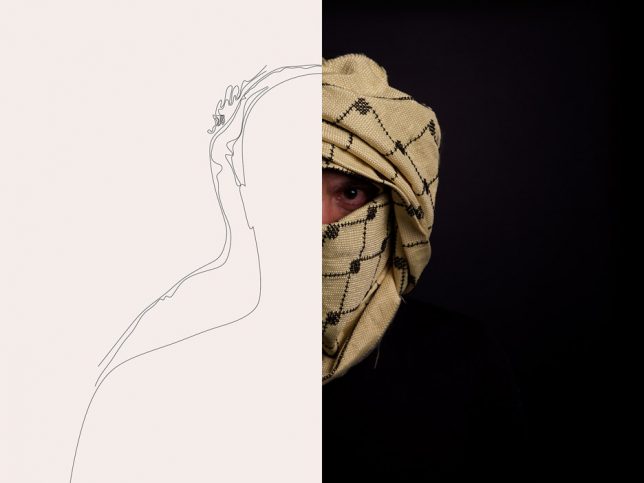
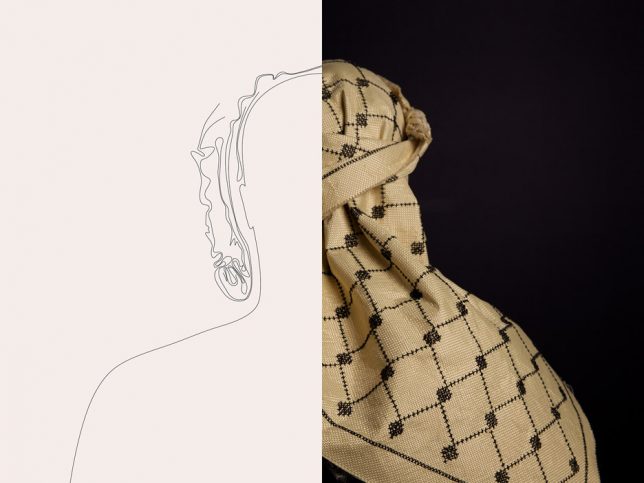
Somewhere between disturbing practical and abysmally pessimistic, this gender-neutral, anti-ballistic headscarf draws on a long history of regional fashion traditions but with a depressingly contemporary twist: it is constructed from Kevlar.

bullet resistant textile design

Salim al-Kadi seems ambivalent on the question of the whether this accessory is practical or political, but he put serious effort into making it work, regardless. The K29 Keffiyeh 001 was made from para-aramid synthetic fiber, of the kind used in body armor including bulletproof vests.

bulletrpoof head wrap kevlar

The architect brought the Kevlar to a Palestinian refugee living in Lebanon and had her weave in a traditional pattern without compromising the bullet-resisting efficacy of the material. Of course, a shot to the head, cloth or no, is certain to be damaging if not deadly, regardless of whether the bullet is stopped.

bullet scarf middle east

Historically, keffiyeh have been worn around the Middle East as a way for men (and women) to gain protection from sun and sand. It is wrapped in different ways depending on the place, but does not stand out, a sort of hidden-in-plain-sight statement about the state of war and tension in the region.

Share on Facebook


[ By WebUrbanist in Design & Products & Packaging. ]

[ WebUrbanist | Archives | Galleries | Privacy | TOS ]


WebUrbanist

 
Comments Off on Dystopian Textile: Beirut Architect Builds Bulletproof Headscarf

Posted in Creativity


Samyang introduces XEEN 135mm T2.2, first ‘summer blockbuster’ lens

19 Jul

Samyang is making good on its promise of a new lens every week for five weeks, kicking things off with a XEEN 135mm T2.2 cinema lens. It slots into the company’s relatively new lineup as the longest lens in the range.

Like its siblings, the XEEN 135 is offered with interchangeable mount fittings for PL, Canon EF, Nikon F, Sony E and Micro Four Thirds bodies. Its manual focus only and uses an 11-blade aperture. No price is given, but XEEN series lenses have averaged around $ 2500 each.

Articles: Digital Photography Review (dpreview.com)

 
Comments Off on Samyang introduces XEEN 135mm T2.2, first ‘summer blockbuster’ lens

Posted in Uncategorized


The Brave New World of Robotic Pizza Delivery is Almost Here

19 Jul

[ By SA Rogers in Gadgets & Geekery & Technology. ]

robot food delivery

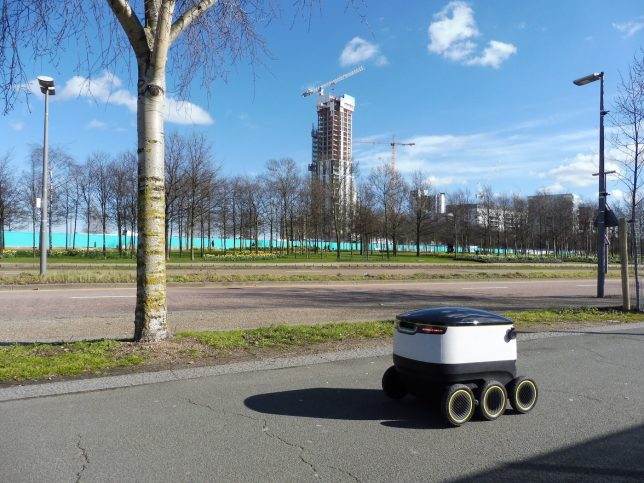
Thus far, the 21st century has been pretty disappointing for those of us who grew up expecting flying cars, teleportation devices and recreational trips to the moon by the time we were adults. While there were some things sci-fi films like Back to the Future got right – including video calls, flat-screen televisions, wearable technology and biometrics – nobody short of a billionaire villain type actually has a robotic butler that can bring them food at the push of a button. But if you live in London, you will soon be able to access the next best thing: dinner delivery via a six-wheeled droid.

food droid 2

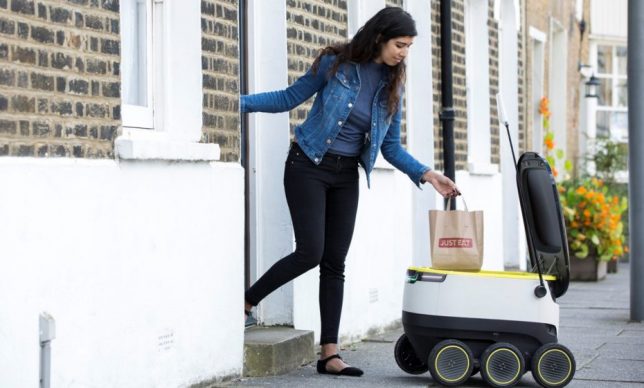
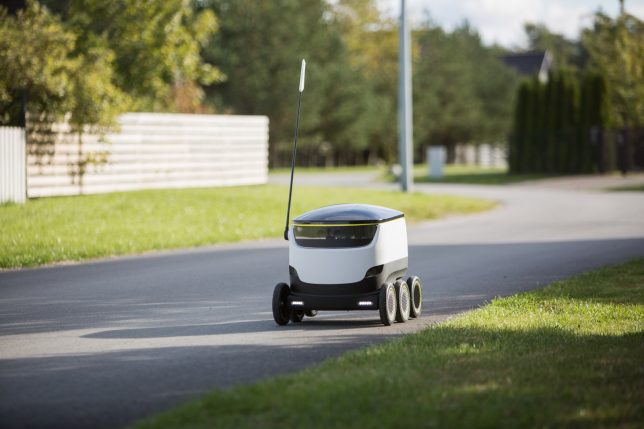
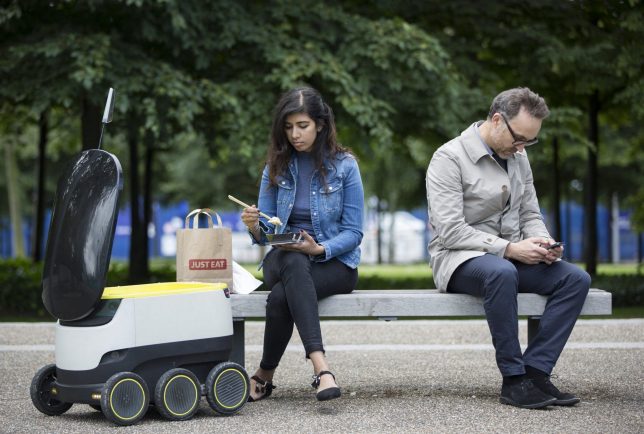
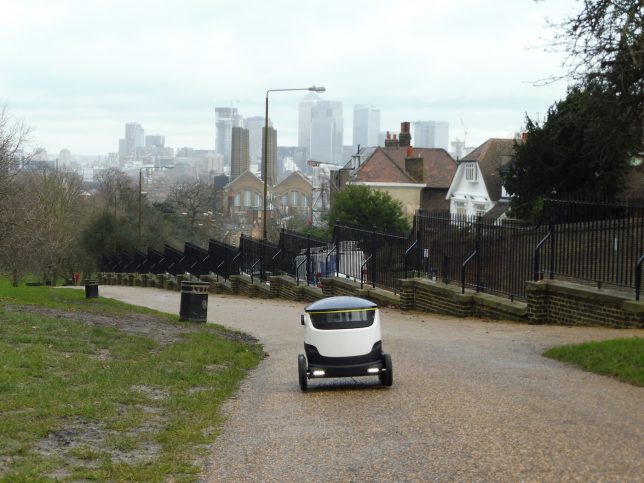
Starship Technologies, which is run by two Skype co-founders, is partnering with London food delivery startups Just Eat and Pronto to send what essentially look like wheeled coolers through the streets, dropping off meals to customers within a 2-3 mile radius. Tests will also be carried out in Dusseldorf, Germany, and in Starship’s home city of Tallinn, Estonia. This is on top of 5,000 miles of previous testing in places like Glastonbury, where the bots have “met over 400,000 people without a single accident,” but this is the first time they’ll be delivering food to actual paying customers. Starship is expected to announce rollouts in the U.S. in the coming months.

robot food delivery 4

Is it really the next best thing to a robot butler, though? The first question that pops into many people’s heads when reading about this technology is whether somebody can just kick that self-driving droid around a little bit and steal your food for themselves. It’s a fair question. Starship says for these first test drives, the bots won’t be fully automatic – the company will monitor their progress remotely and take over if anything goes awry.

robot food delivery 3

food droid

The zero-emissions delivery bots sense obstacles in their path and navigate around pedestrians, getting out of the way as necessary, as seen in the video above. Not just anyone can access what’s inside, either. The customer who ordered the food has to use an app on their phone to open it, ensuring that the robot doesn’t just roll up to somebody else who lives in your apartment building and give them your pad thai.

Share on Facebook


[ By SA Rogers in Gadgets & Geekery & Technology. ]

[ WebUrbanist | Archives | Galleries | Privacy | TOS ]


WebUrbanist

 
Comments Off on The Brave New World of Robotic Pizza Delivery is Almost Here

Posted in Creativity


Mindshift Gear gives Moose Peterson backpacks a facelift

19 Jul

Mindshift Gear has given the Moose Peterson backpack range an update with new design elements and materials, according to the California-based company. The bags now feature tuck-away belts and harnesses, stronger seams and shoulder straps as well as new zipper pulls that make it easier to open and close the compartments when wearing gloves. The three bags each retain the original ‘Moose Ear’ automatically closing flaps that help to keep dust out of the main sections of the bags, but now the bags are slightly larger to take accomodate bigger modern DSLR cameras.

The bags each hold three DSLR bodies with attached lenses, with the MP-1 V2.0 being the larger model that’s suitable for very long lenses, and the MP-7 V2.0 is the smaller, but still capable of holding a 70-200mm type lens on one of the bodies. The MP-1 V2.0 is priced at $ 349.99, the MP-3 V2.0 is $ 279.99 and the MP-7 V2.0 is $ 199.99.

For more information visit the Mindshift Gear website. 

Press release:

MindShift Gear and Moose Peterson Collaborate to Update Classic Moose Peterson Outdoor Photography Backpacks

SANTA ROSA, CALIF. – Working in partnership with renowned wildlife photographer Moose Peterson, MindShift Gear has updated the three classic Moose Peterson backpacks. Initially designed for wildlife and safari photographers, the backpacks feature a three-compartment layout that helps protect their gear from the elements.

The Moose Pack series is available in three sizes: MP-1, MP-5 and the smallest, the MP-7. The backpacks can carry up to three DSLR camera bodies with telephoto lenses attached—up to 600mm f/4. This strategy enables photographers to be ready to capture wildlife at any distance without changing lenses or exposing the sensor to the elements.

The backpacks also feature the same innovative “Moose Ear” flaps that close automatically, protecting camera gear from dust and debris common in wildlife photography. And because nature photographers often travel to remote locations, the packs are designed to meet airline carry on requirements, and even fit in the overhead compartment of the smallest regional jets.

Moose Peterson is a recognized Nikon USA Ambassador, Lexar Elite Photographer, recipient of the John Muir Conservation Award, and Research Associate with the Endangered Species Recovery Program. He also shares his knowledge through writing, being published in over 143 magazines worldwide, authoring 28 books including Photographic FUNdementals and Taking Flight and Captured, and lecturing across the country to thousands of photographers. As one of the original Nikon shooters to receive the D1 in 1999, Moose became the first wildlife photographer to shoot strictly digital.

“Moose Peterson backpacks are renowned for serving the needs of traveling photographers,” said Doug Murdoch, Think Tank Photo’s CEO and lead designer. “It has been a joy collaborating with him on bringing these classic designs back to the marketplace. While their design and materials have been enhanced, the designs of all three backpacks retain Moose’s original vision.”

KEY FEATURES

  • Original 1998 ‘Moose Ears’ design with auto-close compartment flaps protect the interior from dust, spray, wind, etc.
  • Three compartment system allows you to keep lenses attached providing the quickest way to access gear
  • Tuck-away harness system with removable waistbelt easily allows you to streamline your bag when loading it in a train, plane or automobile (MP-1 & MP-3 only)
  • Sized for carry-on, allowing you to get the maximum amount of gear on the plane
  • Long glass carrying solution with body attached
  • Tripod/monopod mounting system on side and front
  • Flap guard protects front zippers
  • Highest quality RC Fuse YKK zippers, 600D and 420D nylon construction for long-lasting durability and strength
  • Dual-density foam padded shoulder harness, cushioned with air mesh
  • Zippered side pockets fit full-sized flashes (MP-7 only)
  • Stretch water bottle pocket fits 32 oz. water bottle
  • Robust zipper pulls are easily gripped with or without gloves
  • Seam-sealed rain cover/drop cloth included protects against rain and dust

GEAR CAPACITY

Moose Peterson MP-7 V2.0

  • Holds 1 gripped body attached to 70–200mm f/2.8 and two ungripped bodies with primes attached, two flashes and accessories
  • Or, holds 1 gripped body and one ungripped body with 70–200mm f/2.8, 24–70mm f/2.8, 14–24mm f/2.8 (or 16–35mm f/2.8), a 2x teleconverter, two flashes and accessories
  • Maximum lens size: 200mm f/2 attached to a gripped body

Moose Peterson MP-3 V2.0

  • 3 gripped DSLRs with lenses attached, 1–2 additional lenses and 1–2 flashes and accessories
  • Or, 3 gripped bodies and 1 ungripped body detached from lenses, 4–5 standard zoom lenses, 1–2 flashes, a 2x teleconverter and accessories
  • Maximum lens size: Holds 600mm f/4 detached or 500mm f/4 lens attached to a gripped body

Moose Peterson MP-1 V2.0

  • 3 gripped DSLRs with lenses attached,3–5 additional lenses, 2x teleconverter,1–2 flashes and accessories
  • Or, 3 gripped bodies and 1 ungripped body detached from lenses, 7–8 standard zoom lenses, 1–2 flashes, a 2x teleconverter and accessories
  • Maximum lens size: Holds 800mm detached

MATERIALS
Exterior: For superior water resistance, all exterior fabric has a durable water-repellant coating, plus the underside of the fabric has a polyurethane coating. The backpacks also feature highest-quality abrasion-resistant YKK® RC-Fuse zippers, 420D velocity nylon, 600D polyester, 1680D ballistic nylon, 320G DuraStretch mesh, nylon webbing, 350G airmesh, nylon webbing, 3-ply bonded nylon thread.

Interior: high-density velex, 210D silver-toned nylon lining, hexa mesh pockets, high-density closed-cell foam, 3-ply bonded nylon thread.

TECHNICAL SPECIFICATIONS

Moose Peterson MP-7 V2.0
External Dimensions: 15” W x 15.5” H x 8” D (38.1 x 39.4 x 20.3 cm)
Large Camera Compartment: 5.3” W x 14” H x 6.5” D (13.5 x 35.5 x 16.5 cm)
Small Camera Compartments (each): 5” W x 6.3” H x 6.5” D (12.5 x 16 x 16.5 cm)
Weight: 2.5–3.3 lbs. (1.1–1.5 kg) (Lower weight excludes all dividers and accessories)

Moose Peterson MP-3 V2.0
External Dimensions: 14” W x 20” H x 8” D (35.5 x 50.8 x 20.3 c m)
Large Camera Compartment: 6.8” W x 18” H x 6.8” D (17.3 x 46 x 17.3 cm)
Small Camera Compartments (each): 6” W x 8.5” H x 6.8” D (15 x 21.5 x 17.3 cm)
Weight: 3.2–4.6 lbs. (1.5–2.1 kg) (Lower weight excludes all dividers and accessories)

Moose Peterson MP-1 V2.0
External Dimensions: 14” W x 23” H x 8” D (35.5 x 58.4 x 20.3 c m)
Large Camera Compartment: 6.8” W x 21.8” H x 6.8” D (17.3 x 55. 4 x 17.3 cm)
Small Camera Compartments (each): 6” W x 10” H x 6.75” D (15 x 25 x 17 cm)
Weight: 3.7–5.1 lbs. (1.7–2.3 kg) (Lower weight excludes all dividers and accessories)

Articles: Digital Photography Review (dpreview.com)

 
Comments Off on Mindshift Gear gives Moose Peterson backpacks a facelift

Posted in Uncategorized