RSS
 

Archive for June, 2016

Bolt-on 21: Fujifilm WCL-X70 sample images

12 Jun

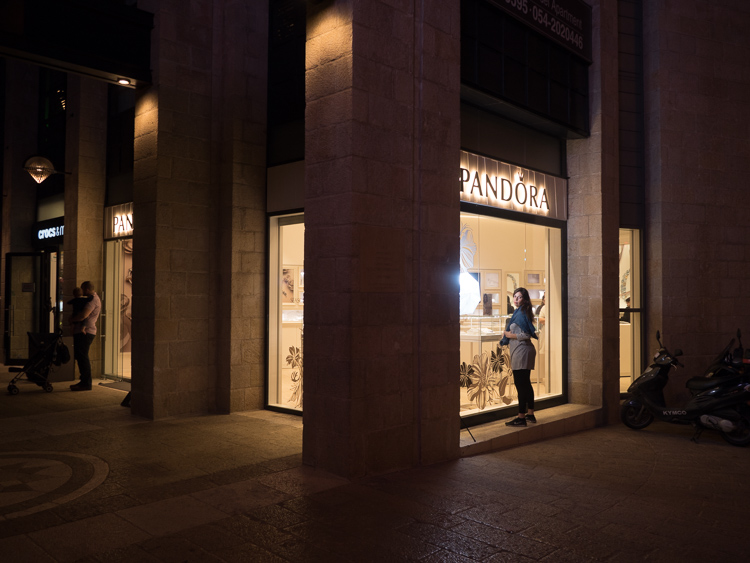
The Fujifilm WCL-X70 is a wideangle converter that fastens to the front of the 28mm equivalent F2.8 lens of the Fujifilm X70. Its approximately 0.8X focal length multiplier results in a 14mm focal length, or 21mm in 35mm format equivalent. Check out our sample images to see how it performs.

Articles: Digital Photography Review (dpreview.com)

 
Comments Off on Bolt-on 21: Fujifilm WCL-X70 sample images

Posted in Uncategorized


Step by Step How to Make a Moody Desaturated Image in Lightroom

12 Jun

Often times we occupy our processing time with thoughts of what can be added to our images in order to make them more impactful; more sharpness, contrast, or color. But, this may not always the best route to take. The old expression “Less is more” can be applied to many aspects of photography, and it is especially true when it comes to dealing with colors.
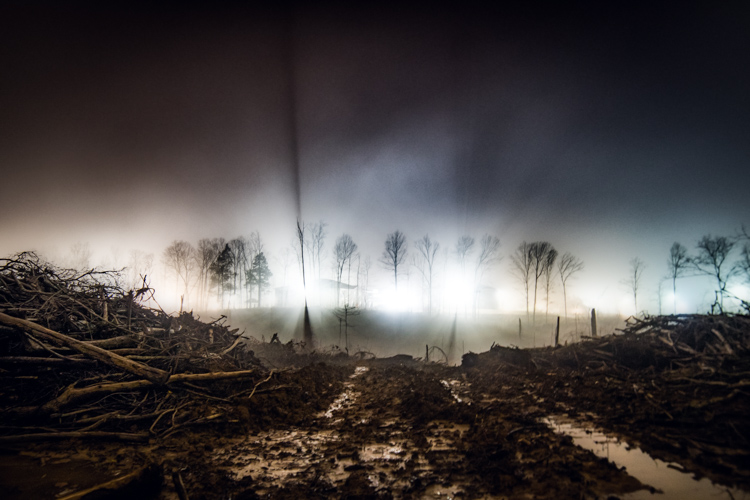
Example 1

Desaturated images are becoming more and more popular, especially with nature, landscape, and street photographers. As counterintuitive as it might seem, removing some color saturation can be more effective than adding it in some situations. That being said, there is more to making a strong desaturated photograph than simply working with the saturation and vibrance sliders in Lightroom or ACR.

In this article I will walk you through all the steps needed to process a moody, desaturated image in Lightroom. It’s extremely easy, and will help you add a unique look to your images. But first, a little bit of knowledge that you need to understand before we get started processing our photos.

What is Saturation?

It might seem to be one of those “It goes without saying” type of situations, but have you ever really thought about what saturation means, or how it can impact your images? As it relates to photography, saturation is the overall intensity of a color. Technically, saturation can be viewed as how far a color differs from pure white in the color spectrum.

For our purposes, saturation is the depth of colors present within a photograph. How intense the colors are in an image can be controlled globally (affecting the entire photo) in multiple ways such as: the saturation slider, HSL panel, and tone curve. Also, saturation can be controlled selectively, to only certain areas of the image, by using the filter and brush tools. In the end, saturation adjustments apply themselves to all colors no matter their luminance.
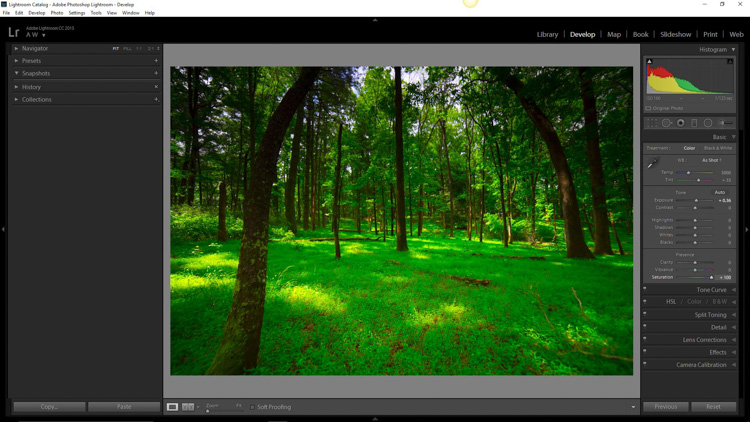
Full saturation applied

Full +100 saturation applied – notice the histogram here.

What is Vibrance?

Vibrance is a somewhat more interesting concept. This is a term Adobe has used to label something that is very similar to saturation. The difference between saturation and vibrance isn’t always black and white (color humor), but there is a distinction.

The saturation slider controls the intensity of all color tones throughout the image, regardless of their luminance. This means any colors whose brightness falls into the highlights, mid-tones, and shadows are all affected. Vibrance is different, in that it only affects the saturation of colors whose luminance falls into the mid-tone range. It has been referred to as smart saturation, and I tend to agree. Vibrance is very useful for enhancing, or in our case desaturation of the colors within a photo, without being as harsh as the saturation slider.
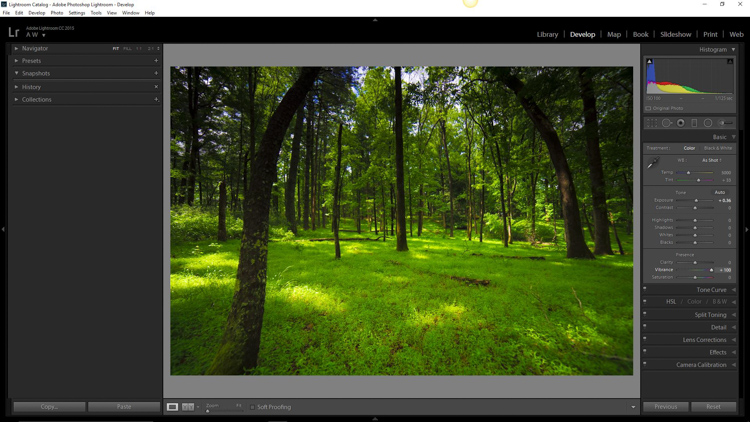
+100 Vibrance applied - notice the difference between this histogram and the saturation one.

+100 Vibrance applied – notice the difference between this histogram and the saturation one.

When Does Desaturation Work Best?

Bright colors lend themselves to photos when the intent is to bring an upbeat or more cheerful feel to the image. Not to say that all less saturated images have to be melancholy or less cheerful, most times it is quite the opposite. The purpose of desaturated, or muted tones, is not to dampen the spirit of a photo, but rather to enhance the mood. Still, more often than not, photographs that benefit the most from desaturation are those which carry an underlying sense of brooding. Images that work well with desaturation include but are definitely not limited to:

  • Moody portraiture
  • Earthy outdoor photographs
  • Urban landscapes and cityscapes
  • Emphasizing dank weather conditions such as rain, mist, or fog

Now that you’ve been patient and endured the why, we will move onto the how.

How to Desaturate Images Effectively

More often than not, the actual desaturation process is accomplished with the vibrance slider more so than the saturation slider itself. They key is the desaturate the image without making it appear flat and completely colorless. There should almost always points of color which are emphasized. As with most aspects of photography less can actually be more. Don’t take away too much color and be sure to work with the colors that enhance the photo. It should be about harmony.
We begin with a RAW file straight from the camera.
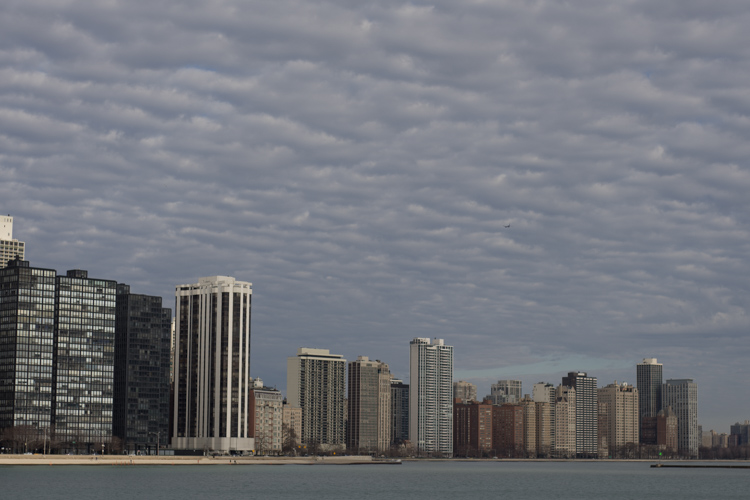
RAW Chicago

Here we have the same image after being straightened, and some adjustments in the basic panel of Adobe Lightroom applied. I also used the neutral density filter tool to equalize the exposure of the sky, buildings, and water. Then +45 dehaze was added.
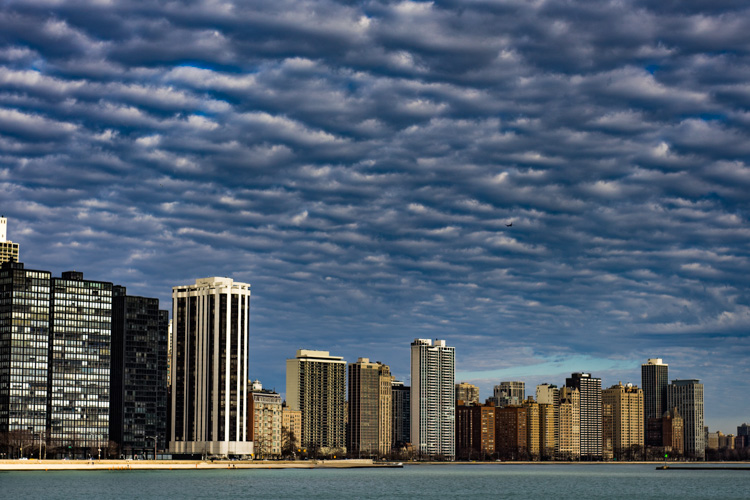
Chicago Basic

Now that we’ve finished with our basic adjustments, the desaturation process can begin. I find it usually works best to save the saturation adjustments for toward the end of the editing process. Please keep in mind that there are an infinite number of directions you can take your saturation effects, so have some fun with this part.

Find the Presence section of the basic Panel in the develop module of Lightroom.
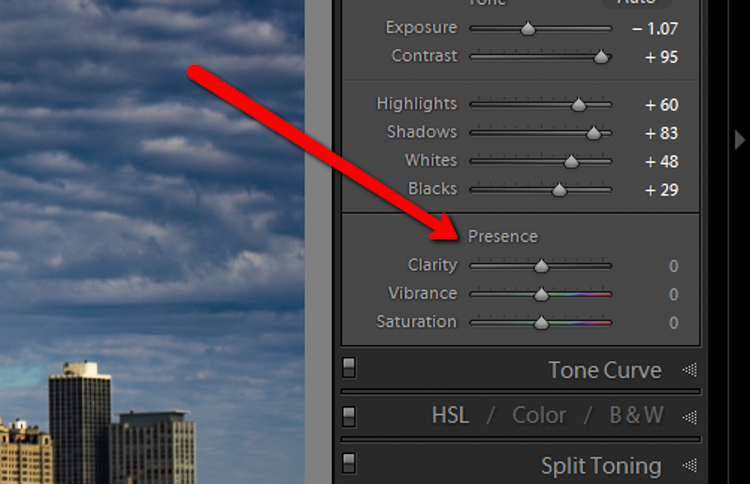
Presence

For this image I took the saturation to -40.
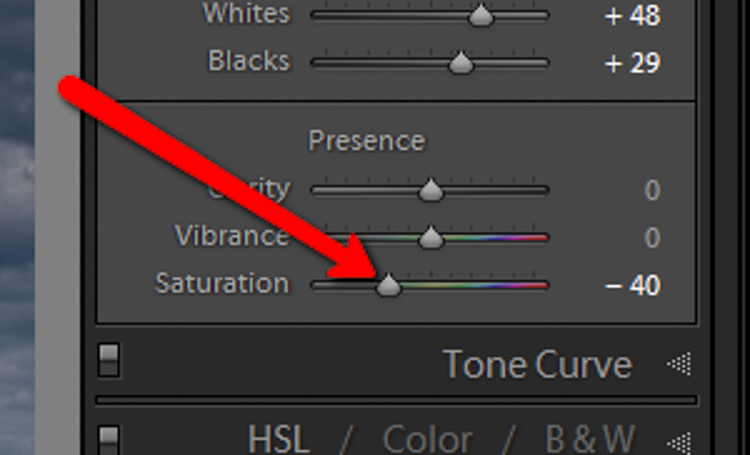
Desat Slider

This brings the entire photo into a considerably desaturated state.
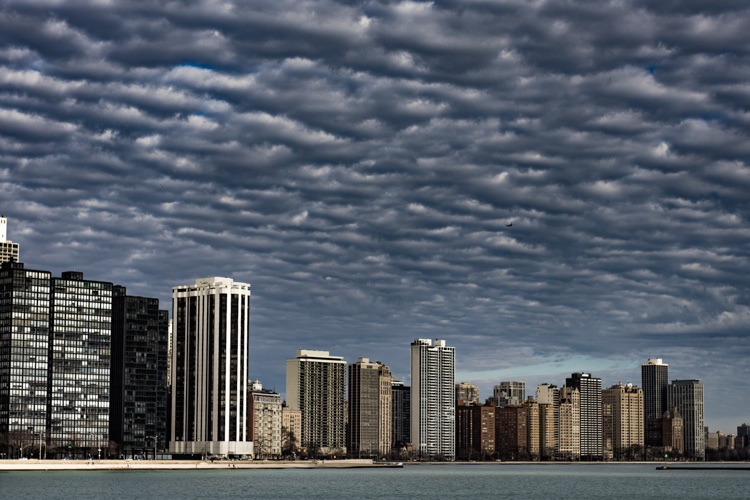
Desaturation Chicago

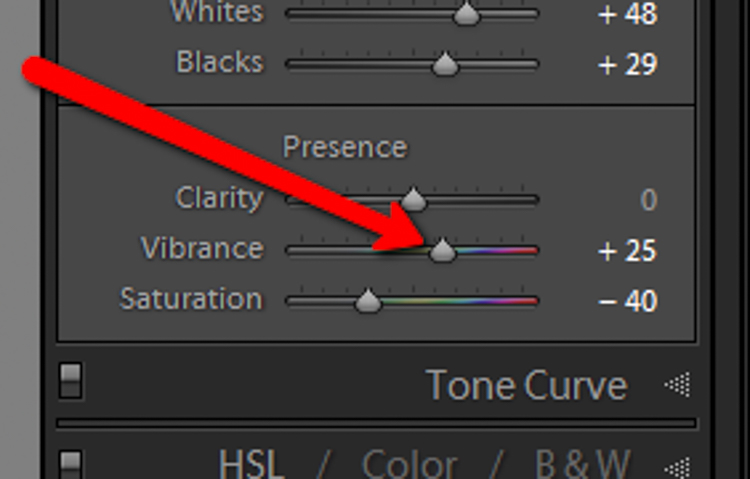
By itself the desaturation leaves the image a little flat. To counteract this, let’s increase the vibrance to +25.
Vib Slider

Remember that vibrance affects the colors in the mid-tones only. In this case, the blue, orange, and yellow tones are amplified. This makes them stand out more within the image, adding a little more pop.
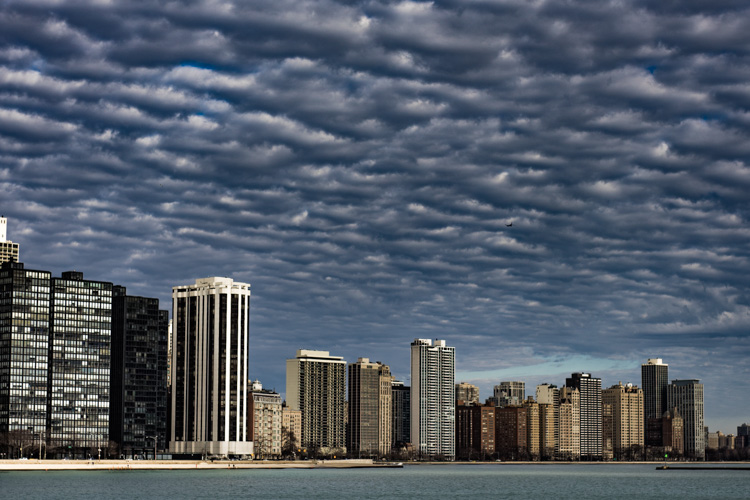
Increased Vib Chicago

Now, this is where things get interesting. Instead of settling for an image that is merely desaturated, we will now take full control with some advanced options, in order to make the photo stand out.

To do this, we turn to the curves panel. The tone curve is simply a graphic representation of the luminance present within the image. If you’ve ever seen a vintage style photo, most likely some edits have been applied using this technique. What we want to do is to slightly fade the image, in order to add a washed out feel to the scene. Mainly the blacks will be lightened and the highlights enhanced. This forms somewhat of an S-curve and looks something like the following image:
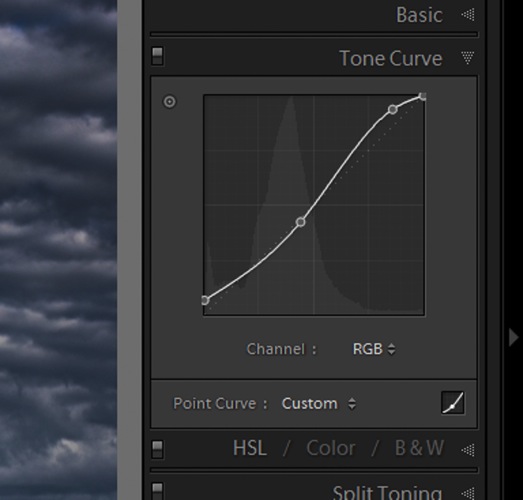
Tone Curve

Which leaves us with a subtly faded effect.
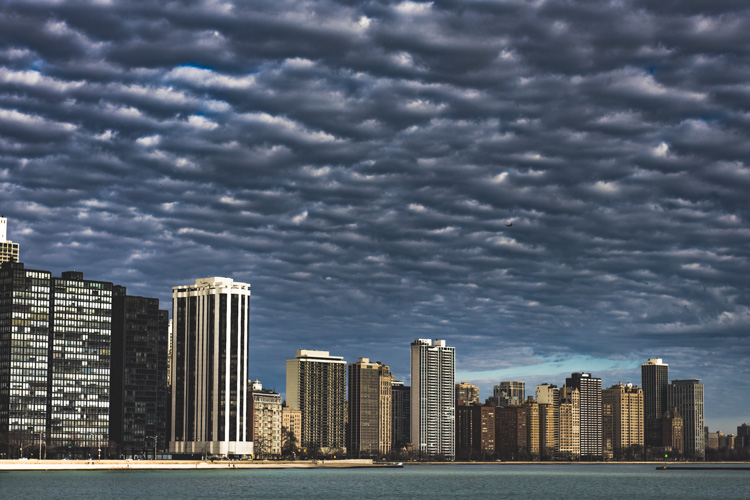
Tone Curve Update

The buildings and the water still look a little drab, so to add a little color intensity we will once more turn to our old friend, the graduated filter tool. This will allow a little more color to be added where it is needed, without affecting the entire image.
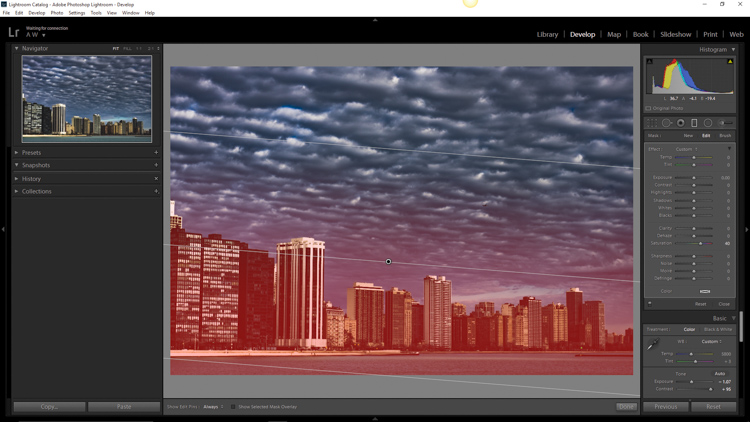
Grad Filter Sat

Which leaves us with a photograph much different than the one we began with just a few minutes earlier.
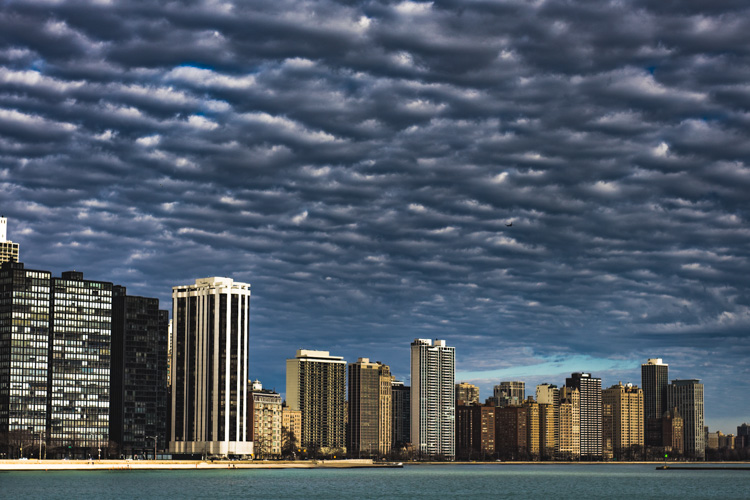
Final Desat Chicago

The difference is quite apparent when compared to the original RAW file.
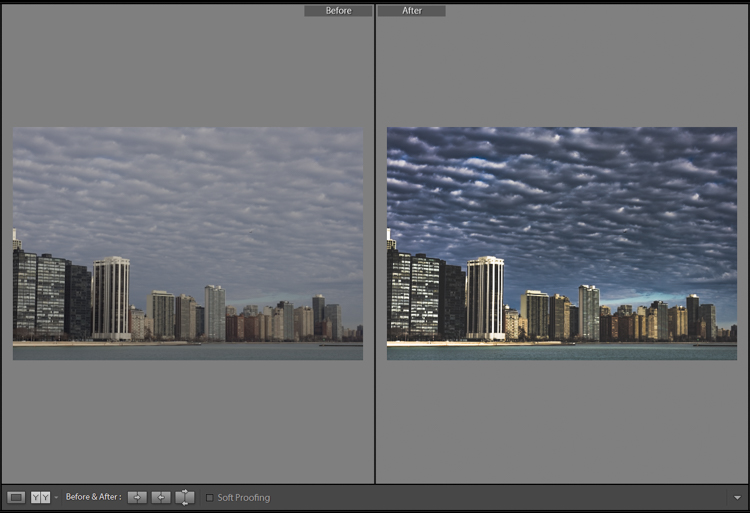
Before_and_After_Desat_Update

Desaturating a photograph goes much further than merely taking away color. Sure, you can move those sliders to the left and continue on your merry way, but why not go further to the next level, and really make them unique? Remember these key points:

  • Begin with a RAW file in order to give you the most dynamic range possible.
  • Complete all basic adjustments such as exposure, contrast, and clarity first.
  • Don’t go too far with your desaturation.
  • Make use of the tone curve panel to add additional ambiance.
  • Fine-tune your finished product using local adjustments such as graduated filter tool or the adjustment brush.

The important thing to remember is to never underestimate the possibilities for your images. Take the time to experiment with different effects until you discover what you like best. It may be something entirely different that what your expected.

Here are a few more examples of images processed with a desaturated look:
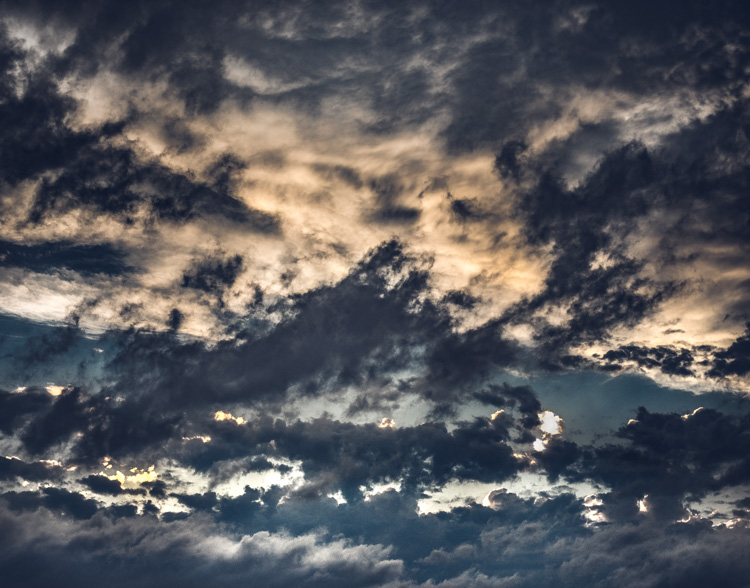
Desat 1

Desat 2

Desat 3

Desat 4

Desat 5

Have you got some photos that you purposely desaturated? Be sure to share them with us in the comments below.


Editor’s Note: Adam also has a Lightroom Preset pack called Desaturated Cinematic that will give you this sort of look. Inspired by motion pictures and tv series, this pack of 25 lightroom presets will achieve great-looking desaturated effects. Perfect to give your images a simulated cinematic look. You can get more info on that by clicking the link.

googletag.cmd.push(function() {
tablet_slots.push( googletag.defineSlot( “/1005424/_dPSv4_tab-all-article-bottom_(300×250)”, [300, 250], “pb-ad-78623” ).addService( googletag.pubads() ) ); } );

googletag.cmd.push(function() {
mobile_slots.push( googletag.defineSlot( “/1005424/_dPSv4_mob-all-article-bottom_(300×250)”, [300, 250], “pb-ad-78158” ).addService( googletag.pubads() ) ); } );

The post Step by Step How to Make a Moody Desaturated Image in Lightroom by Adam Welch appeared first on Digital Photography School.


Digital Photography School

 
Comments Off on Step by Step How to Make a Moody Desaturated Image in Lightroom

Posted in Photography


How to Make a Unique Portrait in the City at Night

12 Jun

What makes a portrait into a portrait ?

Making a portrait is like baking a cake in a way, you need to mix the right ingredients, evenly set it in a tray and add some personal touches. Once the cake is in the oven there is no way back, a bit like pressing the shutter release, then the portrait is done.

ouria_tadmor_city_portrait003

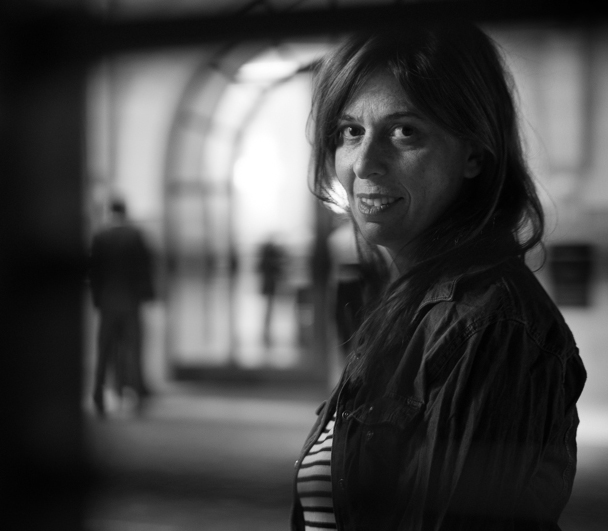
Any portrait, will always include a person, a background, and a key light that will allow the subject’s face and soul to come through in the picture. The subject, background and light are the ingredients, and your frame is the baking tray. Let’s hit the streets and bake the perfect portrait cake!

The city, especially after sundown, has a vast variety of portrait ingredients to be found. Take your portrait subject with you, and go for a walk in the urban studio to look for frames, backgrounds, and light.

The key to success, as always, lies in your eyes, so start looking at the city through a portrait lens, and look for balanced compositions that will frame a good portrait. Try to use what can be found on the streets, but if that’s not possible, a simple off-camera flash with white umbrella can complete the setup for the urban studio.
We took a walk in the city and looked for portraits to be made. Here is what I and my model found.

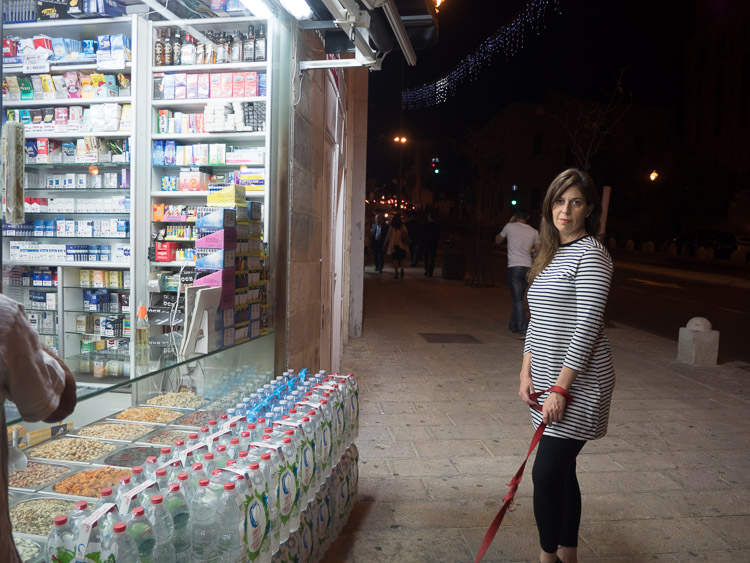
Bright store in a dark corner

The dynamic composition shown here creates the needed interest that focuses viewer’s attention on the model’s facial features and eyes, therefore communicating the personality of the model. This is done by having soft gentle light coming from the left and adding a red bokeh circle in the background. An invisible triangle between the model’s lips, eyes, and the red circle is directing the energy back to her eyes.

ouria_tadmor_city_portrait011
As you can see here, the setup for this portrait wasn’t a big soft-box in the studio, but instead was a messy drug store at night, in a busy street corner in Jerusalem. The store’s fluorescent lights provided an even and soft light source, while the much needed red circle in the background came from the traffic light behind the model (shown in green in the photo below).

ouria_tadmor_city_portrait012

Hotel enigma

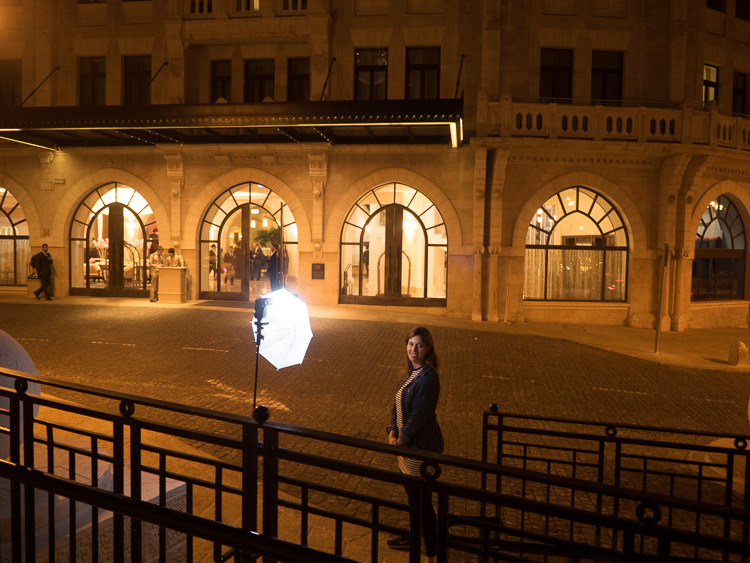
A classic hotel building, with some human presence, helped create an enigmatic atmosphere for this portrait, the background here being part of the story. The key light on the subject came from an off-camera flash positioned at 90 degrees. The dark frame for this composition was made by photographing through a metal railing between the camera and the subject, as you can see in the next photo. This setup helped create depth, that continues with the blurry figures on the street and inside the building.

ouria_tadmor_city_portrait013

The whole setup can be seen below. The flash was positioned about four feet from the model, with the output set to manual at 1/32 power, in order to match the amount of light coming from the background.

ouria_tadmor_city_portrait014

Layer store

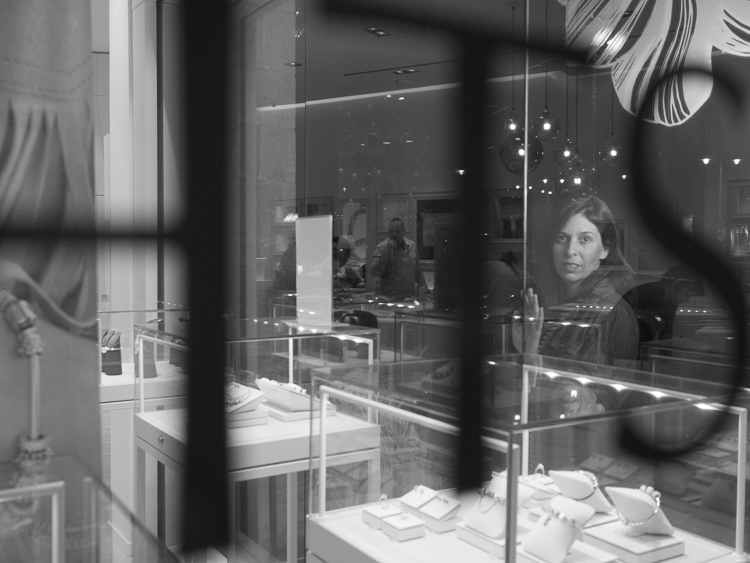
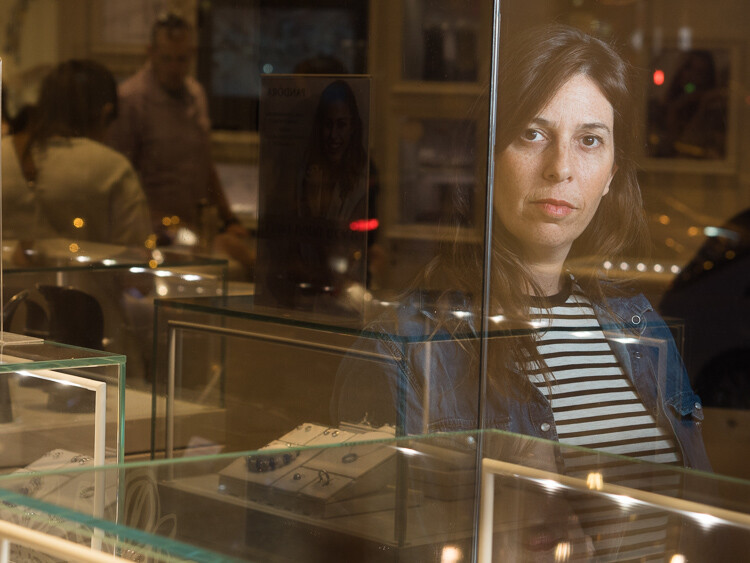
Layers are not only to be found in photo editing programs, they are everywhere, all over the city. A corner store with windows on both sides made it possible to compose a complicated composition, that gives the eye something to explore. When doing so, you need to make sure that the viewer’s eye ends up looking at the subject, so it can still be a portrait. Dividing the frame into three, using the vertical lines on the store’s window, and positioning the subject in the right third of the frame, kept the focus on the subject in this case.

ouria_tadmor_city_portrait002

The main light here also came from the off-camera flash setup, as you can see in the next image. The photo was taken through the window on the left side of the store.

ouria_tadmor_city_portrait004

Equipment

Any camera with a decent portrait lens and manual exposure control can do the work, most of it is hidden in the lens.

A classic portrait lens is between the 85 mm and 105 mm focal lengths on a full frame camera, or their equivalents on any other sensor size. Those focal lengths will give you the perfect camera to subject distance of about six feet, and will produce a moderate compressed perspective, that is distortion free. Typical portrait lenses have a large aperture of f/2 or wider, which allows more light to go through, and therefore are perfect for working with what the city has to offer at night, and will deliver a shallow depth of field when needed.

Off-camera flash can be any speedlight with manual control and radio slave system. Here is the list of equipment I used for this session:

  • Panasonic GH4 camera
  • Olympus M.Zuiko 45mm f/1.8 lens
  • Metz 52 AF-1 flash
  • Two Cactus V5 radio slaves
  • ProVision 20″ White umbrella
  • ProVision M11 shoe mount umbrella adapter
  • Meking L-2000A Light Stand

So if you want to try something a little different get a willing subject (model), grab a flash, and head out into the city at night to make some unique portraits.

Please share your questions and results in the comments below.

googletag.cmd.push(function() {
tablet_slots.push( googletag.defineSlot( “/1005424/_dPSv4_tab-all-article-bottom_(300×250)”, [300, 250], “pb-ad-78623” ).addService( googletag.pubads() ) ); } );

googletag.cmd.push(function() {
mobile_slots.push( googletag.defineSlot( “/1005424/_dPSv4_mob-all-article-bottom_(300×250)”, [300, 250], “pb-ad-78158” ).addService( googletag.pubads() ) ); } );

The post How to Make a Unique Portrait in the City at Night by Ouria Tadmor appeared first on Digital Photography School.


Digital Photography School
 
Comments Off on How to Make a Unique Portrait in the City at Night

Posted in Photography


Light Touch: Sensual Installation Lets Visitors Feel Luminescence

12 Jun

[ By WebUrbanist in Art & Installation & Sound. ]

light art shimmering walls

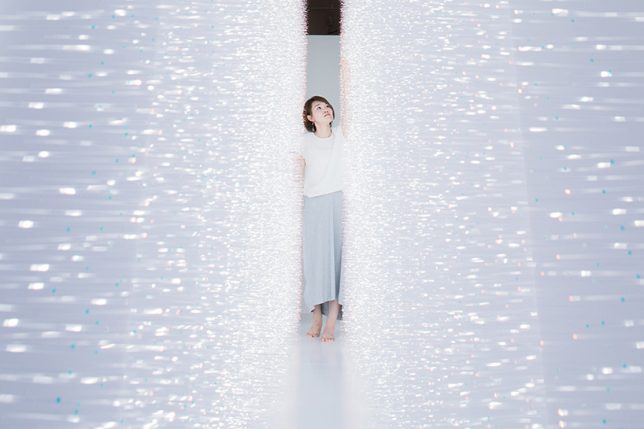
In a new light art installation dubbed Sense of Field, Tokyo artist Hitomi Sato lets visitors simultaneously see, touch and shape shimmers of light all on sides.

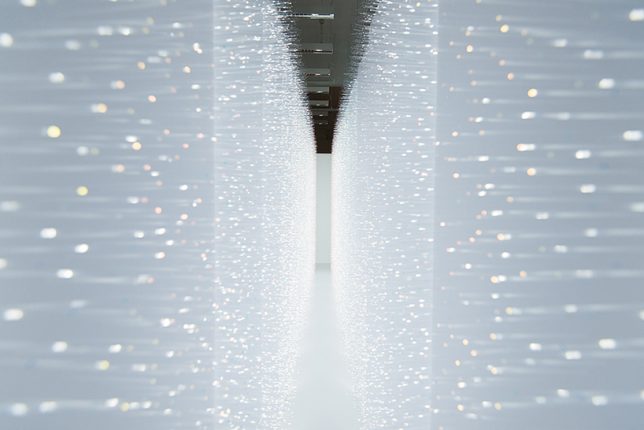
The immersive experience is facilitated by thousands of transparent tendrils extending from two walls opposite one another. Each visitor walking between them,touches bristles on both sides, creating waves of motion that can be both seen and felt.

light art hallway installation walls

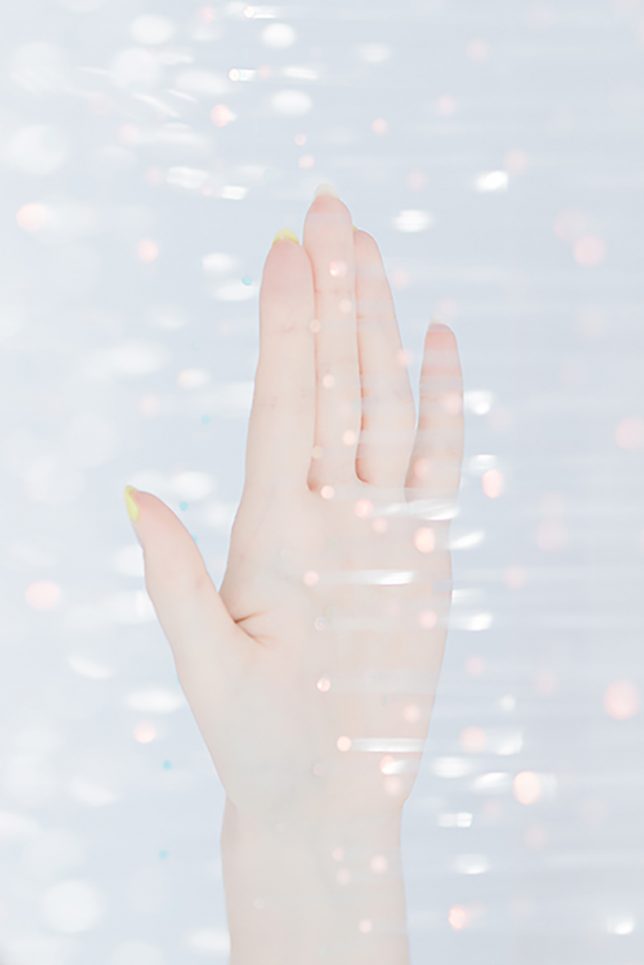
Perspective matters: observers outside the installation see it all from another angle, experiencing the setup differently primarily as a function of gleaming luminosity. Once engaged through physical contact, sensations multiply as clothing and skin brush beads of heat and illumination.

light art installation tokyo

Of her work, the artist says that “when [she] sees the shimmer of light, images of various natural light comes to her mind. For example, ripples on the water’s surface, sunlight through the leaves of trees, rays from a break in the clouds, and the reflections on window’s glass.”

Share on Facebook


[ By WebUrbanist in Art & Installation & Sound. ]

[ WebUrbanist | Archives | Galleries | Privacy | TOS ]


WebUrbanist

 
Comments Off on Light Touch: Sensual Installation Lets Visitors Feel Luminescence

Posted in Creativity


Explore Mars with 360-degree image shot by NASA Curiosity Rover

11 Jun

Earlier this year, NASA released a 360-degree image from the perspective of the Curiosity Mars Rover. The scene is made up of a combination of multiple exposures taken with the rover’s 2MP ‘Mastcam’ camera, which we wrote about back in 2012.

The resulting image is pretty incredible, and if you have access to a Google Cardboard viewer you can experience it in 3D. So if you’ve got a free few minutes this weekend, why not explore the surface of Mars? 

Articles: Digital Photography Review (dpreview.com)

 
Comments Off on Explore Mars with 360-degree image shot by NASA Curiosity Rover

Posted in Uncategorized


iFixit takes a look inside the Olympus PEN E-PL7

11 Jun

Inside the Olympus PEN E-PL7

The Olympus PEN E-PL7, like its Micro Four Thirds peers, is a pretty impressive little piece of engineering. It houses a 16MP Four Thirds sensor and a 3″ LCD that flips up 180-degrees. It accepts Micro Four Thirds lenses and ships with a pocket-sized external flash. Being curious types of people, we wanted to know how Olympus squeezes everything into a camera of the E-PL7’s size. Thankfully, there’s iFixit. Their disassembly guide gives an up-close look at what’s inside the camera – and you don’t have to void your warranty in the process.

Inside the Olympus PEN E-PL7

This disassembly starts the way so many projects do: with a screwdriver. Screws are removed from the bottom plate and sides of the camera.

Image via iFixit

Inside the Olympus PEN E-PL7

With some screws removed from the lens mount, this inner ring is revealed and carefully removed.

Image via iFixit

Inside the Olympus PEN E-PL7

With even more screws gone a pair of tiny springs can be taken out of the mount.

Image via iFixit

Inside the Olympus PEN E-PL7

Removing even more screws makes it possible to gently pull the chassis apart, but not quite all the way with a ribbon cable connecting the two pieces. 

Image via iFixit

Inside the Olympus PEN E-PL7

A camera divided. Highlighted in red is the ZIF connector keeping the ribbon cable attached to the motherboard.

Image via iFixit

Inside the Olympus PEN E-PL7

With the cable disconnected, the camera can be handled one half at a time.

Image via iFixit

Inside the Olympus PEN E-PL7

Here’s another look at the motherboard, with even more ribbon cables attached.

Image via iFixit

Inside the Olympus PEN E-PL7

Up top, the plate that holds the mode dial and shutter release can be removed once one more screw is out of the way. 

Image via iFixit

Inside the Olympus PEN E-PL7

…And with some ribbon cables disconnected, the sensor comes free of the camera body too.

Image via iFixit

Inside the Olympus PEN E-PL7

 E-PL7’s 16MP sensor lies 

Here’s a front view of the E-PL7’s 16MP sensor. 

Image via iFixit

Inside the Olympus PEN E-PL7

The camera is looking quite empty at this point. Here’s a sense of how small that motherboard is.

Image via iFixit

Inside the Olympus PEN E-PL7

…And with a few last cables disconnected and screws removed, the E-PL7 disassembly is complete.

Image via iFixit

Articles: Digital Photography Review (dpreview.com)

 
Comments Off on iFixit takes a look inside the Olympus PEN E-PL7

Posted in Uncategorized


Take a closer look inside Canon’s impressive EF 200-400mm F4L IS

11 Jun

Canon has posted a video showing its massive EF 200-400mm F4L IS USM Extender 1.4 X reduced to its component parts.

The Canon 200-400mm is an impressive lens. This hefty telephoto uses no fewer than 33 elements arranged in 24 groups, including Fluorite and Ultra-Low Dispersion glass, and features a built-in 1.4X teleconverter. Canon’s stop-motion video is rather charming, and makes a nice change from the computer-generated exploded imagery that we’re used to seeing. 

Articles: Digital Photography Review (dpreview.com)

 
Comments Off on Take a closer look inside Canon’s impressive EF 200-400mm F4L IS

Posted in Uncategorized


Fotodiox launches flicker-free LED100WB lighting heads with dimmable daylight output

11 Jun

Accessories and lighting manufacturer Fotodiox has introduced a new LED lighting head that it claims is flicker-free and suitable for high speed photography. The LED100WB head comes with a 5600k daylight balance and offers a more consistent color rendition than the company’s previous models. Fotodiox claims the heads have a CRI of >95 and while they only draw 100 watts they deliver dimmable output of more than 400 watts. The heads run cool so are ideal for a wide range of subject matter indoors and out, and will suit both stills and motion photographers.

The company claims the output is flicker-free so frame rates as high as 120fps can be used for slow motion video, and that the bulbs have a life of 30,000 hours. The bulbs can be dimmed via a knob on the top of the housing or by using a wireless remote control. Fotodiox claims that the advantage of using their LED heads over tungsten when dimming is that the LED’s retain their color temperature.

In a change from the company’s previous WA heads, which used a Bowens S mount for accessories, these new WB models take Alien Bee modifiers. The new heads are more compact than the WA heads, but they weigh the same and don’t offer a choice of temperature or power.

The heads are sold on their own with a power adapter, reflector dish, a diffuser sock for the dish and a stand. A three head kit that also features folding softboxes with speed rings and a rolling case that fits the whole kit. The single head costs $ 299.99 while the 3-head kit costs $ 999.99.

For more information visit the Fotodiox website.


Press release:

Fotodiox Pro Announces Compact, Powerful LED100WB for High Frame Rate Shooting

Fotodiox Pro, creator and distributor of several lines of specialty solutions for videography, cinematography and photography, has announced the LED100WB: a soft light with powerful luminance for photographers and filmmakers. Built upon Fotodiox Pro’s award-winning LED technology, the LED100WB features a compact form factor and draws a mere 100 watts while outputting the rough equivalent of a 400+ watt Tungsten light. A perfect tool for portraits, tabletop photography, video interviews, short films and even special effects like slow-motion and time-lapse capture, the LED100W is available now as a single light or three-light kit from FotodioxPro.com.

“The world is shooting in 4K, and we wanted to create something that would stand up to its amazing creative potential,” says Bohus Blahut, marketing director for Fotodiox Pro. “In addition to already being quite versatile and ready to use right out of the box, the LED100WB is a perfect light for exciting visuals like time-lapse and slow motion. Go ahead and bump frame rates up to 120fps – we’ve designed the LED100WB to provide powerful, beautiful, uniform soft light, with no flickering.”

The LED100WB features a quick-release front mount compatible with Alien Bee accessories; one simple twist allows the user to mount or remove a whole host of light modification accessories. Each LED100WB comes with a metal reflector, a diffuser and a portable folding 24” Softbox, making it easier than ever to start shooting in seconds. Adding to its great versatility is a decidedly compact form factor – perfect for more creative positioning on a shoot – as well as the option to add barndoors, round and strip softboxes, and creative reflectors to each purchase. For ultimate portability, the three-light kit includes three light stands inside a custom-fit, luggage-style rolling case.

To learn more about the LED100WB and Fotodiox Pro’s additional photography and filmmaking accessories, please visit FotodioxPro.com. View unboxing videos and product demonstrations via youtube.com/user/FotodioxInc.

Articles: Digital Photography Review (dpreview.com)

 
Comments Off on Fotodiox launches flicker-free LED100WB lighting heads with dimmable daylight output

Posted in Uncategorized


Think Tank Photo launches Helipak backpack for DJI Inspire drone

11 Jun

$ (document).ready(function() { SampleGalleryV2({“containerId”:”embeddedSampleGallery_7764010080″,”galleryId”:”7764010080″,”isEmbeddedWidget”:true,”standalone”:false,”selectedImageIndex”:0,”startInCommentsView”:false,”isMobile”:false}) });

Bag manufacturer Think Tank Photo has announced a new backpack designed for users of the DJI Inspire drone and other quadcopters of a similar size. The Helipak is capable of holding a single DJI Inspire craft as well as its gimbal, three lenses, spare propellers and six batteries, according to Think Tank Photo. There are also compartments for a 17in laptop and a pair of 8in tablets.

The idea of the Helipak is that it makes transporting the drone to ‘scenic’ locations much easier than via a hard flight case as it features shoulder straps that allow the whole thing to be carried on the user’s back. The backpack straps can also be stowed away to make the Helipak into a normal case with top and side handles.

While the case is made with soft materials it uses ‘twinwall’ reinforcement via a pair of ABS plastic shields within the outer construction that add extra rigid protection for the drone. The exterior is made with nylons and polyester that the company says provides a hardwearing and water repellent barrier, while zips are YKK RC Fuse and feature metal ‘hardwear’. In a promotional video Think Tank Photo claims that DJI’s own $ 200 case for the Inspire has poorly made zips that are prone to failing.

The bag is available now and costs $ 339.75. For more information see the Think Tank Photo website.

Press release

Think Tank Photo’s Helipak™ for DJI Inspire Backpack

Offers Superior Organization, Comfort, and Travel Portability

SANTA ROSA, CALIFORNIA –Think Tank Photo has released the most well thought-out, comfortable, and protective backpack for users of DJI Inspire or other similarly sized quadcopters. The Helipak for DJI Inspire easily holds a DJI Inspire (parked with gimbal and rotors detached), Zenmuse gimbal with 3 lenses, 6x batteries, 2x controllers, 2 x 8” tablets, lots of extra propellers, and a 17” laptop and charger.

Movable dividers allow users to customize the fit of their gear in this fully featured backpack. The contoured tuck-away harness with lumbar support, cut-away air-channel, the adjustable sternum strap, and the removable padded waistbelt allow for extreme comfort while trekking into remote areas or simply pulling it from the car.

“The backpack’s ABS twinwall reinforcement provides a rigid shell that protects sensitive gear from impacts, bumps and scrapes,” said Think Tank Photo’s president and
lead designer, Doug Murdoch. “It also features YKK™ RC Fuse zippers, 1680D Ballistic nylon bottom panel, metal hardware, and nylon webbing that are the most durable, longest
lasting materials on the market. The last thing drone users want to worry about is if their backpack will hold up in rigorous outdoor conditions.”

ADDITIONAL KEY FEATURES

  • Large front pocket fits auxiliary items for the day’s outing: light jacket, 17” laptop pocket or a large tablet
  • Lockable zippers
  • Internal see-through mesh pockets for small accessories: propellers, screwdriver, cables, etc.
  • Deluxe organizer for smart phone, wallet, pens, keys, business cards, etc.
  • Water bottle pocket on side
  • Height adjustable sternum strap
  • Elastic pockets on shoulder straps for phone, energy bar, etc.
  • Robust handles on three sides ensure rapid and easy retrieval from airline overhead bins, car trunks, etc.
  • Seam-sealed rain cover helps to protect gear and stows away inside backpack when not in use

MATERIALS
Exterior: For superior water-resistance, all exterior fabric has a durable water-repellant (DWR) coating, plus the underside of the fabric has a polyurethane coating. It also has YKK® RC Fuse (abrasion-resistant) zippers, 1680D ballistic nylon bottom panel, 600D polyester, 420D velocity nylon, 3D air mesh, ultra-stretch pockets, Y-buckles, antique finish metal hardware, nylon webbing, and 3-ply bonded nylon thread.

Interior: 6mm ABS twinwall, removable closed cell foam dividers with PE board reinforcement, 200D polyester, polyurethane-backed 3-layer velex liner, 2x polyurethane coated nylon 210T seam-sealed rain cover, Belly-O mesh pockets, and 3-ply bonded nylon thread.

TECHNICAL SPECIFICATIONS
Exterior Dimensions: 19.3” W x 24” H x 9.4” D (49 × 61 × 24cm)
Interior Dimensions: 17.3” W x 21.7” H x 7.9” D (44 × 55 × 20cm)
Laptop Compartment: 12.6” W x 16.9” H x 1.2” D (32 × 43 × 3cm)
Weight (with all accessories): 8.5 lbs. (3.9 kg)

Articles: Digital Photography Review (dpreview.com)

 
Comments Off on Think Tank Photo launches Helipak backpack for DJI Inspire drone

Posted in Uncategorized


Weekly Photography Challenge – Glass

11 Jun

How do you photograph something that is transparent or see through, like glass? See how these photographers did it with 28 images of glass subjects, then see if that gives you some ideas for this week’s challenge.

Designmilk

By designmilk

Weekly Photography Challenge – Glass

This should be easy enough to find subjects for this week’s challenge – glass – the tricky part is how to photograph it. Glass reflects everything including the light source and even yourself. So how you approach this will be up to you. Shoot a crystal glass in the studio, photograph an old weathered window pane, work with the reflections and go with them for effect, or shoot through glass. Get creative.

Bill Gracey

By Bill Gracey

?ethan

By ?ethan

Dara Or

By Dara or

Share your images below:

Simply upload your shot into the comment field (look for the little camera icon in the Disqus comments section) and they’ll get embedded for us all to see or if you’d prefer upload them to your favourite photo sharing site and leave the link to them. Show me your best images in this week’s challenge. Sometimes it takes a while for an image to appear so be patient and try not to post the same image twice.

Matthew Rogers

By Matthew Rogers

Wil C. Fry

By Wil C. Fry

Han Cheng Yeh

By Han Cheng Yeh

googletag.cmd.push(function() {
tablet_slots.push( googletag.defineSlot( “/1005424/_dPSv4_tab-all-article-bottom_(300×250)”, [300, 250], “pb-ad-78623” ).addService( googletag.pubads() ) ); } );

googletag.cmd.push(function() {
mobile_slots.push( googletag.defineSlot( “/1005424/_dPSv4_mob-all-article-bottom_(300×250)”, [300, 250], “pb-ad-78158” ).addService( googletag.pubads() ) ); } );

The post Weekly Photography Challenge – Glass by Darlene Hildebrandt appeared first on Digital Photography School.


Digital Photography School

 
Comments Off on Weekly Photography Challenge – Glass

Posted in Photography