RSS
 

Archive for May, 2016

US journalist wins Anja Niedringhaus Award for Sudan conflict series

12 May

$ (document).ready(function() { SampleGalleryV2({“containerId”:”embeddedSampleGallery_0454914811″,”galleryId”:”0454914811″,”isEmbeddedWidget”:true,”standalone”:false,”selectedImageIndex”:0,”startInCommentsView”:false,”isMobile”:false}) });

The Anja Niedringhaus award for Courage in Photojournalism has gone to Kenya-based photographer Adriane Ohanesian for her ongoing coverage of the conflicts in Sudan and South Sudan and their impact on the civilian population. The award was made by the International Women’s Media Foundation and is given for the second year in memory of Anja Niedringhaus, a photographer who was killed in Afghanistan in 2014. The award is given in recognition of courage and dedication while bringing ‘vital stories from countries and communities around the world through pictures.’

This year’s winner is an American photographer who has based herself in Kenya, from where she covers the wars in neighboring South Sudan and Sudan, as well as in Somalia and Burundi. Her pictures focus on the soldiers as much as on the civilians who get caught up in the conflicts who are often displaced and injured. Honorable mentions went to Lynsey Addario and Paula Bronstein, also Americans, for their work covering crisis around the world.

There will be an awards ceremony in Washington, hosted by the German ambassador, in June. The winner will receive a $ 20,000 prize, to help support future work, from a fund set-up with a $ 1M donation from the Howard G Buffett Foundation.

For more information on the awards and the winners, and to see more of the winning photographs, visit the IWMF website.


Press release:

IWMF Names Adriane Ohanesian Winner of the Second Annual Anja Niedringhaus Courage in Photojournalism Award

Lynsey Addario and Paula Bronstein Receive Honorable Mentions
 
May 10, 2016 – Washington, DC — The International Women’s Media Foundation (IWMF) is pleased to announce Adriane Ohanesian as the winner of the 2016 Anja Niedringhaus Courage in Photojournalism Award. The award recognizes the exemplary work of women photojournalists who overcome extraordinary challenges to bring us images of pressing global issues.

Now in its second year, the award was created through a generous grant from the Howard G. Buffett Foundation to pay tribute to the strength and dedication of Pulitzer Prize-winning Associated Press photographer Anja Niedringhaus, who was tragically killed while reporting in Afghanistan in 2014. Niedringhaus received the IWMF Courage in Journalism Award in 2005.

Lynsey Addario and Paula Bronstein received honorable mentions for the 2016 award. All three women will be recognized at a reception in Washington, DC on Thursday, June 9, 2016.

“We are proud to recognize this year’s Award honorees, who are a credit to their profession and to Anja’s legacy,” said IWMF Executive Director Elisa Lees Muñoz. “These remarkable and brave women are revealing difficult truths around the world through their pictures, and the Niedringhaus Award celebrates that service.”

Ohanesian is a freelance photojournalist based in Nairobi, Kenya. She has been reporting primarily in Africa since 2010 and has documented the civil war in South Sudan, the border demarcation between Sudan and South Sudan, the fighting in the Nuba Mountains of South Kordofan, and most recently the conflict in Darfur. Her photographs have been published by Al Jazeera, The Wall Street Journal, National Geographic, and TIME.

 “At the end of the day it’s not about me; it’s about the lives of the people in the pictures,” Ohanesian said. “My photographs document what I’ve seen in isolated areas of the world. I hope the people I photograph feel that these photos communicate their circumstances to the outside world. It takes a massive amount of trust on the part of my subjects to know that I’m accurately representing them and their story.”

The Award jury, comprised of leading photo editors from The Associated Press, The New York Times, and VII Photo, gave Ohanesian the top prize for her “evocative images and tenacious dedication to documenting the effects of conflict on citizens in perilous regions.” They continued, “her perceptive, compassionate eye offers an extraordinarily personal glimpse into places the global community may not otherwise see.” The Anja Niedringhaus Award winner receives a $ 20,000 prize to support her ongoing work thanks to the support of the Howard G. Buffett Foundation.

Honorable mention London-based Lynsey Addario, who won a Pulitzer Prize in 2009 as part of a team at the New York Times and has covered the Syrian crisis for the past four years, was recognized by the jury for her portfolio of powerful images documenting humanitarian crises in Afghanistan, Iraq, Italy, the Philippines, South Sudan, Uganda, and Ukraine. Bangkok-based veteran Paula Bronstein, whose accolades include a World Press Photo award and Pulitzer nomination, was acknowledged with an honorable mention for her coverage of refugees, natural disasters, and political protests in Thailand, Afghanistan, Greece, Hong Kong, and Nepal.

This year’s Anja Niedringhaus Award event and reception will be hosted by German Ambassador to the U.S. Peter Wittig and Mrs. Huberta von Voss-Wittig at the German Embassy and residence. The event program will feature leading international journalists, including Ann Curry, Katty Kay, Ines Pohl, and Judy Woodruff.

For more information about the IWMF, follow us on social media (@IWMF on Twitter, @IWMFpage on Facebook, @TheIWMF on Instagram). Follow awardees on Instagram: Adriane Ohanesian @adrianeohanesian, Lynsey Addario @lynseyaddario, and Paula Bronstein @pbbphoto.

About the IWMF:
The IWMF is dedicated to strengthening the role of women journalists worldwide. The media is not truly free and representative without the equal voice of women. Since 1990, we have celebrated the courage of women journalists who overcome threats and oppression to report and bear witness to global issues. Through our programs and grants we empower women journalists with the training, opportunities, and support to become leaders in the news industry.

Articles: Digital Photography Review (dpreview.com)

 
Comments Off on US journalist wins Anja Niedringhaus Award for Sudan conflict series

Posted in Uncategorized


How Using Your Smartphone Camera Can Help Improve Your Photography

12 May

One of the triumphs of digital photography is that it has become accessible to more people, across more and more devices. Cameras are no longer standalone devices; as the technology allows the camera to be smaller and smaller, it can be built in to other devices that you may have on you more often than a dedicated camera, such as a smartphone. Cameras in smartphones, and other devices like tablets for example, are producing images of an increasingly higher standard. Their low-light performance is improving, and manufacturers are constantly improving upon the dynamic range, autofocus, and lens quality.

Photographer Chase Jarvis said that, “The best camera is the one that’s with you” – so why not use your smartphone or tablet camera more often? There are restrictions on smartphone cameras over their DSLR or mirrorless camera brethren – their low light and AF performance still have quite a lot of catching up to do, the lenses cannot be changed, and you also have far less control over what settings (ISO, shutter speed, aperture) are used. But it is also these very restrictions that can help you improve your photography when you are using your DSLR, mirrorless, and even compact cameras.

Puddles, and other reflections, can make for interesting subjects.

Puddles, and other reflections, can make for interesting subjects.

So how can these restrictions help your photography? Simple, you have less to think about! You no longer have to worry if you have the correct settings dialled into get the exposure you want – you’re phone will work that out. You do have some say in the overall exposure; you can control how bright/dark the image turns out, but that’s it! Worried you don’t have the right lens for the photo you want? Too bad. With your phone you can’t change it, even if you wanted to. There’s another thing you don’t have to worry about.

You can’t control the camera settings. You can’t change your lens, and you generally have poor Autofocus (at least, poor continuous AF). So how can you take great photos with a smartphone? You need to think less about what you cannot control and more about what you can control. For example, no matter what camera you have, you can always control the composition. You can decide from which angle you take a photograph – will you take it down low, looking up or up high, looking down – and which direction you stand in relation to the light. Photographing toward the light can create stunning silhouettes, so looking for striking shapes will help here. You have full control over how close, or how far, from the subject you stand. You dictate what you include in the frame, and what you omit. All of these elements work to make images more interesting, and by removing the control over some of the more technical features as mentioned earlier, you now have more time to consider the compositional elements.

Controlling Focus and Exposure

Focussing and exposing on the candle has made the background go very dark. This works well to isolate the subject more.

Focussing and exposing on the candle has made the background go very dark. This works well to isolate the subject more.

Across most smartphones, touching the screen on the area you want in focus, will make the phone focus on that area. In addition, this is also where the phone will take its exposure reading. There are some camera apps available that will allow you to focus on one area and have the phone take its exposure reading elsewhere. You may also be able to increase or decrease the exposure of the image. How to do this will depend on the phone you are using, but for iPhone users, after tapping the screen to focus, sliding your finger up/down will alter the exposure compensation.

Another image taken with the sun behind. This time, the light makes the bottle glow.

Another image taken with the sun behind the subject. This time, the light makes the bottle glow.

Creating Shallow Depth of Field

Despite many newer smartphones having fast apertures (the iPhone 6 and 6s use an f/2.2 lens), their tiny sensor sizes make getting that nice creamy background bokeh a little more challenging, than with other cameras. If you’re unaware, generally the larger the sensor, the easier it is to create stunning bokeh. However, if you have a little understanding of depth of field, then you can create images from your smartphone with a blurry background. You can achieve this by reducing the distance between your subject and the phone, and increasing the distance from your subject to the background.

Make Your Images Pop

Post-processing is another tool that we have in our arsenal as photographers to make an image more striking. Introduce that to your phone photos. There is a plethora of apps available that give you varying levels of control with the post-processing phase.

Some apps, like VSCO, have a vast range of filters that you can apply to images, and allow you to tweak areas, such as highlights and shadows, to get a different look. Other apps like Adobe’s Lightroom works much like the desktop variant, allowing to develop your images with a more natural touch. Photoshop and Photoshop fix (Note: it is called Photoshop Mix for Android) are both from Adobe and offer varied editing options that are fantastic at polishing up images in the final stages. Personally, I use Lightroom and Photoshop fix on my content now. However, in the past I used SnapSeed and found that to be great fun to use, too. It’s up to you which editing app you decide to employ, and how involved with it you become.

Smartphone-17

Again, looking for clean shapes to create a striking silhouette in an airport.

Looking for clean shapes to create a striking silhouette in an airport.

Other Tips to Consider

  • Take a lot of photos: Sometimes things happen fast. Don’t be afraid of taking a lot of photos. The perfect shot isn’t going to come with every single click. The trick is to take more photos than what you really need, then pick the best one from the bunch. If you do this, then you will have more to choose from, and a higher chance of getting one that stands out.
  • Learn how to see light and how it interacts with its environment: Light is the most important object in a photograph. It doesn’t matter what camera you’re using, how well you know how to use it, or how amazing your subject is; it all counts for nothing without light. You’ll often hear photographers talking about the Golden Hour, which is early in the morning and again in the evening when sun is lower, softer and the light is more directional.
  • If you’re photographing with the sun behind you, know how that will make your subject look. Do you want to light up their entire face, for example? Or do you want to shoot from the side? If you move so the sun is behind the subject, then consider photographing them silhouetted. If the light source is behind the subject, the foreground will always be darker than the background. The way you position your subject – or wait until the light is right for your subject – is how you make an image more creative and stand out.
  • Watch your background: Something that is often overlooked in an image is the background. A bad background can bring a great subject down. You need to think about your photo and what makes it interesting. If the subject you’re photographing is to be the only thing in the photo, then you should use a nice clean background, that isn’t going to draw away people’s attention from the main subject. However, backgrounds can also add to an image, and are great for environmental portraits.
I loved the peacefulness of the light here and the silhouette of the palm tree.

I loved the peacefulness of the light here and the silhouette of the palm tree.

Here, I photographed toward the light and decided to include the flag on the right to add a little more interest.

Here, I photographed toward the light and decided to include the flag on the right to add a little more interest.

Conclusion

Whilst there are many limitations to using the camera in your smartphone, or indeed a tablet, it can help teach you how to work around limitations, and still create striking images. Their quality is clearly not going to be as high as a dedicated camera’s quality will be, however, it’s still a lot of fun to be able to capture a great image on a device with such limitations.

Below are some more images that I have taken with my iPhone. Feel free to share some images you’ve taken on your smartphone or tablet in the comments below, as well as your favorite camera and processing apps.

Smartphone-2

I found the leaves of this plant to be quite striking. By photographing from a very low perspective, I was able to make my subject pop out more against a plain blue sky. The position of the sun also creates interest as the light kicks off edges.

Smartphone-5

The in-built panorama feature of my phone worked well to create this image.

Smartphone-8

Another image where the panorama mode worked quite well.

Smartphone-9

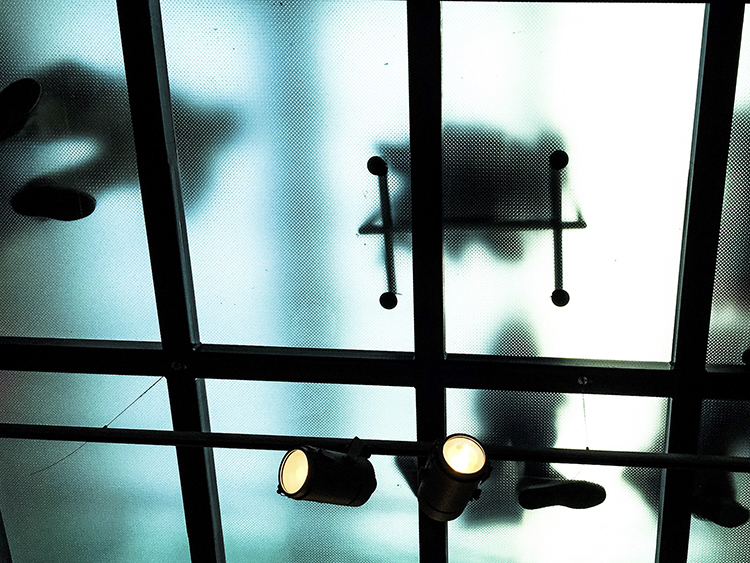
Don’t be afraid to look up! In this image, the floor above me was frosted glass and made for some interesting shapes.

Smartphone-10

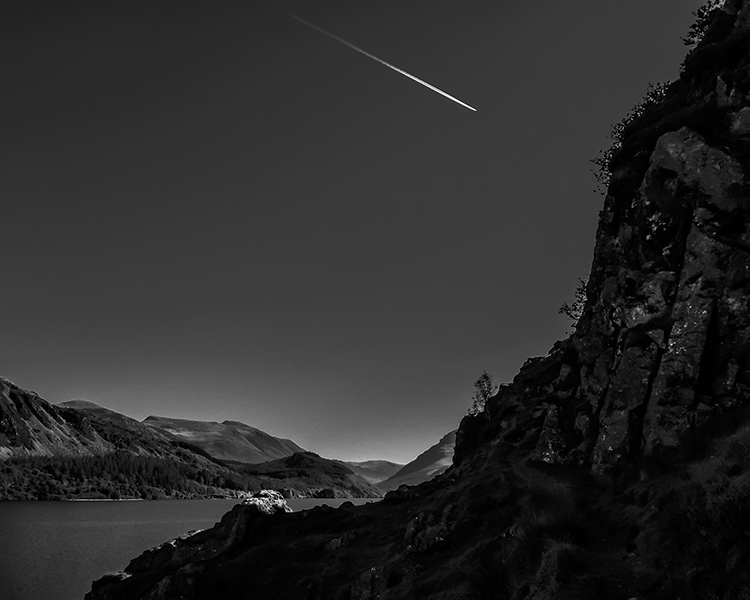
Converting this image to black and white has given it an almost unearthly feel to it.

Smartphone-12

Photographed looking straight down. Simple images often work best not just with smartphones, but in photography in general.

Smartphone-13

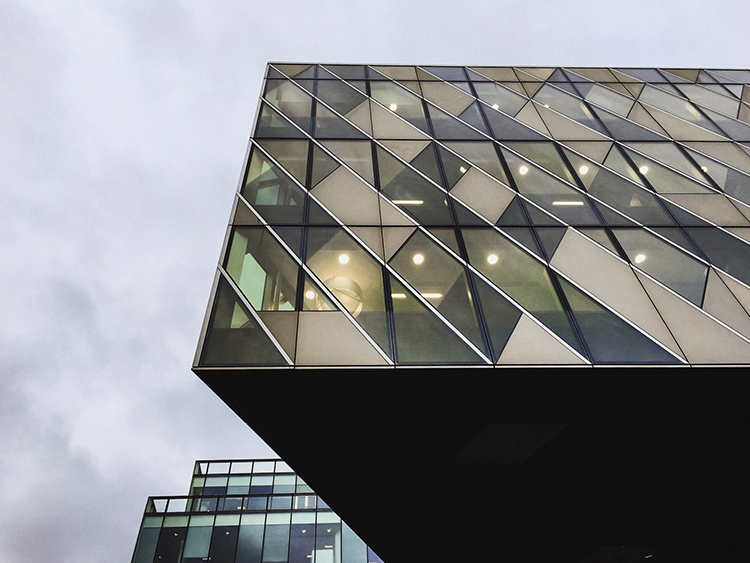
The clean lines of these buildings create some interest.

Smartphone-14

Again, photographing down low I was able to show an every day scene from a different perspective.

Smartphone-19

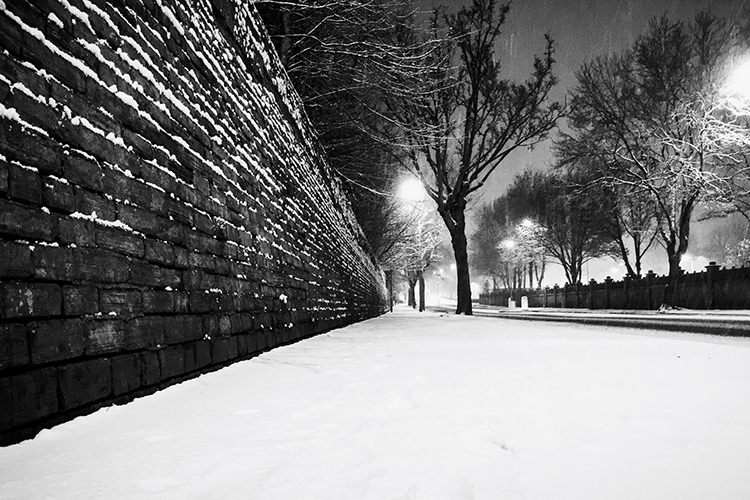
The same principles used in this image will work very well on any camera. The road in this image creates a sense of depth.

Smartphone-20

The quality and direction of light help make this image. These are qualities you should always look for; no matter what camera you are using.

Smartphone-18

googletag.cmd.push(function() {
tablet_slots.push( googletag.defineSlot( “/1005424/_dPSv4_tab-all-article-bottom_(300×250)”, [300, 250], “pb-ad-78623” ).addService( googletag.pubads() ) ); } );

googletag.cmd.push(function() {
mobile_slots.push( googletag.defineSlot( “/1005424/_dPSv4_mob-all-article-bottom_(300×250)”, [300, 250], “pb-ad-78158” ).addService( googletag.pubads() ) ); } );

The post How Using Your Smartphone Camera Can Help Improve Your Photography by Daniel Smith appeared first on Digital Photography School.


Digital Photography School

 
Comments Off on How Using Your Smartphone Camera Can Help Improve Your Photography

Posted in Photography


Corel AfterShot Pro 3 launches with new touchup tool, recovery algorithm

12 May

Corel has launched AfterShot Pro 3, the latest version of its photo editing software. The newest version brings several added features and updates, including a Lens Correction Development Kit for creating custom lens corrections, an in-app plugin manager, and a few new and improved tools for touching up photos.

AfterShot Pro 3 is equipped with a completely new Highlight Recovery algorithm, and as such Corel claims the Highlight Recovery Range slider can pull more tones and details from overexposed Raw photos. Joining the new algorithm is the addition of ‘comprehensive watermarking,’ including the ability to watermark in batches, rotate the watermark’s angle, adjust its size, and alter its transparency. 

Another new editing tool is Blemish Removal & Correction, which aims to eliminate the need to use a separate app like Photoshop to remove blemishes and perform other touchups and small corrections. Photo presets can also be applied via the new in-app preset library; both premium and free presets are offered.

Finally, AfterShot Pro 3 features a new modular delivery system for providing updated and new Raw profiles more quickly than the previous software version. With this, new camera profiles are available to download in-app as soon as they’re released by the company’s development team.

Corel AfterShot Pro 3 is available in English, German and Japanese through the product’s website; Windows, Mac and Linux are supported. The price for new customers is $ 79.99 USD/CAD, while existing customers can upgrade to the newest version for $ 59.99 USD/CAD.

Via: MarketWired

Articles: Digital Photography Review (dpreview.com)

 
Comments Off on Corel AfterShot Pro 3 launches with new touchup tool, recovery algorithm

Posted in Uncategorized


Advanced Accessibility: 12 Futuristic Wheelchair Designs & Concepts

11 May

[ By Steph in Technology & Vehicles & Mods. ]

future wheelchairs off road 1

Technological advancements could enable wheelchair users to stand up to reach high objects, zoom around on sandy and snowy landscapes, power up hills without an assistant and even climb stairs. Lightweight materials like carbon fiber, user-friendly adjustable components, seats customized to the user’s body measurements and electronic features like LED lights, collision sensors and built-in heating systems make these mobility solutions cooler and more functional than ever.

Go Wheelchair: Custom 3D-Printed for Each User
future wheelchair go

future wheelchair go 2

3D printing technology can customize the dimensions of a wheelchair to a specific user’s body measurements as well as giving them a choice of colors and additional components. The appearance can be specified with an app, and the finished product could be delivered in two weeks. “With the Go Wheelchair, we saw an opportunity to really progress the manual mobile category for users with disabilities, and to use 3D-printing technology to solve significant and meaningful problems,” says designer Benjamin Hubert of Layer.

Ultra-Tough Carbon Fiber Wheelchair

future wheelchair carbon black

future wheelchairs carbon black 2

future wheelchair carbon black 3

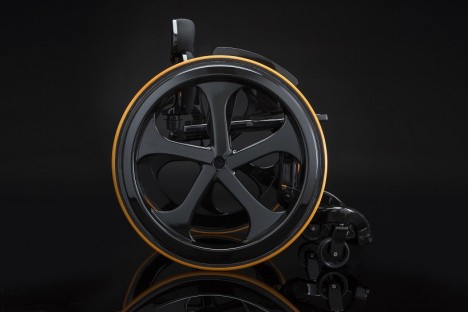
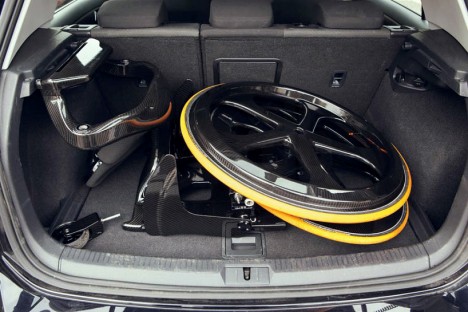
“I felt what wheelchairs were horrible medical devices, and couldn’t understand why companies didn’t advance their wheelchairs in the same way bike companies did with their products, says designer Andrew Slorance, who suffered a spinal injury at the age of 14. His desire for a better-looking, higher quality chair led him to create the ‘Carbon Black,’ which adds a lot of bike-like functionality including an optional LED system for night time travel. Minimal and lightweight, the wheelchair is made of carbon fiber and can be quickly and easily dismantled and reassembled for travel.

Off-Road Wheelchair for Adventurers

future wheelchairs off road 1

future wheelchairs off road 2

future wheelchairs off road 3

future wheelchairs off road 4

No sandy shore or snow-covered field is off limits when you’re in the Ziesel, an off-road outdoor mobility solution with 4-season rubber tracks and a high precision joystick. Made for exploring cross-country skiing tracks, hiking trails, beaches and dunes, the high performance chair by Mattro even has a fully automated heating system and can transport heavy loads on a trailer.

Transformable Wheel Chair by Caspar Schmitz
future wheelchair transformable 1

future wheelchair transformable 2

With flexible wheels that adapt to a variety of ground conditions, the lightweight and durable polyurethane Transformable Wheel can climb stairs and handle other rough terrain. While this design is just a concept, it’s an intriguing take on multifunctional wheelchairs that give users more independence.

Next Page – Click Below to Read More:
Advanced Accessibility 12 Futuristic Wheelchair Designs Concepts

Share on Facebook


[ By Steph in Technology & Vehicles & Mods. ]

[ WebUrbanist | Archives | Galleries | Privacy | TOS ]


WebUrbanist

 
Comments Off on Advanced Accessibility: 12 Futuristic Wheelchair Designs & Concepts

Posted in Creativity


8 Tips to Avoid Crowds at Popular Landscape Locations

11 May

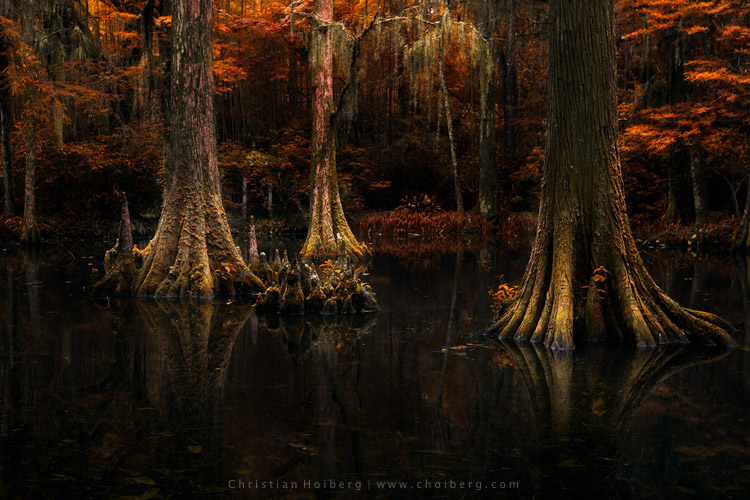
Photographing popular tourist destinations can at times be a great challenge. Hundreds of people are walking within your frame, and regardless of the direction you’re facin,g it’s nearly impossible to capture an image without people in it.

1

I often visit beautiful landscapes, many of which are popular among tourists, even though I prefer to shoot more unique locations, and enjoy photographing in quite areas where it’s nothing but nature and me. So when I visit extremely crowded landscapes, I get slightly stressed. But these touristic places are popular for a reason.

When I visited the famous Svartifoss, Iceland a few weeks back, I left without taking more than a couple snapshots, most with my phone. Even though the roughly 40 minute long hike is considered challenging by some, I was amazed to see the amount of people gathered around the waterfall, not to mention the bunch of tripods placed all over. It seemed to be impossible to take the classic image with the river leading up towards the falls, as a group of tourists had occupied the entire place.

Even though it might seem impossible to take professional looking landscape images from these places, there are ways to avoid the crowds and enjoy them alone. It all comes down to planning and prioritizing.

1 – Choose the Hour Wisely

If you’re into landscape photography you may already know that the best time to photograph is during the Golden Hour. This is the time of the day where the sun’s position in the sky is at the lowest, which creates a soft light ideal for photography.

2

2 – Wake Up Early

Since many tourists aren’t dedicated photographers, most of them won’t be awake and out in nature for sunrise. Normally they prefer spending a couple extra hours in bed and having breakfast at the hotel.

3

This is a great advantage for us who wish to capture the beautiful landscapes in optimal light. It’s rare that you meet large crowds this early in the morning, but you may meet a fellow photographer or two. Usually most photographers, and non-photographers, that are up for sunrise try not to get in each other’s way.

About one or two hours after sunrise, depending on what time of the year it is, the first busses filled with tourists begin to arrive. This gives you a lot of time to enjoy these places, and take the images that will be difficult to capture when it gets annoyingly crowded.

3 – Enjoy the Sunset

It’s no secret that it’s more normal to be awake for sunset than for than sunrise. Accordingly the crowd will be a larger during this hour, and if you’re photographing close to a large town it might even be very crowded. Since I’m a landscape photographer and this article is mainly focused on avoiding crowds at popular landscape destinations, I won’t get into cityscapes, etc.

4

What you will see when you are photographing landscapes during sunset is that most people present are fellow photographers. Most normal tourists tend to head back towards the town or hotel, for dinner or other activities.

4 – Photograph the Night Sky

If you haven’t photographed landscapes at night yet, I strongly recommend you try it. Be aware though, as it is highly addictive!

Images captured during the night can often be quite different than what you normally see from these touristic locations, since the majority of people prefer to sleep at this time. I would say the lack of sleep is part of a landscape photographer’s life (for both beginners and professionals).

5

Another benefit of photographing at night is that you might witness certain astrological events, such as meteorite showers, or the northern lights in the northern hemisphere. Be sure to bring something warm to drink as it may get chilly throughout the night.

5 – Choose the Month Strategically

I know that getting vacation days outside the normal holidays might not be possible for everyone, and some locations are definitely best to visit during certain times of the year. But, visiting during low-season is the best method to avoid the crowds.

6

If you want to photograph events such as the Tulip Festival in the PSNW (Washington/Oregon), or the Cherry Blossom in Japan, you have to visit during a specific time of the year, and most likely it’s going to be crowded with both photographers and tourists. While the tips above still will be beneficial, you will most likely not be at these places alone.

However, if you’re not photographing a specific event, visiting during low season can be a great choice. Not only will you avoid the biggest crowds, you may also be rewarded with some unique scenery and weather.

7

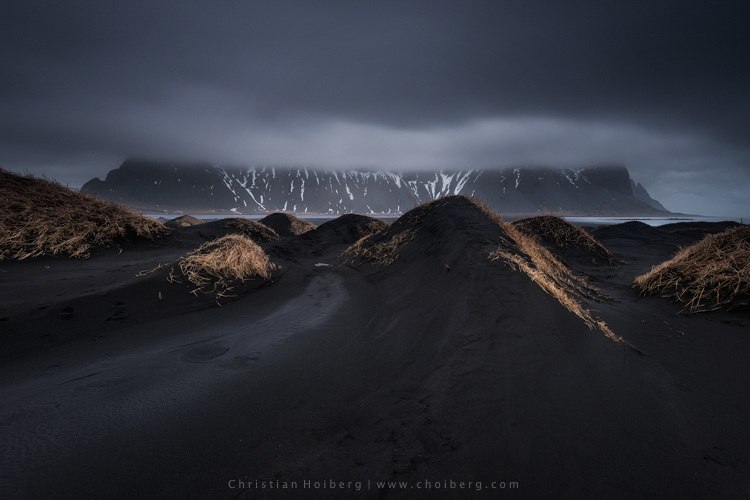
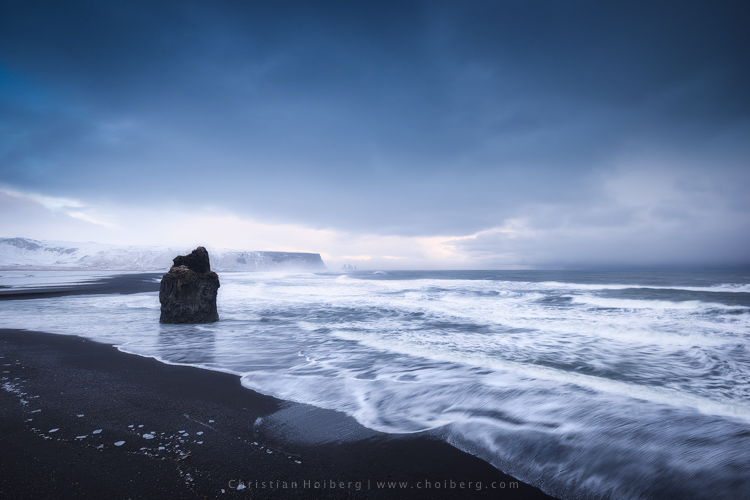
I’ve visited Iceland during low season a couple times, and the results have been great. Yes, it has been challenging with the harsh weather but when the light is good, it’s GOOD!

6 – When the Crowds Won’t Leave

But what if you’re not able to go during low season, sunrise, or sunset? What if there is still a large crowd even during these times? Should you just give up and head back home? Of course not! There’s always a solution, so don’t worry.

7 – Use a Neutral Density Filter

While I won’t get too into the technical aspects of Neutral Density Filters, they allow you to use a longer shutter speed. By placing the dark piece of glass in front of your lens, you need a longer shutter speed to get the correct amount of light to reach the camera sensor. Just be sure to bring a tripod, I doubt you will be able to hold your camera completely still for several seconds or minutes.

8

Why it’s Beneficial to use an ND Filter at Crowded Locations

When you are using a long shutter speed, all motion within the frame will become blurred. The longer your shutter speed is, the less visible people will be. In fact, if you set the shutter speed to a couple minutes, you may even completely remove all people from your image.

8 – Stack Multiple Images

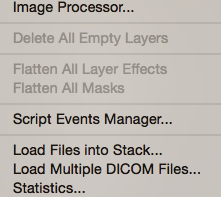
Stacking multiple images is another method to remove crowds from your pictures. This is a little more advanced than using an ND Filter, and requires that you have an image editing software such as Adobe Photoshop. Let’s do this step by step:

  1. Take a set of images from the exact same position. Ideally you should use a tripod so that the frame is the same on each image. Try to take 20-25 images with an interval of roughly 20 seconds. Having this interval will allow people to move a little between each shot.
  2. Import the images to your computer.
  3. Open Photoshop
  4. Click File > Scripts > Statistics
  5. Choose Median as your Stack Mode in the box that appears, and check the box for “Attempt to Automatically Align Source Images”.
  6. Go to YouTube and watch funny videos until Photoshop is done processing…
  7. When the image is done, zoom in to 100% and look for any spots where the script wasn’t able to do a perfect job. If you find such spots select the Spot Removal Tool and carefully heal these places.

9

This is a great technique to remove people from your images. My experience is that the script works well on 99% of images, and even on the remaining 1% it does a decent job.

Final Words

I think most of us have experienced being frustrated due to the large crowds more than once. Personally I think it’s important to remain respectful to both fellow photographers and other tourists when we are at these popular places. Sometimes all you need is a little patience.

10

On another note, the best way to avoid the crowds is to go somewhere less known. I know it’s scary for many to go explore new locations, as you already know how beautiful the popular spots are, but the best images are often taken at less known locations.

What do you do when photographing these popular locations?

googletag.cmd.push(function() {
tablet_slots.push( googletag.defineSlot( “/1005424/_dPSv4_tab-all-article-bottom_(300×250)”, [300, 250], “pb-ad-78623” ).addService( googletag.pubads() ) ); } );

googletag.cmd.push(function() {
mobile_slots.push( googletag.defineSlot( “/1005424/_dPSv4_mob-all-article-bottom_(300×250)”, [300, 250], “pb-ad-78158” ).addService( googletag.pubads() ) ); } );

The post 8 Tips to Avoid Crowds at Popular Landscape Locations by Christian Hoiberg appeared first on Digital Photography School.


Digital Photography School

 
Comments Off on 8 Tips to Avoid Crowds at Popular Landscape Locations

Posted in Photography


Canon PowerShot SX620 HS brings 25x optical zoom to pocketable form

11 May

$ (document).ready(function() { SampleGalleryV2({“containerId”:”embeddedSampleGallery_1212701134″,”galleryId”:”1212701134″,”isEmbeddedWidget”:true,”standalone”:false,”selectedImageIndex”:0,”startInCommentsView”:false,”isMobile”:false}) });

Canon has announced a refresh to its compact superzoom lineup in the form of the PowerShot SX620 HS. It offers a 25x optical zoom covering an equivalent 25-625mm range, outdoing the 25-450mm equiv. range of its SX610 predecessor. The SX620 maintains a 20.2MP sensor, 3″ 922k-dot LCD, Intelligent image stabilization and built-in Wi-Fi with NFC.

The Canon PowerShot SX620 HS will be offered in your choice of black, red or silver for $ 279.99 and will be available later this month.


Press release:

SHARE MEMORIES ON THE GO WITH NEW COMPACT, CONNECTED POWERSHOT SX620 HS DIGITAL CAMERA

Latest Canon PowerShot Digital Camera Provides Impressive Image Quality and Zoom Range in a Compact Size 

MELVILLE, N.Y., May 11, 2016 – Canon U.S.A., Inc., a leader in digital imaging solutions, introduced today the new Canon PowerShot SX620 HS digital camera – ideal for individuals looking for a convenient, easy-to-carry compact digital camera capable of producing high-quality photos and videos. This new camera boasts a 20.2 Megapixel* CMOS imaging sensor and a powerful 25X Optical Zoom lens (25-625mm equivalent) in a form factor that will easily fit in a pocket or purse, making it an ideal camera for those passionate about photography to capture gorgeous imagery no matter where they are. 

The camera’s built-in wireless capabilities make it convenient to share images and videos on the go, and its powerful 25X optical zoom lens makes it ideal for those wanting to zoom in and out of the action. The Canon PowerShot SX620 HS digital camera is a great companion for those looking to visually document their daily adventures and easily share their experiences as they explore new places and do new things. 

As the successor to Canon’s PowerShot SX610 HS digital compact camera, the Canon PowerShot SX620 HS digital camera also features:

  • An Intelligent Image Stabilizer (IS) that helps optimize image stabilization for virtually shake-free images in a variety of shooting conditions
  • Built-in Wi-Fi®** and Near Field Communication (NFC™)***  to allow for easy sharing and transferring of images and videos to a personal computer or other compatible devices such as the Canon Connect Station CS 100
  • 20.2 megapixel* CMOS sensor with DIGIC 4+ Image Processor to help deliver stunning image quality, even in low light
  • The ability to capture spectacular 1080p Full HD video
  • Large 3.0-inch (approximately 922,000 dots) LCD to allow for easy viewing, even from a wide angle
  • Hybrid Auto mode that allows for recording up to four seconds of video before each image that is captured, then automatically combines each clip and still into a quick video recap of the day
  • Smart AUTO mode which intelligently selects the proper settings for the camera based on pre-defined shooting situations to help create the best possible image
  • Creative Shot mode that uses composition, color and lighting from an original image to create unique images with an artistic flair
  • An Auto Zoom feature that, when enabled, makes the camera automatically zoom in on subjects and help keep them in focus

Canon’s PowerShot SX620 HS digital camera, available in black, red and silver, is scheduled to be available in May 2016 for an estimated retail price of $ 279.991

1 Availability, pricing and specifications are subject to change without notice.  Actual prices are set by individual dealers and may vary.

* Image processing may cause a decrease in the number of pixels.

** Compatible with iOS® versions 7.1/8.4/9.0, Android™ smartphone and tablet versions  4.0/4.1/4.2/4.3/4.4/5.0/5.1.  Data charges may apply with the download of the free Canon Camera Connect app. This app helps enable you to upload images to social media services. Please note that image files may contain personally identifiable information that may implicate privacy laws. Canon disclaims and has no responsibility for your use of such images. Canon does not obtain, collect or use such images or any information included in such images through this app.

*** Compatible with Android smartphone and tablet versions 4.0/4.1/4.2/4.3/4.4/5.0/5.1.

Canon PowerShot SX620 HS specifications

Price
MSRP $ 279
Body type
Body type Compact
Sensor
Max resolution 5184 x 3888
Other resolutions 4:3 (5184 x 3888, 3648 x 2736, 2048 x 1536, 640 x 480), 16:9 (5184 x 2912, 3648 x 2048, 1920 x 1080, 640 x 360), 3:2 (5184 x 3456, 3648 x 2432, 2048 x 1368, 640 x 424), 1:1 (3888 x 3888, 2736 x 2736, 1536 x 1536, 480 x 480)
Image ratio w:h 1:1, 4:3, 3:2, 16:9
Effective pixels 20 megapixels
Sensor photo detectors 21 megapixels
Sensor size 1/2.3" (6.17 x 4.55 mm)
Sensor type BSI-CMOS
Processor DIGIC 4+
Color space sRGB
Color filter array Primary color filter
Image
ISO Auto, 80-3200
White balance presets 5
Custom white balance Yes
Image stabilization Optical
Image stabilization notes Intelligent IS
Uncompressed format No
JPEG quality levels Superfine, fine
File format
  • JPEG (Exif v2.3)
Optics & Focus
Focal length (equiv.) 25–625 mm
Optical zoom 25×
Maximum aperture F3.2–6.6
Autofocus
  • Contrast Detect (sensor)
  • Multi-area
  • Center
  • Selective single-point
  • Tracking
  • Single
  • Continuous
  • Face Detection
  • Live View
Autofocus assist lamp Yes
Digital zoom Yes (4X)
Manual focus Yes
Normal focus range 5 cm (1.97)
Macro focus range 1 cm (0.39)
Number of focus points 9
Screen / viewfinder
Articulated LCD Fixed
Screen size 3
Screen dots 922,000
Touch screen No
Screen type TFT LCD
Live view Yes
Viewfinder type None
Photography features
Minimum shutter speed 15 sec
Maximum shutter speed 1/2000 sec
Exposure modes
  • Hybrid Auto
  • Creative Shot
  • Scene
  • Program
Scene modes
  • Portrait
  • Smile
  • Wink Self-timer
  • Face Self-timer
  • High-speed Burst
  • Handheld Night Scene
  • Low Light
  • Fireworks
  • Long Shutter
Built-in flash Yes
Flash range 4.00 m (with Auto ISO)
External flash No
Flash modes Auto, on, slow synchro, off
Drive modes
  • Single
  • Continuous
  • Self-timer
Continuous drive 2.5 fps
Self-timer Yes (2 or 10 secs, custom)
Metering modes
  • Multi
  • Center-weighted
  • Spot
Exposure compensation ±2 (at 1/3 EV steps)
Videography features
Resolutions 1920 x 1080 (30p), 1280 x 720 (30p), 640 x 480 (30 fps)
Format MPEG-4, H.264
Microphone Mono
Speaker Mono
Storage
Storage types SD/SDHC/SDXC card
Connectivity
USB USB 2.0 (480 Mbit/sec)
HDMI Yes (micro-HDMI)
Microphone port No
Headphone port No
Wireless Built-In
Wireless notes 802.11b/g/n with NFC
Remote control Yes (via smartphone)
Physical
Environmentally sealed No
Battery Battery Pack
Battery description NB-13L lithium-ion battery & charger
Battery Life (CIPA) 295
Weight (inc. batteries) 182 g (0.40 lb / 6.42 oz)
Dimensions 97 x 57 x 28 mm (3.81 x 2.24 x 1.1)
Other features
Orientation sensor Yes
GPS None

Articles: Digital Photography Review (dpreview.com)

 
Comments Off on Canon PowerShot SX620 HS brings 25x optical zoom to pocketable form

Posted in Uncategorized


Canon 600EX II-RT boosts recycle times for top-of-the-line Speedlite

11 May

$ (document).ready(function() { SampleGalleryV2({“containerId”:”embeddedSampleGallery_2878417558″,”galleryId”:”2878417558″,”isEmbeddedWidget”:true,”standalone”:false,”selectedImageIndex”:0,”startInCommentsView”:false,”isMobile”:false}) });

The Canon Speedlite 600EX II-RT updates the manufacturer’s top-shelf flash unit with faster recycle times. The unit still offers wireless shooting via radio and optical transmission, but improves flash recycle times by 1.1 to 1.5x when using AA batteries and up to 2x with a new CP-E4N add-on battery pack.

The flash provides a 197ft/60m guide number, consistent with its predecessor, and the zoom flash head covers a range of 20-200mm. It can control up to 5 groups of compatible flash units, offers a weather- and dust-resistant design and boasts ‘simplified’ button and dial operation.

Expected in June 2016, the Canon Speedlite 600EX II-RT will cost $ 579.99.


Press release:

ACCESSORIZE THIS SPRING WITH THE CANON SPEEDLITE 600EX II-RT FLASH AND CANON EF-M 28MM f/3.5 MACRO IS STM LENS WITH BUILT-IN MACRO LITES AND IMAGE STABILIZER

MELVILLE, N.Y., May 11, 2016 – Spring is all about having the right look and Canon U.S.A., Inc., a leader in digital imaging solutions, is giving photographers of all levels two new options that can improve their creativity and versatility; the Canon Speedlite 600EX II-RT flash and the Canon EF-M 28mm f/3.5 Macro IS STM lens. 

Photographers looking to take rapid-fire flash images will appreciate the improved recycling time in the new Canon Speedlite-600EX II-RT flash. Those looking to explore the world of macro photography will appreciate the stylish compact look of the new Canon EF-M 28mm f/3.5 Macro IS STM lens, the first EF-M Macro Lens for the Canon EOS M Camera System, which features Image Stabilization and a pair of built-in miniature Macro Lites to enhance image quality during close-up photography. 

The Canon Speedlite 600EX II-RT flash Offers Improved Recycling Time and More

The Speedlite 600EX II-RT flash is compatible with most EOS cameras. It replaces Canon’s top-of-the-line Speedlite 600EX-RT, and improves recycling time by approximately 1.1 to 1.5 times* during continuous flash shooting when using AA batteries and up to 2 times* when adding the new optional Compact Battery Pack CP-E4N.  

Additional Speedlite 600EX II-RT flash features include: 

  • Zoom flash head covers wide focal length range of 20–200mm; maximum guide number is 197 ft./60m at ISO 100, making Speedlite 600EX II-RT flash the most powerful flash unit in the EOS system.
  •  Wireless flash shooting support is available for both radio and optical transmission with compatible Canon Speedlites, offering users greater functional range when using flash.
  • Multiple flash system support allows control of up to five groups of compatible Canon Speedlites. 
  • Dust- and water-resistant body for reliable operation in harsh environments.
  • Flash-readiness indicator on the display panel, simplified button and dial operation and variable manual flash output.
  • New, specially designed accessories supplied include a built-in bounce adapter, plus SCF-E3 hard-type color filter sets, and a soft case. The new Compact Battery Pack CP-E4N is available as an optional accessory for faster recycling time and more flashes per charge.
  • Illuminated dot matrix LCD panel for enhanced display information, including flash mode and usable distance ranges plus C.Fn (Custom Function) and P.Fn (Personal Function) settings.

First Macro Lens in the Canon EF-M lens series

Photographers looking for a compact, lightweight macro lens should look no further than the Canon EF-M 28mm f/3.5 Macro IS STM lens, the first Canon Macro Lens specifically designed for the EOS M Camera System.

The new lens features a pair of built-in miniature Macro Lite electronic flash units that illuminate close-up subjects as needed, helping to freeze movement, enhance color accuracy and provide a better sense of depth and dimension. Two curved flash units surround the front element of the lens, with the ability to illuminate both simultaneously, or one at a time. Users are also able to adjust the brightness of the Macro Lites between “bright” and “dim” settings.  

The standard focusing range of the Canon EF-M 28mm f/3.5 Macro IS STM lens extends from infinity to life-size (1 time). Additionally, a Super Macro Mode allows shooting at even higher magnifications up to 1.2 times. This feature allows you to capture smaller details that really make your subjects stand out against the background. 

Additional features of the Canon EF-M 28mm f/3.5 Macro IS STM lens include: 

  • Hybrid IS, the same feature as found on Canon EF 100mm f/2.8L Macro IS USM Lens, helps reduce camera shake for enjoyable handheld photography.
  • Stepping motor (lead screw-type STM) helps provide smooth and quiet focusing operation when taking photos, and near-silence when shooting videos.
  • One UD lens and two aspherical lenses** help deliver outstanding image quality at all distance settings by reducing chromatic and spherical aberrations.
  • Angle of view similar to a 45mm standard lens (35mm equivalent) provides flexible image capture of various subjects and scenes at macro distances and beyond.
  • Tapered lens top shape makes it easy to capture high-quality images at close range without casting shadows.

The Canon Speedlite 600EX II-RT electronic flash unit is scheduled to be available through authorized Canon dealers in June 2016 for an estimated retail price of $ 579.991. Canon’s EF-M 28mm f/3.5 Macro IS STM lens is scheduled to be available through authorized Canon dealers in June for an estimated retail price of $ 299.991.

1 Availability, pricing and specifications are subject to change without notice.  Actual prices are set by individual dealers and may vary.

* Based on Canon’s standards. As compared to the Speedlite 600EX-RT.

** Among autofocus lenses for interchangeable lens cameras. As of May 11, 2016, based on Canon’s research.

Articles: Digital Photography Review (dpreview.com)
 
Comments Off on Canon 600EX II-RT boosts recycle times for top-of-the-line Speedlite

Posted in Uncategorized


Bright idea: Canon debuts EF-M 28mm F3.5 Macro with built-in LEDs

11 May

$ (document).ready(function() { SampleGalleryV2({“containerId”:”embeddedSampleGallery_7401393305″,”galleryId”:”7401393305″,”isEmbeddedWidget”:true,”standalone”:false,”selectedImageIndex”:0,”startInCommentsView”:false,”isMobile”:false}) });

Canon is introducing the first macro lens for its EF-M mount. The EF-M 28mm F3.5 Macro IS STM provides two user-controllable built-in LED macro lights and offers true 1:1 reproduction along with a 1.2x super macro mode.

The EF-M 28mm is just the fifth lens for its EOS M system and will provide a 45mm equiv. angle of view on the mirrorless crop-frame bodies. It uses an STM motor and offers a hybrid image stabilization for a claimed 3.5 stop compensation. Shipping in June, it will cost $ 299.99.


Press release:

ACCESSORIZE THIS SPRING WITH THE CANON SPEEDLITE 600EX II-RT FLASH AND CANON EF-M 28MM f/3.5 MACRO IS STM LENS WITH BUILT-IN MACRO LITES AND IMAGE STABILIZER

MELVILLE, N.Y., May 11, 2016 –Spring is all about having the right look and Canon U.S.A., Inc., a leader in digital imaging solutions, is giving photographers of all levels two new options that can improve their creativity and versatility; the Canon Speedlite 600EX II-RT flash and the Canon EF-M 28mm f/3.5 Macro IS STM lens. 

Photographers looking to take rapid-fire flash images will appreciate the improved recycling time in the new Canon Speedlite-600EX II-RT flash. Those looking to explore the world of macro photography will appreciate the stylish compact look of the new Canon EF-M 28mm f/3.5 Macro IS STM lens, the first EF-M Macro Lens for the Canon EOS M Camera System, which features Image Stabilization and a pair of built-in miniature Macro Lites to enhance image quality during close-up photography. 

The Canon Speedlite 600EX II-RT flash Offers Improved Recycling Time and More

The Speedlite 600EX II-RT flash is compatible with most EOS cameras. It replaces Canon’s top-of-the-line Speedlite 600EX-RT, and improves recycling time by approximately 1.1 to 1.5 times* during continuous flash shooting when using AA batteries and up to 2 times* when adding the new optional Compact Battery Pack CP-E4N.  

Additional Speedlite 600EX II-RT flash features include: 

  • Zoom flash head covers wide focal length range of 20–200mm; maximum guide number is 197 ft./60m at ISO 100, making Speedlite 600EX II-RT flash the most powerful flash unit in the EOS system.
  •  Wireless flash shooting support is available for both radio and optical transmission with compatible Canon Speedlites, offering users greater functional range when using flash.
  • Multiple flash system support allows control of up to five groups of compatible Canon Speedlites. 
  • Dust- and water-resistant body for reliable operation in harsh environments.
  • Flash-readiness indicator on the display panel, simplified button and dial operation and variable manual flash output.
  • New, specially designed accessories supplied include a built-in bounce adapter, plus SCF-E3 hard-type color filter sets, and a soft case. The new Compact Battery Pack CP-E4N is available as an optional accessory for faster recycling time and more flashes per charge.
  • Illuminated dot matrix LCD panel for enhanced display information, including flash mode and usable distance ranges plus C.Fn (Custom Function) and P.Fn (Personal Function) settings.

First Macro Lens in the Canon EF-M lens series

Photographers looking for a compact, lightweight macro lens should look no further than the Canon EF-M 28mm f/3.5 Macro IS STM lens, the first Canon Macro Lens specifically designed for the EOS M Camera System.

The new lens features a pair of built-in miniature Macro Lite electronic flash units that illuminate close-up subjects as needed, helping to freeze movement, enhance color accuracy and provide a better sense of depth and dimension. Two curved flash units surround the front element of the lens, with the ability to illuminate both simultaneously, or one at a time. Users are also able to adjust the brightness of the Macro Lites between “bright” and “dim” settings.  

The standard focusing range of the Canon EF-M 28mm f/3.5 Macro IS STM lens extends from infinity to life-size (1 time). Additionally, a Super Macro Mode allows shooting at even higher magnifications up to 1.2 times. This feature allows you to capture smaller details that really make your subjects stand out against the background. 

Additional features of the Canon EF-M 28mm f/3.5 Macro IS STM lens include: 

  • Hybrid IS, the same feature as found on Canon EF 100mm f/2.8L Macro IS USM Lens, helps reduce camera shake for enjoyable handheld photography.
  • Stepping motor (lead screw-type STM) helps provide smooth and quiet focusing operation when taking photos, and near-silence when shooting videos.
  • One UD lens and two aspherical lenses** help deliver outstanding image quality at all distance settings by reducing chromatic and spherical aberrations.
  • Angle of view similar to a 45mm standard lens (35mm equivalent) provides flexible image capture of various subjects and scenes at macro distances and beyond.
  • Tapered lens top shape makes it easy to capture high-quality images at close range without casting shadows.

The Canon Speedlite 600EX II-RT electronic flash unit is scheduled to be available through authorized Canon dealers in June 2016 for an estimated retail price of $ 579.991. Canon’s EF-M 28mm f/3.5 Macro IS STM lens is scheduled to be available through authorized Canon dealers in June for an estimated retail price of $ 299.991.

1 Availability, pricing and specifications are subject to change without notice.  Actual prices are set by individual dealers and may vary.

* Based on Canon’s standards. As compared to the Speedlite 600EX-RT.

** Among autofocus lenses for interchangeable lens cameras. As of May 11, 2016, based on Canon’s research.

Canon EF-M 28mm F3.5 Macro IS STM specifications

Principal specifications
Lens type Prime lens
Max Format size APS-C / DX
Image stabilisation Yes (3.5 stops)
Lens mount Canon EF-M
Aperture
Aperture ring No
Optics
Elements 11
Groups 10
Special elements / coatings One UD and two aspherical elements
Focus
Minimum focus 0.09 m (3.54)
Maximum magnification 1.2×
Autofocus Yes
Motor type Stepper motor
Full time manual Yes
Focus method Extending front
Distance scale No
DoF scale No
Physical
Weight 130 g (0.29 lb)
Diameter 61 mm (2.4)
Length 46 mm (1.79)
Sealing No
Colour Graphite
Hood supplied Yes
Hood product code ES-22

Articles: Digital Photography Review (dpreview.com)

 
Comments Off on Bright idea: Canon debuts EF-M 28mm F3.5 Macro with built-in LEDs

Posted in Uncategorized


Huawei launches Honor V8 with 12MP dual-camera module

11 May

Huawei has announced the V8, the new flagship in the Chinese manufacturer’s Honor series of devices. Consumers can choose from different display and processor options but the camera module is the same on all variants. The Honor V8 features a dual-camera setup that looks very similar in terms of specifications to the one found on the Huawei P9, but has to make do without the P9’s Leica branding.

Both 12MP sensors come with a 1.76-micron pixel-size and are coupled with a 6-element lens with F2.2 aperture. There is also a dual-LED flash and the AF-system is laser-assisted. As on the P9, the front camera offers an 8MP sensor and F2.4 aperture. 

In terms of display resolution customers get to choose from Full-HD or Quad-HD but all displays measure 5.7-inches and come with 2.5HD curved glass. The Android 6.0 operating system with Huawei EMUI 4.1 skin is powered by an octa-Core Kirin 950 or 955 chipset. RAM is 4GB on all models but the model with the higher-resolution screen comes with 64GB of storage while the Full-HD variant has to make do with 32GB.

Energy on all models is provided by a 3,500mAh battery that is charged via a USB Type-C connector. In China the Full-HD base model will retail for approximately $ 350 while to the top-end version with QHD-screen and 64GB storage will set you back approximately $ 439.

Via: GSM Arena

Articles: Digital Photography Review (dpreview.com)

 
Comments Off on Huawei launches Honor V8 with 12MP dual-camera module

Posted in Uncategorized