RSS
 

Archive for April, 2016

5 Secrets for Finding Great Indoor Portrait Locations

04 Apr

156

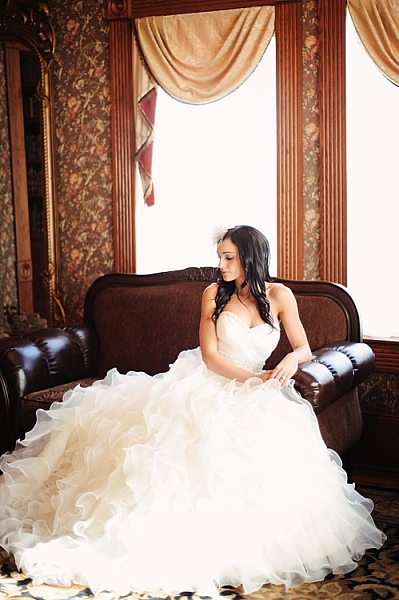
Not all photographers choose to have a dedicated indoor studio, but sometimes you need to shoot a session indoors. Maybe it’s freezing outside, and you don’t want to be out in that weather. Maybe you have a bride who wants bridals, but is worried about her dress getting dirty. Maybe you just want something fresh and a little quirky. Maybe the building has special meaning to you or the person you are photographing.

Whatever your reasons, in this article you are going to learn all my secrets to finding indoor locations, and getting permission to use them. Hopefully they’ll help you find the perfect spot for your next session!
174

Secret #1: Always be on the lookout

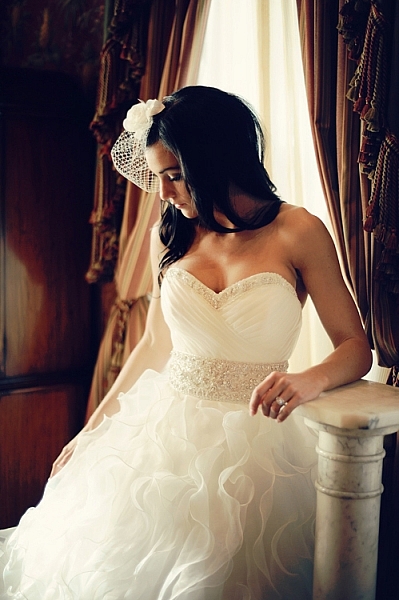
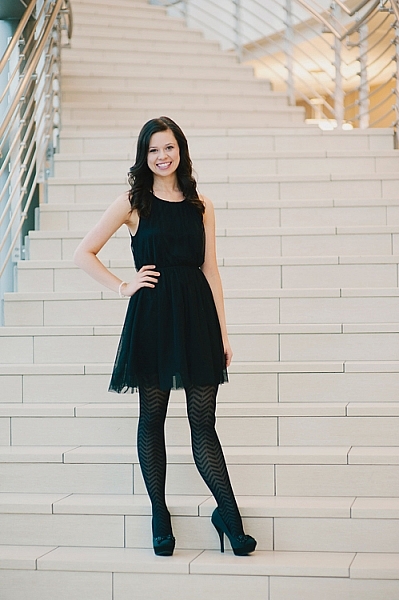
Wherever you go, keep your photographer eyes open. You may be surprised at how many places transform into a great location once you really start looking. Some unique and exciting photography locations could be: family photos in the library, model portfolio shots in the city building, engagement session in the laundromat, dance group session in a hotel lobby, mom and toddler portraits in a grocery store, bridal session in a grand old house, a museum, a quaint bed and breakfast, a roller-skating rink, a university building, a furniture store, a toy store, or candy store – the list is endless.

Look for great lighting, open spaces, interesting backgrounds, and fun things to interact with. Notice if there are lots of people that you might be disturbing, or if it’s a relatively calm place that you could photograph in peace. Use your imagination and creativity to turn the ordinary into something extraordinary.

192

Secret #2: Always ask permission

Once you’ve found a place you’d like to try, make sure you ask permission before you bring a client there. I find, if possible, that asking in person is usually the best, because they can see who they are talking to, and are often less resistant if they can see your smiling friendly face. If you need to call, be professional and friendly on the phone, so they feel comfortable letting you come with your camera.

If you aren’t sure who owns the building, check with city or county records, or ask a neighboring building or house if they know who owns it. Do the legwork to find out who owns the property before you barge in uninvited. It gives all photographers a bad name if you trespass. I’ve had many times where I call to ask permission, and the owner thanks me profusely for asking permission. They express their frustration that other photographers just start shooting without asking. They allowed me to photograph on their property, so obviously they don’t mind people being there, but they always appreciate being asked first.

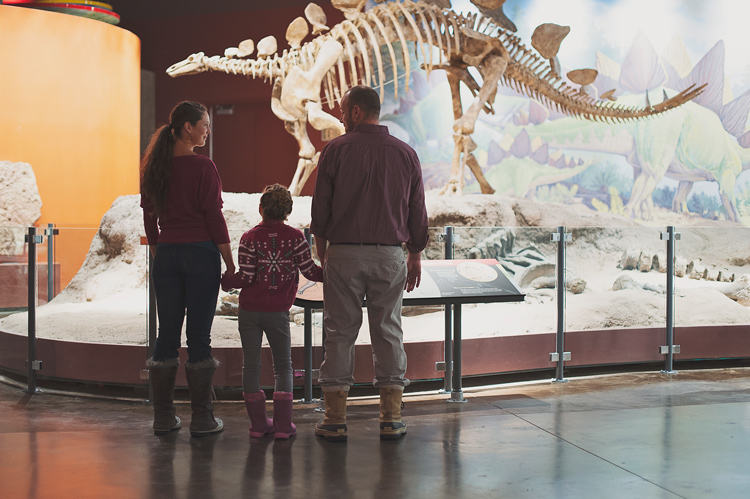
Some locations, like museums, or theme parks, are fine with you taking photographs inside, but you have to pay the entrance fee.
148

Some places charge a fee for photography, and some don’t allow photographers at all. If you whip your camera out in either of those types of places without asking permission first, you could be fined huge amounts. It’s not worth it. If you ask permission and get a no, just move on and find another place. However, it never hurts to ask. Most of the time you get a yes, and often they are pleased that you think their building is worthy of being a photography location.
112

Secret #3: Find an owner who will also benefit

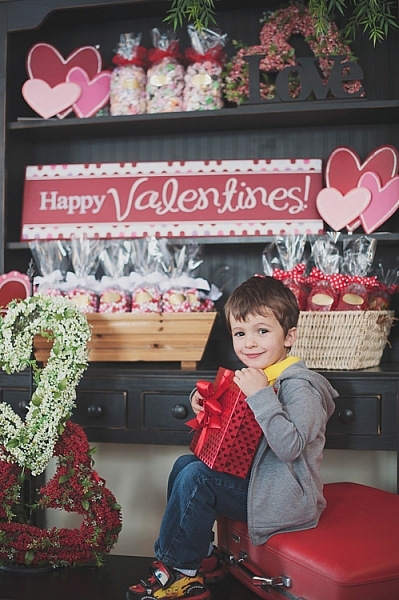
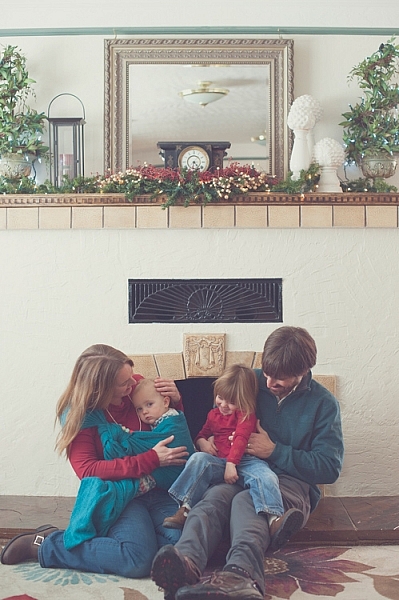
I needed a place to have adorable kids come for Valentine’s Day photos, but I didn’t know who would want multiple kids and families traipsing in and out of their establishment. Then I came across an adorable little candy shoppe that was decorated perfectly, and full of delicious sweets and treats. My photography clients came in and out all day for their sessions, and ended up buying lots of candy in the process. Many who came had never noticed the little hometown shop, with homemade caramel apples and every kind of candy you can think of, and they were happy to have discovered it. I ended up having a great place for my Valentine’s Day photos, and the owner got a lot of new business.

177

Look for places that might have a similar situation, and chances are the owner will be more than happy to let you use their location, free of charge. Many small locally owned places need a couple of photos of their establishment for websites and advertising purposes, or maybe even a quick headshot, and would be thrilled to let you photograph there in exchange for a photo or two.
146

Secret #4: Explore any connections

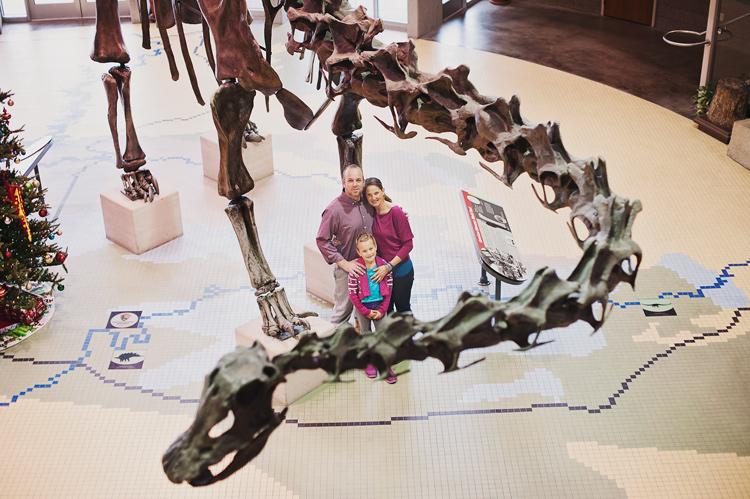
Sometimes a friend may own a quaint little bed and breakfast, or maybe she works at a museum. If you are photographing that friend, that may be an especially smooth way to get your foot in the door. If things go really well, they may be okay with you bringing other people to their property again. Even if they aren’t the one that you are photographing, you could ask what they think about letting you use the property that they have a connection to.

Be careful not to ask for too much, and be careful not to put anyone in an uncomfortable position. If you sense that they are hesitant about having a camera there, don’t push it. A little respect goes a long way, and you don’t want to be the photographer that people avoid at all costs. Relationships are more important than having a cool place to photograph, so be extra sensitive when using this secret.
171

Secret #5: Be the best guest

When you’ve gotten permission to use a place, never, never, never ever let anything get destroyed, damaged, or left in any way other than how you found it. If you need to move something out of the way, ask if it’s okay first, and then put it back where you found it. Be mindful of what is going on around you, especially if you are photographing kids. You are responsible for what happens with your session, and you never want to pay a big repair bill, or lose a friendship because you were careless.

You are not only representing yourself, but all photographers everywhere, when you use a public or private property for photographs. If you make it a horrible experience for the owners, you have more than likely ruined it for future sessions for yourself, and for all other photographers who might think to ask permission. Please don’t be that careless photographer who ruins it for everyone. Instead, leave such a great impression that all photographers will be welcomed with open arms into almost every establishment, to create beautiful and unique photographs.
111

Do you have any other tips for finding great indoor portrait locations? Have you found any gems? Please share your comments and images of your favorite spots below.

googletag.cmd.push(function() {
tablet_slots.push( googletag.defineSlot( “/1005424/_dPSv4_tab-all-article-bottom_(300×250)”, [300, 250], “pb-ad-78623” ).addService( googletag.pubads() ) ); } );

googletag.cmd.push(function() {
mobile_slots.push( googletag.defineSlot( “/1005424/_dPSv4_mob-all-article-bottom_(300×250)”, [300, 250], “pb-ad-78158” ).addService( googletag.pubads() ) ); } );

The post 5 Secrets for Finding Great Indoor Portrait Locations by Melinda Smith appeared first on Digital Photography School.


Digital Photography School

 
Comments Off on 5 Secrets for Finding Great Indoor Portrait Locations

Posted in Photography


Talking Points: 12 Odd Japanese Safety & Traffic Cones

04 Apr

[ By Steve in Culture & History & Travel. ]

safety-cones-0
Plastic safety cones have become so ubiquitous along Japan‘s roadways, unusual measures have been taken to ensure they stand out amongst the crowd.

safety-cones-1a

safety-cones-1b

“Safety in numbers”… a self-defeating term if there ever was when it comes to Japan’s countless cohorts of conical warning signs. They’re everywhere it seems: parking lots, construction zones, anywhere the ground is disturbed and could possibly pose a hazard to drivers and/or pedestrians.

safety-cones-1c

safety-cones-1d

safety-cones-1e

If these cones were all standard Safety Orange, our senses would tune them out as visual background noise. What to do? If you’re Japan, you deviate from the norm in oft-unexpected, cute and quirky ways… like these endearing Mount Fuji cones captured by Asagiri Web, Setsugekka, One Sometimes Futari, Daily Model Railroad Room, and Illumination Designer.

Smile When You Safety That

safety-cones-2a

safety-cones-2b

Is it somewhat incongruous for warning markers to sport goofy grins? Yes, yes it is, but this is Japan so all bets are off. Flickr user Martin Bryant (MartinSFP) and blogger Cat (Overtake) Chan spotted these smiling sunflower cones making light of a serious situation.

Flower Power

safety-cones-3a

safety-cones-3b

At the Sakuragi shrine in Chiba prefecture (east of Tokyo) it’s all cherry blossoms, all the time. The theme extends even to the temple’s parking lot where cherry blossom-wrapped safety cones add a note of scenic harmony. Kudos to blogger “Drawer of his Head” for noticing the cute cone in October of 2015 and proving one does not have to blend in, in order to stand out.

Size Matters

safety-cones-4a

safety-cones-4b

safety-cones-4c

Go big or go home, and that goes for safety cones, to the chagrin of local police forces. Kudos to Flickr user Kat n Kim and blogger Minkara for the images above.

Next Page – Click Below to Read More:
Talking Points 12 Odd Japanese Safety Traffic Cones

Share on Facebook


[ By Steve in Culture & History & Travel. ]

[ WebUrbanist | Archives | Galleries | Privacy | TOS ]


WebUrbanist

 
Comments Off on Talking Points: 12 Odd Japanese Safety & Traffic Cones

Posted in Creativity


Bird’s eye view: Photographing Cherry Blossoms with the DJI Phantom 4

03 Apr

The cherry blossoms at the University of Washington are a hugely popular attraction every spring in Seattle. Weekends during the peak of the blossom bring in crowds of people to the Quad, all hoping to capture the blooms with everything from professional cameras to tablets and selfie sticks. Rather than trying to avoid the mass of people, photographer and DPR reader Dale Johnson embraced the scene and found a new perspective by shooting from above. Find out how he’s adopted aerial photography and what went into capturing this shot.

By Dale Johnson

Trying to find unique perspectives of familiar places is becoming harder and harder, as everyone and their mother has a camera (mostly built into their phones) and hundreds of thousands of images are uploaded to social media every day. A camera attached to an aerial platform is a fairly new concept, but it’s a category that’s growing rapidly. Adding a drone to my photography kit has provided opportunities to find new ways to see things. In addition to the new perspective, I’m finding that I love to have the element of movement in the scene, which the video and smooth and stable platform allows.

I started experimenting with drone photography last summer with the DJI Phantom 3 Professional. I’m not much of an early adopter, tending to wait until the technology has matured before jumping in. I have been following the development of drones for some time since I bought one of the early remote helicopters several years ago. I tried to learn how to fly it around my living room, though not very well I must say. The Phantom 3 is a joy to fly and incredibly simple to control. I have loved flying it around Seattle. 

Having purchased the new DJI Phantom 4 quadcopter the day it was released, I’d been on the lookout for a place to fly it. The cold, wet, grey days of our Seattle winter have been slowly improving into a beautiful spring and I was eager to get it in the air. I was a student at the University of Washington many years ago, and remember how the ‘quad’, with all its cherry trees, would explode in full bloom each spring. It seemed like the perfect place to fly and get a shot that I had not seen before. 

I first went to the quad just after sunrise on Friday morning to catch the warm light with fewer people around. I was able to get a few decent shots, but the sunlight blew out the highlights a bit and even though I was shooting in Raw, the small sensor on the built in camera didn’t give me the latitude for corrections that my DSLR would. I decided to go back on Saturday afternoon as it was mostly overcast with more even contrast. This time the quad was buzzing. The symmetry of the scene made for an easy composition with the cherry trees framed by the buildings, and the crisscrossing red brick paths added diagonal elements to the image. I also like how all the people give the image a sense of scale and contrast.

A quick word about drones and flying within the city. There are a lot of negative feelings out there about drones and people concerned about privacy issues, or collisions with airplanes. The FAA (in the US) has a new requirement to have drone operators register with the FAA (which I have) and some rules for flying. I followed all the FAA requirements during this flight and found after a quick check with the University of Washington Police that there are no restrictions for flying on campus, except over stadium events.

This new vantage point of the world looking down from above has inspired me all over again to look for unique views on familiar places.

DPReview encourages responsible, legal and safe use of drones. Check local regulations before flying any unmanned aerial vehicle.


Dale Johnson has been taking pictures for over 30 years after receiving a Nikon camera as a graduation present from high school. He now has a day job that has him traveling the world, giving him the opportunity to see and experience people and cultures that he would not otherwise visit (56 countries and counting!). Travel photography has become his new passion. You can see more of Dale’s work at:

500px: https://500px.com/drjhnsn

SmugMug: https://dalejohnson.smugmug.com

Instagram: https://www.instagram.com/dalejohnsonphoto/

Youtube: http://www.youtube.com/c/dalejohnsonphoto

Articles: Digital Photography Review (dpreview.com)

 
Comments Off on Bird’s eye view: Photographing Cherry Blossoms with the DJI Phantom 4

Posted in Uncategorized


Readers’ Showcase: Nikhil Shahi

03 Apr

Readers’ Showcase: Nikhil Shahi

The setting sun backlights the blowing sand during a sandstorm in Death Valley National Park, California. Photo by Nikhil Shahi

Travel and photography have a close relationship. Photographers are often keen travelers, and in turn traveling can inspire non-photographers to pick up a camera for the first time. Nikhil Shahi falls into the latter category. His travels with the Merchant Marines inspired him to learn photography, cultivating a portfolio of rich landscapes and portraits. See some of his work and learn more about him in our Q&A.

You can see Nikhil’s complete portfolio at his website. Follow him on Instagram and Facebook to see more of his work. Interested in having your work featured in an upcoming Readers’ Showcase? Let us know! Include your DPR user name a link to your online portfolio.

Readers’ Showcase: Nikhil Shahi

Twilight shot of the Walt Disney Concert Hall in Los Angeles, California. Photo by Nikhil Shahi

Where are you from and what’s your history with photography?

I am originally from Northern India, but have been traveling and living across the world since graduating from high school. After high school I joined the Merchant Marines which gave me the opportunity to see a lot of countries while sailing on behemoth ships. Sailing across the world and encountering natural beauty inspired me to take up photography. My first camera was a Minolta Maxxum 7000 and I essentially learned the basics of photography on that camera. I initially focused on portraits, but then got heavily into landscapes. 

Readers’ Showcase: Nikhil Shahi

I wanted to get a different perspective of ‘Grauman’s Chinese Theater’ in Hollywood, California. I took this shot with my 16mm fisheye lens late one night, when the tourist traffic was ebbing. Photo by Nikhil Shahi

What do you shoot with now?

I currently shoot with a Nikon D800E and an assortment of Nikon lenses (14-24mm, 24-70mm, 70-200 VR2, 200 Micro, 16mm FE, 85mm 1.4G). My favorite lens is the 14-24mm as it was initially really hard to create effective compositions using an ultra-wide angle lens, but the challenge was exciting and it taught me to look at things with a new perspective.

Readers’ Showcase: Nikhil Shahi

This is one of my favorite shots of my maternal grandmother. While traveling by train, I noticed her lost deep in thought, staring out of the window and captured this moment. Photo by Nikhil Shahi

Do you currently shoot all digital, or do you shoot film occasionally as well?

I, like a few of my friends, was resistant to shooting digital for the longest time. We all thought that digital was inferior to film and so stuck with film cameras. It was only with the release of the Nikon D700, that I decided to finally switch to digital and wasn’t disappointed. I have been shooting digital since then and haven’t felt the desire to re-visit film anymore. We are fortunate to live in an age where sensor and camera technology has evolved to an extent that one is able to get great results from even entry level cameras. 

Readers’ Showcase: Nikhil Shahi

On a trip to the Masai Mara in Kenya, our convoy stopped at a village. While walking through the village, I noticed this person peeping through the window of a hut. I was able to take one shot with my F5 before he moved away. Photo by Nikhil Shahi

Your portfolio shows a healthy variety of portraits, landscapes and wildlife. Are there certain subjects you’re drawn to more than others?

My first love has always been landscapes as it gives me a chance to travel to serene places and be one with nature. One of the biggest advantages of living in California, is the close proximity to the National and State parks like Yosemite, Sequoia, Joshua Tree and Anza-Borrego. Weekends often find me loading my camping gear into my car and taking off on road trips to one of these locations.

Readers’ Showcase: Nikhil Shahi

This 10 second exposure is one of my favorite shots of Downtown Los Angeles. Photo by Nikhil Shahi

Is there any particular project or subject you’d like to shoot that you haven’t yet?

I would really like to shoot the Northern Lights in Iceland. Visiting Iceland has been on my bucket list for a while, and I hope to visit that country either this year or early next year.

Readers’ Showcase: Nikhil Shahi

Every year, in the month of February, the sun’s angle is such that it lights up Horsetail Fall in Yosemite National Park as if it were on fire. It truly is a spectacular experience and one that I have been fortunate to see on multiple ocassions. Photo by Nikhil Shahi

Tell us about the experience of shooting ‘Firefall’ at Horsetail Falls in Yosemite.

I am lucky to live relatively close to Yosemite National Park, given that it’s only a 5 hour drive from Los Angeles. I first visited “Horsetail Fall” in 2010. The fall had not garnered much media attention and so was not well known at that time. I remember that I arrived approximately an hour before sunset and witnessed around 10 to 15 other photographers waiting to shoot that event.

Fast forward to 2016 – after 4 years of drought and the fall running dry, the promise of a decent flow and clear skies, along with a boatload of media coverage, had garnered a lot of interest among the masses. I had heard chatter, that there would be substantial crowds and so decided to get there early enough to get a good spot. I left LA around midnight and arrived at Yosemite around 6 AM, and after a quick breakfast, I headed to my spot. I was the first one there, although within a few minutes of my arrival, a couple of other photographers showed up with their chairs and coolers.

By 5 PM, there were at least 300 people lined up to shoot photos of the fall – I have never seen anything like it before. It was definitely a fun experience as one got a sense of camaraderie, and I could sense the excitement in the air, especially at sunset.

Readers’ Showcase: Nikhil Shahi

Horsetail Fall in Yosemite National Park. Photo by Nikhil Shahi

What advice would you give another photographer trying to capture it?

In my experience, the best location to view and photograph the fall, is at South-side Drive, around a mile east of the Cathedral Rock picnic area. I would highly recommend arriving early in the day to stake a good spot. I found that I personally didn’t need a lens longer than 200mm to capture the event, as I wanted to provide a sense of the location, and too tight a shot wouldn’t fulfill that requirement. It’s important to remember that while your photograph will likely be like countless others, you would have witnessed one of nature’s most amazing phenomenons first-hand – so don’t forget to put your camera down for a minute and soak in the beauty before your eyes.

Readers’ Showcase: Nikhil Shahi

Sunlight streaming through the Lower Antelope Canyon in Page, Arizona, bathes the sandstone in a myriad of hues. Photo by Nikhil Shahi

You’ve also photographed notable landmarks around the world. Do you have any favorites that you’d like to revisit?

I would love to go back and photograph the fjords in Norway. I had visited them in 2006 after graduating from Business School when I was a poor student with no camera equipment. I remember being in awe of the the beauty of the fjords and would love to go back someday.

Readers’ Showcase: Nikhil Shahi

My friends wanted me to shoot their engagement photos. I reluctantly agreed (as I don’t like shooting wedding or engagement photos due to the pressure) with the caveat that I would like to shoot some unconventional shots. For this shot, I took them to the Walt Disney Concert Hall in Los Angeles in the morning. I underexposed the ambient and then had the couple light each other with strobes. The couple did end up loving the quirky nature of their photos. Photo by Nikhil Shahi

What’s the best advice you’ve received as a photographer?

It’s not the equipment that makes a photo but one’s vision and creativity. I am very critical of my photos as that fuels me to improve my photography. I remember when I first got into photography, I would shoot rolls and rolls of film during any photography trip, without really thinking about composition or lighting. Now I might shoot just 20 or 30 frames during a 3 to 5 day trip, of which I might select 2 or 3 that I really like. 

Articles: Digital Photography Review (dpreview.com)

 
Comments Off on Readers’ Showcase: Nikhil Shahi

Posted in Uncategorized


5 Troubleshooting Steps for When Your Nikon’s Autofocus Stops Working

03 Apr

You’re in the middle of a photoshoot and suddenly you notice nothing in your viewfinder is in focus. Your shutter and AF-ON buttons (if using back-button focusing) do not seem to work. All eyes are on you, and the pressure is on to quickly fix the problem. Where do you start? Or perhaps you have just changed lenses and suddenly nothing works. Where might you have gone wrong?

This has happened to me one too many times, so I have now come up with a system of troubleshooting in the quickest time possible on the spot. It goes without saying, of course, that your camera needs to be switched to ON and the lens cap needs to be off.

nikon-autofocus-troubleshooting-photo-tips

#1 Autofocus not Manual

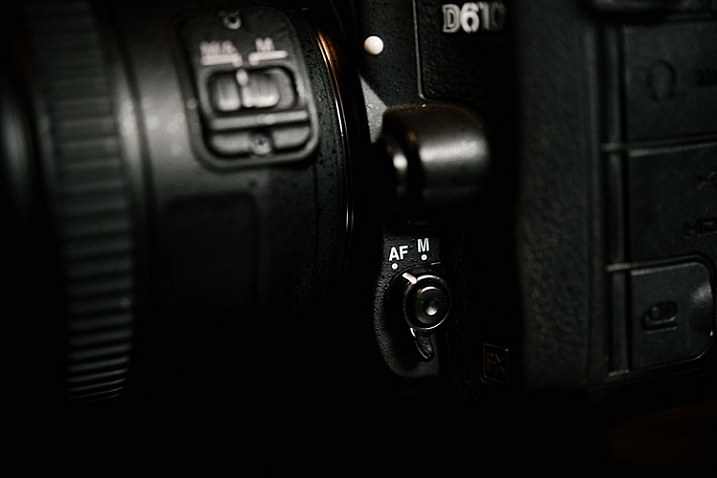
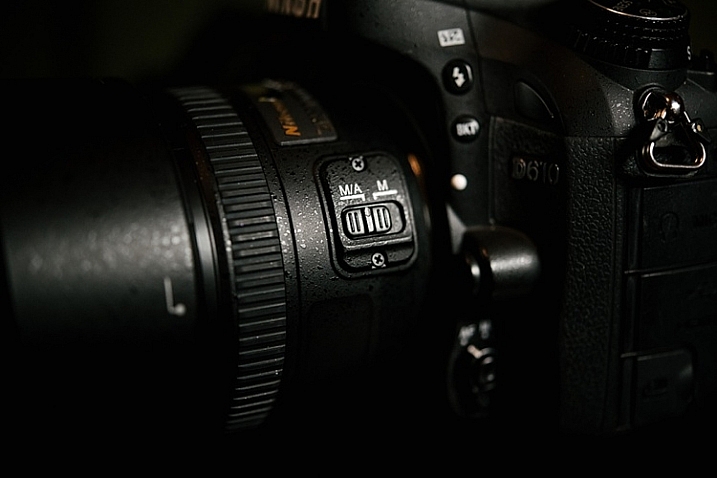
Check that both the lens and the camera switches are both pointing towards Autofocus. On the camera it must be set on AF, not M, and on the lens put it to M/A (A stands for Autofocus and M for Manual, M/A allows you to use both). Flicking the lens switch to Manual can be done unwittingly and fairly easily, especially if you are in a rush to change lenses.

nikon-autofocus-troubleshooting-photo-tips

nikon-autofocus-troubleshooting-photo-tips

#2 Back dial is not Locked

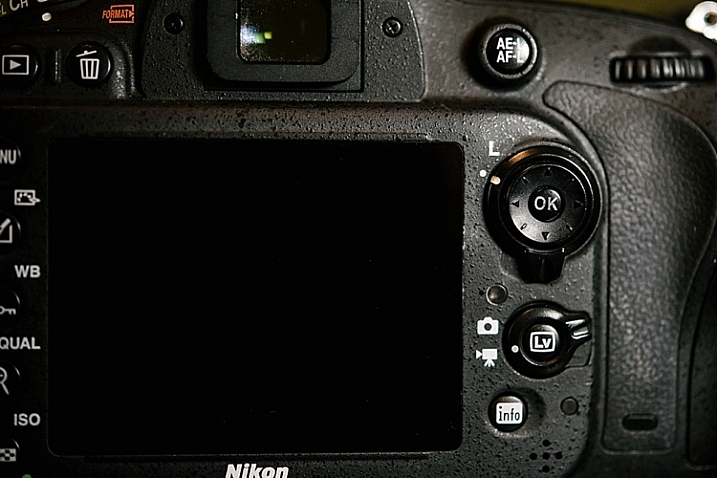
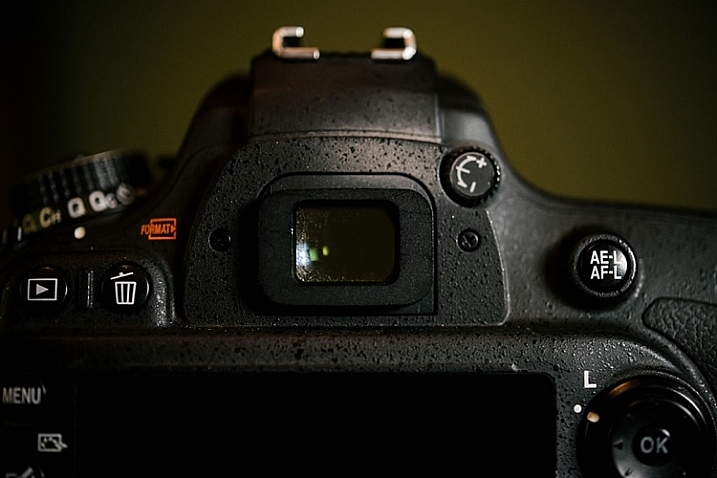
Check that the dial is pointed towards the camera icon and not the L, which stands for lock.  You can easily flick this dial, especially if you are back-button focusing and your dial sees so much action.

nikon-autofocus-troubleshooting-photo-tips

#3 AEL / AFL

Check your AEL/AFL button that you haven’t locked focus. Clicking it once locks focus so click it another time to unlock focus.

nikon-autofocus-troubleshooting-photo-tips

#4 Check the lens

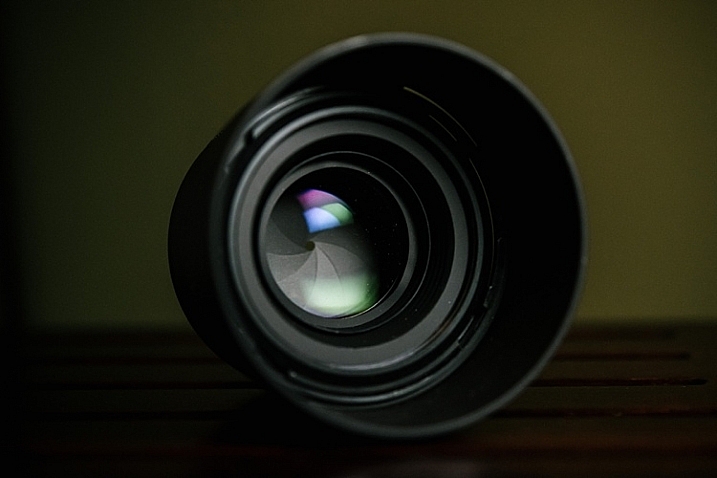
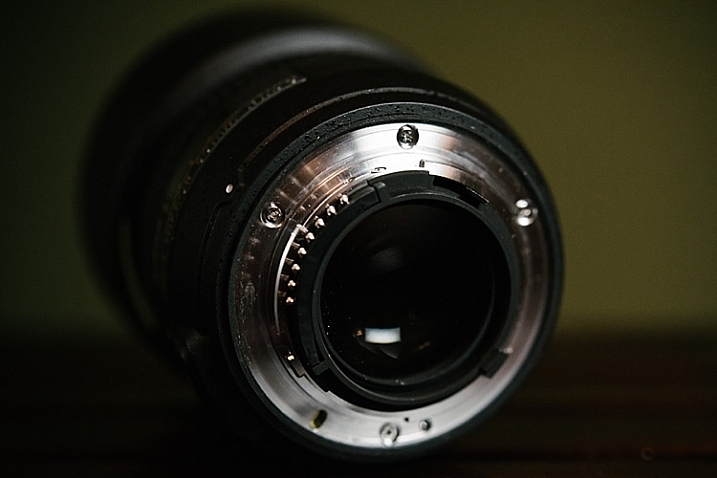
Remove the lens. Inspect the front and rear lens aspects for smudges or dirt. Check also that no part of the lens is broken. If you have filters on your lens, check that they are clear and there are no cracks. When you re-attach the lens, make sure you hear a click once the lens is twisted in place.  If there are any smudges on the lens, make sure you clean it with a lens cloth, and do not blow on the lens.

Lens cloths are usually lint-free pieces of material, and should be used with a lens cleaning solution, rather than anything with solvents. Blowing on the lens can contribute to lens damage since a person’s breath can contain harmful acids. If you feel you have to blow, use a lens bulb blower and a brush.

nikon-autofocus-troubleshooting-photo-tips

#5 Viewfinder

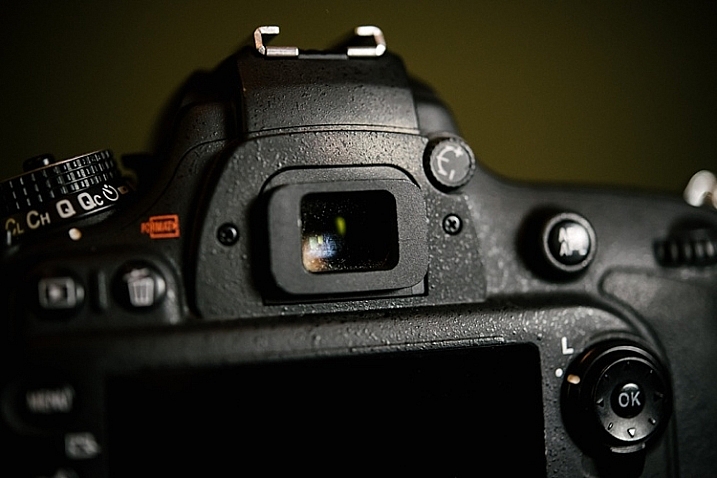
Finally, check your viewfinder and make sure there are no oils, smudges or dirt covering your sight. You can clean the viewfinder the same way you clean your lens.

nikon-autofocus-troubleshooting-photo-tips

#6 Bonus

This applies to any camera, not just Nikons. If something is going on with your camera that is odd – turn it off for a few seconds, then turn it back on. It’s like a reboot for your camera, just like you do with your computer. If that doesn’t work you can also try removing the battery for a minute or more (remember to turn the camera off before removing the battery). As a last ditch effort you could try resetting all functions and settings on the camera to factory default. If it still isn’t working test the camera with another lens, if that one works you may need to take your lens in to get serviced. If the

I hope this little troubleshooting guide helps when you get stuck with focusing problems. Do you have any other quick focus troubleshooting tips to share?

googletag.cmd.push(function() {
tablet_slots.push( googletag.defineSlot( “/1005424/_dPSv4_tab-all-article-bottom_(300×250)”, [300, 250], “pb-ad-78623” ).addService( googletag.pubads() ) ); } );

googletag.cmd.push(function() {
mobile_slots.push( googletag.defineSlot( “/1005424/_dPSv4_mob-all-article-bottom_(300×250)”, [300, 250], “pb-ad-78158” ).addService( googletag.pubads() ) ); } );

The post 5 Troubleshooting Steps for When Your Nikon’s Autofocus Stops Working by Lily Sawyer appeared first on Digital Photography School.


Digital Photography School

 
Comments Off on 5 Troubleshooting Steps for When Your Nikon’s Autofocus Stops Working

Posted in Photography


Get Booked: ‘A Burglar’s Guide to the City’ by Geoff Manaugh

03 Apr

[ By WebUrbanist in Travel & Urban Exploration. ]

burglars guide

Take a break and enter the world of urban villains, who see and seek out hidden opportunities in built environments, forever on the lookout for architectural workarounds and infrastructural escape routes.

In his latest book, A Burglar’s Guide to the City, architecture expert Geoff Manaugh of BLDGBLOG explores everyday spaces through the lens of criminals and criminologists, unearthing uncanny stories at the intersection of buildings and crime.

His research led the author down elevator shafts, into panic rooms and through buried vaults; the resulting tales are a combination of true-crime pieces and architectural philosophy, equal parts entertaining and educational.

abandoned roofman hideout

From the perspective of perpetrators, consider the strange case of Jeffrey Manchester, AKA Roofman, a burglar responsible for dozens of break-ins and hold-ups, primarily at fast-food joints. His signature strategy was to drop down into establishments from above, catching workers and managers unawares. This approach worked precisely because of an architectural flaw in the system: nearly identical structures used by chains make each theft quite like the last, so each incursion doubled as a practice round for the next.

In another architectural twist, when he was finally captured, Roofman’s secret lair turned out to be a customized void between a Toys”R”Us store and an adjacent abandoned Circuit City. He outfitted his abode with working plumbing and electricity, using baby monitors from the Toys”R”Us to monitor employee activity.

capture house thief

From the other side of the law, enforcement officials and criminal investigators have likewise fascinating tales to tell, including the UK police practice of creating “capture rooms.” The cops reverse-engineer ideal targets for breaking and entering, then fill a selected vacant house with tempting electronics and other expensive merchandise, then use it to capture thieves breaking an entering on tape.

Points of entry (doors and windows) as well as the goods strewn throughout the fake homes (such as TVs and video cameras). These are sprayed with a special tracer chemical, helping police confirm with clear physical evidence that suspects were on the premises. Once caught, the would-be burglars are shown videos of their exploits, much like stars on some twisted reality television show.

bldgblog book

And these are just two teaser examples; the book is filled with many more, with subjects ranging from urban guerrilla warfare strategies to the work of theory-minded architects like Bernard Tschumi.

The real magic of Manaugh’s work is in the subtle way it reshapes the reader’s understanding of the built world, causing you to look at architecture with a criminal mindset. Suddenly, trap doors, abandoned shafts, sewer systems, escape ladders, and other oft-overlooked features take on new meaning. The true stories that serve as foils for this exploration are also fully engaging in their own right, real tales genuinely stranger than (and often the basis for) fictional crime dramas.

Readers who enjoy this book will also want to pick up a copy of BLDGBLOG: The Book, a collection of fascinating “architectural conjecture, urban speculation and landscape futures,” a great compilation of stories that expand on Manaugh’s past articles

Share on Facebook


[ By WebUrbanist in Travel & Urban Exploration. ]

[ WebUrbanist | Archives | Galleries | Privacy | TOS ]


WebUrbanist

 
Comments Off on Get Booked: ‘A Burglar’s Guide to the City’ by Geoff Manaugh

Posted in Creativity


5 Tips for Using Risk Taking as a Tool for Better Photography

03 Apr

With the rising tide of enthusiast photographers and the ubiquitous camera phone, there is more competition for eyeballs than ever before in the photo industry. How can you ever stand out from the crowd to be noticed? The trick is both deceptively simple and incredibly complicated: take more risks. Great photographers rarely play it safe, but before you head into the world with reckless abandon, let’s dive into what kinds of risk taking is productive.

1 – Your camera is a tool, not a pet

You’ve received your very first, very shiny, very expensive DSLR kit. Your instincts are to cradle and protect the expensive piece of equipment. Don’t. While you shouldn’t fully submerge your camera, or throw it off the balcony and expect good results, coddling it like your newborn child won’t do you any good either. It’s a tool and is meant to be used out in the world. It should get a few scratches in the paint and some wear and tear on the grip. Take a look at the following images and ask yourself where the camera is.

CmscottiRisk01

CmscottiRisk02

CmscottiRisk03

For the first two, the camera is sitting on the bow of a kayak roughly four inches above the water. For the third image, the camera is a half inch off the muddy ground. Water is often a camera’s worst enemy, but without the risk of the camera getting wet, these images would not be possible. Water is not your camera’s only enemy though. Dings and scrapes, dust, and even wild animals pose a threat.

That said, there are ways to be smart about risk taking and mitigating potential problems. For example, when kayaking you could store the equipment in a dry bag, so it is only exposed when you stop to take a photograph. You could have a friend kayak with you and help stabilize your kayak, or warn you when a large wave is coming. (It is recommended to do outdoor activities with a buddy anyway for general safety). You can use various coverings, coatings, and cases as well to protect your gear.

CmscottiRisk04

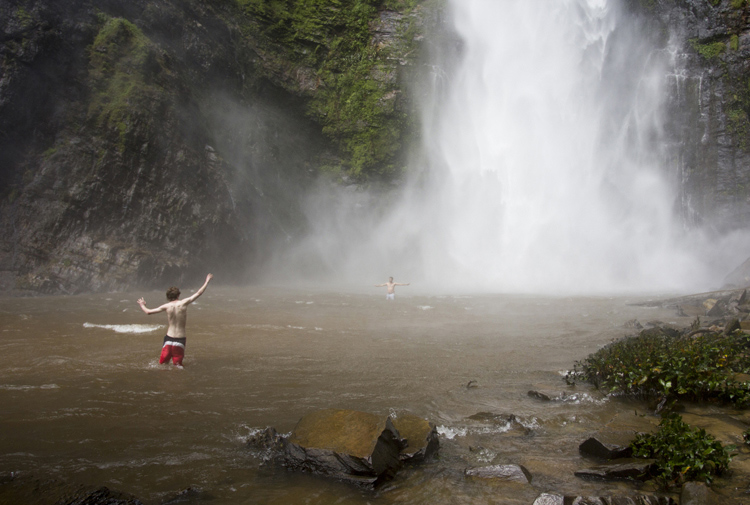
You don’t even have to be in the water to expose your camera to harsh elements. The spray from Wli falls in Ghana was strong enough to reach me 300 meters away. I kept a light jacket in front of my camera until the right moment.

2 – Know your tools

In order to take risks in a smart fashion, it helps to know the limitations of your tools. Does your camera have dust or weather sealing? Does the lens? Did you remember to put a clear (UV) filter on the front of the lens to protect against the basic threats? Is the body primarily plastic? Does it have a metal frame? A quick visit to the manufacturer’s website or a websearch for your equipment’s user manuals should get you the information you need.

There are many more things to consider, but the point is to learn as much as possible about your kit. Your DSLR and lens may be weather sealed and can handle light rain but the audio recorder may not be and may wind up being the weak link.

It’s wise to know how to use your camera well. Often in risky situations you will want to expose your equipment to that risk for the least amount of time possible. The better you know your camera, the less time you’ll spend fiddling with settings. Be sure to practice using your equipment in a low-stress environment, before exposing yourself to a risky situation. Digital Photography School is a great resource for articles on the nitty-gritty workings of your camera, so you don’t have to travel far to get started mastering your gear.

3 – Do your homework on your subjects too

CmscottiRisk05

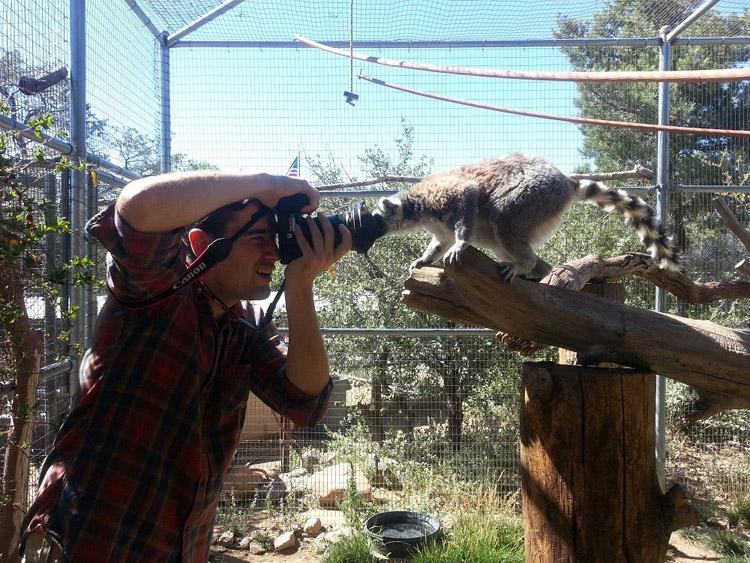
Let’s say you have been given an assignment that involves getting into an occupied cage at the zoo. How do you prepare? It isn’t enough in this situation to know your gear alone. You need to learn about the animals you are interacting with, some basics on their behavioural cues, and what potential stressors may be present. Luckily in this situation you are likely to get help from the zoo’s staff; in fact, they are required to enter the enclosure with you. But be sure to meet with them prior, and take some time online or in a library to supplement your knowledge. Be sure to ask questions specific to your situation as well.

CmscottiRisk06

Photo courtesy of Clare Hancock.

In this case, what do you do if an animal approaches you and grabs, bites, or otherwise latches onto the camera? It turns out in the case of lemurs, just hold still and they’ll lose interest pretty quickly. The point is don’t panic and don’t be afraid to ask questions, even if they sound far-fetched.

CmscottiRisk07

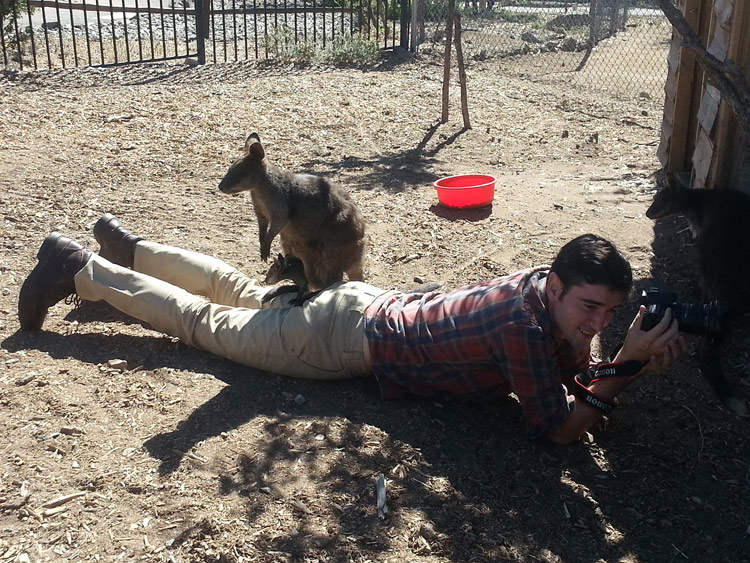
What would you do in this situation? Photo courtesy of Clare Hancock.

In the same vein as asking questions to be prepared, don’t be afraid to ask questions during a shoot either. You are only expected to be an expert photographer. In this particular example, the zoo staff are there to help everything go smoothly. Don’t let pride prevent you from tapping into their expertise. Consider the photo above, I had no idea what to do when a wallaby and her baby decided I made a comfy resting place. I checked with the keepers to make sure there wasn’t any risk to myself or the wallabies. There wasn’t, so I continued to shoot from that position until she eventually hopped away.

Being informed is the best way to enter a potentially risky situation. The zoo session may seem specific, but consider what would go into photographing a tall ship setting sail, or snowboarders screaming down slopes, or even your own dog in your backyard. Snapping good images often involves getting in close, or shooting from a unique angle that could involve having a camera accidentally knocked out of your hands on a crowded ship deck, having snow sprayed onto your camera, or even having an excited dog slobber all over your equipment or tackle you. Do some homework, be aware of your surroundings, ask questions and you will have mitigated most of the riskiness.

4 – Taking risks in your career

Using risk as a tool in your career is not specific to photography, but it is especially important in this field. If you always use the same tried and true portrait poses, and standard three point lighting that you learned in your high school photo course, you are likely going to be stuck at a studio in the mall holding a stuffed giraffe in one hand and a remote trigger in the other, praying that baby Jesse stops crying. (If you work at one of these and enjoy your job, that is awesome and you are honestly a much more patient person than I). Most photographers I know have bigger dreams than this, whether it is running their own mall studio or becoming a successful commercial photographer. Unless you run into some magnificent stroke of luck and were born with real talent, this is going to a lot of time, more effort, and a few risks.

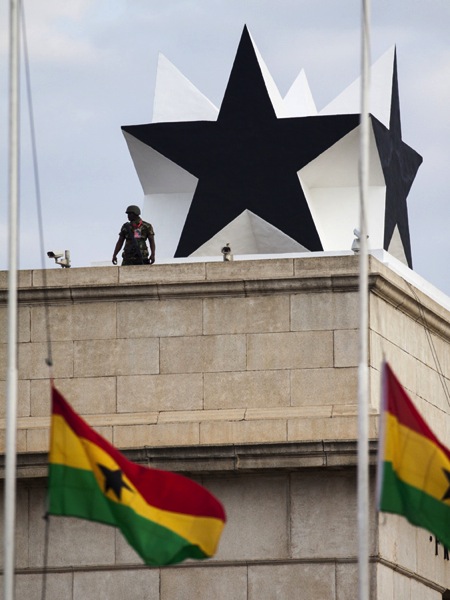
I am no Warren Buffett when it comes to business sense, but I can say the biggest jumps in my own career came from taking big risks. When former Ghanaian President John Atta Mills passed away in July of 2012, I was just coming out of graduate school and interning at the Daily Guide newspaper in Accra. President Mills was the first Ghanaian president to die in office and his state funeral was considered one of the most important stories in the region. I had just arrived in country, knew only what I had read about the culture and only had two weeks to convince my new, sceptical editor to let me be a part of the team covering the story. I worked very hard with my new coworkers, contributing to as many stories as possible, and hanging out with the reporters to learn about Ghanaian politics, history and culture.

CmscottiRisk08

Two days before the funeral, I convinced my editor to let me go on the assignment. Going in I was scared. I felt like I could never be prepared enough, and doubted every decision I made during the assignment. Regardless, I took the risk of screwing up an important assignment, and managed to rise to a challenge. The images ran front page and an entire centrefold was dedicated to my images of the event. Moments like these demand taking risks. If you have ambitions beyond photography as a hobby, you will need to get used to going in over your head. Risk will always force you to be a better photographer.

CmscottiRisk09

However, the risks you can take regarding your career can be mitigated to some extent as well. The key, as you already know, is being prepared. This is a much more abstract process compared to mitigating risks related to camera equipment. While some things are the same, – knowing your tools and subjects well enough to work efficiently – others go a little beyond the act of photography itself. They involve politics in your particular branch of the profession, and knowing just how far you can push yourself.

CmscottiRisk10

As I eluded to earlier, I am not the kind of guy you will see doing family portraits or weddings. I am horrible at convincing the average person to smile or look natural. I simply am no good at those kind of portraits. That said, after I won my first photo award I ran out and bought a Vivitar flash, cloth backdrop and three hot lamps. I was convinced I was going to quit my job waiting tables and pay for my impending college career with my photographic talent. I was wrong… very wrong. I managed to perform poorly on three portrait sessions before realizing that my foray may have been a mistake, and I was out a few hundred dollars in studio gear.

I knew nothing about the family portraiture business. I didn’t do any research aside from reading a couple of gear reviews and really burned myself in the process. Worst of all I didn’t know my equipment very well. I had a total of one lesson in studio lighting under my belt at the time and may have purchased a book, that to this day, I have read a total of three pages of. I took a dumb risk and hurt my confidence and disappointed people in the process.

CmscottiRisk11

Crappy portrait of Markus Sales

5 – When things go wrong

There is one catch to risk taking. What if it doesn’t pan out. You may end up with broken equipment, angry customers, or bodily injury. What now?

Broken equipment is relatively easy to deal with: mourn the loss of your trusted tool, then buy a new one. If you are worried about not being able to afford replacing equipment, talk to your insurance company about whether your homeowners or renters insurance will cover your gear outside your home. Specific camera (and commercial) insurance policies are available as well. Be sure to find out what is covered and how they handle claims.

Smoothing customer relations or repairing a career are tougher issues. Patience and good customer service skills will go a long way, but every case has to be approached individually. Giving a discount for a mediocre portrait shoot might work in one case, but blowing an expensive commercial shoot is going to take a whole different approach. I have been lucky enough that I haven’t had to do this in my own career, but I encourage joining professional associations and talking to other professional photographers to learn what consequences there might be, and how to recover from them.

Bodily injury is the worst on this list. If you are risking your life or serious injury for a photograph, STOP! No photograph is worth getting hurt or dying for. There has been a recent rash of people dying while taking selfies or trying to capture memories from crazy angles over the edge of a skyscraper. It doesn’t matter if it could be the best photo ever taken, this kind of risk is never worth taking in the first place. Broken cameras can be replaced, careers rebuilt, and customer relations smoothed over, but the best photo of your career is worthless if you die or are maimed in the process. Just don’t do it.

One final disclaimer

The nature of risk taking is that the result could be game changing good, or painfully bad. You can fail and fail hard. The advice given here is simply what I have learned over the course of my own career, and it may not apply to you at all. There is no guarantee that taking any kind of risk will result in a positive outcome. Ultimately, you must decide if the risks you take – if any – are worth taking. The outcomes of taking those risks will be entirely yours, so use your best judgment. If you do decide to take a risk, be smart about it and do everything in your power to lessen that risk. Best of luck out there.

googletag.cmd.push(function() {
tablet_slots.push( googletag.defineSlot( “/1005424/_dPSv4_tab-all-article-bottom_(300×250)”, [300, 250], “pb-ad-78623” ).addService( googletag.pubads() ) ); } );

googletag.cmd.push(function() {
mobile_slots.push( googletag.defineSlot( “/1005424/_dPSv4_mob-all-article-bottom_(300×250)”, [300, 250], “pb-ad-78158” ).addService( googletag.pubads() ) ); } );

The post 5 Tips for Using Risk Taking as a Tool for Better Photography by Christopher Scotti appeared first on Digital Photography School.


Digital Photography School

 
Comments Off on 5 Tips for Using Risk Taking as a Tool for Better Photography

Posted in Photography


5 Tips for Using the Lightroom Adjustment Brush Tool

03 Apr

One of Lightroom’s most useful tools is tucked away at the top of the Develop panel, under a rather strange-looking icon that looks like a magic wand from Harry Potter. Clicking this Adjustment Brush icon, gives you access to many of the macro-scale alterations and edits available on some of the other Develop panels, but lets you control them on a micro level. It’s a fantastic tool for editing specific portions of an image, as opposed to the whole picture, but figuring out how to use it can be a bit overwhelming.

Here are my five favorite tips and tricks for using the Lightroom Adjustment Brush tool, and hopefully some of these will be useful to you as you explore how to use it for your own editing.

five-tips-brush-tool-woman-portrait

1. Use the A/B brush options to alternate between different types of brushes

My wife and I have done a great deal of painting in our house over the years. From hallways, to walkways, to bedrooms, we have spent more time and money on painting than I ever thought possible before we became homeowners. One of the most valuable lessons we have learned is that different types of painting jobs require different brushes. Sometimes you need a large roller, other times you need a small one. Sometimes you need a two-inch angled brush, and other times you need a small foam one. Each brush has its own purpose, and all are required to properly complete a painting task.

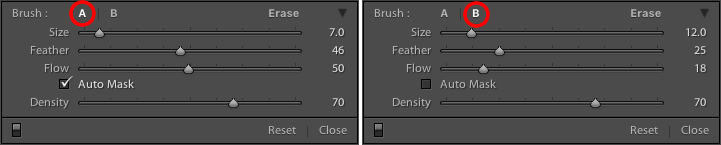
The same principle holds true in Lightroom, and you often need more than one brush to make the adjustments necessary on a given image. This problem is easily remedied by switching between the A and B brushes near the bottom of the Adjustment Brush panel.

five-tips-brush-tool-a-b-brushes

Brush A is highlighted by default when you click on the Adjustment Brush panel, which means that any size, feather, flow, mask, and density settings you use will be automatically applied to that brush. When you click on Brush B you can use an entirely different set of options, then cycle between the two brushes just by clicking A and B. In the example above, Brush A is small with a medium feather and flow rate. Brush B is larger with a much lower flow rate and no Auto Mask, which makes it better suited for large-scale edits, whereas Brush A would be better suited for fine-tuning specific parts of an image. Setting up two different brushes is a great way to speed up your editing workflow, since you won’t need to continually change the parameters of a single brush, and you can instantly switch between the brushes by pressing the forward slash (/) key.

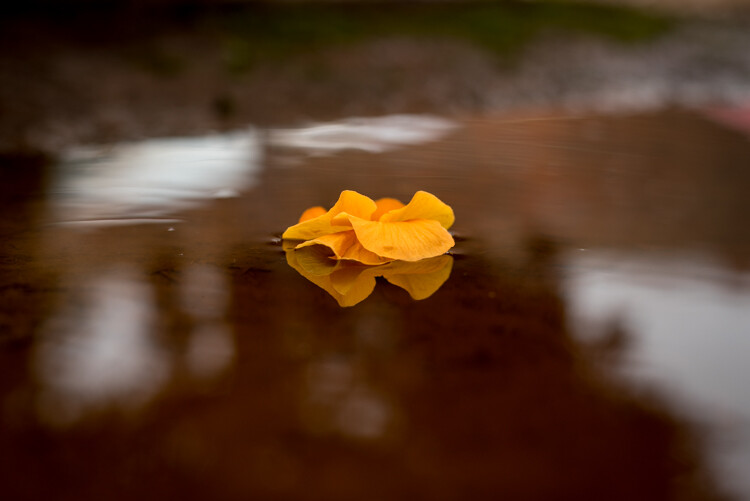
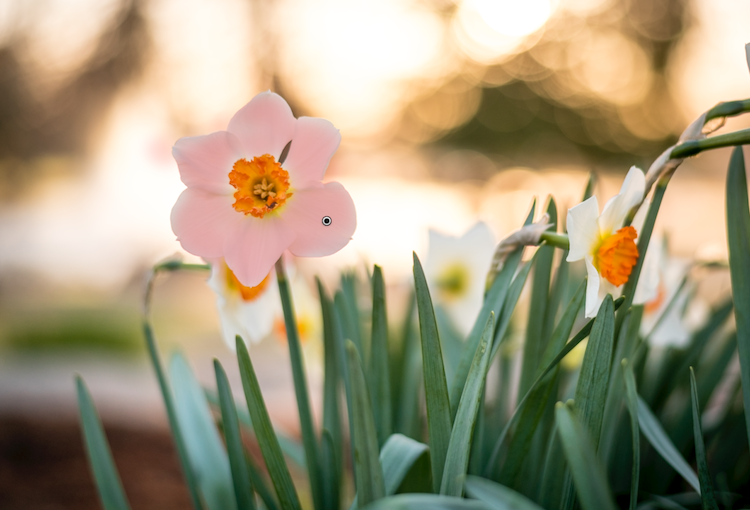
I used a large brush on the background and a smaller brush on the flower petals, and was able to switch between the two easily to get the edits I needed quickly.

I used a large brush on the background and a smaller brush on the flower petals, and was able to switch between the two easily to get the edits I needed quickly.

2. Create custom brush effect presets

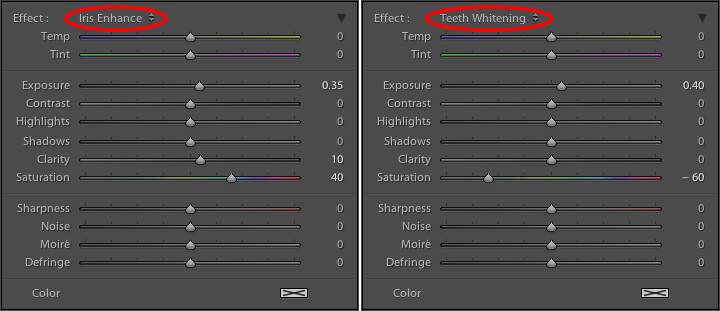
If the A/B brushes are similar to choosing different physical brushes at a hardware store, then the brush effect presets are like picking out different types of paint. Lightroom has several different presets that are available as default options, and they have names like “Highlights,” “Temp,” and “Teeth Whitening.” These presets are just default values that Lightroom thinks would work well to accomplish specific tasks like: adjusting exposure, adding contrast, or reducing noise. You can see how they work just by looking at the sliders, as you change from one preset to another.

These presets don't inherently do anything special, they just adjust various sliders in different ways.

These presets don’t inherently do anything special, they just adjust various sliders in different ways. You can create your own presets to do unique tasks as well.

The beauty of these presets is you are free to add new ones that suit your own workflow. You would never select from only a dozen colors when choosing how to paint a room in your house, and neither should you be forced to stay within the confines of the existing presets in Lightroom. To add your own presets, adjust the sliders how you want, click the name of the existing preset to pull down the list, and choose “Save Current Settings as New Preset.” Give your new collection of slider settings a name, and you can now select it whenever you want, right alongside the rest of the presets.

For example, I have found that on many of my portraits I need to brush in some sharpness while reducing the noise so I created a preset to do exactly that. I also have custom skin smoothing and teeth whitening presets that are a bit different from the default set Lightroom uses, and it’s very handy to switch over to these brushes whenever I need to, instead of configuring the sliders from scratch every single time.

3. Adding color to a brush

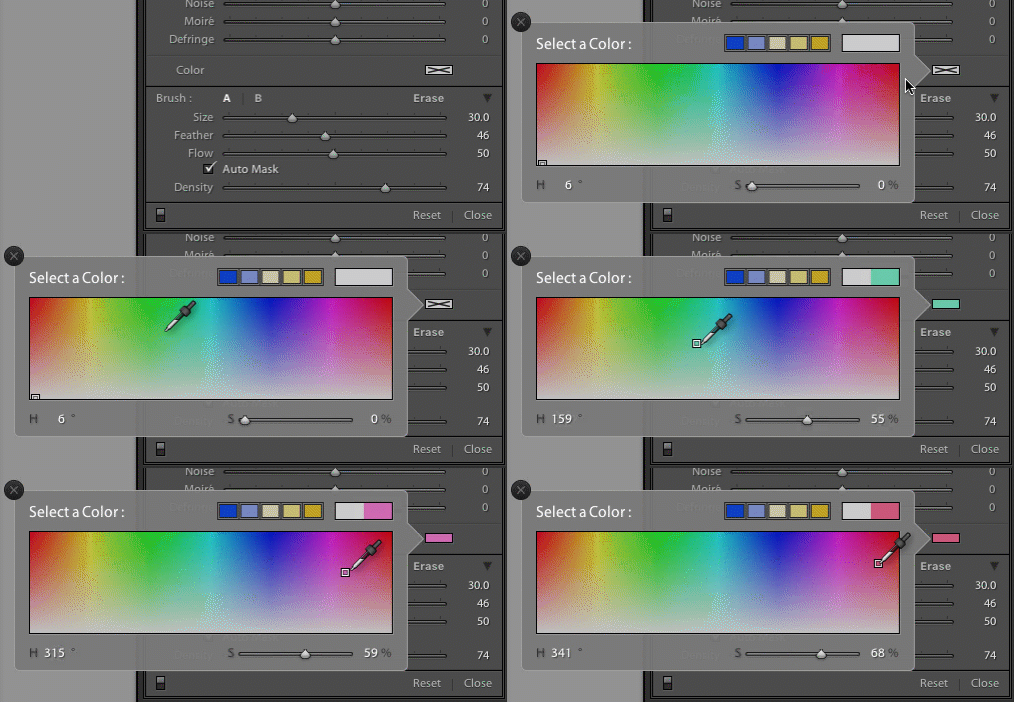
I started this article with an analogy comparing the Adjustment Brush tool in Lightroom to a literal paint brush, but what some people don’t realize is you actually can use the tool exactly like a paint brush to add color to your images. Near the bottom of the color panel is a rectangular box with a large X through it, and if you click on that you will see a color picker with an eyedropper tool that you can use to give your brush strokes a bit of color.

five-tips-brush-tool-color-selection-animated

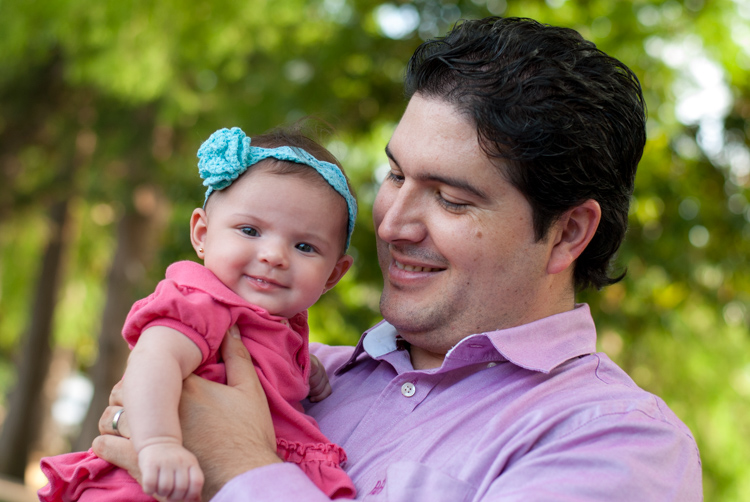
Once you apply a color, the Lightroom Adjustment Brush tool now functions just like the paintbrush in any standard painting application on your computer. It applies any effects you are already using such as exposure, clarity, or saturation while also painting in the color you specified. In the following picture I used this technique to add a subtle splash of color to the baby’s face, but you can also use it on much larger edits like changing the color of flowers or altering the eyes on a portrait.

five-tips-brush-tool-man-baby

4. Use Auto Mask to contain the brush to specific areas

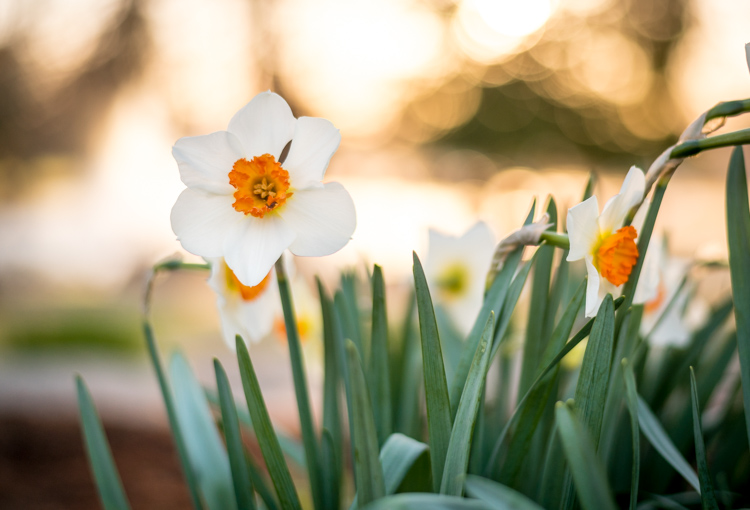
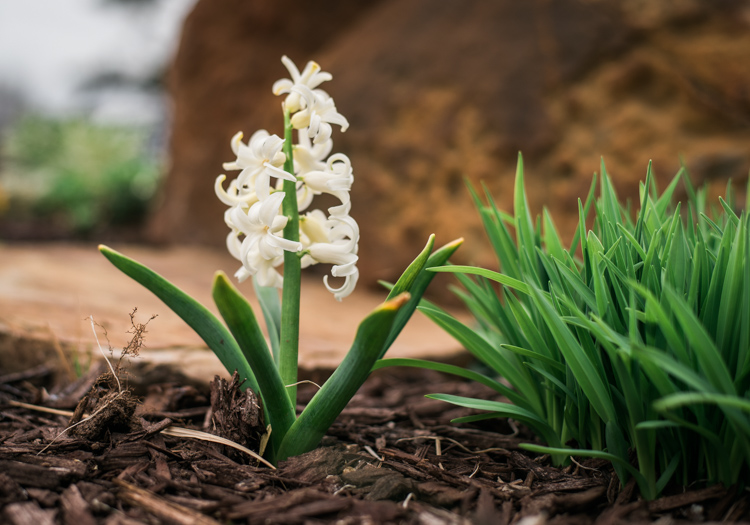
One of the most frustrating parts about the Adjustment Brush tool is that, unlike regular paintbrushes, it only comes in one shape: a circle, which can present a bit of a problem when editing photos with hard lines and angles. How do you confine your brush edits to just a specific area? The key to this lies in the Auto Mask feature which, when checked, tries to keep all the brush edits to places on the image that are similar to where you started painting. In the following picture I used some custom brush settings involving highlights and clarity and then clicked the Auto Mask function to keep these edits within the petals only, and not the surrounding areas.

five-tips-brush-tool-white-yellow-flower

An easy way to make sure the Auto Mask is doing what you want is to hover your mouse over the black dot that appears where you started brushing in your edits (hit the H key if you do not see it). You will then see a red overlay that shows precisely where your edits for that particular brush have been applied, and as you can see below they were confined to the precise area that I wanted, the flower petals. This type of precision is very difficult without the Auto Mask option, but with the click of a button Lightroom makes it very easy for you to do as your kindergarten teacher likely admonished years ago, color inside the lines.

five-tips-brush-tool-white-yellow-flower-edits

5. Changing brush size, resetting settings, and fixing mistakes

There are so many useful elements to the brush tool that it’s kind of difficult to distill everything down to five points. As such, here are a few more tips and tricks that I have found quite handy and you might too.

  • Use the scroll wheel on your mouse to quickly change the size of your brush. For fine-grain adjustments you can click the numbers in the brush parameters that indicate Size, Feather, Flow, and Density and increase or decrease them with the arrow keys on your keyboard. To go up and down in units of ten, hold the [shift] key while pressing arrow-up or arrow-down.
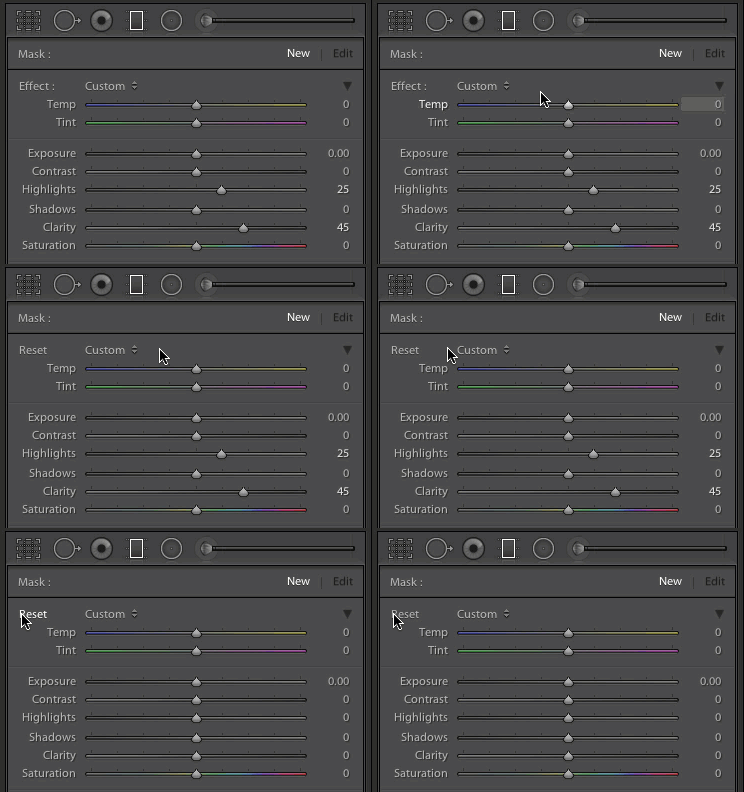
  • five-tips-brush-tool-resetAfter you have brushed in a particular set of edits, click “New” on the top-right of the Brush panel to create a new brush, but notice that all your sliders and adjustments remain unchanged. To reset all your parameters to their default values, hold down the alt key (option on a Mac) and you will see the Effect label at the top change to Reset. Click on that and everything will be set back to zero for you to start creating a fresh set of edits.
  • Pencils have erasers, but fixing errors when painting with brushes and pigment is not so easy. Fortunately the Brush tool in Lightroom has a feature that makes it much more like its wood-and-graphite counterpart in the real world, and makes fixing mistakes as simple as pressing a button. No, I’m not talking about Edit > Undo. If you’re brushing away with some edits and realized that you made a mistake or two, press and hold the Alt key (option on a Mac) and your brush will instantly switch over to eraser mode. Now, just like using the rubber end of a pencil, clicking and brushing will remove any edits you have made to the photo with the current brush. If you have used several different brush edits within one photo, your edits will mercifully be confined to the whatever brush is currently selected, and you can also adjust parameters of the eraser like size, feather, and so on.

five-tips-brush-tool-white-flower
As I mentioned earlier there are enough tricks with the Adjustment Brush tool to fill several articles, but I’m going to stop here and instead ask you for your favorite tips and hidden features. Leave your thoughts in the comments section below and I’m sure I will learn a thing or two from your experiences as well!

googletag.cmd.push(function() {
tablet_slots.push( googletag.defineSlot( “/1005424/_dPSv4_tab-all-article-bottom_(300×250)”, [300, 250], “pb-ad-78623” ).addService( googletag.pubads() ) ); } );

googletag.cmd.push(function() {
mobile_slots.push( googletag.defineSlot( “/1005424/_dPSv4_mob-all-article-bottom_(300×250)”, [300, 250], “pb-ad-78158” ).addService( googletag.pubads() ) ); } );

The post 5 Tips for Using the Lightroom Adjustment Brush Tool by Simon Ringsmuth appeared first on Digital Photography School.


Digital Photography School

 
Comments Off on 5 Tips for Using the Lightroom Adjustment Brush Tool

Posted in Photography


Week in Review: Spring Fever

02 Apr

Week in Review: Spring Fever

There was excitement in the air this week around the office. Was it the unseasonably warm weather? The arrival of a new flagship DSLR? A smattering of product announcements mid-week? It’s hard to say. Whatever it was, it was a week in which Sony supersized its RX10 series, we took a peek at the Nikon D5’s ISO 3 million and learned how to make beer with stinging nettles. Catch up on everything you may have missed in the past seven days.

Week in Review: Spring Fever

The headline of the week goes to the Sony RX10 III announcement, which offers three times the zoom reach of its predecessor, covering a 24-600mm equivalent range. It packs a 20MP 1″-type sensor with 4K/UHD capability, a tilting LCD and a 2.36 million dot EVF in a dust and moisture-resistant body. All of that lens range doesn’t come cheap though – the RX10 III will sell for $ 1500, a $ 200 increase over its predecessor.

On top of the updated superzoom, Sony announced two new full-frame lenses. The business end of the Sony FE 70-300mm F4.5-5.6 is pictured here, and along with it came a 50mm F1.8. If the $ 1000 Zeiss-branded Sony 55mm F1.8 is too rich for your blood, you’ll be thrilled to know that the 50mm F1.8 is a mere $ 250. That’s still more than you’d pay for the Nikon or Canon equivalent, but it’s something, right? Sony let us manhandle their lenses at this week’s press event. You can take a look at some hands-on photos for a closer look and check out some initial sample images.

We see the words ‘I don’t care about video’ expressed fairly often in the comment section, and DPReview writer Richard Butler finds that sentiment a little disheartening. In the spirit of trying something new, the self-professed beginning videographer took the opportunity to test the Sony a6300’s video capabilities to shoot, direct and produce a mini-documentary. The subject is one that’s near and dear to our hearts – craft beer. Find out how a local brewery produces its stinging nettle beer, and see how the Sony a6300 performs.

As parent company Yahoo has fallen on hard times, it looks as though Flickr may be looking for a new home. Yahoo is seeking bids for its web properties, and though it hasn’t said exactly which operations it’s looking to sell off, it would seem that Flickr fits the description. But don’t clear out your savings account just yet – there are a number of reasons why a sale may never happen.

Have you ever wondered what ISO 3 million looks like? Wonder no more. Not only can you see what the Nikon D5’s highest extension ISO setting looks like in our studio, you can take a look at the full range of high ISO settings in their natural environment: a concert venue. We’ve even tested the camera’s dynamic range performance. There’s more to come from the Nikon D5, but for now you can marvel at the highest of high ISO settings.

We sat down with some Nikon executives at CP+ recently. As these things tend to go, we couldn’t pry much information out of them about future plans on the record, but they did confirm some interesting points, including the reason why there’s a D500: you. Years of lobbying for a D300S replacement led directly to the creation of the Nikon D500. It seems that complaining can get you somewhere after all.
Articles: Digital Photography Review (dpreview.com)

 
Comments Off on Week in Review: Spring Fever

Posted in Uncategorized


Break it down: iFixit disassembles the Canon PowerShot G1 X Mark II

02 Apr

iFixit disassembles the Canon PowerShot G1 X Mark II

Taking apart a camera isn’t for the faint of heart, but if you’ve chosen to do so you don’t have to go alone. Our friends at iFixit publish disassembly guides to empower owners of electronic devices to make some fixes themselves. And who hasn’t wanted to see what’s underneath the plastic shell of Canon’s top-of-the-line compact camera? Take a look at what lies beneath the surface of the Canon PowerShot G1 X Mark II.
iFixit disassembles the Canon PowerShot G1 X Mark II

As always, the first and most important step – remove the battery from the camera. 


All images courtesy of iFixit

iFixit disassembles the Canon PowerShot G1 X Mark II

With the battery safely set aside, you’re free to go about the business of taking your camera apart. 


All images courtesy of iFixit

iFixit disassembles the Canon PowerShot G1 X Mark II

After removing the screws on the left, right and bottom of the camera, there are four more to remove under the flip-up LCD.


All images courtesy of iFixit

iFixit disassembles the Canon PowerShot G1 X Mark II

Now that those pesky screws are out of the way, the back panel comes right off, though be sure to disconnect the ribbon cable attaching it to the body before pulling too hard.


All images courtesy of iFixit

iFixit disassembles the Canon PowerShot G1 X Mark II

Unsurprisingly there are additional screws to remove, this time for this copper plate (possibly used to dissipate heat). Underneath that there’s yet another plate, this one silver.


All images courtesy of iFixit

iFixit disassembles the Canon PowerShot G1 X Mark II

With those plates off there are three ribbon cables to remove with your trusty spudger.


All images courtesy of iFixit

iFixit disassembles the Canon PowerShot G1 X Mark II

After removing a screw behind the pop-up flash and another on the front just below the Canon logo, you can ‘pop the top’ on the G1 X Mark II.


All images courtesy of iFixit

iFixit disassembles the Canon PowerShot G1 X Mark II

Once you’re removed even more screws, you can spudge the left side of the camera right off.


All images courtesy of iFixit

iFixit disassembles the Canon PowerShot G1 X Mark II

Finally, after much spudging of ribbon cables, you can remove the front panel of the camera. The round thing toward the right is the G1 X II’s speaker.


All images courtesy of iFixit

iFixit disassembles the Canon PowerShot G1 X Mark II

Two screws must go in order to remove the metal plate surrounding the I/O ports. There are ports for HDMI and USB output as well as a wired remote.


All images courtesy of iFixit

iFixit disassembles the Canon PowerShot G1 X Mark II

With the back and side plates of the camera removed, the time has come to take off the front panel…


All images courtesy of iFixit

iFixit disassembles the Canon PowerShot G1 X Mark II

… and the lens has been liberated from the rest of the camera. That’s the capacitor for the flash on the right – definitely not something you want to handle.


All images courtesy of iFixit

iFixit disassembles the Canon PowerShot G1 X Mark II

After the removal of countless screws and ribbon cables, here’s Canon’s flaghsip compact camera, the PowerShot G1 X Mark II, in pieces.


All images courtesy of iFixit

Articles: Digital Photography Review (dpreview.com)

 
Comments Off on Break it down: iFixit disassembles the Canon PowerShot G1 X Mark II

Posted in Uncategorized