RSS
 

Archive for April, 2016

Panasonic Lumix DMC-GX85 offers 16MP sensor with no AA filter, redesigned shutter mechanism

06 Apr

$ (document).ready(function() { SampleGalleryV2({“containerId”:”embeddedSampleGallery_7478917503″,”galleryId”:”7478917503″,”isEmbeddedWidget”:true,”standalone”:false,”selectedImageIndex”:0,”startInCommentsView”:false,”isMobile”:false}) });

Panasonic has just announced its Lumix DMC-GX85 (GX80 outside of North America), a less expensive sibling to the Lumix GX8 that features a 16MP Live MOS sensor with no AA filter, a redesigned shutter mechanism, and 5-axis Dual IS. Panasonic claims the removal of the anti-aliasing filter boosts fine detail resolution by 10%, and an electromagnet-driven shutter mechanism aims to reduce blur from shutter shock – an issue we noted when we reviewed the GX8. 

The GX85 offers ‘Dual IS’, which combines its 5-axis in-body stabilization with in-lens OIS, offering up to 4.5 stops of shake reduction. That’s an update to the GX8’s 4-axis in-body system. Naturally, the GX85 carries 4K/UHD 30p video shooting and all of the related photography features, including 4K Photo and Post Focus. Speaking of focus, the GX85 offers the same ‘Depth from Defocus’ system that really impressed us on the GX8.

The GX85 provides a fixed 2764K-dot equivalent electronic viewfinder, and its 3″ 1.04M-dot touch screen monitor tilts up by 80° and downward by 45°. Built-in Wi-Fi and a new L. Monochrome photo style mode are also included.

The Panasonic Lumix DMC-GX85 will go on sale at the end of May for $ 799/£599 with a 12-32mm F3.5-5.6 collapsible kit zoom. UK shoppers will also have body-only (£509) and or a bundle with the 12-32mm and 35-100mm lenses (£729) options.


Press release:

LUMIX GX85 – High Image Quality and High Performance Packed in a Compact Body

Capture Life on the Move

Newark, NJ (April 5, 2016) – Panasonic is proud to introduce a new Mirrorless Interchangeable Lens Camera, the LUMIX DMC-GX85 (GX85) for camera enthusiasts or anyone looking for an alternative to bulky DSLRs, that delivers lighter, more intelligent, uncompromising results. Nearly half the size of most DSLRs, the GX85 delivers impressive large sensor performance in the most compact camera system ever designed by Panasonic LUMIX. Thanks to the elimination of the low pass filter, its fine detail resolving power is boosted nearly 10% over previous 16-Megapixel sensors. 

The LUMIX GX85 incorporates a new 5-axis Dual I.S. (Image Stabilizer) for more effective suppression of blur. Combining an O.I.S.(Optical Image Stabilizer, 2-axis) and a B.I.S.(Body Image Stabilizer, 5-axis), the 5-axis Dual I.S. compensates for a larger range of movement than ever before. Users can enjoy blur-free photo/video shooting from wide to tele, even in low light situations.

The 16.0-megapixel Digital Live MOS Sensor without a Low Pass filter and the new Venus Engine combine to achieve crisp, high resolution images in detail with high contrast, impressive color reproduction. The LUMIX GX85 adopts a new electromagnetic drive in the shutter unit. The shock caused by the movement of shutter diaphragm is dramatically reduced and the shutter sound is also minimized. The Contrast AF System features DFD (Depth From Defocus) technology and excels in both speed and accuracy by exchanging the digital signal between the camera and the lens at max. 240 fps, resulting in ultra-fast auto focusing of approx. 0.07 sec*. A variety of extensive AF functions including Face/Eye Detection AF, Pinpoint AF, One-shot AF and advanced Low Light AF enhance usability to comply with wide-ranging shooting situations.

The GX85 integrates a LVF (Live View Finder) with 2764K-dot equivalent high resolution and approx. 100% color reproduction*. This 16:9 Wide Screen LVF boasts approx.1.39x / 0.7x (35mm camera equiv.) magnification and 100% field of view. The new 3.0-inch large, approx.1040K-dot high resolution static-type touch monitor with approx. 100% of field of view tilts up by 80-degrees and down by 45-degrees which enables shooting at either high or low angle even easier.

For even more creative photography, the LUMIX GX85 integrates the new L.Monochrome mode in Photo Style that offers impressive monochrome capture with rich gradation comparable to that of B/W film. Focus Bracket and Aperture Bracket are also new additions to conventional Exposure Bracket and WB Brackets that allow users to choose the best shot later. Thanks to its Wi-Fi® connectivity, users can connect the camera to their smartphone / tablet to expand the flexibility in shooting/storing/sharing images.

1. 4K capability bringing the evolution in videography/photography – 4K video and 4K PHOTO

Taking advantage of the high speed signal readout capability of the sensor and high speed signal processing, the LUMIX GX85 is capable of recording 4K video. Despite its high performance, it boasts superior energy efficiency and the size is kept compact for high mobility. The LUMIX GX85 records stunningly smooth, high-resolution 4K video in 3840 x 2160 at 30p or 24p in addition to the full-HD 1,920 x 1,080 60p (60 Hz) videos with practical full-time AF. 

Thanks to this 4K technology, users can enjoy 4K PHOTO which users can capture the fleeting photo opportunities at 30 fps by extracting the most appealing frame. Three exclusive modes are available to choose from depending on the situation; 4K Burst, 4K Burst (Start/Stop) and 4K Pre-burst. All these function in 4K PHOTO enable saving pictures in 8-megapixel equivalent high resolution.

The LUMIX GX85 comes with the Post Focus function that enables users to select an in-focus area even after shooting. You can get multiple shots with different focus points with a single shutter release to choose from. It is helpful in situations such as macro shooting where severe focusing is required or for changing expressions by changing focused subject. This function has been developed by combining the DFD (Depth From Defocus) auto focus technology that enables measuring the distance to the subject and the 4K technology.  Operation is quite simple and easy – just shoot an image in a Post Focus mode and touch on the point where you want to set focus while playing it back.

In addition, the LUMIX GX85 incorporates the Light Composition function as a new option of 4K PHOTO mode. The camera synthesizes the images by choosing and saving a brighter pixel. This makes it possible to produce a more luxurious, dramatic image of situations such as fireworks or night scenery in camera with ease. 

The LUMIX GX85 also enables 4K Live Cropping in video that yields stable panning or zooming while video recording. In panning shots, you can just set the viewing angle to start and end to get smooth panning imagery without using special equipment such as a slider. When zooming, you can set the after-zoomed viewing angle first, so that the subject can fit perfectly in the frame. Thanks to the digital operation, the imagery of zooming is smooth because it does not physically move the zoom lens. 

* About motion picture recording / 4K Photo recording
– Use a card with SD Speed Class with “Class 4” or higher when recording motion pictures. 
– Use a card with SD Speed Class with “UHS-I UHS Speed Class 3 (U3)” when recording motion pictures with [MP4] in [4K] or [4K PHOTO].
   (SD speed class is the speed standard regarding continuous writing.)
– Recording stops when the continuous recording time exceeds 29 minutes and 59 seconds or the file size exceeds 4GB with [MP4] in [FHD] [HD] [VGA].
– MP4 motion pictures with [MP4] in [4K]:
  – When using an SDHC memory card: You can continue recording without interruption even if the file size exceeds 4 GB, but the motion picture file will be divided and recorded/played back separately.
  – When using an SDXC memory card: You can record a motion picture in a single file.
– When the ambient temperature is high or continuous recording is performed, the camera may stop the recording to protect itself. Wait until the camera cools down.
** For [4K] video output, use an HDMI cable that has the HDMI logo on it, and that is described as”4K compatible”.

2. New 5-Axis Dual I.S. (Image Stabilizer) to be free of blur

The LUMIX GX85 incorporates the new 5-axis Dual I.S.(Image Stabilizer) for more effective suppression of blur. Combining an O.I.S. (Optical Image Stabilizer, 2-axis) and a B.I.S.(Body Image Stabilizer, 5-axis), the 5-axis Dual I.S. compensates for larger movement which was conventionally uncontrollable, making it possible to use 4-step slower shutter speed*1. By making the most of both O.I.S and B.I.S., it is highly beneficial not only in wide angle but also in telephoto and in the adverse situations such as at nighttime or with one-hand shooting.

The 5-axis Dual I.S. works in both photo and motion picture recording including 4K video. Panasonic LUMIX G DSLM (Digital Single Lens Mirrorless) Cameras offer a wide variety of digital interchangeable lenses and most of them will comply with this 5-axis dual I.S. in LUMIX GX85*2 and the B.I.S. compensates for the camera movement even when a lens without O.I.S. is used.

*1 Based on the CIPA standard [Yaw/Pitch direction: focusing distance f=32mm (35mm film camera equivalent f=64mm), when H-FS12032 is used.] 
*2 Firmware update is required for some lenses.

3. The high image quality with real-to-life detail and impressive color reproduction

The LUMIX GX85 lets users shoot vibrant, true-to-life high quality images with excellent resolution, high contrast and impressive color reproduction. Removing the Low Pass Filter, the limiting resolution is improved by approx.10%* while detecting high frequency components to suppress generation of moiré by the Venus Engine, is designed for the GX85.The Venus Engine reproduces vibrant, impressive color such as clear sky by dividing hue, saturation, and luminosity, and finely adjusts them separately. Taking advantage of this fine tuning capability, LUMIX GX85 enables users to choose a preset of contrast, sharpness, saturation and noise reduction as they choose according to the shooting subject in Photo Style. Notably, L Monochrome is a new option added to the Photo Style, making it possible to shoot impressive monochrome photo with deep black and rich gradation like that of B/W film.

The combination of the Digital Live MOS Sensor and the Venus Engine achieves clear image rendering with minimum noise even in low-lit situations and at max. ISO 25,600.

The LUMIX GX85 adopts an electromagnetic drive in the shutter unit. The shock caused by the movement of shutter diaphragm is dramatically reduced by approx.90% in comparison with a conventional spring-powered shutter units. 

4. High speed response and practical AF/MF options

The Contrast AF in theGX85 achieves even higher speed and higher precision focusing with digital signal communication at max. 240 fps. Furthermore, the DFD (Depth From Defocus) technology*1 calculates the distance to the subject by evaluating 2 images with different sharpness level while consulting the data of optical characteristics of the current lens. As a result, the GX85 achieves ultra-high speed AF of approx.0.07 sec*2 and high speed burst shooting at 8 fps (AFS) / 6 fps (AFC) to capture fast moving subject in-focus.

The Low Light AF makes it possible to set focus on the subject more precisely even without AF assist lamp in extremely low-lit situations to -4EV, which is as dark as moonlight. Plus, the GX85 integrates Starlight AF which allows users to shoot a star in the sky at night with auto focus. This can be achieved by accurate calculation of contrast value in a smaller AF zone.

A total of 49 focus detection areas offers more flexible composition together with Custom Multi AF mode in which users can freely select the blocks to focus out of the 49 in the focusing area. In addition to the conventional Face Recognition AF, the GX85 incorporates Face / Eye Detection AF which automatically sets focus right on the eye of human face. With the Pinpoint AF, users can magnify the target area to set precise focus. 

*1 Contrast AF with DFD Technology works only with Panasonic Micro Four Thirds lenses.
*2 In AFS, at wide-end with H-FS14140 (CIPA).

5. Intuitive control for operational comfort

The GX85 integrates a LVF (Live View Finder) with 2764K-dot equivalent high resolution and approx.100% color reproduction*. This 16:9 Wide Screen LVF boasts approx.1.39x / 0.7x (35mm camera equiv.) magnification and 100% field of view. It comes with the Eye Sensor and the Eye Sensor AF and starts auto focusing by just looking into the LVF not to miss the shooting opportunity. 

The 3.0-inch large, approx.1040K-dot high resolution static-type touch monitor has approx. 100% of field of view. It tilts up by 80-degrees and down by 45-degrees which enables shooting in either high or low angle even easier. 

To further enhance the controllability, the GX85 comes with thick, solid grip for stable holding even in one hand. The front/rear dual dial system enables direct setting – for example, users can adjust white balance with a front dial and set ISO with a rear dial while choosing the shutter speed or seeing the noise effect, which is helpful in complex lighting situations. 

6. Other Features

?Exposure / WB / Focus / Aperture Bracket NEW

In the LUMIX GX85, Focus Bracket and Aperture Bracket are new additions to conventional Exposure Bracket and WB Brackets for users to choose the best shot later. In Focus Bracket, max.999 images can be shot with different focus points. The Aperture Bracket lets users have multiple shots with a different depth of field.

?Creative Control in P/A/S/M Mode

The GX85 integrates a variety of artistic functions that adds fun to digital photography. The popular Creative Control mode features a total of 22 filter options. The effect parameter of each mode is also adjustable. Now it is possible to apply one of these filters even in P/A/S/M mode. Users can combine a favorable setting and filter to make specific effect.. Also theGX85 is capable of taking pictures “with” and “without” filter effect simultaneously, so that users can compare them and choose later.

?Easy Wireless Connectivity via Wi-Fi® with Smartphones

The LUMIX GX85 integrates Wi-Fi® connectivity (IEEE 802.11 b/g/n) to offer more flexible shooting experience and instant image sharing with easy operation. Once connecting the camera and smartphone/tablet installing Panasonic’s dedicated application software Panasonic Image App for iOS / Android, users can shoot / browse / share images remotely. 

?RAW data development in Camera

?AC/USB Power Charging

?Silent Mode

?Multiple Exposure

?Time Lapse Shot / Stop Motion Animation

Optional Accessories
The new compact, lightweight External Flash DMW-FL200L (GN20) is available. The DMW-FL200L offers 90-degree vertical bounce lighting and it can also be used as LED light when video recording. It also features wireless shooting capability.

The LUMIX GX85 will be available at www.shop.panasonic.com  and valued channel partners at the end of May for $ 799.99 in both silver and black versions with a 12-32 kit lens. 

Panasonic Lumix DMC-GX85 specifications

Price
MSRP £509 (body only), $ 799/£599 (w/12-32mm lens), £729 (w/12-32 and 35-100mm lenses)
Body type
Body type Rangefinder-style mirrorless
Sensor
Max resolution 4592 x 3448
Other resolutions 4:3 (3232 x 2424, 2272 x 1704), 3:2 (4592 x 3064, 3232 x 2160, 1824 x 1216), 16:9 (4592 x 2584, 3840 x 2160, 1920 x 1080), 1:1 (3424 x 3424, 2416 x 2416, 1712 x 1712)
Image ratio w:h 1:1, 4:3, 3:2, 16:9
Effective pixels 16 megapixels
Sensor photo detectors 17 megapixels
Sensor size Four Thirds (17.3 x 13 mm)
Sensor type CMOS
Processor Venus Engine
Color space sRGB, Adobe RGB
Color filter array Primary color filter
Image
ISO Auto, 200-25600 (expands down to 100)
Boosted ISO (minimum) 100
White balance presets 5
Custom white balance Yes (4 slots)
Image stabilization Sensor-shift
Image stabilization notes Dual IS uses sensor and lens-shift (when available)
Uncompressed format RAW
JPEG quality levels Fine, standard
File format
  • JPEG (Exif v2.3)
  • Raw (Panasonic RW2)
  • MPO
Optics & Focus
Autofocus
  • Contrast Detect (sensor)
  • Multi-area
  • Center
  • Selective single-point
  • Tracking
  • Single
  • Continuous
  • Touch
  • Face Detection
  • Live View
Autofocus assist lamp Yes
Digital zoom Yes (2x-4x)
Manual focus Yes
Number of focus points 49
Lens mount Micro Four Thirds
Focal length multiplier 2×
Screen / viewfinder
Articulated LCD Tilting
Screen size 3
Screen dots 1,040,000
Touch screen Yes
Screen type TFT LCD
Live view Yes
Viewfinder type Electronic
Viewfinder coverage 100%
Viewfinder magnification 1.39×
Viewfinder resolution 2,764,800
Photography features
Minimum shutter speed 60 sec
Maximum shutter speed 1/4000 sec
Maximum shutter speed (electronic) 1/16000 sec
Exposure modes
  • Program
  • Shutter priority
  • Aperture priority
  • Manual
Built-in flash Yes
Flash range 6.00 m (at ISO 200)
External flash Yes (via hot shoe)
Flash modes Auto, auto w/redeye reduction, forced on, forced on w/redeye reduction, slow sync, slow sync w/redeye reduction, forced off
Flash X sync speed 1/160 sec
Continuous drive 8.0 fps
Self-timer Yes
Metering modes
  • Multi
  • Center-weighted
  • Spot
Exposure compensation ±5 (at 1/3 EV steps)
AE Bracketing ±3 (3, 5, 7 frames at 1/3 EV, 2/3 EV, 1 EV steps)
WB Bracketing Yes
Videography features
Resolutions 3840 x 2160 (30p, 24p), 1920 x 1080 (60p, 60i, 30p, 24p), 1280 x 720 (30p), 640 x 480 (30p)
Format MPEG-4, AVCHD
Videography notes 100Mbps bit rate for 4K
Microphone Stereo
Speaker Mono
Storage
Storage types SD/SDHC/SDXC card
Connectivity
USB USB 2.0 (480 Mbit/sec)
HDMI Yes (micro-HDMI)
Microphone port No
Headphone port No
Wireless Built-In
Wireless notes 802.11b/g/n with NFC
Remote control Yes (via smartphone)
Physical
Environmentally sealed No
Battery Battery Pack
Battery description Lithium-ion battery & charger
Battery Life (CIPA) 290
Weight (inc. batteries) 426 g (0.94 lb / 15.03 oz)
Dimensions 122 x 71 x 44 mm (4.8 x 2.8 x 1.73)
Other features
Orientation sensor Yes
Timelapse recording Yes
GPS None

Articles: Digital Photography Review (dpreview.com)

 
Comments Off on Panasonic Lumix DMC-GX85 offers 16MP sensor with no AA filter, redesigned shutter mechanism

Posted in Uncategorized


Nikon issues D810 and D810A firmware updates with remote control bug fix

06 Apr

Firmware updates for the Nikon D810 and D810A cameras are now available. Both updates fix a bug that may cause the cameras to stop responding if attached to a WR-R10 wireless remote control running firmware 3.00. The updates bring the Nikon D810 to firmware version 1.11, and the Nikon D810A to firmware version 1.01.

Via: Nikon

Articles: Digital Photography Review (dpreview.com)

 
Comments Off on Nikon issues D810 and D810A firmware updates with remote control bug fix

Posted in Uncategorized


First Time in 100 Years: Forbidden City’s Secret Garden to Open

06 Apr

[ By WebUrbanist in Destinations & Sights & Travel. ]

forbidden city secret garden

The Forbidden City in Beijing, China, is one of the most-visited landmarks in the world, but now its secret garden, closed to the public for close to a century, is scheduled to open its gates.

forbidden space hidden garden

Built in the 15th Century, the Forbidden City was a center of power for hundreds of years, a vast and sprawling complex of residential, cultural and political spaces. While tourists are welcome to explore much of the complex, the Secret Garden within its walls was shut off from view after the last emperor was deposed.

secret garden roof

Current conservation efforts are underway, aimed at making the space historically accurate down to the last detail. For better and worse, the Secret Garden has been largely untouched for hundreds of years, closed off and left theoretically intact but also subject to decay. The first stage of the project was completed in 2008, and the final phases are scheduled to finish by 2020, at which time visitors will be able to enter once more.

secret garden space interior

More details from Hyperallergic: “The Qianlong Garden Conservation Project is a joint initiative between the Palace Museum, which manages the Forbidden City, and the World Monuments Fund (WMF). Last month WMF Senior Advisor Henry Ng discussed the project’s progress at a gathering of WMF’s Moai Circle at the bar Lumos. ‘Many of the threads were lost for how this place was built,” he explained, adding that the major challenge is retrieving traditional Chinese crafts that vanished in the country’s 20th-century cultural upheaval.’” (images via Si Bing/Palace Museum, the Palace Museum/World Monuments Fund and David Stanley via Inhabitat).

Share on Facebook


[ By WebUrbanist in Destinations & Sights & Travel. ]

[ WebUrbanist | Archives | Galleries | Privacy | TOS ]


WebUrbanist

 
Comments Off on First Time in 100 Years: Forbidden City’s Secret Garden to Open

Posted in Creativity


How to Use the Clone Stamp Tool in Photoshop to Make Clear Skin

06 Apr

We’re all beautiful. Sometimes however, we have imperfections that can be a distraction (most often they are magnified in our minds and really not as bad as we think). In this tutorial, I am going to show you how you can use a basic Photoshop tool, the Clone Stamp, to create clear, natural looking skin in your photos.

Image 1

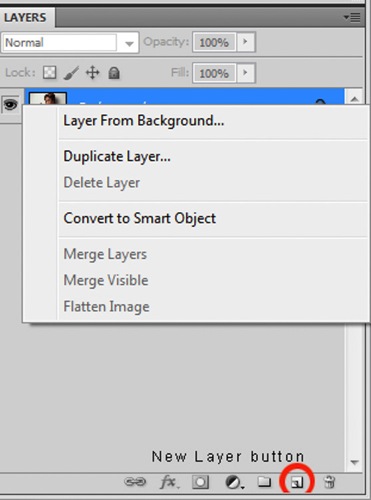
It’s always a good idea to work on a separate layer when editing or retouching images in Photoshop. Once you have your image open, you should create either a new layer or a duplicate layer which you will edit on. You can create a new layer by clicking the new layer button in your Layers Panel, or by selecting Shift+Ctrl+N on a PC (or Shift+Command+N on a Mac). If you prefer to create a copy layer like I have, you can right click on the image in the Layers Panel and select the Duplicate Layer option provided. If you prefer to use keyboard shortcuts, you can simply press Ctrl+J if you’re using a Windows PC, or Command+J if you’re using a Mac.

Image 2

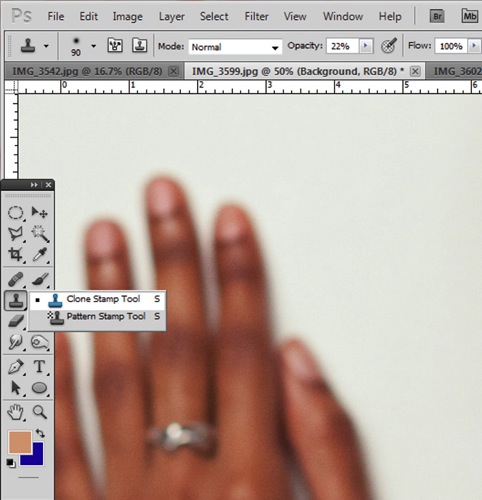
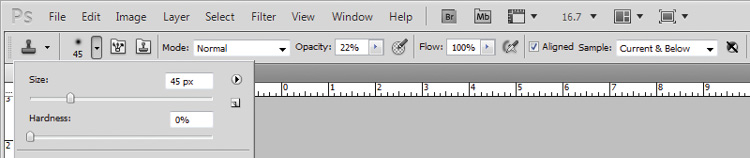
Select the Clone Stamp tool from the tools panel, it conveniently looks like a miniature office stamp. In the options bar at the top of your screen, ensure that your brush softness is set to zero, the mode is normal, and it is set to sample Current & Below. You can keep your opacity anywhere between 10 and 30% depending on the subject. To get a natural looking result, it’s best to gradually work your way up to the final complexion or shade you are trying to attain.

Image 3

Image 4

Zoom in on the area you would like to retouch by pressing Ctrl (or Command) and the plus (+) symbol on your keyboard. In this image, I’m going to focus on the shoulders mainly. You don’t need to zoom all the way in to the area, but ensure that it’s zoomed enough for you to clearly see the area you are trying to adjust.

Image 5

The Clone Stamp tool works by allowing you to duplicate a selected area, over to another section of your image. It’s really great for removing unwanted elements from your photos. Hold down the Alt key on your keyboard and click on an area of skin close to the spot you are trying to remove. If your spot is lighter than the overall skin tone, select an area that is darker than the spot; if the spot is darker than the surrounding skin, you will make your selection from an area that is slightly lighter than it.

Play around with your Clone Stamp brush size and the opacity, until you find a combination that gives your best results. You will more than likely end up using a variety of brush sizes and opacities for the image (change the sample area frequently as well so you don’t get a repetition of patterns). The clone stamp method is very effective at clearing skin but requires patience on your part. A few other minor adjustments resulted in the final image below.

Image 6

With practice and patience you can clone your way to clear skin with the Clone Stamp tool. Have fun!

Please share any questions and comments you have about using the Clone Stamp tool to make clear skin.

googletag.cmd.push(function() {
tablet_slots.push( googletag.defineSlot( “/1005424/_dPSv4_tab-all-article-bottom_(300×250)”, [300, 250], “pb-ad-78623” ).addService( googletag.pubads() ) ); } );

googletag.cmd.push(function() {
mobile_slots.push( googletag.defineSlot( “/1005424/_dPSv4_mob-all-article-bottom_(300×250)”, [300, 250], “pb-ad-78158” ).addService( googletag.pubads() ) ); } );

The post How to Use the Clone Stamp Tool in Photoshop to Make Clear Skin by Tricia Bent appeared first on Digital Photography School.


Digital Photography School

 
Comments Off on How to Use the Clone Stamp Tool in Photoshop to Make Clear Skin

Posted in Photography


Lytro CEO confirms exit from consumer photography business, focus on VR

05 Apr

In a recent blog post, Lytro CEO Jason Rosenthal has confirmed that the company is headed out of the consumer imaging business to focus instead on developing a light field virtual reality platform. Rosenthal admits that it was too risky to compete in an established consumer space (that was in decline, no less, thanks to smartphones), and determined the value-add of light field technology to VR would have greater impact. Hence, Lytro has scrapped product development in the consumer camera space.

Says Rosenthal, ‘The cold hard fact was that we were competing in an established industry where the product requirements had been firmly cemented in the minds of consumers by much larger more established companies.’ He also mentions the rise of smartphones and consumer satisfaction with image quality from them.

And ‘while consumer Light Field cameras offered a number of true technological breakthroughs such as interactive 3D pictures, radical lens specs, and the ability to focus a picture after the fact,’ the reality was that there was much more investment Lytro would’ve had to make to its cameras competitive with modern cameras in image quality. Meanwhile, VR companies and Hollywood studios were increasingly asking for light field technology in cinematic and next-gen content. ‘We had just raised $ 50MM in new capital. We didn’t have the resources to both continue building consumer products and invest in VR.’

Accordingly, in November of last year, Lytro announced Immerge, a 360° light field video capture device, just after announcing plans for layoffs as the company shifted direction toward video and VR. The pro-grade Immerge was a confirmation of this change in focus. It’s currently only a concept camera, capable of recording live action VR in what Lytro claims as ‘six degrees of freedom’ that, if we understand correctly, should allow for multiple perspectives from multiple angles of view, as well as focus and depth-of-field control after-the-fact. This is a clear benefit for VR capture, which aims to capture as much scene content as possible for the viewer to explore in a virtual environment. 

The decision to shift the company’s focus was not taken lightly. Rosenthal details the anxiety he felt before shifting the company vision, but now says ‘My middle of the night panic attacks are gone. I wake with a burning desire to go to work because I am so excited by what we are building and its potential to help shape VR.’

Have a read of Rosenthal’s full blog post here. It’s quite insightful in laying out some of the considerations Lytro has faced as a company. Some of us here are certainly disappointed that Lytro appears to be completely exiting the consumer camera space, as light field technology had a lot of potential in revolutionizing autofocus, in decoupling depth-of-field and light gathering ability, bringing depth-based image editing to the table, and in radical lens design previously thought impossible, thanks to the ability of light field data to perform certain corrections – even image stabilization – after-the-fact as opposed to optically. That said, we certainly understand the change in direction and are very excited to see what Lytro brings to VR and video.

We’ll be following closely. Let us know your thoughts in the comments below.

Articles: Digital Photography Review (dpreview.com)

 
Comments Off on Lytro CEO confirms exit from consumer photography business, focus on VR

Posted in Uncategorized


5 Important Focal Lengths to Know and the Benefits of Each

05 Apr

5 Focal Lengths and Why You Should Use Them 1

Please note: all focal lengths mentioned in this article are in reference to 35mm full frame sensors.

There are photographers that favor the convenience and flexibility of zoom lenses, and those that favor their sharper, lighter and cheaper counterpart, the prime lens. Note: some modern zooms do have prime-like optics. Often, it’s your line of work that will make that decision for you. Whichever variant you favor, you owe it to yourself to experiment with different focal lengths to learn where they each excel, and which ones mesh best with your style. You can achieve this with primes, or zooms if you can commit yourself to not touching that handy zoom barrel. Among the many options, five focal lengths you want to use are the: 24mm, 35mm, 50mm, 85mm, and 135mm.

Let’s look at each one at a time.

#1 – 24mm wide angle

Areas it excels in: landscapes, astrophotography, group portraits, and event photography.

This one is easy to experiment with because not only are there many affordable prime options available, but you’ll find this focal length at the wide end of many full frame zoom lenses. The 24mm prime lens is sufficiently wide and remarkably sharp, making it an ideal candidate for landscape photography. Zooms are wonderful for landscape photography too, but the locked-in field of view (or a prime lens) will force you to think carefully about your compositions.

5 Focal Lengths and Why You Should Use Them 2

The 24mm focal length also excels in situations that don’t offer a lot of light. That includes astrophotography, where 24mm lenses with wide apertures (f/.8 or wider) will facilitate shots of the milky way, and in event photography, where you’ll have an ample field-of-view to shoot indoors and add context to your photographs. Additionally, the 24mm focal length is sufficiently wide to capture group portraits with minimal perspective distortion. Just don’t get too close, and watch the edges of your frame.

5 Focal Lengths and Why You Should Use Them 3

#3 – 35mm focal length

Areas it excels in: street photography, events, environmental portraits, and shooting-across-the-dinner-table photography.

35mm is a classic focal length for many photojournalists. Part of that reason is that the field-of-view requires you to be close to the action, but still maintains enough of the environment surrounding your subject to give an image context. This same philosophy applies well to wedding or event photography, and makes the 35mm focal length a great fit.

5 Focal Lengths and Why You Should Use Them 4

Another great thing about the 35mm prime lens is that it just so happens to be the perfect focal length for shooting a portrait from across the dinner table. Any wider and your subjects face will suffer from perspective distortion (exaggerating their facial features) and any narrower and you’d have to get out of your seat for the shot.

5 Focal Lengths and Why You Should Use Them 5

#3 – 50mm (normal) lens

Areas it excels in: street photography, full-body portraits, walk-around shooting.

There are so many reasons to try shooting with a 50mm prime lens. Perhaps the best one is that they’re cheap. You can purchase a brand new 50mm lens for most DSLR systems for a little over $ 100. Also, they produce an image that is normal, or most-like the image that we see with our own eyes. There is a common misconception about this concept. The normal perspective that a 50mm lens offers refers to the perspective distortion (or lack thereof), not the field-of-view. For this reason, the 50mm lens is great for full-body portraits and walk-around or street photography.

5 Focal Lengths and Why You Should Use Them 6

5 Focal Lengths and Why You Should Use Them 7

The 50mm lens is another classic, and a large part of that reason is that often, the area in frame is just right. It’s narrow enough to create balanced compositions with ease, but still wide enough to create interest beyond your subject. That is why you will find a 50mm lens in the bags of most street photographers.

#4 – 85mm slight telephoto lens

Areas it excels in: portrait, events, and sports photography.

The 85mm focal length is one that you will find in the bag of many wedding and portrait photographers. It creates beautiful portraits with the ability to flatten one’s features, which is generally flattering, and brilliant background separation. The field of view is not so tight that you’ll feel like you need to be outdoors to use one, but it gives you a nice working distance that allows this focal length to sneakily capture candids at a wedding or family gathering.

5 Focal Lengths and Why You Should Use Them 8

That working distance is great for full body shots when you’re on the sidelines of a sporting event, too. The 85mm prime is also a great working distance for photographing your kids or pets.

5 Focal Lengths and Why You Should Use Them 9

#5 – 135mm telephoto

Areas it excels in: head-shots, portraits, and wedding photography.

When you need to get in close, or if you just love bokeh, the 135mm lens is a great pick. For details and head-shots that bring your subject to life, grab this focal length. The background separation is fantastic, due to the increased compression of the image. The flattering flattening effect (say that five times) from the compression, makes this lens great for shoulder shots, senior portraits, candids, and more. You’ll have fun shooting wide open to create magical separation between your subject(s) and their surroundings.

5 Focal Lengths and Why You Should Use Them 10

5 Focal Lengths and Why You Should Use Them 11

The drawback to this focal length is that you do need a lot of working room, and a lot of light. Remember the 1/focal length rule for shutter speed? In other words, you wouldn’t want to shoot a 135mm lens any slower than 1/135th of a second, without a very steady hand or a tripod. When light or space become a problem, it’s nice to have an 85mm lens to fall back on.

5 Focal Lengths and Why You Should Use Them 12

Chances are you will love some of these focal lengths and dislike others, but you’ll never know until you give them all a shot. Modern zoom lenses are remarkable in their optical-quality, but you do lose the connection you feel when you are truly in sync with your focal length. The more you shoot with a 50mm lens, the more you will start to see with a 50mm perspective. Good luck and happy shooting!

googletag.cmd.push(function() {
tablet_slots.push( googletag.defineSlot( “/1005424/_dPSv4_tab-all-article-bottom_(300×250)”, [300, 250], “pb-ad-78623” ).addService( googletag.pubads() ) ); } );

googletag.cmd.push(function() {
mobile_slots.push( googletag.defineSlot( “/1005424/_dPSv4_mob-all-article-bottom_(300×250)”, [300, 250], “pb-ad-78158” ).addService( googletag.pubads() ) ); } );

The post 5 Important Focal Lengths to Know and the Benefits of Each by Jason Checkla appeared first on Digital Photography School.


Digital Photography School

 
Comments Off on 5 Important Focal Lengths to Know and the Benefits of Each

Posted in Photography


Small but mighty: hands on with the Panasonic GX85/GX80

05 Apr

Introducing the GX85 / GX80

The Panasonic Lumix DMC-GX85 (known as the GX80 outside of North America) is Panasonic’s latest mid-range Micro Four Thirds model. It sits in the company’s ‘GX’ series which is used to denote that it’s targeted towards dedicated enthusiast photographers but priced as a mid-range model.

It’s a 16MP model that’s capable of 4K video shooting but features a viewfinder and several features carried-over from the older GX7, including a built-in, bounceable pop-up flash.

As such, it’ll sit below the GX8 in the company’s lineup but the more budget-conscious user may well find that the GX85 offers a lot of its big brother’s capabilities. And, thanks to a redesigned shutter mechanism intended to minimize shutter shock, may even offer some practical advantages.

Body

The GX85’s body is noticeably smaller than the GX8’s. In fact it looks a little like a GX7 that’s been left in the wash and has shrunk a little. This downsizing leaves it with fewer customizable buttons, no focus mode switch and a smaller battery compartment, but most of those changes still leave it as being broadly comparable with the GX7.

Despite the lower price point, it’s still a very solid-feeling camera. Unlike the GX8, it’s not weather-sealed, but it doesn’t feel like corners have been cut, either. The body has a pleasantly dense feeling to it, with no sense of flex or weakness.

The viewfinder is borrowed from the GX7 but it no longer hinges upwards. Its 2.7 million-dot equivalent resolution translates as 1280 x 720 pixels refreshed one color at a time (a process called field sequential update). This is a 16:9 aspect ratio, which is fairly unusual. Like the GX7, the GX85’s rear screen tilts up and down, and is touch-sensitive. It’s a 3:2 aspect ratio panel with 1.04M-dots, which works out as 700 x 480 pixels.

Stills and video

One of the biggest areas in which economies have been made is in the reversion to using a 16MP Four Thirds sensor. This probably isn’t going to be a deal-breaker for many people, and Panasonic has sweetened the pill slightly by doing away with the anti-aliasing filter in front of the chip.

This lack of AA filter should allow it to capture slightly more fine detail (Panasonic claims an improvement of as much as 10%), though comes with a slightly higher risk of moiré when used with a sharp lens. Panasonic says its JPEG engine will detect and remove the false color of moiré when it detects it.

The camera also shoots 4K video at 30p or 24p (25p in the GX80 model outside North America).

Redesigned shutter

The GX85 hasn’t simply been assembled from a bin of existing parts, though. It becomes the first Panasonic to use an electromagnetically driven shutter, rather than the motor and spring arrangement used in existing models.

This allows the shutter to be opened and closed in a more controlled manner, reducing the impact of any shutter shock, as well as making the shutter operation quieter. The new design doesn’t appear to introduce much in the way of compromise: the maximum mechanical shutter speed is 1/4000 seconds, and the flash sync speed is 1/160th. This is a little bit behind the GX8’s 1/8000th mechanical shutter a 1/250th sync speed but is a match for the less expensive G7 model.

Panasonic, rather cautiously, only says that the new shutter reduces shake, not that it eliminates it. We’re told that an electronic first-curtain shutter (which obviates the need to open the mechanical shutter to start an exposure, essentially eliminating shutter shock), would require faster sensor read-out.

5-axis image stabilization

Like the GX8, the GX85 offers a Dual IS system which augments two axes of stabilization if you use a lens with built-in stabilization. Unlike the GX8’s in-body stabilisation, even without a stabilised lens the GX85 offers 5-axis stabilisation.

Most impressively, Panasonic says that the IS continues to work in all 5 axes when you’re shooting 4K video – the first camera we can think of that does this. The digital component of IS used in video requires the camera to read lines off the sensor above and below the standard output region, then use gyro sensors to predict where on the sensor the original framing is now being projected. Most sensors can’t read out a large enough section of the sensor fast enough to stabilize 4K video, but the GX85 claims to do so.

Video capabilities

The GX85 continues Panasonic’s history of offering high-end video capabilities across much of its range, with this latest camera able to shoot UHD 4K at 30p or 24p. It shoots this 4K footage as MP4s at up to 100Mbps, which is pretty respectable for a consumer-focused model. It can also capture 1080p footage at up to 28Mbps as MP4 or AVCHD.

We say ‘consumer-focused’ because the GX85 lacks not only the slightly flatter ‘CinelikeD’ color profile offered by the GH4 but also neglects to include a microphone socket, which will limit anyone with any real video-shooting aspirations. And to think we complained about the non-standard 2.5mm socket on the GX8.

The camera does, however offers the ‘Live Cropping’ feature first introduced on the ZS100 (and demonstrated in our review of that camera). This lets you specify a start an endpoint to produce 1080p footage that appears to either pan or zoom, but does so from the 4K capture – meaning you can fix the camera on a tripod and not have to worry about how smoothly you can pan or zoom. It’s a handy option if you aren’t using sophisticated editing software.

Stills from 4K

Off the back of the camera’s 4K video capture, Panasonic offers its usual array of clever modes that produce stills from 4K capture.

Top of the heap is the 4K Photo mode in which the camera captures bursts of 8MP images at up to 30 frames per second. More than simple grabs from video, this doesn’t have to be in the 16:9 aspect ratio and the camera can be set to continuously record, then present you with the thirty images before and after you choose to hit the shutter button. A handy touchscreen interface lets you choose the perfect shot.

The Post Focus mode is similar, but it racks the camera’s focus across the depth range it detects in the scene and shoots 4K video while doing so. Tapping on the point you want in-focus pulls the frame from the video that was focused at the specified point.

Finally, the new Light Composition mode again uses the camera’s 30 frames per second 8MP image capability, this time to create a composite image. The mode uses only the brightest value from a series of frames you select, so scenes such as fireworks displays can be created from multiple images.

Other new features

In addition to the upgraded shutter mechanism, the GX85 gains a couple of features that stills shooters might find handy. Rather than limiting itself to exposure and white balance bracketing, the GX85 can also bracket focus or aperture setting across several shots.

There’s also an extra monochrome mode (such things having apparently become popular of late). The L Monochrome Photo Style promises ‘deep black and rich gradation like that of B/W film.’ We’ve not yet had a chance to put it to much use but we’ll make sure to include some more examples in our forthcoming samples gallery.

Wi-Fi

The GX85 features built-in Wi-Fi, which allows remote control of the camera from a smart device, as well as opening up the option to transmit images from the camera. To make full use of this, the GX85 includes in-camera Raw conversion so that pictures can be tweaked and perfected before they’re shared with the world.

Like a couple of recent Panasonic models, the initial Wi-Fi connection is established by displaying a QR Code on the back of the camera, which can then be read by the iOS or Android app. It’s not clear whether the slightly faster NFC method has been abandoned to keep cost down or because it excludes Apple devices.

Kit options

The GX85 will be available as a kit bundled with the tiny, collapsible 12-32mm F3.5-5.6 zoom that was created for the similarly minuscule GM models. It’s not a bad little lens, though you pay for its convenient size through having to accept its modest reach. Panasonic USA says it currently has no plans to sell the camera body-only.

Panasonic’s MSRP for this combination is $ 799, which compares very favorably to the $ 999 body-only price that Panasonic asked for the very similar GX7 just two and a half years ago. Obviously the cost of technology falls over time, but $ 799 with a simple lens looks competitive with Fujifilm’s $ 699 X-E2S camera body or Nikon’s $ 899 list price for the D5500 with 18-55mm VR II zoom, not least as none of its immediate peers is capable of shooting 4K video.

Overall

Interestingly the GX85 is called the GX7 Mark II in the Japanese market and, if you place the two side-by-side, that makes some sense: it’s not radically different in spec or control layout. That gives a hint about its intentions – it may not have all the GX8’s specifications, but it has enough that it could have sat at the top of the lineup just a few years ago.

Most of the omissions compared to the GX7 (tilting viewfinder, AF/MF switch) aren’t necessarily essential features. Indeed the retention of the built-in pop-up flash actually gives it an advantage over the more expensive GX8. Sadly, there is one feature that’s been removed that we think will be sorely missed: the lack of any microphone input is likely to come as a real blow to anyone wanting a keenly-priced stills/video hybrid.

Overall though, so long as the new shutter mechanism has settled the shutter shock problem, the GX85’s capability and price mean it looks to wear both the mid-range and enthusiast labels comfortably.

Articles: Digital Photography Review (dpreview.com)

 
Comments Off on Small but mighty: hands on with the Panasonic GX85/GX80

Posted in Uncategorized


Priime Styles for Mac

05 Apr

Priime Styles for Mac Batch Editing

Disclosure: I am a style author and advisor for Priime.

One of my favorite ways to edit photos on my iPhone the past year has been with the Priime app for iOS. In addition to being one of the style creators for Priime, I’ve enjoyed utilizing the custom styles created by so many other talented photographers for my mobile photography. I don’t always have as much time to work with an image when I’m editing it on mobile and it’s nice to have some super easy styles that I can easily apply to my photos and quickly publish on the go.

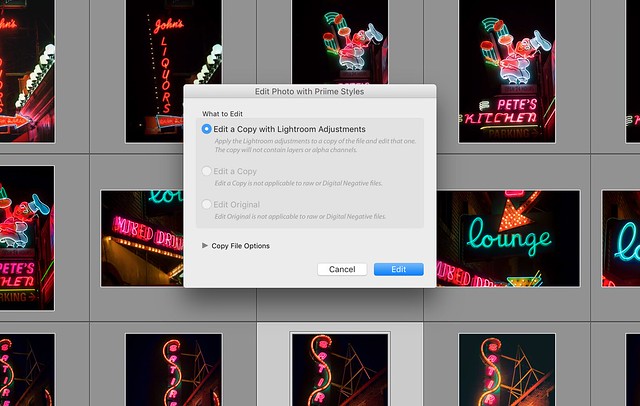
As great an app as Priime for iOS is, 98% of my photos that I work with are still processed the old fashioned way, using Adobe Lightroom and Photoshop on my iMac. One of the things that I love about using Lightroom in my workflow is that more and more you are finding quality external editors that can be used as part of your editing process. Recently Google made headlines when they decided to give away their Nik software (which I have also used for several years now and love). So I was really pleased to hear that in addition to the iOS app, Priime was also releasing an external editor for Lightroom.

The way that I use Priime Styles for Mac is as part of my normal Lightroom editing process. Here I can easily take a special photo (or batch of photos) and quickly move them into the Priime editor to make changes and then have copies saved back to the Lightroom catalog I’m working in. I don’t process every photo with Priime, but if I find one that is special I will often import it in there and work with it.

Sometimes you want just one final version of a photo, but oftentimes I find myself making multiple versions of a photo. While some photos look great in color or black and white. Some photos look great in color AND black and white. I like creating different versions of photographs and then later deciding which I like better or maybe even publishing a few different versions. Priime allows me to try different things with a photo that I may not have thought about creating organically myself in Lightroom. With over 100 different editing styles from some of the top photographers out there today, there are a lot of new things to explore.

Priime Styles for Mac Lightroom External Editor

The nice thing about editing something in Priime with Lightroom is that I can still iterate on that version even after I bring it back into Lightroom, adding additional edits or touches to the photo, customizing it more as my own even as I borrow edits from others.

I think Priime Styles for Mac will be an excellent Lightroom add on tool that serious and professional photographers can have at their disposal to make their photos look as good as possible.

In addition to more serious and professional photographers using Priime Styles for Mac as a Lightroom plug in, I think it also is a great first step for the new or emerging photographer. Some people are not quite ready yet to pay $ 10/month to Adobe every month to use Lightroom. They just want something that can quickly make their photos look better that’s a bit more affordable.

Even if you are not a Lightroom user, in fact especially if you are not a Lightroom user, Priime may be something for you. In addition to the Lightroom plug in, Priime can also be used as a standalone editor as well. You simply launch the app and then drag and drop the photos that you want to work with. For a lot of people $ 24.99 (on sale for launch) as a one time cost is a better value proposition than paying $ 9.99 a month ongoing for Lightroom.

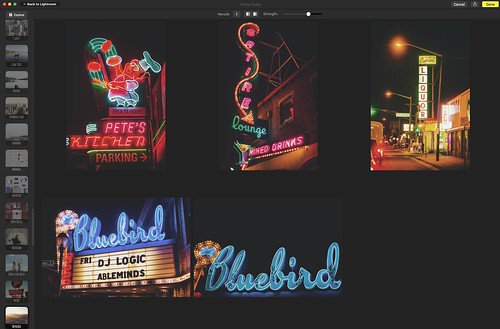
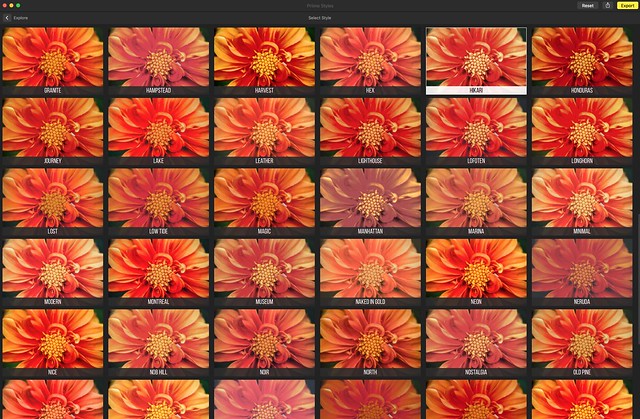
PExploring Styles with Priime Styles for Mac

Priime Styles for Mac has a great Explore function as well. This allows you to look at all of the styles as they’d be applied to a photo at once, which makes it easier to narrow down what might look best.

Another way I think Priime can be helpful is for the less serious photographer/blogger who just wants a consistent look for a batch of photos. A lot of bloggers I know are not exactly photographers but need to include images with their posts. Priime Styles for Mac allows bloggers an easy go to solution where very quickly they can edit a batch of photos and have a consistency to their photos that makes them work much better together as part of a total post.

Anyways, check it out.

Priime Styles for Mac supports JPG, RAW and TIFF files.


Thomas Hawk Digital Connection

 
Comments Off on Priime Styles for Mac

Posted in Photography


Look Sharp: Panasonic Lumix DMC-GX85/GX80 video preview

05 Apr

The Panasonic GX85/GX80 is an impressive mid-range ILC, borrowing many of the features from the company’s enthusiast-level GX8 and bringing the size and price down to earth. We’ve put together a short video so you can see the GX85 in action with your own eyes.

Articles: Digital Photography Review (dpreview.com)

 
Comments Off on Look Sharp: Panasonic Lumix DMC-GX85/GX80 video preview

Posted in Uncategorized


Madcap Murals: Playful Urban Paintings Interact with 3D Elements

05 Apr

[ By Steph in Art & Street Art & Graffiti. ]

interactive street art 4

A wall with a texture reminiscent of a cross-stitch cloth, a rusted shopping cart half-submerged in a river, curbside trash finds and utility boxes all transform into interactive 3D elements of engaging street art pieces by Ernest ‘Zach’ Zacharevic. The Lithuanian-born artist not only takes the surfaces and immediate surroundings into account when planning each mural, but also reflects the culture of the setting for totally unique, spontaneous and yet targeted infusions of color, humor and fun into the urban landscape.

interactive street art 1

interactive street art 2

interactive street art 8

Zacharevic assesses each location ahead of time, often getting inspiration from the elements already present before prepping as much of each piece as possible in his studio to cut down on outdoor painting time. Components like junked bicycles, busted chairs and peeling wheelbarrows are bolted or glued to the walls so they become an active part of the work – though many of these three-dimensional elements are already part of the urban fabric, and the artist simply integrates them.

interactive street art 6

interactive street art 7

interactive street art 9

interactive street art 14

Gestural swipes of dripping spray paint contrast with Zacharevic’s painterly style, contrasting textures and making each mural look like it popped off a gallery canvas to become a part of the larger world. In an interview with DesignBoom, the artist notes that some of these dynamic qualities originate in a fascination with animation and “its ability to bend reality and bring images to life.”

interactive street art 15

interactive street art 13

interactive street art 5

interactive street art 16

“I see my work more like a simple moment capturing everyday life rather than an elaborate narrative,” he says. “This seems to work best with the subject of childhood nostalgia, a subject which features often in my work.”

Share on Facebook


[ By Steph in Art & Street Art & Graffiti. ]

[ WebUrbanist | Archives | Galleries | Privacy | TOS ]


WebUrbanist

 
Comments Off on Madcap Murals: Playful Urban Paintings Interact with 3D Elements

Posted in Creativity