RSS
 

Archive for April, 2016

Frame by frame: ‘live view’ continuous shooting with the Sony a6300

13 Apr

One of the features we were excited by when the a6300 was announced was the promise of ‘live view’ while shooting continuous bursts of shots. Now we’ve used and tested it, what do we think?

What’s the big deal?

Autofocus systems on mirrorless cameras have been getting better and better with each generation of cameras, to the point that the best of them match (and in some circumstances, exceed) the performance we expect from similarly priced DSLRs.

However, many models still lag behind DSLRs in their ability to show you what’s going on while in continuous shooting mode. The common trick of showing a playback of the last captured image makes it hard to keep up with a moving subject, especially if it moves unpredictably, so that you can’t just compensate for the lag.

The a6300 isn’t the first mirrorless camera to try to offer a live view while continuous shooting (several Nikon 1 models, which use comparatively small sensors to allow fast read-out, even manage to give an uninterrupted feed), but it’s still a rare enough feature to make it worth investigating.

What did we find?

We shot the a6300 side-by-side with the Canon EOS 7D (a DSLR that offers the same 8 fps frame rate as the Sony) and found something interesting. The a6300 has a shorter blackout period than the Canon but turns out to only be showing a single updated frame between each capture. At lower, 5 fps shooting rate, we saw two or three frames on display between captures.

That sounds terrible. It sounds like cheating. but it’s not quite the end of the story. Watch the beginning of the video again – the real-time playback – it looks pretty convincing, doesn’t it?

The fact that it looks so convincing left us wondering: why does the screen ever black out? Why doesn’t the camera just continue to show the ‘live’ image until the next one is available? We think we know the answer.

Note the way that the image doesn’t just cut to black – it fades to black then abruptly cuts to the next update. We believe this is trying to achieve something like the ‘black frame insertion’ technology used in some modern TVs: inserting a black frame prompts your brain to imagine what’s happened between the two frames it’s seen, rather than being distracted by the contradiction between perceiving a sense of movement but seeing static images.

Does it work?

In real-world shooting this is pretty convincing: we only discovered the camera was just showing single images when we recorded it at 240 fps, and even then it took us a while to convince ourselves that we weren’t looking at an error stemming from a clash in display and capture frequencies (temporal aliasing).

So, while the display is only showing you eight frames per second (one between each capture), it’s doing so in a way that gives your brain a convincing sense of motion. The question we wanted to answer was: ‘if the blackout between frames is short enough, and the motion looks fairly convincing, is it as easy to follow action as with a DSLR?’

We spent some time trying to shoot rugby with the a6300 to see how easy it was to follow the game’s fast and unpredictable action. The results were mixed – the camera gave enough information for you to be able to follow the action to a reasonable degree, but not as much as you might want.

The a6300’s live view provided enough information to let us follow the action, but not as much as a high-end DSLR, which meant we reacted more slowly to anything unexpected.

Alongside the a6300 we were also shooting with the Nikon D5, not as direct comparison but because we also need to shoot sports with it. As you might expect, the $ 1000 mass-market a6300 wasn’t as good as Nikon’s $ 6500 professional sports-oriented camera, but it’s the way that it fell short that was interesting.

Although the video further up the page shows that the a6300’s live view looks a lot like real motion and its blackout is shorter than the EOS 7D’s, in use it becomes clear that your brain actually can make use of the extra information the 7D gives you about the subject’s movement.

For example, at the rugby we found that we could keep pace with the action when shooting with the Sony but it would take us longer to react if we made the mistake of believing a player’s dummy-pass and started moving in the wrong direction. With the DSLR we’d spot our mistake sooner and turn back to the real action faster. 

At set pieces, where you have a good idea of what’s going to happen next, the a6300 could shoot with confidence.

Having looked at what the camera’s doing and then put to real-world use, we’d conclude that the a6300’s continuous shooting live view more successful than its single frame update makes it sound. It’s convincing enough to let you keep up with fast action, but there’s still room for improvement as soon as anything unexpected happens.

Articles: Digital Photography Review (dpreview.com)
 
Comments Off on Frame by frame: ‘live view’ continuous shooting with the Sony a6300

Posted in Uncategorized


Beastgrip expands into UK and Japanese markets, announces plans for high quality lenses from Kenko Tokina

13 Apr

$ (document).ready(function() { SampleGalleryV2({“containerId”:”embeddedSampleGallery_4199009759″,”galleryId”:”4199009759″,”isEmbeddedWidget”:true,”standalone”:false,”selectedImageIndex”:0,”startInCommentsView”:false,”isMobile”:false}) });

US mobile phone rig and lens mount manufacturer Beastgrip has started distribution of its Beastgrip Pro smartphone grip in the UK and Japan, and announced it is working on new ‘high quality’ lenses with Kenko Tokina. The Beastgrip Pro is an adaptable smartphone housing that uses adjustable clamps and a sliding lens mount assembly to fit conversion lenses over the camera of any model – Beastgrip claims.

The system uses a 37mm threaded lens mount that accepts conversion lenses from Beastgrip’s own collection as well as those from independent manufacturers. The company also offers what is calls a DOF (depth-of-field) adapter that allows Canon EF-mount lenses to be used on the rig in front of the smartphone lens to achieve a shallow depth of field.

The rig also features a cold shoe and tripod thread for attaching accessories such as microphones and lights, as well as a number of mounting threads.

While the company offers its own wide, ultra-wide and fisheye conversion lenses the partnership with Kenko Tokina promises some extra interesting lenses. Kenko’s own line of smartphone conversion lenses includes a 7x telephoto lens that would convert most smartphone focal lengths to 196mm – but that’s not to say it would be also produced to fit the Beastgrip Pro.

The system will be distributed by Kenko Tokina in Japan and Intro2020 in the UK. The price of the rig on its own is $ 139.99/£139.99, and kits are available that include wide and fisheye conversion lenses. For more information visit the Beastgrip website.


Press release:

Beastgrip Pro – the world’s first universal lens adapter and camera rig for smartphones

With immediate effect, Intro 2020 has been appointed sole UK distributor of BEASTGRIP PRO.

Beastgrip Pro is the world’s first universal lens adapter and camera rig system for smartphones. It is the ultimate tool for photographers, videographers and the rapidly growing live streaming market.

The Beastgrip Rig features an adjustable lens mount with spring loaded clamps to ensure a secure grip and perfect fit with virtually any smartphone on the market. It is a modular rig system with a removable lens mount assembly and handle that allows the user to modify the Beastgrip Pro to their own personal preference. It comes with industry-standard photography mounts and an ergonomic grip, allowing you to attach all kinds of photography gear and take a better shot.

There are 3 kits in the product range, including 2 with lenses, as follows:

Beastgrip Pro Rig
Universal/adjustable and works with virtually any camera phone on the market. It is simple and convenient to use and works with or without a protective phone case. It features a standard 37mm threaded lens/filter mount and is compatible with wide variety of conversion lenses and filters. It also features a cold shoe mount for attaching LED lights, microphones, and other accessories plus comes with five standard ¼”-20 threaded mounts for attaching to supportive photo/video gear such as tripods, stabilizers, sliders and other accessories.

Beastgrip Pro Rig plus Wide Angle Lens
This set includes a 37mm 0.43x Extreme Wide-Angle lens, which nearly doubles the field-of-view in your photo/video, letting the user see much more in the frame than a standard phone camera. It’s perfect for shooting large scenes like landscapes, concerts, sports, family photos etc.

Beastgrip Pro rig plus Wide Angle and Fish-eye lenses
Includes the Beastgrip 37mm 0.43x Extreme Wide-Angle lens and an ultra wide-angle lens that produces strong visual distortion, i.e. the classic “fisheye” circle, and an immersive 180° field-of-view. It’s perfect for action sports like skateboarding, biking, snowboarding/skis, etc.

SUGGESTED RETAIL PRICES:
•    Beastgrip Pro Rig £139.99 including VAT
•    Beastgrip Pro Rig plus Wide Angle Lens £169.99 including VAT
•    Beastgrip Pro Rig plus Wide Angle & Fisheye Lenses £199.99 including VAT

All units are available immediately.

Articles: Digital Photography Review (dpreview.com)
 
Comments Off on Beastgrip expands into UK and Japanese markets, announces plans for high quality lenses from Kenko Tokina

Posted in Uncategorized


7 Ways Custom Photo Backdrops Can Promote Your Business

13 Apr

How could you photograph a love story in Paris having less than $ 50 at your disposal? Or make local moms stand in line at your photo studio without running an expensive marketing campaign? That’s totally possible if you pay attention to one single element of your studio setup – background. Read on to find out how other photographers are successfully Continue Reading

The post 7 Ways Custom Photo Backdrops Can Promote Your Business appeared first on Photodoto.


Photodoto

 
Comments Off on 7 Ways Custom Photo Backdrops Can Promote Your Business

Posted in Photography


HTC 10 is the first smartphone with OIS in front and rear cameras

13 Apr

Taiwanese smartphone maker HTC has today launched its latest flagship model, the HTC 10. While the predecessors we tested were frankly disappointing in the camera department, looking at its specs it seems like the 10 has the potential to turn things around for HTC. Read more

Articles: Digital Photography Review (dpreview.com)
 
Comments Off on HTC 10 is the first smartphone with OIS in front and rear cameras

Posted in Uncategorized


Step by Step How to Use HDR Merge in Lightroom

13 Apr

HDR merge in Lightroom
There are lots of plug-ins that you can use with Lightroom to create High Dynamic Range (HDR) images. Photomatix and HDR Efex Pro are two of the best known, and MacPhun’s Aurora HDR (Mac only) is a new application that has received good reviews.

But, if you have Lightroom 6 or CC, you can create HDR images right within Lightroom itself, without having to buy a plug-in. There are several advantages to using Lightroom for your HDR conversions:

  1. You save money. Most HDR plug-ins are not free, and are an additional cost for you.
  2. Lightroom’s HDR merge creates natural looking HDR images. Not everybody will see this as an advantage – but if you want to create garish, over-saturated images the aforementioned plug-ins will help.
  3. You don’t need a lot of bracketed images. Two seem to be enough (you can use more if you want, or if you have a really contrasty scene), one exposed at -2 stops, the other at +2 stops.
  4. The final HDR image is saved as a DNG file. Not only is this smaller than a TIFF file, but you can process it in Lightroom the same as you do with any other DNG or Raw file. The main difference is that the Exposure slider runs from -10 to + 10 stops, rather than the normal -4 to +4. There is also much more information in the file for Lightroom to work with, when you make adjustments with the Shadows and Highlights sliders (and local adjustment tools like the Graduated and Radial filters).
  5. You can take bracketed sequences hand-held, and Lightroom will align them automatically. Having said that, I’ve found the best results come from bracketed photos taken with a tripod mounted camera.
  6. There is less noise in shadow areas than you would expect from a regular, single photo.

Lightroom HDR merge in action

Let’s look at a couple of practical examples to see how it performs.

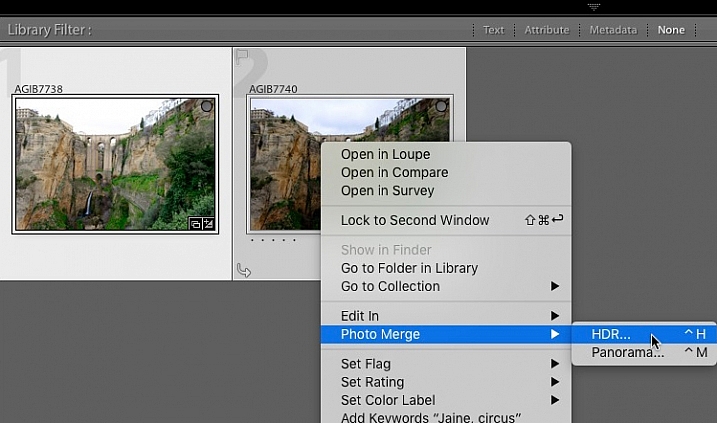
Start in Grid View in the Library module, and select the images you want to merge. Alternatively, you can select the images in the Filmstrip in the Develop module. Then, go to Photo > Photo Merge > HDR. Or, right-click on one of the selected photos and select Photo Merge >HDR.

HDR merge in Lightroom

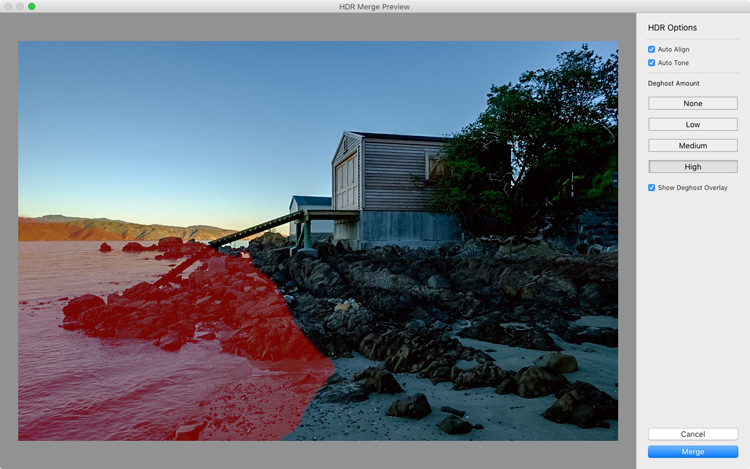
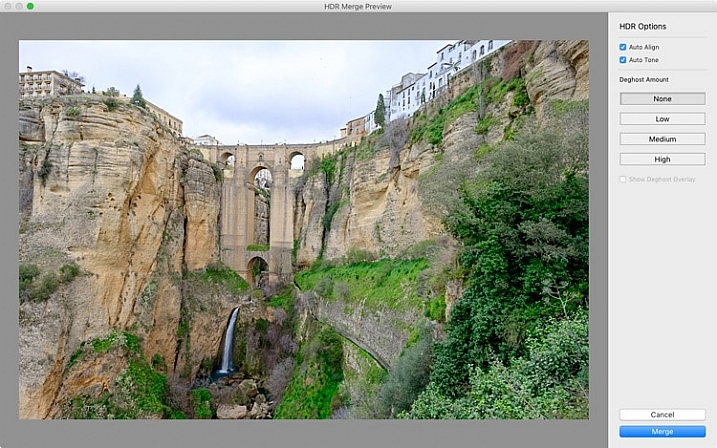
The HDR Merge Preview window opens, and Lightroom creates a preview of the HDR image. This may take some time, especially if you have selected several images. The Auto Align and Auto Tone boxes are ticked, and the Deghost Amount is set to None, by default. Lightroom remembers the last settings used, if you have changed them.

Auto Align is useful if the camera moved between exposures (for example if you hand-held the camera) and Auto Tone performs a similar function to the Auto Tone settings in the Basic Panel of the Develop module.

I find HDR merge works best with the Auto Align and Auto Tone boxes ticked (see below). If there is subject movement between frames you can set Deghost Amount to Low, Medium, or High (trial and error is the only way to see what works best, and is different for each set of images).

HDR merge in Lightroom

You may be surprised to learn that there are not many settings to adjust. This is deliberate, as the aim is to let Lightroom produce a natural looking HDR image, which you can then process in the Develop module to achieve the desired look.

You can set Deghost Amount to Low, Medium, or High if you see any ghosting (double images) in the image. Ghosting takes the form of lines, white patches, or other artefacts caused by subject movement taking place between frames (such as trees blowing in the wind, clouds moving across the sky, or people walking through the scene).

You can’t zoom in to a 100% in the preview mode, so you may only become aware of ghosting once you move on to the Develop module and zoom in to 1:1 magnification. You can simply go back and reprocess the images if you notice ghosting at that stage. Tick the Show Deghost Overlay box, to reveal the areas in which Lightroom has detected and attempted to clean up ghosting (it is shown in red).

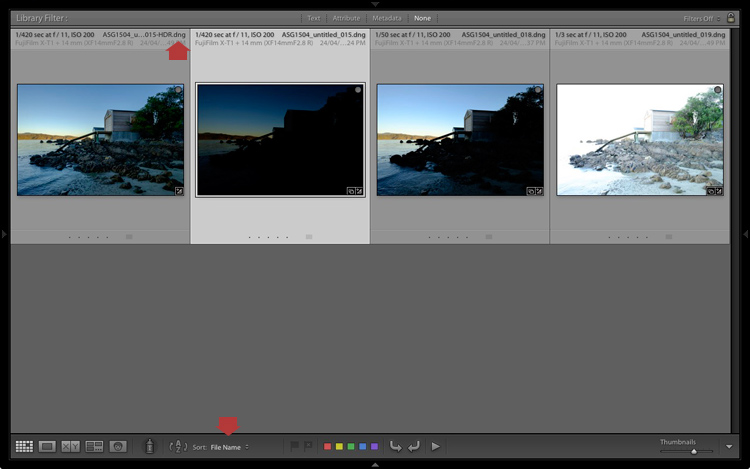
Click the Merge button when you’re done. Lightroom saves the merged image as a 32-bit DNG file, with the suffix -HDR appended to the file name, and takes you back to the module where you started. From there you can edit the image as normal in the Develop module.

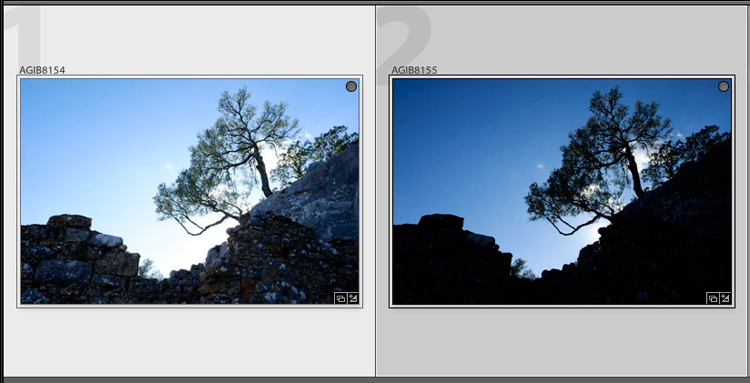
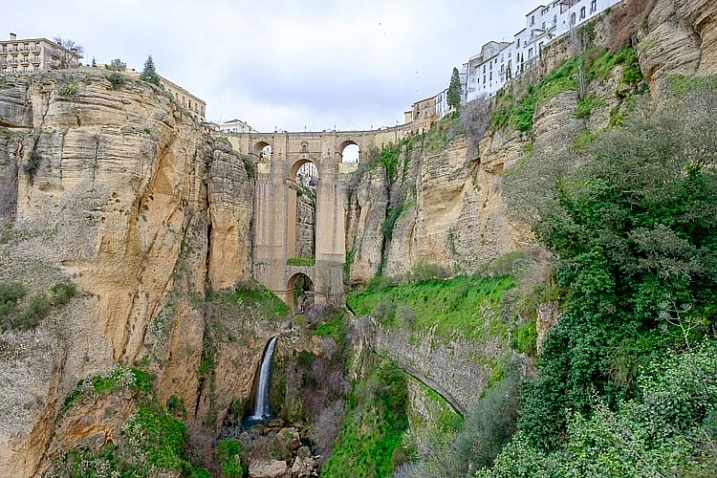
This is the result from my HDR merge. I used two photos, bracketed one stop apart. That’s not a lot, but it was a cloudy day and what I wanted was a photo that captured detail in both the landscape and the sky. On a sunny day you would use images that were bracketed further apart.

HDR merge in Lightroom

The result should be treated as a starting point in your processing – a new Raw file that you can edit in the Develop module to achieve the desired effect. In this case photo was too light, so I darkened it, made some tonal adjustments, and increased clarity. This is the result.

HDR merge in Lightroom

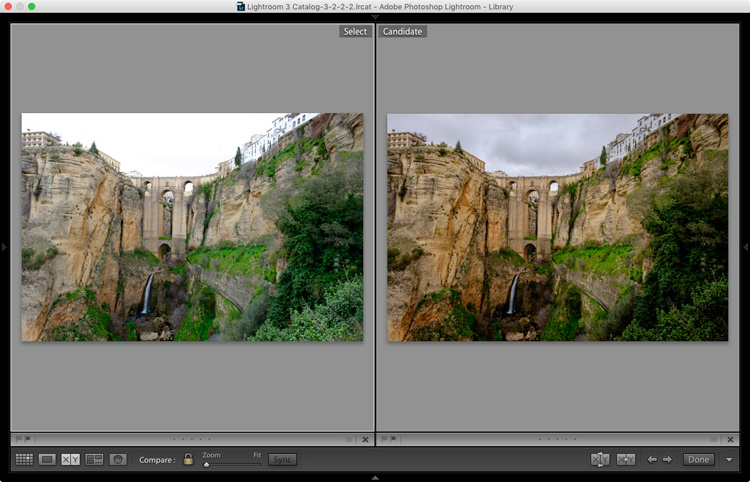
The screenshot below shows a comparison between the HDR image (right) and the same photo taken without any exposure compensation (left). As you can see, merging two exposures has allowed me to capture the details in the grey clouds. If, at this stage, you think the image has too much of an HDR feel, you can use the Basic Panel sliders, or local adjustments, to alter the tonal values. For example, you can increase Shadows or the Blacks setting to add contrast, so you don’t have the unnatural detail in every shadow effect that typifies overdone HDR.

HDR merge in Lightroom

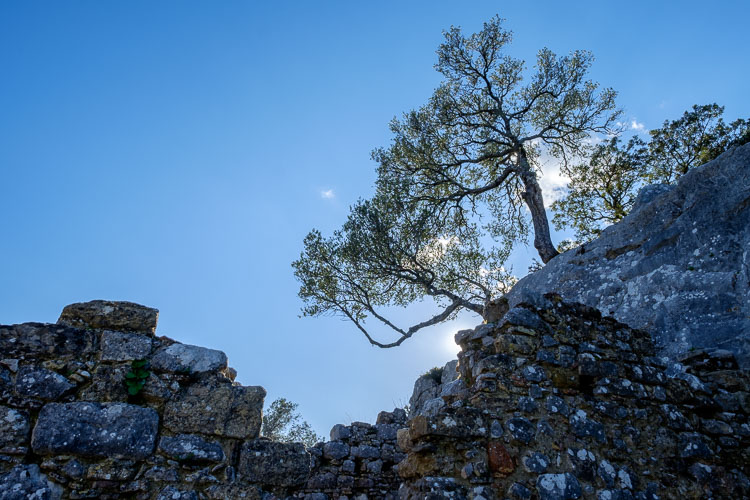
Here’s another example, this time with photos taken in the sun, and a much greater brightness range. These two photos were taken at +1 and -1 stops respectively.

HDR merge in Lightroom

This is the result that Lightroom gave after the HDR merge process.

HDR merge in Lightroom

Below is how it looks after editing in the Develop module. The differences are subtle, I just made the image a little darker, and moved the Highlights slider to zero, to bring out as much detail in the clouds as possible.

HDR merge in Lightroom

High contrast example

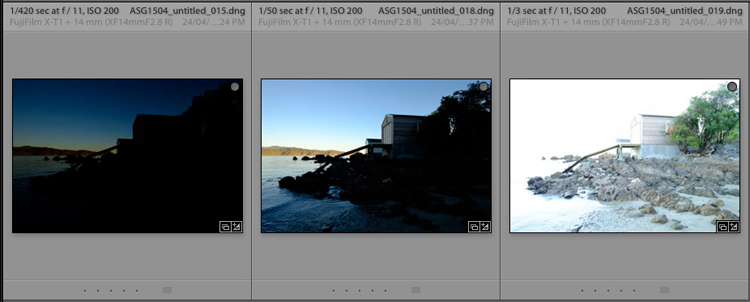
Here’s another example, this time taken with three photos with a total of seven stops difference in exposure. You probably don’t need to make the exposure differences that drastic, but it’s always interesting to try.

HDR merge in Lightroom

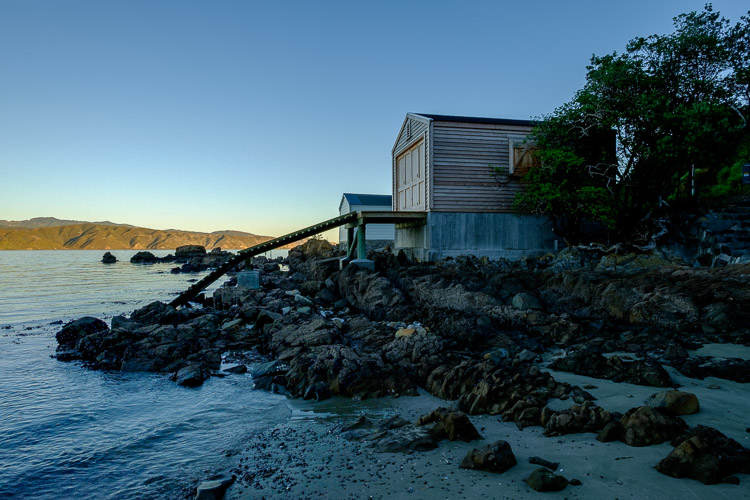
Here’s the result.

HDR merge in Lightroom

The water looks different in each version of the photo so I set Deghost to High. The deghosted area (shown in red below) covers all of the water – when I compare the three original images I can see that Lightroom has used the water from the first photo in the sequence, avoiding the ghosting that would be caused by merging three photos with a different level of water in each shot.

HDR merge in Lightroom

Can’t find your new HDR file?

By the way, if you’re not sure where to find the newly created HDR file, set Sort to File Name in Grid View, and it will appear next to the first image in the sequence (also make sure you are in the folder of originals, not inside a collection).

HDR merge in Lightroom

Here's an extreme contrast example

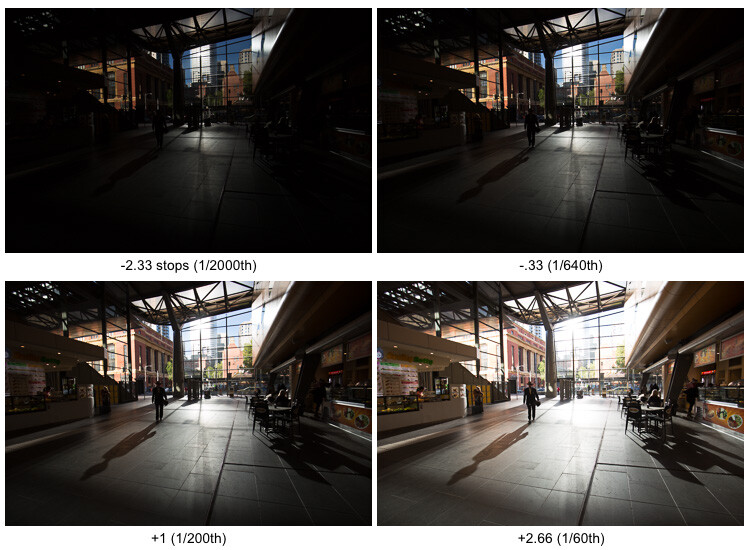
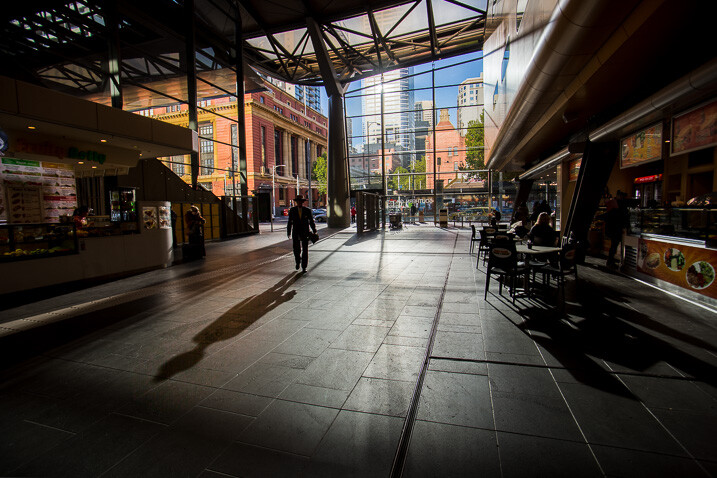
Here’s an extreme contrast example – a tototal 5 stops bracketed to keep details in the buildings outside, and capture some inside.

The final HDR merged and edited version.

The final HDR merged and edited version.

Final notes

You should be aware that it is best to carry out the HDR merge process with files that haven’t yet been edited in the Develop module, as Lightroom only retains some of the adjusted settings. These are taken from the most selected photo and applied to the HDR image. They are listed below (all other settings are returned to their default):

  • Presence sliders (Saturation, Vibrance and Clarity).
  • HSL / Color / B&W panel
  • Split toning panel
  • Detail panel
  • Lens Corrections (excluding Upright)

Lightroom also requires access to the original photo files. It can’t create a HDR image from Smart Previews alone.

Over to you

Have you tried Lightroom’s HDR merge tool? If so, what did you think? Is it a worthwhile addition to Lightroom’s toolset or would you prefer to use a plug-in. Please let us know in the comments below.

Mastering Lightroom

If you’d like to learn more about Lightroom, then please check out my Mastering Lightroom series of ebooks.

googletag.cmd.push(function() {
tablet_slots.push( googletag.defineSlot( “/1005424/_dPSv4_tab-all-article-bottom_(300×250)”, [300, 250], “pb-ad-78623” ).addService( googletag.pubads() ) ); } );

googletag.cmd.push(function() {
mobile_slots.push( googletag.defineSlot( “/1005424/_dPSv4_mob-all-article-bottom_(300×250)”, [300, 250], “pb-ad-78158” ).addService( googletag.pubads() ) ); } );

The post Step by Step How to Use HDR Merge in Lightroom by Andrew S. Gibson appeared first on Digital Photography School.


Digital Photography School

 
Comments Off on Step by Step How to Use HDR Merge in Lightroom

Posted in Photography


Student takes 2016 Zeiss Photography Award top prize

13 Apr

$ (document).ready(function() { SampleGalleryV2({“containerId”:”embeddedSampleGallery_3406645931″,”galleryId”:”3406645931″,”isEmbeddedWidget”:true,”standalone”:false,”selectedImageIndex”:0,”startInCommentsView”:false,”isMobile”:false}) });

A 25-year-old photojournalism student beat a host of professionals to Zeiss’s €15,000 top prize in its first Zeiss Photography Awards. Tamina-Florentine Zuch’s project about train travel in India took her six weeks to shoot, and explores how the nation behaves on the world’s most extensive railway network. Zuch wins Zeiss lenses to the value of €15,000, and will receive her prize during the Sony World Photography Award ceremony in London this month.

Zeiss says its inaugural competition, with the theme ‘Meaningful Places’, attracted 22,000 images from 3139 photographers across 116 countries and was successful enough that the company will repeat the exercise next year.

Runners up in the competition included Melanie Hübner (Germany), Francisco Salgueiro (Portugal), Patricia Ackerman (Argentina), Helen Mountaniol (Ukraine), Jorge Lopez Munoz (Spain), Erez Beatus (Australia), Lasse Lecklin (Finland) and each of them will have their work shown at the Sony World Photography Awards exhibition.

For more information on the awards, and to see the entries of all of those shortlisted, visit the Zeiss Photography Award website.


Press release:

ZEISS award for new perspectives

The winner of the first-ever ZEISS Photography Award has been chosen. The prize goes to Tamina-Florentine Zuch from Hannover with her photo series documenting a train journey through India.

“Meaningful Places” was the theme of the first-ever ZEISS Photography Award “Seeing Beyond,” which invited professional photographers and ambitious amateurs to showcase for the first time their talent to a renowned jury and to the broader public. The contest attracted 3,139 photographers from 116 countries – from Albania to Zimbabwe. A total of 22,000 images were submitted. “The results are superb – we were really excited by the breadth and quality of the applications,” praised Scott Gray, CEO of the World Photography Organisation, which organizes the ZEISS Photography Award.

In Tamina-Florentine Zuch, 25, the ZEISS Photography Award has found a worthy winner. Zuch, a student of photojournalism and documentary photography in Hannover, traveled through India by train last year for a period of six weeks. Her pictures show children sleeping in hammocks in stuffy train carriages, men risking their lives as they ‘surf’ railway cars, and exotic landscapes as they pass by. Her “Indian Train Journey” brings this journey to life. Some of the images, which are very intimate, demonstrate Zuch’s photographic mastery at such a young age, her patience, and her sensitivity and tact in dealing with subjects from a completely different culture. “Tamina Zuch has an incredible eye for composition, light and a feel for the right moment. She combines these characteristics again and again in her pictures,” said Steve Bloom, one of the three jurors, enthusiastically. “‘Indian Train Journey’ is a very personal and poetic journey that is told by a fresh, young voice,” added Hans-Peter Junker, juror and editor-in-chief of the reportage magazine View.

As the winner, Zuch will receive ZEISS lenses of her choice for a total value of EUR 15,000, as well as an offer to cooperate further with ZEISS. Seven other photographers – Melanie Hübner (Germany), Francisco Salgueiro (Portugal), Patricia Ackerman (Argentina), Helen Mountaniol (Ukraine), Jorge Lopez Munoz (Spain), Erez Beatus (Australia), Lasse Lecklin (Finland) – made it to the shortlist, which gives them the opportunity to present their work at the Sony World Photography Awards Exhibition at Somerset House in London from April 22 to May 8, 2016.

In 2017 the ZEISS Photography Award will enter a new round, with a different theme. “We want to create a platform for photographers to show their art and their idea of creation to an interested public, and to pay tribute to that,” said Dr. Winfried Scherle, Executive Vice President Consumer Optics Business Group of Carl Zeiss AG. And Scott Gray praises: “The ZEISS Photography Award provides photographers with an exciting opportunity to expand their creative boundaries. We look forward to working with ZEISS on more contests in the coming years.”

Articles: Digital Photography Review (dpreview.com)
 
Comments Off on Student takes 2016 Zeiss Photography Award top prize

Posted in Uncategorized


Expanding the ISS: Inflatable Space Hotel Room Sent into Orbit

13 Apr

[ By WebUrbanist in Boutique & Art Hotels & Travel. ]

space hotel room

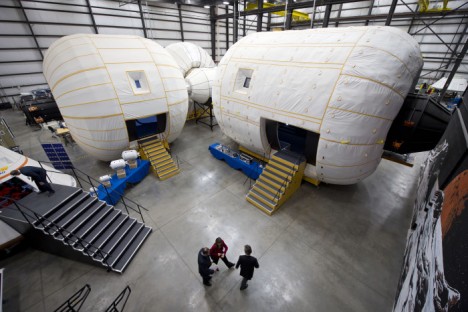
A new space hotel room will be the first addition to the International Space Station in years, part of a test to see whether inflatable rooms can serve as more compact and space architecture on demand, unlike rigid frame space hotel concepts.

The Bigelow Expandable Activity Module (BEAM) developed by an aerospace company in Las Vegas is comprised primarily of a light and flexible fabric that unfolds when inflated, creating a bubble-shaped room. The eventual plan: use this as a prototype for space tourism, creating housing when and where it is needed both attached to and beyond the ISS.

NASA Deputy Administrator Lori Garver is given a tour of the Bigelow Aerospace facilities by the company's President Robert Bigelow on Friday, Feb. 4, 2011, in Las Vegas.  NASA has been discussing potential partnership opportunities with Bigelow for its inflatable habitat technologies as part of NASA's goal to develop innovative technologies to ensure that the U.S. remains competitive in future space endeavors. Photo Credit: (NASA/Bill Ingalls)

Launched into orbit with help from SpaceX, the module is lighter and more compact, thus more cost- and fuel-efficient to ship, and, when not in use: it can also fold back down for storage. A testing period over the next few years will help researching astronauts evaluate its performance, including its ability to withstand micro-meteoroid impacts, radiation and temperature fluctuations.

Share on Facebook


[ By WebUrbanist in Boutique & Art Hotels & Travel. ]

[ WebUrbanist | Archives | Galleries | Privacy | TOS ]


WebUrbanist

 
Comments Off on Expanding the ISS: Inflatable Space Hotel Room Sent into Orbit

Posted in Creativity


Facebook’s open source Surround 360 captures 3D-360 video at up to 8K

13 Apr

$ (document).ready(function() { SampleGalleryV2({“containerId”:”embeddedSampleGallery_7094366011″,”galleryId”:”7094366011″,”isEmbeddedWidget”:true,”standalone”:false,”selectedImageIndex”:0,”startInCommentsView”:false,”isMobile”:false}) });

Facebook has introduced the Surround 360, which captures 3D, 360 degree video using a total of 17 cameras and can output resolutions of up to 8K per eye. Unusually, Facebook will be making both the camera and processing software open source to give developers the opportunity to improve both.

The Surround 360 itself features 17 synchronized cameras: 14 horizontal, a fisheye on top and two more on the bottom. Each camera has a global shutter (which eliminates rolling shutter) and has been designed for long periods of operation without overheating. Raw Bayer data is captured, which is later processed in the stitching software. All 17 cameras are bolted onto an aluminum chassis so everything stays in place.

Facebook says it has used Point Grey industrial cameras in the Surround 360, which hints at the use of Sony 2nd generation Pregius CMOS sensors with global shutters. The lenses used are 7mm F2.4 lenses designed for up to 1″-type sensors, which could even mean the use of the latest Sony IMX253 or IMX255 chips. If that’s the case, then these lenses are roughly equivalent to 19mm.

With incredible amounts of data coming from all of those cameras Facebook uses a Linux-based PC with a RAID 5 SSD array that shares the writing out across eight drives simultaneously. The company has made controlling the camera rig easy, via a web-based interface that allows users to adjust shutter speed, exposure, frame rate and gain.

The stitching software uses the concept of optical flow to resolve disparities between what pairs of cameras can see. The company says this method is ‘mathematically trickier’ than traditional systems, but yields better results. The end results are 3D/360 videos which can be output at 4K, 6K or 8K per eye. Videos can be viewed on Oculus Rift and Gear VR headsets using Facebook’s Dynamic Streaming codec. Videos can also be output and shared on Facebook and other websites.

A big part of the Surround 360’s story is that Facebook is opening up both the camera blueprints and processing software to developers, stating that ‘we know there are ideas we haven’t explored’ and ‘we know from experience that a broader community can move things forward faster than we can.’ The company says that the design and code will be on GitHub this summer.

More technical information can be found on Facebook’s developer site, while consumer-friendly info about the camera can be found here.

Articles: Digital Photography Review (dpreview.com)
 
Comments Off on Facebook’s open source Surround 360 captures 3D-360 video at up to 8K

Posted in Uncategorized


Machine 3D-Paints ‘New’ Rembrandt After Studying the Master

13 Apr

[ By WebUrbanist in Art & Drawing & Digital. ]

remnant design diagram

As part of The Next Rembrandt, a multi-year collaborative project, a team of engineers trained a computer not only to understand the works of this famous Dutch master but also to expand his portfolio. Ultimately, the machine created a portrait that is at once brand new and yet also looks (and feels) like a lost original work of Rembrandt Harmenszoon van Rijn.

next rembrandt studied painting

An incredible combination of both machine learning and 3D printing, the project involved digitally tagging data in scanned versions of the artist’s various known pieces. Resulting patterns were subsequently explored by computers, including: brush strokes, approaches to organic detail and uncanny ability to depict human emotions.

next rembrandt new original lost work

The result is an algorithmic creation that mirrors the style of the master and depicts a Caucasian male in his thirties, with facial hair, black clothes, a white collar and a hat, facing to one side.

lost remnant detail view

Humans input those general parameters, but did not have a say in the look or feel of the final print. A 3D texture was added to the work based on the height and depth of paint applied to Rembrandt’s actual works.

next rembrandt

The two-year project was a collaboration between Microsoft, financial firm ING, Delft University of Technology and two Dutch art museums – Mauritshuis and Rembrandthuis. A public exhibition of the portrait is planned and details of the display will be released at a later date.

From the project creators: “It’s been almost four centuries since the world lost the talent of one its most influential classical painters, Rembrandt van Rijn. To bring him back, we distilled the artistic DNA from his work and used it to create The Next Rembrandt. We examined the entire collection of Rembrandt’s work, studying the contents of his paintings pixel by pixel. To get this data, we analyzed a broad range of materials like high resolution 3D scans and digital files, which were upscaled by deep learning algorithms to maximize resolution and quality. This extensive database was then used as the foundation for creating The Next Rembrandt.”

Share on Facebook


[ By WebUrbanist in Art & Drawing & Digital. ]

[ WebUrbanist | Archives | Galleries | Privacy | TOS ]


WebUrbanist

 
Comments Off on Machine 3D-Paints ‘New’ Rembrandt After Studying the Master

Posted in Creativity


Swirly bokeh: Lensbaby announces Twist 60 lens

12 Apr

Lensbaby has announced the Twist 60, a new lens for creative photography. From what we can see, the Twist 60 is all about bokeh. The 12 aperture blades and a maximum aperture of F2.5 should give a soft, well-rounded bokeh with good separation of the subject from the background, but the real ‘twist’ is just that – the twist. Specifically the twisty, swirly bokeh. Lensbaby claims the lens is modeled after Joseph Petzval’s Classic 19th-century design, giving photographers the ability to introduce and control that distinctive circular bokeh that is unique to Petzval-type lenses.  

We are interested to see how this lens performs, as it is almost half the price of similar lenses recently announced and it is available (via the Lensbaby Optic Swap System) in a wide variety of mounts.

$ (document).ready(function() { SampleGalleryV2({“containerId”:”embeddedSampleGallery_1483721425″,”galleryId”:”1483721425″,”isEmbeddedWidget”:true,”standalone”:false,”selectedImageIndex”:0,”startInCommentsView”:false,”isMobile”:false}) });

The Twist 60 is available for pre-order starting April 12, 2016 and is currently offered in Canon, Nikon, and Sony E mounts. It is priced at $ 279.95/£196 for the full lens or $ 179.95/£126 for the Twist 60 Optic (for use with other Lensbaby Optic Swap System lenses).


Press release:

Lensbaby’s New Twist 60 Lens Exudes Pure Magic of Vintage Photography

Company’s love of old lenses inspires new creativity with classic image elements optimized for full frame photographers
 
Portland, OR – April 12th, 2016 – Lensbaby, makers of award-winning creative effects lenses, optics and accessories, today announced the availability of the Twist 60 lens. Twist 60 helps creative photographers find their visual voice by seeing the world differently.
 
This metal-bodied 60mm f/2.5 lens with gold anodized accents creates powerful portraits, spotlighting subjects by freeing them from their background and surrounding them with swirly blur and enhanced vignette. The brighter the aperture, the greater the swirl and the greater the vignette.
 
“Twist 60 embodies our love of old lenses and their unique ways of helping photographers discover creative possibilities,” said Craig Strong, Lensbaby Co-Founder & Chief Creative Officer. “True to an 1840 design by Joseph Petzval, this lens reveals striking separation between subjects and their background, a quality that modern lens designs lack.”
 
Twist 60 Lens specs:
? 12 blade f/2.5-22 aperture
? 60mm focal length
? Twisty, swirly blur
? Recommended for use on full frame cameras
? Available in Canon EF, Nikon F, and Sony E mounts
? 4 elements in 3 groups
? Filter threads: 46mm
? Black anodized body with gold anodized aperture ring
? Minimum focus distance – 18”
 
Availability
Twist 60 lens retails for $ 279.95 and is available via pre-order beginning April 12, 2016 (shipping May 5th, 2016). Twist 60 Optic will also be sold separately for use with other Lensbaby Optic Swap System-compatible lenses. It retails for $ 179.95. For best results, when using it in a tilting Lensbaby such as the Composer Pro, photographers should shoot with Twist 60 pointed straight ahead. Lensbaby products are available at lensbaby.com, B&H, Adorama, and from select specialty photo stores worldwide.
 
About Lensbaby
For over a decade, photographers have relied on Portland, Oregon based Lensbaby to help them break free of routine, tinker, and open themselves up to unexpected results – dancing, playing and delighting in what’s possible with a creative lens and their imagination.

Lensbaby makes award-winning creative effects lenses, optics and accessories that follow this philosophy, including the Velvet 56, a versatile portrait and macro lens; their unique Optic Swap System, which lets photographers swap their optic and tilt their lens for limitless effects; and mobile lenses that transform everyday smartphone photography. Lensbaby products are sold and distributed worldwide. For more information, visit www.lensbaby.com

Lensbaby Twist 60 specifications

Articles: Digital Photography Review (dpreview.com)
 
Comments Off on Swirly bokeh: Lensbaby announces Twist 60 lens

Posted in Uncategorized