RSS
 

Archive for April, 2016

Flexible sheet camera concept could lead to bendable capture devices

14 Apr

Researchers at Columbia University are working to produce a flexible sheet camera with stretchable lenses. The program aims to create very thin, high resolution cameras that can be wrapped around surfaces like car panels. Currently in concept form, the sheet lens array that such a camera might use has been developed to produce a seamless image on a flexible sensor when it is bent or wrapped around a physical object.

The focus of the research is in creating flexible lenses that are capable of changing shape (and hence the effective focal length) as they are stretched and compressed so that the imaging sensor can record a detailed image whatever the field of view.

With fixed lenses, gaps appear between the coverage of the lenses as the substrate is bent (left), but in the researcher’s flexible lens example (right) the lenses bend with the substrate and offer continuous coverage of the subject.

In previous attempts at flexible lens arrays only the substrate has been flexible, and as the sheet of lenses has been bent gaps have appeared in the subject coverage as the angle between the lenses increased beyond their individual field of view. These gaps lead to aliasing artifacts in the final image that can’t be corrected in post-processing software. In this new concept the lenses are also flexible and they stretch as the sheet bends, altering their focal length and providing better sampling of the subject.

So far the research has successfully produced a sheet of silicone with lenses molded on one side and a diffuser behind a sheet of apertures on the other. The apertures act as a low pass filter ensuring light from each molded lens reaches only one point on the viewing diffuser.

Images created with the substrate bend by different degrees, showing how the field of view changes

The system hasn’t actually been used with a sensor yet, but the study did use it to project images on to the diffuser screen to determine how effective it would be. Bending the sheet increased and decreased its field of view, or effective focal length, and the images were displayed without missing areas. All that is required now is a flexible sensor to go with it.

An array of lenses was formed by pouring silicone into a metal mold

The intention of the project is to work towards finding a way of making sheets of lenses to work with photosensitive materials that will record images when wrapped around real-world objects. The researchers want ultimately be able to produce these sheet cameras in roll format at a low cost so that the sheets can be cut to size to suit specific uses.

The released information suggests a sheet camera could be wrapped around the panels of a car to give the driver a view from all angles. Alternatively sheet cameras could be used by consumers to take normal pictures but with the user bending the sheet to alter the field of view, or zoom effect, of the system.

For more information see the project’s page on the University of Columbia website.


Press release:

Flexible Sheet Cameras With Elastic Optics

In this project, we pursue a radically different approach to imaging. Rather than seeking to capture the world from a single point in space, our goal is to explore the idea of imaging using a thin, large, flexible sheet. If such cameras can be made at a low cost (ideally, like a roll of plastic sheet), they can be used to image the world in ways that would be difficult to achieve using one or more conventional cameras. In the most general sense, such an imaging system would enable any surface in the real world to capture visual information. While there is significant ongoing work on the development of flexible image sensors, our interest here is in the design of the optics needed to form images on such sensors.

At first glance one might imagine that a simple lens array aligned with a flexible detector array would suffice – its field of view (FOV) can be varied by simply bending it. What is perhaps less apparent is the fact that, in a curved state, the FOV can end up being severely under-sampled. This under-sampling leads to a captured image that is not bandlimited. Thus, the Nyquist sampling criterion is violated and the image will suffer from aliasing artifacts when reconstructed. It is important to note that these artifacts cannot be removed via post-processing since scene information is lost during image formation.

To address the above aliasing problem over an entire range of sheet curvatures, we propose the design of a deformable (elastic) lens array. We show that, if designed carefully, the deformable lenses of the array will change shape (and hence focal length) under bending forces in a way that mitigates aliasing. A remarkable feature of our design is that the lens array can achieve aliasing compensation passively, without the use of any per-pixel actuation or control. Our optics can be combined with a flexible sensor array to obtain a complete sheet camera. This project was supported by the Office of Naval Research (ONR).

Articles: Digital Photography Review (dpreview.com)

 
Comments Off on Flexible sheet camera concept could lead to bendable capture devices

Posted in Uncategorized


World’s Tallest Tower: Dubai Superstructure by Santiago Calatrava

14 Apr

[ By Steph in Architecture & Cities & Urbanism. ]

worlds tallest tower 1

Edging out the record-holding Burj Khalifa by just a hair, the world’s tallest tower is set to rise into the Dubai skies by 2020 as the crown jewel of a new waterfront development. Neofuturist starchitect Santiago Calatrava, known for dramatic sweeping structures with complex engineering, won an international competition to design the as-yet-unnamed superstructure offering panoramic vistas of the city in February, and new images and details have just been released.

worlds tallest tower 4

worlds tallest tower 2

Taking design inspiration from the contours of a lily flower, the tower features Calatrava’s signature illuminated cables stretching from its length to the floor of the plaza. Floor after floor of luxury boutique hotel rooms lead higher and higher into the air, topped with the ‘pinnacle room’ observation space. Lushly planted decks envisioned as recreations of the Hanging Gardens of Babylon offer additional views.

worlds tallest tower 3

worlds tallest tower 5

The shimmering spire is meant to be a landmark for Dubai Creek Harbour, a new district that developers hope will become a trendy new residential and leisure destination for the city, and a new tourist attraction completed in time for the Expo 2020. It’s a flashy addition to Dubai’s many flashy projects, from those that have actually been built to those that have been squashed and abandoned. Calatrava calls it “a symbol of an abiding belief in progress.’

worlds tallest tower 6

Since so many of Dubai’s announced projects never actually get off the ground, it remains to be seen whether this tower will end up snatching the crown from the 2,722-foot-tall Burj Khalifa, a mega-tall skyscraper completed in 2009 as part of another large-scale mixed-use development.

Share on Facebook


[ By Steph in Architecture & Cities & Urbanism. ]

[ WebUrbanist | Archives | Galleries | Privacy | TOS ]


WebUrbanist

 
Comments Off on World’s Tallest Tower: Dubai Superstructure by Santiago Calatrava

Posted in Creativity


Bird Biomimicry in Action: 12 Avian-Inspired Jets, Drones & Cars

14 Apr

[ By Steph in Design & Products & Packaging. ]

bird inspired skeleton race car 2

The very same evolution-driven characteristics that enable birds to glide effortlessly through the air can be applied to everything from drones to bullet trains to make them faster, lighter, more nimble and all around cooler looking. Avian-inspired aircraft with nature’s most aerodynamic silhouettes, cars with frames modeled on bird skeletons, gull wing fighter jets and even the U.S. military’s current B2 Spirit Bomber look to the skies for design and performance improvements.

Yamaha with Swan Wing-Shaped Paneling

bird inspired yamaha

bird inspired yamaha 2

With an overall design inspired by flowing garments on a high fashion runway, the Yamaha 04GEN scooter concept has an elegant birdlike frame and two transparent body panels modeled on the wings of the swan. The likeness is especially evident when the panels are flipped up. The experimental concept model was unveiled at the first Vietnam Motorcycle Show in Ho Chi Minh City, and there’s no word as to whether it will actually go into production.

Lockheed Stratoliner

bird inspired lockheed

bird inspired lockheed 2

Designer William Black created the Lockheed Stratoliner in tribute to the bar-tailed Godwit, a bird that holds the record for traveling the farthest without a single stop (7,258 miles.) Designed for long distances, it uses four cryogenic hydrogen turbofans as its engines, emitting zero pollution. The oversized wings and swooping body come straight from the Australian wading bird, as well. Considering that hydrogen-powered flight is still far off from being a reality on such a large scale, this is destined to remain a concept for the indefinite future.

Kingfisher-Inspired Shinkansen Bullet Train
bird inspired kingfisher train

bird inspired kingfisher train 2

bird inspired kingfisher train 3

Engineer Eiji Nakatsu, a general manager of the technical development department for Japan’s high-speed bullet trains, also happens to be a birdwatcher, and not just by coincidence. He realized studying the flight of birds could help make trains faster and lighter, pushing the boundaries of innovation in his field. The typical train nose design was creating incredibly loud sonic booms as it emerged from tunnels, and needed some tweaking. Nakatsu recalled the way a kingfisher’s scoop-like beak enables it to dive into water at high speed with barely a splash, and applied the same shape to the train, eliminating the noise problem and enabling it to run at higher speeds.

Swan Plane, Chicken Aircraft & Seagull Jets by Alex Brady
bird inspired swan brady

Bird Inspired Seagull Jet Brady

bird inspired chicken brady

An odd swan-shaped plane, seagull-inspired fighter jets and an aircraft that combines the forms of chickens and dragons are among the fantastical aircraft concepts by British artist Alex Brady. Admitting that they’re 100 percent whimsical, Brady isn’t too concerned about the opinions of experts, who have noted that these creations couldn’t fly without the invention of new propulsion systems. His other designs take inspiration from manta rays, warthogs, wood lice, porpoises and even a pterodactyl.

Next Page – Click Below to Read More:
Bird Biomimicry In Action 12 Avian Inspired Jets Drones Cars

Share on Facebook


[ By Steph in Design & Products & Packaging. ]

[ WebUrbanist | Archives | Galleries | Privacy | TOS ]


WebUrbanist

 
Comments Off on Bird Biomimicry in Action: 12 Avian-Inspired Jets, Drones & Cars

Posted in Creativity


10 Ideas to Instantly Improve Your Photography Composition

14 Apr

It is an illusion that photos are made with the camera; they are made with the eye, heart and head. – Henri Cartier-Bresson

My photography training took place back in the early 90s, at an intense technical photo school in California. I love tech in all forms, and I love reading my camera manual. I love the precision and procedure of processing my own colour film, and I love learning the ever-advancing skills on photo software – I am a total tech nerd. But technical knowledge will only get you so far; it’s really the second part of the story in photography. Photography composition is the first part.

EPESTENIDEASDPS 01

The first part is your vision of what you want your photography to be, and learning the ability to compose compelling images. Your technical knowledge will only give you the ability to execute your vision, and make the most of the composition that you have created. It can’t replace the ability to see and to compose stunning compositions.

So all things should flow from a good composition. And when we are learning about composition I like to keep in mind that quote that may or may not have been spoken by Picasso (it’s under dispute on the internet): “Learn the rules like a pro and break them like an artist.” Rules, guidelines, ideas about composition will give you a place to start, help develop your skills and propel you out of a rut. But they should not be followed slavishly or forever.

Here are my ideas on what you can do to make your compositions more captivating. But, bear in mind that creating totally unique compositions comes down to creating your own style . So don’t be swayed too much by other photographers’ advice on this subject. Photography is an examination of the world through your eyes, it’s totally subjective, totally about connecting with what inspires and excites you. Just pick up ideas that make sense and motivate you.

EPESTENIDEASDPS 02

To practice, pick one concept from below that jumps out. Don’t take all these ideas and try to incorporate them into your photography all at once. Pick one and really embrace it – then the results will come.

So here are my 10 favourite tips on how you can instantly improve your composition.

1. Light

“Light makes photography. Embrace light. Admire it. Love it. But above all, know light. Know it for all you are worth, and you will know the key to photography.” George Eastman

For me more than anything, photography is about light, and learning to identify interesting light is one of the best skills to learn. Light that is doing something interesting, or is beautiful or colourful; will take a good subject and turn it into something completely amazing.

Light is my starting point when I am taking photos. It is the thing I consider first, and what affects me the most when deciding what to photograph. Look for light doing strange and wonderful things – creating long shadows, diffused light falling over a broken wall, reflecting, creating bursts of colour. Look for the colour of light, too: the cool blue light before dawn, the cold, almost transparent light of a winter’s afternoon, the rich orange light of near twilight – and how that affects your subject. Think always: how can I get the best out of the light that I am photographing?
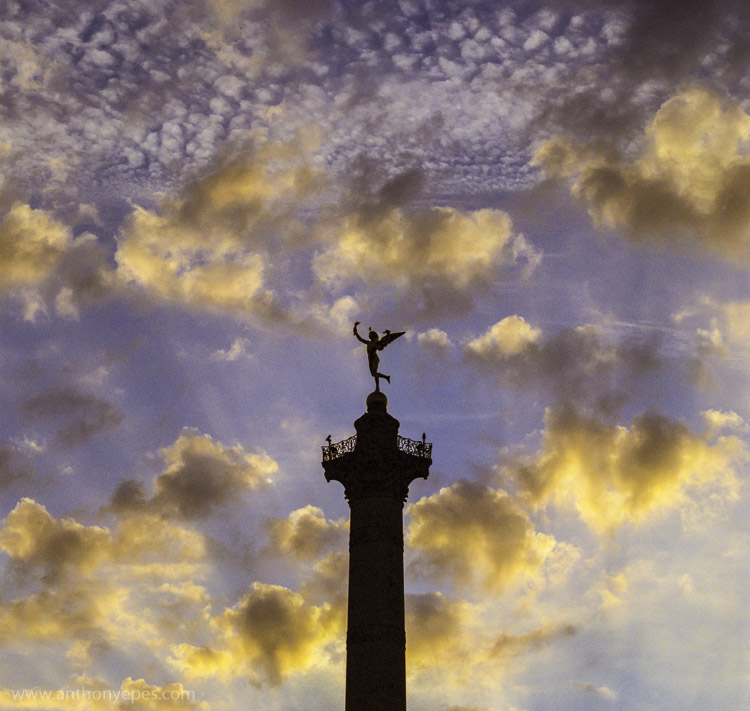
EPESTENIDEASDPS 03

In the photograph above, the beautiful light is obvious. I have used the silhouette of the column, to contrast the dappled light which is illuminating the clouds beautifully. This contrast makes the light look spectacular because it’s showing off its range of colours and depth against the heavy dark column.

Learning to notice light in all its forms and colours is an excellent way to improve your compositions.

When you see a subject you wish to photograph, look at the light around it. If it’s not interesting light – if it’s flat, boring, or draining the sense of colour – have a look at what else is happening with the weather. Maybe you can wait for clouds to pass, come back later or earlier in the day, see if you can organize the composition to incorporate light from other sources. It doesn’t have to be natural light. Artificial light, and particularly the play of natural and artificial light, can make an inspirational combination.

Here’s another photo where the main subject is the light, but this one is more subtle. The absence of light is most pronounced in this shot, and then all of sudden the glow of dawn light is reflected in the windows. Again, there is a contrast of darkness against light.

EPESTENIDEASDPS 04

There is lots of negative space in this photo, an overload of industrial blandness, wastelands. And then these two buildings and the sudden glow of the charming light.

2. Simplicity: think in threes

“The ability to simplify means to eliminate the unnecessary so that the necessary may speak.” Hans Hofmann

Simplicity is often very hard to accomplish, and can be more challenging than more complex compositions. I find there can be a misunderstanding about how to achieve simplicity in your photos. People often think it’s about taking a photo of one subject. But actually I rarely take photos which contain only one subject. Usually there has to be one subject with at least one, but usually, two supporting elements. So I like to say – think in threes.

Humans love to think in threes – (breakfast, lunch, dinner; past, present, future; and small, medium, large). We like to find rhythms and patterns in everything.

EPESTENIDEASDPS 05

This photo above is a very good example. How many elements make up this photo? Well, first you have the beautiful blue gradated sky, then the wild, chaotic pattern of the bare branches. That’s all very nice, but it’s the third element that is the subject, and that really makes the photo – the two men blending into the branches, while creating distinct human shapes. The photo without any one of the elements wouldn’t be as interesting.

I am a particular fan of very simple compositions when photographing people and I often use plain and colourful backgrounds. In the photo below, again there are three strong elements: bright pastel colours, the two guys and the strong lines.
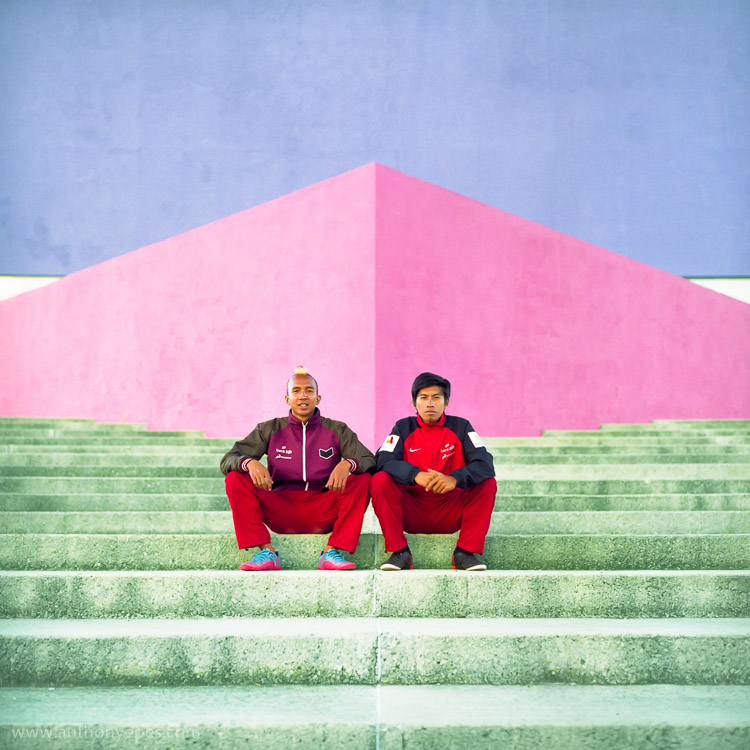
EPESTENIDEASDPS 06

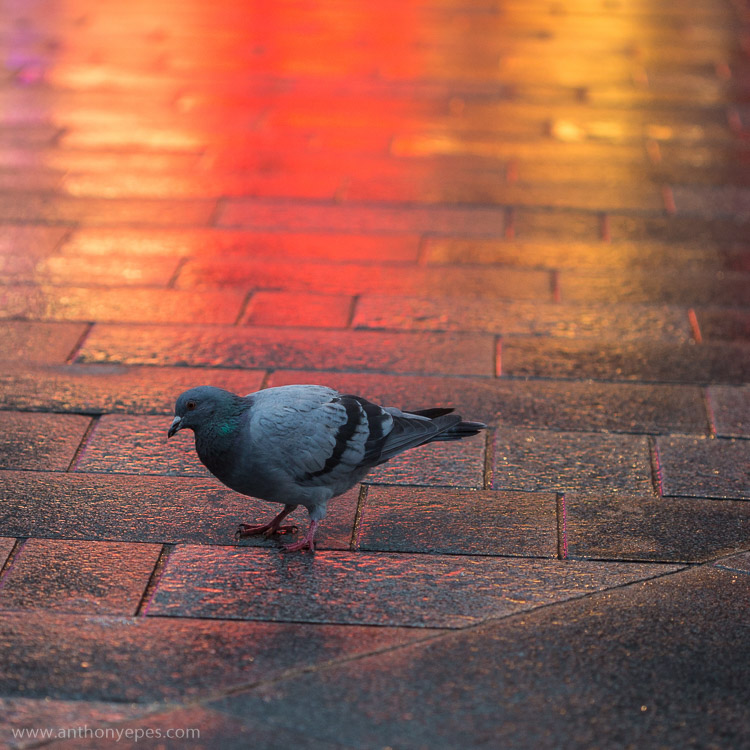
It also works when photographing pigeons! Another photo with three elements: the grey, slightly dishevelled pigeon, the wash of colour, and the texture and lines of the wet paving stones.
EPESTENIDEASDPS 07

3. Move your feet

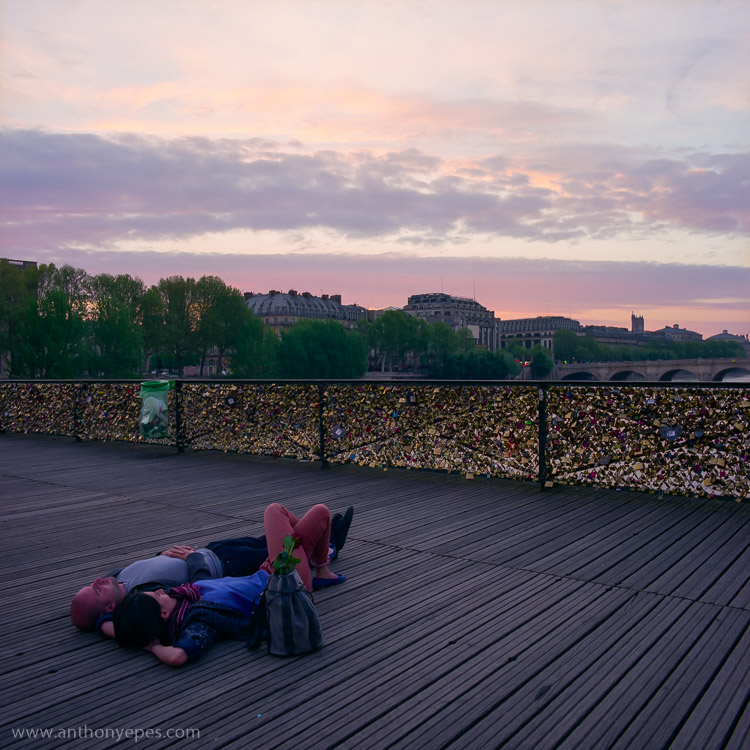
When you are looking at a professional photographer’s work, one thing that they do more than an amateur photographer is move. You may have a killer shot laid out before you, but you still have to find the killer angle that will make the shot really special. Every shot has a perfect angle, and it’s your job to find it. If you are shooting a subject you love and then look at your images and are disappointed with what you find, I guarantee it’s because you haven’t found the perfect angle.

Get up on that roof, lie on the floor, move your feet around until what you see in frame is the best possible angle, the best possible position you can manoeuvre yourself into. Get dirty if you have to. This requires patience (and good knees), and patience is one thing I think most amateur photographers need to develop more of.
EPESTENIDEASDPS 08

There is one particular culprit in our kit that discourages us to move, and makes many of us lazy – a zoom lens. This should NEVER be a replacement for moving around a scene and finding the best angle. Do not fall into the trap that just because you have the subject in frame you can just zoom in to get it. Compose your best possible shot in frame, zooming in only if it’s totally the right thing to do , and not as a default option for moving. My best advice for zooming is pick a focal length, then move your feet and find the angle you need.

4. Get closer

Robert Capa said – “If your pictures aren’t good enough, you are not close enough.”

This concept reminds me of when I once read about a famous chef, who believes that the difference between home cooks and professionals is that home cooks are afraid of heat, and don’t turn their gas hobs up high enough. It’s the same with photography – obviously!

EPESTENIDEASDPS 09

If you feel yourself not wanting to get closer, then this is definitely an idea you should explore. You will almost be able to notice in your images that barrier of fear you set up of getting closer because there will be a distance to your subject. Push through that fear, and your images will benefit from more intimate images. The iconic travel photographer Steve McCurry always photographs subjects within a few feet of himself. For him that is the distance that feels most intimate. That is his style.

Take a deep breathe, hold your fear in check, and just get closer. Investigate as though nothing is holding you back.

5. Build your photo

When I am out wandering around looking for things to shoot, I am looking for elements that I can combine. Often it starts with one thing; it could be anything – an odd looking person, a beautiful shaft of light, a piece of amazing graffiti on a pockmarked concrete wall. If one thing strikes me, I start to look around to find something else to build on that first element to make it more interesting.

EPESTENIDEASDPS 10

In this photo above I think you’ll agree that if you took away the light in the window you’d have a perfectly lovely shot. But that light is what makes it work. It’s that additional element, creating another layer of depth, and providing an echo almost of the church light of the same colour. I passed this spot on many mornings and often took this particular shot, but one morning the window light was on and it changed it from a beautiful scene into a great image.

6. Look behind you

I shoot in places where I often find myself surrounded by other photographers – the Eiffel Tower at Dawn, sunset on Westminster Bridge – and it continuously stuns me that almost every (or even every) photographer will be pointing the same way and shooting the same thing. Now of course a purple pink sunset over the Houses of Parliament is gorgeous – but that light will also be doing incredible things to everything around you. So, while everyone is going nuts at the obvious, do something different – turn around, walk down that alley way, do what everyone else is not doing.

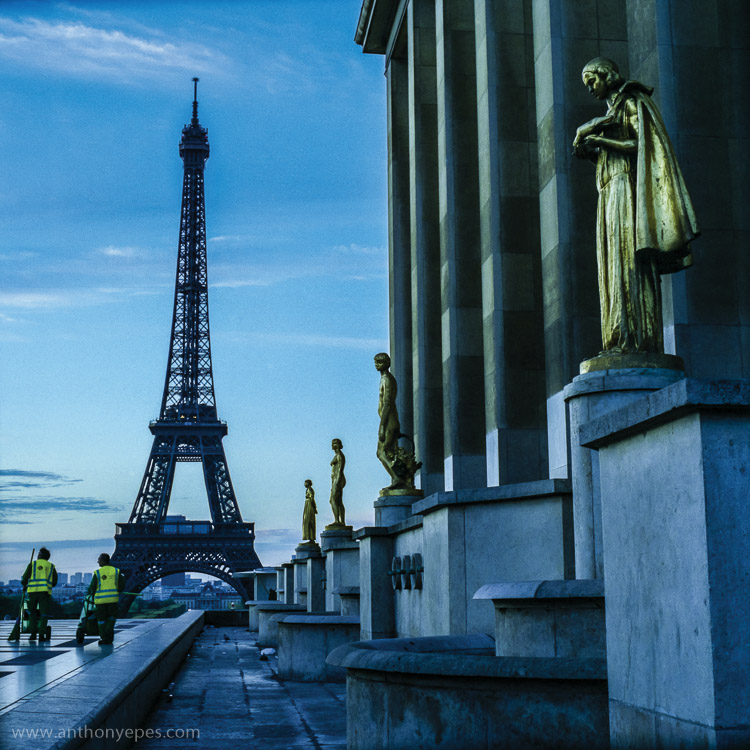
When I was in Paris I was intimidated about shooting the city. It’s the most visited city on earth (hence the most photographed). It is a small city and much of what’s amazing to photograph has been shot to death. I wanted to shoot the Eiffel Tower differently. Here is one shot I liked. You’ve got opulent gold, beautiful dawn sky, the iconic Eiffel Tower – all pretty so far – but then you have this injection of something that most photographers would have avoided – the cleaners.

Have the patience to explore other angles.
EPESTENIDEASDPS 11

The streets cleaners are a vivid contrast against the opulent gold, and while I kept the iconic Eiffel Tower in the shot, it’s really only as a background. Paris is obsessed with tidying itself, so this is also a nice little comment on the city.

7. Simplify your kit (and get really familiar with it)

I think most people generally have too much kit. If you have a lot and you don’t use it daily or even weekly, you’re not going to have that intimate knowledge of how it responds to situations and subjects. Try reducing to just one lens for a while and really get to know it.

When you have a lens that you know exactly what it will do in every situation, you’ll be able to execute even more interesting compositions, as you aren’t leaving things to chance. Chance is something that professional photographers will go out of their way to avoid.

8. Find beauty in the mundane

It’s easy to get a spectacular shot when you have a spectacular subject. But to make simple, boring, or mundane things look interesting – now that’s a challenge! But it’s a challenge I invite you to take up, because it’s an amazing way to train your eye to reveal the beauty of any subject.

This for me is a good example. There are three things that are interesting in this photo (can you guess?) You have the bold colours, and then a little bit of light falling on the wall to create a contrast, and the lines. Now if light was falling on the whole wall, or if there was no light at all, the photo would be totally boring. But can you see how just three simple elements working together can make a photo?

EPESTENIDEASDPS 12

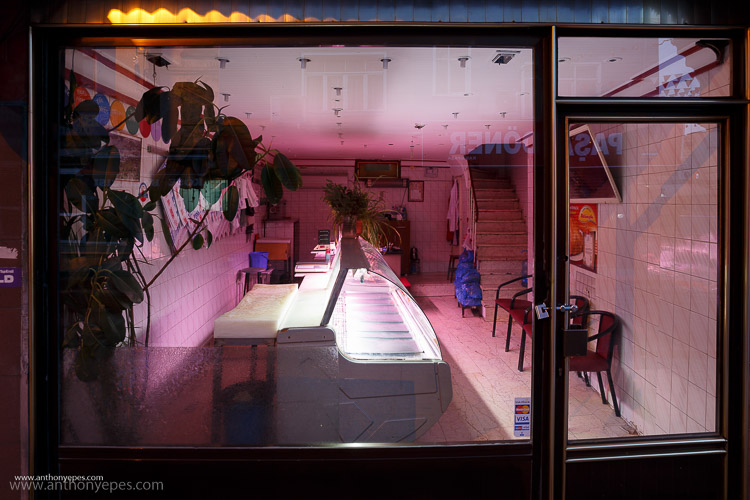
And as I am obsessed with colour and light, I admire this shot.
EPESTENIDEASDPS 13

It’s part of a longer story I am working on in Istanbul at dawn, but to me it shows that there is no subject that isn’t worthy of attention from your camera.

9. Pre-visualize

I love my digital camera, but I also still use film, and now that I’m mainly digital I appreciate the discipline and grounding I received from training in film. I use these skills to help me now.

One super important skill that will really help your compositions is pre-visualizing. It’s a skill you had to have when you shot film, because otherwise you were just shooting randomly.

Pre-visualizing is, “the ability to anticipate a finished image before making the exposure” (Ansel Adams said that, not me). What I love about this, is that it’s about creating space between seeing a shot, and taking it. It’s about being prepared, thinking through what you want to capture, looking at all of the elements of light, positioning, etc., and then picturing in your mind what the final image will look like. For example, imagine your final output was a print. Imagine the print in your hands. What would it look like? If you can see it clearly then your are pre-visualizing. If not, then keep working at it until you see the image in your head. When you have a solid picture in mind, take the shot.

EPESTENIDEASDPS 14

You can also use pre-visualization when you think about timing. A lot of landscape photography is really about waiting around for the perfect moment, that great light. Here is one situation (above) where I knew the scene had potential, but was pretty flat, and if nothing else happened it wouldn’t be interesting. So, I waited for the sun to rise just that little bit more and ping, the clouds were filled with pink light giving the photo more depth.

10. Look for patterns
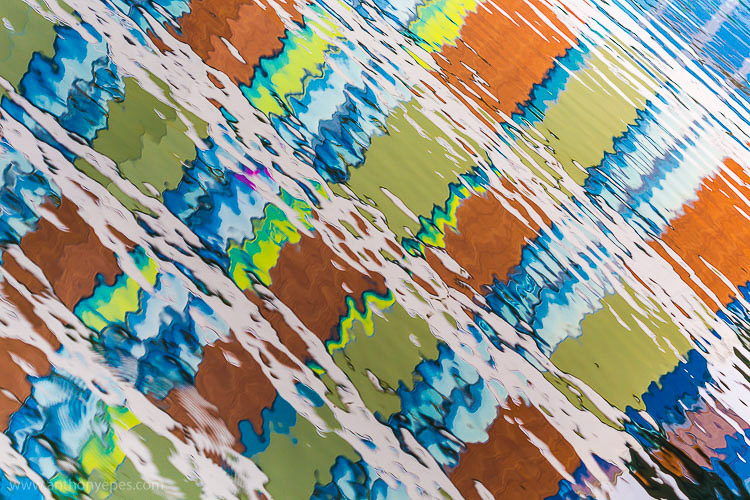
EPESTENIDEASDPS 15

Patterns come in many forms, and are extremely pleasing to the eye. A pattern is anything that is repetitive, that turns your subject from its innate quality, into something more abstract. So people will look and respond more to the pattern and shape that it makes, and less to the subject itself.

“Whatever emotional response a single design element arouses is multiplied when it is repeated in a pattern.” – Bryan Peterson

Patterns are particularly effective when you fill the frame with your subject, and totally cut off the rest of it. These are particularly interesting to look at.
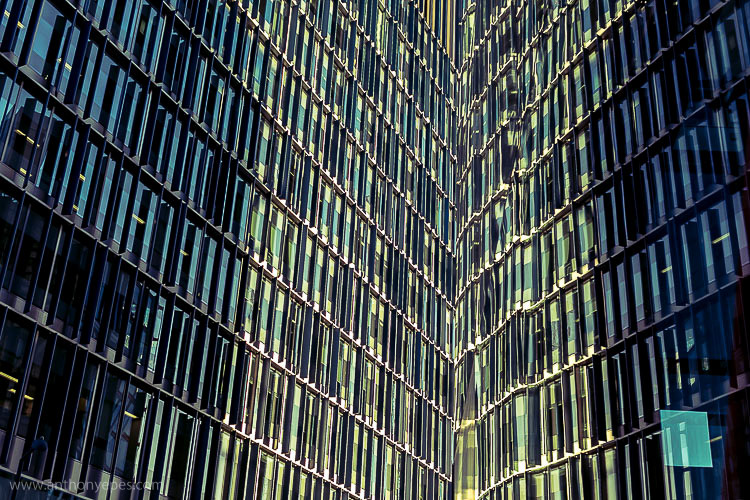
EPESTENIDEASDPS 16

Another way to create patterns is reflections. I love playing with reflections. Anywhere you have a bit of water, even just rain on the street, or shiny surfaces, you have the ability to play with reflections.
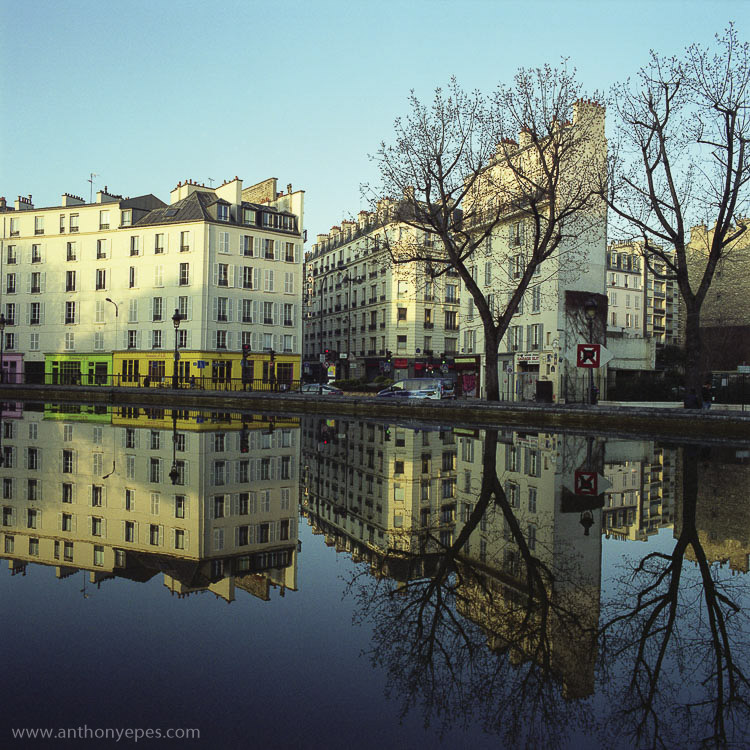
EPESTENIDEASDPS 17

Once you start looking out for patterns you’ll start seeing them everywhere.

Time to practice

I’d love to know what you think of these ideas, and if you put any into practice. Which compositional techniques do you use to enhance your photos?

googletag.cmd.push(function() {
tablet_slots.push( googletag.defineSlot( “/1005424/_dPSv4_tab-all-article-bottom_(300×250)”, [300, 250], “pb-ad-78623” ).addService( googletag.pubads() ) ); } );

googletag.cmd.push(function() {
mobile_slots.push( googletag.defineSlot( “/1005424/_dPSv4_mob-all-article-bottom_(300×250)”, [300, 250], “pb-ad-78158” ).addService( googletag.pubads() ) ); } );

The post 10 Ideas to Instantly Improve Your Photography Composition by Anthony Epes appeared first on Digital Photography School.


Digital Photography School

 
Comments Off on 10 Ideas to Instantly Improve Your Photography Composition

Posted in Photography


Hands on with the Hasselblad H6D 50c/100c

14 Apr

Hands-on with the Hasselblad H6D

Hasselblad claims that its new H6D is a completely new camera and is redesigned ‘from the ground up’ on a completely different platform. The new platform is one of electronics compared to the mechanical bias of its previous models, and consequently there is a good deal more communication between the back and the body – and the new HC lenses.

The general thrust is one of modernization with a mass of upgraded specification that brings the company’s flagship camera into line with the new Phase One XF body. And now of course there is the 100 million pixel sensor to match. One of the areas in which Hasselblad differentiates itself from its main competitor is in the provision of video – and 4K video at that.

The orange dot on the lens here indicates that it is part of the new HC series. The top shutter speed for the new body is 1/1000 sec, but with the new HC lens range that increases to 1/2000 sec as the sensor and lens work together to cut the exposure time in half. As the shutter is in the lens, users can synchronize flash at all speeds. The lenses have a new shutter mechanism that is able to return to the open position more quickly after closing which helps to enable the shorter exposures. The blades have new coatings to reduce friction to allow a smoother motion, and the durability of the system has been increased to the extent that the company guarantees you’ll get at least a million actuations. Hasselblad has also tripled the duration of the camera’s warranty to 36 months (if you register before September 30th – otherwise it’s 24 months).

Other key developments include:

  • A choice of 50 and 100 Megapixel backs
  • New top shutter speeds
  • Much-improved rear screen
  • A host of new connection ports
  • HD and 4K video
  • A new range of HC lenses

There are two different versions of the H6D. The H6D 50c sports a 50MP sensor and retails for $ 25995. The 100c has, as you probably guessed, a 100MP sensor and has an MSRP of $ 32995.

Hands-on with the Hasselblad H6D

The rear screens used on the 50c and 100c backs are a great improvement over those used on the previous models. They are sharp and crisp, and colors seem much more realistic than before. The resolution is 920k dots, but the improvement is as much about contrast and color as it is about the fine detail.

The touch function works very well and offers a great response, and dual touch allows pinch zooming in live view and in review modes.

Live view shooting is also offered, and while at the moment focus is manual-only with the mirror up, we’re told that Hasselblad hopes to have introduced touch AF by the time the camera comes to market at the end of the month.

Hands-on with the Hasselblad H6D

The top plate features a new screen that is a bit bigger than before and which uses slightly larger and clearer icons. The display is slightly sunken into the top plate and sits under glass which makes its low-resolution a little less user-friendly, but it is an improvement on the screen of the H5D. The button layout is almost exactly the same as before, though the orange shutter release of the H6D makes it instantly recognizable. 

Hands-on with the Hasselblad H6D

Hasselblad is quite proud of the fact that the body of the H6D is very much the same as that of the H5D, claiming that the designers got it so right last time that nothing needed to change. The advantage, of course, is that anyone upgrading will be immediately at home with the new body and, in fairness, the H5D is very comfortable to hold and to use. Metering is still in the body though, so when you switch to a waist-level finder you lose metering and the semi-automatic exposure modes.

The in-body shutter and mirror mechanisms are the same as those used in the H5D.

Hands-on with the Hasselblad H6D

The H6D comes in two options – with the 50MP back as the H6D 50c or with the 100MP back as the H6D 100c. While the obvious difference is the resolution, it is worth noting that the 50MP sensor is 43.8 x 32.9mm and the 100MP model measures 53.4 x 40mm – almost full frame for the 6 x 4.5cm format. Clearly the difference in physical size of the sensors has an impact on the crop-factor of the lens range.

While both sensors offer video recording the 100MP sensor is capable of 4K output and uses the whole sensor area for capture – which should produce some interesting shallow depth-of-field footage. The 50c back records in HD only.

The sensors also differ in their dynamic range, with the newer 100MP sensor offering 15 stops versus the 14 stops of the 50c, as well as an ISO range of 64-12800 against ISO 100-6400.

Hands-on with the Hasselblad H6D

Below the main output ports compartment is a USB 3.0 port for shooting tethered to a computer. The USB 3.0 socket is Type-C so photographers can connect quickly even in the dark (since the slot is symmetrical), and the data rate of the socket is up to 5x that of FireWire, which previous models used.

The socket can also be used to power the camera, so portable battery packs that offer USB-out sockets can be used to supplement the camera’s own battery.

Hasselblad says that it has dramatically reduced the power consumption of the camera by managing downtime better, and users should expect over 550 shots per battery and less drain when not actually shooting.

Hands-on with the Hasselblad H6D

The ports compartment offers audio input and output so sound can be recorded via an external microphone (the camera doesn’t have its own) and so audio levels can be monitored through headphones. An HDMI socket is also provided so external field monitors can be used and so video can be streamed to an external recorder. The use of an external monitor is useful when the back is attached to a technical camera. We are told that the labeling in this example doesn’t reflect how the sockets will be marked in the production models.

Hands-on with the Hasselblad H6D

The H6D offers dual card slots, with Hasselblad choosing the CFast and SD formats. The company says that the SD slot is only suitable for shooting stills, while the potential 400MB/s data rate of the CFast slot makes it ideal for shooting 4K video. As usual, the slots can be assigned to duplicate or divide tasks, so images can be stored to both simultaneously or arranged so that JPEG files go to one and raw files to the other. 

Streaming to an external recorder via the HDMI socket will only be necessary if a large amount of storage is required, as the 100c can record raw video in 4K directly to the memory card. It only records in Raw in fact, and users take the footage to the company’s Phocus software where it can be converted to the Apple ProRes format.

Considering Hasselblad went to great lengths to emphasize that video is very much a secondary feature of the H6D the company has gone to a great deal of trouble to accommodate it. Of course, the CFast slot allows longer bursts at the maximum 3.2 fps in stills mode too.

Hands-on with the Hasselblad H6D

The main menu gives users access to all the principle settings of the camera in a clear and icon-centric display. The larger icons at the bottom of the screen switch between stills and video, as well as providing access to the detailed settings, while the smaller icons take us directly to oft-used features and functions. This menu can be customized to suit the photographer’s way of working, favorite features or to the needs of a particular job.

The Hasselbad engineers’ debugging ‘Develop’ tool icon is shown here because the camera is a prototype.

Hands-on with the Hasselblad H6D

Swiping down from the top of the main menu, iPhone-style, brings us to the main shooting interface. The display shows all the principle modes for normal shooting each of which can be accessed by directly touching the icon. A row of four physical buttons below the screen help navigation and when using the touch screen isn’t practical.

Hands-on with the Hasselblad H6D

Once an item is selected a rolling tab appears that allows that function to be adjusted. Here the aperture is being controlled, but the main screen also gives us fast access to exposure modes, drive modes, exposure compensation, white balance, ISO and focus modes. When the scrolling tab is in operation selections can be made either by using a finger on the screen or via the thumb wheel on the main grip.

Hands-on with the Hasselblad H6D

The H6D uses the same Sony sensors that are already in circulation with the Pentax and Phase One cameras – as well as in the H5D 50c. Hasselblad says that although it is using the same sensors as other brands, the 50c and 100c will produce Hasselblad-unique characteristics as it applies its own calibration to the sensors.

While the Phocus software plays a large part in the way raw files appear on the computer screen the camera’s processing will have already applied its own ‘look’ to raw files between them leaving the sensor and being stored on the memory card.

A Hasselblad R&D engineer explained that it has control of fixed pattern noise, how data is dealt with in different temperatures, the way data is dealt with after different exposure durations, tonal gradients and the way color is represented. He said that this allowed Hasselblad to have a significant impact on the look and feel of the image. 

Articles: Digital Photography Review (dpreview.com)

 
Comments Off on Hands on with the Hasselblad H6D 50c/100c

Posted in Uncategorized


Adobe announces updates to Creative Cloud video-oriented applications

14 Apr
With Adobe’s upcoming version of Premiere Pro CC, users can start editing video files immediately, even while still importing, and can switch between native and proxy formats as well.

Ahead of next week’s NAB Show in Las Vegas, Adobe has announced new features to its Creative Cloud software applications for video editing, motion graphics, and audio, including Premiere Pro, After Effects, Audition and Media Encoder.

Of particular interest to video editors, Premiere Pro users will now be able to start editing video files immediately, even while ingesting clips. Additionally, editors can now work natively with high resolution video formats up to 8K. New proxy workflows facilitate quick switching between native video and proxy formats while editing, which should be helpful to those working on older machines or laptops.

Premiere Pro also introduces virtual reality (VR) editing capabilities, making it possible to work with imported stitched video, including the ability to show field-of-view so it’s possible to see what the viewer will be seeing in any direction, and tagging of VR files so that VR-capable video players, such as YouTube, will automatically recognize VR footage.

Other noteworthy features enhanced Lumetri Color tools, improved captioning and titling options, and initial support for Apple Metal for improved performance on Apple devices.

The updated applications should be available in ‘early summer.’


Press release:

Adobe Unveils Breakthroughs in Video and Film Production

Virtual Reality, Character Animation, Sound Innovation Comes To Creative Cloud

SAN JOSE, Calif. — April 13, 2016 — The way consumers access and view content has undergone sweeping changes. Media and entertainment companies, along with creative professionals, are under increasing pressure to find new ways to create, deliver and monetize content. They must also adapt to rapidly evolving technology advancements, including high resolution capture, new delivery formats and virtual reality to name a few.  Also, enterprises are dealing with an explosion of content demands from constituencies and need to integrate high-impact content types, like video, into their communications strategies. 

Ahead of the National Association of Broadcasters (NAB) Show next week, Adobe (Nasdaq:ADBE) has revealed new features across its Creative Cloud tools for video editing, motion graphics, audio and collaboration. Media and entertainment companies are combining these advanced content creation capabilities with Adobe Primetime to help deliver TV and video content across screens. With Adobe’s digital marketing tools TV networks and pay-TV providers can drive viewer acquisition, engagement and monetization as audiences embrace “over the top” (OTT) content via connected devices such as Apple TV, Sony PlayStation, Roku and Microsoft Xbox. At NAB, Adobe will demonstrate the updated tools and new workflows at booth #SL3910, South Hall (lower) in the Las Vegas Convention Center and at over 120 partner booths from April 18-21.

Adobe Creative Cloud video tools are becoming the go-to source for film editors of both award-winning Hollywood and indie films. The most recent example is Deadpool, the 20th Century FOX blockbuster which shattered box office records. The post-production team from Deadpool will discuss their state-of-the-art workflows and why they chose Adobe Premiere Pro CC in a Creative Master Series panel at NAB on April 19 from 4:15–5 p.m. PT. 

Upcoming productions using Premiere Pro CC include Mindhunter, David Fincher’s new series for Netflix, and 6 Below directed by Scott Waugh and starring Josh Hartnett, which is currently shooting in 6K RED and will be edited natively in Premiere Pro.

Creative Cloud video tools are also powering a new generation of content delivered via social channels like YouTube, Facebook and Instagram.

“The videos we make at RocketJump are pure entertainment,” said Freddie Wong, Founder of RocketJump, the hybrid studio/production company behind the popular RocketJump YouTube channel with nearly 8 million subscribers and 1.3 billion views. “We’ve been users of Adobe’s Creative Cloud for years and love the new features coming soon. In addition to editing native footage in Premiere Pro and creating awesome visual effects in After Effects, we use Photoshop for graphics, Audition to sweeten audio, Media Encoder to export content, and now Creative Cloud Libraries to share assets.” 

Immerse Yourself In Creativity 

Adobe continues to deliver technology that opens unimagined creative opportunities for video and film production, and now, immersive experiences. In the next release of Creative Cloud –- available in early summer — Premiere Pro CC will add new virtual reality capabilities, including “field of view” mode for spherical stitched media.  In addition, thanks to Adobe Stock integration into CC apps, customers are already experiencing productivity increases of 10 times, when adding stock content into creative projects, including video*. In the upcoming release, Adobe Stock will have enhanced connections with CC apps and new workflows will enable Adobe Bridge and Lightroom users to contribute to the Adobe Stock marketplace directly from within the application.

Other feature highlights coming soon to Creative Cloud include:

  • Edit immediately during ingest allows Premiere Pro CC users to get straight to work, while importing their video and audio files in the background.
  • Powerful proxy workflows in Premiere Pro CC and Adobe Media Encoder CC enable users to easily work with heavy 8K, HDR and HFR media, so editors can switch between native and proxy formats freely – even on lightweight machines. 
  • Enhanced Lumetri™ Color tools within Premiere Pro CC adds HSL Secondaries to expand the editor’s toolkit for making color correction and adjustment easier for all filmmakers. 
  • New video and audio preview engine in After Effects CC delivers superior playback of cached frames for a smooth experience. 
  • Easier and more efficient Character Animator includes a simplified puppet creation process that enables users to easily tag puppet layers easily and record multiple takes of a character’s movement. Users can animate puppets to respond to motion and trigger animation accordingly. 
  • New Essential Sound panel in Audition CC enables anyone to mix audio content with professional results. 
  • Quickly find Adobe Stock assets with new filtered search in Creative Cloud Libraries. Licensed assets in your library are now badged for easy identification, videos are displayed with duration and format information, and saved videos are linked to video previews on the Adobe Stock site. 

“There’s rapid change happening in the digital landscape with video now the fastest growing media type across social media platforms and OTT shaking up broadcast and film,” said Bryan Lamkin, executive vice president and general manager, Digital Media at Adobe. “Adobe is transforming the industry with Creative Cloud and Primetime by helping customers create beautiful content to engage viewers and technologies that monetize content that audiences care about.”

Pricing and Availability

At NAB, Adobe is previewing the next major updates to Creative Cloud. These updates are expected to ship in the coming months. The company is offering Adobe Creative Cloud for US $ 49.99 a month. For more information, visit http://www.adobe.com/go/video.

Articles: Digital Photography Review (dpreview.com)

 
Comments Off on Adobe announces updates to Creative Cloud video-oriented applications

Posted in Uncategorized


Meizu reveals PRO 6 with 21MP camera and 10-LED flash

14 Apr

Chinese mobile device manufacturer Meizu has launched the PRO 6. It will be sold alongside the PRO 5 with the same 21MP 1/2.4-inch sensor and F2.2 aperture, but updates its dual-tone flash with 10 LEDs arranged in a circular pattern on the back plate. Read more

Articles: Digital Photography Review (dpreview.com)

 
Comments Off on Meizu reveals PRO 6 with 21MP camera and 10-LED flash

Posted in Uncategorized


6 Tips for How to be a Culturally Sensitive Travel Photographer

14 Apr

There is a little wanderlust in all of us. Everyone, at some point in their lives, wants to travel the world and experience all its beauty for themselves. Travel opens the mind to many different possibilities, and makes us more tolerant and conscious as humans. What might be simple, normal, and mundane to some, might be unique, challenging and exciting to another. In the words of Gustave Flaubert, “Travel makes one modest. You see what a tiny space you occupy in the world.”

Memorable Jaunts Ethical Travel Photography Article for Digital Photography School-5

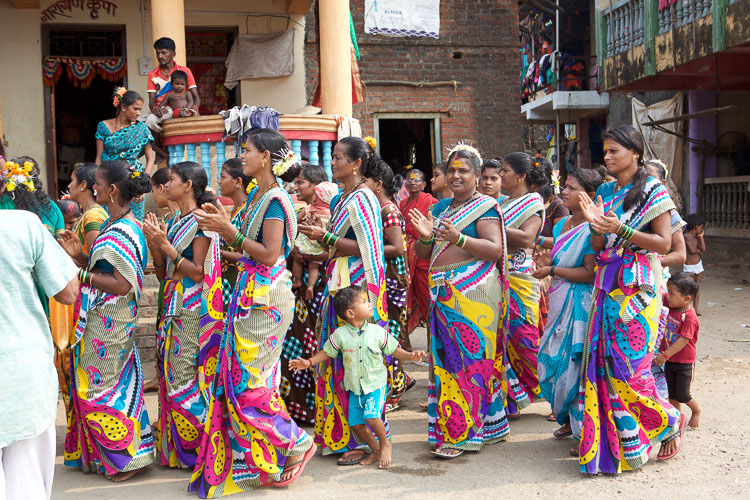
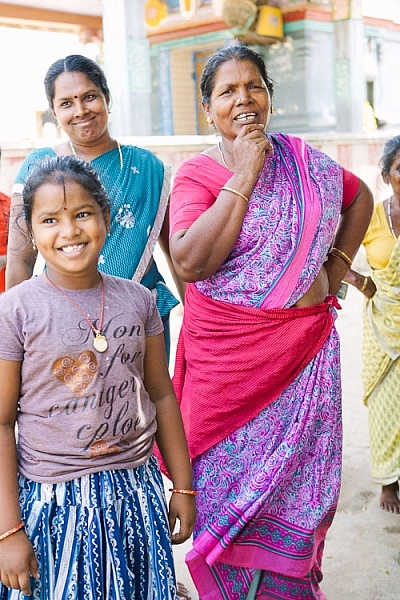
On a particular assignment in Chennai, India last year, the whole community came out to see what I was doing and soon I found 20+ willing subjects to photograph!

As photographers, travel and photography are very much intwined. Photography is a way to capture and communicate the sense of place and people. Our images help immortalize our experiences in travel. This is particularly important when we travel to places outside of our cultural comfort zones. Every moment and every experience is new, and the need to document and preserve them sometimes takes over simple basic common sense. I admit that there have been times when all I’ve done is experienced a place or an event through the back of my viewfinder. My camera has been strapped to my person like my life depended on it, and I have always come back feeling less than happy. The fact that I missed all the little nuances outside the line of vision of my viewfinder, weighs quite heavily on my mind.

Even beyond the obvious need to really experience a place, is the question on when is it okay to take photos of people and places, especially when traveling to other countries? Many times there are major cultural, social and economic differences between the photographer and the subject being photographed. Perhaps the best way to answer that question is that responsible photography is very much like responsible travel. Armed with a thorough knowledge of the place, an interest in cultural enrichment, an open mind, a pleasant attitude, some common sense and a smile, photography abroad—just like travel itself—can be a very fulfilling experience.

Here are some basic guidelines on how to be a culturally sensitive photographer when traveling

1) Knowledge is key

Invest time before traveling to research the customs, and photography norms of the place you will visit. Customs vary not only by country, but by region and religion as well. Understand and appreciate the diverse cultural context, and be respectful of these differences. A little research prior to your journey, goes a long way in avoiding disappointment and despair when you find out that certain photography restrictions exist in the places where you are traveling.

Memorable Jaunts Ethical Travel Photography Article for Digital Photography School-10

I stumbled upon a religious ceremony on a recent trip and soon found myself to be the official photographer of the ceremony – the cultural enrichment was unlike anything found in any guidebook!

2) Be personable and communicate your needs

Self confidence, an open attitude, and a genuine smile, are important wherever you travel. People will generally respond to you with the same attitude that you show them. Be open and honest about your need to photograph something or someone, and more often than not, people will respond positively to you. I have found that most people love to have their picture taken. If you are uncomfortable or nervous about something or someone, it’s best to just leave the camera in your bag.

Memorable Jaunts Ethical Travel Photography Article for Digital Photography School-9

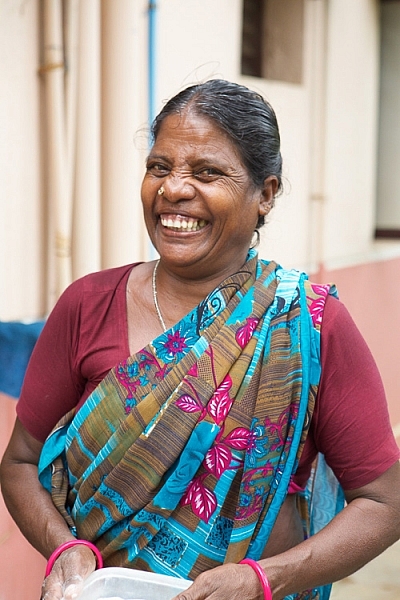
I let my camera do the talking and was rewarded with one of the most genuine portraits I have ever taken.

Memorable Jaunts Ethical Travel Photography Article for Digital Photography School-14

I was grabbing a quick meal before going to the airport in Jaipur, India and this lady was very curious about me and my gear. I promised her a photograph in exchange for a smile and I absolutely adore this image!

3) Get permission

Almost everyone around the world knows what a camera is, and what it can do. Even if you don’t know the language, simple hand gestures and pointing to the camera, can take you far in terms of communicating what is it that you are seeking.

Not understanding the language should never be an excuse to photograph an unwilling person. As a photographer, the responsibility of asking for permission before you click the shutter rests solely on you. If you have time, learn some simple phrases, related to photography, in the language of the country in which you are traveling. This will not only allow you to communicate more directly with your subject, explaining why you want to take a photograph, it shows your interest in learning at least some of the local language.

Sometimes use your camera as an ice-breaker. Take a picture and show people the photos you’ve taken of them, and you will find that photography instantly becomes more fun and less intimidating. More than anything, respect the fact that “No” really does mean NO. Yes, I understand that there is another school of thought of whether asking for permission will ruin the composition of an image. And while a lot of photographers will argue one way or the other, I am of the opinion that if you are taking a picture of a person, you should make every effort to ask permission – either before or after.

Memorable Jaunts Ethical Travel Photography Article for Digital Photography School-13

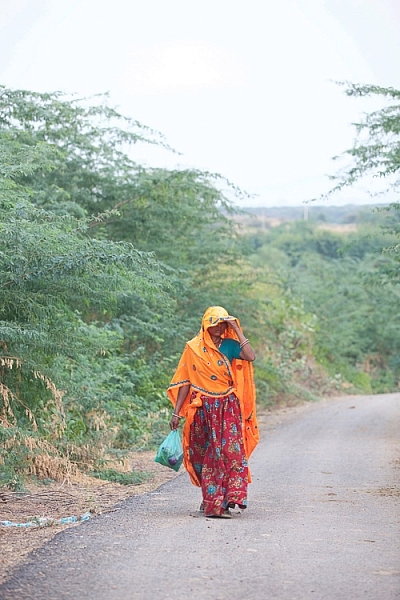
I made the mistake of not asking this lady before photographing her and as she walked by me, she yelled at me for being rude and taking her picture – lesson learnt!

4) Travel without taking pictures

Take the time to really travel without obsessing over capturing every minute of every day with your camera. Spend time exploring your surroundings, and your body and mind will thank you for it. Even if you are on assignment, build in some down time to your schedule. Not only does it help you relax, but also recharges those creative juices so you are more productive when you do get back to work!

5) Know your gear

This one is one of the basics of photography, no matter what your genre. You should know the workings of your camera inside and out. When you are traveling and have strangers pose for you, that is not the time to start trying out different settings and fidgeting with your gear. People begin to loose patience and often get leery of you and your abilities. They are more likely to simply walk away, rather than waste their time with a stranger who does not know how to operate his/her camera.

Memorable Jaunts Ethical Travel Photography Article for Digital Photography School-8

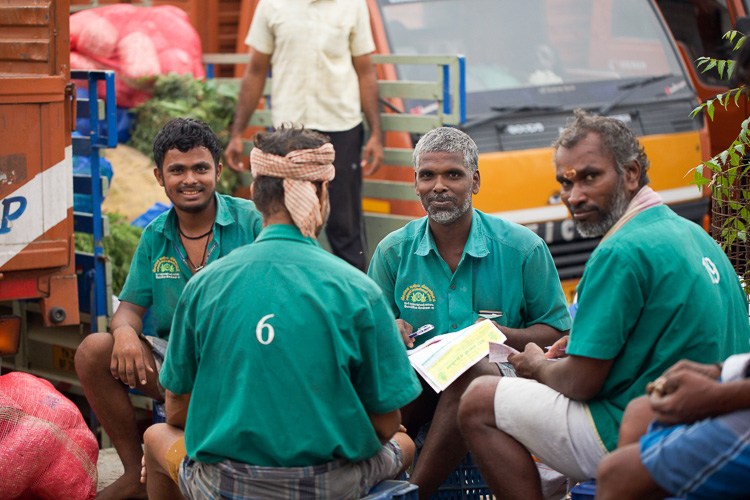
These men were intently discussing the price of wholesale fruits and vegetables at the Chennai Flower market and I had exactly two seconds to take this image – this image is literally SOOC (Straight out of the camera).

6) To pay or not to pay

Perhaps, one of the most controversial situations while traveling abroad, is the question of giving money to people you photograph. There is always that one uneducated, desperate tourist who gives money to get what they think is an award-winning prized photograph, and soon it becomes a lucrative business in the local community. This can get quite uncomfortable and unsafe for other photographers traveling through the same places.

I prefer engaging people openly, and sharing my story and my need for a picture. I find that in most cases people are more than happy to share their story, and to be heard. I too, walk away more culturally and emotionally enriched with the experience. However, if someone expects money for a photograph, then the decision becomes less of whether to pay and more of whether to take the photo. That is a judgement call that each of us needs to make on a case-by-case basis, while being mindful of the example we are setting for future travellers and photographers.

Memorable Jaunts Ethical Travel Photography Article for Digital Photography School-4 Memorable Jaunts Ethical Travel Photography Article for Digital Photography School-12

I remember one instance last year when I was traveling in India with my kids. We were visiting a temple in Southern India, and for some reason a lot of teenagers starting taking pictures of my five year old son. They would come and ask me if they could take a selfie with my son. Initially it seemed innocent enough, and my son posed with them. Soon it was getting to the point of being creepy, and I had to refuse. As a parent, I was extremely uncomfortable with having strangers take pictures of my kids. This experience taught me a very valuable lesson – value and respect people’s personal space and personal preferences.

What are your thoughts on this topic? Do you ask for permission before taking photographs of strangers when you travel? Or do you just take the picture and move on? What other things to you take into consideration to be a culturally sensitive travel photographer?

googletag.cmd.push(function() {
tablet_slots.push( googletag.defineSlot( “/1005424/_dPSv4_tab-all-article-bottom_(300×250)”, [300, 250], “pb-ad-78623” ).addService( googletag.pubads() ) ); } );

googletag.cmd.push(function() {
mobile_slots.push( googletag.defineSlot( “/1005424/_dPSv4_mob-all-article-bottom_(300×250)”, [300, 250], “pb-ad-78158” ).addService( googletag.pubads() ) ); } );

The post 6 Tips for How to be a Culturally Sensitive Travel Photographer by Karthika Gupta appeared first on Digital Photography School.


Digital Photography School

 
Comments Off on 6 Tips for How to be a Culturally Sensitive Travel Photographer

Posted in Photography


Impossible Project unveils I-1 instant camera for 600-type film

13 Apr

The Impossible Project has unveiled the I-1 instant camera, a revival of an analog classic. The I-1 prints photos using Impossible Project 600-type film, which was reverse-engineered from Polaroid’s now-discontinued 600-type offering. The camera includes digital control not found in the original Polaroid camera. Using a related iOS app, photographers can adjust shutter speed, aperture, flash and select one of several presets.

The Impossible Project’s CEO Oskar Smolokowski showcased the camera at Bloomberg’s design conference on Monday, revealing that the I-1 will be available starting May 10 for $ 299. The model is simple in design, but robust in overall features; the physical camera features an exposure dial, shutter button, focus selector, LED flash ring and square viewfinder. Power is delivered via an integrated battery that recharges with USB.

When paired with a related mobile app over Bluetooth, users can remotely capture images, creature multi-exposure photos, adjust capture settings, and creature ‘open-shutter’ pictures. The Impossible Project only lists an iOS app on its website at this time; it is unclear whether an Android app will be made available, as well. Interested photographers can sign up for updates on the Impossible Project’s I-1 web page.

Via: Bloomberg

Articles: Digital Photography Review (dpreview.com)

 
Comments Off on Impossible Project unveils I-1 instant camera for 600-type film

Posted in Uncategorized


Canon announces firmware updates for XC10 and Cinema EOS cameras

13 Apr

With the annual NAB (National Association of Broadcasters) Show just around the corner, Canon has announced numerous firmware updates for its video-oriented cameras and display systems.

A new firmware update for the XC10 camcorder adds MP4 recording capability for HD video, improved AF speed and shutter speed options to reduce flicker. You can read our recent review of the XC10 camera here.

Additional products receiving firmware updates include the Cinema EOS C100 Mark II camera, the Cinema EOS C300 Mark II camera (including Canon Log3), the XA30/35 and XF300/305 series of professional camcorders, the VIXIA HF G40 camcorder, the CINE-SERVO 17-120mm lens, and two reference displays.

Press release:

Canon U.S.A. announces a host of product firmware updates at NAB 2016

New Updates Include Canon Log3 for the EOS C300 Mark II Camera and Support of ARRI Log C and Metadata for Canon’s DP-V2410 4K Reference Display 

MELVILLE, N.Y., April 13, 2016 – Canon U.S.A., Inc., a leader in digital imaging solutions, today announced firmware updates to several products being showcased at NAB 2016. These firmware updates support a number of feature updates for users including improvement of workflow, ease of use, focusing and lens corrections, color space, and creative flexibility for products in the Cinema EOS, HD Video, and 4K Reference Display lines. 

Firmware updates are as follows: 

  • The EOS C300 Mark II Digital Cinema Camera updates will allow various functions such as shooting in new Canon Log3, viewfinder magnification during recording, focus guide with EF Cinema Prime lenses, Push Auto Iris and Zoom function on the grip joystick with New COMPACT-SERVO and CINE-SERVO series lenses, Canon Dual Pixel CMOS AF (DAF) with COMPACT-SERVO 18-80mm and CINE-SERVO 17-120mm lenses, ACES 1.0 output, peripheral illumination correction updates and overall image improvements such as noise level reduction in low-light for Canon Log2.
  • The EOS C100 Mark II Digital Cinema Camera update will allow various functions such as Push Auto Iris and Zoom function on the grip joystick with the new COMPACT-SERVO and CINE-SERVO series lenses,  Canon DAF with COMPACT-SERVO 18-80mm and CINE-SERVO 17-120mm lenses, and peripheral illumination correction updates and selectable disabling of the microphone.
  • The DP-V2410 4K Reference Display firmware will be updated to support ARRI Log C and ARRI metadata; improve display contrast and dynamic range; add support for Canon Log3 and Hybrid Log Gamma; and display of SMPTE 2084 input signal on the waveform monitor.
  • The DP-V3010 4K Reference Display firmware will be updated to improve display contrast and dynamic range; add support for Canon Log3 and Hybrid Log Gamma; and display of SMPTE 2084 input signal on the waveform monitor.
  • The CINE-SERVO 17-120mm Lens will be updated to be compatible with Canon’s DAF function in the EOS C300 Mark II and EOS C100 Mark II Cameras.
  • The update for the ME20F-SH Camera will include lens support for an additional 19 EF and CINE lenses allowing for more creative choices in a wider variety of shooting applications including television and film production.
  • The XA35 and XA30 Professional Camcorders and VIXIA HF G40 Camcorder updates include a new file format making it easier to integrate into third party software systems that are used for athletic coaching applications.
  • The firmware updates for the XF305 and XF300 Professional Camcorders include new shooting modes allowing for greater creative flexibility, Wide DR Gamma (600 percent) Mode, Highlight Priority Mode, and Signal/Noise priority mode.   
  • The XC10 4K Camcorder firmware will be updated to include a new file format MP4 in HD mode (35 Mbps only), improved AF speed, and shutter speed options for flicker reduction. 

To see these products mentioned above at NAB 2016, visit Canon U.S.A., Inc. in the Central Hall, Booth C4325. Follow Canon throughout the show on Instagram at @CanonUSA and Twitter at @CanonUSApro. To learn more about the firmware updates and their availability, please visit www.usa.canon.com/NAB2016Firmware. 

Articles: Digital Photography Review (dpreview.com)

 
Comments Off on Canon announces firmware updates for XC10 and Cinema EOS cameras

Posted in Uncategorized