RSS
 

Archive for April, 2016

Buildings in Motion: 15 Most Mesmerizing Architecture Gifs

18 Apr

[ By Steph in Art & Drawing & Digital & Photography & Video. ]

architecture gif stampa 2

Architecture spins, zooms, slides, grows, shrinks and blooms like oversized artificial flowers in animated GIF form, with the effects originating from both fantasy motions that the real-life buildings don’t actually perform and functional movable parts. With these graphics we see architecture from a new perspective as it seems to take on a life of its own – and while watching elements of a building click into place from the sky like a game of Tetris is satisfying, it’s also really cool to see how transforming elements of real buildings work, like a massive sliding metal roof that covers or uncovers an all-glass house at the push of a button.

M.C. Escher and the Droste Effect

architecture gif escher

M.C. Escher’s drawing of a landscape. spotted inside a window (Prentententoonstelling or ‘Print Gallery’, 1956), serves as the basis of this Droste effect gif. The artist used a mathematical grid to create the twisted perspective in the original drawing, and then researchers at Leiden University reproduced it on a computer, adjusted the perspective and applied the zooming effect.

Rapid Perspective Shift
architecture gif perspective shift

This somewhat disorienting gif gives us an idea of what it would be like to zoom through a city in a flying car, quickly shifting our perspective of a single building’s corner several times.

8 Animated Architectural Images by Axel de Stampa

architecture gif stampa 4

architecture gif stampa 5

architecture gif stampa 6

architecture gif stampa 7

architecture gif stampa 9

architecture gif stampa 1

architecture gif stampa 2

architecture gif stampa 3

A series of structures by famous architecture firms like MVRDV and Herzog de Meuron come to life in these gifs by Paris-based architects Axel de Stampa and Sylvain Macaux. The Mirador Buidling by the former zooms into place on the ground like a life-sized game of Tetris, while the randomly stacked levels of the latter’s Vitra House appear and disappear. ‘Architecture Animée’ adds a fourth dimension to architecture by quickly applying changes that normally would only be seen with the passage of time.

Sliding Pergolas House
architecture gif pergolas house

We get to see just how the star feature of the ‘Sliding Pergolas House’ in Brazil by FGMF Arquitetos works in this fun gif. The movable roof elements make it possible to shelter some areas of the spacious courtyard while letting sun stream into others.

Next Page – Click Below to Read More:
Buildings In Motion 15 Most Mesmerizing Architecture Gifs

Share on Facebook


[ By Steph in Art & Drawing & Digital & Photography & Video. ]

[ WebUrbanist | Archives | Galleries | Privacy | TOS ]


WebUrbanist

 
Comments Off on Buildings in Motion: 15 Most Mesmerizing Architecture Gifs

Posted in Creativity


4 Steps on How to Read Images and Learn to Replicate the Results

18 Apr

Earlier, I wrote an article called: why asking what camera settings were used may not be as helpful as you think, and in it, I touched on the concept of reading an image.

Learning to read images – from a technical perspective and not a conceptual one – is something that I believe all photographers must be able to do, as it allows you to get a rough guide on what settings may have been used to create an image. They won’t be the exact settings; but you’re most likely not going to have the exact same lighting environment as what a particular photo was taken in.

Shallow Apeture 1

A wide aperture was used her to achieve a shallow depth of field.

Dive in to read an image

To begin reading images you must have, at the very least, a good understanding of aperture, shutter speed and to a lesser extent, ISO. You’ll want to understand how these things affect the image in different ways. For example, if you saw an image with a lot of motion blur, you would know from your understanding of shutter speed that a slower shutter speed was used.

As you become more proficient with lighting and off-camera flash, you can even read how the subject was lit with artificial lighting, and begin to replicate how it was done. But don’t worry! This article will be focussing on the three major aspects of photography exposure (aperture, shutter speed and ISO) to help you begin your journey to reading images.

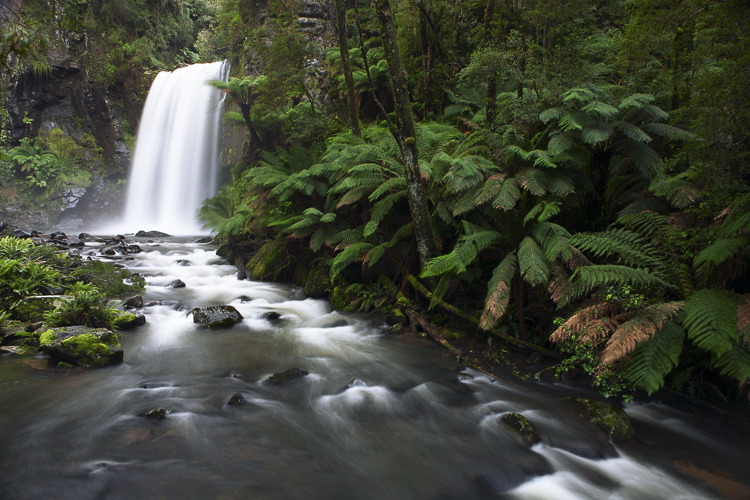
Slow Shutter 2

What shutter speed was used here – a fast or slow one?

Step 1: Shutter Speed – Fast or Slow?

I find that determining whether a fast or slow shutter speed was used first, can help greatly when it comes to determining aperture and ISO later. The first thing you will want to ask yourself when assessing shutter speed is; was it fast or slow? This can be decided by how much, or how little, motion blur is present in the image, as that is what shutter speed controls.

If everything in the image is pin sharp, and there is absolutely no motion blur at all, then a fast shutter speed would have been used. However, if there is a lot of motion blur, then a slow shutter speed was used.
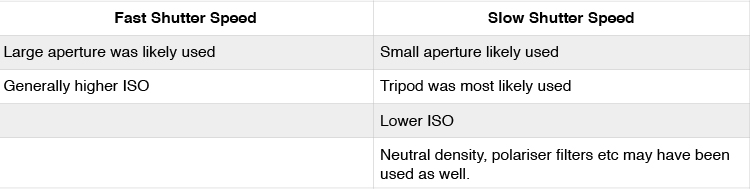
Here are some points that you can take out of knowing if the shutter speed is fast or slow:

Shutter Speed Table

But how fast is a fast shutter speed, and at what point does the shutter speed become slow? To answer this, think of your shutter speed in relation to your subject’s speed. For example, when photographing sports or other fast action, you may find using a shutter speed of 1/1000th is required to freeze your subjects. This is because your subjects are moving quite fast. However, if you were to photograph people walking down the street, you would not need the same shutter speed, as your subjects are not moving as fast.

Below are examples of slow and fast shutter speeds. Notice the presence of motion blur in the images where a slower shutter speed was used, but action is frozen with a fast shutter speed. In images that will use a slow shutter speed, it is often recommended you use a tripod to stabilize your camera, and prevent camera shake.

What isn’t important is knowing the exact shutter speed; that is something that you will be able to experiment with to get the results you want. All you are doing here is identifying if a slow or fast shutter speed was used, to give you a starting point.

Slow Shutter 3

A tripod was used when taking this photograph to prevent blur that can be caused by camera shake. The shutter speed was 3.2 seconds.

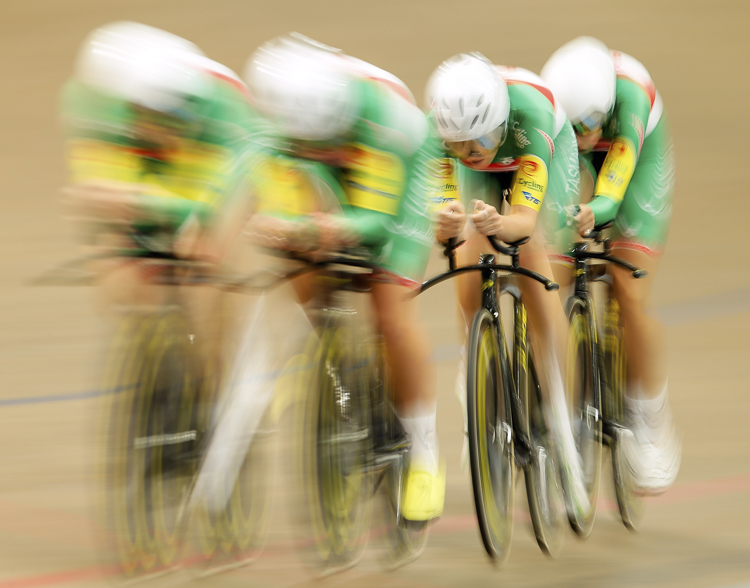
Slow Shutter 4

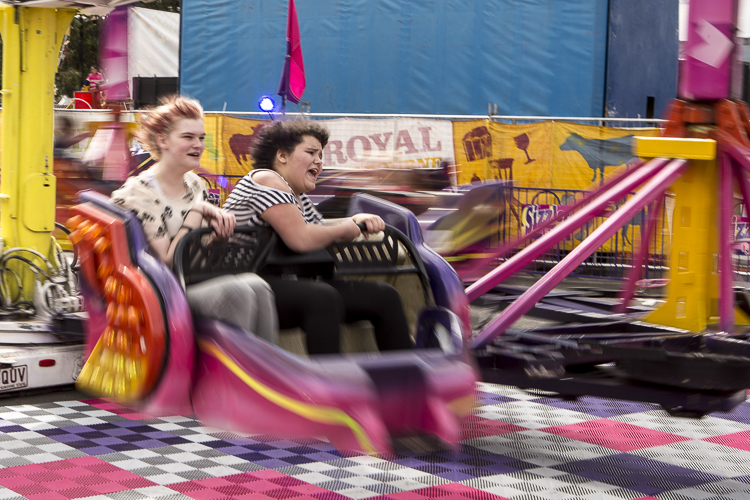
The reason there is one rider sharper than the others in this frame, is because even though all riders are moving at the same speed, the rider who is sharpest is moving slower, relative to where I was positioned taking this photograph. The shutter speed used here was 1/6th.

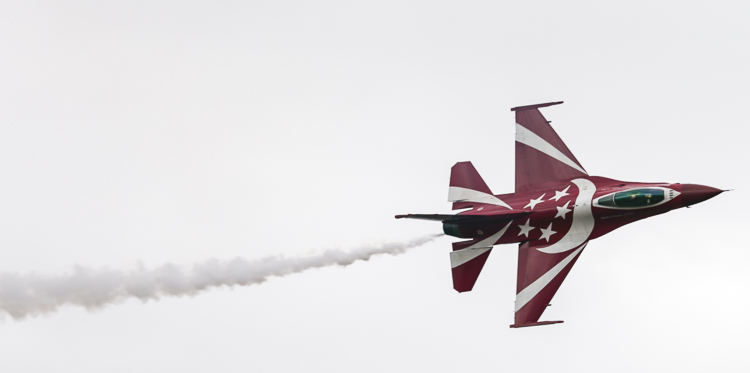
Fast Shutter 2

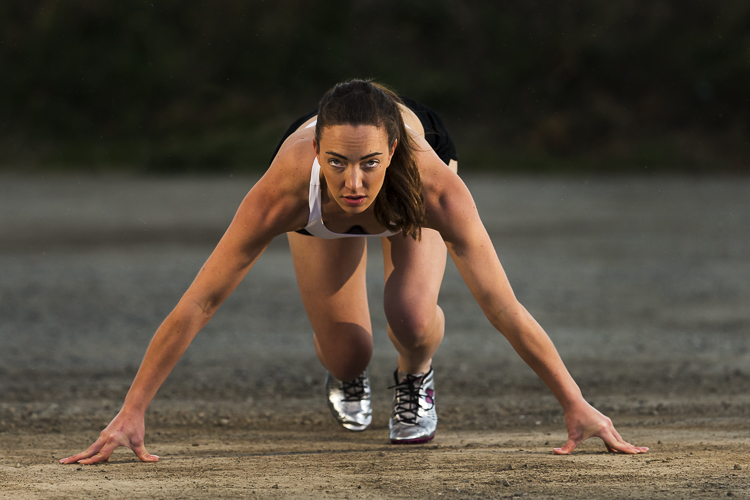
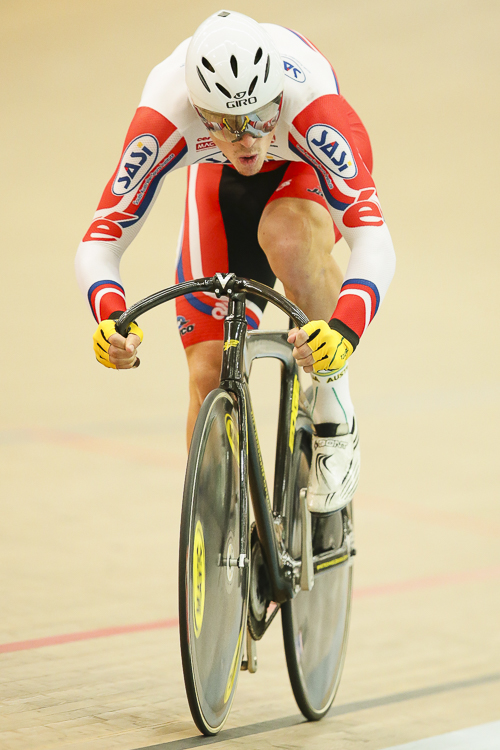
Notice how everything is sharp in this image, and there is no blur? This means that a fast shutter speed was used (in this case 1/2000th), and because the subject is quite fast, a faster than normal shutter speed was needed.

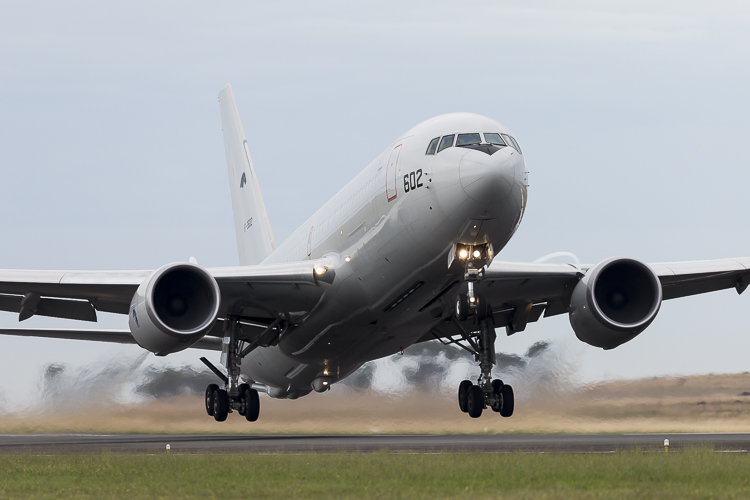
Fast Shutter 1

Again, notice how everything is sharp and there is no blur? This means that a fast shutter speed (1/1250th) was once again used.

Step 2: Aperture – Large or Small?

In step one I mentioned that determining whether a fast or slow shutter speed was used first, can greatly help you in determining the aperture. Here’s why. If you are familiar with the exposure triangle you will know that in nearly all cases when a fast shutter speed is used, it is associated with a large aperture (small f-number). Conversely, the slower the shutter speed, the smaller the aperture becomes. So if you see a photo that has motion blur present, it is highly likely that the photographer used a smaller aperture; or if you see a photo where moving objects are frozen, the photographer has most likely used a larger aperture to enable a faster shutter speed.

Another way you can determine the aperture is by looking for bokeh, or subject isolation. The more bokeh that is present in the image, the more the subject is isolated. To achieve this, the photographer would use a larger aperture. On the other hand, if everything in the image is in focus, then the photographer employed a smaller aperture to increase their depth of field.

Small Aperture 1

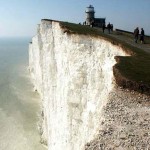
Everything in this photograph is in focus, which would mean that a small aperture (larger f-number; like f/11 in this image) was used to increase the depth of field.

Shallow Aperture 2

Notice how the background in this image is blurred out a lot, and the subject is very isolated? This is a sign that a larger aperture (small f-number; in this example f/3.5) was used to decrease the depth of field.

Step 3: ISO

ISO is one of the parameters that isn’t so important in determining what settings may have been used when reading an image. Use ISO to get the settings that you need to use, to create the shot you want. For example, if you want to use the slowest shutter speed you can, set your camera’s ISO to its lowest setting. Conversely, if you want to use a very fast shutter speed, you may find that you have to increase your ISO.

Step 4: Focal Length

Focal length is something that is often overlooked in images, but it is a very important element indeed. It does more than simply allow a photograph to add more in the frame, or zoom in closer. Different focal lengths evoke different emotions in the viewer when looking at an image. For instance, if a wide angle lens was used, it places the viewer in the scene and can make them feel like they were there; whereas a longer focal length places the viewer further away from the subject, and evokes a more voyeur emotion.

The great thing about focal length is that it is quite easy to distinguish approximately which one was used. To make it simpler, breaking down focal lengths in to three groups can help greatly.

  • Wide: <50mm (i.e. 14-50mm on full frame, 10-35mm on cropped or APS-C sensor)
  • Normal: ~50mm-85mm (35-56mm cropped sensor)
  • Telephoto: 85mm+ (130mm+ on cropped sensor)

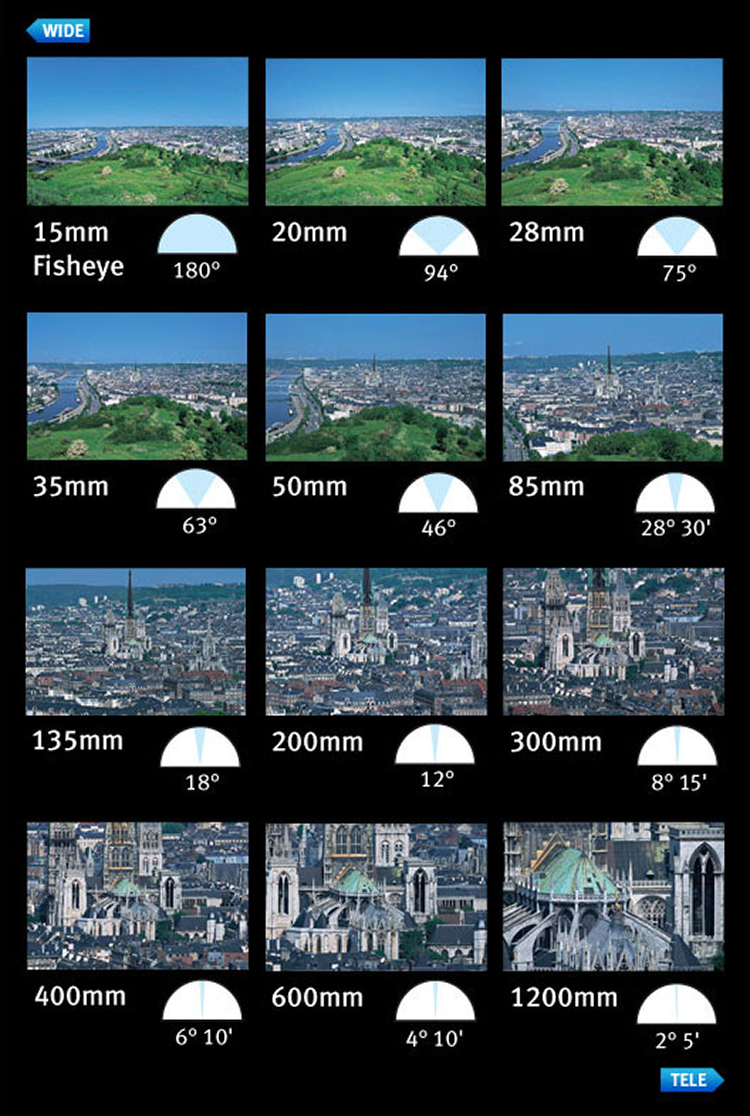
You can use the presence of compression to distinguish the different types of focal length. A wide angle lens accentuates the foreground and increases distances in the frame, as well as having a very wide field of view. This effect increases as the focal length decreases – or gets wider. On the other end, a telephoto lens will give you much more compression, and make distances in the frame look shorter. Their field of view will decrease, and the affects of aperture, particularly larger apertures, will be more pronounced. That’s why f/2.8 at 16mm looks different than f/2.8 at 200mm, if your subject is kept the same size in the frame.

Here is a small table with examples of the same scene photographed from the same point, but with different focal lengths.

Image courtesy of Canon

Image courtesy of Canon

Now you have had a quick introduction on how to read images. Remember, knowing the exact settings is not important, but knowing how to get an approximate guess is better than not knowing anything at all! With experience, you will become more proficient at reading images, and will be able to guess with more precision. The more you understand aperture, shutter speed, and ISO, the better you will be at reading images.

Along the way, you will also learn that different genres within photography use a different set of settings. For example, most landscape photographers will use smaller apertures, lower ISOs, and slower shutter speeds; whereas sports shooters for instance, will generally use higher ISOs, larger apertures, and faster shutter speeds.

googletag.cmd.push(function() {
tablet_slots.push( googletag.defineSlot( “/1005424/_dPSv4_tab-all-article-bottom_(300×250)”, [300, 250], “pb-ad-78623” ).addService( googletag.pubads() ) ); } );

googletag.cmd.push(function() {
mobile_slots.push( googletag.defineSlot( “/1005424/_dPSv4_mob-all-article-bottom_(300×250)”, [300, 250], “pb-ad-78158” ).addService( googletag.pubads() ) ); } );

The post 4 Steps on How to Read Images and Learn to Replicate the Results by Daniel Smith appeared first on Digital Photography School.


Digital Photography School

 
Comments Off on 4 Steps on How to Read Images and Learn to Replicate the Results

Posted in Photography


In the thick of the action: Nikon D5 real world samples gallery

18 Apr

With a newly designed 20MP full-frame sensor, an advanced autofocus system with 153 phase-detect points, a robust build with full weather sealing and 12 action-freezing frames per second, the Nikon D5 has been getting plenty of attention around the DPReview office over the past couple of weeks. It’s a purpose-built machine: we don’t think there’s a camera in the world that can keep erratically moving subjects in focus during fast bursts like the D5 can. But it’s good at a lot else as well.

We’ve toted it to tennis matches, a rugby match, up and over the Cascade mountains, along the Puget Sound waterfront and even a styled wedding shoot. After all, though the D5’s specs may indicate it’s geared toward the discerning sports shooter, that doesn’t mean Nikon’s new flagship wouldn’t make a great (though hefty) all-rounder for photographers shooting all day, every day.

Articles: Digital Photography Review (dpreview.com)

 
Comments Off on In the thick of the action: Nikon D5 real world samples gallery

Posted in Uncategorized


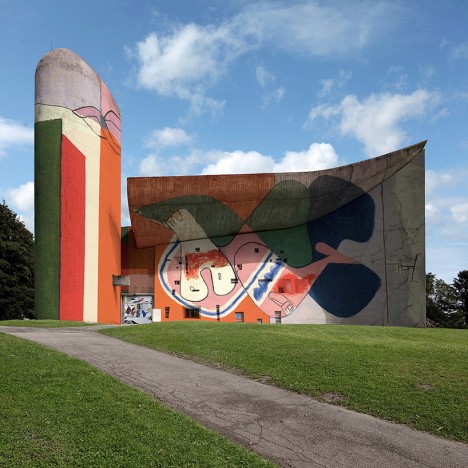
Le Corbusier Murals Applied as Graffiti to Notre Dame du Haut

18 Apr

[ By WebUrbanist in Art & Street Art & Graffiti. ]

corbu vandalized notre dame

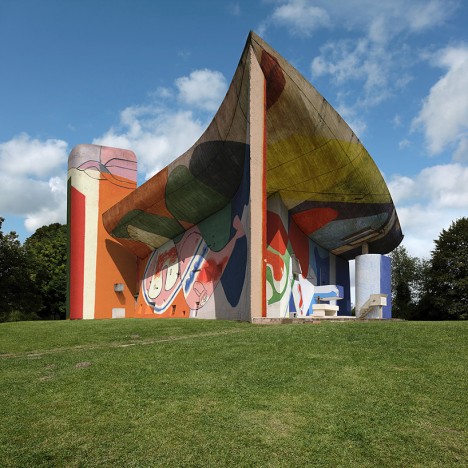
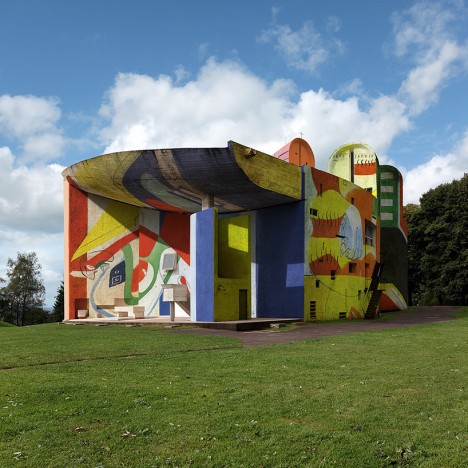
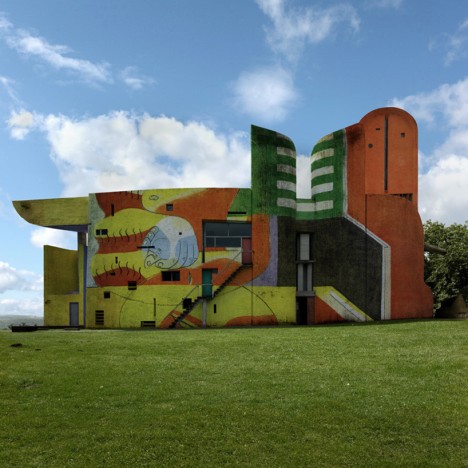
Actual murals made by architect Le Corbusier have been digitally added to the walls of one of his most famous buildings, transforming Notre Dame du Haut, added an array of colors to its complex curves.

corbu chapel full size

Architect Le Corbusier, who passed 50 years ago, remains famous for his rigid Modernist works, but for spiritual spaces he made an exception, shifting from a rule-based to an artistic approach.

corbu chapel photoshop art

Still, the resulting structure was simply white and gray, devoid of color until these murals were introduced. The thin-seeming walls are covered from the ground up, but so too are the thick swooping roofs that curve up and around, seeming almost to float above the sides.

corbu modern graffiti mural

The fictional images were crafted by Belgian photographer Xavier Delory, who applied a set of artworks Corbu made for an architectural colleague.

corbu chapel side view

“Le Corbusier was not only an architect, he was also a painter and sculptor. He is the author of the phrase ‘synthesis of the arts’ meaning an alliance between painting, sculpture and architecture. At first he thought about what painting and sculpture could bring to architecture, not playing a decorative role but rather ‘as a house guest’ in a second phase, he moved this level of synthesis to a fusion of modern architectural styles at Ronchamp.”

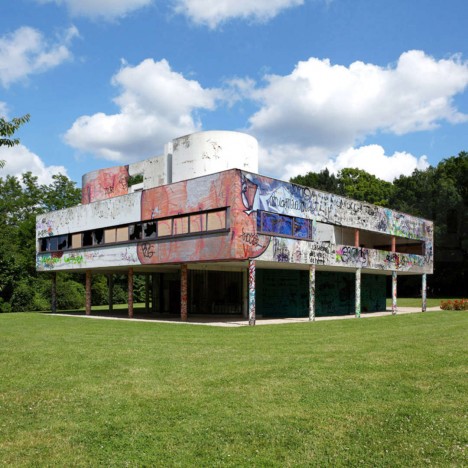
vandalized savoye

In a previous series, the same photographer re-imagined the Villa Savoye, another famous work by Corbu, sparking a series of fake stories suggesting the iconic house had actually been vandalized.

Share on Facebook


[ By WebUrbanist in Art & Street Art & Graffiti. ]

[ WebUrbanist | Archives | Galleries | Privacy | TOS ]


WebUrbanist

 
Comments Off on Le Corbusier Murals Applied as Graffiti to Notre Dame du Haut

Posted in Creativity


Scaffolding Staircase: Huge Steps to Rise from Rotterdam Plaza

18 Apr

[ By WebUrbanist in Architecture & Public & Institutional. ]

urban staircase

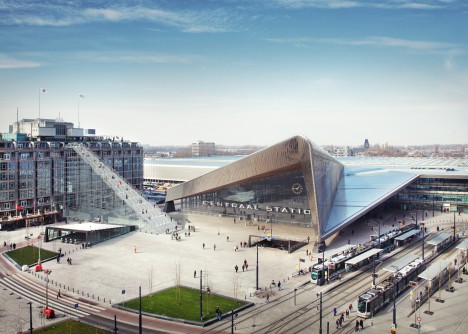
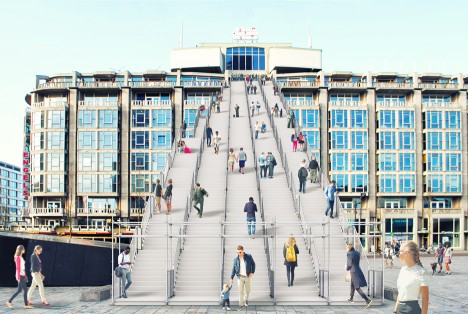
A temporary installation to commemorate the rebuilding of the city after the second world war, this massive staircase made from scaffolding will lead visitors up onto a postwar structure in the heart of Rotterdam.

scaffolding staircase close up

Standing 60 feet high, the staircase of the 180 steps end on top of the Groot Handelsgebouw, an early building from the postwar construction effort that began 75 years ago. Dubbed simply The Stairs, this project by Dutch architecture firm MVRDV will also involve film screenings and events on the rooftop.

central station rotterdam

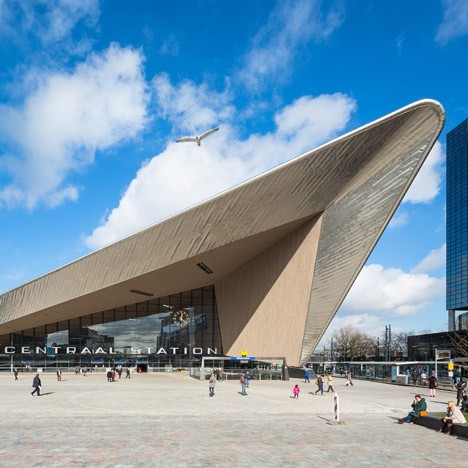
If the resulting temporary roof-topping venue is sufficiently popular, a more permanent means of access may replace the temporary stairs.

mvrdv market hall

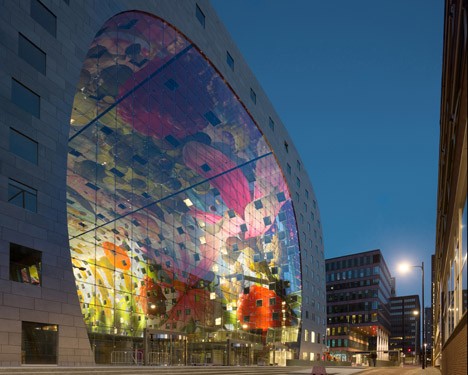
Other temporary and permanent architectural and urban design projects are also being developed and opened as part of the 75th-year commemoration (above: Market Hall with digital mural by MVRDV)

Share on Facebook


[ By WebUrbanist in Architecture & Public & Institutional. ]

[ WebUrbanist | Archives | Galleries | Privacy | TOS ]


WebUrbanist

 
Comments Off on Scaffolding Staircase: Huge Steps to Rise from Rotterdam Plaza

Posted in Creativity


Review – Outdoor Action and Adventure Photography Paperback Book

18 Apr

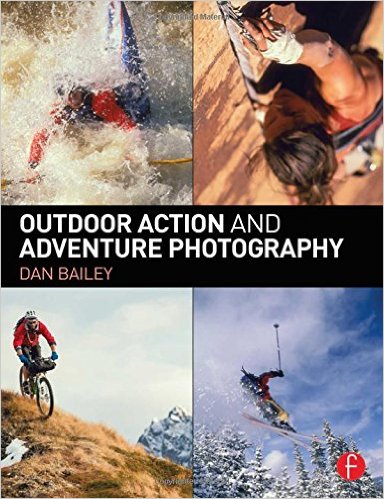
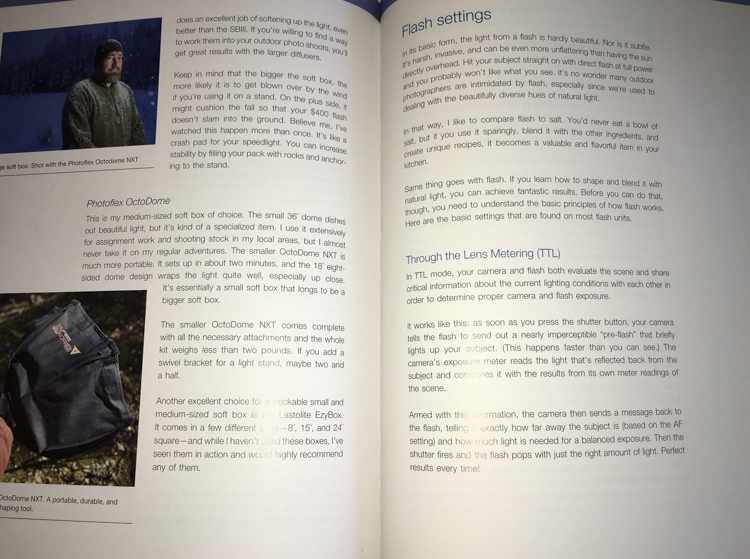
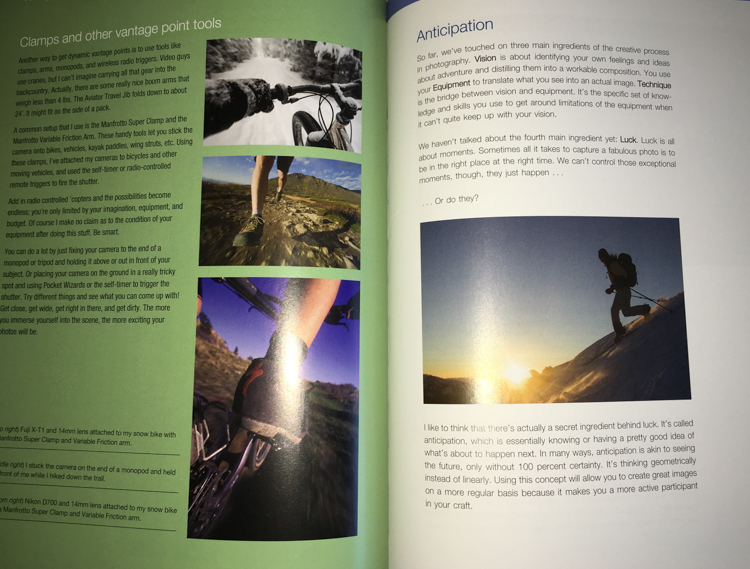
outdoor action and aventure photographyOutdoor Action and Adventure Photography by Dan Bailey is a refreshing change of course in this digital age we live in – it’s actually a paperback book. It is a good thing that Dan had decided to go hardcopy with this book, because it is filled with information, and as a result I feel like many people will want to jot things down, highlight paragraphs, and refer back to it time and again.

Overview

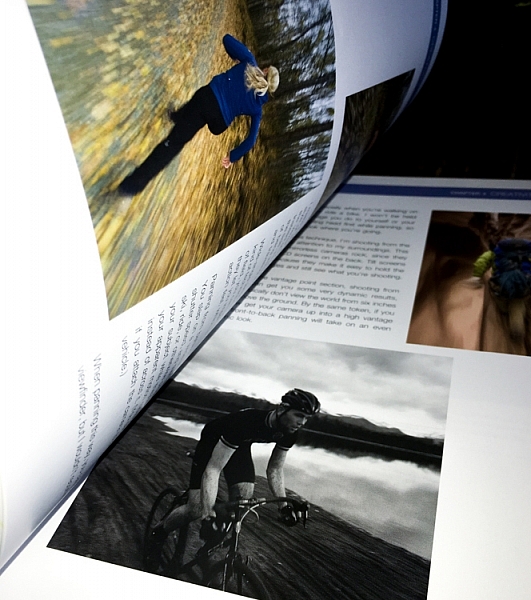
The book starts out with a heartfelt acknowledgement section that truly shows you how much time, effort, and passion, Dan has put into this work. It’s not just something that he’s slapped together – and it shows! Not only is the book well written and informative, but it is beautifully illustrated with a number of photographs from Dan’s portfolio.

After the acknowledgements, you’re given a general introduction to frame your mind for what you’re about to learn. Outdoor Action and Adventure Photography is geared to outdoor photographers, but I’d argue it’s geared even more so towards the outdoor enthusiast, who wants to take great photographs of their adventures.

outdooraction

What I mean is that this book is designed to show you how to take photographs, while you’re hitting a triple black diamond ski slope, or hiking up the side of a mountain. It’s geared more towards the extreme side of outdoor adventure, and the challenges that you would face if you were trying to photograph in those conditions.

What You’ll Learn

After the general framework is set, the book is broken down into a fairly logical path. First you’re introduced to the types of gear that you’ll need. Dan makes a great point about how, for this type of work, expensive gear does make a difference. Not necessarily just for the image quality, but because higher quality professional gear is designed to take a beating, and in the conditions you’ll be facing, the gear you use will need to withstand a few bumps.

outdooraction-3

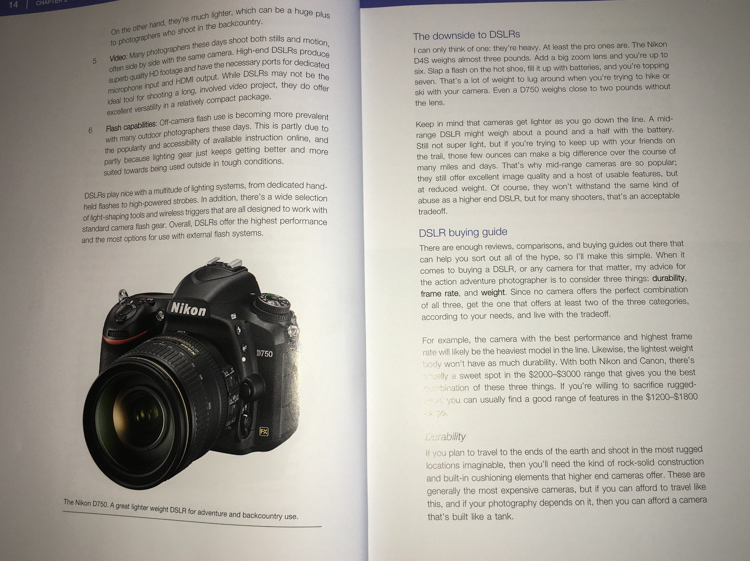
One of the largest problems faced by adventure photographers is the desire to pack light, but maintain a versatile and high quality kit. In the book, Dan addresses how he handles this challenge, and from what I can gather he is focused more on lightweight and ease of use, versus trying to carry every possible lens and body up the side of a mountain. He has a few different configurations of bodies and lenses that he brings, depending on how far and strenuous the adventure is expected to be.

outdooraction-2

Another big issue that is addressed in this book is regarding lighting. Light on the side of a mountain is not always going to be what you want it, and in this section Dan spends a great deal of time discussing different types of flashes, he provides a great step by step workflow, and talks about different use cases.

outdooraction-4

Finally, there’s a great section on weighing the decision to go pro. What does it mean, do you have what it takes, will you go full-time or part-time? A lot of what is discussed in this section can be applied to other fields of photography, but there are a few considerations specific to Dan’s field, that are worth considering if you’re thinking about making this a career choice.

Final Thoughts

Outdoor Action and Adventure Photography is a book that is designed for the outdoor enthusiast who wants to take great photographs in extreme conditions. While Dan keeps a fairly conversational tone throughout, the book is so packed with information, I’d equate it to more of a textbook than a simple informational guide.

If you’re looking to take great photographs while hitting the slopes with your friends – this is the book for you!

googletag.cmd.push(function() {
tablet_slots.push( googletag.defineSlot( “/1005424/_dPSv4_tab-all-article-bottom_(300×250)”, [300, 250], “pb-ad-78623” ).addService( googletag.pubads() ) ); } );

googletag.cmd.push(function() {
mobile_slots.push( googletag.defineSlot( “/1005424/_dPSv4_mob-all-article-bottom_(300×250)”, [300, 250], “pb-ad-78158” ).addService( googletag.pubads() ) ); } );

The post Review – Outdoor Action and Adventure Photography Paperback Book by John Davenport appeared first on Digital Photography School.


Digital Photography School

 
Comments Off on Review – Outdoor Action and Adventure Photography Paperback Book

Posted in Photography


The Top 10 Camera Features Wish List of dPS Readers and Writers

17 Apr
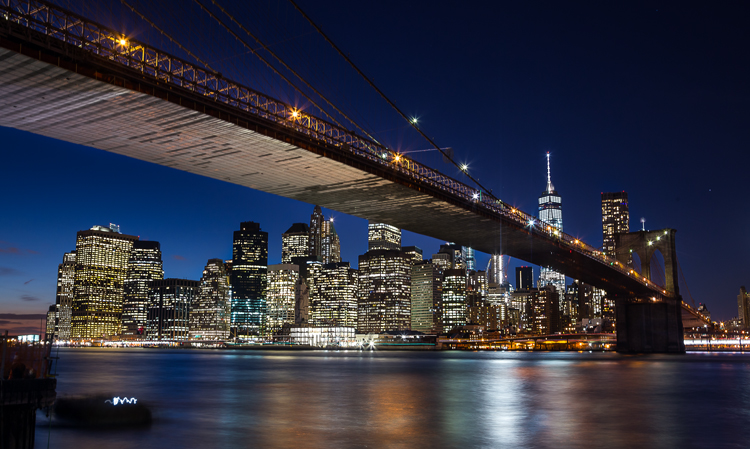
Brooklyn Bridge picture taken using a remote shutter release and a neutral density filter, which could be eliminated with camera improvements.

Brooklyn Bridge picture taken using a remote shutter release and a neutral density filter, which could be eliminated with camera improvements.

It is becoming almost cliche, but there has never been a better time to be a photographer. What we can do now with modern digital cameras, without spending that much money, is incredible. Without breaking the bank, you can now get an extremely high resolution digital camera, with low light performance and a dynamic range unheard of just a few years ago, that shoots at speeds measured in multiple frames per second. If that isn’t enough, it will also double as a video camera with HD quality as a bare minimum. It will even send the pictures wirelessly to your phone. It seems ungrateful to ask for more. Still, everything can be improved, can’t it?

And just to be clear – when I say improved, I don’t mean adding more megapixels. Or demanding even better low light performance and dynamic range. Or achieving even faster focus and shooting speeds. The manufacturers know everybody wants that stuff, and they seem to be putting all their energy into those areas.

But doesn’t it seem like there are features that could be added to cameras that wouldn’t require a technological breakthrough? Or that wouldn’t make your camera cost a fortune? It always seemed that way to me. So I started asking around to other photographers, then I started asking readers, and finally I asked my fellow dPS writers.

How would you improve digital cameras?

I got some good answers, and have combined them with my own to create a list of 10 new features (a wish list) that could be added to digital cameras to make them better. Here they are, in no particular order:

1. A Small LCD for the Histogram

The first improvement is a separate, smaller LCD on the back of the camera. Why? Let me explain.

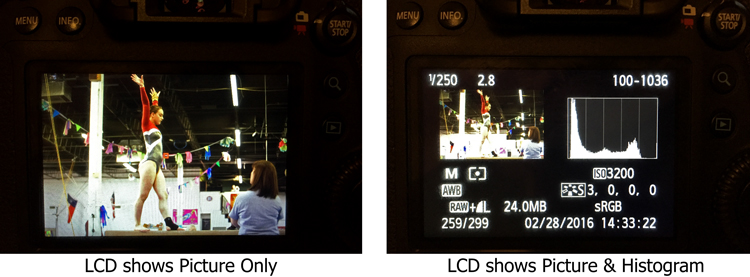
We all know that the best way to evaluate exposure when you are shooting is to look at the histogram. Looking at just the picture on the LCD doesn’t work as well when you are trying to evaluate exposure. But look what happens to the picture on the screen when you add the histogram:
LCD-graphic

On the left, where you have the full picture, you can clearly see it. But once you add the histogram, the picture on the right becomes tiny. It is unusable and tells you nothing. We are essentially forced into a position of having to choose between a picture we can see, or just viewing the histogram (but not both). I’d like to do both.

To fix that, you could just put another very small LCD on the back of the screen. It would show only the histogram, so that you could still have a full sized version of your picture.

2. Three Dials

When you set the exposure level of your pictures, there are three controls: shutter speed, aperture, and ISO.

At the same time, how many dials do we have to set those three controls? Two – and that’s if we’re lucky. Entry level cameras often only have one. To change all three exposure controls with only two dials, means you have to press buttons while turning dials. It’s a rather cumbersome process, for the most important and commonly used functions of the camera. If we have three exposure settings, shouldn’t we have three dials to set them?

The odd man out is always ISO, and I personally think this is a hold-over from the days of film. Back then, you couldn’t change the ISO except by changing your film. When digital came along, everyone was pretty happy to be able to change the ISO at all, so having to press a button didn’t seem like a big deal. In addition, at that time, available ISO ranges were extremely limited and if you raised the ISO much then digital noise quickly became a problem.

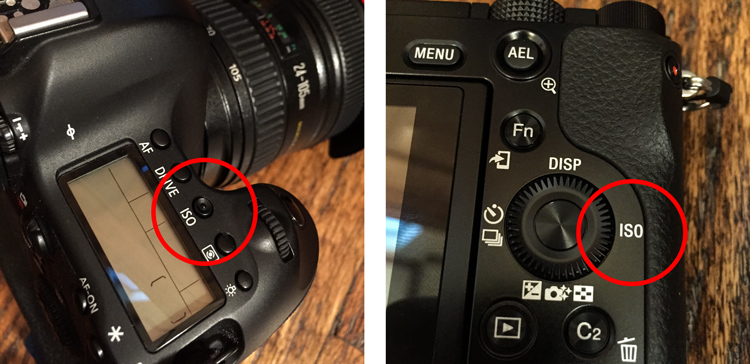
But now? ISO ranges are huge! Even entry level cameras have ISO ranges up to 25,000. ISO is now truly a equal partner in the exposure triangle. It should be treated as such. That means it should have its own dial. You shouldn’t have to press buttons to adjust it.
ISO-controls-graphic

Stop ISO discrimination! Let’s make it an equal member of the exposure triangle by giving ISO its own dial!

Where would you put the extra dial? There are many places you could choose from, but one thought is to get rid of the mode dial. Having a dedicated dial to quickly change the mode is another hold-over from a time when there were fewer camera controls (and no menus). Who changes their modes so frequently that the most valuable real estate on the camera needs to be taken up with a dial for it? Don’t most people just pick a mode and use it most, or all of the time? Even those that change modes don’t do so often enough that it needs its own dial.

Note: It actually appears that this change might be on the way. There are three dials on most Fujifilm mirrorless cameras and one of them is dedicated to ISO. Perhaps others will follow suit.
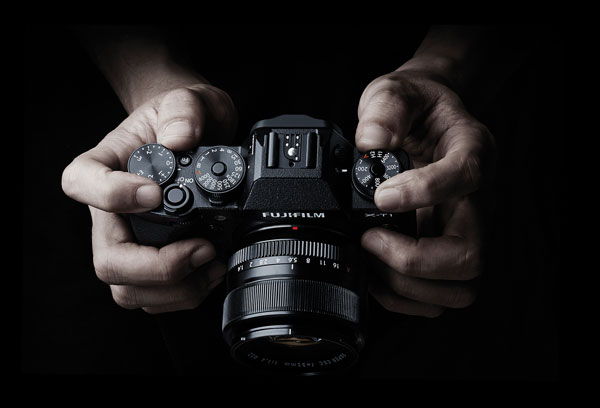
Supplied by Fujifilm

Supplied by Fujifilm

3. Lower ISOs

Speaking of ISO, in the rush to expand ISO values on the high side, the lower side of the ISO scale has been completely neglected. The camera manufacturers have worked very hard to make digital sensors more sensitive to light. It would seem like a simple thing to make the sensor less sensitive to light. Why couldn’t cameras have ISO levels of 50, 25, 12, and so on?

Why would that matter? It would put us in more control over shutter speed, and avoid the necessity of carrying around neutral density filters. Why do landscape photographers need to carry around a bunch of neutral density filters to slow down their shutter speeds? If we could lower the ISO, that would require a longer shutter speed for a proper exposure. It seems like that could just be built in, and would make it much simpler. Instead of adding a 3-stop neutral density filter to your lens, you could then just reduce the ISO from 100 down to 12 (3 stops).
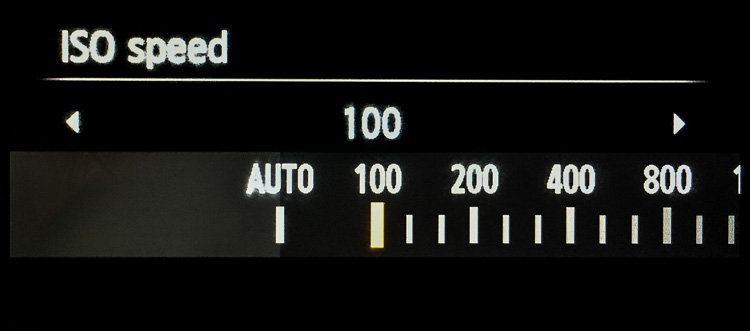
Why stop at ISO 100? We should see ISO 50, 25, 12, 6, 3, and so on.

Why stop at ISO 100? We should see ISO 50, 25, 12, 6, 3, and so on.

Of course, we might need to talk about the numbering system for these low ISOs. Moving down 10 stops from ISO 100 would result in ISO .09 which may not work.

4. Retractable Remote Shutter Release

Speaking of landscape photographers, something every one of them needs is a remote shutter release, or an intervalometer. It seems like the shutter release could detach from the camera with a retractable cable. That way you could pop it out and trip the shutter, without moving the camera or risking vibration.
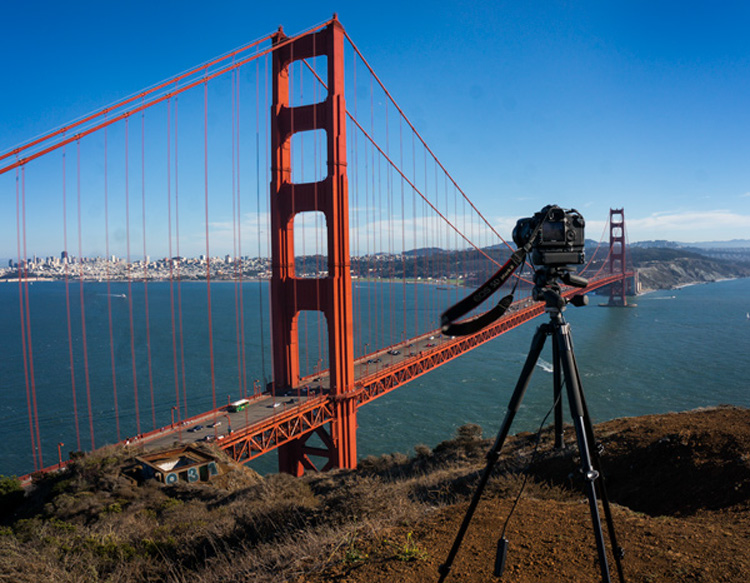
TripodAtGoldenGate

Note the remote shutter release hanging down. Wouldn’t it be nice to have a retractable unit?

It would mean that we wouldn’t have to carry around remote shutter releases.

5. Allowing Longer Shutter Speeds

Another improvement would be to allow longer shutter speeds without the need to switch over to Bulb mode. At present, most cameras limit the length of shutter speeds to 30 seconds. If you want to use a longer shutter speed than that you can, but you have to switch over to Bulb mode. It would be nice to be able to take exposures of a minute or longer without having to switch modes.

Why is this important? Largely because of bracketing (or Auto Exposure Bracketing, or just AEB for short). When you bracket, you are taking three (or more) exposures: one at normal exposure, one underexposed, and one overexposed. If you are starting with a long shutter speed, then the longer shutter speed required for the overexposed picture will often need to be longer than 30 seconds.

For example, if you are taking a bracket of three photos, with your starting shutter speed at 15 seconds, and you set the exposures 2 stops apart, the bracket won’t work as you hope. In this example, the overexposed picture of the bracket would need a shutter speed of one minute (starting at 15 seconds, adding one stop doubles your shutter speed to 30 seconds, and the second stop doubles it again to one minute). But your camera will only allow a shutter speed of 30 seconds, so that won’t work. Your camera will take the normal and underexposed photos, but the overexposed one will be limited to 30 seconds.
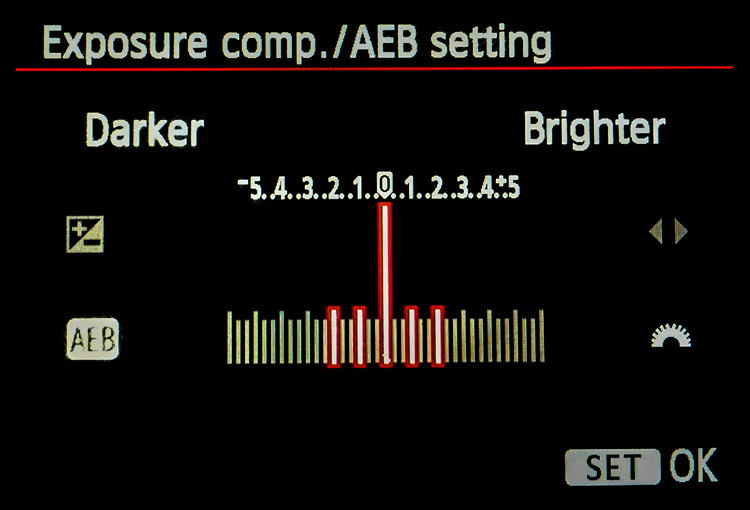
Here is a pretty common bracket for those who use them (5-shots, with each shot separated by 1 stop). If the original shutter speed is longer than 6 seconds, the camera will not capture the entire bracket because the most overexposed picture would need longer than 30 seconds.

Here is a pretty common bracket: 5-shots, with each shot separated by 1 stop. If the original shutter speed is longer than 6 seconds, the camera will not capture the entire bracket because the most overexposed picture would need longer than 30 seconds to expose.

How often does this happen? A lot more than you might think. Landscape photographers are known for being out before the sun is up, and they all want to use a combination of a small aperture to maximize depth of field and a low ISO to minimize noise. The only way to get a proper exposure in these conditions is to use very long shutter speeds. These are the same people who have very little control over their lighting and often face dynamic range problems, so they are the most likely to bracket their photos.

6. Self-Timers

Why are self-timers on cameras limited to two and 10 seconds? A reader named Jeff Johnson wondered about this (as well as raising some of the other improvements mentioned in this article). Every $ 10 digital watch in the discount store will allow you to set timers of different ranges, why not our digital cameras?

This is another one that seems to be a hold-over from a prior era. Timers were mechanical devices at one time, and it may have made a lot of sense to limit the options. Now, it doesn’t make sense. It seems like we ought to be able to set whatever length of timer we want, or at least have a few more options.

7. Improved Wifi

One exciting recent development in cameras has been the introduction of Wifi. It allows you to transfer your pictures to your phone or other device wirelessly. But it is usually clunky. You have to turn off your phone’s data connection to connect with your camera. Some have raised the idea of using bluetooth for connection to phones, tablets, and laptops (in addition to wifi). dPS writer John McIntire echoed that, and pointed out the smartphone and tablet control for things like timelapse and long exposures.

 8. Hyperfocal Distance Calculator

Despite its name, the concept of hyperfocal distance is not that complicated. It is just the closest point at which you can focus, and still keep your entire background acceptably sharp. It depends on only three factors:

  1. The sensor size of your camera
  2. The focal length you are using
  3. Your aperture setting.

There are charts and apps that will help you calculate the hyperfocal distance for your shot.
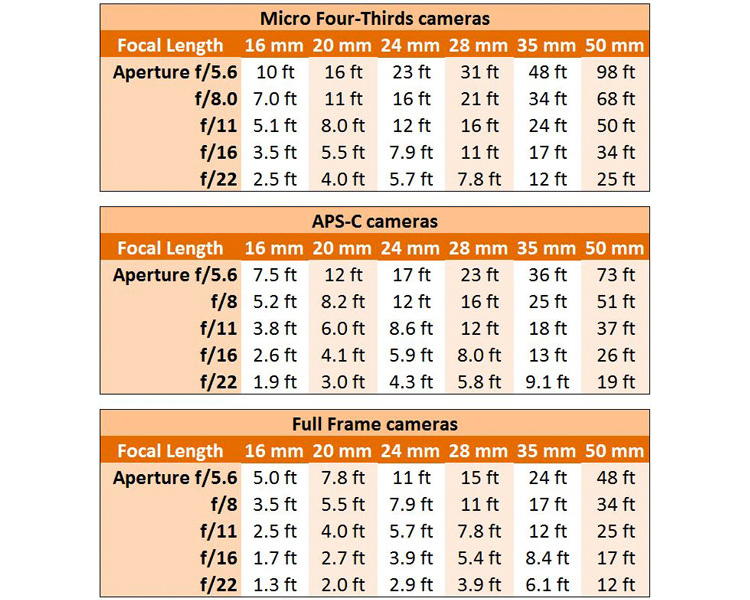
Hyperfocal Distance Charts

Hyperfocal Distance Charts

But why should you be forced to calculate it at all? The aforementioned Jeff Johnson had another great idea of having the camera calculate it for you. After all, the camera is a computer. It already knows all three of the variables involved. Why couldn’t the camera just tell you the hyperfocal distance? It could be part of the camera’s display.

Note: Once again the Fuji cameras lead the way, as the X-T1 and possibly others, do indeed have a hyperfocal distance display inside the viewfinder.

9. Internal storage

Storage has changed remarkably fast in a short period of time. Just a few years ago, you might have been carrying around a bunch of 4 GB memory cards with you. After a couple hundred pictures, you’d swap it out for another. But now, the sizes of memory cards are huge. 128 GB is commonplace, and not all that outrageously expensive. There are even 256 GB cards or even 512 GB cards available as well. As a result, most of us just buy a large card and leave it in the camera. We download the pictures periodically, and resume shooting with the same card.

That’s already a better situation than what we had a few years ago, but doesn’t it seem weird that there is no storage at all in digital cameras (at least not in the mirrorless cameras and DSLRs we tend to use)? It did to Leanne Cole, who wondered why we are fooling around with memory cards at all at this point. Given how much storage can fit in a small place, haven’t we reached the point where storage should be built-in to the camera? Why not have a 500 GB drive already added?

10. Your Changes

These are some items we’d like to see. I think some of these are good ideas, but I suspect there are better ideas out there. So what would you change? Are there things you would add? Are there features you’d like to see put on the digital camera wish list?

Please let us know in the comments below.

googletag.cmd.push(function() {
tablet_slots.push( googletag.defineSlot( “/1005424/_dPSv4_tab-all-article-bottom_(300×250)”, [300, 250], “pb-ad-78623” ).addService( googletag.pubads() ) ); } );

googletag.cmd.push(function() {
mobile_slots.push( googletag.defineSlot( “/1005424/_dPSv4_mob-all-article-bottom_(300×250)”, [300, 250], “pb-ad-78158” ).addService( googletag.pubads() ) ); } );

The post The Top 10 Camera Features Wish List of dPS Readers and Writers by Jim Hamel appeared first on Digital Photography School.


Digital Photography School

 
Comments Off on The Top 10 Camera Features Wish List of dPS Readers and Writers

Posted in Photography


Fruitless: 10 Abandoned Roadside Fruit & Produce Stands

17 Apr

[ By Steve in Abandoned Places & Architecture. ]

abandoned-produce-stand-0
Once vital threads in the fabric of Americana, these abandoned fruit & produce stands no longer entice hungry travelers into making roadside pit stops.

abandoned-produce-stand-1a

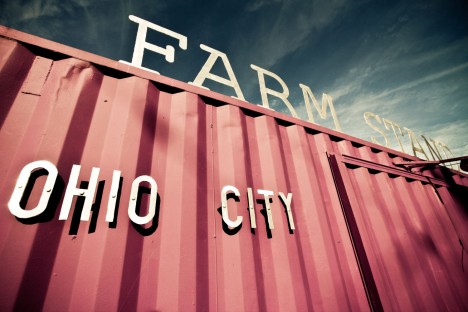
An urban farm in a state whose rivers have been known to catch on fire? It’s more likely than you think: the six-acre Ohio City Farm in Cleveland operates between June and November though the Farm Stand only opens on weekends.

abandoned-produce-stand-1b

Etsy member GregMurrayPhoto and Flickr users MMW Horticulture Group and LAND studio, respectively, snapped the photos above. Gotta love that eggplant-purple, zombie-proof corrugated facade – all that’s missing is a herd of vegetarian walkers milling about in front. BROOOCCCOLIIII…

An Apple Less

abandoned-produce-stand-2

North of the border, a similar unsavory situation is unfolding as Canada builds more major highways and country farms lose access to vehicular travelers – and vice-versa. The abandoned apple stand above was snapped along Highway 11 near Coulson’s Hill in northern Ontario

Michaux Lonely

abandoned-produce-stand-3b

abandoned-produce-stand-3a

Speaking of TWD, the abandoned Michaux Produce stand (and matching flatbed truck) in Goochland County, VA might have served as an alternate filming location had Georgia’s governor not vetoed a certain bill. They could call it “Michonne’s Produce”, harvested with a samurai sword while-u-wait! Kudos to Flickr user Aes D for getting up close and personal with the pleasant yet eerie scene in September of 2015.

Sign of the Times

abandoned-produce-stand-4

No sign remains of this Florida roadside produce stand – er, the stand seems to be gone but the sign remains, though not for much longer by the looks of it. Flickr user Dan Optimus Prime (dvn225) captured the sorry signboard standing – barely – just outside Daytona Beach in March of 2013.

Next Page – Click Below to Read More:
Fruitless 10 Abandoned Roadside Fruit Produce Stands

Share on Facebook


[ By Steve in Abandoned Places & Architecture. ]

[ WebUrbanist | Archives | Galleries | Privacy | TOS ]


WebUrbanist

 
Comments Off on Fruitless: 10 Abandoned Roadside Fruit & Produce Stands

Posted in Creativity


A small project: iFixit Samsung NX Mini disassembly guide

17 Apr

iFixit Samsung NX Mini disassembly guide

As far as small cameras go, the Samsung NX Mini is one of the most impressively small we’ve come across. The Mini manages to fit a 20.9MP 1″-type sensor into a super-slim body that’s just 22.5mm thick. It’s been discontinued, but when we saw iFixit post a disassembly guide for the littlest NX we just had to see what was inside. See some of the highlights from a safe distance here, and if you’re feeling adventurous head over to iFixit and find a step-by-step guide to taking the NX Mini apart.

iFixit Samsung NX Mini disassembly guide

After removing the battery and various screws from the battery compartment and external flash port, you’ll be ready to unscrew the lens mount. That teeny, tiny lens mount.

Image courtesy of iFixit

iFixit Samsung NX Mini disassembly guide

Removing a few more screws from the bottom of the camera frees the front housing, revealing the sensor and NFC chip. Relative to the camera body, the 1″-type sensor looks pretty big.

Image courtesy of iFixit

iFixit Samsung NX Mini disassembly guide

The NFC target lives on top of the battery compartment, which can be removed as seen here to reveal the motherboard underneath. The sensor cover has also been removed at this stage, giving a better view of the 20MP chip underneath. And that’s the next bit to go…

Image courtesy of iFixit

iFixit Samsung NX Mini disassembly guide

A little spudger action frees the sensor module from the motherboard so it’s ready to be carefully removed.

Image courtesy of iFixit

iFixit Samsung NX Mini disassembly guide

There’s one more screw to remove to disconnect the motherboard, and just above it is the Wi-Fi antenna. Of course, you’ll want to carefully disconnect the ribbon cables connected to the motherboard before it goes anywhere.

Image courtesy of iFixit

iFixit Samsung NX Mini disassembly guide

This step requires some careful spudger work to release the ribbon cables…

Image courtesy of iFixit

iFixit Samsung NX Mini disassembly guide

…and once those have all been removed the motherboard is free.

Image courtesy of iFixit

iFixit Samsung NX Mini disassembly guide

The flash assembly is the last piece to come out of the chassis, and takes with it the Wi-Fi antenna as it’s removed.

Image courtesy of iFixit

iFixit Samsung NX Mini disassembly guide

The tilting LCD twists free of the housing and there you have it – one tiny camera in lots of tiny pieces. Check out the whole guide on iFixit for the play-by-play disassembly instructions.

Image courtesy of iFixit

Articles: Digital Photography Review (dpreview.com)

 
Comments Off on A small project: iFixit Samsung NX Mini disassembly guide

Posted in Uncategorized


10 Tips for Photographing Wide-Angle Landscapes

17 Apr

A wide-angle lens is considered an essential piece of gear for any landscape photographer because it gives you a perspective that you cannot achieve with any other lens. You’ll not only be able to photograph grand vistas, but you’ll see lines in a different way, and emphasize subjects by getting super close.

So if you haven’t tried one yet, borrow or rent a wide angle lens and get ready to make images with a different flavour using these tips.

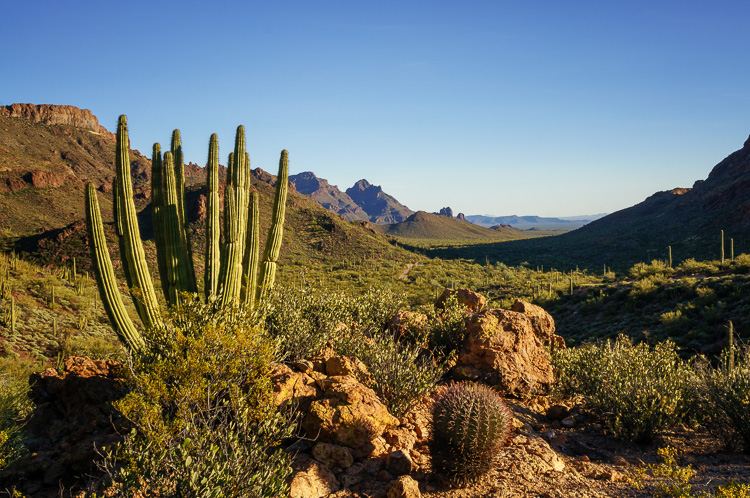
Organ Pipe Cactus National Monument, Arizona

21mm, ISO 100, f/18, 1/15 second

What is a wide-angle lens?

Camera lenses are defined by comparison to the field of view that the eye naturally sees – which is 50mm on a full frame camera or 35mm on a crop sensor camera. This is known as a normal focal length. Any wider than that is a considered wide-angle.

My favourite wide-angle lens is in the 10-20mm range on my crop sensor camera, or 16-35mm on a full frame camera.

When to use a wide-angle lens

Many people think the purpose of a wide-angle lens is to photograph grand vistas and get a lot in the frame. While that is one purpose for a wide-angle lens, its real power is in using its perspective to emphasize objects that are very close to you and de-emphasizing objects that are farther away.

1. Emphasize a foreground element

Wide-angle lenses allow you to get really close to something in the foreground, which will emphasize it and make it look larger and more important than the background elements. A wide lens has a way of changing the relative size of the objects in the frame, so that things that are closer to the lens appear larger, and things in the background appear smaller proportionally.

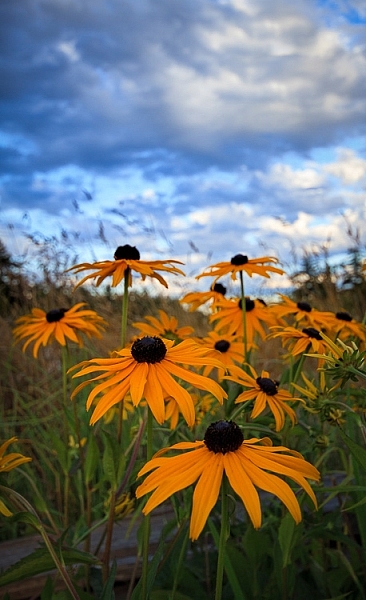
Black Eyed Susan by Anne McKinnell

20mm, ISO 200. f/5.6, 1/160 second

Try using a low angle and getting very close to your main subject. By close, I mean inches away. You’ll be surprised when you look through the viewfinder and discover that objects don’t appear quite so close through the lens.

2. Photograph your subject and its environment

My favourite way to use the lens is to get very close to my main subject so it is large in the frame, as mentioned above, but also include other elements in its environment in the frame. This is a great way to create a story-telling image that provides context for the main subject.

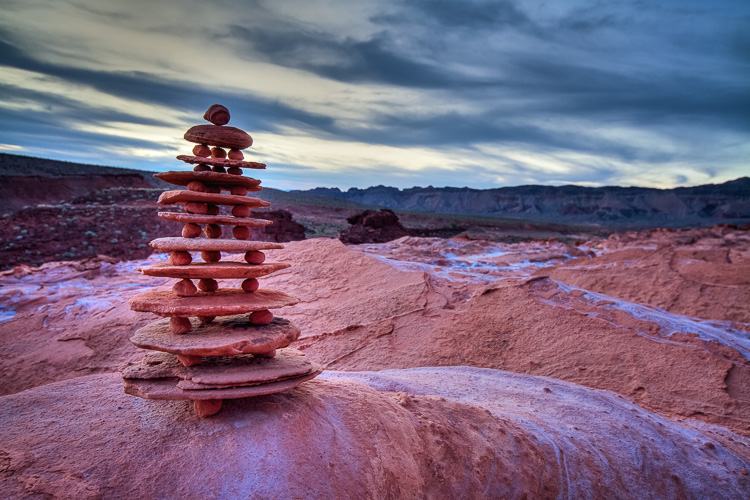
Balancing Rocks at Little Finland, Nevada by Anne McKinnell

16mm, ISO 200, f/8, 1.3 seconds

3. Get everything in focus

Another great power of a wide-angle lens is its ability to have incredible depth of field. You can get everything from two feet away to infinity in focus. Of course, this depends on the exact lens and the aperture you choose, but all wide-angle lenses have a greater ability to get more in focus than a telephoto lens (which is excellent at shallow depth of field by blurring the background). You’d be hard pressed to blur the background with a wide-angle lens.

Whitney Pockets, Nevada by Anne McKinnell

19mm, ISO 100, f/20, 1/20 second

You can use a hyperfocal distance calculator to figure out exactly what will be in focus for your lens at the aperture you choose. But generally speaking, if you focus on something close to you and use a small aperture like f/18, everything from front to back will be in focus.

4. Watch out for distractions

Since wide-angle lenses include a lot in the frame, you’ll need to be extra vigilant to make sure there are no distractions. Everything that is in the frame should have a purpose.

Check your composition to make sure there is nothing in the foreground that you didn’t notice, since objects just inches away from you will be in the frame. As well, check the background to make sure there you haven’t included something unintentional.

Ideally, your composition should clearly show what the main subject is, what the supporting elements are using an interesting graphic design, and not include anything else. Simplify the composition as much as possible.

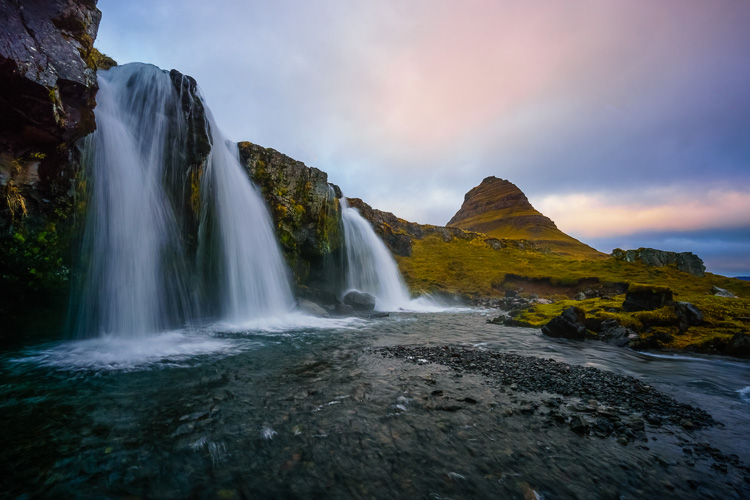
Kirkjufellsfoss, Iceland by Anne McKinnell

11mm, ISO 100, f/20, 1/6 second

Because the frame contains such a wide field of view, it will have a lot in it, so it is especially important that the main subject is obvious.

5. Keep the camera level

Wide-angle lenses are notorious for displaying distortion around the edges. Anything with straight lines at the edges of the frame will appear to lean inwards. To avoid or minimize distortion, keep the camera level with the ground and don’t angle it up or down.

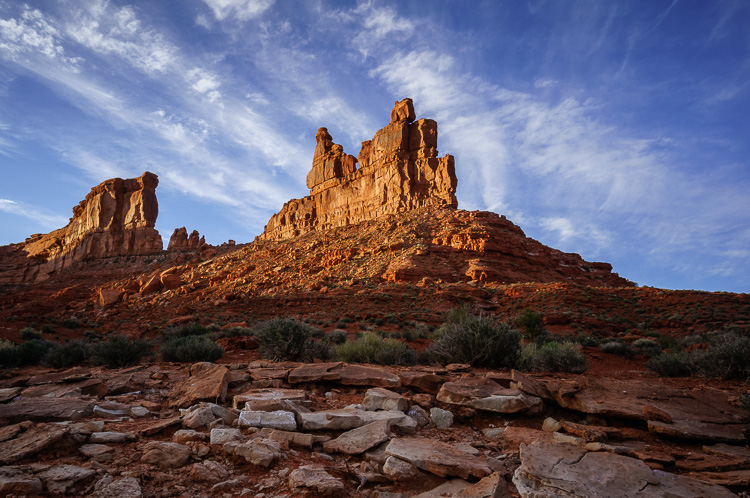
6. Angle your camera upwards

On the other hand, you can use this distortion to your advantage! Just make sure it is intentional and you are using it to emphasize something. For example, by angling the camera upwards you can emphasize the sky, and any clouds in it will appear to point towards the center of the frame.

Valley of the Gods, Utah by Anne McKinnell

15mm, ISO 100, f/11, 1/60 second

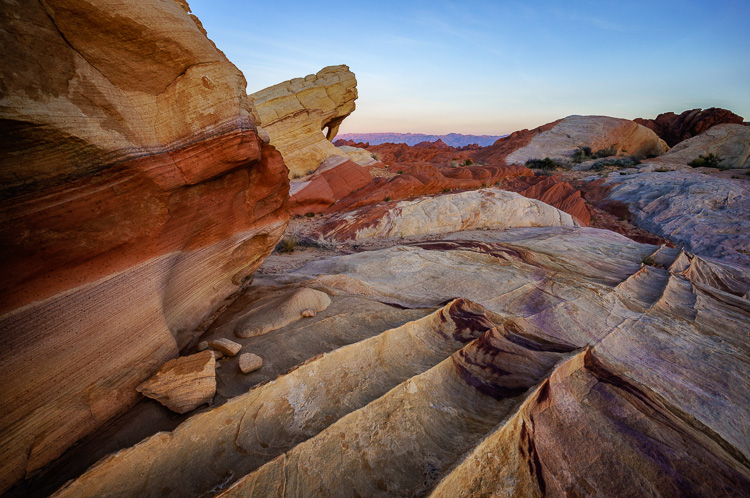
7. Angle your camera downwards

Similarly, if you angle your camera downwards you can emphasize leading lines on the ground and create a perspective that really draws the viewer in.

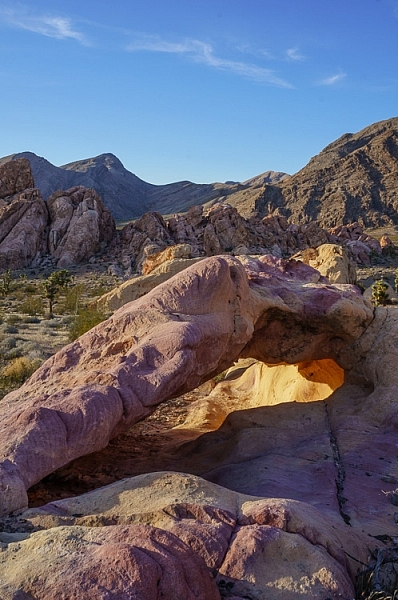
Fire Canyon Arch in the Valley of Fire State Park, Nevada by Anne McKinnell

10mm, ISO 200, f/11, 1/20 second

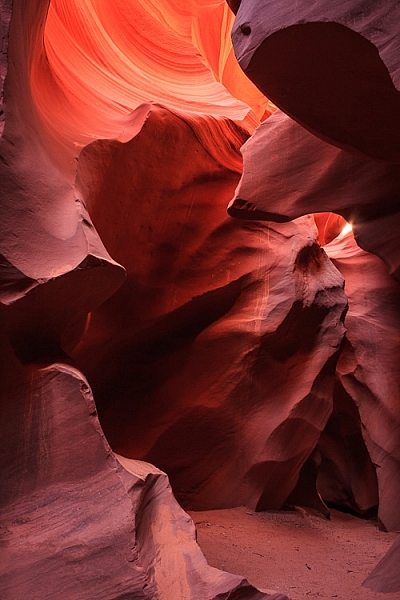
8. Make images in close quarters

Whenever you are in an enclosed space, making images with impact can become difficult, since you cannot get far enough away from your subject. If you are in a tight situation, a wide-angle lens is a necessity!

Antelope Canyon, Arizona by Anne McKinnell

21mm, ISO 100, f/11, 5.0 seconds

9. Beware of polarizing filters

You may already know that polarizing filters can darken skies, emphasize clouds, and saturate colours when you are photographing in a 90 degree angle to the sun. If you are photographing with the sun directly in front of you or behind you, the filter does not have this affect.

With a wide-angle lens, you may find that part of the scene in the frame is at a 90 degree angle and is affected by the polarizing filter, and the other side is not. When this happens, it is better not to use the polarizing filter at all (it will give you an uneven sky which is darker on one side).

10. Manage uneven light

When photographing landscapes with a wide-angle lens you’ll frequently encounter varying amounts of light in the frame. Often the sky in the background is much brighter than your foreground. When this happens, you can use a graduated neutral density filter to darken the top portion of your image and even out the exposure.

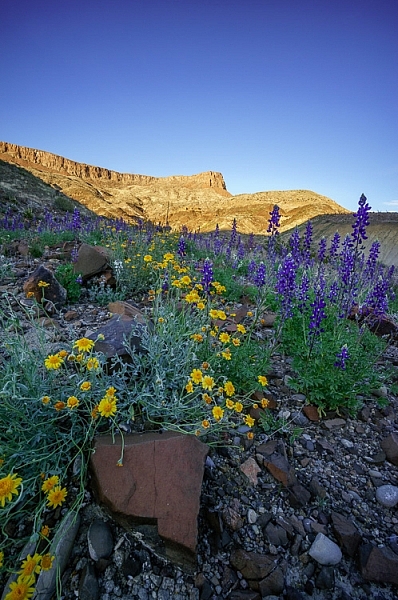
Wildflowers in Big Bend Ranch State Park, Texas by Anne McKinnell

10mm, ISO 200, f/11, 1/100 second

A wide-angle lens is often the favourite lens in the kit for landscape photographers and with these tips it may become your favourite lens too.

What do you like to shoot with your wide lens? Please share your tips and images below.

googletag.cmd.push(function() {
tablet_slots.push( googletag.defineSlot( “/1005424/_dPSv4_tab-all-article-bottom_(300×250)”, [300, 250], “pb-ad-78623” ).addService( googletag.pubads() ) ); } );

googletag.cmd.push(function() {
mobile_slots.push( googletag.defineSlot( “/1005424/_dPSv4_mob-all-article-bottom_(300×250)”, [300, 250], “pb-ad-78158” ).addService( googletag.pubads() ) ); } );

The post 10 Tips for Photographing Wide-Angle Landscapes by Anne McKinnell appeared first on Digital Photography School.


Digital Photography School

 
Comments Off on 10 Tips for Photographing Wide-Angle Landscapes

Posted in Photography