RSS
 

Archive for February, 2016

How to Create Awesome Portrait Lighting with a Paper Bag an Elastic Band and a Chocolate Donut

12 Feb
Paperbag main 717

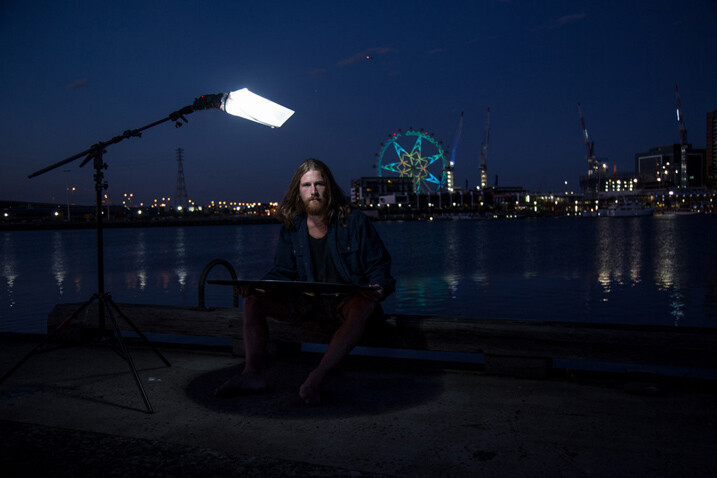
I photographed Luke Deslandes with a homemade modifier and a lighting kit that can be created for less than $ 200

One of my favourite TV series from the 90s was MacGyver, an action-adventure series about a US government secret agent with a fabulous mullet, who improvised and built complicated devices from household objects such as rubber bands, paper clips, pens and a Swiss Army knife.

The show was so incredibly popular that the term MacGyver made its way into the dictionary:

MacGyver (v): To make or repair (an object) in an improvised or inventive way, making use of whatever items are at hand:

  • He MacGyvered a makeshift jack with a log.
  • He has a shock of short red hair and a pair of rectangular-framed glasses, MacGyvered with duct tape.

The other week I was caught short on a night shoot because I’d misplaced my small softbox modifier, and needed to come up with a way to soften and control the from my speedlight to create portrait lighting.

I searched my entire kit and car, found nothing useful, then I asked myself, “What would Macgyver do?”. I rummaged through my bag and found a chocolate donut (Nutella filled, so good!) in a white paper bag, and a hair elastic which would be perfect substitutes for the softbox I’d forgotten to bring to the shoot.

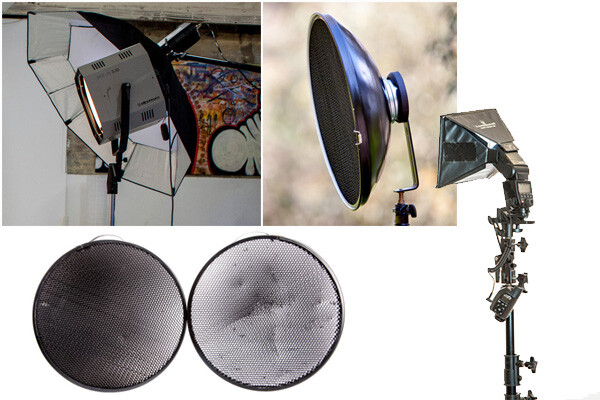
The really cool thing about lighting is that the basic principles will work with any kind of light, regardless of budget, or the type of modifier used. So whether you’re working with a $ 150 lighting kit (similar to the one I used for these images) a $ 1,500 hit, or $ 15,000 one, the light will still react in the same way.
light-modifers

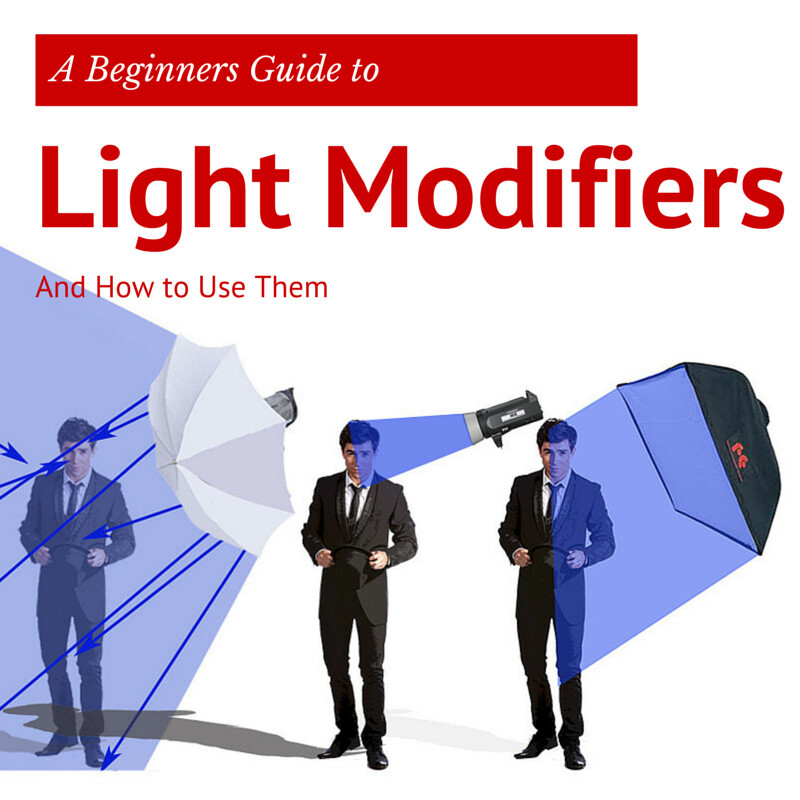
One of the best lessons I learned from working with film and television crews is that ordinary household objects can be used to shape and train light. I’ve seen soft light created using sheets of Perspex, calico, and even shower curtains. A light modifier is basically designed to do two things:

  1. It controls the shape of the flash
  2. It controls the quality of light coming from the flash
Light Shapers SQ copy

Some modifiers, like umbrellas, will spread the light over a large area and soften the quality of the light. Other modifiers like grid spots contain the light to a very small area and create a hard quality of light (click image above to read more).

The main differences between the high-end options, and MacGyvered lighting are: light quality, consistency, and build. A light modifier that has been cobbled together using found objects is not going to look pretty, and you may attract some odd looks from passers by. On a positive note, I believe a MacGyvered light modifier is a perfect way to get your head around how lighting works, and to vary your lighting styles without having to empty your bank account.

This is how I created my mini softbox using a paper bag, an elastic band, and a chocolate donut.

The Gear
Boom 750
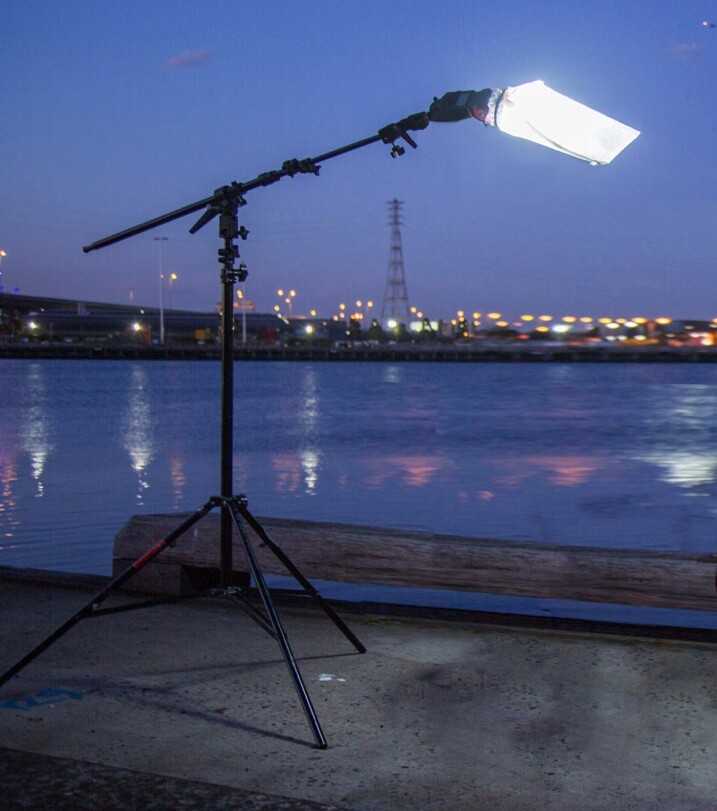
Booms are an awesome way to add light above your model, as they allow the freedom to work without stands getting in the way of your shot. Using a boom is also the best way to position the light exactly where you want it.

I’ve created this lightweight location boom by using a mini-boom arm on an umbrella bracket, attached to a light stand. Always remember to use a weight on the light stand, to avoid it tipping over in high winds. You can buy a sandbag, or MacGyver your own using two-litre drink bottles filled with water in a canvas bag.

A cheaper alternative to the boom is to use a light pole, and to ask a friend to hold it for you. If you are new to working with off-camera flash, I suggest you read one of my previous blog posts: A Beginner’s Guide to Working With Flash Off-Camera.It will walk you through the step-by-step technique of shooting with off-camera flash .

  • A Yongnuo YN-560II speedlight – under $ 80
  • Yongnuo RF-603N flash triggers $ 30
  • CowboyStudio umbrella mount bracket with swivel tilt bracket $ 16
  • LumoPro LP605 compact 7 foot stand with ground spikes $ 45
  • Sandbag $ 7
  • LumoPro mini-boom/reflector arm $ 40
  • Tripod
  • Nutella donut in a white paper bag – you can use plain donut but they are not as good! <$ 1
  • One Hair elastic <$ 1
  • Canon 5DMK111 (use your own camera)
  • Canon 24-105mm L series (use the lenses you have already)

The Way

Paperbag 2 717

Carefully remove the donut from the bag, being careful not to get any Nutella smeared on the bag. Divide the donut into two equal portions. Offer one half to your model and eat the other half. If you can’t find Nutella donuts in your neck of the woods, you can substitute with any other pastry served in a white paper bag.

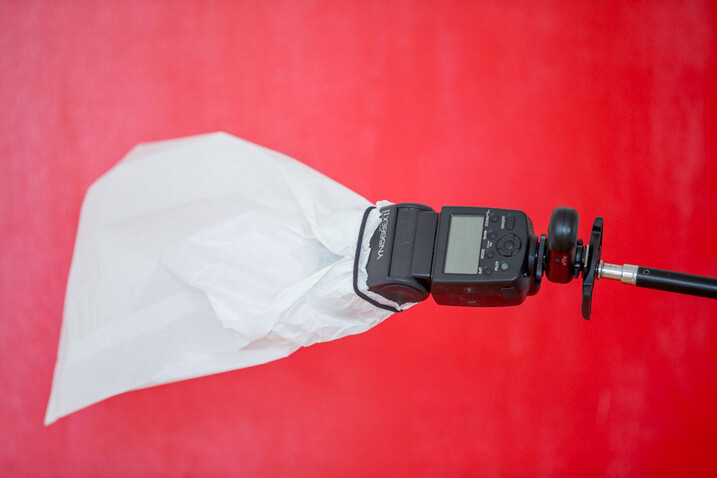
If you prefer a cleaner style of shooting, just ask for an extra bag when you buy your donut. You can also skip this part altogether, but it’s not as much fun, and just find a white paper bag similar to the one I’m using (see below). They vary in size and thickness so look for bags that are free of any advertising.
Paperbag 3 717

Place the bag over the flash and secure using the hair elastic. Electrical tape will also work, but it tends to leave a sticky residue on the flash.
Paperbag 4 717

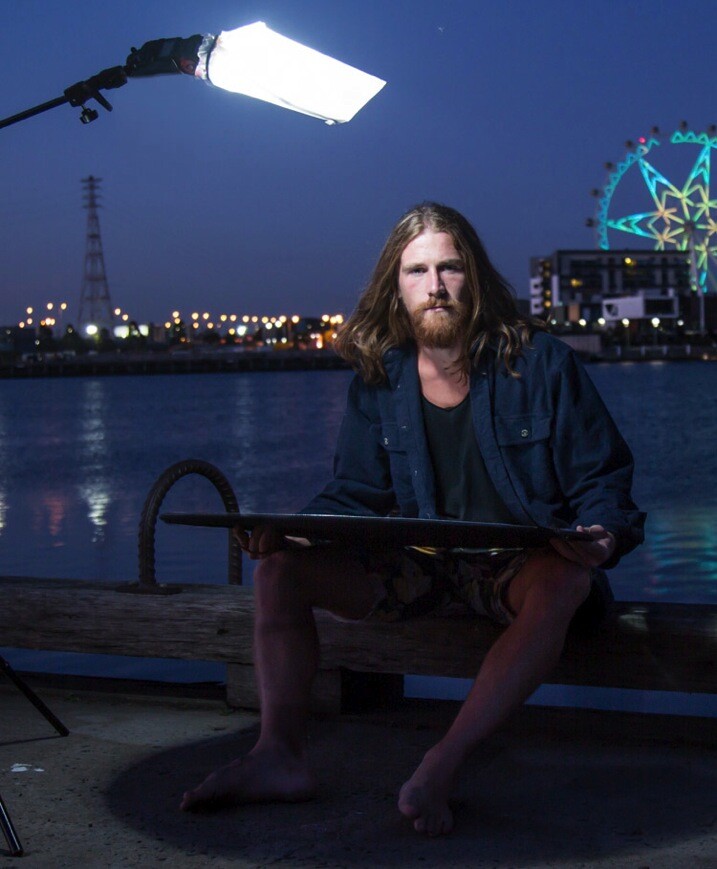
Position the light directly above, and slightly to one side, your model’s head. This lighting style is called loop lighting. I think it’s a flattering style because it leaves the face in partial shadow, and creates the illusion that the face is slimmer.

It’s called loop lighting because of the loop-shaped shadow the nose casts on the side of the model’s face. How prominent the shadow is, depends on how much fill light is used. I use this style of lighting for 80% of my studio and location shoots, as I believe it is one of the most natural-looking lighting techniques.
Paperbag 5

Adding Fill Light

Using one light from overhead looks great, and adds definition to the model’s bone structure. As I prefer a softer lighting style, I’ve also added a white reflector to my shot.

I placed the reflector on Luke’s (my model) lap because I was shooting very tight headshots. If I were shooting a ¾ or full-length portrait, I would position the reflector on the ground, just out of the shot. The reflector fills in the shadows caused by the flash overhead. You can modify the amount of fill light by how close you place the reflector in relation to your light source. The closer the reflector is to the light, the more evenly lit your portrait will look. If you prefer more contrast or mood to your lighting, move the reflector further away from the light or don’t use one at all.
Paperbag_6-717

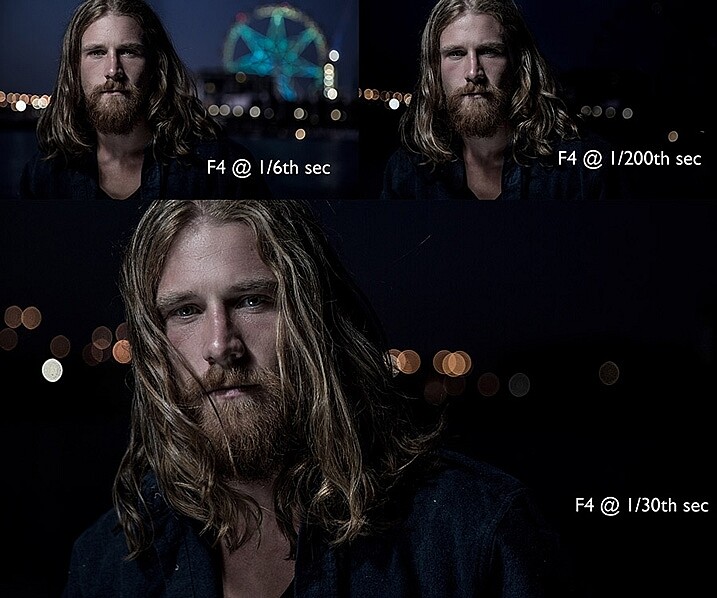
Changing the shutter speed controls how much ambient light there is in the image. To create a brighter background, I selected a shutter speed of 1/6th second. Shooting at 1/200th of a second removes most of the ambient light and creates a moodier image. I wanted to create the goldilocks effect, not too heavy, and not too light, but just right.

The Final Image

Paperbag final 717

Here are a few more awesome Macgyver lighting hacks that my podcast listeners have shared with me.

Ping pong balls and empty toilet rolls
Brett Ferguson 01

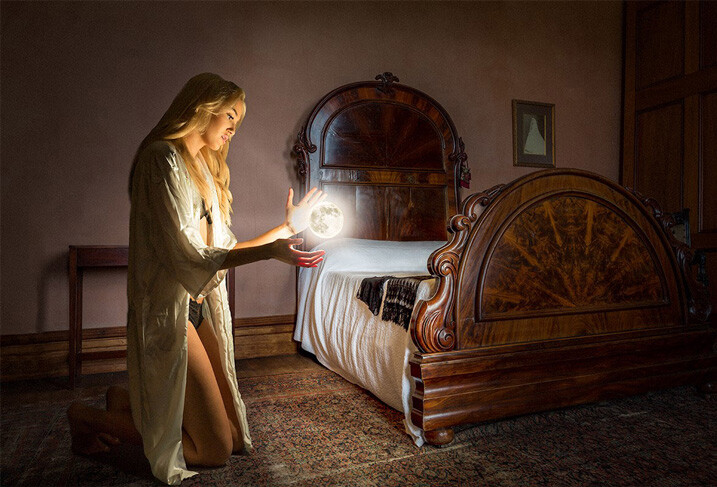
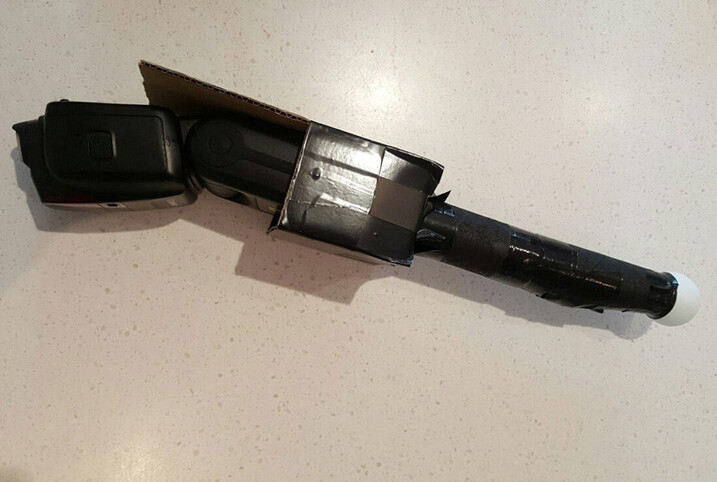
This gorgeous image by Brett Ferguson was created with a light modifier Macgyvered together with a ping pong ball and empty toilet rolls.
Brett Ferguson 02

Hey Gina Milicia, here is a Macgyver light modifier for you. I needed a spot light source to light the model in a convincing way. It was really important to have a soft glow, and realistic shadows, to emulate what the moon would look like. I used a ping pong ball at the end of two empty toilet rolls and then rigged some cardboard to hold the flash. The flash head fits in nicely, and the centre of the toilet rolls are white, allowing it light up to the ball. This image (edited) was shot at 47mm on a 24-70mm f2.8L II lens on a Canon 5D3 at 1/80th, f/3.5 and ISO 500.

You can see a larger version of the finished image at www.brettferguson.com.au.

The Pringles gridspot
GlennDube 717

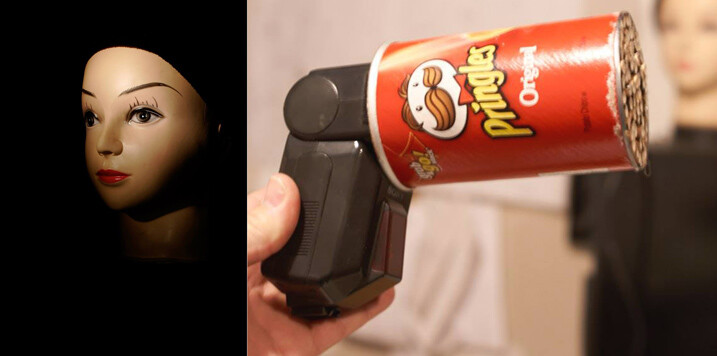
Photographer Glen Dube has Macgyvered this brilliant grid spot using a Pringles container and straws.

This is basically just a Pringles can, with the bottom cut out and replaced by straws, hot glued in place. But I found coloured straws tainted the light, luckily my wife found some paper straws that have a nice bright white inside. The end of the can you get the chips out slides right over all the flashes I have, except this really old Vivitar that has the zoom function on the outside. Pringles has been helpful in providing a variety of lengths of cans for us.

The length (and diameter) of the straws determines the size of the spot and there are even online calculators. I found the flashes zoom function has little effect but the calculators are accurate for determining the spot sizes. The paper straws let you have a sharper fall off (as the plastic straws are translucent and spill light outside the circle). I used 60mm straws, which at 1 meter (3′) gives me a 180MM (7.1″) diameter spot that gets wider the farther away the light is from the subject.

Pop-up flash modifier
Andrej Valko 717

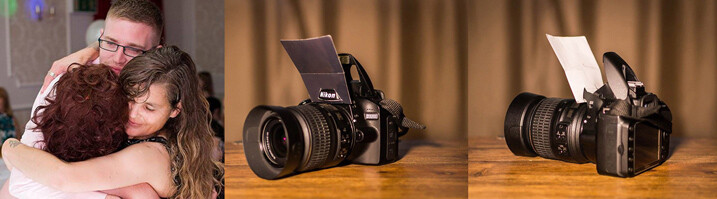
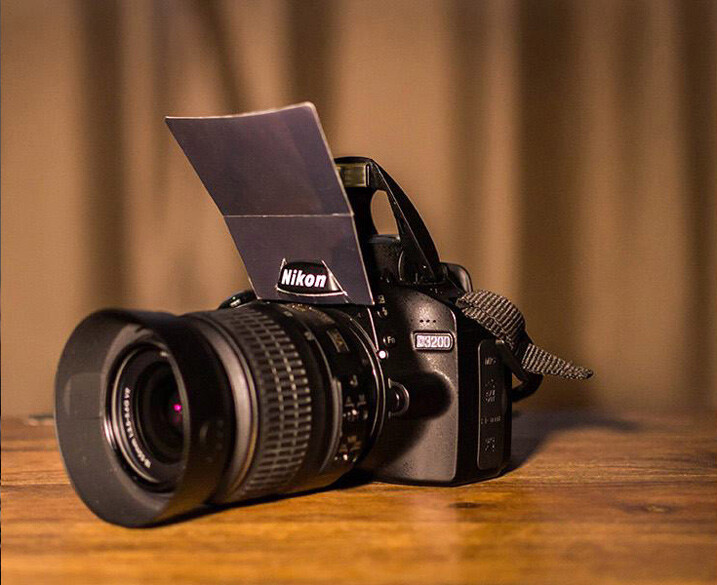
Photographer Andrej Valko created this really simple portable pop-up flash modifier using cardboard.

I saw this idea a couple of years ago – a bounce card for the on-camera flash. I thought: how hard can it be to make one. So I did – I printed black on one side of heavy photo-paper so it didn’t look conspicuous from the front. It was white on the other side to bounce light. I taped it with clear tape so it reflected light more efficiently (it also made it a bit more durable), and I cut it to suit my camera.
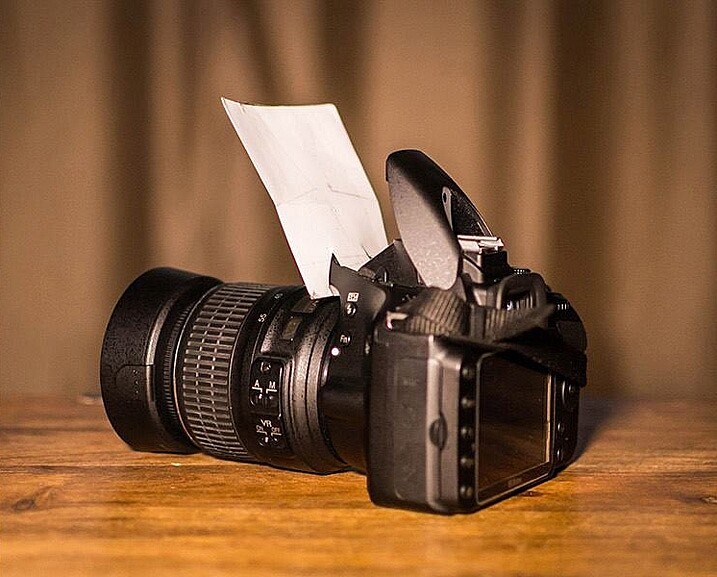
Andrej Valko 2

Andrej-Valko-3

It was easy to mount (it just slid in), easy to carry (in a back pocket just like a business card) and it bounced light off the walls and ceiling, as well as off my face! And I, the crazy photographer, shot a wedding reception with just the bounce card! (I didn’t have a single flash unit at the time.) I still cannot believe I actually used this to shoot a wedding.

The drawer liner modifier
MikeHickman 2 717

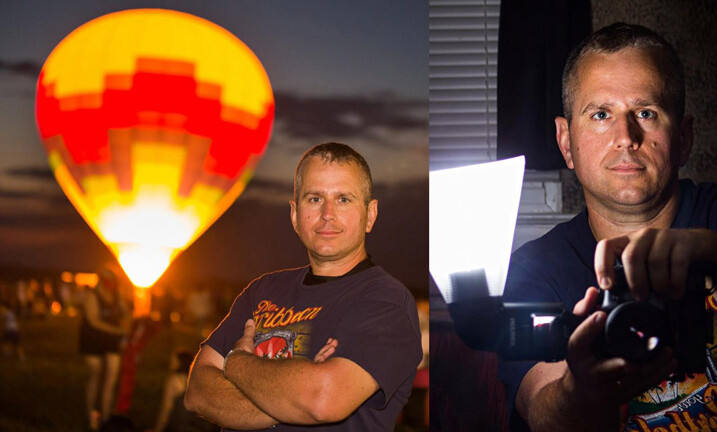
Photographer Mike Hickman created this modifier using a translucent drawer liner.

My “ugly” modifier created from translucent drawer liner which I have used almost exclusively during events, including weddings. The idea came from here.

Cost is about $ 10 for a full liner made by Contact, and attached with Velcro strips for about an additional $ 6. Makes three or four, depending on size. Also, folds up to stick in your pocket when changing locations and I have two in my camera bag at all times. Can’t do that with too many other modifiers!

There are so many awesome ways to MacGyver light modifiers. Do you have one you are particularly proud of? I’d love to see it. Please share your ideas in the comments below.


fastflash_bookIf you want to learn more about using flash for creating portraits, pick up Gina’s brand new dPS ebook: Fast Flash for Portrait Perfection. Now on sale for an introductory price for a limited time only.

googletag.cmd.push(function() {
tablet_slots.push( googletag.defineSlot( “/1005424/_dPSv4_tab-all-article-bottom_(300×250)”, [300, 250], “pb-ad-78623” ).addService( googletag.pubads() ) ); } );

googletag.cmd.push(function() {
mobile_slots.push( googletag.defineSlot( “/1005424/_dPSv4_mob-all-article-bottom_(300×250)”, [300, 250], “pb-ad-78158” ).addService( googletag.pubads() ) ); } );

The post How to Create Awesome Portrait Lighting with a Paper Bag an Elastic Band and a Chocolate Donut by Gina Milicia appeared first on Digital Photography School.

Digital Photography School

 
Comments Off on How to Create Awesome Portrait Lighting with a Paper Bag an Elastic Band and a Chocolate Donut

Posted in Photography


Kipon to produce Canon EF to Sony E-mount adapter with AF and slot-in ND grads

12 Feb

Chinese lens adapter manufacturer Kipon has said it is producing a new model that will allow Canon EF lenses to fit on Sony E-mount mirrorless bodies while maintaining their AF functionality. The Kipon EF-S/E AF ND lens adapter also comes provided with a slot-in four-stop graduated neutral density filter that can be fitted into the body of the ring. Sitting between the optics and the camera, the filter will be protected from stray light and in theory will remain clean, so it should deliver better image quality than had the same filter been fitted over the front of the lens.

The company has not released very much detail about the forthcoming adapter, but it does promise that the phase detection AF system will operate at ‘high speed’. Perhaps significantly, the company is showing a picture of the adapter alongside a pair of slot-in filters, so we might hope that other filters will become available at a later date.

The Kipon EF-S/E AF ND adapter will go on sale from 15th March 2016, and will cost $ 428.

For more information visit the Kipon website.

Articles: Digital Photography Review (dpreview.com)

 
Comments Off on Kipon to produce Canon EF to Sony E-mount adapter with AF and slot-in ND grads

Posted in Uncategorized


Saving Face: ‘Ghost Facade’ Preservation Worse Than Demolition?

12 Feb

[ By WebUrbanist in Architecture & Cities & Urbanism. ]

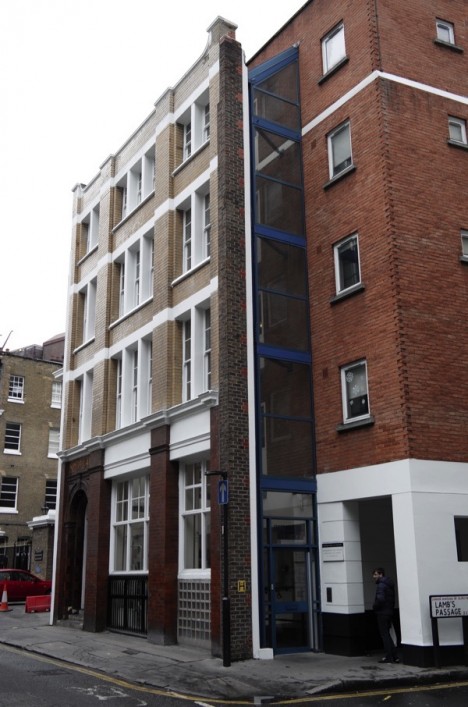
ghastly grafted facade example

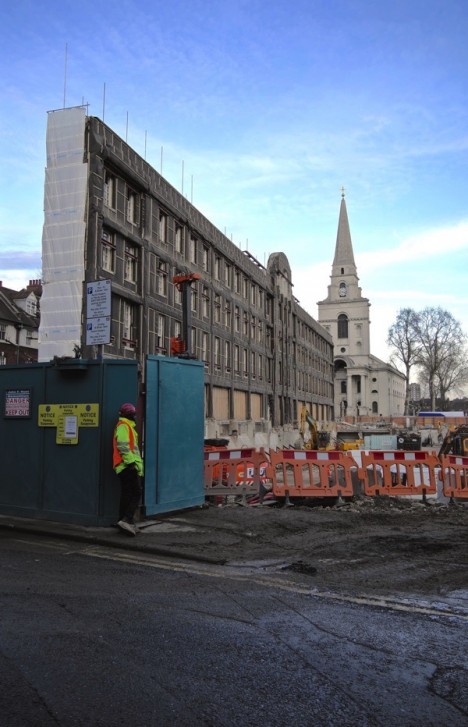
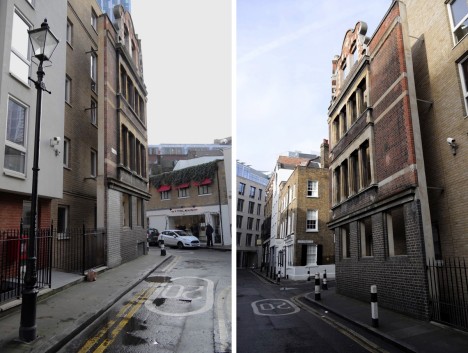
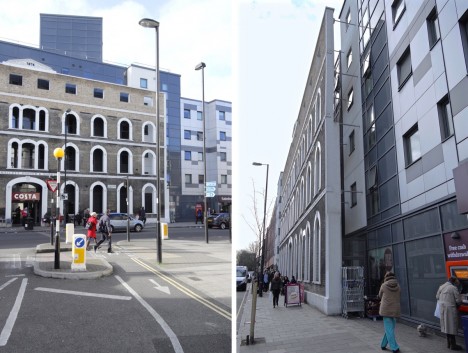
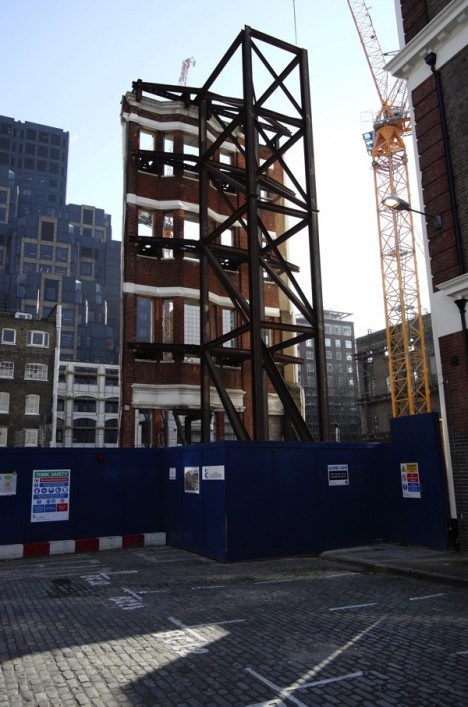
London is filled with grafted facades, nearly two-dimensional artifacts held in place while updated buildings are constructed behind them; many seem to haphazardly half-disguise the boring new structures on which they are grafted. While other cities have done similar, the sheer volume of them in this East End neighborhood is astonishing.

facade combination abomination

The writer behind Spitalfields Life, a web publication, does not mince words in reacting to this partial approach to preservation, which “threatens to turn the city into the back lot of an abandoned movie studio …. As if I were being poked repeatedly in the eye with a blunt stick, I cannot avoid becoming increasingly aware of a painfully cynical trend in London architecture.”

facade ghost grafting

In further criticisms, The Gentle Author bemoans the results as a compromise between “cowed planning authorities” and “architects … humiliated into creating passive-aggressive structures.” Perhaps this gives insufficient credit to architects, some of whom also fall guilty to facadism at times, and have been known to prioritize the exterior over the plan, skin over skeleton, form over function.

facade stabilized new structure

It is dangerous to suppose that preservation is necessarily binary. Compromises are almost inevitably made over time to keep architectural functional, through essential electrical and plumbing retrofits to more debatable code-related upgrades and updates. There is also a case to be made that the streets are a public room of which buildings are the walls, so preserving facades (properly, at least) can maintain the public’s experience of a place.

facadism preservation

Nonetheless, whether you approve of the general approach or cannot see the apologist’s point of view, it is hard to argue against the examples: the executions documented by The Gentle Author range from mediocre to outright terrible. In short: there may be a right way to approach preserving facades as part of new structures, but many architects are doing it wrong.

Share on Facebook


[ By WebUrbanist in Architecture & Cities & Urbanism. ]

[ WebUrbanist | Archives | Galleries | Privacy | TOS ]


WebUrbanist

 
Comments Off on Saving Face: ‘Ghost Facade’ Preservation Worse Than Demolition?

Posted in Creativity


40+ Free & Premium Lightroom Presets You Shouldn’t Miss

11 Feb

Presets can be a Lightroom user’s best friend. When you are editing hundreds or thousands of photos any time you can save in post processing is extremely valuable. Making use of presets is one of the best ways to streamline your workflow and save time in the editing process. You can either create your own presets, download free presets, or Continue Reading

The post 40+ Free & Premium Lightroom Presets You Shouldn’t Miss appeared first on Photodoto.


Photodoto

 
Comments Off on 40+ Free & Premium Lightroom Presets You Shouldn’t Miss

Posted in Photography


Understanding Normal and Cross-Type Focusing Points

11 Feb

Look through the viewfinder of any DSLR camera and you will see several dots, or squares, that represent individual points at which the camera is capable of focusing. The purpose of these focusing points may seem fairly obvious, but not all of them are created equal. When you press the shutter button (or back button) halfway, some of these points will light up, indicating that everything at that specific spot is crystal clear and your photo will be nice and sharp.

However, the speed at which your camera can focus on one of the points, as well as how accurate the focus will be, depends greatly on whether the individual focusing point is a single or cross-type. Understanding the differences in how they operate can help you decide which ones to use to take better photos.

cross-type-focus-sensors-joy-of-the-waters

Most DSLR cameras use what’s called a phase-detection focusing system – whereas most mirrorless cameras, point-and-shoots, and mobile phones use a separate system called contrast-detect. In a DSLR, most of the light coming through the lens is reflected upwards by the mirror, to the optical viewfinder, which lets you see precisely what the camera lens sees.

However, a tiny bit of light is also sent downward to a series of sensors that are capable of figuring out whether the image is in focus. The science behind this involves splitting the incoming light, and comparing two beams, to essentially see if they match up. If not, an electronic signal is sent to the focusing motor, to adjust the lens until the image is in focus. All this happens in a fraction of a second, but these fractions matter in photography, and can often be the difference between a tack-sharp image and a blurry shot.

I used my camera's cross-type focusing points to make sure this picture of a holstein cow was tack sharp.

I used my camera’s cross-type focusing points to make sure this picture of a holstein cow was properly focused.

The problem with traditional phase-detecting systems is they get a bit stumped if there are a lot of vertical lines in the spot where they are trying to focus. To see how this works for yourself, print a sheet of paper on your computer, with nothing but vertical lines. Tape it to a wall, and try to focus on it with your camera. If you are using one of the focusing points on the outside edge of your camera’s viewfinder, your lens will likely spend a few seconds hunting for focus but will probably never find it. However if you turn the paper sideways and try again your camera will likely get things focused fairly easily. This is because when light is sent to the phase-detection sensors in your camera, the sensors don’t have enough information to determine focus, if all it sees is vertical lines.

While most of the time when you are out taking pictures, you are probably not shooting images of vertically-lined paper, this example does illustrate how your camera’s autofocus can get slowed down, and become unreliable under certain conditions. Ironically, in this test, your camera will find focus much better if you use the live view function. That employs a contrast-detection focusing method which is also used in most mirrorless cameras, and while it is a bit slower, can have some advantages over traditional phase-detect systems.

Test your camera's focus sensors with nothing but a lined piece of paper.

Test your camera’s focus sensors with nothing but a lined piece of paper.

To address this issue, most camera manufacturers have implemented cross-type focusing sensors that work fine when focusing on images with horizontal and vertical patterns. On high-end models (like the Nikon D5 or Canon 5D Mark III) there are several clusters of cross-type focusing sensors, but lower-end models (like the Nikon D3200 and Canon Rebel T3i) usually have just one, right in the center. This means that the center autofocus point will likely be significantly faster, and more reliable, than the points on the edge. You can see the results yourself by repeating the test from earlier with the center focus point, instead of one on the perimeter of your viewfinder.

Using your camera's cross-type sensors can help ensure your pictures are perfectly focused.

Using your camera’s cross-type sensors can help ensure your pictures are perfectly focused.

The real-world implications of this are quite significant, and may very well change how you approach your photography. Many people use an automatic setting that allows their camera to look at all the available focus points, and determine which one should be used to set the focus. But, if you know that the the cross-type points will give you consistently better results, you might try using them more often.

This is especially useful with sports and fast action, but other types of photography situations can benefit from utilizing cross-type points also. Portrait, family, and wedding photographers often utilize the focus-and-recompose method to nail focus with a cross-type sensor, then shift their camera’s field of view to get precisely the composition they want. If you shoot landscapes you might not need speedy autofocus, but using your camera’s cross-type sensors may help your focus be more accurate.

Of course all this doesn’t mean that the normal focusing sensors on your camera are worthless, just that knowing which ones are cross-type can often give you an advantage you might not have otherwise had.

My Nikon D750 has 15 cross-type sensors all in the middle. To get this shot I used a cross-type sensor to nail focus and then recomposed by slightly shifting my camera to the right.

My Nikon D750 has 15 cross-type sensors, all in the middle. To get this shot I used a cross-type sensor to nail focus, and then recomposed by slightly shifting my camera to the right.

One other point worth noting is that mirrorless cameras use phase-detection focusing more than they used to, and some are implementing cross-type sensors too. Just because this technology started with DSLRs does not mean it will be forever limited to these types of cameras, and as manufacturers continue to innovate we will likely see more, and better, focusing options in the years ahead.

To help you figure out how many cross-type focusing points your camera has, you can do a little searching online, or look at the list below. I have compiled some data based on the more popular camera models for you:

Canon

  • 70D, T6/T6i: 19 points, all cross-type
  • 60D, T5/T5i, T4/T4i: 9 points, all cross-type
  • T3/T3i, T2/T2i: 9 points, 1 center cross-type
  • 6D: 11 points, 1 center cross-type
  • 7D: 19 points, all cross-type
  • 7D Mark II: 65 points, all cross-type
  • 5DSR, 5D Mark III: 61 points, 41 cross-type in 3 columns (middle, left, and right-side)

Nikon

  • D3300, D3200, D3100: 11 points, 1 center cross-type
  • D600, D610, D7000, D5500, D5300, D5200: 39 points, 9 cross-type (clustered in center)
  • D750, D810, D7100, D7200: 51 points, 15 cross-type (three center columns)

Sony

  • a6000: 179 points, 15 cross-type
  • a77II: 79 points, 15 cross-type
  • a77: 19 points, 11 cross-type
  • a7II: 117 points phase detection, PLUS 25 cross-type points
  • a7R II: 35mm full frame: 399 points (phase-detection AF) APS-C: 357 points (phase-detection AF) / 25 points (contrast-detection AF)

Pentax

  • K-5: 11 points, 9 cross-type
  • K-3: 27 points, 25 cross-type

Have you ever tried using cross-type focusing points? What have your results been like, and what other tips and tricks do you have for other dPS readers? Leave your thoughts in the comments section below.

googletag.cmd.push(function() {
tablet_slots.push( googletag.defineSlot( “/1005424/_dPSv4_tab-all-article-bottom_(300×250)”, [300, 250], “pb-ad-78623” ).addService( googletag.pubads() ) ); } );

googletag.cmd.push(function() {
mobile_slots.push( googletag.defineSlot( “/1005424/_dPSv4_mob-all-article-bottom_(300×250)”, [300, 250], “pb-ad-78158” ).addService( googletag.pubads() ) ); } );

The post Understanding Normal and Cross-Type Focusing Points by Simon Ringsmuth appeared first on Digital Photography School.

Digital Photography School

 
Comments Off on Understanding Normal and Cross-Type Focusing Points

Posted in Photography


How tough can it be? LensRentals looks at why it’s so hard to make lenses

11 Feb
Just check it and fix it, it can’t be that hard. Can it?

Why can’t you just make them better? It sounds like a reasonable question until you start unpacking exactly what it entails. This is exactly what Roger Cicala and company do in the latest LensRentals blog post. As usual with Cicala’s posts, the closer he looks, the more complicated the question becomes. So why can’t everyone just (repeatably and affordably) make lenses, you know… better?

With his usual critical (and somewhat wry) eye, Cicala looks at the importance and challenges of quality assurance (the processes to ensure you build things to standard) as well as quality control (checking that you’ve done so). This includes a look at the impacts of design tolerances, manufacturing tolerances, repeatability and the need to make products affordably-enough that people will be willing to buy them. And just what can you do with the ones that aren’t quite right?

It’s a long article but if you’ve ever wondered why they don’t just check and fix every lens as the last step of the production line, or you’ve found yourself using the phrase ‘you get what you pay for’ and you’d like to understand why it’s often true, it’s well worth a read.

And, if you get a chance to read it all, we’d love to know whether you end up more impressed by Leica’s ability to make expensive, mechanically simple, manual focus single-focal-length lenses really well or by the ability of the big brands to build collapsable, image stabilized kit zooms for next-to-nothing and have them work at all. Let us know in the comments.

Articles: Digital Photography Review (dpreview.com)

 
Comments Off on How tough can it be? LensRentals looks at why it’s so hard to make lenses

Posted in Uncategorized


Architectural Cultures Condensed: Vernacular Dwelling Collages

11 Feb

[ By Steph in Art & Drawing & Digital. ]

architecture collage 1

Can you distill the architecture of a particular city down to an image of just a single building? Not effectively – unless you’re Sweden-based artist Anastasia Savinova, who scouts and photographs the most distinctive typologies of specific locations and then blends them into a single structure via paper collage. Entitled “Genuis Loci,” the series consists of monstrous, Frankenstein-like cobbled buildings packing in as much visual information as possible.

architecture collage 9

architecture collage 11

architecture collage 7

“Traveling around cities and countries, I take pictures of buildings, look into windows sneakily, go to local shops, flea markets and bars, watch everyday life – all this helps to build the feeling of the Place. This feeling becomes a foundation for a series of large-scale collages. The Integral Image emerges from visual information and a dozen of associations. While architecture and landscape are visual components of the integral image of the Place, at the same time, this image is inseparably linked with a mentality and a way of life.”

architecture collage 2

architecture collage 3

architecture collage 4

“It is saturated with ‘an incorporeal something.’ Ancient Romans called it ‘genus loci’ – the protective spirit of a place. In contemporary usage, ‘genus loci’ refers to a location’s distinctive atmosphere. A big house on each collage is composed of many buildings, which are typical for a particular country or city, in their connection with the land and the spirit of the place.”

architecture collage 11

architecture collage 8

architecture collage 6

Some almost look like they could be real structures, while the rest are pure fantasy, towering dozens or hundreds of feet into the air, sprouting forests from their roofs or balancing precariously on ladders. Can you guess from the images which countries are represented here? If you can’t figure it out, check out Savinova’s website for all the specifics.

Share on Facebook


[ By Steph in Art & Drawing & Digital. ]

[ WebUrbanist | Archives | Galleries | Privacy | TOS ]


WebUrbanist

 
Comments Off on Architectural Cultures Condensed: Vernacular Dwelling Collages

Posted in Creativity


Nifty fifty: Hands-on with the Hasselblad H5D-50c Wi-Fi

11 Feb

Hasselblad H5D-50c Wi-Fi Hands-On Review
www.hasselblad.com

Following our recent field test of the Phase One 645DF+ and an accompanying IQ250 back, we thought it would be interesting to see how the same 50MP CMOS sensor is employed by another medium-format beast: the Hasselblad H5D-50c Wi-Fi. This particular Sony sensor is interesting. It may not be the highest resolution sensor in its size class, but its CMOS technology allows ISO sensitivity ratings that its CCD rivals simply can’t match. This extra sensitivity – largely due to the low noise CMOS architecture – lends immense flexibility to cameras that traditionally have been rather tied to the studio and are often only capable of location work when accompanied by a few powerful lights. The low noise sensor combined with the large surface area of the medium format sensor also lends the camera slightly more Raw dynamic range than even the best full-frame cameras, something landscape shooters are sure to appreciate.

That the majority of medium-format camera brands want to be able to offer the features that this 50MP sensor makes possible is understandable, and in fact Pentax, Phase One, Leaf and Hasselblad have all built solutions around it. Of course, having the same sensor doesn’t automatically guarantee that all of these cameras will give exactly the same results. 

In Use

Key Specification:

  • 50MP CMOS sensor (32.9 x 43.8mm)
  • ISO 100-6400
  • 3.0″ 460k-dot LCD
  • Up to 1.5 fps continuous
  • Built-in Wi-Fi
  • 153 x 131 x 205mm / 6.0 x 5.2 x 8.1in
  • 2290g / 5lb

The Hasselblad H5D-50c Wi-Fi is a medium-format DSLR camera that uses a back fitted with a 50MP sensor. The sensor measures 43.8 x 32.9mm and has a pixel array of 8272 x 6200 that outputs Raw images weighing in between 65 and 90MB. The Raw files are saved in Hasselblad’s own 3FR format that uses lossless compression. The camera is capable of simultaneous JPEG output as well – but JPEG files are only 12.7MP and measure 4128 x 3088. Think of them as the digital equivalent of a Polaroid proof print.

The H5D-50c’s CMOS sensor allows an ISO range of 100-6400 which is slightly wider and shifted towards higher sensitivities when compared to the 50-800 range of the company’s CCD offering. Color is recorded in 16-bit ‘definition’ and rendered according to Hasselblad’s Natural Color Solution color profile. The company recommends its own Phocus software for post-production work and for tethered shooting, but the files are also compatible with Adobe’s Camera Raw application – all of which are included in the purchase price of the kit.

Other primary specifications worth pointing out include a shutter speed range of 34 minutes to 1/800sec – more impressive at the longer end than the shorter – spot, center-weighted and center-spot metering across a EV1-21 range, and a single-spot AF system that works between EV1-19.

The new features of the H5D-50c Wi-Fi obviously include the integration of Wi-Fi wireless communication in the digital back. This allows the user to connect the camera to an iOS smart device so that it can be controlled remotely and images can be viewed, before and after shooting, on the screen of an iPhone or iPad. An app called Phocus runs the connection and allows a good deal of control over the camera’s settings, as well as the ability to browse images stored on the card loaded in the camera.

Live View is another important ‘new’ feature, giving photographers the chance to see through the lens via the rear screen. At the same time you can use the built-in level to check the camera is straight, and once images are captured it’s possible to preview focused areas via magnification or peaking, as well as see over- and under-exposure warnings.

This is also the first new Hasselblad for some time to accept film backs, so users can switch easily between digital and traditional media.

Handling

The body of the H5D-50c is a good deal more modern than the 1980’s Mamiya derivative that is the Phase One 645DF+ (which has since been replaced by the Phase One XF). The well-designed hand grip makes the weight of the body pleasant to hold, and the lens and back feel balanced. Although the kit – even with the small standard 80mm lens – is heavy, the designers have made a great job of reducing the strain through the way we are forced to hold the body. During my time with the camera, non-photographers consistently commented to me on how big it was, but also how comfortable it is to hold and use. Probably due to the form-factor, many people also thought it was a video camera.

Hasselblad has arranged the majority of control points around the bulky grip of the right hand. An LCD panel on the top of the grip displays options and settings with the resolution and panache of yesterday’s Casio digital watch – but without the screen size. This tiny display is the interface between the photographer and a mass of complicated functions, and while it can do the job it really isn’t ideally suited to it.

The grip is equipped to keep all of your fingers busy, with buttons on the back for the thumb, on the top for fingers and on the front for stretched out digits. It is remarkable how much can be accessed without changing the way the camera is held – including the mirror lock-up, depth-of-field preview and the True Focus button. With the HVD 90x prism head attached, as it was for the duration of this test, the photographer has access to an exposure compensation button – at a stretch – and the button for adjusting the exposure mode. All adjustments of features and functions are dealt with efficiently by a pair of small but comfortable wheels under the thumb and forefinger.

Further control is afforded by the screen on the digital back and the accompanying small, spongy buttons. While 35mm-style DSLRs can host all their features on a rear screen, this screen only really allows us to alter white balance, image format and other issues relating directly to the operations of the back. The back is attached to the body alright, and the two communicate, but the two are not fully integrated. You can’t adjust body functions via the back, so the real estate of that spacious rear screen is largely redundant when not being used to view what has just been captured.

Working with a single AF point that is fixed in the middle of the frame is par for the course for a lot of medium-format shooters, but hardly ideal. Although the system is reasonably quick I think it is fair to say that autofocus isn’t one of the camera’s strongest points – as indeed it isn’t in the Phase One 645DF+. When tripod-mounted, you’re obviously better off focusing manually using the magnified view in Live View, but when working handheld, AF is much improved by the addition of Hasselblad’s True Focus system.

True Focus makes a real difference if you’re a ‘focus lock and recompose’ kind of a photographer. After locking AF and recomposing your scene, the camera measures the angle that the camera has been shifted by, and adjusts the focus position accordingly to compensate for the fractionally greater subject to imaging plane distance. It is very clever, and works very well most of the time.

As with other large-bodied medium-format cameras, some caution needs to be exercised when working with the H5D hand-held. No matter how comfortable the grip and how well suited the camera seems to off-tripod operation, the slap of the mirror is a significant hazard to image sharpness, especially at shutter speeds below 1/250sec.

Image quality

I think most experienced medium-format photographers will be inclined to forgive some handling irritations for the sake of the image quality (they’re probably used to doing exactly that). And for me, the detail and dynamic range of the successful frames I shot with the H5D-50c worked like some memory-obliterating drug, making me forget about how awkward the camera can – sometimes – be to use. 

Unsharpened Sharpened

Images from this camera look really quite soft in their Raw state, which alarmed me at first. They need a good deal of sharpening applied. However, when used at low ISO settings and at an optimal aperture, the amount of detail captured is fabulous.

Hasselblad seems to have set the processing in Phocus to prioritize noise reduction over detail, so images are less noisy than those shot on the Phase One IQ250 back and opened in Capture One Pro – but they need a good deal more sharpening to bring out textures in the subject matter. When the same images are opened in Adobe Camera Raw the amount of noise from the two backs is much more comparable. 

Dynamic range is extensive, and the camera is capable of capturing a wider range of tones than the best full-frame DSLRs. As is the case generally with digital capture, it is easier to lift shadows than to recover blown highlights: once pixels saturate and clip, there’s no information to recover. Modern CMOS sensors like this one can retain a truly astonishing amount of detail in shadow areas, with little of the noise and / or banding penalty that we might have expected in previous-generation CCD sensors. This low noise CMOS architecture combined with the massive amount of light the large medium format sensor can collect means photographers can deal with high contrast scenes by exposing for highlights and tone-mapping shadows in post.

Unfortunately, exposing in this manner isn’t helped by the camera’s unsophisticated metering system, nor the fact that the rear screen is not a very reliable visual gauge of what has been captured – other than when the histogram display is showing. There is a clipping display option, but it is more a reflection of what will be lost in the JPEG images rather than what will be unrecoverable in the Raw files. 

With HCD 28mm ISO 100, f/14, 0.3sec. Processed in ACR with -38 highlights, +100 blacks, no shadow correction. Processed in ACR with -38 highlights, +100 blacks, +90 shadow correction.

I found Hasselblad’s color quite difficult to get used to, and in some cases it took a while to make it work. I suppose it is hardly surprising that color, dynamic range and sharpness are easier to deal with in the company’s Phocus software than they are in Adobe Camera Raw, but even so there were occasions I struggled to get images to look the way I remembered seeing the original scene.

Summing up

This is the third medium-format camera I have tested in recent months so it is almost impossible not to compare the Hasselblad H5D-50c Wi-Fi in some ways to the Phase One 645DF+ and the Leica S Type 007. Although different in handling and specification, the Hasselblad H5D-50c Wi-Fi is generally quite similar to the Phase One camera; as it is based on a older body, uses the same sensor, has Wi-Fi and Live View – but both seem very clunky when compared to the slick operation of the Leica. The Hasselblad mirror is less violent than the Phase One unit, and the body handling is overall more comfortable and better thought-out, but the integration of the digital back is less complete.

I appreciate being able to use flash at all shutter speeds, but found it hard to accept that my fastest shutter speed under any type of light was a very restricted 1/800sec. To me, that is a serious short-coming.

While obviously the quality of the images a camera produces is of the upmost importance, then surely the comfort of the photographer should take more precedence than it does with this H5D body. Most medium-format bodies are actually fairly old fashioned, and the H5D is a prime example. The company may have added some new features to jazz it up, but in my opinion, the whole system could do with a refresh.

‘The image quality it produces is really excellent,
but there are so many other things the H5D-50c Wi-Fi could do better.’

Perry Oosting, the Hasselblad CEO, hinted in an interview with us that things are about to change and modernize at Hasselblad, and that the core products would be first on the list. I hope that means we will see something more suited to these modern times than this very able but imperfect machine. As I have said, the image quality it produces is really excellent, but there are so many other things the camera could do better.

We like: 

  • Fabulous image quality
  • Great handling
  • Flash sync at all speeds

We don’t like: 

  • Body and back not fully integrated
  • Top shutter speed is too slow
  • Accuracy of rear screen preview

Real-world Samples

$ (document).ready(function() { SampleGalleryV2({“containerId”:”embeddedSampleGallery_8580589921″,”galleryId”:”8580589921″,”isEmbeddedWidget”:true,”standalone”:false,”selectedImageIndex”:0,”startInCommentsView”:false,”isMobile”:false}) });
Articles: Digital Photography Review (dpreview.com)

 
Comments Off on Nifty fifty: Hands-on with the Hasselblad H5D-50c Wi-Fi

Posted in Uncategorized


Olympus SH-3 with 4K video recording announced in Japan

11 Feb

Olympus Japan has announced the Stylus SH-3, a relatively minor update to the SH-2 model introduced last March. The SH-3 offers 4K video at a paltry 15 fps and gains a half dozen new Art Filters. Otherwise, it features the same 16MP BSI CMOS sensor as the SH-2, as well as its predecessor’s 25-600mm equivalent F3.0-6.9 24x optical zoom lens, 5-axis image stabilization and night scene capture mode. 

The Stylus SH-3 will be available in Silver and Black in Japan on February 26 for just under ¥40,000 (~$ 350). It’s unclear whether there are any plans to release the camera outside of Japan.

Olympus Stylus SH-3 specifications

Body type
Body type Compact
Body material Aluminum alloy
Sensor
Max resolution 4608 x 3456
Image ratio w:h 1:1, 4:3, 3:2, 16:9
Effective pixels 16 megapixels
Sensor photo detectors 17 megapixels
Sensor size 1/2.3" (6.17 x 4.55 mm)
Sensor type BSI-CMOS
Processor TruePic VII
Color space sRGB
Color filter array Primary color filter
Image
ISO Auto, 125-6400
White balance presets 4
Custom white balance Yes
Image stabilization Sensor-shift
Image stabilization notes 5-axis (yaw, pitch, roll, up/down, left/right)
Uncompressed format RAW
JPEG quality levels Fine, normal
File format
  • JPEG (Exif v2.3)
  • Raw (Olympus ORF format)
Optics & Focus
Focal length (equiv.) 25–600 mm
Optical zoom 24×
Maximum aperture F3.0 – F6.9
Autofocus
  • Contrast Detect (sensor)
  • Multi-area
  • Center
  • Selective single-point
  • Tracking
  • Single
  • Continuous
  • Touch
  • Face Detection
  • Live View
Autofocus assist lamp Yes
Digital zoom Yes (4x)
Manual focus No
Normal focus range 10 cm (3.94)
Macro focus range 3 cm (1.18)
Screen / viewfinder
Articulated LCD Fixed
Screen size 3
Screen dots 460,000
Touch screen Yes
Live view Yes
Viewfinder type None
Photography features
Minimum shutter speed 30 sec
Maximum shutter speed 1/2000 sec
Exposure modes
  • iAuto
  • Program Auto
  • Manual
Scene modes
  • Portrait
  • e-Portrait
  • Landscape
  • Interval
  • Sport
  • Indoor
  • Self portrait
  • Sunset
  • Cuisine
  • Documents
  • Beach & Snow
  • Super macro
  • Backlight HDR
  • Night capture
  • Night+portrait
  • Night scene
  • Fireworks
  • Handheld star light
  • Live composite
Built-in flash Yes
Flash range 8.30 m (at ISO 3200)
External flash No
Flash modes Auto, redeye reduction, fill-in, off
Continuous drive 11.5 fps
Self-timer Yes (2 or 12 sec, custom)
Metering modes
  • Multi
  • Center-weighted
  • Spot
Exposure compensation ±2 (at 1/3 EV steps)
Videography features
Resolutions 3840 x 2160 (15 fps), 1920 x 1080 (60p, 30p), 1280 x 720 (30p), 640 x 480 (30 fps)
Format H.264
Videography notes High speed: 120 fps (1280 x 720), 240 fps (432 x 324)
Microphone Stereo
Speaker Mono
Storage
Storage types SD, SDHC, SDXC, Internal Memory
Storage included 37MB
Connectivity
USB USB 2.0 (480 Mbit/sec)
HDMI Yes (micro-HDMI)
Microphone port No
Headphone port No
Wireless Built-In
Wireless notes 802.11b/g/n with smartphone app
Remote control Yes (wired or via smartphone)
Physical
Environmentally sealed No
Battery Battery Pack
Battery description LI-92B lithium-ion battery & USB charger
Battery Life (CIPA) 380
Weight (inc. batteries) 271 g (0.60 lb / 9.56 oz)
Dimensions 109 x 63 x 42 mm (4.29 x 2.48 x 1.65)
Other features
Orientation sensor Yes
Timelapse recording Yes
GPS None

Articles: Digital Photography Review (dpreview.com)

 
Comments Off on Olympus SH-3 with 4K video recording announced in Japan

Posted in Uncategorized


How to Take Care of Your Camera in Cold Weather

11 Feb

Mid-day, mid-winter, Alaska light. It just doesn't get any better.

Where I live, it gets cold. Not your “Brrr, I need to put on a sweater” kind of cold, but genuine, bone-chilling, spit-freezes-before-it hits-the-ground, kind of cold. Here in Fairbanks, Alaska, winter temperatures regularly drop far into the negatives, and yearly we suffer through snaps that send the mercury plummeting to -40F (-40C).

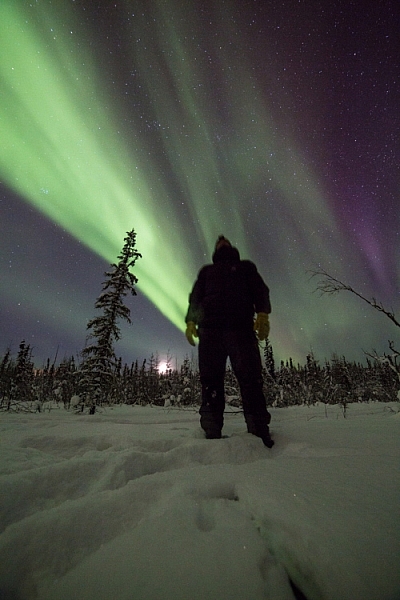
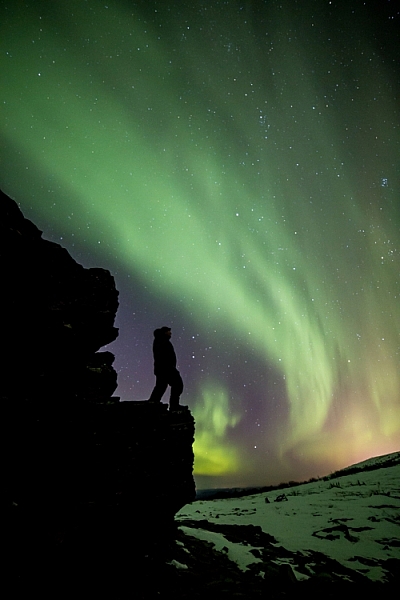
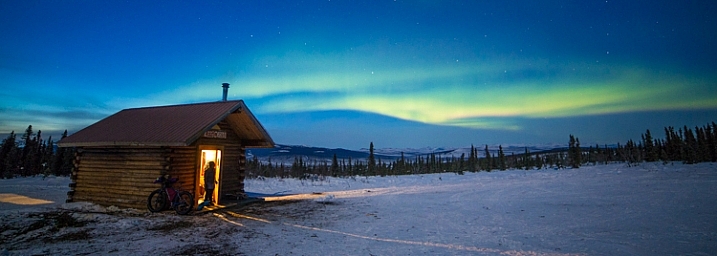
You’d think that in such conditions I wouldn’t want to step outside, let alone take photos, but you’d be wrong. Winter light, what few hours there is of it, is absolutely beautiful. That sweet, crisp glow can pull me from the deepest funk, and lure me out with a camera in hand. During many long winter nights, the aurora borealis dances overhead, and that too can draw me from my cozy cabin, into the snowy forest to make images. On the days I made the two images below, it was seriously cold, but that light, yep, that light will get me outside.

Low winter sun, and frosted birches near Fairbanks, Alaska. AK-FAI-Winter-sun-112172-17

To venture out in those temperatures, you’ve got to be prepared. You need the right clothes to stay warm, and you’ve got to make sure your camera equipment is ready too.

Forget about fashion

To shot the aurora during mid-winter in Alaska you need to dress warm!

To shot the aurora during mid-winter in Alaska, you need to dress warm!

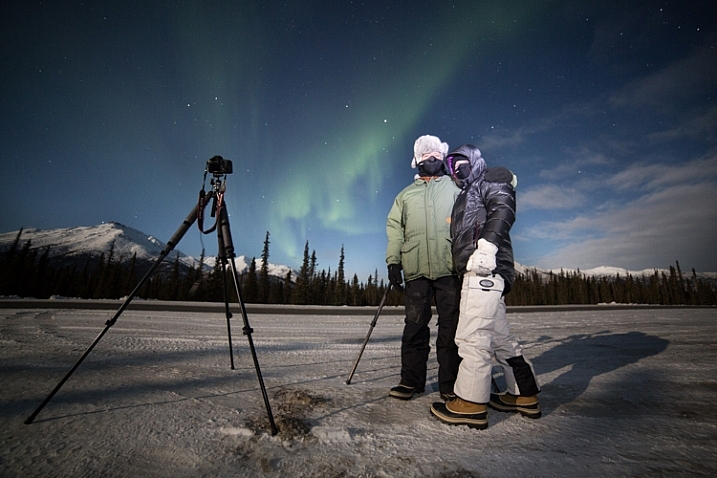
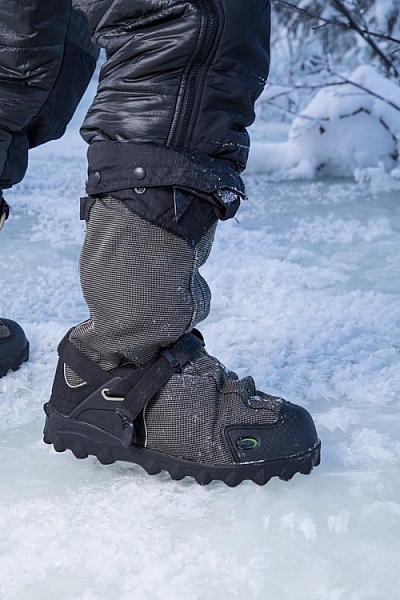
You’ve got to dress right. It doesn’t matter what the light is doing, if you get frost-bite on your fingers, and can’t operate the camera. When dressed in my winter-photo clothing, I feel a bit like an onion, wrapped in layer upon layer. From inside to outside my system goes like this: long underwear, fleece or wool sweater and pants, down or synthetic vest, 800 fill down jacket with hood, windproof Thinsulate pants, two pairs of thick wool socks topped by expedition quality winter boots, a musher’s style hat complete with ear flaps, a balaclava or face mask, and thin nimble gloves with a pair of expedition overmitts dangling from wrist straps. Last, I’ll often throw a couple of chemical hand-warmers into my jacket pockets. When temperatures drop to -40F, it’s best not to mess around.

Two of my clients on an aurora photography tour, dressed for the weather.

Two of my clients on an aurora photography tour, properly dressed for the weather.

The author's well-worn NEOS overboots.

The author’s well-worn NEOS insulated overboots.

Stay Charged

The fluctuations of electricity mean that a cold battery cannot kick out the same amount of electricity as a warm battery. This means that on a brutally cold day, your camera or flash batteries will last only a small fraction of the time they normally would at room temperature. It’s a problem easily solved by carrying a spare battery or two.

A backup battery will let you swap out the cold, dead one in your camera, but there is a hitch: the spares should not be kept in your camera bag, but in an inside jacket pocket. That way they are warm when they go into the camera. When the dead battery warms back up in your pocket (with the help of the aforementioned chemical hand warmers) it will be ready to use for a while again. I find I can shoot at extremely cold temperatures for the better part of day by cycling two batteries back and forth from my pocket to my camera. Though this will vary a lot, depending on how power-hungry your camera is.

AK-FAI-Aurora-111154-35.jpg

Avoiding Bad Breath

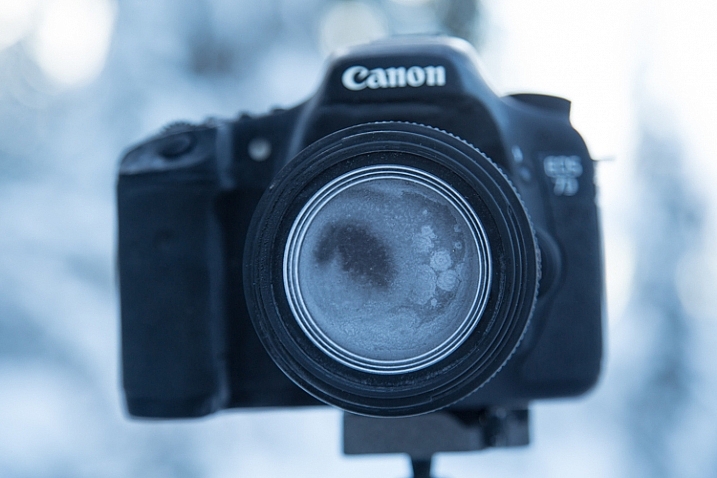
The cold comes with other risks, one in particular, can ruin your day of photography, and that is – watch your breath. I mean it. A mistimed, warm, humid, breath will condense on your lens, resulting in a layer of milky frost on the glass. It doesn’t matter how much money you spend on your lenses, no amount of sharpness will make up for that kind of damage. Wiping at it, usually just smudges it more, and defrosting it inside (see below), can take hours. Watch where you breathe, if you turn your camera around to check lens settings, don’t exhale. I also usually wear a neck gaiter or balaclava that I pull up over my mouth and nose. So with your mouth covered, your breath is directed up, where it frosts on your eyelashes instead of your camera.

This is what happens if you accidentally breathe on your lens during a cold weather shoot.

This is what happens if you accidentally breathe on your lens during a cold weather shoot.

Lens Caps Exist for a Reason

Breath is the usual culprit of fogged lenses, but when shooting at night, there is always the chance that natural frost will form. To avoid this, use your lens cap when you aren’t shooting. If you are walking from one location to another, taking a break, or searching for a new composition, put the cap back on your lens. When I’m out shooting the aurora at night, my cap is on my lens, even if I’m just walking a short distance to a new shooting location.

AK-Interior-Whites-103193-8

Back Indoors

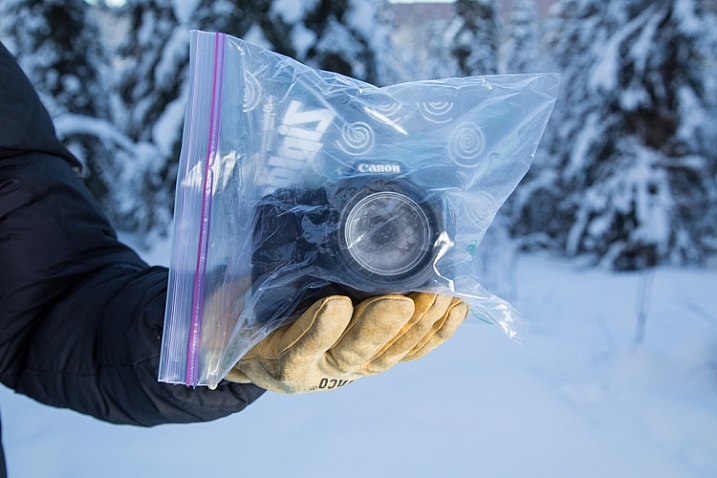
Last, and perhaps most importantly, is the return indoors. You know how on a hot day, your cold beer glass gathers condensation? Ever watched how those drips can form and run down the bottle, pooling in a messy ring on the hard-wood table? Imagine that happening to your camera gear. It can, and it will. When you step back indoors to take a break, warm up, or finish up for the day, place your camera and lenses into an airtight bag.

A properly bagged and sealed camera, ready to be taken back indoors after a cold outdoor shoot.

A properly bagged and sealed camera, ready to be taken back indoors after a cold outdoor shoot.

Ziplocks are good, but I favor light-weight roll-top dry bags like those used by boaters to keep their gear dry. These are tough, reusable, and work like a charm. Once sealed up tight in a ziplock or dry bag, condensation can’t form on your gear. Just let your camera warm up to room temperature before you pull it out.

AK-NoatakPreserve-KellyRiver-1083-491

The cold scares a lot of photographers, and make no mistake, a frigid, mid-winter Alaskan night is nothing to mess around with. But with a few precautions – warm clothes, spare batteries, avoiding frost, and protecting against condensation – you can take advantage of the stellar beauty of crisp, clear, days and nights like this one.

googletag.cmd.push(function() {
tablet_slots.push( googletag.defineSlot( “/1005424/_dPSv4_tab-all-article-bottom_(300×250)”, [300, 250], “pb-ad-78623” ).addService( googletag.pubads() ) ); } );

googletag.cmd.push(function() {
mobile_slots.push( googletag.defineSlot( “/1005424/_dPSv4_mob-all-article-bottom_(300×250)”, [300, 250], “pb-ad-78158” ).addService( googletag.pubads() ) ); } );

The post How to Take Care of Your Camera in Cold Weather by David Shaw appeared first on Digital Photography School.

Digital Photography School

 
Comments Off on How to Take Care of Your Camera in Cold Weather

Posted in Photography