RSS
 

Archive for January, 2016

Sony uses 12 Xperia Z5 smartphones to record 48K 360 degree video

14 Jan

A team at Sony has custom designed and 3D-printed a rig that mounts onto a tripod and can hold 12 Xperia Z5 Compact smartphones, making it possible to record 4K video simultaneously for immersive video. Stitched together in post production, the clips create some impressive 48K 360-degree footage. To test and demonstrate the setup, Sony recorded various winter sports scenes at the Rise Ski & Snowboard Festival in Les Deux Alpes. Read more

Articles: Digital Photography Review (dpreview.com)

 
Comments Off on Sony uses 12 Xperia Z5 smartphones to record 48K 360 degree video

Posted in Uncategorized


Lensbaby Edge 50 Optic launches for pre-order

14 Jan

Lensbaby has announced that its Edge 50 Optic lens is now available to existing Muse and Composer owners for pre-order. Previously sold only in combination with the Composer II lens body, the Edge 50 Optic is part of Lensbaby’s Optic Swap System for Muse and Composer series lenses, and was released in October 2015. 

The Edge 50 is a 50mm F3.2 optic which, according to Lensbaby, creates a ‘sharp slice of focus bordered by silky, smooth blur.’ Features include a 9-blade aperture, 8″ minimum focusing distance, 8 multi-coated glass elements in 6 groups, a flat optic field and 46mm filter threads.

The Lensbaby Edge 50 Optic is available to pre-order now for $ 224.95 and will begin shipping to customers starting January 26.

Lensbaby Announces Availability of Edge 50 Optic for Photographers Who Already Own a Lensbaby Lens in the Composer or Muse Series

Portland, OR – January 11, 2016- Lensbaby, providing creative effects lenses to photographers that ignite their creativity and expand their unique visions of the world, today announced the availability of the Edge 50 Optic, part of their Optic Swap System, for photographers who already own a Lensbaby lens in the Composer and Muse series. 

Edge 50 Optic was originally released on October 21, 2015 in combination with the Composer Pro II lens body. Composer Pro II is an upgraded metal-bodied lens that swivels and tilts on a smooth metal ball and socket design, providing a fast and intuitive way to switch between traditional straight lens photos and tilt photography. Edge 50 Optic is designed to work with all Optic Swap System-compatible Lensbaby lenses in the Composer and Muse series. These lenses work on DSLR and mirrorless cameras.

Edge 50 Optic is a high-quality, 50mm f/3.2 optic that lets you control depth of field in-camera for an authentic, immersive shooting experience. Photographers can use Edge 50 to create images with a sharp slice of focus bordered by silky, smooth blur. Using selective focus, shooters can lead the viewers’ eyes on a unique journey through landscapes, close-ups, miniature effects, street photography and food photos.

“We created our Optic Swap System to provide unlimited creative effects through interchangeable optics,” said Craig Strong, Lensbaby Co-Founder & Chief Creative Officer. “We’re happy to finally be able to provide our loyal fans who use and love their older Composer and Muse lenses with yet another creative visual tool in the Edge 50 Optic.”

Edge 50 Optic specs:

  • For use with Lensbaby Optic Swap System lenses in the Composer and Muse series
  • Focal Length: 50mm
  • Aperture range: f/3.2 through f/22
  • 9-blade internal aperture
  • Flat field optic (creates a slice of sharp focus)
  • Minimum focusing distance: 8” from the front of the lens
  • Maximum focusing distance: Infinity
  • Size/Weight:  2.125” (5.4 cm) high x 1.875” (4.76 cm) wide / 5.5 oz (155.9 g)
  • 8 multi-coated glass elements in 6 groups
  • 46mm filterthreads

Images
http://lensbaby.com/resourceroom/optics

Availability
Edge 50 Optic retails for $ 224.95 and is available via pre-order beginning January 11, 2016 (shipping January 26th, 2016). Lensbaby products are available at lensbaby.com, B&H, Adorama, and from select specialty photo stores worldwide.

Articles: Digital Photography Review (dpreview.com)

 
Comments Off on Lensbaby Edge 50 Optic launches for pre-order

Posted in Uncategorized


Google awarded patent for folding handheld camera design

14 Jan

$ (document).ready(function() { SampleGalleryV2({“targetContainerClass”:”sampleGalleryImageViewerContainer”,”galleryId”:”6782824935″,”isEmbeddedWidget”:true,”selectedImageIndex”:0,”startInCommentsView”:false,”isMobile”:false}) });

Global tech giant Google could be joining the camera business if a patent it was awarded this month is anything to go by. Filed in June 2014 and just approved on the 12th January this year, the patent issued by the United States Patent and Trademark Office is for a design for a folding camera that’s hinged in the middle like a clamshell mobile phone. The design appears to allow the camera to stand upright on its own, which presents a great deal of stability and also the ability to shoot selfies. It isn’t clear from the drawings whether the camera’s screen is inside the fold or on the back outer surface, but the significant bulge of the lens housing suggests the camera has a wide ranging zoom or high class optics.

The design allows the camera to open out so that its backside outer cover/screen can be brought to face in the same direction as the lens, with the front and back of the device creating one long flush surface, other than a gutter in the fold.

The patent might, of course, come to nothing, but it isn’t inconceivable that the company that seems to be into everything should want to create a standalone camera too. We will have to wait and see, but in the meantime can enjoy a little speculation – the patent is good for 14 years.

Do you think the camera will come to life or would Google be crazy to produce it? Let us know in the comments.

For more information visit the US Patents and Trademarks office website. 

Articles: Digital Photography Review (dpreview.com)

 
Comments Off on Google awarded patent for folding handheld camera design

Posted in Uncategorized


World’s Only Light Art Museum is in an Underground Brewery

14 Jan

[ By Steph in Art & Installation & Sound. ]

light art museum main

Deep within the cooling and storage cellars of the former Linden brewery in the German city of Unna, darkened tunnels house the eerily glowing exhibitions of the world’s first and only light art museum. Established in 2001, the Centre for International Light Art is home to eleven sprawling installations within its 8,200 square feet, including Olafur Eliasson’s The Reflective Corridor, a 33-foot-high waterfall of light. Each was created specifically for this unique subterranean space.

light art museum

Director John Jaspers describes the featured artists, including James Turrell and Joseph Kosuth, as “the Rembrandts and van Goghs of light art.” Their creations range from Keith Sonnier’s light graffiti rendered palpable in three-dimensional space via neon tubes, entitled ‘Tunnel of Tears,’ to Turrell’s surreal oculus entitled ‘Third Breath.’

light art museum 2

light art museum 7

light art museum 4

Each exhibit interacts with the stark, aging surfaces within the 167-year-old complex, which was formerly just one of many industrial ruins found within Germany’s coal center. The little-known museum attracts only about 25,000 visitors per year, owing partially to the fact that local laws require limited-capacity guided tours due to emergency evacuation concerns.

Screen Shot 2016-01-13 at 5.30.52 PM

Screen Shot 2016-01-13 at 5.31.09 PM

Screen Shot 2016-01-13 at 5.31.24 PM

Screen Shot 2016-01-13 at 5.31.38 PM

That could change as the museum gains more recognition internationally, especially with its first annual international Light Art Award competition, which aims to promote artists working in the field of light art. It’s located about three hours outside Berlin. Take a virtual tour at the Centre for International Light Art Unna website.

Share on Facebook


[ By Steph in Art & Installation & Sound. ]

[ WebUrbanist | Archives | Galleries | Privacy | TOS ]


WebUrbanist

 
Comments Off on World’s Only Light Art Museum is in an Underground Brewery

Posted in Creativity


12 Common Newbie Photography Mistakes to Avoid

14 Jan

None of us are perfect and we all make mistakes. While some photographers might be naturally gifted, and just do amazing work from the moment a camera is put into their hands, that is not the case for most of us. Chances are, if you are new to photography, you are going to muck things up. You shouldn’t feel bad however, as you can be sure that many newbies have done exactly the same things. Here are a number of very common mistakes that new photographers make. Learn to avoid them, and you will improve your images.

1 – Centering everything in your images

The horizon line is right in the middle, cutting the image in two.

The horizon line is right in the middle, cutting the image in two.

When most of us look back at our early images, we usually see the horizon line placed very much in the middle of the image (see photo above). This is one of the most common mistakes new photographers make when they start. Sometimes it’s a good thing to do, but not always. The problem is that it cuts the image in half, and leaves people looking at the image, unsure of which half to look at, which is the intended subject.

When you take photos of landscapes, or anything with a horizon line, it is best to put the horizon on one of the third lines.The Rule of Thirds is one of the compositional guides for photography. As you get more into photography you will hear more and more about it.

With the horizon in the top third most of the ground is showing, telling the viewer what to look at.

With the horizon in the top third, more ground is showing than sky, telling the viewer where to look

It’s the same idea for your subjects. If you are photographing a person, put them to one side of the image, on one of the vertical third lines. Which line you use is up to you. Sometimes it is better to do both and see which one looks better. Experimenting is the key to getting great photographs.

2 – Taking attention away from the main focus in the image

Without meaning to, you may include something in your frame, that takes the focus off the main subject in the image – things like bushes, or a light post that is just a line through the image. It goes back to the previous point about giving your subject so much attention, that you aren’t taking the time to look around it.

3 – Cutting things off at the edge of the frame

It is amazing how many times you can look at someone’s photo and ask, “Why have you cut off their feet?” They then look back at you blankly, saying they had never noticed it before.

LeanneCole-common-newbie-mistakes-0029

Be careful not to cut off parts of limbs, like feet, when you are taking photos.

It is a very typical thing that newbies do. It may not be the feet, but it could be someone’s hand or the top of their head. It can happen in architecture and landscapes as well; the tip of a church dome will be missing, or the top of a tree.

It is all about learning to look at your subject and making sure you concentrate on getting them all in the frame. If you can’t fit them in the image, then you need to make decisions about what you will include, and what to crop off. Often if you take more than two thirds of a leg away it looks deliberate. If you only take one third away it looks like you weren’t paying attention.

Missing toes or feet.

Missing toes or feet.

Make sure to include feet.

Make sure to include feet.

4 – Thinking that having a great camera is enough

“I bought this fantastic camera and I paid a lot of money for it, but my photos don’t look great.” There is an assumption that if you have a good camera, you will automatically take amazing photos. This is not the case.

Just because you have a great camera, doesn’t mean you don’t need to learn photography. It is the person behind the lens that is responsible. If you see amazing photos by other photographers, that it is because they have learned about composition, and how to use their camera properly. Scroll to the bottom for links to more beginner articles to help you with this one.

5 – Not looking behind your subject

“Look at the tree coming out of that person’s head.” This similar to the previous point. You need to consider everything in the frame. You can usuallt remove the tree from their head by taking one or two steps to either side.

LeanneCole-common-newbie-mistakes-0027

Look behind your subjects and make sure there aren’t things like trees coming out of their heads.

leannecole-newbiemistakes-portrait

Slight camera reposition and no tree coming out of her head any more.

6 – Taking only photo of a subject and from a common viewpoint

We all see people who want to take photos of a building, they walk straight up to it, take one photo from the middle position, and that’s it.

Think about other angles you can use as well. Try moving to the left, the right, or both. Take some from low camera angles and then some standing up. As you take more shots, you will learn what works and what doesn’t. Again, it is all about experimenting.

LeanneCole-common-newbie-mistakes-0031

Taking a photo of a place by standing right in front of it. 

7- Having a really good camera and never learning how to use it properly

If you get an amazing camera that is capable of so many things, and never take it off auto, you are missing out on a lot. Learning to use your camera is one of things you can never regret. While you may be able to get some great photos with it on automatic, if you learn about aperture, shutter speed, and ISO, you will have more control over your images. It is usually something that no one is ever sorry about doing.

Once you have the basics worked out, you can then learn more advanced things like long exposures and HDR. The world of photography really opens up to you when you know how to use your camera to its full potential.

8 – Not giving your camera enough time

I was at an event once and I handed my camera over to friend to grab a few shots for me. When I got home and looked at the photos he had taken, they were all out of focus. I realized that he was pressing the shutter release without giving the camera time to focus properly.

You have to learn how to let the camera focus for you and give it time to do that. They are fast, but not always fast enough. The same goes with exposure, you have to give it the time to get the correct exposure. It doesn’t ask for a lot, so just give it the time it needs.

9 – Forgetting to check the settings you used the last time

It’s common for newbies to go out to take photos, making adjustments on their camera for what they are shooting at the time. But, the next time they go out to shoot, they forget to look at how the camera was set up. Afterwards, when they put the images on the computer, they realize they have lots of photos that didn’t turn out, because the camera settings were wrong for that subject or situation.

I was photographing a four day event a few years ago, and I couldn’t work out why some photos were really overexposed, while some were really dark. It took nearly three days to realize it was because my camera was set on auto bracketing (AEB). It was around that time I had just started taking photos at different exposures (bracketing) and had forgotten about it. Now I pick it up straight away.

LeanneCole-common-newbie-mistakes-0028

Checking your camera setting when you take photos in case the last time you were out your were underexposing or bracketing your images.

Always look at the settings you have on the camera. Check what the aperture is set to. Work out if you have it on manual, shutter priority, aperture priority or auto. Be aware of what the ISO is at all times. It is a good habit to get into, to check them all every time you start.

Make sure you have a memory card in the camera too. I have gotten into the habit of leaving the card out of my camera, and when I pack my gear to go somewhere, I put the card in the camera. It is part of my routine now, I also pack an extra as well.

10 – Never turning the camera vertically

One thing you often notice with new photographers is that they only use their camera in landscape mode. They never seem to consider turning their cameras up on the side, to shoot vertically. It isn’t always necessary to do so, but some subjects would benefit more from that orientation. When you are taking photos, try turning the camera into the portrait mode (vertical) and see if you can get a better image.

leannecole-newbiemistakes-horizontal

Don’t always have your camera in landscape mode, like this image, turn the camera up into portrait mode as well.

Try vertical for a different perspective.

Try vertical for a different perspective.

11 – Not asking for help

You should never be afraid of asking for help. Generally, photographers are more than happy to help someone who wants to learn. Don’t badger people with too many questions, but asking a few questions isn’t going to hurt.

12 – Don’t panic

A friend was telling a story about how she was in a Cathedral taking photos and they were all turning out black. She started to panic and couldn’t work out why. Once she calmed down she realized it was because her ISO was too low.

If you get into a situation where your photos are not working, don’t panic. Think logically about it. In most cases it is going to be your aperture, shutter speed or ISO. Just take the time to think about them and check the settings. You will work it out.

Have fun

The best advice anyone can give you is to enjoy your time with your camera. Explore the world around you. Remember that the mistakes you make are being made by nearly everyone in your situation. You aren’t alone.

googletag.cmd.push(function() {
tablet_slots.push( googletag.defineSlot( “/1005424/_dPSv4_tab-all-article-bottom_(300×250)”, [300, 250], “pb-ad-78623” ).addService( googletag.pubads() ) ); } );

googletag.cmd.push(function() {
mobile_slots.push( googletag.defineSlot( “/1005424/_dPSv4_mob-all-article-bottom_(300×250)”, [300, 250], “pb-ad-78158” ).addService( googletag.pubads() ) ); } );

The post 12 Common Newbie Photography Mistakes to Avoid by Leanne Cole appeared first on Digital Photography School.


Digital Photography School

 
Comments Off on 12 Common Newbie Photography Mistakes to Avoid

Posted in Photography


Architecture with Nothing to Hide: 13 Glass Box Buildings

14 Jan

[ By Steph in Architecture & Houses & Residential. ]

glass boxes lomocubes 3

Spotlighting the reflective, shimmering and transparent qualities of glass, architecture primarily made up of glazed volumes interacts with its environment in ways that opaque structures simply can’t, whether they’re overlooking the ocean or in the middle of a busy urban square. Their sense of vulnerability is tempered by this feeling of connection, containing their inhabitants without cutting them off from the world.

Japanese School
glass boxes japanese school

glass boxes japanese school 2

glass boxes japanese school 3

“I wanted to create a building where it isn’t clear if there are any rules at all,” says architect Junya Ishigami of the disorienting Kanazawa Institute of Technology, comprised of little more than 305 steel columns and a whole lot of glass. The structure reflects the trees at its perimeter, seeming to multiply them, making it feel more like a forest itself than a college classroom. Inside, the steel beams mimic tree trunks.

Russet Residence by Splyce Design
glass boxes russet

glass boxes russet 2

glass boxes russet 3

Stacks of glazed boxes jut out from a Vancouver hillside in this modern residence by Splyce Design, stretching out toward the ocean. Some rooms even cantilever from the sides of the house, maximizing the number of interior spaces with an impressive view. All of that frameless glazing helps the home blend in with its surrounding forest environment.

Offices for Junta de Castilla y Leon by Alberto Campo Baeza
glass boxes junta 1

glass boxes junta 2

glass boxes junta 3

How do you make a structure feel simultaneously open and vulnerable, and as secure as a fortress? Build a glass box inside a stone enclosure. Alberto Campo Baeza’s offices for Junta de Castilla y León utilizes sandstone to disguise the very modern building in its historic environment, the walled city of Zamora, Spain. The perimeter walls provide privacy, while the glazed box within soaks up sunlight.

Skyline Residence
glass boxes skyline 1

glass boxes skyline 2

glass boxes skyline 3

The incredible Skyline Residence in Hollywood by Belzberg Architects has its very own drive-in theater on the side of a geometric glazed volume. The entirety of the glass facade opens to the sky on the bottom floor, leading out to a 65-foot hillside infinity pool.

Next Page – Click Below to Read More:
Glitter And Float 13 Glamorous Glass Box Buildings

Share on Facebook


[ By Steph in Architecture & Houses & Residential. ]

[ WebUrbanist | Archives | Galleries | Privacy | TOS ]


WebUrbanist

 
Comments Off on Architecture with Nothing to Hide: 13 Glass Box Buildings

Posted in Creativity


Phase One photographer Tim Kemple puts XF 100MP back to use in new video

14 Jan

Phase One has published a new video featuring the XF 100MP back in use. Phase One photographer Tim Kemple put the new Sony co-developed 100MP CMOS sensor through its paces outside of the studio, soaring to great heights above a waterfall and on dusty trails in the desert of Moab, Utah.

The Phase One XF 100MP camera system offers 16-bit color output and a claimed 15 stops of dynamic range, presumably at the base (native) ISO setting of 50. In a handful of samples published alongside the video, Kemple pushes the camera to ISO 3200 for some action shots. And as a heads up, if the thought of $ 49,000 worth of gear dangling above a waterfall makes you queasy, the video above probably isn’t for you.

Articles: Digital Photography Review (dpreview.com)

 
Comments Off on Phase One photographer Tim Kemple puts XF 100MP back to use in new video

Posted in Uncategorized


Do These 5 Quick Exercises to Learn What Your New Camera Can Do

13 Jan

new=-camera-experiments-1Have you learned everything your new camera can do yet? If not, then you’ve found the right article.

I present you with five quick exercises you can try right now, to help you better understand your new camera, and how it captures light. I’ll give you some hints about what is happening, but you will need to come to your own conclusions.

If you get stuck after running the experiment, there are answers at the bottom of the article. Don’t cheat! You have to try to come to the conclusion yourself first, you will learn more if you can do that.

To do these exercises your camera will need to have a shutter (although mirrorless cameras will work here), variable aperture, and adjustable ISO. It will also be helpful if you have a Program Mode, Aperture Priority, Shutter Priority, and Manual Mode. Check your user manual to see if these exist on your new camera.

1. Play with depth of field using the aperture

You might have learned a little about your camera’s aperture in this DPS article: Seeing in Depth of Field: A Simple Understanding of Aperture. If not, take a quick look.

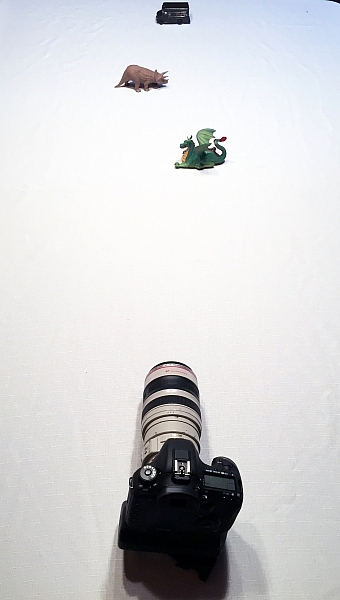
This first exercise is easy. I want you to line up three objects on a table in front of your camera. Make sure the objects are something easy to focus upon (have lots of lines or contrast). If you need to, borrow toys from your kids, I find those work best.

During this exercise your camera will not move, so set it on the table in one spot. Place your first object directly in front of the camera, about two feet (0.6 meters) away. Your second object should be one foot (0.3 meters) beyond the first, and the third object, another foot beyond the second. It should look something like this:

new-camera-experiments-2

The objects should be staggered sideways to ensure they are all visible from the camera angle.

Set your camera to Aperture Priority mode. You may need to reference your camera’s user manual to find the setting. Usually it is the A or Av label on your camera’s main dial. Then set your ISO to Auto, and your focus dot to the camera’s central focus point. Again, you may need to reference the manual as all cameras are a different in how they choose focus points.

Point your camera at the first object (so the active focus point is on it), so that your camera focuses there. Set your aperture to the smallest f-number your lens can achieve; it will around f/1.8 or f/3.5. If you are using a zoom lens, pick a focal length somewhere in the 40-60mm range.

new-camera-experiments-3

Now take a picture. Without moving your camera, change the aperture to f/8. Take another picture. Then change your aperture to the largest number (smallest opening) your lens can achieve; this might be f/22 or even higher. Take a third picture.

Next, point your focus point at the second object, so it is sharp, and repeat the steps above so you have three new images at a low number aperture (f/3.5), a medium number (f/8), and a high number (f/22).

Lastly, focus on the third object and repeat the steps again.

You should now have nine images; three of each of the objects in sharp focus, at three different apertures.

The aperture on your camera controls the depth of field. What do you notice as the aperture number (or f-number) gets larger? Are more or less things in focus? What about when you focus on an object further away and look at the same aperture setting as a close object? Is more or less in focus?

BONUS EXPERIMENT: Run this experiment again and set your focal length to a smaller number (wide angle view) such as 18mm. What differences do you notice now?

2. Exposure compensation when the exposure is wrong

new-camera-experiments-5This may be disappointing to find out, now that you have a fancy new camera; but your camera is often wrong with its automatic settings. I’m sorry, but it just is. It’s not human and it has limits, but you can get around them.

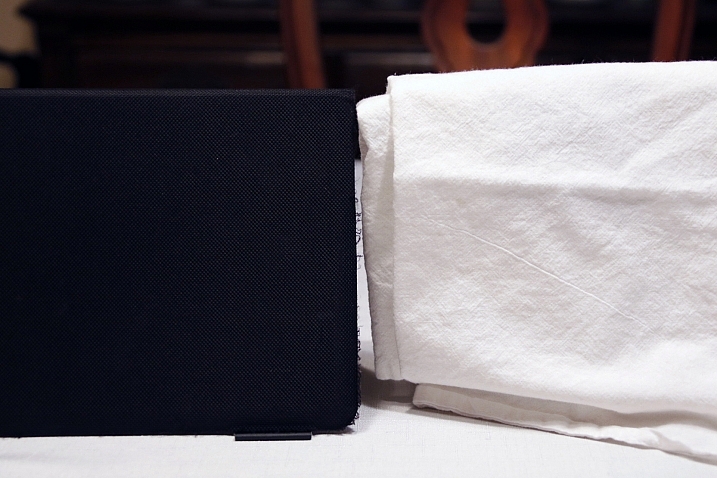
Choose two objects for this experiment. One should be predominantly white, and the other should be predominantly black. Set them side by side. I chose a black iPad cover and a dish towel in this case.

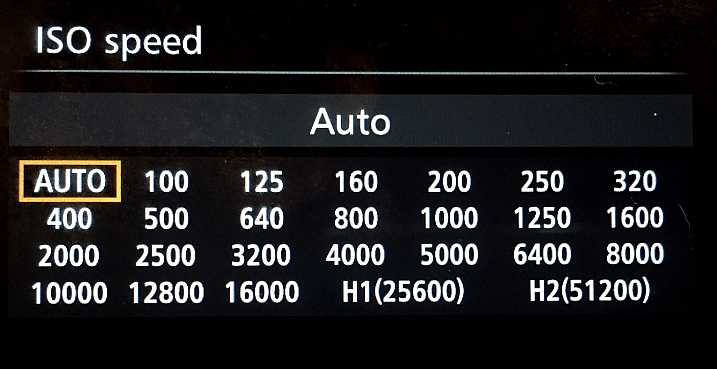
Set your camera to Aperture Priority and choose the lowest f-number you can (e.g. f/1.8 or f/3.5). Set your ISO to 400 and turn autofocus on. Reference your user guide to set your camera’s metering to Spot or Center Weighted. This is typically signified by a small circle in the middle of the viewing area.

new-camera-experiments-4

Set up your camera in one position so it doesn’t move much, and point that center metering spot at the black object, so it fills the entire metering area. If you are using Center Weighted metering, fill as much of the center area with the black object. Take a photo.

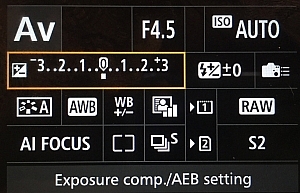
exposure-compensationNow find the exposure bias (or exposure compensation) feature on your camera. It will look something like this:

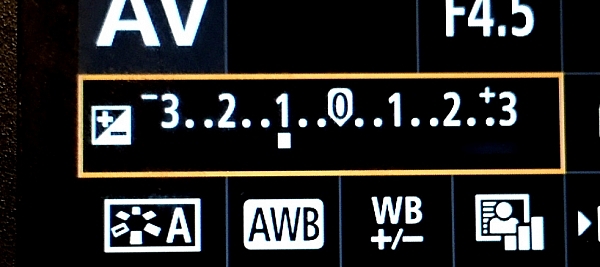
Change the exposure bias/compensation so it is set to underexpose by one stop. This will either look like “-1” or on some cameras there will be a scale with tick marks and one should be labeled “-1”. Move to that point. Take another identical photo of your black object.

new-camera-experiments-6

Reset your exposure bias to zero (0) and point your camera over to the white object, so that it fills the metering area; take a photo. Then change the exposure bias/compensation to “+1”.

You now have four images. Looking at the two shots of the black object, which one makes the object look more like its actual color? What about the white object?

3. Test your ISO

Modern cameras have an awesome range of ISO settings, but they still have their limits. Don’t get fooled into thinking you can just shoot at ISO 6,400 in a dark room and things will be peachy. This experiment is set to help you understand what happens when you change ISO, and what your personal limits might be for your camera.

new-camera-experiments-7

Set up a few objects on a table, at one end, and set your camera at the other end. Zoom in so the viewfinder is mostly filled with the scene in front of you. Include white and black objects, and some other colors. Have a couple of lights on in the room so it is normally lit, make sure the camera’s flash does not fire for this exercise.

Set your camera to Aperture Priority and your aperture to f/5.6. Set your ISO at 100 and take a photo. Without moving your camera much, change to ISO 200 and take another photo. Then ISO 400, take photo, ISO 800, take another shot, and so on (doubling the ISO each time) until you run out of ISO settings.

Examine the images, preferably on a computer screen, or use the zoom feature when reviewing images on your camera. You want to zoom in on the darker areas.

new-camera-experiments-8

What do you see happening from low ISO settings to the higher ones? Do you notice a big difference between white areas as compared to black areas?

If you need a hint about what is happening read: 6 Tips for Using ISO Effectively With Your Camera.

4. Add some blur with a slow shutter speed

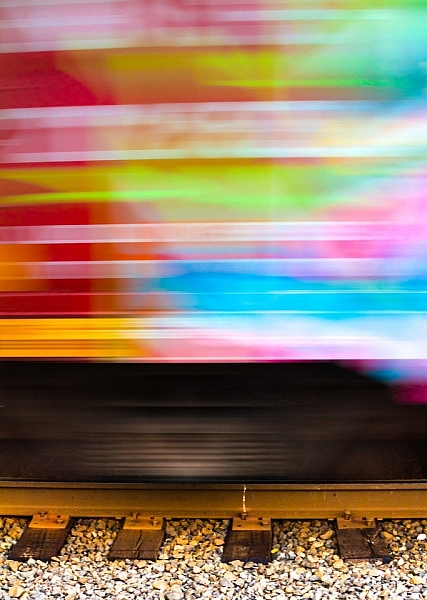
This one is easy and quick. You may need a willing assistant, or you can find cars moving on a city street. You will want objects moving past your field of view, from side to side (not front to back) at a fairly consistent speed.

Set your camera on a solid object; this can be a tripod, desk, the hood of a car, etc. Point your camera toward the moving objects. Set your camera to Shutter Priority (S or Tv) Mode, ISO should be 100, and set your shutter speed to 1/500th.

Take a photo of the objects passing in front of your camera. Change your shutter speed to 1/60th and take another photo as the objects move.

new-camera-experiments-9

Lastly, set your shutter speed to 1/10th and take another photo. What do you notice happened in the three photos?

BONUS EXPERIMENT: What happens when you keep the slow shutter speed of 1/10th and move with the subject while you shoot?

5. White Balance is important for good color

White Balance is very important if you shoot in a file format other than RAW, such as JPEG. Your camera will usually do a good job of guessing the correct White Balance settings, but it is important to know how to control your camera if it messes up.

You will need a place with three different light sources to make this one work. It’s okay if they are not in the same spot, you can walk around. You will also need a piece of white paper with writing on it, to help focus.

Set your camera on Program Mode. This allows your camera to handle shutter speed, ISO and Aperture automatically, but you are going to take control of the White Balance. Again, you may need to reference your camera’s manual as each manufacturer handles these changes differently.

new-camera-experiments-12

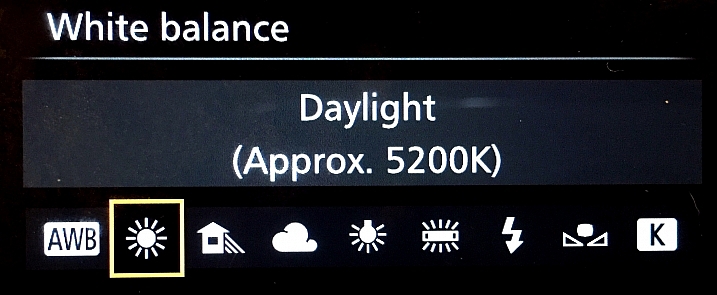
First, find a scene that is lit by daylight. Set your camera’s white balance to the Daylight Preset. It’s setting looks like a little sun in the image above. Take a photo of your white paper with the daylight hitting it. If you can only manage cloudy daylight, that will be okay as well.

Without moving much, set your White Balance to incandescent or tungsten (looks like a little lightbulb). Take the exact same photo you did before. Lastly, set your White Balance to shade (a little house icon with shade next to it). Take the exact same photo.

new-camera-experiments-11

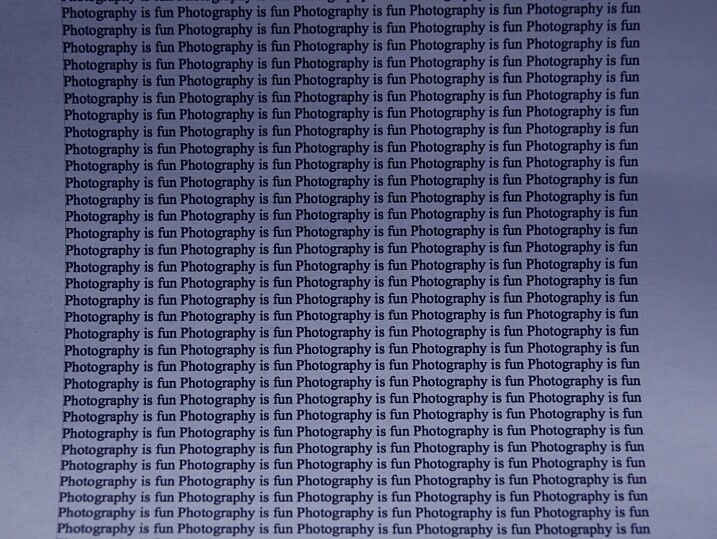
Which White Balance preset under daylight conditions produces this color?

Next, move to an area lit by incandescent or fluorescent light. This would also include compact fluorescent bulbs. You can hold your paper close to the light source for these next photos, just make sure the light is falling on the page and not coming through it.

Run through the same three White Balance settings as before; daylight, incandescent and shade.

new-camera-experiments-10

Which White Balance preset under incandescent lighting produces this color?

What happens to the color of the white paper when each of these changes are made? Its color changes, doesn’t it? When you shot with the shade setting, did things get more blue or more yellow? Think about  how you can use this in your photography once you understand how it works.

Answers and Helpful Hints

Now that you have played around a little, let me help clarify what you should have seen in each exercise.

1. In the first exercise you should see more depth of field (more things in focus, front to back) as the aperture number increases. As you focus further away from the camera, the depth of field also increases at the same aperture. This might be hard to see in this limited of a test, but it is explained better here: How to Control Aperture and Create Images You Love.

2. Your camera is set to expose the world as if it were 18% gray. This means objects that are black are exposed to make them more gray; the same goes for white things. If you are taking pictures of something already gray, like pavement, then there is no adjustment needed. Otherwise, to make white things white, you need to tell your camera to overexpose (that was the “+1”) and to make black things black, you need to under expose (“-1”). More info on exposure compensation is available here: Using Exposure Bias To Improve Picture Detail.

3. As ISO increases, digital noise (not the same as grain in the days of film, but similar) increases. Noise is usually not desired but as time goes on, camera manufacturers get better at reducing it. That’s why camera owners five years ago were told not to go over ISO 800, or there would be too much noise. Now, I regularly shoot at ISO 2000 with results that work for me. It’s important to know the limits of your camera so you are okay with exceeding them in certain circumstances.

4. As your shutter speed gets slower, the chance for blur increases. This can be blur from you moving the camera (we have all done this before) or from your subject moving. Blur is not an inherently bad thing, it can be used with great affect. But it’s important to know when, and how much, works best for you. Play around on this one a little with different subject speeds and shutter speeds.

5. White Balance can be trickiest when there is more than one light source and it’s helpful to know which way to adjust the colors. A lower temperature (incandescent and fluorescent) give more of a yellow/green cast while cloudy and shady gives your more of a blue tone. If you want to eliminate that color cast in your images, move the White Balance toward those settings.

The great thing about photography is it is highly reproducible. When you do this, that happens – and when you do this again, that happens again. That makes it a great art form, in which experimenting can teach volumes, if you keep control of the variables. You might note that only one variable was allowed to change in each of these exercises, that was on purpose.

Go forth and experiment more with your new camera. The more you shoot and the more you experience through the lens of your camera, the more you will learn!

googletag.cmd.push(function() {
tablet_slots.push( googletag.defineSlot( “/1005424/_dPSv4_tab-all-article-bottom_(300×250)”, [300, 250], “pb-ad-78623” ).addService( googletag.pubads() ) ); } );

googletag.cmd.push(function() {
mobile_slots.push( googletag.defineSlot( “/1005424/_dPSv4_mob-all-article-bottom_(300×250)”, [300, 250], “pb-ad-78158” ).addService( googletag.pubads() ) ); } );

The post Do These 5 Quick Exercises to Learn What Your New Camera Can Do by Peter West Carey appeared first on Digital Photography School.


Digital Photography School

 
Comments Off on Do These 5 Quick Exercises to Learn What Your New Camera Can Do

Posted in Photography


The good, the bad and the analog: CES 2016 ‘best of’

13 Jan

Best of CES 2016

CES 2016 just wrapped up in Las Vegas and during the course of the week-long trade show, in between meetings and demos, we had the chance to roam the floor and check out a lot of cool new products; from big releases like the Nikon D500 and D5 to pleasant surprises like the new Kodak Super 8 camera (pictured above). Take a look through our gallery and see for yourself all the cool new stuff CES 2016 had to offer.

Zeiss Optics + ExoLens for iPhone

Zeiss and Fellowes Brands teamed up to launch three new Zeiss-branded iPhone attachment lenses that work with ExoLens iPhone mounts, including a wide-angle, telephoto and macro lens. The wide angle lens offers an 18mm equiv. FOV, the telephoto a 58mm equiv. FOV and the macro a 40-80mm FOV depending on distance from subject. We had the chance to check out the wide-angle and telephoto options in person, and were quite impressed with the quality of these iPhone accessories.

We also chatted with a Zeiss rep on the show floor and he told us that the whole idea in developing these lens attachments was to create something that would not degrade image quality in any way, when affixed to an iPhone. We also joked that these are the most affordable Zeiss lenses on the market (though pricing has not officially been announced). It seems likely that these units will initially hit the market as a kit, which will include the wide, tele and ExoLens mount; the Macro lens will likely be sold as a stand-alone product.

Sony HDR-AS50 Action Camera

The Sony HDR-AS50 is the company’s latest mid-level action camera. It features an 11MP 1/2.4-inch BSI sensor with an F2.8 lens and can capture 1080/60p video as well as 720/120p slow-motion video. While it isn’t waterproof, a newly-designed underwater housing will be available bundled with the camera (and also sold separately).

Unlike GoPros, Sony Action Cameras are stabilized, and the HDR-AS50 utilizes the company’s newest version of SteadyShot. It also features a new button layout and a rearranged menu, with an easy-to-use grid design. It should be available come February and can be yours for $ 200, making it a mean competitor to the GoPro HERO4 Session.

360Fly VR Camera

The 360Fly camera, which was technically launched prior to CES, caught our attention because of its unique design and ease-of-use. We had the chance to briefly demo one on the show floor and were impressed with the fact that users can view their footage in real-time on a smart device, as well as edit and share with great ease.

Video captured with the 360 Fly can also be viewed using standard cardboard VR glasses. And unlike VR cameras that use multiple lenses and stitch in post, the 360Fly has only one lens (so no awkward seams). It is also smaller than most 360 cameras we’ve seen, about the size of a tennis ball. The 360Fly is available now for $ 400.

Olympus M.Zuiko Digital ED 300mm F4 IS Pro

Olympus’ new 300mm F4 IS Pro offers a 600mm equivalent field of view in a reasonably-sized/weighted package. It is weather-sealed, dust-sealed and freeze-proof. It is also the first Olympus Micro Four Thirds lens to offer built-in image stabilization, for easy hand-hold-ability. When paired with an Olympus OM-D E-M1 (firmware version 4.0) or E-M5 Mark II (firmware version 2.0), Olympus claims it will give up to 6 stops of image stabilization.

We had the chance to check out this beautiful lens prior to the show, and found it to be incredibly sharp. Take a look through our sample gallery and see for yourself.

LaCie Porsche Design Desktop Drive

LaCie’s new Porsche Design Desktop Drives utilize USB-C connectivity for file transfer speeds up to 5 Gb/sec. But what’s even cooler about these drives is the fact they can also be used to power your laptop – simply plug the drive into the wall, and USB-C cable from the drive to your computer. Available in 4TB, 5TB and 8TB, these drives will be available in March starting at $ 209.95.

Kodak Super 8

The new Kodak Super 8 camera was easily on of the most talked about product releases of CES 2016 (Nikon DSLRs aside), at least amongst nerdy camera folks. And for good reason: it not only has us feeling nostalgic, it also gives us hope that Kodak, the film company (not the licensed name) is here to stay.

The unit records movies on Kodak Super 8 film cartridges but uses an internal prism to split the image and display what is being captured on an LCD. It also has a built-in microphone and SD card slot for recording audio, which can be synced up later. When available, the Kodak Super 8 camera will ship with either a Ricoh 6mm or 6-48mm lens, both of which are C-Mount.

One of the coolest things about the launch of this new Super 8 camera is that Kodak also announced they will start including processing costs in the price of each Super 8 film cartridge. So when you’re done shooting, simply send the cartridge off to Kodak and they’ll send the physical film back, along with digital scans of your movie, which can then add your sound to/edit.

Pricing and availability details are not set in stone, but it looks like the unit will be available in fall 2016 and will cost between $ 400 and $ 750. The film should cost between $ 50 to $ 75 per cartridge, including processing.

MindShift Gear UltraLight Dual 36L

MindShift Gear is a funky little company owned by Think Tank Photo that specializes in bags for adventure-seeking photographers. What makes the new UltraLight Dual 36L so cool is the ability to remove the gear compartment completely from the backpack, and use it as a stand-alone bag. The gear compartment has both a belt loop and shoulder strap for easy transportation when not in the backpack. However, when it is tucked within the bag, gear can easily be accessed via a side zipper.

We love the idea of camera bags that can serve double duty, hauling one’s gear, as well as one’s personal items. Also, as the name might suggest, the UltraLight Dual is one of MindShift Gear’s lightest daypacks, weighing 3.3 lb / 1.5 kg. It can also carry up to a 15″ laptop and includes a rain cover. The UltraLight Dual 36L is available now for $ 200.

Nikon SB-5000

The Nikon SB-5000 was announced at the same time as the flagship Nikon D5 and D500 DSLRs. It is the first Nikon flash to offer built-in radio triggers. Smaller than an SB-910, the SB-5000 has a range of 30 meters and can control up to 6 groups of flashes, or a total of 18 units. It features a redesigned cooling system and can fire 120 continuous shots at 5-second intervals.

The Nikon SB-5000 will be available in March for $ 599.95.

DJI Phantom 3 4K

DJI might be the most recognizable name in consumer drones. The company’s latest release, the Phantom 3 4K offers the same exact video quality as the higher-end Phantom 3 Professional, but for $ 200 cheaper. 4K video is captured at 30 fps with a 60Mbps compression rate.

The main difference between the $ 1000 Phantom 3 4K and $ 1200 Phantom 3 Professional is the operating range. The 4K uses Wi-Fi to stay connected and stream footage while the Professional uses DJI’s LightBridge system, which has a greater range, and can stream higher-res video. Still, it’s nice to see DJI offering quite a few drone options at different price points to meet different budgets. For those looking to invest in their first drone, DJI also offers the Phantom 3 Standard for $ 800, which is capable of 2.7K video and also uses Wi-Fi to stay connected.

Kodak/JK Imaging PixPro SP360

The Kodak PixPro SP360 4K action camera is one of those products that took us by surprise at CES. In general, we were on the lookout for any cool virtual reality or 360 cameras, but Kodak was one of the last names we expected to be attached to such a product. Technically, JK Imaging has licensed the Kodak name for this product, but that is neither here nor there.

The SP360 4K uses a 12MP BSI CMOS sensor and an F2.8 aperture lens; 4K video is captured at 2028 x 2028. It is being touted as the World’s first 4K 360-degree action camera. Though there were some hiccups with the unit during our booth demo, the sample footage from it looks very good. Users can record footage in 10 different modes including a full 360-degree mode, a super-wide 235-degree mode, and a Front mode that gives a more traditional (less distorted) action-cam POV. The SP360 4K is Wi-Fi and NFC enabled for pairing with a device. It is also freeze, dust and shockproof as well as water-resistant, though not waterproof. It ships with dedicated editing software and footage from the SP360 4K is both YouTube and Facebook-compatible.

The camera is being sold in two different kits, as a stand-alone unit for $ 500, and Dual Pro pack that includes both cameras and a mount for $ 900 (pictured above). Check out a sample video here.

Olympus Tough TG-870

Olympus makes some of the best rugged cameras in the business and the TG-870 is the company’s latest Tough Camera release. Slotted right below the flagship TG-4, the TG-970 features an improved GPS with faster synchronization times (compared to its predecessor), and a brighter, higher resolution 920K-dot LCD.

It is waterproof down to 50 feet, shockproof from 7 feet, crushproof up to 220 pounds and freeze proof down to 14 degrees F. Basically, this camera is built to last, making it a solid option for both adventure-seekers, or those needing a kid-friendly family camera.

Other cool features include Live Composite mode, new Nightscape movie and still modes, built-in Wi-Fi and 1080/60p video. Also cool: the LCD flips up 180 degrees and a front-facing shutter release ensures the ability to take epic selfies, no matter how extreme the situation. The Olympus Stylus Tough TG-870 will hit shelves in April for $ 279.99.

Nikon D5

The fact that Nikon ‘pre-announced’ the D5 didn’t make it any less exciting to see it in person and get our hands on it. Taking over the high performance flagship position in Nikon’s lineup from the D4S, the D5 is poised to create its own legacy. The D4S was a beast; the D5 is an even beastier beast.

The D5 is built around a new 20.8MP CMOS sensor and and Nikon’s EXPEED 5 image processor. Key to its high performance is a new 153 point autofocus system which includes 99 cross-type sensors. In addition, the 180,000-pixel RGB metering sensor is double the resolution of the one in the D4S, which should make Nikon’s already good 3D focusing system work even better. Nikon also made a big deal about high ISO performance on this camera: when fully expanded its ISO range reaches into the stratosphere at ISO 3,280,000. You may not want to shoot quite that high to get optimal image quality, but Nikon emphasized that they want users to be able to shoot in dark environments, such as poorly lit sports arenas, without having to use a strobe.

Although the D5 isn’t the type of camera someone is likely to buy as a primary video tool it can capture 4K video footage, though with the caveat that you get a 1.52x crop factor and a 3 minute record limit per shot.

You can read more about the Nikon D5 in our hands-on article from CES.

Nikon D500

Nikon gave its users an unexpected New Year’s gift in the form of the D500 DSLR, the long awaited follow-up to the D300S, which was introduced way back in 2009. Just in case you did a double take, yes… 2009. Though some users inevitably gave up hope along the way the Nikon faithful never did, and they’ve been rewarded with a camera that may have been worth the wait.

Nikon has managed to cram as much of a D5 into a smaller APS-C body as humanly possible. For the most part, they’ve pulled it off with finesse. The D500 gets the same 153-point AF system as its bigger brother, though on the DX sensor it covers almost the entire frame. It uses the same EXPEED 5 image processing engine as the D5 and shoots 10 fps with a 200 shot Raw buffer. Birders are going to love this thing. 

At 20.9MP the D500 doesn’t have quite the resolution as the more common 24MP we see on many cameras nowadays, but we’re guessing that most users of this camera are less worried about total resolution than performance. Like its big brother the D500 can also shoot 4K video, though at a 2.3x crop relative to full frame.

One feature we’re really excited to see is ‘Auto AF Fine-Tune’, which is designed to use the live-view image on the sensor to auto-calibrate the phase detect autofocus system for any lens.

You can read more about the Nikon D500 in our hands-on article from CES.

Samsung Gear VR

Virtual reality goggles were everywhere at CES, but none more than Samsung’s Gear VR headset that uses one of the company’s Galaxy smartphones for its display. I sat through a demo in Samsung’s booth in which you ride a virtual roller coaster while sitting in chairs that simulate the ride’s movement and vibration, and I have to admit it was shockingly realistic. It may be obvious to your eyes that you’re looking at a smartphone, but your brain still leaves your stomach behind when the roller coaster drops down some steep track. 

The good news for photographers and videographers is that the conversation around VR seems to be changing. Whereas marketers used to just talk about the technical capabilities of headsets (and let’s face it, they still will if you give them a chance) we seem to have reached the point where everyone realizes that VR content will be what drives the market. Riding roller coasters at trade shows is fun, but tools that give individual content creators the ability to create unique VR experiences or immersive films should really open up creative possibilities.

Panono Camera

Speaking of creating VR content, one of the tools we saw at CES that will help you make it is the Panono spherical camera. At less than five inches in diameter, and weighing in at just over a pound, the Panono packs 36 fixed-focus cameras that capture a total of 108MP of image capture capability. You control the camera with a simple smartphone app that uploads the data to Panono’s servers to perform the processor-intensive stitching process.

We had the opportunity to play with the Panono at CES and you can see an example of a shot we took in the Nikon booth. It’s worth noting that the camera couldn’t capture the wide dynamic range of lighting in the convention center – it probably would have been a challenge for many small cameras – but the folks at Panono showed us a soon-to-be-released update that adds HDR to the camera, with fairly nice results.

Nikon KeyMission 360

We were expecting to see a lot of action cameras at CES, but this one caught us by surprise. After wowing us on Tuesday with its new D5 and D500 DSLRs, Nikon unexpectedly gave us the the KeyMission 360.

The company says the name reflects the nature of the camera; when you’re out having a serious adventure your ‘key mission’ is to get footage. OK, we’ll be the first to acknowledge that the name doesn’t exactly roll off your tongue, but the camera itself looks pretty exciting. It’s a shockproof, waterproof, spherical 360-degree action camera which includes electronic VR stabilization and generates 4K (UHD) video using two ultra-wide angle field of view cameras.

Unfortunately, the KeyMission was still locked under glass at CES, but to our eye the footage from the camera looked pretty impressive. We’ll reserve final judgement until we have a chance to run our own tests, but there are already arguments around the office about who gets to do the playing testing. The KeyMission 360 is scheduled to be released in spring 2016.

Ambarella Electronic Image Stabilization (EIS)

Many consumers may not recognize the name Ambarella, but that doesn’t mean they’re not customers. Ambarella makes many of the processors that power the small, mobile imaging devices now in use, such as action and drone cameras. Chances are if you have one of these devices it probably has Ambarella technology inside.

Ambarella showed us a number of new technologies at CES 2016, but the one that really caught our attention was the company’s electronic image stabilization (EIS) technology. Historically, processing power limited just how much manipulation could be done to video in realtime; for example, you could have effective image stabilization on a small drone camera, but only at 1080p. With Ambarella’s newest chips, such as the H2, it’s now possible to record in UHD 4K with fully enabled EIS. 

How good is it? To provide an example the company set up two cameras on a vibrating platform, one with EIS enabled and one without, and two TVs showing live feeds from each camera. The results? The image from the camera without EIS enabled was bouncing all over the place, while the camera with EIS enabled looked almost as if it was mounted on a tripod. Ambarella is a component provider to other manufacturers so it will probably take a while before this technology starts appearing in consumer products, though a spokesman said we should be seeing shipping products by CES next year.

Panasonic DMC-ZS100

Readers of the site will know that we’re generally big fans of Panasonic’s high end compact cameras, so the new Panasonic ZS100 (TZ100 outside North America) definitely got our attention. It’s a compact model with a 20MP 1”-type sensor and a 25-250mm equivalent lens. Despite the rather generous 10x zoom range it still collapses down into a package that will fit in many pockets.

But it’s not just the 1” sensor and versatile zoom range we like. The camera features two control dials (one on the top plate and one surrounding the lens), four customizable buttons, and a touch screen, meaning you get plenty of control. Top it off with 4K UHD video and it makes a very nice package.

Of course, there are always tradeoffs with long zooms, and the ZS100 is no exception. Although it starts out at F2.8 at the wide end, it stops down to F5.9 at the long end. If you can work within those parameters, however, the ZS100 could make a great compact travel zoom.

InVisage Quantum Film

The top two devices in this image are an iPhone and a ‘popular Android phone.’ The bottom device is a prototype phone incorporating InVisage’s QuantumFilm sensor technology.

A couple months ago we wrote about an innovative sensor technology from InVisage called Quantum Film. You can read our earlier article for specifics on how the technology works, but the abbreviated version is that instead of using silicon as the light sensitive medium in its sensors, InVisage Quantum Film uses a layer of nano-scale crystals that respond to specific frequencies of light. The primary benefits of the technology are expanded dynamic range (compared to silicon-based sensors) and global shutter, which eliminates the jello effect often seen in CMOS sensor designs.

In a private meeting with InVisage we finally had a chance to see these sensors in action, and we’re excited. To show off dynamic range InVisage set up a mini studio scene with color charts in high contrast bright and dark areas (see photo above). Three phones – an iPhone, an ‘popular Android phone,’ and an unreleased phone with an InVisage sensor – were lined up for comparison. To our eye the InVisage sensor definitely captured more dynamic range, appearing a bit similar to Log video footage. We were also able to see global shutter in action in a side-by-side comparison to an iPhone. In this video, you can see the difference global shutter makes when capturing certain types of motion such as a vibrating guitar string.

The good news is that you won’t have to wait long to get your hands on this technology: InVisigen tells us the first phones with their sensors are expected to ship in Q1.

olloclip Studio

Smartphone photography has gone mainstream, and one company that has been supporting users almost from the beginning is olloclip, known for its cases and add-on lenses. At CES 2016 olloclip introduced its new olloclip Studio, an integrated case and accessory solution for the iPhone 6/6 Plus series of phones. 

The core of the Studio is a highly protective case that includes a rail-mounting system to which accessories can be attached. Accessories include two screw mounts for attaching tripods or grips, two cold-shoe adapters for add-ons such as microphones or LED lights, a very sturdy finger grip to facilitate one-handed operation, and a kickstand. It’s enough to build out an entire filming rig in the palm of your hand. 

Samsung T3 SSD

It’s not exactly photography equipment, but the Samsung T3 portable SSD is an appealing solution for photographers and videographers who need lots of fast, compact storage while working in the field. Available in capacities up to 2TB, the T3 weighs in at under 2 ounces (51 grams, to be exact) and its longest edge is only 3 in / 7.6 cm long – small enough to fit in a shirt pocket. See that connector on the end? That’s a USB type-C connector, giving you an idea of how small it is.

Despite its size, the T3 offers data transfer speeds up to 450MB/sec, likely fast enough for all but the most demanding applications of most photographers.

Articles: Digital Photography Review (dpreview.com)

 
Comments Off on The good, the bad and the analog: CES 2016 ‘best of’

Posted in Uncategorized


6 Mistakes to Avoid in Long Exposure Photography

13 Jan

Do you want to get better at creating long exposure photos? Long exposure photography is famous for tranquil and serene landscape shots, but when engaging in this type of photography there are many pitfalls that can ruin your shots. Below you will find a list of 6 common mistakes and how to avoid them. Shaken and Blurred Photos Even though Continue Reading

The post 6 Mistakes to Avoid in Long Exposure Photography appeared first on Photodoto.


Photodoto

 
Comments Off on 6 Mistakes to Avoid in Long Exposure Photography

Posted in Photography