RSS
 

Archive for January, 2016

Can the Skyfire App Predict Stunning Sunset Colors Days in Advance?

18 Jan

Skyfire-Review-9What if you could predict beautiful sunset or sunrise colors? The colors we dream of when the word sunset crosses our mind; deep oranges, pinks, reds and streams of yellow, often against a deep blue sky.

Skyfire attempts to do just that for you, in app-form of course. Skyfire is a subscription product from the makers of The Photographer’s Ephemeris (TPE) that uses a host of data to help predict the probability of desirable sky colors for beautiful photos.

What is Skyfire?

Developed by Matthew Kuhns and a team of photographers, Skyfire is a subscription service that runs exclusively on TPE. Currently it only runs on TPE for iOS, but it will soon be ported over for Android as well. It uses a combination of data from weather monitoring and prediction stations, currently only in the lower 48 US states (plus minute amounts of the Canadian and Mexican borders). Correlating items like topography, cloud height and type, as well as gap light, (the amount of light coming in from under clouds that gives them their brilliant colors at sunset and makes it seem the sky is on fire, hence the name) Skyfire attempts to predict your odds of capturing beautiful sunset and sunrise colors in the clouds.

Skyfire’s subscriptions and prices are $ 9.99 for a three month Basic subscription, or $ 29.99 for a year. The Plus version (explained in a minute) is $ 14.99 for three months or $ 44.99 for a year.

Disclaimer about weather

Skyfire-Review-17

While technology has made bold strides in the meteorological world, it’s still not perfect – thus, Skyfire is not perfect. The app updates as new information comes in from weather services, and it updates itself four to six times a day on average. The app shows the latest update times so you will know if your current odds are based on recent data, or old info.

Also, the localization of weather can be very fickle. While Skyfire attempts to consider items like the general topography (highs and lows in the elevation of the Earth), sometimes local weather patterns can make those predictions tricky.

That is why Skyfire shows its predictions as a percentage chance of colors happening. This scale can be used to guess if it is worth heading to your local hotspot for an evening or morning shoot. The prediction capability will show the odds for either two or four days in advance, depending on the service you choose.

Skyfire-Review-21

How to use Skyfire

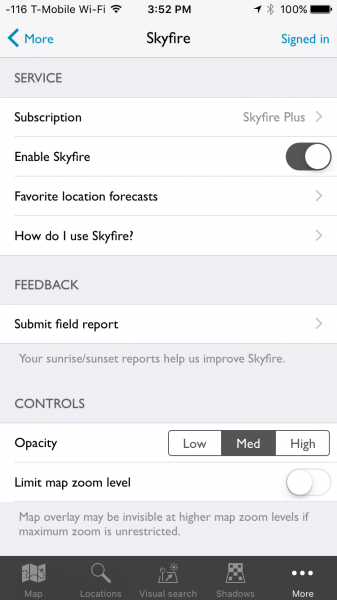
The first step in using Skyfire is to sign up for the service. Inside the More menu item in TPE is the main Skyfire control panel. Here you will find an option to turn Skyfire off and on, as well as manage your subscription. Crookneck is nice enough to offer a 30 free trial so you can see if the feature works well for you, before buying. Subscribing to the service, even in trial mode, will require creating an account with Crookneck, which is all done in-app.
Skyfire-Review-22

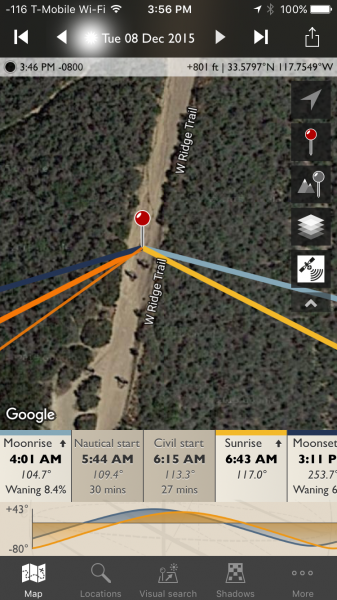
Once you either sign up for the service or activate the trial period, Skyfire’s basic functionality is very easy to use. Select a date for which you want to see a prediction – Skyfire Basic allows predictions up to two days in advance while the Plus subscription will show four days in ahead. Date selection is done by tapping on the date at the top of the screen, then simply scrolling until the appropriate one is selected.
Skyrife-Review-23

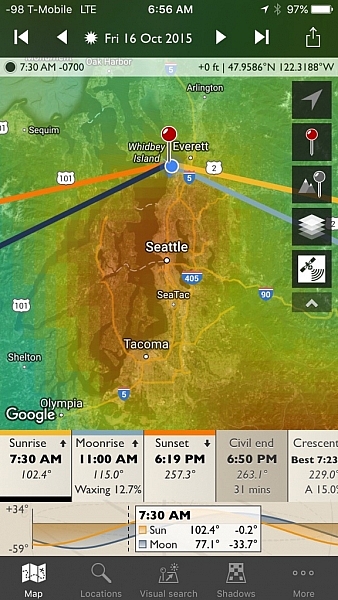
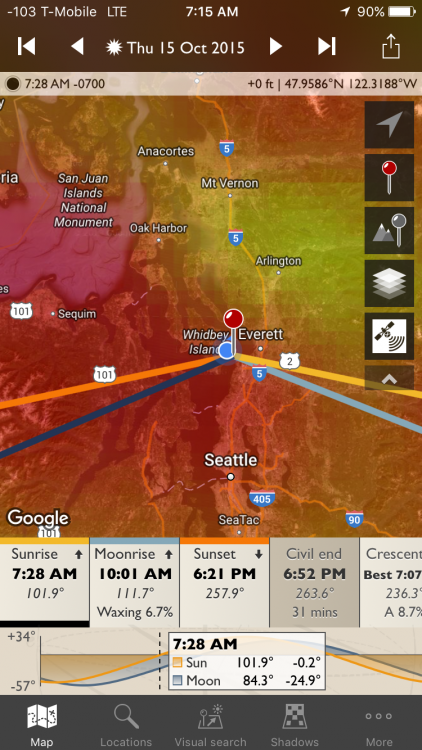
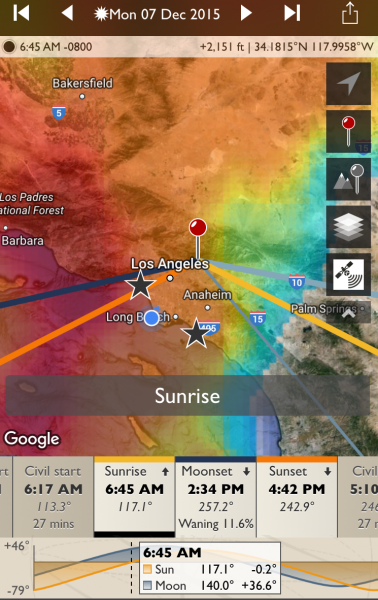
With the correct date selected, tap either the sunrise or sunset icons, from the timeline on the bottom of the screen. If you are zoomed-in too far, Skyfire will tell you to zoom out. Once you are zoomed out (by using a pinching motion on the screen) to the appropriate level, a semi-opaque overlay will show up with varying colors.
Skyfire-Review-24

No color overlay means no chance color and clear skies (the bottom right corner in the example above). You’ll still see the sunset or sunrise at that location, but the odds are there will be no clouds to take on color. The scale then follows the colors of the rainbow, more or less, to show slim chance (lighter blue) to high chance (red). In between are varying shades of blues to greens, and yellows to red. White means there will be cloud cover but no colors, and you likely won’t even see the sunset or rise.

It should be noted, the overlay color show the area where the greatest chance for sky color will occur. Meaning, it might be clear above you (no chance) but possibly red to the West. If you are deep in a valley you might not be able to see to the West, but if you’re on a mountain peak, you will know which direction works best.

How well does it work

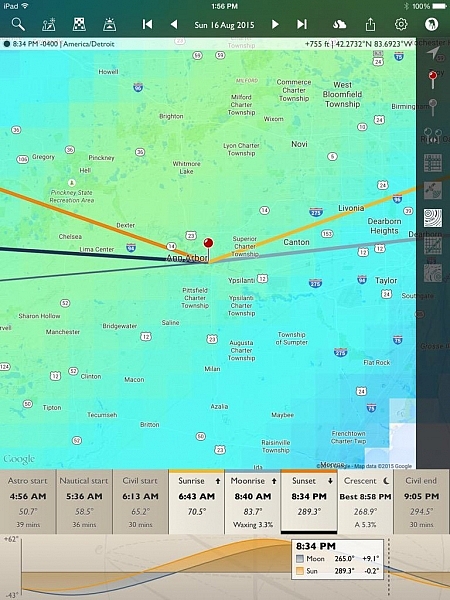
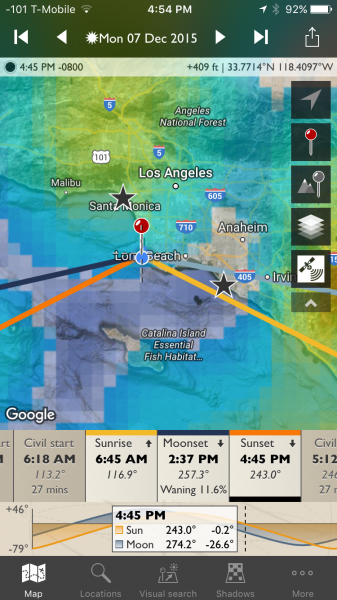
While I don’t have hard stats from years of testing to document Skyfire’s accuracy, but I do have my own experience, and that of two other photographers in various locations around the US who’ve tried it. I’ve used Skyfire in both Orange and LA Counties, California as well as Seattle, Washington. Rachel Cohen has tested the app in Ann Arbor, Michigan, while Richard Wong uses the app in the San Francisco Bay Area of California.

The short of it: Skyfire works well enough for my use as a professional photographer. I find its predictability to be within Crookneck’s stated goal of 80% accuracy (the app has an opt-in feature that allows users to send in photographic feedback of their experience which helps the company track accuracy and improve the product) and I have trusted it to get me out of bed early enough to catch pleasing sunrises.

Rachel used the app nearly every day during her 30 day trial and Richard tried it several times, including a trip to Quebec, Canada (note, while Skyfire only states coverage for the Lower 48 US, areas close to the border often get coverage as weather knows no border). “It’s great for traveling, as I can look up to four days ahead and get an idea of how to position myself best for the sunset, and what to expect in general on how colorful it might be”, Rachel commented when asked what she liked best about the app. Richard offered, “I like that Skyfire helps with coming up with ideas for shooting locations at sunrise / sunset. This especially comes in handy for sunrises to determine whether or not to set the alarm the night before.”
Skyfire-Review-25

Knowing Skyfire is not perfect, Richard mentioned, “Wind conditions need to be accounted for, and mountains. I drove 2+ hours to Point Reyes National Seashore expecting good odds of an explosive sunset, but it was cloudless when I arrived, with none in sight in any direction because the clouds had blown inland.” Rachel found that it’s best to fiddle with the zoom depending on your location, “I’m not quite sure where it loses its accuracy, but I can be at, or near a location, then look at the Skyfire app. What I see in the sky might not always represent what’s actually happening. If I zoom way out on the map, it seems more accurate than limiting zoom. Usually I try it both ways. Especially if traveling any distance.”

While the app shows the percentage for probability of photogenic cloud colors, it can’t predict just how amazing those colors will be. This type of knowledge comes with experience, and knowing local patterns.

My Results

I’ve been testing and using Skyfire for a few month,s and as I mentioned, I’ve been happy with the product. While access to it was given to me in order to perform this review, I had initially paid for a three month subscription because I found it useful. Below are some examples of my results.


Skyfire-Review-9

Skyfire-Review-6

Skyfire-Review-7

Skyfire-Review-15

Skyfire-Review-16

Skyfire-Review-9

Skyfire-Review-10

This last one is where Skyfire said there as a low chance, but the sky had different plans.
Skyfire-Review-30

Skyfire-Review-29

Skyfire forecast push notifications

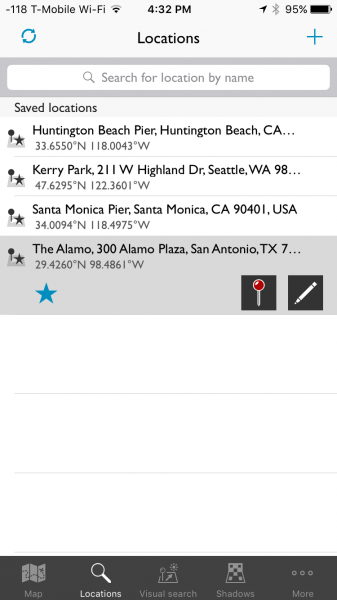
One of Skyfire’s strongest features works when you forget to check the app. You can set up push notifications (Skyfire Plus subscription required) inside the app, and it will notify you, based on percentage thresholds you set, when there are particularly high odds of great sunrise/sunset colors. You first pick your favorite locations via a simple search.
Skyfire-Review-28

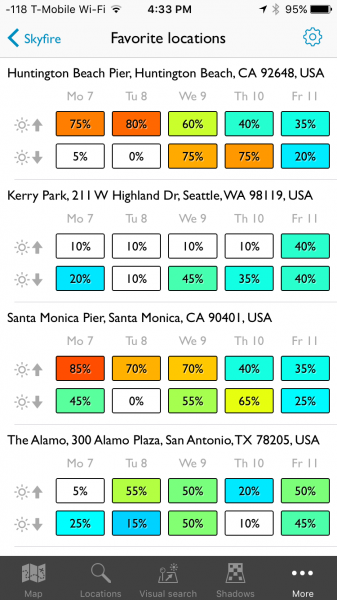
Skyfire will then keep track of your favorite locations and can show you the current predictions for each one.
Skyfire-Review-27

I’m heading to San Antonio tomorrow and I enjoy that the app helps me plan my tourism and photography. I know, as of right now, the sunset chance on my day of arrive is low, but the next morning is 50/50. So, I will check back tomorrow night, but in the mean time, I plan on making that morning an early one.

The notifications look like this:

Skyfire-Review-26

You can configure the notifications from one day in advance, to two or four days, depending on which subscription you opt-in for. Further, you can use the iPhone Do Not Disturb feature to make sure you aren’t receiving these texts when you are sleeping.

What’s next for Skyfire?

I got in touch with Matthew Kuhns and asked him what is next for Skyfire, he said:

“We are currently working on expanding the coverage area to Europe and Canada, which is challenging in that it requires some new forecast models to be created. And simultaneously we are working on the Android release for The Photographer’s Ephemeris plus a few other secret yet really awesome new features! The core service is also being analyzed and improved through the hard work of the entire team thanks for the great user feedback and field reports we receive. 

One hurdle many people don’t realize, is that most weather forecasts are broad stroke type predictions, and one of the biggest challenges with Skyfire is to take a broad forecast and nail down where the clouds will be exactly at sunset and sunrise, which is only a 20 minute window. Cloud forecasts are one of the trickiest parts of forecasting, and so developing ways to reliably analyze, interpret, and generate predictions based on these data sets is very challenging.

Conclusion

Skyfire is a robust feature inside TPE and for my money, it’s worth a yearly subscription. A hobbyist might opt for the Basic version, but as a professional who likes to hedge the bets in his favor, I prefer the Plus version. The push notifications are helpful for when I forget to check my phone. I have also found the app to be helpful for non-photography trips, such as the simple joy of enjoying a colorful sunset with my wife.

More information about the nuts and bolts of how the app is built can be found on Skyfire’s site.

Have you tried this app yet? What are your thoughts and results? Please share in the comments below.

Disclaimer: Skyfire was provided to the writer at no charge for the purpose of this review/article, but he was happy enough with it to purchase a subscription to continue using it. All reviews here on dPS are 100% unbiased opinions of the writers. 

googletag.cmd.push(function() {
tablet_slots.push( googletag.defineSlot( “/1005424/_dPSv4_tab-all-article-bottom_(300×250)”, [300, 250], “pb-ad-78623” ).addService( googletag.pubads() ) ); } );

googletag.cmd.push(function() {
mobile_slots.push( googletag.defineSlot( “/1005424/_dPSv4_mob-all-article-bottom_(300×250)”, [300, 250], “pb-ad-78158” ).addService( googletag.pubads() ) ); } );

The post Can the Skyfire App Predict Stunning Sunset Colors Days in Advance? by Peter West Carey appeared first on Digital Photography School.


Digital Photography School

 
Comments Off on Can the Skyfire App Predict Stunning Sunset Colors Days in Advance?

Posted in Photography


Fujifilm X70 puts 28mm equivalent F2.8 lens into compact X100-style body

17 Jan

$ (document).ready(function() { SampleGalleryV2({“targetContainerClass”:”sampleGalleryImageViewerContainer”,”galleryId”:”0302545666″,”isEmbeddedWidget”:true,”selectedImageIndex”:0,”startInCommentsView”:false,”isMobile”:false}) });

Fujifilm has announced the X70, a fixed-lens compact camera designed in the spirit of the company’s X100-series.

The X70 takes the design of the X100, shrinks it down, and adds a 28mm equivalent F2.8 lens (compared to the 35mm equiv. F2 optics on the X100). The cool hybrid viewfinder from the X100 is gone, but in exchange users get Fujifilm’s first touchscreen LCD (3″ in size), which can also tilt 180 degrees. The X70 has direct controls for aperture, shutter speed and exposure compensation, just like its big brother.

The guts of the camera are similar to that of the X-T10, meaning that the X70 has a 16.3MP X-Trans CMOS II sensor and Hybrid AF system. The AF system offers 49 points in single-point mode and 77 in zone and wide/tracking modes. The lens itself has nine rounded aperture blades and a minimum focus distance of 10cm. The mechanical shutter stops at 1/4000 sec but the electronic shutter goes all the way to 1/32000 sec.

The X70 has a standard ISO range of 200-6400, which expands to 100-51200. It can shoot continuously at 8 frames per second, though only for ten photos. Naturally, it has the full set of Film Simulation Modes, save for the new ACROS mode on the X-Pro2. Video can be recorded at 1080/60p, with a maximum bitrate of 36Mbps. As one would expect, the X70 also has built-in Wi-Fi with remote control from your smartphone.

The X70 will be available in all-black or silver and black in February at a price of $ 699.95.

Online resellers are selling the X70 for $ 799 – Fujifilm tells us that the $ 699 price in the press release is indeed correct.

FUJIFILM ANNOUNCES NEW ADDITIONS TO THE X-SERIES LINE OF CAMERAS AND LENSES

X-Pro2, X-E2S, X70 and XF100-400mmF4.5-5.6 R LM OIS WR join the X-Series; all-weather FinePix XP90 gets the shot from sand to slopes

Valhalla, N.Y., January 14, 2016 FUJIFILM North America Corporation, a leader in digital imaging, today announced new additions to the award-winning X-Series line of premium fixed and mirrorless cameras, and ultra-high quality lenses, including: the FUJIFILM X-Pro2, FUJIFILM X-E2S, FUJIFILM X70 and FUJINON XF100-400mmF4.5-5.6 R LM OIS WR.  Fujifilm also introduced the new rugged and waterproof FinePix XP90, perfect for capturing amazing images everywhere, from underwater to mountain tops.

FUJIFILM X70

The FUJIFILM X70 is a newly designed premium fixed lens digital camera that features a FUJINON 18.5mmF2.8 lens (28mm in 35mm format equivalent), suitable for a range of applications from landscapes to everyday snapshots. The new X70 elegantly combines simple manual operation with superior image quality and versatile picture-taking functions, and is the first X-Series camera to offer a touchscreen display that rotates 180 degrees, enabling users to shoot from up high, down low and capture selfies.

The compact FUJIFILM X70 uses a 16.3MP APS-C X-Trans CMOS II Sensor for extraordinary image resolution, and gives photographers milled aluminum dial controls, as well as aperture settings in 1/3 stop increments, and the new Auto Mode Switch lever for selecting its fully automatic Advanced SR Auto mode. In this mode, the camera automatically chooses the optimum settings for great results on any scene.

The new FUJIFILM X70 features a responsive touchscreen – a first for the X-Series. Now, photo enthusiasts can use the Touch Panel for operations during shooting and playback modes. For shooting, users can select their focus area and touch-to-shoot. During playback, users can swipe their finger to scroll through images, double-tab to enlarge images, and drag to view different points on the picture, and pinch-out and pinch-in to enlarge and reduce the image view.
Users can also disable the touchscreen functions at any time by turning the Touch Panel Settings to “off.”

FUJIFILM X70 key features:

  • 16.3MP APS-C X-Trans CMOS II Sensor
    • Fast AF of up to 0.06 seconds
    • Start-up time of 0.5 seconds
    • Shutter time lag of 0.05 seconds
    • Shooting interval of 0.5 seconds
  • Uses the FUJINON 18.5mm F2.8 lens with 7 elements in 5 groups, and  2 high-performance aspherical elements
    • 9 blade aperture
    • FUJINON’s unique HT-EBC coating
  • High-definition, touchscreen 3” tilting (180o) LCD display with 1.04 million dots
  • Maximum ISO performance up to 51200 sensitivity
  • New  AF system offers the 49-point Single Point mode for fast, precise focusing, and a  new Zone and Wide/Tracking modes with a 77-point area to capture moving subjects
  • Up to ±3 stops of exposure compensation on the top-plate dial
  • 8 function buttons (1 customizable)
  • Latest CLASSIC CHROME Film Simulation mode that delivers muted tones and deep colors
  • Interval timer for shooting time-lapse sequences of one second to 24 hours, up to 999 frames
  • Completely silent electronic shutter capable of exposures up to 1/32,000 second
  • Digital teleconverter offers additional focal ranges of 35mm and 50mm
  • Full HD video 1080p at 60fps; bit rate of 36Mbps for clear capture of delicate movements; frame rates of 60 fps, 50fps, 30fps, 25fps and 24fps, supporting worldwide motion picture formats
  • Free FUJIFILM Camera Remote application and Wireless Communication function allows users to remotely shoot images from smartphones and tablets via WiFi
  • Photos can be sent to the INSTAX Share Printer using the free INSTAX Share App (iOS and Android) SHARE Smartphone Printer
  • Advanced creative filters


The FUJIFILM X70 will be available in February 2016 for USD $ 699.95 and CAD $ 899.99.

Fujifilm X70 specifications

Price
MSRP $ 799/£549
Body type
Body type Large sensor compact
Sensor
Max resolution 4896 x 3264
Other resolutions 3:2 (3456 x 2304, 2496 x 1664), 16:9 (4896 x 2760, 3456 x 1944, 2496 x 1408), 1:1 (3264 x 3264, 2304 x 2304, 1664 x 1664)
Image ratio w:h 1:1, 3:2, 16:9
Effective pixels 16 megapixels
Sensor photo detectors 17 megapixels
Sensor size APS-C (23.6 x 15.6 mm)
Sensor type CMOS
Processor EXR Processor II
Color space sRGB
Color filter array X-Trans
Image
ISO Auto, 200-6400 (expandable to 100-51200)
Boosted ISO (minimum) 100
Boosted ISO (maximum) 51200
White balance presets 7
Custom white balance Yes
Image stabilization Unknown
Uncompressed format RAW
JPEG quality levels Fine, standard
File format
  • JPEG (Exif v2.3)
  • Raw (RAF format, 14-bit lossless compressed or uncompressed)
Optics & Focus
Maximum aperture F2.8 – F16.0
Autofocus
  • Contrast Detect (sensor)
  • Phase Detect
  • Multi-area
  • Center
  • Selective single-point
  • Tracking
  • Single
  • Continuous
  • Touch
  • Face Detection
  • Live View
Autofocus assist lamp Yes
Digital zoom Yes (35mm, 50mm digital teleconverter)
Manual focus Yes
Normal focus range 10 cm (3.94)
Number of focus points 77
Screen / viewfinder
Articulated LCD Tilting
Screen size 3
Screen dots 1,040,000
Touch screen Yes
Screen type TFT LCD
Live view Yes
Viewfinder type None
Photography features
Minimum shutter speed 30 sec
Maximum shutter speed 1/4000 sec
Maximum shutter speed (electronic) 1/32000 sec
Exposure modes
  • Program
  • Shutter priority
  • Aperture priority
  • Manual
Built-in flash Yes
Flash range 7.90 m (at ISO 1600 (5.5m at ISO 100))
External flash Yes
Flash modes Auto, Forced Flash, Slow Synchro , Suppressed Flash, Commander
Drive modes
  • Single
  • Continuous (hi/lo)
  • Self-timer
  • Interval
Continuous drive 8.0 fps
Self-timer Yes (2 or 10 secs)
Metering modes
  • Multi
  • Center-weighted
  • Spot
Exposure compensation ±3 (at 1/3 EV steps)
AE Bracketing ±1 (at 1/3 EV, 2/3 EV, 1 EV steps)
WB Bracketing Yes
Videography features
Resolutions 1920 x 1080 (60p, 50p, 30p, 25p, 24p), 1280 x 720 (60p, 50p, 30p, 25p, 24p)
Format MPEG-4, H.264
Microphone None
Speaker None
Storage
Storage types SD/SDHC/SDXC
Connectivity
USB USB 2.0 (480 Mbit/sec)
HDMI Yes (micro-HDMI)
Microphone port No
Headphone port No
Wireless Built-In
Wireless notes 802.11b/g/n
Remote control Yes (Wired or via smartphone)
Physical
Environmentally sealed No
Battery Battery Pack
Battery description NP-95 lithium-ion battery & charger
Battery Life (CIPA) 330
Weight (inc. batteries) 340 g (0.75 lb / 11.99 oz)
Dimensions 113 x 64 x 44 mm (4.45 x 2.52 x 1.73)
Other features
Orientation sensor Yes
Timelapse recording Yes
GPS None

Articles: Digital Photography Review (dpreview.com)

 
Comments Off on Fujifilm X70 puts 28mm equivalent F2.8 lens into compact X100-style body

Posted in Uncategorized


Tips for Using a Handheld Light Meter

17 Jan

In modern DSLRs they all have a light meter built-in to the camera. But sometimes you want a more accurate reading, or to measure the amount of light when using flash (your camera can’t do that), in which case you would turn to a handheld light meter.

Check out this video from Adorama TV (host Daniel Norton) for some light meter basics.

This second video is more advanced. Once again from Adorama TV, with host Mark Wallace, this one covers how to meter for light ratios. Read more about ratios here: Lighting Ratios to Make or Break your Portrait.

In the video above he is using the Sekonic L-358 light meter. Here are a couple other choices, also made by Sekonic. I personally use the L-308 and it works just fine. You don’t need one that’s really fancy but the one he used does have the memory storage for comparing the light, the L-308 does not. So if you want that feature you may want to opt for the L-358.

Have you used a light meter before? If you are shooting with speedlights or studio lights you may find it necessary, but if you shoot landscapes and use mostly natural light you probably do not need one. Let us know your experience in the comments below.

googletag.cmd.push(function() {
tablet_slots.push( googletag.defineSlot( “/1005424/_dPSv4_tab-all-article-bottom_(300×250)”, [300, 250], “pb-ad-78623” ).addService( googletag.pubads() ) ); } );

googletag.cmd.push(function() {
mobile_slots.push( googletag.defineSlot( “/1005424/_dPSv4_mob-all-article-bottom_(300×250)”, [300, 250], “pb-ad-78158” ).addService( googletag.pubads() ) ); } );

The post Tips for Using a Handheld Light Meter by Darlene Hildebrandt appeared first on Digital Photography School.


Digital Photography School

 
Comments Off on Tips for Using a Handheld Light Meter

Posted in Photography


Fujifilm announces its flagship 24 megapixel X-Pro2 mirrorless camera

17 Jan

$ (document).ready(function() { SampleGalleryV2({“targetContainerClass”:”sampleGalleryImageViewerContainer”,”galleryId”:”2153749715″,”isEmbeddedWidget”:true,”selectedImageIndex”:0,”startInCommentsView”:false,”isMobile”:false}) });

Fujifilm has released the long-awaited followup to its flagship X-Pro1 mirrorless camera, aptly named the X-Pro2. While similar in design to its predecessor, virtually everything else about the X-Pro2 is new.

First is an all-new 24.3 megapixel X-Trans CMOS III sensor, making the X-Pro2 the highest resolution Fujifilm camera yet. It can capture images at sensitivities as high as ISO 51200 and also supports compressed Raw (a first for the X-series). The camera’s focal plane shutter tops out at 1/8000 sec (with an x-sync speed of 1/250 sec), with the electronic shutter offering speeds up to 1/32000 sec.

Another big leap is in terms of autofocus. The X-Pro2 has a Hybrid AF system with 273 total points, of which 77 are phase-detect and cover 40% of the frame. Fujifilm claims the X-Pro2 offers the fastest AF of any of its X-series models, though it’s worth keeping in mind that performance will vary based on lens – many lenses in the line, particularly primes, tend to have slower focus motors that can significantly affect continuous AF performance. 

While the X-Pro1 was already a sturdy camera, its successor is even more durable. Its magnesium alloy body has 61 points which are sealed against dust and moisture. It offers direct control for shutter speed, ISO and exposure compensation via dials on the top plate. The X-Pro2 is Fujifilm’s first camera with dual memory card slots, both of which take SD cards. The first slot is compatible with ultra-high speed UHS-II media.

Fujifilm has also updated the X-Pro1’s hybrid viewfinder, bringing it more in line with what’s found on the X100T. It can still be both an optical or electronic viewfinder, with the resolution of the EVF panel being bumped to 2.36 million dots. X-Pro1 users have always been able to overlay shooting data and bright lines onto the optical view, but now there’s a ‘tab’ at the lower-right which can display a projected LCD display showing a magnified view of the focus point, peaking, or a digital split prism. In addition to the hybrid viewfinder, the X-Pro2 also has a 3″ LCD with 1.62 million dots.

Some other new features of note include a monochrome Acros film simulation mode ‘for smooth tones’, a grain effect, interval shooting, 1080/60p video and, of course, Wi-Fi support.

The X-Pro2 will be available next month at a price of $ 1699.95.

FUJIFILM ANNOUNCES NEW FLAGSHIP X-PRO2 MIRRORLESS CAMERA

Weather-resistant X-Pro2 features the world’s first Advanced Hybrid Multi Viewfinder, new 24MP X-Trans CMOS III sensor, and creative monochrome ACROS film simulation

Valhalla, N.Y., January 14, 2016 FUJIFILM North America Corporation, a leader in premium mirrorless cameras, today announced the FUJIFILM X-Pro2, the new flagship range-finder style camera in the award-winning X-Series line. As the new pinnacle of X-Series photography, the X-Pro2 gives professional photographers an innovative Advanced Hybrid Multi Viewfinder capable of instantly switching between optical and electronic finders, a new 24.3MP X-Trans CMOS III sensor for truly remarkable image resolution, and a new X-Processor Pro that delivers dramatically improved response times for unmatched performance.

By combining these features with the ultra-high image quality of FUJINON X-Mount lenses and the world-renowned color reproduction technology refined over more than 80 years as a photographic film leader, the FUJIFILM X-Pro2 delivers the best ever results from an X-Series camera.

Advanced performance for professionals
The FUJIFILM X-Pro2 has the world’s first Hybrid Multi Viewfinder that allows photographers to take advantage of both an optical finder for a direct view of the subject as well as an electronic viewfinder to preview settings. The ability to instantly switch between these two types of viewfinders was first installed on the FUJIFILM X100 in 2011, but the latest version found on the X-Pro2 is the most advanced. It now features a Multi-Magnification function that automatically switches viewfinder magnification according to the lens in use and an Electronic Rangefinder that simultaneously displays the electronic viewfinder on top of the optical viewfinder.

Working together, the newly developed 24.3MP X-Trans CMOS III sensor and the high-performance X-Processor Pro image engine deliver pictures with a perceived resolution far greater than the actual number of pixels used. Moreover, the X-Pro2 now boasts 4x the processing speed of conventional image processing engines, which in turn gives users increased response times, even with the increased resolution. The powerful X-Processor Pro dramatically improves a wide range of response times, including a start-up time of just 0.4 seconds, the shortest shooting interval of 0.25 seconds, a shutter time lag of 0.05 seconds, and autofocus speeds as fast as 0.06 seconds. And with the option to use compressed RAW files, the X-Pro2’s performance and functionality now exceed the needs of professional photographers, including faster live view and even higher definition movies.

Cutting-edge autofocus system
The FUJIFILM X-Pro2 uses a new autofocus (AF) system that gives users an expanded number of selectable focusing points with 273 AF points. 77 of these are phase detection – for greater functionality and faster autofocus. With the X-Pro2, approximately 40% of the imaging area is now covered by fast, precise phase detection AF pixels, which means focusing speeds when photographing moving subjects have improved dramatically. By combining the processing capabilities of the new X-Processor Pro with a contrast AF readout speed that is 2x faster than before, the X-Pro2 delivers the fastest AF performance ever in an X-Series camera.

Weather-resistant for challenging shooting environments
The FUJIFILM X-Pro2 has a robust, weather-resistant body to meet the needs of professional photographers in tough shooting environments. The camera’s chassis is made from four pieces of magnesium alloy and is sealed with more than 61 points, making it dust-proof, splash-proof and capable of operating in temperatures as low as 14°F. In addition, it has dual SD card slots, for more reliable image storage and less card changing while on location.

Improved layout and new user interface design
The new FUJIFILM X-Pro2 embodies the true craftsmanship that the X-Series is known for around the world. The shutter speed dial, exposure compensation dial and finder switching lever are all milled from aluminum for a premium look and comfortable feel. The ISO sensitivity dial is now built-in to the shutter speed dial so camera settings can be confirmed at a glance without having to turn the power on. And the command dial position has been added to the exposure compensation dial. Selecting this function switches exposure compensation operation to the front command dial and expands the range to ±5EV.

The FUJIFILM X-Pro2 features Command dials on both the front and rear of the camera. And by adding a push function, they are easier to use, and still retain dust and water resistance. There are six function buttons to allow easier access to regularly used functions, and a new Focus Lever enables users to quickly select a focusing point, speeding up operation.

Photographers will find a new, easy-to-use graphical user interface design in the FUJIFILM X-Pro2 with fresh categories added to the tabs on the menu screen, allowing faster access to the item required. Users can register a maximum of 16 frequently used items in the new My Menu feature, and when combined with the 16 items from the Q Menu, a total of 32 shortcuts can be created.

The viewfinder display in the FUJIFILM X-Pro2 now offers a greater level of customization so it can further match the individual needs of the photographer. The X-Pro2 gives users a Bright Frame Simulation function in the optical viewfinder mode so the angle of view of each focal length can be confirmed without having to replace the lens, so the user can change lenses more accurately.

FUJIFILM X-Pro2 key features:

  • World’s first Advanced Hybrid Multi Viewfinder with 2.36 million dots and maximum speed of 85 frames per second
    • Diopter correction mechanism with an eye point of 16mm and a telephoto bright frame with enlarged focal length of 140mm
  • 24.3MP APS-C X-Trans CMOS III Sensor
    • Fast AF of up to 0.08 seconds
    • Phase detection AF and motion predictive AF for continuous shooting up to 8 frames per second
    • Start-up time of 0.4 seconds
    • Shutter time lag of 0.05 seconds
    • Shooting interval of 0.25 seconds
    • Focal plane shutter top speed of 1/8000 second
    • Flash sync speed up to 1/250 second
  • Dust and water-resistant body with more than 61 points of weather sealing and freeze resistance to 14°F
  • High-precision 3” rear display with 1.62 million dots
  • Dual memory card slots (Slot1 compatible with UHS-II standards)
  • New monochrome  ACROS film simulation for smooth tones, deep blacks and rich textures
  • New Grain Effect mode for images reminiscent of old film photos, especially when printed
  • Maximum ISO performance up to 12800 sensitivity; Extended ISO ISO100, 25600, 51200
  • Improved electric charge transfer rate for ultra-fast readout speeds
  • Interval timer for shooting time-lapse sequences of one second to 24 hours, up to 999 frames
  • Free FUJIFILM Camera Remote application and Wireless Communication function allows users to remotely shoot images from smartphones and tablets via WiFi
  • Photos can be sent to the INSTAX Share Printer using the free INSTAX Share App (iOS and Android) SHARE Smartphone Printer
  • Full HD video 1080p at 60fps; bit rate of 36Mbps for clear capture of delicate movements; frame rates of 60 fps, 50fps, 30fps, 25fps and 24fps, supporting worldwide motion picture formats
  • Advanced creative filters
  • Optional accessories:
    • Hand Grip MHG-Xpro2 – improves grip and retains access to battery and SD card, and compatible with an Arca Swiss plate
    • Leather Case BLC-XPRO2 – genuine leather bottom case elegantly shows off the X-Pro2’s classic design while protecting the camera body with battery access

The FUJIFILM X-Pro2 (body only) will be available in February 2016 for USD $ 1,699.95 and CAD $ 1,899.99.


Fujifilm X-Pro2 specifications

Price
MSRP $ 1699/£1349 (body only)
Body type
Body type Rangefinder-style mirrorless
Body material Magnesium alloy
Sensor
Max resolution 6000 x 4000
Other resolutions 3:2 (4240 x 2832, 3008 x 2000), 16:9 (6000 x 3376, 4240 x 2384, 3008 x 1688), 1:1 (4000 x 4000, 2832 x 2832, 2000 x 2000)
Image ratio w:h 1:1, 3:2, 16:9
Effective pixels 24 megapixels
Sensor size APS-C (23.6 x 15.6 mm)
Sensor type CMOS
Processor EXR Processor III
Color space sRGB, Adobe RGB
Color filter array X-Trans
Image
ISO Auto, 200-12800 (expandable to 100-51200)
Boosted ISO (minimum) 100
Boosted ISO (maximum) 51200
White balance presets 7
Custom white balance Yes (3 slots)
Image stabilization No
Uncompressed format RAW
JPEG quality levels Fine, normal
File format
  • JPEG (Exif v2.3)
  • Raw (14-bit RAF, lossless compressed or uncompressed)
Optics & Focus
Autofocus
  • Contrast Detect (sensor)
  • Phase Detect
  • Multi-area
  • Center
  • Selective single-point
  • Tracking
  • Single
  • Continuous
  • Face Detection
  • Live View
Autofocus assist lamp Yes
Manual focus Yes
Number of focus points 273
Lens mount Fujifilm X
Focal length multiplier 1.5×
Screen / viewfinder
Articulated LCD Fixed
Screen size 3
Screen dots 1,620,000
Touch screen No
Screen type TFT LCD
Live view Yes
Viewfinder type Electronic and Optical (tunnel)
Viewfinder coverage 92%
Viewfinder magnification 0.6×
Viewfinder resolution 2,360,000
Photography features
Minimum shutter speed 30 sec
Maximum shutter speed 1/8000 sec
Maximum shutter speed (electronic) 1/32000 sec
Exposure modes
  • Program AE
  • Shutter priority
  • Aperture priority
Built-in flash No
External flash Yes (via hot shoe or flash sync port)
Flash modes Auto, forced flash, slow synchro, suppressed flash, rear-curtain synchro, commander)
Flash X sync speed 1/250 sec
Drive modes
  • Single
  • Continuous (hi/low)
  • Self-timer
  • Interval
Continuous drive 8.0 fps
Self-timer Yes (2 or 10 secs)
Metering modes
  • Multi
  • Center-weighted
  • Spot
Exposure compensation ±5 (at 1/3 EV steps)
AE Bracketing ±2 (at 1/3 EV, 1/2 EV, 2/3 EV, 1 EV, 2 EV steps)
WB Bracketing Yes
Videography features
Resolutions 1920 x 1080 (60p, 50p, 30p, 25p, 24p), 1280 x 720 (60p, 50p, 30p, 25,p, 24p)
Format MPEG-4, H.264
Microphone Stereo
Speaker Mono
Storage
Storage types SD/SDHC/SDXC (Dual slots, UHS-II support in slot 1)
Connectivity
USB USB 2.0 (480 Mbit/sec)
HDMI Yes (micro-HDMI)
Microphone port Yes
Headphone port No
Wireless Built-In
Wireless notes 802.11b/g/n
Remote control Yes (Wired or via smartphone)
Physical
Environmentally sealed Yes (water and dust resistent)
Battery Battery Pack
Battery description NP-W126 lithium-ion battery & charger
Battery Life (CIPA) 350
Weight (inc. batteries) 495 g (1.09 lb / 17.46 oz)
Dimensions 141 x 83 x 56 mm (5.55 x 3.27 x 2.2)
Other features
Orientation sensor Yes
Timelapse recording Yes
GPS None

Articles: Digital Photography Review (dpreview.com)

 
Comments Off on Fujifilm announces its flagship 24 megapixel X-Pro2 mirrorless camera

Posted in Uncategorized


The power of a photograph: Lynette Johnson and Soulumination

17 Jan

In 2005, wedding and portrait photographer Lynette Johnson founded an organization that would have a profound impact on over 1,400 families. Celebrating its 10th year, Soulumination is a non-profit that provides free professional photography sessions for individuals and families facing truly devastating circumstances – the loss of a child (or a parent with young children) to terminal illness. Now with almost 50 volunteer photographers, Soulumination provides a loving remembrance to comfort families and loved ones through extremely difficult times. 

In her PIX 2015 talk, Johnson discusses her work founding and growing Soulumination. She’s also joined by ‘Soul Mom’ Debbie, who brings a heartfelt perspective on just how important it is to have photographs that celebrate the life of a loved one. Lynette and Debbie give a moving talk, one that really illuminates how priceless a photograph can be.

Watch the talk and visit Soulumination’s website to learn more about their mission. The organization is currently running a ten-week campaign celebrating its ten years, hoping to raise $ 100,000 to continue helping families.

Articles: Digital Photography Review (dpreview.com)

 
Comments Off on The power of a photograph: Lynette Johnson and Soulumination

Posted in Uncategorized


Hands-on with the Fujifilm X-Pro2

17 Jan

Hands-on with the Fujifilm X-Pro2

At its core, the X-Pro2 is a rangefinder style camera (and one that actually works a little like a rangefinder, thanks to some clever digital technology) that should appeal not only to the traditional rangefinder crowd, but also to enthusiasts who may be more accustomed to other styles of camera as well.

The X-Pro2 is technically the successor to Fujifiilm’s original X-mount camera, the X-Pro1, however in the context of Fujifilm’s camera business it’s much than that. In many ways the X-Pro2 raises the bar for the entire Fujifilm line of interchangeable lens cameras, including the current top of the line X-T1. Headline features include a 24MP X-Trans sensor, a new hybrid AF system, and picture-in-picture viewfinder design borrowed from the X100, along with improved video quality.

Hands-on with the Fujifilm X-Pro2

With its 24MP X-Trans III CMOS sensor the X-Pro2 sets a new resolution standard for Fujifilm cameras, most of which have utilized 16MP sensors for a number of years. We’ve generally been impressed with how much image detail the company has been able to extract from those 16MP, and so far our impressions of the X-Pro2’s images have been positive, too.

The camera’s shutter has been uprated, too. The mechanical shutter can shoot as fast as 1/8000th of a second and can flash sync up to 1/250th. An electronic shutter mode expands the range up to 1/32000th of a second.

Hands-on with the Fujifilm X-Pro2

Just as important as the additional resolution is the X-Pro2’s new autofocus system. With 273 AF points (including 77 phase detect points) the AF system is actually more advanced than Fujifilm’s existing flagship model, the X-T1. Importantly, the phase detect region extends beyond the central third of the frame, and the system supports AF tracking as well as eye-detection AF. Ultimately, however, the rate-limiting step when focusing some of Fujifilm’s lenses may be the lenses themselves: a few of them have to move a lot of glass around and may not react as quickly as the camera.

If you find 273 points too many to cope with, you can limit yourself down to 77 points to make them quicker to select – you retain the same coverage across the frame, though.

Hands-on with the Fujifilm X-Pro2

The top plate of the X-Pro2 should be fairly straightforward to most experienced photographers, however it’s worth noting Fujifilm has added a nested ISO dial inside of the shutter speed dial. As neat as it looks, you probably won’t utilize this dial much if you use the camera’s Auto ISO settings. One quirk when using Auto ISO is that while you have the ability to specify a minimum shutter speed threshold, there is no option to relate minimum shutter speed to focal length. This is fine when using prime lenses but works less well for zooms, where the shutter speed required to avoid shake changes as you zoom.

There’s good news, though. The X-Pro2 includes the ability to save three Auto ISO settings in camera (compared to one on many previous Fujifilm models). It’s also possible to assign a custom button to switch between these settings for quick changes while shooting. Maximum standard ISO is extended up 12800 – one stop more than on previous Fujifilm models – and there’s an extended ISO mode that expands out to ISO 51200. For the first time, you can shoot Raw files at every setting.

There’s also a manual exposure compensation dial which can be set as much as ±3EV. However, this can be extended out to ±5EV in combination with the front dial.

Hands-on with the Fujifilm X-Pro2

Looking at the rear of the camera we see one of the most important design elements of the X-Pro2: a small joystick just to the right of the screen. The joystick is useful for a couple reasons.

First, it can be used to manually select any of the camera’s 273 AF points – a much easier arrangement than trying to do so with four directional buttons. Second, and possibly more important, using the joystick to select AF points means that you don’t have to assign your four-way controller buttons to perform this task, effectively giving you extra buttons for custom functions.

In fact, the X-Pro2 has six customizable buttons. With the addition of the joystick, this means you really can assign six custom functions even with manual AF point selection. For shooters who like to manually select AF points this will be a significant enhancement to the shooting experience. 

Hands-on with the Fujifilm X-Pro2

Even the original X-Pro1 had a viewfinder lever on the front, but now the lever’s presence has taken on new significance. On the X-Pro2, Fujifilm has added the ‘Advanced’ hybrid viewfinder, similar to the one in the X100T. While shooting with the optical viewfinder, a quick push of this lever will bring up a small, magnified live view window in the lower right corner to use as a focusing aid. It’s then possible to focus on the magnified region (as seen through the lens) while composing with the OVF. There’s also a function button at the center of the lever.

In addition to the viewfinder lever there’s also a new command dial on the front of the camera, bringing the X-Pro series into the twin dial control era.

Hands-on with the Fujifilm X-Pro2

The X-Pro2 has the standard connections you would expect on a Fujifilm camera. In addition to the traditional PC sync socket for connecting a flash there are USB and micro-HDMI ports. That microUSB port is also where Fujifilm’s optional RR-90 wired remote control plugs in. There’s also a 2.5mm microphone-in jack for shooting video, though no headphone jack to monitor sound. 

For those wanting to shoot video, we’re happy to report that video quality on the X-Pro2 is notably improved relative to previous Fujifilm models. Whether this is a result of the new sensor or better algorithms for converting X-Trans data into video we’re not sure, but it’s fair to say that movie quality is fine for casual use. Video enthusiasts concerned with absolute quality will still want to look elsewhere, however. The X-Pro2 supports 1080/60p recording at around 36mbps.

Hands-on with the Fujifilm X-Pro2

Another area in which Fujifilm has improved the build of the X-Pro2 is with additional weather sealing. A quick look at the inside of the card slot door reveals a good example of this in the form of a rubber gasket. The X-Pro2 is also Fujifilm’s first camera to support dual card slots, one of which supports UHS-II speeds.

What will go on those cards? Photos with beautiful Fujifilm colors, of course. Fujifilm has a well-deserved reputation for both JPEG color and B&W rendition based on classic film stocks, and the X-Pro2 continues the trend with a new one: Neopan Acros, a black and white film known for its rich gradations and fine grain. By default it features a very fine grain but there’s now an option to apply an additional grain effect to this and all the camera’s film simulation modes.

Hands-on with the Fujifilm X-Pro2

Thankfully, Fujifilm has been fairly consistent with batteries, and the X-Pro uses the same NP-W126 battery as cameras such as the X-T1 and X-Pro1. It’s rated at 350 shots (250 if using the EVF) according to CIPA standards, which is about average for similar Fujifilm models, but it does come in below average for its APS-C sensor peers.

Hands-on with the Fujifilm X-Pro2

We end with a slide from a Fujifilm presentation highlighting some of the X-Pro2’s sensor capabilities. The X-Trans color filter array (CFA) sits atop a traditional CMOS sensor, which we expect is Sony or Toshiba sourced, based on the low noise characteristics of previous Fujifilm cameras. The specs indicate a higher sensor readout rate, which if utilized properly, could lead to increased autofocus performance and may have an impact on video – which appears to be improved on the X-Pro2 relative to the X-T1 for example. Fujifilm is also claiming a 7.6 dB improvement in SNR, and we’ll be curious to see if this translates to increased low light performance in our controlled studio tests. 

For more information about the X-Pro2 and what it’s like to use, read our first impressions review.

Articles: Digital Photography Review (dpreview.com)

 
Comments Off on Hands-on with the Fujifilm X-Pro2

Posted in Uncategorized


Retro through-and-through: Fujifilm X-Pro2 First Impressions Review

17 Jan

The X-Pro2 is a high-end, rangefinder-esque mirrorless camera that directly succeeds the first X-mount camera: the X-Pro1. The Pro2 now sports a 24MP APS-C sensor and a host of feature improvements in a body that very closely resembles that of its predecessor.

Fujifilm X-Pro2 features

  • 24MP X-Trans CMOS III sensor (APS-C)
  • 273 Autofocus points (77 of which PDAF)
  • 2.36M-dot OLED/Optical hybrid viewfinder with pop-up picture-in-picture tab
  • ISO 200-12800, expandable to 100-51200 with Raw shooting at all settings
  • 1/8000 sec maximum shutter speed and 1/250 sec flash sync
  • Acros black and white film simulation
  • Grain Effect option for JPEGs
  • 1080/60p movies

The X-Pro2’s higher resolution sensor also gains wider-spread on-sensor phase-detect AF coverage, which is another significant improvement. In addition it has a small, thumb-operated joystick that allows you to more easily select an AF point and, in turn, the camera lets you select from a any of the camera’s AF points.

Other changes include allowing Auto ISO to extend up to 12800 and the ability to shoot Raw files at all the camera’s ISO settings (extended settings have always been JPEG-only on previous X-series cameras), as well as the ability to apply lossless compression to Raw files. The X-Pro2’s shutter has been improved, too, and can now shoot as fast as 1/8000 sec, with flash sync extended to 1/250 sec of a second.

But much of what else made the original X-Pro1 stand out remains. The genuinely rangefinder-styled body, rather than just being a rectangle with a band of faux leather around it, mimics most of the control points and design accents of a 1960s camera. It still has the all-metal construction but more attention has been made to provide environmental sealing, as you’d expect in a camera at this price.

And, although the body looks broadly the same, it’s been significantly reworked to offer improved ergonomics as well as additional features. The hybrid viewfinder has been improved through the inclusion of an X100T-style pop-up tab in the corner, onto which an LCD image can be projected.

Here’s a spec comparison between the X-Pro2 and its predecessor, as well as the X-T1:

 
Fujifilm X-Pro2
Fujifilm X-T1
Fujifilm X-Pro1
Pixel count 24MP 16MP 16MP
AF points 273 points (77 of which PDAF) hybrid system.
All directly selectable.
77 point (15 of which PDAF) hybrid system
49 directly selectable (9 of which PDAF)
49 point CDAF system
All directly selectable.
Viewfinder 2.36M-dot OLED/Optical Hybrid 2.36M-dot OLED 1.44M-dot LCD/Optical Hybrid
ISO Range 200-12800
(100-51200 Extended)
200-6400
(100-51200 JPEG-only)
200-6400
(100-25600 JPEG-only)
Auto ISO settings 3 1 1
Maximum frame rate
With AFC/With Live View
8 fps / 3 fps 8 fps / 3 fps 6 fps / 3 fps
Maximum shutter speed 1/8000 (Mechanical)
1/32000 (Electronic)
1/4000 (Mechanical)
1/32000 (Electronic)
1/4000 (Mechanical)
X-Sync Speed 1/250 sec 1/180 sec 1/180 sec
Movie shooting 1080/60p 1080/60p 1080/24p
Wi-FI Yes Yes No
Customizable Q Menu Yes Yes No
Custom ‘My Menu’ Yes No No
Direct controls Shutter Speed
Exposure Comp
AF Drive Mode
ISO
Shutter Speed
Exposure Comp
AF Drive Mode
ISO
Drive Mode
Metering Mode
Shutter Speed
Exposure Comp
AF Drive Mode
Direct AF point control Yes – Joystick Optional – At expense of custom buttons No
Custom buttons 6 6 (2 if direct AF select chosen) 2
Exposure Comp Dial ±3EV (±5EV using front dial) ±3EV ±2EV
Rear screen 3″ Fixed (3:2)
1.62M-dot (900 x 600)
3″ Tilting (3:2)
1.04M-dot (720 x 480)
3″ Fixed (4:3)
1.23M-dot (640 x 480)
Command dials 2 (Push-button type) 2 1 (Push-button type)
Card slots 2 (1 of which UHS-II) 1 (UHS-II) 1 (UHS-I)
Film Simulations* 9 8 7
AF Tracking Yes Yes No
Eye-detection AF Yes Yes No
AF in MF mode AF-C or AF-S AF-C or AF-S AF-S
Panorama mode No Yes Yes
Compressed Raw? Optional (Lossless) No No
Battery life 350 OVF
250 EVF
350 EVF ~300 OVF
Battery percentage? Yes No No
Maintain zoom when changing image in playback Yes No No
Lens Modulation Opt Yes Yes No
Grain simulation Yes No No
Split prism focus guide Color/Mono Mono No
Brightline display Yes N/A No

*Not including color filter simulation variations

As you can see, compared to the X-Pro1, the Pro2 is significantly improved. Almost every aspect of the camera has been refreshed and these updates quickly add up to a much nicer-to-use, more capable camera.

However, in the four years that have passed since the launch of the X-Pro1, a lot has changed, with mirrorless cameras maturing dramatically and expectations for features such as continuous autofocus and movie shooting leaping forwards. However, neither of these two factors is likely to be a prime concern for would-be buyers, instead, the main thing likely to make life difficult for the X-Pro2 could be the existence of its own sister model: the X-T1.

The X-T1 was described at launch as a flagship model and offers a fully fleshed-out feature set for enthusiasts, semi-pros and perhaps even some professionals. It has sealed magnesium alloy construction, a huge electronic viewfinder, weather sealing and abundant external controls. So is there really still room for a new X-Pro alongside the DSLR-style model?

Scanning through the table above, there are certainly some areas in which the X-Pro2 is more advanced than the X-T1, but details such as shutter speed and pixel count are just generational improvements that would make just as much sense in a X-T2. So one of the main things we’ll be looking to address in this review is: how does the hybrid viewfinder change the shooting experience and is it enough to allow the X-Pro and X-T lines to continue in parallel?

 Review History
29 Jan 2016 First Impression Review based on Pre-Production camera running Firmware 1.00

If you're new to digital photography you may wish to read the Digital Photography Glossary before diving into this article (it may help you understand some of the terms used).

Conclusion / Recommendation / Ratings are based on the opinion of the reviewer, you should read the ENTIRE review before coming to your own conclusions.

We recommend to make the most of this review you should be able to see the difference (at least) between X, Y, and Z and ideally A, B, and C.

This article is Copyright 1998 – 2016 and may NOT in part or in whole be reproduced in any electronic or printed medium without prior permission from the author.

Articles: Digital Photography Review (dpreview.com)

 
Comments Off on Retro through-and-through: Fujifilm X-Pro2 First Impressions Review

Posted in Uncategorized


Hands-on with the Fujifilm X70

17 Jan

Hands-on with the Fujifilm X70

In addition to its X-Pro2 and X-E2S, Fujifilm also announced the X70, a compact camera with a fixed 28mm equiv. F2.8 lens (shown here with a lens hood). Focal length aside, the X70 is in many way a Fujifilm X100T minus the hybrid viewfinder but with the addition of a tilting touchscreen.

It uses the same 16.3MP APS-C X-Trans II sensor as the X100T and features a similar layout of control points. We had the opportunity to get our hands on the X70 at a press event in Japan – take a look. 

Hands-on with the Fujifilm X70

The X70 looks quite a bit like a classic rangefinder film camera shrunken down. It features direct controls for shutter speed and exposure compensation, both of which are made from milled aluminum. It also has a dedicated aperture ring around the lens barrel, offering 1/3-stop aperture adjustments ranging from F2.8 to F16.

The focus ring on the front of the lens can be set to toggle focus when shooting in MF, or be used as a digital teleconverter, to switch the field of view to a 35mm and 50mm equivalent. The top also offers a hotshoe, video record button, drive button and Auto switch. When flipped down, the Auto switch overrides all other exposure parameters (just like the Auto switch on the X-T10).

Hands-on with the Fujifilm X70

Just because the X70 has a touchscreen doesn’t mean there aren’t ample physical controls as well. Quite the contrary. The back alone offers a four-way controller, custom function button and a Q button for direct access to the Quick menu.

The touchscreen, by the way, is 3″ in size with 1.04 million dots. In addition to offering touch-to-shot and touch-to-focus capabilities, it can also be used in playback to swipe through images, and even offers pinch-to-zoom functionality.

Hands-on with the Fujifilm X70

The grip on the X70 is made from a rubber-material; it is moderately-sized and comfortable to hold. The camera can easily be used with just a single hand, but offers enough real estate on the body to also be comfortably gripped with two.

While it’s easy to draw comparisons between the X100T and the X70, spend a little time holding the latter and you’ll quickly find it handles like a very different camera. In addition to its use of a 28mm equiv. F2.8 lens, compared to the 35mm equiv. F2 of the X100-series, it is also substantially smaller than a X100, thanks to its lack of a viewfinder. Moreover, the addition of an articulating touchscreen makes the X70 an even more discreet option than the X100T, especially for street photography.

Hands-on with the Fujifilm X70

The 28mm equiv. F2.8 lens is composed of 7 elements, arranged into 5 groups. Two of those elements are aspherical to help cut chromatic aberration. The lens itself uses a 9-blade aperture. 

The X70 offers Fujifilm’s latest AF system, and features both Zone AF and Wide/Tracking AF, first introduced on the Fujifilm X-T10 (and X-T1 via firmware 4.0). The Hybrid AF system comprises a total of 77-points.

Like all recent X-series cameras, the X70 offers Face Detect and Eye Detect. We had the chance to briefly try Face Detect on the X70 in a press meeting and our initial impressions were positive, despite the fact that Fujifilm cameras have historically lagged behind the competition at AF speed and accuracy when using Face and Eye Detect.

Hands-on with the Fujifilm X70

The X70 has an articulating touchscreen that flips up 180 degrees and down 90 degrees; this is the first X-series camera to offer a touchscreen of any kind. We had the chance to try out the touch-to-shoot functionality during a product briefing and found the camera to be quite responsive. Street photography purists might scoff at the idea of using a touchscreen to make images, but we’ve found in use, it can be an incredibly handy way to shoot discreetly.

Hands-on with the Fujifilm X70

For those tempted by the small size and touchscreen of the X70, but afraid they might miss having a viewfinder, Fujifilm will be selling the VF-X21 hotshoe-mountable optical finder, shown here, for $ 200. 

Hands-on with the Fujifilm X70

The X70 uses the same NP-95 battery as the X100-series. However the most logical comparison to the X70, both in terms of price and design is the Ricoh GR II. Both cameras use 16MP APS-C sensor and offer 28mm F2.8 equiv. lenses. It’s clear that Fuijifilm has set its sights on street shooters with the release of the X70; perhaps trying to snag those tempted by the Ricoh GR (and GR II), which is somewhat of a cult classic among urban shooters.

But while both cameras have similar bells and whistles, like Wi-Fi connectivity, direct controls and comfortable ergonomics, all in a nondescript body, the GR II has a fixed LCD, while the X70 has an articulating touchscreen. Furthermore, the X70 has a high ISO of 51,200, compared to the 25,600 on the GR II.

And for those nostalgic for the days of film, the X70 offers 13 baked-in film simulations including the much-loved Classic Chrome.

Articles: Digital Photography Review (dpreview.com)

 
Comments Off on Hands-on with the Fujifilm X70

Posted in Uncategorized


GoPro’s poor holiday sales lead to staff layoff

17 Jan

In its preliminary Q4 financial report this week, GoPro revealed it expects the last quarter’s revenue to be about $ 435 million, a figure significantly lower than the $ 512 million analysts had estimated. Due to poor sales over the holidays, GoPro states it will layoff 7% of its workforce as part of a restructuring effort.

The company announced its fourth quarter financial estimates on Wednesday, saying the quarter’s ‘revenue reflects lower than anticipated sales… due to slower than expected sell through at retailers.’ The company’s workforce had increased more than 50% annually over the last two years, eventually growing to 1500+ workers. With revenue down, GoPro will restructure its workforce to focus on ‘key growth initiatives,’ letting about 105 workers go in the process.

The company’s final Q4 financial numbers will be reported on February 3.

GoPro Announces Q4 and Calendar Year 2015 Preliminary Results

16% Annual Revenue Growth to $ 1.6 Billion for 2015

SAN MATEO, Calif., Jan. 13, 2016 /PRNewswire/ — GoPro, Inc. (NASDAQ: GPRO) today reported certain preliminary financial results for the fourth quarter and year ended December 31, 2015.

GoPro expects revenue to be approximately $ 435 million for the fourth quarter of 2015 and $ 1.6 billion for the calendar year. Fourth quarter revenue reflects lower than anticipated sales of its capture devices due to slower than expected sell through at retailers, particularly in the first half of the quarter. Fourth quarter revenue includes a $ 21 million reduction for price protection related charges resulting from the HERO4 Session repricing in December. Non-GAAP gross margin for the fourth quarter of 2015, excluding the impact of price protection and a charge of between $ 30 million and $ 35 million to cost of revenue for excess purchase order commitments, excess inventory, and obsolete tooling is anticipated to be between 44.5% and 45.5%. Non-GAAP gross margin for the fourth quarter of 2015 is anticipated to be between 34.5% and 35.5%. Non-GAAP operating expenses for the fourth quarter of 2015 are estimated to be between $ 150.0 million and $ 152.5 million.  Cash, cash equivalents and marketable securities at December 31, 2015 totaled approximately $ 475 million.  

These preliminary, unaudited results are based on management’s initial review of operations for the quarter and year ended December 31, 2015 and remain subject to the completion of the Company’s customary annual closing and review procedures. Final adjustments and other material developments may arise between the date of this press release and the dates GoPro announces fourth quarter 2015 results and the filing of the Company’s Annual Report on Form 10-K with the SEC.

Zander Lurie Appointed to GoPro Board
Zander has resigned from his role as Senior Vice President of GoPro Entertainment and has been appointed to serve on GoPro’s board of directors. Mr. Lurie has deep experience working with Internet-based business models across digital and traditional media. At GoPro Entertainment, he built a team dedicated to pursuing new formats and revenue streams from user-generated content and the Company’s large cache of digital entertainment. Prior to GoPro, he served as an executive at CBS Corp. which he joined with the acquisition of CNET Networks where he served as CFO and head of Corporate Development. Mr. Lurie began his career in the technology investment banking group at J. P. Morgan where he led equity transactions and mergers and acquisitions in the Internet sector.

Reallocation of Resources
Over the past two years, GoPro’s headcount has grown by more than 50% annually, to more than 1,500 employees at the end of 2015. To better align resources to key growth initiatives, GoPro has implemented a reduction in its workforce of approximately 7 percent. The Company estimates it will incur approximately $ 5 million to $ 10 million of restructuring expenses in the first quarter of 2016, substantially all of which will be severance costs.

Fourth Quarter and Full Year 2015 Earnings Conference Call
GoPro will release its financial results for the fourth quarter and full year 2015 after the market closes on February 3, 2016.

GoPro management will host a conference call and live webcast for analysts and investors on February 3, 2016 at 2 p.m. Pacific Time (5 p.m. Eastern Time) to discuss the Company’s financial results.

To listen to the live conference call, please dial toll free (888) 806-6221 or (913) 981-5588, access code 4243159, approximately 15 minutes prior to the start of the call. A live webcast of the conference call will be accessible on the “Events & Presentations” section of the Company’s website at http://investor.gopro.com. To access the live webcast, please log in 15 minutes prior to the start of the call to download and install any necessary audio software. The webcast will be recorded and the recording will be available on GoPro’s website, http://investor.gopro.com, approximately two hours after the call and for six months thereafter.

GoPro reports gross margin and operating expenses, in accordance with U.S. generally accepted accounting principles (GAAP) and on a non-GAAP basis. Non-GAAP gross margin and non-GAAP operating expenses exclude, where applicable, the effects of stock-based compensation and acquisition-related costs. A reconciliation to the comparable GAAP guidance has not been provided because certain factors that are materially significant to the Company’s ability to estimate the excluded items are not accessible or practically estimable at this time.

Articles: Digital Photography Review (dpreview.com)

 
Comments Off on GoPro’s poor holiday sales lead to staff layoff

Posted in Uncategorized


Architectural Geodes: Subtractive Sculptor Carves Ornate Spaces

17 Jan

[ By WebUrbanist in Art & Sculpture & Craft. ]

carved stone sacred space

Combining the raw exterior remnants of source stones with the finely-tuned architectural details of sacred spaces, these marvelous fossil-like miniatures combine compelling elements of organic forms with heroic amounts of human effort.

architectural geodes

carved stone pillars

Matthew Simmonds studied art history before becoming a stonemason, then turned his knowledge and skill toward a hybrid pursuit: sculpting spaces from sandstone, limestone and marble.

carved interior architecture space

What he uncovers inside each chunk becomes part of a graceful juxtaposition with the rough and unaltered exterior shells that remain. His works also convey a sense of discovery, as if archeologists had dug down to find these marvelous wonders buried in history.

sculpture interior revealed

“Making a play of architectural spaces on a small scale, the solid stone is opened up to reveal internal worlds, often intricately carved, in which the changing viewpoint and light play a strong role in defining the sculptures.”

sclupture carved stone space

“Drawing on the formal language and philosophy of architecture the work explores themes of positive and negative form, the significance of light and darkness and the relationship between nature and human endeavour.”

set in wood

Geoff Manaugh highlighted Simmonds work but also connected it to similar approach taken in a stellar piece of museum advertising set in wood, a promotional image of modern architecture hewn from a log, made for the Cité de l’Architecture.

Share on Facebook


[ By WebUrbanist in Art & Sculpture & Craft. ]

[ WebUrbanist | Archives | Galleries | Privacy | TOS ]


WebUrbanist

 
Comments Off on Architectural Geodes: Subtractive Sculptor Carves Ornate Spaces

Posted in Creativity