RSS
 

Archive for May, 2015

Rotating Condo Tower: Units Take Turns as the Penthouse Suite

28 May

[ By WebUrbanist in Conceptual & Futuristic & Technology. ]

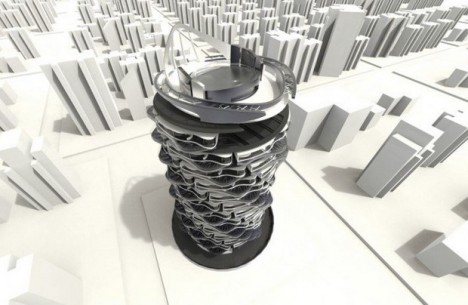
rotating tower design

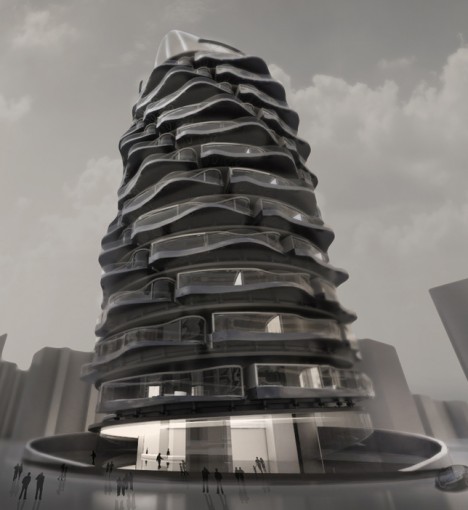
Spinning structures is not new territory, but shifting units around vertically as well as in horizontal circles is a fresh dimension of novelty with a likewise refreshed sense of purpose – to make housing truly fair for everyone, giving each person some time at (and views from) the top.

rotating tower

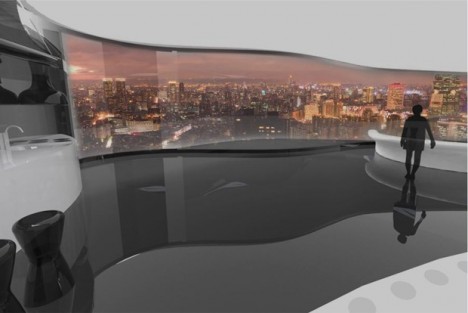
future variable unit views

Every since the elevator shifted the top floors from being least to most desirable in cities, real estate prices have reflected the relative values of these spaces. With this alternative arrangement proposed by designer Shin Kuo, each unit would take turns being on top as well as facing each different direction.

future spinning skyscraper condo

A lot of engineering is required to make such a thing work, from detachable infrastructural connections to prescribed times and safety locks for rotation (please keep limbs inside your home!).

Part of what makes the solution so intriguing is that it conceives of architecture like a product of industrial design – something that can be fundamentally improved upon through rethinking even our most basic assumptions.

future residential design diagram

Still, at least one big question remains: given the upfront and ongoing costs of making this whole thing work, who will ultimately be able to live in such a structure, which presents itself with such an egalitarian purpose? It may simply be ahead of its time – if more modular modes of plug-and-play dwelling become the norm, such infrastructure may also come to be more commonplaces (and come down in cost).

Share on Facebook


[ By WebUrbanist in Conceptual & Futuristic & Technology. ]

[ WebUrbanist | Archives | Galleries | Privacy | TOS ]


WebUrbanist

 
Comments Off on Rotating Condo Tower: Units Take Turns as the Penthouse Suite

Posted in Creativity


f-stop gear introduces four additions to its Mountain Series of tough terrain bags

28 May

f-stop gear, maker of rugged camera bags, has introduced three new models and a refreshed existing model to its Mountain Series. The Ajna, Sukha, Shinn and Tilopa offer increased durability and ripstop Nylon shells for weather-proofing. Read more

Articles: Digital Photography Review (dpreview.com)

 
Comments Off on f-stop gear introduces four additions to its Mountain Series of tough terrain bags

Posted in Uncategorized


Must-Have Gear forSummertime Photography

28 May

Goodbye tests and 8:00 a.m. classes.

School’s out and summer’s in!

To help you prepare for all those fun-in-the-sun photo ops coming up, we put together a handy list of essential summer photo gear.

From umbrellas to lens filters, you’ll be ready to snap pics whether you’re poolside or in the middle of that long-awaited camping trip.

Slap on some sunscreen and let’s go!

FUNdamental Items for Summer Photos

(…)
Read the rest of Must-Have Gear for
Summertime Photography (874 words)


© Taylor for Photojojo, 2015. |
Permalink |
No comment |
Add to
Summertime Photography”>del.icio.us

Post tags:


Photojojo

 
Comments Off on Must-Have Gear forSummertime Photography

Posted in Equipment


Details of Google’s new photo app leaked

28 May

It’s been rumored for some time that Google is planning to separate the photo component from its Google Plus app and establish it as a stand-alone service. Ahead of Google’s annual I/O event taking place this week, some leaked information and screenshots have surfaced that shed some light on Google’s plans. Read more

Articles: Digital Photography Review (dpreview.com)

 
Comments Off on Details of Google’s new photo app leaked

Posted in Uncategorized


4 Ways to Make Your Photos Stand Out with the Clarity Slider

28 May

Clarity - Bay Bridge example

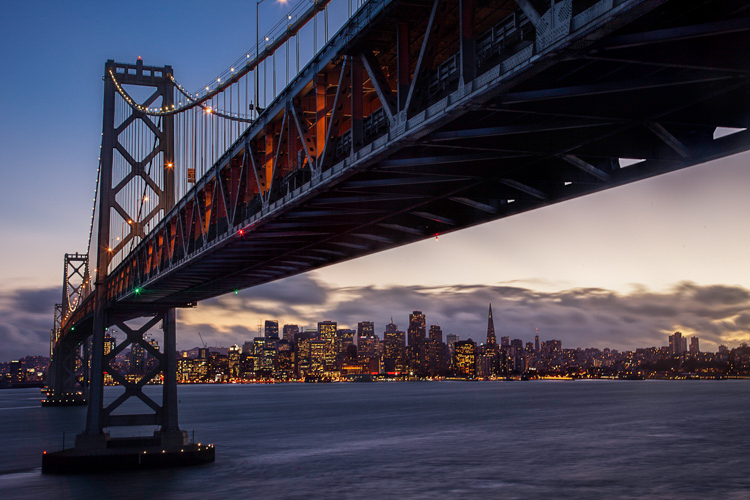
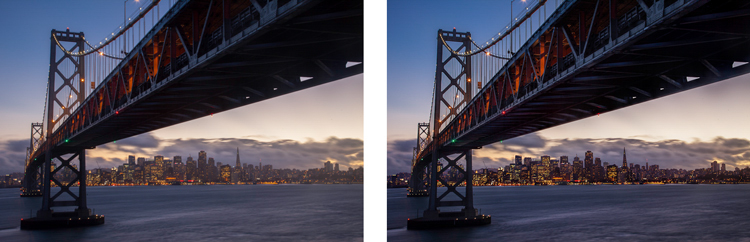
You want your photos to be as sharp as possible. Of course, there is no substitute for good technique in the capture phase, but you would like to add something in the post-processing to make the pictures clearer and sharper. You may already be adding sharpening, but how to add that extra crispness to make your pictures pop? The answer is clarity. This article will show you how to add that to your photos.

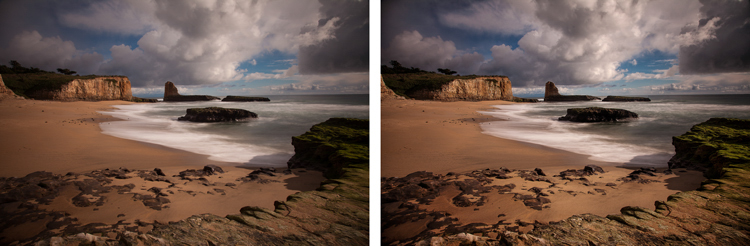
Clarity - before and after

What Exactly Is Clarity?

What is clarity? Clarity is a local contrast increase that focuses on the mi-tones of the image. If differs from sharpness, because whereas increasing sharpness increases the contrast between dark and light tones, clarity increases the contrast within the middle tones of the image. The effect is similar to sharpening, but it brings out textures a bit more. In addition, digital noise isn’t as much of a problem as it is with sharpening increases.

Adding Clarity in Lightroom (or ACR)

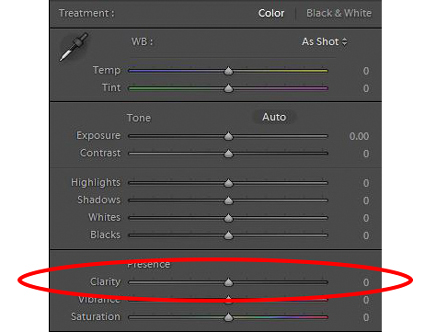
How do you add clarity to your photos? The best-known, and simplest way, to add clarity is to use the Clarity slider in Lightroom (there is an equivalent in Adobe Camera Raw – or ACR). To do that, just find the Clarity slider in the Basic panel of the Develop module. Increase the clarity by moving the slider to the right a bit. That’s all there is too it.

Clarity - Lightroom slider

The Clarity slider makes a global adjustment to your image (meaning it affects the entire image). If you want to add clarity only to specific portions of your image (referred to as local adjustments), you can do so by using the Adjustment Brush (or Radial or Graduated filters). When you select that brush, you will see clarity among the sliders that you can use. Increase the clarity to the desired amount and brush the effect where you want it, on your image.

I find it best to apply a slight, to moderate amount, when making Lightroom adjustments. Think of it as a baseline. Other areas of the image that you want to draw out can be targeted later. You may find it easier, and more precise, to make local adjustments using Photoshop, so that will be the next topic.

High Pass Filter in Photoshop

Within Photoshop, there is no Clarity slider. If you want to add clarity to your photos within Photoshop, there is still a way to do it. It is called the High Pass filter.

Why should you use this filter, and not the Clarity slider in Lightroom (assuming you have both)? Mostly because, with the High Pass filter you can take advantage of all the masking and blending tools available within Photoshop. The primary reason is the ability to mask the changes, which is a much more precise and powerful way to create localized adjustments, than using Lightroom’s adjustment brush. Use the High Pass filter for targeted adjustments to specific areas that you want to draw out in your picture.

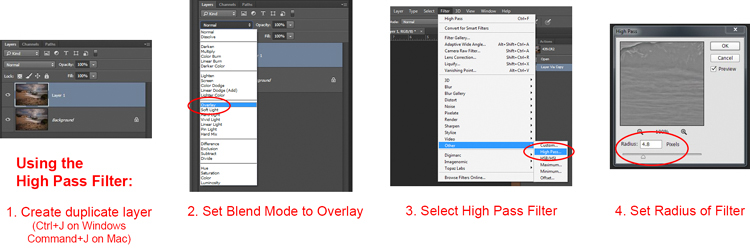
It takes a few steps to use this tool, so follow this process:

  1. Make a copy of the background layer (Ctrl+J) of your picture.
  2. Set the blend mode of the new layer to Overlay. The picture will look terrible for now, but don’t worry about it.
  3. Select the High Pass Filter by going to Filters – Other – High Pass.
  4. Set the radius, which is the equivalent of setting the strength of the effect.

Clarity - high pass filter

Note that this process will create a global adjustment to your image. To turn it into a local adjustment, create a layer mask to apply the effect only where you want it. To do that, with the new layer selected go to Layer – Layer Mask – Hide All. That will create a black layer mask. A black layer mask hides the effect everywhere. Now use a white brush to paint (on the mask) in the effect where you want it. Use the Opacity slider to control the degree to which the effect is applied by your brush (you can also adjust the layer opacity).

Local Contrast Adjustments in Photoshop

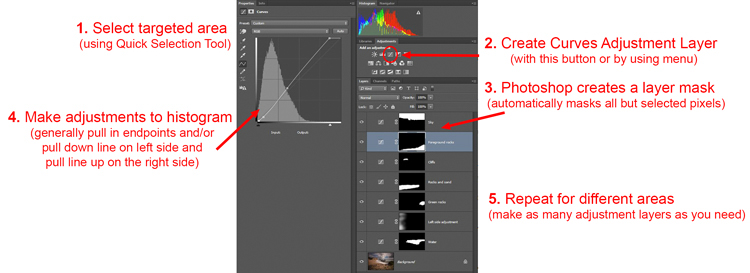
Another way to add a degree of clarity to your photos is to increase the local contrast, with the best way being a Curves Adjustment Layer. You’ll be surprised at how much clearer and more detailed things look after you increase local contrast in this way. This is another tool for making targeted adjustments.

They key here is to select an area and then increase the contrast just within that area. Here’s how:

  1. Select the area you want to affect. Use the Quick Selection tool to select those pixels.
  2. Create a Curves Adjustment Layer (Layer – New Adjustment Layer – Curves) with those pixels selected. When you do so, Photoshop will create a new adjustment layer, but it will mask off all the pixels except those you previously selected. Therefore, the changes you make will only apply to your selection.
  3. Increase the contrast of your selected area. You can either drag in the endpoints of the curve, or you can push down the line on the left (dark) side and pull up the line on the right (bright) side of the histogram. (You can also use Levels to increase the contrast, if you are uncomfortable with Curves).
  4. Clean up with your brush tool. If there are harsh transitions, use a soft brush to feather out the change (paint ON the mask only, not on the layer). You can increase or lessen the effect using the brush tool as well.

Clarity - Photoshop curves adjustment layers

Be sure you select targeted areas and use this method to draw out the contrast. It will add clarity and texture to that portion of the picture you want only, not the entire image.

Clarity by Topaz

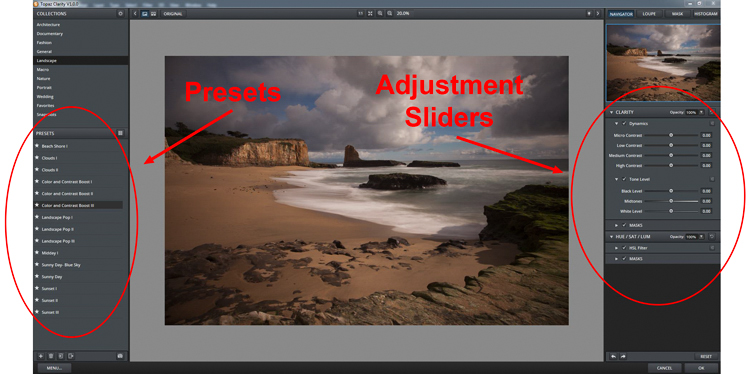
There is another tool you can use to add clarity to your photos. It is a plug-in by Topaz that is named, appropriately enough, Clarity. It costs $ 50 and acts as a plug-in to Photoshop or Lightroom.

Clarity by Topaz divides contrast into different components ranging from Micro contrast, to High contrast, and provides a slider for each. That allows you to reach different parts of the picture and affect contrast in different ways.

The best part of Clarity is the Micro contrast, although this often requires offsetting adjustments to other areas of contrast. That is the greatness of this plug-in: you are not confined to a simple contrast adjustment that pushes all bright areas toward white, and all dark areas toward black. It allows you to add some clarity and texture to your pictures without blowing out your highlights or losing your shadow detail. You can also effect saturation, brightness, and other controls from within Clarity.

Clarity - using Topaz Clarity

The best way to use Clarity is by creating a duplicate layer of your image in Photoshop (Ctrl+J) and then opening the plugin. That way, after you have made your changes in Clarity and you have gone back to Photoshop, you can mask in or out the effect to whatever degree, and in whatever areas of your image, you wish.

Clarity - Davenport example

Application

The best part about these tools is that you can combine them to get exactly the effect you want. For example, you might make a minor global adjustment to Clarity in Lightroom, then take it into Photoshop and make a series of Curves Adjustment Layers to bring out certain areas. You might also do the same with Topaz’s Clarity and mask off the effect. When you are done, you can use the High Pass filter to highlight key areas of your photo in Photoshop. Of course, you’ll need to be careful not to overdo the effect, which can happen quickly, especially if you use multiple tools listed here. But judicious use of these tools, in conjunction with your normal input and output sharpening, can really make your photos pop.

googletag.cmd.push(function() {
tablet_slots.push( googletag.defineSlot( “/1005424/_dPSv4_tab-all-article-bottom_(300×250)”, [300, 250], “pb-ad-78623” ).addService( googletag.pubads() ) ); } );

googletag.cmd.push(function() {
mobile_slots.push( googletag.defineSlot( “/1005424/_dPSv4_mob-all-article-bottom_(300×250)”, [300, 250], “pb-ad-78158” ).addService( googletag.pubads() ) ); } );

The post 4 Ways to Make Your Photos Stand Out with the Clarity Slider by Jim Hamel appeared first on Digital Photography School.


Digital Photography School

 
Comments Off on 4 Ways to Make Your Photos Stand Out with the Clarity Slider

Posted in Photography


Panasonic Lumix DMC-G7 real-world samples

28 May

Over the holiday weekend we spent some time shooting with Panasonic’s newest mirrorless camera, the Lumix DMC-G7. We put its new 16MP sensor to the test along with an improved AF system at the racetrack – the Indianapolis Motor Speedway, to be precise. We’ll be updating this gallery with many more images in the coming days. See gallery

Articles: Digital Photography Review (dpreview.com)

 
Comments Off on Panasonic Lumix DMC-G7 real-world samples

Posted in Uncategorized


Architectural Camouflage: Garments Printed with Tile & Marble

28 May

[ By Steph in Design & Products & Packaging. ]

architectural camouflage 1

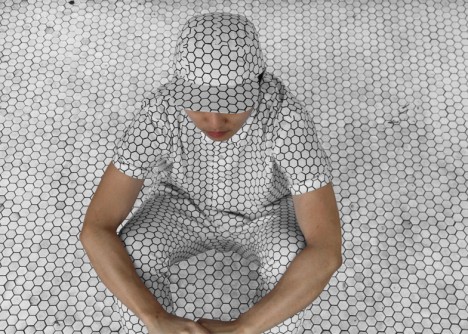
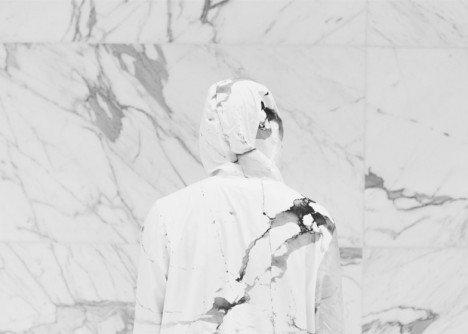
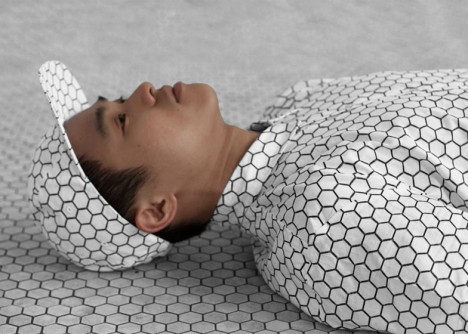
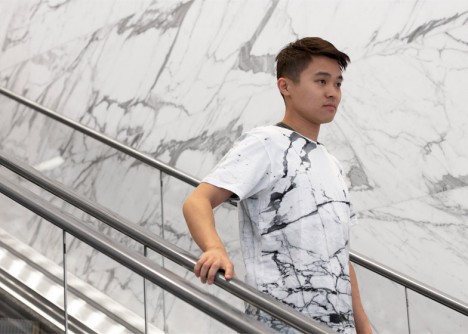
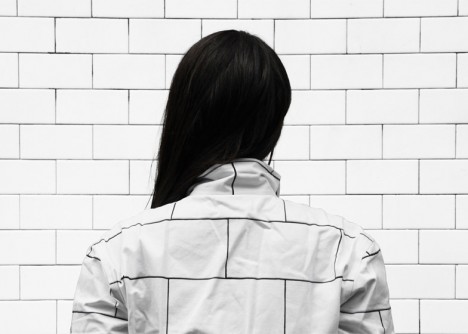
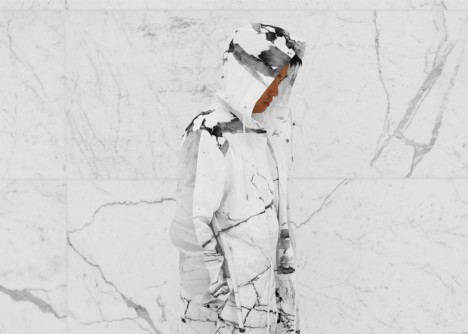
Blend right into urban surfaces, from the walls of subway stations to the marble in museums and courthouses, with this line of architectural camouflage shirts, pants and accessories. A collaboration between design firm Snarkitecture and custom print company Print All Over Me, the line takes architectural patterns from public places all over New York City and translates them into fashion.

architectural camouflage 5

architectural camouflage 2

The prints not only honor iconic minimalist patterns that have been an integral part of the city’s visual identity for decades, it enables the wearer to blend into urban environments. The effect can be pretty impressive, as seen in the collection’s promotional images.

architectural camouflage 3

“The starting point was this idea of creating moments of architectural confusion, where you become visually lost within different material surfaces,” says Snarkitecture, a Brooklyn-based collaborative practice known for its unexpected installations, like all-white airball machines at Miami’s coolest modern parking garage.

architectural camouflage 7

The Architectural Camouflage collection is available now at Print All Over Me, ranging from $ 38-$ 145, including a backpack, a baseball hat, a jumpsuit and a rain coat. Got an idea of your own? Anyone can upload images to create custom garments, home accessories and other items at PAOM.

architectural camouflage 6

Check out more urban camouflage, from body painting and bizarre costumes to disappearing cars.

Share on Facebook


[ By Steph in Design & Products & Packaging. ]

[ WebUrbanist | Archives | Galleries | Privacy | TOS ]


WebUrbanist

 
Comments Off on Architectural Camouflage: Garments Printed with Tile & Marble

Posted in Creativity


Nikon to offer free newlywed portraits at New York’s City Hall next week

28 May

Nikon will be offering newlywed portraits for free to couples who marry at the New York City Hall on June 4th and June 5th. Couples married at City Hall will be treated to a free portrait session with pro photographer and Nikon Ambassador Joe McNally, working out of a 20-foot ‘Wedding Truck’ studio. Read more

Articles: Digital Photography Review (dpreview.com)

 
Comments Off on Nikon to offer free newlywed portraits at New York’s City Hall next week

Posted in Uncategorized


Leica introduces its first ever F1.4 aperture 28mm lens for the M system

28 May

Leica has announced the forthcoming availability of its fastest ever 28mm lens for the M-system of rangefinder cameras. The Leica Summilux-M 28mm F1.4 ASPH will arrive in stores from June 22nd, and will be priced at £3975/$ 5950. Read more

Articles: Digital Photography Review (dpreview.com)

 
Comments Off on Leica introduces its first ever F1.4 aperture 28mm lens for the M system

Posted in Uncategorized


5 Great Ways to Learn Photography

28 May

All images ©Gina Milicia

“Every Artist was first an Amateur”- Ralph Waldo Emerson

Learn 1

If you’re just starting out as a photographer, congratulations! There’s never been a more exciting, or easier time to learn the art of photography. Today’s market is flooded with tertiary courses, books, workshops, websites, podcasts and online courses that didn’t exist as little as ten years ago.

When I began my career 25 years ago, there were only a few options. You could learn photography at a university or technical college, you could complete an apprenticeship or internship with a photographer, or you could teach yourself through trial and error and by studying the work of other photographers. I combined all three of these techniques and found a way that worked really well for me.

Today there are dozens of ways of developing your photography skills. None of them is right or wrong; just find the one that best suits your personality and learning style. This is a surefire way to fast track your development as a photographer.

Learn 2

What is your learning style?

There are three different ways you can learn a new activity. Most people are a combination of all these styles of learning, so that’s why it’s best to try several different styles to help you learn new techniques.

1. Visual

A visual person will learn best from seeing something demonstrated and looking at photos, maps and diagrams.
Watching “how to” videos and reading books and online blogs really support your learning style if you are a visual learner.

2. Auditory

Auditory style people learn through listening to lectures or audio presentations, talking things through and listening to what other people have to say. Listening to podcasts and audio books would be a great way to support your learning style.

3. Kinesthetic

Kinesthetic people like to learn by doing activities. You prefer to be hands-on and try things out and discover how they work. Attending practical workshops would really suit your learning style

So if you really want to cover all bases read, watch, listen and do.

I know for a fact that my weakness is auditory. I can’t sit still in a lecture or presentation for very long before I get fidgety, but if I listen to information while I’m doing a menial task I find I retain far more information. That’s why I love podcasts and audiobooks so much. I’m able to learn so much while I’m out walking, driving or burning, I mean cooking dinner.
Learn 9

Here are five options worth considering:

1. University/college degree or photography diploma

This is the traditional road, and the one that many people take. You’ll learn a wide variety of photographic styles, in a structured environment, from experienced teachers and industry experts. You’ll also have access to state-of-the-art studios with all the latest cameras, lighting equipment, accessories and software.

Learning in school also has the advantage of being in a group learning environment. This will help you develop networks and social skills that you’ll use in the future. Sharing the journey with your new friends will make learning more fun.

The downside is the expense. Depending on where you live, a degree or diploma can cost tens of thousands of dollars or more. There’s also a significant investment of time. This can be difficult to manage for older students who may have families to support.

The school’s location will also be a factor. Many of the better photography courses are located in capital cities, so you’ll also need to consider travel or relocation expenses.

If you think you’re suited to this style of education, thoroughly research the schools in your area. Find out who the teachers are, who the past students have been, and what they’ve gone on to achieve. If it’s feasible, attend an open day and ask current students what they think. I’ve known students who’ve been miserable and have even failed classes because their personality didn’t match their schools’ cultures. After transferring to schools better suited to their learning styles, they thrived.

Learn 4

2. Assisting – apprenticeship – internship

Apprenticing is a traditional, and often overlooked, way of learning the ropes and breaking into photography. This is how many of my peers and I, worked our way up the ladder.

After graduating from art school, I started out as an unpaid intern with a celebrity and fashion photographer. At the end of my eight-week internship, I was offered a full time job. I couldn’t have landed such a sought-after position based on my portfolio and by cold-calling photographers alone. I learned more in my first month on the job than in four years at art school.

The 18 months I spent assisting taught me tons of lessons about how to light, direct, pose and talk to models. It also taught me how to work with makeup artists and stylists, and how to deal with difficult clients. But most importantly, I witnessed first-hand the ups and downs of running a business. Had I gone straight out on my own without working as an assistant, I never would’ve realized that ALL photographers experience downturns in their business, and that nobody — no matter how amazing or in-demand — is immune. That lesson was gold and saw me through many quiet times through my career.

In some cases interning with the right person can be more valuable than doing a course. But that person needs to be generous with their knowledge, and should be an encouraging teacher. The wrong kind of internship can find you stuck in a tiny office filing, answering phones, and performing menial non-photography jobs without the opportunity to ever learn anything.

Learn 8

3. Workshops

Workshops are a great way to refine and advance your skills. One of the advantages of workshops is that you can select the style of photography and techniques you want to improve, and the photographers you want to learn from.

Some workshops are local, and only last a couple of hours. Others last longer and are held in exotic locations. These are great for travellers who want to shoot on location, but are reluctant to travel on their own.

Whatever course you’re thinking of attending, read up on it. Read testimonials and find out how much experience the teacher has. But most importantly, find out the class size. Larger classes are fine for software workshops such as Lightroom and Photoshop, but when it comes to learning the craft of photography, smaller groups are much better. You’ll get more one-on-one time with the instructor.

Learn 7

4. Online courses

Online course are great for learning at your own pace and in the comfort of your own home. Look for courses that are taught by professionals you respect and in a style you can relate to. The more you enjoy and relate to your teacher, the easier it’ll be for you to learn. Many of the really good courses offer money back guarantees, making them a zero-risk investment.

Learn 6

“When the student is ready, the teacher appears” – Buddhist Proverb

5. Mentors

A mentor can be anyone who’s realized the goals you want to achieve. This includes both friends who can help you understand some of your camera’s settings, and professionals with five, 10, 20, or more years of experience. Their skills may vary, but anyone who’s farther down the path than you has valuable information that will save you time, money and effort in reaching your goals.

A great place to start looking for mentors is in your friendship and social media circles. It isn’t as daunting as it sounds. Look for someone whose work and working style you admire and respect. Follow them on social media and look for ways you can add value to the relationship. Retweet their posts, comment on their photos, share their work, refer clients to them, and send them links to great locations or items that may be interested in.

Give the relationship time to develop before you ask them to mentor you. That will increase the chance that they say yes, because they will have had a chance to get to know you. A mentor is far more likely to want to give up valuable time to work with you if they can see you show initiative, and are respectful of their time.

I’ve been lucky enough to work with several mentors in my career and I know their knowledge and guidance has saved me years of extra work and opened many doors I may never have walked through had I have stumbled along on my own.

Learn 5

“The journey of a thousand miles begins with a single step.” – Lao Tzu

Finally, there is plenty of great information out there, and lots of amazing teachers, but in the end it’s up to you to take the first step.

What have been the most successful ways for you to learn photography? Do you have any other suggestions I may have missed? I’d love to hear from you, please leave a comment below.

googletag.cmd.push(function() {
tablet_slots.push( googletag.defineSlot( “/1005424/_dPSv4_tab-all-article-bottom_(300×250)”, [300, 250], “pb-ad-78623” ).addService( googletag.pubads() ) ); } );

googletag.cmd.push(function() {
mobile_slots.push( googletag.defineSlot( “/1005424/_dPSv4_mob-all-article-bottom_(300×250)”, [300, 250], “pb-ad-78158” ).addService( googletag.pubads() ) ); } );

The post 5 Great Ways to Learn Photography by Gina Milicia appeared first on Digital Photography School.


Digital Photography School
 
Comments Off on 5 Great Ways to Learn Photography

Posted in Photography