Lomography has launched its new Petzval 58 Bokeh Control Art Lens, the second lens it has introduced based on the Petzval optic invented by Joseph Petzval in 1840. This newest Petzval lens features Russian glass optics, is constructed by hand, and is offered in a brass finish. The lens results in photographs with a ‘swirly bokeh,’ and the strength of the effect can be controlled via a Bokeh Control Ring, a feature not available in Lomography’s existing 85mm Petzval. Read more
Month: May 2015
-
Snowy Sunrise at Gates of the Valley
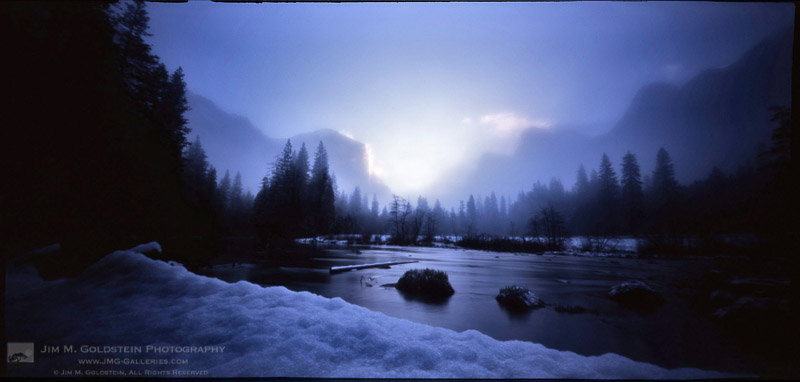
Snowy Sunrise at Gates of the Valley, Yosemite National Park
via 6×12 ONDU pinhole cameraI never thought I’d say it, but it’s been fun dabbling with film again. While I still haven’t resorted to 35mm film in my old SLR I have been enjoying my time with an ONDU pinhole camera. I bought this camera via a Kickstarter campaign in 2013. Turns out ONDU is running a Kickstarter campaign for their 2nd generation pinhole cameras. If this type of photography interests you I highly recommend their cameras.
Copyright Jim M. Goldstein, All Rights Reserved
Snowy Sunrise at Gates of the Valley
The post Snowy Sunrise at Gates of the Valley appeared first on JMG-Galleries – Landscape, Nature & Travel Photography.


Related Stories
- Snowy Sunrise at Gates of the Valley – Enclosure
- Return of Film: Snowy Sunrise at Gates of the Valley
- Before the Tempest, Yosemite
-
Samsung working on slimmer RWB camera sensors
Photos from a Samsung presentation have emerged online, providing some insight about the company’s upcoming image sensors for mobile devices. It appears Samsung is working on chips that use a RWB (red, white, blue) color filter instead of the conventional RGB pattern. This allegedly improves color fidelity and light sensitivity, allowing for smaller pixels. In turn, this could mean smaller camera modules in future smartphones. Read more
-
Ein fernes Dorf in den Karpaten

Der Fotograf Jan Brykczynski sehnte sich als Stadtkind immer nach einem dörflichen Leben. In seinen fotografischen Arbeiten wird diese Sehnsucht sichtbar – er beschäftigt sich mit den ländlichen Regionen Europas. Mit seinem Buchprojekt „Boiko“ fand er jedoch, wonach er so lange suchte.
kwerfeldein – Fotografie Magazin | Fotocommunity -
Oh Snap: Clamping Steel Legs Turn Found Objects into Furniture
[ By WebUrbanist in Design & Furniture & Decor. ]

Converting almost anything you find into a household furnishing, from discarded doors and shelf boxes to dart boards, these clip-on supports can be added or removed in seconds.


Initially experimenting with cards, clips and coat hangers, a pair of Spanish design students in Barcelona, Maria Roca and Erika Biarnes (together: Be-Elastic), developed this system to be elegant, efficient, strong and flexible, combining slim steel supports with straightforward usability.


The real challenge was to make something robust that could also be easily converted on demand. While other clamp-based furniture systems exist, this solution represents a more versatile and expressive aesthetic and a much faster method of assembly and disassembly.


A set of four legs can support a few hundred pounds, making surface selection a more likely weight limitation than the capacity of the supports. As few as two units, however, can create a working piece of furniture, like a side or television table leaning against the wall. The units come in 16 color combinations (4 colors of cable and 4 colors of steel).

The clamps can be attached to essentially anything less than a few inches thick, including recycled objects of various shapes and sizes: “SNAP is designed to fit all shapes and sizes: triangular, rectangular or irregular boards. You can also place the SNAPs wherever you like in corners, on the sides in a disorderly way, or wherever you’d like! It’s up to you.”
Want More? Click for Great Related Content on WebUrbanist:
Flat-Pack Furniture: 3 Modern Designs from Noon Studio
Three designs from Noon Studio prove that simple is beautiful including a flat-pack cantilevered table, an oak and steel stool and an A-shaped leaning lamp.
Click Here to Read More »»
3D-Printable Connectors Make DIY Furniture Assembly Easy
Leveraging the best features of available 3D printers and the materials they can print, this kit-of-parts approach opens up an amazing array of possibilities …
Click Here to Read More »»
Redefining Rustic Materials: 6 Modern Log Furniture Makers
Logs typically conjure images of remote cabins and plaid-clad workers felling trees. As these seven creative designers and craftspeople show, though, log …
Click Here to Read More »»


[ By WebUrbanist in Design & Furniture & Decor. ]
[ WebUrbanist | Archives | Galleries | Privacy | TOS ]
-
Google rolls out standalone Photos app with unlimited free storage
Confirming rumors from earlier in the week, Google has announced its new Photos app – a standalone service that separates the photo component of its Google Plus app. It’s available now for Google and iOS and comes with unlimited free storage of 16MP or smaller images. Read more
-
Annes Ausrüstung

Ich glaube an Fotos, aber ich habe nie sonderlich an Kameras geglaubt. Die Technik hinter einem Bild ist mir eigentlich relativ egal, was es natürlich nicht leichter macht, einen Artikel über meine technische Ausrüstung zu schreiben. Aber ich versuche es.
kwerfeldein – Fotografie Magazin | Fotocommunity -
Learn How to Setup Studio Lighting in 15 Minutes
Do you find studio lighting daunting? Understandable. When I got my first set of lights I played with it for half an hour. Intimidated and confused, I shoved it back in the box where it stayed for six months.
Don’t worry though, mastering exposure with studio strobes is easy; in fact it’s probably one of the easiest of the photographic skill sets. By following this tutorial, you can go from no experience with studio lighting, to getting a correct exposure on your first frame, without the aid of expensive and unnecessary light meters. This isn’t a crash course in complicated theories and physics; our goal is to get you using strobes and creating photographs as quickly as possible. You can return to the theories at your convenience. I am a firm believer in the idea that it’s easier to learn the why, when you’ve already figured out the how.
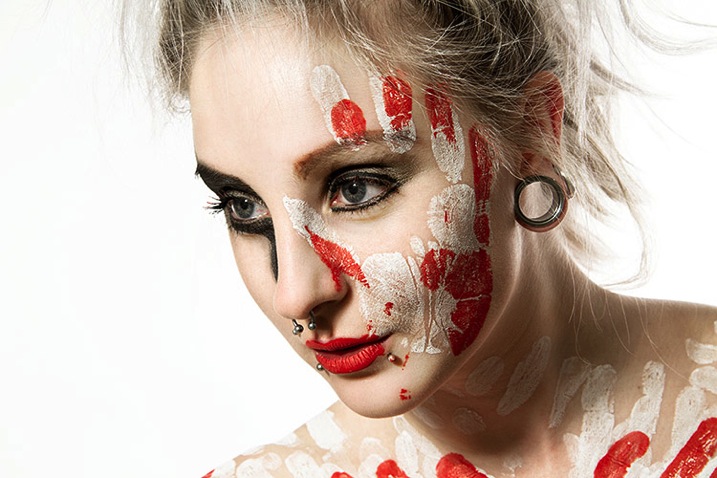
Getting Ready
Before we start, you’ll need to do a few things in preparation:
- Setup your studio strobe on its stand, set it to full power and make sure it works.
- You should know how to connect your strobe to the camera and make it fire by way of remote trigger, pc sync cable, slaved to your on-camera flash, or by way of an in-camera system. Refer to your manuals if you need help.
- Have your strobe’s instruction manual at hand.
- Settings: Set your camera to manual mode, your shutter speed to 1/125th of a second, and your ISO to 100. (If you have an older model, or a film camera, then default to 1/60th of a second.)
- Have a calculator at hand will make things easier.
- Finally, I recommend that you start to think in full stops, which I’ll cover in the next section.
Thinking in Full Stops
Most of our modern cameras are capable of setting the aperture in increments of 1/3 or 1/2 of a stop. This is extremely useful for fine tuning the exposure in most situations; however, for the purpose of this exercise, it is much easier to ignore them for now and concentrate on the full stop values as indicated in the chart below.
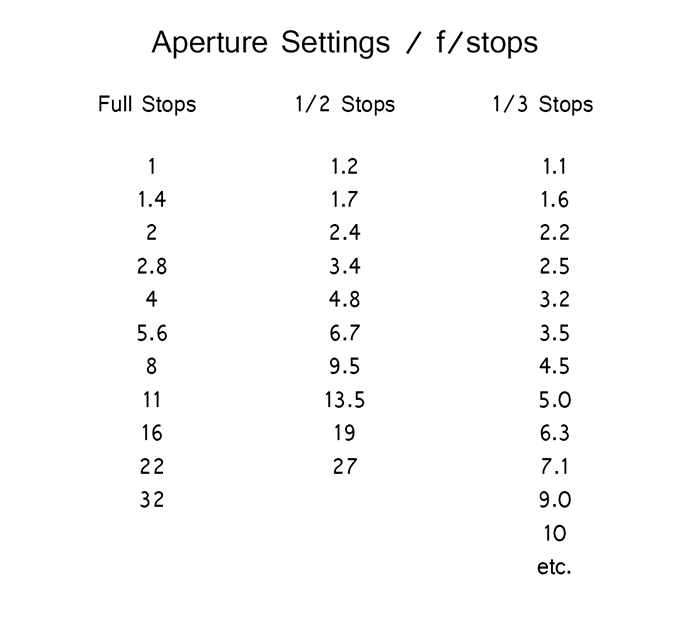
Finding Your Guide Number
The next step is to flip through your strobe’s manual and find where it lists the Guide Number (also check whether the guide number is listed in feet or meters; this is vital). This magic number is a rather complicated thing and steeped in the brain-wracking Inverse Square Law. As promised, you don’t yet need to know why it works; you only need to know how to use it at this point.
There are two main ways to use the guide number, that will be useful to you. You can choose your aperture based on the desired outcome of your photo and calculate where to put your strobe, or you can place your strobe for a desired lighting effect and calculate the correct aperture.
Calculating Aperture
Some lighting effects require strobes to be in certain positions, and distances from your subject and other strobes. In other circumstances, your strobe might be in a fixed position and it cannot be moved.
In these events, to calculate the aperture for a correct exposure all you have to do is measure the distance between the light source and your subject in feet or meters (whichever your guide number is listed as). Now divide your guide number by that distance. For example a guide number of 66 with a distance of 6 feet between your subject and the light source would result in: 66 divided by 6 for a result of 11. Your answer is your aperture for a correct exposure: f/11.
Most guide numbers never divide so evenly into full stops. For example, if you get a result along the lines of f/9.2, just round it off to the nearest full-stop for the moment and we’ll learn how to fine-tune the exposure shortly.
Calculating Strobe Distance
Conversely, if you know what aperture you want to use, for a creative effect perhaps, simply divide the guide number by your desired aperture. My tendency for studio portraits is f/8, so if you divide our previous example of 66 by 8 (66/8) you get 8.25. To get a correct exposure for this setup, you would just place your light source 8.25 feet away from your subject. It really is that easy.
One caveat: if you have a high powered strobe in a small place, you’re not going to be able to set your camera to something ridiculous like f/64. If your power output is too high, just turn your strobe down to half power and divide the guide number by two.
Fine Tuning Exposure without Changing Your Settings
As you learned, there are instances where you want your aperture to remain constant. You also don’t want to mess with the power settings on your strobe so much that they completely change your guide number and negate your ability to calculate your exposure with ease. Yet subjects move, or you might want to over or underexpose your image for creative effect. The way to do this is simple.
To underexpose or reduce the amount of light falling on your subject, you would move your strobe further away. If your light source is really close to the subject and you move it back about a foot, you will lose 1-2 stops of light (smaller f/number). If your source is farther away from the subject and you move it back one foot, you will lose less light. This is caused by the Inverse Square Law which states: In physics, an inverse-square law is any physical law stating that a specified physical quantity or intensity is inversely proportional to the square of the distance from the source of that physical quantity. (and link to the wiki definition). Just know that closer in you lose more light as you back it away, than if the light is situated farther from the subject to begin.
This is also why I asked you to consider thinking in full stops rather than fractional increments. Moving a strobe or a model one or two feet is much easier to judge on the fly than the four inches (10cm) a third of a stop increment would require.
Notes on Modifiers
The most common modifiers in studio photography will affect the output of the strobe in terms of exposure. You may need to increase or decrease your aperture, or the distance of your light source, depending on which modifier you choose.
Soft boxes and white or translucent umbrellas, which all produce a softer, more diffused light, will decrease the amount of light falling on your subject. To combat this, choose a larger aperture (smaller f/number) or move your light source closer to your subject.
Beauty dishes, silver umbrellas and reflectors, which all produce a harder, more defined light, will increase the amount of light falling on your subject requiring you to choose a smaller aperture (larger f/number) or to move your light source further from your subject.
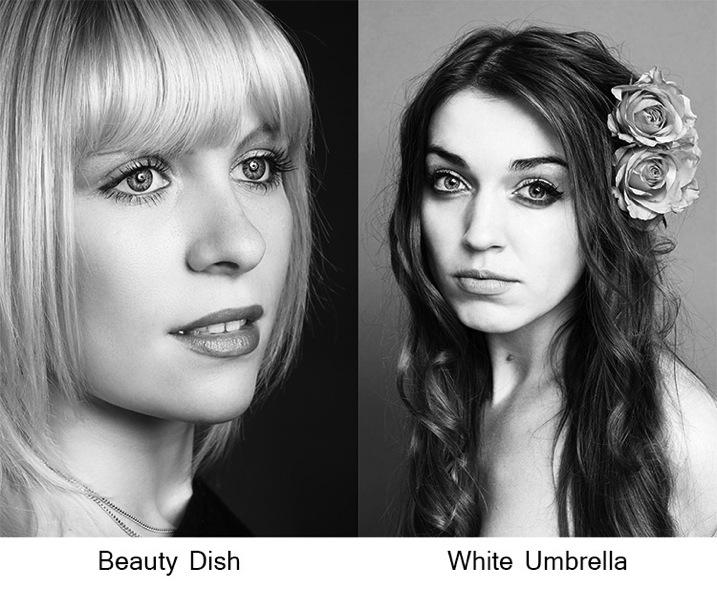
If you choose to alter your aperture in these situations, feel free to revert to your 1/3 stop increments. A modifier will rarely alter the output of a strobe by a full stop.
You will quickly learn how your modifiers affect the output of your strobes and within a few sessions you should find yourself automatically compensating for them without thinking about it.
Putting it into Practice
I set up a quick portrait session to help demonstrate how to employ these techniques. Gemma graciously volunteered for the task.
The only preparation was the setup of a paper background and fitting the strobe with a beauty dish. After she arrived, I asked Gemma to stand two feet from the background and I placed the light source straight in front of her and as high possible with the beauty dish pointed downward at her face.
All that was required to start shooting was the correct aperture. The Bowens GM400 I used has a guide number of 76. I measured how far away the light source was; which was 7.5 feet. Dividing 76 by 7.5 gives a result 10.133. Because I was using a silver beauty dish, we know that I need to stop down the aperture to get a precise exposure so I set the camera to f/11 and took a test shot. As you can see from the histogram, these simple calculations gave me the correct exposure and it took less than a minute to get there.
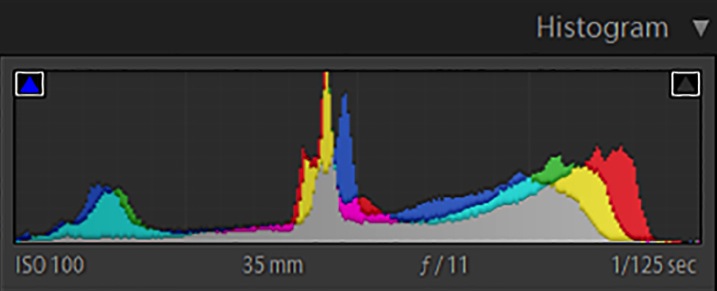
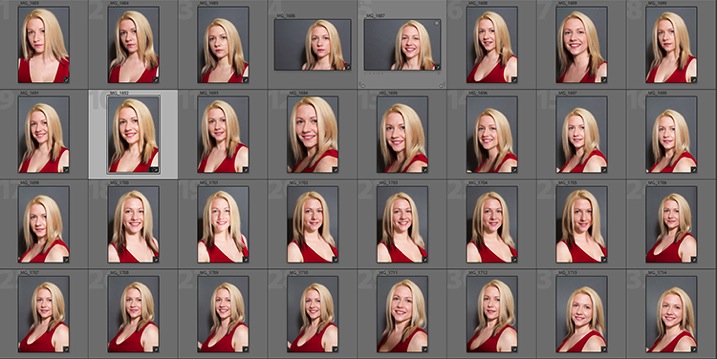
In this image you can see that from the first frame to the last, the exposure remained constant leaving me free to concentrate on other aspects of the images.
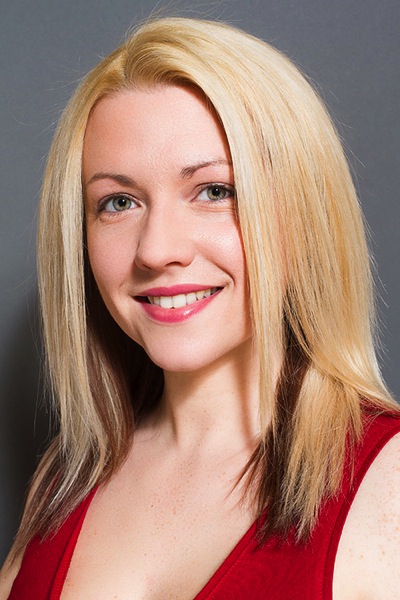
Finally, here you can see the end result.
I hope you’re still with me, and that I’ve convinced you that studio strobes are nothing to be afraid of. With a little practice, the techniques outlined in this article will quickly become second nature, allowing you to concentrate less on the technicalities of exposure, and more on aesthetic variables such as composition and establishing rapport with a client or model. As with most things, the key is practice. Snag a friend, a pet or even a bowl of fruit and run through the whole process again and again, until calculating the correct exposure becomes reflex, and you’ll find yourself spending more time and energy on the creative processes rather than the technical ones.
googletag.cmd.push(function() {
tablet_slots.push( googletag.defineSlot( “/1005424/_dPSv4_tab-all-article-bottom_(300×250)”, [300, 250], “pb-ad-78623” ).addService( googletag.pubads() ) ); } );googletag.cmd.push(function() {
mobile_slots.push( googletag.defineSlot( “/1005424/_dPSv4_mob-all-article-bottom_(300×250)”, [300, 250], “pb-ad-78158” ).addService( googletag.pubads() ) ); } );The post Learn How to Setup Studio Lighting in 15 Minutes by John McIntire appeared first on Digital Photography School.
-
Understanding Light for Better Portrait Photography
A solid understanding of light can make you stand out from an average photographer. In fact, in portrait photography, light is even more important than the subject and location. This is because without the proper use of light, you can ruin the shot, even with the best looking subject, at the most awesome location in the world!
In this article, I’m going to break down the understanding of Light for you into six simple terms. Once you understand and apply these concepts, you will immediately notice the improvement of quality in your portrait photographs.
The six principles of light are: intensity, dynamic range, direction, diffusion, White Balance and reflection.
1) Intensity of Light
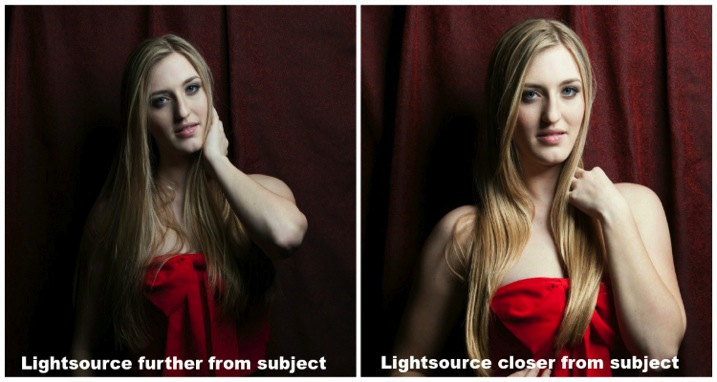
Intensity is the brightness level of light and it brightens up your subject. For both natural light and studio light, you can modify the light source to change the intensity. I’ll cover the basics of light modifiers later, but the most important fact about intensity is that the distance between the light source and your subject has a massive impact on the intensity of light.
This is also known as the Inverse Square Law.
It is an equation that dictates the intensity of light produce at a given distance. It states that the intensity of light changes in inverse proportion (one over that number) to the square of the distance from the source. Meaning:
- At one foot it is 1 over the square of one or 1/1 or 100%
- At two feet it is 1 over the square of 2 (2×2) or ¼ or 25%.
In plain English, that means if you double the distance from one to two feet, the light intensity will decrease by 75%. On the other hand, if you bring the light source closer from two feet to one foot the intensity of light is going to increase by four times.
With the knowledge of inverse square law, you will be able to determine the placement of your subject for better portrait photography.
2) Dynamic Range
Dynamic range and stops have a very close relationship. Dynamic range is the difference between the lightest and darkest tones of an image, and a stop is the measurement of this range. Since a stop measures light in representation of numbers, what’s the relationship between the two?
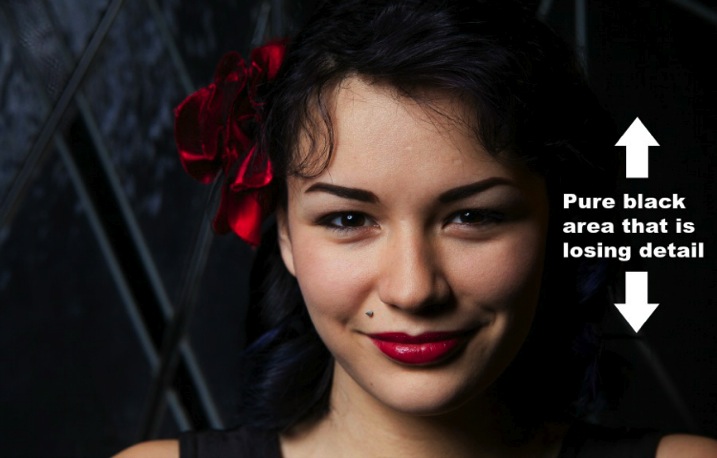
The difference of one stop of light means the light is twice (or half) as intense. Human eyes can detect roughly 10-14 stops of light, while a DSLR camera can only detect around 8-10. With that said, your camera sees a lot less than your eyes. Dynamic range issues occur when this range goes beyond what the camera can record in details. These areas come out as pure white or pure black in the photograph.
Generally, most people tend to avoid pure white and black in portrait photography unless it is for artistic reasons. Otherwise, it may look like as if you exposed the picture incorrectly.
3) Direction of Light
The position of your light source is very important because it determines how light hits your subject. It has a great affect on the quality of your photograph and a few small inches of light misplacement could bring your shot down to a snapshot.
A common question people always ask is, “Why do I need to worry about the direction of light when the subject is properly exposed?” Everyone has different opinions, but my point of view is that this is how you create mood, define shadows, and shows depth to your subject.
The biggest thing to avoid in portraits is flat images (which is created by lighting your subject directly from your camera angle). Reach into your wallet now and grab your driver’s license. That is an example of a flat image. The picture is either too bright or too dark; there is no shadow on your face (or a very harsh one) because the flash was pointed straight at you; and the worst thing is you probably look 10 years older! Without saying any further, I am almost certain that it is one of the worst pictures of yourself.
So what are some ways to light your subjects? Below are two of the most common ways:
Split Lighting – This direction of light divides the face equally in half so one side is in shadow while the other is toward the light. You can simply place the light source 90 degree to the left or right of your subject. If you are using natural light, just ask your subject to turn to such an angle. It creates a very deep dramatic shadow that casts strong moods for your subject. It is great for artistic type portrait shots.

By James Willamor
Loop Lighting – Perhaps the most common lighting method for portraits. Simply place the light source about 45 degrees to your subject. The shadow it casts is going to show nice depth; this method is great for single portraits. Make sure you place the light just slightly above eye level to make the best of this lighting style.

By Dragos Jianu
There is no right or wrong direction of light in portrait photography. They are more personal preference, mixed with different style and purpose. The main thing is that you make your subject look good in front of the camera.
4) Diffusion of Light
Diffusion relates to hardness and softness of light. It also determines the intensity of the shadow. As a general rule, the bigger the light source and the closer it is to the subject, the softer the light.
When photographers talk about hard light, it means there is a rapid falloff between bright and dark areas in the photograph creating harsh, sharp-edged shadows. As such, the photograph doesn’t look as appealing to the viewer.
An example of hard light would be taking picture under a bright sunny day or when you overexpose studio light photographing your subject. Generally, hard light is not something you should be looking for in portrait photography unless for artistic reasons.
As you might have guessed, opposite hard light, there is soft light. This kind of light has mild falloff between bright and dark areas in a photograph. The light is evenly spread and it looks like it wraps around the subject.
An example of soft light would be taking pictures under an overcast day or using studio light with modifiers. The portrait looks more pleasing to the viewer and the photograph does not show much contrast.5) White balance
White balance is the color temperature of your camera’s setting. Matching the right color temperature in the environment you are shooting is very important. This is how you remove an unrealistic colorcast, so that your photograph represents true color that you see in real life.
Depending on your camera model, you should have a different white balance presets to choose from: Tungsten, Fluorescent, Daylight, Flash, Indoor, Cloudy, Shade, Custom (PRE), and Kelvin (K).
As the photographer you need to make sure white appears white and not yellow/orange on the hot end, and blue/green on the cold end on the Kelvin scale.
If you shoot RAW, you can modify the white balance during post-processing of your images. This can also be changed easily in Adobe Lightroom or Photoshop. By the way, this is one of the reasons why it is important to shoot RAW instead of JPEG.
6) Reflection of light
Light has one very distinct behaviour; it travels in straight lines. Which means no matter whether you are using natural light or studio light, it is only going to travel in one direction until it reaches a surface.
Once the light reaches a surface it reflects off at the same angle it hits. The amount of light being reflected is going to be determined by the color and texture of the surface.
So why is reflection of light important for portrait photography?
Once you understand light behaviour you can then modify it to control how much light you want for your subject. For example, if you want soft light and you have no other equipment, you can bounce light off a wall. As mentioned before the larger the light source the softer the light, you can now control both the direction and intensity of light for your portrait photographs by doing so.

Another common way to modify light is using a softbox such as a brolly box (umbrella softbox). This is a type of softbox where the external flash is placed inside of it. When the flash fires, light bounces all around inside the box until it exits out the white diffuser on the front. If you have an assistant to hold the brolly box you now have a portable light source producing soft light everywhere you go. This is a must-have for portrait photography.
I hope by breaking down the understanding of light into six categories they are going to be able to level up your skills as a portrait photographer. Be sure to practice as much as you can, but most importantly, enjoy this process and have fun in photography.
googletag.cmd.push(function() {
tablet_slots.push( googletag.defineSlot( “/1005424/_dPSv4_tab-all-article-bottom_(300×250)”, [300, 250], “pb-ad-78623” ).addService( googletag.pubads() ) ); } );googletag.cmd.push(function() {
mobile_slots.push( googletag.defineSlot( “/1005424/_dPSv4_mob-all-article-bottom_(300×250)”, [300, 250], “pb-ad-78158” ).addService( googletag.pubads() ) ); } );The post Understanding Light for Better Portrait Photography by Gary Lun appeared first on Digital Photography School.
-
28. Mai 2015
Das Bild des Tages von: Mehran Djo

Im Ausblick: Jennys Seele, Mary Ellen Mark und zehn Kameras.
kwerfeldein – Fotografie Magazin | Fotocommunity