RSS
 

Archive for April, 2015

Mesmerizing Motion Capture: Dance as Point Cloud Data

14 Apr

[ By Steph in Art & Photography & Video. ]

motion capture 1

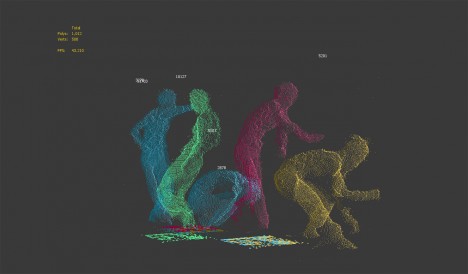
The graceful movements of a professional dancer are rendered as a cloud of flickering metallic dots using inexpensive Xbox Kinect sensors and 3D tools. Constantly shifting and changing even as the dancer stands still, the data points create a ghostly impression against a black backdrop, seeming to embody motion itself.

motion capture 8

motion capture 6

motion capture 4

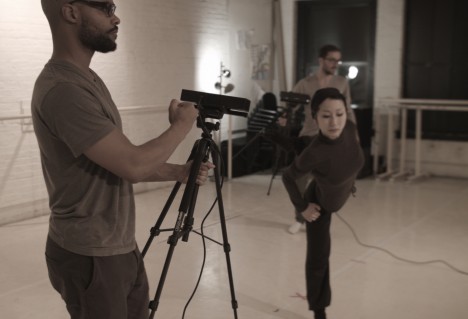
Asphyxia is a collaborative experimental film project by Maria Takeuchi and Federico Phillips, performed by Shiho Tanaka, combining various technologies to stress “the desire to be expressive without limits.” The sensors scanned data points on Tanaka’s body, which were then combined and used as the basis for the creative development of the film.

motion capture 3

motion capture 5

motion capture 2

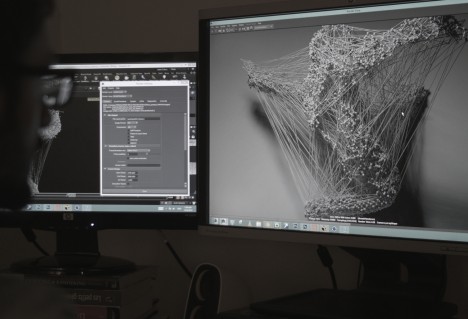
The filmmakers rendered the data into this hauntingly abstract form, placing it in a photorealistic environment to add to the eerie quality of the finished product. Check out the behind-the-scenes process above to learn more about how it was made.

Share on Facebook


[ By Steph in Art & Photography & Video. ]

[ WebUrbanist | Archives | Galleries | Privacy | TOS ]


WebUrbanist

 
Comments Off on Mesmerizing Motion Capture: Dance as Point Cloud Data

Posted in Creativity


Meet the Blackmagic Micro Cinema Camera, a Super 16 action camera with a Micro Four Thirds mount

14 Apr

Blackmagic revealed the Micro Cinema Camera today, a lightweight professional-grade action camera with a Micro Four Thirds lens mount and a Super 16 sensor. GoPros may be good enough for your extreme family vacation and your cousin Jeremy’s POV skateboard videos, but Blackmagic is counting on pro filmmakers needing more. Read on

Articles: Digital Photography Review (dpreview.com)

 
Comments Off on Meet the Blackmagic Micro Cinema Camera, a Super 16 action camera with a Micro Four Thirds mount

Posted in Uncategorized


Manfrotto unveils Digital Director for iPad Air

14 Apr

Manfrotto has used the National Association of Broadcasters (NAB) show as launching pad for the Digital Director, a bracket designed to turn an iPad Air into an external monitor for Canon and Nikon DSLRs. By connecting the Digital Director to a camera via USB and opening the app of the same name, a Live View feed is provided and exposure settings can be controlled by the iPad. Read more

Articles: Digital Photography Review (dpreview.com)

 
Comments Off on Manfrotto unveils Digital Director for iPad Air

Posted in Uncategorized


Sony announces Cyber-shot DSC-WX500 and EVF-equipped DSC-HX90V compact superzooms

14 Apr

Sony has announced the Cyber-shot DSC-HX90V and DSC-WX500, two travel zooms which the company claims are the world’s smallest. Both cameras boast an 18.2MP BSI-CMOS sensor plus a 30x, 24-720mm equiv. lens with optical image stabilization, 3″ LCD that tilts upward, a control ring around the lens, 1080/60p video using the XAVC S codec, and Wi-Fi with NFC. The HX90V adds a pop-up OLED viewfinder similar to the one in the RX100 III, as well as built-in GPS. Read more

Articles: Digital Photography Review (dpreview.com)

 
Comments Off on Sony announces Cyber-shot DSC-WX500 and EVF-equipped DSC-HX90V compact superzooms

Posted in Uncategorized


Wired Wood: 13 Handmade Versions of Electronic Gadgets

14 Apr

[ By Steph in Gadgets & Geekery & Technology. ]

wood gadgets record 1

Anyone who longs for the days of simpler, longer-lasting gadgets will love these lo-fi wooden versions of modern tech, including a pixel display made of blocks, laser-cut wood records, an orb-shaped computer mouse and even an all-wood version of a classic arcade game system.

Lo-Fi Pixel Display
wood gadgets pixel display 2

wood gadgets pixel display

Wooden blocks measuring 1.5 inches across stand in for digital pixels in this analog version of a display screen created by Han Lee. The 64 blocks were laser-cut and connected to an Arduino Uno, which controls the imagery.

Laser-Cut Records
wood record

Designer Amanda Ghassaei programmed a laser cutter to turn round slices of wood into playable records. Audio data is ripped from a WAV file and then turned into a PDF of a vector graphic containing all of the little bumps and grooves needed to reproduce the music on a record player.

White Fruit Radio

white fruit radio

Inspired by the way biological organisms organize their internal and external components, the ‘White Fruit Radio’ makes use of sycamore’s acoustic properties. There are no buttons or knobs on the outside – instead, it’s controlled by rubbing your finger across the ripples on the side.

Tiny iPhone Speakers

wood gadgets iphone speaker

Measuring less than a cubic inch each, these cute little ‘i-Dear’ speakers can hang from your keychain until you need to plug them in to your iPhone or other portable media player. Powered by built-in rechargeable batteries, they’ll play for about five hours before they need to be plugged into a USB power source again.

Next Page – Click Below to Read More:
Wired Wood 13 Handmade Versions Of Electronic Gadgets

Share on Facebook


[ By Steph in Gadgets & Geekery & Technology. ]

[ WebUrbanist | Archives | Galleries | Privacy | TOS ]


WebUrbanist

 
Comments Off on Wired Wood: 13 Handmade Versions of Electronic Gadgets

Posted in Creativity


Shooting Better Waterfalls: Five Tips for Improving Your Waterfall Photography

14 Apr

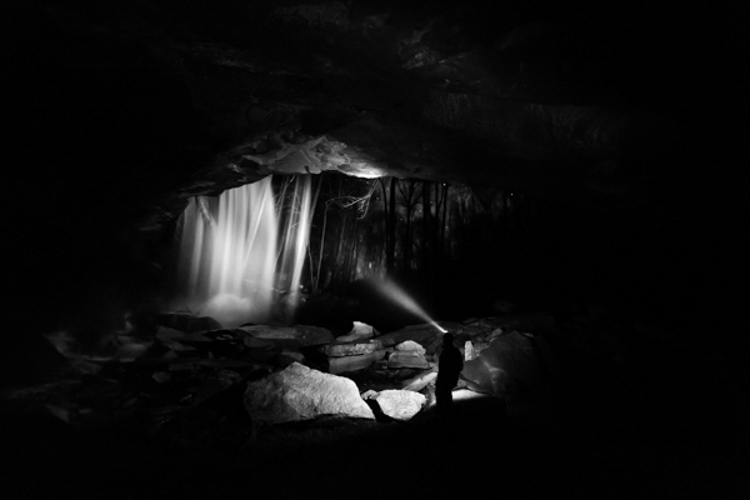
Cave Selfie

Perhaps there isn’t a more sought after and photographed subject than water. More specifically, waterfalls. When you really think about it, waterfalls are one of the most basic and simple things that we can find in nature. They are just streams or rivers that happened, by one geological occurrence or another, to find themselves flowing over some height of cliff or stone or other drop-off. Still, we remain captivated by the simple beauty and serenity that can come from being near, and photographing a waterfall.

That’s where we, as photographers, often slam face first into a huge creative and artistic wall. How can you make an interesting photograph of something that has already been so extensively covered by countless other photographers? While there is unfortunately no secret formula for all waterfall photo sessions, there are some very simple and useful tips that can help you create better, and more unique images, of these phenomenal natural occurrences. Let’s dive in (get it?) and get started on the path to better waterfall photography.

Have a plan

I always stress the importance of research and preparedness before any photographic excursion regardless of what the subject or goal might happen to be. This is especially true when you, the outdoor photographer, are readying yourself to photograph waterfalls. There is simply no denying that the more you know about a location, the better your odds will be of coming home with images that you are happy to claim as your own.

Conduct some quick research and find out what the main waterfall or waterfalls are in the area you plan to visit. Google (or another search engine) will be your absolute best friend in this regard. Try to find as many images as you can before you set out so that you can be inspired and have a head start on coming up with your own unique compositions that haven’t been tried with that particular spot.
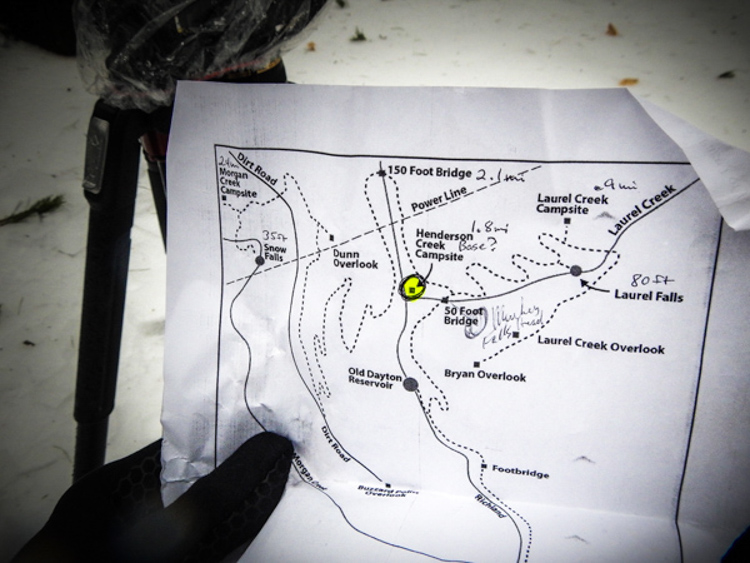
Map

Also, if at all possible, print out a map of the area and highlight the waterfalls that you feel are the most promising for you on that particular day and focus on those first. Don’t waste time trekking into a place that probably won’t yield a good result. Know before you go, and you will make better use of your time and become a much more efficient shooter.

Use a tripod

The topic of using a tripod can sometimes scare you off just from the sheer repetition of the statement. For whatever reason it seems like this essential bit of knowledge is where most beginner photographers find themselves in a state of complete denial. Believe me, I know how uncomfortable, to downright physically painful and tiring it can be to carry a tripod on your person for an extended amount of time. Still, though not always convenient, a tripod will always help you in the long run to produce better photographs. There is simply no other way to limit camera shake without having a solid shooting platform – there just isn’t. You will need such a platform for the longer exposure times often used when encountering waterfalls. End of story.

Another fact that beginners, and even some seasoned photographers, fail to grasp is that the quality of the tripod plays an essential role in its overall use to you. You will need a tripod that locks securely and reliably, and can handle the weight of whatever camera rig you happen to be shooting, as well as the shooting conditions. I can’t tell you how many long exposure images I ruined due to drifting of the tripod head because all I had available was a suboptimal tripod.

The biggest gripe I hear concerning tripods is that the good ones are too expensive. It’s true that a quality tripod will not be cheap. However, it is just as true that you can still obtain one without being outrageously expensive. Shop around and find a tripod that has good reviews, fits your current needs, and will also grow with you as a photographer. Do you really need carbon fiber? Do you need the most advanced ball head? Ask yourself questions like that and your purchase will make less of a dent on your pocketbook. A good tripod will last you years and yield incredible benefits. It will literally pay for itself and be one of the best investments you will make.

Make the waterfall the secondary subject
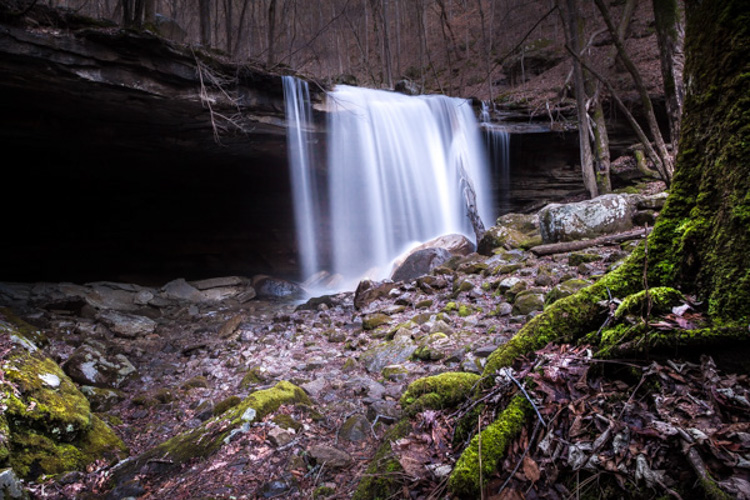
Foreground Focus

This image puts the colors of the moss and the detail of the foreground as the first point of interest and less on the waterfall itself.

This tip may seem a little counter intuitive but stay with me. It’s fairly straightforward to walk up to the front of a waterfall and snap a quick photo to take home. That’s great if that’s all you want. But let’s face it, you wouldn’t be pouring through all the great content here on dPS if all you wanted was to make average photos. You want to shoot with a purpose, and make photographs instead of taking snapshots. One of the best ways to do this is to think about the subject differently than the average photographer, and waterfalls offer a great opportunity to do this.

When you arrive at a particular falls you should really study the scene. Give yourself a few minutes before you even start thinking about making an exposure. Watch how the water flows and interacts with the other pieces of the scene. It may be rocks, boulders, sand, trees or any number of artifacts found in such places. Don’t let the waterfall itself distract you from the other photographs that could be there.

After all, the waterfall is not the only thing you notice so why should it be the only thing you show your audience? Look for ways to include different parts of the scene and even have the falls take a back seat if that makes a stronger image. Pay attention to what is often overlooked by other photographers. If you do this you will almost always be able to present the waterfall in a way that has never been seen before.

Pay attention to color

Color is a great way to grab the attention of your viewers and pull them into a photograph. Never underestimate the creative power of color when photographing waterfalls. Water is an incredible thing because it not only reflects the different colors around the surface such as the sky and leaves, but also the colors that come from underneath as well.
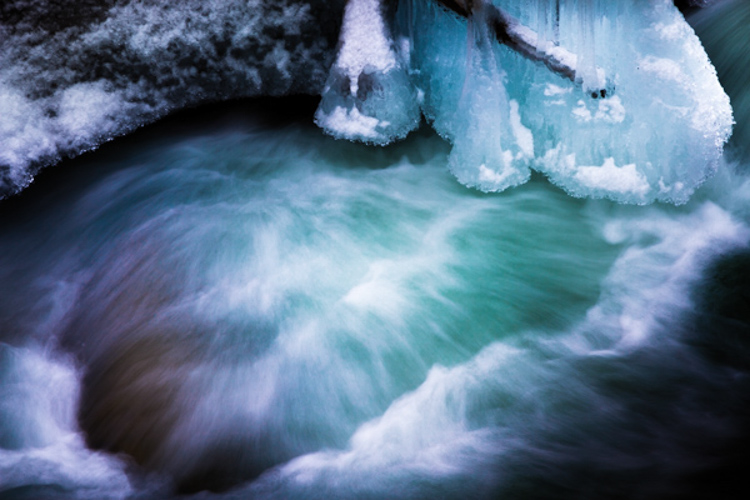
Use Color

The first step to getting the most interesting colors from a scene is to always shoot in RAW if at all possible. Shooting RAW will allow the most information to be recorded by your camera sensor, which will in turn give you much greater latitude for getting creative later with your post processing. Experiment with creative white balance and see what happens. Enhance the vibrancy and saturations in some areas and decrease them in another. You will be surprised how much more lively and interesting a waterfall can become with simply letting your imagination run free, and by using color creatively.

On the flip-side of the color coin, is that some waterfalls work much better when photographed in black and white. I have often said that I prefer images that tell a story through black and white, unless the color of the scene can speak louder. If you find yourself shooting a waterfall that lacks a lot of native color then why not put your pre-visualization skills to work (you’re still practicing that, right?) and try to imagine how the image could appear in black and white? Look for contrasts between light and dark areas on rocks, and contrasts within the water itself. Are there any interesting textures or reflections?

Here’s an unprocessed RAW version of a waterfall. Notice there’s not much color to boast about.
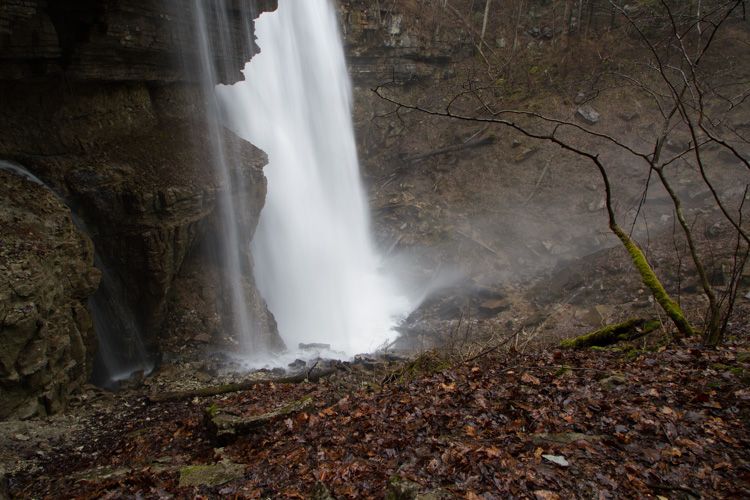
Virgin Falls RAW

Here we see the same image after a little cropping and black and white conversion.
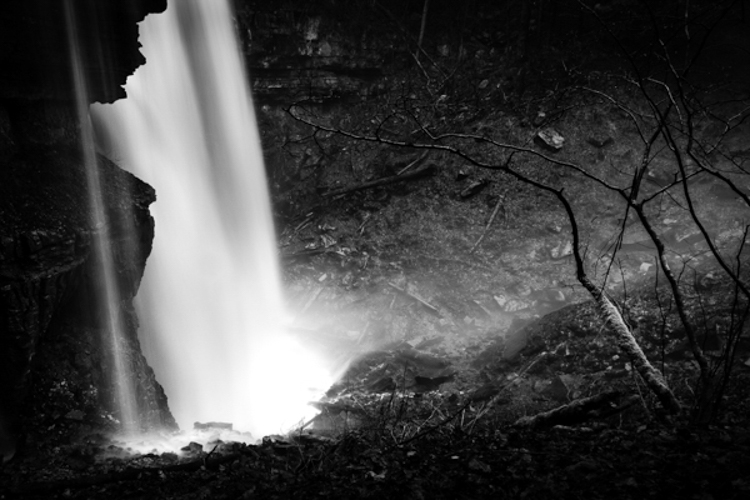
Virgin Falls Processed

Lastly, with this photo, the textures and light really made the image so I converted it to black and white as well.
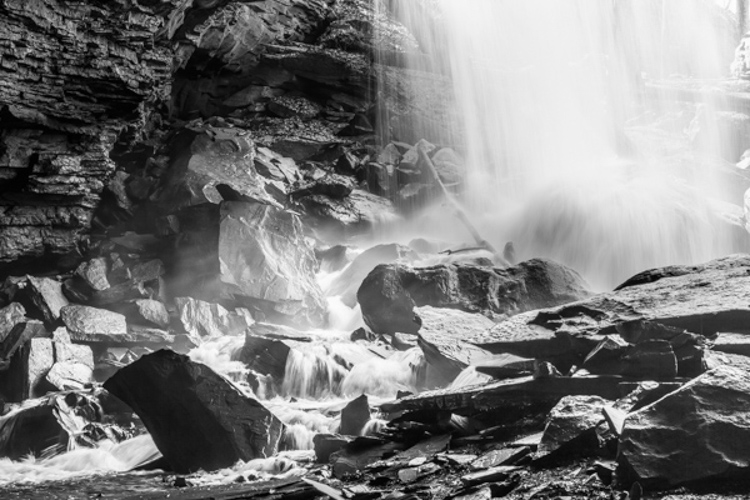
Rocks and Falls

Never discount the power of a monochrome image. Black and white waterfall work can be extremely profitable especially when you’re shooting in the drab and often colorless winter months.

Don’t forget to protect your gear

This isn’t really a tip, but rather a lesson that should be learned and become second nature to the serious waterfaller. When shooting a waterfall of any large size and flow there will always be moisture in the air, whether it is visible to you or not. The shear force of the water impacting the terminus of the fall, with render small droplets into the air that will absolutely ruin your shot and potentially destroy your camera and lenses.
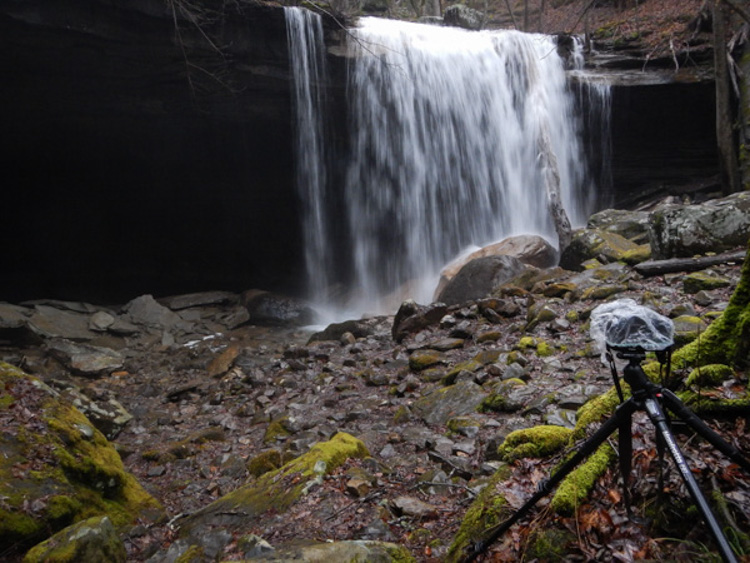
Without Water Drops

The air surround a thirty-five foot waterfall without flash.
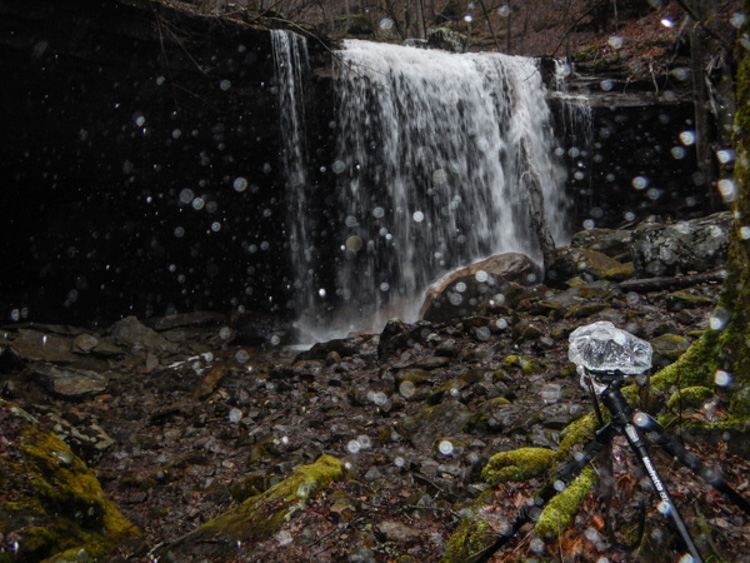
Water Drops

Then with a flash firing to show the moisture in the air.

Always use some protective barrier to protect your camera and lens while you set up for your exposure, and for transport around the waterfall. This barrier doesn’t have to be fancy. Personally I use pre sized slip-on plastic container covers that you can pick up at virtually any grocery store. They are perfectly waterproof and fit snugly around my camera and are unnervingly cheap.
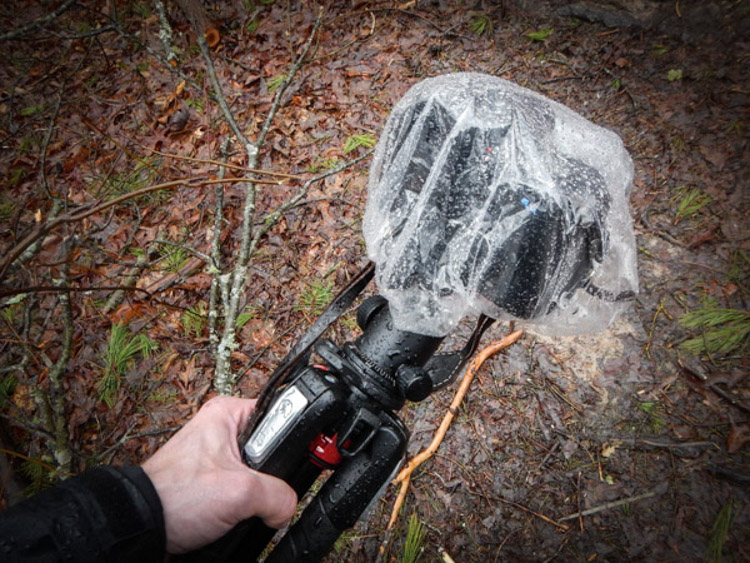
Protect Gear

The same goes for your lenses. Even if they are in your camera bag, always protect them from the moisture. Again, low tech is often your best option here. I simply wrap my lenses in a cloth and place them individually into resealable sandwich bags. The cloths will help to absorb any condensation that builds up from temperature changes and were a hard learned lesson for me. Lastly, minimize the amount of time you leave the cap off your lens, and always carry a good lens cloth for wiping the front between takes.

Shooting even small waterfalls can be very rewarding, and are a great way to just get out and enjoy nature. Learning to shoot them creatively, however, can be a little more challenging. That doesn’t mean that it has to be difficult or intimidating. Just remember these five simple tips and you’ll be ahead of the game when it comes to waterfall photography:

  1. Research and plan beforehand.
  2. Don’t desert your tripod.
  3. Think of the waterfall as part of a whole and not the only part of a scene.
  4. Learn to use color creatively or when to get rid of it altogether.
  5. Always protect your gear from the elements.

Now go out and do what you love to do!

googletag.cmd.push(function() {
tablet_slots.push( googletag.defineSlot( “/1005424/_dPSv4_tab-all-article-bottom_(300×250)”, [300, 250], “pb-ad-78623” ).addService( googletag.pubads() ) ); } );

googletag.cmd.push(function() {
mobile_slots.push( googletag.defineSlot( “/1005424/_dPSv4_mob-all-article-bottom_(300×250)”, [300, 250], “pb-ad-78158” ).addService( googletag.pubads() ) ); } );

The post Shooting Better Waterfalls: Five Tips for Improving Your Waterfall Photography by Adam Welch appeared first on Digital Photography School.


Digital Photography School

 
Comments Off on Shooting Better Waterfalls: Five Tips for Improving Your Waterfall Photography

Posted in Photography


Tiffen adds more filters, looks and faster processing with version 4 of its Dfx software

14 Apr

Tiffen has announced an updated version of its Dfx photo and video editing software that adds new filters, historic process simulations and extra tools, as well as wider compatibility with movie editing programs. Tiffen Dfx produces effects like those created by the company’s optical glass filters, with the latest version 4 adding 12 extra ‘filters’ to the menu system, including the company’s new Pearlescent and Satin diffusers. Read more

Articles: Digital Photography Review (dpreview.com)

 
Comments Off on Tiffen adds more filters, looks and faster processing with version 4 of its Dfx software

Posted in Uncategorized


Red introduces ‘Weapon’ camera with 8K sensor option

14 Apr

Red has unveiled its latest camera body and announced its next-generation 8K sensor. The Weapon body will be produced in magnesium alloy or carbon fiber and is available as an upgrade for users with the 6K ‘Dragon’ sensor. Anyone making the upgrade to the Carbon Fiber version will then be able to pay extra to get the forthcoming 8K sensor. Read more

Articles: Digital Photography Review (dpreview.com)

 
Comments Off on Red introduces ‘Weapon’ camera with 8K sensor option

Posted in Uncategorized


Winners of the Defrozo Contest Plus a Bonus for All dPS Readers

14 Apr

A huge thank you to everyone who entered our recent contest to win one of five prize packs from Defrozo.

Defrozo 1b

The response was great with numerous valuable suggestions left for the Defrozo team in the comments. The Defrozo founder, Demetrio Fortman, even decided to add a bonus offer for ALL of the Digital Photography School readers (details below).

And now to the winners. . .

Below a list of the five winners, their comment, and a note from the Defrozo team to each of them:

Winner #1 – bv

“At 51, my initial foray into a more serious version of my photography as me a top 20% popular photographer on ViewBug, a Facebook page with 2K+ fans, and the ability to sell and donate a couple of items.

I need something serious that elevates my game to a viable new level. I would love to see a one-stop command center that unifies everything a photographer may be doing. Uploading photos to multiple sites, contact with friends lists and email contacts with newsletters/messages featuring my contact information, it would be awesome to tie-in to invoice program, calendar, run contests, Somebody needs to step up and create a Photography Business Mothership! Are you that company?”

Note from Defrozo: Photography Business Mothership? We couldn’t say it better. We look forward to creating one together with you.

Winner #2 – Domien De Clercq

“I do however have some questions before making any decisions.
Will there be a plugin with lightroom to ease exports? With inclusion of metadata such as tags?
Will the images be uploaded in raw or jpg?
Will the images be protected with a watermark?
Will there be a separate image bank (not all pictures go on your website) to which clients can search and purchase images?
Will the processing of different image resolutions happen on the server side or client side?
How is the pricing, commission and rights handled? Do the images stay property of the photographer or is it like Facebook and they become property of the site via some loophole?
If an image is sold for 6 months, will it automatically reappear in the stocklist after the contract is completed?
If you upload images to the site, can you mark them as sold (images taken for a paid shoot) for a given time so they appear in the stock after this time without us having to worry about this?

I could go on but these are the main questions for now.”

Note from Defrozo: Domien, this is just the beginning for both of us, we look forward to making Defrozo your best companion as your grow your business.

Winner #3 – MelissaL

“I am at a point in my life ready to switch careers, and make the scary leap from photo enthusiast to professional. Defrozo looks like it might make my venture a little less intimidating, since I really have no business background, and want to hit the ground running. I would like a way to optimize my name and future website to be at the top of search lists for people looking for a photographer in my area, with easy and fast downloading of my work, and I want a beautiful aesthetic quality to my site. A critical element is also making sure my clients can see the products and framing they will purchase in detail, and having easy, safe, and robust payment options at their fingertips. I am excited to learn more, and also find out if the pricing listed is per year or month, beyond the free site, and what bonuses are included. Storage is such a key part of online photos, that I would want to be sure that I have enough spade for high res files and that the images can be password protected for the privacy of my clients. I am excited to find Defrozo and learn all about it. By the way, what’s with the name “Defrozo” anyway?”

Note from Defrozo: Melissa, hopefully, we’ll make this leap towards your professional photography career together!

Winner #4 – Andrew F

“Defrozo looks like it could have a lot of potential. As a professional photographer it is important to keep all your client interactions in one place. Otherwise you waste a lot of time trying to manage a mess of relationships. I am currently using ShootQ and ShootProof as my CRM and Gallery. Here is what I would like to see in the full version of Defrozo:

1) Fully interactive CRM with:
• Lead management – follow up reminders (with alerts sent right to your phone), lead workflows with auto emails and tasks, appointment requesting, calendar sync (with google AND iCal), & relationship management/group marketing
• Online booking – online contracts and auto invoicing, proposal and estimates, image usage options for business and corporate clients, auto emails, client portal for payments and shoot progress
• Client management – Shoot workflows, auto emails, invoice reminders, email templates, etc.
• Email marketing capabilities to specific groups or client types
• Easily understandable interface

2) Online gallery with:
• intuitive yet easily understood interface
• client collaboration
• easy to download images – setting a limit on # of image downloads, allowing download of web and full res files.
• auto emails and templates
• ability to show photographer’s favorite images
• Print fulfillment through partner labs
• Image archiving/ cloud storage

3) Interactive client or event websites

4) Everything must be mobile friendly and easily accessible

I don’t have much use for the website site of things, as I would imagine most photographers don’t. There are plenty of affordable options out there on that spectrum.

I would use this in my everyday workflow. I’m sure there are a ton more options you could add down the line, but I think these are the main ones to get people to switch over to your product.”

Note from Defrozo: Andrew, your comment was a goldmine of valuable suggestions. We hope one day not so far in the future we’ll become your ultimate tool for managing your business.

Winner #5 – Emily M

“I have been venturing into photography for the last year now, an enthusiast who wants to turn a hobby into a successful business. I have a two year plan of which I am in year one, one of the goals for this year was to start up a blog as I build my portfolio; Unfortunately starting up a blog from scratch for a newbie is kind of complicated from the loads of research I have done. Defrozo seems to be an awesome way to go; especially being a marketing platform tailored for photographers. Marketing has never been easy but with the right tools you can get your product right onto the doorstep of prospective customers. Defrozo’s setup is very chic and professional. I honestly think that Defrozo is the partner I need to transition from my day job to a fully fledged photographer.”

Note from Defrozo: Emily, with a clear game plan and goals, you’re on the right track to becoming a successful photographer. We look forward to walking this route together with you!

Winners will be emailed with details of how to collect their prize by the team at Defrozo.

A message from Defrozo and a special bonus

We’re excited to receive so many great entries on this contest. Your feedback and suggestions help us create truly useful software for enthusiast and pro photographers, so thank you for all the valuable tips you sent us via comments!

If you were not lucky enough to win, don’t be upset. Here’s our extra bonus for ALL Digital Photography School readers:

defrozo-2b.jpg

50% OFF our most popular Kickstarter reward ($ 50 value)

To receive your special discount, pledge $ 50 toward the Defrozo Kickstarter campaign by April 17th. Leave your Kickstarter username in the comments below this post, and we will immediately DOUBLE your reward to the $ 100 level. You get our juiciest pack of goodies with 50% off – an opportunity that will never repeat again.

Thanks again for all the awesome entries,

The Defrozo Team

Thanks again to everyone for entering and to Defrozo for sponsoring this competition. Don’t forget to sign up for your free Defrozo membership and contribute to creating the ultimate photography business platform.

googletag.cmd.push(function() {
tablet_slots.push( googletag.defineSlot( “/1005424/_dPSv4_tab-all-article-bottom_(300×250)”, [300, 250], “pb-ad-78623” ).addService( googletag.pubads() ) ); } );

googletag.cmd.push(function() {
mobile_slots.push( googletag.defineSlot( “/1005424/_dPSv4_mob-all-article-bottom_(300×250)”, [300, 250], “pb-ad-78158” ).addService( googletag.pubads() ) ); } );

The post Winners of the Defrozo Contest Plus a Bonus for All dPS Readers by Darlene Hildebrandt appeared first on Digital Photography School.


Digital Photography School
 
Comments Off on Winners of the Defrozo Contest Plus a Bonus for All dPS Readers

Posted in Photography


13. April 2015

13 Apr

Das Bild des Tages von: Daniel Ernst

Landschaftsfotografie: Lichtflut durch einen Gebirgszug.

Im Ausblick: Eine reale Disneystadt, Kinder auf Schulhöfen und eine Kritik an Touristen.
kwerfeldein – Fotografie Magazin | Fotocommunity

 
Comments Off on 13. April 2015

Posted in Equipment