RSS
 

Archive for April, 2015

Street Re-View: Hacking Google with Theatrical Performances

16 Apr

[ By Steph in Art & Photography & Video. ]

Screen Shot 2015-04-15 at 3.34.39 PM

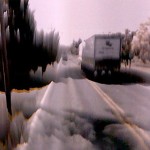
Mons, Belgium might just be the most interesting and artistic-looking city on the entirety of Google Street View, full of seemingly spontaneous dramatic scenes like chaotic clouds of floating white feathers, painters turning sidewalk crossings neon pink, and basketballs falling out of trees like fruit. The theatrical performances are timed to coincide with the arrival of Google’s camera-equipped van when it comes along to map out the area.

Screen Shot 2015-04-15 at 3.35.11 PM

Screen Shot 2015-04-15 at 3.34.58 PM

Screen Shot 2015-04-15 at 3.38.21 PM

Mons Street Review, spearheaded by artists Ludovic Nobileau and Antonia Taddei, is an initiative put on by the city as part of its agenda as a European culture capital. The scenes are curated by citizens, who transform the streets into urban theater sets and pose as the camera passes.

Screen Shot 2015-04-15 at 3.32.03 PM

Screen Shot 2015-04-15 at 3.32.47 PM

Screen Shot 2015-04-15 at 3.35.54 PM

The artists encouraged people to come up with their own ideas, create their own roles and costumes, and arrange props however they like. About 900 people participated on 42 streets, essentially hijacking Google’s service to promote themselves and their city.

Screen Shot 2015-04-15 at 3.37.50 PM

Screen Shot 2015-04-15 at 3.37.21 PM

Screen Shot 2015-04-15 at 3.35.54 PM

The aim is to present Mons the way the people see it, as a living place of culture and history rather than a series of static street view images. Says Nobileau, “It should be up to people, rather than Google, to represent cities.”

Share on Facebook


[ By Steph in Art & Photography & Video. ]

[ WebUrbanist | Archives | Galleries | Privacy | TOS ]


WebUrbanist

 
Comments Off on Street Re-View: Hacking Google with Theatrical Performances

Posted in Creativity


Pentax DSLRs gain firmware updates to accommodate new lenses

16 Apr

Ricoh has released new firmware for three of its DSLR cameras in preparation for the arrival of new HD lenses to the K-series. The Pentax K-3, K-S2 and K-S1 will receive updates that allow them to get the most out of the forthcoming HD Pentax-D FA 150-450mm f/4.5-5.6ED DC AW and HD Pentax-D FA*70-200mm f/2.8 ED DC AW lenses, while the K-3 and K-S1 also gain compatibility with the HD Pentax-DA 18-50mm f/4-5.6 DC WR RE standard zoom. Read more

Articles: Digital Photography Review (dpreview.com)

 
Comments Off on Pentax DSLRs gain firmware updates to accommodate new lenses

Posted in Uncategorized


Tips for Photographing Butterflies

16 Apr

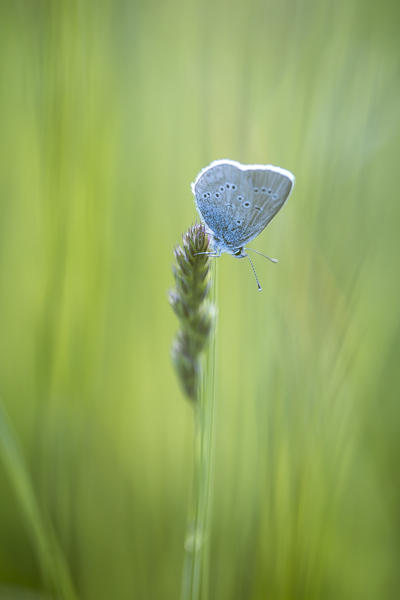
Butterflies can provide a colorful and fun way to explore the macro world, and the basic techniques are easy to master with a little patience and practice.

Just because butterflies are fast movers, doesn’t mean you have to be! If you watch carefully, you will notice that each species tends to visit the same variety of flower. If you miss a photo opportunity, wait a couple of minutes and the chances are that the butterfly will soon be back again to the same flower, or to a neighboring one. When approaching, avoid unnecessary vibrations and be careful not to cast a shadow over the butterfly.

Butterfly 1

Lens choice

Although a macro lens is an advantage, almost any lens can be used. A wide angle lens will help show context, whilst lenses with a longer focal length will isolate the butterfly from the background and will also ensure that it is not physically disturbed.

Camera settings

As in all macro photography, the background is as important as the subject and using the right aperture can make or break the photo. Use Aperture Priority mode and choose a fairly wide aperture (a small f-number). A good starting point is somewhere between f/3.5 and f/5.6, which will help separate the butterfly from the flowers or branches behind.

Of course, a wide aperture will also reduce depth-of-field, so your final choice will often depend on the position of the butterfly. If its wings are closed for example, and you are parallel to its body a wide aperture will be fine. If not, you may need to try something smaller such as f/8 or f/11.

Sometimes you will be lucky enough to find a butterfly who is feeding and poses beautifully for the camera, but most of the time they are in constant motion. Using a fast shutter speed of 1/800th and upwards will help reduce your quota of blurry photos.

Ideally, your ISO will be set to either 200 or 400, although you may need to increase this depending on available light.

Butterfly 2

Focus

If your butterfly is part of a larger scene, you may get away with autofocus. For close-ups, there is only one way to focus, and that’s manually! Autofocus rarely puts the focus exactly where you want it, and with butterflies you are aiming at their eyes. If they are visible, the eyes are the key to the image and they need to be sharp.

If you are wondering how to manually focus on the microscopic eyes of a tiny, moving creature, don’t worry. Try pre-focusing on a flower so that when the occupant arrives you only have to make minor adjustments. Good focusing can be a bit hit and miss, so take plenty of photos to increase your chances of having a few sharp images.

Butterfly 3

Lighting

As for most photography, avoid the harsh light of the middle of the day. Early morning provides great light and slower moving butterflies, but late afternoon on a sunny day is often the best option. The butterflies are active and the sun is low in the sky.

Once you feel comfortable with the more classical front and side-lighting, have a go at back-lighting. This can be achieved by positioning the butterfly between yourself and the sun. Avoiding lens flare can be a bit tricky, but this type of lighting will really show off the details of the wings and put a beautiful rim of light around the butterfly.

If your back-lit photos are on the dark side, you may need to over-expose slightly. Dial in some exposure compensation until the butterfly is correctly exposed.

Butterfly 4

Composition

Photographing a butterfly from above, will showcase the patterns and colours of its wings. Getting down to eye level however, will give your photos much more impact and intimacy (especially if those eyes are sharp). Vary your perspective, move around, and show the butterfly from angles that are rarely seen.

As well as close-up shots, you may also want to consider the larger picture and show the butterfly in its natural surroundings.

Butterfly 5

Tripod

Whether you use a tripod or not is a personal choice. A tripod will bring you an element of stability and will help with composition and focus. The down side is that it is cumbersome and will severely restrict your movements when photographing these fast moving, and somewhat erratic subjects.

As for finding butterflies, you shouldn’t have to go far. Your garden will probably reveal several passers-by, and others can be found in local parks, fields and woodlands. Butterfly houses also provide great photographic opportunities with nice, even lighting and many species under one roof.

Butterfly 6

With a bit of perseverance you will soon develop your own technique for photographing these little beauties. Be warned though, chasing butterflies can become highly addictive!

Kathy Samuel is a natural light photographer with a passion for the outdoors and the world of macro photography. She is English, but now lives in the southern French Alps where there is no shortage of tiny subjects for her camera. You can visit her at Kathy Samuel Photography.

googletag.cmd.push(function() {
tablet_slots.push( googletag.defineSlot( “/1005424/_dPSv4_tab-all-article-bottom_(300×250)”, [300, 250], “pb-ad-78623” ).addService( googletag.pubads() ) ); } );

googletag.cmd.push(function() {
mobile_slots.push( googletag.defineSlot( “/1005424/_dPSv4_mob-all-article-bottom_(300×250)”, [300, 250], “pb-ad-78158” ).addService( googletag.pubads() ) ); } );

The post Tips for Photographing Butterflies by Kathy Samuel appeared first on Digital Photography School.


Digital Photography School

 
Comments Off on Tips for Photographing Butterflies

Posted in Photography


Tiny Apartment Tricks: 13 Ideas for Ultra-Compact Spaces

16 Apr

[ By Steph in Design & Fixtures & Interiors. ]

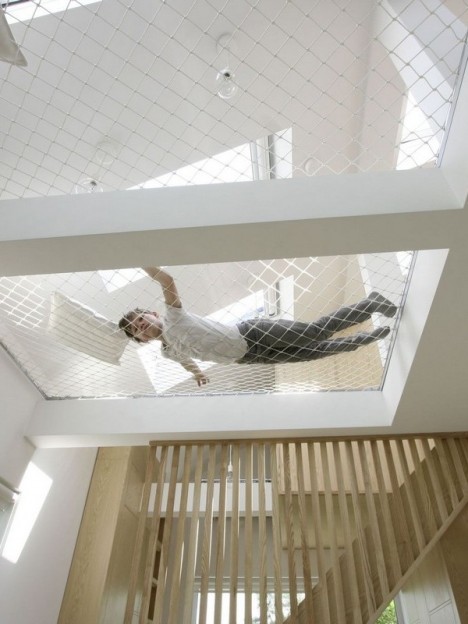
tiny apartment hammock 2

If you want to live in a tiny apartment without murdering your significant other or feeling like your home is a jail cell, you might want to employ a few of these clever small-space tricks, like roll-away closets, double-duty room dividers and multi-level built-ins. These organization ideas include everything from IKEA hacks to full-on remodels and even a hammock that takes up the entire second level of a studio space.

How to Fit An Apartment Into 182 Square Feet
tiny apartments 182 square feet 2

Tiny Apartments 182 square feet 1

tiny apartments 182 square feet 3

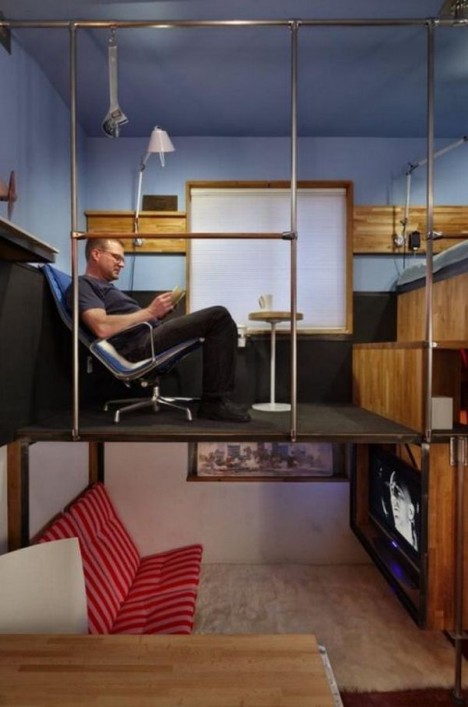
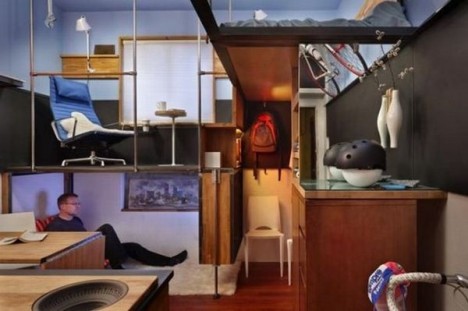
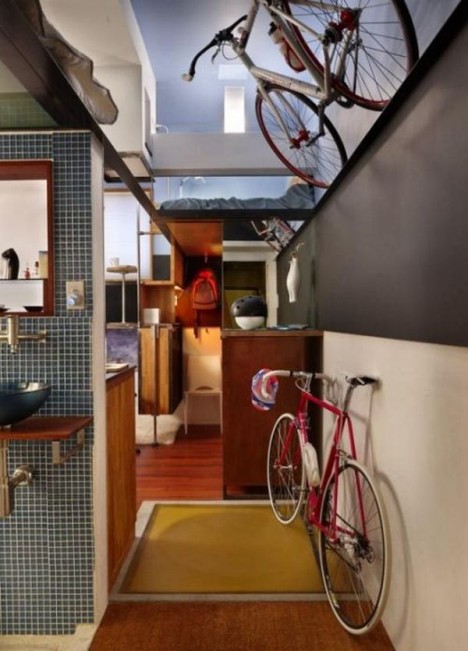
How do you cram an entire apartment worth of stuff, including two bicycles, into a 182-square-foot basement – making it comfortable enough for a 6’2” occupant? Engineer Steve Sauer took inspiration from boats when he designed the layout for his personal space, noting that the most important aspect of making it work is ensuring that everything has its place. Sauer split the space vertically in thirds to create a seated lounge area, an office and a lofted bedroom.

Studio with a Crawl-In Library

tiny apartments library

crawl in library

crawl in library 2

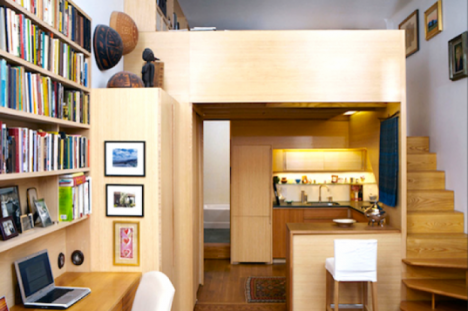
Think you don’t have room for a library in your apartment? This imaginative remodel shows that pretty much anything is possible, even when you’re living in 240 square feet. Inspired by the cabinetry of furniture maker George Nakashima, the wood-paneled addition is built over the kitchen and includes a crawl-in, cubby-like library beside the bed.

Bed Nooks, Built-Ins and a Second-Floor Hammock

tiny apartment hammock 2

tiny apartment hammock 1

tiny apartment hammock 3

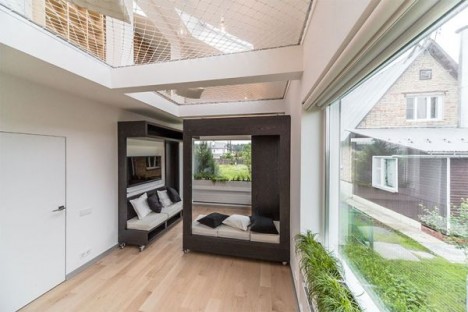
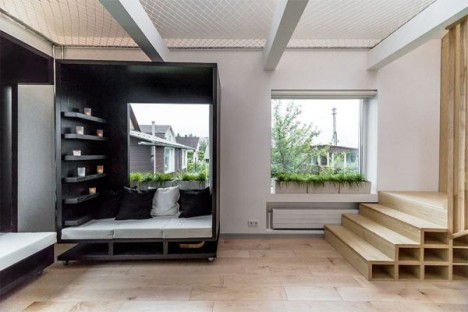
Two students designed this 33-square-meter apartment to be as functional as possible with a few fun and unexpected tricks: a series of rolling modules in the living space that can be rolled together or apart to create custom couches, lounge areas or beds, and a hammock stretching across the space leading to the awkwardly shaped upper level. The slanted ceiling didn’t leave much room for furniture, so the hammock makes the space usable.

Lego-Like Tetran Cubes

tiny apartments tetran cubes 3

tiny apartments tetran cubes 2

tiny apartments tetran cubes 1

Put your living space together like a set of Lego blocks, assembling just the right shapes to fit your home and lifestyle, with modules by Tetran. These storage cubes can be stacked and assembled in all sorts of ways to form the basis of couches, beds, side tables, desks, bookcases and practically any other kind of furniture you need.

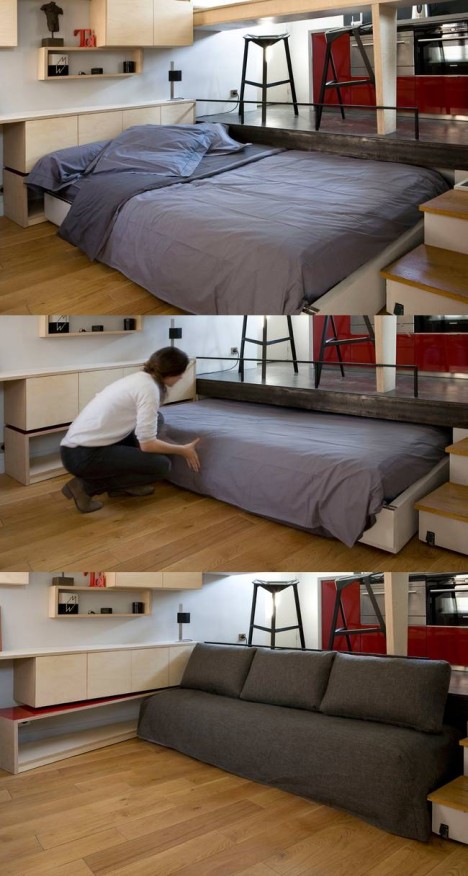
Bed Stows Away Under the Kitchen Floor

tiny apartment roll away bed 3

Architects Marc Baillargeon and Julie Nabucet collaborated to convert what was once the master bedroom of a larger living space into a micro-apartment measuring just 130 square feet. The kitchen is elevated onto a platform that hides a roll-away bed, which can be partially pulled out for use as a couch. A coffee table hides under a counter when not in use, and the steps double as storage.

Next Page – Click Below to Read More:
Tiny Apartment Tricks 13 Ideas For Ultra Compact Spaces

Share on Facebook


[ By Steph in Design & Fixtures & Interiors. ]

[ WebUrbanist | Archives | Galleries | Privacy | TOS ]


WebUrbanist

 
Comments Off on Tiny Apartment Tricks: 13 Ideas for Ultra-Compact Spaces

Posted in Creativity


Five Useful Lightroom Keyboard Shortcuts

16 Apr

Lightroom shortcuts

Adobe makes life easier for Lightroom users by building in keyboard shortcuts. You probably know some of the more important ones by heart (e.g.: T to reveal or hide the Toolbar, \ to toggle between before and after views, and O to reveal the Adjustment Brush overlay). But I’m also betting there are quite a few shortcuts you didn’t even know existed. Here are some of the more useful, lesser known ones.

1. Reveal all Shortcuts

Keyboard shortcuts are difficult to remember, especially if you don’t use them that often. But if you press Ctrl + / (PC) or Cmd + / (Mac), Lightroom displays a list of the shortcuts available in the current module. When you’re done, click anywhere on the shortcut list to hide it.

Lightroom shortcuts

Library module shortcuts.

Lightroom shortcuts

Develop module shortcuts.

Note: The rest of these keyboard shortcuts are for the Develop module. Not all of them are shown on the shortcuts list.

2. Rotate the Crop Overlay

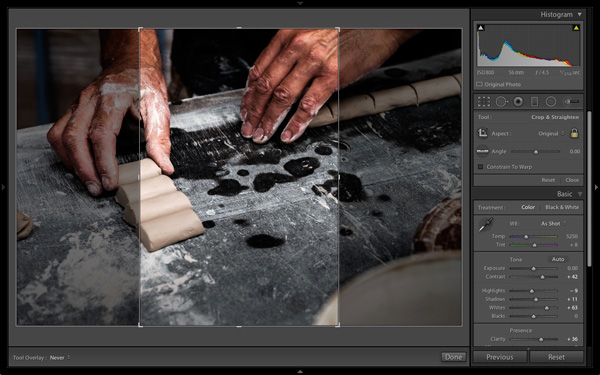
If you’ve ever tried to make a portrait crop from a landscape image you’ll have experienced the frustration of trying to rotate the Crop Overlay (press R to go straight to that tool).

Lightroom automatically gives the Crop Overlay the same orientation as the photo, with no immediately obvious way of rotating it. To do so, simply press X.

Lightroom shortcuts

By default the Crop Overlay is automatically given the same size and orientation as the original frame.

Lightroom shortcuts

Press X to rotate the Crop Overlay and make an extreme crop.

3. Resample Spot Removal Tool

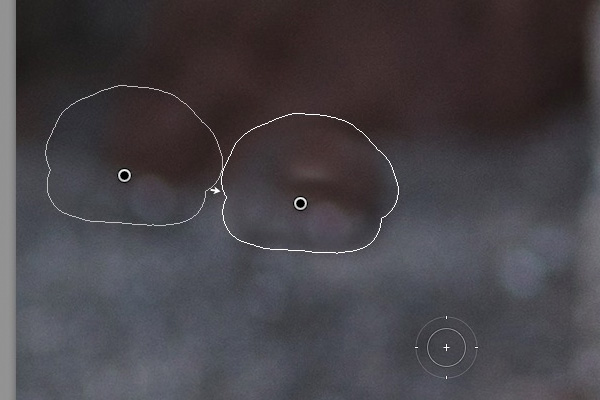
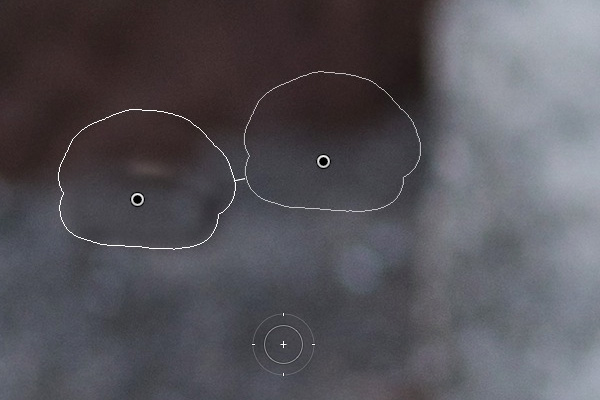
The good thing about the Spot Removal Tool (which you can activate by pressing Q) is that Lightroom is quite good at guessing which part of the image it should sample, in order to heal the selected area. But it doesn’t get it right all the time. If you don’t like the result, press the / key and Lightroom will choose a different area to sample. Repeat as often as you like.

Lightroom shortcuts

In this example I wanted to get rid of this dark blob in the background because it’s a distraction.

Lightroom shortcuts

Lightroom’s first guess doesn’t really work.

Lightroom shortcuts

But the second one is much better. You can of course fine-tune it by moving the pin indicating the sampled area manually.

4. Automatic White and Black points

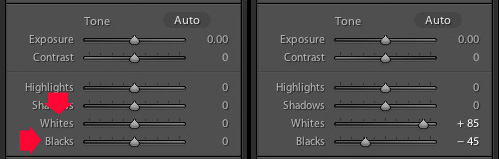
If you double-click on the Whites and Blacks sliders in the Basic panel, Lightroom resets them to zero. If you hold the Shift key down while you do it, Lightroom calculates the best settings, working out where to position both sliders so that the histogram stretches all the way from the left side of the graph (shadows) to the right (highlights) without any gaps. This quick fix makes most photos look better right away. The flatter the original photo, the more extreme the settings required.

Lightroom shortcuts

Double-click the Whites and Blacks sliders while holding the Shift key down. Make sure you double-click the words and not the slider itself.

5. Flip a Graduated Filter

Press the apostrophe key to flip (invert) a Graduated Filter. One practical use for this is as follows:

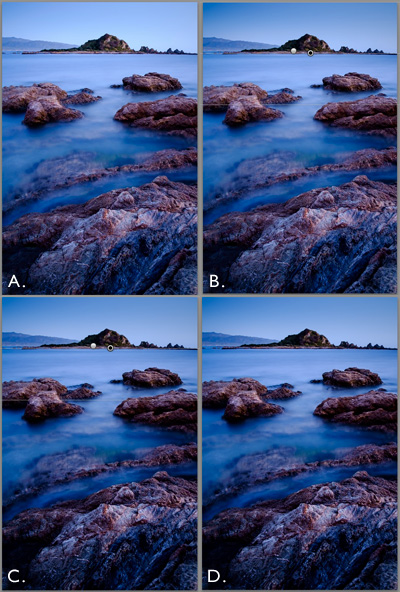
  • Create a Graduated Filter over the sky of a landscape image (hold the Shift key down while you do so to keep the Graduated Filter straight) and move the Exposure slider left to darken that area.
  • Right-click on the Graduated Filter’s pin and select Duplicate. This creates a new Graduated Filter with exactly the same settings as the first.
  • Press the apostrophe key to flip the Graduated Filter. Now the minus Exposure setting is applied to the foreground. We don’t want to make the foreground darker, so double-click the Exposure slider to return it to zero. Now we are ready to use this new Graduated Filter to enhance the foreground.
  • Move the Clarity slider right to emphasise the texture in the foreground. You may also need to move the Exposure slider left if this brightens the foreground too much.

The net result is that you have applied two Graduated Filters, one to the sky, and the other to the foreground.

***By the way, the apostrophe shortcut also works with the Radial Filter.

Lightroom shortcuts

(A) Original photo. (B) Graduated Filter with minus Exposure applied to sky. (C) Duplicated and flipped Graduated Filter applied to foreground, with plus Clarity and minus Exposure. (D) Final result.

Your turn

What keyboard shortcuts do you use in Lightroom and why? Please let us know in the comments.


The Mastering Lightroom Collection

Mastering Lightroom ebooksMy Mastering Lightroom ebooks will help you get the most out of Lightroom 4 and Lightroom 5. They cover every aspect of the software from the Library module through to creating beautiful images in the Develop module. Click the link to learn more or buy.

googletag.cmd.push(function() {
tablet_slots.push( googletag.defineSlot( “/1005424/_dPSv4_tab-all-article-bottom_(300×250)”, [300, 250], “pb-ad-78623” ).addService( googletag.pubads() ) ); } );

googletag.cmd.push(function() {
mobile_slots.push( googletag.defineSlot( “/1005424/_dPSv4_mob-all-article-bottom_(300×250)”, [300, 250], “pb-ad-78158” ).addService( googletag.pubads() ) ); } );

The post Five Useful Lightroom Keyboard Shortcuts by Andrew S. Gibson appeared first on Digital Photography School.


Digital Photography School

 
Comments Off on Five Useful Lightroom Keyboard Shortcuts

Posted in Photography


Garmin VIRB X and VIRB XE action cameras to launch this summer

15 Apr

Garmin has introduced two new action cameras, the VIRB X and the VIRB XE. Both cameras feature a new form factor that increases the number of mounting options available. Both feature a waterproof design, and the VIRB XE offers support for 1440/30p and 1080/60p video recording. In addition, the action cameras feature G-Metrix, which leverages integrated sensors and wireless tech to monitor ‘action data’ like speed, and display the information as animated data overlays. Read more

Articles: Digital Photography Review (dpreview.com)

 
Comments Off on Garmin VIRB X and VIRB XE action cameras to launch this summer

Posted in Uncategorized


Save The Memory Project restores over 400,000 photographs from Tsunami-hit areas of Japan

15 Apr

A project to salvage, clean, scan and return photographic prints found in the areas devastated by the August 2011 Great East Japan Earthquake and Tsunami has reunited over 90,000 images with their rightful owners since shortly after the disaster struck. The Save The Memory Project has recovered over 400,000 prints from the rubble of affected areas, having cleaned, scanned and posted digitized versions to an online system for owners to claim. Learn more

Articles: Digital Photography Review (dpreview.com)

 
Comments Off on Save The Memory Project restores over 400,000 photographs from Tsunami-hit areas of Japan

Posted in Uncategorized


6 Things to Consider Before Becoming a Professional Photographer

15 Apr

192

So, you’ve got a nice camera, you really love photography, and you’ve been thinking that maybe it would be nice to make a little bit of money from this passion you’ve discovered. Before you decide to make that leap, read on. You may be convinced to throw that idea out the window, or you may find that you truly are ready, and it’s time to try your hand at photography as a career.

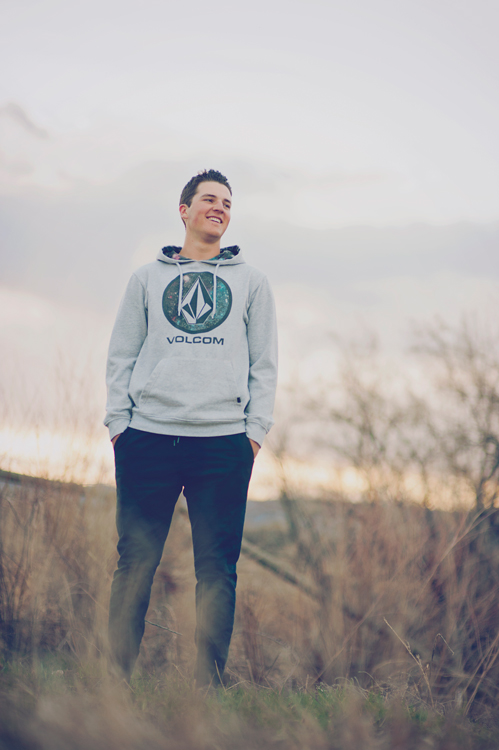
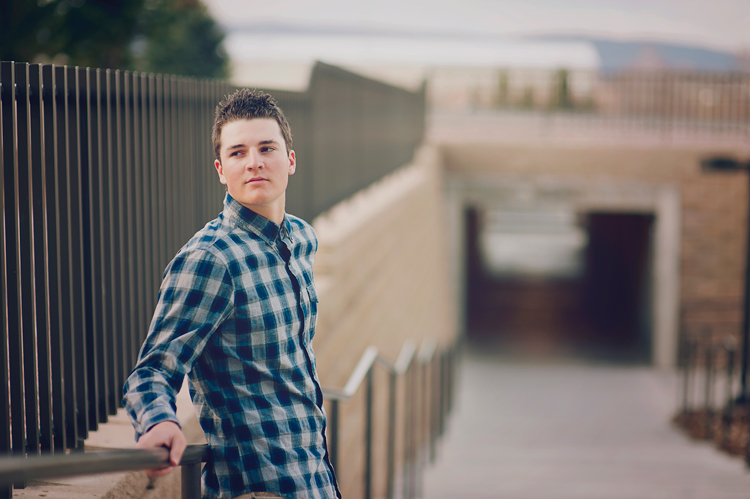
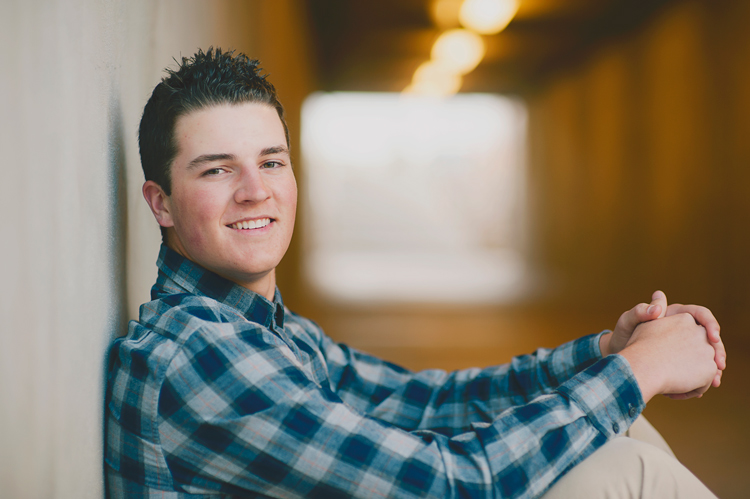
Before we go any further, I have to clarify something about the photos in this article. First of all, I had to include photos, because every article is better with pictures, right? Secondly, this session was inspiring, fun, and an example of every reason that I LOVE being a photographer. This client does not exemplify any of the cons of the business. Also, for this article “professional photographer” is defined as someone who gets paid to take photos, particularly portrait photographers.

137

1. You’re not good enough…yet

Maybe you love photography, and maybe you get a lot of compliments on your photos, but you may not be a good enough photographer to actually take money from people yet. Do you sometimes take a bunch of photos where the majority of them are garbage? Do you often say to yourself, “I’ll fix that later in Photoshop?” If your photos aren’t consistently in focus, exposed correctly, and great IN CAMERA, before you get to Photoshop, you’re not ready.

If you look at other professional photographers’ work and wonder how on earth they got their photos to look like that, you are not ready. I don’t mean that you have to be able to produce photos exactly like the photographers that you admire. I’m saying that you should have an understanding of how they achieve the look they get. You should know how light, depth of field, angles, etc., contribute to the photo. You should have an idea of how much of the photo is a result of post-processing.

Having a nice camera does not qualify you to be a professional photographer.

151

2. You don’t have enough experience

This goes along with not being good enough, but experience is important. You have to be consistent every time. You have to know that every single session you do will result in good photos, and that you can roll with the punches if conditions aren’t ideal. You have to know your camera settings inside and out, because when you’re chasing a naughty toddler around, you don’t have time to try to figure out what your shutter speed should be.

I’ll admit that I didn’t have enough experience when I started. I did some sessions for friends and family, then requests started coming in. I didn’t really have the goal of making money with my photography, but when people started asking me, I thought, “Hey, why not?” Some of my early sessions are dear to my heart, but some of them I look at and cringe. I feel bad that people paid money for me to experiment and find out who I was as a photographer.

182

3. You don’t want to lose the love of photography

Once you turn a passion into a job or career, you have a very real possibility of it turning into something you do because you have to, and not because you want to. I’m not saying this happens to everyone, but I’ve seen enough professional photographers burn out and quit, that I know it’s a very real thing. You may think that it will be fantastic to make money doing something you love, but are you ready for the possibility of not loving that thing anymore?

True confession here: I rarely get my camera out anymore for anything except a paid session. When I’m on vacation, sometimes the last thing I want to do is “work” while I’m there, and I certainly don’t want to drag my camera around when I’m supposed to be having fun.  Then, if I do take some photos just for the heck of it, they sit there on my computer forever, because I don’t really feel like sorting and editing yet another batch of photos. This doesn’t happen to every pro photographer, but I’m being real here. Sometimes I wish that I could just take photos because I love it, but the truth is, I’m often too tired after my paid sessions for the week to get my camera out again. I still love photography, but it’s more that I love my job; I love the photos and what I can create, I love working with people, but I don’t love photography just for photography’s sake anymore.

186

4. You don’t want to deal with business stuff

Taxes, business licenses, contracts, equipment upkeep, scheduling, email, phone calls – it’s all a very real part of running a photography business, and it takes far more time and effort than you’d like to believe. Being a professional photographer is not just happily snapping some photos, collecting money, and then spending all of that money on anything you’d like. There are expenses, lots and lots of expenses. There are boring, repetitive tasks. There are hours spent doing behind the scenes stuff.

No matter how great of a photographer you are, if you aren’t good at the business side of things, you are going to struggle as a photographer. It’s hard. It’s frustrating. Sometimes it’s overwhelming. Some days horrible things happen, like The Cloud losing your entire photography calendar (yes, speaking from experience). Sometimes you have to ask people for money, and that’s not easy for everyone. You have to be able and willing to run a pretty tight ship with scheduling, collecting money, and sticking to your policies. You have to decide your policies, and your fees, and how you are going to do business beforehand, because believe me, people will ask you to change all of it for them, and you have to be ready for it.

165

5. You don’t like to deal with difficult people

Luckily for me, I actually really love working with people, but even then, sometimes some people are hard to deal with. When people are paying you money to photograph them, sometimes they expect you to do anything and everything they want, and sometimes, even when you’ve done your best, they aren’t happy with you. If you are sensitive, like I am, that kind of criticism can be very hard to take.

Most of the people you will take photos for are fantastic, wonderful people, who love your work, and love you, which is why they hired you. That doesn’t happen every time though. Sometimes you have to spend lots of time on the phone talking to a worried client (what about the weather? what about junior’s bad haircut? what about clothes they’ll wear? what if they smile awkwardly?). Or someone who has lots of ideas they saw on Pinterest, and wants to discuss every one of them with you, in depth, even if they aren’t even remotely your style of photography. Sometimes you’ll show them their gallery and they’ll say they love it, except can you photoshop every single wrinkle off of their face? Questions are great, and most people don’t have unreasonable demands. But, you have to know that sometimes people are just not on the same page as you are, and you have to be able to work with them, and do your best to keep them happy.

155

6. It isn’t the fairytale job you think it is

I hear from people all the time about how much fun it must be to be a photographer, and how much they wish they could be a photographer too. Many people who jump into the photography business, without doing a lot of research and self-evaluation, get a harsh slap to the face when they realize that it’s work. A lot of work. Many people pop in the “professional photographer” scene on a whim, and pop right back out of it within a year or two, and sometimes don’t even last a few months. It’s work to get clients. It’s work to keep clients. They don’t just fall in your lap, waving hundred dollar bills and smiling their pearly whites for your camera.

You’re going to have competition, and sometimes criticism from others. Sometimes the world of photographers can get pretty nasty. You will find wonderful people to collaborate with, and those who encourage you, but you will also find some that will tear you down if they get the chance.

There are many benefits of running your own business, but it’s also hard. You have to know what you are doing, and if something goes wrong, it’s all on your shoulders. Being a professional photographer is much more than loving to take pictures. When you realize all of the work it’s going to be, you might decide that taking photos for the love of it, and because you’re an artist, may be much more fulfilling in the end.

169

Do I sound a little bitter? I know that I might, but I want to be realistic here. I think being a photographer is such a romanticized notion, that there are oodles of people just itching to jump into photography as a business, without really knowing what they’re getting into. I’ve learned so much over the years, and sometimes I wonder if I would have even started had I really understood all of the cons.

Then, remember why I do this. Yes, it’s a job, and it’s hard. Yes, I hate the business side of things sometimes. Yes, some days I want to go hide in a hole and bury my camera there. But most of the time I feel blessed beyond measure to be a photographer. I love the people I get to work with. I love creating beautiful photos, and capturing real personalities. I love happy clients, and I love that I can create memories for them that will last forever. Right now I wouldn’t trade this job for any other, because now, that I’ve learned and lived through the hard parts of my job, I know that it’s all worth it, for me.

Now you get to decide: will it be worth it for you?

googletag.cmd.push(function() {
tablet_slots.push( googletag.defineSlot( “/1005424/_dPSv4_tab-all-article-bottom_(300×250)”, [300, 250], “pb-ad-78623” ).addService( googletag.pubads() ) ); } );

googletag.cmd.push(function() {
mobile_slots.push( googletag.defineSlot( “/1005424/_dPSv4_mob-all-article-bottom_(300×250)”, [300, 250], “pb-ad-78158” ).addService( googletag.pubads() ) ); } );

The post 6 Things to Consider Before Becoming a Professional Photographer by Melinda Smith appeared first on Digital Photography School.


Digital Photography School

 
Comments Off on 6 Things to Consider Before Becoming a Professional Photographer

Posted in Photography


Fashionably Architectural: 5 Designers Debut 3D-Printed Shoes

15 Apr

[ By WebUrbanist in Design & Products & Packaging. ]

spikey zaha hadid shoe

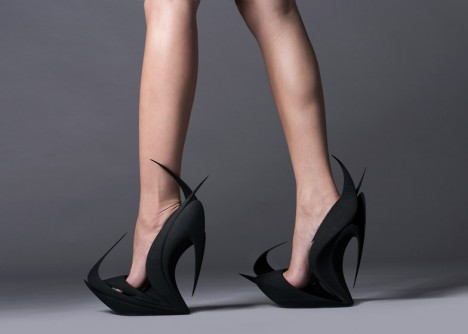
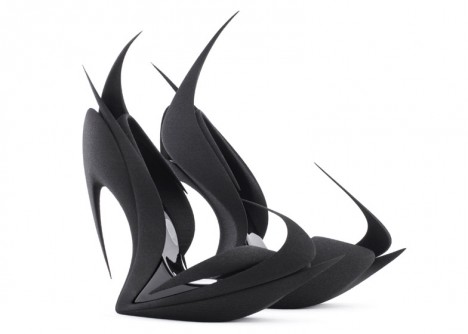
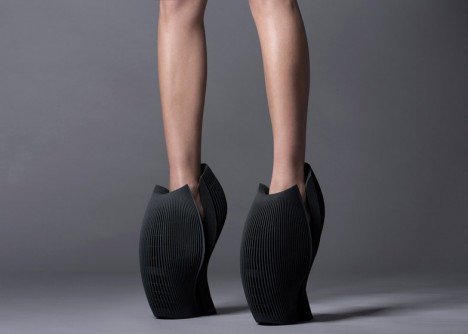
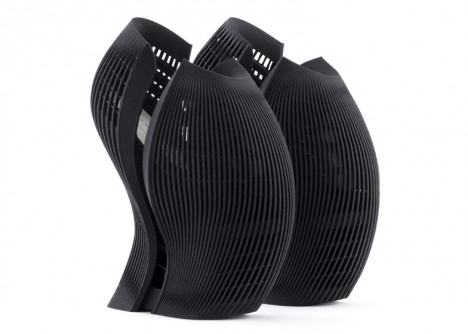
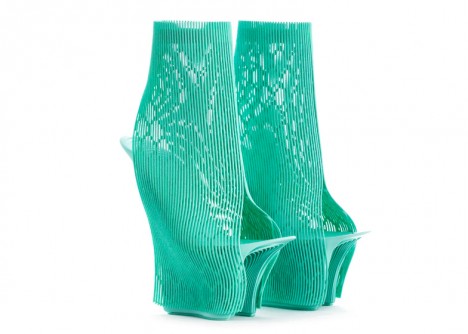
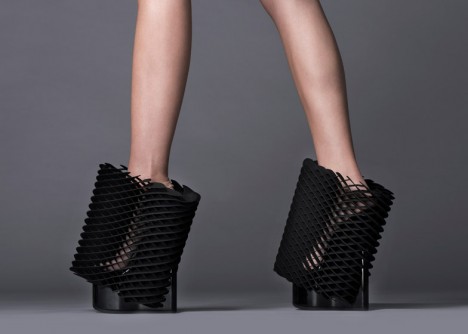
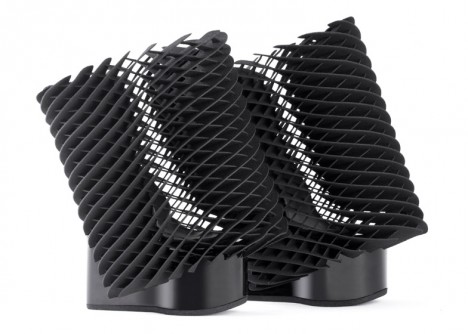
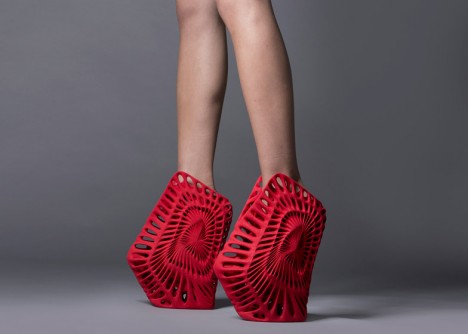
Somewhere between architecture, art and fashion, this series of 3D-printed shoes by five famous designers for United Nude pushes the limits of new technologies to make fresh forms of fancy footwear. Not meant to be everyday apparel, these unique party-oriented accessories were created for Milan Design Week 2015.

spiked 3d printed shoe

Rem Koolhaas invited architects Zaha Hadid, Ben van Berkel and Fernando Romero as well as designers Ross Lovegrove and Michael Young to participate in creating these pairs, each requiring around a day to print on a sPro 60 selective laser sintering (SLS) machine made by 3D Systems.

hoof like 3d shoe

hoof shoe base

open heal toe shoe

open thin material

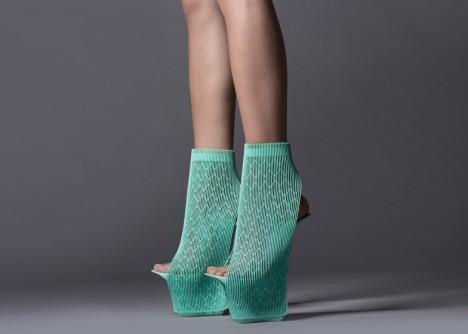
All shown above, Flames by Zaha Hadid features pointy protrusions casting stellar silhouettes, UNX2 by Ben van Berkel looks almost like a hoof and Ilabo by Ross Lovegrove features open heals and toes. Below, the Young Shoe by Michael Young provides comfortable support on all sides, looking much more awkward, reportedly, than it actually feels when in use and Ammonite by Fernando Romero is abstractly patterned off of the spirals of sea creatures.

angled shoe mesh

3d printed mesh shoe

sea shell shoe

3d red spiral shoe

More on the process and materials from Dezeen: “The process starts with a container filled with powder, which is heated in places, as specified by a digital file. This fuses the material together layer by layer until the final form is built up. Once complete, the excess powder is broken away to reveal the design.Each pair was created using two different materials: the soles were printed in hard nylon, while the uppers were formed from thermoplastic polyurethane (TPU), which is softer and more flexible.”

Share on Facebook


[ By WebUrbanist in Design & Products & Packaging. ]

[ WebUrbanist | Archives | Galleries | Privacy | TOS ]


WebUrbanist

 
Comments Off on Fashionably Architectural: 5 Designers Debut 3D-Printed Shoes

Posted in Creativity


Review of the Mindshift Gear Rotation180° Professional Backpack

15 Apr

Screen Shot 2015-03-19 at 2.40.05 PMI thought the whole Rotation180 thing was a gimmick, and avoided the packs by Mindshift Gear because who needs a new gimmick, right? I wanted a useful pack and had it in the f-stop Gear Satori EXP that joined me trekking in Nepal more than once. That pack is amazing and fits all kinds of stuff for my longer trips in the backcountry.

The best way I can describe the Mindshift rotation180° Professional pack is that it’s more amazinger. The Satori EXP is an amazing pack and can take a beating, but I found the rotation180° Pro better suited to my style and shooting needs. But, it’s not for everyone. Instead of a boring, exhaustive review, let me point out the highlights that sealed the deal for me.

The Rotation Gimmick That is Actually Awesome

One of the biggest obstacles I find when I am out hiking with my camera is stopping to get it out my pack each time I want to use it. Not only that, but living in Washington half the time means hiking in inclement weather, which means leaving my camera on the outside is not much of an option. The same goes for trekking in the Himalayas; having a heavy camera around my neck or shoulder just doesn’t work for me.

The r180° Pro attempts to solve this problem by making the lower part of the bag into a huge waist pack that swings around when needed. It works quite well.

Peter-West-Carey-_PWC3982

The rotation feature requires that your hip belt is attached first, otherwise it won’t really work. The belt is nicely padded all the way around, and is as comfortable as I’d expect in a long distance pack. The clips in front are normal size, I found the adjustment straps a little more complex than they need to be, but they work.

On the right side of the pack is a quick release buckle.

Peter-West-Carey-IMG_7344

Peter-West-Carey-IMG_7345

The more I study it, the more I am impressed because the buckle can only be removed by sliding it down, yet it can be attached by simply placing both pieces close together and letting the magnetic, one-way buckle attach. This makes it remarkably easy to attach by sense of feel but still secure enough to keep things in place. It is very well thought out.

With the buckle detached, the entire waist pack section is free to rotate. There is a handle loop on the right side of the pack, as well as huge loops on the front of the belt to aid in rotation.

Peter-West-Carey-IMG_7340

You can see in the image above that a full size DSLR (Canon 7D with battery grip, in this case) will fit, even with a 28-300mm or 70-200mm lens attached. The compartment comes standard with those dividers you find in all the packs these days, and can easily accommodate a smaller DSLR or mirrorless camera, an extra lens and a flash.

Screen Shot 2015-03-19 at 2.36.25 PM

Peter-West-Carey-IMG_7341

Inside the compartment there is ample storage for the small things. Filters and cards have side and top pockets including one with a zipper and mesh to make finding articles easy.

The waist belt also comes with its own rain cover and pockets for spare batteries and cards on the belt, interior pockets for filters, and other items.

Peter-West-Carey-IMG_7342

Peter-West-Carey-IMG_7343

But Does it Work?

At its core, the rotation180° is all about the quick action of slipping the waist belt around to access your gear. So how well does it work? I tested the pack over the course of two months, on ten different hikes, covering over 52 miles, as well as seven airline flights.

To those ends, the pack works very well for the right audience. It’s not as easy to take through airports as a smaller bag, or a roller bag as I am accustomed to using. But on the trail, it is hands down the best pack for mixed use.

Peter-West-Carey-_PWC3984

By that I mean, when your goal is to cover some ground and also take some photos, especially in inclement weather. I found this pack extremely useful for taking photos while keeping up with other non-photographers in the group. Because the action of sliding the belt around, extracting my big old camera, taking a shot and returning it all in place is so easy, I take more pictures and fall behind less than when I have to remove my whole pack.

This action alone is what has made the rotation180° Pro my replacement pack for the f-stop Satori EXP.

A Technical Pack

Beyond the waist belt, the pack is a technical pack, meaning those who love options and comfort in their pack will be happy. There are dozens of attachment points for hiking, skiing, and photography gear. It comes with a rain cover and tripod attachment straps.

Peter-West-Carey-_PWC3993 Peter-West-Carey-_PWC3991

Peter-West-Carey-_PWC3989

The shoulder straps allow for a full range of adjustment for someone up to about 6’6″. Ice axe/trekking pole loops on the bottom match up with daisy chain loops on the back for the most adventurous. An outside stuff flap allows wet or oversized gear to remain away from precious camera gear.

Peter-West-Carey-_PWC3988

There are daisy chain loops on the bottom for affixing things like sleeping bags or pads. Compressions straps are also available to help hold the pack to your back.

Space!

The space in this pack! Inside the main compartment is a removable organizing bag. This is accessed from the part of the pack that goes against your back, which helps increase security while traveling. With this bag removed, as I often used the pack, there is ample room for a full day hike worth of food, clothes, first aid, etc.

Peter-West-Carey-_PWC3985

Screen Shot 2015-03-19 at 2.37.52 PM

While knocking around town I carry a few books, iPad, chocolate and other odds and ends in this space. There is also a large pouch on the back of the pack that fits flipflops or a larger map (pictured below on the right). Along the sides are large tube sleeves, one of which typically holds the raincover. On the left side the tube can hold a large water bottle or bladder (there is also a hydration hole to allow a bladder to remain inside the main compartment).

Peter-West-Carey-_PWC3987

Organization

This pack is not the best for carrying a home office, as I am often apt to do. There are zippered pockets on the outer top flap, inner top compartment, and inside the opening against your back. There are five pockets in all, that are perfect for filters, remote controls, card wallets and recharging cords. But it doesn’t have anything for pens or business cards or protection for a laptop/tablet.

Peter-West-Carey-_PWC3986

That being said, the rotation180° Pro Is not designed for the mobile worker. It does an excellent job of keeping your photo gear separated (the waist belt has pockets for cards, filters, and other small items as well). I’m quite happy with its ability in that case. It’s not the bag for you if you need a mobile office bag.

Thoughtfulness in Design

It’s the little things I keep finding, and appreciating on this bag, even two months later:

  • The back open sleeve is entirely removable.
  • There are straps to help balance the load of a tripod specifically.
  • There is a whistle in the sternum strap.
  • The big thumb loops to help rotate the waist belt (and to just hook your thumbs in while on long hikes).
  • Rubberized zipper covers to keep out the elements.
  • A hidden compression strap for even more gear on the back, or your tripod.
  • Loops on the waist belt, to attach water bottle holders or lens bags.
  • Velcro attachment on the rain covers so they don’t blow off, but can be removed to dry out.
  • Custom designed outer rain cover that works with the waist belt system flawlessly.
  • The waist belt magnetic clip.
  • It fits in overhead compartments of major airliners.
  • The waist belt is easy enough to remove when the pack is not on your back, but is harder than any other bag I’ve used.
  • Comfort.

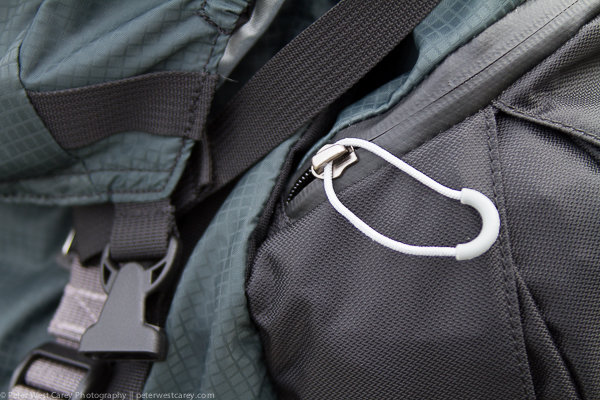
All the zipper pulls have decent sized loops, and there are two zippers to make opening the main compartment easy. Inside there is enough room for a full size DSLR and longer lens (pictured is a Canon 7D with battery pack and 28-300mm lens, equivalent in size to a 70-200mm lens). The unit also comes with dividers for those with smaller cameras and multiple accessories.
Peter-West-Carey-_PWC3990

No pack is worth its weight if it is not comfortable to lug around. While the pack is not super light because of its substantial build quality, materials and stitching, the weight is carried well thanks to extra padding against your back and shoulders.

I would estimate that the pack has ridden on my back for about 60 hours. This includes city walks, forest hikes, snowshoeing, airports and just standing around waiting for transit. I have tested other packs for much shorter periods and that is because they didn’t feel right. I would not hesitate to take this pack on multi-week treks in the Himalayas, as I have done with the f-stop Satroi EXP.

What Doesn’t Work

The pack is not perfect, but it’s close. It really is not the right size pack to be schlepping through airports. While I have been doing it (so I can use the bag at my regular locations) I prefer the f-stop Guru instead, or the ThinkTank Aviator rollerbag.

Removing your camera when the pack is not on your back is not that hard but can make things dirtier than normal when on the trail, because you now have two pieces in the elements.

This may seems like a small thing, but I found that dog hair loves this pack and sticks quite easily. I know this is not normal review criteria, but this bag is more magnetic to dog hair (and probably llama, cat and zebra hair as well) than any pack I’ve used.

Conclusion

The Mindshift Gear rotation180° Pro is one heck of a great bag. It is also not cheap and retails for $ 389.99 USD. Thankfully that cost translates into care in design and a solid build (nothing on this bag feels cheap). A month after using the bag I was still finding helpful attachment loops and straps.

This bag is designed for the active photographer with any size camera, while noting it works well for large lenses. Mindshift also has smaller versions of this bag if you don’t need to carry so much gear.

Finally, if you have a family who has a mind of their own and tends to walk away even after you have muttered, “Hold on a sec, I need to get a photo of that!” for the 60th time during a trip, this bag is for you. I love the ability to quickly get my shot and return my camera to both a comfortable carrying position, and a safe spot out of the elements.

Disclaimer: Mindshift Gear furnished the author with a pack in order to review this product.

googletag.cmd.push(function() {
tablet_slots.push( googletag.defineSlot( “/1005424/_dPSv4_tab-all-article-bottom_(300×250)”, [300, 250], “pb-ad-78623” ).addService( googletag.pubads() ) ); } );

googletag.cmd.push(function() {
mobile_slots.push( googletag.defineSlot( “/1005424/_dPSv4_mob-all-article-bottom_(300×250)”, [300, 250], “pb-ad-78158” ).addService( googletag.pubads() ) ); } );

The post Review of the Mindshift Gear Rotation180° Professional Backpack by Peter West Carey appeared first on Digital Photography School.


Digital Photography School

 
Comments Off on Review of the Mindshift Gear Rotation180° Professional Backpack

Posted in Photography