RSS
 

Archive for April, 2015

Do Visual Push-Ups Everyday to Grow as a Photographer

17 Apr

Please note that I do not know who originally coined the phrase “visual push-ups”. I have heard it used many times and find it very suitable to describe what we should all be practicing as often as possible with our camera.

There is no better time to practice your photography than here and now. Don’t wait for the best light, the exotic vacation, or a new lens. Let’s be honest, the only way you’re going to become a better photographer, is by doing visual push-ups every day, and by challenging yourself continuously for as many years as you’ll be able to carry that camera around. Give yourself assignments often and never stop learning!

©Valerie Jardin-4

One of my ongoing projects for several months was photographing beautiful smiles of strangers which resulted in a fun collection of smiles from all over the world. Here a shopkeeper in Melbourne, Australia.

Are you a hobbyist photographer?

You have the luxury of only needing to please yourself with your work. Make sure you do that. Click the shutter to move and inspire, not to impress.

Do you work for clients?

Pursuing personal projects is even more important. Remember the feeling of shooting for yourself only, without having to compromise between your vision and your client’s? However much you love being a pro photographer, you run the risk of losing the passion if you don’t take care of yourself and your creative needs.

You don’t have time to shoot everyday?

Yes you do! How much time do you spend on social media for example? Or sitting in front of the television? If you take only 15 minutes of that time and invest it in your photography daily, you will see the results. The best part is that you can do those visual push-ups at home, during your lunch break, or on the bus ride to work.

Do you think this only applies to beginning photographers?

Think again! I see so many seasoned photographers who are always shooting the same types of subjects, the same way. No matter what your skill level is, it’s always good to challenge yourself by getting out of your comfort zone to try new things.

Do you think that posting different genres will look like you can’t focus on one thing?

Wrong! On the contrary, it will prove that you are a well-rounded photographer. But, if you are trying to sell your services as a wedding shooter, your urbex images will be better posted on a separate page or gallery. Use common sense.

©Valerie Jardin-1

Anything can become a subject and give you a challenge. Try to make art with everyday objects and difficult lighting situations.

 What type of photo projects should you work on?

Anything will do, as long as you enjoy it. Remember, the point of the exercise is not to please others or get likes. It’s to please yourself, and yourself only. By all means, do share with the world and get that extra satisfaction and gratification if others like it too. But that should not be your priority.
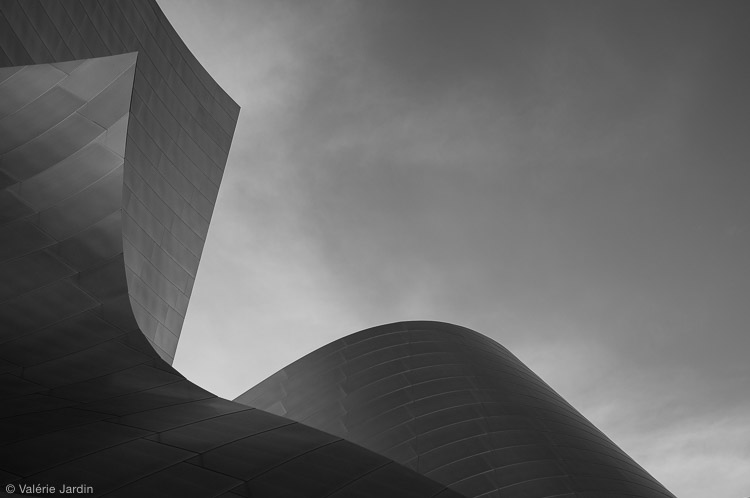
©Valerie Jardin-5

Although I am better known for my street photography, I don’t want to limit myself to just one genre of photography, the world is too beautiful to miss other opportunities. I love photographing architectural abstracts for example.

The sky is the limit!

Photograph any ordinary objects around your house and make them look extraordinary. Read the local paper and find a story that you can document with your camera. Start a 52 week, a 365 project, or even a 100 strangers or a self portrait project but be aware of the pressure you are putting on yourself. Make sure it doesn’t become a chore which would be counter-productive to what you are trying to accomplish.

Don’t worry too much about coming home with keepers every time you go out with your camera. There will be some good days, and there will be many not-so-good days. But one thing is certain; you will learn and grown every time you go out with your camera and do those visual push-ups.
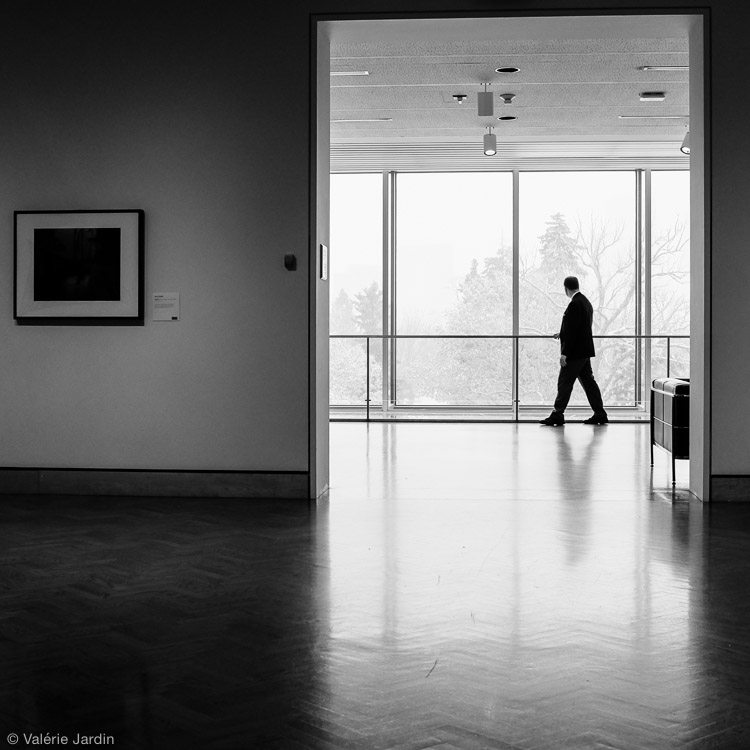
©Valerie Jardin-3

During the long winter months I visit a lot of museums and Museum-Goers has become one of my on-going series.

I always have two or three personal projects going at the same time, in different genres if possible. The point of the exercise is to explore new things and grow. Remember, that no matter what the subject or genre you choose to experiment with, you will benefit greatly from expending your creative vision.

Doing those daily visual push-ups will be the best time invested in your photography. One day you will only have five minutes to photograph an ordinary object on the window sill in the early morning light. The next day you may have an hour with your camera during your lunch break. Every minute you spend working on your craft will help you find your photographic voice and expand your creative vision.

©Valerie Jardin-2

Exercising your vision can take as little as a few seconds, and be as simple as photographing an object in your own house. This is part of my weekly self-assigned “Ordinary Objects are Beautiful” challenge.

Do yourself a favor, get off the internet and grab your camera NOW!

Please share with the dPS community which personal projects have made a real difference in your photography by adding a comment below.

googletag.cmd.push(function() {
tablet_slots.push( googletag.defineSlot( “/1005424/_dPSv4_tab-all-article-bottom_(300×250)”, [300, 250], “pb-ad-78623” ).addService( googletag.pubads() ) ); } );

googletag.cmd.push(function() {
mobile_slots.push( googletag.defineSlot( “/1005424/_dPSv4_mob-all-article-bottom_(300×250)”, [300, 250], “pb-ad-78158” ).addService( googletag.pubads() ) ); } );

The post Do Visual Push-Ups Everyday to Grow as a Photographer by Valerie Jardin appeared first on Digital Photography School.


Digital Photography School

 
Comments Off on Do Visual Push-Ups Everyday to Grow as a Photographer

Posted in Photography


Canon adds new Selphy CP1000 to its dye-sub mini-printer line-up

17 Apr

Canon has announced it will introduce a new dye-sublimation thermal transfer printer to its Selphy range of compact photo printers this summer. The Selphy CP1000 will have features very similar to the current products, but will additionally offer the ability to print twin ID photos on the same sheet of paper using the new Dual ID mode. The new model features a USB socket for printing from USB Flash storage as well as from a computer. The printer will also have memory card slots that will accept CF and SD type memory cards, and mini/micro SD cards via adapters. Read more

Articles: Digital Photography Review (dpreview.com)

 
Comments Off on Canon adds new Selphy CP1000 to its dye-sub mini-printer line-up

Posted in Uncategorized


[UPDATED] Nikon announces new firmware for 300mm F4 VR to fix blur at certain shutter speeds

17 Apr

Nikon has announced a firmware update for its new AF-S NIKKOR 300mm f/4E PF ED VR, to fix an issue where at certain shutter speeds on D800-series cameras, images can exhibit ‘noticeable blur’. According to Nikon, the problem can occur at around 1/125sec with the lens’s VR function enabled in either ‘Normal’ or ‘Sport’ modes. Users of affected units are encouraged to return their lenses to Nikon where the update will be applied free of charge. Click through for more details

Articles: Digital Photography Review (dpreview.com)

 
Comments Off on [UPDATED] Nikon announces new firmware for 300mm F4 VR to fix blur at certain shutter speeds

Posted in Uncategorized


How to Select the Right Camera Memory Card

17 Apr

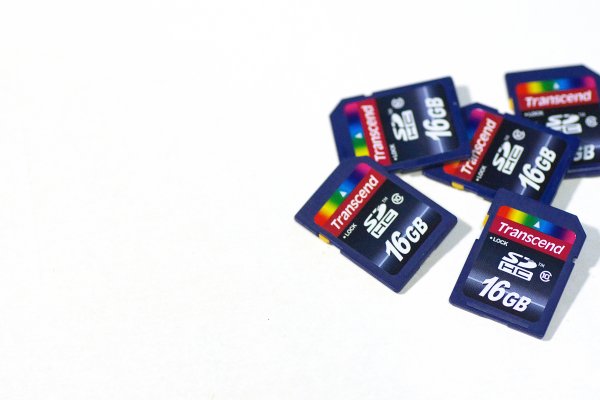
In today’s market if you want to buy a camera memory card, you may find it challenging to select the right one. A card comes with the following criteria; type, speed, price, capacity. If you want to buy a high capacity card with low price it might come with a low transfer speed. If you wish to buy a high transfer speed with high capacity card it may come with a really high price. If you want to strike a balance between both, you really have to compromise on quality.

Paul Hudson

By Paul Hudson

What is a memory card?

A small removable memory medium which can be used to store data on one medium and to transfer the data to another medium.

Let’s see each criteria which will help you decide on a memory card in detail.

Capacity

This one is fairly straightforward, and not a big deal. A 32GB memory card can hold up to about 1000 RAW photographs. Assuming that one RAW file size is 30MB, in general a Canon 5D MKIII will produce a RAW file between 25-35MB in size. Likewise a 16GB card can hold up to about 500 photographs, and so on. If you shoot in jpeg format, then a 32GB card can hold around 3200 photographs, assuming you have your jpeg settings as fine in detail, and large in file size. With that setting a jpeg file will come in at an average size of 10MB on a Canon 5D MK III camera.

Types

There are many types of memory cards available on the market ranging from Micro SD card, SD card, CF card, M2 (from sony). But there are only three type of cards being used primarily in the photography world, Secure Digital (SD) card, Eye-fi card, Compact Flash (CF) card.

Micro SD card

Micro SD card is a miniature version of the SD card and meant to be used in mobile phones. This card has capacity, as well as transfer speed restrictions. That is why it is used primarily in Smartphones where one can store music and apps, or any other relatively less active data.

Daniel Sancho

By Daniel Sancho

Secure Digital card (SD card)

This type of the card is widely being used in digital cameras, primarily in point and shoot cameras and secondarily being used in professional cameras. The constraint in using this card is the capacity of the card. The initial high capacity is only 2GB when introduced in 1999. But as the time and technology progressed a later version as SDHC is introduced with a higher capacity of 64GB in 2006 (HC means Higher capacity). The recent third iteration of SD card been announced in 2009 as SDXC cards (XC stands for extended capacity). This type of card offers up to 2TB and increased transfer speed.

Eye-fi card

These are unique SD cards that come with built-in WiFi. This allows you to transfer the data to your computer or a cloud based service or even to your Smartphone directly, thus enabling you to clear off the memory as you shoot, without having a need to replace the memory card. It is even possible to geotag your photographs with the available wireless service, but with less accuracy though.

Bfishadow

By bfishadow

There seems to be a promising future for this card!

Compact Flash card (CF card)

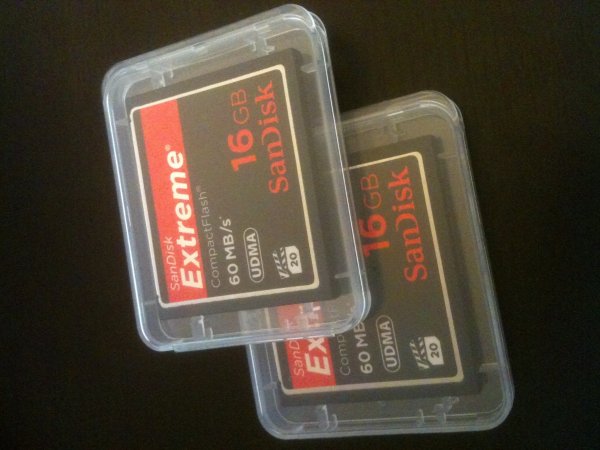
First introduced in 1994, CD cards have high speed, and high capacity. This is the reason why CF cards occupy the primary card slot in professional cameras. Present SD cards are equalling the speed and capacity of CF cards, but camera manufacturers are not leaving CF cards just yet. They often provide slots for both an SD and CF card, but some photographers wish they would offer two SD card slots instead. This provides some extra space inside the camera and saves money for the photographer (CF cards costs roughly twice that of SD cards). Hopefully they will switch the importance to SD cards in the near future.

As the name suggests this is a flash memory which aids high speed reading/writing speed, and has a higher capacity too.

Speed

Speed in SD cards

All memory cards come with speed, either mentioned or not. Speed here means both writing and reading. The one indicated on the card is the maximum speed the card can read, but the most important thing is the write speed. Read speed is the time taken to read the data from the card and the write speed is the time taken to write the data. Simply put read speed comes into action when you transfer the data from the card, write speed comes into play when you shoot. In general the write speed is about half of the speed of read speed in SDHC cards. In few other cards both the read and write speeds are about the same.

Simon Yeo

By Simon Yeo

The speed of cards have been classified into classes by the SD Association, which are referred to below. The speeds are primarily meant for video recording, where sustained recording (write) is required and it is supposed to be the minimum worst case scenario speed.

You really need to give weight to this one single-most important factor, when you buy a memory card. All SD cards have a class noted on them. Check the attached diagram below:

Class Minimum Speed
2 2MB/s
4 4MB/s
6 6MB/s
8 8MB/s
10 10MB/s

Later, in 2009 another class, UHS, was introduced by the SD association and is designed for SDHC and SDXC memory cards. UHS utilizes a new data bus that will not work in non-UHS host devices. If you use a UHS memory card in a non-UHS host, it will default to the standard data bus and use the “Speed Class” rating instead of the “UHS Speed Class” rating. UHS memory cards have a full higher potential of recording real-time broadcasts, capturing large size HD videos and extremely high quality professional HD.

Courtesy – SanDisk website.

UHS Class Minimum Speed
1 10MB/s
3 30MB/s

Speed in CF cards

Laurie Cooper-Murray

By Laurie Cooper-Murray

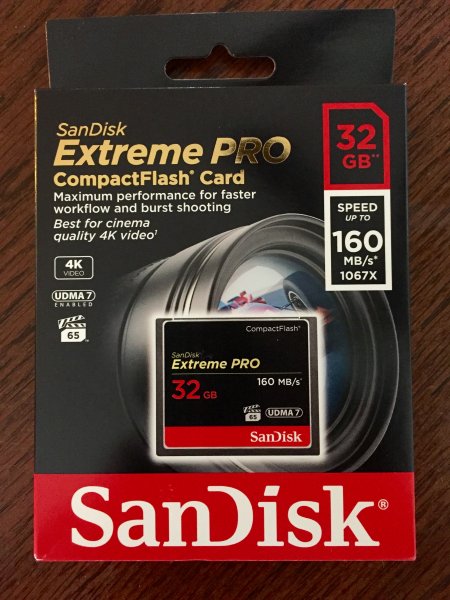
When it comes to CF cards the speed is often mentioned as X times and in many cards it’s been mentioned as MB per second, which is pretty straight forward. Whereas when the speed is mentioned as 600X or 1066X what exactly does it means? X means 150Kb per second. It is a standard brought over from optical media recording. Now to find out what exactly the speed is of 600X – to find this multiply 600 by 150 and divide the result by 1000. The final result is in MB per second. Eg., a 600X speed card is capable of 90MB per second read speed (600?150/1000).

The latest CF cards come with the UDMA 7 which improves in clearing the camera’s buffer memory quickly, which allows the camera to get ready for the next burst. Firmware upgrade is required for the Canon 5D MKIII (yours may require it also, check with the manufacturer) camera to make full use of UDMA 7.

Price

Phil Romans

By Phil Romans

When it comes to price, the fastest card is the primary criteria which decides the price. The next deciding factor is capacity of the card. An SD card is 50% of the price in the same capacity CF card. So, if you want to buy a high speed card with same capacity you will need to pay more. On the other side if you want to buy a high capacity card at a lower price, it is possible to do so but you’ll get a lower speed card.

Notes

  • If you use two cards at different speeds, the lowest speed is the deciding criteria for the burst. For instance if you use a CF card at 90 MB/sec in one slot and an SD card having the capacity of 45MB/sec (and you set RAW files for both cards) then you won’t get the advantage of 90MB/sec and the possibility of missing the shot. You have to use both cards at the same speed.
  • If you do not upgrade to the latest firmware for the 5D MKIII camera, the host memory will perform for UDMA 6 which significantly consumes more time in clearing the buffer memory.
  • I wish the camera manufacturers would switch to SD cards completely for both slots. The speeds of the SD card already matches with the CF cards, there is no point paying twice the price, and we’d get the added bonus of saving space inside the camera.
  • In few cases the SD card speed is higher than CF cards. For instance SanDisk Extreme Pro speed is 280 MB/sec but from the same manufacturer the CF card’s maximum speed is 160 MB/sec.

Hope you have gotten a bit of information from this article. Do share your thoughts in the comments.

googletag.cmd.push(function() {
tablet_slots.push( googletag.defineSlot( “/1005424/_dPSv4_tab-all-article-bottom_(300×250)”, [300, 250], “pb-ad-78623” ).addService( googletag.pubads() ) ); } );

googletag.cmd.push(function() {
mobile_slots.push( googletag.defineSlot( “/1005424/_dPSv4_mob-all-article-bottom_(300×250)”, [300, 250], “pb-ad-78158” ).addService( googletag.pubads() ) ); } );

The post How to Select the Right Camera Memory Card by Navan Viswa appeared first on Digital Photography School.


Digital Photography School

 
Comments Off on How to Select the Right Camera Memory Card

Posted in Photography


Luxury Retrofit: New 440-Square-Foot Condo Hidden in Old Garage

17 Apr

[ By WebUrbanist in Architecture & Houses & Residential. ]

box-home

Boxed in on both sides, this once-homely little garage space is now a cozy high-end condo, its rusted white corrugated metal front replaced with a still-concealing wood facade serving to hide something much more dynamic inside.

garage house interior

garage house kitchen

garage house seating

Designed by FABRE/deMARIEN, this ‘100% Box’ home features white walls and ceilings, reinforcing lightness and openness toward the front of the space, an area containing a kitchen and dining room as well as a front entry deck.

garage house living room

garage bathroom inside box

garage elevated sleeping loft

A wood-paneled box in back serves all kinds of additional functions, housing a series of desk and seating built-ins, enclosing a small bathroom and supporting the elevated bedroom with bed and storage above.

garage house before

garage reconstruction

garage under construction

garage house conversion

garage house car port

The sloping roof helps provide higher ceilings in the back spaces as well as accommodating the additional needs of the raised bedroom area, with periodic sunlights to help illuminate all of the above. Enclosed on all sides, this urban infill lot reuse manages to feel spacious and open despite the limitations of its site.

Share on Facebook


[ By WebUrbanist in Architecture & Houses & Residential. ]

[ WebUrbanist | Archives | Galleries | Privacy | TOS ]


WebUrbanist

 
Comments Off on Luxury Retrofit: New 440-Square-Foot Condo Hidden in Old Garage

Posted in Creativity


Create Your Own Super SparklyBokeh Background

16 Apr

When points of light are out of focus they turn into sparkling orbs of awesomeness.

This is called bokeh!

Wouldn’t it be cool if your next backdrop was made completely out of this fantastic effect? We tried it and loved it, and chances are you will, too!

So we’ve put together a step-by-step tutorial on how to make your very own glittery bokeh backdrop. Follow along and let the magic begin.

Make Dreamy Bokeh Backdrops
(…)
Read the rest of Create Your Own
Super Sparkly
Bokeh Background (476 words)


© Taylor for Photojojo, 2015. |
Permalink |
No comment |
Add to
Super Sparkly
Bokeh Background”>del.icio.us

Post tags:


Photojojo

 
Comments Off on Create Your Own Super SparklyBokeh Background

Posted in Equipment


15. April 2015

16 Apr

Das Bild des Tages von: Reimund Schmidt-De Caluwe

Treppenarchitektur

Im Ausblick: Ein Büchersammler, ein Street-Wettbewerb und Analog-Digital-Frage.
kwerfeldein – Fotografie Magazin | Fotocommunity

 
Comments Off on 15. April 2015

Posted in Equipment


Tilt-Shift-Fotografie für Einsteiger

16 Apr

tiltshift-manuelmut-titel

Nachdem ich neulich bereits in einem anderen Artikel erzählt habe, wie ich zur Fotografie mit dem Tilt-Shift-Objektiv gekommen bin, möchte ich mit dem heutigen Artikel eine kleine Einführung für all diejenigen geben, die sich mal daran probieren wollen, es sich aber bisher wegen mangelndem Verständnis nicht getraut haben.
kwerfeldein – Fotografie Magazin | Fotocommunity

 
Comments Off on Tilt-Shift-Fotografie für Einsteiger

Posted in Equipment


Trick Photography: Creating Appealing Illusions with Your Camera

16 Apr

Trick photography – creating appealing illusions with your camera Trick photography helps in creating an illusion of the scene through the ideas of the photographer. While there’re many, some of the popular trick photography ideas include tilt-shift, infrared, high speed, light painting, zoom & panoramic photography. Trick photography is a way to make a scene look more appealing and attractive Continue Reading

The post Trick Photography: Creating Appealing Illusions with Your Camera appeared first on Photodoto.


Photodoto

 
Comments Off on Trick Photography: Creating Appealing Illusions with Your Camera

Posted in Photography


Fujifilm XF 16mm F1.4 moves from roadmap to retailers

16 Apr

Another lens from Fujifilm’s roadmap is making its way to retailers, and that’s the XF 16mm F1.4 R WR wide prime. This lens, equivalent to 24mm on APS-C, has a nine-blade aperture, flare-reducing Nano-GI coating, and a minimum focusing distance of 15cm/6 in. It’s also sealed against weather and dust and can function at temperatures as low as -10C/+14F. More details

Articles: Digital Photography Review (dpreview.com)

 
Comments Off on Fujifilm XF 16mm F1.4 moves from roadmap to retailers

Posted in Uncategorized