RSS
 

Archive for February, 2015

Real-world test: the Sony a6000 goes surfing with Chris Burkard

18 Feb

Chris Burkard is a well-established adventure and surf photographer. His landscapes and cold weather surf photos have earned worldwide attention and plenty of high-profile clients. Chris joined us recently in California to take Sony’s a6000 for a spin to try out its hybrid AF system on – what else? – sun, sand and surf. See how the a6000 keeps up in our latest real-world test. See video

Articles: Digital Photography Review (dpreview.com)

 
Comments Off on Real-world test: the Sony a6000 goes surfing with Chris Burkard

Posted in Uncategorized


New Artificial Lighting Tricks Human Brain into Seeing Sunlight

18 Feb

[ By WebUrbanist in Design & Fixtures & Interiors. ]

skylight

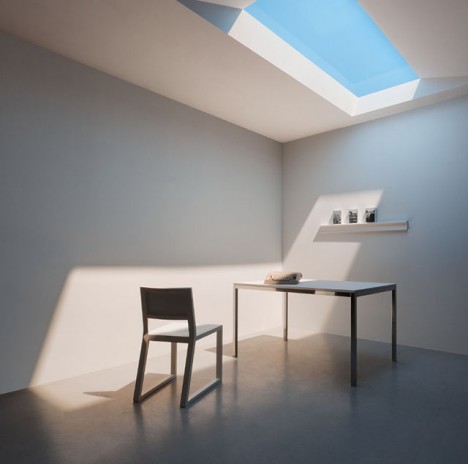
Access to natural daylight has long been one of the biggest limiting factors in building design – some solutions involve reflecting real daylight from the outdoors, but until now no solution has been able to mimic natural refraction processes and fool our minds into thinking we are surrounded by actual sunlight.

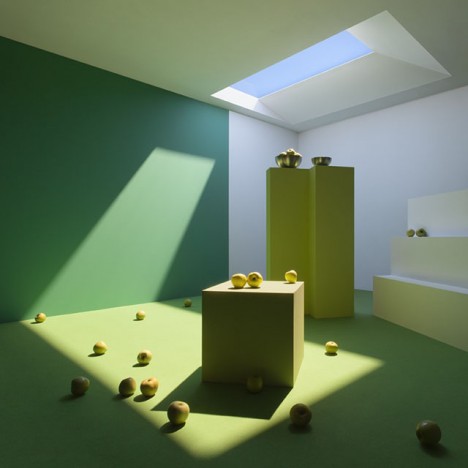
artifical snlight interior image

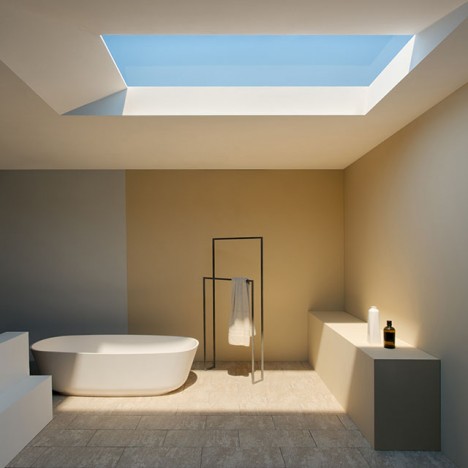
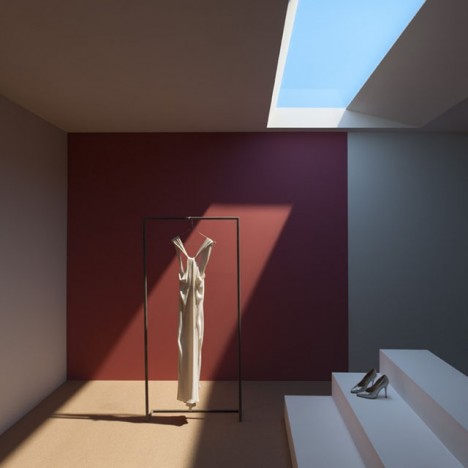
Developed by CoeLux in Italy, this new form of artificial light is able to dupe humans, cameras and computers alike using a thin coating of nanoparticules to simulate Rayleigh scattering, a natural process that takes place in Earth’s atmosphere causing diffuse sky radiation. It was not enough to make the lights brighter or bluer – variegation and other elements were needed as well.

artficial skylight system design

light bring to market

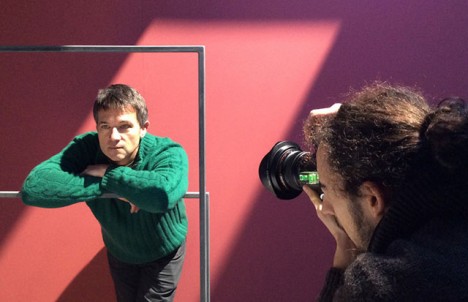
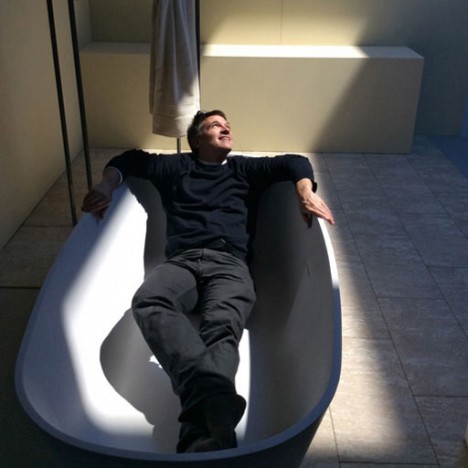
The result is an effect that carries the same qualities we are used to experiencing outside, from color to light quality. The company also boasts that these photos are untouched and that their fake skylights in showrooms fool people in person just as effectively, appearing to have infinite depth just like one would expect looking up into the sky (James Turrell’s skyspaces and this work by Christo come to mind).

artificial light photo shoot

daylight light soucre innovation

The potential applications are effectively endless, from lighting deep indoor spaces to replacing natural light in places where winters drag on and daylight hours are short. The company sees opportunities in areas like healthcare facilities where it may not be possible to put patients near real windows for spatial or health reasons.

lux live winner award

light real simulation design

Currently, three lighting types are on offer to simulate various broad regions – Mediterranean, Tropical and Nordic – featuring various balances of light, shade, hue and contrast. They are also working on additional offerings, including simulated daytime sequences (sunrise through sunset) and color variations to reflect different kinds of weather conditions.

Share on Facebook


[ By WebUrbanist in Design & Fixtures & Interiors. ]

[ WebUrbanist | Archives | Galleries | Privacy | TOS ]


WebUrbanist

 
Comments Off on New Artificial Lighting Tricks Human Brain into Seeing Sunlight

Posted in Creativity


Fujifilm XF 16-55mm F2.8 R LM real-world samples gallery posted

18 Feb

Fujifilm’s XF 16-55mm F2.8 is a weather-sealed zoom covering a 24-83mm equivalent range. With a fast F2.8 constant aperture, manual aperture control and a new Nano-GI coating to reduce flare, it’s a high-end lens to be sure. Take a look at how it performs in the real world. See gallery

Articles: Digital Photography Review (dpreview.com)

 
Comments Off on Fujifilm XF 16-55mm F2.8 R LM real-world samples gallery posted

Posted in Uncategorized


Make Magical Photo Special FX (no spells required)

18 Feb

Ta-da! We’re about to reveal our best tricks for creating magical photo effects.

With a little collection of ordinary objects you can make your photos extraordinary.

Turn the whole world into a whole rainbow party, transform a handful of flour into a majestic cloud, paint the night sky with light and more.

Read on and you too can put the special in special effect photography.

Photojojo’s Guide to Special FX Photography

(…)
Read the rest of Make Magical Photo Special FX (no spells required) (575 words)


© laurel for Photojojo, 2015. |
Permalink |
No comment |
Add to
del.icio.us

Post tags:


Photojojo

 
Comments Off on Make Magical Photo Special FX (no spells required)

Posted in Equipment


Pop-Up Office: 14 Modern Mobile Studios for Creatives

18 Feb

[ By Steph in Architecture & Offices & Commercial. ]

mobile office observatory 1

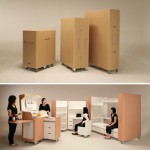
Whether you’re an artist looking to work in the most inspiring environment possible or just want to break beyond the cubicle, these mobile and pop-up offices offer adaptability, portability and access to optimal daylight levels.

Volkswagen T6 Mobile Office
mobile offices volkswagen t6

mobile offices volkswagen t6 2

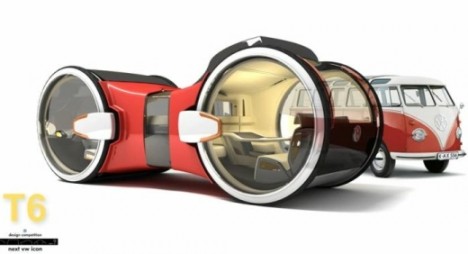
Volkswagen’s bizarre-looking T6 is a mobile office in the most literal sense – it’s a van and workspace in one. The idea is that you wouldn’t have to miss a moment of work time while commuting, but this design – which features a meeting area as well as a personal cubicle – might be even better suited to parking somewhere pretty and enjoying the view out of those big round windows.

Observatory Modern Artist Residence

studio

mobile office observatory 2

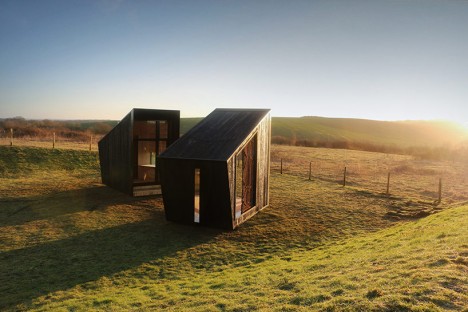
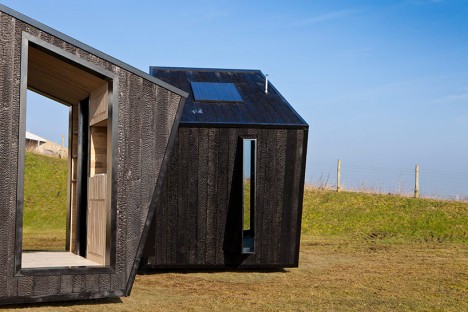
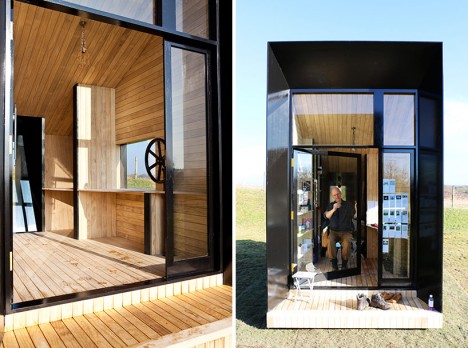
These mobile ‘observatory’ studios are perfect for creative work with their massive glazed walls opening up to whatever landscape is deemed desirable for the work at hand. Designed by four graduate students from the English design firm Feilden Clegg Bradley Studios, these two small timber structures sit on prefabricated swiveling bases so they can be moved even once they’re transported via flat-bed truck to their destination.

SPACE Shipping Container Office

mobile office shipping container 1

mobile office shipping contaienr 2

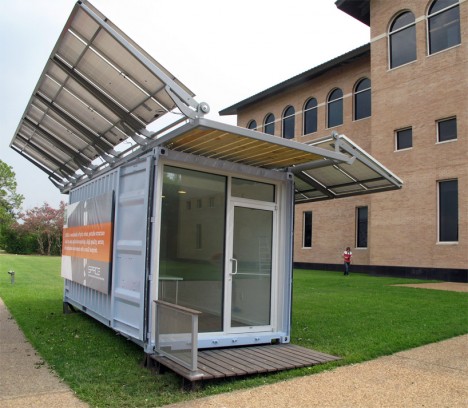
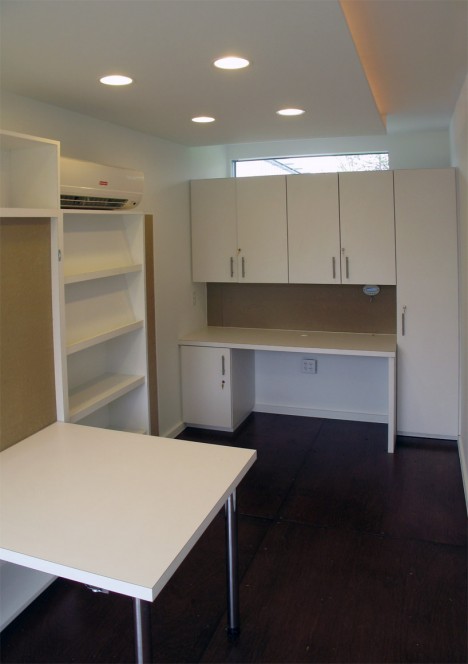
The SPACE shipping container office by Metalab is made up of a reclaimed shipping container with a fold-out solar rack system. It’s designed for rapid deployment so it could function as an emergency relief office, but also as a park ranger’s station or an everyday work space in areas where access to the power grid isn’t available.

Mobile All-in-One Office Unit

mobile offices all in one 1

mobile offices all in one 2

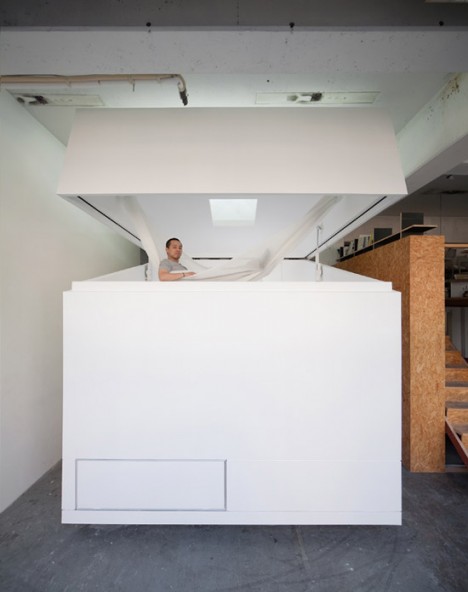
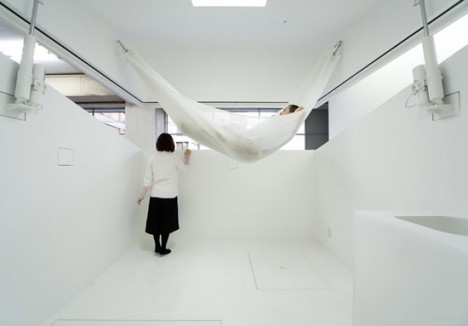
This office-within-an-office makes it easy to maintain a comfortable, modern, minimalist workspace no matter where your office might be physically located -even if it’s a dreary warehouse. THe Paco all-in-one unit by Jo Nagasaka + Schemata Architecture Office is a white cube with a roof that opens up to allow interaction with the world outside, but offers privacy when closed. The interior is fitted with a hammock, a table and even a bathroom.

Comic Book Style Pop-Up Office
mobile office comic book style

OLYMPUS DIGITAL CAMERA

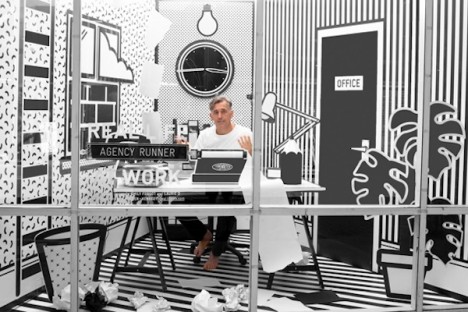
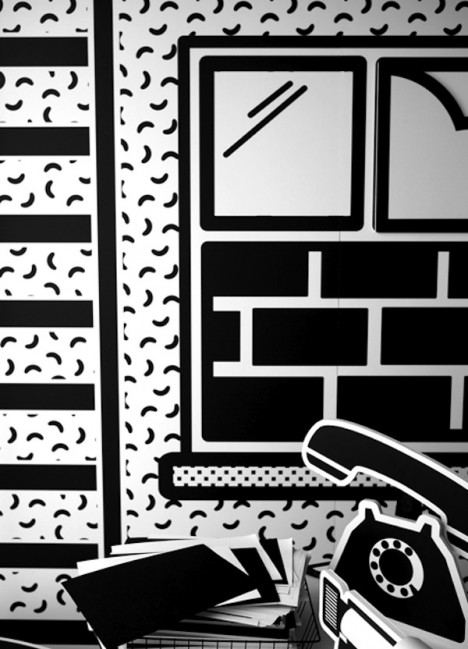
This fun pop-up office turns a display window into a creative comic-book inspired workspace, showcasing local artists in London to entertain passersby. Employees of the Weiden + Kennedy ad agency took turns working in the window at the company’s headquarters. Most of the office is made of paper and cardboard in stark black and white, and some elements are kinetic, like a phone that rocks as if it’s ringing and a clock that runs backwards.

Next Page – Click Below to Read More:
Pop Up Office 14 Modern Mobile Studios For Creatives

Share on Facebook


[ By Steph in Architecture & Offices & Commercial. ]

[ WebUrbanist | Archives | Galleries | Privacy | TOS ]


WebUrbanist

 
Comments Off on Pop-Up Office: 14 Modern Mobile Studios for Creatives

Posted in Creativity


Review: slingShot DSLR Remote Control App

18 Feb

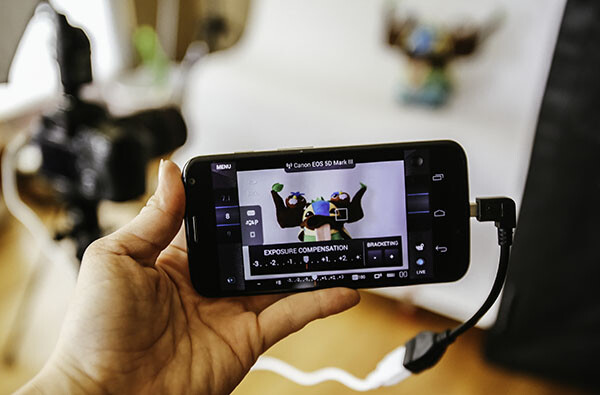
One of the great advantages of smartphone technology is the way that it makes photography more convenient. I’m not just talking about using the camera that came with your phone. There are now smartphone apps coming out that allow you to connect with, and even control, your DSLR camera. One of these apps is the brand new slingShot DSLR Remote Control, which just came to the Google Play Android market on January 25, 2015. Using this app makes it possible to adjust the settings on your camera, see what the camera sees in live view, and view the resulting image after it’s snapped. All of this, and you don’t even have to be standing right next to your camera.

How it Works

The slingShot app connects with your camera in one of two ways: via Wi-Fi if your camera has it, or via a physical USB On-The-Go (OTG) cable. If you have a Wi-Fi enabled camera, you’re already likely to be familiar with how the function works in that your camera will create its own Wi-Fi network that your phone will then sync with. For photographers with non-Wi-Fi cameras, the connection to your phone is made with the aforementioned OTG cable. While these cables definitely aren’t as common as others, they are cheap, easy to find online, and really convenient for connecting other devices to your phone or tablet besides your DSLR, such as a wireless USB mouse or keyboard.

slingShot Remote DSLR Controller

Compatibility

At this moment, the app claims on its website to only support the following models:

  • Camera Via Wi-Fi Connection: Canon EOS 6D, Canon EOS 70D and Nikon 5300.
  • Camera Via USB Connection: Canon EOS 6D, EOS 70D and Nikon D5300 and D7000.
  • Phone: Android 4.0 or higher; phone must also have Wi-Fi or full USB host support capabilities.

Despite the app’s relatively short list of supported devices, you may want to try it out for yourself. For example, the app doesn’t specify compatibility with the Canon EOS 5D Mark III, but it worked just fine with mine.

How to Control Your Camera with the App

1. Assuming you have a supported camera model and Android phone (no iOS support at the moment), the first step is to download the slingShot app from the Google Play store. This app does cost $ 8.99, but its features may make it worth the cost, depending on how useful you find them.

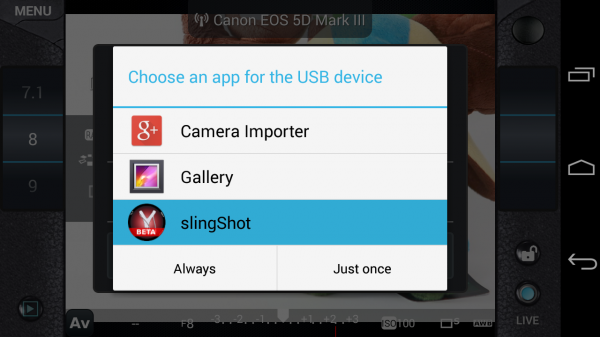
2. After you install the slingShot app, proceed to connect your camera to the phone. If your camera has Wi-Fi, walk through the procedures to enable the wireless connection, or simply connect the camera by using a OTG USB cable. When your camera and phone are successfully connected, you’ll see the screen below pop up, asking which app you want to activate. Choose the slingShot app.

slingShot Remote DSLR Controller

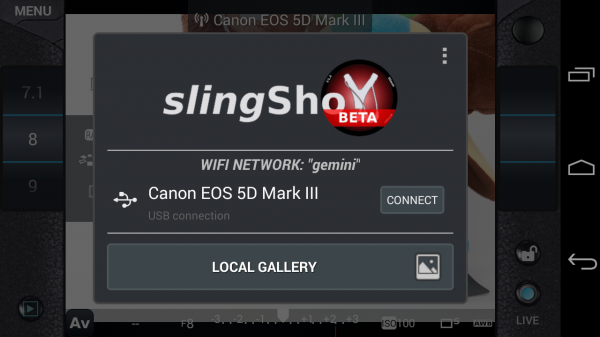
3. A screen will then flash up on your phone indicating that your camera has been detected. Press the “Connect” button to continue.

slingShot Remote DSLR Controller

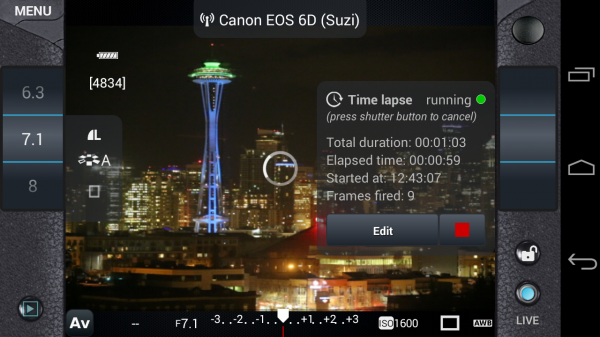
4. You will then see the menu controls on your phone (see below), as well as an indicator in the upper middle of the frame confirming that your camera is connected; in this case, I have my Canon 6D connected via Wi-Fi. You will also have the ability to use your phone to control aspects of your DSLR such as shutter speed, aperture, exposure, ISO, white balance, and image quality; you can even tap on the button in the upper right corner to take a photo.

However, you won’t be able to see what the camera is seeing until you enable live view mode on your camera and then press the “LIVE” button on the lower right corner of the app. Once the live view is on, the rest of the app controls are very smooth and easy to use, requiring just a tap or swipe of the finger to enable. There are also some extra features that appear when you tap on the menu button in the upper left corner, one of the most notable being the ability to do time lapse shots.

slingShot Remote DSLR Controller

Time lapse feature

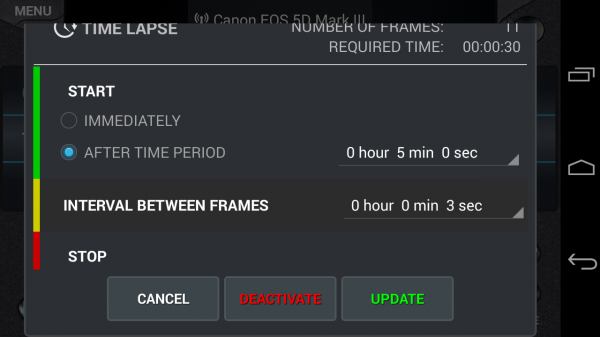
I’ve played around with quite a few DSLR remote control apps, but none have come with the time lapse functionality. slingShot’s time lapse feature is in the Menu and it offers a range of customizable settings. You can set it to start immediately or after a set period of time, you can also set the interval between frames, and give it a time to stop or have it stop after a certain number of frames are snapped. I tried the time lapse function out on both my Canon 6D and 5D Mark III and it worked perfectly the first time around.

There are a couple things that didn’t work so well. First, if your camera falls asleep, the time lapse function is turned off, even if you have a timer set. Second, the ability to reset the time lapse with different conditions is difficult to do; each time I had to simply reconnect my camera and phone to get rid of the initial settings I input. However, the fact that this app can do basic time lapses is still impressive and will likely be improved upon in future updates.

slingShot Remote DSLR Controller

Previewing images

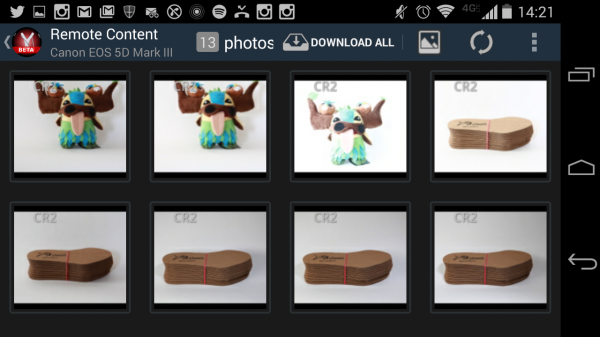
Another simple use of the slingShot app is to use it to preview DSLR content on your phone. Simply connect via Wi-Fi or OTG cable and press the play button in the app’s lower left corner. You’ll then see the screen show (see image below) a neat gallery of photos from your CF or SD card. Even if you have older content that wasn’t shot with the app,  you’ll be able to see it and download it to your phone, or share via email or social media. This app will even read and convert RAW files at pretty decent speeds.

slingShot Remote DSLR Controller

Potential Deal Breakers

While there are many positive aspects to the slingShot app, there are a few possible deal breakers. First, there are a few bugs in the app that don’t necessarily affect its overall functionality, but make its cool trick features such as time lapse not work as well as one might hope. On the other hand, the team behind the app is still actively making updates, so there’s a good chance these errors will be fixed. Another possible point of contention is the app’s $ 9.99 price tag. While you can download slingShot’s Beta version for free, you can only use it for 11 days before you’re made to purchase the actual app in order to keep using it. While the price isn’t super extravagant, it is on the steeper side compared to some other apps available. Also, there are a few other DSLR controller apps that offer the same functionality at lower prices. In fact, if you have a Wi-Fi DSLR, such as the Canon 6D in my case, there’s a (free) app from Canon that comes with it that enables DSLR control.

If the idea of being able to control your DSLR with your phone sounds like a winning deal, be sure to download slingShot app! Has anyone else given it a try? Thoughts?

googletag.cmd.push(function() {
tablet_slots.push( googletag.defineSlot( “/1005424/_dPSv4_tab-all-article-bottom_(300×250)”, [300, 250], “pb-ad-78623” ).addService( googletag.pubads() ) ); } );

googletag.cmd.push(function() {
mobile_slots.push( googletag.defineSlot( “/1005424/_dPSv4_mob-all-article-bottom_(300×250)”, [300, 250], “pb-ad-78158” ).addService( googletag.pubads() ) ); } );

The post Review: slingShot DSLR Remote Control App by Suzi Pratt appeared first on Digital Photography School.


Digital Photography School

 
Comments Off on Review: slingShot DSLR Remote Control App

Posted in Photography


6 Eye-Catching Photos and How They Can Help You Improve Your Photography

17 Feb

Each photographer has their own way of approaching a scene, choosing which settings on their camera will best reflect their vision, and then crafting the final image. You get to make this series of decisions each time you take a photo, and it’s a highly personal experience.

But you can still learn a lot by going behind the scenes of a photo, and hearing how the photographer made their own decisions. Whether you pick up a new tip for creating an interesting effect, a new way of looking at a scene, or simply the inspiration to go and shoot, it’s both informative, and a lot of fun too.

So here are six of my favourite photos, and details about how they were taken. Get out your notebook, have your camera handy, and let’s go.

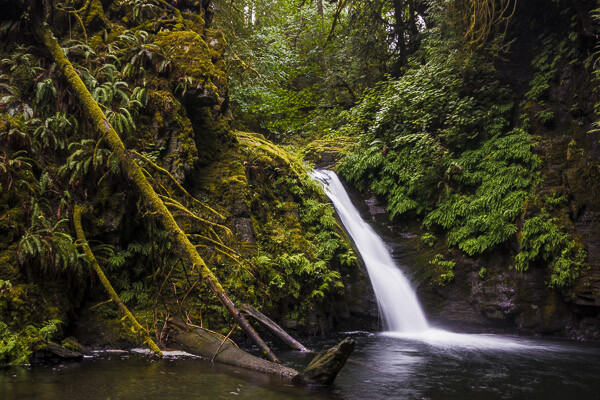
1. Waterfall in the Woods
Extremely essential camera skills 1

Vancouver Island, Canada – Settings: 14mm, f/10, 1.6 seconds, ISO 80

This shot is a great example of what happens when you pick a slow shutter speed. Moving water takes on this flowing look and adds a softer feel to the image.

If you want to get this effect, first set your shutter speed to a long value. Here the setting was 1.6 seconds – a value around there is a good place to start. Then you’ll need to adjust the rest of your settings to get a good exposure. This can be tricky sometimes, especially if it’s a really bright scene. A high (small) aperture, and low ISO can really help. But if that’s not enough, you may need to use a neutral density filter.

Then make sure you can keep your camera steady for the entire shot. The ideal would be to use a tripod, but it doesn’t even need to be a big, heavy one. This shot was taken with a point and shoot camera (the Sony RX100III) and the tripod was just a tiny tabletop tripod set up on the rocks.

Finally take the photo, and enjoy a beautiful waterfall image that really grabs your viewers’ attention.

2. The Bee and the Flower

Extremely essential camera skills 2

Edmonton, Canada – Settings: 85mm, f/4.0, 1/3000th, ISO 200

This photo has two elements to pay attention to, the first being the composition. The bee is very small, but you can still easily make it out. That’s thanks to negative space. All of the blue, empty sky is negative space that draws your eye towards the subject. One of the keys to finding negative space in a scene is to move your feet. Walk around, looking to see if you can find an angle that helps simplify your frame by incorporating negative space. Don’t stop there, though. Change your position even further by climbing up high, or, as in this case, lying on the ground. Yep, this photo was taken lying flat on the grass. Don’t be afraid to get messy in the pursuit of a great shot.

The second thing to note about this shot is the shutter speed. There’s a very fast setting chosen here (1/3000th of a second) and that allowed the bee to be in sharp focus, even when it was moving very fast. A slower shutter speed could have led to motion blur of the subject, losing that crisp, sharp detail. When shooting fast moving objects, make sure your shutter speed is set appropriately.

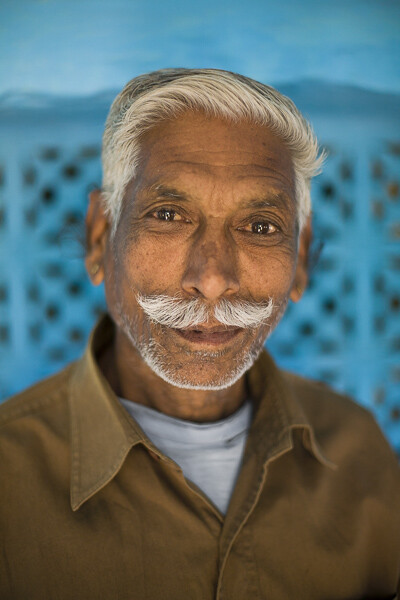
3. The Internet Man
Extremely essential camera skills 3

Jodhpur, India – Settings: 50mm, f/1.6, 1/320th, ISO 400

There’s a great story behind this image. On a trip through India we found ourselves in Jodhpur, known as the Blue City. The walls of many of the houses are painted a vibrant blue, and it made for some incredible images. But this portrait was not taken on a photo walk, but rather after we made our daily visit to the internet shop.

After we finished up on the computer, we got to chatting with the man who owned the shop. He was a wonderful guy, with a great face, so we asked for a portrait. He was happy to oblige, and by standing in the doorway of his shop we got both a beautiful blue background, and catchlights in his eyes from the light coming in the door (catchlights, those white specks in the eyes, are a great way to add life and sparkle to your subjects’ eyes).

One final note on the settings: using a low aperture value can help your subject stand out from the background, especially if you can’t bring them very far forward from the background. In this image f/1.6 was used, which is definitely very low, but it really helped create some background separation.

The best part of the story? After we took his photo (and gave him a copy of the file) he thanked us, and told us that he’d pray that we’d have a son before returning to India. Well, we did have a son. Now we just have to go back, don’t we?

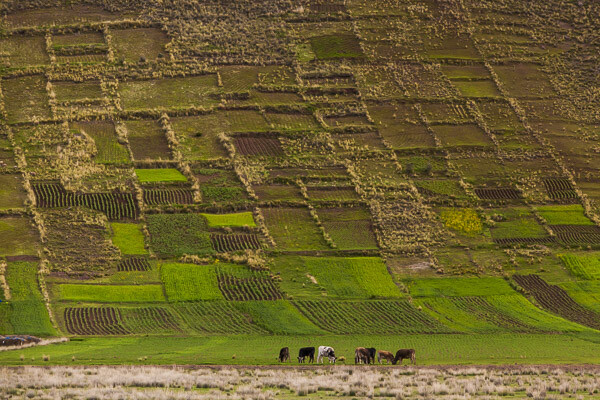
4. Cows in the Field
Extremely essential camera skills 4

The Sacred Valley, Peru – Settings: 200mm, f/7.1, 1/1600th, ISO 800

Learning how to use lens compression to your advantage can make for some really impressive shots. This image is a great example of this technique.

Very simply, when you use a longer focal length (like the 200mm used in this photo) it makes the distance between objects in the frame appear to be less. It makes the background appear closer to the foreground, and in this example it makes the hills appear very close to cows. Essentially, it compresses the space in the image.

Here you can see how it makes the hills really fill the frame and create a strong, patterned background that contrasts nicely with the organic shapes of the cows.

In your own photography you can use a long lens to make clouds appear much larger and closer to your subject, or make your friends look like they’re stepping on top of a building, Godzilla-style. There’s no limit to the creative effects you can achieve when you use compression.

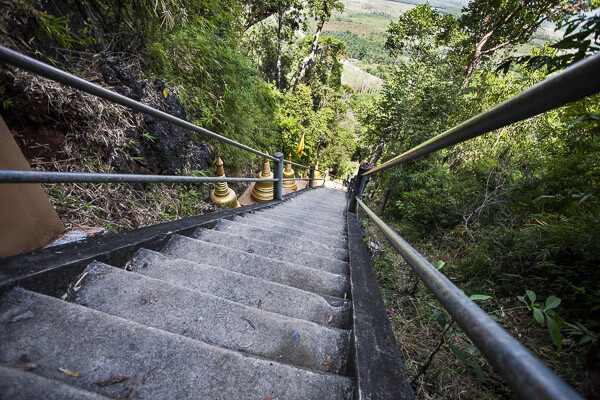
5. Down the Stairs
Extremely essential camera skills 5

Krabi, Thailand – Settings: 17mm, f/5.0, 1/400th, ISO 400

If long lenses make objects appear closer to each other in your frame, what about wide angle lenses?

Here’s a great example. This shot, taken while looking down a few of the 1,272 treacherously steep steps of the Tiger Cave Temple, makes you feel like you may just fall down them, along with the photographer.

The wide angle lens (17mm) helps to create that feeling. The wide angle exaggerates the distance between objects, especially at the edges. Take a look at those hand rails at the edge of the frame. They look very far apart, especially compared to the distance between the hand rails further down the stairs. But this exaggeration at the edges helps to turn the rails into leading lines, drawing your eye down the stairs, and creating that falling feeling.

So if you want to add some drama to an image, or exaggerate perspective, grab a wide angle lens. Place objects near the edges and make use of the stretching it causes.

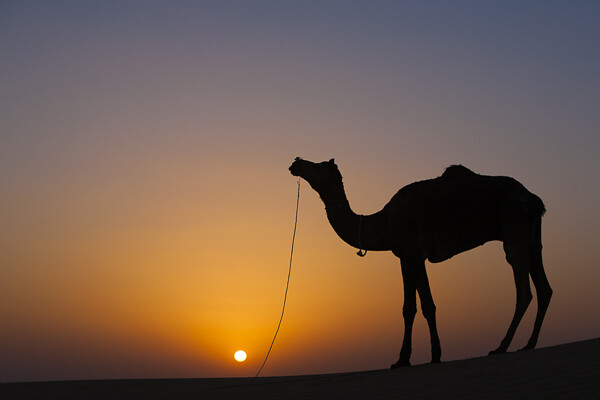
6. Camel at Sunset
Extremely essential camera skills 6

Jaisalmer, India – Settings: 70mm, f/7.1, 1/400th, ISO 125

Doesn’t a great silhouette image just grab your attention? It’s so different from how we normally see the world that it can add a big impact to your work.

But a silhouette is a prime example of how your camera can easily be fooled by light, and how you, the photographer, need to know how to control it.

In this example your camera might very well try to expose for the camel, or somewhere in between the camel and the sunset, and you’ll wind up with something really bright, or sort of dark, but it probably won’t look like a nice, crisp silhouette.

So what to do? Take control. When aiming for a silhouette you’ll want to expose for the sky, not the subject. Then you can either use exposure compensation to dial in the exposure you’re looking for, or better yet, jump into full manual control and choose your settings to get exactly the exposure and depth of field you want.

Hopefully this peek behind the decisions and settings of these photos gives you a few tips to take some great shots of your own. The more you learn about how all the settings on your camera affect the look and feel of your images, the better decisions you’ll be able to make. Best of all, this stuff doesn’t have to be hard to learn, and you’ll get to use the knowledge to create better images for the rest of your life.

googletag.cmd.push(function() {
tablet_slots.push( googletag.defineSlot( “/1005424/_dPSv4_tab-all-article-bottom_(300×250)”, [300, 250], “pb-ad-78623” ).addService( googletag.pubads() ) ); } );

googletag.cmd.push(function() {
mobile_slots.push( googletag.defineSlot( “/1005424/_dPSv4_mob-all-article-bottom_(300×250)”, [300, 250], “pb-ad-78158” ).addService( googletag.pubads() ) ); } );

The post 6 Eye-Catching Photos and How They Can Help You Improve Your Photography by Lauren Lim appeared first on Digital Photography School.


Digital Photography School
 
Comments Off on 6 Eye-Catching Photos and How They Can Help You Improve Your Photography

Posted in Photography


Home Room: Plug-and-Play Modules Make Instant Living Spaces

17 Feb

[ By WebUrbanist in Design & Fixtures & Interiors. ]

cubitat bed pull out

Resembling a house turned inside out, the Cubitat is a hybrid architectural and interior design prototype designed to be a modular all-in-one solution that can turn any empty space into your new home on demand.

cubitat interior architecture hyrbid

In essence, it takes the idea of a mobile kitchen island and expands the concept to include everything you need to live, containing a bathroom inside and featuring an array of furniture and fixtures on its exterior.

cubitat bathroom interior design

Certain novel applications seem particularly promising, like quickly upgrading old condo spaces or converting open-plan warehouses, factories or schools, for instance, into instant apartments.

cubitat shower storage space

A pullout bed on one side slides open while panels above reveal a series of shelves, including one that can be fitted with television. A sink and stove, some storage and other kitchen amenities can be found on an adjacent face of the cube. Individual pieces and parts can be swapped out over time as needs change or things wear out as well.

cubic habitat module

A collaboration between Luca Nichetto and Urban Capital, the design is made to be as portable as possible, constructed from prefabricated parts but also made to be assembled and deconstructed with ease. It features durable laminate surfaces on the outside and warm wood accents within (all materials could, of course, also be customized by buyers).

cubitat mobile home kitchen

From the designers: “Fitting the bathroom in was our biggest challenge. The only way to approach it was to start with that, and place everything else around it. There’s no reason why it couldn’t be built with that as the central piece, with smaller cubes plugged in around it, like a giant Rubick’s cube. Just plug in all your ’colours’ once the middle is in place.”

Share on Facebook


[ By WebUrbanist in Design & Fixtures & Interiors. ]

[ WebUrbanist | Archives | Galleries | Privacy | TOS ]


WebUrbanist

 
Comments Off on Home Room: Plug-and-Play Modules Make Instant Living Spaces

Posted in Creativity


The Importance of Scouting for Landscape Photographers

17 Feb
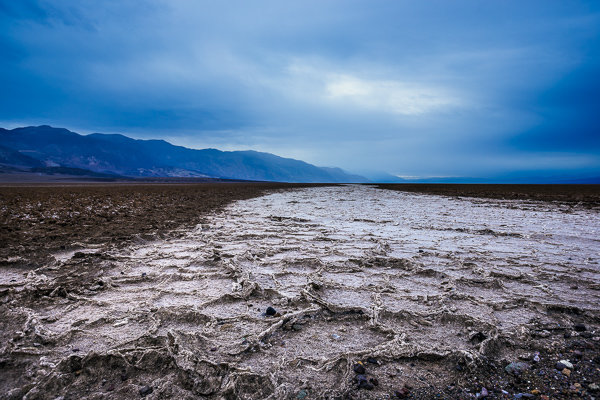
What Lies Beneath | West Side Road, Death Valley National Park

What Lies Beneath | West Side Road, Death Valley National Park

As I start writing this post, I’m sitting by my gate at Las Vegas McCarran International Airport. I loathe Vegas, but that’s beside the point. I managed to avoid the strip this time and will be home soon. I just wrapped up an incredible week leading a workshop in Death Valley National Park with my good buddy Brian Matiash and nine awesome students. This was my fifth trip to the park, and I’m starting to feel like I know the place like the back of my hand (even though there are still a several places I’d like to visit).

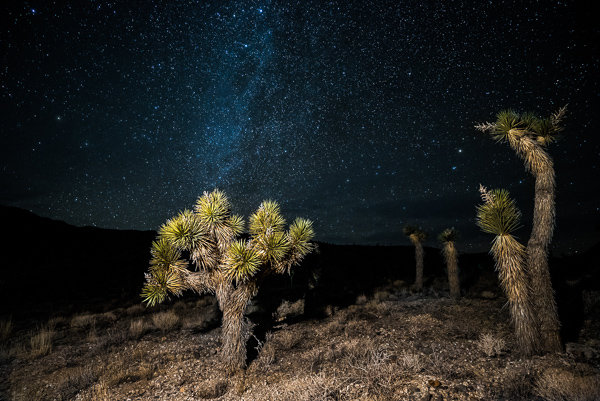
Joshua Trees in Death Valley

Joshua Trees in Death Valley

Ever since hearing about a lesser known area of the park known as Cottonball Basin (or Cottonball Marsh), I’ve been on the hunt for a certain kind of pattern found there. Cottonball Basin is hiding in plain site of virtually everyone who visits Death Valley. It’s located about five miles north of Furnace Creek off Highway 190, but there are no signs for it, and no areas for parking. You simply have to pull off into the gravel on the side of the road and start hiking out.

The trouble is that Cottonball Basin (and much of Death Valley) is always changing. Badwater Basin (which feeds into Cottonball) is an underground river, so the surface is always morphing and looks different with each visit. If you pick the wrong spot of the highway to pull over and start hiking, you could spend hours hiking around the marsh and find nothing.

During my last visit to the park (before this one), I hiked out to Cottonball twice and while I was able to come out with some decent shots, it wasn’t what I was looking for. I was never able to find the patterns I had seen in a few photos.

Even though I hadn't found what I was looking for, there is still plenty of beauty to be found all over Cottonball Basin.

Even though I hadn’t found what I was looking for, there is still plenty of beauty to be found all over Cottonball Basin.

This time around, I was bound and determined not to come up empty handed. Right before heading out, I purchased a Garmin Oregon 600 Handheld GPS. I had a cheaper Garmin before, but it was so unintuitive and difficult to use that I wasn’t willing to risk using it again. The Oregon series is a touch screen model that is responsive, quickly acquires satellites, and is very easy to use and understand.

The day before the workshop began, Brian and I hiked out to Cottonball Basin. We found essentially nothing. I felt pretty defeated. We ended up changing the workshop itinerary and nixed Cottonball Basin altogether. It wasn’t until a chance encounter at Racetrack Playa that my luck would change.

As our group began exploring The Racetrack, Brian and I noticed a group of four photographers at one of the best rocks on the playa. They were taking turns standing on the rock, sitting on it, and taking all sorts of photos with them in it (probably for Instagram or something). This made my blood boil, so before too long, we went over and laid into them pretty good. They apologized for what they were doing and promised to stop (I really don’t understand that behaviour).

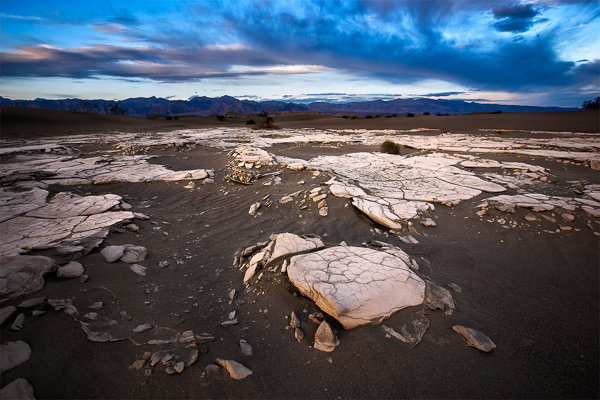
Mesquite Sand Dune Crust | Death Valley National Park

Mesquite Sand Dune Crust | Death Valley National Park

After going back later that evening (they stayed at that same rock the entire evening) we began chatting with the main guy from the group taking pictures. He mentioned that he found some good patterns at Cottonball and showed us the shots he took with his iPhone. These shots were the closest I’ve seen in a long time to the patterns I was looking for and he was nice enough to let us know where to find them. Unfortunately, we only had one last day of the workshop so we’d have to try our luck alone after the students had already left.

On the last day of our trip, after the workshop had concluded, we headed out again to explore and scout the basin. Using my Oregon 600, I dropped a pin at our parking spot off the highway and began hiking out. Around half a mile in, we saw some good patterns starting to forming (this was after walking over some very unwelcoming terrain that would probably cause most tourists and/or photographers to turn back). Things were starting to look good. As we kept hiking out, the patterns began getting tighter and tighter together. Finally, around 1.5 miles into the basin we hit the mother-load. I dropped around 7 pins at different locations out on the basin because I knew these spots were going to be difficult to find again. It’s hard to describe, but Cottonball Basin is a massive expanse of completely flat terrain for the most part. You can pick the same exact parking spot, but if you hike out 20 degrees to the left of where you found the patterns, you’ll miss your mark by enough to not even see something useful.

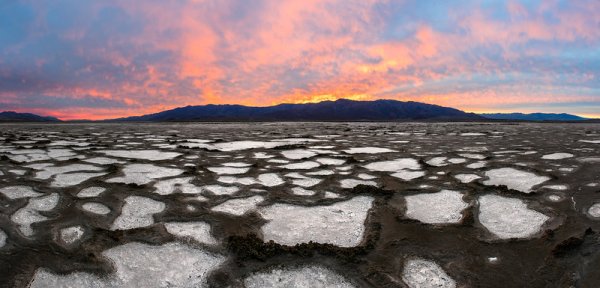
Cottonball Basin

The shot I had been waiting thee years to get was finally mine. I wanted to capture as much as possible so I created this panoramic by taking five vertical images and stitching them together in PTGui Pro.

After lunch and a good nap, we headed out again for sunset. The Oregon 600 led us directly to the exact same spots we stood in earlier that da,y with plenty of time to spare for the light to be right. Oh man, did the light get right. Sunset that evening was one of the top three sunsets I’ve ever seen in my life (and I take ranking my sunsets pretty seriously).

If we hadn’t been relentlessly scouting this location, I’m quite confident I would still be in search of those patterns today.

Start to Finish Video Tutorial

Below is a video I put together from the trip. This is an in-depth video showing the scouting process, the sunset shoot, as well as the post-processing of the image once I got back home. Let me know if you have any questions!

googletag.cmd.push(function() {
tablet_slots.push( googletag.defineSlot( “/1005424/_dPSv4_tab-all-article-bottom_(300×250)”, [300, 250], “pb-ad-78623” ).addService( googletag.pubads() ) ); } );

googletag.cmd.push(function() {
mobile_slots.push( googletag.defineSlot( “/1005424/_dPSv4_mob-all-article-bottom_(300×250)”, [300, 250], “pb-ad-78158” ).addService( googletag.pubads() ) ); } );

The post The Importance of Scouting for Landscape Photographers by James Brandon appeared first on Digital Photography School.


Digital Photography School
 
Comments Off on The Importance of Scouting for Landscape Photographers

Posted in Photography


Ten Hasselblad cameras up for grabs in 2016 Masters competition

17 Feb

Swedish medium format camera manufacturer Hasselblad has launched its 2016 Hasselblad Masters competition, and will be giving away a total of ten cameras as prizes to winners. Open to ‘active professionals’ using film or digital cameras that have at least 16MP, the competition features 10 categories including a new street/urban section that seems angled at more positive images of city life. A category called Project//21 is open to all photographers under the age of 21. Learn more

Articles: Digital Photography Review (dpreview.com)

 
Comments Off on Ten Hasselblad cameras up for grabs in 2016 Masters competition

Posted in Uncategorized