RSS
 

Archive for February, 2015

Converted Crane: 150-Foot-Tall Dutch Hotel Spins in the Wind

19 Feb

[ By WebUrbanist in Boutique & Art Hotels & Travel. ]

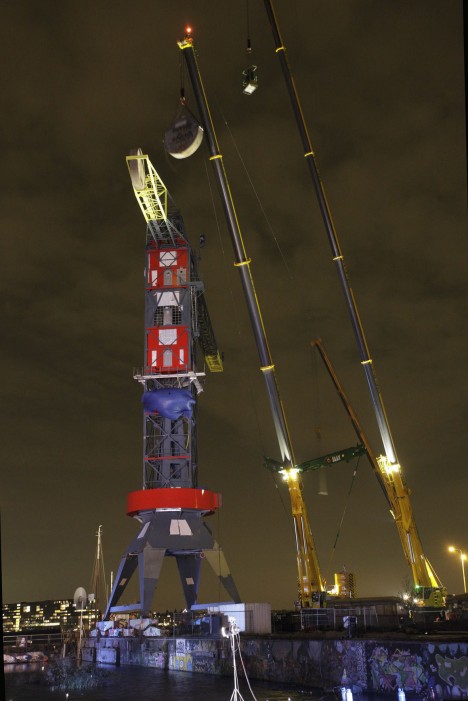
a Faralda NDSM Crane Hotel Amsterdam

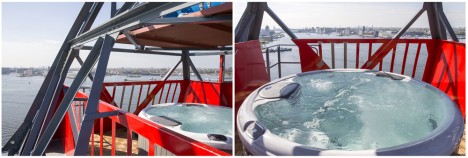
Featuring three suites toward its peak (and a spa pool to top it off), this boutique hotel is situated in one of the tallest and oldest maritime cranes in the world – and despite the steel frame weighing a whopping 250 tons, it still slowly rotates with the weather.

a Jacuzzi Top deck

a dutch hotel vup

After three years of rehabilitation, code approval and other obstacles (include the search for a 500-pound bomb left from a previous World War), this remarkable transformation is complete and rooms are now open for rent at the Faralda Crane Hotel.

a dutch historical use

a dutch crane lift

The lower part of the structure also features a conference, television and festival room that can be tied to renting out the rest of the spaces or used independently. If that isn’t exciting enough for you and your friends, guests can also bungee jump from the top of the crane as well.

a dutch restoration project

a dutch crane hoist

The rotational effects (top able to move independently of the bottom) are not to be underestimated, demanding a great deal of engineering ingenuity: “Because the Faralda Crane hotel keeps spinning in the wind it is fit with a rotating shaft and a pivot bearing with gold. In the drag link are the gold connectors to guarantee the Internet connection to the Amsterdam Fire Department. The genius and always turning piping system has been specially designed for this Crane.”

Next Page – Click Below to Read More:
Converted Crane Hotel 150 Foot Tall Resort Spins In The Wind

Share on Facebook


[ By WebUrbanist in Boutique & Art Hotels & Travel. ]

[ WebUrbanist | Archives | Galleries | Privacy | TOS ]


WebUrbanist

 
Comments Off on Converted Crane: 150-Foot-Tall Dutch Hotel Spins in the Wind

Posted in Creativity


Upload Your Photos to Multiple Social Media Websites with Expojure

19 Feb

How many social media websites do you upload photos to regularly? I have five – a Facebook page, my personal Facebook profile, Google+, Flickr and 500px. Some people have more. For photographers who want to get their work out there, this seems like a must. Yet it’s time consuming and, truth be told, an inefficient way of working.

If this is you, then you’ll be interested in new photo sharing website, Expojure. A startup based in Mumbai, it lets you upload the photos you want to share to a central Expojure account, arrange them in Collections, add keywords, titles, tags and descriptions, then upload them to as many as six photo sharing websites (the five listed above plus SmugMug).

Expojure review

I’ve been using Expojure for a few weeks now and I’m very impressed with the setup. The website is well-designed and easy to use. The layout is simple, doing exactly what most people will need it to, without adding unnecessary extras.

There’s also a plug-in for uploading photos to your Expojure account directly from Lightroom.

How Expojure works

When you sign in to Expojure you’ll see a page that looks something like this – it is your Dashboard. If you’ve uploaded any photos to Expojure already, you will see them here. If not, you’re presented with the option to sign into the photo sharing accounts you wish to use. Just click the buttons to do so. Connected accounts are shown afterwards on the left.

Expojure review

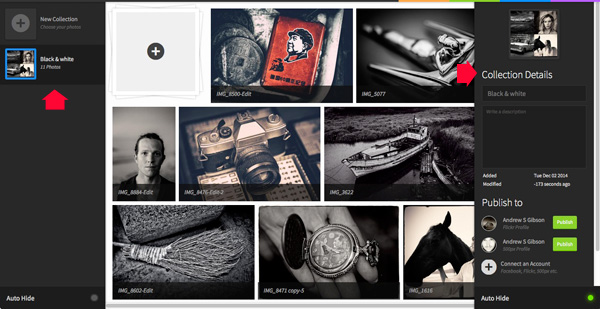
Once you’ve connected to some photo sharing websites, it’s time to go to the Organizer and add photos. Uploaded photos are automatically placed in a new Collection. You can rename the Collection and add a description using the panel on the right. You can also move photos around between Collections.

Expojure review

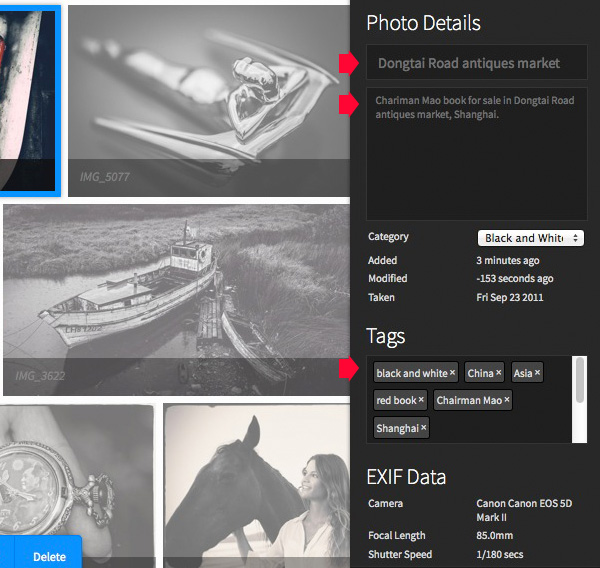
You can add or amend details of individual photos by clicking on them and entering the new information on the right. If you haven’t already added a title, description, or tags now is your chance to do so.

Expojure review

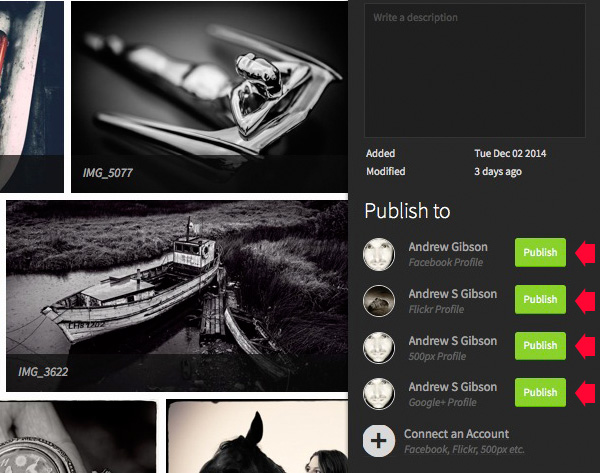
Click the green Publish buttons in the bottom right corner to upload the photos. Expojure places all the photos in the Collection into a new Set on your selected website.

Expojure review

Every photo in the Collection is sent to the chosen website. If you want to upload a single image, you need to create a new Collection and add the chosen photo to that first.

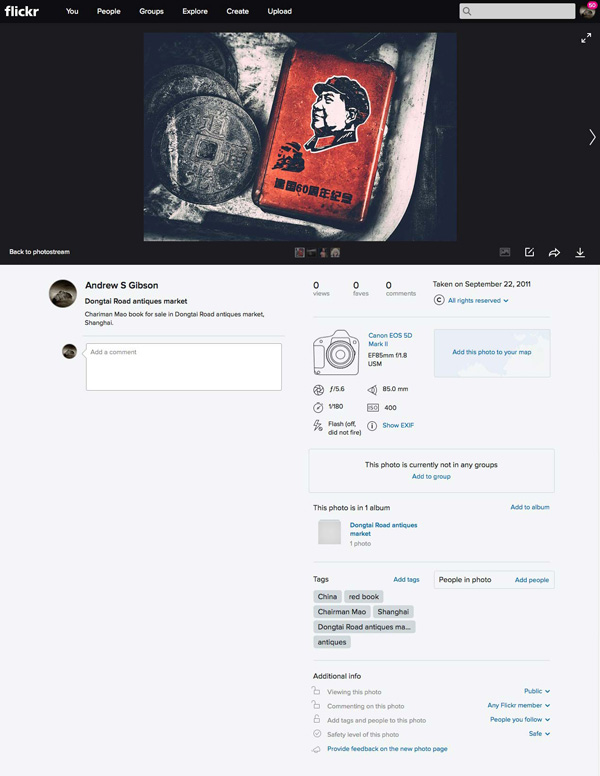
Here’s a photo that I uploaded to Flickr. The title, description, EXIF data and tags have been successfully added. The only thing left to do is add the photo to any Groups or mark the location on the map.

Expojure review

Expojure Lightroom plug-in

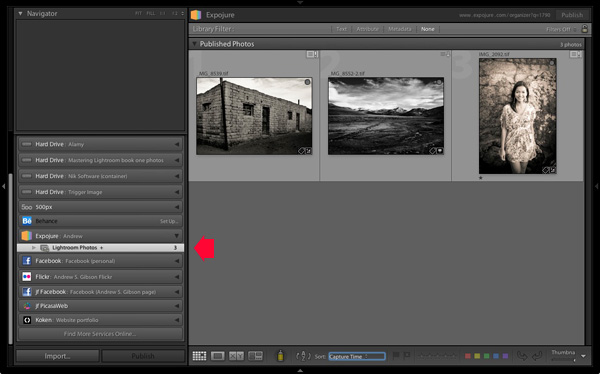
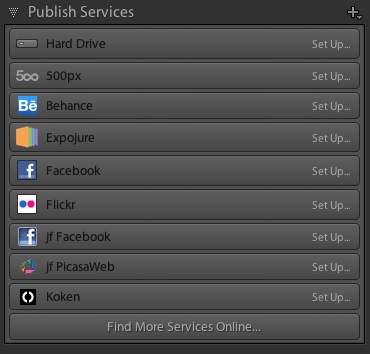
If you click on the Settings tab at the top of the Expojure website page you can download a free plug-in for Lightroom. Use Plug-in manager to add it. It shows up in Lightroom’s Publish Services.

Once installed, you can create new Publish Collections containing photos to upload to your Expojure account. Lightroom uploads them when you press the Publish button. The images are held there until you log in and distribute them to your photo sharing websites.

Expojure review

Notes about Expojure

At the time of writing Expojure is free to use, and has been since the service went live. However, at some point (most likely after this article has been written, but before it is published) Expojure is switching to a subscription model. There will still be a free account, which limits you to uploading 20 photos a week and connection to two social media accounts. Paid accounts retain unlimited photo uploads and unlimited social media accounts.

If you have a free 500px account, you will receive an error message when you upload photos to it. This is because free accounts don’t support Sets. However, your photos are still successfully uploaded to 500px, despite the error message.

Expojure will add more features, and more services to its supported photo sharing websites over the next few weeks. Some of these may be active by the time you read this article.

Alternatives to Expojure

The only alternative to Expojure that I’m aware of is Lightroom’s Publish Services (please let us know in the comments if you know of any others). The benefit of Lightroom’s Publish Services is that it is free (once you own Lightroom). However it’s not as efficient or easy to use as Expojure and doesn’t support websites like Google+ out of the box (plug-ins are available for many photo sharing websites).

Expojure review

Conclusion

Expojure is a well thought out service that greatly simplifies the task of uploading photos to social media websites. If you find the process of adding images to multiple websites frustrating, then please take a look at Expojure’s website, you’ll be glad you did. The video posted at the top of the article gives you a good overview of how it works.

Which photo sharing accounts do you use and how do you manage them? Please let us know in the comments.


The Mastering Lightroom Collection

Mastering Lightroom ebooksMy Mastering Lightroom ebooks will help you get the most out of Lightroom 4 and Lightroom 5. They cover every aspect of the software from the Library module through to creating beautiful images in the Develop module. Click the link to learn more or buy.

googletag.cmd.push(function() {
tablet_slots.push( googletag.defineSlot( “/1005424/_dPSv4_tab-all-article-bottom_(300×250)”, [300, 250], “pb-ad-78623” ).addService( googletag.pubads() ) ); } );

googletag.cmd.push(function() {
mobile_slots.push( googletag.defineSlot( “/1005424/_dPSv4_mob-all-article-bottom_(300×250)”, [300, 250], “pb-ad-78158” ).addService( googletag.pubads() ) ); } );

The post Upload Your Photos to Multiple Social Media Websites with Expojure by Andrew S. Gibson appeared first on Digital Photography School.


Digital Photography School

 
Comments Off on Upload Your Photos to Multiple Social Media Websites with Expojure

Posted in Photography


Adobe celebrates 25 years of Photoshop

19 Feb

Photoshop turns 25 today, and Adobe is marking the occasion with a look back at the software’s humble roots, along with a chance for users under the age of 25 to take control of the company’s Instagram handle for two weeks. Short of supplying its subscribers with complimentary birthday cake, the company has put together some entertaining graphics comparing Photoshop’s icons, toolbars and splash screens for a short trip down the digital memory lane. Read more

Articles: Digital Photography Review (dpreview.com)

 
Comments Off on Adobe celebrates 25 years of Photoshop

Posted in Uncategorized


Banknote Bombing: Hacked Currency Spotlights Instability

19 Feb

[ By Steph in Art & Drawing & Digital. ]

hacked money 7

The grim reaper lurks, one man steps on another’s head, crowds cling precariously to window ledges and the people begin to revolt in a series of hacked Euro bank notes by artist Stefanos. The simple images, inked onto the currency, make a statement on the current social and economic stability in the artist’s home country of Greece.

hacked money 1

hacked money 2

“Observing the Euro banknote landscapes one notices a lack of any reality, whatsoever for the last five years the crumbling Greek economy has hatched violence and social decay – so, I decided to fuse these two things. Through hacking the banknotes I’m using a European a document [sic], that is in cross-border circulation, including Greece – thus, the medium allows me to ‘bomb’ public property from the comfort of my home.”

hacked money 3

hacked money 4

hacked money 5

The drawings make use of the existing imagery on the currency, including recognizable ancient Greek monuments, ornate Gothic windows, modern architecture and aqueducts. Just the slightest marking on a bill can completely change one’s perception of the printed imagery.

hacked money 6

hacked money 8

See more currency art, including defaced U.S. dollars featuring pop culture icons, portraits made of shredded cash and money origami.

Share on Facebook


[ By Steph in Art & Drawing & Digital. ]

[ WebUrbanist | Archives | Galleries | Privacy | TOS ]


WebUrbanist

 
Comments Off on Banknote Bombing: Hacked Currency Spotlights Instability

Posted in Creativity


Marumi introduces fixed and variable neutral density filters, including ND100,000 for solar shooting

19 Feb

Japanese filter brand Marumi has introduced a collection of neutral density filters for its DHG (Digital High Grade) range including fixed density strengths of ND 8, 16, 32 and 64 as well as a variable ND filter with a range of ND 2.5-500. The company has also announced a ND filter for shooting solar eclipses. Read more

Articles: Digital Photography Review (dpreview.com)

 
Comments Off on Marumi introduces fixed and variable neutral density filters, including ND100,000 for solar shooting

Posted in Uncategorized


Compressed Motion: 14 Hypnotizing Time-Lapse Videos & Images

19 Feb

[ By Steph in Art & Photography & Video. ]

time lapse snowflakes 2

Movements that may happen to quickly for us to perceive in real time, like the imperceptible swaying of a portrait subject trying to stay still or the multiplication of microscopic crystals as they turn into snowflakes, are stunningly captured in these 14 (more!) time-lapse videos, images and sculptures.

Time Lapse Captures Triple Lightning Strike

time lapse triple lightning

Videographer Craig Shimala was filming a time lapse of a storm from his home in Chicago when he just happened to capture an incredibly rare triple lightning strike, with the Willis Tower, the Trump Tower and the John Hancock Buiding being hit at the same time.

Seagull Skytrails

time lapse seagulls

The curves and patterns of seagull flight are revealed in this time-lapse video by Paul Parker, created using the ‘echo’ effect in video editing software After Effects.

Psychedelic Spinning Paint Time Lapse

rower time lapse

Just try to look away from this video of the hypnotizing swirls of color created as artist Holton Rower pours paint onto a spinning block.

Paper Portraits by Ryuta Iida

time lapse paper portraits

time lapse paper portraits 2

Three minutes of imperceptible movement are compressed into a single layered portrait in this series by Ryuta Iida, in which many layers of photographs of a single subject are stacked and glued together. Each layer is a separate photograph taken over the tree-minute period in which the subject tried to stay still, but once they’re put together, it’s clear that even millimeters of shifting in place make a difference.

Yoga Movements Captured in Sand

time lapse yoga sand

time lapse yoga sand 2

Artist Katie Grinnan used sand, plastic and enamel to capture her own body’s movements during her morning yoga routine. “Mirage focuses on the concept of peripersonal space, the space that your body encompasses at its most extended point in every direction, which describes the body’s potential boundary.”

Next Page – Click Below to Read More:
Compressed Motion 14 Hypnotizing Time Lapse Videos Images

Share on Facebook


[ By Steph in Art & Photography & Video. ]

[ WebUrbanist | Archives | Galleries | Privacy | TOS ]


WebUrbanist

 
Comments Off on Compressed Motion: 14 Hypnotizing Time-Lapse Videos & Images

Posted in Creativity


Astropad turns iPad into drawing tablet for Mac

19 Feb

Two former Apple engineers have just launched Astropad, an app for Apple’s iPad and Mac computer that turns the former into a drawing tablet for the latter. It works with most styluses, and allows use of applications like Photoshop for image retouching and editing with more precision. Read more

Articles: Digital Photography Review (dpreview.com)

 
Comments Off on Astropad turns iPad into drawing tablet for Mac

Posted in Uncategorized


Lessons from the Masters: Robert Capa and Jerry Uelsmann

19 Feb

Before you or I ever picked up a camera, our photographic forefathers( and mothers) were out shooting, learning, and blazing new trails for us to follow. I’ve always taken great comfort in that fact. Knowing that we are part of a long line of picture takers and image makers should lend us a sense of pride. Through sheer will and determination they worked through hard times, failure, and sometimes controversy in order to give us an incredible head start for becoming better photographers.

Ironically, many of these giants of photography, like most other people of great influence, did not start out to be such at the beginning of their careers. Many simply needed a job, others needed an outlet for their artistic inclinations, and still others…well, they had failed in what they initially wanted to become.

In this edition of what I’ve come to lovingly call, The Master’s Series, we will look at two great photographers who didn’t come by their fame easily. You will learn from their hard earned wisdom some tips, that can help you to improve your own photography.

Robert Capa
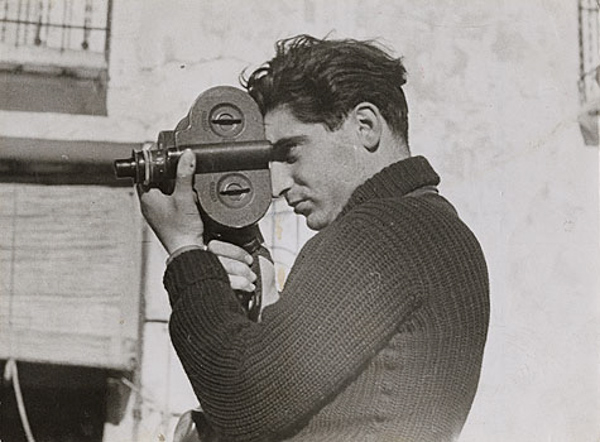
Capa by Gerda Taro

Capa by Gerda Taro

Robert Capa, who was actually born into this world under the name Endre Friedmann, was a Hungarian photographer and photojournalist. His passion was to give war photography to the masses in an up-close and personal way that had never been seen before. He was born in the October of 1913 and met his untimely end on May 25, 1954. In those 41 years Capa shot photographs in the heat of battle during five wars. His work virtually defined the image we have of World War II including the invasion of Normandy from the front lines of Omaha Beach.

In 1947, Capa was part of a group of photographers who came together in Paris to form Magnum Photos. Among the members of the group where such greats as Henri Cartier-Bresson, George Rodger, David “Chim” Seymour, and William Vandivert. Magnum would become the first worldwide agency for freelance photographers and photojournalists.

Lessons you can learn from Robert Capa

Position yourself for the shot

Increase your chances of making better photos by putting yourself into a position to make them. When I say “better position” I mean this both figuratively as well as literally. Capa was famous for saying, “If your pictures aren’t good enough, you’re not close enough.” Capa was renowned for being fearless and would get right up in the action to make his photographs. Truly, as a general guideline, moving in close to your subject can improve not only the quality of an image but also increase its visual impact with the viewer.

That being said, putting yourself in the position to produce better work also means that you should know what photograph you are trying to capture. Come prepared to make the photograph, i.e. the right lens, tripod, permissions, etc. Lastly, be sure you know what needs to be done in order to make an exposure to the best of your potential.

Promote yourself creatively

Thumbs Up

Why did Andre Friedmann stop being Andre Friedmann and become Robert Capa? The answer is simply better marketing. If you’re of the exceptionally linguistic sort, you may have noticed that Capa is the Hungarian word for shark. When Capa was a boy, that was the nickname given to him by his friends. You see, Capa wasn’t getting very much attention under his given name, so a new persona was invented as front for his work. This new persona was that of famed but wholly fictional American photographer Robert Capa, who was supposedly touring Europe at the time. Clients loved it. Soon work was pouring in and Capa was on his way to becoming a photographic legend.

This doesn’t mean that you have to stop being you in order to be more successful as a photographer. It just means that sometimes you need to bring out a little creativity when you’re selling yourself as an artist. In a way, work to manufacture your own identity as an photographer. Cultivate your own style. Be sure to show only your best work. Tell the story of the photo instead of just showing it. Be charismatic and welcoming with your clients and don’t be afraid to speak favorably (not boastfully) of yourself and your work.

Don’t always obsess over technical perfection
Camera Display

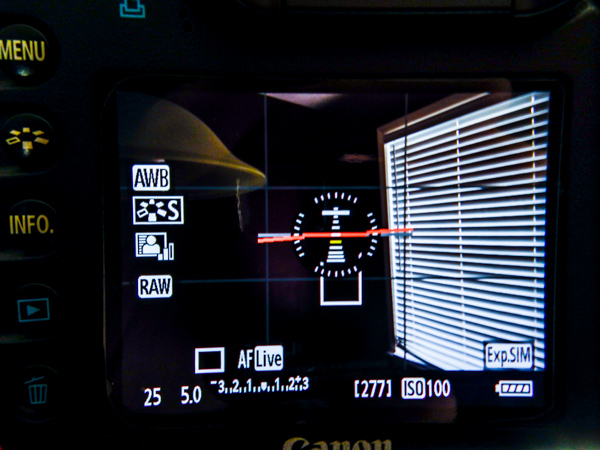
This can be a very difficult task to master. It’s easy to get caught up in getting your aperture just right or making sure there’s not too much grain with that ISO. When it comes to photojournalistic imagery such as street photography, the emotions and mood of a scene or subject should command your primary attention. In the amount of time it might take to tweak that focus, the moment may pass by. The important thing is to teach yourself that a good exposure of a great moment, will almost always trump a great exposure of a mediocre scene.
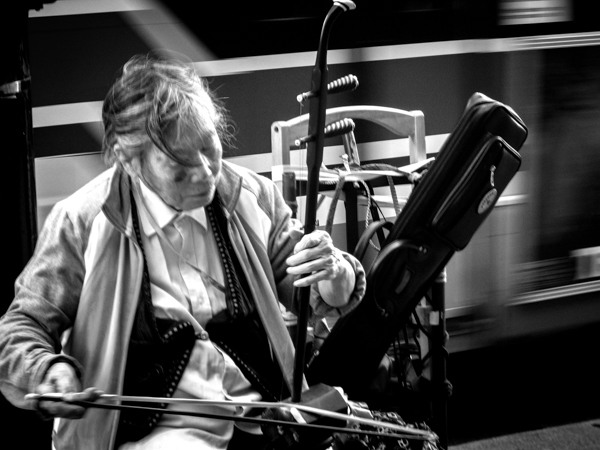
Street Musician

This shot could have been focused better, but I might have missed the look of concentration.

Mentor those who want to learn
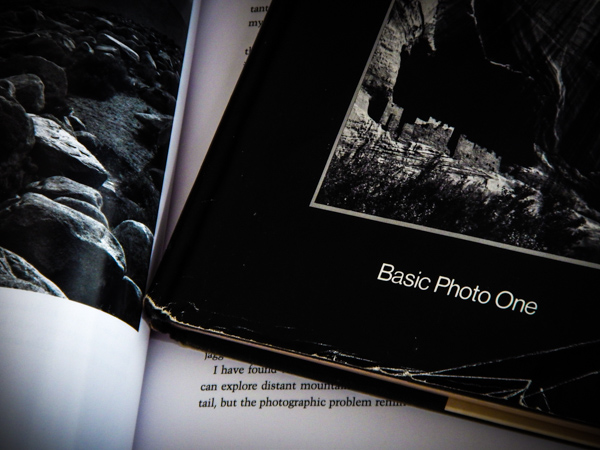
Books

This is a biggie, and perhaps one of the most important things you can learn from Robert Capa to help yourself grow as a photographer. Capa recognized that photography would never advance if there were no new photographers coming along to take the place of himself and his colleagues when their time had passed. So he directed a good bit of his time to networking with, and teaching, other photographers the craft.

When you mentor or otherwise give of yourself to help a new photographer better themselves, you are perhaps unknowingly having an enormous impact on the art of photography. An appreciation for the passing on of photographic principles and techniques is possibly the single greatest contribution a photographer can make to the world.

Jerry Uelsmann
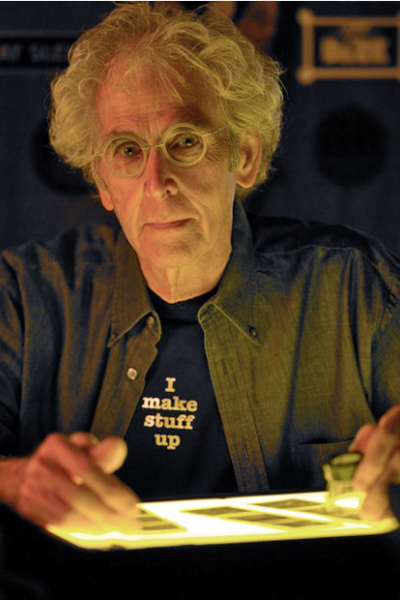
Uelsmann

Image courtesy of Indiana University

To say this next photographer is an interesting individual is both accurate, and at the same time a resoundingly inadequate description. Born on June 11, 1934 in Detroit, Jerry Uelsmann is one of those great artists who flies just beneath the radar of the mainstream, but whose work is truly one-of-a-kind and inspiring. Like many, his rise in the photography world was slow and painstaking. He discovered photography as a teenager. By his own admission he believed that through making photos he was able to live outside of himself and reside in a world of his own creation.

He would eventually go on to obtain degrees from multiple colleges, and ultimately found himself teaching photography at the University of Florida in the early 1960’s. His career was kickstarted in 1967 when he landed a solo photography exhibition at the The Museum of Modern Art in New York City.

Jerry began his work about thirty years prior to the advent of photo editing software such as Photoshop. He rose to fame through his production of highly surreal and manipulated black and white photographs. He did everything in the darkroom – using may different negatives with up to twelve enlargers, that he then literally “layered” on top of one another to create his finished product. Many of his images combine elements of the natural world as well as humanistic representations and man-made objects.

Lessons you can learn from Jerry Uelsmann

Don’t be afraid to post-visualize

If you’re just starting out in photography then you likely have heard some key phrases mentioned over and over again. One of the most important is that of pre-visualization. Teachers and writers (myself included) love to verbalize or write poetic analogies about what it means to “see” an image before the shutter is released. What is meant by this is that you can teach yourself to mentally compose, frame, and process a photograph before it is ever made. Making photographs becomes so much more satisfying once you have managed to develop this difficult, yet essential photographic skill.

The flip-side of that coin is something that seldom gets talked about, but is nonetheless interesting and thought provoking. What we’re talking about here is the act of post-visualization. THis can be thought of as the exact opposite of pre-visualizing a photograph but it’s not exactly that easy. Uelsmann is literally the original master of this process. He photographed distinct objects and scenes, with the express intention of later making a finished work that blends together elements of each. Essentially, he saw the completed photograph after he already had produced a series of otherwise unrelated images.

Try out post-visualization for yourself. Go through some of your old images and see if the passing of time helps you look at them in a new way. Look for different crops that might make the image stronger. See if an image might work well in black and white and experiment with the shadows. Tweak the white balance and completely change the mood of a photo. That’s really all post-visualization is; looking at something that already exists and seeing what else it could become.
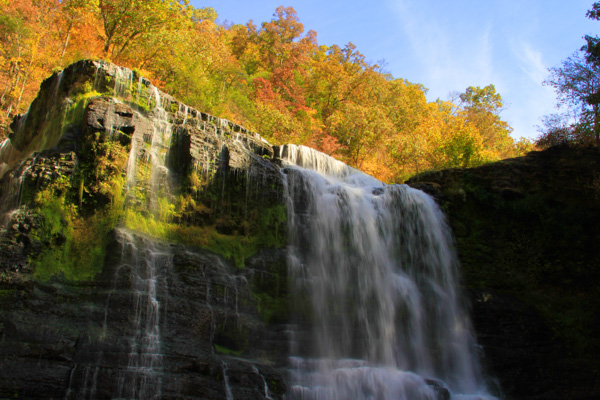
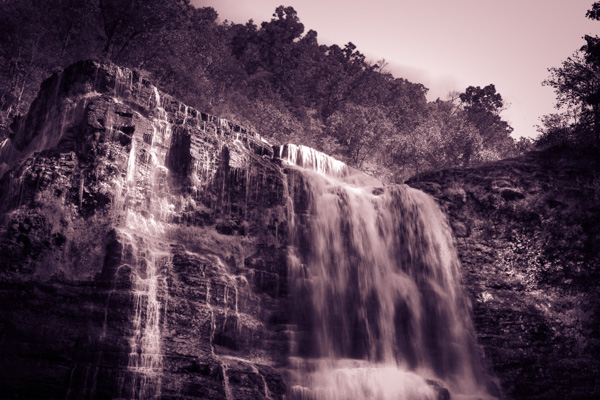
Waterfall

An image I made over four years ago.

Reworked Waterfall

Here we see it in a completely different way after some recent creative processing.

Fulfill your vision

Stay true to your vision. That is the key phrase that you should take away from this point. Uelsmann produced images that were hard to understand by some. They weren’t readily accepted, and the techniques he used where viewed by some as nothing but trickery. Still, he produced the images that he wanted regardless of what manipulation he had to do in the darkroom.

Do whatever you need to do. Be it post-processing, filters, funky borders, weird color selection – anything. It might not be to everyone’s liking, but thats the beauty of photography. Do whatever it takes to achieve the image that you set out to make.

You will fail, but you’re not a failure.

Failure

Jerry Uelsmann is a classic case of someone who refused to give up. He kept trying despite his initial difficulties in school, and the poor acceptance of his early work. Instead of shutting the doors of his darkroom for good he decided to keep going. Making images that moved him was his goal and he didn’t let life’s friction stop him.

The very nature of his work which was at first off-putting began to be what people came to love. So if you’re stuck on a project, you have trouble with a client, or even if your camera seems to be unlearnable, just remember to keep going. Nothing worth doing was ever easy.

googletag.cmd.push(function() {
tablet_slots.push( googletag.defineSlot( “/1005424/_dPSv4_tab-all-article-bottom_(300×250)”, [300, 250], “pb-ad-78623” ).addService( googletag.pubads() ) ); } );

googletag.cmd.push(function() {
mobile_slots.push( googletag.defineSlot( “/1005424/_dPSv4_mob-all-article-bottom_(300×250)”, [300, 250], “pb-ad-78158” ).addService( googletag.pubads() ) ); } );

The post Lessons from the Masters: Robert Capa and Jerry Uelsmann by Adam Welch appeared first on Digital Photography School.


Digital Photography School

 
Comments Off on Lessons from the Masters: Robert Capa and Jerry Uelsmann

Posted in Photography


How to Tell Better Visual Stories with Travel Photography

18 Feb

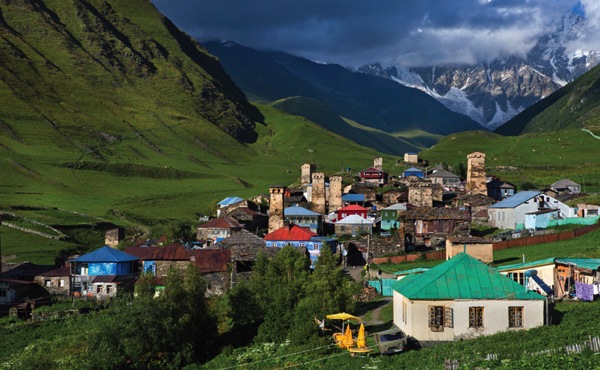
Take a look at your favorite travel magazine, and you will notice a pattern in the images.

Establishing 12

Understanding how to turn a bunch of images into a story – creating series is crucial to any travel photographer.
In this article, we will get familiar with two kinds of very important visual concepts in the travel photography world: the establishing shot (above) and the detail shot (below).

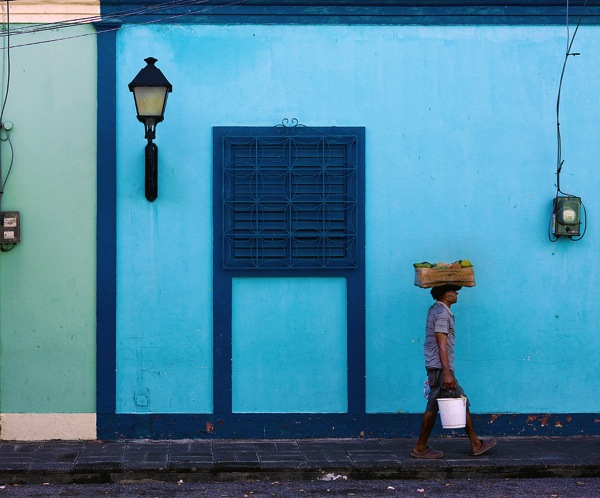
Detail 1

It doesn’t matter if you wish to do travel photography professionally, or if you just want to come back home with better pictures from your next trip. Understanding these visual concepts will help you.

Establishing shot

The establishing shot is arguably the most important shot in a travel photography series. In a print magazine, this image will usually cover the two first pages of the article (the spread). In a digital-based platform (your website or Facebook page), this will be the album’s opening image. However, you can find the establishing shot later in the series.

Establishing 10

The establishing shot’s purposes are to:

  • Give a general idea about the story and the “what” and “where” of this series.
  • Be visually interesting enough so that the viewer wants to read the article or go through the digital album.

Establishing 8

From the technical point of view:

There are no clear rules. But in most cases, the image is a horizontal one (sometimes you will see two vertical images side by side).

Most important:

This image is the grand entrance to your story. Make it impressive and epic. It is usually recommended to leave room for text on this image. So take it into account when you create your composition.

Establishing 9

The detail shot

While the establishing shot is all about being big and epic, the detail shot is about putting a spotlight on something small and making it the image’s hero.

The detail shot’s purposes are to:

  • Give attention to different aspects in your story that might get lost in the bigger picture.
  • The detail shot is like sorbet ice cream in a gourmet dinner — it gives balance to the other, bigger images.

Detail 4

From the technical point of view:

It is all about making small things bigger, so a macro lens is useful (but not obligatory) here.

Most important:

While in the field, be on the lookout for interesting details of things that relate to your story. If you are doing a series on a city a funny street sign, graffiti, or food in a local market can be your detail shot. If you are doing a story about a specific person, his hands or his work tools can be the hero of the shot.

Detail 3

Putting it all together

Of course, I’m not saying that there are certain rules that you must apply in order to create a well-built travel photography series. But by thinking in terms of visual concepts, such as the establishing and detail shots, it will help you be more focused in the field.

Examples include taking the extra effort to reach a high vantage point, or getting an “off limits to the general public” pass to an interesting location in order to get that jaw-dropping establishing shot. Or, taking an hour just to “hunt” for interesting subjects to snag the detail shot. From my experience, having a framework to work within allows you to know what you are looking for, and increases the chances you will find it!

Establishing 14

Want to get more tips and hints about travel photography in a snap? Check out Oded’s ebook, about travel photography, by dPS and our sister brand – Snapn Guides.

Note: the author would like to thank Nicholas Orloff for his help in writing this article.

googletag.cmd.push(function() {
tablet_slots.push( googletag.defineSlot( “/1005424/_dPSv4_tab-all-article-bottom_(300×250)”, [300, 250], “pb-ad-78623” ).addService( googletag.pubads() ) ); } );

googletag.cmd.push(function() {
mobile_slots.push( googletag.defineSlot( “/1005424/_dPSv4_mob-all-article-bottom_(300×250)”, [300, 250], “pb-ad-78158” ).addService( googletag.pubads() ) ); } );

The post How to Tell Better Visual Stories with Travel Photography by Oded Wagenstein appeared first on Digital Photography School.


Digital Photography School
 
Comments Off on How to Tell Better Visual Stories with Travel Photography

Posted in Photography


Improve Your Photography in 10 Days with These 10 Tips

18 Feb

For beginners, learning the ins and outs of the fundamentals can often seem daunting. Intermediate photographers might feel confident of their grasp of the photography basics, but find themselves lacking inspiration. Even seasoned photographers might occasionally find themselves stuck in a rut. So we put together a list of tips you can use to get your shutter firing and improve Continue Reading

The post Improve Your Photography in 10 Days with These 10 Tips appeared first on Photodoto.


Photodoto

 
Comments Off on Improve Your Photography in 10 Days with These 10 Tips

Posted in Photography