RSS
 

Archive for February, 2015

Natural Looking HDR in Photoshop and Lightroom in 5 Easy Steps

06 Feb

HDR (High Dynamic Range) photography was developed out of necessity to overcome limitations of photography equipment, mostly in digital cameras’ sensors. From the beginning, the technology was intended to make photographs as close as possible to human experience by bridging the gap between what the human eye perceives, and what the digital camera can actually capture.

NaturalLookingHDR Photo 1

Montreal, Canada – HDR processed, five exposures, tripod.

Think of HDR as a sophisticated, software based, ND (Neutral Density) filter. Instead of placing it in front of the lens at the moment of capturing photos, HDR allows you to accomplish it in post-processing. It sounds practical and convenient, right? There is no need for extra equipment and you can work on extending the dynamic range of the scene without rush, at your own pace, in the comfort of your home.

NaturalLookingHDR Photo 2

Montreal, Canada – HDR processed, three exposures, hand-held.

Why is HDR photography getting such bad press lately?

I believe that the main reason for this is the misconception in defining what HDR actually is. Somehow, there is a notion, that HDR is a new style in photography, which is completely false. HDR is not a style or genre; it is a technique of post-processing. It is a tool. The way the final photo looks is absolutely up to you, as you have full control over the entire process.

There are many different tools and techniques for creating HDR photographs and each one has its own advantages and limitations. If you are going for a surrealistic, edgy look in your images, Photomatix is your best friend.

But, if you are like me and your main goal is to achieve images that are as natural as possible and reflect the best aspects of the original scene, I definitely have a solution for you – one that I’ve successfully used for years and love.

On my blog, dedicated to travel and landscape photography (see my bio below for a link), you can find a detailed breakdown of my shooting and processing techniques for almost every photograph. In most cases where I used this technique, it is not easy to tell if the photo was processed as HDR unless you read the description. They look that natural.

NaturalLookingHDR Photo 3

Big Sur, California – HDR processed, three exposures, tripod.

The technique is somewhat underappreciated, but it is very powerful and easy to master. The beauty of it is that you do not have to learn additional software and there is no learning curve. You use familiar and powerful Adobe tools, Lightroom and Photoshop, and nothing else.

NaturalLookingHDR Photo 4

Cayo Coco beach, Cuba – HDR processed, three exposures, tripod.

This technique leverages the power of 32-bit processing in Photoshop HDR Pro, the module of Photoshop that was established in version CS3.

Below is the infographic that illustrates the schematic view of the entire process, from the time you take the photo to the moment you are ready to save the final image.

NaturalLookingHDR Photo 5

The Technique

1. Bracketing Photographs

Before you can start processing photos for HDR you need to take a series of bracketed shots with different exposure values. Normally, you take between three and five shots in each series but, in extreme lighting conditions (example: shooting directly into the sun), you might need to take anywhere from seven to even nine shots.

Ideally, you take multiple shots on a tripod but, since Photoshop has an extremely effective alignment tool, it is possible to take hand-held photos and let Photoshop align them.

2. Lightroom: Preprocessing

This is very simple step that should not take longer than one to two minutes. Import photos into Lightroom and only apply the following adjustments in the LENS CORRECTIONS panel:

  • Enable Profile Corrections. Lightroom detects the model of your lens and applies corrections to fix any type of distortions.
  • Remove Chromatic Aberration. Lightroom automatically cleans the edges in your photographs.

3. Photoshop: Tone Mapping

This is an almost completely automated process and should not take longer than two minutes.

In Lightroom, select the bracketed photos that you want to merge to HDR. Right click (option click on Mac) and go to Edit In > Merge to HDR Pro in Photoshop.
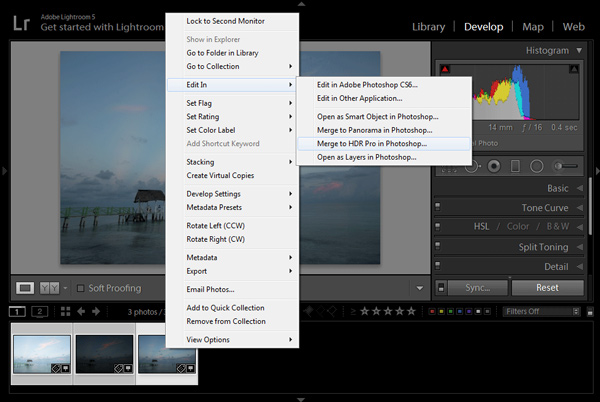
NaturalLookingHDR Photo 6

Your bracketed photos will open in Photoshop and will be placed on separate layers. Immediately, the complex algorithm will be applied in order to align the layers. This comes in handy if you took the photos hand-held, without a tripod.

Next, the HDR Pro interface is triggered. All you have to do here is select the tone mapping mode. Opt for the 32-bit option to ensure that you preserve as much information as possible from the original images. Click OK.

NaturalLookingHDR Photo 7HDR Pro will merge the bracketed photos into a new 32-bit image and open it in Photoshop’s main interface. The tone mapping is complete. All you have to do now is save the document (File > Save). The new HDR image will be saved and automatically imported back into Lightroom. You can find it next to the original bracketed photos.

4. Lightroom: Main Processing

This is the most exciting step. You edit the newly tone mapped HDR image with enormous bit depth (32-bit) to give it the desired look and feel you want. Use standard Lightroom workflow to achieve your artistic vision.

Here is the photograph I took in Cuba and processed using this technique. Below the photograph, you can find a screenshot of the Lightroom interface with all of the adjustments I performed in order to achieve the final look.

NaturalLookingHDR Photo 8

Cayo Santa Maria, Cuba – HDR processed, three exposures, tripod.
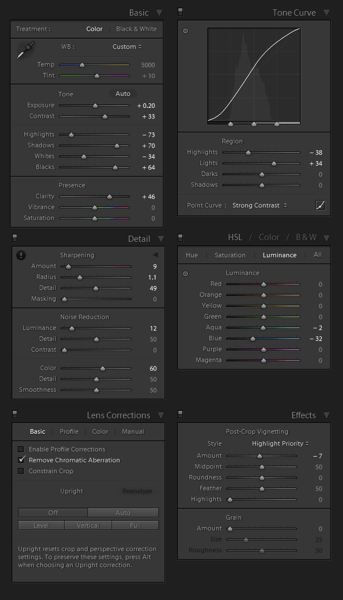
NaturalLookingHDR Photo 9

At this point, HDR processing is done. If you are happy with the way your photo looks, you can save it as a JPEG directly from Lightroom (“Export” in Lightroom).

5. Photoshop: Final Touches (Optional Step)

In some cases, HDR photos require additional edits, such as selective sharpening, noise reduction and HDR artifacts cleaning. Photoshop is your best friend for selective editing.

Select the HDR photo in Lightroom, right click and select Edit > Edit in Adobe Photoshop. In Photoshop, do what is necessary to improve your final photo. In the majority of cases, all you will need is to reduce noise and nothing else.

That is it. This is how you achieve natural looking HDR images in five easy steps or less.
NaturalLookingHDR Photo 10

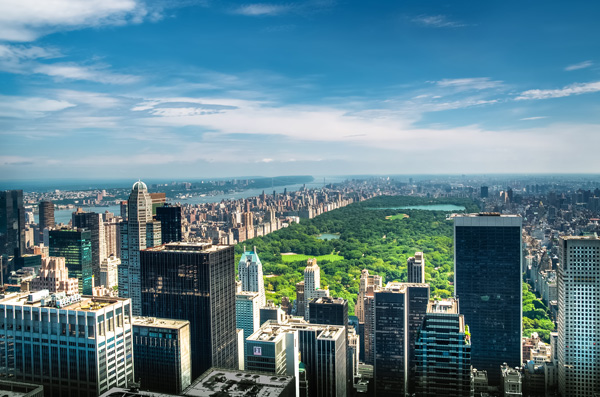
Manhattan, New York – HDR processed, three exposures, hand-held.

PROS of 32-bit HDR processing in Photoshop HDR Pro

  • It does not require stand-alone HDR software
  • The learning curve is minimal
  • Tone mapping and editing are completely two separate processes and it is easy to achieve a natural look
  • This technique takes advantage of 32-bit editing

CONS of 32-bit HDR processing in Photoshop HDR Pro

  • In some cases when there are multiple moving objects in the scene (trees, leaves, water), it can cause artifacts that require additional cleaning.

Have you tried this method before? How do you process your HDR images? Please share in the comments below.

googletag.cmd.push(function() {
tablet_slots.push( googletag.defineSlot( “/1005424/_dPSv4_tab-all-article-bottom_(300×250)”, [300, 250], “pb-ad-78623” ).addService( googletag.pubads() ) ); } );

googletag.cmd.push(function() {
mobile_slots.push( googletag.defineSlot( “/1005424/_dPSv4_mob-all-article-bottom_(300×250)”, [300, 250], “pb-ad-78158” ).addService( googletag.pubads() ) ); } );

The post Natural Looking HDR in Photoshop and Lightroom in 5 Easy Steps by Viktor Elizarov appeared first on Digital Photography School.


Digital Photography School

 
Comments Off on Natural Looking HDR in Photoshop and Lightroom in 5 Easy Steps

Posted in Photography


5. Februar 2015

06 Feb

Das Bild des Tages von: Nikolas Moreno

Totenmaske-©-Nikolas-Moreno-15752669834

Fotolinks des Tages

1. Tausende Blumen im Studio

Alexia Sinclair hat eine Vorliebe für die Mode des 18. Jahrhunderts in Frankreich und kreiert inspiriert davon unglaublich aufwändige Fashion- und Aktfotos. Jedes Kostüm schneidert sie selbst, arrangiert Tausende von echten Blumen in ihren Studio-Sets, oder malt für ein Foto Hunderte von Seidenblumen von Hand weiß an. Ein Aufwand, der sich lohnt, wie ihre Bilder beweisen. 500px stellt die Fotografin näher vor. → ansehen

2. Elliott Erwitt für Lebenswerk geehrt

Elliott Erwitt wird im Vorfeld zu den Sony World Photography Awards mit dem Preis für “Outstanding Contribution to Photography” geehrt. Der 86-jährige Magnum-Fotograf und Hundeliebhaber ist besonders bekannt für seine humorvollen, aber auch sehr sensiblen Schwarzweiß-Aufnahmen. → ansehen

3. Eine Abschlussarbeit über den Tod

Wie kann man den Tod fotografisch festhalten? Marvin Hüttermann hat dies in seiner Abschlussarbeit getan und die Hinterlassenschaften von Verstorbenen, sowie deren letzten Weg dokumentiert. Spiegel Online stellt ihm einige Fragen zu seiner nicht ganz einfachen Serie und zeigt 13 Bilder daraus. → ansehen


kwerfeldein – Fotografie Magazin | Fotocommunity

 
Comments Off on 5. Februar 2015

Posted in Equipment


World’s First Public Streetlight Network Powered by Sun & Wind

06 Feb

[ By WebUrbanist in Conceptual & Futuristic & Technology. ]

solar wind light

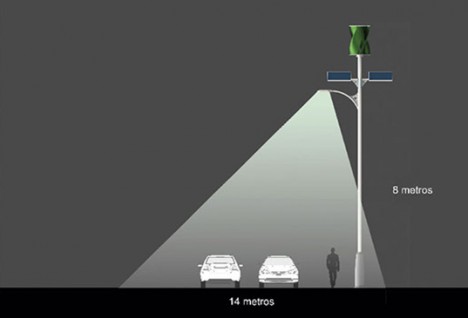
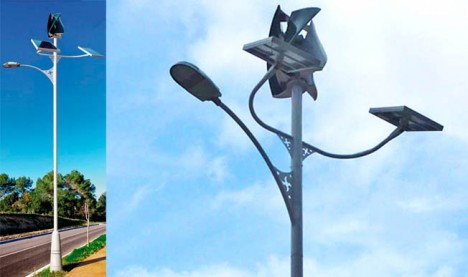
Unveiled in Spain and planned for the streets of several towns and cities, these grid-free street lighting units are completely energy-autonomous, powered by solar and wind energy without needing to be networked with primary electricity grids.

light post prototype models

While other examples of self-sufficient streetlights exist as prototypes and installation art pieces, this system is set to be the first on the planet to be installed at scale for public use.

light post real life copy

Ramon Bargalló of the Department of Electrical Engineering at the Barcelona College of Industrial Engineering (EUETIB) of the Universitat Politècnica de Catalunya (UPC) has been working with Eolgreen, a private company, to engineer the system.

light post early prototyp

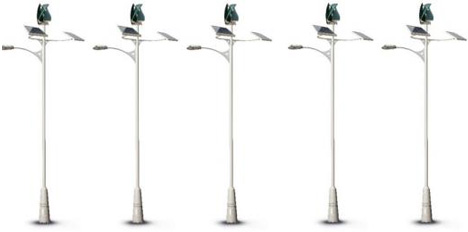
At roughly 30 feet tall, the posts feature leafy solar panels and turbines as well as built-in batteries for energy storage – relatively little wind or light are required to make the system work. Over 700 are set to be created in 2015, but the man and company behind their design are still working on increasingly efficient models for future deployment, testing and building as they proceed.

press release lamp post

From their press release: “This system, developed after four years of research, is designed for inter-urban roads, motorways, urban parks and other public areas. It is unique in the world and reduces the cost by 20% compared with conventional public lighting systems. The turbine runs at a speed of 10 to 200 revolutions per minute (rpm) and has a maximum output of 400 watts (W). An electronic control system manages the flow of energy between the solar panel, the wind turbine, the battery and the light. “

Share on Facebook


[ By WebUrbanist in Conceptual & Futuristic & Technology. ]

[ WebUrbanist | Archives | Galleries | Privacy | TOS ]


WebUrbanist

 
Comments Off on World’s First Public Streetlight Network Powered by Sun & Wind

Posted in Creativity


Selfie-mergency Hacks

06 Feb
Extra photos for bloggers: 1, 2, 3

They happen when you least expect it.

When your arms are *just* too short and an epic moment is about to go undocumented.

They’re selfie-mergencies and we’re here to make sure the world sees your mug even when your hands are otherwise occupied.

No tripod or selfie sticks required, here’s how to hack your way to the perfect selfie in 3 everyday situations.


Learn How To Take Emergency Selfies

WHY IT’S COOL

Um, because these hacks are the solution to all your selfie problems.

HACK 1: SELFIES ARE A BEACH

beforeWhen you’re at the beach and you’re trying to get your face, the water and your abs in the shot, hack 1 is here to save the day.

Fold your, preferably dry, towel in half lengthways, then keep alternating sideways folds until it’s stacked like an accordion or looks a bit like a tall, skinny book. Fold open to the middle and lean your phone with the folds.

Set that self timer, or fire up the CamMe app and strike a pose.


HACK 2: BOTTLE IT UP

beforeOkay, you’re going for a bike ride down the most picturesque mountain in all the land and you need evidence that you were there. Hack 2 to the rescue.

Undo your ponytail, and use the hair tie to secure your phone to your water bottle.

Jump back on the bike, show your good side, and stare longingly out to the view ever so naturally.


HACK 3: STICK IT

beforeHack 3 is for all you picnickers out there. You’re eating strawberries and noodle salad at the park with your friends when the urge for a group selfie strikes.

Just stick a, well stick, into the ground and angle according to your needs.

Duckface and post that bad boy to Instagram.


TAKING IT FURTHER

  • Buy a super handy keyprop and own any selfie-mergencency sitch
  • Hack 2 is just as handy at a restaurant. Just swap a wine bottle or tumbler instead of the water bottle.
  • For even more fun selfies, use an app like Party Party

© Erika for Photojojo, 2015. |
Permalink |
No comment |
Add to
del.icio.us

Post tags:


Photojojo

 
Comments Off on Selfie-mergency Hacks

Posted in Equipment


Shoot for the Light – Improve Your Composition

05 Feb

JB 1134 Edit

JB 2111

Here is one of my most valuable tips. The one I will offer to someone who comes to me, complaining that after 20 years of taking photos they can’t get out of their usual compositions, and want to get into a new level of creativity.

It may sound like something you have heard before. Yes, photography is all about light, and if there is a good light then there is a good photo.

But no, I am talking about something more specific.

JB 2548

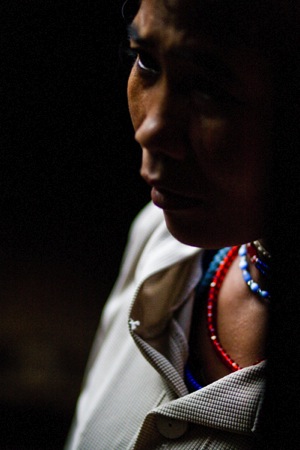
Please note that I have always focused my photography, and my articles on travel photography, on people. So when reading this article, please think people photography (which also includes street photography).

In travel photography, most people tend to look for a good subject to photograph. Of course that means that this subject should be “sitting” in an appropriate light, with a good catchy background, something not too distracting. The problem with this approach, is that you might end up taking the same kind of compositions again and again. Framing your subject on the side, rule of thirds, looking into the photo, etc. As much as these are nice photos, you may feel the need to develop your creativity and come up with something different.

JB 1174

JB 2352

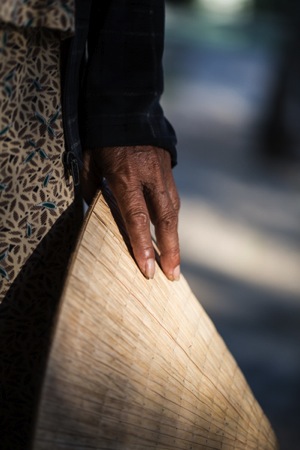
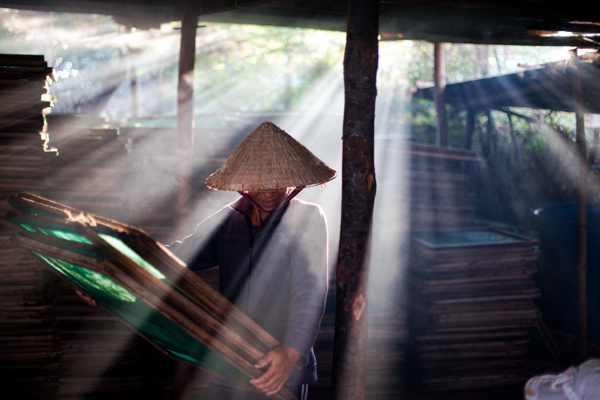
What I am telling you, is to completely not focus your attention on your subject. After all, your subject does not matter (unless you happen to meet the new “Afghan girl” of Steve McCurry, or the girl with green eyes of David Lazaar). No, believe me, as someone living in Vietnam: one old lady with a pointy hat looks the same as another old lady with a pointy hat.

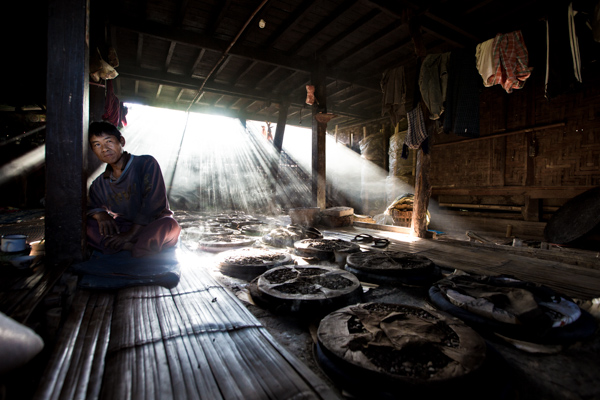
Instead of that, try and focus your entire attention on the light around you. Not the beautiful sunset light in the whole sky, but the little spots of golden light right there, on the floor next to you. Yes, can you see them? Well, there is your next photo my friend.

Yes, I hear you already, “What do you mean shooting light?! And what is my subject, what am I telling a story about?”. Well – now your job is to patiently wait for the right subject to walk into that light. But remember? Shoot the light.

JB 6808

IMG 6354

In the same way as we say “fill your frame” in photography. Keep things simple, only include elements which are relevant to the story you are telling. You can fill your frame with that sumptuous golden light you found on the floor. And that is what is going to lead you to a completely new level in composition and creativity. Because you are only shooting that piece of light, you are going to crop your subjects in way you would never have dared before. You are going to break all the rules you have carefully been following until now, and create something new.

IMG 3204

It will surely be beautiful, as your light will be stunning. You may miss a lot of photos, as you have to get used to getting that close to things and people in a light that can be quite full of contrasts and colors. But with time and a bit of practice, things will start to take shape. You will get used to such new ways of composing your image, and your results will become sharper over time. Until you are getting comfortable with this new idea, and start re-creating your templates that will allow you to be fast and efficient and not miss your images.

EJB 1426 IMG 1761

“Heresy!!!” I can already hear. Sorry? Which book are you talking about? Look at the results you are going to achieve with this technique, and tell me if does not make you think in a complete new way, bringing completely new styles of images. If you don’t like it, well go and try something different. But surely you would have learned something out of it.

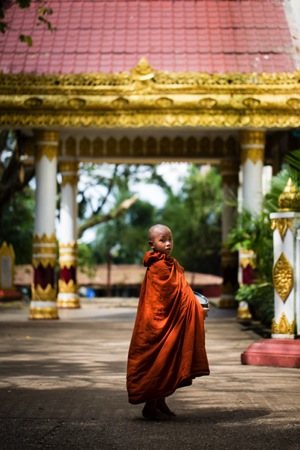
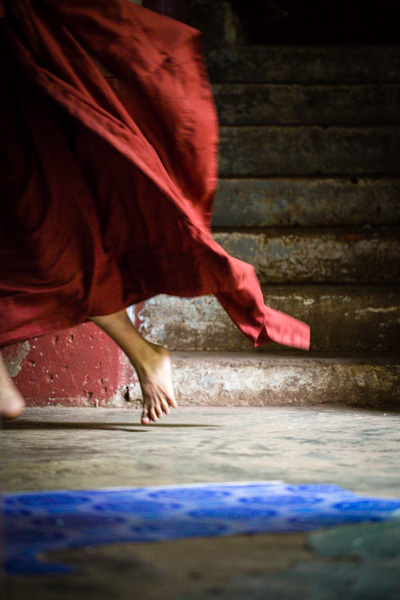
Last year, while running a photo workshop in Myanmar, I managed to capture this image using this exact technique. I could see the light on the floor, and the beautiful blue color next to it. I also knew that this monastery was quite busy, and if I waited long enough someone would walk into my frame.

EJB 1515

One of my students and I laid down on the floor. I switched from Aperture mode to Manual (making sure I would have the right exposure, as the situation had very strong contrasts). I did compose the photo, exactly the way I wanted to have it, and I waited. Surely, after half a minute, some novices went down the stairs. They did spot us, and feeling a little shy to be photographed, they ran through the corridor, laughing out loud.

Click – Click – Click

I did not expect them to run in the first place so my shutter speed was right enough to freeze my hand shakes, or someone walking. But it gave some blur to the novice’s robe, and I liked the shot even more like that. After all, most new things that were created on our planet are the result of accidents!

Go ahead, give it a try!

EJB 1830 IMG 8352

JB 6091

IMG 6605

IMG 4331

IMG 9911

googletag.cmd.push(function() {
tablet_slots.push( googletag.defineSlot( “/1005424/_dPSv4_tab-all-article-bottom_(300×250)”, [300, 250], “pb-ad-78623” ).addService( googletag.pubads() ) ); } );

googletag.cmd.push(function() {
mobile_slots.push( googletag.defineSlot( “/1005424/_dPSv4_mob-all-article-bottom_(300×250)”, [300, 250], “pb-ad-78158” ).addService( googletag.pubads() ) ); } );

The post Shoot for the Light – Improve Your Composition by Etienne Bossot appeared first on Digital Photography School.

Digital Photography School

 
Comments Off on Shoot for the Light – Improve Your Composition

Posted in Photography


Lost Places: Alte Panzer

05 Feb

© Callaveron

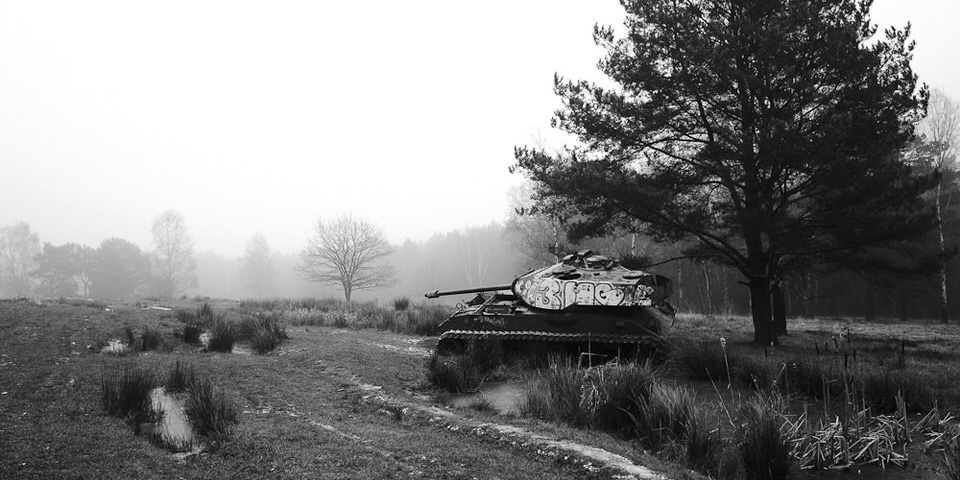
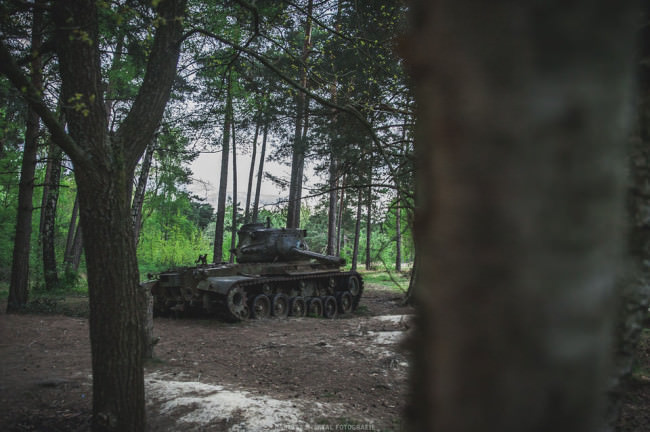
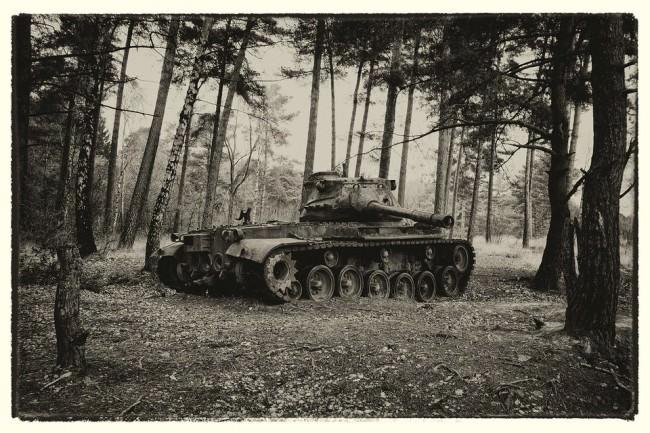
Vor einiger Zeit fand ich bei einem Spaziergang mit Freunden alte Panzer an einem Waldrand. Obwohl die Gegend teilweise noch als Truppenübungsplatz genutzt wird, war ich zunächst etwas erschrocken. Diese Ungetüme sind einfach furchteinflößend und niemand verbindet mit ihnen etwas Gutes. Eigentlich ein schönes Bild, wie sie langam zerfallen und von der Natur eingenommen werden.

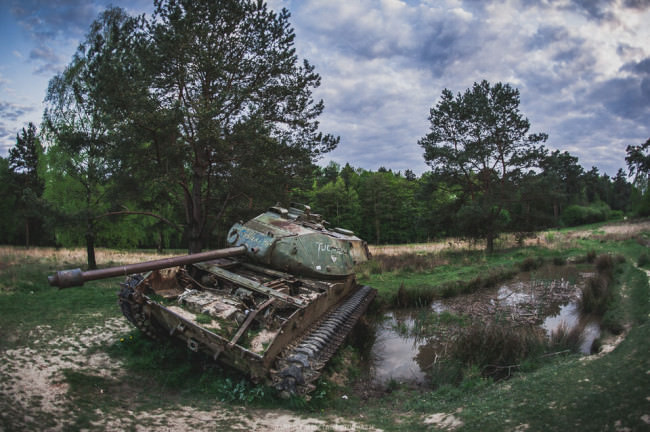
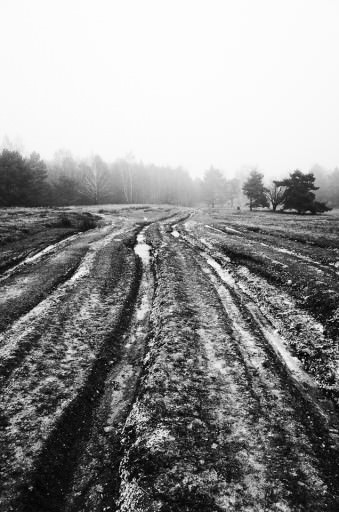
Durch ihr Gewicht drücken sie sich langsam selbst in die Erde und dem robusten Panzerstahl setzt der Rost sichtlich zu. Um sie herum viel Natur, aber auch Spuren der Militärübungen, wie tiefe Krater und Furchen, in denen sich kleine Biotope gebildet haben.

Ein Panzer im Wald.

Detailaufnahme eines Panzers.

Ein Panzer an einem Tümpel.

Fotos: Dariusz Misztal

Drei Panzer finden sich in nächster Nähe, darunter ein M47 Patton und ein M41 Walker Bulldog. Viele von ihnen wurden im Laufe der Zeit mit Graffiti bemalt und Kleinteile entwendet. Bedenkt man die Stahlpreise, ist es eigentlich verwunderlich, dass sie noch da stehen, wobei ihr unglaubliches Gewicht von 23 bis 46 Tonnen sicher ein Grund dafür ist.

Weit im Westen Deutschlands, am Westrand Stolbergs liegt das etwa 226 Hektar große Gelände, das mittlerweile zum Großteil zu einem Naturschutzgebiet wurde. Und so friedlich es zunächst hier wirkt, setzen die Panzer einen beunruhigenden Kontrast.

Panzerspuren in frostigem BodenEine Frau steht auf einem Panzer.
Panzer und ein Arm im Detail.

Titelbild und Fotos: Callaveron

Das Gebiet liegt am Westwall, der von Hitler zwischen 1936 und 1940 gebaut wurde. Ein riesiges Verteidigungssystem aus Stollen, Bunkern und Panzerwehren. Viele Bunker wurden nacht dem Krieg gesprengt, aber auch heute findet man noch viele Bauten aus der Zeit, deren Überreste zum Teil überwuchert und mit Moos bewachsen sind.

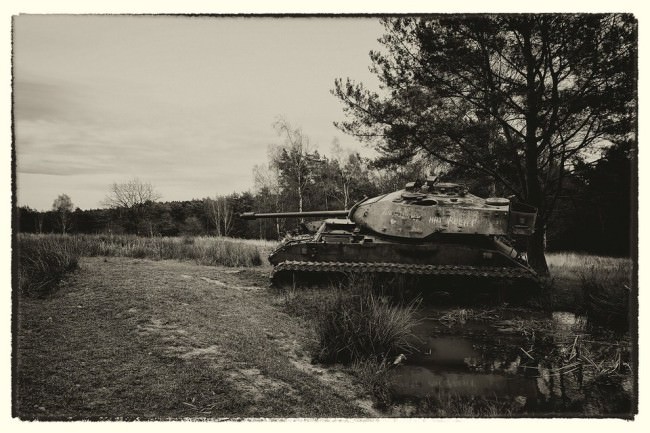
Die Panzer selbst haben eine weniger aufregende Geschichte. Sie sind nicht im Krieg liegen geblieben, sondern dienten als Hartziele der Bundeswehr zu Übungszwecken.

Panzer in Sepiatonung.

Detailaufnahme eines Panzers

Ein Panzer im Wald.

Fotos: Stefan Rollar

Der Truppenübungsplatz ist öffentlich zugänglich und Besuchern ist die Nutzung der Wege zum Großteil gestattet, jedoch sollte man vorsichtig sein: Abseits der Wege kann noch immer Munition aus dem Zweiten Weltkrieg liegen. Zudem findet man hier viele Pflanzen und insbesondere Vogelarten, die auf der roten Liste stehen. So brütet der Eisvogel entlang des Bachlaufes und fühlt sich schnell durch freilaufende Hunde gestört.

Das Gebiet mit seinen Wäldern, Auwäldern und der Heide gilt als eines der artenreichsten Gebiete Deutschlands und ist damit sicher nicht nur für Lost-Places-Fotografen interessant.


kwerfeldein – Fotografie Magazin | Fotocommunity

 
Comments Off on Lost Places: Alte Panzer

Posted in Equipment


Rustic Swiss Structure Hides Modern Underground Home

05 Feb

[ By Steph in Architecture & Houses & Residential. ]

hidden modern home 1

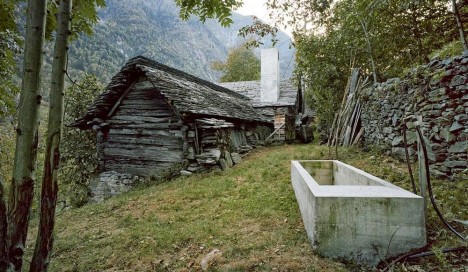
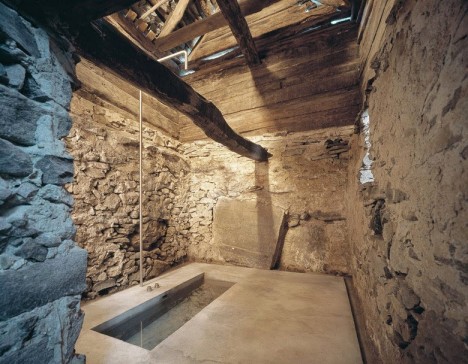
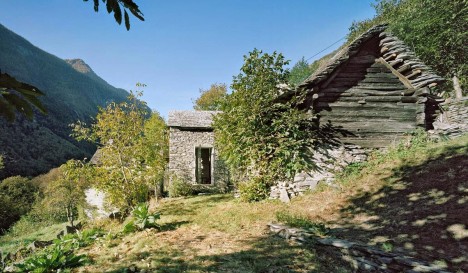
Set into a landscape of grassy hills and deteriorating stone walls, a rustic 200-year-old wood and stone structure hides a wholly unexpected modern residence. The renovation in Linescio, Switzerland by Buchner Bründler Architekten adapts an existing country home that had fallen into ruin, setting the new concrete shell into a hillside so that it’s partially subterranean. From the outside, a few streamlined concrete elements are the only signs hinting at a modernized interior.

hidden modern home 6

hidden modern home 4

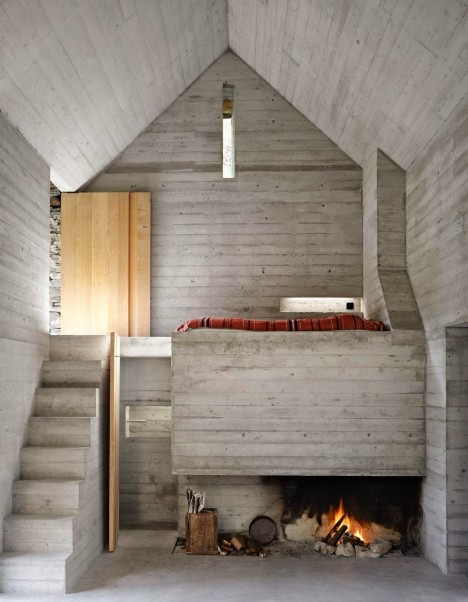
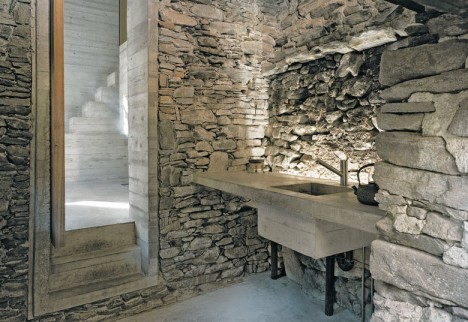
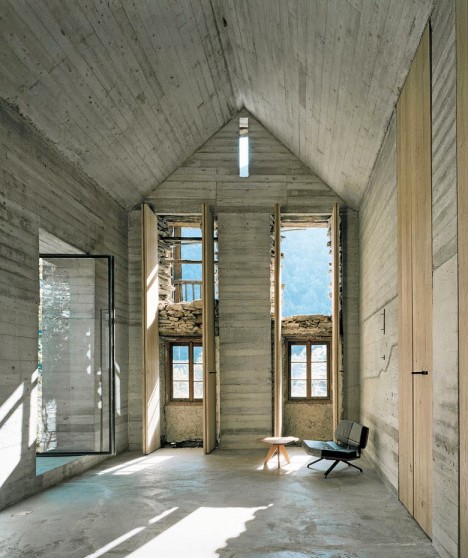
All new elements are made of concrete, including the recessed bathtub, open fireplace, basins and the kitchen counter. The architects wanted to leave as much of the existing fabric of the historical structures as possible, adding minimalist complementary elements that don’t fight the aging textures for attention.

hidden modern home 5

High, folding wood shutters cover the original front windows, which have partially lost their glass, while a new glass door leads out to the garden. The concrete was brought in layer by layer and still bears the marks of the formwork. The existing walls act as an extra layer of insulation, though the home is only meant for use in the summer.

hidden modern home 3

hidden modern home 7

“The plastic, evocative qualities of the exposed concrete intensify the archaic character and the calm atmosphere of this stone house,” say the architects.

Share on Facebook


[ By Steph in Architecture & Houses & Residential. ]

[ WebUrbanist | Archives | Galleries | Privacy | TOS ]


WebUrbanist

 
Comments Off on Rustic Swiss Structure Hides Modern Underground Home

Posted in Creativity


Olympus announces OM-D E-M5 II with 40MP high resolution mode

05 Feb

Olympus has unveiled the OM-D E-M5 II. Picking up where its successor left off, the E-M5 II continues to offer weather sealing and 5-axis IS while adding a redesigned 16MP Four Thirds sensor and 5-axis image stabilization. The E-M5 II also boasts a 40MP high resolution shot mode, achieved by shifting the sensor in half-pixel steps and capturing eight images over a period of one second. Read more

Articles: Digital Photography Review (dpreview.com)

 
Comments Off on Olympus announces OM-D E-M5 II with 40MP high resolution mode

Posted in Uncategorized


Olympus OM-D E-M5 II First Impressions Review posted

05 Feb

At a glance the Olympus OM-D E-M5 II appears relatively unchanged from its predecessor, so you have to look a little closer to see how much work Olympus has put into the new model. The E-M5 II uses a redesigned 16MP Four Thirds sensor and offers a 40MP high-resolution shot mode powered by its 5-axis image stabilization. See its high-resolution mode in action and learn more about the subtle improvements included in the E-M5 II in our First Impressions Review. Read more

Articles: Digital Photography Review (dpreview.com)

 
Comments Off on Olympus OM-D E-M5 II First Impressions Review posted

Posted in Uncategorized


Wundershine smart frame prints, displays and stores your favorite images

05 Feb

Dutch startup Wundershine has re-imagined the photo frame with Makerframe, a wooden frame that can print and display your images thanks to a built-in inkless thermal printer. Still in the development phase, the system is controlled via Android or iOS app. A simpler model called Reframe that doesn’t include the printer is also in the works. Read more

Articles: Digital Photography Review (dpreview.com)

 
Comments Off on Wundershine smart frame prints, displays and stores your favorite images

Posted in Uncategorized