RSS
 

Archive for February, 2015

Nikon announces Coolpix P610, L840, S9900, S7000 and S6900 compacts with emphasis on zoom

10 Feb

The pre-CP+ announcements keep on rolling in, and with them, new cameras from Nikon, including six zoom-centric, stabilized compacts that all sport 16MP CMOS sensors and built-in Wi-Fi/NFC. The P610 offers the greatest reach of the bunch, a 24-1440mm equivalent range. Read more

Articles: Digital Photography Review (dpreview.com)

 
Comments Off on Nikon announces Coolpix P610, L840, S9900, S7000 and S6900 compacts with emphasis on zoom

Posted in Uncategorized


How to Make a Photoshop Collage in 9 Simple Steps

10 Feb

We all aim to tell a story through one single image. For many occasions, though, a well-assembled collage is an excellent way to pull the viewer in for a full experience. Consider this method for sharing photos from an event, a real estate shoot, or even a family photo session!

Collage4

Collages are easy to put together in Photoshop, so let’s walk through the steps. Note that I am working on a Mac with Photoshop CS3, so your system may have slight variations in the key commands needed.

Photo selection is crucial. You want to select a mix of scales that will span the entire event. That means you pick some wide shots that show the entire scene, and some detail photos that show lots of texture and personality. Without one or the other the story will not be complete, and won’t carry the same emotion that it could.

Step 1. Open the selected images in Photoshop

Open all selected photos in Photoshop. You’ll want to pick a minimum of three, but avoid getting cluttered with too many also. Typically, I limit my photo selection to no more than eight. Keep in mind that the more photos you select, the tougher it will be to see details of each one.

Step 2. Create a new file

Create a new file (File -> New). Be sure to make it a bit larger than the size you want in the end. I always make it 20×30″ at 150ppi.

Collage1

Step 3. Add your images one at a time

Go to one of the open photos and, using the marquee tool, select all (or press command+A). Press Command+C to copy. Click into the new document and press Command+V to paste. This will bring the photo into the new document on its own layer. Depending on the size and resolution of the photo you brought in, you may need to adjust the size. To do this, press Command+T to transform. Use the corner node and, while pressing Shift, adjust the scale of the photo until it is small enough to comfortably move around on the new document canvas.

Note: if you convert the image layer to a Smart Object first it will maintain integrity of the image quality as you size up and down.

Step 4. Create your layout

After you have added all images that you want in the collage, it’s time to lay out the photos! This is where you will shift the photos around until you feel they tell your story best. You’ll discover a style of your own after doing several collages. I generally like to either have symmetry in layouts, or make it look like an interlocking puzzle. That being said, each story has slightly different needs.

Collage2

Step 5. Add image spacing

When you have the layout figured out and the photos are all sized as they should be, you can create a thin white border between images to give a bit of visual space. This step is optional, and the amount of white space you put between photos is a personal preference.

To do this, select the image layer that you want to move then use the arrow keys to shift it in the direction you want. Using the arrow keys rather than shifting with the mouse will help keep track of distance so that the spacing in between photos is even.

Alternatively you can butt them up against one another and using a Layer Style (select Stroke > Inner) add a white or black border around each image. See screen capture below.

Screen Shot 2015 02 06 at 3 01 27 PM

Step 6. Merge all layers

Once you have your collage laid out and the photos are spaced as you want them, you are ready to merge all layers. To do this, press Command+Shift+E.

Step 7. Crop the final image

Once your collage is merged into one layer, crop any extra white space around edges so that it’s even. This outside white border is typically very narrow on my collages, so I don’t bother measuring. Be sure that it looks even all around.
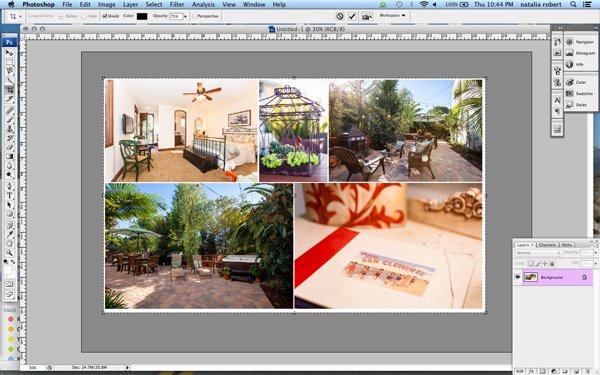
Collage3

Step 8. Resize for online usage

To make sure your collage fits your social media needs, you may want to resize it once complete. I recommend saving your original flattened collage as a JPEG for possible future re-use.

To resize your collage and bring it down to social media friendly dimensions, press Opt+Command+I. Sizing varies per social media platforms, but I typically save it at 1000 pixels on the short edge and 150ppi.

Step 9. Add a watermark if desired

If you want to put a watermark on your masterpiece, now is the time. Bring in your watermark and be sure to merge all layers once more to save as a JPEG. You are now ready to share it with the world.

Collage4

Have you made any collages? Have any additional tips? Please share in the comments below.

googletag.cmd.push(function() {
tablet_slots.push( googletag.defineSlot( “/1005424/_dPSv4_tab-all-article-bottom_(300×250)”, [300, 250], “pb-ad-78623” ).addService( googletag.pubads() ) ); } );

googletag.cmd.push(function() {
mobile_slots.push( googletag.defineSlot( “/1005424/_dPSv4_mob-all-article-bottom_(300×250)”, [300, 250], “pb-ad-78158” ).addService( googletag.pubads() ) ); } );

The post How to Make a Photoshop Collage in 9 Simple Steps by Natalia Robert appeared first on Digital Photography School.


Digital Photography School
 
Comments Off on How to Make a Photoshop Collage in 9 Simple Steps

Posted in Photography


Curious Collections: 15 of the World’s Weirdest Museums

10 Feb

[ By Steph in Destinations & Sights & Travel. ]

phallological museum 2

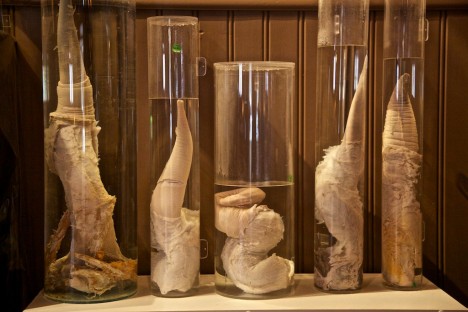
You might wonder why anyone would pay money to gaze at collections of dog collars, toilets, packets of ramen and mammalian penises in jars, but one thing we’ve learned from this list of weird museums is that absolutely anything can be collected and put on display. These unusual exhibitions range from the bizarre and macabre, like a Peruvian museum of brain abnormalities, to the oddly specific, like Massachusetts’ Museum of Burnt Food.

Icelandic Phallological Museum
phallological museum 1

On the busiest street in Reykjavik, you’ll find a museum filled with shelf after shelf of animal penises in jars. Iceland’s Phallological Museum started as a private collection in 1974 when the founder received a bull’s penis as a joke gift, and it took off from there. “Some of my teachers used to work in summer in a nearby whaling station and after the first specimen they started bringing me whale penises, supposedly to tease me. Then the idea came up gradually that it might be interesting collecting specimens from more mammalian species.

Sulabh International Museum of Toilets, India

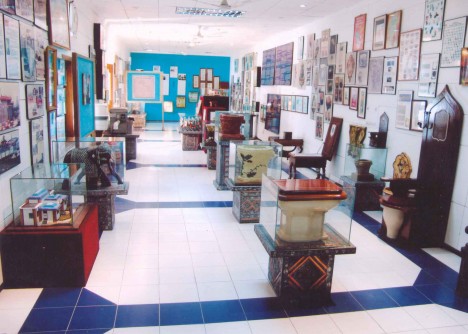
toilet museum 1

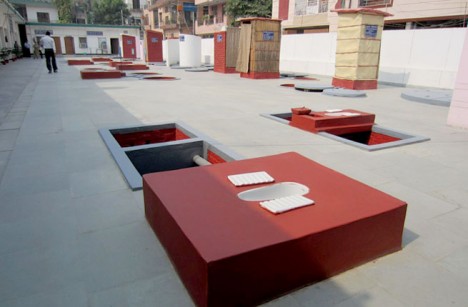
toilet museum 2

Run by a social service organization that works to protect human rights, sanitation, waste management and social reform through education, New Delhi’s toilet museum showcases the 4,500-year history of toilets around the world, including one disguised as a bookcase and King Louis the XIV’s royal throne, upon which he was said to defecate during court sessions. Sulabh International has been credited with bringing sanitation to India’s poor, and founded the museum to send a message about how important proper disposal of human waste is.

Avanos Hair Museum, Turkey

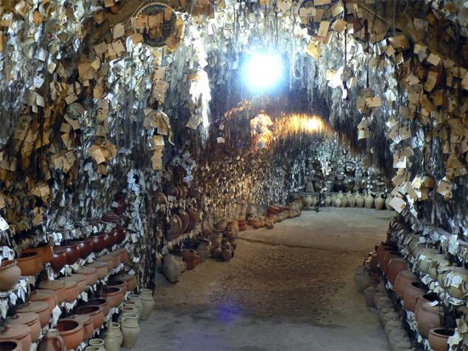
hair museum 1

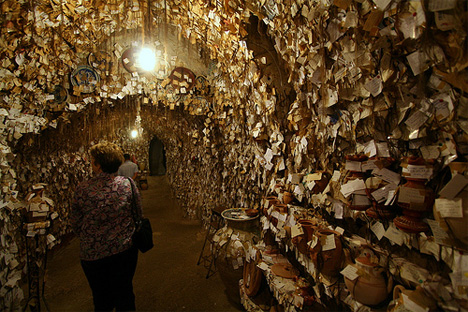
hair museum 2

The names and addresses of over 16,000 women around the world are taped to delicate little samples of hair hanging from the walls at the Avanos Hair Museum, a bizarre treasure tucked into the caves of Turkey’s surreal Cappadocia beside the owner’s pottery studio. The first lock of hair went up in 1979, supposedly as a memento for founder Chip Galip, starting a bit of a trend in which women voluntarily left their locks behind. Every year Galip chooses ten hair samples at random and invites the women to come back for a pottery workshop and to stay in his traditional guest house for free.

Momofuku Ando Instant Ramen Museum, Japan

instant ramen museum

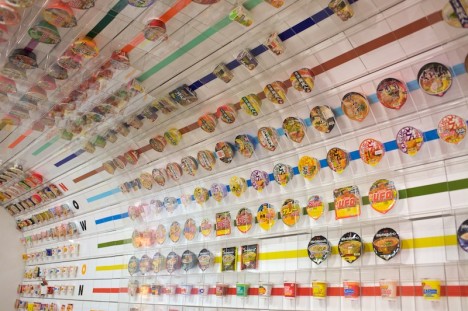
The history of ramen noodles and Cup Noodles is celebrated at the Momofuku Ando Instant Ramen Museum in Osaka, a free exhibit with recreations of the ramen inventor’s workshop and thousands of cups and packets of instant noodles on display. There’s also an instant ramen workshop where visitors can make their own noodles.

Meguro Parasitological Museum, Japan

7482791412_cdea80a49c_z

14190368935_6c38a6153b_z

14190310424_ac1e7fdfe5_z

Get up close and personal with tapeworms, mites and other parasites at the world’s only parasitological museum. Located in the Meguro neighborhood of Tokyo, this museum has over 45,000 specimens in its collection, including the world’s longest tapeworm at 8.8 meters. You can even get yourself a parasite-themed souvenir.

Next Page – Click Below to Read More:
Curious Collections 15 Of The Worlds Weirdest Museums

Share on Facebook


[ By Steph in Destinations & Sights & Travel. ]

[ WebUrbanist | Archives | Galleries | Privacy | TOS ]


WebUrbanist

 
Comments Off on Curious Collections: 15 of the World’s Weirdest Museums

Posted in Creativity


Nikon aims for the stars with the D810A, world’s first full-frame astrophotography camera

10 Feb

Nikon has announced the D810A: the first full-frame astrophotography-specific camera. This is the largest sensor to appear in a consumer astrophotography camera, bringing improved light capture capabilities to the discipline. It’s essentially a Nikon D810 with a modified IR-cut filter to ensure the camera can capture light emitted by nebulae and additional features to support long exposure photography. Read more

Articles: Digital Photography Review (dpreview.com)

 
Comments Off on Nikon aims for the stars with the D810A, world’s first full-frame astrophotography camera

Posted in Uncategorized


Sigma dp0 Quattro announced with 14mm F4 lens

10 Feb

Sigma has announced its fourth compact in its unique Quattro series. The dp0 features a fixed 14mm F4 lens (21mm equivalent) along with the unconventional styling of its peers. Its Foveon X3 CMOS sensor is divided into three layers to record red, green and blue wavelengths separately, and the top layer captures 19.6MP of information. Read more

Articles: Digital Photography Review (dpreview.com)

 
Comments Off on Sigma dp0 Quattro announced with 14mm F4 lens

Posted in Uncategorized


Sigma goes wide with 24mm F1.4 DG HSM Art lens

10 Feb

With the CP+ tradeshow in Japan about to kick off, Sigma has unveiled a 24mm F1.4 DG HSM wide angle prime lens, joining its ‘Art’ series of premium glass. Designed to cover a full-frame sensor, it will be offered in Canon, Nikon and Sigma mounts with availability and pricing yet to be announced. Read more

Articles: Digital Photography Review (dpreview.com)

 
Comments Off on Sigma goes wide with 24mm F1.4 DG HSM Art lens

Posted in Uncategorized


Durch die Augen einer Tänzerin

10 Feb

© Darian Volkova

Ballett ist eine Kunstform, die durch ihre Anmut und Eleganz so unsagbar fein und leicht wirkt, jedoch gleichzeitig ein unglaublich hartes Training benötigt. Dieser Gegensatz lässt sie magisch, ja nahezu unwirklich erscheinen. Einen Blick hinter die Kulissen gewährt uns die Fotografin und Tänzerin Darian Volkova.

Dank ihr können wir nicht nur einen Einblick in das Leben eines der bekanntesten Balletthäuser der Welt erhalten, sondern das klassische Ballett auch durch die Augen einer Tänzerin sehen.

Eine Tänzerin hält ihr Bein auf einer Stange am Fenster.

Ballettschuhe

Darian wurde in der russischen Stadt Chabarowsk nahe der chinesischen Grenze geboren, begann bereits im Alter von fünf Jahren mit dem Tanzen und fand mit sieben Jahren dann zum klassischen Ballett. Heute arbeitet sie am klassischen Balletttheater in Sankt Petersburg, einem der wohl traditionsreichsten und bekanntesten Balletthäuser überhaupt.

Vor etwa einem Jahr begann sie, das tägliche Leben der Tänzer zu dokumentieren. Sie arbeitet dabei sowohl analog mit der zweiäugigen Spiegelreflexkamera Yashica Mat 124G, digital mit der Fujifilm X-E2 und manchmal einfach mit dem iPhone. Sie portraitiert die anderen Tänzer bei den Proben, zeigt aber auch ganz alltägliche Dinge und Situationen.

Eine Tänzerin fotografiert sich selbst vor einem Spiegel

Tänzerinnen hinter der Bühne von oben aufgenommen

Was ich an der Ballettfotografie schätze, sind der menschliche Körper und seine Fähigkeiten. Ich stelle das gern heraus, indem ich mit Licht und Schatten spiele. Ich versuche, den Moment festzuhalten, die Atmosphäre des Theaters zu vermitteln und die Arbeit der Künstler so zu zeigen, wie sie ist.

Ihre Bilder leben nicht nur von den unglaublich grazilen Bewegungen, den schönen Körpern und Kostümen. Darian hat einen sehr guten Blick für tolle Bildschnitte und ein großartiges fotografisches Talent.

Ein Mann tanzt unter einem Kronleuchter.Eine Tänzerin unter Schrägfenstern.

Dass Darian selbst auch tanzt, hilft ihr sehr, wenn sie ein bestimmtes Bild umsetzen möchte. Die Tänzer sehen in ihr keine Fremde und sind oft sogar befreundet, was die Arbeit miteinander viel einfacher macht.

Ich bin in der Lage, während der Interaktion mit meinem Modell meine eigene künstlerische Vision auszudrücken. Es ist sehr leicht für mich, den Tänzern zu erklären, wie das Endresultat aussehen soll, denn da ich selbst tanze, sprechen wir dieselbe Sprache.

Ein Tänzer auf einer Leiter

Ballettshow von oben auf die Bhne fotografiert.

Darian teilt ihre Bilder über Instagram. Besonders empfehle ich aber ihre Homepage „Soul in Feet“, auf der man ihre Fotos in großer Auflösung und ohne störende Elemente bewundern kann.


kwerfeldein – Fotografie Magazin | Fotocommunity

 
Comments Off on Durch die Augen einer Tänzerin

Posted in Equipment


Invasions: Clouds of White Balloons Take Over Public Spaces

10 Feb

[ By Steph in Art & Installation & Sound. ]

invasion 1

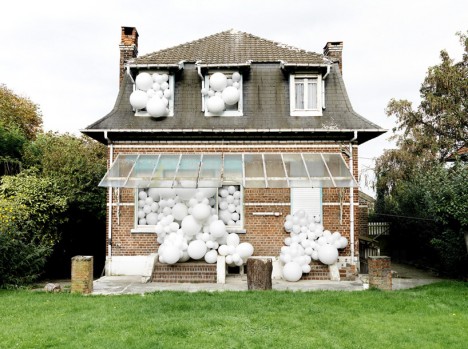
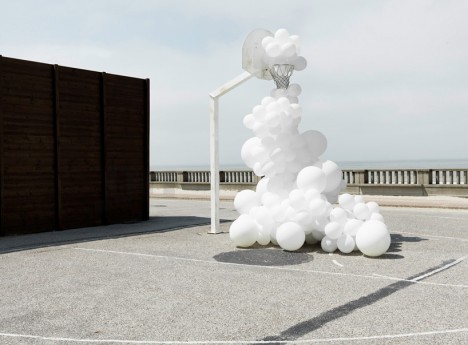
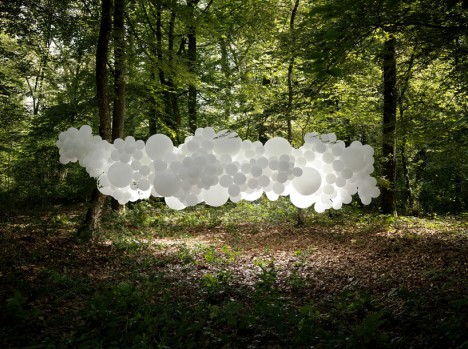
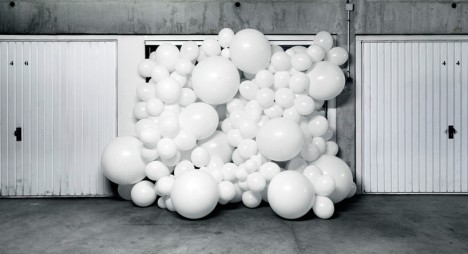
Profusions of white balloons seem to explode from the interiors of houses, squeeze through basketball hoops and hover between the trees in the forest like odd bulbous clouds in this series by artist Charles Pétillon. ‘Invasions’ gives these normally free-floating objects a life of their own with a swarm-like presence within architectural spaces and landscapes.

invasion 3

Each photograph depicts a particular metaphor, making a statement on various topics. ‘Family Memories,’ top, shows the white balloons “symbolizing childhood naivety,” while ‘Play Station 2′ aims to “question the viewer on the uses of games in all forms, their evolution and their influence in society.”

invasion 5

The forest scene, entitled ‘Mutation 2,’ mimics the molecular structure of DNA, placing it in a picturesque environment to symbolize the effect of humans on natural spaces, with our tendency to modify everything to our own uses.

invasion 2

invasion 4

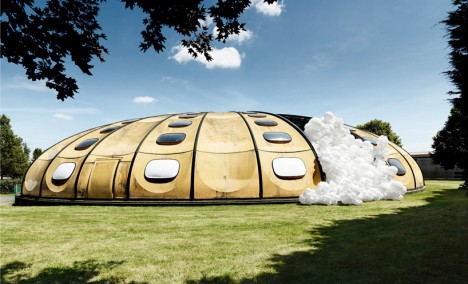
‘Invasions’ brings the balloons to retrofuturistic architecture designed in the late ’70s and early ’80s to examine our visions of the future and how quickly they become obsolete. ‘CO2′ represents the scars we leave upon the world with our lust for objects like cars. The artist sees the balloons as a way to visualize each of these ways in which we thoughtlessly proliferate, invade or evolve.

Share on Facebook


[ By Steph in Art & Installation & Sound. ]

[ WebUrbanist | Archives | Galleries | Privacy | TOS ]


WebUrbanist

 
Comments Off on Invasions: Clouds of White Balloons Take Over Public Spaces

Posted in Creativity


Collapsible Pentax-DA 18-50mm F4-5.6 DC WR RE claims title of world’s shortest zoom

10 Feb

Ricoh has just announced a new collapsible standard zoom lens. The HD Pentax-DA 18-50mm F4-5.6 DC WR RE is the world’s shortest zoom when its stored position, and is to be sold as a kit with the just-launched Pentax K-S2 DSLR. The lens offers weather-resistant construction for shooting in rain or mist, and uses Pentax’s multi-layer HD coatings to reduce flare and improve light transmittance. Read more

Articles: Digital Photography Review (dpreview.com)

 
Comments Off on Collapsible Pentax-DA 18-50mm F4-5.6 DC WR RE claims title of world’s shortest zoom

Posted in Uncategorized


Ricoh WG-5 GPS updates rugged series

10 Feb

Ricoh has introduced the WG-5 GPS, the latest in its line of rugged compacts. It exceeds its predecessor’s shockproof rating of 2m to 2.2m, and maintains its other rugged specs including -10C/+14F degree freezeproof rating, 14m/45 ft waterproof capability and 100kgf/220lbf crushproof rating. The WG-5 uses a 16MP BSI CMOS sensor, a 25-100mm equivalent zoom lens and as its name suggests, built-in GPS. Read more

Articles: Digital Photography Review (dpreview.com)

 
Comments Off on Ricoh WG-5 GPS updates rugged series

Posted in Uncategorized