RSS
 

Archive for January, 2015

Sarah DeAnna On Working With Photographers

18 Jan

Hi FashionPhotograhyBlog.com readers, 

Sarah DeAnna, top fashion model, speaker & author of the book “Supermodel YOU“, is back with us on FPBlog. After sharing her passion helping everyone discover their own supermodel from within  in our previous post with Sarah, “Body Image of a Model“, she shares her experience working as a model for both male and female photographers, as well as offering tips for photographers who need guidance in how to direct models to get the most out of their subjects during a shoot. Let’s get the party started.  Here is Sarah DeAnna with FPBlog…


FashionPhotographyBlog.com Sarah DeAnna photo by Melissa Rodwell for Kurv Magazine


FPBlog: Do you have any words of advice to, either models that want to start in this industry and/or photographers who are starting out? You have worked with some of the biggest photographers… What’s the difference between men and women photographers?


Sarah Deanna: Working with women is great, I do like that. I felt more with women for some reason, like I connect more – I don’t know why. Some of my best shoots have been with female photographers. And I think it’s because we’re women, and we get it. I mean, we understand each other.  I mean I love working with men too. It’s always different, but there’s something really intimate working with a woman. I don’t know how to explain that. They always take beautiful pictures. I don’t know a woman that does not know how to take a beautiful picture. I think she knows, she wants you to look beautiful. You (can) look cool and still look beautiful, but, sometimes I think, (in) fashion, you could take a picture of me and I’m like, “Really? You think this looks good?” But, I get it. It’s edgy and cool. 


Don’t give them too much direction. (Some) direction is good, like the idea and the concept, but also (let the models) own it for themselves. (If) you’re telling them all the time, “turn your foot to the right, turn your foot to the left, keep your hand there, do this (and) do that”,  all of that (can) make you crazy and feel like you’re doing everything wrong. If you’re constantly saying, “move to the left, or don’t do that, or change that pose… it’s so hard (that) you’re going to have a terrible time.


FPBlog: Yeah, because it makes you (the model) look rigid right?


Sarah Deanna: Yeah, and you start to get so self-conscious and it’s in your face, so that’s a big one. Anytime anybody is giving me too much direction like that type of (over) direction; where it’s “body like this”. A little bit I get it, you know. (However) if you explain (it like), “well don’t do that because you’re going to make it (out of the frame)”, and “when you go that way you’re out of the light”. When you explain (it like) that you say, “don’t turn your face to that side because you’re going into the shadow” that makes sense, but, a lot of times they don’t explain it to you like that and you get so (self-conscious and confused as a result).


FPBlog: Does it help if someone just shows you, for example, “I want your hands on your hips like this. Sometimes it looks better like this, or higher up because it breaks through the hip line”. Just showing them, is that type of direction useful?


Sarah Deanna: Yeah, and I like that. I really do, I like both. Sometimes photographers know exactly what they want, the exact pose and everything. If you (the photographer) know exactly (what you want) you (can) tell a girl (model) that. To me I’m not offended, because then I don’t have to think about – sometime (that part) is a lot of work. Sometimes it’s fun and I love it because I get to be part of the creation of it (the image) but if they know exactly what they want then I just get it (understand the concept and then) I just got to nail the pose and…


FPBlog: And work it from there right? Go with the emotion?


Sarah Deanna: Yeah, so it’s just knowing what you want. The worst thing you can do is not know what you want. It can’t just be, “let’s just shoot” unless two people have just great energy and they’re just like, “let’s just go with this” and the model is cool (with it), and you know that’s its going to work out. But if they (the models) need that direction you got to give it to them.


FPBlog: Right. So thank you so much for sitting with me and good luck… I know that you’ll keep FPBlog in the loop.


Sarah Deanna: Thank you!


Did you find the tips from Sarah DeAnna useful? Leave your comments below in the comment section. We would like to know what you thought about this post. If you enjoyed this article, we recommend that you check out our article on FashionPhotograhyBlog.com with Sarah DeAnna on how she began her modelling career, titled “Beginnings of a Model“. If you are interested in grabbing a copy of Sarah’s book, “Supermodel YOU” you can find it here.


IMAGE SOURCE: 

Feature image & image 1: Photo of Sarah DeAnna, courtesy of Melissa Rodwell for Kurv Magazine


Fashion Photography Blog

 
Comments Off on Sarah DeAnna On Working With Photographers

Posted in Uncategorized


3 Video Tutorials – How to Use On-Camera Flash

18 Jan

This week I have found some great videos to help you to understand how to use on-camera flash to your advantage. Flash can be confusing to understand and using on-camera flash incorrectly can make unflattering light, or worse yet ruin your photos completely. Have a watch of these tutorials on flash and see if you can pick up some helpful tips:

Video #1 Ed Vorosky – On-camera fill flash basics

Ed Vorosky covers some of the basics you will need to get a grasp on using flash on-camera. He goes over some of the settings to look for on your flash, different lighting situations, and which camera shooting mode to use. There’s a helpful demonstration of using Flash Exposure Compensation and how it affects your photo as well.

Video #2 Tony Northrup – Bounce Flash Basics

In this second video tutorial Tony Northrup goes into a little more detail using on-camera flash indoors and bouncing it for various different looks. He shows the results using just ambient light, flash straight on, and bounced off both the ceiling and side walls. You can see how just a small adjustment with your flash can completely change the look of your image or portrait.

Video #3 Mark Wallace – On-camera flash basics

In this last video Mark Wallace covers some of the basic flash settings for both Canon and Nikon flashes, then he goes outside to demonstrate how to control the exposure on the background (ambient) using both systems. Then he goes back indoors and shows several options for using the flash on-camera in that environment including bounce flash techniques.

Do you have any anxiety around using flash? Or are you a pro? Share any questions and comments you have below.

googletag.cmd.push(function() {
tablet_slots.push( googletag.defineSlot( “/1005424/_dPSv4_tab-all-article-bottom_(300×250)”, [300, 250], “pb-ad-78623” ).addService( googletag.pubads() ) ); } );

googletag.cmd.push(function() {
mobile_slots.push( googletag.defineSlot( “/1005424/_dPSv4_mob-all-article-bottom_(300×250)”, [300, 250], “pb-ad-78158” ).addService( googletag.pubads() ) ); } );

The post 3 Video Tutorials – How to Use On-Camera Flash by Darlene Hildebrandt appeared first on Digital Photography School.


Digital Photography School

 
Comments Off on 3 Video Tutorials – How to Use On-Camera Flash

Posted in Photography


Die 5 Videos des Monats

18 Jan

Video © Aileen Wessely

Unsere Fotorückblicke auf das Jahr 2014 sind vorbei und kwerfeldein nimmt wieder normale Fahrt auf. Dazu gehören natürlich auch in diesem Jahr die monatlichen Videos. Deshalb haben wir auch für heute wieder fünf sehr sehenswerte Bewegtbild-Inhalte gesucht und gefunden, bei denen sicher für jeden etwas dabei ist. Film ab für die Januar-Ausgabe und viel Spaß dabei.


1. Projections In The Forest

Sechs Wochen haben die Künstler Friedrich van Schoor and Tarek Mawad in den Wäldern gefilmt, um das Material für „Projections In The Forest“ fertigzustellen. Herausgekommen ist ein extrem faszinierender Kurzfilm, der nicht einfach nur wunderschöne Naturaufnahmen beinhaltet, sondern die glühenden, leuchtenden, schimmernden Naturphänomene der Biolumineszenz durch Nachbearbeitung betont. Dieser Wald ist magisch.

• Weiterführender Link: Ein ähnliches Projekt gibt es bei National Geographic, nur nicht im Wald, sondern im Wasser.


2. Long Live Film

Das Indie Film Lab macht einen Road Trip und will eine kurze Dokumentation darüber drehen. Dann steigt Kodak als Sponsor ein und das Projekt entwickelt sich zu einem knapp 50-minütigen und sehr sehenswerten Feature über die Liebe von Fotografen zur Arbeit mit analogem Material. Was kann man dazu noch sagen? Lang lebe Film!

• Weiterführender Link: Auf das Blog des Indie Film Lab kann man auch mal einen Blick werfen.


3. Gigapixels Of Andromeda

Ein Video, das man unbedingt im Vollbild gucken sollte: Wir betrachten ein 1,4-Milliarden-Pixel-Foto der NASA unserer Nachbargalaxie, der Andromeda-Galaxie und reisen an einer schier unendlich scheinenden Zahl von Sternen vorbei. Auch das, was auf dem Photo wie Bildrauschen wirkt: Alles einzelne Sonnen, vielleicht mit einzelnen Planeten, auf denen jemand sitzt und zu uns zurückguckt.

• Weiterführender Link: Die anderen Fotos, die die NASA auf der Seite des Hubble-Teleskops zeigt, sind zwar nicht so riesig, aber teilweise noch spektakulärer.


4. The Little Nordics

Der Filmemacher und Fotograf Martijn Doolaard wirft in seinem bezaubernden Kurzfilm „The Little Nordics“ einen Blick aus der Luft auf Island und Norwegen – mit einem Fokus auf den Menschen und ihren seltsamen Tätigkeiten in spektakulären Landschaften und einer Vorliebe für den Tilt-Shift-Effekt. Unbedingt sehenswert.

• Weiterführender Link: Natur- und Landschaftsfotos aus Norwegen kann man den ganzen Tag lang angucken.


5. How To Make A Panorama In Photoshop

Wie macht man eigentlich ein richig gutes Panorama in Photoshop? Hier werden für alle einzelnen Schritte des Zusammenbauens von Einzelbildern sehr hilfreiche Tipps gegeben.


Die Bonus-Links

• Bei „The Art Of Photography“ (dem YouTube-Channel, den ich in der letzten Ausgabe vorgestellt habe) gibt es dieses Mal eine Doku über einen echten Klassiker der Fotografie: Ansel Adams.

• Leider nicht einbettbar: Arno Rafael Minkkinen macht seit 40 Jahren surreale Kunstfotografie, immer schwarzweiß, immer mit einzelnen Körperteilen in den Bildern. LensCulture hat ihn interviewt und zeigt viele seiner Fotos im Feature „Art Is Risk Made Visible“. Die Vielseitigkeit seiner Bildwelten sollte man sich auf seiner Webseite unbedingt in Ruhe angucken.

• Bei Open Culture gibt es Urbanes zu sehen: New York, Los Angeles und Chicago in den 40ern und in Farbe in bewegten Bildern.


Welche sehenswerten Videos rund um die Fotografie habt Ihr in der letzten Zeit gefunden, die wir vergessen haben? Sagt es uns auf Twitter oder in den Kommentaren.


kwerfeldein – Fotografie Magazin | Fotocommunity

 
Comments Off on Die 5 Videos des Monats

Posted in Equipment


17. Januar 2015

18 Jan

Das Bild des Tages von: Steven Böhm

Jänner © Steven Böhm

Fotolinks des Tages

1. Nicht. Sofort. Sehen.

Analoge und digitale Fotografie sind kein getrennt lebendes Ehepaar. In den letzten Jahren sprießen Startups, die sich der Verknüpfung beider Welten verschrieben haben. Eines davon ist WhiteAlbum und eine App für iOS. Was an der App analog ist? Ganz einfach: Man sieht die Fotos, die man mit WhiteAlbum macht nicht sofort und kann sie auch nicht mehr optimieren. Nein, erst wenn die Fotos entwickelt (gedruckt) und vom Service an den Benutzer verschickt wurden, gibt es ein Wiedersehen. Mit Freude? Wer weiß. Spannend ist es auf jeden Fall. → ansehen

2. Geschwungene Bewegungen einfrieren

Eine elegante Tänzerin wirft weißen Puder in Luft und ein Fotograf macht ein Bild davon. Mit Blitzen und einer 6000/s. Was daraus entsteht, ist alles andere als gewöhnlich. Jeffrey Vanhoutte und der Filmmacher André Nicolas Vantomme erarbeiteten ein Set von wahrlich zauberhaften Aufnahmen im Rahmen einer Werbeaktion für den niederländischen Kaffeesahne-Hersteller Campina Friesland Kievit. Tipp: Schaut Euch sowohl das finale Video, als auch das Making-Of am Ende des Artikels an. → ansehen

3. Anleitung zum Doppelbelichten

Zugegeben, es passiert recht selten, dass wir in den Foto-Links des Tages Tutorials empfehlen, doch heute machen wir eine Ausnahme. Denn auf 121clicks haben wir zwei tolle Videos mit Sara Byrne gefunden, die sich dem Thema digitale Doppelbelichtungen im Bereich der Portraits annimmt und dafür mit der EOS 5D MK III arbeitet. Das Canon-Modell verfügt praktischerweise über Spezialfunktionen, die dies erleichtern. Falls Ihr nun keine Mark III habt, dürft Ihr trotzdem kicken. Denn ein Großteil der Beispielfotos im Artikel ist super. → ansehen


kwerfeldein – Fotografie Magazin | Fotocommunity

 
Comments Off on 17. Januar 2015

Posted in Equipment


Cool as Ice: 10 Years of Artist-Made Shanties on Frozen Lakes

17 Jan

[ By WebUrbanist in Art & Installation & Sound. ]

SONY DSC

Over the past decade, over 1,000 artists and 60,000 visitors have taken part in this incredible seasonal arts event, coming together to create an annual temporary arts community-on-ice in one of the nation’s coldest states.

art shanty village overview

art shanty ice dice

Known as the “Land of 10,000 Lakes” but also as a center for the arts, Minnesota seems the perfect place for the Art Shanty Projects – a temporary autonomous zone where two disparate concepts to come together: the tradition of ice shacks built for fishing and the idea of public, interactive, community-built art on those same iced surfaces.

art shanty aerial view

art shanty collection image

Comparisons have been made to Burning Man, but those sell short the unique local nature of this undertaking. One thing they do share, however, is a harsh (if opposite) environmental context that makes serious demands on buildings and shapes their form and function. The resulting structures are a mixture of wooden stick-framed shacks, metal geodesic domes, triangular tipis and other proven engineering approaches mixed with creative touches and unusual applications.

art shanty party time

ART SHANTY INTERIORS

In years past, first on Medicine Lake and later White Bear Lake, the spaces these shape have featured a little bit of everything, from interactive games and dance floors to indoor and outdoor theatrical and musical performances. Sometimes a wild art car or two can be spotted patrolling the streets of the the shanty village as well and strange sculptures have been known to crop up in between buildings as well. While some things are scheduled, visitors learn to expect the unexpected.

art shanty rainbow arc

art shanty robot play

This winter, the Art Shanty Projects is taking a break from the On-Ice Program to celebrate 10 years of success and complete a pivotal transition into an official non-profit 501(c)(3) organization. However, the organization is hosting a fundraising retrospective featuring some of the best shanties of years past as well as a custom-brewed beer specifically created for the event, taking place on February 28th at the Fulton Brewery in Minneapolis (more details can be found on ArtShantyProjects.org). Anyone wishing to donate to next year’s program can also do so online at Give.MN. This year, ASP is also a finalist for an Art Place America grant and is competing for a Black Rock Arts Foundation grant.

art shanty building process

art shanty night light

More about ASP: “Art Shanty Projects is an artist driven temporary community exploring the ways in which relatively unregulated public spaces can be used as new and challenging artistic environments to expand notions of what art can be. Our organization values artists, art in all communities, and the importance of interaction between the two. Through an array of artists receiving fair wages for their work, we broaden perceptions of art while maintaining respect for the environment and communities in which we work.” Note: the writer of this article serves as on the Board of Directors for the Art Shanty Projects, an unpaid position.

Share on Facebook


[ By WebUrbanist in Art & Installation & Sound. ]

[ WebUrbanist | Archives | Galleries | Privacy | TOS ]


WebUrbanist

 
Comments Off on Cool as Ice: 10 Years of Artist-Made Shanties on Frozen Lakes

Posted in Creativity


5 Quick Reasons to Use the Nifty Fifty for Landscape Photography

17 Jan

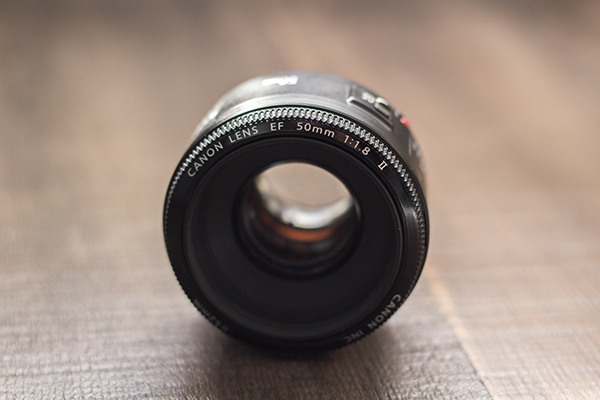
The 50mm prime lens, or as it’s more commonly known, the Nifty Fifty; we all know the name, even inexperienced photographers have likely heard of it. Most of us know it for its outstanding qualities; an inexpensive, quality, prime lens that is in plenty of photographers’ bags around the world, and one of the most popular lenses of all time.

What we might NOT think of it as, however, is a lens normally used for landscape photography. The zoom is tight, and doesn’t possess a field of view wide enough to usually be considered proper for this sort of work.

But I have. For four years, the 50mm f/1.8 has been my workhorse for portfolio building (which is primarily nature and landscape), and even though I’m branching off with other lenses, I can’t stress the usefulness of the Nifty Fifty. And I’m not alone.

50mmLens

My primary reasoning for using the 50mm instead of going out and buying a proper wide angle lens such as a 35mm or even wider? Cost. I was delving back into photography, and was on an extremely tight budget. After buying my camera, spending $ 500 on a lens simply wasn’t an option. It didn’t take long for me to hear my fellow photographers sing the praises of this wonderful lens; cheap, fast, and sharp. Right up my alley.

There are no tricks or immaculate revelations here, and you won’t likely become famous for taking only landscape shots with 50mm lenses – but there are a few reasons why shooting landscapes with a 50mm lens can produce great results. Giving it a try can only improve your photography and make you a better observer of the world around you.

Focus on What’s Important

We think of landscapes as sprawling, wide shots, that include many elements in one frame, but does it have to be that way? Can we not capture the beauty of the area around us, in a tighter package? The rolling hills and an interesting tree in an outdoor scene are more than enough to create a photo that provokes thought.

The Nifty Fifty makes it easier to focus on whatever is most important in your photo, while still capturing enough around the subject to lend it scope.

The Nifty Fifty makes it easier to focus on whatever is most important in your photo, while still capturing enough around the subject to lend it scope.

Shooting at this focal length forces us to focus on the most important parts of what we’re seeing around us. Trimming the fat, as they would say. In doing this, we’re also training ourselves psychologically to do the same in all of our shots.

Quality

Landscapes usually require very good sharpness, and the 50mm prime lenses excel at that. No extra moving parts normally required for varied focal lengths (zooms) mean a crisper, sharper result. As with most lenses, its sweet spot isn’t wide open, but more in the f/4 to f/5.6 range. Even narrower apertures will still yield excellent results.

The 50mm prime allows you to capture very sharp images

The 50mm prime allows you to capture very sharp images.

Take Your Time

Since the 50mm is a prime lens, you’ll get an added benefit (or detriment, depending on how much you care for walking); the single focal length means you can’t just shoot from anywhere, you’ll need to move around to find the best angle and distance. This automatically forces you to think about your shot a bit more, which is always a good thing.

The 50mm allows you to think differently about the landscape or subject you're framing, and to make more creative choices.

The 50mm allows you to think differently about the landscape or subject you’re framing, and to make more creative choices.

With a zoom, you’d adjust focal length without even thinking, until the scene is framed in a way that looks good. But what if that isn’t the best angle or distance? The Nifty Fifty will give you incentive to take a chance and try something different, whether it be an angle, a distance, or even perspective.

No Wide Angle…or Can There Be?

Of course there can! The 50mm gives you a gentle push into playing around with some panoramic shots. Three, four, five, or more shots can be stitched into a flattering wide angle composite, sometimes with even more dramatic results than a single wide angle shot.

By stitching together shots, we can create a panorama that gives us the wide field of view we're looking for

By stitching together shots, we can create a panorama that gives us the wide field of view we’re looking for.

Lightweight is King

If you’re serious about landscape photography, you’re probably already lugging around a considerable amount of gear; camera bodies, other lenses (you don’t go out with just one lens, do you?), tripods – the list goes on. The last thing you need are more heavy lenses when you’re out and about, right? Do you know what the Canon 50mm f/1.8 weighs? 4.6 ounces (130 g). It’s short, sweet, and light to boot.

At the end of the day, all lenses and focal lengths have advantages and disadvantages, and the case can certainly be made for using glass with wider angles. But as a teaching tool, the 50mm prime lens is a great option for your landscape photography; it will make you think a bit differently about those types of shots and easily provide you with clear, sharp images.

What are your experiences with this lens? What images have you captured? Tell us your opinion below, and show us those Nifty Fifty shots!

googletag.cmd.push(function() {
tablet_slots.push( googletag.defineSlot( “/1005424/_dPSv4_tab-all-article-bottom_(300×250)”, [300, 250], “pb-ad-78623” ).addService( googletag.pubads() ) ); } );

googletag.cmd.push(function() {
mobile_slots.push( googletag.defineSlot( “/1005424/_dPSv4_mob-all-article-bottom_(300×250)”, [300, 250], “pb-ad-78158” ).addService( googletag.pubads() ) ); } );

The post 5 Quick Reasons to Use the Nifty Fifty for Landscape Photography by Tim Gilbreath appeared first on Digital Photography School.


Digital Photography School

 
Comments Off on 5 Quick Reasons to Use the Nifty Fifty for Landscape Photography

Posted in Photography


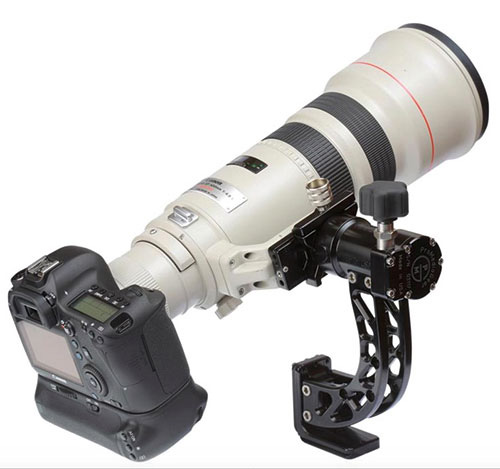
17 January, 2015 – Gimbal / Monopod Use With Long Lenses

17 Jan


The Luminous-Landscape team is about to embark on two back to back Antarctica Photo Adventures.  Micahel and Kevin are working out the logistics for getting their gear to Antarctica as well as what gear to bring.  Today Michael shares with us his new set up for handling his NEW 150-600mmm Tamron lens while on the trip.  Gimbal / Monopod Use With Long Lenses is Michael’s answer.  His article also has a video showing how this set up is used.


The Luminous Landscape – What’s New

 
Comments Off on 17 January, 2015 – Gimbal / Monopod Use With Long Lenses

Posted in News


A Super Simple Way to Make Landscape Photos POP Using Lightroom

17 Jan

It seems like virtually all outdoor or landscape photographs suffer from the same illness when they come out of the camera. The symptoms are:

  • An overly bright sky
  • Foreground that is too dark
  • A general lack of color and contrast.

Sound familiar?

Fortunately, there is a cure for this ailment. Actually, as anyone who has worked with post-processing software for any length of time knows, there are a lot of different cures. But I want to show you a super simple way to fix pictures with these problems. I performed these fixes in Lightroom, but you can also do them on the Adobe Camera Raw screens of Photoshop or Photoshop Elements.

Colorado road photo with Lightroom adjustments

The quick-fix shown here will involve nothing more than moving six sliders, each of which is in the Basic panel of Lightroom’s Develop module. The edits will take less than 30 seconds of your time. I performed these edits – and only these edits – to the pictures you see throughout this article to show you the effects.

The Steps

Let’s not dally with a lot of explanation just yet. Here are the steps to perform a quick-fix of landscape photos. The first three steps are the most important, where you will see about 90% of the changes to your pictures. After walking you through these steps I will explain the process in a little more detail.

  1. Decrease the Highlights: Just pull the highlights slider to the left as much as is needed to add more detail to your sky.
  2. Increase the Shadows:  Pull the Shadows slider to the right to brighten the foreground. Don’t worry if it looks a bit washed-out after this step.
  3. Reduce the Blacks: Pull the Blacks slider to the left. This will add contrast back to the picture, and will fix the washed-out look that might have crept into your picture after the last step.
  4. Increase Vibrance: Pull the Vibrance slider to the right a bit to add more color to the picture.
  5. Increase Contrast: Pull the Contrast slider to the right a little bit to increase overall contrast. Don’t go too far, or it might start to undo the changes you just made above.
  6. Increase Clarity: Pull the Clarity slider to the right to add some clarity (edge contrast) to your photo and make it appear less soft.

That’s it. Just move these six sliders and you should see a vast improvement in your landscape pictures. This might seem more complicated than it actually is, because there are six steps. But after a while you will be able to do all of it in a matter of seconds.

Bass Harbor photo with Lightroom adjustments

What’s Going on Here

Now that I’ve shown you the steps and a few examples, let’s talk about this process.

What you are doing first is reducing the tones in the sky by using the Highlights slider. The sky is typically the brightest part of landscape photos. The Highlights slider will ONLY affect the brightest tones in the image, so decreasing it should tone down your sky but not touch the darker portions of your picture. Decreasing the highlights will not only keep the sky from being too bright, but will also add detail and texture to the clouds.

After the change to the sky, step 2 is to increase the brightness of the foreground. The foreground is almost always too dark in outdoor photos, and you need to brighten it up and add detail there. As you pull the Shadows slider to the right, you should see your foreground brighten up. The sky, which is not among the shadows of your photo, should remain largely unaffected. Your photo should be looking a lot better at this point.

Many times, when you make the change to the foreground in step 2, that area starts to look a little bit washed-out. Therefore, step 3 is the pull the Blacks slider to the left. Whereas the previous step brightened the shadows, we are now taking the very darkest tones in the photo and bringing them closer to black. The shadows were made brighter in the last step, and now the blacks are made even blacker. That adds more contrast to the foreground and eliminates that washed-out look. It often adds a little bit more contrast to your sky as well.

Note: For a handy tip on using sliders, read The Magic Alt Key article here. 

At this point, your photo should be looking pretty good. In fact, about 90% of the effect is applied to your photo after step 3. Now you will just clean up by making the photo a little clearer, and more colorful.

Texas field photo with Lightroom adjustments

In step 4, we will just increase the vibrance of the photo to add more color to the scene. The Vibrance slider is just below the sliders you have been working with.  Pull it to the right to add more color to the picture. You can adjust this slider however you want, but don’t overdo it.

You might wonder why you should use the Vibrance slider instead of the Saturation slider. The answer is that vibrance is designed to have a higher impact on less saturated colors. Saturation adjustments apply to all colors equally, so an increase in saturation can make certain highly saturated colors look garish. Vibrance, by focusing on colors that are less saturated, lets you increase the overall saturation of your colors without overdoing any colors.

Next, you add a little contrast. Pull the Contrast slider to the right a little bit. You have to be careful here because essentially what you did in the first three moves of this process was reduce overall contrast (making the bright sky darker and the dark foreground lighter). If you crank the contrast up now using the Contrast slider, you will be working against the moves you previously made. A small or moderate increase in contrast, however, can add more texture to the photo, so I recommend you do that.

Finally, a small to moderate increase in Clarity usually makes the photo look sharper and clearer. Don’t overdo this, as clarity is a powerful tool. Just add a little bit by pulling the Clarity slider to the right, and this final step can really make your photos pop.

After having gone through this process, there is nothing stopping you from continuing with additional editing, if you wish.  You can take your photo into Photoshop and make a lot of other changes, or you can use the plug-in of your choice. But even if you decide to do additional editing, the process I have described in this article can still be a good starting point for your landscape photos. It also works really well when you are in a hurry or you’d like to process a lot of photos at once.

Head Harbor Lighthouse photo with Lightroom adjustments

Bonus Tip

I want to keep this process as simple as possible and not confuse it with a bunch of other things, but there is just one more tip I want to pass along in this article. It is a way to add more contrast to your skies in Lightroom (or in ACR in Photoshop).

Scroll down to the HSL/Color/B&W panel in Lightroom’s Develop module, where you will see sliders for eight different colors. Go to the Blue slider and make sure the Luminance tab is selected just above the colors. Decrease the luminance of the blues in your picture by pulling the Blue slider to the left. This will make the color in your sky a deeper, richer blue.

Recall that Step 1 of the process above was to decrease the highlights in an effort to tone down and add detail to your sky. If you decrease the luminance of the blues, you might find that you don’t need to do Step 1 (or at least that you do not need to pull down the highlights as much). In fact, keeping the highlights nice and bright, while decreasing the luminance of your blues, can really add some nice contrast to your skies.

Colorado National Monument photo with Lightroom adjustments

Conclusion

This is one simple way to make super fast changes to your landscape photos. After you have done it a few times, you can make these changes in mere seconds. I know we are all sensitive to falling into ruts and doing the same thing over and over again, so you don’t want to do this process all the time. But it is great when you just want high impact in a short amount of time, or as a quick baseline for further changes.

googletag.cmd.push(function() {
tablet_slots.push( googletag.defineSlot( “/1005424/_dPSv4_tab-all-article-bottom_(300×250)”, [300, 250], “pb-ad-78623” ).addService( googletag.pubads() ) ); } );

googletag.cmd.push(function() {
mobile_slots.push( googletag.defineSlot( “/1005424/_dPSv4_mob-all-article-bottom_(300×250)”, [300, 250], “pb-ad-78158” ).addService( googletag.pubads() ) ); } );

The post A Super Simple Way to Make Landscape Photos POP Using Lightroom by Jim Hamel appeared first on Digital Photography School.


Digital Photography School

 
Comments Off on A Super Simple Way to Make Landscape Photos POP Using Lightroom

Posted in Photography


The Wild Southwest: Jory Vander Galien’s landscapes

17 Jan

Like many fine-art-nature photographers, Jory Vander Galien says that his passion for landscapes was ignited at a young age through National Geographic and Ansel Adams. How, he often finds himself at a location before dawn, ready to fight lightning and dust storms in order to capture the vast and volatile Southwest landscape. See his work and find out more in our Q&A. See gallery

Articles: Digital Photography Review (dpreview.com)

 
Comments Off on The Wild Southwest: Jory Vander Galien’s landscapes

Posted in Uncategorized


Body Image Of A Model With Sarah DeAnna

17 Jan

Hi FashionPhotograhyBlog.com readers, 

Top fashion model, speaker & author of the book “Supermodel YOU, Sarah DeAnna, joins us once again on FPBlog to share her experiences of healthy bodies and body image in the modeling industry and how she came about to create her book that deals with finding identity and beauty within yourself. Let’s note wait any longer. Here is the interview of Sarah DeAnna speaking to FPBlog…

 FashionPhotographyBlog.com Sarah DeAnna photo by Melissa Rodwell for Kurv Magazine


FPBlog: One of the things that I really admire about you, Sarah, is that  you have this gorgeous body. Models have to have gorgeous bodies, but you have this body through good habits and healthy means. You know in our industry, and I often at times I feel guilt about it, is the showing off, depicting the perfect image, body and face, and we then exploit that.


Young girls, who maybe are 5’10” and 115 pounds feel bad about themselves and it can lead to low self esteem or poor body image. Maybe they might try to get as thin as you are through unhealthy measures whether that’s through fasting, drugs or anorexia and that’s really sad. So you have written a book which I’m so happy and proud that you’ve done. Can you tell us about it?


Sarah Deanna: Yeah, it’s called Supermodel YOU, and basically it was my response to, like all the things your saying right now. Being in the industry, I just became the “go to girl” for models living in model apartments, backstage at shows or (for) agents (who) would tell the models to call or ask me because “Sarah Deanna is thin and she’s healthy and they’re having problems”. They knew I was eating anything, they knew I was healthy and it just became a passion of mine. Girls would come up to me, I would teach and help them.


So I started researching and I found something (interesting); that they were five keys that determine body weight for every single person and I was able to show how a model, a healthy model (because of our career and because of what we do), how we have mastered these keys. I put it into a book and I have an amazing publishing house (Hay House), support system and writer. I’m just really happy (about it) and it’s out now!


It’s my passion, my dream and I just want to (do it). It’s Supermodel YOU and it’s teaching people how to channel their own inner supermodel. It’s not (about) having somebody else’s body or (the body of) somebody that you see in a magazine, but your dream body, and your body that makes you feel the best, that you’re healthiest at, and I love it.


I cannot wait for people to get it and I hope that the message is understood the right way. (I hope that it is) given how we’re giving it, but (also) understood, that people feel empowered; girls won’t feel like a model is better than them or a person on the street, or a girl in their school or anything (is better than them). I hope they can get how to own their own identity and their own beauty. 


FPBlog: That’s great! I’ll read it!


Did you find this interview with Sarah DeAnna interesting? Leave your comments below in the comment section. We would like to know what you thought about the post. If you enjoyed this post, stay tuned as Sarah DeAnna has more insights to share on FashionPhotograhyBlog.com – If you are interested in grabbing a copy of Sarah’s book, “Supermodel YOU” you can find it here. You can also find out how Sarah learned her way through the modeling industry when she first started by reading our previous post with her, titled “Learnings of a Model“.


IMAGE SOURCE: 

Feature image & image 1: Photo of Sarah DeAnna, courtesy of Melissa Rodwell for Kurv Magazine


Fashion Photography Blog

 
Comments Off on Body Image Of A Model With Sarah DeAnna

Posted in Uncategorized