RSS
 

Archive for November, 2014

25 November, 2014 – Yellowstone In The Winter

26 Nov


In the last week just about all parts of North America received a very early preview of winter.  In Buffalo they received nearly 6 feet of snow.  And that is before Thanksgiving.  So, in honor of a cold winter ahead we present Nigel Turner’s article on Yellowstone In The Winter.  Nigel who shared an article Symphony In Stone takes us deep into Yellowstone during the coldest part of winter.  Enjoy some beautiful photography and remember just because it is cold out doesn’t mean your cameras need to gather dust sitting on the shelf.


The Luminous Landscape – What’s New

 
Comments Off on 25 November, 2014 – Yellowstone In The Winter

Posted in News


Konversion

26 Nov

Ein Beitrag von: Isabel Kiesewetter

Mit dem Zerfall der Sowjetunion und dem Ende des Kalten Krieges begann die größte militärische Abrüstung der Geschichte. In Europa wurden nach dem Abzug sowjetischer und westlicher Streitkräfte nach der Wende zahlreiche militärische Einrichtungen geschlossen. Die Fotografin Isabel Kiesewetter hat die Umnutzung dieser ehemaligen militärischen Areale dokumentiert. Auf Kwerfeldein stellt sie ihr Projekt „Konversion“ vor.

1994. Ein Blick nach Brandenburg. „Wjunsdorf“, wie der Ort von den Russen genannt wurde, ist Sitz des Oberkommandos der sowjetischen Streitkräfte in Deutschland. Innerhalb des umzäunten Geländes befinden sich zahlreiche sowjetische Einrichtungen wie Kindergärten, Schulen und Geschäfte.

Unterirdisch erstreckt sich ein durch Gänge verbundenes Netz an bombensicheren Bunkeranlagen, überirdisch stehen zahlreiche Luftschutztürme. Für Bürger der DDR ist das Areal Sperrgebiet.

Eine Waldszene

Ein Loch im Boden

Das einstige Hauptquartier des Oberkommandos der Wehrmacht beherbergte zu Spitzenzeiten 50.000 bis 75.000 sowjetische Männer, Frauen und Kinder.
1994 erfolgte dann der Abzug der Truppen und hinterließ eine komplette Stadt – menschenleer.

Wünsdorf ist nur ein Beispiel von zahlreichen verlassenen Militärgeländen in Ost- und Westdeutschland. Riesige Militärflächen bleiben zurück, die sich in einem äußerst desolaten Zustand befinden und mit gefährlichen Altlasten kontaminiert sind.

Stühle und Tische im Dunkeln

Ein verlassener Turm in der Landschaft

Die Rückführung der ehemaligen militärischen Anlagen in eine zivile Nutzung bringt für die Kommunen deshalb erhebliche Herausforderungen mit sich. Für Flächen, die oft jahrzehntelang in der Stadtplanung unberücksichtigt blieben, muss nun eine neue Verwendung gefunden werden. Die Finanzierung der Konversion stellt die Kommunen vor beträchtliche Probleme.

Der Abzug der Truppen führt zu einem Verlust von 129.000 zivilen Arbeitsplätzen in Deutschland. Wo vorher ein reger Handel zwischen den ausländischen Streitkräften und ortsansässigen Betrieben herrschte, ist plötzlich keine Nachfrage mehr vorhanden. Daher sollen nun neue Märkte erschlossen werden.

Schafe in einem Stall

Ein Jahrmarkt mit Menschen

Die Kommunen wollen Investoren finden, um durch Steuereinnahmen und Arbeitsplätze Wohlstand für die Region zu sichern. Dabei kann es zu Spannungen kommen, wenn die kommunalen Interessen, nicht mit den Forderungen der Umweltverbände und Gewerkschaften vereinbar sind, die für eine sozial verträgliche Umnutzung eintreten.

20 Jahre nach dem Abzug der Alliierten ist die Konversion einiger Areale bereits abgeschlossen, bei anderen hat sie noch nicht einmal begonnen. Hier ergreift die Natur Besitz vom militärischen Nachlass. Die Betrachtung der derzeitigen Beschaffenheit und Nutzung dieser Gebiete ermöglicht einen differenzierten Blick auf den langwierigen Konversionsprozess in Deutschland.

Eine dreckvernebelte Waldszene

Eine Kuppel in der Landschaft

Das Konzept zu diesem Thema habe ich im Rahmen meiner Abschlussarbeit an der Ostkreuzschule für Fotografie in Berlin entwickelt. Meine Fotografien zeigen Landschaften. Doch ihr Bezug zur früheren militärischen Vergangenheit erschließt sich nicht immer auf den ersten Blick. Erst bei genauerem Hinsehen und der Betrachtung der Bilder als Serie, entsteht ein Gefühl für die Bedeutung, die diese Orte einmal hatten.

Bei der Konzeption des Projekts war es mir wichtig, keinen Verfall zu zeigen. Ich versuchte, einen neutralen Standpunkt einzunehmen und mich darauf zu konzentrieren, diese Haltung auch technisch umzusetzen. Es gibt kaum Unschärfe in den Bildern. Viele Fotografien wurden aus einer größeren Distanz oder von einem erhöhten Standpunkt aus aufgenommen.

Eine Kleinstadt.

Eine Landschaft mit Traktor

Das Projekt „Konversion“ knüpft direkt an meine vorangegangenen Arbeiten an. Auch in den Arbeiten „places“ und „Hamburg Süd“ habe ich mich bereits mit Orten beschäftigt, die sich aufgrund gesellschaftlicher und politischer Veränderungen einem Wandel unterziehen.

Meine Arbeit soll kein bloßes Dokument sein, sondern eine eigene differenzierte Sichtweise auf ein komplexes Thema erlauben und Fragen aufwerfen. Sie ist eine Momentaufnahme, die einen Einblick in den langwierigen Konversionsprozess in Deutschland ermöglicht.

Wer mehr über Isabel Kieswetters Arbeiten wissen möchte, schaue auf ihrer Homepage nach. Isabel Kiesewetter ist Teil des Fotografenkollektivs Exp12.


kwerfeldein – Fotografie Magazin | Fotocommunity

 
Comments Off on Konversion

Posted in Equipment


How to get more from your printer – besides good quality prints!

26 Nov
Canon Pixma MG6350 All-in-one-printer

Canon Pixma MG6350 All-in-one-printer

If you like to print hard copies of your photos at home, how do you decide which inkjet printer to buy? With such a myriad of printers on the market it can be daunting which one to choose. However, similar to buying a camera, one main consideration will be how much do you want to spend.

I bought a Canon PIXMA MG6350 a little over a year ago.

As luck would have it, my local computer shop had the white version in stock for nearly 50 Euros ($ 62USD) less than the black one. The white one was my first choice.

This is a high-end, multifunction, inkjet printer. It is an all-in-one color printer with two paper trays. This means that it can print, copy, and scan and it also has WiFi and Airprint. I believe the latter lets you print from a smartphone or tablet but I haven’t tried it yet.

The lower cassette can hold up to 125 sheets of A4 (US letter) size paper, while the upper tray is for photo paper (20 sheets) of 10 x 15cm (3.9 x 5.9 inches) or 13 x 18cm (5.1 x 7.1 inches). So it doesn’t hold a great deal of paper but I only ever load one sheet at a time.

Its physical size, measuring 466 x 369 x 148mm (18.34 x 14.5 x 5.8 inches)was a perfect fit for my shelving unit. My Manfrotto travel tripod measures 18 inches when folded and this is exactly the width of the printer. It’s not small but at least it doesn’t have a top paper feed which can be awkward if the space between the shelves isn’t adequate enough.

It’s solid but it is not light, it weighs approximately 8.4 kg (18.5 lbs). Also, this printer is noisy.

Canon printer with Manfrotto travel tripod

Manfrotto travel tripod on top of Canon Pixma MG6350 All-in-one-printer

Canon Pixma MG6350 All-in-one printer

Canon Pixma MG6350 printer-perfect fit on these shelves

Inks

The branded inks aren’t cheap. This is often the case with home, small office printers, whereby the consumables are not cost efficient. The Canon Pixma MG6350 uses a six-tank ink system. A full set of standard 15ml tanks will cost you around 62 Euros ($ 77.50 USD). The 22ml XL versions cost around 85 Euros ($ 106 USD), and are better value for money. The Canon Pixma MG6350 has a print resolution of up to 9600 x 2400 dpi.

Generic third party inks have improved in their quality. It will be a case of trial and error to see which ones are better than others. The upside is that they can work out much cheaper. Currently, the non-branded full set XL versions cost 52 Euros ($ 65 USD) for this printer, so it is worth taking at look at them.

DPI/PPI/MP

In printing, DPI (dots per inch) refers to the output resolution of a printer or imagesetter. The more dot’s the higher the quality of the image.

PPI (pixels per inch) refers to the input resolution of a photograph or image. Although these two terms are used in the same context, they are different but are analogous to each other.

The real digital “resolution” of your photos are its pixels, the total of those is expressed as megapixels. For example, if your camera shoots 2848 x 4288 natively. Multiply these two figures and this represents the megapixels of your camera. In this case, it is 12.2 MP.

Images viewed on the web have an output value of 96dpi (for PCs) and 72dpi (for Macs). However, this is where it can get confusing. An image displayed on your monitor with a resolution value of 72dpi, and the same image saved out as 300dpi will look exactly the same on screen (the resolution on your monitor is fixed). But if you were to print these images, this is where they would look very different. The image saved out as 300dpi will be a quarter the size of the image at 72dpi but the image will be better quality and won’t have that pixelated (jaggies) look.

So why bother saving images for the web at 96/72dpi? Because they load faster and it saves on bandwidth.

The standard output resolution(dpi) for printing when using inkjet printers is normally 240dpi (good), 300dpi (better) and 360dpi (better yet).

To change the the resolution of a file in Photoshop, you first choose Image from the File menu and then Image Size. Make sure to uncheck Resample Image. If you need to make the image smaller or larger than leave Resample Image checked.

However, if you want to change the resolution and the document size (print output size) at the same time here’s what you do. In this example, I want to change this file sized 9.49” x 14.29” at 300ppi to a 4” x 6” at 360ppi.

  1. Choose Image > Image Size (Alt+Ctrl+I). The Image Size dialog box appears.
  2. Deselect the Resample Image option, and change the Resolution to 360ppi. Notice that the Document Size changes to 7.9″ x 11.9″ because you’re moving the pixels closer together.
  3. Select Resample Image option and change the Document Size Width to 4 inches.
  4. Click OK. Now you have a file that is 4″ × 6″ at 360ppi.
Resampling and image resizing in Photoshop

Animated gif illustrating how to change resolution and size of image in Photoshop

Scanning

The Canon Pixma MG6350’s flatbed scanner has an optical resolution of up to 2400 x 4800 dpi, and is Twain compatible. This means that you can scan an image through Photoshop rather than using proprietary software. What I like about this flatbed scanner is that the flap can extend upwards allowing for books and larger items.

This was particularly useful a few months back, I was presented with this very old portrait image to make a copy. As you can see, the actual image is much larger than the surface area of the scanner.

Old large image on scanner bed

Old large image on scanner bed

Old portrait image-actual size-larger than scanner bed

Old portrait image-actual size-larger than scanner bed

Tip: Scan the image in as four separate files, working from top left to top right and then bottom left across to bottom right to ensure all the image has been scanned. Don’t worry if they overlap. Depending on the size of your photo, it is better to increase the DPI.

For this image, I increased the DPI to 400. Save out the images as PNGs. This format is lossless, whereas JPEGs are a lossy compression which means that some detail is lost. The size of the image worked out at 6056 x 6983 pixels. This is a high resolution image.

You then bring the four separate images into Photoshop. Go to File>Automate>Photomerge. A dialog box appears. By default, Auto is chosen which is fine. Make sure Blend Images Together checkbox is ticked too.

Photomerge dialog box in Photoshop CS6

Photomerge dialog box in Photoshop CS6

Photoshop usually does a fantastic job of blending images together. It also creates the layer masks. This will be a huge time saver. Then save out your file as a PSD and work on cleaning up the image.

Photomerge action completed showing scanned image with layer masks

Photomerge action completed showing scanned image with layer masks

Photo Papers

When it comes to photo papers, the better quality branded papers are excellent. They are consistent and produce much better quality prints over non branded cheaper versions. My choice is the Ilford Galerie range (especially the Prestige Smooth Pearl paper), Hahnemühle FineArt Pearl-finish, and the Canon Luster range.

However, I do use cheaper photo papers for my girls’ school projects. And if you are feeling in a creative mood, like I was, you can print up ID tags for your kids’ school bags using an old plastic gift/iTunes card, some double-sided tape, a colored cable tie and an O-ring.

Another gift idea is the iron-on transfer papers. These papers allow you to print your photo onto a t-shirt. In the past I have given these as last minute birthday presents. They have always gone down as a treat.

T-shirt+name-tag

T-shirt+name-tag

WiFi

That fact that this printer works from WiFi is a plus. This helps prevent your desk looking like a spaghetti junction of cables from other connected peripherals.

CD/DVD Labels

A feature that I hadn’t realized came with the printer was neatly tucked under the second paper tray. This is the direct-to-disc tray for printing CD, DVD and Blu-ray labels.

This is a much more favourable option over the self adhesive labels. These are known to peel and get stuck in the optical drive.

While Apple is doing away with optical CD and DVD drives from their range of desktops and laptops. This technology is becoming defunct, especially as flash drives are getting cheaper to buy. Nonetheless, it makes for a good presentation to give someone a CD with photos and a cool label on it. This could be a potential client or gift to someone you like.

Do you have any other printer tips you’d like to share?

The post How to get more from your printer – besides good quality prints! by Sarah Hipwell appeared first on Digital Photography School.


Digital Photography School

 
Comments Off on How to get more from your printer – besides good quality prints!

Posted in Photography


Ghost Creeks: Resurfacing Vanished Waterways on City Streets

26 Nov

[ By WebUrbanist in Culture & History & Travel. ]

street painting vanished waterway

Half-forgotten historical urban rivers are set to resurface in San Francisco as part of a civic installation project designed to fill in their historical footprints with a bright blue work of temporary art. The project will stretch across roads, sidewalks and other urban staples with colorful swaths reflecting part the city’s hidden history.

historical waterways city streets

It might seem obvious upon reflection, but few people realize just how many surface waterways ebbed and flowed on the surface of a city like this before development forced their paths into culverts, tunnels and sewers. Set to debut at the Market Street Prototyping Festival (more on that below), this piece explores the intersection of past and present through installation art. Still at a conceptual stage it remains to be decided whether the work will involve physically painting the streets or projecting light down on them from above.

market street festival project

From project creator Emily Schlickman: “Every city has invisible histories embedded within its landscape. Up until the 19th century, ephemeral streams ran through nearly every valley in San Francisco, channeling rainwater to peripheral tidal estuaries. This project, ‘Ghost Arroyos’ seeks to reveal these forgotten waterways of the city through a simple, but powerful intervention. Visitors … will be invited to trace the path of the waterways while listening to a curated recording of hydrological soundscapes and oral histories.”

market street installation art

Emily is a designer living and working in the Bay Area. She is interested in the intersection of landscape processes, art, and systemic design and aims to incorporate these issues into her work. Hers is just one of dozens of crowd-selected projects set to line Market Street during the festival and spanning multiple neighborhoods.

market street prototyping festival

CityLab writes more about the historical waterways of this urban environment: “There was once a time when San Francisco was glistening with creeks and arroyos, or streams that stay dry for part of the year. When Spanish explorers arrived in what’s now the Lower Haight in the late 1700s, they found a healthy brook and named it Fuente de Dolores. Down in the Mission there was a gulch whose water helped sustain cattle and crops. In 1878, the municipal government took another natural channel under modern-day Cesar Chavez Street and turned it into a sewer.”

installation art project series

Some additional information on the festival itself (with a further video introduction above): “Market Street will transform into a public platform, showcasing exciting ideas for improving our famed civic spine and how we use it. Winning entries, as diverse and exciting as the people of San Francisco themselves, will be brought to life for three days along Market Street’s sidewalks, where millions of pedestrians from all walks of life will have the chance to experience, explore, and interact with the prototypes.”

street painting vanished waterways

Like other projects in the mix, Ghost Arroyos is designed to be interactive and community-driven. “The goal of the Prototyping Festival is to unite diverse neighborhoods along Market Street, encouraging these vibrant communities to work with designers, artist and makers to build a more connected, beautiful San Francisco”

Share on Facebook


[ By WebUrbanist in Culture & History & Travel. ]

[ WebUrbanist | Archives | Galleries | Privacy | TOS ]


WebUrbanist

 
Comments Off on Ghost Creeks: Resurfacing Vanished Waterways on City Streets

Posted in Creativity


Updated: Enthusiast compact camera roundup

26 Nov

We’re updating our ‘What to buy and why’ camera roundups to include new models introduced in 2014, and first up is the enthusiast compact camera class. These cameras may be a bit too big to fit in your pocket but most are compact enough to be considered appealing alternatives to heavier, bulkier, interchangeable lens camera systems. Read more

Articles: Digital Photography Review (dpreview.com)

 
Comments Off on Updated: Enthusiast compact camera roundup

Posted in Uncategorized


Is Being a Photographer Synonymous With Being an Artist?

26 Nov

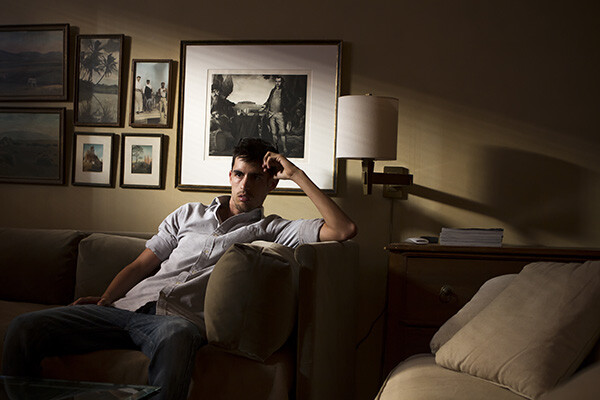
Photo 1 Guy

Sure, the concept of photography falls under the realm of one the arts, but can you strictly label someone an artist based on their job or hobby?

Photographers are everywhere nowadays. Beyond the thousands upon thousands of photographers who have businesses and make a living taking pictures, there are also all the families with cameras and anyone who halfway knows how to use a camera phone. Every single one of you who calls yourself a photographer has the opportunity, in my opinion, to call yourself an artist.

The term artist has a powerful meaning that is non-discriminatory. You, as an artist, have the distinct ability to take something and make it your own. But for me, I don’t consider myself an artist. It’s not a label I give myself because I feel that it is too strong for how I look at my own photos.

What do I do? I am in one world, a staff photographer taking pictures of exotic cars, in another world, editorial portrait photographer, and in another a sports photographer. But where I find myself in true harmony is taking landscape and cityscape photos. Do any of these types of photography REQUIRE me to be an artist? Or is that just a term we can only identify ourselves with?

Is the Word Artist too Demanding?

Sometimes there’s a connotation that you have to be an artist to be considered a respectable photographer; whatever either of those terms mean.

In our generation you don’t need much to pick up and learn how to take great photos. It’s not like you need a darkroom, chemicals, and to constantly be purchasing film. With just a good smart phone you can yield some amazing photos in spectacular quality. This has opened the world of photography and the arts to lot more people.

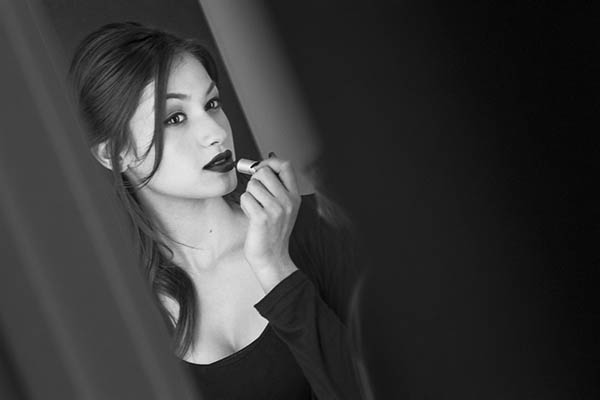
Image 2  Girl

With that said, do you need to be an artist, think like an artist, and go to art school to be a great photographer? I personally have a science mind. I graduated from college with a degree in Health Sciences. I picked up a camera sometime in college, and now that’s what I do.

What about this: do you need to think like an artist and go to art school to BE an artist?

Being a photographer can be just as much about having technical skill and experience, as it is about having a vision.

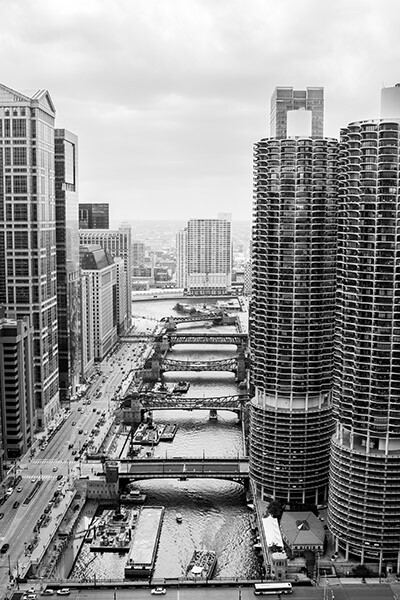
Image 3  City

The Balance Between Technical Skill and Vision

In order to make great photographs you need to have both technical skills and a vision. The combination of these two is what converts real life into a photograph.

Technical skill is required for just about everything you do. Maybe you started on automatic settings for your camera and slowly moved your way to manual as you got more comfortable with it. Maybe all of your photos are printed yourself?

Whatever type of photo you’re trying to capture, chances are you won’t have all the time in the world to check every setting on your camera to see which photo comes out the best. You’ve already learned, and have experience with which settings work best. That’s how you continue to get good-looking photos out of the camera on fewer attempts.

In the world today where just about every photo is being retouched to some degree, editing is also a technical skill that allows you to cement your style into your photos. Editing is an ever-evolving skill as you continue to learn new features in Photoshop (or other editing software) and as technology advances.

In photography you progress, every day you get out there and take a new photo; you’ve gotten better. But that improvement needs to carry on by continuing to learn your craft. Every artist, every photographer, works to improve upon what they’ve already done. You can strive the same way, at your own pace.

Image 4  Churches

When it comes to the other world of photography, some people tend to replace the term vision with other words, like artistic eye. You can call it whatever you want. Your vision can be a result of thorough internal planning of what’s going to make that a great photo. Or your vision can be more instinctual based on a knowledge of photography rules and personal experience.

You see the world, you pull your camera to your eye and you take the photo. That’s what makes every photographer the same as well as different. From the same spot, 20 photographers will yield 20 different photos. Your vision is a result of how you see the world; and you see the world differently than the person next to you based on your upbringing and beliefs.

You can continue to learn your own vision by understanding why you see the world the way that you do. Do your photos reflect the way that you see the world? I found my style because of how often I produced poor results. I eventually found my missing key: foreground and negative space.

In your own personal photos, do you weigh skill and vision equally? Are you working to improve both of them and not just one?

Image 5  River

The Reason Why This Distinction Between Photographer and Artist Matters…

There’s no mold in photography. We don’t all have to fit any particular style. Find your own style and explore it. The stigma that one must act like an artist in order to feel comfortable with a camera is erroneous.

You have the things you want to capture (vision) and over time you develop your own styles through skill and experience.

Do you label yourself an artist?

Will G. MacNeil (wgmphotography.com) takes photos for a living and is currently residing in Chicago, IL. Beyond everything, landscapes, editorials, and sports make up his style in the industry. You can follow Will G. MacNeil on Instagram for more concepts and photos.

The post Is Being a Photographer Synonymous With Being an Artist? by Will G. MacNeil appeared first on Digital Photography School.


Digital Photography School

 
Comments Off on Is Being a Photographer Synonymous With Being an Artist?

Posted in Photography


Nikon D750 shooting experience published

26 Nov

The Nikon D750 is a full-frame DSLR that mates features from the D810 with a 24MP sensor, providing a faster frame-rate than any non-pro full-frame Nikon DSLR since the D700. Its comprehensive still and video photography specifications are aimed directly at enthusiasts and full-frame upgraders. We’ve made a significant update to our D750 first impressions review including a shooting experience and studio scene analysis. Read more

Articles: Digital Photography Review (dpreview.com)

 
Comments Off on Nikon D750 shooting experience published

Posted in Uncategorized


Hasselblad introduces Stellar II luxury enthusiast compact

26 Nov

Hasselblad has announced the Stellar II, an enthusiast compact which the company says has been ‘conceived and crafted exclusively for aficionados, collectors, and connoisseurs’. Like other recent Hasselblads, the Stellar II is a rebadged Sony camera – which in this case is the RX100 III. Available grip finishes include olive, walnut, padouk, and carbon fiber. You can pick one up for yourself at a price of $ 2395/€1650.

Articles: Digital Photography Review (dpreview.com)

 
Comments Off on Hasselblad introduces Stellar II luxury enthusiast compact

Posted in Uncategorized


24. November 2014

26 Nov

Ein Beitrag von: Catalina Koe

Ein Frauenportrait mit Sonnenlichtstreifen


kwerfeldein – Fotografie Magazin | Fotocommunity

 
Comments Off on 24. November 2014

Posted in Equipment


Modular Micro-Pad: 85 Sq Ft Loft Full of Slide-Out Surprises

26 Nov

[ By WebUrbanist in Design & Fixtures & Interiors. ]

paris modular home tiny

Using a system of large sliding doors and functional-filled drawers to transform a maid’s quarters into a whole home, this small-footprint apartment in Paris gives a (much more positive) new meaning to the phrase ‘hole in the wall’.

paris micro apartment home

paris home shelves drawers

paris dining room set

Sleeping, cooking, eating, washing and storage are all packed into 8 square meters using a system of unfolding flat-pack furniture items, hidden spaces and dual-purpose built-ins, custom-designed by Kitoko Studio.

pairs kitchen sink window

paris kitchen smal lview

paris other angle view

Like a Swiss Army Knife writ large, many items serve more than one use, like a staircase for climbing up to bed that also has built-in shelves that tuck back into the wall.

paris apartment mini tiny

paris bathroom shower combo

paris micro bathroom sink

The kitchenette and bathroom are as compact as can be, packing essential plumbing into the tightest spaces possible in order to maximize the still-limited open space at the center of the design.

paris home compact minimalist

paris modular apartment design

paris cabinet storage stairs

paris shelves drawers storage

paris tiny wall bedroom

paris house plan diagram

paris view from above

paris house plan tiny

Bright white walls with minimal decor help the space feel lighter and more open despite its necessarily-cramped nature and odd wedge-shaped configuration.

Share on Facebook


[ By WebUrbanist in Design & Fixtures & Interiors. ]

[ WebUrbanist | Archives | Galleries | Privacy | TOS ]


WebUrbanist

 
Comments Off on Modular Micro-Pad: 85 Sq Ft Loft Full of Slide-Out Surprises

Posted in Creativity