German optical manufacturer Zeiss has announced a new range of lenses called Loxia, designed for full frame cameras using the Sony E mount – essentially the Sony Alpha 7 series at the moment. The Loxia 2/35 and Loxia 2/50 are based on the company’s existing 35mm f/2 Biogon and 50mm f/2 Planar lenses from the ZM range. Read more
Month: September 2014
-
Choosing Soft Modifiers
Editor’s note: In 2011 I wrote a full post on my four favorite soft modifiers. No changes since then. These are still my go-to’s, for reasons explained below. So I am reprinting this in the gear selection module. -DH
With the gazillion or so soft light mods out there, it is easy to be overwhelmed by the choices available. And while I have probably shot with more of them that I would care to admit, there are four soft mods that I go back to again and again.As it happens, these four are reasonably priced, too. (Which may well be what attracted me to them in the first place, of course.)
__________Soft is Relative
So, which of the light sources above is the softest? The one in the back, right?
Not necessarily. The 60″ source in back is not as soft at 10 feet away from your subject as the 8×9″ source is at 10 inches away. A good rule of thumb to remember is that a light source is soft when it looks large to your subject. This nets out the two variables of size and distance.
Example: Even a bare speedlight looks soft to a subject only a couple inches away.
Long story short, if you want soft light you will have to consider the working distance at which you’ll be using it. The further back your light source, the larger your light mod will have to be.
So front to back, here is the straight dope on the four mods pictured above.
1. The LumiQuest Soft Box III
 At 8×9″, the LumiQuest SB-III can be very soft — as long as you are working the light literally right up next to the subject. Case in point, this headshot of Ben I did for an ad for the SB-III when it first came out.
With a flat front edge, the light is easy to feather. This means you can work in the edges of the beam for more interesting (i.e. uneven) illumination.
Pros: The SB-III is small, and folds flat. This means it travels great, hiding in the back flap of my Domke F3 or just about anywhere else. It is also pretty reasonable, at under $ 50. (Especially considering the SB-III has a lifetime guarantee, unique on this list.)
Cons: It’s small size means it is literally soft in only in the knife-fight range. Back it up more than a couple of feet and it starts to get hard. Actually, I tend to use this to my advantage, making the light more versatile just by varying the distance. That is one of the reasons I use it so much.
And speaking of that, most of the time I use an SB-III, I will do so in combination with a fill light. (Example here.) This gives a combination of both shape and detail.
2. Beauty Dish
 The next step up, size-wise, gets us to a beauty dish. A broad, shallow reflector, it throws a modestly soft light at portrait distances. There is nothing particularly “beautiful” about it. The dish just has good PR, I guess.
A light this size won’t wrap as much as a giant octa or umbrella when used at the same distance, which can be a good thing. So while some people may think of it as a beauty dish, I tend to think of it as a character dish.
Again, I almost always use it with fill. The shot above (more here) is a good example.
When used when a giant, on-axis fill light, as in this Martin Prihoda cover shoot, the beauty dish really starts to live up to its name. The shadows from a dish are distinct, and controlling their depth with another light source gives you a wide range of possibllity.
Pros: A dish gives you soft(ish) light that can stand up to a breeze. Soft boxes and (especially) umbrellas can turn into a sail in even a light wind. The beauty dish will hold up in a moderate wind — especially when sandbagged. Also, the fact that the dish is circular gives a signature shape on the face as compared to a rectangular soft box. Some people prefer this, but I find it kinda arbitrary.
Cons: Does not fold in any way, so travels like crap. Expect to have to buy a protective case for it. Which only adds to the next downside. Of the four sources listed here, the beauty dish is the most expensive.
I have a few dishes, including one that I got for free from Profoto in a promotion that would have cost me north of $ 300. I did not know which I wanted (silver or white) so I chose silver for more efficiency. In hindsight I should have chosen white, which I now use far more often.
But I was not gonna pony up for another full-price Profoto dish. So I ended up with the white FTX 22″ Beauty Dish ($ 105.00 – $ 130.00) shown above.
Being an aftermarket universal fit dish (one dish, many mounts) it can be a little quirky in some ways. But overall I have been happy with it. They also do a grid for the dish ($ 85.00). So if you are into controlling the beam of the light, the price difference (OEM vs aftermarket) may be even bigger.
3. Westcott Double-Fold 43″ Shoot-Through Umbrella
 Usually recommended as the first soft light mod for a space-conscious photographer, the double-fold umbrella practically disappears in your bag. It collapses down to 15″. (Best of all, they are just silly cheap.)
I started out using it in typical fashion, 45 degrees up and over, as do most photographers. These days I am much more likely to fly it over the top of a subject, as in the falconer shot seen above (more here) or literally on the floor, as in this portrait.
Pros: Hello … dirt cheap. Also, travels extremely well. If you are into guerilla lighting, this is your mod. Also can be very powerful, used right up next to your subject. This is something you cannot do with a reflected umbrella because the shaft can get in the way.
Cons: They are pretty fragile. Between the double folding arms and the telescoping hollow shaft, expect them not to last too long. (A little breeze can get them, too.) Also, the light is hard to control — an umbrella spews out light like a frat boy puking at 2:30am after a party. Very little directional control. Raw light can spill past the edge, too.
But for under $ 20, who can complain? I usually grab a couple to be safe.
4. Photek 60″ Softlighter II

Combining the best features of a shoot-through umbrella and a large soft box, I like to think of the large Softlighter II as a poor man’s octa.It is a convertible shoot-through umbrella that can double as a reflective one due to the removable black backing. And it comes with a very efficient diffuser screen, turning the umbrella into a wonderfully even light source. As a bonus, the umbrella shaft is segmented, so you can remove half of it after you open it. This makes it possible to use it in very close. It is large-octa light quality, for about $ 100.
Actually, I have a 47″ octa, and it gets very little use compared to the Softlighter. Friends usually ask to borrow the octa, which is fine with me — I’d rather have the Softlighter on hand. (If you are an Annie Leibovitz fan, she frequently uses them as her key light, as seen in this video.)
I own and use both the Softlighter II and the new Paul Buff 64″ PLM (with diffuser). The PLM is more efficient than the Softlighter because of its parabolic design, but that is lessened if you do not use the Paul Buff or Elinchrom mount. (They take advantage of perfect positioning.) For speedlights, I prefer the Softlighter, as it does not require a bare-bulb-type light source to be located at the focal point of the parabola. Just slap an umbrella swivel and a speedlight in there and you are good to go. If you primarily shoot WL or Elinchrom, I would suggest the PLM.
Or if you use big and small lights, maybe get both at under $ 100 ea. That is what I did, and frequently use both together (PLM as a key and the less efficient Softlighter as a fill.)
Pros: Way cheap, compared to the octa it largely replaces. Versatile as an umbrella, as described above. Gorgeous light with the diffuser. Very lightweight — easy to boom without expensive gear. Takes a speedlight well. (That’s how we lit the photo above, as detailed here.)
Cons: They are not as heavy-duty as an octa — but to be honest I have yet to kill one. Also, the front is not a clean light source like an octa. You can see the strobe unit. So if you are shooting reflective objects (glass, etc.) this may not be for you.
__________So those are my Four Horsemen of soft light. You could choose four completely different different mods, but those are the ones I keep going back to. I highly recommend each, for the reasons above.
The main thing is to look at your working distance and see which light source will create the light you want at that distance. Fortunately, as you can see above, you don’t have to spend a ton of money to get versatile, soft light.
NEXT: Hard and Specialty Modifiers
-
Canon confirms price drop on select EF lenses
Canon US has confirmed several price drops across its range of lenses, including several L-series models. According to Canon the price reductions are in honor of reaching a milestone – the production of 100 million EF lenses. Price drops range from a modest $ 40 up to $ 1000 off the original retail price, depending on the lens. Read more
-
Everything You Need to Know About Lightroom and Colour Space
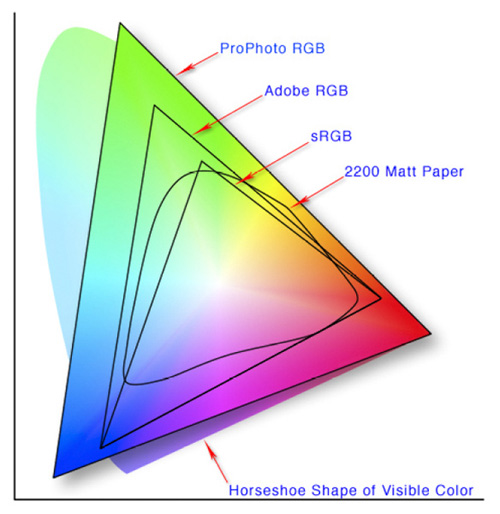
This diagram shows the three colour spaces that Lightroom works with. Photo from Wikipedia
One of the key differences between Lightroom and Photoshop is their approach to colour management. In Photoshop, once out of Adobe Camera Raw, you can go to the Colour Settings menu option and tell Photoshop in which colour space you want it to work.
How Lightroom works
Lightroom works differently. When processing Raw files, Lightroom uses the ProPhotoRGB colour space the whole time, and there’s nothing you can do to change it. The benefits of this method are:
- Less colour information is lost during the processing stage. ProPhotoRGB is the largest colour space, so it is the optimum one to work in.
- You can export multiple versions of the same photo, each with a different colour space, if you have need to do so.
- If future output devices (monitors, printers etc.) support ProPhotoRGB (they don’t at the moment) then your photos will be ready for them.
- Colour management is greatly simplified. You don’t have to make any decisions about what colour space to work in until you export your photos. This is the biggest advantage of all.
How Lightroom manages colour
When processing Raw files, Lightroom (and Adobe Camera Raw in Photoshop) uses its own colour space based on ProPhoto RGB. It provides a large colour gamut to work with the wide range of colours that digital sensors are capable of recording.
Note: Gamut is the term used to describe the range of colour values that fit in a colour space.
Exporting photos in Lightroom
When you export a photo in Lightroom it gives you the choice of three colour spaces.
ProPhotoRGB: ProPhoto RGB is the largest of the three. It roughly matches the range of colours that a digital camera sensor can capture.
Adobe RGB (1998): Adobe RGB (1998) is smaller than ProPhoto RGB, but larger than the next choice, sRGB. It roughly matches the colour gamut of CMYK printers used to print books and magazines.
sRGB: sRGB is the smallest colour space of the three. It represents the colour space that most monitors are able to display.
Comparing colour spaces
These two graphs show how the colours my monitor is capable of displaying, compared to the sRGB and Adobe RGB colour spaces.
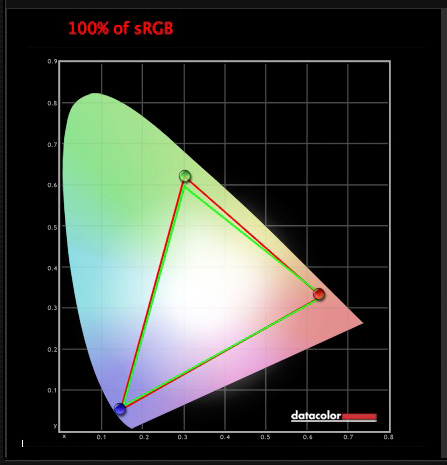
The green triangle shows the sRGB colour space, the red one shows my monitor’s colour gamut. The two are nearly identical.
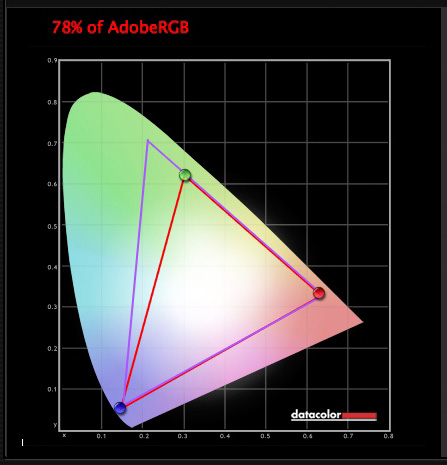
The purple triangle shows the Adobe RGB (1998) colour space, the red one shows my monitor’s colour gamut. My monitor can’t display all the colours within this colour space. Only a select few high end monitors can display all the colours within the Adobe RGB (1998) colour space.
This diagram compares the ProPhoto RGB, Adobe RGB (1998) and sRGB colour spaces. You can see that ProPhoto RGB is the largest.
Photo from Wikipedia
Keeping it simple
Armed with this knowledge, here’s a guide to which colour space you should select when exporting your photos:
sRGB: Use when exporting photos to be displayed online, printed at most commercial labs, or printed with most inkjet printers. In short, if in doubt, use sRGB.
Note: Lightroom’s Web module automatically sets the colour space of exported files to sRGB.
Adobe RGB (1998): Use only if requested. If you’re not sure, ask. If you’ve been asked to submit photos to a magazine, for example, then ask them which colour space is required. It will probably be Adobe RGB (1998). Submitting photos to a stock library? Again, it will probably be Adobe RGB (1998). It’s the colour space most likely to be used for commercial purposes.
You would also use this colour space if you have an inkjet printer that utilizes the Adobe RGB (1998) colour space, or you are using a lab that accepts and prints photos with that profile.
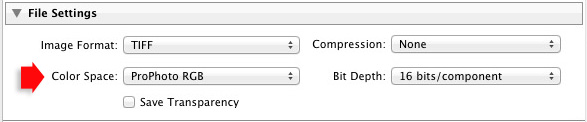
ProPhoto RGB: Use when exporting a photo file to be edited in another program such as Photoshop or a plug-in. The file should be exported as a 16-bit TIFF or PSD file. There is little point in using the ProPhoto RGB colour space with 8 bit files, as they don’t contain enough bit depth to utilize the full colour range.
Note: If you import a JPEG or TIFF file into Lightroom, it uses the file’s embedded colour profile. If there is no colour profile attached, it assumes that it’s an sRGB file. If you choose an alternate colour space when you export the file, Lightroom converts it.
Colour spaces and compression
The reason that Lightroom uses a version of the ProPhoto RGB colour space, is that it is doesn’t compress the colours captured by your camera’s sensor.
When you export a photo, if you select either the Adobe RGB (1998) or sRGB colour space, Lightroom compresses the photo’s colours to match the chosen profile. That’s why selecting colour space is best left for as close to the end of the post-processing workflow as possible.
While Lightroom does its work within its version of the ProPhoto RGB colour space, your monitor isn’t capable of displaying all those colours. Instead, your computer’s operating system uses the monitor profile to convert the colours to ones that your monitor is capable of displaying.
Note: All monitors have a colour profile, regardless of whether they have been calibrated. But your monitor will only display colour accurately if it has been properly calibrated. You can learn more about the calibration process in my article How to Calibrate Your Monitor With the Spyder 4 Express.
Exporting photos with Lightroom
To export a photo in Lightroom, select the photo (or photos) you want to export, then go to File > Export. You can do this from any module (use the Film Strip to select multiple photos if you are not in the Library module’s Grid View).
Go to the File Settings section of the Export window and set the required colour space. If you select the ProPhoto RGB colour space set Bit Depth to 16 bits/component.
Transferring photos to Photoshop
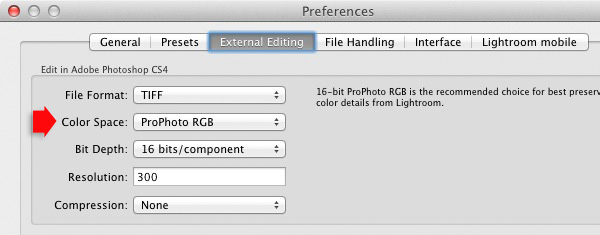
To open a photo in Photoshop, right-click on the photo and select Edit In > Edit In Adobe Photoshop. Photoshop opens the photo using the colour space indicated in Lightroom’s preferences.
To adjust this setting, go to the External Editing tab in preferences, and set Color Space to ProPhoto RGB. You can choose another colour space if you wish, but ProPhoto RGB is definitely the best one to use.
Opening photos in plug-ins
To export a photo to a plug-in, right-click on the photo, go to Edit In and select the plug-in you want to use to open the photo.
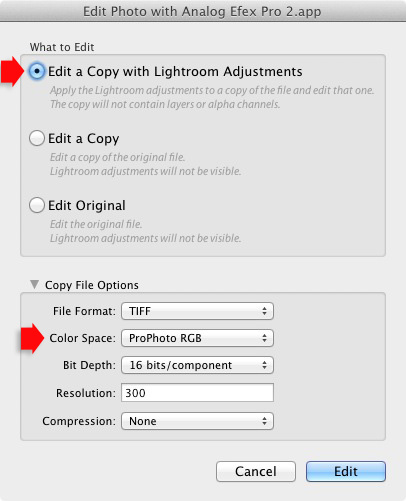
In the Edit Photo window, if you select Edit a Copy with Lightroom Adjustments (the only option available if you are exporting a Raw file) you will be able to select which colour space you want to use. Again, go with ProPhoto RGB for the best results.
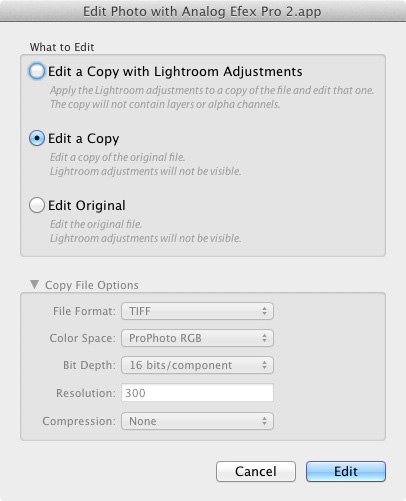
If you are exporting a JPEG or TIFF file, Lightroom gives you the option of selecting Edit a Copy or Edit Original in the Edit Photo window. If you do so, the option to select a colour space is greyed out and Lightroom opens the photo in the plug-in using the embedded colour profile.
But if you select Edit a Copy with Lightroom Adjustments, you can select any colour space and Lightroom will convert the photo to that colour space when it opens the photo in the plug-in.
Conclusion
Confused? I hope not, because colour management in Lightroom is really very simple. It’s essential to calibrate your monitor, but after you’ve done that Lightroom takes care of all colour related issues for you until you export your photos. Then, it’s just a matter of selecting the appropriate colour space.
If you have anything to add to the article, or any questions, please post it in the comments.
 Mastering Lightroom: Book Four – The Photos
My new ebook Mastering Lightroom: Book Four – The Photos takes you through ten beautiful examples of photography and shows you how I processed them step-by-step in Lightroom. It explores some of my favourite Develop Presets and plug-ins as well as the techniques I use in Lightroom itself. Click the link to learn more.
The post Everything You Need to Know About Lightroom and Colour Space by Andrew S. Gibson appeared first on Digital Photography School.
-
Choosing Hard and Specialty Modifiers
We tend to start out using soft light at a 45-degree angle because it is an easy fix, and it’s hard to go seriously wrong doing that.But there are all kinds of light mods, and often choices other than default soft ¾ light can be more interesting. My favorites are snoots, grids and ring adapters.

Snoots are like little tunnels you attach to your flash to block part of the light beam. Snoots are not rocket science — we are just blocking some light. And cardboard works just fine to create tight zones of light that you can use to create something like the photo above.For grid spots, which work like snoots but have a much more beautiful fall-off to the edge of the light, you can DIY them out of straws but it is a pain in the ass and not really worth the effort for many. My advice? Get a Honl eighth-inch grid and be done with it. They are indestructible, and they fit all speedlights.
I’d nix the velcro mounting system, however. Mod it with elastic for quick changes and you’ll be good to go.
__________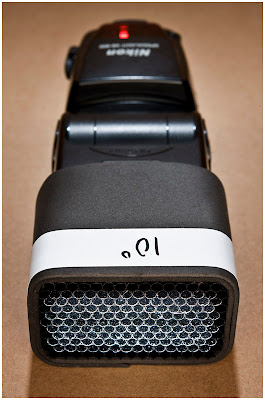
A less expensive (but flash-specific) alternative are the DIY-ish grids from SaxonPC. (Seen above, more info on those here.)
Also in the specialty mod category are speedlight ring flash adapters. They turn your small flash into a donut of light that can give you a beautiful, shadowless look for key or fill. My two favorites here are the Orbis. and the RoundFlash. Both have a very good quality of light. Both have advantages and disadvantages.

For the record, I have owned five different commercial ring flashes (and adapters): Profoto, ABR800, Ray Flash, RoundFlash and Orbis. I use the Orbis more than all of the others combined.
Whatever you do, avoid the Chinese knockoffs of the Ray Flash. They are light-sucking pieces of junk, and are rarely anywhere near color correct. But they are cheap!
If you are that broke, you’ll be better off home-brewing a cardboard DIY ring flash adapter.
NEXT: Cases and Carts
-
3-in-1 Cargo Shelters: Expandable Containers Triple in Size
[ By WebUrbanist in Architecture & Houses & Residential. ]
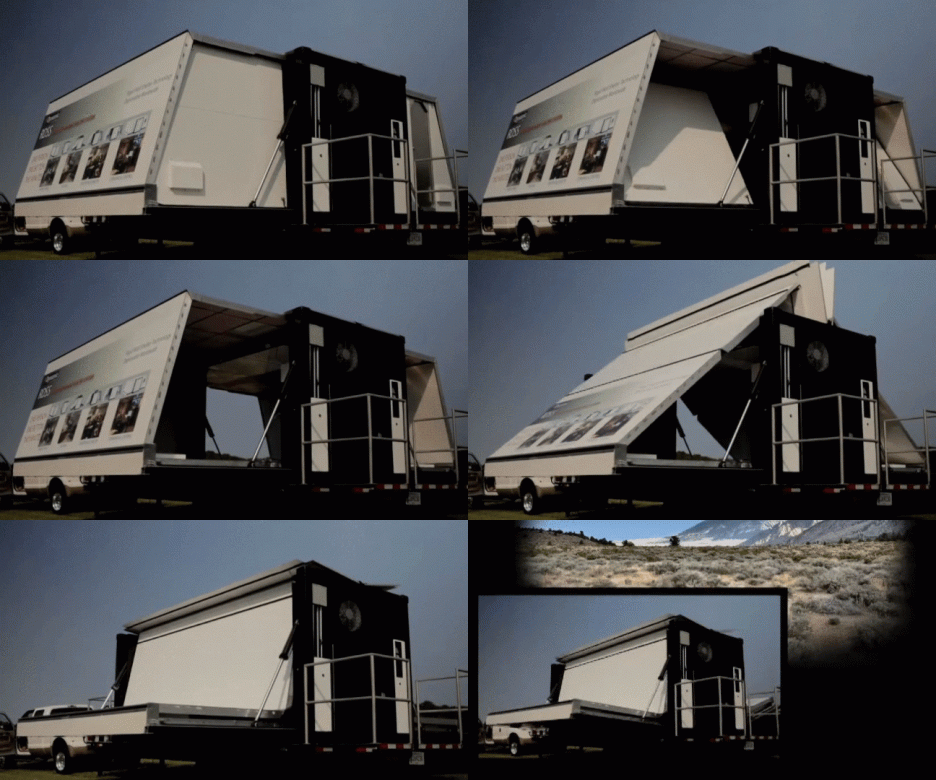
Shipping container shelters combine the appeal of ultimate portability with rugged durability, but these structures add another dimension lacking in the default configuration: three times as much space thanks to their transforming designs. Below are four examples with varying degrees of technological sophistication for a wide range of applications.
The RDSS (Rapid Deployment Shelter System) shown above can be deployed by one person in less than two minutes, expanding into a 400-square-foot, rigid-walled shelter – all from a single 20-foot ISO (International Standards Organization) shipping container module.
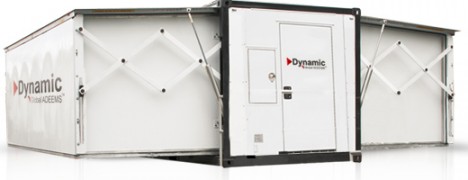
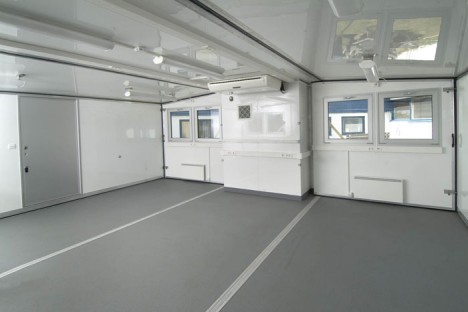
While the same company offers a variety of similarly convertible solutions, the particular model in the video comes equipped with on-board heating and air conditioning systems and its own generator. The units can be sent by ship or rail, towed by trucks or flown by helicopters and stacked nine containers high.
Three-in-one cargo modules are made by a variety of manufacturers for deployment under various conditions, including military use, communications headquarters, medical triage, disaster relief centers, homes or offices – the one above is from Mobile Shelter Systems.
A soft-walled variant on the same theme of spatial expansion, the above patent-pending design unfolds two side panels that become floors with curved ceilings arcing overhead. A lower-tech approach, to be sure, but also one that could theoretically be done for much less money and in a do-it-yourself fashion for those inclined to create their own shipping container building.
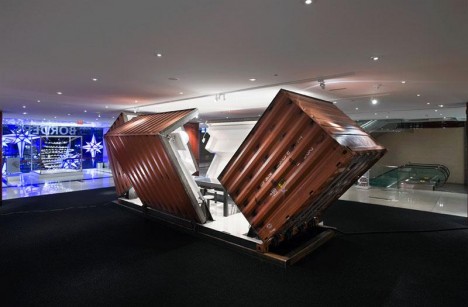
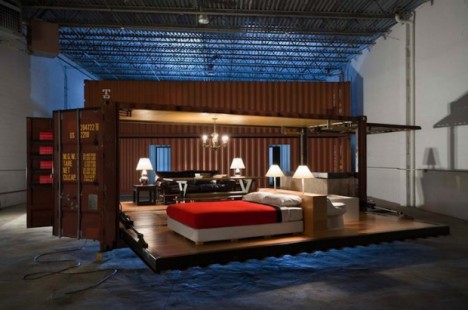
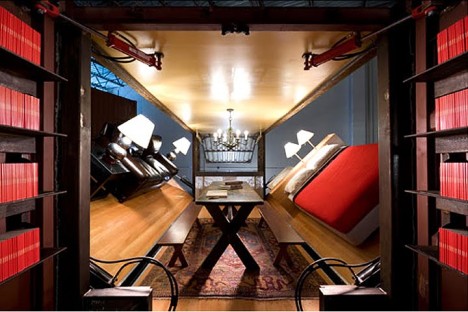
While less suited for rugged outdoor use, any discussion of convertible shipping container spaces should include a mention of the Illy Push-Button House (which has both commercial and residential applications) designed by Adam Kalkin, the sides of which fold down to form an open-air living room area or temporary storefront space.
Want More? Click for Great Related Content on WebUrbanist:
10 Cargo Shipping Container Houses, Building Designs & Ideas
Shipping containers are becoming ever-more-popular sources of design inspiration in new architectural designs, from personal residences to big commercial …
Click Here to Read More »»
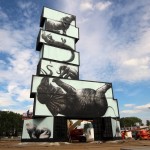
Cargo Canvases: 6 Street Artists Paint 22 Stacked Containers
Towers constructed from shipping container modules formed the blank basis behind this series of incredible giant-sized, site-specific artworks using spray …
Click Here to Read More »»

Cargo Architecture: 10 Shipping Container Homes & Offices
Cargo containers are of increasing interest to architects who plan to make them into homes, offices and other buildings through simple modifications and …
Click Here to Read More »»


[ By WebUrbanist in Architecture & Houses & Residential. ]
[ WebUrbanist | Archives | Galleries | Privacy | TOS ]
-
Sommerzeit
Der Sommer verabschiedet sich leise, aber rasch. Morgens ist es schon spürbar kälter und erste Eicheln liegen auf den Straßen. Was bleibt, sind die Erinnerungen an die warmen Tage, an denen wir leichtbekleidet durch die Wiesen und Felder spazierten oder am See ins Wasser sprangen, um uns danach von den warmen Sonnenstrahlen trocknen zu lassen.
Was bleibt, sind aber auch die Bilder, die wir gemacht haben, um unseren Erinnerungen ein wenig zu helfen. Die polnische Fotografin Izabela Urbaniak hat ganz atemberaubende Erinnerungen für sich und ihre Kinder geschaffen. Sie dokumentierte den Sommer in wunderbaren Bildern in sanftem Schwarzweiß und mit weichem Bokeh. Diese Fotos sind so schön, dass es zu schade wäre, sie für sich zu behalten. Sie erzählen von unbeschwerter Kindheit auf dem Land, Abenteuern und Freundschaften.
Aufgenommen hat Izabela die Fotos mit einer Canon 5D Mark III und den Objektiven 50mm f/1.4 und 85mm f/1.2. Ihr ist es wichtig, die Momente so einzufangen, wie sie passieren und nichts zu inszenieren.


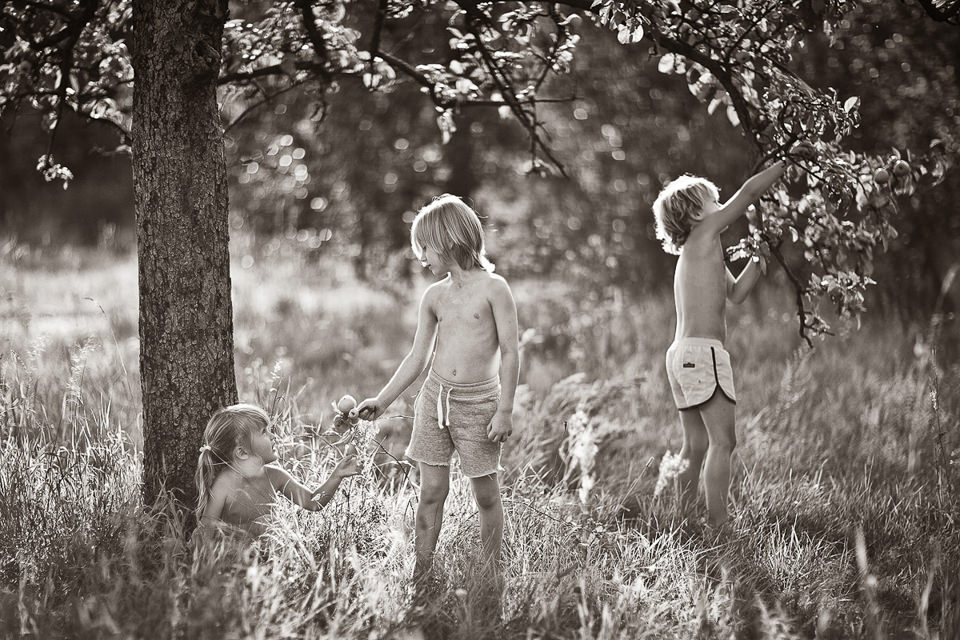
Wenn Euch die Bilder genauso gut gefallen wie uns, besucht unbedingt die Webseite von Izabela. Folgen könnt Ihr ihr auch auf Facebook.
-
Cartier-Bresson and Stieglitz – Study the Masters of Photography to Become a Better Photographer
There is an unnervingly common trait among photographers, image makers, picture people, etc. Sometimes we forget that the reason we have access to such awesome gear and techniques, is because those who came before us in our trade figured them out, practiced them, advance them, and then left us a legacy of knowledge. The further we go back through the history of photography, the more prevalent this apathy becomes. What do you have to learn from someone who used a camera less advanced than a garage door opener? Well, as it turns out, we stand to learn a lot. Maybe not from a technological standpoint, but rather in a more intangible way that’s more difficult to appreciate, and easy to miss.
This is not to say that you can’t improve your photography from studying the methods of some of the masters. Their gear was varied and less advanced, but that only makes their work more extraordinary, and their skill even more humbling.
Henri Cartier-Bresson
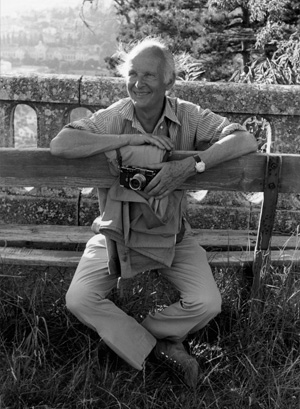
Image by Gertrude Käsebier
Even if the name doesn’t ring some little bell in your memory, chances are you most likely have viewed his work at some point. He was literally the inventor of the photojournalistic style… let that sink in for a minute or three. Before Cartier-Bresson, proper street photography as we know it and “still life reportage” as he called it was not a well practiced, or validated form of photography.
Born into a relatively well placed upper-class French family in 1908, Cartier-Bresson, like so many well known photographers, didn’t start out intending to be such. Painting was his major pursuit before picking up a camera. That all changed in 1931 when he set his eyes upon a photograph made by Hungarian photographer Martin Munkacsi. It was an image of three young boys in the surf of a lake in Africa. Cartier-Bresson said that he “couldn’t believe such a thing could be caught with a camera” and that he “suddenly understood that a photograph could fix eternity in an instant.” The photograph drove him to relinquish painting, and start making photographs. He was thoroughly a recorder of the spontaneity of human experience. There is much you can learn from Henri Cartier-Bresson to improve all aspects of your photo making.
Lessons you can learn from Henri Cartier-Bresson:
Strive to be invisible
When you’re working as a photographer it doesn’t take long to understand that humans tend to drastically change once they realize they are being photographed. Their mannerisms, expressions, and appearances all become noticeably different. Conspicuousness steals away realism very quickly if you are not careful. Cartier-Bresson understood this and moulded himself into somewhat of a photographic ninja. He shot with relatively small cameras, usually Leica 35mm Rangefinders. You have to understand that most photographers of his time were using larger format cameras which practically screamed “Hey, I’m making a photograph of you!!!” Anonymity allowed him to capture the essence of any scene in a way that was raw and unobtrusive.
Cartier-Bresson went so far as to conceal all the shiny surfaces of his gear with black paint to further decrease his footprint as a photographer. You might not want to go that far, but it will help you to capture better images if you blend into your surroundings. Plan for your sessions in a practical way. Don’t take more gear than you need, and keep a low profile. Try to wait until you’re ready to make an exposure before you raise your camera. Practice using your camera’s controls and memorize their placement. Also, avoid using a flash if it will likely interfere with your subject. Cartier-Bresson supposedly never used a flash for his images as he saw them as impolite and distracting. Photography, especially photojournalism, depends on the earnest capture of life in all its beauty, and regrettably, its occasional misery. Try to keep it real, literally.
Compose in camera
I know, I know. You’ve probably heard this before, and are most likely tired of having that phrase hurled at you. I feel your pain. I would always roll my eyes any time a seasoned photographer or well intentioned writer would talk about the importance of getting things right in-camera. Let’s be real here. It’s so easy to crop an image on the computer instead of using the camera’s viewfinder. It’s so much more convenient to salvage a less than correctly exposed image than to think through your aperture and shutter combinations.
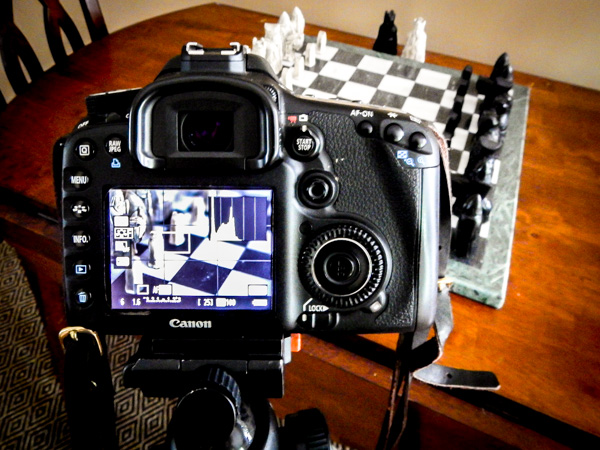
Post-processing photographs is a wonderful thing. Completely changing a photograph, however, is not always ideal. Cartier-Bresson was absolutely anti photo manipulation and believed any photograph should be cropped in the viewfinder before it was captured. Nearly all of his photographs were printed full-frame and even included about one millimeter of the unexposed negative so that his finished prints sported a thin black border to further prove the absence of cropping.
Any image is only as good as the ingredients put into its making. So try to put the best possible ingredients into your work so that your finished product will be something you will be proud to display and say “I made this”.
Focus as much on the art as the science
What we do as photographers would have been considered magic in an earlier time. Even at the basic level it is an amazing science. We record light that is completely unique and fleeting. You will never make the exact same photograph twice. The science of image making is an essential part of our creative process, but it must never be viewed as the only part.
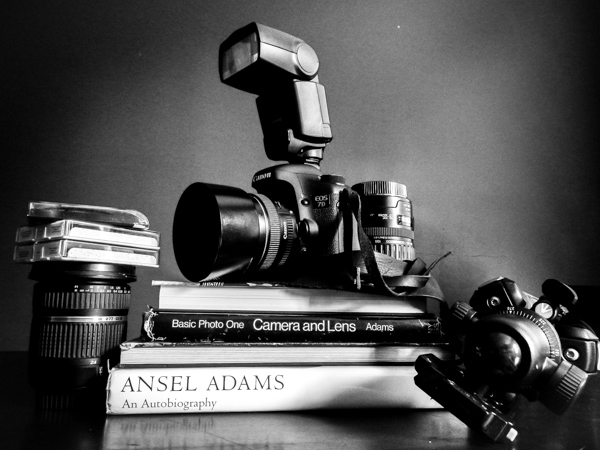
Surprisingly, Cartier-Bresson expressed, on multiple occasions, his almost complete lack of interest in the more technical portion of making photographs. The developing and printing of his negatives, actions so carefully controlled and guarded by most serious photographers of the time, were valid only to him in the cases where they allowed more effective expression of his vision. He saw the camera as a tool, and development and printing as merely a means to a much anticipated end. He said “people think far too much about techniques and not enough about seeing”.
You can lose your direction during the of making an image. Sometimes we let technical perfectionism overshadow our initial vision. Thorough knowledge of your gear is essential to grow as a photographer. However, like Cartier-Bresson tells us, don’t allow yourself to become so focused on your tools that you forget your craft.
Alfred Stieglitz
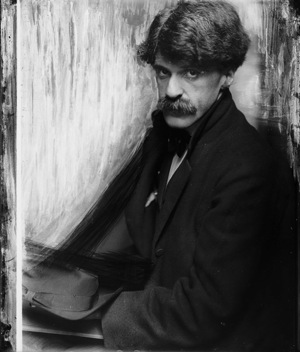
Alfred Stieglitz was born into this world on January 1, 1864 and left it on July 13, 1946. Anything else that I can tell you about the impact of man’s life upon the world of photography and creative art will fall unbelievably short of the full measure of gratitude we owe him as photographers. That’s not hyperbole. Before Stieglitz, photography was not considered a form of artistic expression. There were no real schools of photography, and it certainly was not considered high art on the level of painting and sculpture. Stieglitz gave artists an outlet to show their work to the public, and was the catalyst that helped begin the careers of many celebrated artists including the paintings of Georgia O’Keeffe, and the legendary photographs of the great Ansel Adams. Stieglitz was always open to new techniques and innovative thinking towards art.
His work is removed from our time by nearly a century, and many of the technical mechanisms he used are now obsolete. Still, there is much insight to be gained from Alfred Stieglitz, and his contributions. We can learn from his approach to the art world as a whole, to better ourselves as photographers.
Lessons you can learn from Alfred Stieglitz:
Express yourself when you can
Stieglitz created a series of images called “Equivalents”. It is a collection of photographs that show a variety of different cloud formations. Each image was a self-reflection of the thoughts, emotions, and experiences that he was feeling at the time the frame was exposed. That made each image unique to only him. He was the only person who truly understood how he felt during each release of the shutter. So go out and photograph something that makes you happy. Share it with others if you want, or just keep it for yourself. Go and make photos of something that is only beautiful, or meaningful to you. The act in itself is very freeing.
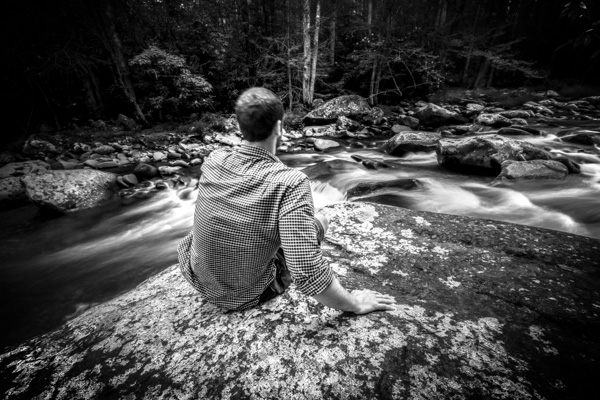
This spot has special meaning only to me. I made this photo for myself and no one else.
You might be thinking “I express myself with all my work”, but really think about it for a moment. Do you ever make a photograph and immediately consider how it might be accepted or rejected by other people? Do you sometimes share an image that you personally think is outstanding but no one else seems to care about? We have all done it more often than we might comfortably admit.
Break the rules if you want
Simply put, any photograph that has ever been produced, resulted from of a combination of the following variables: size of aperture, shutter speed, depth of field, focal length, image receptor sensitivity and composition (film, digital sensor, ect) and that’s all. The key to making a great image is putting all those pieces together in such a way that they convert what was only visible within your own mind, into a photograph. Those are the only iron clad rules in photography. In the end it’s you who make the choices and operate the camera.
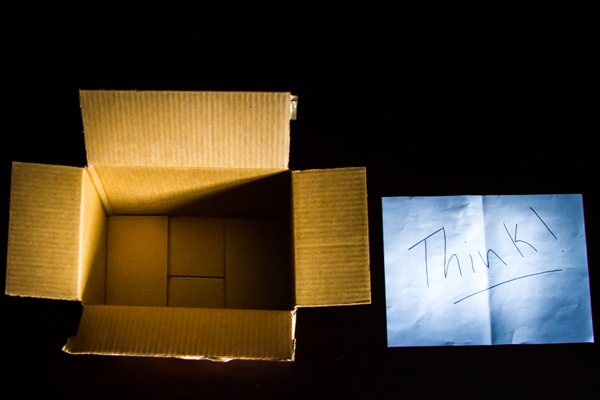
Don’t be afraid to think outside the box!
Some really great work has resulted from stepping outside the mainstream. There are many stunning images that completely ignore the rule of thirds, leading lines, horizons, and so forth. Never completely cast aside guidelines, but don’t convince yourself that you are permanently tied to them either. Learning, and practicing, the tested and proven building blocks of strong photography will help you greatly. Just remember that ground breaking work often arises from the bending of rules.
Look for inspiration everywhere
Stieglitz promoted all art forms. He opened galleries to display the works of painters, sculptors, and of course photographers. He didn’t limit himself to only photography, or painting or to works fashioned from stone and clay. Instead, he drank it all in. He recognized that it was all tangled together and intertwined.
As photographers we are able to almost instantly project what sometimes takes other artists days or weeks, or even months to create. However, this relative ease of creation can gradually place blinders on our creative thinking. We can reach a point when we only look at other photographs for inspiration. That kind of thinking limits our scope as artists. This mindset is especially dangerous for new photographers and can lead to frustration, disappointment and even worse, emulation that festers into plagiarism.
Don’t let yourself have artistic tunnel vision. Begin to look for inspiration everywhere to fuel your photography. Black and white sketches, paintings, wood carvings, architecture, kids finger-painting – everything has the potential to give you a smack of creativity that you can mould into photographic inspiration. The truth is that you really never know what will inspire you.
Please share your questions and comments below. Have you heard of these two masters before? Have they influenced your photography?
The post Cartier-Bresson and Stieglitz – Study the Masters of Photography to Become a Better Photographer by Adam Welch appeared first on Digital Photography School.
-
Einmal kulinarisch um die Welt
Die Lebensmittelkarten wurden von Caitlin Levin und Henry Hargreaves erstellt und sind inspiriert von der Leidenschaft des Reisens. In ihrer Serie haben sie die typischen, kulturell wichtigen Nahrungsmittel der jeweiligen Länder undKontinente genommen und zu Landkarten geformt. Es ist eine spielerische Darstellung und ihre ganz eigene Interpretation der jeweiligen Esskultur.
Einen Ort durch das Essen, das man dort isst, zu erkunden, ist oft die Tür zur kulturellen Komplexität dieses Ortes. Wir wissen natürlich, dass die Tomate ursprünglich aus den Anden in Südamerika kommt, aber heute ist Italien König der Tomaten.
Diese Karten zeigen, wie unsere Nahrungsmittel um die Welt gereist sind – und schließlich zu einem Teil der kulturellen Identität neuer Orte wurde. Wer geht nach Frankreich, ohne Baguette und Käse zu essen? Und wer macht eine brasilianische Caipirinha ohne eine Handvoll Limetten?
Dieses Projekt spricht die Universalität an, mit der Essen die Menschen eint, uns zusammen bringt und Konversationen anregt – genau wie wir hoffen, dass es diese schönen Landkarten tun werden.


Henry Hargreaves und Caitlin Levin teilen nicht nur die Leidenschaft des Kochens und Reisens, sondern fotografieren beide unglaublich gern. Die Lebensmittelkarten sind nur eines ihrer Projekte. Mehr von den beiden findet Ihr auf ihrer Webseite. Die Typografie auf den Lebensmittelkarten stammt von Sarit Melmed.


