RSS
 

Archive for August, 2014

Der Kreis

16 Aug

Aliza Razells neue Fotoserie „Der Kreis“ zeigt ein kleines Märchen in Bildern, das von Lichtgestalten und Waldfantasien erzählt. Die Fotografin ist selbst Hauptmotiv der Serie und spielt eine Frau im roten Kleid, die eine mysteriöse Entdeckung im Wald macht.

Die Geschichte wurde inspiriert von den Mythen um Irrlichter sowie der germanischen Tradition von Erzählungen um Menschen, die von Waldwesen mit rätselhaften Absichten weggezaubert werden. Ich mochte die Idee, mir diesen Vorgang als nur einen weiteren Kreislauf der Natur vorzustellen – als eine Unumgänglichkeit – daher auch die zyklische Natur der Serie.

Aliza ist eine Meisterin im Nutzen verschiedenster Medien. Oft bemalt sie ihre Fotos nachträglich, wie in der Serie „Die Büchse der Pandora“, die wir bereits auf kwerfeldein vorgestellt haben. Für ihre neue Serie nutze sie invertierte Zeichnungen und in schwarzes Papier gestanzte Löcher.

Eine Frau im roten Kleid folgt seltsamen Lichtern im Wald.

Ein Mann aus Licht bittet die Frau, ihm zu folgen.

Die Frau hält die Hand des Lichtmanns und blickt zurück.

Die Frau schließt sich einem Kreis von Lichtgestalten an.

Die Frau steht im Kreis mit anderen Lichgestalten und löst sich langsam auf.

Ein rotes Kleid liegt am Waldboden. Darüber steht eine Frau aus Licht..

Eine Lichtgestalt lockt einen Mann im roten Anzug in den Wald.

Wenn Euch die kleine Geschichte von Aliza gefallen hat, dann schaut Euch unbedingt auch ihre anderen Fotos an. Mehr von Aliza Razell findet Ihr auf Flickr oder Facebook. Hier verrät sie auch mehr über die genaue Technik, die sie in der Serie angewendet hat.


kwerfeldein – Fotografie Magazin | Fotocommunity

 
Comments Off on Der Kreis

Posted in Equipment


Rare Canon EF 1200mm f/5.6L USM goes on sale in UK

15 Aug

A copy of one of the largest interchangeable lenses for SLRs ever produced has emerged for at a UK retailer. Canon’s massive EF 1200mm f/5.6 L USM is a rare beast, and the longest lens in the world with AF. MPB Photographic describes it as being in mint condition and has priced the lens at £99,000. Read more

Articles: Digital Photography Review (dpreview.com)

 
Comments Off on Rare Canon EF 1200mm f/5.6L USM goes on sale in UK

Posted in Uncategorized


A Set of Cool Blue Images to Enjoy

15 Aug

This week it’s been hot where I live, almost unbearable so. Therefore I thought some blue images in nice cool tones would help chill things off a bit.

So continuing on my series of colors we’ve already done Golden and Green . . .

A set of cool blue images for you to enjoy!

Photograph Bokeh by Joel Ericsson on 500px

Bokeh by Joel Ericsson on 500px

Photograph Blue by Boris van Berkel on 500px

Blue by Boris van Berkel on 500px

Photograph Blue by Suehana Suzie on 500px

Blue by Suehana Suzie on 500px

Photograph blue by olaus magnus on 500px

blue by olaus magnus on 500px

Photograph The Squareness by Joe@Plasmatico  on 500px

The Squareness by Joe@Plasmatico on 500px

Photograph Blue Quasar ? 5D/M51 by Josep Sumalla on 500px

Blue Quasar ? 5D/M51 by Josep Sumalla on 500px

Photograph Forest in blue by Valerie Anne Kelly on 500px

Forest in blue by Valerie Anne Kelly on 500px

Photograph Flurry. by  Chung on 500px

Flurry. by Chung on 500px

Photograph Midnight Blue by Margaret Morgan on 500px

Midnight Blue by Margaret Morgan on 500px

Photograph Flower of deep sea by Shihya Kowatari on 500px

Flower of deep sea by Shihya Kowatari on 500px

Photograph The night is coming by Cenzo Photography on 500px

The night is coming by Cenzo Photography on 500px

Photograph Flight.. by Atif Saeed on 500px

Flight.. by Atif Saeed on 500px

Photograph Rajan by Jody MacDonald on 500px

Rajan by Jody MacDonald on 500px

Photograph And I Am Off !!!! by Judylynn Malloch on 500px

And I Am Off !!!! by Judylynn Malloch on 500px

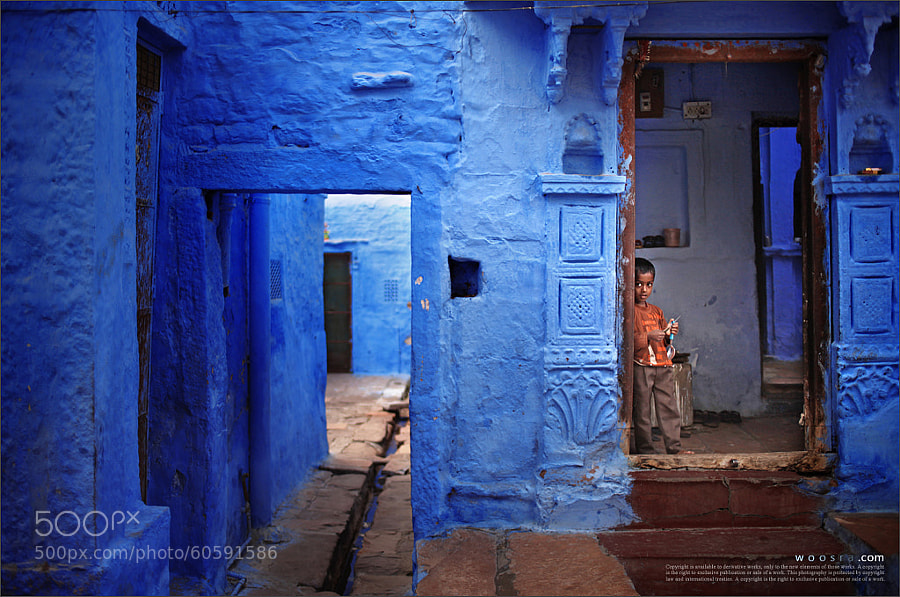
Photograph Blue City by Woosra Kim on 500px

Blue City by Woosra Kim on 500px

Photograph NEO OSAKA by Yoshihiko Wada on 500px

NEO OSAKA by Yoshihiko Wada on 500px

Photograph IronMan MK II by Suradej Chuephanich on 500px

IronMan MK II by Suradej Chuephanich on 500px

Photograph Blue by Mike Busby on 500px

Blue by Mike Busby on 500px

Photograph Hpnotiq by James Brown on 500px

Hpnotiq by James Brown on 500px

Photograph To Each His Own by Juan Osorio on 500px

To Each His Own by Juan Osorio on 500px

Photograph Story Time by Adrian Murray on 500px

Story Time by Adrian Murray on 500px

Photograph smile by Eszter Virt on 500px

smile by Eszter Virt on 500px

Photograph Blue Eyes by Rasif Babayev on 500px

Blue Eyes by Rasif Babayev on 500px

Photograph Alone in the dark by AtomicZen : ) on 500px

Alone in the dark by AtomicZen : ) on 500px

Photograph Blue Syndrome by Lafugue Logos   on 500px

Blue Syndrome by Lafugue Logos on 500px

Photograph Hold hands by YUYU Photography on 500px

Hold hands by YUYU Photography on 500px

Photograph ?????????? ? ????????? by Natalia Lisovskaya on 500px

?????????? ? ????????? by Natalia Lisovskaya on 500px

Photograph Summer Berry Waffles by MARJA SCHWARTZ on 500px

Summer Berry Waffles by MARJA SCHWARTZ on 500px

Photograph Peacock by strassguetlralf on 500px

Peacock by strassguetlralf on 500px

Photograph Follow the jellyfish... by Ilias  Varelas on 500px

Follow the jellyfish… by Ilias Varelas on 500px

Photograph Blue by Andres Restrepo on 500px

Blue by Andres Restrepo on 500px

Photograph A Friendly Berber Man by Brad Hammonds on 500px

A Friendly Berber Man by Brad Hammonds on 500px

Photograph Jodhpur by Mahesh Balasubramanian on 500px

Jodhpur by Mahesh Balasubramanian on 500px

Photograph JODHPUR-BLUE CITY by Harsh Chaudhary on 500px

JODHPUR-BLUE CITY by Harsh Chaudhary on 500px

Photograph Blue Cave by Roger Sharp on 500px

Blue Cave by Roger Sharp on 500px

Photograph Blue Impulse by K Yonekura on 500px

Blue Impulse by K Yonekura on 500px

Photograph Swimmer by Daniel Stefan on 500px

Swimmer by Daniel Stefan on 500px

The post A Set of Cool Blue Images to Enjoy by Darlene Hildebrandt appeared first on Digital Photography School.


Digital Photography School

 
Comments Off on A Set of Cool Blue Images to Enjoy

Posted in Photography


15 August, 2014 – The Luminous Endowment Grows

15 Aug

We launched the Luminous Endowment on August 1 and it has received wide attention and enthusiastic support. The number of applications from photographers around the world increases every day. Clearly there is a need in the photographic community for financial support for worthwhile projects, and it is our intention in the months and years ahead to finance as many of these as possible. Why not visit our new site and find out more?

But we need your financial support to make these grants possible. Please visit The Endowment, spend a few minutes finding out who we are and what we are doing. Also, find out how you can receive a copy of Michael’s new 400 page book titled Michael Reichmann – A Twenty Year Retrospective as a gift in exchange for your generous donation to other photographers. The Endowment is a not-for-profit.


The Luminous Landscape – What’s New

 
Comments Off on 15 August, 2014 – The Luminous Endowment Grows

Posted in News


Als Zuschauer unter Schauspielern

15 Aug

Ein Beitrag von: Laurent Roch

Mein Interesse an der Fotografie rührt von meiner unablässigen Neugier her, die Welt und insbesondere das Verhalten der Menschen zu beobachten. Als Kind war ich sehr interessiert an der Welt der Erwachsenen. Mein Vater schenkte mir bald eine Kodak Automatic, mit der ich meine Umgebung und Familienfeste fotografierte.

Verwischtes Bild eines Kindes hinter einer Scheibe bei Regen

Seitdem hat mich der Virus Fotografie nicht mehr losgelassen. Die Ratschläge meines Vaters, Filme und Fotobücher (von Mark Cohen, Alex Webb, Garry Winogrand und anderen) haben mein Sehen geschult und hatten ihren Anteil am „Erwachen meines Auges“.

Auto mit halb geöffnetem Fenster, daneben ein Mann mit Hut und am Himmel die Spur eines Flugzeugs.

Frau mit blauem Kopftuch vor blauem Wasser, blauem Himmel mit Flugzeug und neben einem blauen Mülleimer.

Obwohl ich mich ganz klar auf die urbanen Szenen spezialisiert habe, interessiert mich auch jedes andere ästhetische Element. Mein erster Antrieb ist immer die Emotion. Die Fotografie ohne emotionale Bindung zu betreiben, ist nahezu unmöglich. Ich muss Dinge spüren.

Wenn ich mit anderen Leuten auf Ausstellungen oder im Internet spreche, realisiere ich immer wieder, dass Menschen ihre tägliche Umgebung nicht wirklich beachten. Ich wurde schon oft gefragt, wo ich meine Fotos gemacht habe – dabei habe ich sie an Orten aufgenommen, an denen genau diese Menschen leben!

Eine Frau in blauem Badeanzug und mit blauer Badekappe unter einer Dusche am Strand.

Die Beine von zwei Frauen auf bunten Handtüchern am Strand.

Um das Schwinden oder organisierte Chaos des täglichen Lebens einzufangen, gehe ich mit sehr kleiner Ausstattung los, um nicht bemerkt zu werden. Meistens arbeite ich dabei mit einer Festbrennweite von 35 mm, die mich dazu zwingen, mich dem Subjekt zu nähern und die Komposition aktiv zu gestalten.

Natürliches Licht reicht mir aus, ich suche nicht nach künstlichen visuellen Effekten oder arbeite gegen die Realität. Ich passe mich den Bewegungen der Straße an und möchte die Charakteristika dort nicht verändern. Ich versuche, Banalitäten in ihrer klarsten Form einzufangen, während ich mich vom Rhythmus und der Dichte des Moments absorbieren lasse.

Frauenbeine in Strumpfhose und Pumps auf gelben Straßenmarkierungen

Stofftiger auf dem Rücksitz eines Autos.

Wenn ich so durch die urbanen Landschaften wandere, habe ich keine besonderen Ziele oder speziellen Projekte. Ich bin geführt von meinem Instinkt, der mir sagt, dass ich links statt rechts abbiegen sollte oder umgekehrt. Die Ästhetik eines Platzes, das Spiel von Licht, Farben und interessante Personen sind die mir verfügbaren Möglichkeiten.

Ich habe meine Kamera immer in der Hand, bereit, das Unvorhergesehene festzuhalten. Es ist sogar ziemlich zwanghaft, immer die Angst zu haben, einen flüchtigen Moment zu verpassen, der nie wieder kommen wird. Nur Situationen des echten Lebens wecken meine Neugier. Ich suche nach der Wahrheit des Moments, die einem Foto Bedeutung gibt.

Mann mit roter Haut vor rotem Hintergrund.

Schatten eines Menschen durch eine Holzinstallation

Der spontane und zufällige Mensch übersteigt jedes konzeptuell erdachte Bild. Man kann alle verfügbaren künstlichen Methoden nutzen, aber wenn man nicht in der Lage ist, dieses zusätzliche bisschen Seele einzufangen, verpasst man ein interessantes Foto.

In diesen gestohlenen Momenten, die ich der Freiheit der Straße abgerungen habe, versuche ich nicht, irgendetwas zu erklären, sondern nur zu zeigen. Ich agiere wie ein Zuschauer inmitten von Schauspielern, ohne den Prozess des Films zu verändern. Ich bin nur ein eifriger Beobachter.

Dieser Artikel wurde für Euch von Aileen Wessely aus dem Englischen ins Deutsche übersetzt.


kwerfeldein – Fotografie Magazin | Fotocommunity

 
Comments Off on Als Zuschauer unter Schauspielern

Posted in Equipment


15. August 2014

15 Aug

Ein Beitrag von: Melf Mayer

© Melf Mayer


kwerfeldein – Fotografie Magazin | Fotocommunity

 
Comments Off on 15. August 2014

Posted in Equipment


How to Make Instagram Filters in Photoshop: Sierra & Brannan

15 Aug

I’m happy to continue our series of Instagram photo filter Photoshop tutorials. Before going to the tutorial, I’d like to share with you a few interesting facts about Instagram that you probably don’t know! Did you know that New York City is the most geotagged place on Instagram? Or that the most Instagram users are located in the United States, Continue Reading

The post How to Make Instagram Filters in Photoshop: Sierra & Brannan appeared first on Photodoto.


Photodoto

 
Comments Off on How to Make Instagram Filters in Photoshop: Sierra & Brannan

Posted in Photography


Hyperphotos: Architectural Hybrids Remix Built Environments

15 Aug

[ By WebUrbanist in Art & Photography & Video. ]

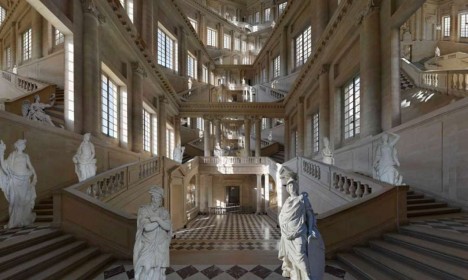
hyperphoto endless staircase image

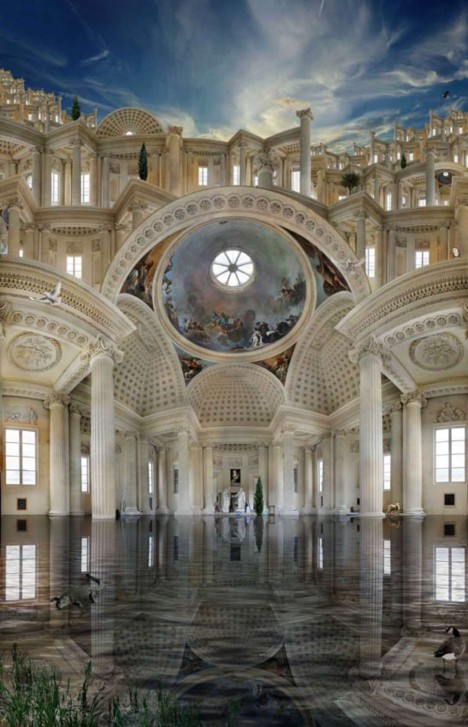
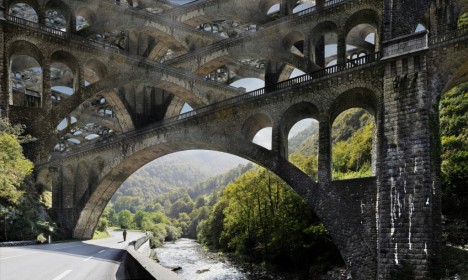
There is something almost mystical (or mythical) about these photographic collages, at once apparently realistic in content and seemingly impossible in composition.

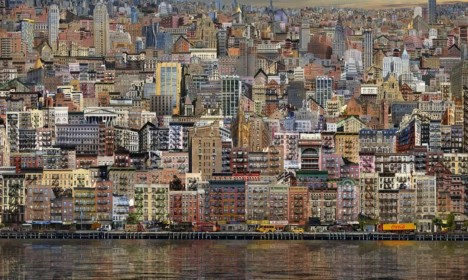
hyperphoto urban city montage

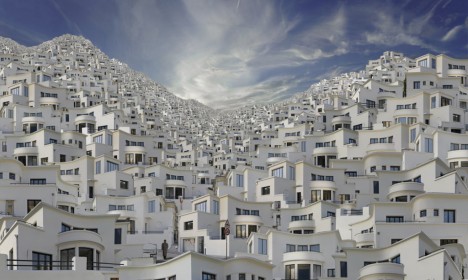
hyperphoto babylon

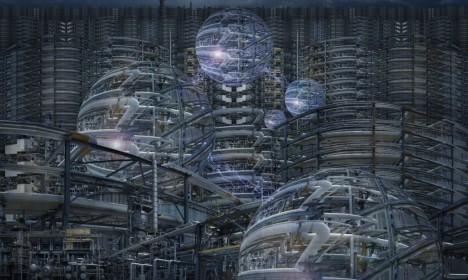
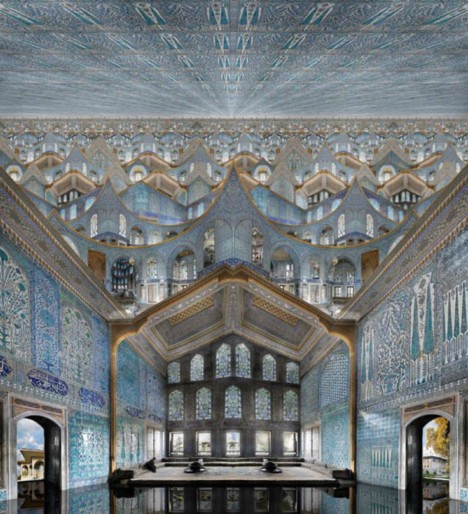
The Hyperphotos portfolio of Jean-Francois Rauzier, a French artist and photographer, represents years of captured images overlaid to create incredibly detailed composites. “In his monumental works he mixes the infinitely big and the infinitesimal, in a profusion of details so unusual as fascinating. The image thus recomposed numerically gives way to the dreamlike world of the artist.”

hyperphoto reflected mythical interior

Some seem to reflect the nature of their places of origin, from New York City and Paris to Istanbul and Barcelona, or the time period from which the architecture originates, from ancient cathedrals to modern brownstones.

hyperphoto stacked bridges

hyperphoto infinite future city

Others are works of almost pure fantasy, casting the viewer into imaginary futures or impossible pasts. While people, plants and animals are sometimes included, the focus of his fascination is almost always a built environment.

hyperphoto inside religious structure

About the artist: “Fascinated by photography from an early age, Jean-François Rauzier graduated from the School Louis Lumière in 1976. He has since been working as a professional photographer, while developing a personal creative work. In 2002, his artistic work takes an innovative and radical turn.” Now “he creates virtual images consisting of several hundreds of shots, taken with a telephoto lens and assembled by computer.”

Share on Facebook


[ By WebUrbanist in Art & Photography & Video. ]

[ WebUrbanist | Archives | Galleries | Privacy | TOS ]


WebUrbanist

 
Comments Off on Hyperphotos: Architectural Hybrids Remix Built Environments

Posted in Creativity


ESA’s ATV-5 equipped with camera to document atmospheric breakup

15 Aug

The European Space Agency’s ATV-5 supply vessel docked a couple of days ago with the International Space Station. Not just loaded with cargo for the ISS, the ATV-5 is also carrying newly developed camera technology which will record the final moments of ATV-5’s breakup on re-entering Earth’s atmosphere. The Break-Up Camera was designed in only nine months and will relay images from the last 20 seconds of the vessel’s life to a capsule that can survive the extreme heat of reentry. Learn more

Articles: Digital Photography Review (dpreview.com)

 
Comments Off on ESA’s ATV-5 equipped with camera to document atmospheric breakup

Posted in Uncategorized


The Mysterious Disappearing Filters in Photoshop

15 Aug

photoshop-missing-filters-1
If you use filters in Photoshop CS6, Creative Cloud (CC) or CC2014 you may notice that some of your old favorites are missing. Some (sadly) are gone forever, and others are just less easy to find. So, here’s what you need to know about the filters that are gone, how to make those that are hidden more accessible and why that might be important.

Going…Going…Gone!

First to Photoshop CC 2014. Gone from this version is the Oil Paint Filter. This was the sole remaining filter left when support for the Pixel Bender plug-in was removed from Photoshop CS6.

Also gone from this version is the Kuler Extension which you could get to by choosing Window > Extension > Kuler, and Mini Bridge too. In addition, any older Flash based extension panels are also no longer supported. That said there is a new html based Kuler extension with a different feature set that you can download from Adobe here.
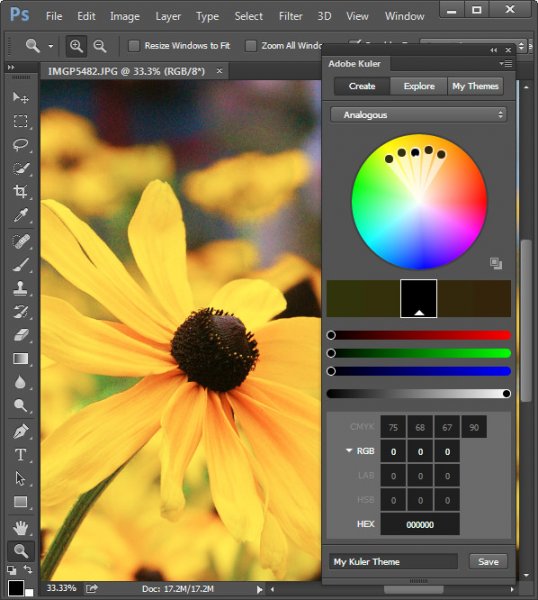
photoshop-missing-filters-2

Missing but not gone…

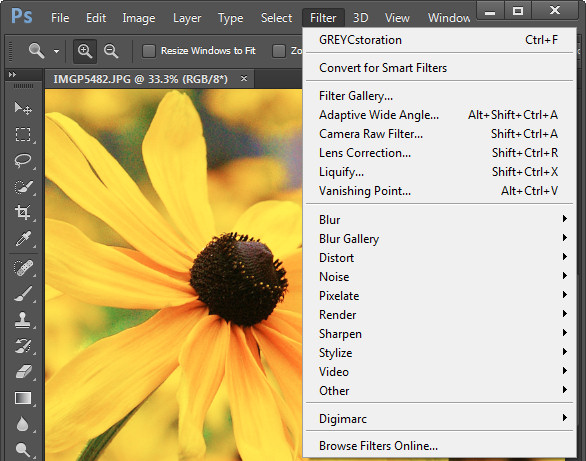
In Photoshop CS6, CC and CC2014 some filters groups are missing from the Filter menu. Those missing are the Artistic, Brush Strokes, Distort, Sketch, and Texture groups. The filters themselves are still available from the Filter Gallery but the actual menu options for those filters are no longer visible by default.
photoshop-missing-filters-3

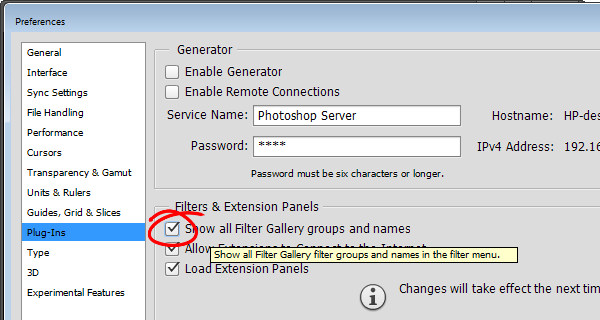
Luckily you can restore those filters to the Filter menu. To do this, go to your Preferences dialog on Mac by choosing Photoshop > Preferences (on PC select Edit > Preferences). Click the Plug-Ins group of preferences and locate and select the checkbox for” Show all Filter Gallery groups and names” and click Ok.
photoshop-missing-filters-4

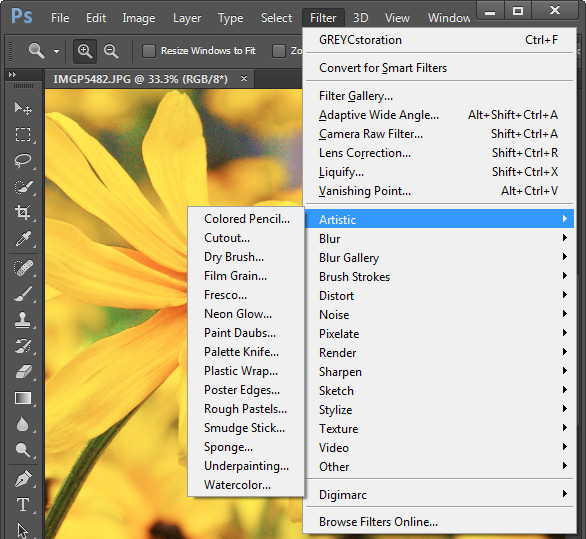
If the filter groups don’t appear on the Filter menu immediately, close and reopen Photoshop.
photoshop-missing-filters-5

You may be wondering if there is any real reason to return these filters to the Filter menu when they are all still accessible via the Filter Gallery. The answer is that there is a difference in how the filter is referred to in the Layers palette depending on whether you select it from the menu, or the Filter Gallery.

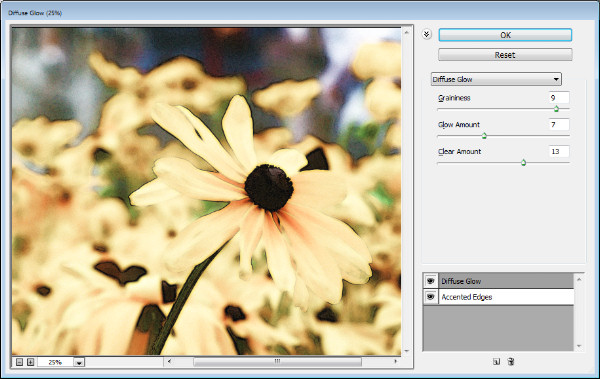
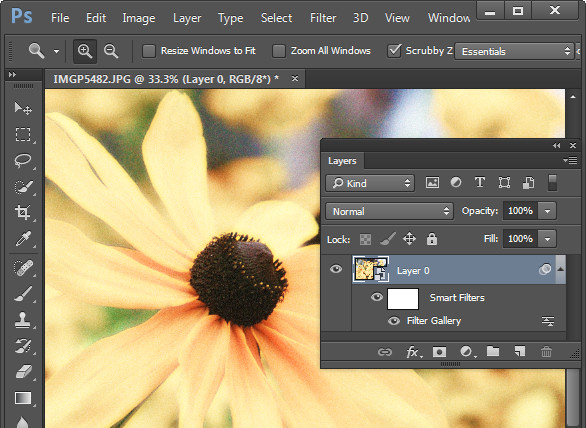
In the image below I first selected the image layer and chose Filter > Convert for Smart Filters to make the layer a Smart Object. I then applied the Diffuse Glow filter to the photo by choosing Filter > Filter Gallery. I selected the Distort group of filters and applied the Diffuse Glow filter and clicked OK.
photoshop-missing-filters-6

The Layers palette entry for this filter simply reads Filter Gallery, there is nothing to say what filter was applied to the image. Worse still if I were to apply multiple filters this way the entries in the Layers palette will each read Filter Gallery so I have no visible indication of what filters have been applied or in what order.

Contrast this to the image below where I applied the Palette Knife filter by choosing Filter > Artistic > Palette Knife > OK and the Layers palette shows the filter name. So, even though the settings for the filter are applied using the Filter Gallery dialog, the very fact that the filter was initially selected from the Filter menu results in the filter’s name appearing below the Smart Object layer in place of the less helpful “Filter Gallery”.
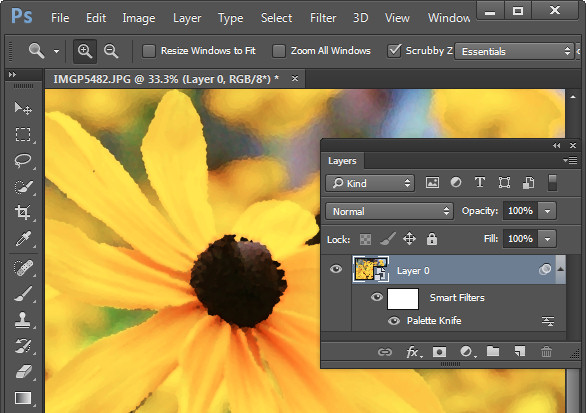
photoshop-missing-filters-7

This is the case if you apply multiple filters from the Filter menu, and also if you select one filter from the menu and then change your mind and apply a different one when the Filter Gallery appears. The trigger seems to be that you start the process of applying a filter in the menus and not via the Filter Gallery.

If you use filters a lot then it’s best to have them appear on the Filters menu and to use them from that menu rather than the Filter Gallery.

An Oil Paint Filter option

If you’re bemoaning the demise of the Oil Paint Filter in Photoshop CC 2014 there are some options available. One option is to keep an older version of Photoshop on your computer so you can use that version when you need to use that filter.

If you are using Windows, there is a Windows only plug-in called GREYCstoration which you can find more details about here. This is an open source filter typically used for noise reduction that will double as an Oil Paint filter which installs inside Photoshop. Make sure you download the correct version for your version of Windows (there are x86 and x64 versions), unzip the file and copy the 8bf and bin files into your Plug-ins folder. Then you will find the filter in your Filters > Noise category. To date there is no Mac equivalent for this filter.
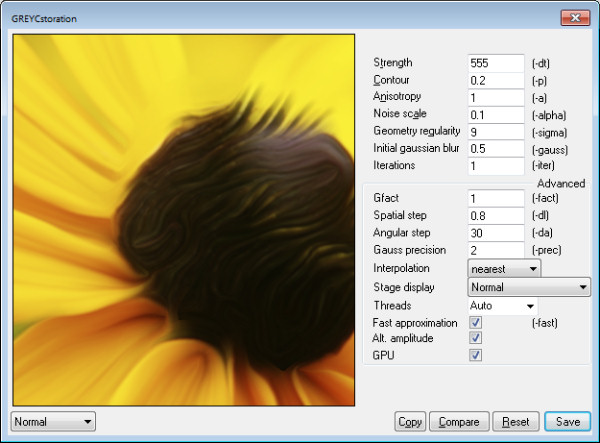
photoshop-missing-filters-8

Some sites have also suggested you try the Pixel Bender Accelerator for Photoshop that allows you to run Pixel Bender files in Photoshop CS6 and later. This will be of use to you if you want access to Pixel Bender filters that are available as .pbk files. Unfortunately the Oil Paint Filter was never distributed as a .pbk file so it appears that, inspite of suggestions to the contrary, this application won’t be of use for getting access to the Oil Paint filter.
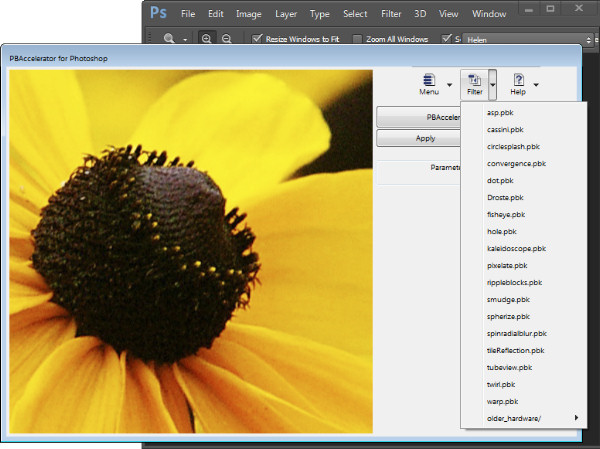
photoshop-missing-filters-9

That said, this application is great for running Pixel Bender filters in later versions of Photoshop so, if that’s what you’re seeking to do it is worth a look.


The post The Mysterious Disappearing Filters in Photoshop by Helen Bradley appeared first on Digital Photography School.


Digital Photography School

 
Comments Off on The Mysterious Disappearing Filters in Photoshop

Posted in Photography