RSS
 

Archive for July, 2014

Fantastische Bände zur Straßenfotografie, Teil 4

04 Jul

Nachdem die letzte Ausgabe dieser Serie ein komplettes Jahr her ist, wird es dringend Zeit für einen Folgeartikel. Bildbände sind nach wie vor mein persönlicher „Schatzzzz“ und vier von denen stelle ich heute vor. Dabei werden ich auf das Blabla (und die Vorgeschichte des Fotografen) verzichten und mich nur auf die Bände konzentrieren.

Michael Wolf: Tokyo Compression*
112 Seiten | 25,2 x 21 x 2 cm | Vergriffen; derzeit gebraucht ab 32 €
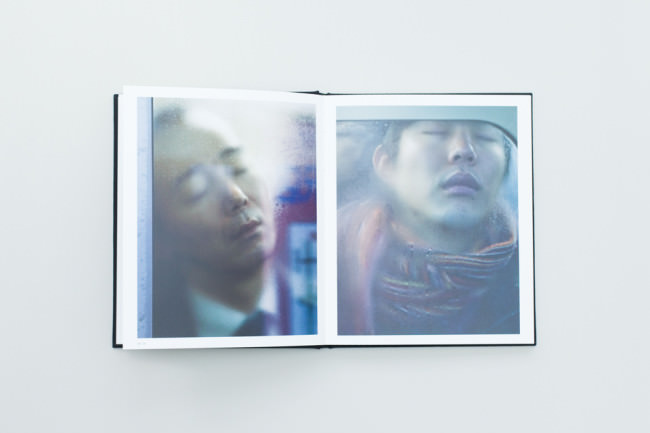
Menschen, die ihre Gesichter an eine beschlagene Scheibe drücken.

So wie es da liegt, macht der Band „Tokyo Compression“ einen stabilen und kompakten Eindruck. Ich nehme es gern in die Hand und ertaste das aufgeprägte Titelfoto. Der inhaltliche Beginn von „Tokyo Compression“ ist schlicht und kommt schnell zur Sache. Kein nervendes Vorwort und auch kein Inhaltsverzeichnis. Der Titel reicht, basta.

Die Seiten selbst sind schwer und dick genug, um nicht billig wie eine Aldi-Einwurf-Werbung daherzukommen und stets beidseitig und formatfüllend mit ein bisschen Platz zum Seitenrand bedruckt. So machen mir Fotobände Spaß.

Kommen wir zur Hauptsache: Die Fotos. Michael Wolf hat in Tokyo Menschen fotografiert, die in der U-Bahn aneinandergequetscht und schwitzend von A nach B transportiert werden. Mit dem Teleobjektiv ist er stets nah dran und die and die Scheibe gedrückten, müden Gesichter füllen oft das gesamte Bild aus.
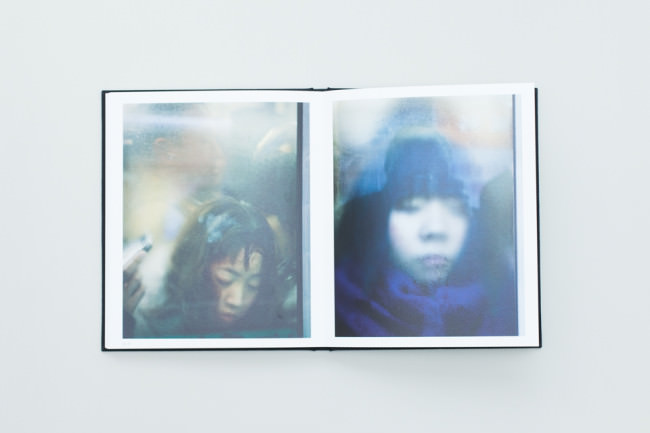
Menschen, die ihre Gesichter an eine beschlagene Scheibe drücken.

Hände werden an die Scheiben gedrückt und die zugefallenen Augen der Fahrgäste erinnern mich an meditierende, wartende Menschen, die nur einem Gedanken folgend im Moment verharren: „Ich. Will. Hier. Raus.“

Das Kondenswasser an den Scheiben ist die natürliche Folge der vielen Menschen in einem geschlossenen Raum. Kombiniert mit der Kompression Wolfscher Perspektive abstrahieren die nassen Scheiben oft auch das, was dahinter zu sehen ist.

Die Bilder wirken echt, natürlich und glaubwürdig. Ob und wie Michael Wolf die Bilder im Nachhinein justiert hat, weiß ich nicht, jedoch gibt es keinen störenden Hinweis auf eine übertriebe Tätigkeit desgleichen.

All das erzeugt eine Nähe zu den Leuten, die ebenfalls bedrückend ist und auf die man sich einlassen muss. Michael Wolf hat genau gewusst, was er wollte und das passende Werkzeug benutzt, um seine Idee zu verwirklichen.

Auch, wenn es sich in diesem Buch nicht um konventionelle Straßenfotografie handelt, ist es dennoch ein Konzept-Buch, das in sich schlüssig ist und die Grenzen des Genres wieder einmal neu definiert – anders gesagt: Nach außen öffnet.


Bruce Davidson: Subway *
135 Seiten |  29,4 x 30 x 1,8 cm | 45 €
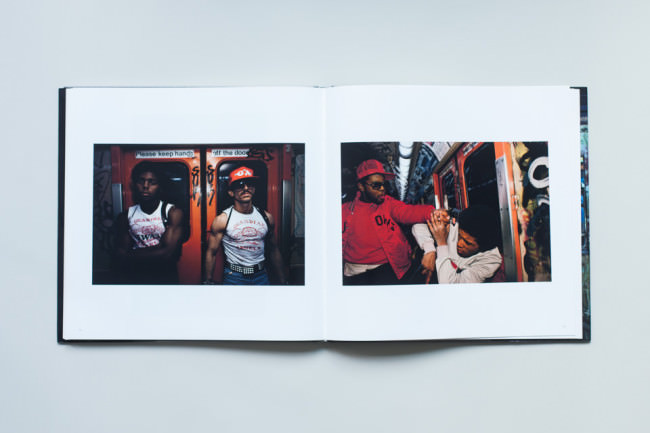
Menschen in der U-Bahn von New York City

Bleiben wir in der U-Bahn, doch wir wandern in die 80er und nach New York City. Bruce Davidson, Magnum-Fotograf, schuf hier eines seiner wichtigsten Bücher: „Subway“.

Ich weiß noch genau, wie es mir erging, als ich dieses Buch öffnete. Ich zeigte es stolze meinen Bürokollegen, raufte mir die Haare und sagte ständig: „Oh fuck. Nein, nein, wie geil ist das denn? Fuck! FUCK!!!“

Derart emotionale Ausbrüche gibt es bei mir nur dann, wenn mich ein Buch so richtig vom Hocker reißt. Bei „Subway“ hält die Begeisterung bis zum heutigen Tage an und ich frage mich immer noch, wie krass Bruce Davidson eigentlich ist.

Bleiben wir beim Buch. Es ist ein Hardcover, mit Schutzeinband aus Papier. Es ist groß, aber nicht schwer. Definitiv nichts, was ich einen fetten Schinken nennen würde, aber auch nicht zu klein für einen Fotoband im quadratischen Format.

Das erste Vorwort überspringe ich, doch dann folgen sieben Seiten Text von Davidson selbst, an denen ich nicht vorbeikomme. Ich bin zu neugierig. Der Fotograf beschreibt darin, wie er hart dafür trainierte, in den Subways zu fotografieren, da er einiges an Kraft brauchte, um sein Equipment mehrere Stunden mit sich herumzutragen.
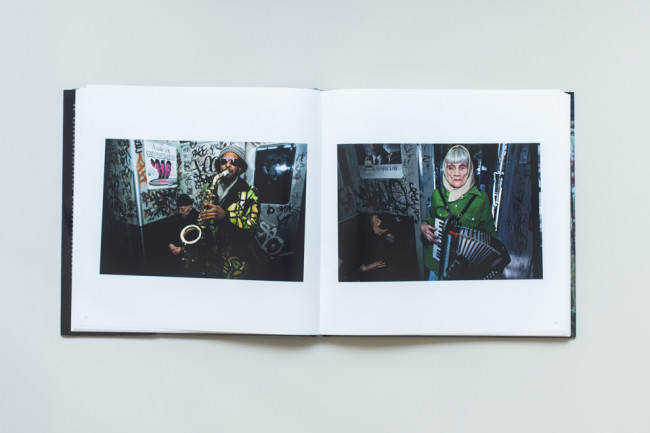
Menschen in der U-Bahn von New York City

Wie er zunächst Angst hatte, ausgeraubt zu werden, sich dann aber als Polizei-Detektiv ausgab, Menschen vor dem Fotografieren ansprach – oder gar nichts sagte. Wie er seinen Magenta-Filter in die Gleise rollen sah und irgendwann tatsächlich ausgeraubt wurde. Geschichten, die ich beim Durchblättern im Kopf habe und versuche, die erwähnten Menschen darin zu finden.

Die Bilder selbst stellen mich immer wieder vor ein neues Rätsel. Selbst, wenn Davidson eine Vielzahl der Fahrgäste vor dem Fotografieren fragte, sehen einige Bilder nicht danach aus. Dazu kommt eine Ästethik, die ich bis heute nur sehr, sehr selten zu sehen bekomme.

Der Fotograf blitzte nämlich nicht an die Decke, sondern richtete das Licht direkt auf die Menschen und das erinnert bezüglich der Farbästhetik an Tiefseeaufnahmen von Fischen. Da Davidson selten Anzugträger, sonder eher die untere Schicht der Gesellschaft fotografiert, bekommt die Gesamtwirkung der Bilder jedoch eine sehr raue und direkte Art.

Die Fotos zeigen zudem die New Yorker U-Bahn in einem sehr schlechten Zustand. Zugetaggte Scheiben und Wände, zersplittertes Glas und mitten drin Menschen, die unterschiedlicher nicht sein könnten.

Manch abstrakte Aufnahme erinnert leicht an einen Saul Leiter und hätte sich Davidson nicht gegen schwarzweiß entschieden, wäre der der Vergleich mit Bruce Gilden nicht zu verhindern. Doch so ist „Subway“ ein Unikat, das für mich zu den wichtigsten in meiner Sammlung gehört. Defintiv ein Buch, das ich mit auf die obligatorische Insel nehmen würde.


August Sander: (Aperture Masters Of Photography)*
94 Seiten | 21,2 x 20,6 x 1,6 cm | 5,95 €
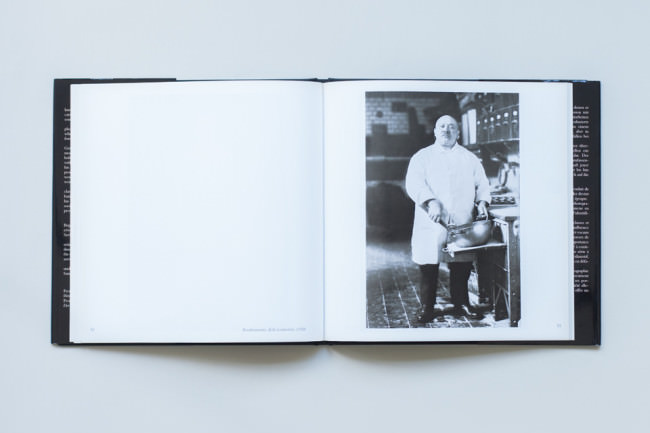
Ein Konditormeister mit großer Schüssel von vorne fotografiert.

Bei August Sander läuft es mir manchmal kalt den Rücken herunter, wenn ich etwas über ihn schreiben soll. Warum? Weil ich verdammt großen Respek vor ihm und seiner Leistung habe und mir recht unscheinbar dabei vorkomme, irgend etwas Bedeutungsvolles zu äußern.

Doch auch Herr Sander hat nur mit Wasser gekocht und schließlich stelle ich hier Bände vor, die ich essentiell für die Straßenfotografie finde. Ja, manchmal muss man sich selbst erklären, warum das, was man macht, eine Berechtigung hat.

Den vorliegenden Band habe ich im Winter des letzten Jahres gekauft, als mir klar wurde, dass ich so rein gar nichts von und über den Chronisten Sander habe. Bei einem Preis von knapp 5 € für dieses Werk wurde nicht lange nachgedacht, sondern zugeschlagen.

Der Fotoband ist mit seinen knappen 20 cm Breite kein Brecher, aber das soll er auch nicht sein. Im Schutzeinband (ich hasse diese Erfindung, denn meist ist das, was drunter ist, wesentlich besser gestaltet, wenn auch unscheinbarer) mit den abgebildeten Werkstudenten wirkt das Buch ehrlich gesagt etwas billig, doch der Blick ins Buch lässt vom Gegenteil überzeugen.
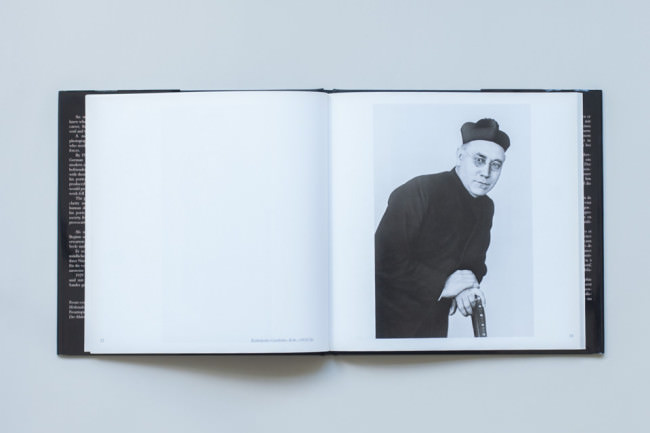
Ein katholischer Geistlicher.

Meine Ausgabe ist aus dem Jahre 1997 und die Zeit hat ihr schon einiges angetan, denn die Seiten sind zum Rande hin vergilbt. Witzigerweise passt das sogar zum umfangreichen Werk des Fotografen, das in den 00er bis in die 30er Jahren des 20. Jahrhunderts erstellt wurde.

Da ich ein Faible für Zeitgeschichte, insbesondere des vergangenen Jahrhunderts habe, sind die Portraits des Fotografen für mich von beachtlichem Wert. Diese bilden einen Querschnitt durch die Arbeit eines Menschen, der jede Gesellschaftsschicht fotografiert hat (und dessen Bilder später von Nazis verboten wurden).

So finden sich Berufe, die sich damals in der deutschen Gesellschaft durchgesetzt hatten, in ikonischen Portraits und durch ihre Einzigartigkeit erreichen sie stellvertretenden Charakter für den benannten Professions-Strang. Vom Konditormeister über Bauern bis hin zum Schriftsteller ist alles dabei.

Nun stellen sich manche Hardliner sicher die Frage, was August Sander im Rahmen der Straßenfotografie überhaupt zu suchen hat. Die Frage ist berechtigt, lässt sich jedoch problemlos klären: Originale, Originale, Originale.

Durch den Querschnitt des Lebenswerks Sanders erreicht der Band eine sehr hohe fotografische Dichte, die sich – aus heutiger Sicht – in der Selektion einzigartiger Portraits niederschlägt. Menschen mit originell anmutendem Äußerden zu sehen und zu dokumentieren, ist eine Kunst, die der Straßenfotografie ihren Atem verleiht und eine der Haupttugenden eines Fotografen im Genre ist.

Ich empfehle jedem, der unter einem schmalen Geldbeutel leidet, aber von den präsentierten Bildern angetan ist, des Buches habhaft zu werden.


Eamonn Doyle: i*
74 Seiten | 34 x 24,5 cm | Vergriffen, derzeit Angebote ab 129 €
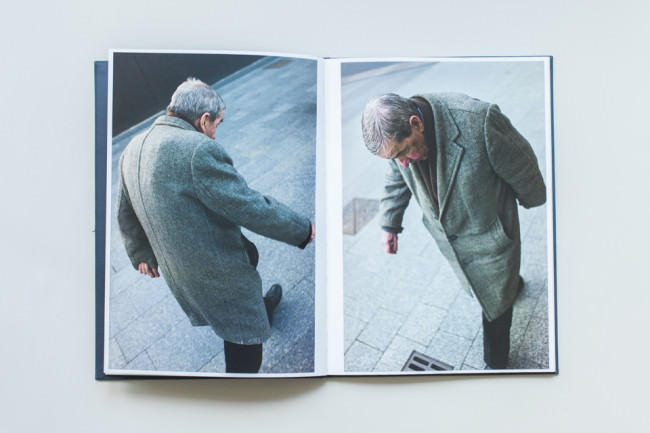
Eine Person, zwei Mal aus unterschiedlichen Perspektiven fotografiert.

Das letzte Buch, das ich hier vorstelle, kann man nur noch in Glücksfällen irgendwo erstehen. Dennoch stelle ich es vor, weil die Geschichte dahinter zu cool und der Band kurz gesagt der Hammer ist. Geschichte?

Am 1. April schrieb Martin Parr einen Kommentar ins Internet, und zwar in der Flickr-Gruppe HCSP. Allein diese Tatsache ist schon außergewöhnlich, doch wie betitelt Parr seinen Kommentar? So: „The best new street photo book, I have seen for a decade.“

Nun, der Herr Parr ist nicht irgendjemand und erst recht nicht in der Szene der Straßenfotografie. Wenn er sagt, ein Buch sei gut, dann ist das definitiv ein Tipp, den man sich zu Herzen nehmen sollte.

Das wissen wir spätestens seit der Buchreihe The Photobook, A History*, die mittlerweile in der dritten Ausgabe vorliegt und den Buchmarkt regelmäßig auf den Kopf stellt.

Ohne lange nachzudenken, bestellte ich das Buch. Ich wusste, dass es jetzt schnell gehen musste, da der Band auf 750 Stück limitiert war. Als ich ein paar Tage später das Buch in den Händen hielt, war ich… ja, was war ich denn? Überrascht, irritiert und begeistert zugleich.

Überrascht deshalb, weil das Buch ohne ein einziges Wort auf den Seiten daherkam. Der Titel, Metainformationen auf der letzten Seite und die Signatur von Eamonn Doyle sind alles, was es zu lesen gibt.

Irritiert, weil ich viel erwartet hatte, aber nicht ein solch in sich schlüssiges, durchdachtes Buch, das fotografisch auf allerhöchstem Niveau spielt.
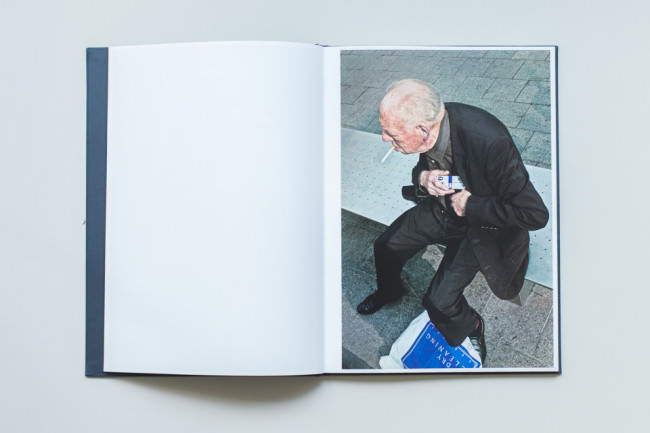
Ein älterer Herr, der sich eine Zigarette anzündet

Und begeistert deshalb, weil ich mit jedem weiteren Betrachten der Bilder langsam zu verstehen begann, was Martin Parr gemeint hatte, als er vom besten neuen Fotobuch gesprochen hatte.

Ich möchte auch ausführen, warum: Die Straßenfotografie ist – im Kontext aller Genres – ein chaotisches Intermezzo. Sie lebt davon, komplexe Situationen einzufangen und ist meist an die Stadt als Lokalität gebunden. Kurz gesagt: Es ist immer viel los.

Nun kommt „i“ ganz anders daher. Eine einzige Person pro Bild wird gezeigt, ohne viel drumrum und sogar der Schnitt des Fotografen ist fast durchgängig gleich. Das ist noch nicht alles, denn es sind immer alte Menschen, die Eamonn Doyle auf der Straße und durchgehend aus dem gleichen Abstand zur Person fotografiert.

All das ergibt beim Betrachten ein Gefühl der Ruhe und Ordnung, ohne langweilig zu werden. Nein, es ist ein Konzept, das mir zu denken gibt. Denn Doyle schafft es, innerhalb sehr enger Grenzen eine Serie vorzulegen, die es in dieser Form noch nicht gegeben hat.

Er widerlegt auf seine Art und Weise, dass es eben doch möglich ist, etwas Neues zu erschaffen. Und dazu noch, dass es nicht unmöglich ist, im Eigenverlag ein Buch zu publizieren, ganz ohne Riesenverlag, ohne fette PR. Wobei er natürlich die fetteste PR hatte, die man als Straßenfotograf haben kann: Eine Empfehlung von Martin Parr im Internet.


Abschließend fällt mir gerade auf, dass ich folgende Frage noch nie gestellt habe: Welche Bücher und Bildbänder im Bereich der Straßenfotografie sind für Euch unverzichtbar? Erzählt doch mal.

* Das ist ein Affiliate-Link zu Amazon. Wenn Ihr darüber etwas bestellt, erhält kwerfeldein eine kleine Provision, Ihr zahlt aber keinen Cent mehr.
kwerfeldein – Fotografie Magazin | Fotocommunity

 
Comments Off on Fantastische Bände zur Straßenfotografie, Teil 4

Posted in Equipment


Retractable Stairs Open to Reveal Urban Wheelchair Lifts

04 Jul

[ By Delana in Architecture & Public & Institutional. ]

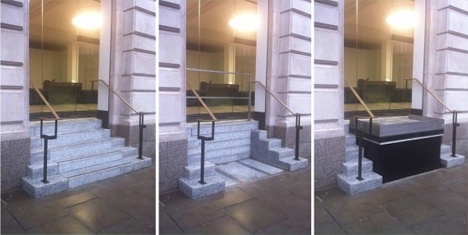
sesame stairs retractable stairs

Getting around the city in a wheelchair can be challenging, but a British company called Allgood Trio has devised an interesting way to help wheelchair users get into and out of buildings with steep stairs. Their Sesame Stairs are a brilliant barrier-free way to provide accessibility in buildings which would otherwise be difficult for wheelchair users to enter.
retractable stairs wheelchair lift

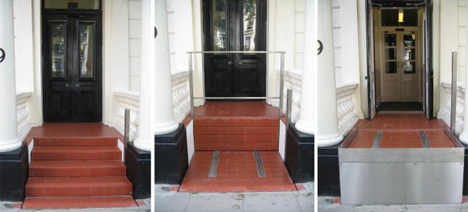
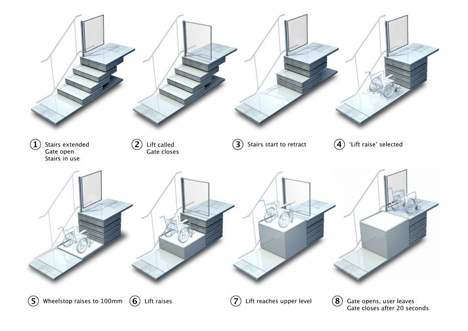
In order to comply with Americans with Disabilities Act (in the US) and Disability Discrimination Act (in Britain and Australia), buildings must provide a wheelchair-accessible entrance. For some older buildings with limited space, this can be a rather tall order. Sesame Stairs are a retractable set of stairs that open up to reveal an electric chair lift.
The ingenious chair lifts are tailor made for each building, so even buildings with extremely narrow entrances or historic façades can comply with the law without making major alterations. Since ramps are unsightly and can be difficult to use – not to mention the amount of space they occupy – the retracting stairs can be a brilliant alternative.

sesame stairs wheelchair lifts

In the company’s demo video, they show that the person trying to enter the building needs to push a button to call someone outside to activate the lift. This aspect of the Sesame system doesn’t seem to be convenient for the user, but it may not be the only option offered by the company. The hidden chair lift can help preserve the integrity of historic buildings’ appearances and architecture while providing the necessary access for wheelchair users.

Share on Facebook


[ By Delana in Architecture & Public & Institutional. ]

[ WebUrbanist | Archives | Galleries | Privacy | TOS ]


WebUrbanist

 
Comments Off on Retractable Stairs Open to Reveal Urban Wheelchair Lifts

Posted in Creativity


Time-Traveling Trams: 30,000 LED Lights Vanish Street Trains

04 Jul

[ By WebUrbanist in Art & Installation & Sound. ]

seasonal time traveling tram

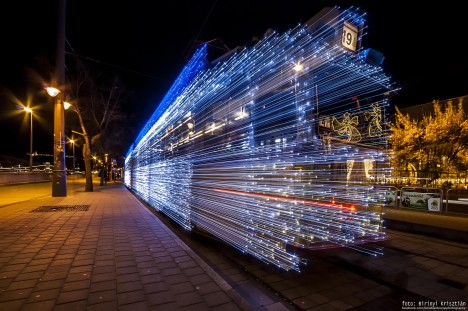
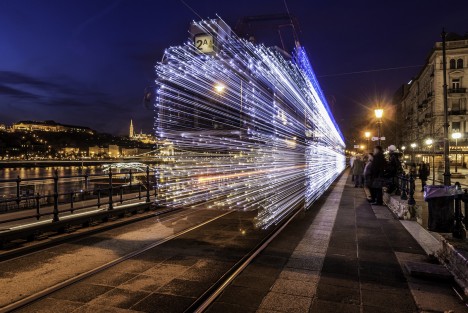
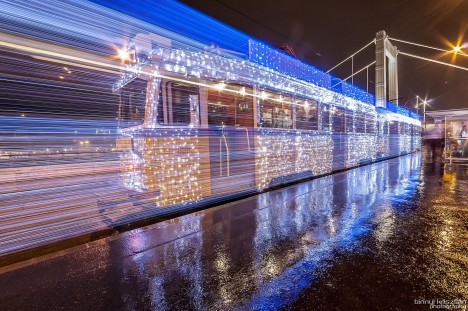
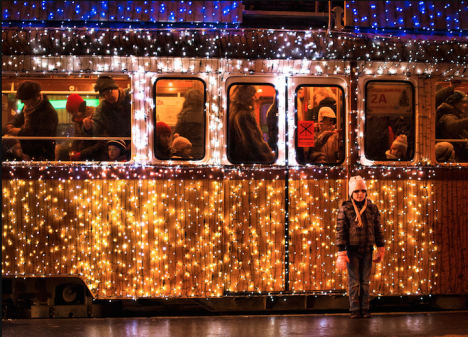
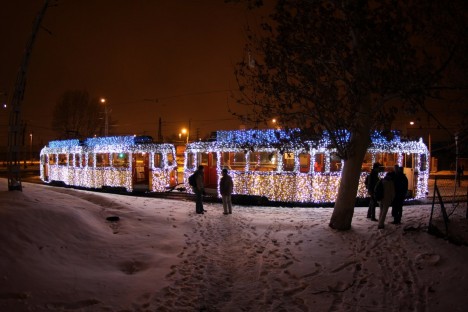
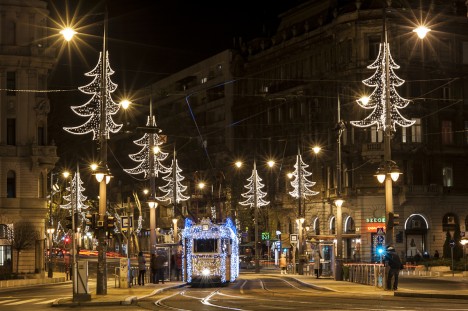
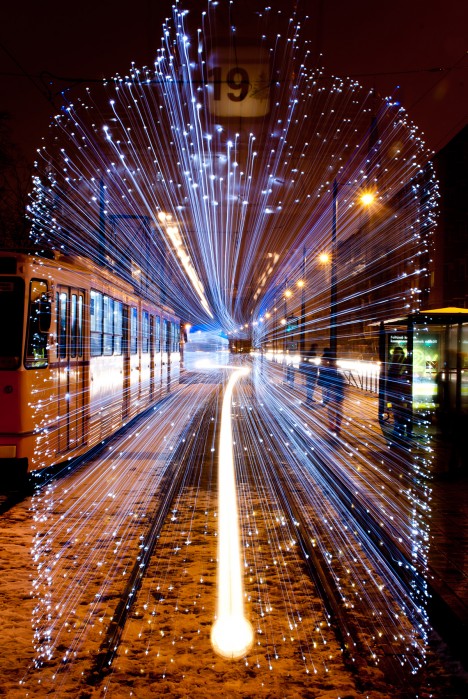
Extended exposure photography combined with a unique art installation project creates an incredible time lapse illusion on the streets of Budapest, making train cars appear to disappear in a burst of light.

seasonal christmas tram lights

seasonal time lapse art

Started for Christmas 2009, this is a project of a regional transport company since captures by a number of intrepid photographers, each showing different speeds and resulting effects.

seasonal installation art series

seasonal train photo shoot

Via Colossal, this seasonal lighting is meant to attract tourists and additional riders, a decorative nod to the holidays as well as a moving work of photogenic art.

seasonal train light art

seasonal disappearing train view

Images here were taken by Andras Csore, Victor Varga, Krisztian Birinyi, Krisztian Birinyi, Zsolt Andrasi English Hungary and the Centre for Budapest Transport.

Share on Facebook


[ By WebUrbanist in Art & Installation & Sound. ]

[ WebUrbanist | Archives | Galleries | Privacy | TOS ]


WebUrbanist

 
Comments Off on Time-Traveling Trams: 30,000 LED Lights Vanish Street Trains

Posted in Creativity


Peak Design Kickstarter offers ‘hassle-free’ Slide and Clutch straps

04 Jul

San Francisco-based Peak Design will release a couple of new camera straps, the Slide and Clutch, in October following a successful funding campaign on Kickstarter. The Slide is a quick-connecting shoulder strap for cameras of any size, while the Clutch is a smaller hand strap designed for use regardless of whether the camera has a battery grip. Read more

related news: Digital Photography Review (dpreview.com)

 
Comments Off on Peak Design Kickstarter offers ‘hassle-free’ Slide and Clutch straps

Posted in Uncategorized


Canon and Microsoft sign patent agreement

04 Jul

It appears we can expect an increased interchange of technologies between imaging giant Canon and software maker Microsoft in the near future, thanks to to a patent agreement that was signed by the two parties on Wednesday. Though the brief statement issued by Microsoft doesn’t reveal much, it appears that Canon imaging technology may be used in future Lumia smartphones made by Nokia. Learn more

related news: Digital Photography Review (dpreview.com)

 
Comments Off on Canon and Microsoft sign patent agreement

Posted in Uncategorized


3. Juli 2014

04 Jul

Ein Beitrag von: Sebastian Grote

Pavillons in filigraner Betonschalenbauweise an einem künstlichen Teich in Valencia.


kwerfeldein – Fotografie Magazin | Fotocommunity

 
Comments Off on 3. Juli 2014

Posted in Equipment


36 of the Best Online Tools to Boost Your Photography Business

04 Jul

As a beginner photographer, I put most of my time and energy into the product side of my business. I need to practice, improve my shooting and post processing skills, and just grow as a photographer. However, I have a strong intention to make photography my full-time job and be successful in it, which is hardly possible without a business strategy. Besides, with over five years of experience in social media and content marketing, I know for sure that establishing a sound online presence and effective marketing channels may not show you the money today, but it will shape your business in the long run.

35 photography marketing tools

In this article, I’m sharing the results of my recent research on the online marketing and workflow organizing tools for photographers. I use some of these services on a daily basis; others are carefully stored in my bookmarks, eagerly waiting for the moment to come in handy. Each tool category includes several noteworthy options (both big players and lesser known tools), so that you can use this article as a catalog to refer to in your marketing pursuits.

Photography Website Builders

1. MotoCMS

Since I was looking for a self-hosted solution with no additional costs for the tools I don’t need just yet, this one worked perfectly for me. For $ 139, I got a modern website template based on the quite powerful MotoCMS. Among the key features are advanced drag-and-drop website editor, SEO & social media tools, e-commerce widget, etc.

2. Squarespace

Squarespace offers 25 modern-looking templates with e-commerce integration, custom domains (no self-hosting, though), mobile-ready websites and support. There’s no free plan, but prices start from $ 8 per month, and you have 14 days to give it a try for free.

5. Portfoliobox

There’s a free account option allowing you to select a clean template and fill it with up to 40 images. A $ 6.90/month Pro plan (paid yearly) with Portolfiobox includes more design and marketing options, as well as a custom domain name and email.

6. Wix

The free plan includes a wide gallery of templates, unlimited pages and hosting. Premium plans start from $ 4.08/month, but your website will carry Wix brand ads both on desktop and mobile.

7. Pixpa

Pixpa offers hosted portfolios with private galleries, ec-ommerce with Fotomoto, custom domains, social media sharing and other features. All-inclusive plans start from $ 4.00/month (billed annually) with a 50% discount available for students.

8. Portfolio Lounge

A custom domain is included in Portfolio Lounge’s free plan, which is nice! Upgrading to the Pro ($ 7.99/month) and Max ($ 16.99/month) will get you extra storage space. This is quite a simple service with no pricing gimmicks and overwhelming feature sets.

9. Folio Websites

Folio Websites templates are based on WordPress, which is quite a benefit these days. There’s just one plan available – $ 175/year, and your decision to sign up may only be based on examples and promises since there’s no trial period offered.

10. Carbonmade

Carbonmade is a kinda hipster among portfolio builders – its design is funky, the words are fun, and the service is on trend. Opting in for the free “Meh” plan, you get a 35-image portfolio on the carbonmade.com domain. Upgrade to the $ 12/month “Whoo!” plan, and you get 500 images and 10 video slots, domain binding, ad-free site, private projects and tech support.

10b. Zenfolio (added by the Editor)

Editor’s note: I personally use Zenfolio for my portfolio, and have for several years. The benefits of choosing something like Zenfolio over just a portfolio site is that they also offer a way to sell your images, preview them for clients, have locked or private galleries and even a blog element. Their Basic Plan is only $ 30/year but if you want unlimited uploads, and the ability to price your own work go for the Premium at $ 140/year. This can also act as you backup as well with unlimited storage of images. They do offer a free trial.

By DAVID MELCHOR DIAZ

Have you ever wondered why crappy photographers do better than you? It’s because they know that both creative and business sides of photography are critical for success.

Cloud Storage and Media Library

11. Flickr

With a colossal 1TB of free storage on the table, Flickr remains a first-class service for photographers of all levels. I’m using it to store my photos, too. However, I really hope their sluggish interface will be updated very soon.

12. Streamnation

Streamnation supports a pile of photo file formats, including RAW and C2R – a feature any photographer would appreciate. 20GB of storage is free. The price varies from $ 4/month for 100GB to $ 19/month for unlimited space biled annually.

13. Dropbox

While Dropbox’s experience for photographers still feels half-baked, it’s definitely a solution to consider since, unlike your average cloud hosting startup, the established service provides welcome peace of mind.

14. Google+

You can store up to 15GB in Google+ Photos, Gmail, and Google Drive for free and then pay for additional storage (up to 16TB) as your account grows. A neat thing about Google’s offer is that, unless your photos exceed 2,048 pixels by width, Google won’t count them against your total amount of available space.

15. Crashplan

A neat feature about Crashplan is that you can recover a deleted file no matter how much time has passed. Prices for unlimited online backup to the Crashplan cloud start at $ 5/month with annual billing.

16. Zoolz

Unlike most cloud hosting services, Zoolz is a long-term storage unit designed for storing your data on the cloud for a lifetime. With a 5-year subscription you can have your photos reside on reliable Amazon AWS servers for as low as $ 2/month.

16b. Zenfolio

Editor’s note: see above for Zenfolio info under the website section, also works for image backup.

By Anca Mosoiu

Image Proofing and Selling Prints

17. Pixieset

Pixieset is my number one tool to create beautiful client galleries. It has all the key features to help you deliver, proof, and sell your work (unlimited galleries, proofing system, instant download, password protection, audio, just to name a few). The best part is that all this is available in their free plan. If you’d like more space and a custom domain, you can upgrade your plan (prices range from $ 8/month for 10GB to $ 40/month for 1TB).

18. Nextproof

Nextproof a pay-as-you-go service with a $ 0 plan (1GB of space and a 15% transaction fee) on the table and a free 30-day trial available for every paid plan (ranging from $ 9-99/month).

19. OnlinePictureProof

There’s a single, $ 29/month plan you can buy. Among the key features are slideshows, mobile app and a shopping cart. Online Picture Proof is a simple yet professional picture proofing and sales solution.

20. ProofBuddy

If your website runs on the WordPress platform, you can make use of this free WP plugin, ProofBuddy, to activate a fully-functional proofing system built to show your proofs and accept orders from clients.

21. ShootProof

With ShootProof, you can create public or private galleries that work equally well on desktop and mobile devices. The great feature is that each visitor’s activity is displayed in detail to you. ShootProof has a flexible payment plan (commission-free $ 10-50/month) as well as a free plan allowing up to 100 uploads.

20b. Zenfolio

Editor’s note: see above for Zenfolio info under the website section, also works for image proofing and sales.

By zizzybaloobah

Scheduling

22. Setmore

Getting started with Setmore is very easy thanks to a clean, intuitive interface and wizard-like design. Standard features are free to use and include unlimited appointments, services and customers, as well as the ability to add up to 20 staff members to your account. Upgrading to $ 25/month brings you to the premium level with Google Calendar sync, unlimited SMS (text) reminders and recurring appointments.

23. Ubooq

Ubooq makes it easy for clients to schedule an appointment with an easy-to-use, online reception page. Appointment ticket and reminders help avoid no-shows. You can schedule up to 30 appointments in Ubooq for free, and then, if you like it, pick a plan that suits your needs. There is a 5-grade plan system, with prices starting at $ 19 for the monthly service.

24. BookedIn

A pretty cool feature in BookedIn, that I didn’t see on similar services, is that you can add a booking app to your Facebook timeline. Payment plans include a pay-as-you-go model (you purchase a block of booking for 50 cents each) and a monthly plan costing $ 20/month. You can try out the complete set of features for free during 30 days.

Note: other free options: Calendly and TimeTrade (also have a paid version for more appointments)

By keso s

CRM (Customer Relationship Management) System

25. Simply Studio

For $ 29/month (billed annually) with Simply Studio you get a full-fledged, web-based CRM system with client-money task management, accounting, invoicing and bookkeeping, online proofing, polls and email marketing. All features are included in a free trial version available for 15 days. My workflow of a newbie obviously does not require such software yet, but I surely love the features-price ratio of Simply Studio, as well as the simplicity of its interface. So Simply Studio is already in my bookmarks waiting for my photography business to grow and call for it.

26. StudioCloud

StudioCloud is free desktop software for photography studios. Standard features include cloud syncing, a client database, scheduling, billing, order management and other business-management tools. While the basic functionality (which is quite rich, though), is free to download, some extra tools, such as multiple users, online proofing and automatic client reminders, will cost you between $ 10-60 per month.

27. ShootQ

ShootQ offers the most comprehensive list of management tools, which naturally reflects in pricing. There are three all-inclusive and monthly plans to choose from, and prices range from $ 39.95 to $ 79.95 depending on the desired number of users, pages and amount of storage.

Organization and Automation

28. IFTTT

This brilliant service saves me lots of time for shooting. Using IFTTT’s straight-forward formula, you can automate a variety of tasks, such as tweeting your new blog posts or notifying you of the latest dPS posts.

29. Buffer

A dead simple, yet useful tool, to schedule your social media posts. If you’re a heavy social network user, Hootsuite might work for you better, but if you just don’t want your Twitter and Facebook get dusty while you’re on vacation, Buffer has you covered.

30. Nutcache

Nutcache enables you to easily create unlimited number of invoices, do estimates, and track time. Great tool to operate your photo business in the cloud. It’s also multilingual.

By Staffan Scherz

You won’t believe how many tasks you can manage with some organization and system put in the process.

Mobile Client Galleries

31. Myphotoapp

Myphotoapp boasts the widest library of tools among mobile photo gallery builders. Client email collection, integration with MailChimp and advanced app analytics are some really neat features that make this service my number one choice. I hope, though, the usability of the administrative panel will be soon revised towards a simpler and more intuitive interface.

32. StickyAlbums

Create mobile photo apps that your clients can save on their iPhones, iPads and most Android devices using Sticky Albums. Features include custom branding, built-in Facebook sharing, password protected albums, photo album hosting and sharing via SMS. Prices start at $ 19/month with a free, 14-day trial available.

33. ProImageShare

If you’re a Lightroom diehard, it’s an easy winner here. ProImageShare lets you publish and host your own web app that can be downloaded on iOS devices with the appearance of a custom app. With a one-time payment of $ 69, you can publish as many apps as you want to your own unlimited, shared-web host.

Photograph Rings on her toes by Vanessa Kay on 500px

Rings on her toes by Vanessa Kay on 500px

Brides will definitely appreciate a custom app with their wedding pictures. Expect referrals to come your way!

Multi-platforms and Services

34. Photoshelter

I bet you’ve heard about Photoshelter, as it’s one of the industry’s “big dawgs”. Portfolio websites, integrated e-commerce, cloud storage and client-proofing system are the tools you can find under this shelter. Prices vary from $ 9.99/month for the basic feature set, to $ 49.99/month for the premium toolbox.

35. Zenfolio

Zenfolio is another giant in the field of digital marketing for photographers. The number of features here is impressive, too. One of the recently added ones is Photo Books (order and sell). Prices start from $ 30/year with a free, 14-day trial on hand.

36. Queensberry Workspace

Built around Quensberry’s range of print products, Workspace enables you to create, organize, and market your online presence, as well as order and sell photo books, albums, frames, etc. Its basic version is available for free and you can upgrade from $ 4 monthly.

Editor’s note: once upon a time I was a consultant for Queensberry Albums (for 9 years) and I can attest to their dedication to quality albums, products and software. They also make Photojunction, a powerful album design tool.

Another biggie in this area is SmugMug. Slightly more than Zenfolio with many of the same features.

Last Click

Defrozo

I didn’t include Defrozo on the round-up because currently it’s a private beta, but the features listed on the “coming soon” page make it so worth mentioning.

Website builder, Media Library, Image Delivery and Proofing, Scheduling, E-commerce, CRM system, and Websites for Clients make the initial toolbox Defrozo is going to deliver from the start. Moreover, photo book design tools and retouch services are scheduled to be added to the products’ following updates. How do I know that? Well, I subscribed for early access and received an invitation from the Defrozo team to join the focus group of photographers from 30 countries worldwide. I recommend that you sign up, too, since a new player on the market will likely offer something extraordinary to attract users. There are good chances that it’s gonna be a freemium or at least offer extra benefits to early adopters.

By Pascal

Defrozo seems to have a potential to be the ultimate weapon for your business to reach zen.

What’s in your digital toolbox?

I hope my research will come in handy, and I’m sure there are a lot of other tools and services worth mentioning here that I missed. What do you use to manage your photography workflow and business? Is there any all-in-one tool out there you could recommend? Please share your suggestions and experience in the comments below.

The post 36 of the Best Online Tools to Boost Your Photography Business by Julia May appeared first on Digital Photography School.


Digital Photography School

 
Comments Off on 36 of the Best Online Tools to Boost Your Photography Business

Posted in Photography


Cecilia Gallery Camera Strap Giveaway

03 Jul

Recently, FashionPhotographyBlog.com reviewed the unique camera straps from Cecilia Gallery. Well today, I’m going to share with you how you can claim one of these gorgeously crafted straps for your camera because thanks to Cecilia Gallery, we have one of their camera straps to give away to one of our subscribers to our blog. To decide who will receive this coveted prize we are going to hold a competition between now and the end of the month.

Fashion Photography Blog Reviews Cecilia Gallery Camera Straps (FashionPhotographyBlog.com)

The rules on how to enter the competition are simple:

1) Take a photo of your favorite item that you use as a photographer.

It does not have to be restricted to cameras; you can think outside of the box as much as you like. It can be an accessory, a piece of software, a tablet, computer or electronic equipment, a book or even an app just to name a few suggestions.  Feel free to be as creative as you like in the photo – you may even want to appear in the photo if you are comfortable being seen in it. Just make sure that we can clearly identify what the item is.

2) Write a brief description of at least 100 words telling us why it’s a favorite item of yours as a photographer. You can detail how it has benefited you or how useful it is in your photography. Let us know why you love it.

3) Send these to us via this email competition@fashionphotographyblog.com with your first and last name so we know whose entries are whose.

4) Photo entries and their descriptions will then be posted on our Facebook page where the public will VOTE on for their favorite photos.

The scoring of these votes will be weighted and by the total number of SHARES, followed by the total number of COMMENTS, then the total number of LIKES. In a nutshell, the most popular photo with the top points at the end of the competition period will be announced as the winner of the camera straps. YAY!

6) You can enter as many times as you like, just that each entry needs to be accompanied with a photo and description.

7) Competition starts at the beginning of this month and closes at the end of this month, July 31st Midnight.

So that’s how you can will one of these trendy camera straps. Here’s how you can make sure that you stay updated about the competition and hear when we announce the winner:

1) LIKE us on Facebook

2) Join our mailing list

Once again, we would like to thank Cecilia Gallery for supporting this competition and offering one of their hand-woven alpaca wool and leather camera straps as the prize. We are officially starting the competition and receiving entries.

Good luck everyone! (Although there can only be one winner)


PHOTO SOURCE:

Images courtesy of Cecilia Gallery


Fashion Photography Blog

 
Comments Off on Cecilia Gallery Camera Strap Giveaway

Posted in Uncategorized


Review Domke Chronicle Camera Bag

03 Jul
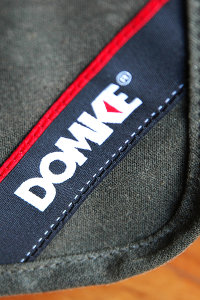
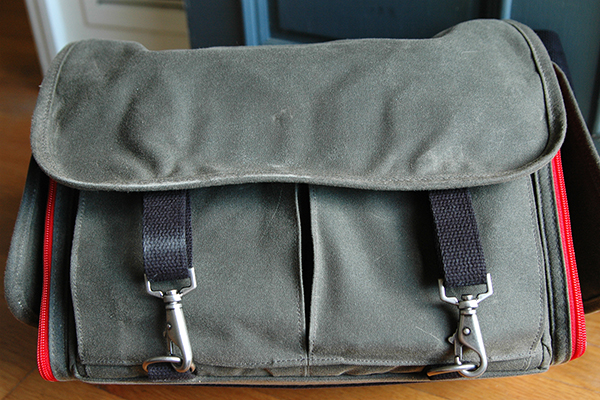
The new Chronicle is part of Domke's Next Generation line of camera bags.

The new Chronicle is part of Domke’s Next Generation line of camera bags.

There’s a new line of camera bags on the market, but they come from an old, familiar name. Originally founded in 1976 by photojournalist Jim Domke with the introduction of the F-2, the Domke brand has been synonymous ever since with low-profile, high-quality bags geared towards photojournalists, travel photographers, and anyone else looking for a bag that does a great job protecting their gear without drawing unwarranted attention to the thousands of dollars worth of kit hanging from their shoulder.

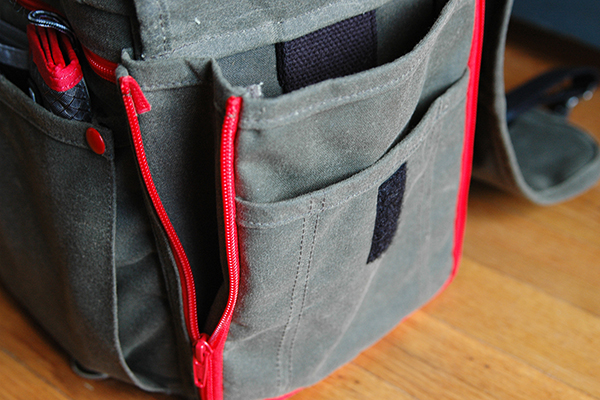
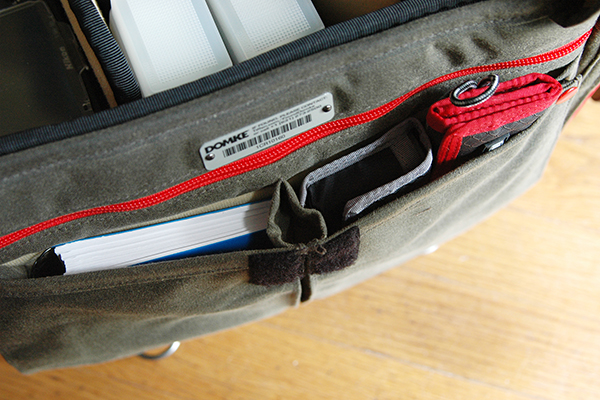
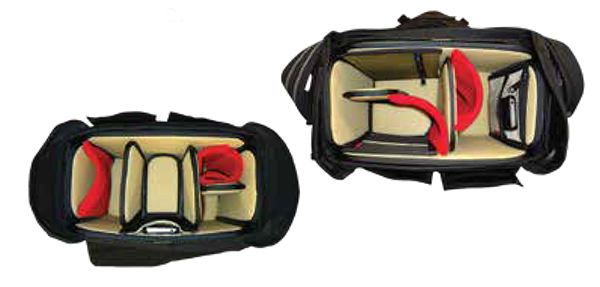
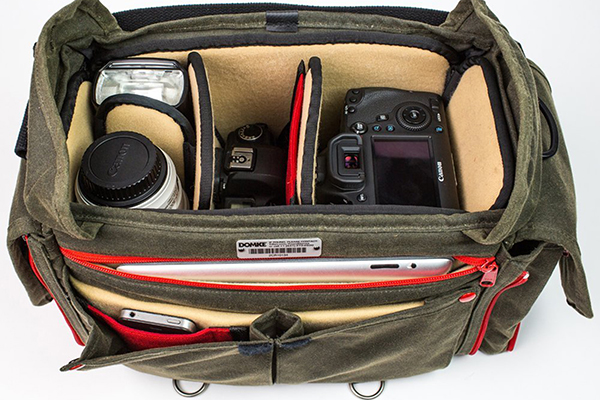
Domke’s “Next Generation” consists of eight new bags, each available in different choices of materials and equipped with Domke’s new GearProtex™ and PocketFlex™ systems of customizable dividers, inserts and storage pockets. I recently had the chance to spend some time putting The Domke Chronicle (J-Chron) through its paces. One of three bags in the Journalist Series (alongside the Ledger and the Herald), the Chronicle– described as the grandchild of that original F-2– is obviously designed with the working photojournalist in mind, but would also be a great bag for any photographer, professional or otherwise, looking for a low profile or a classic retro look.

domke-chronicle-review-digitalphotographyschool-009

First Impressions

Fresh out of the box this bag brought a smile to my face. My dad was a truly amazing photographer. Wanting to make his hobby my own, when I was a kid, we spent countless hours together in the darkroom. This is a bag my father would have loved. Not getting too lost in its retro appeal, though, it’s abundantly clear that a lot of thought and attention to detail went into the design and production of this bag. Available in four different color options, I opted for the Ruggedwear Military/Black. All materials, both inside and out, appear to be of extremely high quality, yet they don’t add any unnecessary bulk or weight. This keeps the bag comfortable on your shoulder, even when fully packed.

domke-chronicle-review-digitalphotographyschool-008

domke-chronicle-review-digitalphotographyschool-006

Dimensions and Specs

  • Exterior:  15.75″ (L) x 7″ (W) x 10″ (H)  (40 cm x 17.8 cm x 25.4 cm)
  • Interior:  12.25″ (L) x 6.5″ (W) x 9.25″ (H)  (31.1 cm x 16.5 cm x 23.5 cm)
  • Weight: 4.2 lbs.  (1.9 kg)
  • YKK brand zippers
  • Top access double zipper
  • Expandable zippered side pockets
  • Expandable front pockets
  • Rear zippered pocket
  • Padded zippered tablet pocket (fits up to 11″ x 8″)
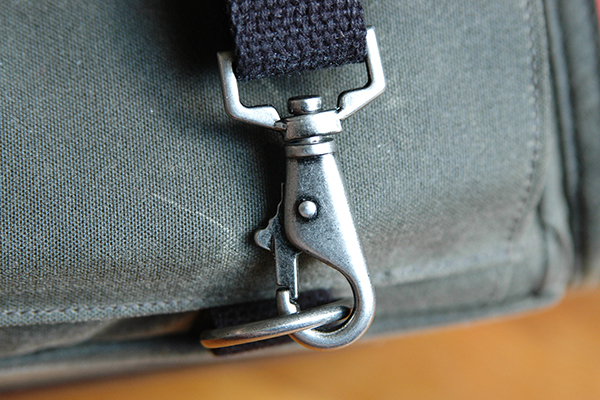
  • Antique steel hardware exterior flap fasteners
  • Detachable shoulder strap
  • Detachable hand strap
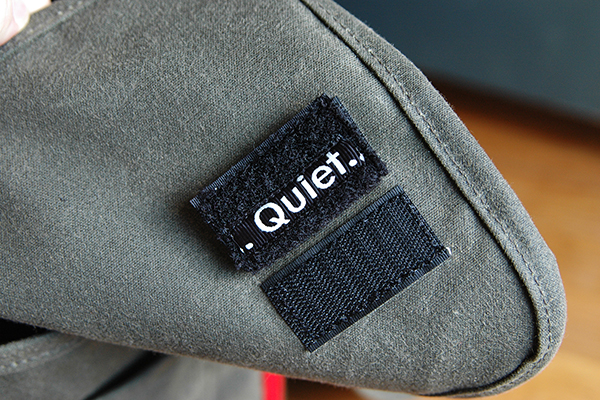
  • Velcro silencers
  • Numbered identity plate

domke-chronicle-review-digitalphotographyschool-003

What I Packed

  • Nikon D300s with 35mm prime lens attached
  • Nikon 70-200 mm f/2.8 lens
  • Two SB800 speedlights
  • Flashpoint Blast Power Pack
  • Think Tank PPR with extra CF cards
  • Think Tank DSLR battery holder
  • Light Meter
  • Gaffers tape
  • Notebook/pens/business cards
  • Client contract, model releases, and paperwork
  • iPad

It’s well worth pointing out here that the Chronicle could have easily handled several additional items, but I’ve been trying to travel a little lighter these days.

domke-chronicle-review-digitalphotographyschool-007

Dividers and Inserts

Domke’s new GearProtex system of dividers allows you to fully customize the inside of the bag with dividers that can attach to any interior surface, not just corresponding Velcro attachment points. The PocketFlex system is a collection of pockets and pouches that can also attach to any interior surface of the bag. If I had to pick one area where this bag fell slightly short it would be here, with the dividers. While many companies seem to give you way more dividers than you could ever possibly need, I found the number of included dividers to be a bit lacking for my taste. With only three included dividers and one included pocket patch, if I want this bag to be 100% in line with my needs, I’m going to have to order a few more dividers. Considering the cost of this bag ($ 349 USD), it might have been nice of them to include a few more dividers. On the up side, however, the flexibility of the dividers, combined with almost limitless attachment points, does help create sections of sizes and shapes I’ve never been able to get with standard dividers.

domke-chronicle-review-digitalphotographyschool-002

Domke PocketFlex SS

Fabric Choices

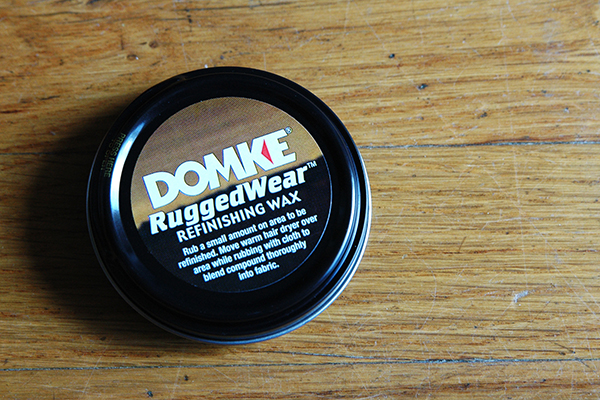
Here is an option you don’t often see when choosing a camera bag. The Chronicle, as well as every bag in the Next Generation line, is available in a choice of materials and colors. As noted, the bag in this review is the RuggedWear Military/Black option. Also available are Cordura Black/Black, Canvas Khaki/Black, and RuggedWear Black/Sand. While it’s obvious from a quick inspection that the exterior materials are of a high quality and built to withstand the regular challenges our bags face on a daily basis, let’s face it, it’s material and eventually it’s going to get dirty or show some wear. In what was a first for me, I was pleasantly surprised to find a tin of Domke Ruggedwear Refinishing Wax in the bag for those inevitable occasions when parts of the bag exterior might need a little attention.

domke-chronicle-review-digitalphotographyschool-010

Wrap-up and Recommendations

I really love this bag, particularly its classic retro look. I’ll most likely end up using it more for personal photography than commercial work, but it’s a bag that is well-suited for both. Even though it is the smallest bag in the Journalist series, I never felt limited in terms of what I could or couldn’t pack. This bag should appeal to a wide variety of photographers, from photojournalists and nature photographers, to hobbyists and travel photographers, as well as every photographer in between. The price may be a bit steep for a bag this size, but I think you absolutely get what you pay for in terms of quality, longevity, and adaptability. I’ve given it a 4.5 out of 5 due to not enough dividers.

The post Review Domke Chronicle Camera Bag by Jeff Guyer appeared first on Digital Photography School.


Digital Photography School

 
Comments Off on Review Domke Chronicle Camera Bag

Posted in Photography


Ineinander verschachtelt

03 Jul

Das nicht Greifbare, das nicht Offensichtliche, das Dahinterstehende, all das vereint eine in St. Petersburg lebende Fotografin. Sie schafft es, mit ihren durchweg komplexen Aufnahmen eine Irritation in den ersten Sekunden des Betrachtens zu erzeugen, die dazu zwingt, sich länger als geplant mit einem Bild zu beschäftigen. Herzlich Willkommen in der Welt von Polina Washington.

Was passiert, wenn sich zwei Menschen treffen? Niemand weiß es, nichts kann vorherbestimmt werden. Es wird etwas Neues sein. Und was passiert, wenn Polina Washington zwei Bilder mittels einer Doppelbelichtung übereinander legt? Genau, ebenfalls etwas Neues. Doch die Bilder liegen nicht nur übereinander, als ob sie immer noch voneinander getrennt werden.

Nein, sie verschachteln sich, liegen ineinander, miteinander, vereinen sich und sind im Nachhinein nur schwer in Einzelteile zu zerlegen. Diese Symbiose bildet nicht ab, was man sieht. Denn mittels analogem Handwerk und verträumt anmutenden Arrangements ist Polina Washington an einem Prozess teilhabend, der tiefer geht, als das, was sowieso schon da ist. Natur dient dabei als Manege, Wald als Bühne für Aufführungen schön-verrückter Provokationen all dessen, was unser Auge gewohnt ist.

Doppelbeluichtung mit einer Person, deren Hände zu erkennen sind, auf dem zweiten Bild ein See im Wald.

Doppelbelichtung mit einer Frau im Schleier und Wald.

Doppelbelichtung mit einer Person, die vor einer Licht- oder Feuerquelle steht.

Doppelbelichtung, eine Person und ein Hund im Schnee sind zu sehen.

Doppelbelichtung: Eine Person mit Schwert in der Hand steht am Wasser.

Doppelbelichtung in Farbe, auf der ein Turm und Bäume zu erkennen sind.

Doppelbelichtung, eine Frau und eine Person mit Tiermaske sind zu sehen.

Doppelbelichtung: Eine Hand hält ein Tuch im Vordergrund, ein Mann schaut in den Wald im Hintergrund.

Bunte Doppelbelichtung mit viel Glitzer und Wald.

Frau im Wald, die ihre Arme ausstreckt.

So beschreibt auch sie, die Autorin ihrer Geschichten, das große Ziel:

Zwei oder mehrere Bilder miteinander in eines zu verbinden, gibt mir die Möglichkeit, mich von der Realität zu entfernen. Und das ist es, was ich in meinen Bildern kreieren will: Unreale und imaginäre Welten.

Das schafft sie ganz gewiss. Mich persönlich hat sie angesteckt, denn ich mag es, wenn Fotografie einen zweiten Blick erfordert. Wenn sie nicht unterhält, sondern mitnimmt und mich als Betrachter dazu bestimmt, mir ganz bewusst Zeit zu nehmen und mich in ihre Aufnahmen zu vertiefen.


kwerfeldein – Fotografie Magazin | Fotocommunity

 
Comments Off on Ineinander verschachtelt

Posted in Equipment