RSS
 

Archive for June, 2014

Phase One introduces 40-80mm Schneider leaf shutter lens

03 Jun

P1_40-80_onCam_w.jpg

Phase One has announced a new leaf shutter lens for its 645 camera platform. The new Schneider Kreuznach 40-80mm LS f/4.0-5.6 joins the existing Schneider Kreuznach 75-150mm f/4.0-5.6 leaf shutter zoom lens, and allows for flash synchronization up to 1/1000sec. Supposedly on a par with prime lenses in terms of critical image quality, the new lens is available now for $ 8990 / €6990. Click through for the press release

News: Digital Photography Review (dpreview.com)

 
Comments Off on Phase One introduces 40-80mm Schneider leaf shutter lens

Posted in Uncategorized


2. Juni 2014

03 Jun

Ein Beitrag von: Christian Meermann

Looping © Christian Meermann


kwerfeldein – Fotografie Magazin | Fotocommunity

 
Comments Off on 2. Juni 2014

Posted in Equipment


In iOS 8, Apple brings welcome refinements to Photos app

03 Jun

wwdc-2014-brandnew-100260150-gallery.png

As we’ve come to expect, Apple is using its annual developers’ conference in San Francisco to announce new versions of its desktop and mobile operating systems. Along with a host of refinements in iOS 8 is a revamped Photos app, with improved native retouching options, better search, more complete iCloud integration and support for third party retouching apps as ‘extensions’. Click through for more details.

News: Digital Photography Review (dpreview.com)

 
Comments Off on In iOS 8, Apple brings welcome refinements to Photos app

Posted in Uncategorized


Is Visiting the Racetrack Playa in Death Valley Worth It?

03 Jun

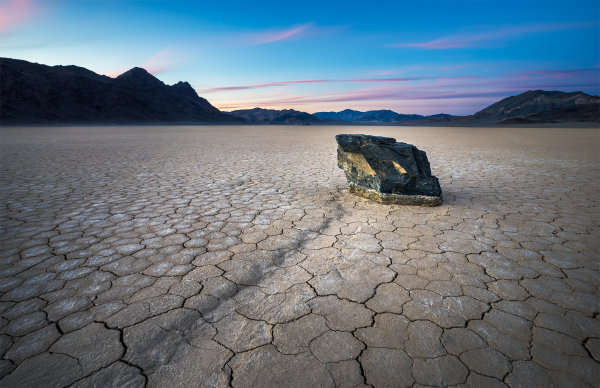
racetrack-playa-workshop

I probably won’t ever go again. That’s how bad it’s gotten. Not unless something changes.

If you’re into travel and landscape photography you’ve likely either been to or have on your bucket list the Racetrack Playa in Death Valley National Park. I’ve been twice now, which is really a lot harder than it sounds if you haven’t been before. In this article, I want to go over my current thoughts on this peculiar and incredible place and the impact that tourists and photographers are having on it. I think it’s an important dialogue to open up, so I hope you’ll join in the conversation once you’ve read the article.

What is the Racetrack Playa?

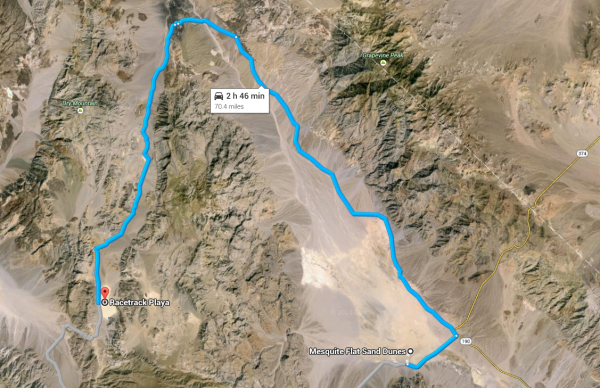
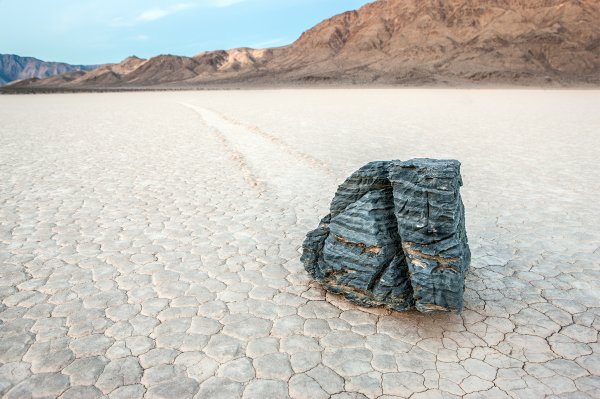
Perhaps you’ve never heard of the Racetrack Playa, or maybe you’ve heard of it but just don’t know much about it? The Racetrack Playa is a remote location deep within Death Valley National Park. It is a massive playa (dry lake bed) that measures 2.8 miles long by 1.3 miles (4.5 km by 2.1 km) wide. The playa is famous amongst tourists and photographers because of its mysterious “sailing rocks” that leave trails behind them on the playa. It’s said that nobody has ever witnessed the rocks moving. Because of that, there is no shortage of theories about how they move about the playa. While the Racetrack Playa is incredibly remote, in reality it’s really not all that far away from the main attractions at the park like the Mesquite Sand Dunes. The problem is that a mountain range sits in-between the two (so you have to drive all the way around).

Screen Shot 2014-05-19 at 3.53.48 PM

Getting there

Once you’ve driven the two hours on Scotty’s Castle Road and stopped at Ubehebe Crater, you still have a daunting 27 mile washboard gravel road to contend with. From Furnace Creek to Racetrack Playa, you’ll be driving uphill the entire way and will gain around 3,500 feet in altitude. The gravel road is fine in a few areas, but absolutely frustrating most of the way. The entire time you’re dodging large rocks and boulders in the middle of the road, pulling over to let oncoming traffic pass by and trying to ride that balance between going safe and slow to avoid a flat tire, and fast and dangerous to avoid the washboard style road and all the bumps and vibrations.

Both of my trips into the Racetrack Playa had potentially horrendous outcomes but both also produced some great images for my portfolio. The first trip in was with my buddy Cliff Baise in his VW Toureg. We made it in just fine, but on the way out the road just proved too much for the SUV. His drive train got damaged at some point and we had to limp into Las Vegas for three days while the car got repaired. The second trip was during the first of two photography workshops I led inside the park with Mike Mezeul II back in February of this year. During that workshop, we took another SUV in and got a flat tire when we pulled into Tea Kettle Junction. Luckily we had a spare tire and got out fine (but it could have ended a lot worse if we had gotten another flat on the way out).

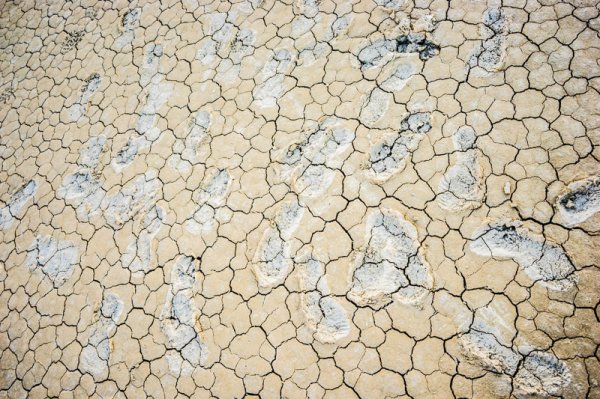
All of this to say that by the time we actually got to the playa parking lot–after 3 hours of driving and a flat tire–I wasn’t in the best of moods, and I was doing my best to stay calm and happy for my workshop students. After all, this place is a bucket list item for most photographers and just being here is a huge blessing. So if just getting to the Racetrack isn’t bad enough, here’s what we were greeted with as we walked out onto the playa…

racetrack-damage

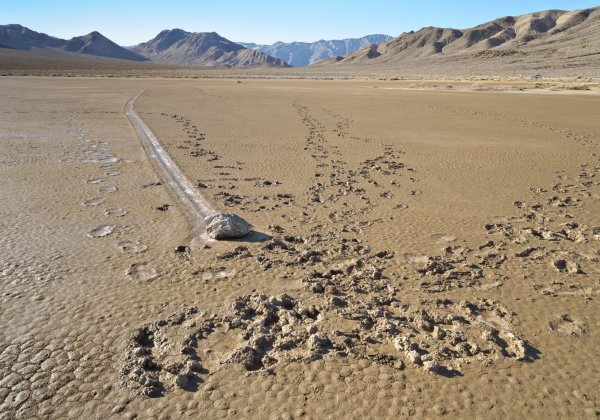
We anticipated this, but had no idea the extent of how bad it was. The Death Valley National Park Facebook page had shared a similar photo at the beginning of the month but we had heard rumors that the photo was taken well off the beaten path of the playa. Here’s that photo:

Image originally posted on the Death Valley National Park Facebook page. Used with permission.

Image originally posted on the Death Valley National Park Facebook page. Used with permission.

This is what happens when logic flies out the window. This is pure stupidity and selfishness at it’s worst. Matt Kloskowski wrote an article that somewhat defended the actions of whoever did this. He wasn’t by any means saying it was ok, just that they didn’t know any better and that it’s just dirt. I respectfully disagree. When I took my workshop group out onto that playa, it was plenty dry enough to walk on without leaving any trace. If it was still damp or muddy, we would have turned right around and left (the group knew that going in). As we explored the Racetrack during sunset, it was virtually impossible to find a good composition that didn’t have footprints littering the scene. It was far, far worse than I had expected. Nobody could have done this without at least thinking to themselves that maybe they shouldn’t be doing it. I refuse to believe otherwise.

But it’s just dirt – who cares?

It matters because the playa, and the park as a whole, only get around one to two inches of rain per year. That means that these footprints will likely be on the playa for years and years. Unfortunately, that’s not where the problem ends.

Childish playa mischief

Another thing that becomes painfully obvious while exploring the Racetrack Playa is the increasingly high amount of mischief going on. The very first rock trail that I came to on the playa had no rock at either end. The next trail I came to was around 15-20 inches wide (quite large for the playa) but only had a tiny rock (maybe 6 inches) at the end. Yet another rock trail I found was just the opposite; around 6 inches wide but with a much larger rock at the end. There were trails with no rocks, trails with rocks at both ends, rocks with far too extravagant trails behind them and so on.

It’s quite clear that people tamper with the rocks at Racetrack Playa. Unfortunately, the likely source of this mischief is other photographers. It takes a LOT of walking and a LOT of patience to find the perfect rock, with a perfect trail behind it, with a perfect backdrop behind that. The problem is, some people don’t have the amount of patience it requires to get a shot like that. My guess is that photographers are finding good trails and good backdrops, and then replacing the rocks in front of them with larger rocks from somewhere else. I talked to one photographer out there who heard a rumor that another photographer took a picture of a rock and then move it as far away as he could, ensuring that nobody else would ever get the same photo.

There have also been tire tracks both times I visited the playa, leading out toward the rocks. So who’s responsible for that? Is it tourists, or photographers who just don’t want to make the hike out to good rocks? Is it people who take their trucks out on the playa to drag the rocks around? Who knows. Either way, there are plenty of signs prohibiting driving onto the playa.

So what can we do?

I think the most important thing we can do is just get the word out. I’m convinced that the overwhelming majority of photographers are good people and respect the things they photograph. It’s just unfortunate that the small percentage of people who don’t fall into that category can completely ruin a good thing like the Racetrack Playa.

I hate to say it, but at this point I think I would totally support Death Valley National Park changing the Racetrack Playa to a permit only destination and even making it a lottery system much like Vermillion Cliffs National Monument. Those who get accepted to go in will be educated on the playa, how to take care of it and precautions to take when going out. The footprints would disappear, the mischief would go away and photographers everywhere would rejoice.

racetrack-playa-rock-james-brandon

Conclusion

My experience with the Racetrack Playa has been a frustrating one to say the least. That’s why I really want to get the word out about the shape that it’s in and get people talking about it. What do you think about all this? What’s your opinion? How should we fix it? Let me know in the comments below!


Editor’s note: I think this is an important topic for discussion. Some photographers like Ansel Adams were key in the conservation of National Parks in the US and he was a big advocate for leaving nature natural. So how have we gotten so off track since Ansel Adam’s time? If photographers of his era were as careless and selfish there might not even be parks for today for us to enjoy. So what legacy will be leave our future generation? How can we make a stand and make a difference? I just used this quote on someone else and thought it appropriate to share here also:

I am only one,
But still I am one.
I cannot do everything,
But still I can do something;
And because I cannot do everything,
I will not refuse to do the something that I can do.

Edward Everett Hale (often wrongly attributed to Helen Keller as she has used it in her writing as well)

So what will you do?

The post Is Visiting the Racetrack Playa in Death Valley Worth It? by James Brandon appeared first on Digital Photography School.


Digital Photography School

 
Comments Off on Is Visiting the Racetrack Playa in Death Valley Worth It?

Posted in Photography


Painted Ladies With Alana Tyler Slutsky

02 Jun

Alana Tyler Slutsky Second Skin series as featured on Fashion Photography Blog (FashionPhotographyBlog.com)
FashionPhotographyBlog.com
is pleased to announce Alana Tyler Slutsky as one of our recent winners of our Photo of The Week competition. Alana is a fashion, beauty and portrait photographer located in Brooklyn, New York. As seen in her winning entry that was part of her “Painted Ladies” series, she is not afraid to experiment with light and color, as well as playing with the idea that “fashion is fantasy”. This has been the driving force behind the photographer’s journey.

So where did Alana’s journey begin? The mostly self-taught photographer revealed that the journey was not actually planned. She said that “My interest in photography started by accident. I ended up dropping a class in high school and needed to fill my schedule. I signed up for the photography class offered at my school and the rest is history.

Alana Tyler Slutsky Second Skin series as featured on Fashion Photography Blog (FashionPhotographyBlog.com)

My attraction to fashion photography was pretty instinctual. I had always been a creative person but I also love structure.  I find that fashion photography is the perfect mix of the two.  I had also always been a very practical person and knew that if I actually want to make it through life doing what I love, I would have to go into some form of commercial photography.  As sad as it is to say, very few fine art photographers actually sustain themselves off of their photography alone.  To me, fashion is the perfect mix where art meets commercial work.”

Alana Tyler Slutsky Second Skin series as featured on Fashion Photography Blog (FashionPhotographyBlog.com)

With her imagination let loose to play with color and light, how did Alana manage to come up with the inspiration for her original “Painted Ladies” series when she was first experimenting with lighting? I asked the photographer and she started explaining “From what I remember, it was just after Halloween and all the terrible leftover makeup was on sale at Walmart.  I was walking through the aisles thinking that there had to be something I could do with all this random stuff. Turns out that there was! A few sets of extraordinarily tacky eye lashes, 2 bottles of white body paint, 1 package of self-adhesive rhinestones plus 2 really kind friends equal a mini series of images entitled Painted Ladies.” According to Alana, her winning photo (seen below) was taken with beat-up mono lights and a soft box.

Alana Tyler Slutsky Painted Ladies as featured on Fashion Photography Blog (FashionPhotographyBlog.com)

When it comes to style the photographer had great opinions about the subject, she explains that “So many people are worried about developing a style. Yes, it’s important and definitely something that you need but you can’t force it, it happens naturally. I’d be a fool to say that I had found and locked into my style. I won’t lie, I haven’t. It’s continuously evolving. All I know is that I’m extremely comfortable working with harsh light and deep shadows and playing around with this is contributing to making my work look like, well, my work. But to anyone out there looking to push themselves and develop a style – experiment! Try different things, make yourself uncomfortable. It will all pay off in the end! Just stay true to yourself and you’ll find your way.

Alana continues to develop her style and evolve her work as seen in the photos posted in this article from her recent shoot entitled “Second Skin” that reminisce the essence of her winning photo. It just goes to show that style is an ever evolving process as are conceptual ideas.

Alana Tyler Slutsky Second Skin series as featured on Fashion Photography Blog (FashionPhotographyBlog.com)

To find more about Alana Tyler Slutsky’s winning photo and other photos from her “Painted Ladies” series, you would probably need to search deep in the depths of the internet on a post about it winning an amateur photography contest. However if you want to find out information about her recent shoots, you can check out her websiteFacebookblog or email her at alana@alanatylerslutsky.com

PHOTO CREDITS:

Photography by Alana Tyler Slutsky

Picture 1 2, 3 & 5: from her “Second Skin” series

Picture 4: winning photo from her earlier “Painted Ladies” series

Blog: http://alanatylerslutsky.blogspot.com

Website: http://www.alanatylerslutsky.com

Facebook: https://www.facebook.com/alanatylerslutsky

Twitter: https://twitter.com/alanaslutsky


Fashion Photography Blog

 
Comments Off on Painted Ladies With Alana Tyler Slutsky

Posted in Uncategorized


Pocket movie maker? We examine the Sony RX100 III’s video mode

02 Jun

RX100-III_Right-1200.png

The Sony Cyber-shot RX100 III may have photographers drooling over its fast lens and pop-up electronic viewfinder, but it gains some serious video-related updates too. It now features full sensor readout for higher image quality (as previously seen on the RX10), and also supports the XAVC S codec which allows higher bit-rates. In the latest update to our First Impressions Review, we take a detailed look at its movie mode. Click through to read all about it.

News: Digital Photography Review (dpreview.com)

 
Comments Off on Pocket movie maker? We examine the Sony RX100 III’s video mode

Posted in Uncategorized


4 Steps to Photoshop Artistry Using Fine Art Grunge Techniques

02 Jun
PhotoshopGrunge600x600

Image by Sebastian Michaels

Sebastian Michaels has the course Photoshop Artistry: Fine Art Grunge Composition which is current on sale for 67% off at SnapnDeals.com for a limited time only. Grab it now before the deal is over.

One question. Do you sharpen just about all your images? If so … you should stop. As photographers we tend to want our images to be perfect: perfect exposure, perfect white balance, perfect sharpness. But aren’t you a little tired of being so perfect all the time? Let me clue you in. Art doesn’t always have to be so darn pretty. What if instead you let yourself RELAX a bit, lighten up, and have some fun? What if you let yourself get a little messy? Maybe not full-blown grunge. But how about “fine art grunge”?

Start here: a little more blur, a little more noise, an unexpected angle or crop, perhaps some striking effect of light combined with a subject you never would normally have thought to consider.
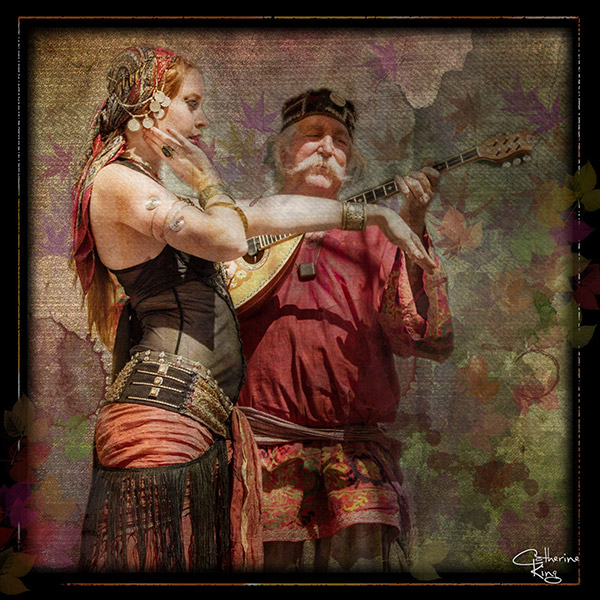
BellyDance

Photo credit: Catherine King (course student)

Sometimes we forget that at our core we are ARTISTS. Owning a Canon 5D Mark III rig and enough lighting gear to stage a Pink Floyd reunion tour doesn’t change that. Just because we spend so much time trying to capture the perfect shot doesn’t mean that we can’t switch it up now and then and treat our images (even our mistakes, even our botched shots) as nothing more than the starting point in more elaborate artistic compositions.

Here’s a mental trick to get you started. Think of some of your favorite shots. But instead of imagining your photos all printed pretty and perfect, imagine them layered-in and composited with other images and rendered as a painted canvas.

Think paint on canvas. Not that you need to simply run a paint filter on your photos. That’s not going to cut it here. Think instead of paint on a canvas in the sense of a wild-eyed painter with oil paint in his hair, brushes sticking out of his pockets and one clenched between his teeth – attacking a canvas in a frenzy of creativity and passion. When was the last time you approached your photography with that kind of intensity? When was the last time you let yourself step outside of your serious photographer role and actually felt like an ARTIST creating a great canvas?
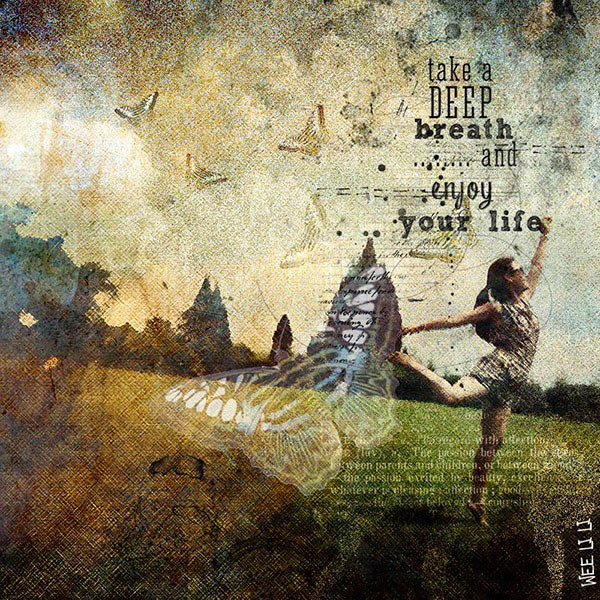
EnjoyYourLife

Photo credit: Li Li Wee (course student)

That kind of artistry is in you. Let’s look at how you might begin tapping into it.

STEP ONE: Take More Chances With Your Photography

I mentioned a little of this earlier. You might already have some shots that you would otherwise delete out of hand just because they are blurred or the contrast is screwy. Give those a second look. Maybe there’s something artistic you could do with them. Maybe you could crop them in a creative way.

When you are shooting, try some angles you normally wouldn’t even attempt. For that matter, try shooting some subjects outside of your usual comfort zone. Take a walk down a dark alley (or a woodland trail) and see what you come out with.

Maybe enlist some models you normally wouldn’t have chosen, or stockpile some odd objects and lug them out to quirky locations. In other words: experiment more. Get out of your comfort zone and try something new. Take some chances for your art.

STEP TWO: Throw In Some Blend Modes (and Maybe Some Textures)

It’s surprising how much more interesting an image can become simply by slapping a Curves layer on it (or even simply duplicating the background layer) and assigning that layer a Blend Mode. Give it a try and see.
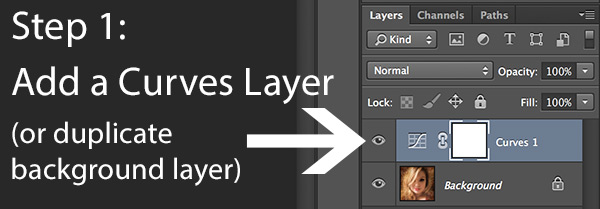
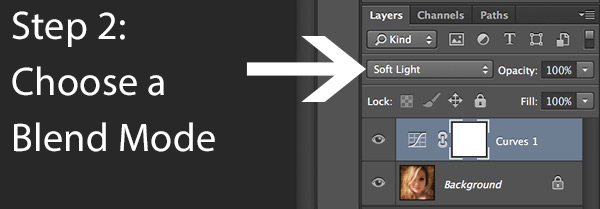
BlendModes1

BlendModes2

Your best bet is almost always with Multiply or Screen blend modes, or alternately with Overlay, Hard Light, or Soft Light. I recommend memorizing the keyboard short cuts for those so you can toggle through them quickly and pick the best. You might also want to lower the opacity of the layer (or you might want to duplicate that layer with Cmd/Ctrl+J, doubling up the effect, or giving that duplicate layer a different Blend Mode of its own).

You might also want to stick a Layer Mask on there and paint in precisely where you want that effect to show. Every image is different, and layer Blend Modes can create rich results.

I recommend also trying out some textures combined with Blend Modes and Layer Masks. A texture or overlay might be as simple as a photo of a grungy patch of concrete, or it might be a scanned watercolor wash. It could also be an intricately layered piece in and of itself, comprised of scanned swatches of paint, scratched up paper with coffee stains on it, colorized with a Hue/Saturation layer and given a dark vignette. When you decide to explore photo-artistry, you begin collecting a lot of these kinds of textures and overlays.
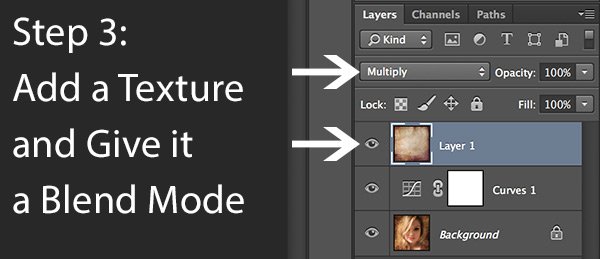
Texture

But whatever you use, you drop it in over the image and give it a Blend Mode; again, you might tweak the opacity or employ a Layer Mask. Already your image is likely looking more dramatic and artistic. It’s probably a bit “grungy” at this point, and that’s okay. Embrace it. You might already find yourself astonished; discovering something in the image you never quite knew was there until this moment.

STEP THREE: Get More Dramatic With Your Lighting or Experiment With Some Filters

You never know where an image is going to take you. All you can do is try a few things and see if one of them looks especially cool. One approach you may want to try is to slap another Curves layer on top of the image (or Brightness/Contrast if you’re working with Elements) and deliberately darken the entire image. Go back in with the Brush Tool to paint over the Layer Mask at a low opacity and, in essence, paint in the lighting where you want it. Be sure to use a soft-edged round brush at only about 20% opacity, layering your strokes while using black and white and toggling between the two by pressing the “x” key.

Here you are painting in where you want light. But you can do something very similar with any of the effects in the Filter Gallery. Here’s how:

  1. Go to the top layer of your layer stack and execute what has come to be known as “The Move”: Cmd-Option-Shift-E on a Mac (or Ctrl-Alt-Shift-E on a PC) to “merge everything visible” onto its own new layer.
  2. Select the new layer you just created and press Cmd/Ctrl+J to duplicate it.
  3. Run a filter from the Filter Gallery on that layer. Go ahead and try out one or more of the painting filters, but experiment with the others as well, and how they interact. LayerMaskShortcuts
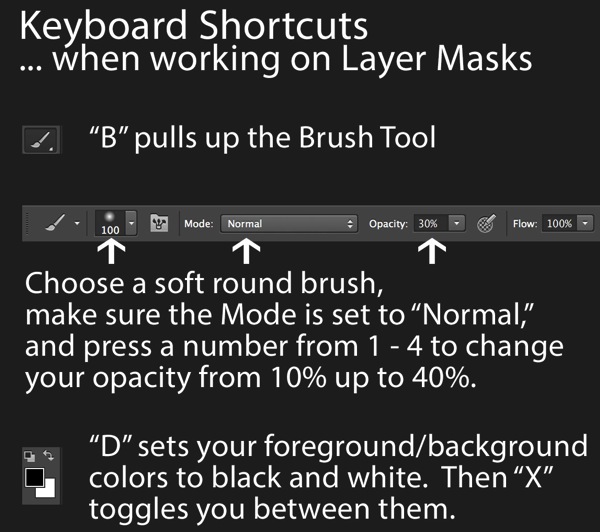
  4. After you apply the filter to your duplicate layer, stick a Layer Mask on it and again use a black or white soft-edge brush at low opacity to paint the effect in or out as you like. Try masking out the effect a bit in the areas of greatest focus, leaving everything on the edges more enhanced. Experiment and see where the image takes you.

STEP FOUR: Go Ahead and Add an Edge Effect and a Signature

Now that you have an interesting artistic image, it’s nice to give it some kind of artsy edge treatment. There are half a dozen ways to do this (you can even pick up OnOne Software specifically built for the task of creating edge effects), but we can leave the pure Photoshop methods for the next tutorial.

You might even want to stick a more artistic signature on the corner of the piece, because you’re likely excited at this point, since you are now looking at a work fit for canvas.

Cat

Photo credit: Irene Hofmann (course student)

You took some chances and it paid off. Next time maybe you’ll get even grungier, because by now you’re seeing that “grunge” is just another way of saying “artistic.” Above all else, whatever your tools, and whatever your approach, you are first and foremost, an artist.

For walk through of this process and a better idea of what the course is like, check out this video:

// < ![CDATA[ _evpInit('dHV0b3JpYWwxMjgweDY5MndlYi0xLm1wNA==[evp-f593aa84764ec0c7dba0fa770e9114bc]'); // ]]>

Sebastian Michaels has the course Photoshop Artistry: Fine Art Grunge Composition which is current on sale for 67% off at SnapnDeals.com for a limited time only. Grab it now before the deal is over.

The post 4 Steps to Photoshop Artistry Using Fine Art Grunge Techniques by Sebastian Michaels appeared first on Digital Photography School.


Digital Photography School

 
Comments Off on 4 Steps to Photoshop Artistry Using Fine Art Grunge Techniques

Posted in Photography


1 June, 2014 – Leica 24/1.4 M Summilux ASPH, Part Of The Special “Leica M Edition 100” Set

02 Jun


It’s a crazy time in the camera industry.  Here we are in a Photokina year and major announcements are being made every week.  One has to wonder what the camera makers are holding back to show at Photokina.  Well, Leica a few days ago decided to make a special announcement to celebrate their “100 Years of Leica Photography” with the “Leica M Edition 100”.  Sean Reid a regular contributor on Luminous-Landscape gives us a peek at this “Limited Edition 100”.  Some might say when you read about this special kit, that Leica has lost its way, but so far that hasn’t been the case.  Sean’s take on the NEW 24mm 1.4 lens is of special interest.  Will Leica eventually mass produce this lens?  Read on to find out.


The Luminous Landscape – What’s New

 
Comments Off on 1 June, 2014 – Leica 24/1.4 M Summilux ASPH, Part Of The Special “Leica M Edition 100” Set

Posted in News


Lightweight ‘Airbeams’ Frame Inflatable Geodesic Dome Tent

02 Jun

[ By WebUrbanist in Design & Products & Packaging. ]

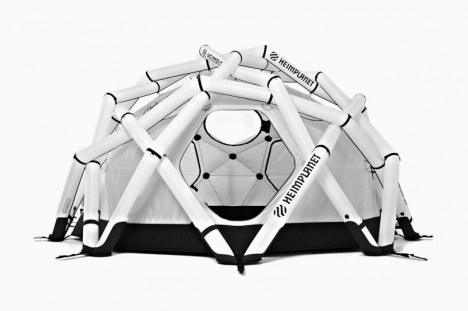
geodesic inflatable tent

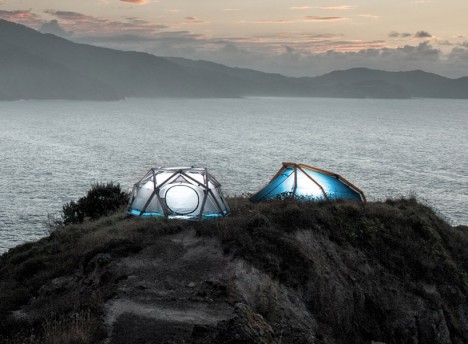
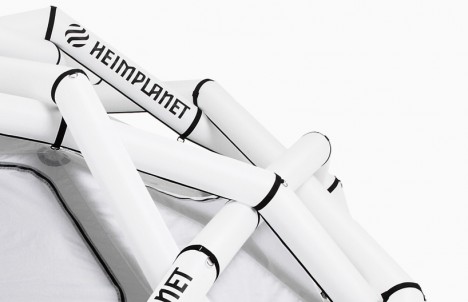
Derived from crystal structure of diamonds and geodesic domes of Buckminster Fuller, these all-weather structures are astonishingly strong but incredibly light at the same time.

wedge cave maverick

inflatable tent poles design

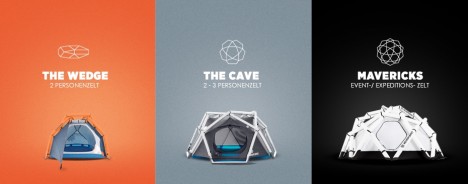
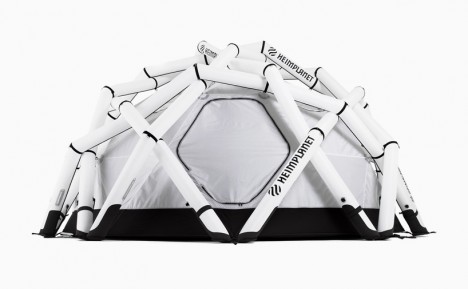
Created by Heimplanet, the Maverick grew out of a previous iteration, The Cave, which was similarly structured, eschewing solid poles in favor of an impressive custom airbeam system.

inflatable tent design detail

Made to withstand winds of over 100 miles per hour, each section of the all-weather Maverick can be separated from the next chamber when deployed. As a result, the entire structure can be inflated at once but a failure in one segment does not cause the deflation of the whole.

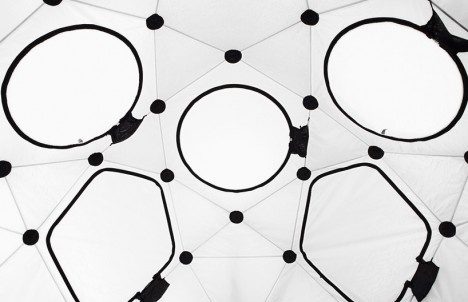
inflatable tent interior

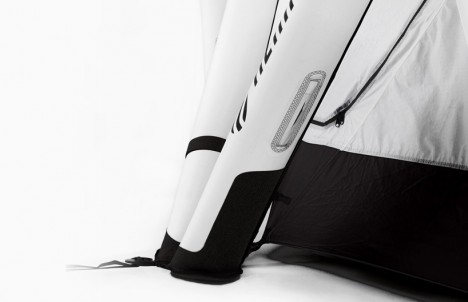
inflatable tent side tubes

inflatable tent door openin

More about the materials: “The airbeams are built with a resistant double-layer construction: an extra airtight TPU (thermoplastic urethane) bladder keeps the air inside for a long time. An outer jacket made of a high-tenacity polyester fabric ensures extra stability, protection and durability.”

Share on Facebook


[ By WebUrbanist in Design & Products & Packaging. ]

[ WebUrbanist | Archives | Galleries | Privacy | TOS ]


WebUrbanist

 
Comments Off on Lightweight ‘Airbeams’ Frame Inflatable Geodesic Dome Tent

Posted in Creativity


Rhino Slider PRO 4ft Review – Camera Rail System for Time Lapse and Video

02 Jun

If you’re into Videography or time lapse photography, chances are you’ve either already got yourself a slider or are considering making that purchase. Smooth camera movement can really add major production value to your footage and the key word here is ‘smooth’. Having your camera glide through space like it’s floating on air gives a huge boost to any kind of footage.

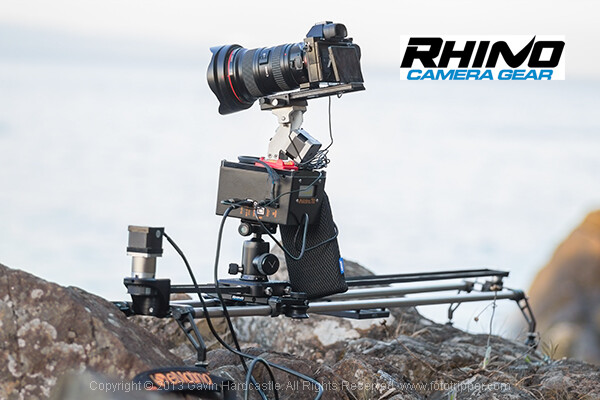
Enter the Rhino Slider Pro 4ft from Rhino Camera Gear, currently priced at $ 550. As the name suggests, this is a four foot wide slider, onto which you can attach your camera or take things a step further and add a robotic tripod head for a three axis solution of motion control awesomeness.

Rhino Slider PRO 4ft

How Smooth is the Slide?

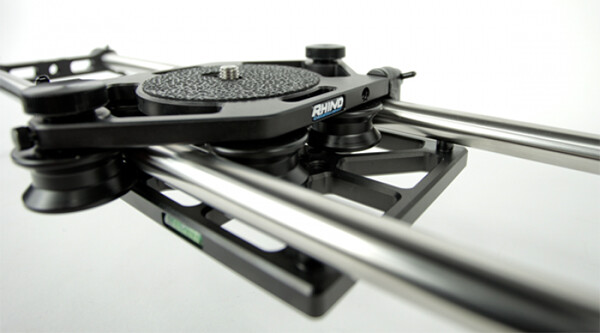
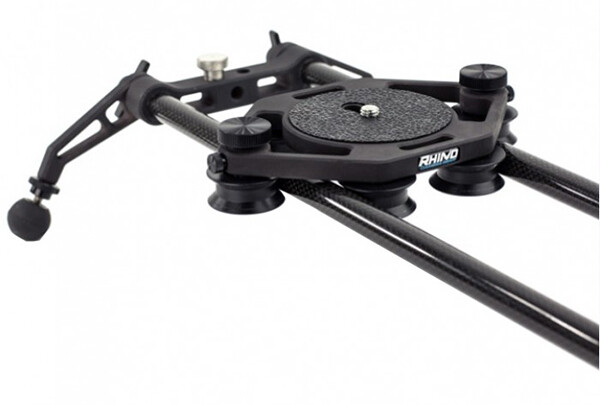
The most important thing to consider when thinking about buying a slider is the smoothness of the sliding action. This is where the Rhino slider excels. The sliding motion of the carriage on to which you place your camera is as smooth as silk. Once you’ve set the tension on the outer wheels of the carriage, you’re good to go and you can rely on a super smooth slide every time.

Rhino Slider Pro Review

Build Quality

There is a huge difference between the build quality of a sub $ 300 slider and what you’re getting with the Rhino. This is a sturdy, well built unit, that performs well in all kinds of conditions. Sliders are a bit like tripods, if you buy a really cheap one –  it’ll probably end up in the trash. Spend a little more and you’ll get a unit that delivers the goods and lasts a long time. All of the Rhino slider parts are well machined and have that solid, reliable feel to them.

Rhino Slider Review PRO 4ft - Gavin Hardcastle

Heavy is Good Right?

Of course, all of that stability comes at a cost of added weight. The product page on the Rhino Camera Gear web site says that the Rhino Pro 4FT Slider weighs around 10 pounds (4.54 kg). That might not sound like much but by the time you’ve strapped on your camera bag, tripods and any other gear, you’ll be carrying the Rhino slider in its case and holding it in your hand. Talk about a forearm workout. Turns out you can’t have your cake and eat it.

For those concerned about the weight, you might want to consider the carbon fibre rails or two foot rails to keep things more portable on long bush hikes.

Rhino Slider Carbon Legs

Rhino Slider Pro shown with Carbon fibre rails which weigh much less than the stainless steel ones.

The Rhino Gear Carry Case

The test unit I received from Rhino Camera Gear came with the Rhino Armor – Slider Carrying Case 4ft, which is an additional $ 100. Let’s be honest, you’re not very likely to be dragging a 4ft slider into the bush without the carry case so you might as well consider it a foregone conclusion that your total cost will be $ 650. On the plus side, the carry case has space for extra rails so that you can extend the length of your slide. Having more rails means more weight, so I’d definitely opt for the carbon rails.

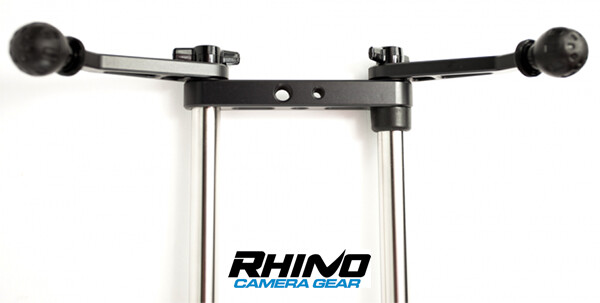
I found the case to be just a little too short. It was difficult and fiddly to fit the slider back in the case due to the four legs on the ends of the slider. If the case had been an inch longer I reckon this would have been much easier. I’m guessing they make it super tight so that the slider doesn’t shift in the case during transport but there’s tight, and then there’s this.

Rhino Armor Carry Case

Pros for the Rhino Slider PRO 4ft

  • Super smooth sliding action
  • Build quality
  • Value for money
  • Ease of use

Cons against the Rhino Slide PRO 4ft

  • Carry Case could be an inch longer to make it easier to pack the slider
  • Stainless steel rails are heavy – consider buying carbon rails if you are going on long hikes
  • End plates could have been taller. I found that the carriage hit my tripod plates long before it hit the rubber brakes.

Rhino Slider PRO Review

Would I Recommend It?

Having looked at the prices of similar sliders that boast the same build quality, the Rhino slider is looking like a bargain at $ 550 (+ $ 100 for the carry case). Before shelling out the dollars though I’d like to test out the carbon fibre rails to see if they perform as well. If the whole rig could be made lighter, that would eliminate my worst grumble and make this a near perfect product. If you’re not too bothered about the weight of those stainless steel rails, I think you’ll be extremely satisfied with the build quality and smooth sliding action of the Rhino Slider Pro 4ft from Rhino Camera Gear.

The post Rhino Slider PRO 4ft Review – Camera Rail System for Time Lapse and Video by Gavin Hardcastle appeared first on Digital Photography School.


Digital Photography School

 
Comments Off on Rhino Slider PRO 4ft Review – Camera Rail System for Time Lapse and Video

Posted in Photography