RSS
 

Archive for June, 2014

Nikon sets aside 1.8 billion yen to cover D600 warranty repairs

03 Jun

nikon_d600.png

Nikon has revealed that it allocated ¥1.8bn (~ $ 17.6m / £10.5m) to cover the cost of warranty repairs and replacements for its D600 SLR in the last financial year. The camera has been plagued since its launch by a tendency to accumulate oil spots on its sensor, resulting in Nikon offering to replace the shutter mechanism or even the entire camera for free if necessary. In an investor relations statement on its website, the company says that it is taking the matter very seriously, and ‘will be taking steps to restore confidence in the Nikon brand’.

News: Digital Photography Review (dpreview.com)

 
Comments Off on Nikon sets aside 1.8 billion yen to cover D600 warranty repairs

Posted in Uncategorized


Full speed ahead: Sony a6000 Review

03 Jun

a6000_beauty.jpg

The Sony a6000 offers some considerable advantages over its Sony NEX-6 predecessor. It has a 24.3 megapixel APS-C sensor and an updated hybrid AF system with 179 phase-detect and 25 contrast-detect points. Also included is a built-in 1.44 million-dot EVF and a tilting 3.0-inch display with 921,600 dots. With an impressive AF system, fast 11 fps continuous shooting with subject tracking and lots of extras, the a6000 is poised very competitively in the mirrorless class. Read the review

News: Digital Photography Review (dpreview.com)

 
Comments Off on Full speed ahead: Sony a6000 Review

Posted in Uncategorized


Out of This World: 13 Extraterrestrial Architecture Concepts

03 Jun

[ By Steph in Conceptual & Futuristic & Technology. ]

Space Architecture Main

Artificial environments designed for space have thus far remained totally utilitarian, but what if more aesthetic considerations were brought into the mix? These design concepts range from constantly morphing art galleries for the International Space Station to a moon base built using existing 3D printing technology and designed by a renowned architecture firm.

Tate in Space: Cultural Center for the International Space Station
Space Architecture Tate

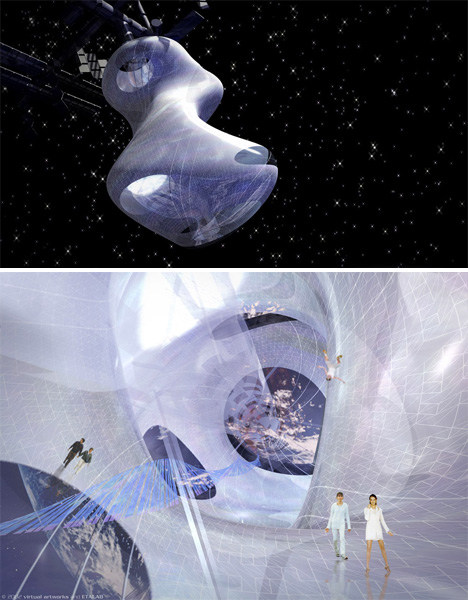
Artists, designers and other creatives haven’t exactly been included in the process of space exploration thus far, but this project by ETALAB aims to change that with an outer space gallery where artists, curators and visitors interact with works of art and architecture in zones of zero and partial gravity. Docked at the International Space Station, ‘Tate in Space’ features a flexible ‘envelope’ made from a smart material based on biomechanics that enables the space to constantly shift in shape.

Olympic Stadium for the Moon
Space Architecture Stadium

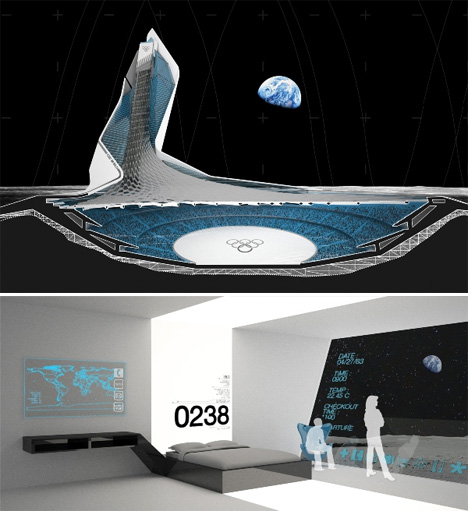
Designed as part of the ‘MARS ONE’ project that aims to start colonizing Mars and other locations in space within a matter of mere years, SILO (Stadium International Lunar Olympics) is a stadium for the moon complete with a hotel, restaurants and a solar electric system as well as seats for 100,000. The designers say, “Within the lunar colonies of the future, recreational activities will arise and evolve to take advantage of the moon’s micro-gravity. The sports we know today will be modified, and brand new sports will be invented. Lunar sports associations will be created, teams will be sponsored, games will be televised, and people from all over the globe will watch as the best of the best compete in an arena in which all the rules have changed.”

Mars Colonization by ZA Architects
Space Architecture Mars Colonization

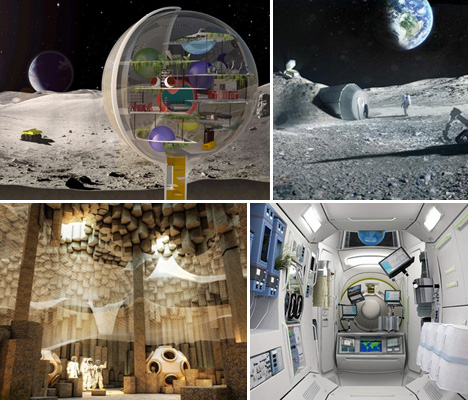
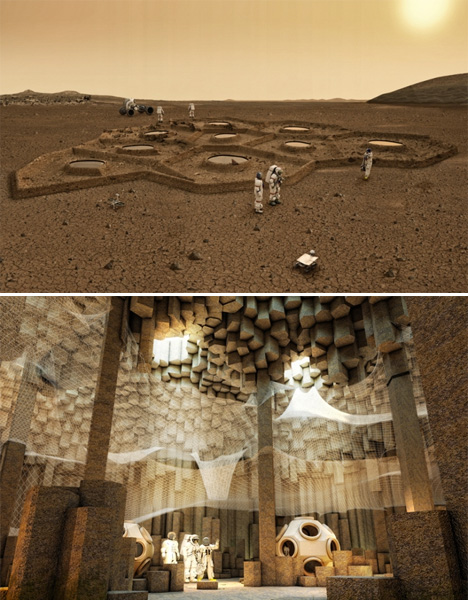
Solar-powered robots could excavate dwellings for humans on Mars before the people ever arrive in this concept by ZA Architects. Choosing areas where the basalt rock has formed into hexagonal columns, which can be easily removed to create cathedral-like spaces, the robots would weave web-like structures from basalt fibers to create floors at various levels within the caves.

Self-Assembling House for the Moon
Space Architecture Self Assembling Moon

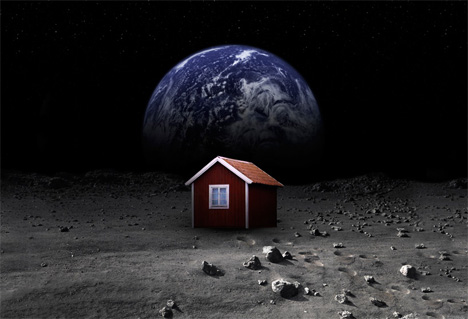
A crowd-funding initiative will send a self-assembling house to the moon in October 15th on SpaceX’s Falcon 9 spacecraft. The building, designed by American aerospace company Astrobotic, will be made from a thin sheet of specially developed cloth stretched over a carbon frame. Once it’s placed on the lunar surface, it will fill up with gas and stand erect within five to fifteen minutes.

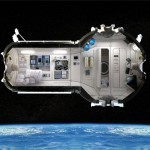
Russian Space Station Hotel
Space Architecture Hotel

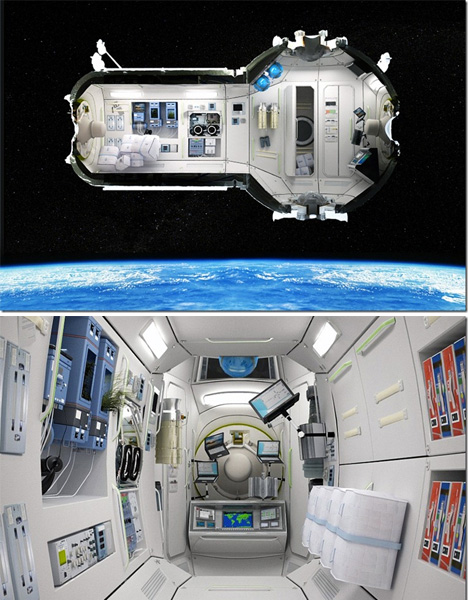
Russia’s plans for a space hotel would house seven guests in four cabins, 217 miles above the surface of the Earth. The hotel would also function as accommodations for scientists on space-related missions, and as an emergency blowhole for astronauts aboard the International Space Station. A five-day stay will set guests back $ 100,000 in addition to the half-million it costs to get to space in the first place.

Mars: Adrift on the Hourglass Sea
Space Architecture Adrift Mars

Space Architecture Adrift Mars 1

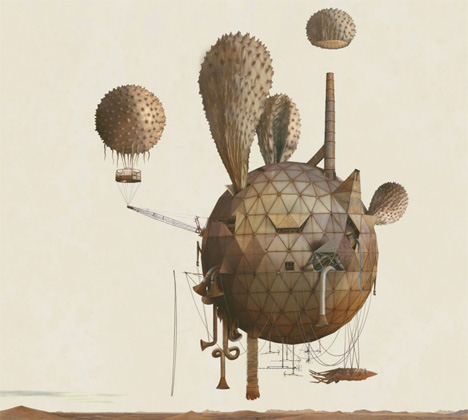
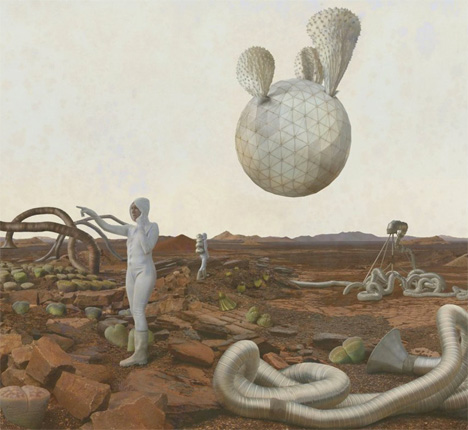
This series of fantastical images doesn’t even try to be technically correct or scientifically possible, but it was commissioned by NASA all the same to represent a vision of existence on Mars. The artists used photo-mosaic panoramas of expeditions by the rovers Spirit and Opportunity as backdrops for surreal scenes.

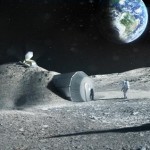
3D Moon Base by Foster + Partners
Space Architecture Foster moon

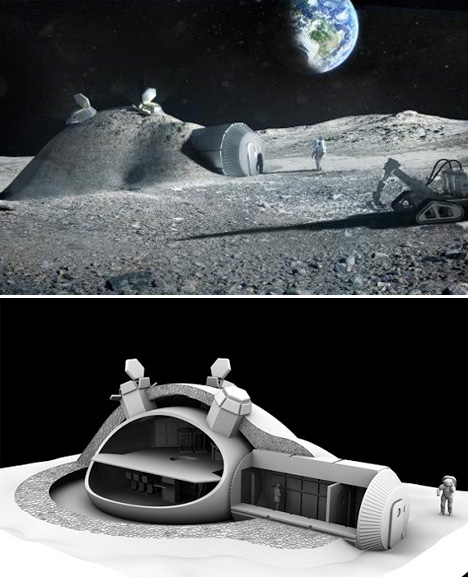
Architecture firm Foster + Partners, responsible for many iconic buildings on Earth, have designed a four-person lunar base that uses 3D printing technology to ‘print’ a protective layer of locally-sourced lunar soil over an inflatable dome. Commissioned by the European Space Agency, the project takes a look at the feasibility of actually building such a structure using currently existing technology.

Moon Dwelling by Royal Haskoning Architects

Space Architecture Royal
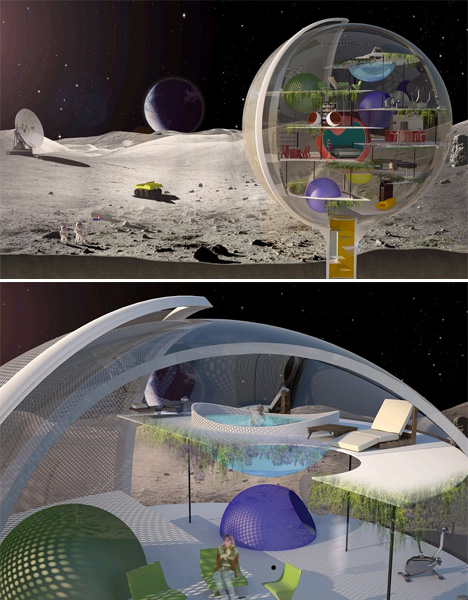
A transparent sphere houses living spaces for lunar residents in this concept by Royal Haskoning Architects, offering inhabitants unlimited views of the awe-inspiring setting if not a whole lot of privacy. But then again, who needs privacy when you live on the moon? A protective screen rotates around the sphere to protect the inside from the harsh rays of the sun. The sphere is envisioned as a mini-Earth with its own oxygen supply and various levels that inhabitants can simply float between rather than taking the stairs.

Martian Base by Janek Kozicki
Space Architecture Janek

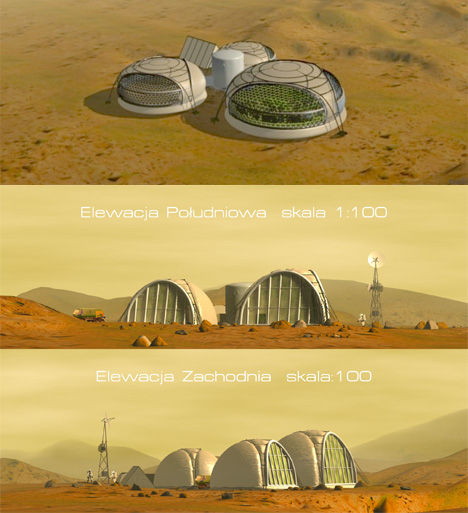
Husband and wife design team Janek Kozicki and Joanna Kozicka have created a number of concept designs for Martian bases generally powered by either a radio-isotope generator or a small nuclear power plant, along with practical architectural guidelines for building on other planets. The design pictured above, by Kozicki, is a modular setup that would start with a single pod and grow with subsequent trips to and from Earth to ultimately accommodate several dozen people.

Inflatable Pods by Joanna Kozicka
Space Architecture Inflatable Pods

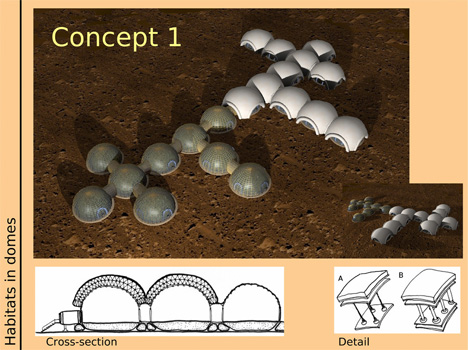
Kozicka’s solutions include inflatable pods that are lightweight, easy to deploy, and ultimately offer a bigger payoff in terms of square footage for the size of the load sent to Mars. The designs address the sociopsychological problems that the couple identified in relation to living on another planet, avoiding isolated and confined environments in favor of large, comfortable spaces that let in sunlight and allow contact with nature.

Shackleton Crater Lunar Outpost
Space Architecture Shackleton Crater

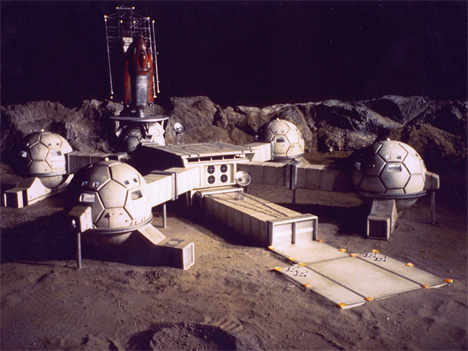
NASA’s Lunar Architecture Team is working on a design for a permanent lunar outpost that could be set up the next time humans land on the moon. Designed for Shackleton Crater, located at the south pole of the moon, the habitat would consist of larger modules sent ahead of time on a cargo lander.

Luna Ring Concept
Space Architecture Luna Ring

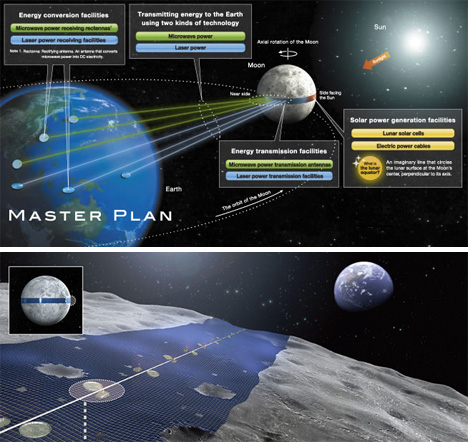
The Luna Ring concept would put permanent solar collectors around the moon’s equator like a belt, with solar cells collecting energy that would then be beamed back to Earth via microwave power transmission antennae. A team of astronauts would supervise the robot construction workers carrying out the installation process.

Fractal Lunar Architecture
Space Architecture Fractal

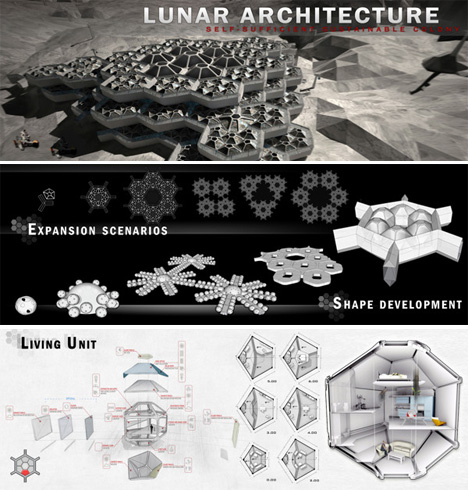
A fractal design for a lunar base by Hatem Al Khafaji of Dubai makes it easy to expand the available space as needed using a system of seven modular components of living pods, air locks, corridors and connectors. Layers of these modules would be placed around a central ‘heart’ and continuously stacked by teams of robots and human workers.

Share on Facebook


[ By Steph in Conceptual & Futuristic & Technology. ]

[ WebUrbanist | Archives | Galleries | Privacy | TOS ]


WebUrbanist

 
Comments Off on Out of This World: 13 Extraterrestrial Architecture Concepts

Posted in Creativity


Nokia Lumia 1020 used in medical research

03 Jun

Lumia-Microscope-shot2.jpg

A pair of scientists and experts in photomicrography have been using an unusual new tool in their research – a Nokia Lumia 1020. Taking advantage of the device’s mobility, image stabilization and high pixel-count camera, they’ve used it with a state-of-the-art microscope to help digitally zoom in for a better view of detail of bacteria. Read more

News: Digital Photography Review (dpreview.com)

 
Comments Off on Nokia Lumia 1020 used in medical research

Posted in Uncategorized


Ghost Estates of Ireland: Symbols of an Economic Collapse

03 Jun

[ By Steph in Abandoned Places & Architecture. ]

Ghost Estates of Ireland 1

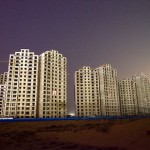
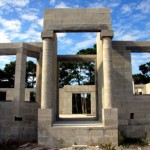
Built with visions of suburban prosperity in more optimistic times, the empty shells of former dream homes dot the countryside among piles of construction rubble and fallen-down fences. Economic highs and lows have led to abandonments of entire villages all over the world, from China to the Mediterranean, but Ireland is among the nations that was particularly hard-hit.

Ghost Estates of Ireland 2

Photographer Valérie Anex captures Ireland’s ‘ghost estates’ in a series of striking images that juxtapose a fading hope for sanitized suburbia with the current reality, which is simply that nobody can afford to live in these houses. The National Institute for Regional and Spacial Analysis defines ‘ghost estates’ as developments of ten houses or more in which fifty percent or less of the homes are occupied or completed.

Ghost Estates of Ireland 3

Ghost Estates of Ireland 4

The latest tally of ghost estates in Ireland, taken in 2013, is 30% less than it was when Anex took these photos in 2011, but that’s still well over ten thousand mostly-empty neighborhoods in a relatively small nation (and just a small percentage of Ireland’s 350,000-some-odd abandoned houses.)

Ghost Estates of Ireland 6

Most of the ghost estates are found in the rural areas of the northern and western parts of the country. Says Anex, “These empty shells are eyesores for the locals in these small towns. The crisis is affecting the country – unemployment, debts, budget cuts, flights of capital investments – but it is also shaping its landscape.”

Ghost Estates of Ireland 7

“Bitter memories left by the spectral and temporary nature of the property boom in Ireland, ghost estates are the symbol of the property market’s collapse, a topology of the economic disintegration of the country.”

The Ghost Estates series will be on display at the Photobookshow in Brighton, England this June.

Share on Facebook


[ By Steph in Abandoned Places & Architecture. ]

[ WebUrbanist | Archives | Galleries | Privacy | TOS ]


WebUrbanist

 
Comments Off on Ghost Estates of Ireland: Symbols of an Economic Collapse

Posted in Creativity


Hör auf Dein Auge!

03 Jun

Ein Beitrag von: Alexandra Höhn

Die Arbeiten, die ich hier zeige, sind alle in den letzten beiden Jahren entstanden. Es sind Einzelarbeiten und doch passen sie irgendwie zusammen. Mittlerweile. Das liegt daran, dass sehr viel persönliche Denke von mir drin steckt, aber es ist auch ein Prozess von Unsicherheit, Eigenkritik, Lernen und der Löschen-Taste am Rechner.

Ich bin besessen vom nächsten Bild, das ich machen werde und von dem ich hoffe, dass es besser ist. Und – was noch viel wichtiger ist – diese Besessenheit macht mich glücklich. Als ich vor drei Jahren angefangen habe, mit dem iPhone rumzuknipsen, (das waren noch die netten Zeiten auf Instagram) hat mir mein Freund die Bilder von einem berühmten Fotografen gezeigt.

Im Spalt zwischen blauen Vorhängen ist das Auge einer blonden Frau zu sehen.

Auf einem Bett sitzt ein Plüschtierhase, der von einem Lichtstrahl erhellt wird, der durch einen Spalt zwischen Vorhängen in das sonst dunkle Zimmer fällt.

Ein Strauß pinker Lilien mit einer Plastikfigur von Superman steht vor einer Raufaser-Wand mit Lichtschalter.

Ich kannte damals noch keinen einzigen. Dieser Fotograf war William Eggleston. Ich sah seine Bilder und habe mir eine richtige Kamera gekauft, erst digital, analog kam später dazu. William Eggleston fotografiert Zimmerdecken, ein Stück Auto, ein Schild und alles in unglaublichen Farben. Er fotografiert das Gewöhnliche ungewöhnlich, mit einem genialen Bildaufbau.

Mittlerweile habe ich fast all seine Fotobücher und ich kann sie wieder und wieder anschauen. Und die Dokumentationen über ihn! Er antwortete einmal in einem Interview mit „That is the most stupidest question I ever heard“. Dafür mag ich ihn auch ziemlich gut leiden. Ich könnte jetzt noch ewig über William Eggleston schreiben, aber ich soll ja über mich etwas sagen.

Eine Wolke sitzt in der Dunkelheit auf einer Straße.

Ein Frauenkopf mit lustigem Zopf lehnt schlafend an einem Flugzeugfenster.

Der Grund, warum mein Freund mir Eggleston gezeigt hat, ist, dass ich das Alltägliche spannend finde. Landschaften oder Straßenfotografie kann ich nicht. Sieht beides bei mir langweilig aus. Ich glaube, das liegt wiederum daran, dass ich deutsch bin. Ich brauche die Kontrolle. Wenn man ein Bild aber zu sehr kontrolliert, wird’s auch langweilig. Das ist natürlich Geschmacksache, aber ich finde Gurskys „Rhein“ zum Gähnen.

Um jetzt die Brücke von Eggleston zu Gursky zu schlagen: Ich bin immer auf der Suche nach dem Detail, nach der ungewöhnlichen Perspektive, nach etwas, was „hakt“, wo der Blick hängen bleibt oder was man nicht gleich versteht und dann räume ich das Bild auf. Alles kommt weg, was stört oder was zu viel ist, was den Blick ablenken könnte. Bis das, was übrig bleibt, fast abstrakt wirkt.

Eine Frucht in orangem Netz wird von Händen und Beinen in weißer Netzstrumpfhose gehalten.

Frauenbeine, eingefasst von einem weißen Faltenrock und weißen Kniestrümpfen.

Ich mag einen „ordentlichen“ Bildaufbau. Obwohl ich jetzt nicht der ordentlichste Mensch bin, mag mein Auge es einfach am liebsten aufgeräumt. Und darauf sollte man hören. Auf sein Auge. Jeder guckt die Dinge anders an, jeder hat einen anderen Geschmack. Ich habe eine Weile gebraucht, um das zu akzeptieren. Dass ich nun mal kein Martin Parr bin und auch keine Nan Goldin. Obwohl ich ihre Bilder toll finde, aber ich bin das eben nicht. Wenn ich in deren Richtung anfangen würde zu fotografieren, wäre das nicht echt, weil es nicht mit mir zu tun hat.

Meine Bilder wirken für manche vielleicht etwas verschlossen, aber so bin ich. Ich mag auch keine Titel, ich will nicht eine Geschichte zum Bild erzählen, das Bild soll für sich sprechen. Seit diesem Jahr tut sich was mit meinen Arbeiten, ich soll über meine Fotografie etwas sagen. Das fällt mir einfach schwer, ich liebe den Prozess, aber nicht die Selbstvermarktung.

Männerhände schließen silberne Stilettos Füßen in purpurner Strumpfhose.

Eine Frau mit gepunktetem Rock, weißer Spitzen-Feinstrumpfhose und Mantel überquert eine Straße, digital wurde ihr ein gewundenes, pinkes Band an die Hand gegeben.

Auch das hat mit mir zu tun, ich steh nun einmal nicht gern im Rampenlicht und ich fotografiere lieber als zu reden. Aber natürlich habe ich auch ein Ziel, auf das ich hinaus will und das heißt raus aus dem Internet! Ich will ein Foto in der Hand halten, ein Buch anschauen, in eine Galerie gehen.

Das Internet überfordert mich. Es gibt so viele Fotos und über alle geht man klick klick klick. Mein Hirn kann so viele Bilder gar nicht verarbeiten. Und es gibt dank digitalen Kameras auch immer mehr, die fotografieren. Umso wichtiger also, eine eigene Visualität zu entwickeln. Und dann?

Eine Person hält sich eine Zigarette an den Mund, ihr Gesicht liegt im Schatten eines Strohhuts.

Rückansicht eines Mannes, der auf dem Bürgersteig steht und die Hände unter der Jacke hinter seinem Rücken verschränkt hält.

Der Zeitraum, über den ich am Anfang gesprochen habe, ist abgeschlossen. Das war sozusagen meine „Kindheit“. Jetzt bin ich „erwachsen“ und arbeite an ersten Projekten, deren Planung mich mehr Zeit kosten wird als die Realisation. Ich bin Teil eines Kollektives, mit zehn anderen Fotografen aus Europa, Russland und Israel.

Und ich arbeite an einem Konzept für ein kleines Fotobuch. Was dabei rum kommt, darüber mache ich mir kaum Gedanken. Ich mache es einfach, weil ich es machen muss, weil es mich glücklich macht. Das ist meine Motivation.


kwerfeldein – Fotografie Magazin | Fotocommunity

 
Comments Off on Hör auf Dein Auge!

Posted in Equipment


Blut, Feuer, Sonne

03 Jun

Farben werden durch den physiologischen Prozess des Sehens in Gefühle umgewandelt, in Farbempfindungen. — Wolfarth

„Martin?“ Nichts. „Maaaaaartin!“ Als mich ein Klassenkamerad angestupst hatte, war ich plötzlich da. Die Klassenlehrerin hatte uns gefragt, was unsere Lieblingsfarbe ist. Ich lief rot an, fühlte mich ertappt, denn ich hatte schon wieder nicht aufgepasst.

Meine zittrige Antwort war der Farbe meines peinlich berührten Gesichtes gleich: „Rot.“ Eigentlich war die Frage für mich immer einfach gewesen, denn als Rothaariger hatte ich mich mit der Farbe des Blutes verbündet.

Und das, obwohl meine Haare gar nicht rot waren. Sie waren eher kastanienbraun oder orange, aber so richtig rot natürlich nicht. Rot sagte man nur dazu. Das wusste ich, doch innerlich mochte ich sie alle, die warmen Farben.

Sie waren nicht nur auf meinem Kopf, sondern in Form von Sommersprossen auf meiner Haut. Die übrigens auch des Öfteren rot wurde — das Wort „Sonnenbrand“ sollte an dieser Stelle reichen.

Straßenfotografie: Eine ältere Frau mit Hut und roter Jacke lacht in die Kamera.

Straßenfotografie: Frau in roter Jacke vor roten Schirmen.

Straßenfotografie: Mann in rotem Adidas-Trainingsanzug nach dem Essen.

© Martin Gommel

Ein Mädchen schaut zur Seite.

Straßenfotografie: Drei Personen in rot, weiß und schwarz.

Straßenfotografie: Mann mit roter Schildmütze vor einem orangen Auto.

Straßenfotografie: Eine ältere Frau wirf ihr Taschentuch in einen orangen Mülleimer.

Straßenfotografie: Drei Männer in Orange vor oranger Gießkanne.

Straßenfotografie: Ein Mann in orangem T-Shirt vor vielen anderen orangen Dingen.

Straßenfotografie: Verschiedenfarbene Marktplanen in orange und weiß.

Straßenfotografie: Eine Frau mit gelbem Schal um den Kopf schaut zur Seite.

Straßenfotografie: Mann mit gelbem Gurt steht vor gelbem Baustellenhäusschen.

Straßenfotografie: Bauarbeiter hinter gelbem Baustellengehäus.

Straßenfotografie: Ein älterer Herr vor gelbem Hintergrund.

Straßenfotografie: Frau in gelbem Jakett.

Straßenfotografie: Eine Wand mit roten Streifen.

Straßenfotografie: Ein gelbes Regen-Cape.

Straßenfotografie: Straßenmarkierungen in weiß und gelb.

Straßenfotografie: Eine Frau in goldener Kleidung schaut zum Betrachter.

Meine Begeisterung für warme Farben hat sich bis heute nicht verändert. Ich liebe den „Fluss der Farben“* von Raghubir Singh, die zahlreichen Braun- und Rottöne in Leiters „Early Color“* und diejenigen, die mir jeden Tag in der Stadt begegnen.

Karlsruhe ist derzeit vollgestopft mit roten Baustellenschildern, gelben Straßenmarkierungen und (Gott sei dank jetzt nicht mehr) oranger CDU-Werbung. Menschen tragen gern ein saftiges Gelb, rote Jacken fallen immer auf und die orange Gießkanne, nun, wer kennt sie nicht?

Die hier gezeigten Aufnahmen bilden übrigens einen guten Kwerschnitt meiner Arbeit der letzten zwölf Monate. Hält man ein Sieb darunter und lässt nur das durch, was warme Farben beinhaltet, bleiben diese übrig. Ich bin schon sehr gespannt auf die kommenden Jahre und wer weiß, vielleicht mache ich ja mal ein Buch daraus.

* Das ist ein Affiliate-Link zu Amazon. Wenn Ihr darüber etwas bestellt, erhalten wir eine kleine Provision, Ihr zahlt aber keinen Cent mehr.


kwerfeldein – Fotografie Magazin | Fotocommunity

 
Comments Off on Blut, Feuer, Sonne

Posted in Equipment


Accessory review: Vanguard Heralder 51T Rolling Backpack

03 Jun

Vanguard-Heralder-4.jpg

The Vanguard Heralder 51T combines the conveniences of a backpack with the travel-friendliness of a rolling case. At almost ten pounds it’s no day bag, but it is equipped with loads of compartments and pockets, a large removable interior tray, tripod sling, laptop storage and a rain cover. Is it the best of both worlds, or would you be better off with a dedicated backpack or roller? Read our review

News: Digital Photography Review (dpreview.com)

 
Comments Off on Accessory review: Vanguard Heralder 51T Rolling Backpack

Posted in Uncategorized


Step By Step How to Make Panoramic HDR Images

03 Jun
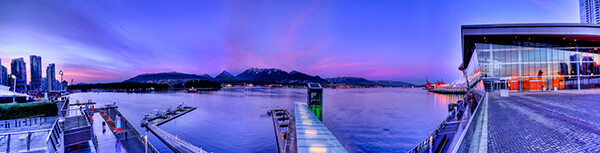
Panoramic HDR image of Coal Harbour - Vancouver BC

Panoramic HDR image of Coal Harbour – Vancouver, Canada

I am convinced that digital photography has changed so many aspects of photography forever.  HDR and photo stitching are just two of those aspects. In the film era you could achieve a lot in the darkroom with blending, dodging and burning, but not to the extent that HDR allows us to achieve now. Photostitching has also allowed us to produce images that were not possible a few years ago. In the days of film, panoramic images were possible, but required a camera made for that purpose, nowadays we can shoot panoramic shots with any digital camera, they can even be shot using an iPhone. So the merging (excuse the pun) of the HDR and Photostitching was inevitable.

This process is a little time consuming and needs to be planned beforehand, but the results can be really spectacular and make your images very dramatic. This article will give you a starting point into exploring the world of bringing HDR and Photostitching together.

What is a panoramic HDR image?

A panoramic HDR is quite simply a series of HDR images that have been stitched together using photo stitching software. It is an image comprised of any number of images, sometimes up to 60, depending on how you plan your shots. Sounds complicated right? It’s really not. If you follow a simple plan, it’s actually pretty easy. It is all in having the correct workflow, so here it is.

The panoramic HDR workflow outlined

The quick process we will be running through is as follows:

  1. Plan and shoot your HDR and panoramic images
  2. Edit your HDR images
  3. Stitch your HDR images together
  4. Edit the final image in Lightroom or Photoshop

That’s it, simple and we will do it in small steps, so it is easy to follow.

Step 1 – plan and shoot your HDR and panoramic images

HDR Images

I have written Getting Real with HDR – a Step by Step Tutorial for Realistic Looking HDR. Take a look at that if you need a refresher on how to get your HDR images into good shape. Normally, when you shoot an HDR image, you will be using between three and seven images of the same scene to create the HDR. In panoramic HDR shots, you will repeat that HDR shot across the scene for five to seven shots that will capture the panoramic. The key point to remember when shooting a panoramic image is your subject matter. Choose a scene that works in the panoramic format; i.e. a seascape, mountain range, forest or a cityscape from a distance. If you are too far away from your subject, the stitched photo may lack impact, so choose your scene with that in mind.

Panoramic Images

Of course, it’s up to you how many images you want to shoot for your HDR shots. In the example shot at the top of the article, I used three shots per HDR set and used a total of seven images to capture the scene panoramically. Keep in mind that you may want anywhere between three to seven shots per HDR image and use as many images as you need to capture the scene.

Here is a visual breakdown on how this shot worked. I have broken the shots I took into sets. Each set consists of three HDR images. So, Set #1 consists of three HDR images, Set #2 consists of three HDR images. Set 1 and Set 2 overlap by 30%. Set 2 and Set 3 overlap by 30% as well, and so on.
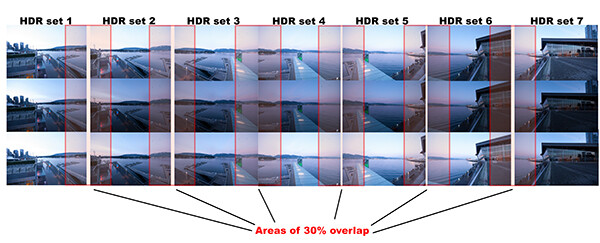
HDR sets and flow for the image of coal harbour. Note the overlaps

HDR sets and flow for the image of coal harbour. Note the overlaps

What you will notice is that you must take your HDR images and complete the set before moving your camera for the next set. This ensures that you will get the best possible HDR shots, and that they will blend properly. Once you have your HDR shots done on Set #1, move your camera over to frame and shoot Set #2. With panoramic photography, you must overlap your images by at least 30%. It’s not necessary to overlap much more than this, but less than 30% could cause the software to struggle to find linking points in the images. If you have a scene that has lots of detail in it, 30% will be good, if you have a scene that is not very detailed (let’s say a beach scene with sand, water and sky) you may need to overlap more to make sure that the photos can stitch. Continue this process until you have captured your scene in the sets you have decided on.

Some quick tips to remember when you shoot Panoramic HDR images

1. Choose a preset white balance setting that works well for the scene, avoid using auto white balance. If you use auto white balance (AWB), your overall colours in the scene may change as you shoot your panoramic and this could cause some unusual colour  shifts in your image
2. Keep your aperture between f/8 and f/11. Once you have chosen your aperture, don’t change it throughout the sets.
3. Use a tripod to make sure that your images are sharp. Also, as you move the camera onto the next set, be sure to overlap by 30%.
4. Be sure not to allow the camera to move up or down as you shoot the images. If it does, the result will be that the images might stitch but the resulting shot will be dropping down or sweeping up and you may not be able to get it right afterwards.
5. The best idea is to use a tripod and keep the focal plane as flat as possible, to avoid distortion, particularly with a wide angle lens.

Step 2 – edit your HDR images

Edit your images by set. Start with Set #1 and take them into an HDR product such as Photomatix Pro. You could used Photoshop too, but my preference is Photomatix Pro. For more details on making your HDR images, take a look at my HDR article to get into the details of the editing process in Photomatix.

Save each set and name them chronologically. I will name my images as follows: SCENENAME – HDR PANO 1, SCENENAME – HDR PANO 2 etc. Once you have taken all your sets through the HDR process and named them in order, the photostitching part is pretty easy.

Step 3 – stitch your HDR images together

For the photostitching part of this process, you can use the photo stitching function in Photoshop or any other photo stitching tool of your choice. I have used Photoshop in the past and it works well, but for more complex stitching I find that Autopano Pro works extremely well. It has been rated as one of the best stitching packages available. I have used it to stitch some pretty crazy panos together and almost anything I have thrown at it, it has been able to process.

Lets look at how this process works in Autopano Pro:

  1. Open Autopano Pro and on the first screen that you see, click on the second icon from the left to select your images to be stitched
  2. Navigate to the HDR images that you have processed and select them
  3. Click on “detect” on the top left hand side of the screen
  4. Autopano will now scan your images and do a preliminary stitch, this preview stitched image will be displayed on the right hand side of the screen that is open. This process may take a few minutes.
  5. Once the preview image is displaying, click on the “edit” button (Right hand side of the screen) this will open the image in the Autopano edit screen
  6. There are a number of options here, below is a high level overview of the most important functions
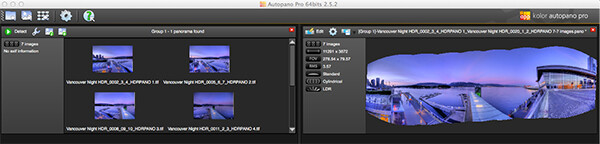
Autopano Pro - Images selected for the pano stitch on the left and a preview of the stitched image on the right

Autopano Pro – images selected for the pano stitch on the left and a preview of the stitched image on the right
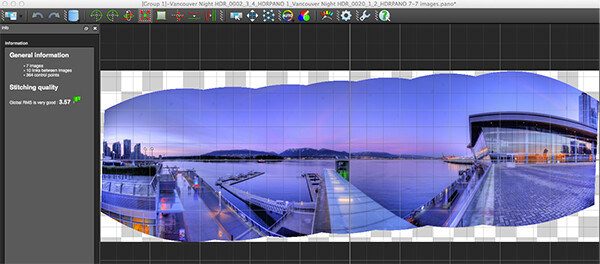
Autopano edit screen with preview of stitched image

Autopano edit screen with preview of stitched image

Autopano functions on the edit screen:

Autopano has a number of options you can use to render your panoramic image. These projections help with distortion and skewing. Below is an explanation of the most commonly used projections.

  • Spherical – the spherical function allows any panorama to be assembled. It is a commonly used function for building panoramic images.
  • Planar or rectilinear projection – this is a good choice if the angle is low, It’s recommended for architectural shots because it is the only mode that does not curve lines that are deemed to be straight lines. Sometimes if the angles are too extreme there may be a loss of sharpness, so be aware of this.
  • Cylindrical projection – this projection can be used up to 360° (horizontally).
  • Mercator projection – the mercator projection can also be used up to 360° (horizontally). The effect of stretching up and down the image may seem to become distorted.

The key factor in choosing a projection is in how the projection affects your image visually. Does it work for the subject matter? Does the image look correct? Ask yourself these questions as you experiment with the projections.

Once you are happy with your projection and the way the image looks, you can now save the image to a folder on your computer.
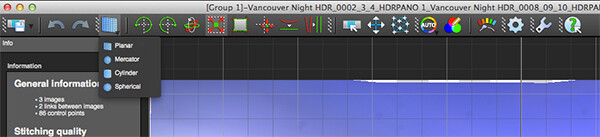
Choose the projection that works best for your image

Choose the projection that works best for your image

Rendering
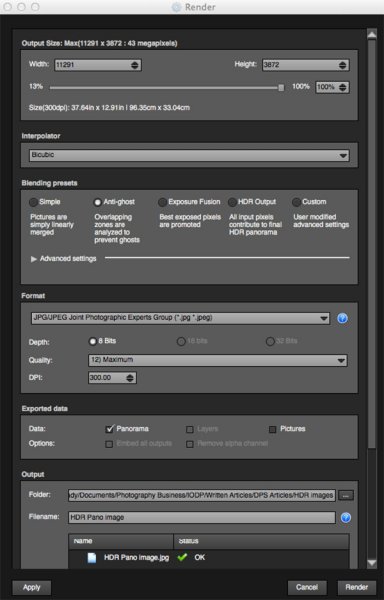
Render screen and options

Render screen and options

This is the process of saving your panorama.It is called rendering because the software needs to perform the final stitching and edits to your image. On the rendering screen, you will need to take note of the following:

Interpolator – the interpolator is the method used to assemble the pixels of your panoramic image  and will determine the quality and sharpness of your image. There are a few different options here, but the most commonly used options is Bicubic. The other options are useful for advanced stitching.

Blending settings – the purpose of the blending settings is to allow the combining of the overlapped sections of your panoramic to look smooth and seamless. You will notice  the following presets:

  • Simple – this is fast, but it is possible that defects are seen where the areas overlap
  • Anti-ghost – conserve the image’s strong characteristics (stops, lines, curves) when mixing while automatically removing objects that have moved
  • Exposure Fusion – to be used if the panorama was created with a bracket shoot. Keeps the best of different exposures.
  • HDR output – to be used by users who wish to create a “.hdr” format file in order to create post-production or special effects. Don’t use this on these images as they have already been processed as HDR images.
  • Custom – this is enabled when you manually change the parameters and they no longer correspond to a profile.

On the advanced settings, I generally leave that on the default.

Format

This section allows you to determine what the format in which you want your image to be saved. The two formats I use most are TIFF and JPEG. TIFF is an uncompressed file (which means all the information is still in the file, this is great if you are planning to print the image out large) The downside to TIFF is that the files are big. JPEG is a compressed format, that means that some image information has been discarded, the quality will still look the same to the naked eye, but if you print a JPEG image up really big, you may notice some image degradation. Depending on your final output and your space constraints you can choose the format that works best for you. Take the quality up to 12 and set the DPI to 300. This will ensure that you have the best quality image saved.

Output

On this screen, the software needs to know where to save your panoramic and what you want to call it. Choose your destination folder and name the file. Once this is done (it sounds more complicated than it is) click on the render button and the software will begin rendering your image. Depending on the size of the files being stitched, this rendering process can take a few minutes. Once complete, a screen will pop up to let you know that the image is now rendered.

4. Edit the final image in Lightroom or Photoshop

Your image is now stitched together, but the final step in the process is to edit the image in your choice of image editor (Lightroom, Photoshop, Gimp or any other) You will want to follow the basic workflow I outlined in a previous article.  Once that is done, you will now have a fantastic Panoramic HDR image. Not too many photographers attempt these images as they take some time to get right, but the results can be spectacular. Give this a try, let me know where you struggled or any insights you had during the process, above all go out and have fun with it!

Panoramic HDR image of Coal Harbour - Vancouver BC

Panoramic HDR image of Coal Harbour – Vancouver BC

The post Step By Step How to Make Panoramic HDR Images by Barry J Brady appeared first on Digital Photography School.


Digital Photography School

 
Comments Off on Step By Step How to Make Panoramic HDR Images

Posted in Photography


The Drone Zone!

03 Jun

Extra photos for bloggers: 1, 2, 3

Your attempt to capture your cat running through a field of daisies on film is well intentioned, but your handmade hacks aren’t great and your cat is losing patience.

Put away the yarn and the moon shoes and meet the Phantom 2, the camera carrying drone of your dreams.

Our friendly Phantom 2 drone is the best drone around. It’ll take your photography to (literal) new heights.

There’s no assembly required and it’s easy to fly! It has a simple to use remote, GPS enabled stabilizers to help you out in windy situations and the latest and greatest HD-3D gimbal making sure your camera is stable and videos are so smooooooth.

The extra long battery life means you’ll have plenty of time to get the perfect shot, if only your cat would start taking his job seriously.

Learn More About the Phantom 2 Drone
$ 1299 at the Photojojo Shop


© Britta for Photojojo, 2014. |
Permalink |
No comment |
Add to
del.icio.us

Post tags:


Photojojo

 
Comments Off on The Drone Zone!

Posted in Equipment