RSS
 

Archive for June, 2014

Canon 8-15mm Fisheye Lens

08 Jun


Michael and I (Kevin) have spent the last few days photographing together in Buffalo, NY.  We met up with Mark Maio and a workshop he was holding photographing Silo City.  This is a huge complex of abandoned Grain Silos that at the beginning of the 20th century played a huge part of distributing grain from the Midwest to other areas around the country.  Needless to say it was a great time shooting old, huge, abandoned and decaying buildings.  We got our fill of urban decay landscapes, with a number of good keepers.  You’ll see these on the home page in coming weeks from both Michael and me. 

Michael and I will be working together over the next few days along with Chris on a number of different and exciting projects for LuLa, Rockhopper and the Endowment.  We’re very excited about everything we are working on.

Alain Briot’s monthly article is featured today The Canon EF 8-15, f1.4 USM Fisheye Lens.  Not only is it a review of this lens but also how the lens plays a big part in Alain’s photography.


The Luminous Landscape – What’s New

 
Comments Off on Canon 8-15mm Fisheye Lens

Posted in News


Homestead Restaurant, Oakland, California

08 Jun

Homestead Restaurant
Address: 4029, Piedmont Ave, Oakland, CA 94611
Phone:(510) 420-6962
Menu: homesteadoakland.com

Tried Homestead Restaurant on Piedmont Avenue last night with @mrsth. Highly recommended. :)

The restaurant has great light with an open air kitchen where you can watch the chefs work.

The menu changes daily. The squid, duck and horchata ice cream were my favorites. Here’s what we had:

date night.

Great open air kitchen where you can watch the chefs work.

First course, spicy pepperoni and meat plate.

First course, little gems, avocado, fried onions, buttermilk dressing

Second course, local squid, grilled summer beans, almond & sherry vinaigrette

Third course, grilled duck breast, fried farro, fava beans, apricots, wild arugula

Third course, poached egg, porcini mushrooms, sweet corn, thyme, watercress

Dessert, horchata ice cream, strawberries, churros

Dessert, brown sugar chocolate cake, toasted meringue

I’ve never had madeira on ice before. It was really nice and refreshing with a twist of lemon.

Homestead seasonal spritzer

Fresh garden vegetables used by the chef.

Wood fire grill in the open kitchen.

Welcome to Homestead.

We brought our own bottle of wine, a wonderful 1997 Altesino Brunello di Montalcino. Corkage was $ 20.

Loved the colors of the kitchen.


Thomas Hawk Digital Connection

 
Comments Off on Homestead Restaurant, Oakland, California

Posted in Photography


1939: England in Color (part 3)

08 Jun

Beverly.jpg

Their relative rarity makes the discovery of color images from the distant past perennially fascinating. In the final part (for now at least) of a three-part article, Barnaby Britton shows us a selection of images taken from a collection of 75 year-old color slides found in his grandmother’s attic. Some better preserved than others, the photographs provide a unique glimpse into England in August 1939, on the eve of WWII. See photos and read more of the story…

News: Digital Photography Review (dpreview.com)

 
Comments Off on 1939: England in Color (part 3)

Posted in Uncategorized


browserFruits Juni, Ausgabe 2

08 Jun

Und schon ist Juni mit allen Annehmlichkeiten, die der Monat zu bieten hat: Lange, helle Abende, warme Tage, Sonne, überfüllte Eisdielen, offene Freibäder. Reizt den Juni doch ruhig auch fotografisch aus, zu Beispiel, indem Ihr noch nach Feierabend einen kleinen Fotoausflug plant. Oder eine einfache Unterwasserkamer mit zum Badesee nehmt. Habt Ihr noch weitere gute Ideen? Wie nutzt Ihr den Sommer?


Fotospecial: Messer, Gabel, Löffel

Flickr

500px


Deutschsprachig

• Fotografie-Projekt „Shift“: „Was ist Rio? Was ist Brasilien?“ Neun Fotografie-Studenten machten sich auf, flogen nach Brasilien und fotografierten das, was sie dort vorfanden. Im ZEIT-Magazin beantwortete einer der Studenten Fragen, die man sich stellt, wenn man die großartigen, analog fotografierten Bilder sieht.

• Wahrscheinlich sagt Euch der Name Bertha Wehnert-Beckmann nicht viel. Sie war die erste Berufsfotografin und hier gibt es einen spannenden Bericht über sie.

• Nun auch hat der Stern Oleg Oprisco entdeckt und stellt seine Fotografie und den konzeptionellen Ansatz dahinter vor.

• Wim Wenders’ neue Doku dreht sich um Sebastião Salgado. Das Monopol-Magagzin hat ihn dazu interviewt und ihn nicht nur über seine Verbindung der Fotografie zum Filmemachen ausgefragt, sondern auch darüber, was es für ihn bedeutet, in Cannes vertreten zu sein.

• Am 2. Juni war Internationaler Hurentag. Zeit Online hat zum Thema spannende Bilder der Agentur Magnum.


International

• Die Landung der Alliierten in interaktiven Bildern von damals und heute. Mit einem Klick verwandeln sich die Bilder von damals.

• Wenn beim Reisen schon das Hotel eine einzigartige Fotolocation sein soll, dann schaut Euch diese zehn unglaublichen Hotels an.

• Lustige Portraits von nassen Hunden von der amerikanischen Fotografin Sophie Gamand.

• Fotogeschichte: Eine ausführliche, aufschlussreiche Einschätzung und Analyse der späten Fotografien von Garry Winogrand finden wir bei The Awl. Es ist ein langer Artikel, der sich jedoch lohnt, gelesen zu werden, da die Schlussfolgerungen des Autors Mikanowski in dieser Form einzigartig sind.

• Die Fotografin Lori Nix baut Modelle von post-apokalyptischen städtischen Szenerien und fotografiert sie dann.

• Drei Fotografen der Agentur VII diskutieren den Wert ihrer Fotografien. Die Diskussion dreht sich um Sinn und Zweck ihrer Fotoreportagen und ob/was sie an positiven Veränderungen auslösen können.

• Axel de Stampa und Sylvain Macaux animieren in ihrem Vorhaben „1 Week 1 Project“ bekannte Architektur auf eine ungewöhnliche, humorvolle Weise.

• Sehr, sehr toll: Die Straßenfotografie von Jens Franke wird auf dem Fujifilm–Blog vorgestellt.

• Die Fotojournalistin Kitra Cahana fotografiert für ihre Serie „Nomad“ Obdachlose. Es ist eine Auseinandersetzung mit dem Wanderleben, in dem sie Kreativität gedeihen sah, ihr aber auch bewusst wurde, dass Obdachlose in unserer Gesellschaft keinen Platz haben.


Neuerscheinungen und Tipps vom Foto-Büchermarkt

Buchtipps

• Die Photonews empfiehlt das Buch „Ametsuchi“ von Rinko Kawauchi* und wir schließen uns der Empfehlung an. Die Deutsche Ausgabe ist beim Kehrer Verlag erschienen und bereits gut vergriffen, die englische ist noch für 58 € erhältlich.

• „Ute Mahler: Zusammenleben“*: Vor über 40 Jahren begann Mahler, in ihrer Reihe „Zusammenleben“ die verschiedenen Weisen, in denen Menschen miteinander Alltag erfahren, sichtbar zu machen und zeigt, was zwischen den Zeilen ungesagt, in subtilen Stimmungen eingefangen bleibt: Die Schwarzweiß-Aufnahmen erzählen mild und doch ungeschönt vom Leben zu DDR-Zeiten. Das Buch kostet 35 €.


Zitat der Woche

Wenn ein Künstler teurer wird, landen seine Arbeiten oft nicht mehr bei den Menschen, zu denen sie am besten passen.

Jeff Wall –

Mehr Zitate


Videos

Liebe Lost-Places-Fotografen, wenn Ihr den Eulenmann seht, schlagt doch bitte mit dem Stativ zurück. Das Video zeigt, wie ahnungslose Fotografen ziemlich fies erschrocken werden.


* Das ist ein Affiliate-Link zu Amazon. Wenn Ihr darüber etwas bestellt, erhält kwerfeldein eine kleine Provision, Ihr bezahlt aber keinen Cent mehr.


kwerfeldein – Fotografie Magazin | Fotocommunity

 
Comments Off on browserFruits Juni, Ausgabe 2

Posted in Equipment


Lens Review Tamron 24-70 mm f/2.8 Di VC USD

08 Jun
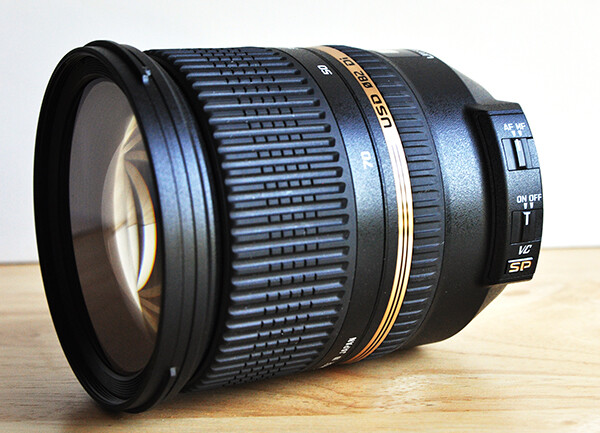
The Tamron 24-70mm f/2.8 Di VC USD is a great lens choice for both professionals and enthusiasts.

The Tamron 24-70mm f/2.8 Di VC USD is a great lens choice for both professionals and enthusiasts.

I won’t make you wait until the end of the review for the verdict– this lens absolutely rocks. Plain and simple. Despite what I consider to be a huge and unfortunate misconception among many professional photographers, there are some truly amazing, high-quality lenses being designed and produced by companies other than Nikon and Canon. Dismissing them as being somehow inferior simply because their logos don’t match up with those on the camera would be a big mistake. The Tamron SP 24-70mm f/2.8 Di VC USD is just such a lens. I recently had the opportunity to put it through its paces, and this is where the test drive took me.

The Specs

Let me start with deciphering the alphabet soup. Designed for digital (Di), this lens includes Tamron’s proprietary Vibration Compensation (VC) for less camera shake and smoother image stabilization, as well as its Ultra Silent Drive (USD) motor, ensuring fast, virtually silent auto focusing. This Super Performance series (SP) lens includes 17 elements in 12 groups, which vastly reduces chromatic aberration.

  • Focal Length:  24-70mm
  • Maximum Aperture:  f/2.8
  • Lens Construction:  17 elements in 12 groups
  • Minimum Focal Distance:  0.38m (15.0 inches)
  • Maximum Magnification Ratio:  1.5 on APS-C sensor cameras
  • Filter Size:  ø82mm (3.2 inches)
  • Length:  108.5mm (4.3 inches)
  • Extended Length:    116.9mm (4.6 inches)
  • Diameter:  ø88.2mm (3.5 inches)
  • Weight:  825g (29.1 oz)
  • Diaphragm Blades:  9 (rounded diaphragm)
  • Standard Accessories:  Lens Hood
  • Cost:  $ 1,224 (USD), compared with $ 1,887 (Nikon) and $ 2,299 (Canon L Series)
  • Compatible Mounts:    Nikon, Canon, Sony (NOTE: The Sony version of this lens does not include the vibration compensation feature, since Sony DSLR bodies already have this functionality).

First Impressions

In some ways, I was sold on this lens before I even put it on a camera. Taking it out of the box for the first time, I was immediately impressed with the feel of it. It’s obvious that this lens was both designed and constructed with high-quality materials and great attention to detail. A common complaint among photographers about “off-brand lenses” (a term I hate, by the way), is that they just don’t have the same feel or build quality as lenses coming from Nikon or Canon. I’ve used several Tamron lenses over the years (the 28-75mm f/2.8 being among my favorites), and I can tell you that you’d be hard-pressed to find any flaws in the construction and build of this lens. As a matter of fact, this is Tamron’s first lens to include extra seals for moisture-resistant construction.
tamron-lens-review-digital-photography-school-002

Lens Creep

Lens creep is a fairly common problem with zoom lenses of lower quality. If you have ever zoomed a lens all the way out, only to have it slowly slide back down on you when trying to shoot at a sharp, upward angle, you know what I’m talking about. The opposite can also happen, where a poorly crafted zoom can start sliding out all on its own when pointed at a downward angle. While lens creep usually manifests itself more readily with longer, heavier zooms, it can be an issue on shorter lenses also. I experienced no lens creep at all on this lens, regardless of where I was along the zoom range.

Focus

As noted in the specs above, this lens is equipped with Tamron’s Ultra Silent Drive (USD) motor, which is supposed to help ensure fast, virtually silent autofocus. This is particularly useful for wedding and event photographers who are trying to be as unobtrusive as possible. One of the things that helps me hide in plain sight is quiet autofocus. One word of caution is worth mentioning. While the USD is virtually silent on the outside of the camera, it is possible that additional noise might be picked up when shooting video.

Autofocus was fast, accurate, and, as mentioned, quiet. There might have been a slight bit of focus lag in extremely low light situations, but I would expect that from just about any lens in dark conditions. My only complaint regarding the manual focus on this lens is the size of the rubber focus ring. I think it’s a little too small, even for average hands. Add my big Chewbacca hands into the mix, and manual focus ends up taking a little more concentration that it should actually need. As far as the actual manual focus mechanics, however, I have no complaints at all. There was no lag whatsoever on the ring, making it smooth, accurate and responsive.

tamron-lens-review-digital-photography-school-009

Chromatic Aberration

Forgive me for a minute or two while I geek out on the science end of things. Chromatic aberration is a type of distortion in which the lens fails to focus on all colors to the same convergence point. It is also a type of distortion which appears more frequently in lower quality lenses. It occurs because different lenses have different refractive indices for different wavelengths of light. Before your eyes glass over too much, let me just say that chromatic aberration becomes visible as fringes of color along boundaries separating light and dark parts of the image (i.e., contrast). As a general rule, chromatic aberration is mainly an issue at the combination of a lens’ shortest focal length and its widest aperture. This particular lens was designed specifically to minimize chromatic aberration and those efforts appear to be successful. While the laws of physics make it practically impossible to completely eliminate chromatic aberration, this lens exhibited it so slightly that I actually had trouble finding it. To that end, I’d say that any chromatic aberration actually created by this lens is inconsequential.

As long as we’re on the subject, let me offer one additional point regarding chromatic aberration that has nothing to do with this review. Colored fringes (often purple) around image highlights can be due to lens flare and have nothing at all to do with chromatic aberration.

Sharpness, Vignetting and Distortion

I found this lens to be very sharp in the center at all focal lengths and apertures. While stopping down a lens (moving to a smaller aperture) can sometimes result in an increase in sharpness and resolution, there was virtually no change in this lens between 24mm and 35mm. It wasn’t until I got between 50mm and 70mm that I think I might have noticed a very slight improvement by stopping down, but it was too slight to be of any real concern to me.

On a full frame Nikon D800, the corners are slightly less sharp than the center–a fairly common issue in lenses of this focal length. Having said that, however, corner image quality improves at all focal lengths as the lens is stopped down. I found the optimum aperture for the corners to be around f/8. Taking both center and corner sharpness into account, I’d put the “sweet spot” for this lens to be around f/5.6, but don’t let this keep you from capturing great “wide open” shots at f/2.8. The big surprise for me came when I compared corner sharpness on the Tamron with a Nikkor 24-70 f/2.8 and found corner sharpness on the Tamron to be better than the Nikkor.

While there is some visible distortion at the wider end of the lens, it does drop off quite quickly as you zoom in from 24mm. This is of most concern when shooting portraits. Making sure that faces are not distorted is an obviously valid concern, and is easily addressed by zooming the lens all the way in to 70mm.

Putting it to the Real Test

It’s easy to get passionate about lenses, regardless of brand name. It’s also easy, however, to get lost in the details. Look hard enough and you’ll find issues relating to chromatic aberration, sharpness, vignetting, and distortion in any, and every, lens you try. As pointed out earlier, we’re dealing with the laws of physics. That’s why the ultimate test of any lens has to be how it performs in everyday shooting conditions.

The first thing I want to know about any lens is what it’s going to do for me. Like many photographers, I make a living capturing a wide variety of subject matter. Since most of us don’t have unlimited gear budgets, the best purchases are those that are going to fill more than just one function. This is one of those lenses that does a great job, regardless of whether I am shooting portraits, food, or architecture. The fact that it does a great job as an all-around, everyday lens for personal photography is a bonus for the professional and a necessity for the enthusiast.

First came outdoor portraits. This first image was taken in the shade with no direct sunlight. There was a single off-camera strobe in a softbox to the left of the camera, approximately three feet from the subject. I was impressed with the speed of the autofocus, as well as how this lens captured the fine details. As noted, the wrong focal length can sometimes distort a subject. Zooming a 24-70mm all the way in to 70mm, like I did here can prevent that.

tamron-lens-review-digital-photography-school-003

1/125, f/8, ISO 200, 70mm, off-camera flash.

I was in the middle of a cookbook shoot when this lens arrived, and I was curious to see how it would do in an all natural light scenario. When we shoot food in the studio, we generally use a single natural light source (big window) to backlight or sidelight the dish, along with a bounce card for fill. Shooting from the shadow side of the food can sometimes pose a challenge for auto-focus, but this lens had no problems at all, even when I selected a focus point in the darkest part of the frame.

tamron-lens-review-digital-photography-school-004

1/80, f/5.6, ISO 400, 70mm, natural light.

But let’s take low light a step further. Really low light. In the images below, the photo on the right was taken with only ambient light in order to show how the autofocus performs in very low light situations. For purposes of the test, I placed my focal point on the subject’s left eye- the one in shadow. The photo on the left was taken at the same settings, with a single speedlight in a softbox to the left of the camera. The autofocus obviously had to work a little harder than it might have in broad daylight, but not so much that it became a problem on the shoot.

tamron-lens-review-digital-photography-school-006

1/60, f/5.6, ISO 640, 70mm, off-camera flash.

If you read my article on How to Shoot Flowers, you know I spend a lot of time capturing flowers and their delicate details. Obviously,  I was excited to see how the lens would perform with flowers. Other than the crop, this image is straight out of the camera. The edges and textures are all very sharp. While not specifically a macro lens, it’s nice to know it can still capture fine details with precision.

1/500, f/2.8, iSO 100, ambient light.

1/500, f/2.8, iSO 100, ambient light.

While attending Photoshop World in Atlanta last month, I stopped by the Westcott expo booth, where models and lights were set up for the Westcott Shootout Contest. Since studio lights were already set for optimal conditions, it seemed like a great opportunity to test the lens for indoor portraits. Other than the black and white conversion, this image is straight out of the camera. The lens performed really well while trying to capture the glam look of 1940s Hollywood.

tamron-lens-review-digital-photography-school-005

1/200, f/5.6, ISO 1600, 70mm, constant LED studio lighting.

The lens had performed extremely well with portraits, food, and flowers, so I decided to see how it would do on an architectural interior shoot before I had to box it up and send it back. I was thrilled with how it captured the color and contrast.
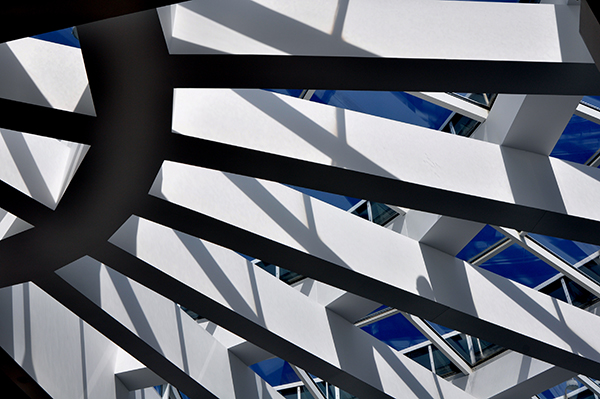
1/160, f/10, 28mm, ISO 200, ambient light.

1/160, f/10, 28mm, ISO 200, ambient light.

Wrap-Up and Recommendations

Like I said at the very beginning — this lens rocks. It performed flawlessly in a variety of lighting and shooting situations. While I didn’t have time to take it out on a landscape shoot, there was absolutely nothing about my experience with this lens to indicate that nature and landscape results would have been any different. An excellent lens for either full-frame or APS-C sensor cameras, if you’re looking for a really great lens that can handle just about any assignment, the Tamron 24-70 f/2.8 should be at or near the top of your list of choices. The only down side to this lens was returning it to Tamron when I was done.

The post Lens Review Tamron 24-70 mm f/2.8 Di VC USD by Jeff Guyer appeared first on Digital Photography School.


Digital Photography School

 
Comments Off on Lens Review Tamron 24-70 mm f/2.8 Di VC USD

Posted in Photography


Die Waldkönigin

08 Jun

Es war einmal ein Mädchen, das im Wald spielte. Sie sammelte Stöcker, Kiefernzapfen und Schneckenhäuser. Auf einer kleinen Lichtung fand sie dabei eine Holzkrone, versteckt im Gebüsch. Sie setzte sich die Krone auf den Kopf und tat, als wäre sie die Königin des Waldes.

Ein Mädchen mit Holzkrone steht im Wald.

Zuerst bereitete es ihr noch großen Spaß, doch schon bald fühlte sie sich seltsam. Als würde die Farbe aus ihrer Existenz schwinden. Irgendetwas ging langsam verloren, die Geräusche wurden wie betäubt. Hinter etwas, das ihr wie eine Wand aus Glas erschien, konnte sie die Realität sehen. In dieser Realität war ein Mädchen, das aussah wie sie, im Wand stand, eine Krone trug – selbstbewusst, während sie selbst ängstlich war.

Ein Mädchen mit Holzkrone steht im Wald.

Als das Mädchen auf der anderen Seite sich bewegte, tat sie es ebenso. Ohne Kontrolle über ihre Bewegungen folgte sie und spiegelte. Hob einen schweren, sehr alten Stock mit rätselhaften Gravuren von Zeit und Wetter auf. Wanderte durch den Wald und ihr Glasgefängnis wanderte mit jedem Schritt mit.

Ein Mädchen in langem schwarzen Kleid steht mit einem Stab und einer Holzkrone im Wald.

Sie kam auf einer weiten Lichtung an, auf der kein Buschwerk wuchs und wo Lichtflecke durch die Baumkronen fielen und Muster von fremdartigen Buchstaben auf dem Waldboden bildeten. Die alten Kopfbuchen traten einen Schritt zur Seite, als die Holzkrone wuchs. Mehr und mehr Zweige und Äste wuchsen aus den hölzernen Zacken, bis sie ein übergroßes Vogelnest geworden waren, das auf den Boden rund um das Mädchen fiel.

Ein Mädchen in langem schwarzem Kleid steht mit einem Stab in einem überdimensionalen Vogelnest.

Das Mädchen sah nun kopfherum runter, über der Realität hängend. Als sie versuchte, das Glas zu berühren, das sie von der Realität trennte, fühlte sie, dass sie, ihrerseits, ebenfalls das andere Mädchen gegen deren Willen bewegen konnte, auch wenn es alle ihrer noch verbliebenen Gefühle brauchte.

Ein Mädchen hält mit einer Hand einen Stab und greift mit der anderen zu ihrem eigenen Spiegelbild über sich.

Sie versuchte, sich dagegen zu wehren, dass ihre Hand sich zur Welt über ihrem Kopf bewegte, sie konnte es fühlen und bündelte all ihre Kräfte. Ihr Haar begann, zu fallen und hoch zu fliegen, ihre Füße hoben sie vom Boden ab, auf die Glasoberfläche zu.

Ein Mädchen hält mit einer Hand einen Stab und greift mit der anderen zu ihrem eigenen Spiegelbild über sich, ihre Haare fliegen.

Als sich ihre Fingerspitzen berührten, begann das Haar der beiden Mädchen, sich ineinander zu verzwirbeln und die Realität stürzte in eine zusammen, das hölzerne Vogelnest und sein Spiegelbild krachten ineinander. Sie hörte und sah nur noch Chaos.

Ein überdimensionales Vogelnest im Wald.

Es sah aus und hörte sich so an wie ein ganzer Wald aus Glasbäumen, die zerbrachen. Die Scherben schwirrten durch die Luft, nahmen sie mit sich. Vor der ältesten Buche des Waldes kam sie zu stehen, während die Bäume um sie herum weiter zersprangen, in einem großen Strudel um sie herum wirbelten.

Ein Mädchen in langem schwarzen Kleid mit Holzkrone und Stab steht vor einem großen Baum in einem Wald, über ihr Lichtreflexionen.

Sie fühlte, wie Schlaf sie überkam, ausgelaugt von ihren Versuchen, dem Glasgefängnis zu entkommen, sich vor den Glasscherben zu schütze, die die zerbrochene Realität waren. Nur die Spiegelwelt wurde zurückgelassen, während die kleinen Stücke der Realität zu einem Faden verschmolzen, dünn wie eine Nadel und bald zu dünn, um noch gesehen zu werden.

Großer Baum im Wald mit Lichtreflexionen.

Sie erwachte in einem großen, leeren Glashaus. Das Dach und die Wände waren aus den Scherben der Realität gemacht, die den Raum mit gleißendem Licht füllten. Nun stand sie auf der anderen Seite der Glaswand. Sie konnte ihr Spiegelbild auf der anderen Seite sehen.

Ein Mädchen in einem weißen Kleid steht in einem leeren Gewächshaus.

Immer noch fühlte sie ihre Zuversicht und ihren Willen. Sie hatte sich den anderen Teil von ihr genommen und es schien, dass sie ihr nur übrig gelassen, was sie nicht gebrauchen konnte und all die anderen nützlichen Teile genommen hatte. Zurückgelassen war eine seltsame Ansammlung von Furcht, Zweifel, Hoffnung und Mitgefühl.

Portrait von einem Mädchen in weißem Kleid.

Doch sie erkannte, dass die Farbe zurück auf ihrer Seite des Glases war. Und sie erinnerte sich daran, dass die andere Seite das Gefängnis war, nicht diese hier. Sie war hier frei, auch wenn dieser Raum nur ein Traum sein sollte, eine Reflexion der Überreste der Realität.

Ein Mädchen in weißem Kleid.

Sie wendete der Glaswand den Rücken zu, trat langsam näher. Sie rollte sich auf einem Bett von Gestrüpp zusamen, ihren anderen Teil in die Arme nehmend. Flüsternd: Angstvolle Hoffnung, zweifelndes Mitgefühl, sie können nicht existieren. Ebensowenig deine Bruchstücke unseres früheren Selbst.

Ein Mädchen in weißem Kleid liegt im Gras.

Sie umarmten sich und sie schliefen, Seite an Seite, auf dem Boden. Sie fragte sich: Wenn ich in einem Traum einschlafe, wohin gehe ich? Gibt es einen noch tieferen Platz in einer anderen Schicht von Träumen? Ist ein Traum im Traum wieder die Realität?

Ein Mädchen in weißem Kleid liegt im Gras.

Als sie erwachte, hatte sie keine Antwort. Auf einem Baum sitzend, der von dem, was vielleicht ein Traum oder die Realität war, hinüber in die Glaswelt ihres Spiegelbildes ragte, baumelten ihre Füße in einen See. Das Wasser war grün und blau und seine Geräusche waren die von Millionen Glassscherben, aber sie schnitten nicht ihre Haut.

Ein Mädchen in weißem Kleid sitzt auf einem Baumstamm, der ins Wasser ragt.

Sie konnte nicht mehr fühlen, wo das Gefängnis war. War es auf ihrer Seite der Glaswand oder der des anderen Mädchens? Beide bewegten und verdrehten die andere, gespiegelte Welt. Sie drehte das Glas herum, sodass es auf der Wasseroberfläche lag.

Ein Mädchen in weißem Kleid sitzt auf einem Baumstamm, der ins Wasser ragt.

Lass uns Realität und Traum wieder in Ordnung bringen, liebe Schwester, sagte sie zum Spiegelbild. Langsam bewegte und balancierte sie die Glasoberfläche genau auf dem Wasser. Stück für Stück glitt sie vom Baum ins Wasser.

Ein Mädchen in weißem Kleid sitzt auf einem Baumstamm, der ins Wasser ragt.

Die kleinen Scherben wurden zu einer neuen Glasoberfläche, direkt auf der Glaswand des Gefängnises. Sie fühlte, wie ihr Verstand und ihr Körper sich wieder zusammenfügten. Hoffnung hatte wieder Hass, Furcht hatte wieder Vertrauen. Die alten gegenspieler waren wieder vereint in ihr. Es gab nur noch ein ihr. Keine Glaswände mehr.

Modell: Katja Kemnitz


kwerfeldein – Fotografie Magazin | Fotocommunity

 
Comments Off on Die Waldkönigin

Posted in Equipment


DreamVendor: 3D Printing Kiosk Makes Your Vision Reality

08 Jun

[ By Steph in Gadgets & Geekery & Technology. ]

Dream Vendor 1

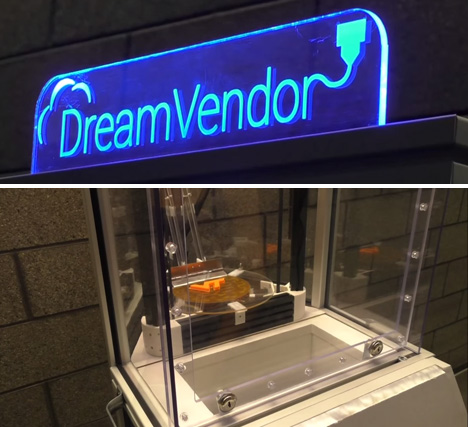
If you could have a vending machine spit out a small object in any shape you could dream up, what would it be? The DreamVendor, an interactive 3D printing station for Virginia Tech students, is envisioned as “a vending machine with an infinite inventory” that’s only limited by the imaginations of those who put it to work.

Dream Vendor 2

Created to enable students to quickly fabricate prototypes for academic and personal design projects, the machine reads CAD files from the user’s SD card, prints the three-dimensional part desired, and dispenses it into a bin when it’s done. The prototype machine is located on the Virginia Tech campus, but soon, new DreamVendors could pop up in retail centers for use by the general public.

Dream Vendor 3

Anyone who walks up to a DreamVendor kiosk – located inside a store, likely beside photo booths and soda machines – can choose to either load their own CAD designs into the system, or choose a pre-designed item to print. Plans are still in the developmental stage, but production is expected to begin next year.

Drea Vendor 4

3D printing pop-up shops have already begun to appear around the world, from a Baltimore studio that will help you create personalized products to a Japanese cafe that will scan your face and turn it into an edible chocolate treat.

Share on Facebook


[ By Steph in Gadgets & Geekery & Technology. ]

[ WebUrbanist | Archives | Galleries | Privacy | TOS ]


WebUrbanist

 
Comments Off on DreamVendor: 3D Printing Kiosk Makes Your Vision Reality

Posted in Creativity


7. Juni 2014

08 Jun

Ein Beitrag von: Katharina Jung

© Katharina Jung


kwerfeldein – Fotografie Magazin | Fotocommunity

 
Comments Off on 7. Juni 2014

Posted in Equipment


In Photos: Iceland captured in infrared

07 Jun

kirjufell.jpg

Iceland, it seems, is extremely photogenic. Photographers traveling the country routinely emerge with stunning photos of mountains and waterfalls. Visiting for the first time, Andy Lee saw an opportunity to bring out even more of the drama in the country’s already dramatic landscapes. He used a DSLR converted for infrared photography, capturing the scenery in deep blues and blacks. See gallery

News: Digital Photography Review (dpreview.com)

 
Comments Off on In Photos: Iceland captured in infrared

Posted in Uncategorized


Take your Photos from Blah to WOW with Lightroom and Photoshop

07 Jun

Would you like to get started with black and white (or color) fine art photography, but don’t really know how to get the results you want? I will give you some insight in the process to take your photos to the next level and let you see how you can make the most of the not so ideal situation. I will explain how you can take your ordinary photo and transform it from this . . .

Img1

to this!

Img final

Take your Photos from Blah to WOW with Lightroom and Photoshop

For the creation of this photo I used both Adobe Lightroom and Adobe Photoshop (Note: any program that handles layers will also work including GIMP or Photoshop Elements). The beginning photo is just a black and white conversion of the color photo, as shot. It is important that when you go out and shoot, you have an idea of the final image in your head. If you are at a location, take a moment and think of what you would like to see as a final result. This way, it will take you less shots to get your winning photo.

First step the photography, how was this photo created?

This photo was shot with a Nikon D3000, Tokina 12-28mm f/4 (IF) DX AT-X PRO and Haida ND3.0 (10 stop neutral density filter). That’s right, it’s not a full frame camera! With good light conditions you don’t need one, spend money on lenses instead. I was aiming at an exposure time of minimum 25 seconds, to make the clouds and water smooth. I metered 1/60th at f/14, 100 ISO, so that would give me the 25-27 second exposure (with the ND3.0) I wanted.

You can find exposure tables online, and sometimes you get them with the filter you buy. If all the conditions were perfect (which wasn’t the case) I wanted to shoot until sunset, expanding my exposure time to over 1 minute. But clouds rolled in (wasn’t forecast) and ruined the light. After a few shots, I got what I wanted and was heading home.

Next step, post-processing your image

First load the photo in to Lightroom and give it some minor adjustments to contrast and clarity. Increase the contrast a bit and reduce the clarity of the bottom part of the photo (the water). This can be done with a graduated filter (keyboard shortcut “M”) and moving the clarity slider to the left.

Now move over to Photoshop to take care of the sky (you can export it directly from Lightroom, right click on the photo and select edit in Photoshop). I was aiming for a nice movement in the sky, but the clouds weren’t going fast enough for my maximum exposure time. So we are going to replicate that with the help of photoshop.

Duplicate the image and select the sky, using the magic wand selection tool (W). Use the current layer and a brush seize of 30 pixels. When you’ve got your selection (it won’t be perfect but that is fine), click on the add layer mask symbol. (below the layers on the bottom right side of the screen).

You can make the layer mask more accurate with the pen tool (p). Click on the edge of a building (and later on the bridge) and work your way around the skyline, by clicking on every corner. The pen too will automatically draw a straight path from one point to another. When complete (you have to get all the way back to the first point you made), right click on the image and select “make selection” (feather 0, and make new selection) hit OK in the new window. Now fill your selection with black and you have a nice and clean layer mask of the sky.

Add motion blur to the sky

Now you can add a zoom blur to the sky layer, so you get a nice washed out cloud formation. Here is how to do that:

  • Select the duplicated sky layer then select Filter -> Radial Blur
  • In the menu select Blur Method -> Zoom, Quality -> good and amount 70 (you can add more, but that depends on the photo) – don’t hit OK yet!
  • Nest select where the Blur Center is positioned in the right window by clicking and dragging it around (somewhere in the middle for this photo)
  • Hit OK
  • After this you need to clean up the layer, because it now runs over the buildings
  • Hold CMD (alt on win) and click on the layer mask for the sky. Click -> selection -> inverse (you now have everything but the sky selected and hit delete.

Now you should have something like this:

Img2

As you can see the sky is now very pleasing, full of movement. When you look closer you can see that all the wires from the bridge are gone. We will have to fix that next. The wires aren’t straight lines, so the selection process of these is a pain – but worth the effort.

Using the pen tool (P) you can select all the wires on the background layer (which took me quite some time). You can do this one by one. Select one complete wire and duplicate the selection into a new layer. When you have all of them, merge all of these layers to one and place it above the duplicated sky layer.

You could also use the Magnetic Lasso Tool (L) to select all the wires but because of the low contrast in some places it won’t work, and you have to correct it later on.

Using the pen tool is a complete chapter, and I’m feeling that explaining how to use the tool takes too much focus away from this tutorial. It can take some time to master but I highly recommend reading tutorials on how to use the pen tool. You will need it for this image, but for the most of the images you can just make straight selections.

Here is my selection of the wires:

Img3

Now you can add some adjustments to the contrast in the wires and bridge, using a Brightness/Contrast adjustment layer. I used: Brightness +3 and Contrast +24

Img4

Final adjustments in Lightroom

From this point we leave Photoshop and continue in Adobe Lightroom. You could, however, do the same in Photoshop with dodging and burning, but I like the workflow of Lightroom more and used it to get to the final stage of the image.

From here it is basically just adding and removing light (exposure, contrast, white point) to selective places in the photo and checking for some dust particles. I can go into the details here, but it’s your vision of what you would like to achieve with the photo. Use the gradient filter (M) and the adjustment brush (K) in Lightroom to add and remove light to selected areas of the image. You have to “color” the photo to your wishes and crop it when needed. You are in fact painting with light.

Here is what I came up with for the final image:

Img final

“Catch  the light” – Rotterdam (The Netherlands)

Do you have any additional tips for processing for that wow factor? Please share in the comments below.

The post Take your Photos from Blah to WOW with Lightroom and Photoshop by Martijn Kort appeared first on Digital Photography School.


Digital Photography School

 
Comments Off on Take your Photos from Blah to WOW with Lightroom and Photoshop

Posted in Photography