RSS
 

Archive for June, 2014

Brandalism: Replacing Bus Shelter Ads with Art in the UK

17 Jun

[ By Steph in Art & Street Art & Graffiti. ]

Brandalism Main

Over three hundred bus shelter ads across the UK have been replaced with thought-provoking works criticizing capitalist culture by 40 street artists. The ‘Brandalism‘ posters were installed in high-traffic areas, from the busiest shopping district of London to the Leeds  Half Marathon route and even outside Scotland Yard, right under the noses of the police officers lambasted by several of the designs.

Brandalism Urban Intervention 1

Brandalism Urban Intervention 2

“The large print giveth, the small print taketh away,” reads one, while another parodies Harrod’s department store with “Horrids – trite gewgaws, trinkets & trash, the cluster bombs of consumerism.” “The market is dead, long live the market,” a third repeats.

Brandalism Urban Intervention 3

Brandalism Urban Intervention 4

The campaign is a response to the fact that the UK’s advertising industry pays just under 250 per person each year to reach the ears and eyeballs of the citizens i the hopes of selling things like “adjustable mops and leather sofas.” Plus, the industry relies on manipulation ranging from the subtle to the overt, convincing us that we won’t be happy until we make more money in order to purchase all of this stuff. It’s not about catering to our needs, it’s about creating new desires.

Brandalism Urban Interventions 7

Brandalism Urban Intervention 8

The campaign explains, “The fight against advertising is not a fight against desiring. We should want more from life not less, and we should demand it. The question is more of what? This exhibition is about trying to open up questions about the ills created by advertising, the false needs and destructive desires it attempts to distill in us, and it is about trying to reclaim some of the spaces taken from us.”

Brandalism Urban Intervention 9

Brandalism Urban Intervention 5

Brandalism even has a suggestion for anyone who isn’t a big fan of the work their artists produced: “Swapping them is easier than you’d imagine. All you need are some o the magic cabinet keys and a trusty hi-viz vest to remain hidden in plain sight. So if you don’t like what we’ve put up, check out our guide to opening the cabinets, and replace it with something you prefer. Because after all, they’re your streets.”

Share on Facebook


[ By Steph in Art & Street Art & Graffiti. ]

[ WebUrbanist | Archives | Galleries | Privacy | TOS ]


WebUrbanist

 
Comments Off on Brandalism: Replacing Bus Shelter Ads with Art in the UK

Posted in Creativity


How to do Surreal Digital Infrared Photography Without Expensive Gear or Camera Conversions

17 Jun

Photos made with invisible infrared light, rather than visible light, yield wildly strange and eerie photographs that always have the “WOW Factor.”  For landscapes or scenic imagery, infrared (IR) photography is highly regarded as fine art. But back in the days of film photography, shooting infrared was complicated, expensive and the results were often not great. For those with determination though, that one image that did ‘work” was always worth the trouble.
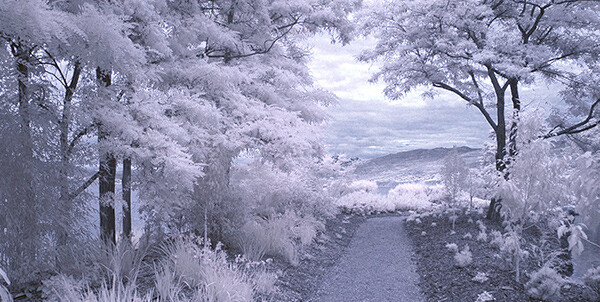
But now the complexity of capturing infrared photos has changed – digital cameras have made the technique almost foolproof, inexpensive, and a lot of fun! All you’ll need is a tripod, a special infrared filter, and any camera that is sensitive to infrared light. With a few easy steps you’ll be shooting infrared photos in no time at all.

But before I get into the process, it’s not my intention in this article to delve into the physics of infrared light, and all the scientific mumbo jumbo that goes along with understanding WHY infrared light creates amazing images, but rather to give you some simple steps to get you started in this super creative technique.
_DSC1747W

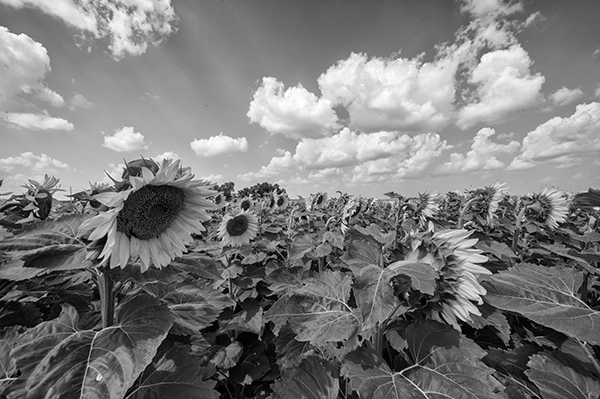
Visible Light Black and White Image

Just know that anything that is alive will reflect a greater amount of infrared light than inanimate objects. Leaves, foliage, and grass, along with skin, reflect the greatest amounts of infrared light, and so will be the whitest objects in your image. Stones, concrete, mountains, water and sky tend to absorb infrared light and so appear as darker objects in your images.  The tonality is very different from that of visible light black and white photography though. Notice how the tones of the leaves, seeds and sky are quite different in the infrared image below.

Digital Infrared Image

Digital Infrared Image

Okay, are you ready to give this a try? Here are the simple steps you need to follow so your images will turn out into hauntingly beautiful, surreal infrared photographs. The first steps deal with equipment and settings, and the last steps are all about how to best capture beautiful infrared light.

Step 1: Test your Camera

Before you go out and buy an infrared filter test your camera to make sure it’s sensitive to infrared light.  Not all digital camera sensors are able to “see” infrared light. In fact the newer the camera, the less sensitive to infrared light it may be. Try this simple test to see if your camera will give you good results.
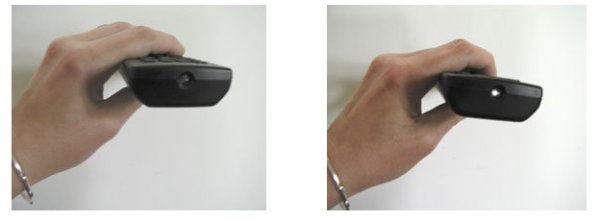
Testing your camera for infrared sensitivity.

Testing your camera for infrared sensitivity.

Hunt down a TV, VCR or DVD player remote control. Look at the end that points to the TV (or VCR etc), and you’ll see a little bulb or flat back plastic window. This is the transmitter that sends the signal from the remote to your device. That signal usually uses infrared light. You can see that it is invisible light – i.e. when you look at the remote with your eye, you can’t see anything when you press the buttons. But just wait until you do this looking through your camera! You’ll be able to see invisible light – the infrared spectrum that makes such cool photos.

If you have a point & shoot camera look through your LCD viewer while pressing any button on the remote. If you see the bulb light up, your camera can see infrared light.  If you have a DSLR you’ll have to take a photo to see the results, or if you camera has a live view feature, you will be able to see the the results on your LCD as well.

The whiter and brighter the light you see from the remote, the more sensitive your camera is to infrared. If the light is more purple or red your camera may not be a good candidate for shooting infrared photos.

Step 2: Equipment

If your camera passed the sensitivity test, you’ll need two more pieces of equipment before you can shoot infrared photos, a tripod and an infrared filter. The tripod will help you take a sharp shot, as your exposure times will be quite long. The filter will  block most of the visible light from reaching your camera sensor, but will allow the beautiful infrared light to pass through.

When I first started shooting infrared images, I used  a Hoya R72 screw-on infrared filter. B+W, Tiffen and other manufacturers also have equivalent infrared filters.  If you are using a slide in filter system, such as Cokin or Lee, they also make infrared filters to work with their holders. If this is the filter you’ll be using, make sure to slide it into the slot closest to the camera to prevent unwanted visible light from sneaking in. The R72 refers to the amount and type of infrared light that passes through to your sensor and I recommend using this to start. It allows some visible light to pass to the sensor so it will allow you do to all sorts of creative post processing with your images.
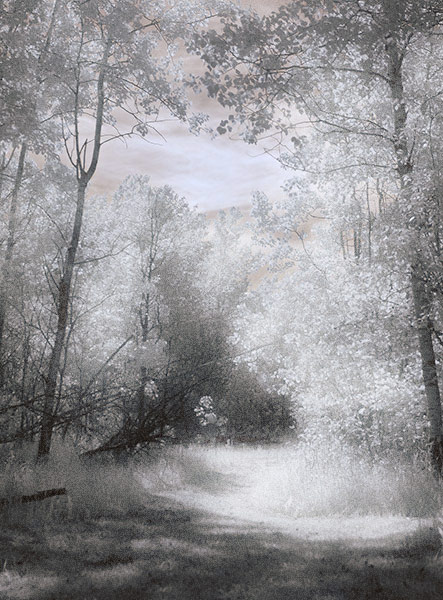
Infrared Image with creative post processing.

Infrared Image with creative post-processing

Step 3: Camera settings

Because the infrared filter blocks out most of the visible light, your exposures will be quite long. You’ll have to adjust your camera settings to ensure you get a good exposure, while keeping noise to a minimum.  Set up your camera on your tripod and make these adjustments:

  1. Set your ISO between 200 and 400, keep it as low as you can
  2. Set your Long Exposure noise reduction to ON
  3. Set your camera to shoot in RAW mode
  4. Set your camera to Aperture Priority (Av mode on a Canon), and your aperture to around f/8 for maximum sharpness
  5. If your camera does auto bracketing (refer to your owner’s manual), set your bracketing to +/-1 EV.  Your series should be -1 EV, 0 EV, good exposure, and + 1 EV. You can also bracket manually.

Shooting in RAW will give you a bit more latitude for processing and adjusting.  Bracketing will help you find the sweet spot for exposure at your preferred aperture and ISO.

I’m not going to go deep into the White Balance setting, as this could be an entire article on its own. But for now set your White Balance to the Sunny or Daylight preset.

Step 4: Composition

Just as in regular light photography, composition is a critical component of infrared photography. However there are a few additional considerations to keep foremost in your mind when planning your infrared composition.
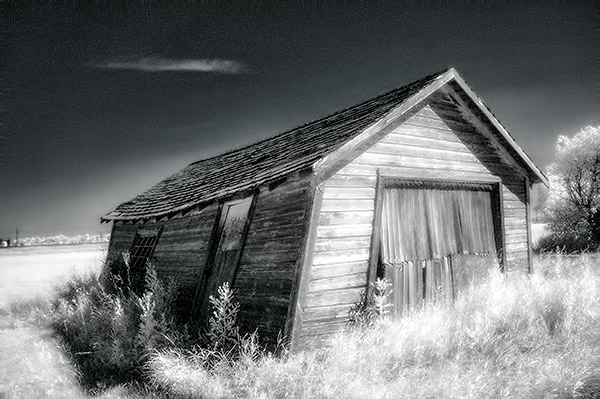
A variety of textures make the image more dynamic.

A variety of textures make the image more dynamic.

Infrared photography is similar to black and white photography, in that you are dealing with a limited number of tones. To add more dynamism and energy to your infrared shots, add contrasting elements. By this I mean using dark and light objects in close proximity to each other. But also use smooth and textured objects together. You can mix and match for artistic composition and design.

 COLUMN 1  COLUMN 2
  • light
  • white
  • smooth
  • large patterns
  • light with fine textures
  • light with large textures
  • dark
  • black
  • textured
  • small patterns
  • dark with fine textures
  • dark with large textures

In every infrared shot you make, include at least one element from Column 1 with the corresponding one from Column 2. You can add as many elements as you want, but it’s best to keep your composition simple. You can use light and small patterns, with dark and large patterns and so on. Foliage and clouds will always be a light element in your image; the sky, stones, bark, water  and concrete will be darker. Leaves from a distance are a rough texture, with many small elements appearing rough and textured; while human skin is very smooth.  This should give you a great starting point for infrared compositional considerations.

Step 5: Shooting Infrared

There is only one critical thing to remember when shooting infrared – you must shoot when there is lots of sunshine, and in the summer when there is lots of deciduous foliage. Overcast days won’t give you great results, and because living things reflect the most infrared light, snowy winter days are usually devoid of anything that reflects infrared.  If there are clouds in the sky these can add an element of interest, but don’t make your capture until the sun is out, and shining on your subject.

Find a great place to shoot and adjust the settings on your camera. I like graveyards, parks, and old abandoned buildings. The contrast between the stones, the pathways, the old wood and leaves and grass provides outstanding tonality for infrared images. If you can get a few wisps of cloud in your sky all the better.

Put your camera on your tripod, and compose your image. Place the infrared filter on your camera, and use your autofocus as usual. Yes, it works just fine for infrared photos! Your light meter will work too but be sure to bracket on either end to make sure you have at least one usable exposure. Then click the shutter.  You’ve just made an infrared photograph.
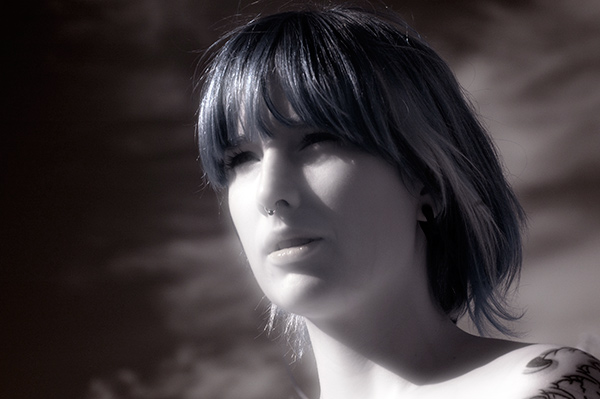
Skin looks like alabaster when shot using infrared light.

Skin looks like alabaster when shot using infrared light

For techniques and ideas for post-processing our infrared images, watch for my article on post processing infrared photos coming soon!

The post How to do Surreal Digital Infrared Photography Without Expensive Gear or Camera Conversions by Alex Morrison appeared first on Digital Photography School.


Digital Photography School

 
Comments Off on How to do Surreal Digital Infrared Photography Without Expensive Gear or Camera Conversions

Posted in Photography


Dive in: Waterproof compact group test posted

17 Jun

underwasser2014-copy-flatfinal2.jpg

For those of us here in the Northern Hemisphere summer is upon us. We’re celebrating the arrival of longer days and seaside vacations with our annual waterproof compact group test. This year’s test includes the Canon PowerShot D30, Nikon Coolpix AW120, Olympus Tough TG-3, and Ricoh WG-4 GPS. See which of these rugged compacts came out on top.

News: Digital Photography Review (dpreview.com)

 
Comments Off on Dive in: Waterproof compact group test posted

Posted in Uncategorized


No Rest In The Kingdom With Charles Quiles

17 Jun

Charles Quiles "No Rest In The Kingdom" photo series with model Nykhor Paul (RED Management) featured on Fashion Photography Blog (FashionPhotographyBlog.com)Charles Quiles dropped by FashionPhotographyBlog.com recently and we were so glad to hear that his recent debut solo exhibition was a tremendous success. We posted an article about his exhibition, “Fais-Mois L’Amour” (translates to “Make Love To Me”) a couple of weeks ago, and since then Charles has been on fire. Charles shared with FPBlog his latest project, a series showcasing Nykhor Paul, from RED Model Management NYC titled “No Rest In The Kingdom”. We loved the series so much we had to ask the photographer how he creates his amazing images and what is his process. Fortunately, Charles was able to make time to chat with us as we did not get much of a chance to catch up last time with the lead up to his exhibition event.

Charles Quiles "No Rest In The Kingdom" photo series with model Nykhor Paul (RED Management) featured on Fashion Photography Blog (FashionPhotographyBlog.com)

So how did the photographer’s journey for this Puerto Rican born, American photographer and director began? You’d be surprised to hear that photographer was not Charles’ first passion, as he explained “First it was poetic writing and acrylic painting that became my original necessary outlet through my angst teen years. Photography just evolved on its own.

My mother was always taking pictures of my brother and I when we were kids. I use to steal my brother’s Polaroid camera from him all the time just because the technology was so fascinating, then at 16 a local boutique modelling agency approached me at a school function, which introduced me to the world of modelling.

Charles Quiles "No Rest In The Kingdom" photo series with model Nykhor Paul (RED Management) featured on Fashion Photography Blog (FashionPhotographyBlog.com)

I never really was a big fan of listening to authority, so becoming the authority, the photographer, was just my natural next step. After a few years of getting the hang of it on my own, I decided to start reaching out to photographers I admired for advice. Sure enough, I connected with UK’s icon, Mariano Vivanco, and assisted him for a few years, until branching off on my own afterwards.

My photography comes from of a place of study. I’m very curious about people in general, the human condition. “Fashion” is the outlet I chose to communicate from…  I express a genuine love for the person I’m photographing. I like to photograph what I like to see, and it reflects how I feel about myself in that very moment.” Part of love that Charles shows on a set is maintaining the respect with everyone involved in the shoot, as he stated, “Mind you, if you’re being negative and/or nasty to anyone on set, I have no problem sending you home.”

Charles Quiles "No Rest In The Kingdom" photo series with model Nykhor Paul (RED Management) featured on Fashion Photography Blog (FashionPhotographyBlog.com)

I definitely agree that solid team work on set really does reflect on the outcome of photos from the shoot. No wonder the photos from his latest series “No Rest In The Kingdom” featuring female model, Nykhor Paul exude such warmth and charisma, that shines through Charles’ use of striking colors. I asked the photographer how the inspiration behind this shoot came about. He explained that “Gold is the color of success, achievement and triumph. It has always been associated with abundance, luxury, quality, sophistication, and elegance. All things we generally hope to be associated with individually. The power of intention… I also secretly have an obsession with royalty. My last name, Quiles, comes from a line of royalty, all though I was born in the slums of Puerto Rico.” To create this shoot Charles said that he used his Canon Mark II camera and a Westcott reflector.

Charles Quiles "No Rest In The Kingdom" photo series with model Nykhor Paul (RED Management) featured on Fashion Photography Blog (FashionPhotographyBlog.com)To find out more information about this photo series from Charles Quiles and other photos from his shoots you can find everything that you need on his website (www.charlesquiles.com), tumbler for all his outtakes (http://charlesquiles.tumblr.com) and Facebook for what he wants to show his loved ones. (https://www.facebook.com/charles.quiles.x). You can also check out works from his recent exhibition in our post here and email him via charles@charlesquiles.com

Charles Quiles: “Peace and love.”

Do you like Charles’ new work? Please comment below.

Charles Quiles "No Rest In The Kingdom" photo series with model Nykhor Paul (RED Management) featured on Fashion Photography Blog (FashionPhotographyBlog.com)


Fashion Photography Blog

 
Comments Off on No Rest In The Kingdom With Charles Quiles

Posted in Uncategorized


Ein persönlicher Einblick

17 Jun

Kann es in einem Artikel, in dem nicht das Bild im Mittelpunkt steht, überhaupt um Fotografie gehen?

Im Folgenden wirst Du ein paar persönliche Einsichten in meine Art des Fotografierens erhalten. Lehn Dich zurück, gönn Dir noch einen Kaffee und nein, Du musst überhaupt nichts dafür bezahlen, es ist vollkommen umsonst. Los geht’s.

Oft lese und sehe ich, dass sich andere Fotografen durch andere Fotografien inspiriert fühlen. Ob sie diese nun in Büchern, bei Ausstellungen oder im Internet finden, ist hier nebensächlich. Sicher habe ich mich zu so einer Aussage auch schon einmal hinreißen lassen. Sei es aus Langeweile im Kopf, weil man nichts Besseres zu sagen hatte oder durch das Vergessen, dass es eigentlich doch ganz anders ist.

Natürlich ist es nicht verwerflich, sich durch andere Fotografen und ihr Schaffen zu inspirieren oder einfach zu wissen, was es um uns herum schon alles gibt.

Aber in meinem Fall sind sie nicht der Grundstein meines Handelns. Die anderen sind nicht der Grund, warum ich mich für eine Kamera als Werkzeug entschieden habe. Was mich mit all den Fotografen um mich herum verbindet, ist doch lediglich, dass wir alle das gleiche Medium benutzen.

Dieser Gedanke wuchs mit jedem Tag, und je öfter ich las oder erzählt bekam, dass man kürzlich dieses und jenes da oder dort gesehen hätte und es zu jenem oder diesem inspiriert habe, umso mehr spürte ich, dass es hier, in meinem ganz persönlichen Fall, einfach ganz anders war.

Eine Aufsicht von Materialien.

Eine Sammlung an Inspirationsmateralien – durchsichtiges Blatt, Äste, hölzernes Raumschiff

In einem Buch unter einem Stapel anderer Bücher liegen gepresste Blüten vom letzten Sommer. Sie stammen aus dem Hochland Schottlands oder aus dem Wald hinter meinem Elternhaus. Ich sammelte sie am Morgen, am Nachmittag und am Abend, wann immer ich etwas sah, das schön oder anders war.

Vielleicht sollte ich noch erwähnen, dass meine Eltern Botaniker waren und die Natur für sie aus seltsam klingenden Namen bestand, die ich als Kind kaum auszusprechen vermochte. Und genauso seltsam sollte diese Welt für mich werden.

Auf meinem Schrank türmt sich die Baumrinde. Abgefallen im Frühjahr, nahm ich sie mit, Birkenrinde. Ich erinnere mich an den Spaziergang, an die weißen und fast durchsichtigen Blätter auf dem Boden. Ich erinnere mich an den feinen Nieselregen, der scheinbar aus den Ästen der Bäume ronn und nicht vom Himmel fiel.

Ein Vogelkopf, ein Krabbenpanzer, Muscheln und eine Schnecke.

Hinterlassenschaften vom Leben selbst – Vogelkopf, Krabbenpanzer usw.

Mein Zimmer ist voller toter Dinge. Das klingt erst einmal recht scheußlich, ist es aber nicht. Es sind abgefallene Zeitschuppen. Ich erinnere mich durch sie an die Jahreszeiten, an mein Leben.

Sie sind Hinterbliebene: Die Blüten meines mittlerweile toten Hibiskus, der kleine Vogelschädel, auf den ich im Wald fast getreten wäre, dieses merkwürdige Geäst mit den durchsichtigen Blättern, die ausgehöhlten Krabbenkörper, das ausgewaschene Holz, das uns im Urlaub an ein vergessenes Raumschiff erinnerte, die Muscheln in den seltsamsten Farben, grüne Steine, lustig geformte Sandsteine aus der Wüste und so weiter.

Birkenrinde mit Moos und ein Ästlein mit durchsichtigen Blättern.

Birkenrinde und das klingende, singende Bäumchen

Manchmal sitze ich da und zeichne diese Dinge. Im Urlaub kann ich mich oft stundenlang in einen Perlmuttschneckenkörper verkriechen und alle Einzelheiten mit einem Graphitstift ans Tageslicht zeichnen. Ich habe schon immer gern gezeichnet und irgendwann sogar mal beruflich. Es liegt mir also im Blut, mich mit den Dingen um mich herum lange zu beschäftigen; vor allem, wenn sie schon tot sind.

Aber wenn ich das für mich mal so überblicken und zusammenfassen darf, dann ruht in all dem eine tiefe Faszination für das Leben. Wir haben zwar für viele Dinge Namen gefunden, aber sprich den Namen einer Sache ganz oft hintereinander aus und Du wirst merken, wie seltsam das ist.

Alte und vergilbte Fotografien vom Flohmarkt

Flohmarktgeschichten

Für mich ist das alles immer wieder so unglaublich. Das wir atmen, sprechen und sehen, dass wir lieben und hassen und begehren, dass wir Kriege führen und zu den Sternen reisen können. Dass wir Wüsten durchwandern und auf Berge steigen.

Das alles ist für mich einfach nicht in Worte zu kleiden, aber mit der Kamera hier in meiner Hand kann ich allein oder mit anderen zusammen diese unaussprechlichen Dinge zusammenführen. Für mich sind Bilder Sprache und meine Inspiration ist das Leben selbst und das, was übrig bleibt, wenn das Leben die Dinge verlässt.


kwerfeldein – Fotografie Magazin | Fotocommunity

 
Comments Off on Ein persönlicher Einblick

Posted in Equipment


Travel Through Trees: Root-Like Wooden Tunnel Installation

17 Jun

[ By Steph in Art & Installation & Sound. ]

Tree Root Tunnel Installation 1

You may have to crouch a little to take a journey through this system of tunnels, but it’s worth it to feel as if you’re traveling through the roots of an enormous tree. Artist Henrique Oliveira has transformed a bare white gallery space at the Museu de Arte Contemporânea da Universidade in São Paulo with a cavernous installation that looks as if nature has taken over.

Tree Root Tunnel Installation 2

‘Transarquitetônica‘ fuses real tree branches with tunnels made from reclaimed scrap wood to create an interconnected organic mass that visitors can actually walk through. The wood is an inexpensive temporary siding , known as tapumes, which is often used to obscure construction sites and then discarded.

Tree Root Tunnel Installation 3

Tree Root Tunnel Installation 4

Tree Root Tunnel Installation 5

“It’s wood that has been taken from nature, has been cut down into geometric structures, and they have been used by society and discharged,” says Oliveira. “And I take it back and I rebuild the forms there again, creating true nature forms. It’s bringing back the tree aspects to the material. It’s not just an object, it’s an experience.”

Tree Root Tunnel Installation 6

Tree Root Tunnel Installation 7

Tree Root Tunnel Installation 8

Oliveira’s largest installation to date, ‘Transarquitetônica’ grew from the artist’s original vision because the space provided by the gallery was so vast. The installation will be on display through the end of November.

Share on Facebook


[ By Steph in Art & Installation & Sound. ]

[ WebUrbanist | Archives | Galleries | Privacy | TOS ]


WebUrbanist

 
Comments Off on Travel Through Trees: Root-Like Wooden Tunnel Installation

Posted in Creativity


Canon Japan announces Digital Photo Professional and EOS Utility updates

17 Jun

shared:Canon_Logo_Lrg.png

A press release that appeared on Canon Japan’s website today indicates that Canon will be upgrading its Digital Photo Professional and EOS Utility applications. According to a translation of the release, DPP will be a ‘significant’ upgrade and will be available free as of June 26th. Read more

News: Digital Photography Review (dpreview.com)

 
Comments Off on Canon Japan announces Digital Photo Professional and EOS Utility updates

Posted in Uncategorized


Start Filming with the iOgrapher Bundle

17 Jun

Extra photos for bloggers: 1, 2, 3

They say a picture is worth a thousand words, but a well made video with high quality sound all made on an iPad? There are no words.

Pair your iPad with the pro quality Rode VidMic Pro Boom and iOgrapher video rig, to really get a handle on your next film project.

The iOgrapher will really step up your film making game with a wide angle lens, accessory mounts a plenty, a tripod mount and handy handles for fearless filming.

The VidMic Pro is small but packs a lot of power. It picks up the voices and sounds you want to hear while cutting out the buzz and background noise you don’t.

Your high standards, striking visuals and clear sounds will soon leave audiences in silent awe as they witness the glory of your vision.

Get the whole iOgrapher Bundle


© Britta for Photojojo, 2014. |
Permalink |
No comment |
Add to
del.icio.us

Post tags:


Photojojo

 
Comments Off on Start Filming with the iOgrapher Bundle

Posted in Equipment


5 Ways To Break Out of a Creative Photography Rut

17 Jun

Ironside-1500px-2482

I’m a full time photographer that concentrates on shooting restaurant and bar interiors, food, and cocktails. After strictly shooting that subject matter for long time I found myself uninspired, so I decided to do something about it.

I’m going to share four tips I’ve used over the years to get back on track creatively, hopefully they will help you get out of your photography rut too.

1. Get out of your comfort zone – physically

Lake-Cayumaca-600px-5582

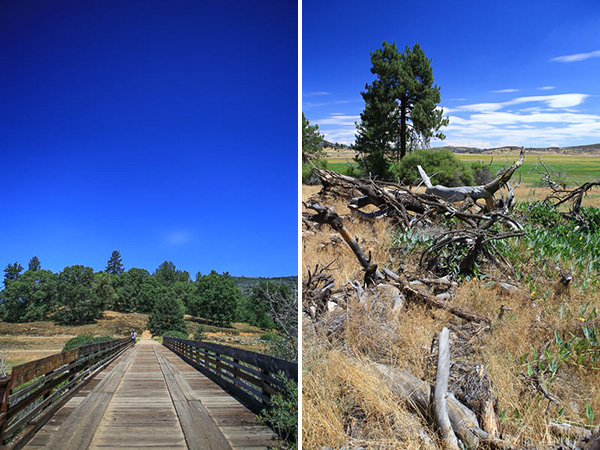
I find that I loose inspiration when I’ve been in the same area too long. When things become familiar they become less exciting. If this happens to you there is only one thing to do: leave!

There is huge value in leaving your area, city, or even state for a day or two. The process of traveling to an unfamiliar place jumpstarts the creative process.

Lake-Cayumaca-600px-5430

My photography was becoming stagnant so I left downtown San Diego and took an hour drive to Lake Cayumaca. Being in a totally different geographic area afforded me new opportunities to shoot things I don’t see every day in downtown San Diego.

Lake-Cayumaca-split

2. Learn something totally new and uncomfortable

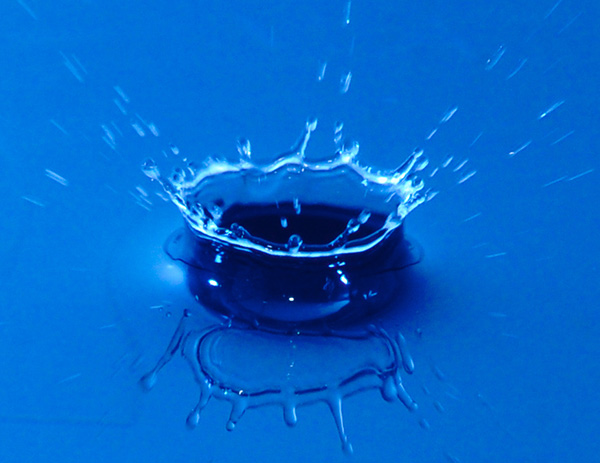
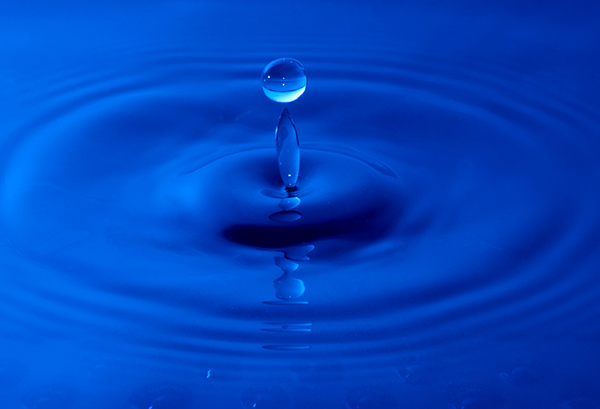
A few years ago I had gotten in a photography rut while shooting a ton of portraits. I decided I needed to learn something new so I decided to learn how to photograph water drops.

blue-crown

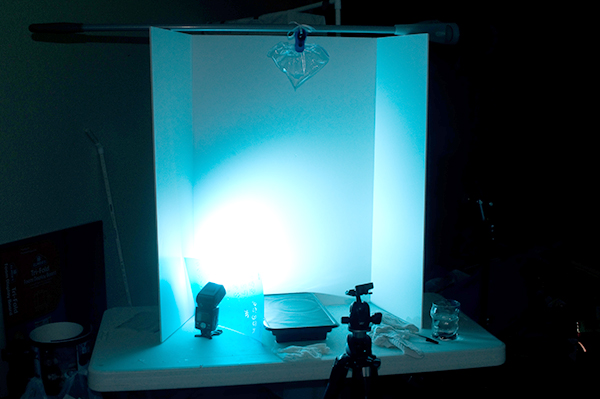
I read a tutorial online and set up a little station in my garage. I didn’t have any experience with macro photography but was excited to try. Check out the setup below:

blue-drop-setup

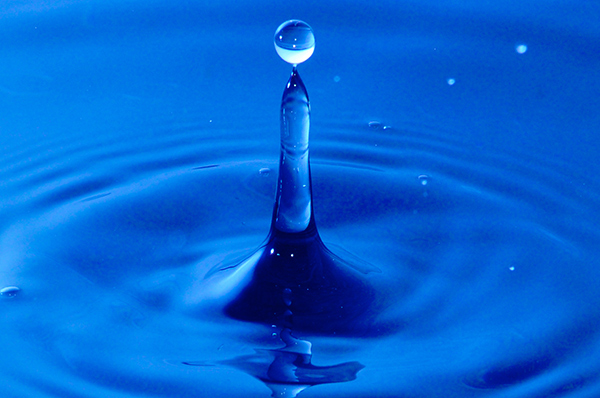
It took me a while to start getting decent results but I found myself loving the learning process. I had a great time and came away with a new skill set and a revived creativity.

blue-teeball

If you find yourself in a rut, learn something new that is unfamiliar. While there are people who put my water drop photos to shame I’m still proud of these images and the rut they helped me get out of.

blue-point

3. Try a new style of shooting

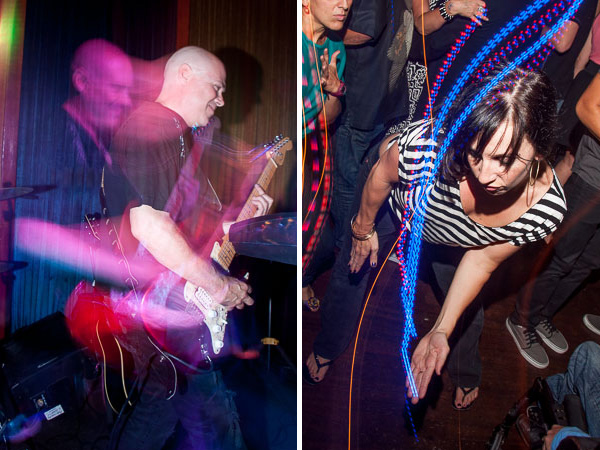
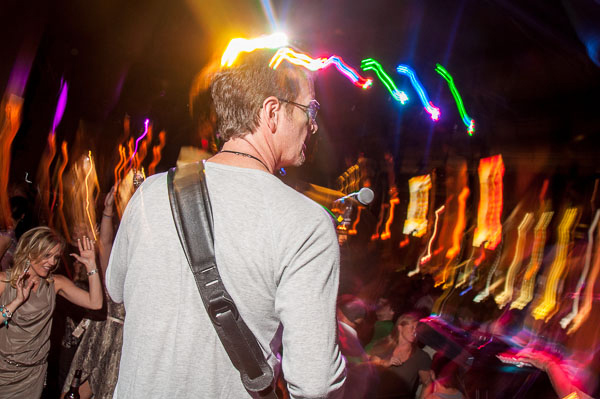
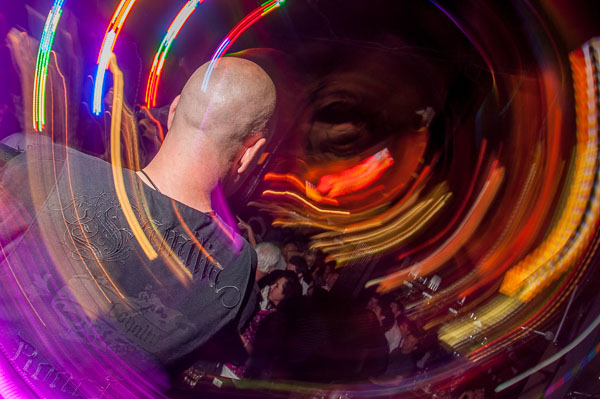
A few years ago I was starting to learn about rear curtain sync on my flash. I had a few friends who shot really cool light trails in their nightlife photography. I felt a renewed surge of inspiration to try this during a rock concert.

rear-curtain-sync

I plugged an Alien Bees flash trigger into my speed light and put the receiver onto my camera’s hot shoe. This enabled me to hold the flash up, and to the left, with my left hand while holding the camera with my right hand.

Jimmy-Loves-600px-80

I put my camera and flash on manual. I used a one-second-long shutter speed and set the flash power to properly expose the musicians a few feet in front of me.

Jimmy-Loves-600px-82

I clicked the shutter to start the exposure and immediately tilted my camera around in circles or side to side. Moving the camera while the shutter was open captured all the lights in the concert hall in different shapes. In rear curtain sync the flash pops at the end of the exposure and the shutter closes.

This combination of using a long exposure and rear curtain sync to create light trails taught me a new skill that I was excited to keep using in future shoots. It is important to master new skills to keep your creativity up.

4. Start an ongoing project

How ironic that my initial rut that was caused by shooting the same subject matter would become a source of inspiration. After half a year of shooting tons of bars and restaurants I looked back on my photos and noticed my favorite photos from those shoots were the corner bar shots.

Common Theory corner bar 600px-6605

After realizing this I got really excited to get back out there to start a project and shoot more bars and restaurants to add to my collection.

Modern Times corner bar 600px-6250

I’m really excited about this now!  I’m already thinking about my next trip and what bars I’ll stop at to add to my project.

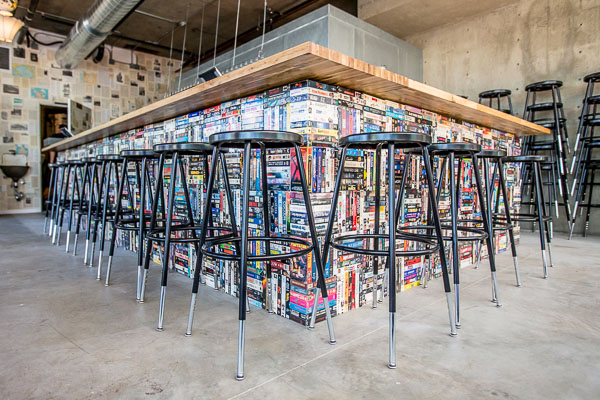
puesto-restaurant-interiors-5084

Getting in a rut happens to us all at one point or another. What ways have you guys found to kickstart your creativity? I’d love to hear your suggestions in the comments below.

The post 5 Ways To Break Out of a Creative Photography Rut by Mike Newton appeared first on Digital Photography School.


Digital Photography School

 
Comments Off on 5 Ways To Break Out of a Creative Photography Rut

Posted in Photography


Spice-Up Your Outdoor Photos with Wireless Off-camera Flash and Gels

17 Jun

Wireless off-camera flash is a great way to add a splash of light and give a scene an added dimension, or to fill in shadows in high-contrast scenes. The TTL (through the lens) exposure feature makes it easier than ever to get a well-exposed image without the need for a flash meter. However, there’s one more ingredient that you can add that will open up a new world of creative possibilities for your photography. That ingredient is easy to find, easy to use, and affordable: colored flash gels.

What’s a gel?

A gel is a piece of colored cellophane that you place over your flash head. Gels are available individually (expensive) or in more pocketbook-friendly multiple gel kits, which may contain anywhere from half a dozen to 20 or more different color variations. Gels come in primary (red, yellow, blue), secondary (green, purple, orange), and tertiary colors (Kelly green, red violet, pink, aquamarine, etc.).

Rogue envelope 600

The Expoimaging Rogue Gel Universal Lighting Filter Kit has 20 different gels that are: well-organized in tabbed compartments; housed in a handy-dandy holder; and divided logically into warm colors, cool colors, and color corrective gels. Each gel has information about how many stops of light it blocks, as well as White Balance values. This will help you determine appropriate exposure, flash output, and camera White Balance settings.

Some kits include color correction gels, which are intended to balance the flash (normally balanced for daylight) with artificial light sources, such as incandescent or fluorescent lights. They can also be used to add elements of warm, or cool light, as more subtle effects. While individual gels are larger and can be cut to custom-fit your flash, kits gels are generally smaller but large enough to fit over nearly any shoe-mounted flash, and usually come with a band or fabric fastener strip that affixes the gel to the flash.

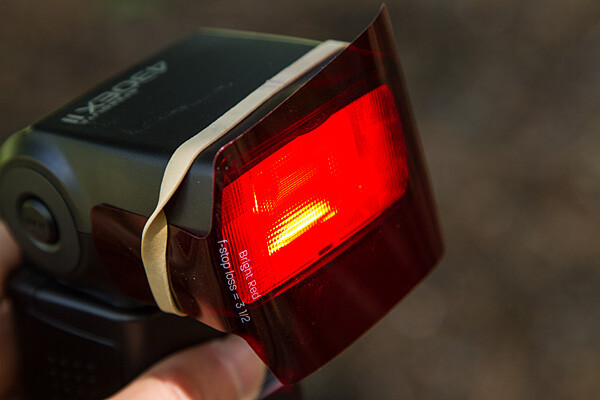
Flash redgel rubberband 600

Simple setup

All you have to do is take the gel and affix it to the front of your flash. While Rogue includes a black band that will do the job with just about any flash unit, sometimes a forgetful author needs to make due with a MacGuyver-like solution, such as using a rubber band (see image above).

The key to using a color gel to accent a scene is to use it with an off-camera flash. Fortunately, the cost of a TTL wireless flash is low. For instance, the Canon Speedlite 430 EX II currently costs under $ 260 USD, which is quite affordable. Whether you are using a DSLR, such as the Canon EOS 70D, or an advanced compact with wireless flash control, such as the Canon G16, you can fire the off-camera flash via a pulse from the on-camera flash.

Let’s take a look at one example of gels in action

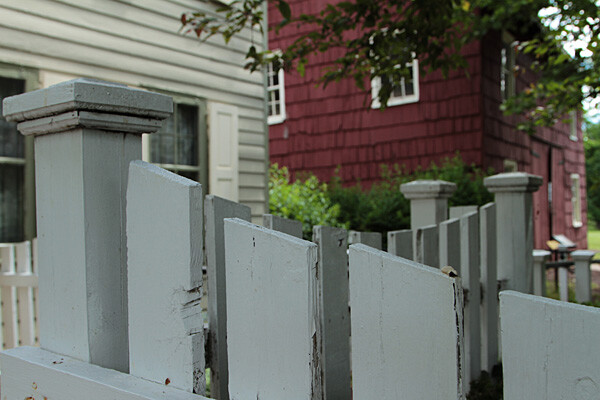
Whitefence noflash 600

Blah foreground – this white fence could be a unifying element in this photo of a restored colonial village in Piscataway, New Jersey, but because it’s in the shade, it’s just a boring grey. Gear: Canon EOS 7D, Canon 24-105mm f/4L IS USM lens.

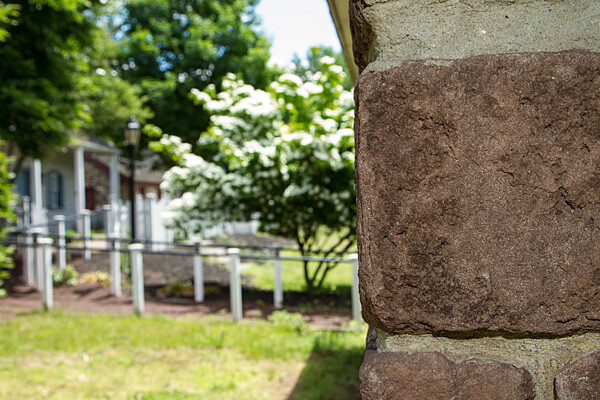
Whitefence flash nogel 600

A splash of flash – even if the fence had been more evenly lit, the plain white flash on the fence overpowers the image. Gear: Canon EOS 7D, Canon 24-105mm f/4L IS USM lens, and Canon Speedlite 430 EX II flash.

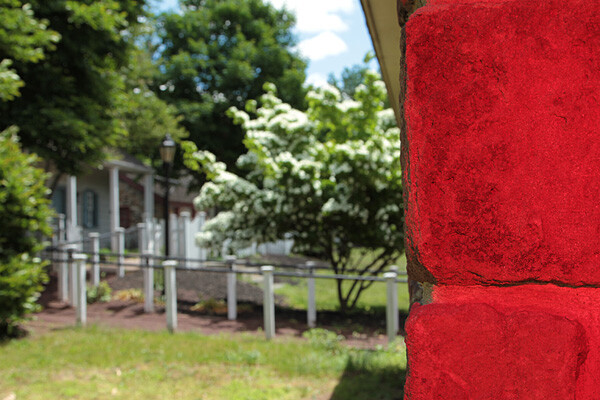
Whitefence redgel 600

Bright red adds interest – the idea was to pick up the red tones of the building in the background while leading the eye into the shot by adding a red gel, courtesy ExpoImaging Rogue Gels (read on). Reducing the intensity of the flash output would have changed the color from pink to red. Gear: same as above with Rogue Bright Red Gel added.

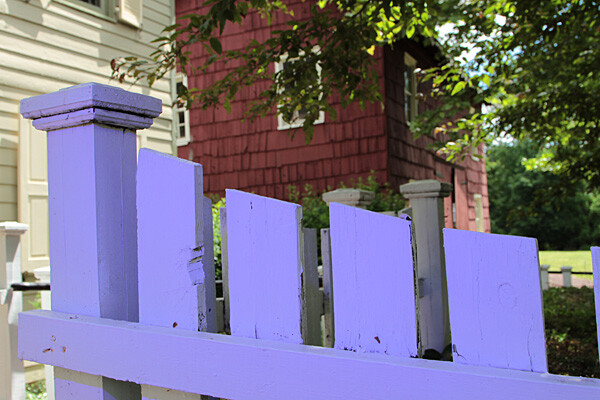
Whitefence levendargel 600

Oops, wrong color! In this case, the lavender gel was a mismatch. A color wheel, available at art supply stores, will help you make better choices. Gear: Same as above with Rogue Special KH Lavender Gel.

Step-by-step – how to trigger a Canon off-camera flash wirelessly

Here are the step-by-step directions for triggering a Canon 430 EX II wireless Canon flash from the Canon 7D. If you’re using another camera, check your manual for wireless flash instructions. Among Canon bodies, the directions will be similar to the following:

Flashsettings

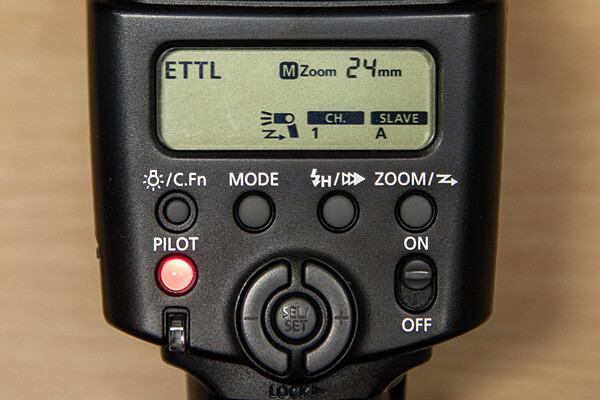
  1. Turn the flash on, then press and hold the Zoom button for a second or two. You’ll see a new flash icon and Ch 1 Slave A appear in the LCD screen (see photo above).
  2. Turn the camera on and pop up the flash.Wirelessfunc
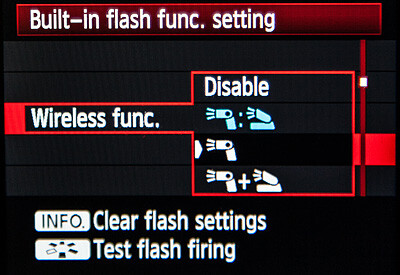
  3. In Menu in the first tab (camera operation), choose Flash Control, then scroll down to Built-in flash function setting, select Wireless Functions and choose the middle setting of the single flash (see above)

Take pictures!

Although the on-camera flash is flipped up, it will not fire during the exposure. Rather, it will flash a split-second before the exposure, which triggers the off-camera flash to fire during exposure, so your only source of flash illumination during exposure is the off-camera flash. To the naked eye, it looks as if the two flashes are going off simultaneously, but they’re not.

If you want both the on-camera and off-camera flash to trigger simultaneously during exposure, go back to Wireless Functions and choose the bottom setting, which shows the off-camera flash icon + a flip-up flash icon. In this setting, your off-camera flash is your key (strongest) light source, and the flip-up flash is a fill light. Choose the top setting (Off camera flash = flip-up flash) and both will provide equal power. We’ll explore these options in future articles.

The other way to set off a wireless flash is by using a separate wireless transmitter such as the Canon Speedlite Transmitter ST-E2. The advantage of using a transmitter over triggering your off-camera flash via your camera’s built-in flash, is that the transmitter uses infrared signals, and can trigger the flash from farther away, and at greater angles. When using your on-camera flash, your flash sensor must always be within line of sight of your camera. If you’re using a full-frame DSLR, such as the Canon EOS-6D or 5D Mark III, neither of which has a built-in flash, you will need a transmitter to trigger off-camera flash.

Let your imagination run wild! You can add crazy colors and transform a scene, or you can use a more subtle approach to improve a scene without overpowering it. Here are a few examples of both techniques.

Steeple redtree 600

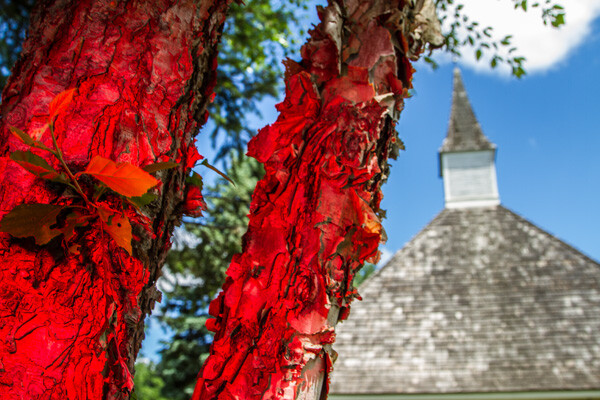
Wild and crazy – red tree adds primary color to offset the deep blue sky and add foreground interest. Too much? It’s a matter of personal taste.

Steeple noflash 600

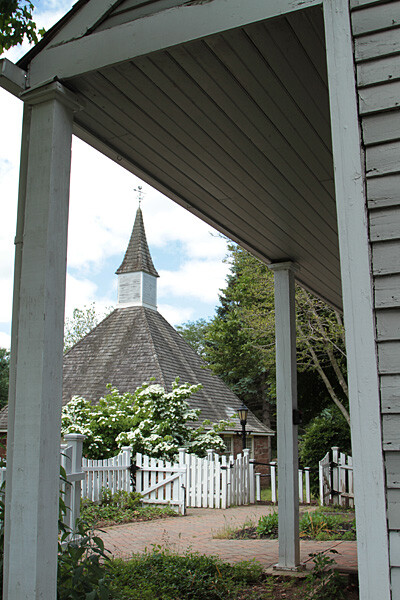
Before -this “frame within a frame” composition doesn’t quite work because the foreground is too dark, and the sun-drenched but interesting background is too light.

Steeple fullCTO 600

When lit with an unadorned flash, the foreground was uninvitingly cool. After adding a full CTO gel, the subtle splash of warmer light frames the background nicely.

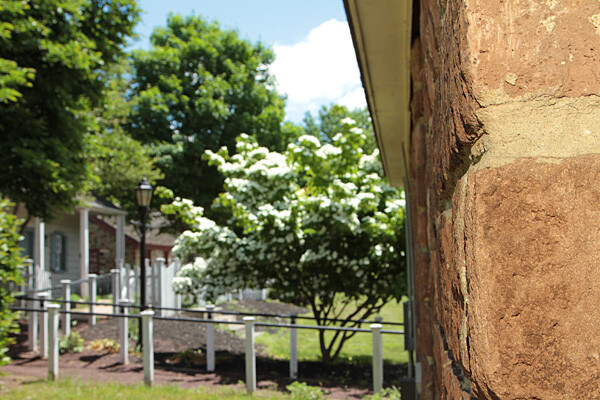
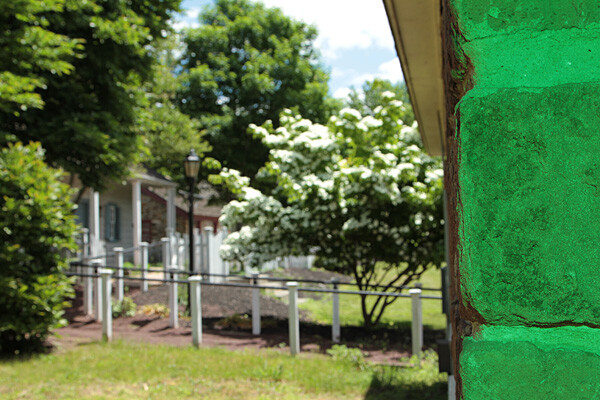
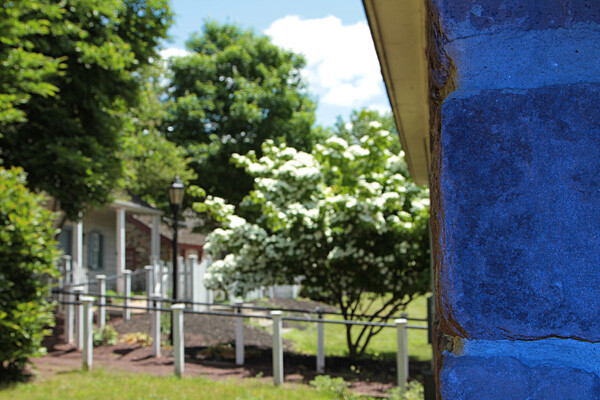
Experiment. Try different gels to see what they look like. Don’t like your result? Try another one. Here are several variations where different color gels were used against a foreground wall in the shade, to balance a bright, sunlit scene in the background. Camera and flash setup are same as above.

Wall fullCTO flash 600

Gel: full CTO, balanced for 3,200K ambient light

Wall mossblue 600

Gel: Moss Green

Wall justblue 600

Gel: Just Blue

Wall red 600

Gel: Red

Wall nogel 600

No gel

Have you done any experimenting with colored gels and off-camera flash? Please share your results and comments below.

The post Spice-Up Your Outdoor Photos with Wireless Off-camera Flash and Gels by Mason Resnick appeared first on Digital Photography School.


Digital Photography School

 
Comments Off on Spice-Up Your Outdoor Photos with Wireless Off-camera Flash and Gels

Posted in Photography