RSS
 

Archive for May, 2014

Create Art with your Photos Using Topaz Simplify

27 May

Simplified-after-1

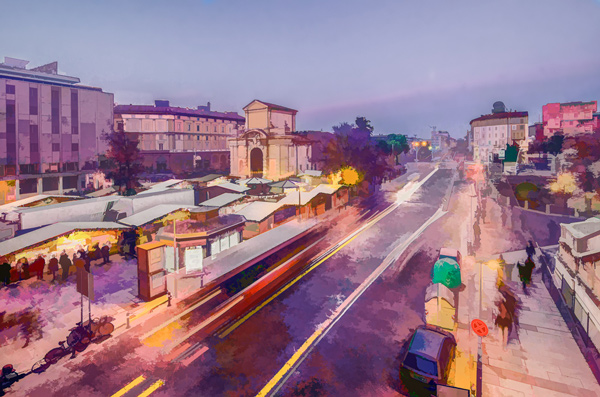
Topaz Simplify is designed in a way that allows you to transform your photography into something that resembles painted or drawn art. There are a ton of different styles of art packed into Simplify, from line and ink, to oil and watercolor painting; so it should provide some great creative opportunities for you. Today I’m only going to do a basic walk through on a couple of different photographs in order to introduce the product to you.
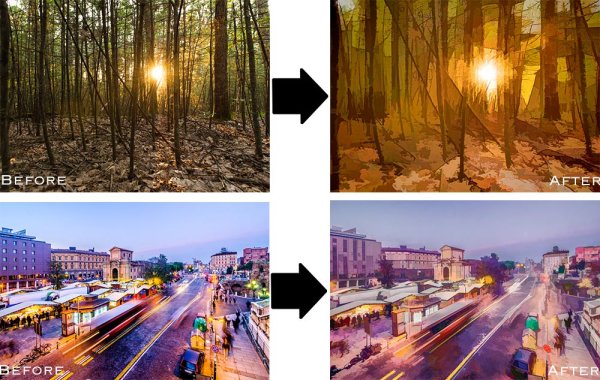
TopazSimplfiy-Beforeandafter

Before getting started I do want to mention that while I’ll be using Topaz Simplify as a Lightroom plugin today, it also works with Photoshop, Aperture, iPhoto and others so you don’t have to have Lightroom to use it. Find out all the info and get the free trial of Topaz Simplify here.

Topaz Simplify Basic Walkthrough

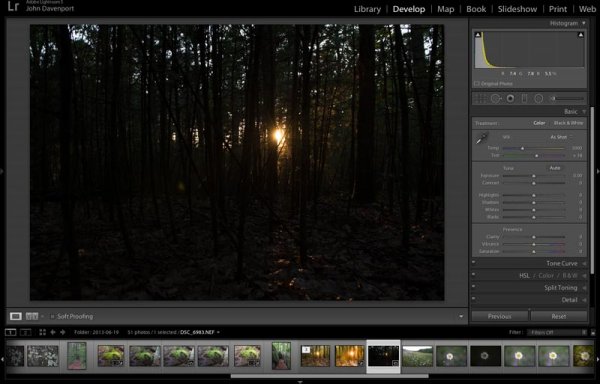
As you can see from the original RAW file below this photograph is in some serious need of help. It’s basically just an underexposed shot of the sun setting through the forest, without much of a focal point or anything interesting going on. Now I don’t want you to think that Simplify will solve all your terrible miss-fired shots, in most cases it won’t. But here I think it does a remarkable job at making lemonade out of lemons.

Do Lightroom basic adjustments first
TopazSimplify-Original

Original RAW file in Lightroom

Before we can use Simplify however, we do need to get the photograph into some sort of usable shape. For this photograph I’ve got to really rely on Lightroom’s power of saving an underexposed image which it handles without too much of a problem.

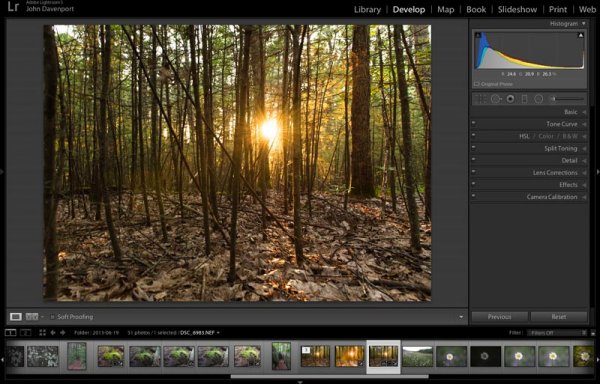
After some adjustments in Lightroom 5 using a combination of sliders in the basic tab, you can see that the photograph is at least now in a condition that Simplify will be able o handle.
TopazSimplify-LightroomCleanupCrop

After some basic Lightroom adjustments

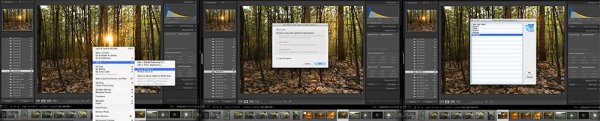
To use Topaz Simplify in Lightroom you’ll also need the free Fusion Express plugin (download it here) which is what launches all of the Topaz products. Once both programs are installed launch Topaz Simplify by right clicking on your photo. Navigate to EDIT IN > FUSION EXPRESS 2.
TopazSimplify-LaunchSequence

You can see this in more detail in the video below

Next, a dialog box will open up asking you to select how you’d like the photograph to be brought into Topaz Simplify there are three options here – I always choose ‘create a copy with Lightroom adjustments’ as the other two work off the original file in Lightroom. Note: if this is an area of confusion for you, you’ll be able to see this process in more detail in the video below.
TopazSimplify-AdjustmentForest

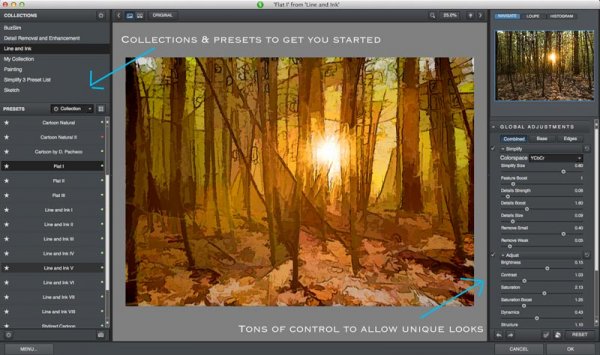
Topaz Simplify preset and adjustment options

Next try the ready-made presets that come with Simply

Once you’ve launched Topaz Simplify you’ll be brought into a new editor screen with a bunch of prepackaged collections filled with different presets.

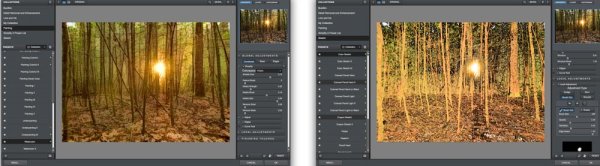
On the left-hand side, as you can see from the screen shot above, the Line and Ink collection is currently selected. There are a handful of other collections, each one containing a different set of presets, all of which are great when you’re just getting started with Topaz Simplify. I highly recommend just playing around with them to find out which ones suite your own creativity best, before getting to involved with the rest of the program. Here are a couple more variations on the photograph above that I achieved with just a few mouse clicks using presets.
TopazSimplify-Forest2

A couple more Topaz Simplify variations.

Customize and play

However, once you have gotten used to the presets and found the ones you like, you also have a lot of control to make the images your own through various adjustment options.

The right-hand panel offers the ability to control things like the overall intensity of the Simplify effect, the ability to determine which edges are drawn in harder or removed entirel,y and the ability to modify how much overall detail is pulled out from the scene.

You also have access to some options for basic image adjustments should you need to do some minor contrast, brightness or saturation modifications (though I’d suggest waiting on these until you get back into Lightroom).

Finally – one of the best parts of Simplify – is that Topaz decided to include bunch of great local adjustment options allowing you to burn, dodge, smooth and/or brush out the effects of Simplify in specific areas of your photograph.
Simplified-after-2

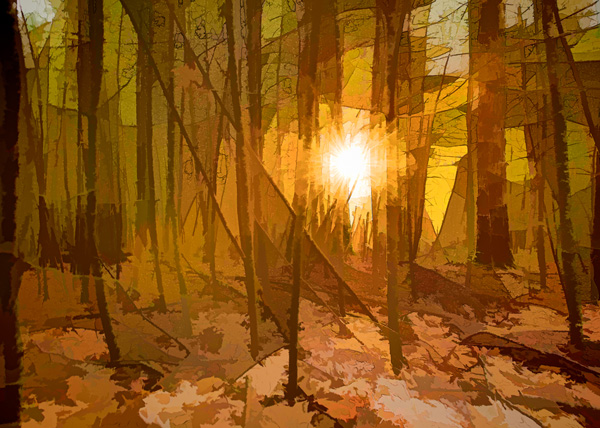
For a look at Topaz Simplify in action watch the video below where I run our second photograph from the two before and after images above through Simplify.

Topaz Simplify Basic Video Walkthrough

What do you think? Have you simplified a photo?

So after this basic walk through I’d love to hear your thoughts on the software. If you do go ahead and use it, or have done so in the past, how about a sharing one of your favorite before and after image sets in the comments below – I’m curious to see what you’re able to come up with.

The post Create Art with your Photos Using Topaz Simplify by John Davenport appeared first on Digital Photography School.
Digital Photography School

 
Comments Off on Create Art with your Photos Using Topaz Simplify

Posted in Photography


House of Metal: 15 Steel and Aluminum-Clad Residences

27 May

[ By Steph in Architecture & Houses & Residential. ]

Metallic Houses Main

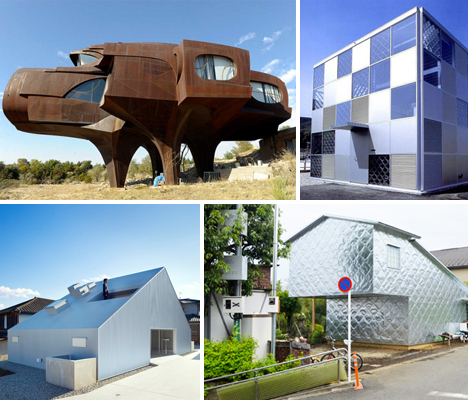
Durable, reflective and often becoming even more beautiful with exposure to the elements, metal is an unusual choice in exterior treatment for houses. These 15 metallic residences range from sculptural raised houses made of welded steel to sleek modern homes in Japan covered in privacy-enhancing perforated metal screens.

Soft Hard House by Terunobu Fujimori, Tokyo, Japan

Metallic Houses Soft Hard

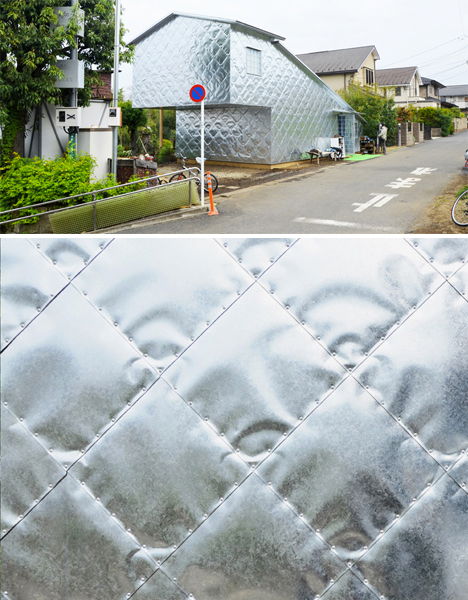
What looks like a quilted metallic blanket has been applied to the exterior of a private home in a small town near Tokyo. ‘Soft-Hard Aluminum House‘ features a cantilevered gable end and an unusual aluminum cladding with a slightly squishy texture. While the shape fits in with the more conventional houses of the neighborhood, the metallic treatment certainly makes the home stand out.

Steel House by Robert Bruno, Texas

Metallic Houses Steel Bruno

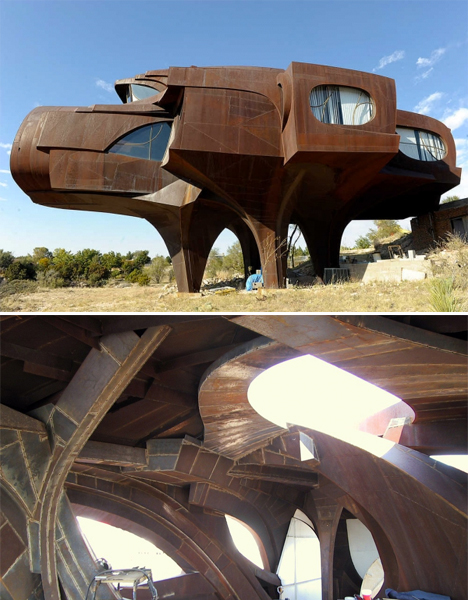
Architect Robert Bruno’s rusting Steel House is an icon and landmark in Lubbock, Texas. The sculptural home resembles a giant pig, and is made of 110 tons of steel, with an impressively cavernous interior. It was originally built in 1973, but over the years, Bruno continued to refine it, adding rooms and stories simply by welding on additional metal.

Balancing Barn by MVRDV, Suffolk, England

Cantilevered Balancing Barn 1

Cantilevered Balancing Barn 2

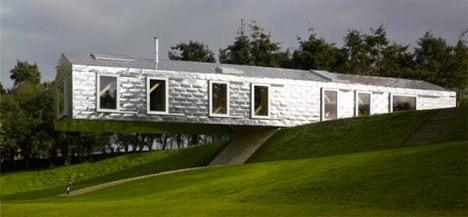
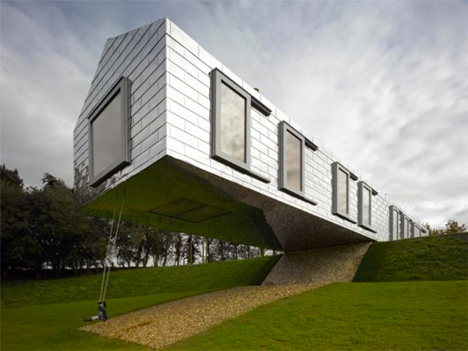
MVRDV’s gravity-defying Balancing Barn in Suffolk, England is another cantilevered structure with reflective metal cladding that mimics the look of bricks. The sheeting was chosen because it references the local building vernacular and reflects the surrounding nature over the changing seasons.

Cloudy House by Takao Shiotsuka, Oita, Japan

Metallic Houses Cloudy

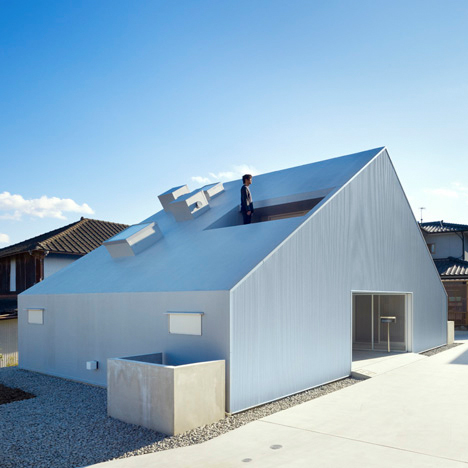
It may be named ‘Cloudy House‘ for its stormy gray color, but this gabled home in Oita, Japan looks quite bright and sunny when it’s nice outside. The entire exterior is covered in corrugated metal. The home features a tunnel that runs through its center to split the ground floor into two halves, each with their own entrance.

Croft Residence by James Stockwell, Australia

Metallic Houses Croft

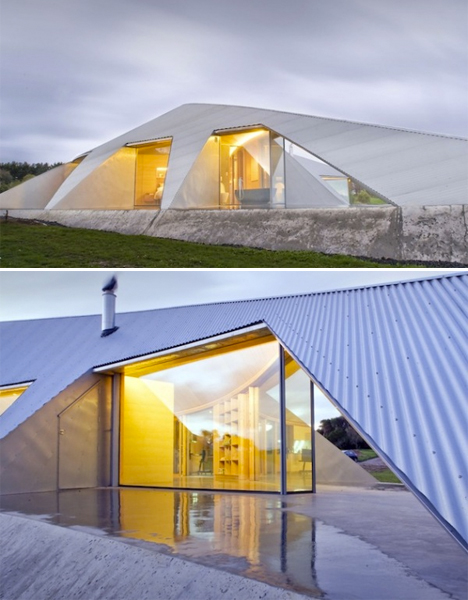
Reinforcing the rural context of corrugated iron, James Stockwell’s Croft House addresses “the core idea of shelter in an exposed environment” for a house with coastal vistas that blends into the land unobtrusively.

Next Page – Click Below to Read More:
House Of Metal 15 Steel And Aluminum Clad Residences

Share on Facebook


[ By Steph in Architecture & Houses & Residential. ]

[ WebUrbanist | Archives | Galleries | Privacy | TOS ]


WebUrbanist

 
Comments Off on House of Metal: 15 Steel and Aluminum-Clad Residences

Posted in Creativity


20 Cool Things You Can Do With Nik Software’s New Analog Efex Pro 2

27 May

I’ve been playing around with Nik Software’s new Analog Efex Pro 2 photo processing software (brought to you by the good folks at Google) all weekend long and I’m super impressed. The purist film photographers out there are probably going to hate this new software, but for you digital photographers who dig an analog look and feel, you are going to love this.

I shot film exclusively for about 15 years before switching to digital in the early 2000s. While there is an absolute undeniable romance with rolling your own film, hanging out in a darkroom with your college girlfriend, and licking the fixer off your own prints you made yourself, it’s not something I think I’ll ever go back to — unless and maybe when my hipster buddy Daniel Krieger finally convinces me to buy a film Hasselblad.

I used to joke around with anyone who asked me what camera I shot and tell them a Holga. Now it’s like I really am shooting a Holga, just with my Canon 5D Mark III. ;)

Anyways, check out 20 different looks you can create with Analog Efex Pro 2. I’m a fan. You can buy it here if you want.

Motion Blur. It’s like owning a lensbaby without having to actually use one of those horrible awkward things. Just kidding, lensbabys are great!

How did I ever get a double exposure of this classic neon sign? I’ll never tell.

Hey It’s Amanda Morgan shot with my cool Toy Camera #9.

Wet plate photography, without all the sticky wet plates.

Jenna Jamieson shot with Toy Camera #1.

Every respectable concert photographer brings their Toy Camera #2 to the photo pit these days. Chvrches rock!

Instant triptychs.

Classic Camera #7 has such a nice warm film feel, doesn’t it?

Hey tilt shift and I didn’t even have to buy the $ 2,500 Canon TS-E 17mm f/4L Tilt-Shift Lens! Which is a totally awesome lens by the way that I actually will buy someday. Canon L lenses are the best. I cannot say enough positive things about all my Canon glass. I’m not being sarcastic there, I’m being serious.

One of my neon signs that I took back in 1972 while on a photography junket across America with Stephen Shore.

Motion blur with Jeremiah Owyang. It’s just like Star Wars only better because it’s got Jeremiah in it.

Colorcast #2 makes butterflies look so pretty.

Colorcast #2 makes models look so pretty too, but this one was already pretty to begin with. :)

I think this painting from the Met in New York City looks better this way, don’t you? I could totally print this up and hang this in my house. So can you too, because I licensed it Creative Commons non-commercial. Friends share right? ;)

Oopsie, a little light leak thing happened in my Holga again.

Doing wet plate photography in Holbrook, Arizona.

Love the authentic real life colors from Classic Camera #2 on this San Francisco victorian in the Mission District. A couple million in stock options and this too can be yours.

Smoothdude let me borrow his Hasselblad to make this photo on our Route 66 trip last year.

I took a photo of my Kodak Instamatic with my Kodak Instamatic. Get it?

More Seattle fun with Toy Camera #2.


Thomas Hawk Digital Connection

 
Comments Off on 20 Cool Things You Can Do With Nik Software’s New Analog Efex Pro 2

Posted in Photography


Leica M Monochrom now available in grayscale (sort of)

26 May

monochromintro.jpg

Have you been lusting after a Leica Monochrom but anxiously hoping for its release in a new body finish? Well your long, nightmarish wait is over. Leica has announced that its M Monochrom, first announced in 2012, is now available in a new limited silver chrome ‘color version’. Click through for (not much) more information, or just to take part in the inevitable comments debate about whether chrome and /or black really count as ‘color’ options. 

News: Digital Photography Review (dpreview.com)

 
Comments Off on Leica M Monochrom now available in grayscale (sort of)

Posted in Uncategorized


Three Methods of Making Stunning Photographs in Bright Sunlight

26 May

Location Lighting Masterclass – The Art Of Shooting Into The Sun

Shooting directly into the sun may not be the first thing that pops into your mind when creating a photograph, but the effects it can have on your final image when done correctly can border on magical.

1

#2 The Dreamy Look

There are three primary looks that can be achieved by shooting into the sun.

  1. The first of these takes advantage of lens flare and aims to over-expose the image drastically, creating a ‘dreamy’, almost glowing look. (see image above)
  2. The second ignores the foreground entirely, exposing only for the brightly lit sky and creating foreground silhouettes.
  3. The third comes somewhere in between, exposing for the brightly lit sky and simultaneously using reflection or fill flash to overpower the foreground shadows.
The Silhouette Look

#2 The Silhouette Look

#3 The Balanced Look

#3 The Balanced Look

Let’s work through each of these in turn, how to make stunning photographs in bright sunlight.

#1 – the Dreamy Look

This is not a photographic style I typically aim to produce, however it is nonetheless popular with many photographers. The style aims to expose for the skin tones predominantly, allowing the background to become significantly overexposed; and in the process, create a soft glow around the subject. This style can also take advantage of lens flare (the rings of light that appear in your shot when you shoot directly at bright sunlight) and the varying types of lens flare that different lenses create. To achieve this look, ensure that you have spot metering selected on your camera and measure directly for the skin (you will need to be in aperture priority mode for this). It doesn’t matter if the background overexposes; the primary aim is to expose for the skin and facial features. The brightness of the background will typically create a haze across the rest of the image.

4

#2 – the Silhouette Look

Again, using the camera’s spot meter in Aperture Priority mode, you will need to meter and expose for the background. Select an area (not directly on the sun itself) of sky near to the sun. You can lock the exposure using the AE lock function (usually the “*” button on Canon cameras) to enable recomposition of the image. Alternatively, note the shutter speed reading where you metered on the sky, switch to manual mode and set the camera up with the given shutter speed and aperture manually. Here, the aim is to darken everything in the foreground so be sure to think about the kind of silhouette you’re creating. Less is usually more. Too much in the foreground just creates clutter and loses the focal point.

5

#3 – the Balanced Look

The final, and arguably the most powerful is partway in between, and utilizes flash to fill the image exposure correctly.
Just like the silhouette style, you should meter on the background sky. If you don’t use flash, you’d end up with another silhouette. Instead, crank up the power of the flash as far as it will go (it takes a fair amount of flash power to overcome direct sunlight). About 600w (watt seconds) is preferable, and ensure that the subject you want to light up remains relatively close (due to the inverse square law, light fall-off will very quickly erode the power of the flash). Some post-production boost to the shadows and recovery of the background highlights may be necessary to properly balance the exposure.

6

A few general hints to help with direct sunlight shooting:

1) Autofocus often struggles in direct sun. Try first shading the end of your lens with your hand, focussing on your subject, then switching off autofocus and taking the shot without shading the lens.

2) Colors and white balance can often be thrown by bright sunlight. Be sure to shoot in RAW so that you can true up any color differentials later on.

7

3) Use a polarizer or ND (neutral density) filter where you can. Really bright direct sunlight and long exposures are not good for your camera’s sensor over time, just as they are not good to stare at with your naked eye.

4) Think about the time of day – you want light to fall behind your subject, not on top of it. Therefore, early mornings and late afternoons are best for this type of photography. It is also when the sunlight is weakest, resulting in less overexposure and less risk of damage to the sensor.

8

5) Think about alternative fill light sources. Consider reflective windows, white walls, metallic surfaces – effectively anything that can bounce the direct sun back into the subject to naturally add fill light. This means you will need to have your back to the reflective source.

10

6) Consider some post-production magic, if too much flare is coming into the shot. Mount the camera on a tripod so that the image doesn’t shift, then take two shots of the same scene with the same exposure settings. For one shot, leave the image as is, but for the second, shade the end of the lens with your hand. It doesn’t matter if your hand appears in the image because during post production, you simply join the half from the shaded shot that doesn’t have your hand in it, with the bright half from the unshaded shot. This technique will leave the full effect of the flare around the sun, but enable you to remove the surplus flare from the rest of the image.

9

The post Three Methods of Making Stunning Photographs in Bright Sunlight by Leo Edwards appeared first on Digital Photography School.

Digital Photography School

 
Comments Off on Three Methods of Making Stunning Photographs in Bright Sunlight

Posted in Photography


35 Adorable Pet Images to Make You Say “Awww”

26 May

Pets fill the places in our hearts really fast, and it’s always cool to have an adorable picture of your pet on your desktop. While pet photography is one of the most interesting subjects to shoot, it’s not always easy to capture their true, cute personality. Unlike humans, pets do not understand what we are going to do and will Continue Reading

The post 35 Adorable Pet Images to Make You Say “Awww” appeared first on Photodoto.


Photodoto

 
Comments Off on 35 Adorable Pet Images to Make You Say “Awww”

Posted in Photography


Portfolio: Photography student Luke Evans

26 May

PHOTOBOOTH_NEW-1.jpg

Luke Evans is a student, just coming to the end of a three-year course in graphic design and photography at London’s University of Westminster. Since starting the course Luke has received attention from media across the globe for his unusually fresh approach to the challenges of the course. Luke’s work is imaginative, technically innovative and thought-provoking, and we spoke to him as he was preparing his final year show. Click through to read our interview and see some of his work.

News: Digital Photography Review (dpreview.com)

 
Comments Off on Portfolio: Photography student Luke Evans

Posted in Uncategorized


26. Mai 2014

26 May

Ein Beitrag von: Peter Eberhardt

Architecture © Peter Eberhardt


kwerfeldein – Fotografie Magazin | Fotocommunity

 
Comments Off on 26. Mai 2014

Posted in Equipment


Wanted: Freelance news / features writers!

26 May

DPRlogo.png

We’re on the lookout for freelance writers to contribute news and short feature content for our homepage. If you’re an experienced writer with great editorial instincts who loves ferreting out interesting and unusual photo-related content, we want to hear from you. Click through for more details.

News: Digital Photography Review (dpreview.com)

 
Comments Off on Wanted: Freelance news / features writers!

Posted in Uncategorized


Agbogbloshie

26 May

Agbogbloshie ist eine der größten Elektroschrott-Mülldeponien der Welt und liegt im westafrikanischen Ghana. Der Inhalt von rund 600 Kontainern landet hier jeden Monat. Kevin McElvaney hat die Kinder und Jugendlichen getroffen und portraitiert, die hier leben.

Viele von ihnen sterben an Krebs, bevor sie 30 Jahre alt werden. Und das für gerade einmal 2 Dollar am Tag, die sie verdienen, indem sie den Elektroschrott verbrennen, um anschließend die darin enthaltenen Edelmetalle zu verkaufen.

Die Fotostrecke wird am 6. und 7. Juni in Hamburg, Warnholtzstraße 4 ausgestellt. Der Fotograf Kevin McElvaney und sein Partner des Projektes, der ghanaische Umweltaktivist Mike Anane, der extra aus Accra anreisen wird, sind vor Ort und stellen sich gern den Fragen der Gäste.

Die Idee ist, dass diese Ausstellung anschließend von jedem in seine Stadt geholt werden kann, um auf das enorme Problem aufmerksam zu machen. Die nächsten geplanten Stopps sind in Chicago, San Francisco, Amsterdam und Accra.

© Kevin McElvaney

© Kevin McElvaney

© Kevin McElvaney

© Kevin McElvaney

© Kevin McElvaney

© Kevin McElvaney

© Kevin McElvaney

© Kevin McElvaney

Ich habe Kevin gefragt, was ich tun kann, damit mein alter PC nicht in Ghana landet. Er empfiehlt die offiziellen Recyclinghöfe, merkt jedoch an, dass auch hier hin und wieder Sub-Unternehmer das System stören und am Ende wiederum das passiert, was nicht passieren soll: Die illegale Entsorgung statt Recycling.

Am Schluss kann man leider nur zu der Erkenntnis kommen, dass Verzicht und weniger Konsum all das minimieren kann, denn keines der Versprechen in Politik und Industrie greifen bis heute, auch 30 Jahre nach den Baseler Konventionen. ARTE hat hierzu kürzlich ein Spezial gebracht.


kwerfeldein – Fotografie Magazin | Fotocommunity

 
Comments Off on Agbogbloshie

Posted in Equipment