RSS
 

Archive for May, 2014

Vapour With Greg Cunningham

05 May

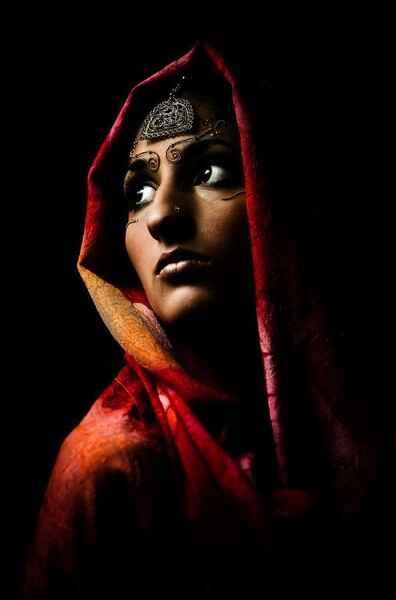
Greg Cunningham photo Vapour

Photo Of The Week rounds had never seen a week like this, what could only be described as FIERCE! There were over hundred votes that was submitted and second and third place were biting right on the heels. It was very suspenseful week to watch and I felt my heart thumping out of my chest watching the leader board race back and forth like a day at the horse races, but in the end it was Greg Cunningham’s photo which is just one image in a photographic series, entitled “Vapour”, that won the crown of Photo of the Week, with only fractions separating second and third place.

With the race to the finish line over, I was able to get a chance to interview Greg Cunning on how he started as a photographer and what is the inspiration behind his hauntingly beautiful photo submission. When asked about his beginnings in fashion photography Greg explained that, “Fashion photography for me is a creative outlet. My career as an air crewman in the US Navy has little to do with artistic expression so it really helps to keep me level as a person.”

From operating planes to operating cameras he explained, “I was looking for a hobby around 6 years ago when I was based in the Pacific Northwest. So my intent was to take beautiful landscape photos of Washington state and that never happened. I knew a few of the night life promoters in Seattle and they would hire photographers at their events to take candid snaps for a little money, so I figured if I was already going to be there I might as well make some money and meet some new people.

That grew old before I had even photographed ten events in a three month period. The last event I photographed was a charity fashion show and I surprised how striking some of the models were. After I turned the photos over to one of the local boutique owners they asked me if I had ever thought of photographing fashion on a more serious level. They graciously introduced me to the agency models that I had seen walking in the show. So from then on I have been studying fashion and beauty photography and the professionals past and present.”

Greg remains humble about his photographic abilities stating “I am not proficient enough to consider myself a professional fashion photographer. It is a hobby that became a passion.” That is very true for most photographers in the industry on how they got started, and everyday is a learning experience in the field.

To create the shoot for his Vapour series Greg used the following:

Alienbee 1600 w/ 22″ Beauty Dish Key light
Alienbee 1600 w/ 20 degree grid for rim light
Canon 5D MK II w/ 24-70mm f/2.8


The results? Tremendous, breathtaking and surreal. When asked if there was any last words of wisdom he would like to share to the next generation of photographers, at the end of the interview, he shared these words, “Stay humble out there.”

To find out more about Greg Cunningham and photos from his Vapour series, including the one featured here, you can visit his website: www.gicunningham.com and blog: www.gicunningham.tumblr.com
You can also catch greg via email, instagram and Twitter:
Email: greg@gicunningham.com
Instagram: gicunningham
Twitter handle: gicunningham

Currently, we have another round of Photo Of The Week running. To participate in the voting, make sure you “like” our Facebook page here and vote for your favorite photographer‘s photo out of the finalists in the comments section of the post. The photo with the most vote’s by the end of the week at Sunday midnight will win Photo of the Week and win the great prizes on offer.

Since FashionPhotographyBlog.com is Google’s #1 site on fashion photography in the world, you might be interested in entering our Photo Of The Week competition. this could be your entry to some great exposure if you submit your photo and win. To find out more details on how to enter, make sure you join our mailing list. We will send you the entry details via your email.

As a reminder, voting ends at the end of the week so make sure you get voting on our Facebook page here. Tell us in the comments below, do you agree with how this week’s voting outcome? What is your critique on this photo? We want to here from you!


Fashion Photography Blog

 
Comments Off on Vapour With Greg Cunningham

Posted in Uncategorized


10 in 1 Day: Chinese Homes 3D-Printed from Scraps Materials

05 May

[ By WebUrbanist in Architecture & Houses & Residential. ]

3d printed almost finished

Using recycled construction waste and rapid prototyping processes, a Chinese company is showing off how 3D printing technologies can be applied to building at astonishing new speeds and scales. More specifically: Winsun New Materials used a series large 3D printers to frame up 10 houses in 24 hours with a skeleton crew of builders.

These scaled-up printers mimic the additive approach their smaller plastic-extruding cousins, but deploy a mixture of glass fiber and scrap concrete instead.

3d printed extrusion printer

3d printed house china

The function-first walls of these homes are designed to provide shelter via robust solid surfaces and structural support, all while minimizing materials. Built-in truss shapes (with spaces in between) are made to leave calculated gaps for the later insertion of plumbing, electrical, passive and active heading and cooling systems.

3d printed building construction

3d printed wall sections

In this initial run, the resulting prefab frameworks for ten residential structures were assembled in less than 24 hours and for just a few thousand dollars a piece. Securely enclosed by a small crew of builders, the weather-proof shells are then ready to be finished by other teams.

3d printing on site

3d printing in china

Given the pace of urbanization and construction within the country, it seems apt that innovators from China would be pushing limits like these, hopefully with more (and similarly eco-friendly) innovations yet to come.

Share on Facebook


[ By WebUrbanist in Architecture & Houses & Residential. ]

[ WebUrbanist | Archives | Galleries | Privacy | TOS ]


WebUrbanist

 
Comments Off on 10 in 1 Day: Chinese Homes 3D-Printed from Scraps Materials

Posted in Creativity


A Beginners Introduction to Using Layers

05 May

Using layers in your photo editing software is one of the most important things you can do to create great images. Layers are so powerful, even the most basic understanding of them can improve your photography tremendously. The good news is that using layers is extremely easy, and very quick. If you follow along with this tutorial and incorporate the techniques, you’ll see a huge difference in the quality of your images.
22 use gradient

While there are countless things you can do with layers, it’s convenient to group them into three main categories:

  1. Exposure blending
  2. Local adjustments to specific parts of an image
  3. Special techniques

We’ll go through all three categories in this tutorial. Please keep in mind this guide is meant to demonstrate the power of layers and why you want to use them. It’s not a software-specific guide and the exact mouse-clicks and menu items may vary slightly among the different photo editing packages available. That said, the use of layers is very similar in all software.

EXPOSURE BLENDING

Exposure blending is one of the best techniques you can use to improve your photos. It’s critical to understand and use this skill. It’s also super-easy!

First, let’s understand why you need to blend exposures. We know that a camera has limited “dynamic range”. That means the camera has a hard time capturing very bright parts of a scene and very dark parts in a single photo. As a photographer, you would generally choose to prioritize one over the other. This is a sacrifice photographers have been dealing with for decades.
Exposure blending solves this problem.

You simply take two or more photos of the scene at various exposures and blend the best parts of each exposure to produce a single image where all areas are exposed correctly. Wait you say, isn’t that HDR? In a way it sort of is. The difference between automated HDR software and this technique is that HDR software uses a computer algorithm to choose the areas of your photo to blend, while using layers gives you complete control over the final image. It can also be a much quicker process than using dedicated HDR software. Both processes can be considered “High Dynamic Range” photography, and both have their place.

So how do we do it? It’s very simple, you layer the photos with different exposures on top of each other and then manually blend them. Before we blend exposures, let’s take a quick look at how layers work.

Here we see two photos, one of the Brooklyn Bridge and one from Bora Bora.
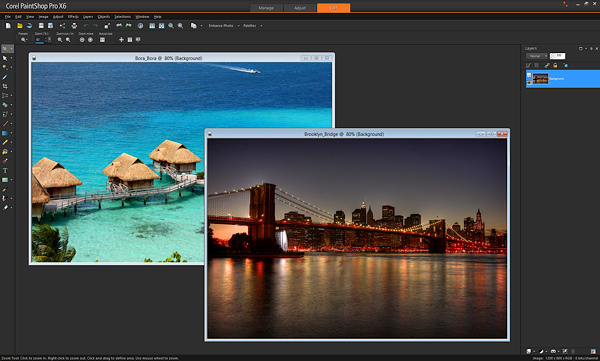
1 Brooklyn and Bora Bora separate

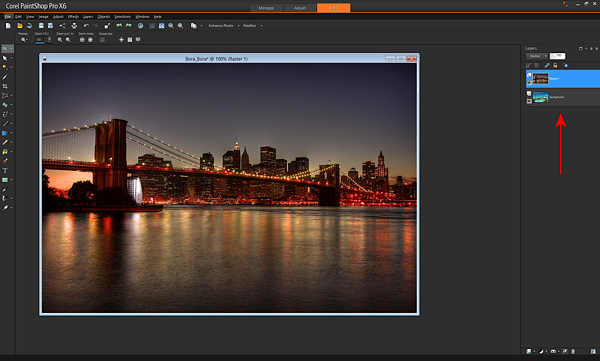
To layer them, I’ll copy-and-paste one photo on top of the other in my editing software. (There are a variety of ways to layer photos depending on the software you use. I use copy-and-paste). After I paste the Brooklyn Bridge photo on top of the Bora Bora photo, you can now see on the right of the screen, where the red arrow points, that the photos are now layered in one document (see image below).
2 Brooklyn and Bora Bora layered

If I were to take an eraser brush and swipe it across the top layer, I will erase that top photo and “reveal” the photo below it. Here’s an example after I’ve taken a swipe with the eraser brush.
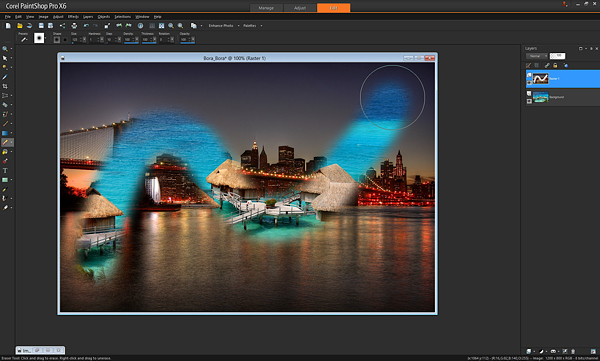
3 Brooklyn and Bora Bora erased

That’s all there is to understanding the very basics of how layers work. With just that little piece of knowledge, your photography can be completely transformed.

In the example above, I used the eraser brush to reveal the layer below. That’s one way of doing it, and I showed you that first because it’s an easy way to demonstrate layers. However, most people use what’s called a “layer mask” instead of the eraser brush. Don’t worry, it’s not complicated.

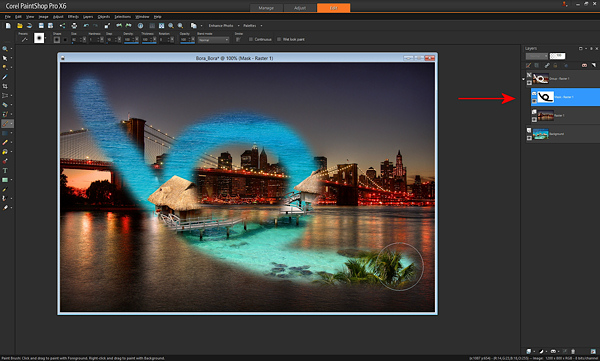
A layer mask is just another way of revealing the photo below. Instead of using the eraser brush to reveal the bottom photo, you create a middle layer between the two photos called a “mask layer” and you draw on it with a paintbrush – wherever you paint, the top photo is “erased” revealing the bottom photo.

To create a layer mask, just layer two photos on top of each other like I did above, then from the menu click “Create Layer Mask –> Reveal All”. Then you use the paintbrush on the mask to reveal the bottom photo. Painting with the color black reveals the layer below, and if you switch the color to white, it will “undo” wherever you’ve painted black so you can clean up any strokes you didn’t want to make (black reveals, white hides the layer below). Here is the same example below with a layer mask – you’ll see the effect is identical. Notice the new mask layer by the red arrow.
4 Brooklyn and Bora Bora mask layer

The great part about layer masks is that you can save the entire set of multiple exposures along with the masks in a single file, which you can edit later. The original exposures are left completely untouched. That’s the difference between using a mask and using the “eraser brush” directly on your photo. With a mask, you can always go back at any time and paint with the white paintbrush to undo anything you need to.

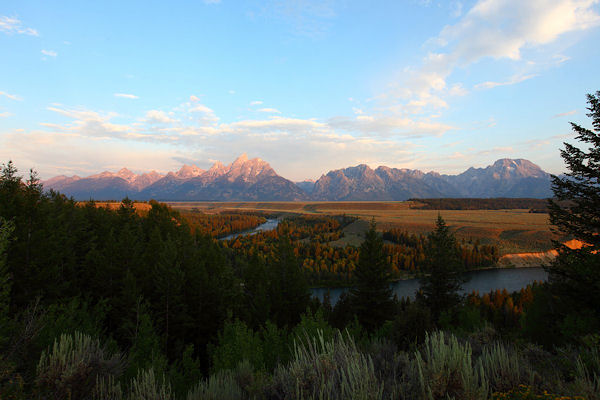
Now that you know how to use layers, exposure blending is very easy. Here’s a photo I took in Grand Teton National Park. Notice that the mountains and sky look properly exposed, but the foreground foliage is way too dark.
5 Tetons Mountains background

Without exposure blending, the photo above is the best I could do. However, while I was at the location, I also took another photo with the foreground exposed properly. Notice though how the sky is completely blown out and the mountains are overexposed now.
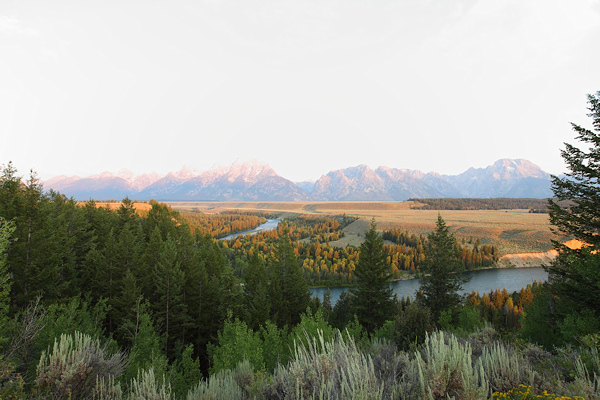
6 Tetons Foreground

With layers, I can easily blend these two images to create the perfect combination, and it only takes a few seconds. I just take the photo with the good exposure for the mountains and paste it on top of the photo with the good exposure for the foreground. With the properly exposed foreground on the bottom, I use the brush to reveal that bottom photo wherever the leaves are too dark. Here it is after one swipe with the brush. You’ll see the better exposure is revealed below.
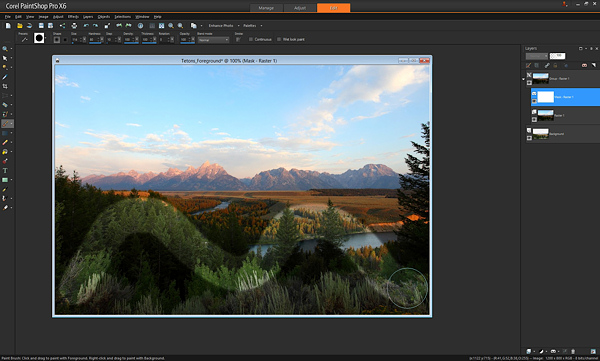
7 Tetons brush swipe

That’s it. After some practice, you’ll be able to do this very quickly, with the final photo looking like this.
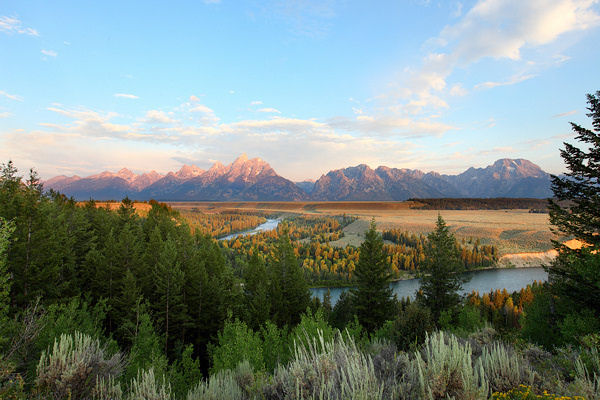
8 Tetons Blend

Of course there is one key thing to remember: You must take multiple exposures at varying brightnesses when you’re at the scene!

If you forget, you can sometimes fudge it and brighten dark areas in your editing software, but you can never darken the overly bright parts if you forget to take a photo with those areas properly exposed. Always make sure at least one photo has the bright areas exposed properly (nothing clipped or overexposed).

Here’s an additional example of exposure blending below. How many of us have taken this shot? Sure would be nice to see what’s outside that window.
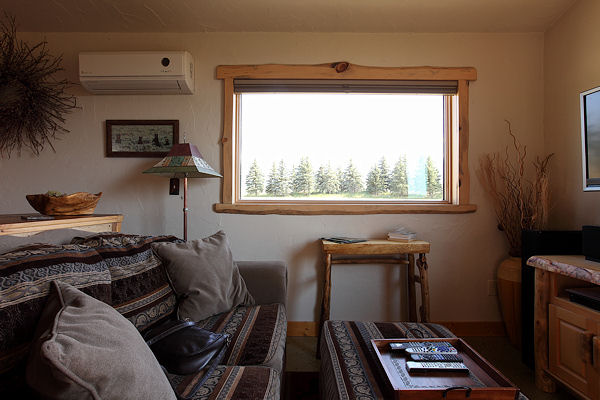
9 Montana Interior

If you took another exposure with the outside properly exposed, it’s simply matter of layering the two photos on top of each other and revealing the bottom photo with the properly exposed window. Here’s the photo for just the outside.
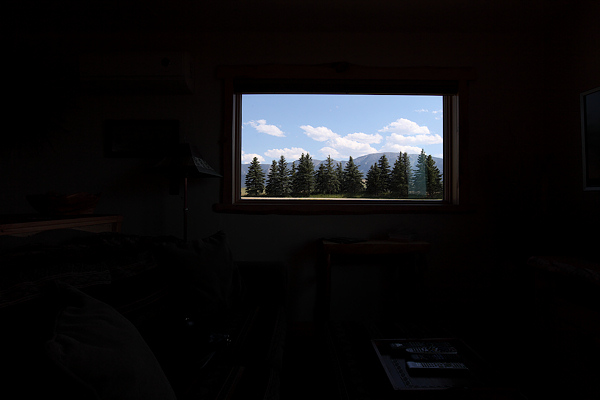
10 Montana Exterior

…and the final blend looks like this.
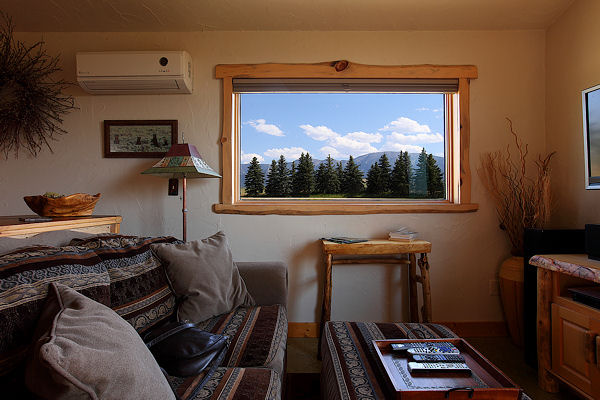
11 Montana Blend

Let’s talk about the opacity and color you can use with the brush when painting on a mask layer. We know that a black paintbrush erases the top photo revealing the photo below, and that a white paintbrush is like an “undo” that puts the top photo back where needed. In addition to just the white and black paintbrush, you can also use any shade of grey. Using a grey paintbrush blends the two photos together, making the top photo slightly transparent so you see both the top and bottom photo at the same time. The darker the grey the more the top photo is erased. The lighter the grey, the more the top photo is visible. This allows for very subtle and realistic blending of the two photos. You may also see it as “opacity” in your software. When the brush opacity is 100%, the brush is at “full strength”. When you swipe the brush, it erases 100% of the top layer fully revealing the layer below. If you set it for 50%, a swipe of the brush works at half-strength.

Here’s an example of a swipe of the brush at 50% opacity or medium grey.
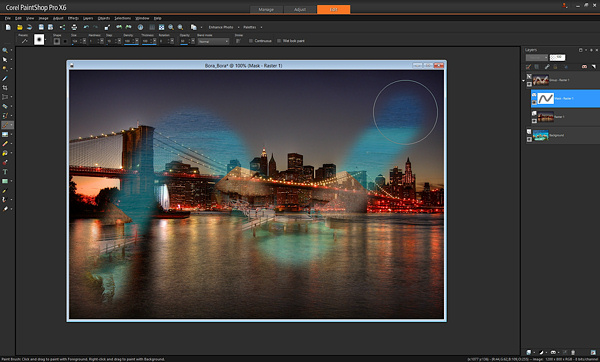
17 Brooklyn and Bora Bora opacity

Notice how you can see both the Brooklyn Bridge and Bora Bora at the same time. Adjusting the opacity or grey-level lets you apply the effects more subtly and with more control as needed. For example, with the Grand Teton photo in the earlier example, where the foreground leaves meet the background mountains, I might use the brush with 50% opacity so it’s a nice seamless blend, that’s unnoticeable. Another way to create a seamless blend is to use a brush with a low “hardness” — that is, the center of the brush is 100% opacity while the outer edges are less strong, creating a smooth effect.

LOCAL ADJUSTMENTS

After exposure blending, one of the most important techniques you can do with layers is to make local adjustments. That just means tweaking certain parts of the photo while leaving the rest of the photo as is.

Below is a great example of using layers for a quick local adjustment. Have you ever taken a photo where different parts of the photo have mixed lighting and different white balances? In the photo below, you can see that the camera’s flash has cast an unflattering blueish tint onto the people’s faces, contradicting the warm glow of the Eiffel Tower in the background.
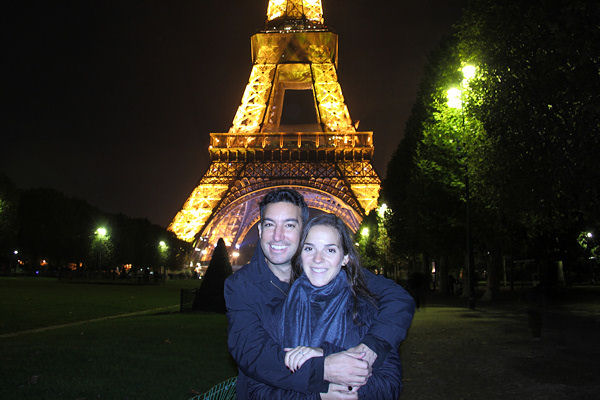
12 Paris 1 White Flash

With layers, you can easily solve this problem. Here is the corrected photo.
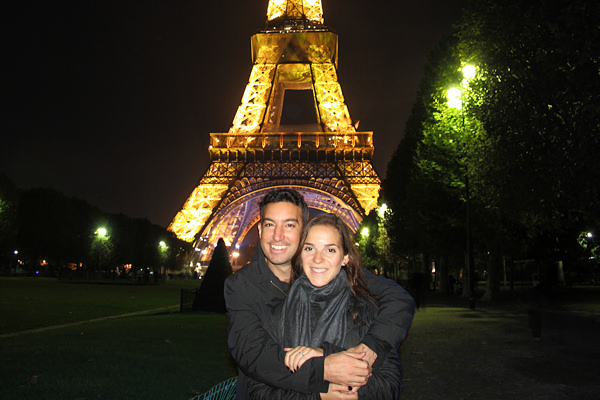
13 Paris 2 blend

To do this requires just three quick steps:

  1. Create a copy of the original photo and set it aside
  2. Adjust the original photo paying attention only to the area that needs to be fixed (in this case adjust the White Balance of the image paying attention to the faces and ignoring everything else)
  3. Paste the untouched copy that you put aside on top of the adjusted photo, and “erase away” the top photo revealing the adjusted layer below, just where you want to see the adjustment.

In this example, you can see exactly where I “erased away” the bad white balance revealing the better white balance below.
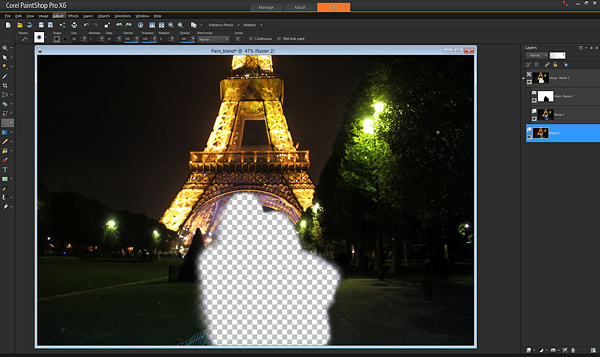
14 Paris 3 layer removed

If you shoot in RAW format, you can create the two versions of the photo with the two appropriate white balances in your RAW converter. If you don’t shoot raw, just create a second copy of the original photo, change the color balance in your editing software, and layer as described above.

Using layers you can selectively apply saturation adjustments, brightness/contrast, sharpening, etc. This allows for an incredible amount of control over the final image. Just create a version of the photo with the adjustments, put it as the bottom layer, and reveal it with the brush just in the spots you choose.

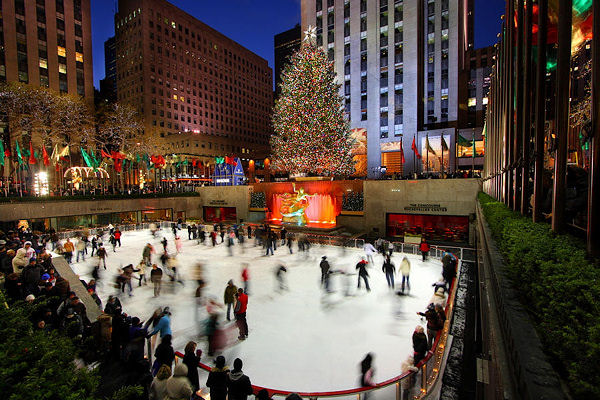
For example, in this photo of the Rockefeller Center Christmas Tree in NYC, just the lights on the tree needed a levels and sharpness adjustment. You can see the difference that local adjustment makes to the entire photo in this before and after.
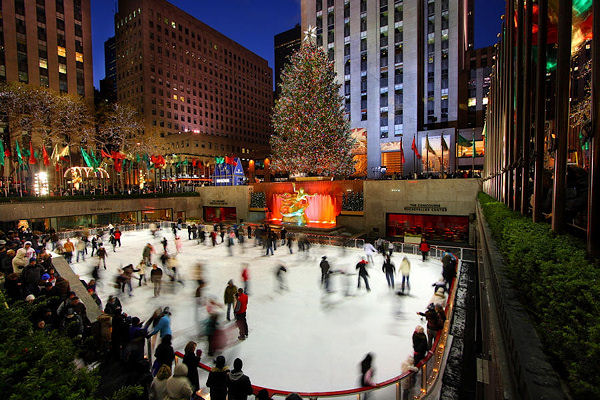
15 Rock Center 1a blurry

Before

16 Rock Center blend

After

SPECIAL TECHNIQUES

In addition to using layers for exposure blending and applying local adjustments, you can use layers for a wide variety of additional purposes. I’ve listed some really cool techniques below.

Blinking in group portraits: Have you ever taken a group shot and there’s always one person blinking or making an odd face? Next time, mount the camera on a tripod and use your camera’s continuous shooting (i.e. rapid-fire) mode to take a few photos in quick succession. If one person is blinking in the photo you like best, just put that photo as the top layer and put another photo without him blinking underneath, and “erase” the top photo with the blink to reveal the bottom photo below with his eyes open.

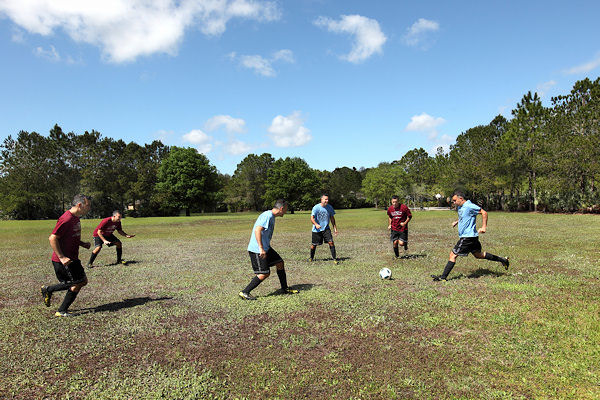
For cool sports effects, use a tripod and take rapid-fire photos of the action, layer the photos, and “erase” away the top photo to reveal the person moving in the subsequent shots.
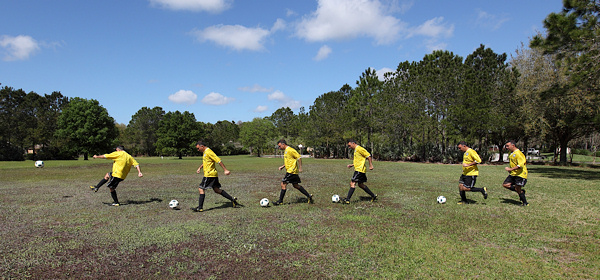
18 soccer line

You can get really creative with this effect – here’s six of me playing a soccer game.
19 soccer team

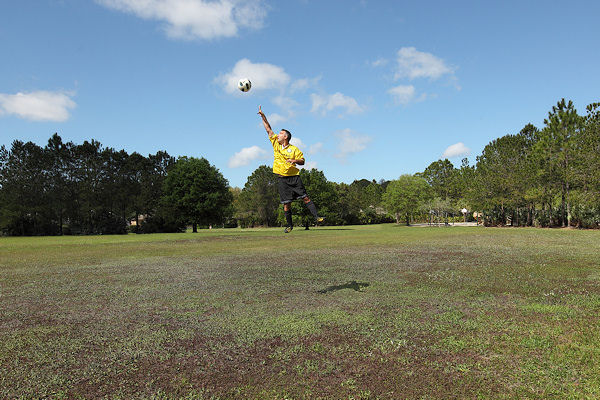
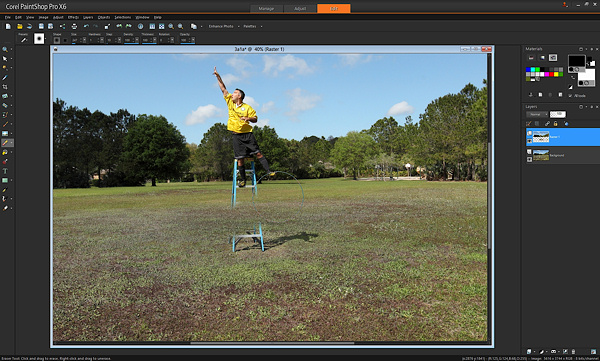
For special “flying” effects, take two photos from a tripod, one with a person on a ladder, one with the just the background (ladder and person removed). Then layer the photos and “erase” the ladder.
20 soccer jump

Here’s what it looked like with one swipe of the brush “erasing” the ladder and revealing the background.
21 soccer ladder

Many people find that automated HDR software can produce unnatural effects. If you’ve used HDR software to create an HDR image that you like, but there are certain parts that appear unnatural (for example, the sky), blend a little bit of the original non-HDR photo using layers to make it more natural.

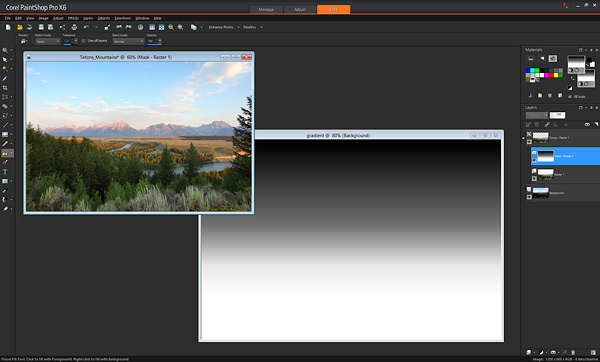
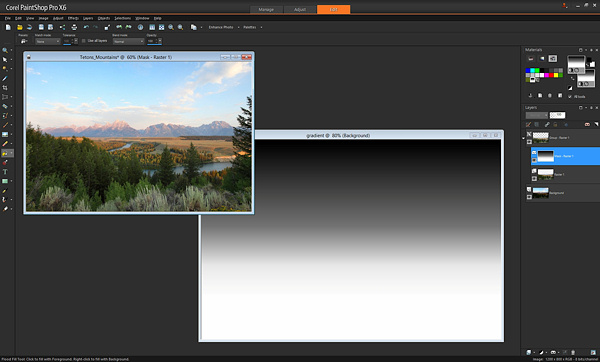
You already learned that painting with a black brush reveals the layer below. Wherever there is black, the top layer is “erased”. What if we didn’t use a brush at all, and instead used another way to paint black? This opens up a whole new set of possibilities. For example, this is a simple gradient, a pattern that goes from white to black gradually.
22 use gradient

If instead of using a black brush to reveal the bottom photo, we used this gradient, we get an instant Neutral Density filter! Apply this gradient using the Fill tool on the mask instead of painting with a brush, and where the black is, the bottom photo will be revealed. Put the black part of the gradient over the area of the photo where you want to adjust exposure and you’ll have a beautiful transition.

You can also use other tools to apply black to the mask. In the earlier example with the view outside the window, rather than painting with a brush, you could use the “draw rectangle” tool to place a black rectangle over the window, revealing the view outside.

Hopefully you’ve seen just how simple it is to use layers in your work, and how powerful they are. From blending multiple exposures, to adjusting your photos and using special techniques, layers take your images to a whole new level.

Please feel free to ask any questions in the comments below.

The post A Beginners Introduction to Using Layers by Paul Timpa appeared first on Digital Photography School.


Digital Photography School

 
Comments Off on A Beginners Introduction to Using Layers

Posted in Photography


Versatility – Your Guide to Shooting Great Travel Photography

05 May

Professional travel photographers realize that the key to their business is versatility: to be able to shoot all styles of photography, and to consistently capture great shots even under very trying conditions. To be a strong assignment photographer you must identify your weakness and then work on it.

Instead of concentrating on what you shoot well why not break out of your comfort zone and try something more challenging? Some of the most experienced photographers from The WideAngle network give us their insights into a few of the specialized fields of travel photography.

DPS1 DALE MORRIS

Image by Dale Morris

PHOTOGRAPHING WILDLIFE

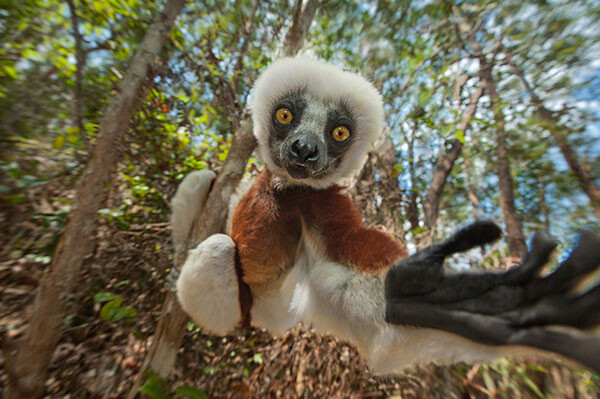
British born wildlife photographer Dale Morris has built a reputation as one of the most widely published photographers in South Africa. His background as a trained naturalist allows him to capture aspects of the natural world that many photographers would miss.

I’m a firm follower of the philosophy that wildlife photography is not only about getting a great image but equally about taking time out to observe, and more importantly, really enjoy the experience of being in the company of wild animals. It helps to understand that every animal stands at the center of its own concentric set of invisible circles and if something unusual (a photographer for example) steps across the outermost boundary, the animal will react (usually by becoming more alert to your presence). Move across the next circle in the set too soon and an imaginary alarm is triggered. You are now running the risk of eliciting a flight or fight response. An animal’s rear end vanishing post-haste over the horizon rarely makes for a good photo, nor does a trampled and gored camera. Move slowly and in a non-threatening manner. The secret to wildlife photography is patience, empathy, awe and a true appreciation for your subject matter.

SHOOTING MOVEMENT

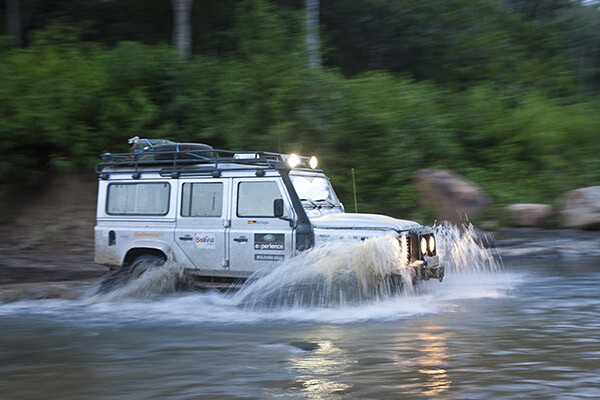
Craig Pusey is a dedicated motoring and expedition photographer, who’s never scared to go the extra mile for a shot. You might see him scaling an Indonesian volcano or lying face down in an Andean stream just to get the perfect angle.

DPS2 CRAIG PUSEY

Image by Craig Pusey

The perfect panning shot takes practice. For people and animals moving perpendicular to you, aim to keep your shutter speed between 1/15th and 1/90th of a second to get a bit of blur. For faster things, like cars or galloping horses, set a speed of between 1/60th to 1/125th. Try to focus just ahead of the moving object and if you have the opportunity shoot a trial pan before your subject even arrives. (This will check exposure and focus but also make sure that no obstacles are going to get in the way of your pan…it also limbers you up!).

It’s best to start with a higher shutter-speed and then work down, but it’s also dependant on distance from you to the subject. The farther away, the lower your shutter speed will need to be to show the effect of panning. With practice you can shoot slower, and will be better be able to judge the object’s speed.

SHOOTING ARCHITECTURE

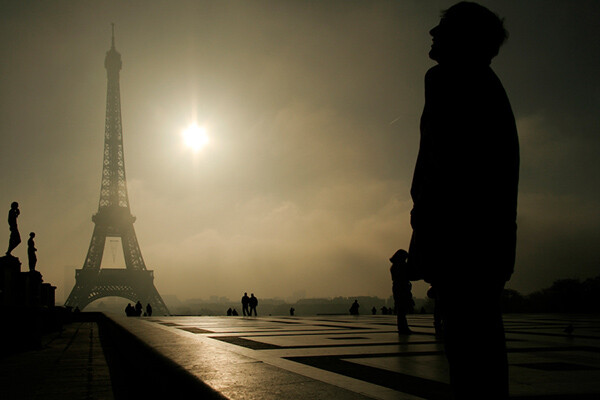
Laurence Garçon is an experienced Parisian artist, publisher and assignment photographer. She has travelled widely but has retained an unshakeable love affair with her hometown and is recognized as one of the city’s most visionary photographers.

DPS3 Laurence Garcon Misty Morning

Image by Laurence Garçon

Firstly, be aware of the highlights. Play with the speed and the aperture of your camera to avoid over-exposing sunlit walls, etc. Secondly, try to frame a composition that will best display the building. Be prepared to wait a while for something to happen (a passer-by, a vehicle): this could be the element that will be capture the soul of the quarter. Be aware that, in some countries you may need specific permission to photograph some particular buildings (especially airports, military buildings, ministries, embassies, sometimes even bridges). If you plan to publish your photograph of a single (isolated) contemporary building, try to always mention the name of the architect.

PHOTOGRAPHING INDIGENOUS PEOPLE

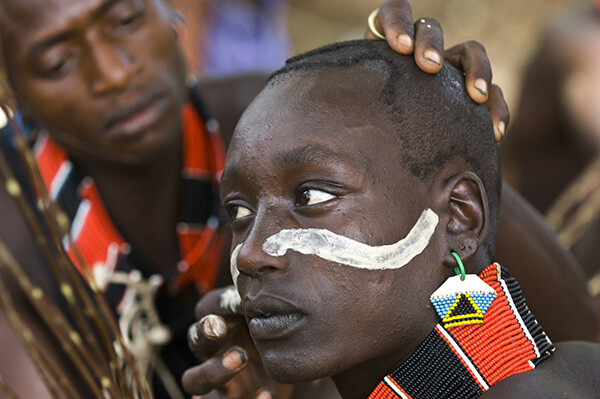
Axel Fassio left his home in Italy to travel the world (everywhere from Antarctica to Iceland) on assignments. In 2013 he won a first prize at PX3 Prix de la Photograhie Awards in Paris and a 3rd at the International Photographic Awards. He’s currently based in Nairobi.

DPS4 Axel Fassio

Image by Axel Fassio

Ideally, if time allows you should approach a community without a camera and hangout a bit, getting to know the elders and playing with the children. The last thing you would want to do is have to rush to take pictures. Resulting images would lack of spontaneity. A few hours are enough to create a basic ‘relationship’ within the community and the resulting images will benefit hugely.

If your time is limited, always contact the elders and ask permission to take photos. A money arrangement is common when time is tight but it’s not desirable. Negotiating to pay for each images tends only to produce aggressiveness among the people, bad memories for you and usually this shows in the shots.

Longer zoom lenses can be used to “steal” candid portraits and a wide-angle held at waist level often has the effect of bringing the viewer more intimately into the scene. It is always better to avoid clearly aiming at a person unless he/she is very comfortable and is agreeable to being photographed. In this case, a medium-length zoom is perfect for portraits.

DPS5 Wylie Maercklein

Image by Wylie Maercklein

SHOOTING PORTRAITS

Wylie Maercklein is an experienced Texas-based photographer and videographer with a specific talent for powerful portraits.

Portraits are similar to other action shots to me, in that you’re just waiting for the right moment. With a group, that moment is something larger – an externalized emotion. An action. With an individual portrait, it’s an internalized thing – it’s the moment when their defences drop just a little and you see something living behind their eyes.

LOW LIGHT AND NIGHT PHOTOGRAPHY

British photographer Jonathan Perugia has built a reputation as one of the most prodigiously published assignment photographers in the business. In addition to his freelance work he leads photography holidays with Authentic Adventures.

I love the way cities look after sunset, so I shoot a lot in low light. If you want to really explore this kind of photography, then adding a fast prime lens to your collection (if you use a DSLR) is invaluable. I use the Canon 50mm f/1.4, which is pretty good value. Another invaluable bit of kit is a tripod. Go for something as sturdy, but as light, as you can afford. Carbon fibre is ideal. Try to avoid anything flimsy. There are some good mini tripod options too, with bendy legs that will hook around a handrail at a push. Generally I avoid using flash, so I’m often at high ISOs. I recommend testing or researching your camera to see how high it will go without too much noise.

DPS6 Jonathan Perugia

Image by Jonathan Perugia

For cityscapes, the best time to shoot is the period after sunset but before dark, when there is still colour in the sky. On a clear night you can get fantastic electric blue skies with all the city lights illuminated. Note that the brighter electric lights will start to blow out as the sky gets darker, so you may want to choose your frame accordingly. If there are no bright lights in the shot, you can use longer shutter speeds to get colour out of a sky that appears dark to the naked eye. Cloudy skies reflect street lights and can look quite surreal. This is the perfect time to do classic long exposure traffic shots with streams of light from the car lights. Smaller apertures give points of light a kind of starburst effect that looks more natural than starburst filters. You’ll notice that you can start shooting into doorways, shops, windows that wouldn’t work in daylight when the light outside is much brighter than inside.

Experiment and enjoy the different effects and colour casts you get after dark – even ‘painting with light’ with long shutter speeds and no tripod. Look for pools of light from street lamps, windows, street stalls.

SHOOTING LOCAL CEREMONIES

Ingetje Tadros is a Dutch-born photographer who emigrated to Western Australia. She spends much of each year on assignment in various parts of Asia.

DPS7 Ingetje Tadros

Image by Ingetje Tadros

While shooting ceremonies pay close attention to your choice of lens. Personally I like the 35mm prime as I like to be close and look for little moments. But, I also find it important that people feel comfortable with my presence and you need to be aware of personal space. When rituals are taking place it’s important to be aware what the rules are and specifically to know where you should and shouldn’t stand. Take your time and don’t just go in snapping. Try to limit use of flash to an absolute minimum as you should be as unobtrusive as possible.

Do you have any tips on versatility? How do you approach travel photography? Please share in the comments below.

The post Versatility – Your Guide to Shooting Great Travel Photography by Mark Eveleigh appeared first on Digital Photography School.


Digital Photography School

 
Comments Off on Versatility – Your Guide to Shooting Great Travel Photography

Posted in Photography


browserFruits Mai, Ausgabe 1

05 May

Die lieben browserFruits. Wisst Ihr, wie oft wir uns schon überlegt haben, sie zu kicken? Wenn es nach Martin ginge, wären sie spätestens seit 2012 Geschichte. Doch weil Katja sie wichtig fand, hat sie einfach die Organisation dafür übernommen – und die „Fruits“ somit erhalten. Übrigens: Jeder aus der Redaktion schickt Katja regelmäßig Links (mit dem hier gezeigten Text), die sie dann einbaut und zu einer ordentlichen Mischung aufbereitet. So, jetzt wisst Ihr also, was hinter den Kulissen passiert. Viel Spaß beim Naschen.


Fotospecial: Türkis

Flickr

500px


Deutschsprachig

• Xu Xixian fotografierte in seiner Freizeit Shanghai – seit den 60ern. Die Zeit zeigt passend zur Ausstellung seine Bilder in groß.

• GIGA stellt die ominösen Doppelbelichtungen des Hiki Komori vor.

• Nach der Insolvenz der Firma Ilford reiste der Künstler Roland Wirtz mit einer riesigen Kamera zur Fabrik in die Schweiz.

• Der italienische Straßenfotograf Giulio Magnifico ist bekannt für seine zerzausten Charakterportraits von Menschen mit Migrationshintergrund. Mitte April hat ihn auch Der Spiegel entdeckt. Und ihm einen ganzen Artikel gewidmet.

• Thomas Lamadieu kombiniert Architekturfotografie und Illustrationen auf sehr schön humorvolle Weise.

• Seen.by verkauft nicht nur Bilder, sondern stellt seine Fotografen auch hin und wieder in Interviews vor. Wie den US-Fotografen Jeff Seltzer, der am liebsten Parkplätze und Flughäfen fotografiert.


International

• Ja ja, das Video ist alt. Aber es ist immer noch das witzigste, das es gibt, auch wenn wir etwas Mitleid mit dem Hochzeitsfotografen haben.

• Auch immer wieder schön und gruselig: Angebliche Geisterfotografien aus den 20ern.

• Forensische Bilder des LAPD, die bis 1925 zurückgehen, wurden geborgen und sind auf Mail Online einzusehen. Nichts für schwache Nerven.

• Was macht eigentlich… Tom Anderson von Myspace? Er bereist die Welt und lädt auf Instagram sehr, sehr tolle Landschaftsaufnahmen ins Internet.

• Fotograf Owen Perry machte einige interessante Aufnahmen vom Vulkan El Tatio und dessen Geysirfeldern in Chile. Wie aus einer anderen Welt.

• Blick über den Tellerrand: Nein, Bodypainting muss nicht peinlich im 80er-Look sein. Es geht auch anders, wie die Künstlerin Trina Merry beweist.

• Levitation wird irgendwie nicht langweilig. Hier ein paar schöne Aufnahmen von Bairon Rivera.


Neuerscheinungen und Tipps vom Foto-Büchermarkt

buchtipps

• „Taking Shots“* zeigt Fotografien von William S. Burroughs. Das Buch bietet faszinierende Einblicke in die fotografischen Praktiken Burroughs. Es enthält Portraits und Selbstportraits, Aufnahmen von seinen Reisen in Europa, Amerika und Nordafrika, Fotos von Bau- und Abbrucharbeiten und seine ganz individuellen Experimente mit Fotomontagen und Collagen. Essays von verschiedenen angesehenen Personen geben einen theoretischen Hintergrund, um das Gesamtwerk besser zu verstehen.

• Es gibt sie noch – die vermeintlich ausgestorbenen, wilden Autofriedhöfe. In Wäldern, die sich vielleicht erst nach dem Abstellen der einstigen Symbole von Wohlstand und technischem Fortschritt durchgesetzt haben. Auf Wiesen, uneinsehbar gelegen und durch ihre ständige Feuchte das verbrauchte Blech von unten zersetzend. Thorsten Müller hat sie aufgespürt und dokumentiert in „Endstation: Die skurrilsten Autofriedhöfe Europas.“*


Zitat der Woche

You have to have a dream so you can get up in the morning.

Billy Wilder –

Mehr Zitate


Videos

Habt Ihr den Artikel von Justin Vogel in Erinnerung habt? Hier ist er im Interview mit Eric Kim.


Ein unfassbar großer Seeleopard überraschte den Unterwasserfotografen Paul Nicklen. Was dann passierte? Das:


* Das ist ein Affiliate-Link zu Amazon. Wenn Ihr darüber etwas bestellt, erhält kwerfeldein eine kleine Provision, Ihr bezahlt aber keinen Cent mehr.


kwerfeldein – Fotografie Magazin | Fotocommunity

 
Comments Off on browserFruits Mai, Ausgabe 1

Posted in Equipment


Kickin’ The Bucket: 12 Outrageous Fake KFC Restaurants

05 May

[ By Steve in Design & Graphics & Branding. ]

fake KFC
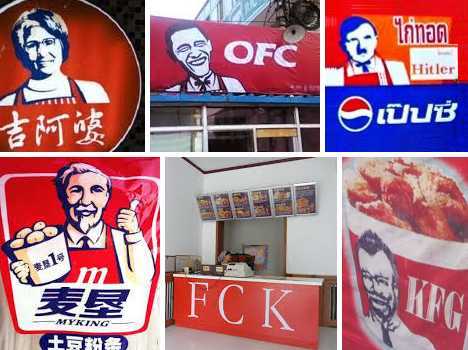
Acquiring a KFC franchise doesn’t appear to be that difficult. Appearances may deceive, however, as do these dozen absolutely unauthorized KFC wannabes.

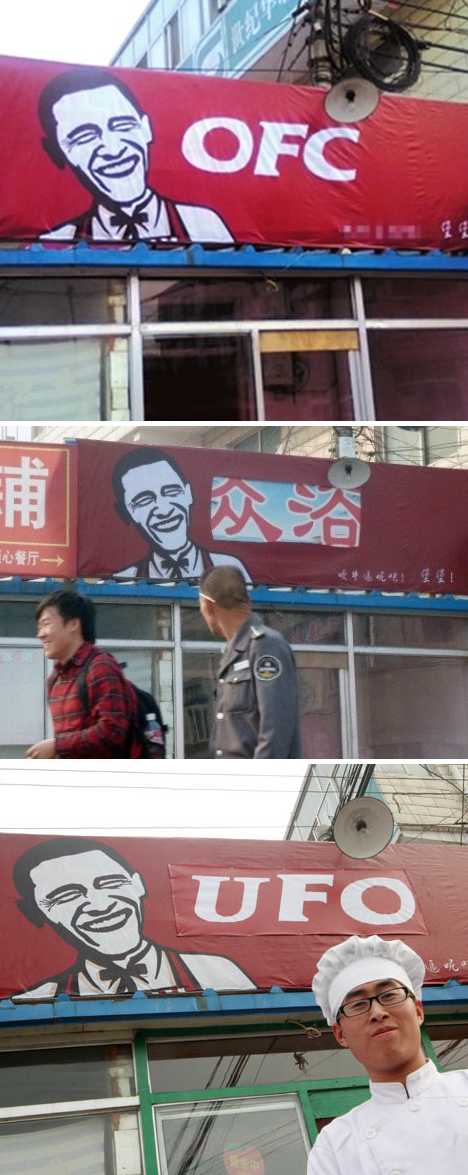
OFC: Change We Can’t Believe In

fake KFC China OFC UFO(images via: The China Times, CoCoas.net and ViralSlam)

Tea Party types might have stuck with KFC (Kenya Fried Chicken) but the Chinese student-entrepreneurs behind OFC were less concerned with birth certificates, not to mention other legalities. Located near Beijing Aerospace City College, OFC sought to trump a mere Kentucky Colonel by evoking the head honcho, the Commander in Chief, the Big O himself. Speaking of legal issues, it seems KFC won a small victory by forcing the shop to change its name to UFO. Yeah, that really helped.

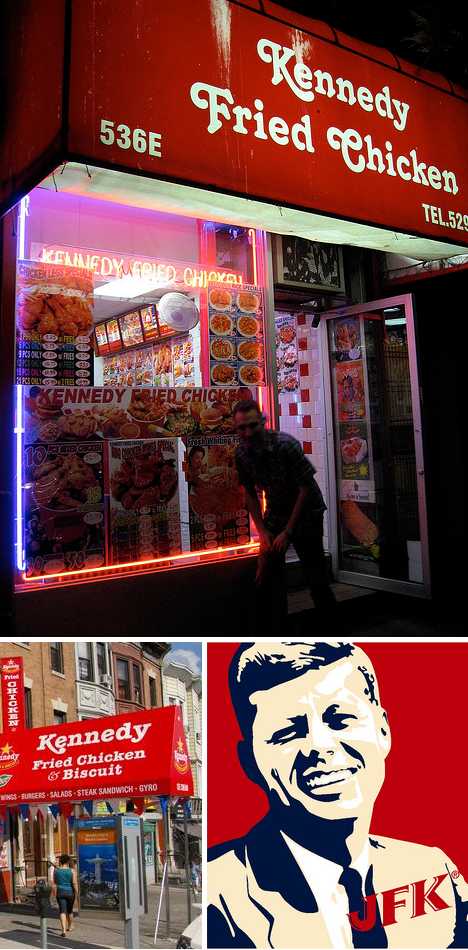
Kennedy Fried Chicken: KFC + JFK

Kennedy Fried Chicken fake KFC (images via: Jessica Port, Deephouse Page and Jason Klamm)

From one president to another, it’s a coop d’etat! Kennedy Fried Chicken was founded in 1975 by Afghan immigrant Taeb Zia, who named his restaurant after JFK “because Afghans are fond of the former president.” The first store opened in New York City’s Flatbush neighborhood and these days most of the roughly 1,000 outlets are owned by Afghan-Americans. Kennedy Fried Chicken‘s unusually loose control over its franchisees has occasionally brought the chain into conflict with KFC, usually when the owners paint their stores with red & white paint and employ “KFC” on their signage.

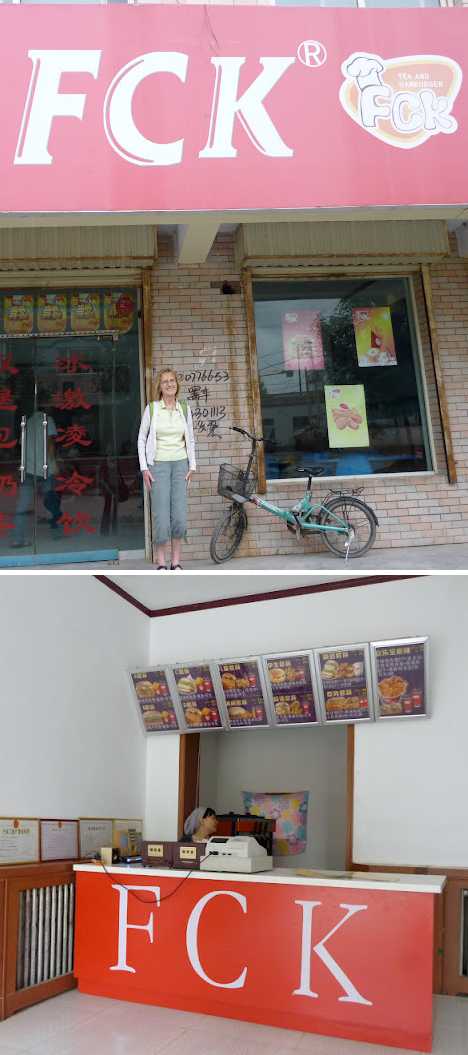
FCK’n Good Chicken!

FCK China fake KFC (images via: Life in the Middle Kingdom)

Located in Haiyuan, north-central China’s Ningxia province, FCK “Tea and Hamburger” means no offense in their ongoing effort to serve Fried Chicken Kentucky-style, along with tea and hamburgers (also presumably Kentucky-style). Full props to Canadian English teacher Alison Lentz for discovering the joy of FCK and photo-documenting its graffiti-scarred existence on her blog.

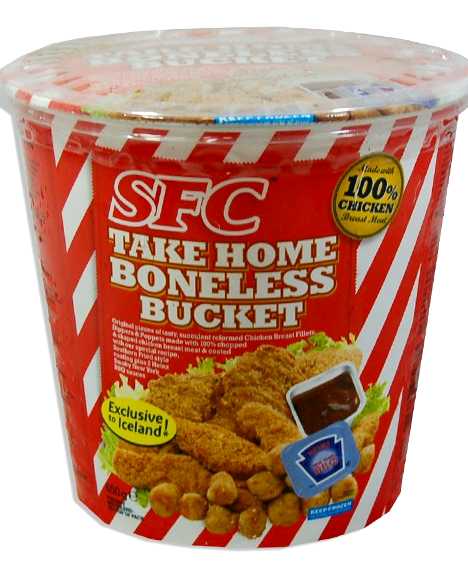
SFC: “Exclusive To Iceland”

SFC Iceland fried chicken bucket fake KFC (image via: MaltaSupermarket)

“I gave my love a bucket, that had no bones…” There ain’t nowhere you can hide when a peeved Colonel’s on your tail, and that includes Iceland (the nation or the British supermarket). SFC‘s Take Home Boneless Bucket above doesn’t display a Viking-ized version of Harlan Sanders, which is unfortunate, because that would be awesome! It does allude to KFC via the branding copy, however, offering buyers “Original pieces of Tasty reformed Succulent Crispy Chicken… coated with a Southern Fried style coating made to Our Secret Recipe of Herbs & Spices”. Tasty reformed chicken, huh? Sounds scrumptious.

Next Page – Click Below to Read More:
Kickin The Bucket 12 Outrageous Fake Kfc Restaurants

Share on Facebook


[ By Steve in Design & Graphics & Branding. ]

[ WebUrbanist | Archives | Galleries | Privacy | TOS ]


WebUrbanist

 
Comments Off on Kickin’ The Bucket: 12 Outrageous Fake KFC Restaurants

Posted in Creativity


4. Mai 2014

04 May

Ein Beitrag von: Flo Dystopia

Ein Baum, von unten fotografiert. Naturfotografie.


kwerfeldein – Fotografie Magazin | Fotocommunity

 
Comments Off on 4. Mai 2014

Posted in Equipment


Die Geometrie und der Himmel

04 May

Lino Russo ist ein junger Grafikdesigner aus Neapel in Italien. Ausdrücklich ist er kein Fotograf, das zu betonen ist ihm wichtig. Trotzdem findet sich zwischen seinen geometrischen und minimalstischen Arbeiten, die vor allem aus Illustrationen und Videos bestehen, auch ein wunderbares Beispiel für fast abstrakte urbane Fotografie.

Er hat seine Serie „Skymetric“ getauft, ein Kunstwort aus „Sky“ (Himmel) und „-metric“ von geometrisch. Das beschreibt auch schon ganz gut, was man sehen kann. In jedem Bild gibt es ein Stückchen strahlend blauen Himmel. Dem gegenüber steht immer Architektur, die aus ihrem Kontext gelöst wurde.

Linien, Flächen, grelle Farben, schematische oder schiefe Muster. Sie alle greifen in den natürlichen Raum ein, in dem wir uns ursprünglich befinden. Wir haben aufgeräumt: Alles ist einfach, überschaubar und sauber. Geordnet.

© Lino Russo

© Lino Russo

© Lino Russo

© Lino Russo

© Lino Russo

© Lino Russo

© Lino Russo

© Lino Russo

© Lino Russo

© Lino Russo

© Lino Russo

Da Lino kein Fotograf ist, träumt er auch von etwas ganz anderem: Eines Tages wäre er gern für die gesamte Identität einer großen Marke verantwortlich. Als Multitalent hat er ja schon einmal die besten Voraussetzungen dafür, das dann auch mit vielen Medien umsetzen zu können.


kwerfeldein – Fotografie Magazin | Fotocommunity

 
Comments Off on Die Geometrie und der Himmel

Posted in Equipment


Winners of the 2014 Sony World Photography Awards, part 2

04 May

130413539122035000_1_Sara-Lewkowicz_USA_1st-Place_-Contemporary-Issues_Professional-Competition-2014_600x400.JPG

The World Photography Organization has announced the winners of its 14 Professional categories. American photographer Sara Naomi Lewkowicz was named as 2014’s L’Iris d’Or/Sony World Photography Awards Photographer of the Year. Selected from 140,000 entries from 166 countries, Lewkowicz’s story is a a stark and intimate look at domestic violence. See gallery of winners

News: Digital Photography Review (dpreview.com)

 
Comments Off on Winners of the 2014 Sony World Photography Awards, part 2

Posted in Uncategorized


Time-Lapse Photography Equipment Guide to Getting Started

04 May

Currently for a limited time only get the Stage R Versatile Motion Control for Timelapse and Film and get FREE eBook – on now at SnapnDeals!

“Never forget that all the great photographs in history were made with more primitive camera equipment than you currently own.” – Brooks Jensen

No doubt that first time you said “Hey, wouldn’t it be fun to dabble in DSLR photography? You know, just as a hobby.” Your financial counsellors, or your spouse for that matter, broke out in budget busting hives.

There probably isn’t a more gear focused group of enthusiasts out there, but don’t worry, taking that step into time-lapse photography doesn’t require much gear to begin – and the extra gear that can really take your time-lapse to the next level is more affordable and easier to use than ever before.

Whether you are a brand new time-lapse photographer or an experienced shooter looking to unleash full creativity with time-lapse motion control, this article will provide a launch pad for your next steps into one of the most emotionally connecting, and at the same time freeing, creative photographic endeavours.

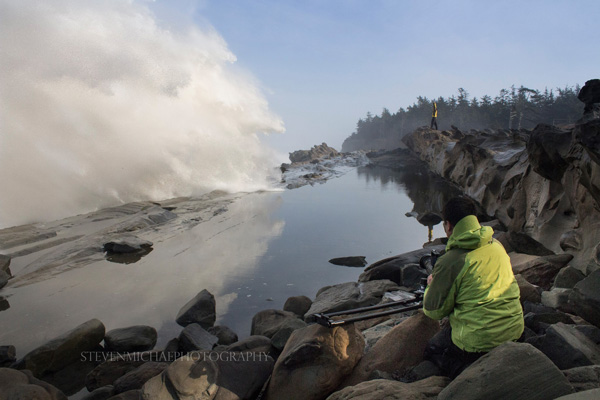
Steven Michael Photography 600

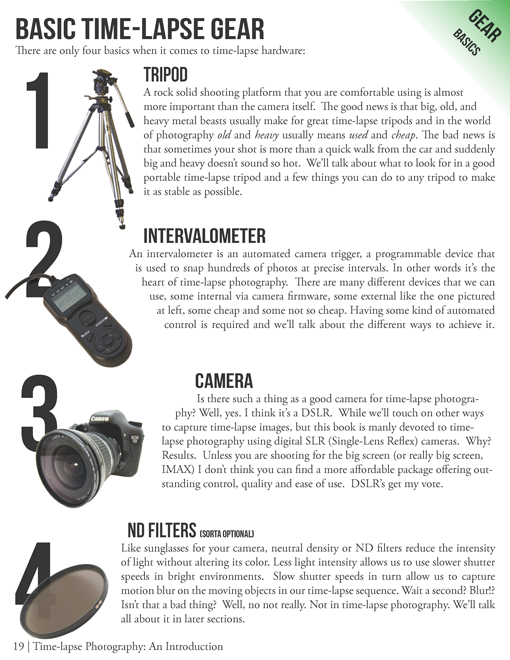
Your minimum gear checklist for time-lapse photography

Chances are good if you’re already a DSLR shooter you almost have everything you need to get started. These four things are essential.

  1. A tripod
  2. An intervalometer
  3. A Camera
  4. An ND filter

timelapse-gear.png

A closer look at a good time-lapse support system

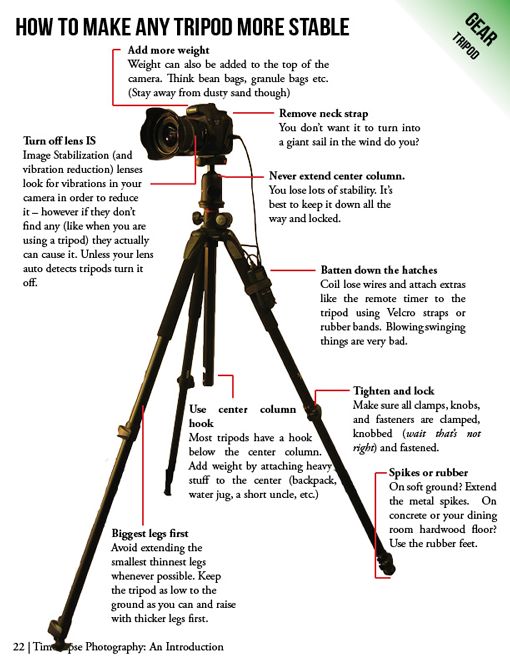
Rock solid stability (or precise controlled movement) is just about the most important and most essential component for good time-lapse photography. Keep in mind a good tripod that meets your needs will outlast several cameras so consider budgeting a little more time and possibly cash to this category.

  • Consider the materials used – weight and strength
  • Check the load weight – avoid sagging and flexing
  • Height – eye level without using the centre column
  • The right tripod head for your work – ball heads versus pan and tilt

timelapse-tripods.png

Unleashing your creativity with advanced time-lapse equipment

Time-lapse photography is benefiting from a dramatic flow of new ideas. The level of innovation, especially over the last few years, is incredible. Not only are we quickly fixing problems that have plagued photographers for years, but advanced camera controls and processing tools that used to be cost prohibitive, are now becoming affordable for the most basic hobbyist.

Advanced camera exposure control

The Timelapse+ can operate as a universal intervalometer for nearly any camera that supports a remote shutter release, and IR remote, or USB tethering. Bulb-ramping is its claim to fame. The Timelapse+ can perform keyframe-based, guided, or fully automatic bulb ramping – and for cameras supported by USB control, the Timelapse+ can also seamlessly integrate ISO control to smoothly ramp across a wide exposure range, making the “holy-grail” transition from day-to-night or night-to-day easier to achieve. Extended and long-exposure HDR sequences are also made easy with the Timelapse+.

Simple and powerful advanced time-lapse sequence rendering with LRTimelapse:

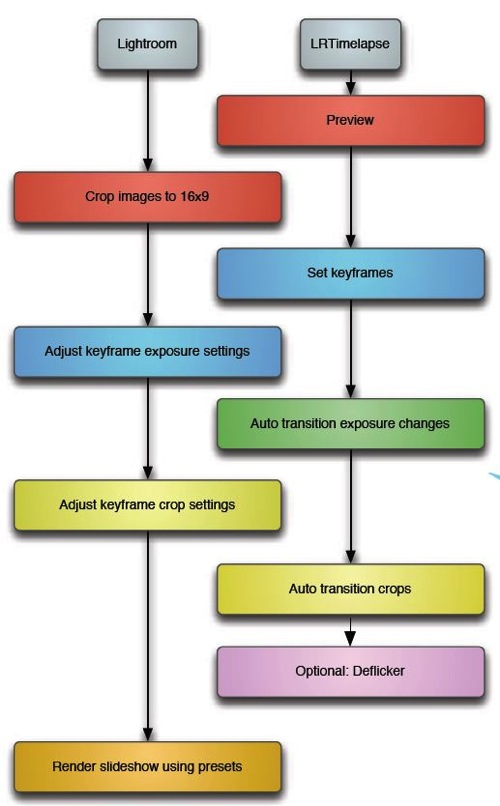
In a nutshell LRTimelapse takes changes and corrections you make in Lightroom and then smoothly applies them throughout the entire time-lapse sequence. By altering either the first and last image, or several images throughout the sequence, LRTimelapse can quickly fade the changes we need to only the parts we want. Deflickering can also easily be accomplished in the exact same way by flattening out big exposure jumps.

Here’s a simple workflow for editing timelapse images and rendering a movie using Adobe Lightroom and LRTimelapse.

Lrtimelapseworkflow

Advanced motion control

The last few years have shown incredible advances in the field of manual and controlled camera movement, so much so that the
average photographer can now afford motion control devices that were once only available to big budget productions. We’re talking precise, rugged and lightweight panning (left and right), tilting (up and down), and dolly movements with simple controls, such as a smartphone app, that make setup easy and intuitive. Control over motion and time combined with an interesting subject can produce what I believe to be an awesome trifecta of emotion eliciting imagery – some of the most engaging and lasting photography you’ve seen.

Yosemite HD II, an incredible example of time-lapse and motion:

Dolly motion shots can add multiple points of interest by highlighting components of a scene’s unchanging foreground and the larger time-altered background. The movement shots in the wave video move the camera along the jagged rocks, while the waves are slowed in the background. Some of the most popular time-lapse clips feature this kind of extreme moving contrast in many shots too. By moving the camera slowly from left to right on a horizontal track, or flipping the track system almost vertically to instead change the elevation of the camera, we can highlight stationary foreground objects in incredible ways.

The next two axes of movement can be accomplished by camera rotation – aptly named a motorized panning and tilting head. Then combining panning and tilting on a camera slider to achieve 2, or 3 axis of movement simultaneously can dramatically elevate the interest level in a shot.

zion 3axis motion control

2 axis motion control

Do you think advanced time-lapse work should be left to the pros?

Eric Warren of Matadornetwork.com posed a related question:

“Pros are the guys you call when you want to put a time-lapse in your car commercial. And while we tend to put pros up on a pedestal, they are often bogged down by their clients’ needs. Most commercial advertising doesn’t push the envelope of an art form.

That job often falls to the independent artists, building their own equipment, and often not [caring] about whether their work is going to sell. Not that I want to be too demanding here, but I want to see something mind-blowing. Either something I’ve never seen before or something familiar, shown in a new way (one thing time-lapse excels at.) ….

Consider this a call to all you independent filmmakers out there ready to push the limits of one of the most striking visual art forms.”

Time-lapse has a way of slowing the world for the photographer while at the same time accelerating it for everyone else. Shooting time-lapse alters the way you think, it challenges your view of the world and teaches you things about our world you can bring back and share with everybody else.

Get out and start shooting. Render some footage and break some rules. Most importantly know that you are not alone. The time-lapse community is more connected today than ever before. You have friends all over the world ready to help you get the shots you imagine.

Currently for a limited time only get the Stage R Versatile Motion Control for Timelapse and Film and get FREE eBook – on now at SnapnDeals!

The post Time-Lapse Photography Equipment Guide to Getting Started by Ryan Chylinski appeared first on Digital Photography School.


Digital Photography School

 
Comments Off on Time-Lapse Photography Equipment Guide to Getting Started

Posted in Photography