RSS
 

Archive for May, 2014

A Step By Step Guide to Making Your First Panorama Photo

08 May

Image 4

While visiting an art gallery or a photography exhibition, at times you may have noticed certain landscape photographs have extremely elongated fields of view. They seem quite impossible to have been photographed with a standard camera. If you wonder how such elongated photographs are made, you are not alone. I had my first encounter with a panoramic image of the Himalayan mountain range being displayed at Das Studios in Darjeeling, a Himalayan resort town in West Bengal, India. That photograph had a huge impact on me and it led me to searching for ways and means to photograph panoramic images.

During my initial search I figured panoramas were probably made with highly specialized cameras and lenses. But, to my surprise I found that panoramic photographs can be made with any kind of camera at your disposal. All you need is a camera, preferably one capable of shooting in Manual mode. Yes, with certain cameras and Smartphones you can get Apps for recording a panorama in a sweep but I never found the results quite satisfactory. Shooting your own panorama gives you the creative freedom and a sense of satisfaction.

How to shoot a panorama

A panorama is a combined set of individual photographs, in which two adjacent photographs have at least 20% overlapping areas. These two, or more, overlapping photographs are “stitched” with the help of software to produce extremely elongated fields of view. The overlapping is required as the software is able to understand the common areas in two adjacent photographs and hence can eliminate duplication of a scene by stitching the same into a single photograph.
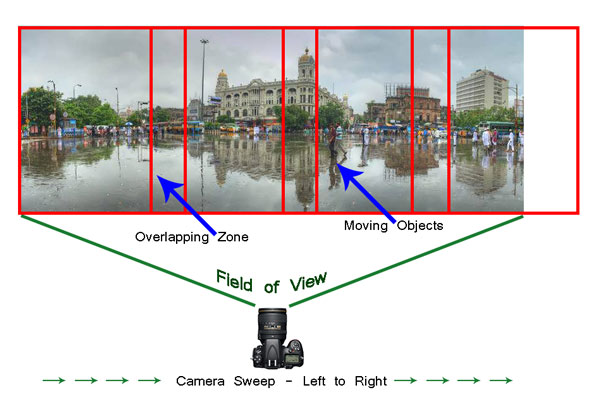
Image 1

Before shooting a panorama, you need to plan out well. Here is a list of guiding factors for creating your own panorama.

#1 Shoot in Manual Mode

Since a panorama is shot over a large field of view where lighting conditions can be different, it is imperative to shoot in Manual mode with Manual Focus. This will ensure all the photographs shot have an exact exposure value and focus throughout all the images. Shooting in Automatic, Program or Semi-Automatic modes (like Shutter priority or Aperture priority) will result in different exposure values for each photograph, which in turn may cause the final merged photograph to have varied exposure and color casts in different parts of the photograph.

#2 RAW or JPEG

While you generally want to shoot in RAW, it is preferable to switch to JPEG for panoramas. Shooting in RAW is absolutely fine, but since the photographs will not be edited individually (we will see this at a later stage) and to reduce shutter lag, shooting in JPEG is preferred. A word of caution – as we will be shooting in JPEG make sure the exposure values are correctly adjusted.

#3 Tripod or handheld?

If the weight of your tripod is not a factor, carrying it is always preferable. However on a bright day you can very well rely on your own hands. A steady posture, or using your camera bag or any sturdy object available to rest the camera on, will save you the weight of carrying a tripod.

#4 Horizontal or vertical

We are generally accustomed to shoot in Landscape (horizontal) mode. Shooting in Landscape is fine but the resulting panorama will be short in height, since Landscape photographs will be stitched together. Additionally, during the stitching process there will be a lot of redundant or blank areas (you will see later during the post-processing) which need to be cropped out. This will further reduce the height of the panorama. To overcome this issue you may choose to shoot the panorama in Portrait (Vertical) mode. This will help in achieving a greater image height which can be cropped out as per requirement, say for printing or aesthetics.

#5 Be fast

Be very quick in shooting since light conditions change fast. Additionally if you are shooting a cityscape, a populated beach or a scenario where there is movement, be cautious. If you are not shooting fast enough, you will find moving objects (e.g., people, cars, bikes) will be duplicated across the frames. You would not want to see the same object twice across the panorama.

# 6 Plan it out well

Stand at the selected spot and plan the number of shots in advance. This will help you in keeping a control of the number of shots rather than shooting randomly. Be sure to do a mock round without actually shooting.

When you are ready, start shooting from left to right. Make sure you have at least 20% overlapping areas in two consecutive photographs. An visual estimate will suffice. Look through your viewfinder and shoot. Do not look at the individual photographs on your LCD screen until you finish shooting. Before leaving the scene turn on the LCD screen and review the photograph series. If you are not happy, shoot again.
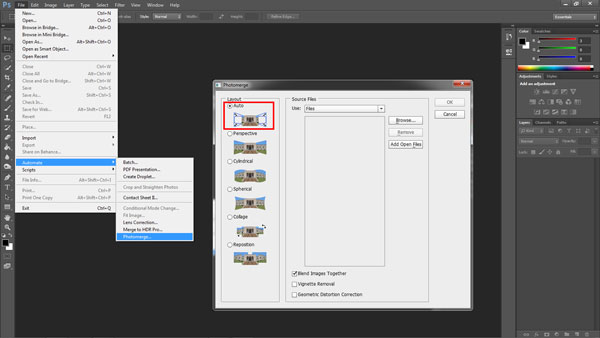
Image 2

Stitching your panorama

The sext step is stitching your panorama. There are plenty of panoramic stitching software available on the internet. I will put a list of links to some of the best software at the end of this article. The stitching process is similar across software but as of now we will use the standard photo editing tool – Adobe Photoshop. The stitching process in Adobe Photoshop is fully automated.

Since you may have shot more than one panorama series, for the purpose of identification it would be easier to store each series in a separate folder. You may have shot in JPEG or RAW but make sure you do not edit individual photographs.

Steps to stitch a panorama:

  1. Open Photoshop
  2. Click File > Automate > Photomerge
  3. “Auto” is the default Layout option. Photoshop analyzes the source images and applies either a Perspective, Cylindrical, and Spherical layout, depending on which produces a better Photomerge. Choose “Auto” if it is not selected by default.
  4. Check “Blend Images Together”
  5. Next Click “Browse” and locate the separate Folder where you have put in your panorama series. Select the series and click “Ok”
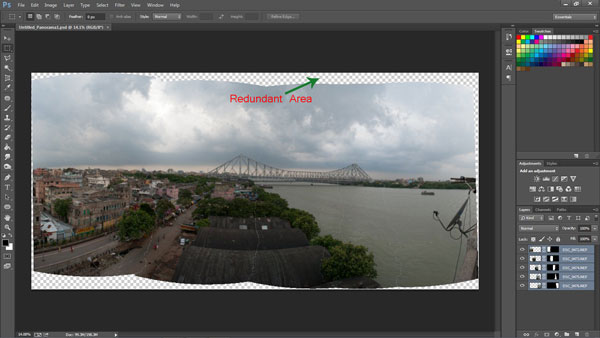
Image 3

  1. Depending on the number and size of the photographs, it may take a while for Adobe Photoshop to stitch together the images.
  2. After the stitching process is completed you will find a roughly shaped panorama (with a few redundant spaces). Refer to the image above
  3. Right click on a Layer in the Layers panel and click Merge Layers
  4. The next step is to use the Crop Tool to trim out the redundant portions of the panorama
  5. After the final touches you are done with your very own first panorama
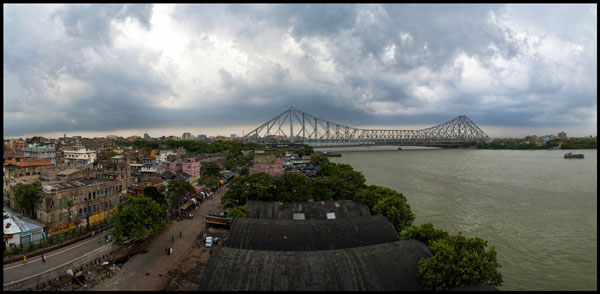
Image 4

Links to panorama stitching software:

  • AutoStitch
  • pTGui
  • Hugin
  • Autopano
  • Microsoft Image Composite Editor

If this is the first time you are creating your panorama, I would love to receive your feedback or to share your panorama in the comments below.

The post A Step By Step Guide to Making Your First Panorama Photo by Soumya Shankar Ghosal appeared first on Digital Photography School.


Digital Photography School

 
Comments Off on A Step By Step Guide to Making Your First Panorama Photo

Posted in Photography


Smaller, faster … better? Canon G1 X Mark II review

08 May

gx1_ii.jpg

The Canon PowerShot G1 X Mark II is an ambitious product that addresses some of the shortcomings of its predecessor by adding a 24-120mm F2.0-3.9 lens, faster AF system, tilting LCD, and 5.2 fps continuous shooting. Its 1.5″-type CMOS sensor also allows for image quality that should rival consumer or midrange interchangeable lens cameras. But do these improvements make the G1 X Mark II the large-sensor compact for enthusiasts? Read full review

News: Digital Photography Review (dpreview.com)

 
Comments Off on Smaller, faster … better? Canon G1 X Mark II review

Posted in Uncategorized


Trending to the Unknown

08 May
Unknown Beach, Point Lobos

Unknown Beach, Point Lobos

Updates have been sparse as of late thanks to a full schedule and increasing demands at home. We’re approximately T-minus 21 days from our 2nd son arriving. As you’d imagine that means a lot of preparation, stress, and wondering.

Some of the more pleasurable prep work has been enjoying time with my 1st son, who is nearly 4, going to places like Yosemite and Point Lobos. I can’t say when I’ll take both sons to such beautiful locations to appreciate nature, but odds are its not going to be for a while. I’ve really enjoyed the ability to experience these locations with my son. Not only has it been an amazing experience to see his reaction, but it has also let my mind wander pondering what son #2 will be like.  In my minds eye I see him as a figure on the edge of a void lacking distinguishing characteristics. Characteristics I long to know hair color, eye color, what his laugh & voice will sound like, what interests he’ll have, etc. Waiting for the arrival of a new child is an interesting experience. The best way to describe it is trending to the unknown… a steady and slow movement to meet someone one step away from a void only to turn around and journey with them into the unknown of life.

Copyright Jim M. Goldstein, All Rights Reserved

Trending to the Unknown

The post Trending to the Unknown appeared first on JMG-Galleries – Landscape, Nature & Travel Photography.


Related Stories

  • Return of Film: Snowy Sunrise at Gates of the Valley
  • Return of Film: Snowy Sunrise at Gates of the Valley – Enclosure
  • 101 Landscape Visionary Insights Not To Miss – A New eBook & Video Series
Feed Ads by FeedBlitz
powered by ad choices


JMG-Galleries

 
Comments Off on Trending to the Unknown

Posted in Equipment


Antisocial Seating: 14 Distraction-Cutting Privacy Chairs

08 May

[ By Steph in Design & Furniture & Decor. ]

Privacy Chairs Main
Sometimes you wish the whole loud, distracting, eavesdropping world would just go away, especially when you’re trying to work on your computer or take a private phone call. These clever chair designs will make you feel like it really has with soundproofing elements, hoods and booth-like shields that provide a sense of peace and privacy even if you’re stuck in a busy airport, office or hotel lobby.

Womb-Like Hush Seating

Privacy Chairs Hush 2
Privacy Chairs Hush 1

Hide yourself in a cocoon of wool to work on your laptop or take a little time to yourself. Designer Freyja Sewell’s HUSH looks like an incredibly cozy space, envisioned for busy hotels, airports, offices and libraries.

Objet-O Chair

Privacy Chair Objet O

A massive paper lantern fits onto the back of a chair to offer light and privacy in one, in this fun idea by Korean designer Song Seung-Yong.

Windowseat Lounge

Windowseat Lounge 2
Privacy Chairs Windowseat 1

This sleek, colorful chair features a built-in canopy that shields the user from distractions while still allowing you to lean back and peek around it.

‘Firstcall’ Chair Phone

Firstcall Chair Phone

Need to take a phone call, but there’s no private place to go? Take a seat in the ‘Firstcall’ chair by Dutch designer Ruud van der Wier. Shaped like a classic phone, the padded fabric material of the chair shields the user’s head to mute background noise.

Peekaboo Cantilevered Wing Chair

Privacy Chair Peekaboo

The top of the Peekaboo cantilevered wing chair flips down to provide total sound-absorbing privacy whether you want to make a private call, take a nap or just have a few moments of quiet time. Made of molded formfelt, it features a plexiglass panel in the hood so you can still see around you while inside.

Next Page – Click Below to Read More:
Antisocial Seating 14 Distraction Cutting Privacy Chairs

Share on Facebook


[ By Steph in Design & Furniture & Decor. ]

[ WebUrbanist | Archives | Galleries | Privacy | TOS ]


WebUrbanist

 
Comments Off on Antisocial Seating: 14 Distraction-Cutting Privacy Chairs

Posted in Creativity


Huawei launches ultra slim Ascend P7 with 8MP front camera

07 May

huaweiascendp7.jpg

The Chinese technology company Huawei has launched its latest flagship Android smartphone, the Ascend P7. At 6.4mm the new model is just a touch thicker than its predecessor, the Ascend P6, but it’s still one of the thinnest devices on the market. The Ascend P7 doesn’t come with 4K video recording but the front camera offers unusually high resolution at 8MP. Learn more

News: Digital Photography Review (dpreview.com)

 
Comments Off on Huawei launches ultra slim Ascend P7 with 8MP front camera

Posted in Uncategorized


7. Mai 2014

07 May

Ein Beitrag von: Catalina Matei

untitled © Catalina Matei


kwerfeldein – Fotografie Magazin | Fotocommunity

 
Comments Off on 7. Mai 2014

Posted in Equipment


Win an Alaskan photo safari with Datacolor

07 May

Screen_Shot_2014-05-06_at_2.36.22_PM.png

Datacolor has announced its Great Alaskan Photo Expedition Sweepstakes, an online contest that offers an all-expense-paid trip to Cook Inlet, Alaska. Winners will get to spend a week photographing wildlife in Lake Clark National Park with nature photographer David Cardinal. The grand prize has a $ 10,000 value and includes round-trip airfare to and from Anchorage as well as all meals, lodging and charter flights to the wildlife preserve. Learn more

News: Digital Photography Review (dpreview.com)

 
Comments Off on Win an Alaskan photo safari with Datacolor

Posted in Uncategorized


Winners of the ViewBug Landscape Photography Contest

07 May

The wait is FINALLY over!!! The Winners of the ViewBug Landscape Photography Contest Are…

Grand Jury Winner

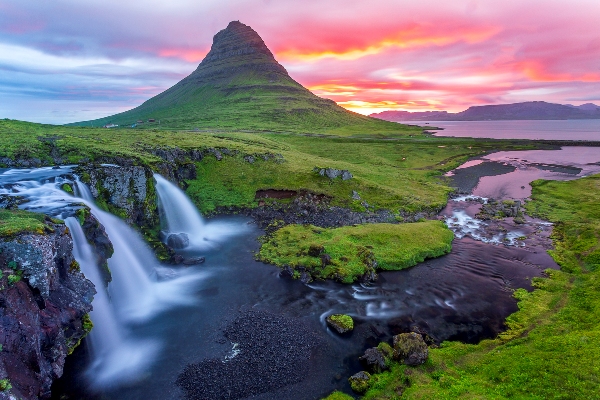
Grand Jury Winner – Church Mountain Falls

A BIG thank you to everyone who entered our recent Landscape Photo competition. The winners receive Year Long PRO Subscriptions from our friends at ViewBug.

ViewBug LogoThe response was amazing with THOUSANDS of entries. The response was so great that the team at ViewBug wants to invite ALL of the Digital Photography School readers to register for a free basic membership to ViewBug. Start participating in all theViewBug photography contests now! To register now, click HERE.

But first – here are the winners of the competition, and an extra special thank you to Guest Judge, professional photographer, Chris Burkard:

  • Grand Jury Winner “Church Mountain Falls – Redux” by Scott Don Schikowski
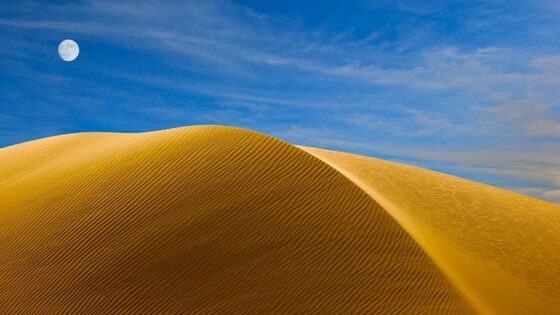
  • Runner Up “Dune Rise” by Tra Rader
  • Runner Up “Crater Lake Winter” by Lugji Photography
  • People’s Choice Winner “Lavender Delight” by Jason L. Stephens

And now, the Winning Photographs!

Grand Jury Winner – Church Mountain Falls

Grand Jury Winner

Runner Up – Dune Rise

Runner Up 1 Tra

Runner Up – Crater Lake Winter

Runner Up 2 Lugji

People’s Choice Winner – Lavender Delight

People s Choice

Thanks again to everyone for entering and to ViewBug for sponsoring this competition. Don’t forget to sign-up for your complimentary basic membership here.

The post Winners of the ViewBug Landscape Photography Contest by Darlene Hildebrandt appeared first on Digital Photography School.


Digital Photography School

 
Comments Off on Winners of the ViewBug Landscape Photography Contest

Posted in Photography


Dringend gesucht

07 May

Die Serie „Wanted“ von Nick Dolding wurde inspiriert vom Buch „Least Wanted: A Century of American Mugshots“*, das 10.000 Verbrecherbilder, aufgenommen zwischen 1870 und 1950, zeigt. Der Sammler dieser Bilder legte den Schwerpunkt auf Kleinkriminelle wie Huren und Gauner und nicht die großen, angsteinflösenden Mafiabosse.

Und diese Bilder sprechen, erzählen Geschichten und sind nicht nur fotografisch interessant. Die Menschen sehen einen müde, ängstlich, manchmal auch trotzig an. Ob sie wirklich alle Verbrecher waren? Oft sind sie von Verletzungen und Narben gezeichnet. Nick Doldings Modelle sind definitiv keine Verbrecher. Er suchte für sein Projekt Schauspieler, die die stereotypischen Rollen einnehmen.

Um die Bilder nachzustellen, entschied er sich dafür, Make-Up zu verwenden, um blaue Augen und Narben zeigen zu können, wie sie auf den Orignalbilder auch oft zu sehen sind. Für den Charakter des „Danny the fish“ portraitierte er einen Schauspieler, dem tatsächlich seit seiner Kindheit ein Auge fehlt. Neben den ausgedachten Namen für die Charaktere wollte Nick auch Fingerabdrücke einbeziehen, weshalb ein Schauspieler sogar absagte.

News Boy © Nick Dolding

Bookie © Nick Dolding

Sailor Boy © Nick Dolding

Jake © Nick Dolding

Danny The Fish © Nick Dolding

Olu © Nick Dolding

Doc © Nick Dolding

Baby Face © Nick Dolding

Moll © Nick Dolding

Hakan © Nick Dolding

Bei „Wanted“ handelt es sich um ein freies Projekt. Umso mehr freute sich Nick, dass es so gut ankommt. Sogar der Herausgeber des Buches „Least Wanted“ wurde schon auf seine Serie aufmerksam und schrieb ihm, wie sehr er sie mag.

Die Arbeit hat ihm sogar schon ein paar weitere Jobs beschert, unter anderem einen zum Movember mit einem Football-Team der 1920er Jahre und eine Werbekampagne für Dulux.

* Das ist ein Affiliate-Link zu Amazon. Wenn Ihr darüber etwas bestellt, erhält kwerfeldein eine kleine Provision, Ihr bezahlt aber keinen Cent mehr.


kwerfeldein – Fotografie Magazin | Fotocommunity

 
Comments Off on Dringend gesucht

Posted in Equipment


Fotogenes Deutschland – Wildensee

07 May

Ein Beitrag von: Moritz Ilmberger

Nur durch Zufall entdeckte ich vor ein paar Jahren den Wildensee. Eigentlich haben wir uns sogar verlaufen und wollten einen ganz anderen Weg vom Kranzberg zurück zum Parkplatz nehmen. Ich habe mich schon ein wenig geärgert, weil ich nicht mehr wusste, wo genau wir waren und es dann auch noch erneut bergauf ging. Einige Minuten später lichtete sich der Wald und ein kleiner Bergsee zeigte sich.

Es war ein lauer Spätsommernachmittag und ich hatte kein aufwändiges Kamera-Equipment dabei. So entstand das Titelfoto eher im Vorbeigehen. Doch ich versprach mir, dass ich hier wieder vorbeikommen würde.

Der Wildensee ist ein kleiner Alpensee mit kristallklarem Bergwasser. Wegen seinen nur rund zwei Metern Tiefe behaupten böse Zungen, er sei nur eine Pfütze. Allerdings begünstigt das trotz seiner Höhenlage die Wassertemperatur, so dass ein Bad nicht allzu viel Überwindung kostet.

Außerdem beschert es dem Gewässer eine für diese Höhe außergewöhnlich reichhaltige Flora und Fauna im und um den See. Zum Beispiel gibt es hier das landesweit höchstgelegene Vorkommen des Europäischen Laubfrosches.

© Moritz Ilmberger

© Moritz Ilmberger

Ich hielt auf jeden Fall mein Versprechen ein und so wurde der Wildensee zu einem meiner meistbesuchten Fotoplätze in den letzten zwei Jahren. Der Blick über den See auf die nördliche Karwendelkette ist atemberaubend. Mit seinen ca. 2400 m hohen Gipfeln, auf denen viele Monate im Jahr Schnee liegt, ergeben sich hier immer wieder spannende Motive und Möglichkeiten.

Das Gute daran, einen Ort zum Fotografieren öfter aufzusuchen, ist, dass man sich mit der Zeit auch immer mehr auf die Umgebung konzentriert. Man entdeckt dann Details in der Landschaft, die bei nur einem Besuch sicherlich durch den imposanten Anblick der Berge untergehen würden. Außerdem wird das Fotografieren ruhiger.

Es geht nicht mehr nur darum, in der kurzen Zeit des Sonnenunter- oder -aufgangs alles an Fotomaterial herauszuholen, sondern viel mehr darum, die vorherrschende Stimmung zu genießen. Die Natur auf sich wirken zu lassen. Und auch ein wenig zur Ruhe zu kommen.

© Moritz Ilmberger

© Moritz Ilmberger

Das Licht, die Wolken, die Vegetation, die Schneelage in den Bergen und einiges mehr, ändern sich nicht nur mit den Jahreszeiten, sondern von Tag zu Tag. Langweilig war es mir dort noch nie.

Besonderen Gefallen habe ich an diesem Ort im Winter gefunden. So fiel die Hälfte meiner Besuche dort in die kalte Jahreszeit. Dann ist die Sicht auf die Berge besonders klar und man trifft nur selten auf andere Menschen.

Die Strukturen von Schnee und Eis bieten immer wieder wechselnde Motive. Interessant ist es außerdem jedes Mal, zu beobachten wie stark die Schneehöhe von meiner Haustüre (702m) bis zum See (1136m) ansteigt. So benötigten wir einmal zur halben Umrundung des nur 240m langen Sees eine knappe halbe Stunde durch gut einen Meter hohen Pulverschnee. Das war zwar sehr anstrengend, brachte aber auch jede Menge Spaß mit sich.

Ein weiteres Highlight an einer Winterwanderung hierher ist die darauffolgende Abfahrt. Ich bevorzuge für die ca. 250 hm durch den Wald den Bob. So geht es dann mit der Stirnlampe rasant durch die Dunkelheit.

© Moritz Ilmberger

© Moritz Ilmberger© Moritz Ilmberger

Egal, wann und wie er kommen mag, ich freue mich schon wieder sehr auf meinen nächsten Besuch an meinem Lieblingssee.


kwerfeldein – Fotografie Magazin | Fotocommunity

 
Comments Off on Fotogenes Deutschland – Wildensee

Posted in Equipment