RSS
 

Archive for April, 2014

Sony releases update for QX10 and QX100 lens modules

16 Apr

bothsonys-rocks.jpg

Sony has released a firmware update for its QX10 and QX100 camera modules that bring a couple of improvements. The shutter button can now be used to pre-focus with a half-press which allows you to focus and recompose with the QX modules just like you would do with any digital camera. Learn more

News: Digital Photography Review (dpreview.com)

 
Comments Off on Sony releases update for QX10 and QX100 lens modules

Posted in Uncategorized


Google applies for contact lens camera patent

16 Apr

googlecontact3.png

If you are the kind of person who gets uncomfortable at the thought of somebody recording you on Google Glass, the search company’s latest patent application will probably make you feel even more uneasy. In January Google announced its smart contact lens project and now has filed a patent application for a micro camera module to go with the smart lenses. Learn more

News: Digital Photography Review (dpreview.com)

 
Comments Off on Google applies for contact lens camera patent

Posted in Uncategorized


Fuji adds grips, grip strap, and extended eye-cup accessories for X-T1

16 Apr

big-grip-news.png

Fujifilm UK has announced a host of accessories for its X-T1 mirrorless cameras. These include two extra accessory grips for the X-T1, which build on the features offered by the MHG-style grips already available for the X-series cameras. The MHG-XT Small and Large offer a choice grip sizes and include integrated Arca-Swiss compatible flanges, as well as full-time access to the battery port. Other accessories include a deeper viewfinder eye-cup and a handgrip-style strap that’s compatible across the X-mount range. Pricing and availability dates have not yet been announced.

News: Digital Photography Review (dpreview.com)

 
Comments Off on Fuji adds grips, grip strap, and extended eye-cup accessories for X-T1

Posted in Uncategorized


The New Colossal Bundle with $10,063 worth of Top-Quality Resources – From $49

16 Apr

Maybe you’ve heard of Inky Deals before. If you’re the kind of person who’s always on the hunt for massive deals, monster discounts and insane bundles, then you likely know all about Inky Deals. They’re the website that’s always putting out amazing resources on a regular basis for a very good price. And boy, oh boy, do we have a Continue Reading

The post The New Colossal Bundle with $ 10,063 worth of Top-Quality Resources – From $ 49 appeared first on Photodoto.


Photodoto

 
Comments Off on The New Colossal Bundle with $10,063 worth of Top-Quality Resources – From $49

Posted in Photography


Fujifilm announces 1.4x teleconverter for X100/X100S

16 Apr

TCL-X100_Black-db2.png

Fujifilm has formally announced the TCL-X100, a 1.4x teleconverter for the X100 and X100S that was first shown at CP+ back in February. The converter brings the focal length up to 33mm (50mm equiv.) and features an HT-EBC coating to reduce flare. Owners of the X100 and X100S will need to update their firmware in order to take advantage of the TCL-X100. The teleconverter will be available this May in your choice of black or silver for a price to be announced later.

News: Digital Photography Review (dpreview.com)

 
Comments Off on Fujifilm announces 1.4x teleconverter for X100/X100S

Posted in Uncategorized


A New Photographer’s Guide to Composition

16 Apr

Recently I wrote a New Photographer’s Guide to Camera Settings. Once you become comfortable with your camera settings, the next step is to learn the rules of good composition and design for your photography.

So here are the 10 most important tips to take into account when framing your scene. Your guide to composition.

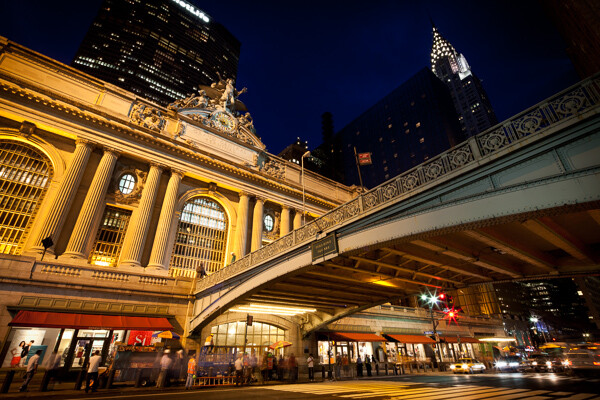
Grand Central and Chrysler Building, NYC.

Grand Central Terminal and Chrysler Building, NYC

#1 How will the viewer’s eyes flow through the scene?

I prefer to think about composition as if it is a game to please the eyes, and if you want to please the eyes, they need something to do and somewhere to go. When creating an image you want to think about the path that the viewers eyes will take through the scene, and whether this will be a fluid path or a jarring path.

  • Fluid Path – an image with leading lines, such as a road or stream, or an image with a foreground, middle ground, and background, which leads your eyes gradually from one level to the other.
  • Jarring path – an image with multiple, well spaced subjects for the eyes to bounce around between. Since there would be no lines leading between the objects in this type of image, they must be well spaced within the scene.

If you look at the photo above, the eyes are led directly to the Grand Central statue in the top left one third line in the scene, particularly because most people read from top to bottom and left to right.   The eyes are then led over to the Chrysler Building Spire and down to the detailed bridge.  These three elements make a triangle shape to lead the eyes through, however, the bridge acts as a very important element of the composition, keeping the eyes from leaving the scene and leading them back into the image, where they can either head up towards the statue or down to the people and cars on the street.

#2 Watch the Edge of your Images

Continuing from tip #1 above , for an image to feel balanced the edges of the image should be balanced. The eyes have a natural tendency to want to fall off an image through its edges. By putting elements in the corners you stop and catch the attention of the eyes, pushing them back into the scene. This is why landscape images often have small branches of trees or foliage in the top corners of the sky, and why vignetting is commonly used.

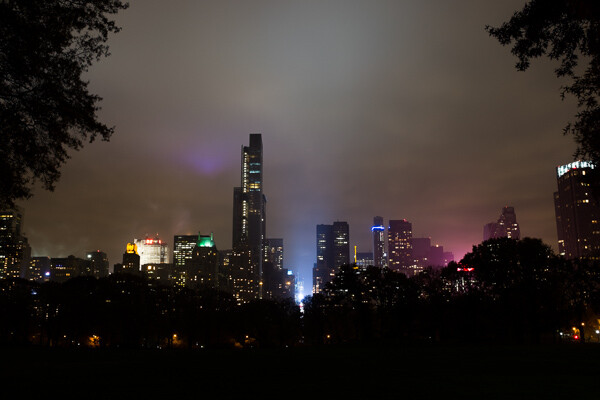
Central Park South, NYC.

Central Park South, NYC

Notice the branches in the top corners that function to keep the eyes in the frame. The corner elements often work even more effectively when only part of them is showing.

#3 Rule of Thirds Versus Centered Images

The rule of thirds is more of a suggestion than a rule. I’ve seen people take it to the extreme, but there are so many instances where a centered or different composition is preferable.

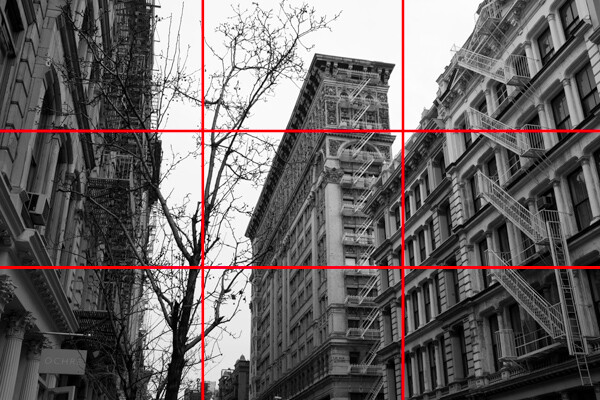
The rule of thirds refers to placing your main subject, or subjects, at one of the four one-third intersections in your photo, which you will notice in the second image below. This feels more pleasing to the eyes and it also allows you to simultaneously focus on a foreground subject on one side, while having a significant amount of space for an interesting background to balance out the scene.

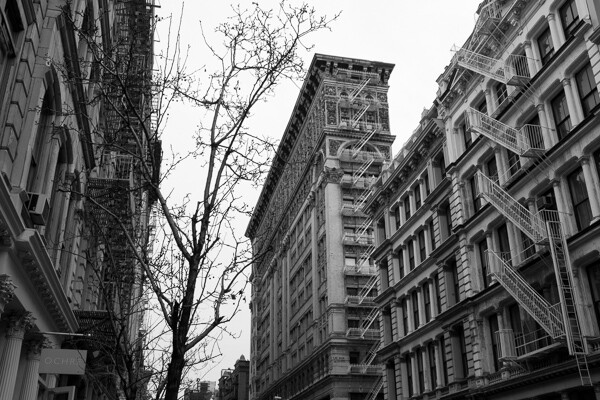
Silk Exchange Building, NYC.

Silk Exchange Building, NYC

Rule of Thirds.

Rule of thirds

In the above photo, while not exactly on the one third line (it’s not a rigid rule), you can see the building is balanced out by the tree on the corresponding one third line. The buildings on the each edge act as leading lines and have the added purpose of acting as edge frames to keep the eyes within the scene.

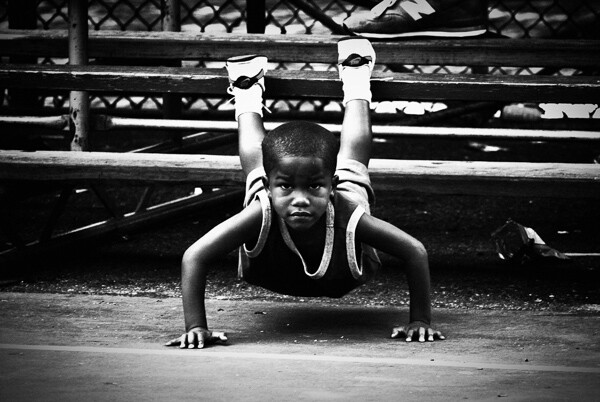
However, don’t be afraid of placing your main subject in the center. A centered subject can block everything else out of the scene and make you focus only on the most important element. This works especially well with a strong facial expression or look in the eyes. In addition, this works for symmetrical scenes, which can feel extremely balanced.

Rucker Park, NYC.

Rucker Park, NYC

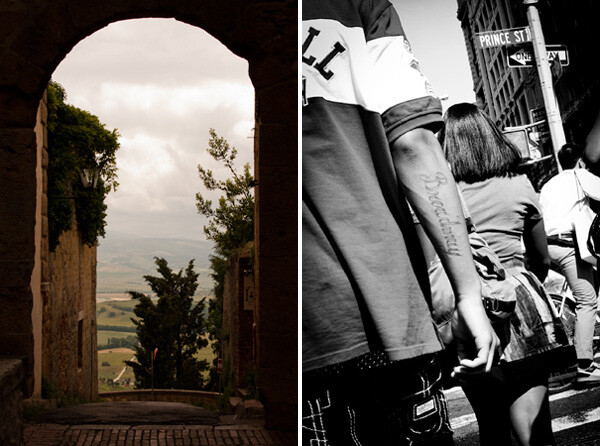
#4 Horizontal – Vertical or Skewed

Whether to capture an image horizontally, vertically, or slightly skewed is always a tough decision. There are many reasons to photograph both horizontally and vertically, however I often find that photographers have a tendency to rely more on one format.

Horizontal images often feel more natural to look at because they mimic the way that our eyes see the world. They also allow you to to fit more elements into your image and they provide an easier format for the eyes to flow through the image.

A vertical format can be beneficial when you want to get in closer and focus on a single subject or a tight area. It is a way to simplify your photo and get rid of any elements that might take attention away from your main subject.

When you are creating a horizontal or vertical image you want to make sure that your lines are straight.  If they are slightly off, the image will not feel balanced. However, sometimes you will want to skew your subjects at an angle. Skewing your subjects so the scene is neither horizontal nor vertical adds interest and energy to the photo. It promotes a spontaneous feeling and the lack of balance can actually be a pleasing to the viewer.

4-vertical_vs_skewed2

Tight, classic, vertical shot vs. energetic, skewed, detail shot

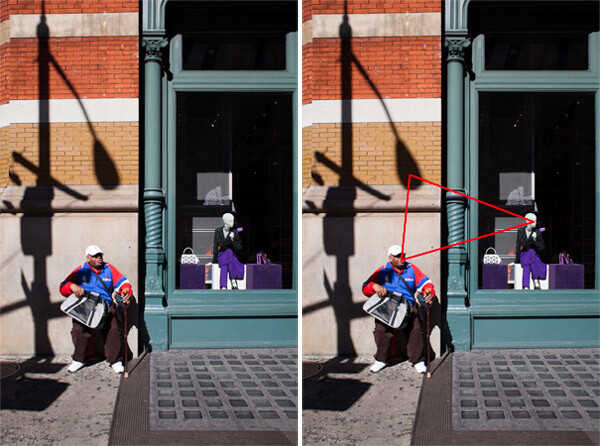
#5 Triangles and the Number Three

The triangular shape can be very important to good composition in photography. This does not refer to having the actual shape in an image but a relationship between three objects that create a triangle within the scene.

As long as the three objects are able to balance each other out, this is pleasing to the eyes because it creates a constant path through the scene.

5-Prada_Store2

Prada store, SoHo, NYC

#6 Perspective

The height from which you shoot can be a significant factor in how your images appear. If you want to emphasize height and power in a scene, get low to the ground and tilt the camera slightly up. People will look more important and prominent, and objects like trees or mountains will look even larger.

Shooting from a high camera angle on the other hand makes everything feel smaller and diminished in power. If the shooting height becomes extreme enough the image can even tend to take on an abstract and graphic feeling.

When photographing people, always pay attention to the camera angle.  Sometimes raising or lowering the camera slightly can make a big difference.

#7 Minimalist Versus Maximalist

Minimalist refers to keeping a photograph very simple, such as an image with a single subject and a pleasing and calm background. This can create a very powerful and graphic design.  There is power in the simplicity.  Valerie Jardin, recently wrote a good article on minimalist photography.

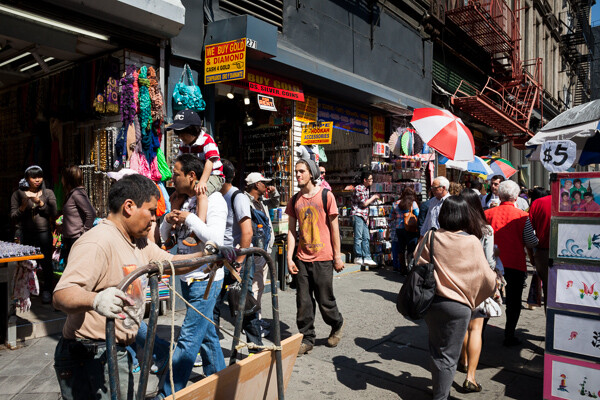
Maximalist on the other hand refers to a chaotic image, with a lot of elements competing with, and playing off of each other. However, within the chaos there is balance. This type of image is very hard to create in a balanced way, but when it works it can be a delight for the eyes that allows a viewer to explore through the scene.

Canal Street, NYC.

Canal Street, NYC. Balance in the chaos

The image above would not work if the subjects were not all spread out evenly throughout the scene.

#8 Color

Color is a vital aspect of design. A strong color on your main subject can add extra emphasis, while a strong color in an insignificant element can ruin the balance of a photo.

There is a large trend these days towards strong and unrealistic colors in photography, similar to the movies or on instagram. Strong colors do a better job of catching our attention at first, but muted colors can be just as interesting and create just as much of a mood as strong colors, if not moreso.  Explore desaturating your images slightly.

Each color has its own properties and ability to create mood within an image. A red tint can add a warm and energetic feeling to a photo, while a blue tint can make a scene seem either calm or cold and sterile. As portrait photographer Dan Winter’s states, “Green is an inherently calming and inviting color, and is tied to our natural surroundings.” Winters uses green for many of his portraits.

Here are some ways that colors can play off each other to add balance:

  • Complementary colors (colors on the opposite side of the color wheel)
  • Analogous colors (colors next to each other on the color wheel)
  • Different colors in similar shades
  • The same color in different shades
Spring and Bowery, NYC.

Spring and Bowery, NYC

#9 Getting Close and Filling the Frame

This is a very important concept. Figure out what is significant in the frame, get close, and only capture that. Cut everything else out and envelope the main subject. If the most interesting part of a person is their eyes, then capture the eyes up close.

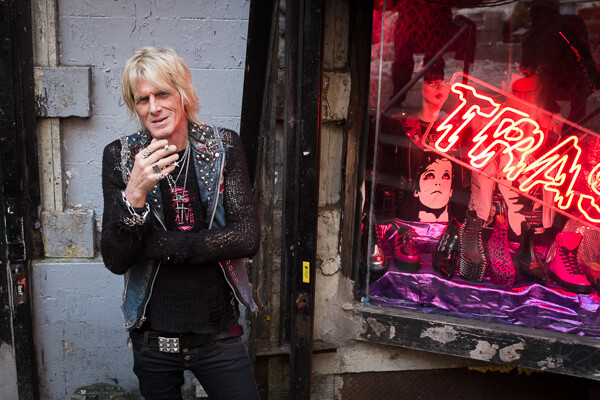
Shop Owner, Trash and Vaudeville, NYC.

Shop Owner, Trash and Vaudeville, NYC

#10 Uniqueness and Breaking the Rules

Learn these rules and practice them, but keep in mind that sometimes you must break the rules. Be unique whenever possible. There is nothing more pleasing to the eye than something that is different.

Do you have any additional tips you’d like to add to this list? Please share in the comments, with example images if you have some.

The post A New Photographer’s Guide to Composition by James Maher appeared first on Digital Photography School.


Digital Photography School

 
Comments Off on A New Photographer’s Guide to Composition

Posted in Photography


Unbelievable Advert: Augmented Reality Bus Shelter Window

16 Apr

[ By WebUrbanist in Design & Guerilla Ads & Marketing. ]

pepsi viral marketing bus

Taking over a single bus shelter on New Oxford Street, guerrilla advertisers threw everything they could think of at commuters, including (but not limited to) flying space aliens, underground squid monsters and giant city-crushing robots.

pepsi augmented reality display

The campaign, created for Pepsi Max, takes a real-time projected display and adds (almost) impossible scenarios seamlessly to convince viewers of their authenticity.

pepsi marketing stunt lion

pepsi alien invasion overlay

pepsi guerilla marketing campaign

From its creators: “Watch their reactions as unbelievable scenarios unfold before their very eyes; from a giant robot crashing through the street to a passer by being abducted by flying saucers.” With over 5,000,000 views and counting, it is safe to say that Pepsi can clearly count this one as a success.

Share on Facebook


[ By WebUrbanist in Design & Guerilla Ads & Marketing. ]

[ WebUrbanist | Archives | Galleries | Privacy | TOS ]


WebUrbanist

 
Comments Off on Unbelievable Advert: Augmented Reality Bus Shelter Window

Posted in Creativity


Windows 8 – Shrink the Taskbar Buttons

16 Apr

Is the Windows 8.1 Taskbar useful but taking too much space on the Desktop? Shrink it down!

If you run Windows 8.1 in “Desktop” mode, you probably make frequent use of the Taskbar. While the buttons provide quick access to applications, some people need every inch of screen real-estate that they can get and would rather the Taskbar take less room, but still be instantly accessible and onscreen at all times. There’s a quick way to shrink the buttons, and thus the Taskbar:

1. Right-click an empty part of the Taskbar, selecting “Properties”….

Read more at MalekTips.
New Computer and Technology Help and Tips – MalekTips.Com

 
Comments Off on Windows 8 – Shrink the Taskbar Buttons

Posted in Technology


Guide to Creative White Balance for Landscape Photography

16 Apr

If you’ve been using a digital camera for any length of time, you’ve probably heard about White Balance. You may still be wondering exactly what it is, and how to use it; or you may be using it right now and be wondering how it can possibly be something “creative”.
Creative white balance landscape photography

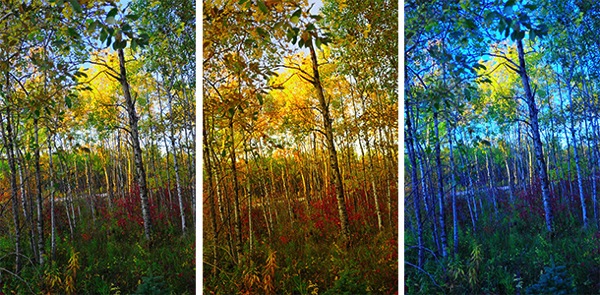
Different white balance settings create different looks

I’m going to show you some of my techniques for using White Balance to creatively enhance your landscape photography and with a few simple steps you can unlock the remarkable power of creative White Balance. Don’t worry, this is not a technical discussion, there are lots of references about that aspect of White Balance online. This article explains a simple shooting technique you can start using right now.

The Color of Light

Creative white balance landscape photography daylight

Daylight setting

Have you ever taken photos in an office, and been dismayed to see that your results had a sickly green cast to them? Or taken photos under cloudy, lifeless, skies only to see your images appear cold, flat and a little blue?

This happens because light comes in a variety of colors. The reasons for these colors is a result of wavelengths of light and the light spectrum. But we’re not going to get into this too deeply here. Just know that all light has different colors, and even the sun has different colors at different times of the day. Every landscape photographer knows about the “sweet light” or the “magic hour” – the times around sunrise and sunset when the color of the light is perfect for photography.

The crazy thing is that your eyes usually adjust to compensate for these color shifts, especially the subtle ones, so you won’t necessarily perceive these color differences, and in some cases your eyes are not as sensitive to color shifts as are the sensors in your camera. So you snap that office photo and the result isn’t as great as you had expected. Because of the color, those fluorescent bulbs cast a green pall over everything but you didn’t see it because your eyes “adjusted” the color for you.

This is where your White Balance settings play an important role in correcting potential problems by adjusting the color of the light in the camera. It is really important when you’re taking images of people, because the skin tones will be unattractive and far from natural looking.

But, if you are a landscape photographer, armed with the knowledge that light has color and your camera has a tool that can change the color of light, you can use this knowledge to do more creative landscape photography.

White Balance for Landscape Photography

Creative white balance landscape photography hicolour fluorescent daylight

Fluorescent setting

I shoot a lot of landscapes, in fact I pretty much ONLY shoot outdoors. Thankfully I almost never have to deal with those ugly green fluorescent lights. But what I do deal with are sunsets, sunrises, autumn colors, mountains, flowers, etc. – all those good things we find in nature.

I noticed that sometimes my sunset images just didn’t pack the punch the way I SAW it at the location. Sure, I could go back to my computer and make adjustments. Or, without degrading any pixels, I could punch up my images in camera by purposely fooling it into using a different White Balance. In other words I don’t use White Balance to correct color casts, I use it to ADD color casts! I deliberately use the “wrong” White Balance setting.

Landscapes created at sunset or sunrise, snow and winter scenes, and those with night sky dominating lend themselves well to creative White Balance techniques.

Sunsets can become more warm, or more soothing, with violet overtones if you use the Cloudy White Balance setting. Autumn foliage pops with yellow and orange when you use Shade as your White Balance! The Aurora Borealis (Northern Lights) becomes a rich alien green, rolling through a deep royal blue sky, by changing your White Balance setting to Incandescent or Tungsten. Please note, that you use these settings regardless of actual light colour.

Creative white balance landscape photography hicolour fluorescent daylight

Fluorescent daylight camera setting

Creative white balance landscape photography customA3 M3

Custom white balance setting A3 M3

Creative white balance landscape photography auto

Auto white balance setting

Creative white balance landscape photography direct sun

Daylight white balance setting

Creative white balance landscape photography shade

Shade white balance setting

How to use Creative White Balance

To use creative White Balance, there are just a few things to understand about using White Balance in general.

Since White Balance is designed to correct color casts, the setting on your camera will compensate, or change the light, to be the opposite of the shooting situation. In other words, incandescent lights are too warm (orange), so changing your White Balance setting to Incandescent or Tungsten will add a blueish tinge. The light in the shade is blueish, so changing the White Balance setting on your camera to Shade adds warmth, orange and red.

To get creative with White Balance you’ll need to find the dial or menu for changing your White Balance settings. Most cameras have presets for Flash, Shade, Cloudy, Incandescent (Tungsten), Fluorescent, Sunny (or Daylight), and Auto.

Look for the ICONS – a cloud (cloudy), a house (shade), a sun (full sunlight), a fluorescent bulb – long and skinny (fluorescent), an old school light bulb (incandescent or tungsten), a lightning bolt (flash), and AUTO or A for automatic.

Next you’ll need to know how to set your White Balance for a specific type of shot. The best way is to experiment by trying all of your White Balance settings for the same scene. So if you want to ramp up your warm colors, say in an autumn scene or sunset, change your White Balance to Shade, Flash, and Cloudy! Compare your results.

Shooting the night sky or the Aurora Borealis, change to Tungsten or Incandescent to make the colors cooler, make that Aurora really pop! The added blue tones give the night sky a rich royal blue tone, while the green light of the Aurora turns an eerie alien glowing green.

Here’s a handy chart I made for you – so you can literally “dial it in”. All you need to do is change your settings according to the type of landscape scene, using the chart. This will give you a great place to start.

Chart

Supercharge your Creative White Balance

Depending on your camera, you may also be able to fine tune and supercharge your custom White Balance once you find one that provides the boost you like.

In Nikon DSLRs you may see this graph that enables you to make your own custom White Balance presets. It’s typically in your shooting menu under the White Balance tab. Consult your camera manual to see if your camera has this option, and how to apply it.

2customWB1

1customWB

Custom white balance in camera

By selecting a specific color balance presets, you can ramp up the warmth and impact for sunrise and sunset, as well as boost the coolness for winter snow landscapes.

Easy Experimentation

If you shoot RAW, and can’t switch White Balance in the field, you can also easily adjust your White Balance in post-production. Lightroom, Photoshop, Nikon Capture and most other image editing programs have a RAW White Balance setting. Nikon shooters note that you’ll get the best results adjusting RAW [NEF] White Balance if you use Nikon Capture, as Nikon encrypts its White Balance “formula”. Other software can only read parts of the White Balance data so your results may not be as high impact as they could be.

If you have some landscape sunset or sunrise shots on your computer, give creative White Balance a try right now. Here are few of my Lightroom White Balance edits so you can see how much control you have over the drama and mood of your lighting.

Creative white balance landscape photography auto

Auto white balance in Lightroom

Creative white balance landscape photography cloudy custom

Cloudy custom white balance in Lightroom

Creative white balance landscape photography auto adjustments 2

Auto white balance adjustment in Lightroom

Creative white balance landscape photography auto adjustments3

Auto white balance adjustment in Lightroom

Do you have some other tips you can share on using White Balance creatively? Please tell us about them in the comments below and share your images as well.

For some other landscape photography tips try some of these articles:

  • 5 Steps to Help you Take Better Landscape Photos
  • 10 Most Common Mistakes in Landscape Photography – and How to Overcome Them
  • So you Want to Shoot Landscapes? [Top 12 dPS Landscape articles from 2013]
  • Living Landscapes – A Guide To Stunning Landscape Photography – a dPS ebook
  • Loving Landscapes A guide to landscape photography workflow and post-production – a brand new dPS ebook by the authors of Living Landscapes

The post Guide to Creative White Balance for Landscape Photography by Alex Morrison appeared first on Digital Photography School.


Digital Photography School

 
Comments Off on Guide to Creative White Balance for Landscape Photography

Posted in Photography


Google Gmail – Show Maps Automatically in Emails Instead of Copying and Pasting

16 Apr

If you often receive addresses via Google Gmail, why copy and paste them into a Google Maps window?

Depending on your electronic mail habits, you may have contacts that often need to send addresses to your Gmail account. When you get these addresses and need to view them on a map, would you rather A) copy and paste the addresses into a new browser tab running Google Maps, or B) have Gmail show the maps automatically inside the e-mail messages?

If your answer is “B”, there is a Google Labs extension that will do just that, and it’s easy to set up:…

Read more at MalekTips.
New Computer and Technology Help and Tips – MalekTips.Com

 
Comments Off on Google Gmail – Show Maps Automatically in Emails Instead of Copying and Pasting

Posted in Technology