RSS
 

Archive for April, 2014

Drone films SpaceX rocket launch and landing

23 Apr

Screen_Shot_2014-04-22_at_9.40.49_AM.png

These days shots from a flying drone are a dime a dozen – when engagement shoots are being covered from a hovering photographic robot you know that the technology is ubiquitous. It’s getting increasingly hard to impress someone with images or video from drones. So it’s lucky that privately-owned SpaceX happens to own its own rockets because it gives them the ability to capture stunning video, like this launch and landing test of its Falcon 9 Reusable rocket. See video

News: Digital Photography Review (dpreview.com)

 
Comments Off on Drone films SpaceX rocket launch and landing

Posted in Uncategorized


Finding the Time to do Photography Part 1- Business Trip to Las Vegas

23 Apr
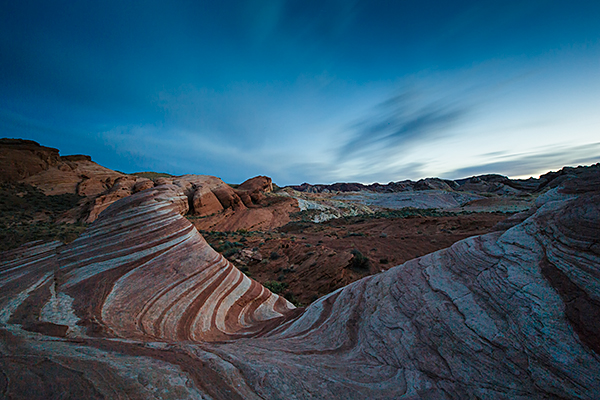
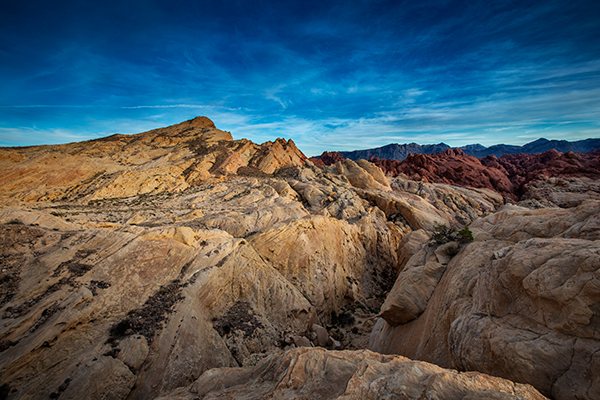
The Fire Wave at Valley of Fire State Park. 4 minutes, f/16, ISO 160. EOS 5D Mark III with EF 16-35 f/2.8L II.

The Fire Wave at Valley of Fire State Park.Exposure: ISO 160, 4 minutes, at f/16. EOS 5D Mark III with EF 16-35 f/2.8L II.

About a month ago, a question was posed on the DPS Facebook Page, “What is the number one obstacle to you taking better photos?” While some answered that they were unsure how to set exposure in Manual mode, and others thought their gear might be limiting them, the overwhelming number one answer was TIME.  In this day and age of being always on, always connected, and always on the go, it can be difficult to find time to do photography.  Like many, my day job, which isn’t as a full time photographer, keeps me busy and eats up much of my time. On weekends, I can occasionally make time but often life and family get in the way.
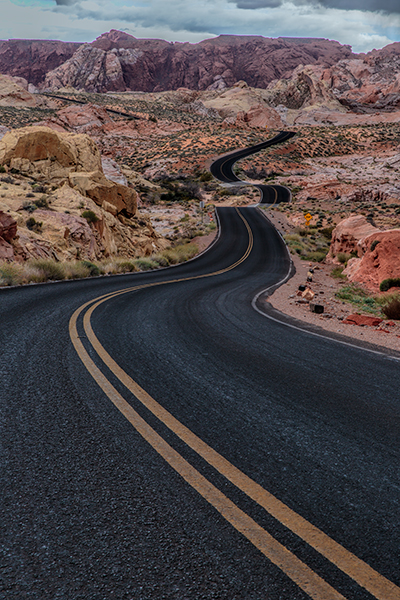
Scenic Drive in Valley of Fire. 1/10, f/16, ISO 100. EOS 5D Mark III with EF 24-70 f/2.8L II.

Scenic Drive in Valley of Fire. 1/10, f/16, ISO 100. EOS 5D Mark III with EF 24-70 f/2.8L II.

So what to do when you need a fix?  There are several things you can do. What I do is to take advantage of my job when I can. I do occasionally travel for work, and when I do, I bring my camera with me.  While I may not have an entire day, often I can find an hour at the end of the day, or I can even go shoot at night.  This was true when I went to Las Vegas recently for a trade show.  I had two days of training seminars, two days of trade show setup and four full days of trade show to work. Was I tired at the end of the day? Yes, but photography is how I relax, so it seemed only natural to eschew the neon glow of the restaurants and casinos and go grab my camera.

First of all, the day I arrived, my flight got in earlier in the afternoon.  I rented a car and headed out to Valley of Fire State Park, about 45 minutes northeast of Las Vegas. I got a mixed afternoon of clouds, which parted for a nice sunset. I then hung around for darkness and got a few night shots just to finish things off.

The next day, the work began, but after my work day ended, I headed out to the strip to shoot some of the neon.  The Vegas strip is an awesome place to shoot no matter what you like to shoot. Cityscapes, architecture, or people, it’s all there and it’s there every night. You need only spend an hour and you’ll get more than your fill. The beauty of it all is, Las Vegas makes its own light, so you can shoot 24-7 there.
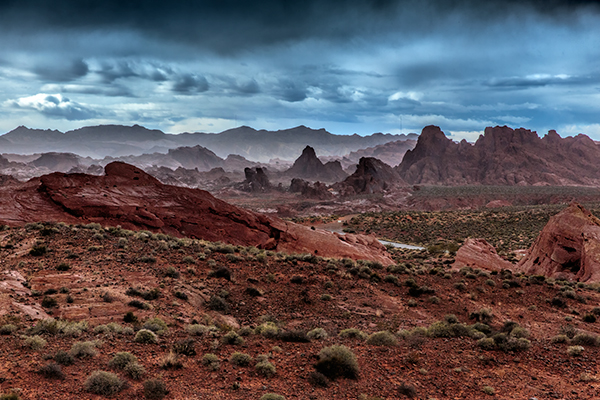
Valley of Fire Storm. 1/1000, f/8, ISO 1600. EOS 5D Mark III with EF 24-70 f/2.8L II. I managed to catch the Valley of Fire on one of the few days it rained all year.

Valley of Fire Storm. 1/1000, f/8, ISO 1600. EOS 5D Mark III with EF 24-70 f/2.8L II. I managed to catch the Valley of Fire on one of the few days it rained all year.

Elephant Rock, in Valley of Fire, at night. 15 seconds, f1.4, ISO 800. EF 24mm f/1.4L II.

Elephant Rock, in Valley of Fire, at night. 15 seconds, f1.4, ISO 800. EF 24mm f/1.4L II.

Get over your objections

I know what your objections will be:

  • I can’t carry everything I need.
  • I don’t have room in my luggage.
  • I’m tired after a day of work.

I’ve said all of those myself, and at times, this attitude won out. But if you have a passion for taking pictures, you’ll find a way.  I carry a small travel tripod- a Gitzo 1541T.  It fits right in my luggage.  I realize that one’s a bit pricey, but there are many other options. Try a Gorillapod. They are small, lightweight, and come in a variety of sizes to fit almost any camera. Perfect for traveling light.

Don’t want to carry a DSLR?  Get yourself a smaller setup you won’t mind carrying.  I own a Canon G16 for when I don’t want to bring my full kit. I can still shoot RAW, have full manual control, but it’ll fit on my belt.  And if you do want a DSLR? Consider minimizing your kit for travel. Pick one or two lenses that can cover most of the standard range. I always have a hard time minimizing, but when I do, I usually carry my EOS 5D Mark III with EF 16-35 f/2.8L II and EF 24-70 f/2.8L II. This is the kit used for the shot of Fire Wave, and of Scenic Drive.  I added the EF 24mm f/1.4 for night shooting. If you’re using a DSLR with an APS-C sensor, an 18-135 is an excellent choice for a do-it-all lens.

I’m not saying finding the time is easy.  Sometimes it will require sacrifice. But I have never regretted spending even a minute with my camera, even when I was tired, or pulled in many directions.  If photography is a passion for you, you make time.  I’m not saying every day.  But I do make it a point to make time to indulge my passion.  You should too. Even if it’s just a minute.  In part two, I’ll discuss ways to make time when you’re at home.

EOS 5D Mark III with EF 16-35mm f/2.8L II. 5 seconds, f/11, ISO 200.

EOS 5D Mark III with EF 16-35mm f/2.8L II. 5 seconds, f/11, ISO 200.

EOS 5D Mark III with EF 16-35mm f/2.8L II.  1/25, f/8, ISO 640.
EOS 5D Mark III with EF 16-35mm f/2.8L II. 1/25, f/8, ISO 640.

Fire Canyon. EOS 5D Mark III with EF 16-35mm f/2.8L II. 1/5, f/16, ISO 100.

Fire Canyon. EOS 5D Mark III with EF 16-35mm f/2.8L II. 1/5, f/16, ISO 100.

The post Finding the Time to do Photography Part 1- Business Trip to Las Vegas by Rick Berk appeared first on Digital Photography School.


Digital Photography School

 
Comments Off on Finding the Time to do Photography Part 1- Business Trip to Las Vegas

Posted in Photography


3D-Printable Connectors Make DIY Furniture Assembly Easy

23 Apr

[ By WebUrbanist in Design & Furniture & Decor. ]

diy joinery design closeup

Leveraging the best features of available 3D printers and the materials they can print, this kit-of-parts approach opens up an amazing array of possibilities for do-it-yourself furniture construction.

diy table surface supports

Studio Minale-Maeda presented their Keystones system at Milan, using elegantly simple table and coat rack designs to show off the potential of this connective system.

diy coat rack connected

Their core idea is that the larger wooden pieces can be flat-packed more easily for shipping. Customers can then complete the assembly process using included or locally-printed pieces. Still, the potential of this approach goes well beyond that system as such.

diy furniture connector plastic

diy black 3d printed

There is really no reason to limit the process to a ship-and-print combination. With a similar but open-source variant, would-be buyers could take off-the-shelf dimensional lumber and construct their own furniture effectively from scratch. Perhaps unintentionally, the simple and standardized shapes of the components shown here already suggest such potential implicitly – at most a few cuts would be needed for the table, if even that.

diy angle view table

diy side view table

diy standing table vertical

diy joint intersection wood

Regardless, the solution-as-presented is quite crafty, whatever its potential future might be – it leverages the strengths of 3D-printed plastic (rigidity with flexibility), uses strong triangular shapes for structural support (like trusses) and requires only the most basic tool to tighten the finished product (a screwdriver).

Share on Facebook


[ By WebUrbanist in Design & Furniture & Decor. ]

[ WebUrbanist | Archives | Galleries | Privacy | TOS ]


WebUrbanist

 
Comments Off on 3D-Printable Connectors Make DIY Furniture Assembly Easy

Posted in Creativity


Nokia device division may become ‘Microsoft Mobile’

23 Apr

3308282642.jpg

Microsoft is in the process of acquiring Nokia’s Devices and Services division, and in March both companies confirmed the $ 7.2 billion deal would be closed by the end of April. Now Windows Mobile Power User got hold of a leaked letter which Nokia supposedly had sent out to its suppliers in Finland. In the letter it says that the name of Nokia Oyj will change to Microsoft Mobile Oy. Learn more

News: Digital Photography Review (dpreview.com)

 
Comments Off on Nokia device division may become ‘Microsoft Mobile’

Posted in Uncategorized


[MODIFIED] General Computers – Why Do Install Programs Ask Me to Close Everything or Restart?

23 Apr

When installing software, here’s why you should close down all running applications – but think twice before shutting down security software.

When you install software on your machine, you are usually asked near the beginning to close other running programs (a good practice to do even if you are not explicitly asked). Why should you consider doing so, and should you shut down everything?

1) Some install programs require you to reboot your operating system when the install is done, so, you would have to close other programs down anyway or let the operating system do so (risking you losing work in such applications). This is especially true for software such as firewalls, virus scanners, some anti-spyware applications, backup utilities, etc….

Read more at MalekTips.
New Computer and Technology Help and Tips – MalekTips.Com

 
Comments Off on [MODIFIED] General Computers – Why Do Install Programs Ask Me to Close Everything or Restart?

Posted in Technology


Contest – Win an Olympus E-M10 Camera from Macphun!

23 Apr

Win an Olympus E-M10 Camera from Macphun! Every photo entrant receives a prize!!!

Contest Image 01

Over the last several years here at dPS, we’ve run some very popular competitions. This week, we are very happy to bring you our latest photo contest, “Get Outside and Shoot” from Macphun, makers of award winning photo apps for Mac OS!

EVERYONE is a WINNER!

For this competition, Macphun is giving away a Grand Prize of an Olympus E-M10 Camera, photo submissions published on canvas, and Macphun photo apps of your choosing! Plus, EVERY entrant will receive a complimentary copy of ColorStrokes for Mac – an award winning photo application!

These five prizes are designed to be helpful for every level of photographer, so don’t wait to enter. Here’s what you could win:

Contest Grand Prize Image 01

  • Grand Prize: Olympus E-M10 Camera – $ 700 Value
  • Weekly Winners will receive their submission on canvas – value varies
  • Runners-up will receive the Macphun photo app of their choice (Intensify Pro, Snapheal Pro, Fx Photo Studio Pro, or Focus Pro) You can view each product here.

How to Win

Anything you see outside is already a perfect subject. So take your camera or a smartphone, get outside, find the best angle and shoot. All you need to do is submit your photos to our photo contest and check back on weekly basis: we will be awarding prizes each Wednesday throughout the contest timeframe.

Deadline is Wednesday May 21, 2014, 12:00 a.m. PDT (PST). Photos submitted after deadline will not be considered.

Contest Outline

The Grand Winner will get a shiny new and amazing Olympus E-M10 camera!

There are also very cool prizes for runners-up, and a guaranteed gift for everyone who enters. Just remember, these will work with your Mac OS only. Sorry Windows users.

You can submit your photo on here. The contest is called “Get Outside and Shoot”, so we urge you to submit images that are on topic, as others will not qualify. You can submit up to three different images.

Your FREE gift, just for entering!

Every entrant will receive a free copy of ColorStrokes for Mac – award-winning photo app by Macphun Software . The Macphun team will email you the app (download link and serial code) 2-3 days after your first submission. There will be only one app per entrant. Learn more about Macphun photography software here.

Colorstrokes

Winners and Prizes

  • The Macphun Team will pick and announce four winners of the week (one Grand Winner and three runners-up) every Wednesday for the duration of the contest; April 23rd, April 30th, May 7th, and May 14th, 2014.
  • One (1) Grand winner of the week will get his/her submission printed on canvas and shipped directly to them. Please note that the winner will be contacted by Macphun Team to confirm the shipping address.
  • Three (3) runners-ups will receive a Macphun photo app of their choice (Intensify Pro, Snapheal Pro, Fx Photo Studio Pro or Focus Pro)
  • The Grand Prize Winner will be picked by the Macphun Team and announced on Wednesday, May 28th, 2014. The Winner will receive an Olympus E-M10 Camera ($ 700 value)
  • The Macphun team may decide to add more prizes for the entrants of the contest. Entrants will receive an email newsletter, announcing new prizes, so make sure to enter today!!

Macphun is passionate about photography! They develop software that inspires photographers of all levels to create the most stunning pictures ever. You capture the moments, Macphun products help you to unveil the real beauty of an image.

Disclaimer: Macphun is a paid partner of dPS.

The post Contest – Win an Olympus E-M10 Camera from Macphun! by Darlene Hildebrandt appeared first on Digital Photography School.


Digital Photography School

 
Comments Off on Contest – Win an Olympus E-M10 Camera from Macphun!

Posted in Photography


Nikon Coolpix P340 real-world samples gallery

23 Apr

Screen_Shot_2014-04-22_at_9.25.09_AM.png

The Coolpix P340 is Nikon’s latest pocket enthusiast camera, featuring a large 1/1.7″, 12.2-megapixel BSI CMOS sensor, full manual controls (P, S, A, M) and Raw image capture. The P340 has a versatile 5x (24-120mm equivalent) wide-angle to telephoto zoom range plus 10x Dynamic Fine Zoom and a fast F/1.8 maximum aperture lens with Lens Shift VR image stabilization. We’ve spent a few days shooting with it to see if these specs add up to impressive performance. See gallery

News: Digital Photography Review (dpreview.com)

 
Comments Off on Nikon Coolpix P340 real-world samples gallery

Posted in Uncategorized


Invisible Barn: Mirrored Surfaces Create Camouflaged Folly

23 Apr

[ By WebUrbanist in Art & Installation & Sound. ]


invisible structure windows reflections

Like a mirage on the horizon, the structure seems to shimmer into and out of existence, playing tricks on the eye with a combination of see-through portals and reflective surfaces.

invisible barn at night

Designed for the 2014 Folly Competition held by The Architecture League, the idea was to slip something into an existing park context that would draw attention and generate interaction.

invisible architecture mylar plywood

Deceptively, the building itself is nearly two-dimensional, adding another element of camouflage depending on the angle of view or direction of approach. Unlike its more solid cousin the invisible cabin, the result in this case could really catch you by surprise, but is still probably less dangerous to walk into by accident than a mirrored fence.

invisible mirrored architectural concept

One of the self-imposed problems its designers sought to solve revolved around the question of year-round engagement – how to make something that changed and was worth revisiting from one season to the next.

invisible building site plan

From the design brief: This mirror-finished folly is placed in the middle of the grove and reflects its surrounding environment: different species of trees and plants, sky, ground and the seasonal changes of the site. The reflection of the folly within its enclosed grove allows the structure to smoothly assimilate into the nature.”

invisible design concept drawing

“The incisions that penetrate through the folly allow visitors to maneuver in, out, and around the structure. Invisible Barn is a folly that loses its man-made architectural presence in nature but adds novel experience and interaction to the users.””

Share on Facebook


[ By WebUrbanist in Art & Installation & Sound. ]

[ WebUrbanist | Archives | Galleries | Privacy | TOS ]


WebUrbanist

 
Comments Off on Invisible Barn: Mirrored Surfaces Create Camouflaged Folly

Posted in Creativity


Windows 8 – Speed up Your Taskbar Thumbnail Previews

22 Apr

Disable animations when viewing thumbnail previews of open windows via your Windows 8.1 Taskbar to save you time.

Just as with Windows 7, when you hover over Taskbar icons, previews of open windows appear. These don’t normally snap onscreen but fade in and out of view, and if you move between Taskbar icons the previews become animated.

If you don’t care for the Windows 8,1 Taskbar animations and would rather save time by disabling them, the following tweak does so:…

Read more at MalekTips.
New Computer and Technology Help and Tips – MalekTips.Com

 
Comments Off on Windows 8 – Speed up Your Taskbar Thumbnail Previews

Posted in Technology


22. April 2014

22 Apr

Ein Beitrag von: Florian Ilsinger

© Florian Ilsinger


kwerfeldein – Fotografie Magazin | Fotocommunity

 
Comments Off on 22. April 2014

Posted in Equipment