RSS
 

Archive for March, 2014

Zeiss announces Compact Zoom CZ.2 15-30mm T2.9 lens

28 Mar

Zeiss.jpg

Zeiss will have its new Compact Zoom CZ.2 15-30mm T2.9 lens on display at this year’s National Association of Broadcasters (NAB) show in Las Vegas, April 7-10. The new lens fills the wide-angle gap in Zeiss’ cine-style zoom lineup, complementing the already available CZ.2 28-80mm T2.9 and CZ.2 70-200mm T2.9 lenses. Also at the show will be a new Arri/Zeiss Master Anamorphic MA 135mm T1.9 lens. Learn more

News: Digital Photography Review (dpreview.com)

 
Comments Off on Zeiss announces Compact Zoom CZ.2 15-30mm T2.9 lens

Posted in Uncategorized


So klein

27 Mar

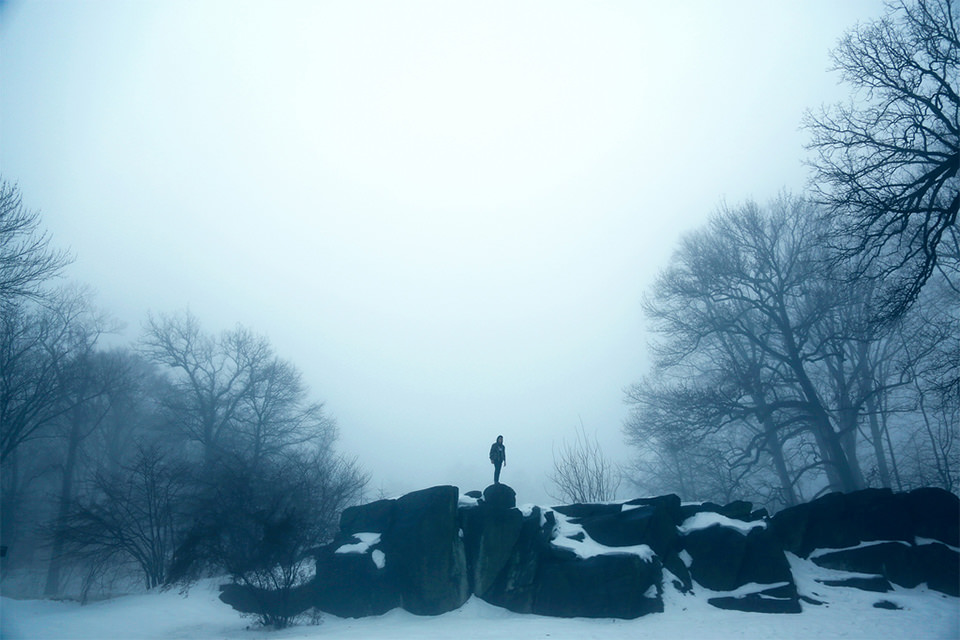
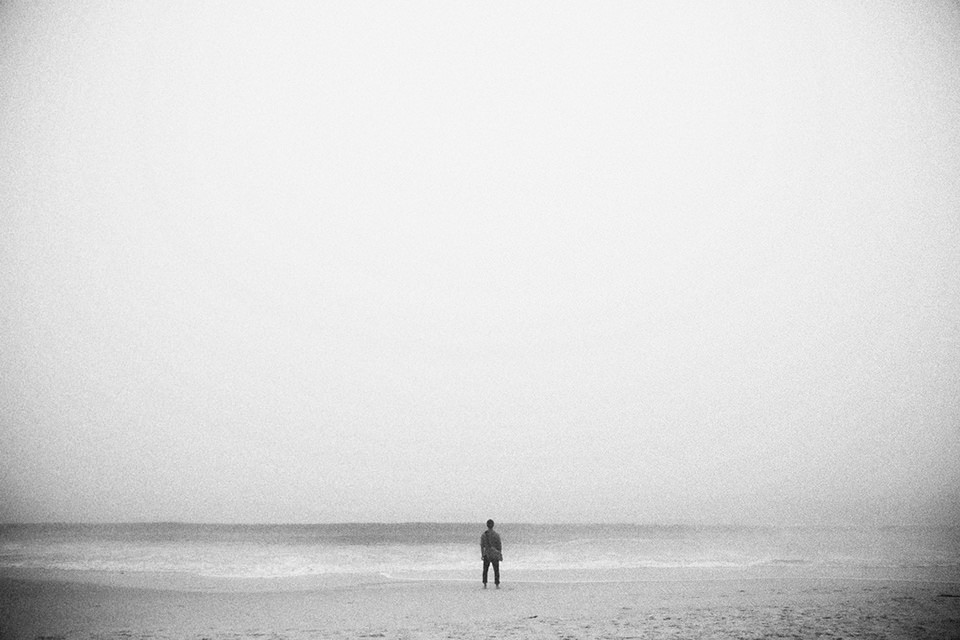
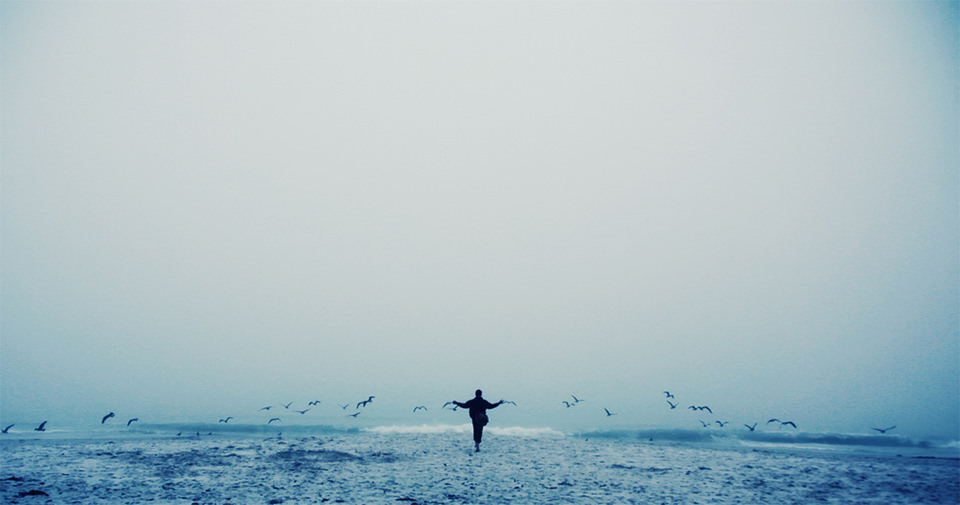
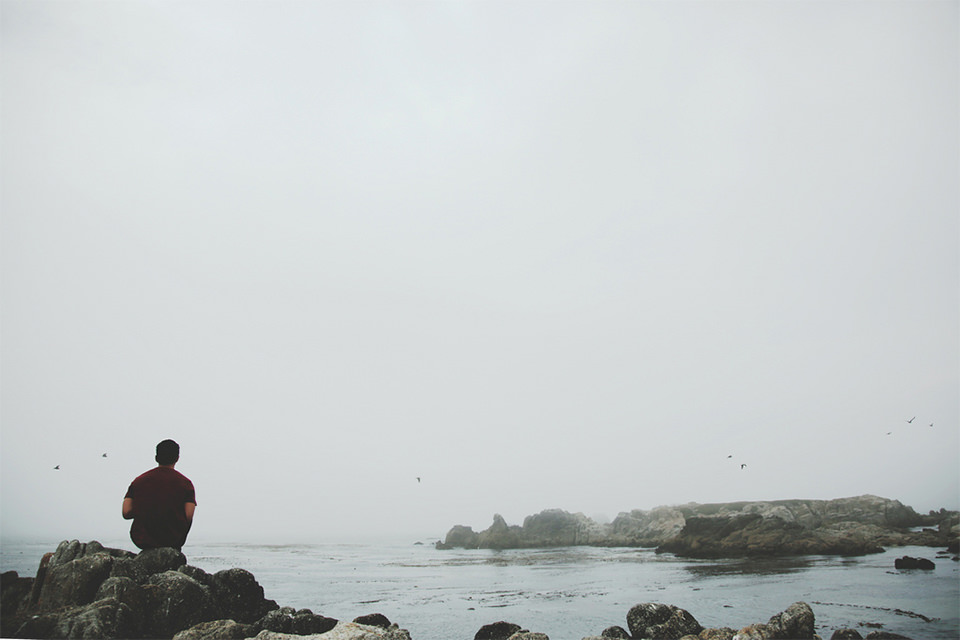
Shayan Artuz ist 18 Jahre alt, wuchs in Yorba Linda in Kalifornien auf und besucht aktuell ein College in New York City. Er studiert Bildende Kunst und Englisch und möchte sich in naher Zukunft mehr mit Fotojournalismus beschäftigen. Seine momentanen Arbeiten sind konzeptuelle Aufnahmen von Menschen in der Natur.

Ich fühle mich stark zu Landschaftsaufnahmen und Portraits hingezogen. Meine Lieblingsfotos sind die Bilder, die die Weite der Natur demonstrieren und wie unglaublich winzig wir im Vergleich zu dieser atemberaubenden Größe wirken.

© Shayan Artuz

© Shayan Artuz

© Shayan Artuz

© Shayan Artuz

© Shayan Artuz

© Shayan Artuz

Und in der Tat fühlt man sich beim Anblick seiner Fotos auf einmal sehr klein. Oft stehen die Menschen mit dem Rücken zum Fotografen und durch diese Anonymität der Person kann man sich noch einfacher mit ihnen identifizieren. Sie erinnern etwas an Caspar David Friedrich und Shayan schreibt mir auch, dass ihn vor allem die Malerei, aber auch Skulpturen und die Musik inspirieren.

Mehr Fotos von Shayan findet Ihr auf Flickr oder Facebook.


kwerfeldein – Fotografie Magazin | Fotocommunity

 
Comments Off on So klein

Posted in Equipment


It’s Thanks Back Thursday!

27 Mar

Sure, your photography is good. But, did you know it can also do good?

Use your photos to put smiles on the faces of your best chums and total strangers.

Simply enter a photo and message of gratitude into our Thanks Machine and we’ll pop out a sendable thanks-o-gram.

Send it out to that pal you’re thankful for and we’ll donate $ 1 to Kids’ Photography Education through Donors Choose. Whabam! You just helped out a total stranger.

Put your photos to good use, express your thanks and educate kiddos.

Send a Photo Thanks-O-Gram


© laurel for Photojojo, 2014. |
Permalink |
No comment |
Add to
del.icio.us

Post tags:


Photojojo

 
Comments Off on It’s Thanks Back Thursday!

Posted in Equipment


Die Visionen des Reuben Wu

27 Mar

Als ich vor ein paar Tagen beinahe über die Lanschafts-Aufnahmen von Reuben Wu hinweg gesurft wäre, musste ich meiner Entdeckung erst einmal auf unserer Facebook-Seite Luft machen. Selten war mir ein solch surreal-dramatisches Sujet im diesem Genre untergekommen.

Der Fotograf selbst beschreibt sein Schaffen wie folgt:

Ich fotografiere sehr viel auf Reisen, denn ich liebe neue Entdeckungen. Für mich ist die Aufnahme eines Bildes ganz der Artikulation meiner Wahrnehmung gewidmet: Dem Ausdruck einer inneren Vision.

© Reuben Wu

© Reuben Wu

© Reuben Wu

© Reuben Wu

© Reuben Wu

© Reuben Wu

© Reuben Wu

© Reuben Wu

© Reuben Wu

© Reuben Wu

Und die Visionen, die der Entdecker mit dem feinen Namen hat, sind weder belanglos noch distanziert. Seiner Aussage nach „ist die Fotografie nur ein Mittel zum Zweck. Das Bild ist nur eine Facette dessen, wonach ich suche“.

Reuben Wu, ich werde Deine Bilder so schnell nicht vergessen.


kwerfeldein – Fotografie Magazin | Fotocommunity

 
Comments Off on Die Visionen des Reuben Wu

Posted in Equipment


Popkultur im Quadrat

27 Mar

Ein Beitrag von: Peter Breuer

Ein Musiker kommt auf die Bühne, greift in die E-Gitarre und im selben Moment brüllt aus den Marshall-Verstärkern der Ton. Die Fotografie war lange Zeit deutlich betulicher.

Zuerst war sie ein Expertenmedium, dann ein teures Oberschichtvergnügen und selbst, als sie sich in der Kodak-Ära der preiswerten Großlabore demokratisch nannte, vergingen noch zwischen dem Druck auf den Auslöser und dem Betrachten der Bilder einige Labortage, die das fotografierte Erlebnis vom seiner Dokumentation aus Papier trennten.

Erst das Polaroid brachte den Rock’n’Roll in die Fotografie.

Hotdog © Peter Breuer

Das SX70-Polaroid war schnell genug für Andy Warhols Portraits von Bianca Jagger und sein Quadrat perfekt für Walker Evans typographische Fundstücke. Monumental wurde es, wenn Jan Hnizdo Polaroidmaterial in seine riesige Fachkamera spannte.

Die Geschwindigkeit und seine stetig leicht falschen Farben waren Popkultur und verhießen in den 1970er Jahren einen Fortschritt, der es möglich machen würde, bald jedes Bild in hoher Qualität blitzschnell in den Händen halten zu können.

Lange vor Apple und Facebook zählte Polaroid zu den heißesten Aktien der Wall Street: Die „nifty fifty“ waren Zukunftswerte, bei denen das Kurs-Gewinn-Verhältnis uninteressanter war als die explodierende Popularität. Polaroid gehörte dazu, aber auch Eastman Kodak – und beide waren später dem Tempo der Digitalisierung der Fotografie nicht gewachsen.

Mit einer SX70-Kamera zu fotografieren, war analoger als analog. Das Hell-Dunkel-Drehrad veränderte Belichtungszeiten, ohne genaue Zahlenwerte anzuzeigen. Gewählt wurden keine komplizierten Brüche, sondern gefühlte Unterschiede zwischen „bisschen“ und „sehr“. Die perfekte Temperatur für Polaroids lag deutlich über 20 Grad Celsius, das Licht war idealerweise exakt im Rücken und der Himmel satt blau. Kein Wunder, dass David Hockney mit Vorliebe die Kacheln und Lichtbrechungen kalifornischer Pools fotografierte.

Fisch © Peter Breuer

Meine erste eigene Polaroidkamera stammte vom Trödelmarkt. Eine SX70-Alpha Spiegelreflex aus weißem Kunststoff mit brauner Belederung. Zehn Mark kostete die wertvolle Klappkamera – gerade mal die Hälfte eines einzelnen 10er Filmpacks. Meine ersten Versuche waren indes relativ mühsam. Dieses Warten, bis endlich unter der Folie etwas passierte und diese völlig unkalkulierbaren Farben.

Weil ich aus Kostengründen auf abgelaufene Filme setzte, die ich für den halben Preis kaufen konnte, musste ich penibel sauber arbeiten. Immer wieder mal platzte der Chemiebeutel am unteren Ende des Bildes und verschmierte die empfindlichen Walzen im Inneren der Kamera. Damit nicht das nächste Bild durch ein noch ungleichmäßigeres Auspressen beschädigt wurde, waren in der Fototasche ständig Q-Tips und eine Flasche Alkohol zum Säubern.

Kaffeefilter © Peter Breuer

Um den fast zwangsläufigen Farbstich zu kontrollieren, begann ich, mit Kunstlicht und Farbfiltern von Lee zu arbeiten. Mit seltsamen Aufbauten auf dem Bügelbrett, ausgeschnittenen Lichtformern aus Fotokarton und Baumarktklemmen. Was mich 1989 besonders faszinierte, war Foodfotografie – das schien einerseits am wenigsten zum SX70-Polaroid zu passen, ließ sich aber andererseits hinterher oft noch verzehren.

Glücklicherweise hatte ich über Umwege irgendwann eine Verbindung zu Polaroid in Offenbach und konnte dort mein abgelaufenes Material in Kartons kaufen. Das machte das Fotografieren immer noch nicht billig, aber wenigstens halbwegs bezahlbar.

Wurst © Peter Breuer

Im Laufe der Zeit entstanden viele Hundert Fotos von Lebensmitteln und eine Serie von Fast-Food-Motiven für das ZEIT-Magazin, die meine damalige Wohnung in einen fetttriefenden Ort verwandelte: Schließlich hatte ich mein „Studio“ immer noch auf einem Bügelbrett aufgebaut und selbst die Fotos, die nach einer echten Location in einem Eckimbiss aussahen, waren in Wirklichkeit nur angeschraubte Neonröhren auf einer Holzplatte, die ich mit Tapete aus einem Abbruchhaus bekleistert hatte.

Diese Improvisationen passten einfach perfekt zur Unfertigkeit des Polaroid-Materials. Und je länger ich mich damit beschäftigte, desto angenehmer blieben die SX70-Bilder hinter den arschglatten Bildwelten zurück, die mit dem damals neuen Photoshop entstanden. Die Einzigartigkeit der Bilder macht ihren zusätzlichen Reiz aus – es sind eben keine Abzüge, sondern Unikate.

Das Polaroid als Gesamtkunstwerk aus dickerem Rahmen, Klarsichtfolie und der belichteten farbigen Schicht dahinter ist ein Objekt und entzieht sich sperrig seiner Verdopplung. Es besteht nicht aus Daten, man kann es anfassen und der Akt des Weitergebens ist tatsächlich ein Geschenk, bei dem der Beschenkte etwas besitzt, was der Verschenkende dann nicht mehr hat.

Korken © Peter Breuer

Es ist kein Zufall, dass das Fotonetzwerk Instagram in dem Moment blitzschnell populär wurde, als die Handykameras den Perfektionsgrad von eigenständigen Digitalkameras erreichten. Das von Polaroid entlehnte Logo, die per Filter einrechenbaren Bildfehler, Unschärfen und Fehlfarben entsprechen dem zutiefst menschlichen Wunsch nach Originalität und kuscheligem Rückbesinnen auf eine von Hand gemachte Ästhetik.

Gepaart mit der Schulhofromantik des sich gegenseitig Bilderzeigens ist Instagram ein warmer Ort in der Flut der Bilder. Natürlich ist Instagram selbst eine große Welle in diesem Ozean, aber eine Hinterhofmanufaktur war Polaroid schließlich auch nicht.

Zitrone © Peter Breuer

Wie sehr Polaroid ein popkulturelles Phänomen des Westens ist, zeigte sich Anfang der 90er Jahre, als Einbrecher in ein Schweriner Fotogeschäft einstiegen: Munter fotografierten sie sich mit Sofortbildkameras gegenseitig und ließen ihre Bilder – enttäuscht, weil sie nicht wirklich sofort ein Bild zeigten – am Tatort liegen. Als die Polizei später eintraf, hatten sich die Bilder entwickelt und die Täter wurden ermittelt.


kwerfeldein – Fotografie Magazin | Fotocommunity

 
Comments Off on Popkultur im Quadrat

Posted in Equipment


26 March, 2014 – Palouse Photography Workshop

27 Mar

Luminous-Landscape announces The Palouse Photography Workshop.  In cooperation with Phase One, Luminous-Landscape will host a PODAS workshop in the beautiful area of Southeast Washington known as the Palouse.  This is an amazing region of rolling hills and rich soil.  The workshop will be held during the harvest and will provide unique images as the primary crop – wheat is harvested.  Sign-uo today and receive a LuLa Video Subscription as a bonus (expires April 10, 2014).  Each attendee will be provided the latest Phase One camera system for the duration of the workshop.  This is your chance not only to photograph a beautiful part of the US, but also an opportunity to experience what medium format photography can do for your photography.  More information can be found HERE.

Looking for the ultimate summer photography vacation.  We still have a few berths lefts on our Svalbard – Land Of The Polar Bears workshops this July.  This is a small boat cruise into the ice pack to photograph Polar Bears as well as numerous excursions around Svalbard for other wildlife photography and landscapes. This will be an unforgettable trip with a maximum of only 11 particpants.


The Luminous Landscape – What’s New

 
Comments Off on 26 March, 2014 – Palouse Photography Workshop

Posted in News


Light Tent Comparison – DIY Versus Kit Tents

27 Mar

A light tent is an invaluable photography tool for shooting smaller objects and items and for achieving even, near-shadowless lighting. In our earlier post, we looked at How to Use a Light Tent for Product-Style Photography, which covered the basics for using and shooting with a light tent. In this post, we will take a look at a head-to-head comparison between buying a light tent kit versus making your own DIY version.

The light tent contenders

In this corner, we have the Square Perfect SP500 Platinum Photo Studio In A Box. This kit contains: two pop-up light tents (one 30 inch cube and one 12 inch cube – 12 inch shown below); two lights with adjustable stands; two 30W, 5400K daylight fluorescent bulbs; a tripod; a carrying case; and two sets of four colored fabric backdrops (white, black, red, and blue) sized for each light tent.
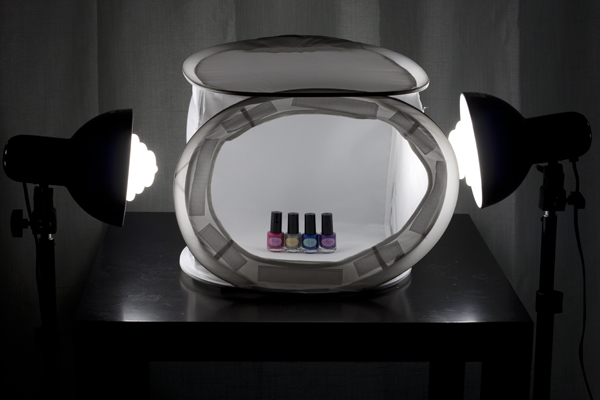
light tent kit, Square Perfect, photography, setup

And in this corner, we have the DIY Light Tent, built using these specifications: Foldable DIY Photography Light Tent. This light tent will be lit by means of two adjustable desk lamps and 60W, 2900K halogen bulbs. The backdrops are made from standard poster board and cut to size. You can purchase daylight-rated light bulbs for your DIY kit as well, but you may need to order them online from a photography or home improvement site.
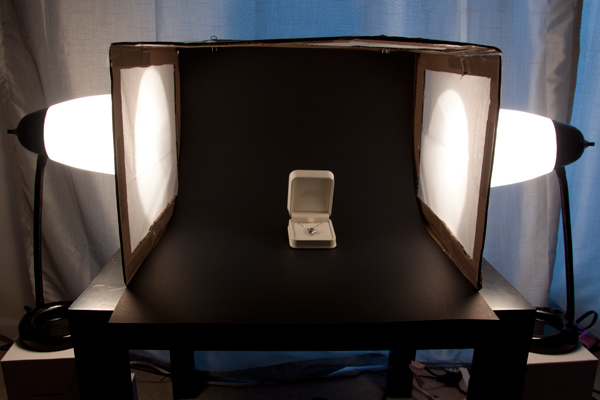
light tent, DIY, how to, photography

To make this an even test, we will be comparing the 12 inch kit cube against the 12 x 16 x 18 DIY tent. The first set of comparisons will feature each set as described above (the lights that come with each kit), while the second set will put the two up against each other using the same lighting set up for both kits.

Light tent comparison: using their own lights
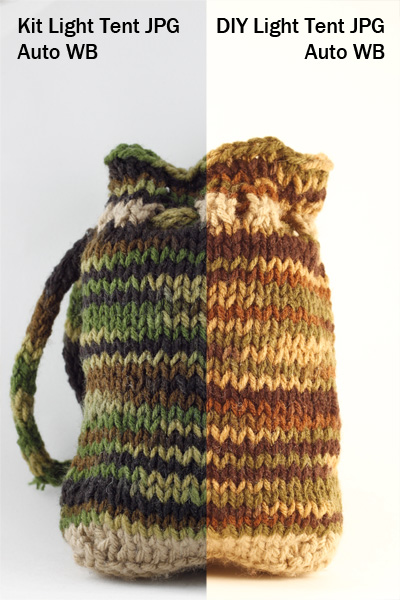
light tent, product photography, knit bag, photography, how to, light tent

For this first photo-face-off, each light tent will be evaluated using its own lights (daylight fluorescents for the light tent kit and halogen bulbs for the DIY light tent). A major consideration when shooting with a light tent is controlling or choosing the correct white balance to match the lights being used. You want your white backdrop to look white and not have any color tint from the lights used. Read more about that issue in: How to Use a Light Tent for Product-Style Photography.

These shots show SOOC (Straight out of Camera) JPG files for the kit and DIY light tents using auto white balance.The kit’s light gives a cooler (more neutral) look to the background, and the colors of the knit bag are much truer to life, while the DIY lights impart a yellowish hue to the bag and the background. Setting your camera on “Tungsten” white balance for the DIY table lamps may give you a more neutral color, or you can also do a custom white balance using a gray card or even the white backdrop as a test shot. Consult your camera manual for how to perform a custom white balance with your camera.
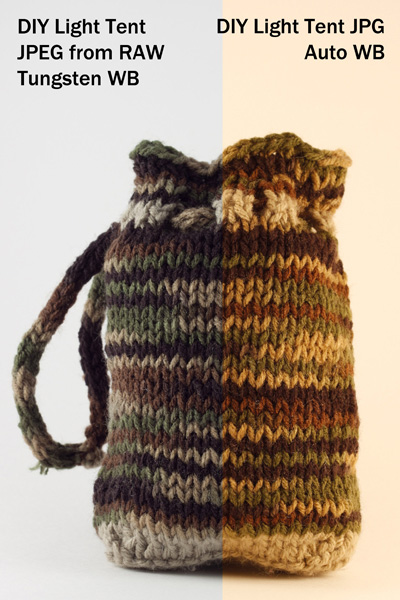
compare-bag-autoWB-darker

This image is a little dark on purpose so you can see the color tint of the background more easily

If you want perfectly clean whites and neutral blacks, then I would recommend shooting in RAW, which will give you greater flexibility regarding the white balance in post-processing. These images (left) show a comparison of the same image of the bag with a Tungsten white balance setting as compared to the Auto. The Tungsten white balance was selected in post-processing from the RAW image file, or it can also be selected as a white balance preset on the camera when shooting, especially if using JPG format.

Light intensity

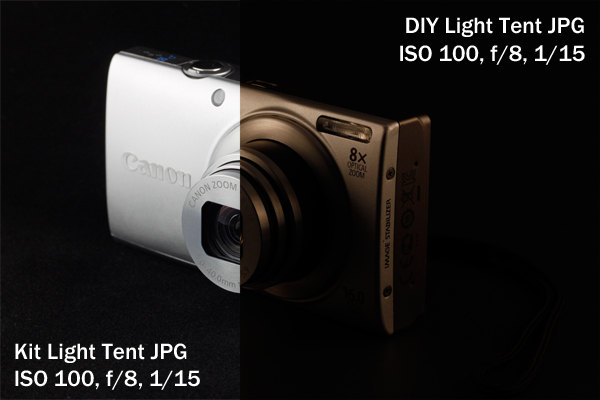
As you can see by the image below the DIY lights are considerable less intense (not as bright), which will mean you will either need to use a much longer exposure (shutter speed) to get a correct exposure, or increase your ISO. If working on a tripod (recommended for this type of set up) exposure time shouldn’t be an issue though so just stay at ISO 100 and adjust accordingly.
light tent, product photography, camera, Canon, point and shoot, Canon A4000IS

Light tent comparison: using the same lights

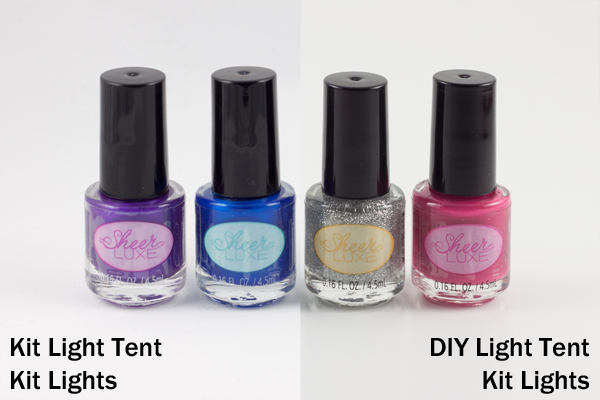
A final test was done to see whether this difference in light was due to the different light bulbs being used or to a difference in the light tents themselves.
light tent, product photography, nail polish

Left image shot at 1/25th – right image at 1/13th

These two shots were taken using the daylight lights from the light tent kit with both the kit tent and the DIY tent (again, in aperture priority, ISO 100, f/8). The kit light tent shot was taken at 1/25th of a second, and the DIY light tent shot was taken at 1/13th of a second, which is a full full stop difference. This means that even with the same lights, the DIY light tent blocked more light than the kit light tent and required longer shutter speeds to shoot the same exposure. The background also came out a little more gray than the kit light tent.

Light tent comparisons: practicalities

There are many other considerations to keep in mind when deciding which kind of light tent would be best for you. Think about how much room you have to devote to gear use and storage, as well as how much the benefits of a pricier kit outweigh the cost investment.

Use of ease
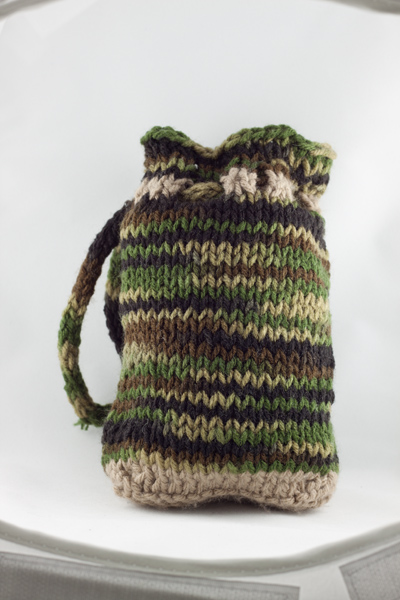
light tent, product photography, knit bag, how to

Notice edges of tent showing in places

The lighting stands that come with the light tent kit have greater range and reach than a typical desk lamp, but they cannot get down as low. This makes it difficult to use the kit lights for shooting with the 12-inch cube sitting on a table top, as the lights are too tall to sit beside it on the table and too short to reach up from the floor. A coffee table seems to be the ideal height. For the desk lamps, they work well when sitting on a table next to the light tent, but they will need to be placed on a stack of boxes or books if shooting from something like a coffee table (as shown earlier).

The 12-inch cube also has a lip around the edge, making the functional shooting space a bit smaller, as you want to avoid the edge appearing in your frame. This is far less of a problem with the 30-inch cube. One workaround is putting a book underneath the backdrop to raise the bottom up. The benefit here of the DIY box is that you can make it the size you want for the subject you have, and there is no lip to shoot around, so you can shoot straight-on at your subject.

Backdrops

Backdrops require careful handling and attention, and the poster board DIY versions are much easier to replace than the fabric ones from the kit. If you are going to be shooting something potentially messy or greasy, consider using a poster board backdrop regardless of which light tent you use.
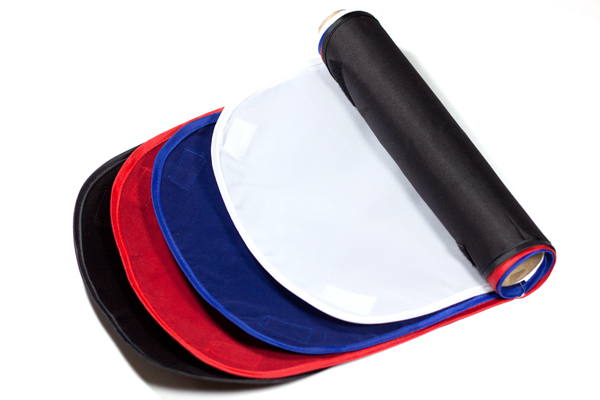
light tent, how to, photography, fabric, backdrops

Care for your fabric backdrops by ironing out the wrinkles before hanging. If you roll them up on a cardboard tube when you are finished shooting, you should be able to reuse them again without having to iron every time. Keep a lint roller or clear tape on hand to deal with any dust or lint, and save yourself the time of editing it all out in post-processing.

Portability

The light tent kit has the edge in portability, as it comes with its own carrying case. The case is not particularly sturdy or padded, however, so you would not want to travel with it other than carefully placing it in your car (without stacking anything on top of it).

Storage

The DIY light tent folds down flat for easy storage, and you can simply put your two desks lamps back where you borrowed them from, until the next time you are shooting. The light tent kit takes up significantly more space, and the process of folding the light tents back down into themselves is a little complicated and requires some practice, though there are plenty of “how to” videos online. There is also the risk of deformation if you leave the tents stored too long in their folded down state.

Cost

The DIY light tent is the clear winner in the cost department, particularly if you already own a desk lamp or two, which are the priciest elements. The cardboard box and tissue paper should not set you back more than about five dollars. The light tent kit is currently listed at $ 143, a very discounted price on Amazon, which makes it reasonable to consider as an investment.

Final verdict: which light tent to choose?

There are a lot of different variables to consider when making the final choice about whether a DIY light tent will serve your needs or whether you should invest in a light tent kit. If you are looking at exploring what a light tent can do and whether it would be useful, then definitely build your own to experiment with. Keep the white balance in mind and shoot in RAW. But if you are shooting JPG, remember to adjust the white balance setting when shooting by using a preset or doing a custom white balance.

If you know that you will be consistently shooting a lot of this style of shots, perhaps for selling jewelry or crafts online or for displaying directions for your own DIY projects on a blog, then you should consider investing in a light tent kit. The time savings of having bulbs that match your white balance is considerable if you are doing a lot of light tent photography. You will also have significant flexibility with a kit that offers different sizes of light tents and a better range of motion and height for the lights and light stands.

Do you shoot with a light tent? Do you prefer a light tent kit or a DIY version? Share your thoughts in the comments below.

The post Light Tent Comparison – DIY Versus Kit Tents by Katie McEnaney appeared first on Digital Photography School.


Digital Photography School

 
Comments Off on Light Tent Comparison – DIY Versus Kit Tents

Posted in Photography


How to Apply the Look of Hand Coloring in Lightroom

27 Mar
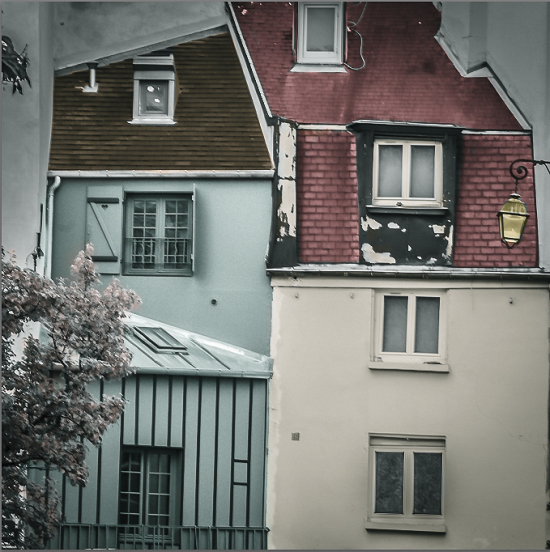
Give a photo the look of a hand tinted image in Lightroom

Give a photo the look of a hand coloring in Lightroom

Before there were color photos there were black and white photos, colored by hand using paints or dyes. Today, courtesy of any good photo-editing program, you can apply your own hand coloring effect to your photos.

Here’s how to apply the look of hand coloring in Lightroom.

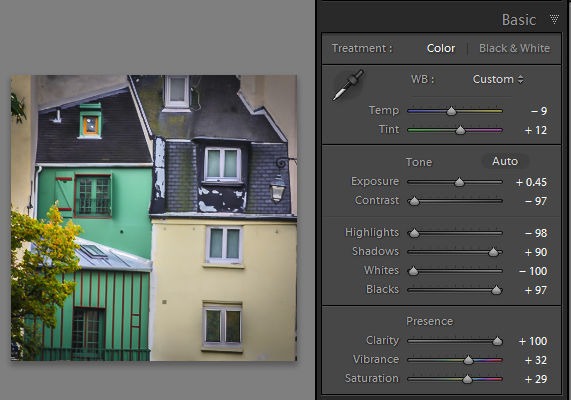
To get started, open the image in the Lightroom Develop module. You will want to make the usual basic edits to the image so it shows a good tonal range and contrast.

Before colorizing the image, make sure to adjust the tonal range and contrast.

Before colorizing the image, make sure to adjust the tonal range and contrast

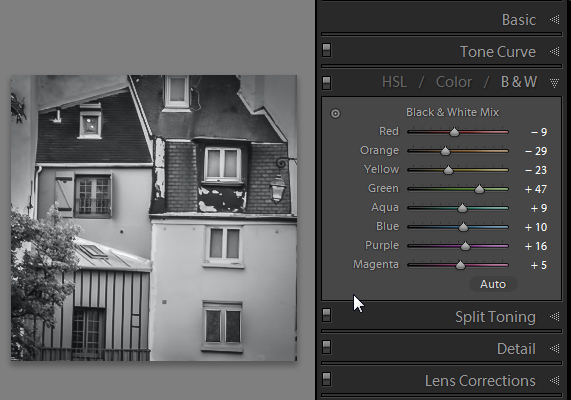
Then convert the image to a black and white by clicking B&W panel and adjust how the underlying colors in the image are converted to black and white using the sliders. Lighter areas will show the color better and darker areas will show a more subtle tint.

Use B&W to create a black and white image.

Use the B&W panel to create a grayscale or monochromatic image

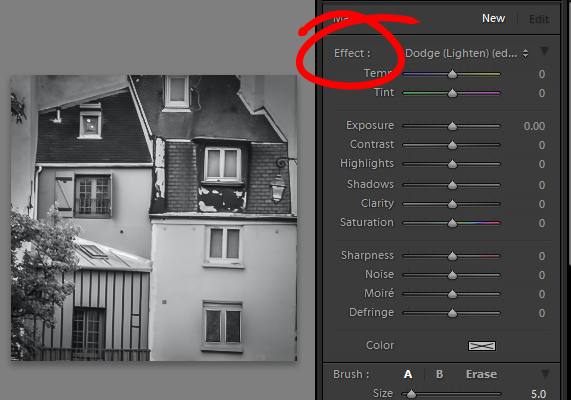
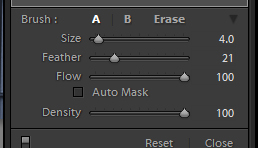
When you’re ready to add color to the image, click the Adjustment Brush and return all the sliders to zero by double clicking on the word Effect at the top of the panel (circle in red below).

Double click Effect to reset all the Adjustment Brush sliders.

Double click Effect to reset all the Adjustment Brush sliders

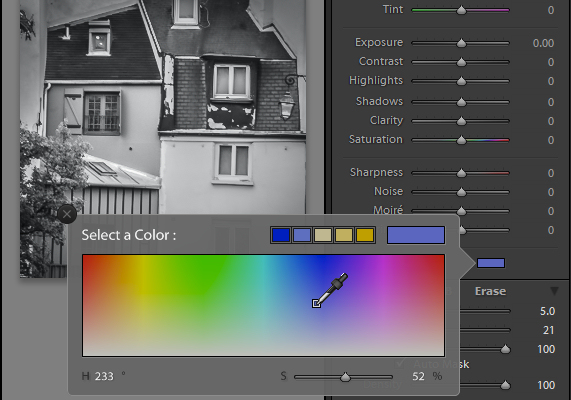
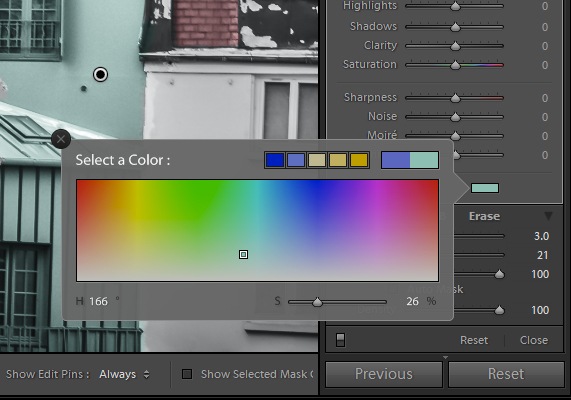
Click on the color sampler and choose a color to use.

Select a color to tint the image with from the Color selector

Select a color to tint the image with from the Color selector as shown here

Now click on the area that you want to recolor to set an Edit Point. Paint over the area to apply the color to it. As you paint with the Adjustment Brush a layer of partially opaque color is applied to the image.

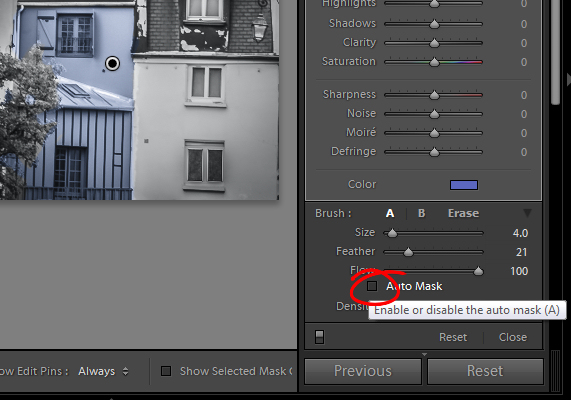
Select the Auto Mask checkbox if you are working on an area of the image that has distinct edges. Doing this makes it easier to limit the painting to only the desired area. The roof tops and buildings here are good examples of areas with distinct edges.

Selecting Auto Mask helps paint in areas with defined edges.

Selecting Auto Mask helps paint in areas with defined edges (stay within the “lines”)

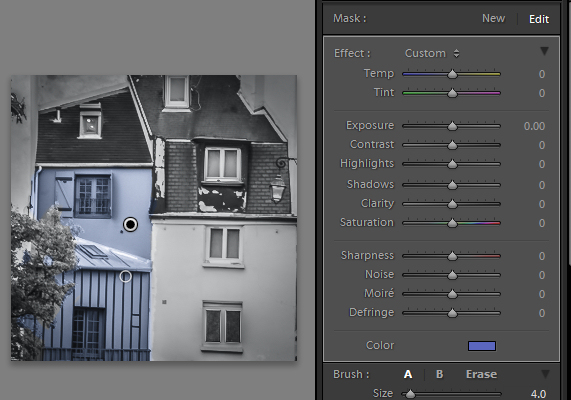
When painting an area that is less defined, disable the Auto Mask checkbox. The tree in this image has less defined edges so you should disable Auto Mask when coloring this area.

The buildings have defined edges so use Auto Mask when painting them. The tree does not, so disable Auto Mask when painting it.

The buildings have defined edges so use Auto Mask when painting them. The tree does not, so disable Auto Mask when painting it.

If you mistakenly paint over an area and want to undo the painting click the Erase brush link or hold Alt to select Erase and paint to remove the mistake.

To zoom into the image press Z on the keyboard and click on the image to zoom in or out. To move the image hold the spacebar so the mouse pointer turns into a hand and drag on the image.

Size the brush using the Size slider

Size the brush using the Size slider

To resize the brush either use the [ and ] keys on the keyboard or adjust the size using the Size slider.

When you have finished working with the first color, click New to set a new Edit Point. Select a different Color and paint that onto the image.

Continue creating a new Edit Point for each color until the coloring is complete.

If desired, you can alter a color or adjust a painted area by selecting the Adjustment Brush and then click the Edit Pin for that adjustment. You can then change the color using the color picker.

Give a photo the look of a hand tinted image in Lightroom

Give a photo the look of a hand tinted image in Lightroom

Do you have some other tips:

If you have some other ways of doing this technique in Lightroom please share. Or share your images if you give it a try!

For more Lightroom tips and tutorials try these:

  • Processing an Image in Lightroom 5 – a Video Tutorial
  • 6 of Lightroom’s Hidden Treasures
  • Why Lazy Photographers Should Use Lightroom Smart Collections
  • 3 Uses for the Radial Filter Tool in Lightroom 5
  • Lightroom 5 Tips – Hidden Gems

The post How to Apply the Look of Hand Coloring in Lightroom by Helen Bradley appeared first on Digital Photography School.


Digital Photography School
 
Comments Off on How to Apply the Look of Hand Coloring in Lightroom

Posted in Photography


Bigger than life: Drone flight documents Alaskan ice caves

27 Mar

Screen_Shot_2014-03-26_at_10.57.22_AM.png

The 12-mile long Mendenhall Glacier, located just outside of Juneau, Alaska may be one of the world’s most easily accessible glaciers. But the crew of Firefight Films takes you far beyond the parking lot. Billed as the first documented drone flight through ice caves, Firefight Films’ co-founders, Lion El Aton and Christopher Carson, outfitted a DSLRPros DJI Phantom with a GoPro HERO3+ Black Edition to venture beyond the physical limits of a human film crew. See video

News: Digital Photography Review (dpreview.com)

 
Comments Off on Bigger than life: Drone flight documents Alaskan ice caves

Posted in Uncategorized


26. März 2014

27 Mar

Ein Beitrag von: Florian Ilsinger

Mystery Tour © Florian Ilsinger


kwerfeldein – Fotografie Magazin | Fotocommunity

 
Comments Off on 26. März 2014

Posted in Equipment