RSS
 

Archive for February, 2014

Tamron develops 16-300mm F3.5-6.3 superzoom for APS-C SLRs

06 Feb

16-300_news520.png

Tamron has announced the development of an all-in-one ‘superzoom’ lens for APS-C SLRs with a huge 18.8x range. The 16-300mm F/3.5-6.3 Di II VC PZD Macro will offer an unusually wide angle view for its class (24-450mm equivalent), while also allowing close-up shooting with 0.34x magnification. It has an ultrasonic-type autofocus motor, splashproof construction and optical image stabilization. Pricing and availability are still to be announced. Learn more

News: Digital Photography Review (dpreview.com)

 
Comments Off on Tamron develops 16-300mm F3.5-6.3 superzoom for APS-C SLRs

Posted in Uncategorized


Fotogenes Deutschland – Kreideküste

06 Feb

Ein Beitrag von: Florian Nessler

Im kleinsten deutschen Nationalpark und auf Deutschlands größter Insel ist die wohl am spektakulärsten erscheinende Küstenlandschaft unseres Landes zu finden. Die Kreidefelsen der Insel Rügen.

Unzählbar viele tote Kleinstlebewesen schufen vor ca. 70 Millionen Jahren die Grundlage für die heutige Kreideküste. Ihre kleinen Kalkschalen lagerten sich am Grund eines urzeitlichen Meeres ab und bildeten so mit der Zeit eine mehrere hundert Meter dicke Kreidekalkschicht. Durch tektonische Bewegungen und vor allem durch die letzte Eiszeit vor 60.000 Jahren wurde die Kreide an einigen Stellen an die Oberfläche gedrückt und prägt in manchen Regionen, wie zum Beispiel auf Rügen, ganz entscheidend das Landschaftsbild.

Vielen werden sicherlich der Königsstuhl und die 2005 abgebrochenen Wissower Klinken ein Begriff sein. Doch der etwa 15 Kilometer lange Küstenstreifen zwischen Sassnitz und Lohme hat noch deutlich mehr zu bieten. Das Gakower Ufer, die Piratenschlucht, der Tipper Ort, die Ernst-Moritz-Arndt-Sicht, das Fahrnitzer, Kieler und Kollicker Ufer, der Äser Ort sowie die kleine und die große Stubbenkammer, die den Königsstuhl und die Victoriasicht umschließen, sind im letzten Jahr mein zweites Zuhause geworden.

Mit dem Beginn meines Studiums und dem damit verbundenen Umzug nach Hamburg wuchs nicht nur mein Interesse an der Fotografie, sondern auch das an meiner Heimat. Die Kreidefelsen zogen mich dabei ganz besonders in ihren Bann. Die teilweise senkrecht nach unten abfallenden Hänge, die zackigen Abbruchkaten, das Weiß der Kreide, das im Sommer mit dem satten Grün der Buchen konkurriert, die Türkis gefärbte Ostsee, die zahlreichen Fossilien und Hühnergötter am Steinstrand. All das ist wirklich beeindruckend und lockt jedes Jahr viele tausend Touristen in den Nationalpark.

Aber das, was mich am meisten fasziniert und was erst sichtbar wird, wenn man immer und immer wieder die Kreidefelsen besucht, ist die ständige Veränderung. Nach jedem Sturm, jedem Regenschauer oder bei Minusgraden im Winter bricht etwas ab, rutscht ein Stück Hang nach unten, lassen die Wurzeln einer Buche nach oder wird etwas Sand angespült und abgetragen. Man kann sich nie sicher sein, ob der markante Felsvorsprung mit der knorrigen Buche am nächsten Morgen noch da ist oder ob man an diesem Tag überhaupt am Ufer entlang laufen kann, ohne knöcheltief im Schlamm eines frischen Abbruchs zu versinken.

Jede Tour ist ein Ausflug ins Ungewisse und birgt etwas Neues. Das macht für mich den Reiz dieser Landschaft aus.

1 © Florian Nessler

2 © Florian Nessler

3 © Florian Nessler

4 © Florian Nessler

5 © Florian Nessler

7 © Florian Nessler8 © Florian Nessler

Ich denke, jeder, der sich fotografisch ähnlich intensiv mit einer Region auseinandergesetzt hat, wird mir beipflichten, dass man in dieser Zeit eine ganz besondere Verbindung zu ihr aufbaut. Für mich ist es deshalb nicht nur das Fotografieren an sich, das mich immer wieder lange vor Sonnenaufgang aufstehen lässt. Es ist auch das Verlangen, wieder den Wind zu spüren, die Brandung der Ostsee zu hören, ganz allein 100 Meter über dem Meer einfach ich zu sein und der Natur bei ihrem täglichen Schauspiel zuschauen zu können.


kwerfeldein – Fotografie Magazin

 
Comments Off on Fotogenes Deutschland – Kreideküste

Posted in Equipment


Ricoh promises ‘reference products’ including CMOS 645D at CP+

06 Feb

Ricoh_Logo.png

Ricoh Imaging has announced it will be showing four ‘reference products’ at the forthcoming CP+ trade show in Yokohama, Japan. The company’s Pentax brand has previously shown early prototypes of future models at the show. This year’s products include a CMOS-based 645D medium format camera with tilting LCD, scheduled for launch in Spring 2014, along with an ultra-wide-angle zoom for the 645 system. Also on show will be a telephoto macro prime lens for the small sensor Q-mount system and a DSLR accessory for making digital captures from slide and negative film.

News: Digital Photography Review (dpreview.com)

 
Comments Off on Ricoh promises ‘reference products’ including CMOS 645D at CP+

Posted in Uncategorized


Sensory Reading Experience Integrates Touch and Sound

06 Feb

[ By Steph in Conceptual & Futuristic & Technology. ]

Sensory Fiction 1

Some might say that if you aren’t experiencing the atmosphere of a story while you’re reading, the author hasn’t done her job. But we’ve all read a book that we loved so much, we wished we could experience more of it, feel as if we were actually a part of the story as it was happening. That’s now possible with ‘Sensory Fiction,’ a digitally-augmented prototype book that comes with a sense-stimulating harness that’ll squeeze you or change your body temperature at the right moments.

Sensory Fiction 2

Much like 4D films, which let you feel and smell the plot with moving seats and other sensory experiences, ‘Sensory Fiction’ makes the body a more active part of the process of taking in a story. Created by students at the MIT Media Lab for a class called ‘Science Fiction to Science Fabrication,’ the book and harness set aims to bring more excitement to the average written story.

Sensory Reading 3

It works through a combination of networked sensors and actuators. The book senses which page the reader is on to flash LED lights or play certain sounds that go along with that part of the plot. Meanwhile, the wearable component senses the reader’s heart rate and offers a gentle squeeze, vibration, changing temperatures and other forms of physical feedback.

Sensory Reading 4

The story selected for the prototype, ‘The Girl Who Was Plugged In’ by James Tiptree, was chosen because it showcases a wide range of emotions in a variety of environments, providing lots of opportunities for those sensory ‘extras.’ Can you imagine wearing one of these while reading a particularly scary horror story?

Share on Facebook


[ By Steph in Conceptual & Futuristic & Technology. ]

[ WebUrbanist | Archives | Galleries | Privacy | TOS ]


WebUrbanist

 
Comments Off on Sensory Reading Experience Integrates Touch and Sound

Posted in Creativity


Ricoh announces HD Pentax DA AF 1.4X AW rear converter

06 Feb

14x-news.png

Ricoh has announced the HD Pentax DA AF 1.4X AW Rear Converter – a weather-resistant 1.4x teleconverter. It’s designed to maintain autofocus both with lenses that use built-in focus motors, and those which are driven from the camera body. It’ll be available in March 2014 for a price of $ 599.95 / £379.99. See full details, including a list of compatible lenses

News: Digital Photography Review (dpreview.com)

 
Comments Off on Ricoh announces HD Pentax DA AF 1.4X AW rear converter

Posted in Uncategorized


Ricoh announces WG-20 entry-level rugged compact

06 Feb

wg20_red_003_WEB.png

Ricoh has announced the WG-20, an inexpensive rugged compact that’s waterproof to 10m/33ft, freezeproof to -10C/+14F, and able to survive a 1.5m/5ft drop. Sporting a 14 megapixel CCD sensor, it provides a 28-140mm 5x optical zoom lens and 720p HD movie recording. It’s a continuation of Pentax’s WG-line (minus the ‘Pentax’ logo), and presumably a WG-10 replacement, though the cameras appear to share the same sensor, lens and rugged specifications. Available in March, it will ship in red or white for $ 199.95. Learn more

News: Digital Photography Review (dpreview.com)

 
Comments Off on Ricoh announces WG-20 entry-level rugged compact

Posted in Uncategorized


Create a Cast of Light in Your Image using Photoshop or Elements

06 Feb

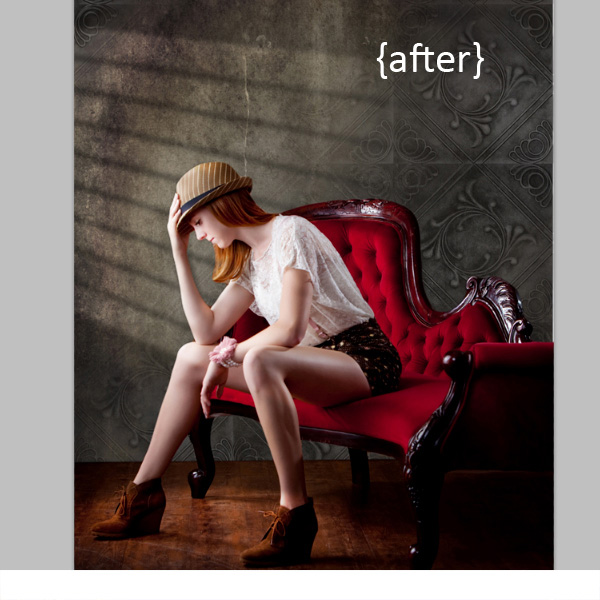
Light sources add depth and interest to your images immediately. By simply adding some window light to this image we added depth and warmth. If you have an image that you love, but it’s falling a little flat, consider adding some light! With just a few simple steps you can add beautiful light to your images.

Follow these steps to create a cast of light – works in Photoshop and Elements
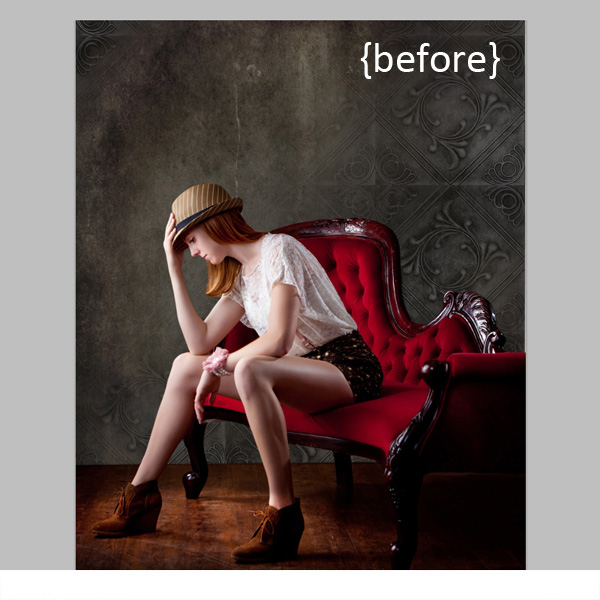
Window Light Cast Before

Window Light Cast After

One thing you’ll want to pay special attention to is pre-existing lighting in your image. Make sure the light source you add works with and compliments your image. You can adjust the angles and direction of your added lights to make them work together so your image is both believable and beautiful.

Let’s get started. Follow these simple steps to make your compositions shine!

Step 1: Start with a light source

This can be an image you’ve taken, something you’ve designed or something you’ve purchased. We are using a light element from our Window Cast Light Set. Choose a light source and shape that you want to bring into your composition.

NOTE: if you want to follow along and try this on one of your images we’re happy to provide our set of Light Casts to you for free. Go here to download them – use the code: FREEBIE when you checkout to get them at no charge.

Step 2: Add the light source to your image

If you have your image and the light source both open in Photoshop, you can use your selection tool to drag the light source to your image. Alternatively, you can also copy (Control + C) the window shape layer in Photoshop (or PSE). Open your image and paste (Control + V) the window shape layer into your image.

In this case, we placed the light source over our image. Next we adjusted our Layer Blending Mode by setting it to “vivid light” and then adjusted our opacity and fill on the light source until we achieved the desired look. You’ll want to play around with these settings to get the right look for your image.
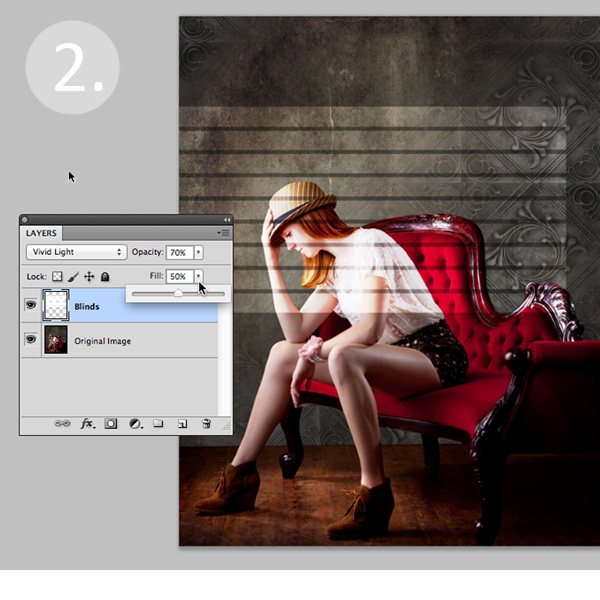
Window Light Cast La ED2363

Step 3: Adjust the shape of your light

Next, you’ll transform the window shape to your liking. Go to Edit>Transform>Distort and then move the corners to create the
shape that works best with your image.
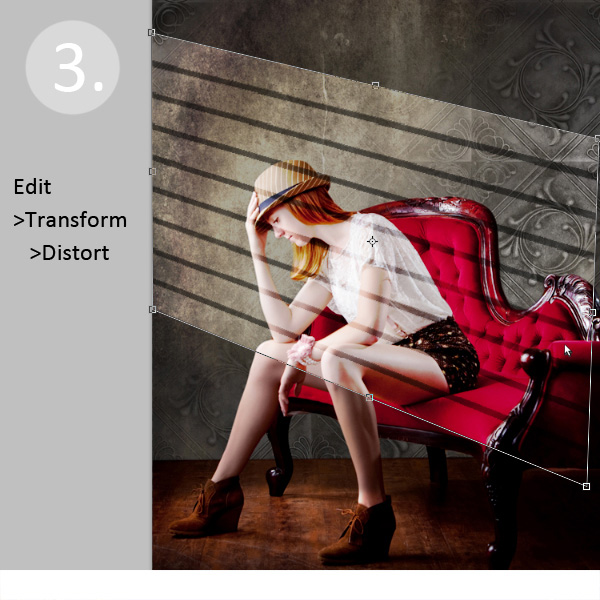
Window Light Cast Transform

Step 4: Soften your light

Now you want to soften the edges of your light so that it is not so harsh. Use the Gaussian Blur filter (Edit>Blur>Gaussian Blur) to soften the edges to your taste. In this case, we set the blur amount to 5. Adjust the amount of blur up and down to see how it softens the light in your image.
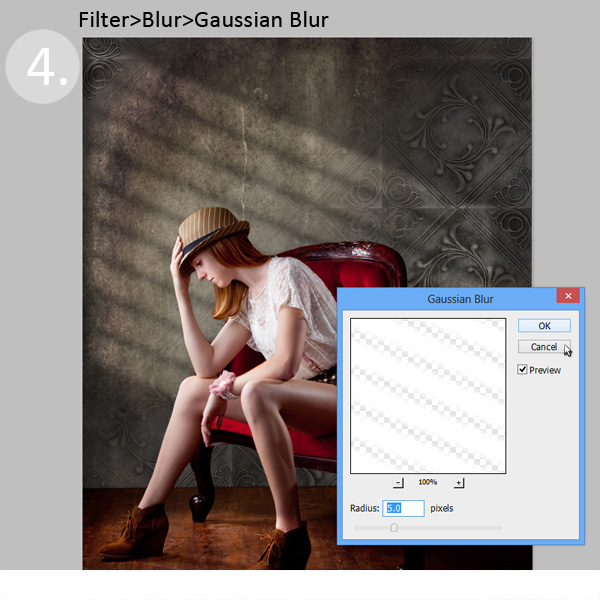
Window Light Cast Blur

Step 5: Fade your light source for a more natural look

Now you’ll add a Layer Mask to your window shape layer. First, select your layer, and then click the Add Layer Mask Button at the bottom of your Layers Palette. Click on the new Layer Mask in the layer to make sure it’s selected. (VERY IMPORTANT STEP!)
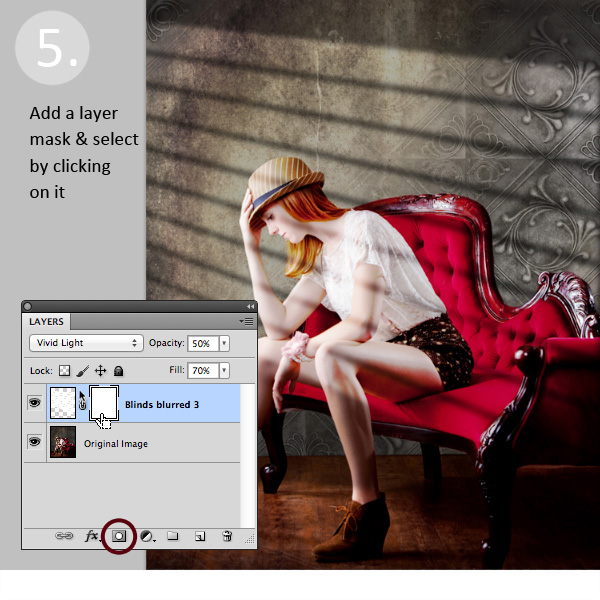
Window Light Cast La ED283A

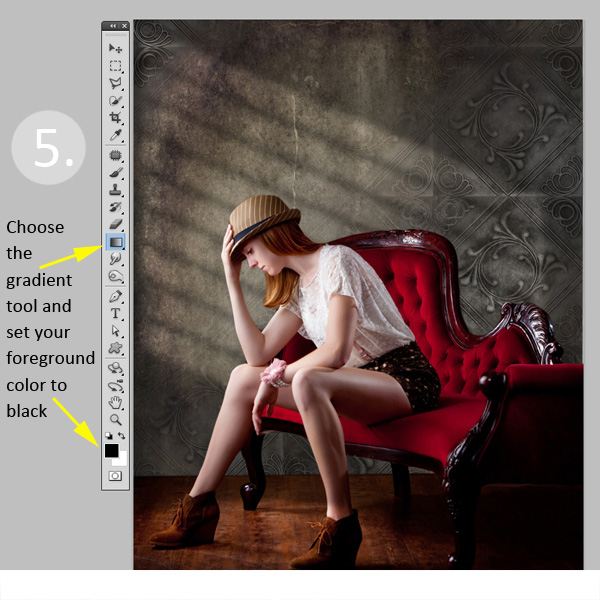
After adding a layer mask to the light cast layer, set your color palette to black and white, with black in the foreground color. Then use the gradient tool set to “foreground to transparent” to fade the light off.
Window Light Cast Gradient

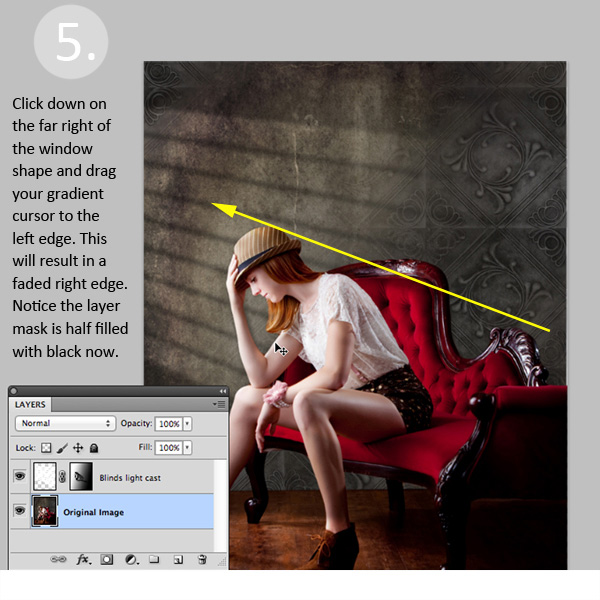
Simply click into your layer mask and drag your cursor from one end (this will be 0% opacity) to where you’d like to see the light at 100% opacity. If you don’t like your results, fill the mask with white and start over.
Window Light Cast Gr ED2331

Step 6: Position the window shape to your liking.

Use your Selection Tool to adjust the position of your light layer to the desired location in your image. You can also use a soft black brush set to 30% opacity to subtly brush away the window light in the layer mask. We did this to remove extra light from her face.

Congratulations! You’ve successfully added a beautiful, warm light effect to your image to create more depth and interest in your image.

Window Light Cast Before

Window Light Cast After

Your turn!

If you’ve tried out this technique please share your images in the comments below, and please ask if you have questions!

The post Create a Cast of Light in Your Image using Photoshop or Elements by Christina Roth appeared first on Digital Photography School.


Digital Photography School

 
Comments Off on Create a Cast of Light in Your Image using Photoshop or Elements

Posted in Photography


Ricoh WG-4 and WG-4 GPS debut with premium rugged specifications

06 Feb

wg4_silver_003_WEB.png

The Ricoh WG-4 and WG-4 GPS update the previously Pentax-branded rugged WG-series as step-up models featuring a 16MP BSI-CMOS sensor, 25-100mm equiv. F2-4.9 lens and sensor-shift image stabilization. The two models are nearly identical with the exception of the WG-4 GPS’ built-in location tagging capability and front-facing display, and are introduced with a number of mount accessories for action videography and photography. Both cameras are waterproof to 14m/45ft, coldproof to -10C/+14F, crushproof to 220lbf and shockproof from 2m/7ft. The WG-4 and WG-4 GPS will sell for $ 329.95 and $ 379.95 respectively. Learn more

News: Digital Photography Review (dpreview.com)

 
Comments Off on Ricoh WG-4 and WG-4 GPS debut with premium rugged specifications

Posted in Uncategorized


Spiral Architecture: 12 Swirling Building & Bridge Designs

06 Feb

[ By Steph in Architecture & Offices & Commercial. ]

Spiral Architecture Main

Ubiquitous in nature and mathematics, spirals are beautiful to look at and provide a structure that’s strong and stable, so it’s no surprise that they turn up so often in architecture, too. Spiraling forms offer uninterrupted panoramas on observation towers, remove the obstacles of walls and floors in a creative interior, and enable unusual stacked configurations of living spaces in skyscrapers.

Evolver by Alice Studio

Spiral Architecture Evolver

The spiraling viewing platform in Zermatt, Switzerland by Alice Studio fuses beautiful design with a function that enables uninterrupted panoramas of the surrounding landscape. It was constructed by a group of students from the Ecole Polytechnique Fédérale de Lausanne (EPFL) and is made up of 24 wooden frames, with a tubular path offering a continuous 720-degree route to the top.

Arganzuela Footbridge

Spiral Architecture Arganzuela

A spiraling footbridge in Madrid’s Parque de la Arganzuela by Dominique Perrault Architecture links neighborhoods on the right and left banks of the Manzanares River, opening up in the center to allow access to a new urban green space. Built for both pedestrians and cyclists, the bridge is made up of two interlocking metal spirals ‘wrapped by a metallic ribbon.’

Mobius Buddhist Temple

Spiral Architecture Buddhist 2

Spiral Architecture buddhist 1

Based on a mobius strip, this Buddhist temple in Taichang, China integrates visual symbolism representing reincarnation with the basic design of the architecture interpreted as a path. Digital design and fabrication techniques enabled a building in which the entire shape is made up of two intertwined spirals, an ‘unstable’ configuration that places the beginning and ending of the worshipper’s path at the same point.

Mangal City Spiraling Skyscraper Pod

Spiral Architecture  Mangal City

Envisioned as an ‘urban ecological system,’ Mangal City is a concept that explores spiraling towers made up of individual pods. taking its design cues from systems in nature, such as mangrove roots. Of the project, Chimera says “The mangrove plant and its collective the mangal, provide examples of social associative principles as well as structural capacities and hybrid responses to environmental and contextual conditions.”

Next Page – Click Below to Read More:
Spiral Architecture 12 Swirling Buildings Bridges

Share on Facebook


[ By Steph in Architecture & Offices & Commercial. ]

[ WebUrbanist | Archives | Galleries | Privacy | TOS ]


WebUrbanist

 
Comments Off on Spiral Architecture: 12 Swirling Building & Bridge Designs

Posted in Creativity


Pentax firmware v1.02 for K-3 allows bracketing by AA filter mode

06 Feb

shared:download-button.png

Pentax has released new firmware for its flagship K-3 DSLR, allowing users to bracket exposures by AA filter simulation mode. As a reminder, the K-3 lacks a physical anti-aliasing filter, but simulates the blurring effect via minute movement of its sensor, with two intensity levels available (three if you include ‘off’). Firmware v1.02 allows you to shoot a burst of sequential images at each AA filter level, to fine-tune the optimal balance between resolution and artifacts like moiré.

News: Digital Photography Review (dpreview.com)

 
Comments Off on Pentax firmware v1.02 for K-3 allows bracketing by AA filter mode

Posted in Uncategorized