RSS
 

Archive for September, 2013

They’re Finally Here!The Sony Smart Lenses – QX10 & QX100

25 Sep

Meet the Sony Smart Lenses, pro-quality lenses that are also full-fledged cameras!

These first-of-their-kind lens cameras use your smartphone as a viewfinder, settings panel and shutter release.

Plus, they connect wirelessly, so you can use them attached to your phone or totally off board to snap the perfect shot at any angle.

Get all the advantages of a DSLR – shallow depth of field, optical zoom, a 20 megapixel sensor that’s 4x the size of your iPhone’s! And, retain the ease of shooting and sharing on your phone.

*We are getting a limited supply and shipping them out first come, first serve.*

Learn More or Reserve Yours Now

 Tweet it!      Share

p.s. Want to see the QX10 in action? We will be demonstrating this innovative wonder on a live video stream *TODAY* (Wed. 9/25) at 9am PST (that’s noon to you, East Coasters). Head to our Ustream page to have all your burning questions answered!

Related posts:

  1. Attachable Lenses for Your Camera-Phone, Fisheye & Macro/Wide Angle Phone Lenses Extra photos for bloggers: 1, 2, 3 Camera-phones. They’re a…
  2. Better Lenses for Less Money: How To Use Vintage Lenses with Your DSLR Extra photos for bloggers: 1, 2 ~Have a cool photo…
  3. The iPhone Lens Wallet
    Keeps Your Cell Lenses in One Place Check out that sweet collection of lenses for your smarty-pants…


Photojojo

 
Comments Off on They’re Finally Here!The Sony Smart Lenses – QX10 & QX100

Posted in Equipment


X is for zoom? Our Fujifilm XF 55-200mm F3.5-4.8 R LM OIS review

25 Sep

xf55200news.png

We’ve just posted our review of the FUJINON XF 55-200mm F3.5-4.8 R LM OIS, Fujifilm’s first telephoto zoom for its X system mirrorless cameras. We’ve been out and about with the lens taking hundreds of real-world pictures, and looked at them closely to find out what it can deliver in terms of image quality. We’ve also looked at how the system’s integrated software corrections for lens aberrations such as distortion affect the final out-of-camera JPEGs in comparison to RAW files. Click through to read all about it.  

News: Digital Photography Review (dpreview.com)

 
Comments Off on X is for zoom? Our Fujifilm XF 55-200mm F3.5-4.8 R LM OIS review

Posted in Uncategorized


When Photoshop’s Content-Aware Fill Made My Mouth Drop Open

25 Sep

When Adobe began demonstrating Content-Aware Fill in Photoshop CS5 it generated 2 reactions on average. The first fear about the removal of watermarks identifying the work of photographers and the second was an enthusiastic roar about the creative possibilities. Adobe of course was aiming for the later response.  Since the release of Content-Aware Fill I’ve often used it to fill in gaps when my canvas is rotated to straighten an image, remove objects creeping into the edge of my image, etc. With each subsequent version of Photoshop released Content-Aware Fill has seemingly been able to handle more and more complex scenes.

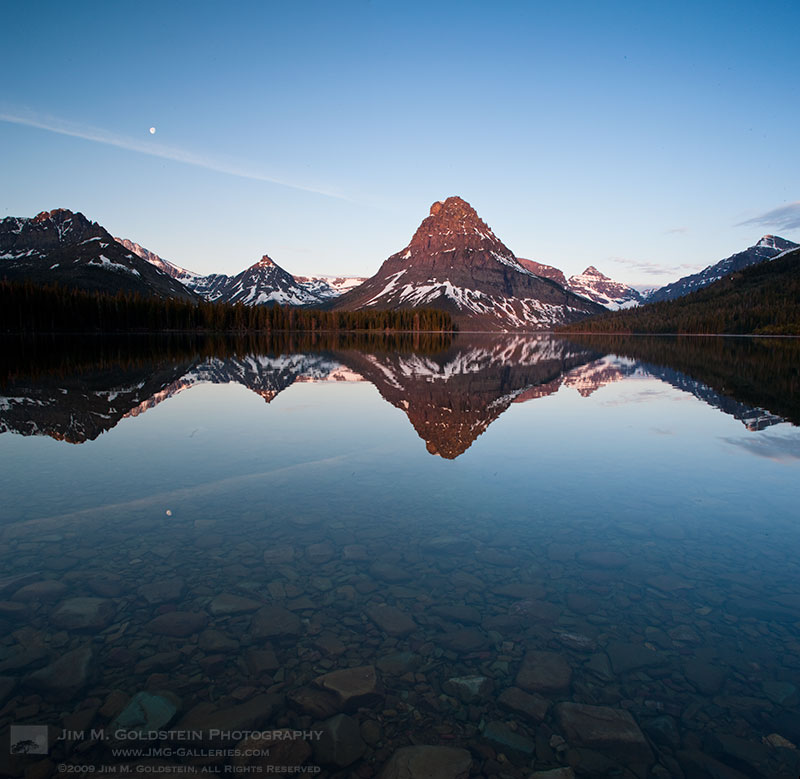
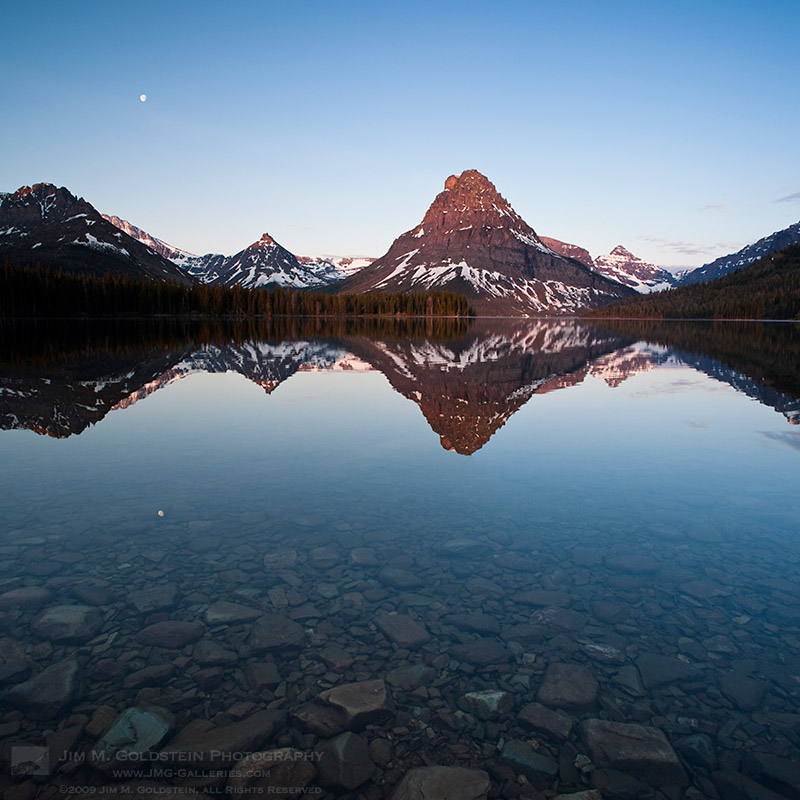
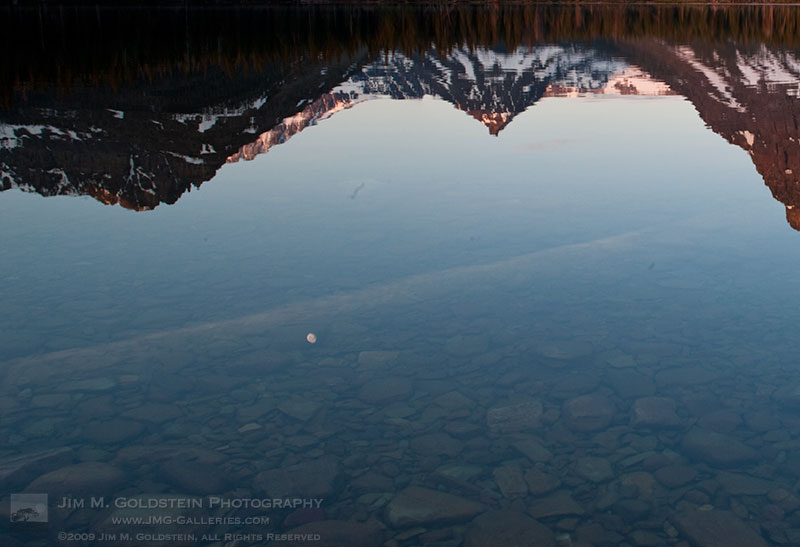
During a recent edit using Photoshop CC I went back to work on some images with contrails reflected in water where the rocky bottom was still visible. At the time the photo was taken I thought it was ultimately unusable, as I wasn’t about to release an image with reflected contrails. For fun I decided to put Photoshop to the test to see how well it could fill in a complex pattern such as this. I was blown away that it took care of the contrails in a single shot.

Unedited – Zoom View

Content-Aware Fill Employed – Zoom View

If you look closely in the zoomed version of the image, the rocks have an organic pattern while the contrail is completely removed. While I expected that the upper right section of the contrail would be handled easily due to its transition to a nearly pure colored gradient, the random rocky pattern on the left  I figured would be too complex to be addressed cleanly. I was pleasantly surprised when I zoomed in at 100% and 200% to see that all the rocks had continuous edges and didn’t have any obvious signs of being edited. It was at this point my mouth dropped open in amazement.

Unedited  – Full Image 

Content-Aware Fill Employed – Full Image

Sunrise at Two Medicine Lake with Sinopah Mountain reflected in the calm water – Glacier National Park

Adobe’s Original Content-Aware Fill Demo

Copyright Jim M. Goldstein, All Rights Reserved

When Photoshop’s Content-Aware Fill Made My Mouth Drop Open

The post When Photoshop’s Content-Aware Fill Made My Mouth Drop Open appeared first on JMG-Galleries – Landscape, Nature & Travel Photography.


Comments

  • nice content aware is mostly his and miss. often miss for me … by Tor Ivan Boine

Related Stories

  • When Photoshop’s Content-Aware Fill Made My Mouth Drop Open – Enclosure
  • Talking Lightroom & Photography
  • Talking Lightroom & Photography – Enclosure
Feed Ads by FeedBlitz
powered by ad choices


JMG-Galleries

 
Comments Off on When Photoshop’s Content-Aware Fill Made My Mouth Drop Open

Posted in Equipment


365 Tage später

25 Sep

Die meisten kennen wahrscheinlich das sogenannte „365-Tage-Projekt“.
Ein Jahr lang jeden Tag ein Foto machen. Jeden Tag! Man könnte auch sagen: Der Ironman unter den Fotografieprojekten.

Natürlich ist das je nach Anspruch an das tägliche Foto mehr oder weniger schwierig und aufwändig. Ich bewundere jedenfalls schon lange all die Leute, deren tägliche Fotos bei mir höchstens einmal pro Woche ins Zeit- und Kreativitätsmanagement passen würden. Ich bewundere sie aus einigem Abstand, mit ein wenig Neid und mit viel Respekt.

Immer wieder fällt mir auf, dass diejenigen, die es schaffen, das Projekt erfolgreich abzuschließen, beeindruckende Fortschritte gemacht haben. Sicher, in einem Jahr lernt man eben eine Menge, aber dieses Projekt scheint kleine Wunder zu bewirken. Wahrscheinlich ist das der Kontinuität und dem gewissen Schaffensdruck zu verdanken.

Da ich selbst keine Erfahrung habe, mich das Thema aber sehr interessiert, habe ich fünf junge Fotografen, die das Mammutprojekt gestemmt haben, nach ihren „365-Tage-Erlebnissen“ befragt.

~

project © Eva Patikian

Siréliss

Ich habe mein 365-Tage-Projekt angefangen, nachdem ich immer wieder sah, wie andere Fotografen es schafften und wie ihnen von allen Seiten gratuliert wurde. Ich wollte mich verbessern und vielleicht auch ein paar Gratulationen einheimsen.

Dank dieses Projektes habe ich die Brenizer-Methode kennengelernt, viele neue Werkzeuge in Gimp entdeckt und viel über Komposition, Licht und Schatten gelernt. Aber das Allerwichtige ist, dass ich das Gefühl habe, meinen eigenen Stil gefunden zu haben.

Das Projekt ist hart. Das kann ich nicht bestreiten. An manchen Tagen ist man müde oder hat keine Idee. Man fühlt sich wie eine ausgedrückte Orange. Man ist gerade mit dem einen Bild fertig und muss schon nach einer Idee für den nächsten Tag suchen.

Trotzdem würde ich das Projekt sofort weiterempfehlen. Ich weiß, dass ich ohne es niemals so schnell so viel gelernt hätte. Kurz war ich erleichtert, als es vorbei war, aber jetzt vermisse ich es total und überlege, es noch einmal zu wagen. Ich kann es jedem, der es sich zeitlich zutraut und unter Druck gut arbeiten kann – oder genau das lernen möchte – nur empfehlen. Es ist wie tägliches Workout, nur eben für den eigenen Stil und die eigenen Ideen, statt für die Muskeln.

~

Project © Gillian Woods

Gillian Woods

Ich habe mich entschlossen, das Projekt anzufangen, weil ich meine fotografischen Kenntnisse, vor allem im Bereich Portrait, verbessern wollte. Am Anfang war ich sehr enthusiastisch, daher war es gar nicht schwer, jeden Tag ein Foto zu machen und dann ging es einfach in eine tägliche Routine über.

Ich habe erst durch mein 365-Tage-Projekt die Grundlagen der Fotografie gelernt. Vorher hatte ich wenig Ahnung davon, wie ich meine Kamera effektiv einsetzen konnte, aber das änderte sich durch die tägliche Übung sehr schnell. Außerdem habe ich sehr viel darüber gelernt, was ich gerne fotografiere und was weniger und dass ich viel kreativer bin als gedacht.

An manchen Tagen habe ich sehr viel Aufwand in das Bild gesteckt, an anderen Tagen ging das nicht, aber die Unterstützung von anderen hat mir bis zum Schluss geholfen, nicht aufzugeben und jetzt bin ich sehr stolz, dass ich es geschafft habe, ein Jahr lang jeden Tag ein Foto zu machen.

~

Project © Kyle Thompson

Kyle Thompson

Ich beschloss, ein 365-Tage-Projekt zu beginnen, weil ich mich unbedingt verbessern wollte. Ich fotografierte schon seit sechs Monaten, aber machte nur langsam Fortschritte. Ich würde sagen, durch dieses Projekt habe ich alles gelernt, was ich über Fotografie weiß. Allein dadurch, dass ich viel experimentierte und jeden Tag eine neue Idee ausprobierte.

Vor allem gegen Ende des Projektes wurde es aber auch immer schwerer, eine neue Idee zu entwickeln und Zeit für Fotos zu finden, während ich reiste, zur Schule ging und arbeitete.

Trotzdem kann ich es nur jedem empfehlen, der Einsteiger in der Fotografie ist. Die Fortschritte sind riesig und man hat danach schon ein großes Portfolio.

~

Project © Grace Adams

Grace Adams

Ich begann das Projekte an einem wichtigen Wendepunkt in meinem Leben und brauchte einfach ein Ziel, auf das ich mich konzentrieren konnte. Es begann also eher als Ablenkung, aber wurde schnell zu einem wunderbaren Weg für mich, meine Emotionen auszudrücken.

Sicherlich war es nicht immer einfach, aber es war doch weit weniger schwer als erwartet. Nachdem es zur täglichen Routine wurde, freute ich mich sogar immer darauf.

Neben den fotografischen Fortschritten ist für mich im Nachhinein viel wichtiger, dass ich jeden Tag dieses wichtigen Jahres dokumentiert habe. Es ist toll, zurückzublicken und Tag für Tag nachvollziehen zu können, wie ich mich entwickelt habe. Nicht nur als Künstlerin, sondern auch als Mensch. Ich bin nicht mit jedem Foto zufrieden, aber jedes einzelne bedeutet mir persönlich sehr viel und das ist es, was für mich wirklich zählt.

~

Project © Grant Heinlein

Grant Heinlein

Ich begann mein Projekt, weil ich sah, welche großartigen Bilder zum Beispiel Lauren Withrow and Alex Stoddard in ihrem 365-Tage-Projekt schossen. Außerdem mochte ich einfach die Herausforderung.

Für mich war das Tollste daran der Gedanke, etwas zu Ende zu bringen, was ich begonnen hatte und das Versprechen sich selbst gegenüber zu erfüllen. Es war definitiv nicht immer einfach. Vor allem, weil ich es zu 100% korrekt machen wollte. Also wirklich das jeweilige Foto am jeweiligen Tag.

Aber sobald man an Tag 200 oder so angekommen ist, gibt es einfach kein Zurück mehr. Es macht wahnsinnig Spaß, sich das erste Foto anzusehen und den Fortschritt zu erkennen. Man versucht sich ja mit jedem Bild zu verbessern und wenn das klappt, ist es einfach ein echt tolles Gefühl.

~

Wahrscheinlich spielt der eine oder andere jetzt doch mit dem Gedanken, es auch einmal zu wagen. Für die, die wissen, dass es zeitlich nicht machbar ist, gibt es aber auch Alternativen wie das 52-Wochen-Projekt – also jede Woche ein Foto – oder einfach verkürzte Projekte wie zum Beispiel das 100-Tage-Projekt.

Und wer sich überhaupt keinem Schema unterwerfen möchte, hat immer noch die Möglichkeit, täglich über die Ergebnisse der Menschen zu staunen, deren Tage scheinbar mehr als 24 Stunden haben.

Die Statements der einzelnen Künstler wurden von Laura aus dem Englischen ins Deutsche übersetzt.


kwerfeldein – Fotografie Magazin

 
Comments Off on 365 Tage später

Posted in Equipment


Rediscovering Backlit Subjects

25 Sep

Back-LightingPhoto by naughton321

“Look where the sun is coming from – then position yourself with your back towards it so that it light up your subject’s face.”

This was the very first piece of photographic advice that I was ever given as a child entrusted with the family’s camera for a school excursion.

The intention behind it was good and in many photographic situations over the years it has actually served me well.

However…. sometimes in photography it can be easy to get trapped in a mindset that actually limits the potential of your shots.

My suspicion is that many people are being limited by the above piece of advice – lighting your subject from the front and avoiding back lighting at all costs.

The problem with ignoring back lighting images is that:

  • backlight can add drama to an image
  • backlit images can show the delicacy of a subject (think transparent or translucent things like flowers or insects)
  • backlight can help create real mood in a shot
  • backlit images can highlight details on the edges of subjects
  • backlight can reveal textures that might previously have been hidden
  • backlit images can show off the shape and form of a subject
  • backlight can create shadows that add points of interest to an image

I’m not arguing that backlit subjects are the way you should approach every shot – but ignoring it as an option ca leave you potentially missing out on a very powerful technique.

Check out some of the following images that show the beauty of power of ignoring the age old advice of always lighting a subject from the front.

PS: just because your subject is backlit doesn’t mean you need to forget about how they are lit from the front. Using a Fill Flash and/or some sort of reflector is often a great way to get the balance right for a well exposed shot.

BacklightPhoto by Ty-Dan

BacklitPhoto by benefit of hindsight

Back-LightPhoto by ‘SeraphimC

Back-LitPhoto by limonada

BacklightingPhoto by serni

Post originally from: Digital Photography Tips.

Check out our more Photography Tips at Photography Tips for Beginners, Portrait Photography Tips and Wedding Photography Tips.

Rediscovering Backlit Subjects


Digital Photography School

 
Comments Off on Rediscovering Backlit Subjects

Posted in Photography


24. September 2013

25 Sep

Ein Beitrag von: Michael Armentano

abendsonne, sonne, untergang, leute, bäume, sonne


kwerfeldein – Fotografie Magazin
 
Comments Off on 24. September 2013

Posted in Equipment


The Soul Behind the Subject by Kelly Kirkpatrick

25 Sep

To quote Jean-Luc Godard, “when you photograph a face you photograph the soul behind it”. While I have been a shutterbug all my life, it wasn’t until 2006 when I really started studying photography and working as a professional. Through education and building on my own experience, there are many things I could say on […]
dslrBlog

 
Comments Off on The Soul Behind the Subject by Kelly Kirkpatrick

Posted in Photography


Storefront Transformer: Magic Box Reprograms Empty Space

25 Sep

[ By WebUrbanist in Architecture & Offices & Commercial. ]

modular shop design concept

From urban blight to versatile site, one modular cube can convert unused storefronts of New York City into flexible destinations – community workshops one day, performance spaces or pop-up shops the next. Think: AirBNB for retail space meets coworking venue and co-op incubator all in one kit of parts.

pop-up-animation

Architecture Commons describes the “miLES [made in the Lower East Side] Storefront Transformer [as] a versatile set of furnishing and amenities to program any storefront – essentially a 6ft cube that can be easily transported and subdivided to roll through any storefront door.”

modular cube deployment options

The idea is to make any particular configuration easily obtained and changed on demand. “When unfolded, the Transformer provides functional elements such as shelving, partitions, tables, seats, stage, as well as infrastructure such as lighting, WIFI, power strips, speakers, projectors, and PA system so you have all the basic ingredients to create your own pop-up!”

modular store pieces parts

Their current Kickstarter campaign aims to fund a prototype to be built and installed later this year in one of the 200+ empty store fronts on the Lower East Side of Manhattan.

community modular space program

“Imagine a shape-shifting storefront, one space, many possibilities: from an independent arts space one week to designer fashion boutique the next; from cooking classroom on Thursday to locavore snack bar on Friday.”

modular pop up themes

The goal is to provide a boon for all parties involved, including the building owner, local community and those who could use a bit of space but can’t afford full-time rent.

storefront popup weekly events

storefront activation modular program

“We make it quick and easy to turn underutilized storefronts into anything you can imagine. We give entrepreneurs and artists an easy and affordable way to showcase their work. The neighborhood gets a variety of vibrant programmed uses in a previously vacant space. Landlords get short-term rental income and increased visibility to help them find a longer-term tenant for their space. It is a win-win proposition for multiple stakeholders. “

Share on Facebook


[ By WebUrbanist in Architecture & Offices & Commercial. ]

[ WebUrbanist | Archives | Galleries | Privacy | TOS ]


WebUrbanist

 
Comments Off on Storefront Transformer: Magic Box Reprograms Empty Space

Posted in Creativity


The Sabattier Effect

25 Sep

I have a rule when it comes to Photoshop, Lightroom, and post-processing in general. I have always felt that image manipulation should be a tool, not a crutch. Photoshop can make a good photo better, but a bad photo is just a bad photo. I strive to get it right in the camera. When people look at my work I want them to say, “That’s a great photo.” I don’t want them saying, “Hey, you’re really good with Photoshop.” As my friend Zack Arias is fond of saying, “If you ever hear yourself saying ‘I’ll fix it later in Photoshop,’ you need to immediately stop whatever you’re doing and slap yourself as hard as you can.” I’m not saying that I don’t edit– or “finish” as I like to say. I don’t judge photographers who like to dive deeper into their editing, but for me it’s usually a matter of a contrast bump, a white balance tweak,  a little bit of skin smoothing, maybe a little sharpening. Hopefully, that’s it. Get it right in the camera. That’s the rule.

Except for when it’s not.

Every once in a while you need to break out of the day-to-day and try something different. That’s not to say that my portrait style is going to be changing any time soon, but photography is art and sometimes you need to evolve as an artist. This was my thinking when I recently came across something called the Sabattier Effect.

What Is it?

It gets a little technical, but let’s see if we can get into it without getting lost in the science. If you’ve spent any time exploring your way through the Photoshop filters menu, you may already be familiar with the solarization filter. When a partially developed negative or print is briefly exposed to white light, some of the tone values are reversed. Dark areas appear light and light areas appear dark. French scientist and doctor Armand Sabattier (1834-1910) described the process as “pseudo-solarization.” Over time, the “pseudo” has been dropped, but the effect is the same– the reversal of image tones due to extreme overexposure. Run an image through the solarization filter and you’ll see what I mean. In the days of film, the effect manifested itself one of two ways. The first would be an extreme overexposure of the negative in the camera. In the darkroom, it could have been something as simple as turning the lights on and off while processing the negatives.

The Sabattier Effect takes solarization a bit further. In addition to the overall tone reversal, the Sabattier Effect includes a narrow band or rim of low density, which is formed at the edges between adjacent highlight and shadow areas. This white band, or Mackie Line, appears around areas of high contrast. It was a popular darkroom technique for a while, but became increasingly less popular due to the combination of long hours in the darkroom and unpredictable results.

Creating the Effect in Photoshop

The first thing to keep in mind is that the effect can be drastic, so not every image is going to be a prime or even suitable candidate. The best images for the effect will be black and white photos with simple outlines and bold shapes. Color images can work also, particularly when the coloring is only slight. The results will show partially reversed hues and tones.

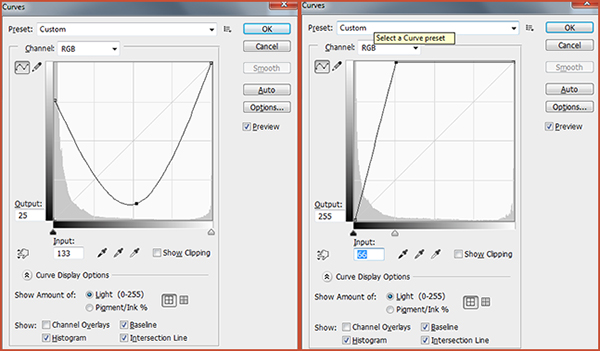
After you have selected an image and opened it in Photoshop, convert it to black and white. Next, duplicate the background layer (Ctrl/Command-J) and set the blending mode to Exclusion. The initial results will be obvious and immediate. You can then adjust the effect with either the Levels or Curves adjustments. Levels allows you to tweak the black, white, and mid-points in the image. Playing with the sliders will either lighten or darken the effect. Curves allows you to adjust the same values as Levels, but also gives you control over the contrast and specific tones of the image. While both Levels and Curves can achieve the intended results, I prefer the precision of Curves, which allows me to select individual points along the curve and adjust targeted areas of the image.

Creating a valley-shaped curve like the one on the left or a sharp angle curve like the one on the left create some of the best examples of the Sebattier Effect.

Creating a valley-shaped curve like the one on the left or a sharp angle curve like the one on the right create some of the best examples of the Sabattier Effect.

In this first example, a mostly black & white photo of a musician forms the basis for the effect. We clearly see the white Mackie Line around the subject and the saxophone, marking the edges between highlights and darker areas of the image.

Sabattier-002-dPS

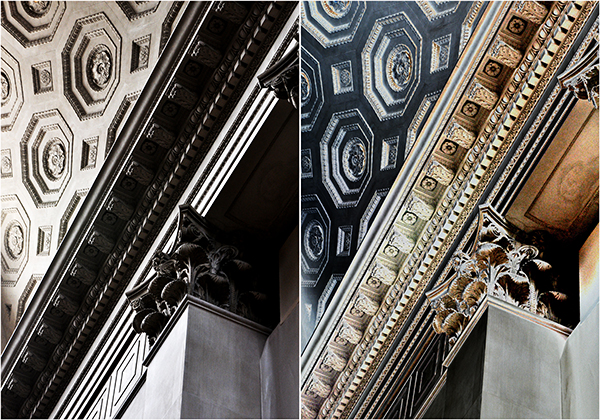
This second image, taken in the lobby of the New York Museum of Natural History, would not ordinarily make for a good example of this effect, due to some of the more intricate details.  I think it works, however, due to the simple, leading lines, as well as the fairly even tones. With the exception of opening up the dark shadows, the lower half of the image is tonally similar in both the before and after.

Sabattier-001-dPS

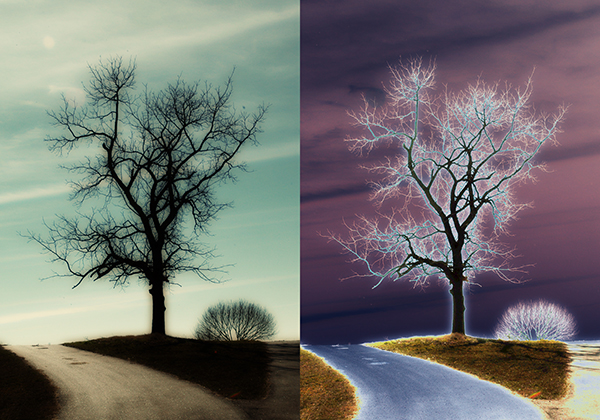
So far, both examples have been fairly “traditional” attempts at the Sabattier Effect. I’ve used mostly black & white images with simple lines. For this last example, I decided to throw out the “rules” and go with color and some of the most complicated lines I’ve ever photographed. I’ve photographed “Lonely Tree” in all four seasons, but seemingly lifeless in the middle of winter is by far the most interesting of the set. A rather large canvas print hangs in my office, so I’m intimately familiar with the details of this photo. While I doubt I would ever display the Sabattier-ized version, I think it makes a great example of what happens when the effect is applied to a color image with a mix of simple and complicated lines.

Sabattier-003-sPS

The beauty of this effect is that there are no right or wrong results– just personal preferences. It’s obviously not natural-looking, so you have much more room with which to experiment. A common mantra in my classroom is, “I don’t care if you break the rules as long as I know that you know them.” For the Sabattier Effect there are no rules to break, just suggestions to either follow or ignore. Either way, you’re bound to get interesting results.

Post originally from: Digital Photography Tips.

Check out our more Photography Tips at Photography Tips for Beginners, Portrait Photography Tips and Wedding Photography Tips.

The Sabattier Effect


Digital Photography School

 
Comments Off on The Sabattier Effect

Posted in Photography


Photoshop Elements 12 adds useful editing tools, without the subscription

25 Sep

PSE12_3in_boxshot_front.png

Adobe has released version 12 of its Photoshop Elements software for Mac and Windows. One of the highlights of the latest version of this consumer-friendly photo editor is ‘Mobile Access’, which uses Adobe’s Revel cloud service to let users view and retouch photos on their mobile devices, keeping everything in sync. Other new features include ‘Content-Aware Move’, guided editors, and 64-bit support for Macs. Best of all, there’s no monthly subscription fee. Read on to learn more about Elements 12, and if it may be a good substitute for its big brother.

News: Digital Photography Review (dpreview.com)

 
Comments Off on Photoshop Elements 12 adds useful editing tools, without the subscription

Posted in Uncategorized