RSS
 

Archive for September, 2013

Primitive Coast V + Thoughts On The Singh-Ray 10-Stop Mor-Slo Filter

05 Sep

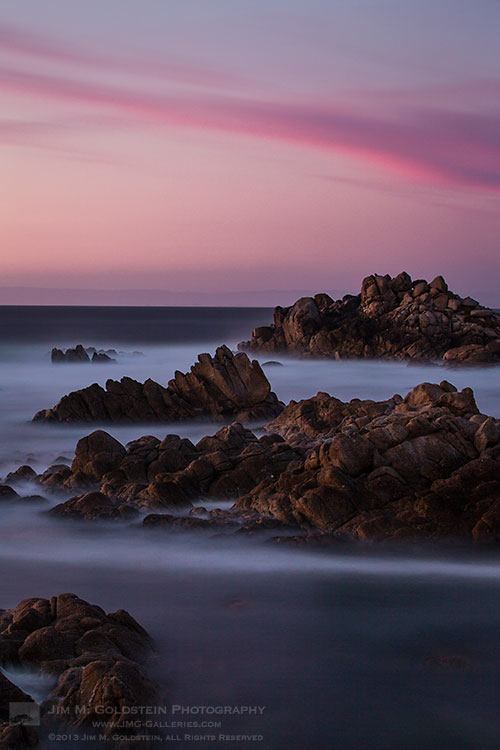
Primitive Coast V - landscape photography by Jim M. Goldstein

One of my favorite techniques to tame the chaotic beauty of the ocean into a smooth surreal scene is to take long exposures. Earlier in the year I decided to buy and test the Singh-Ray 10 Stop Mor-Slo filter. One of the big features I liked about this filter over the Lee Big Stopper filter is that it was actually available and Singh-Ray makes an amazingly high quality product that produces minimal color cast.  I was using a 100mm square version of the filter that has a foam framing around the edge to minimize light leaks. If you venture out to get this filter the one thing I’ll warn you about is to pay attention to how you place the filter in your filter holder. The 100mm and 150mm square filters foam framing has been cut so that it slides in a certain way. If you force the filter in the wrong way you’ll tear and rip off the foam framing. Easy to do if you’re rushing, fatigued and just plain not paying attention. If you’re using a screw mount version of the filter this is a non-issue. Overall a great filter and worthy of the premium price.

As for my image “Primitive Coast V”, pictured above, I took this image just after the sun set and as the blue hour was approaching. The long exposure, lengthened by the 10-Stop Mor-Slo filter, helped more of the rich red color register on my camera sensor giving a naturally intense coloration to the scene. I normally keep shooting photos until the last bit of light is present to capture such color, but now waiting and using the Mor-Slo filter opens doors to even more interesting color photos especially on the tail end of the day when you’d think no more light is present.

Photo Details

Canon 5D Mark III, 70-200mm f/2.8L IS II USM,  f/13,  ISO 100, 4 min with Singh-Ray 10-Stop Mor-Slo filter

Copyright Jim M. Goldstein, All Rights Reserved

Primitive Coast V + Thoughts On The Singh-Ray 10-Stop Mor-Slo Filter

The post Primitive Coast V + Thoughts On The Singh-Ray 10-Stop Mor-Slo Filter appeared first on JMG-Galleries – Landscape, Nature & Travel Photography.


Related Stories

  • Primitive Coast V + Thoughts On The Singh-Ray 10-Stop Mor-Slo Filter – Enclosure
  • Yosemite Falls Moonbow and Star Trails
  • Yosemite Falls Moonbow and Star Trails – Enclosure
Feed Ads by FeedBlitz
powered by ad choices


JMG-Galleries

 
Comments Off on Primitive Coast V + Thoughts On The Singh-Ray 10-Stop Mor-Slo Filter

Posted in Equipment


Fast and wide: Fujifilm releases XF23mm F1.4 R for X system

05 Sep

Lens_23mm_Black_Front.png

Fujifilm has announced the FUJINON XF23mm F1.4 R, a premium fast wideangle lens for its X system mirrorless cameras. It offers the same moderate wideangle view as the fixed-lens X100S, but with an extra stop of brightness. The overall design approach is similar to the company’s recent XF14mm F2.8 R, with distance and depth of field scales for manual focusing, and fully optical (rather than digital) correction of distortion. The 23mm F1.4 will be available in October 2013 with an SRP of $ 899.95 / £849.99. Click through for the full press release. 

News: Digital Photography Review (dpreview.com)

 
Comments Off on Fast and wide: Fujifilm releases XF23mm F1.4 R for X system

Posted in Uncategorized


Nikon reveals LD-1000 LED movie light for 1 System and Coolpix

05 Sep

LD-1000_J3_DB.png

Nikon has announced an LED movie light for its Coolpix and 1 System cameras. We could swear the LD-1000 was already available, but maybe that’s because we’ve been seeing mockups of it attached to 1 System cameras at tradeshows for a couple of years. The lamp is fairly compact and uses LEDs behind a diffusion panel for soft, even light. Although it comes with a bracket to mount it onto compatible cameras, the LD-1000 can be hand-held for more control. It will be available next month at an MSRP of $ 99.95.

News: Digital Photography Review (dpreview.com)

 
Comments Off on Nikon reveals LD-1000 LED movie light for 1 System and Coolpix

Posted in Uncategorized


Nikon unveils tiny Coolpix S02 for ‘trendy individuals’

05 Sep

S02_SL_front34l_lc_DB.png

Nikon has taken the wraps off the Coolpix S02 – a tiny metal-bodied 13MP compact camera with a smartphone-sized CMOS sensor and 2.7-inch touch-sensitive LCD. The entire package, built around a 3x (30-90mm equiv) zoom lens is small enough to fit in the palm of your hand. In possibly the most cringeworthy press release we’ve seen from a major manufacturer this year, Nikon describes the S02 variously as ‘stylish’, ‘hip’, and ‘fashionable’, and suggests that it would make an ideal gift for a ‘trendy individual’. If this is up your street, note that the S02 will be available later this month in no less than three colors, at an MSRP of $ 179.95.

News: Digital Photography Review (dpreview.com)

 
Comments Off on Nikon unveils tiny Coolpix S02 for ‘trendy individuals’

Posted in Uncategorized


The same but different: Nikon announces Coolpix P7800 with EVF

05 Sep

P7800_front_on_DB.png

Nikon has announced the Coolpix P7800, which sits at the top of its compact camera lineup, replacing last year’s P7700 as flagship zoom camera. The P7800 is extremely similar to its nominal predecessor, the most notable change being the addition of an electronic viewfinder. Other specifications are more or less unchanged. The camera is built around a 28-200mm (equivalent) F2-4 zoom lens, and features a fully-articulating rear LCD screen, and plenty of manual control and exposure options, at an expected MSRP of $ 549.99. Click through for pictures and Nikon’s press release.

News: Digital Photography Review (dpreview.com)

 
Comments Off on The same but different: Nikon announces Coolpix P7800 with EVF

Posted in Uncategorized


7 Tips for Photographing Kids

05 Sep

kids-photography-tips-dps-10

Notice something about the title of the article? It doesn’t say how to take “portraits” of kids! Kids, especially those five and under, pretty much dictate how the photography session is going to unfold, and it usually involves moving. Fast! Over the years my style has evolved from format portraiture with medium format film camera (which is NOT conducive to movement) to 35mm, and finally to digital. Digital allows much more freedom of motion and with a few tips you should be on your way to some great photos of kids. 

THE SEVEN TIPS :

  • have patience
  • be ready
  • get down to their level
  • using natural light or flash
  • choose your focus mode carefully
  • be a goofball
  • let them run the session, don’t try and control it

#1 HAVE PATIENCE

When photographing kids sometimes you get a whole lot of nothing for a while, or they may be shy to start, or play coy. Even kids that know you may decide they don’t want you to take their picture and say so. My three year old niece did just that when I spent the day photographing her. “Don’t take my picture Auntie!” she said as soon as I pointed the camera at her. She’s a regular ham for the camera usually and I knew she’d warm up. Eventually she was giving me “the wave” that you see below which sort of means “don’t take my picture but I’m going to act like I’m the star anyway just in case you do”.

So if you get this kind of behaviour don’t rush or force it. Just keep hanging out with them, play and interact and eventually they’ll come around. A couple hours later she was telling me to take her photo.  kids-photography-tips-dps-14

#2 BE READY

This is almost a given, but be ready for anything with kids! Expect the unexpected and be ready to shoot it. One of the things I say to my students is that photography is about being in the right place, at the right time, with the right lens on – there’s a lot of truth to that! So learn to anticipate what might happen, and where you need to be to capture it. Have the right lens on and make sure your settings are all good. Be ready technically, and in all other aspects. Be ready to move fast if this happens:

Oh yes she did!

Oh yes she did!

I fired off two shots and then she fired right at me with the water gun and I had to turn to protect the camera. I however, took a direct hit in the backside. Luckily it was a nice warm day and it was refreshing. I got the shot, saved the camera from drowning and had a lot of fun with her.

Here’s another of my nephew at the same age. My sister was watering the flowers, nobody knew he was going to do this. Be ready!

kids-photography-tips-dps-04

Part of being ready also means to stop looking at the images on the back of your camera! If you are looking there you are missing something happening live. You can review them later, so stop chimping! 

We set her up with the streamers but being ready meant making sure I get it all in the frame and capture it when she throws it in the air.

We set her up with the streamers. So being ready here meant making sure I got it all in the frame and captured it when she threw it up in the air.

#3 GET DOWN ON THEIR LEVEL

When you photograph little ones doing so from an adult perspective makes them look even smaller. Getting down to their level puts you more on equal ground. Get in the mud or sandbox with them, don’t stand over top looking down. Crawl around on the floor and play trucks.

Get down to their level literally, and figuratively. You nee also to get skilled at holding your camera and playing, coloring, or any number of other interactive things with the child.

kids-photography-tips-dps-06

We tied the dinosaurs together, I had to hold them sometimes while I was shooting.

 #4 USING NATURAL LIGHT AND FLASH

“When should I use flash?” is a common question I get in my photography classes. My answer to that is two part:

  1. if there isn’t enough light, add flash
  2. if the light isn’t “good”

Part one, not enough light, is fairly obvious. It’s too dark if you have the aperture on the lens as wide open as it goes, and you are still getting a shutter speed that’s slower than your lens focal length (see Tips for getting Sharper images for more info on that). It helps to use a lens with a large aperture either an f/2.8 zoom lens (but they’re pricey) or even better an f/1.8 prime lens like the handy little 50mm f/1.8 or 85mm f/1.8.

But what about part two, what is “good light”? How do you know if you have bad light? 

That part is a bit subjective but tough lighting situations like backlighting, or strong overhead light would be some times where you might want to add flash to balance out the light or overpower the natural light entirely. I tend to use flash to supplement natural light whenever possible, and to try and correct the lighting where necessary. Notice the image above – there is NO flash used for that image. The light coming from the windows in the living room on the right provided a nice soft directional light on his face. Selecting a large aperture allowed me to use that light.

Now look at the image below. Can you tell if there was flash used or not?

kids-photography-tips-dps-07

Flash was used here, bounced off the ceiling but aimed slightly back.

Flash was used for the image above because the windows behind him were leaving his face in deep shadow. So I used a flash bounced off the ceiling, angled slightly behind me. Avoid direct flash whenever possible as it flattens out the subject and produces harsh shadows. Bouncing off walls and ceilings is ideal if you can do so. In this case I aim my flash backwards slightly as well so the result isn’t light coming straight down on him and making dark eyes. I use this technique a lot at events, even with 15-20′ high ceilings.

#5 CHOOSE YOUR FOCUS MODE CAREFULLY

Capturing moving subjects of any kind requires the right camera settings, practice and trial and error. Most cameras have different Focus Modes – read your manual to find out more. Select the one for continuous or tracking focus. What that means is the camera does not lock focus when you push the shutter button halfway down. Instead it “tracks” any moving objects as they come nearer and farther away from you. If you hold the shutter button down the camera continues to look for focus and if the object is moving towards you some cameras actually anticipate their speed and prefocus in front of them so when you press the shutter fully your image is sharp. There are too many camera brands and models and each are different and offer different choices, so I can’t tell you what to choose. Just know that when shooting moving objects you want the tracking option.

You may also want to shoot in burst or high speed shooting mode. That’s when you press the shutter all the way down and hold it, the camera takes multiple images until you let go or the camera can’t hold any more information. Most SLRs have this feature but vary in the frames per second rate they are capable of shooting. Even three frames per second will give you more options than just shooting a single frame at a time.

This was shot using the tracking focus mode - on my Canon that's called Servo

This was shot using the tracking focus mode – on my Canon that’s called Servo

Another example using focus tracking. I keep the camera pointed at him and the button partly pressed and it follows him with focus.

Another example using focus tracking. I keep the camera pointed at him and the button partly pressed and it follows him with focus. Make sure to get out of the way of errand water sprays during water fights!

#6 BE A GOOFBALL

I’ve often been told that I’m good with kids during sessions because I get silly with them. I make fart noises and silly faces. I play with puppets with them. I get down in the sand and play. Too often we adults worry about our dignity and how we “look” – throw all that out the window and get over yourself and let go a little, Give yourself permission to be a GOOFBALL for a little while. Who knows you might actually have some fun!

The image below happened because we were blowing raspberries at each other and having a face making competition of sorts. He won, but I got the shot! He was also soaking wet from running through the hose several times and the read dye in his hair was running down his forehead, which just adds to the image!

kids-photography-tips-dps-05

#7 LET THE CHILD RUN THE SESSON

Really, you will never be in control anyway so why not relinquish it right from the start and call a spade a spade. The child is in charge and will run the session, so the sooner you accept that the more fun you’ll both have. Here’s a few DOs and DON’Ts.

  • DON’T try and make them do anything
  • DON’T get upset with them if they don’t follow your plan
  • DON’T, for heaven’s sake yell at them, especially if they are your kids or family. That will only serve to make them hate getting photos done and they will make it even harder next time. That only leaves the child feeling like they’ve been bad and you frustrated.
  • DO go with the flow. Take whatever happens and go with it.
  • DO be ready. See #2 above!
  • DO approach it from a perspective of having fun, not one of getting the best photos. The second is a product of the first.
kids-photography-tips-dps-16

You must test the chalk to make sure it writes don’t you know! So serious.

I was literally putting my bag in my car to leave, camera all packed away when the sidewalk art began and the light was so perfect. So out came the camera again! This image follows pretty much all the points above: be ready, get down on their level, use the natural light when it’s good, play with them.

I just can’t resist good light! I have a slight case of Photography Compulsion Syndrome, perhaps you suffer from it too?

ACTION PLAN

If you photograph kids or have some of your own, go out and practice using these tips and tell me how you did. Do you have any additional tips you’d like to add, please share in the comments below.

Now get out there and go do some photography! Happy shooting.

Cheers, Darlene

Post originally from: Digital Photography Tips.

Check out our more Photography Tips at Photography Tips for Beginners, Portrait Photography Tips and Wedding Photography Tips.

7 Tips for Photographing Kids


Digital Photography School
 
Comments Off on 7 Tips for Photographing Kids

Posted in Photography


Zaha Hadid’s Apartment Block Overlooking NYC High Line

05 Sep

[ By Steph in Architecture & Houses & Residential. ]

Zaha Hadid High Line Apartments NYC 1

A glittering glass apartment block with volumes flowing into each other in dynamic stacked arrangements will be architect Zaha Hadid’s first building in New York City. Set to overlook the second section of the High Line, the city’s elevated park, the 11-story sculpted glass and steel development aims to draw in luxury buyers with a double-height lobby, private courtyards, a communal garden and residences measuring up to 5,500 square feet.

Zaha Hadid NYC High Line Apartments 2

The mid-rise apartment block will feature approximately 37 apartments, each with its own private terrace, 11-foot ceilings and state-of-the-art features. Located in Chelsea at 520 West 28th Street, the building will also offer a large roof terrace and an indoor pool and spa.

Zaha Hadid NYC High LIne Apartments 3
“Our design is an integration of volumes that flow into each other and, following a coherent formal language, create the sensibility of the building’s overall ensemble,” says Hadid. “With an arrangement that reinvents the spatial experience, each residence will have its own distinctive identity, offering multiple perspectives and exciting views of the neighborhood.”

Zaha Hadid NYC High Line Apartments 4

The creation of the High Line, which was formerly an abandoned section of elevated railway, has spurred a rash of new economic and real estate development in areas of the city that had slumped a bit. According to The New York Times, the High Line as generated $ 2 billion in private investment, including a number of other deluxe apartment buildings, art galleries, restaurants and boutiques.

Share on Facebook


[ By Steph in Architecture & Houses & Residential. ]

[ WebUrbanist | Archives | Galleries | Privacy | TOS ]


WebUrbanist

 
Comments Off on Zaha Hadid’s Apartment Block Overlooking NYC High Line

Posted in Creativity


Sony announces action cam, wrist controller and music video recorder

05 Sep

AS30V-t.png

Sony has updated its Action Cam with a new name, a lighter waterproof housing, and GPS. The Action Cam HDR-AS30V can capture an 11.9-megapixel still image on its back-illuminated Exmor R CMOS sensor as well as Full HD footage. Its new waterproof housing is smaller and lighter than its predecessor, and also a little less rugged. Built-in Wi-Fi offers easy connectivity to a smartphone, as well as the new Live View Remote wristwatch. Click through for more details of this, and also the new ‘Music Video Recorder’ announced at the same time.

News: Digital Photography Review (dpreview.com)

 
Comments Off on Sony announces action cam, wrist controller and music video recorder

Posted in Uncategorized


For those on the leading edge Sony announces enthusiast 4K Handycam

05 Sep

SonyFDR-AX1-t2.png

Sony announced a consumer 4K camcorder, the FDR-AX1, which gives enthusiast videographers a way to capture four times the resolution of a Full HD camera. The AX1 is able to save the massive amounts of data gathered by a 4K, 60fps camera thanks to its XQD memory card. Its G lens covers a 20x zoom range equivalent to a 31.5 – 630mm, and includes Optical Steady Shot. Click through for more.

News: Digital Photography Review (dpreview.com)

 
Comments Off on For those on the leading edge Sony announces enthusiast 4K Handycam

Posted in Uncategorized


Adobe introduces cheaper Creative Cloud with Photoshop + Lightroom

05 Sep

shared:AdobeLogo.png

Adobe has added a new pricing tier to the Creative Cloud product, possibly in response to the negative response from the photography community when it announced that all Creative Suite products would require a monthly subscription. The Photoshop Photography Program gives users Photoshop CC, Lightroom 5, Bridge CC, Behance, and 20GB of storage for $ 9.99 per month. That’s not a promotional price, either, as long as you sign up by the end of this year. You must already own Photoshop CS3 or newer to be eligible for this offer.

News: Digital Photography Review (dpreview.com)

 
Comments Off on Adobe introduces cheaper Creative Cloud with Photoshop + Lightroom

Posted in Uncategorized