RSS
 

Archive for July, 2013

Discover These Stunning Creative Lighting Techniques That Will Electrify Your Photos

03 Jul

Light is photography.. Without it, photographs would make for some of the dullest looking objects; as pointless an activity, as that of watching a documentary on the beauty of rainbows on a black and white television set! Many first time photographers struggle with the fundamentals of lighting, I certainly did, as there are so many options and choices available to Continue Reading

The post Discover These Stunning Creative Lighting Techniques That Will Electrify Your Photos appeared first on Photodoto.


Photodoto

 
Comments Off on Discover These Stunning Creative Lighting Techniques That Will Electrify Your Photos

Posted in Photography


Auf den Hund gekommen – ein etwas anderes Hundeportrait

03 Jul

Ein Beitrag von: Martina Woll

Man kennt ja die gruseligen 0815-Hundeportraits des alteingesessenen örtlichen Fotostudios. Das arme Tier sitzt unruhig mit Korb, Schleifchen und Spielzeug ausgestattet vor einem neutralen Hintergrund und weiß nicht, wie ihm geschieht.

Der Vorhof zur Hölle? Spätestens nach der Bearbeitung des Bildes in Sepia und dem Zaubern einer ovalen weißen Vignettierung steht fest: Ja, willkommen in der visuellen Hölle!

Also Geschmäcker sind ja bekanntlich verschieden und das ist auch gut so. Wäre ja langweilig, wenn alle das Gleiche schön finden würden. Es gibt sicher auch schöne Hundeportraits, die im Studio entstehen und mit einer schönen Bildbearbeitung versehen sind. Aber mein Geschmack ist es leider nicht. Ich bin kein Studiofotograf und mag lieber ungestellte, lebendige, echte Fotos. Egal ob beim Menschen oder beim Tier.

© Martina Woll

Jetzt habe ich noch nicht so viele Haustiere fotografiert – wenn ich recht überlege, eigentlich noch gar keine, zumindest nicht ernsthaft. Denn als ich Haustiere hatte (und ich hatte viele: Hasen, Katzen, Meerschweinchen, Vögel, Ziesel, Rennmäuse, Fische, ja sogar einen Hund), habe ich noch nicht fotografiert und seit ich ernsthaft fotografiere, habe ich keine Haustiere mehr. Wie das Leben manchmal so spielt.

Seit einiger Zeit nun überlege und überdenke ich ein Fotoprojekt, welches ich bald starten möchte. Es hat – trommelwirbel – mit Hunden zu tun. Wer hätte das gedacht.

Kürzlich unterhielt ich mich mit einer Fotografenkollegin und irgendwie kamen wir über Katzenfotos auf den Hund. Und weil ich ja unbedingt meine Fähigkeiten als Hundefotograf testen wollte, hatten wir uns dann ganz spontan für nachmittags verabredet. Sie ist nämlich das Frauchen von Butch, einem achtjährigen Boxer-Staffort-Terrier-Mix.

Sie hatte mir noch ein Bild von Butch gemailt, worauf er recht klein und schnuckelig aussah. Ich war entsprechend „geschockt“ als ich ihn dann in Natura sah: Kein Riese, aber doch nicht so klein wie erwartet. Aber ‘ne echt coole Socke, dieser Butch!

© Martina Woll

Ich mag also wie bereits erwähnt lebendige Fotos. Für mich gehört in diesem Fall Verwacklung, Unschärfe und schönes Korn bzw. Rauschen durchaus dazu.

Meine DSLR mit den lichtstarken Objektiven habe ich also zu Hause gelassen und stattdessen eine kleine Systemkamera mit einem eher lichtschwachen, leichten Zoom mitgenommen. Bei ISO 1600 und Blende 3,5 bis 5,6 für diese Art von Fotos geradezu perfekt.

© Martina Woll

© Martina Woll

Wir gingen also ganz entspannt und ohne den Druck, unbedingt ein preisgekröntes Foto schießen zu müssen, mit Butch eine Runde im Wald spazieren. Stellenweise war es dort fast schon zu dunkel für die Kamera, weshalb die Bilder bei schnelleren Bewegungen des Hundes dann verwackelten.

Aber das war ja mehr oder weniger gewollt, bis zu einem bestimmten Grad zumindest. Gänzlich verwackelt sollte das Bild dann doch nicht sein, sondern nur der Körper des Hundes oder Teile davon wie Schwanz oder Kopf oder eben umgekehrt, also Körper scharf, Umgebung verwackelt, um die Bewegung beziehungsweise Lebendigkeit des Tieres sichtbar zu machen. Es musste halt in sich stimmig sein und zum Gesamtbild passen.

© Martina Woll

© Martina Woll

Nun wollte ich aber nicht nur leicht verwackelte oder unscharfe Bilder machen, sondern auch durch einen ungewöhnlichen Bildschnitt etwas Spannung mit einbringen. Bei mir gibt es deshalb auch mal nur einen halben Hund zu sehen oder nur mal den Kopf, das Hinterteil oder eine Pfote.

Mir ist hier wichtig zu erwähnen, dass ich den Bildschnitt bereits beim Fotografieren wähle und das Foto nicht nachträglich am Bildschirm zurechtschneide. Ich möchte, dass meine Bilder beim Fotografieren entstehen und nicht in der Nachbearbeitung. Diese bezieht sich am PC daher lediglich auf die Farbgebung und den Kontrast des Bildes.

© Martina Woll

© Martina Woll

Aber zurück zu unserm Kurztrip in den Wald.

Ich hatte Butchs Frauchen gebeten, sich einfach mit ihm zu beschäftigen und mich gar nicht zu beachten. Leckerlis geben, Stöckchen holen, an der Leine gehen, frei laufen, sich austoben, was man eben beim Gassigehen so macht. Wir waren vielleicht eine halbe Stunde unterwegs und die Zeit war völlig ausreichend, um ein paar schöne Fotos zu schießen. Für mich sagen solche Bilder viel mehr aus als gestellte Hundeportraits im Studio.

© Martina Woll

Ein paar gestellte Bilder musste ich dann aber doch machen und bat Butchs Frauchen hierfür mit ins Bild. Und selbst hier möchte ich vom Standard abweichen und ein etwas anderes Portrait zeigen.

Wer meine Arbeiten kennt, der weiß, dass ich das Motiv gern auch mal nur klein zeige, sei es nun eine Person, ein Flugzeug oder ein Tier. Ich liebe es, solche „Such das Motiv“-Bilder zu kreieren, die auch die Umgebung mit einbeziehen und viel Raum für Gedanken lassen.


kwerfeldein – Fotografie Magazin

 
Comments Off on Auf den Hund gekommen – ein etwas anderes Hundeportrait

Posted in Equipment


DxOMark looks into lenses for the Sony SLT-A99

03 Jul

DxOMark-logo-520.jpg

Our friends and collaborators over at DxOMark have been looking into how lenses score on specific cameras, and their latest round-up takes a look at Sony’s 24MP full frame flagship, the SLT-A99. The article covers 22 lenses, including both current models from the likes of Sony, Sigma and Zeiss, and some older Konica Minolta optics. They’ve published a number of reviews of new Sony-mount lenses alongside, including the 300mm F2.8 G II SSM telephoto and the Tamron SP 24-70mm F2.8 Di USD, plus the ZEISS Touits for NEX cameras. Click through for the links.    

News: Digital Photography Review (dpreview.com)

 
Comments Off on DxOMark looks into lenses for the Sony SLT-A99

Posted in Uncategorized


Top of the World: Photos & Videos from Atop Tallest Towers

03 Jul

[ By WebUrbanist in Art & Photography & Video. ]

tallest building top view

First he presented a photo-edited version (carefully stitched from dozens of photos) to show what the view would look like without the building he on top of which he took it. Still, impressive as that was, photographer Gerald Donovan‘s raw shot is all the more dizzying despite leaving the obstructions in the frame.

tallest building panoramic photograph

tallest structure top view

In the unedited version, the last bits of tower and few people right below give you a sense of the distance from Earth at which the shot was taken – 2,722 feet at the top of the Burj Khalifa.

It is in fact so tall you can see a sunset twice in the same day, per the video above. You can watch the sun set once from the ground, then take the elevator up, and witness it for a second time minutes later. Amazing. The second film above shows a 24 hour sequence of this incredible structure from below.

top of wtc photo

And if static images of the Burj in Dubai are not sufficient to get your heart racing, try watching the last video above showing the last piece being installed at the top of One World Trade Center  in New York City (image and video via the Port Authority of NJ & NY).

Share on Facebook


[ By WebUrbanist in Art & Photography & Video. ]

[ WebUrbanist | Archives | Galleries | Privacy | TOS ]


WebUrbanist

 
Comments Off on Top of the World: Photos & Videos from Atop Tallest Towers

Posted in Creativity


‘Liking Isn’t Helping’ – ad campaign uses jarring press photos to spur action

03 Jul

flood_1.jpg

It’s all very well ‘liking’ a charitable cause on Facebook, but what difference does it make? Crisis Relief Singapore is running an ad campaign called ‘Liking Isn’t Helping’ which uses photos showing victims of war and natural disasters to encourage volunteerism – with an ironic twist. The images are composites of real press photos and Facebook-style thumbs ups, accompanied by the message that ‘Liking isn’t helping’. Click through for more details.

News: Digital Photography Review (dpreview.com)

 
Comments Off on ‘Liking Isn’t Helping’ – ad campaign uses jarring press photos to spur action

Posted in Uncategorized


How To Improve an Image with 2 Steps in Photoshop Using Screen Mode

03 Jul

A Guest Post by Sergey Sus/

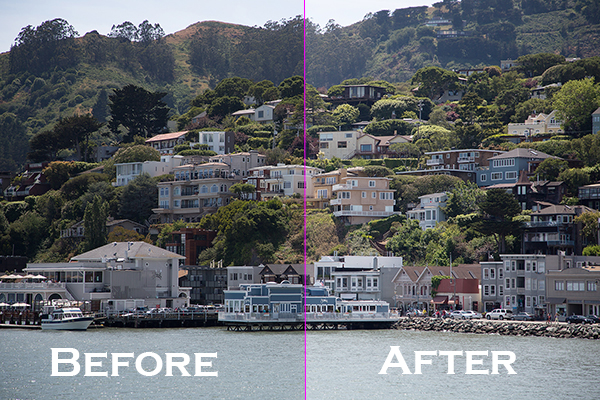
Before after

Wanted to share a very simple way for improving a photo without having to change the exposure. I use this method quite often and sometimes even after adjusting exposure.

The image is of a small hillside town in North California called Sausalito taken while on vacation.

Here the SOOC (straight out of the camera) image before any adjustments are applied or any cropping. It is just a bit under exposed and very flat looking.

Img sooc

Certainly there are many ways to brighten a photo in Photoshop like using Curves, Levels or Shadow layers. For this tutorial, we will be using a duplicate layer and then change the overlay to Screen mode to brighten up and give it a bit of a punch. I’ve seen many professional photo retouchers use this technique on both landscape and portrait photography as a starting point for retouching. This method works really well on jpgs as well!

1. Open image in Photoshop. Then duplicate layer by pressing Ctrl+J (Win) / Command+J (Mac)

Img dup layer

2. Change blend mode to Screen and and then set Opacity to 50%.

Img screen

Starting out with Opacity set to 50% and adjusting the slider for more or less brightness. For this image the opacity is about right at 50% for my eyes. See how this new layer in Screen mode added a subtle contrast and brightness.

Img ps screen

Give this technique a try even if the image is not under exposed as it will brighten up overall highlights and will slightly increase perceived contrast. Make sure to experiment with different opacity values for different looks. Here is the final image cropped and with a bit more processing – how I remember Sausalito looking that day.

Img final

Let me know in the comments how this has worked for you or if you have questions.

Sergey Sus is a Los Angeles based photographer telling telling real stories, individual, professional and family. Problem solver, artist and teacher. His work can be found on http://www.sergeys.us/.

Post originally from: Digital Photography Tips.

Check out our more Photography Tips at Photography Tips for Beginners, Portrait Photography Tips and Wedding Photography Tips.

How To Improve an Image with 2 Steps in Photoshop Using Screen Mode


Digital Photography School

 
Comments Off on How To Improve an Image with 2 Steps in Photoshop Using Screen Mode

Posted in Photography


Yahoo and Flickr Renege on Their Paid Advertising Free Accounts

03 Jul

The New Yahoo Advertising Tool Bar on Flickr is Ugly

One of the things that I’ve liked about being able to pay Yahoo and Flickr $ 24.95 per year, is that it comes with an advertising free experience. The deal between Yahoo and Pro accounts is simple, and can be summed up in Flickr’s own words: “No ads in your browsing experience.”

While new Flickr Pro accounts are no longer available, all existing Pro accounts were given an opportunity to grandfather in their Pro accounts and continue them ad free. If users want an ad free experience now, they have to pay double the price as the old Pro account, but it’s still an option.

In the past, when paid accounts on Flickr have complained about advertisements, Flickr pointed them to a toolbar that a user likely installed: “If you are pro, we don’t show you ads on Flickr, but you may have unintentionally installed a browser toolbar, extension or add-on that is serving them.”

I’ve always respected Flickr for offering this ad-free option, it’s a refreshing departure from Facebook, where we are bombarded with ads at every turn.

Unfortunately, today Flickr has reneged on their advertising free account by forcing a new Yahoo tool bar on all Flickr users, both those with free ad supported accounts and those of us with paid ad-free versions. It’s an ugly intrusion to an otherwise beautiful new Flickr. It also advertises at me on *every* *single* *page* on Flickr — a bunch of Yahoo services that I *do* *not* *want.*

Complete with a Yahoo logo, the forced real estate takeover also offers me Home, Mail, News, Sports, Finance, Weather, Games, Groups, Answers, Flickr, omg!, Shine, Movies, Music, TV, Health, Shopping, Auto, Travels, Home.

There is no way to disable this forced tool bar. Worse it follows you as you scroll down the page. It never goes away. As of right now it is impossible to be on any page on Flickr without having these hyperlinked ads in your face.

I think these advertisements are just awful. I think they are distasteful and I think it’s unfortunate that Yahoo is so greedy that they cannot be satisfied with our simply paying them for an ad-free experience. If Yahoo cannot make enough money off of Flickr, then increase the price, or give us an option to pay more and remove this intrusive forced advertising bar.

Flickr is supposed to be an elegant, paid, ad-free, photo experience — or at least one version of it is. Forcing advertisements like this on ad-free accounts is wrong. Flickr should give all paid accounts an option to x out this ugly marketing based tool bar and make it go away.

There are few things as annoying as having a toolbar forced on you with a bunch of advertising links to things that you do not want. You can follow user reaction to this new forced tool bar in the Flickr Help Forum here.

You can and should do better than this Flickr.


Thomas Hawk Digital Connection

 
Comments Off on Yahoo and Flickr Renege on Their Paid Advertising Free Accounts

Posted in Photography


The Basics of Using ND Grads to Improve Your Landscapes

02 Jul
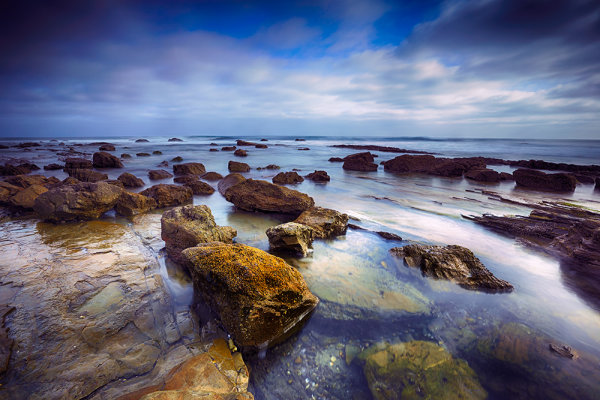
For this image, I used a 4-stop hard-edged ND grad to hold back the sky.  I also used a 5-stop ND filter to slow the exposure enough to get the water silky smooth. 6 seconds, f/16, ISO 100. EOS 5D Mark III with EF 16-35mm f/2.8L II.

For this image, I used a 4-stop hard-edged ND grad to hold back the sky. I also used a 5-stop ND filter to slow the exposure enough to get the water silky smooth. 6 seconds, f/16, ISO 100. EOS 5D Mark III with EF 16-35mm f/2.8L II.

As I’ve written before, the hardest part of landscape photography is retaining detail in a bright sky with a darker foreground.  There are several ways to deal with this issue. The newest ways involve various post-processing techniques in Photoshop or Lightroom, or using High Dynamic Range photography to blend several exposures together, retaining both shadow and highlight detail from these exposures.  There is nothing wrong with these techniques, and in fact there are times where these may be the best method for keeping detail in the sky. There are issues with both blending and HDR.  HDR tends to have a very processed look to it when not done well, and blending takes time to do well. I am not one who likes to spend much time in Photoshop with my images.  In addition, you still need to be sure that you somehow capture enough information in the sky that you are not simply darkening down white pixels.

On the left is a 2-stop, hard-edged ND grad.  On the right is a soft-edged 2-stop ND grad.

On the left is a 2-stop, hard-edged ND grad. On the right is a soft-edged 2-stop ND grad.

To ensure you’re capturing enough detail, the use of graduated neutral density filters is needed. Graduated Neutral Density Filters (ND grads, for short), are pieces of glass or photographic resin that are half clear, and gradually gets darker as it moves to the other end.  This darkening begins in the middle of the piece of glass.  First of all, these filters come in two forms.  The first of which is a typical screw-on filter that screws onto the front of the lens. While this style is fine for polarizers or skylight filters, it’s problematic for ND grads, because the horizon can’t be repositioned.  The other way these filters come is in 4×5 or 4×6 inch glass or resin.  These pieces of glass are then placed in holders, and the horizon can be repositioned as needed. The biggest advantage these filters have over the screw-in kind is the fact that they allow you freedom of composition to put the horizon where you want.   The most popular holders and systems for this type of filter are the Cokin systems, which come in various sizes, and the Lee system, which typically accepts a 4″ wide filter.  The Cokin systems tend to be a bit cheaper both in terms of cost of the holder and cost of the filters.  The Lee system is a bit more expensive on both fronts.

Once you’ve decided on which system to use, there is then the choice of which ND grads to choose. There are several companies that manufacture these filters, from  Cokin for their systems, to Lee, to to Formatt Hi Tech, to Schneider Optics, among others.  The prices vary, depending on whether you’re buying photographic resin or glass.  Resin filters tend to be cheaper while glass is most expensive. Resin doesn’t break when dropped but can scratch more easily than glass does. ND grads are available in various densities, including  2 stops, 3 stops, and 4 stops.

The selection doesn’t stop there, however. In addition to choosing which density you need, you also must choose how gradual the density is. Graduated neutral density filters come in both hard-edge and soft-edge graduations.   You would use hard-edge filters when you have a clear horizon and no object in the foreground intersects it.  You would use soft-edged filters when there is an object that intersects the horizon.  Soft-edge filters have a much smoother gradation, which allows it to look more natural when used in a photo.  A hard-edged filter will create a more definitive line between light and dark in the image.

These filters have become some of the most important tools in my bag when creating landscape photos. If you’re just starting out, get an inexpensive set of filters- there is no “one size fits all” to ND grads.   However, if you can only start with one, I’d suggest a soft-edged three stop ND grad. The hard-edged can be limiting at times, and two stops never seems to be enough on its own.  I often stack ND grads to get the effect I’m looking for.

Happy shooting!

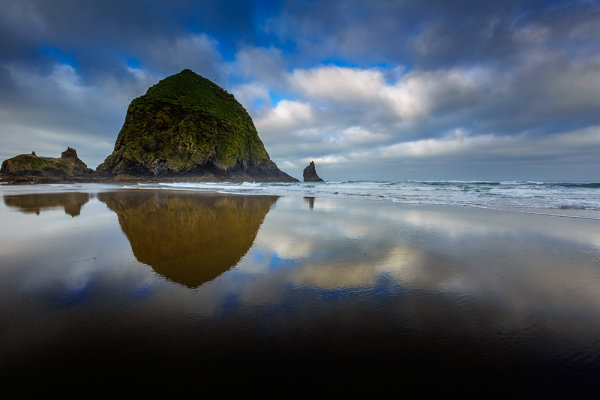
Because Haystack Rock stood above the horizon line, and was quite a bit darker than the sky behind it, I had to use a 3-stop, soft-edged ND grad filter here. 1/20, f/16, ISO 100. EOS 5D Mark III with EF 16-35mm f/2.8L II.

Because Haystack Rock stood above the horizon line, and was quite a bit darker than the sky behind it, I had to use a 3-stop, soft-edged ND grad filter here. 1/20, f/16, ISO 100. EOS 5D Mark III with EF 16-35mm f/2.8L II.

Post originally from: Digital Photography Tips.

Check out our more Photography Tips at Photography Tips for Beginners, Portrait Photography Tips and Wedding Photography Tips.

The Basics of Using ND Grads to Improve Your Landscapes


Digital Photography School

 
Comments Off on The Basics of Using ND Grads to Improve Your Landscapes

Posted in Photography


Redefining Rustic Materials: 6 Modern Log Furniture Makers

02 Jul

[ By WebUrbanist in Design & Furniture & Decor. ]

log furniture set series

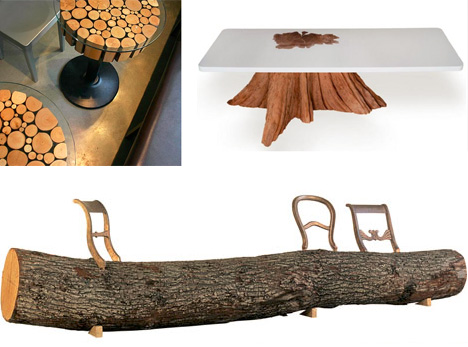
Logs typically conjure images of remote cabins and plaid-clad workers felling trees. As these seven creative designers and craftspeople show, though, log furniture can be cool, clever and contemporary, too.

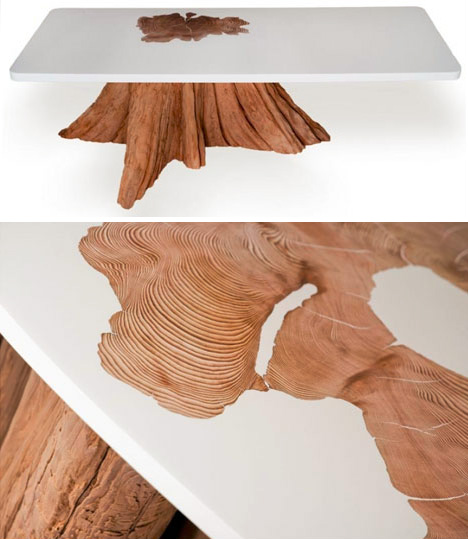
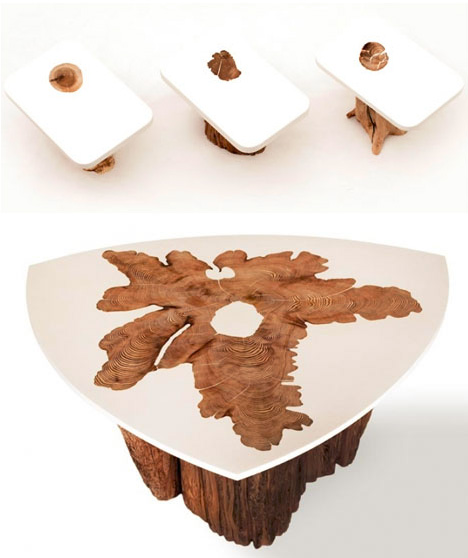
upcycled resin log tables

Rather than presupposing a finished shape, Mth Woodworking uses logs individually to inspire and guide each unique piece they create.

upcycled log table tops

Their addition of a resin surface largely leaves the natural shape of the stump or trunk alone, and highlights the cross-section showing through the top. Until the resin dries around the log, the end result always remains something of a mystery.

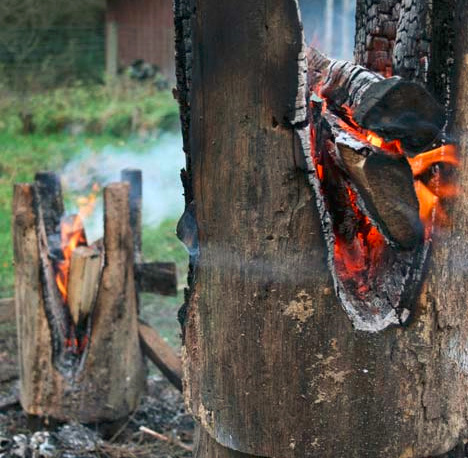
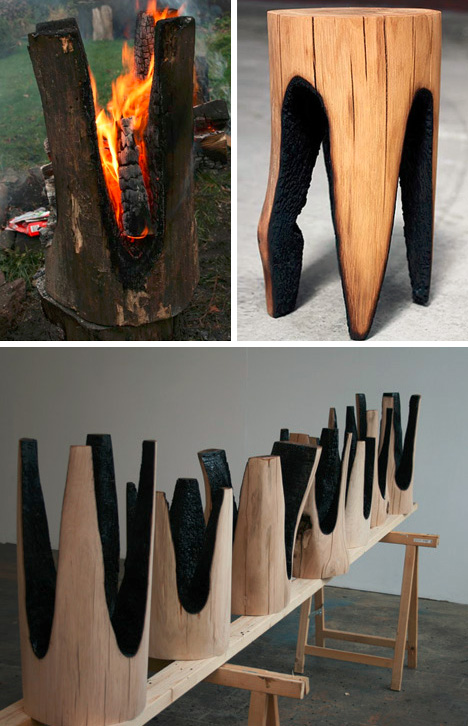
upcycled burned log stools

With a combination of roughness and care, Kaspar Hamacher chops logs into sections, strips the bark away and places smaller burning logs on top to create legs from the charred remains.

upcycled charred furniture set

Given the natural ingredients of both raw timber and burning embers, the results, while clearly of a kind when set next to each other, are nonetheless always unique.

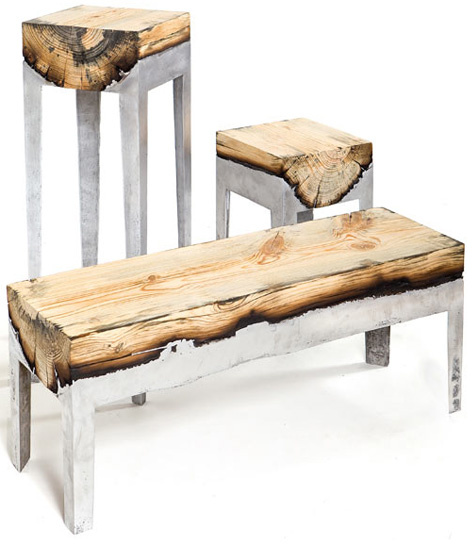
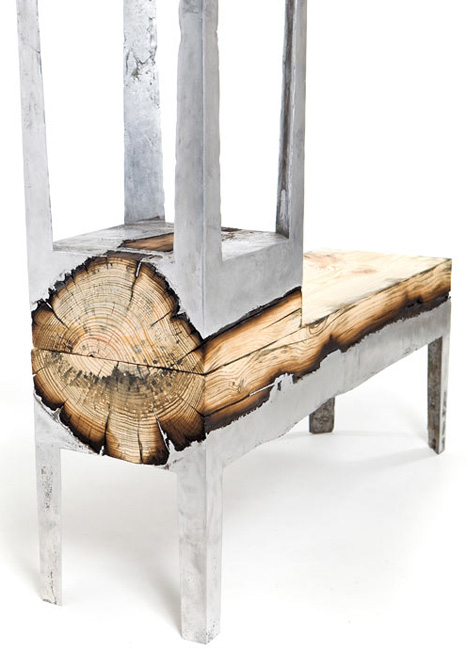
upcycled aluminum half logs

Hilla Shamia casts logs into liquid aluminum, burning the edges and creating a dark interstitial zone between the dull gray metal and bright near-white interior of each log.

upcycled log metal benches

Since the logs are cast on the surface side, they provide a warmer texture to those sitting (benches or chairs) or leaning (tables) on them, while providing sturdy and predictable support below.

Next Page:
Redefining Rustic Materials 6 Modern Log Furniture Makers

Share on Facebook


[ By WebUrbanist in Design & Furniture & Decor. ]

[ WebUrbanist | Archives | Galleries | Privacy | TOS ]


WebUrbanist

 
Comments Off on Redefining Rustic Materials: 6 Modern Log Furniture Makers

Posted in Creativity


2. Juli 2013

02 Jul

Ein Beitrag von: neekon59

Bis zum Gipfel © neekon59


kwerfeldein – Fotografie Magazin

 
Comments Off on 2. Juli 2013

Posted in Equipment