RSS
 

Archive for July, 2013

Retro Restoration: Abandoned Space Age Bungalows

04 Jul

[ By Steph in Abandoned Places & Architecture. ]

Abandoned Space Bungalows 1

In the 1970s, these odd little pods were on the cutting edge of portable architecture, with a design clearly influenced by Space exploration and futurism. Today, they sit abandoned on the lot of an Italian holiday resort, cracked and stained. Time hasn’t been kind to these relics of a bygone era, but they could be saved. Restoration specialists are seeking funding to preserve them, along with the rest of the resort, making them an active travel destination.

Abandoned Space Bungalows 2

Abandoned Space Bungalows 5

‘BANGA’ portable bungalows were created by an unknown designer in 1971, intended for use as compact living spaces with folding beds, a small bathroom and kitchenette. The interiors are reminiscent of airplanes and boats, with rounded surfaces, porthole windows, and virtually everything built right into the plastic walls.

Abandoned Space Bungalows 3

Abandoned Space Bungalows 6

All of the factory-assembled components are made from glass-reinforced plastic GRP. Left to age over the decades since they were built, these unusual living units have definitely seen better days, and they’re in need of some serious care, but it’s not hard to imagine them scrubbed up and ready for novelty-seeking travelers.


Share on Facebook


[ By Steph in Abandoned Places & Architecture. ]

[ WebUrbanist | Archives | Galleries | Privacy | TOS ]


WebUrbanist

 
Comments Off on Retro Restoration: Abandoned Space Age Bungalows

Posted in Creativity


3. Juli 2013

04 Jul

Ein Beitrag von: Julia Wengenroth

Sailor's knot © Julia Wengenroth


kwerfeldein – Fotografie Magazin

 
Comments Off on 3. Juli 2013

Posted in Equipment


Canon videos showcase 70D’s innovative AF system

04 Jul

impressions.jpg

Canon’s new 70D features a ground-breaking ‘Dual Pixel CMOS AF’ sensor which splits every single pixel into two photodiodes for on-chip phase detection autofocus, promising greatly improved AF performance in live view and movie mode. Canon has created a sample video, called ‘Handmade’, shot with the 70D, which showcases the new AF technology, alongside another short video feature going behind the scenes. Click through to watch the videos. 

News: Digital Photography Review (dpreview.com)

 
Comments Off on Canon videos showcase 70D’s innovative AF system

Posted in Uncategorized


Merge to 32 bit – HDR technique comparisons

04 Jul

HDR is an often discussed and debated subject in photography circles. There’s much talk about “bad” HDR, or a whether or not one should even do it in the first place. I think a lot of that stems from what I’d consider to be overdone, over-processed versions.

IS MERGE TO 32-BIT A SOLUTION FOR BAD HDR?

Depending on the software used to make your tone-mapped HDR images you may be given an option to view and/or save a 32-bit version. Prior to Lightroom 4 we there wasn’t really much we could do with such a file so most photographers never bothered saving it. Now that LR4 and PS can handle a 32bit file it has opened up a whole new set of options for HDR, one that is a lot simpler, more photo realistic, and many would venture to say – better.

The problem with most overdone HDR images is that they are often:

  • too overly saturated, way past surreal into unpleasant looking by many accounts
  • too flat, the blacks are grey and the highlights are grey and muddy looking
  • too far into the realm of “surreal” or “artistic” where the shadows are now brighter than some of the highlights, and the highlights are darker than some of the shadows. It seems unnatural and many people reject it because their brain’s can’t even register it.
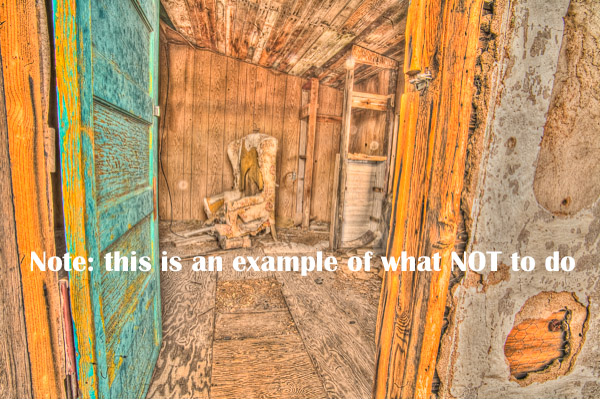
NOTE this is an example of what NOT to do, please do NOT make HDR that looks like this.

Please do NOT make HDR that looks like this!

WHO IS MERGE TO 32-BIT HDR FOR?

  • perhaps you’ve tried HDR and been unhappy with the results
  • maybe you vowed never to touch it for fear of producing something that falls into one of the above areas. If that is the case I urge you do take a second look and see if this is more to your tastes.
  • the process baffles you and you just want a good final result without having to learn yet another software

Photomatix Pro has been one of the front runners for HDR tone-mapping software since its creation. Now they offer a new plugin for using that 32-bit image. I’m not going to get into the step by step how to use shoot your bracketed images or use this plugin (they already have that on their site here), rather a comparison of a three different methods of making HDR images and the resulting images.

THE MERGE TO 32-BIT PROCESS

Okay in a nutshell, this is how the plugin works.

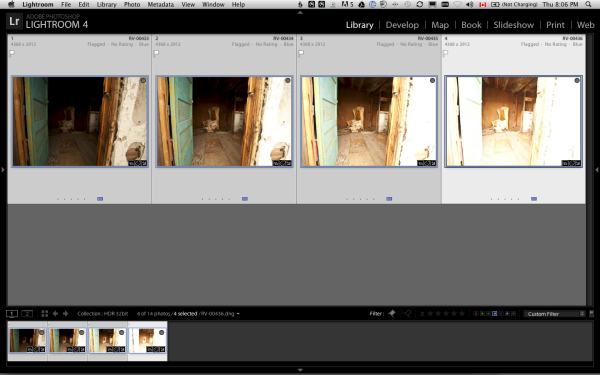
  1. select your bracketed images in LR or PS
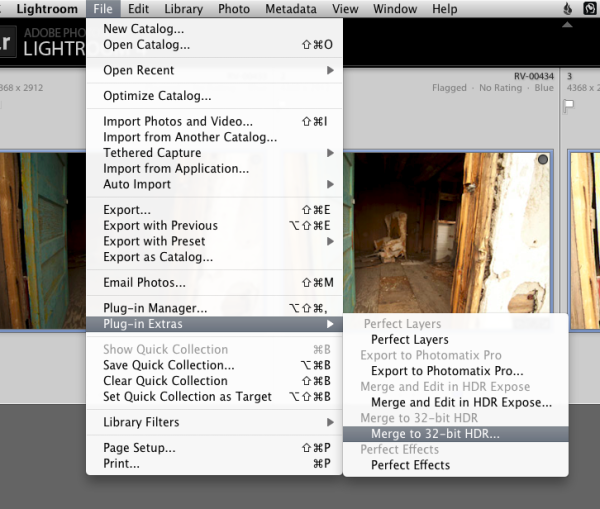
  2. launch the 32-bit plug in (and select a couple options) and it does its thing in the background
  3. take the resulting 32-bit image and finish it in LR or PS
Screen shot 2013-06-27 at 8.06.37 PM

Select bracketed images

Screen shot 2013-06-27 at 8.07.20 PM

Launch the Merge to 32-bit HDR plugin

Screen shot 2013-06-27 at 8.41.07 PM

And away it goes! How easy right?

That’s it!  No sliders to play with, no presets, no way to muck it up – the software just merges them together into one massive file with a whole lot of exposure data. Then you work the magic on it in Lightroom or Photoshop (or your favorite image editor) to lighten where you want, and darken where you want – with no loss of image quality or detail.

AN EXAMPLE DONE TWO WAYS

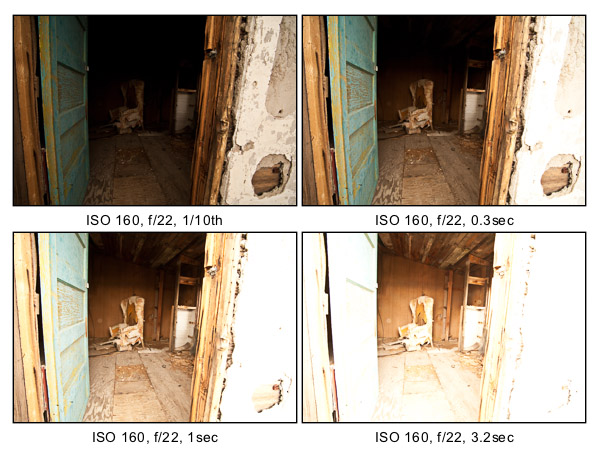
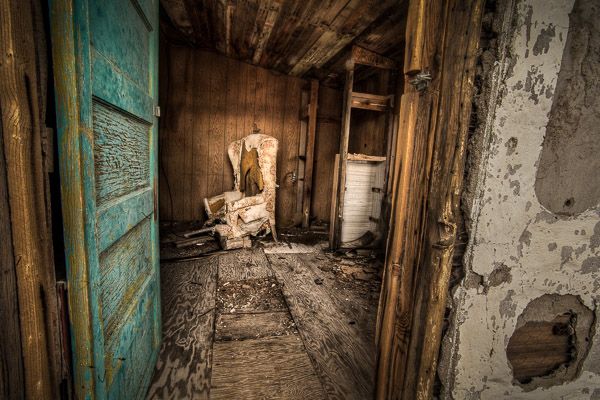
Below you see the four bracketed images I’m using for this example. Notice that the darkest image shows lots of detail in the white wall on the right of the doorway, and the lightest image has tons of detail on the ceiling inside the building. I use the histogram and shoot in manual to make sure I capture enough range and generally bracket 2 tops apart (these are about 1 and 2/3rds apart as it was enough to get the range I needed) – notice I only ever adjust the shutter speed, keep my ISO low and use a tripod whenever possible.

4-bracketed-images

Bracketed images shot in Manual mode on tripod

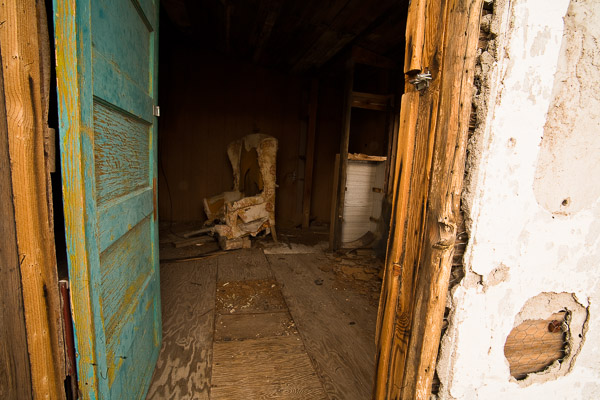
Below you see the 32-bit image as it first appears in Lightroom. It looks pretty contrasty (almost exactly like the second image above) but unlike using just a single image there is plenty of detail in ALL areas of this image, you just have to manipulate it out a bit!

RV-00433_4_5_6-32bitb-600px

Merge 32-bit image before Lightroom processing.

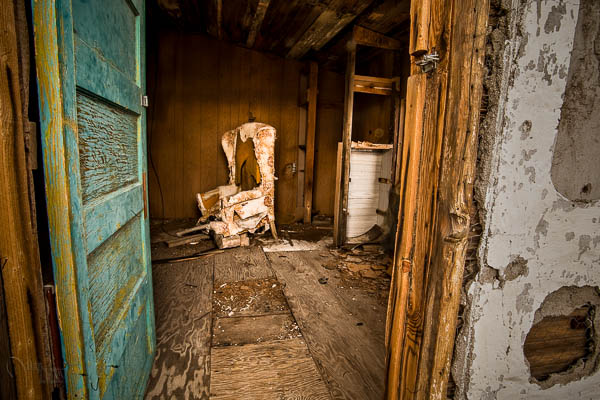
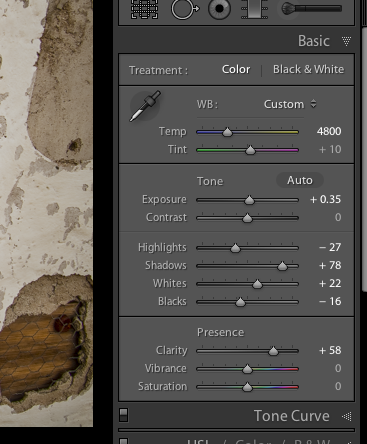
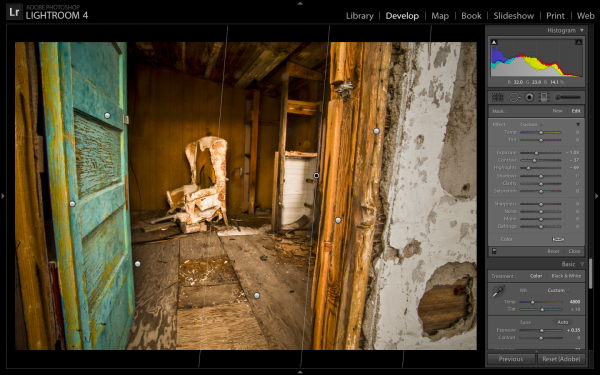
Here is the final version after doing some Lightroom magic.  I’ve used several of the sliders pulled to the max (see screen shot of my Basic panel below), as well as some Graduated filters on the edges (see screen shot below), a post-crop vignette, and several adjustment brushes to lighten and darken areas I wanted to control. Notice the white wall on the left is quite dark now, almost grey – however the highlights inside the house are still bright white. If you just darken all the highlights you end up with a flat, muddy looking mess. I’ve also darkened the wall outside intentionally to draw your eye inwards towards the brighter areas and the chair. If the wall was still pure white it would scream and draw your attention.  Notice how the image still has dark areas, light areas, and a good contrast range. All I’ve done is control the tonal values to retain detail where I wanted.

32bit-dps-01

Final image after Lightroom adjustments

Basic panel adjustments in LR

Basic panel adjustments in LR

Gradient filters used to darken the edges of the doorway

Gradient filters used to darken the edges of the doorway

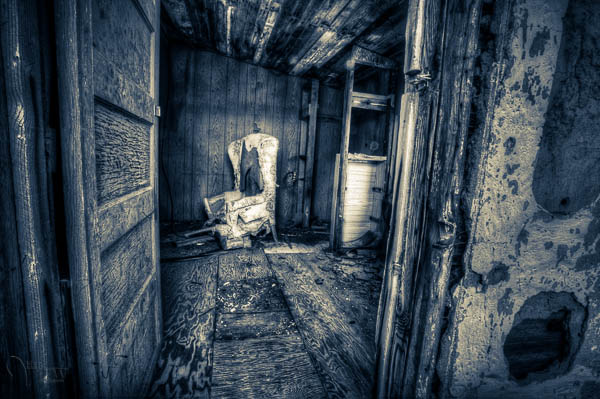
Now have a look at another version of the same bracketed image set, but this time created using the full Photomatix Pro software and LR adjustments afterwards.  It’s a much grungier look, which some people dislike. Personally I like this look and it’s not going too far for my tastes. There’s still pure black, and pure white in the image and it has good contrast – the tones have just been adjusted in a different way.

HDR done by tonemapping in Photomatix Pro

HDR done by tonemapping in Photomatix Pro

One more version, also tone mapped in Photomatix then split toned in LR

One more version, also tone mapped in Photomatix then split toned in LR

CAN YOU GUESS HOW THESE WERE DONE?

Let’s look at two more images as examples. I’ve used three different processes to get the final results in each set:

  • using just Lightroom adjustments
  • using the regular Photomatix Pro tone-mapping process
  • using the merge to 32bit method

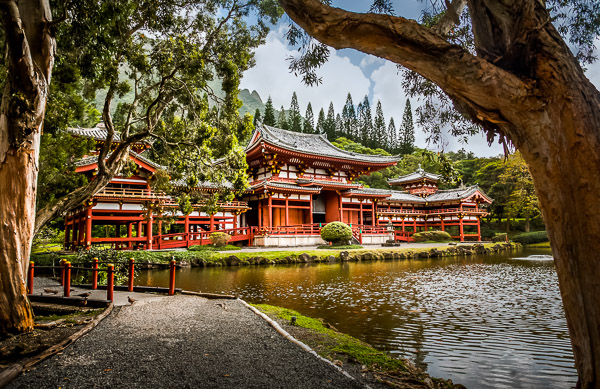
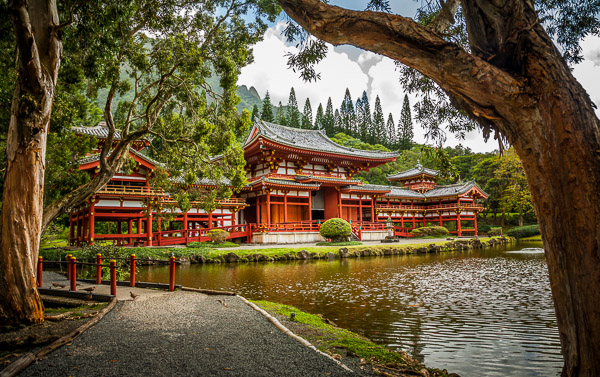
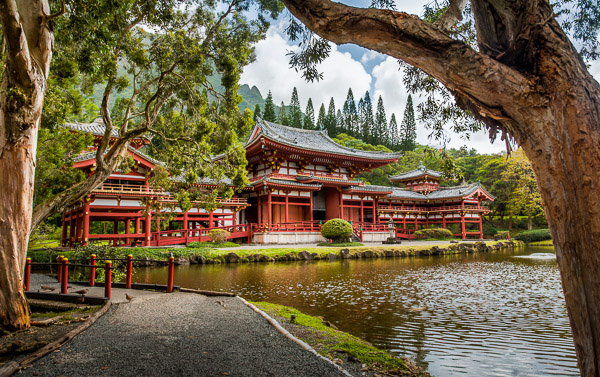
Can you guess which is which in each trio?  No fair peeking at the file names!   Look over the three versions of each scene and tell me in the comments below which was done with what process.  How can be first to get it all right?  GO!

32bit-LR2

32bit-merged

32bit-tonemapped

Hawaii2012-32bit-600px

Hawaii2012-LR-600px

Hawaii2012-TM-600px

SUMMARY

To revisit my original question – is merge to 32-bit the answer for better HDR? I think that’s probably still up for debate. It does however allow you to create a much more photo realistic result with relatively few easy steps, and less hassle. So if you fall into one of the categories at the top of the article I’d suggest you give it a try especially if you want to do tone control but not alter the look of the image beyond that of reality.

As always, give me your thoughts and opinions. There’s always many different options and opinions and no one solution is right for everyone.

Post originally from: Digital Photography Tips.

Check out our more Photography Tips at Photography Tips for Beginners, Portrait Photography Tips and Wedding Photography Tips.

Merge to 32 bit – HDR technique comparisons


Digital Photography School

 
Comments Off on Merge to 32 bit – HDR technique comparisons

Posted in Photography


Sigma blog posts tips for photographing 4th of July fireworks

04 Jul

fireworks.jpg

Sigma has posted an informative article on its blog by photographer Jack Howard, sharing tips on how to photograph fireworks. The article comes just in time for the 4th of July celebrations in the USA, but is equally relevant to various festivals, year-wide, all over the world. Tips include obvious pointers like making sure you have a good, sturdy tripod, but also more detailed advice about how to set up your camera’s exposure and focus modes, as well as how to trigger exposures. Click through for a link to the article at blog.sigmaphoto.com.

News: Digital Photography Review (dpreview.com)

 
Comments Off on Sigma blog posts tips for photographing 4th of July fireworks

Posted in Uncategorized


Just Posted: Pentax Q7 Real-world Samples Gallery

04 Jul

q7news.jpg

Just posted: Our real-world samples gallery shot with the Pentax Q7. The latest in Pentax’s series of tiny interchangeable lens cameras, the Q7 is the first to offer a larger 1/1.7 inch 12MP BSI CMOS sensor. We’re working on a full review, and as part of the process we’ve been out and about taking plenty of sample pictures on the Q7 in a range of different situations, to see how it performs. Click through for a link to the our gallery.

News: Digital Photography Review (dpreview.com)

 
Comments Off on Just Posted: Pentax Q7 Real-world Samples Gallery

Posted in Uncategorized


Rare Visions of the Past: 30 Old Color Photographs

03 Jul

[ By Steph in Art & Photography & Video. ]

Oldest Color Photos Main

The black-and-white shades of old photos can reduce the immediacy of the images, making them feel as if the people and events they captured existed so long ago as to be irrelevant to our current lives. But look at those same photographs in color, and you’ll marvel at how much is still the same. These 30 images were taken before color photography was widely available, powerfully preserving Nazi Germany, Depression-era America, early 20th century Paris and Russia during the Revolution.

Nazi Germany

Oldest Color Photos Nazi Germany 3

Oldest Color Photos Nazi Germany 1

Oldest Color Photos Nazi Germany 2

The vivid reds of the Nazi banners against a cheerful blue sky make these images of 1930s Berlin even more unsettling than they would be in black and white. Made available for the first time by the National Archives of Norway, the images ere taken by Thomas Neumann and kept hidden away for decades.

Other color photos from that era were taken by ardent Nazi Hugo Jaeger, who had access to Hitler himself and his upper echelon, capturing private moments of the Third Reich. Upon seeing his images, Hitler declared, “The future belongs to color photography.”

Early 1900s Paris

Oldest Color Photos Paris 1

Oldest Color Photos Paris 2

Oldest Color Photos Paris 3

Taken at the turn of the century, these photos reveal the Golden Age of Paris in all its charming beauty. Captured using Autochrome Lumiere technology, an early color photography process, the images give us a look at cityscapes, the Eiffel Tower, street scenes, museum displays and even an image of fireworks that looks like it could have been taken in the modern era.

America in the Depression Era

Oldest Color Photos Depression 1

Oldest Color Photos Depression 2

Oldest Color Photos Depression 3

The Library of Congress has preserved thousands of color photos taken by photographers working for the U.S. Farm Security Administration, and later the Office of War Information, between 1939 and 1944. These photos are particularly intriguing because they capture scenes from that period of time that we don’t often see – migrant workers and poor laborers working on farms, as well as those most affected by the Depression, living in Dust Bowl states like Oklahoma.

Next Page:
Rare Visions Of The Past 30 Old Color Photographs

Share on Facebook


[ By Steph in Art & Photography & Video. ]

[ WebUrbanist | Archives | Galleries | Privacy | TOS ]


WebUrbanist

 
Comments Off on Rare Visions of the Past: 30 Old Color Photographs

Posted in Creativity


10 Travel Photography Tips to Help Avoid Regrets When You Get Home

03 Jul

By Hélio Dias.

I have lost count of how many times I’ve came home and regretted not having done something to get better pictures when I was traveling.

Luckily, each time that happened I learned from my mistakes. Now I want to share them with you so you don’t need to learn the worst way.

The tips apply for professional jobs and for your vacation pictures.

1. Make a List

Search on the internet – Google, Flickr, 500px, etc. – for images of the places you are going to visit and have a first look on them. Pay attention to the light, the colors, the possibilities to explore in the field and find out the best locations to take your photos.

On Flickr, for instance, it’s even possible to check the time in which the picture was taken, so you can know how the light is in that particular site at that time. A little geeky, but really helpful for me.

The possibilities of the research on the web are pretty amazing and endless. For food photography, for example, you don’t need to find a restaurant with pictures on the menu, or spend some time inspecting what people around you are eating before ordering your meal. You can find information and pictures of local food in advance and choose the best looking dishes, so when you go to a restaurant you know exactly what to order to take photos of.

Don’t run the risk of finding out later about a great place you missed when you where there.
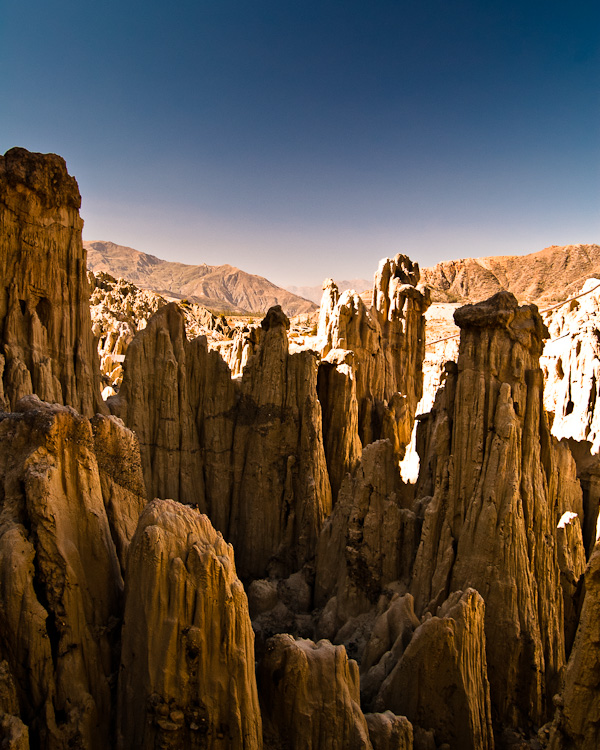
Moon Valley, a beautiful place I missed in my first visit to La Paz, Bolivia.

Moon Valley, a beautiful place I missed in my first visit to La Paz, Bolivia.

2. Take your Time

Definitely not something you haven’t heard yet, but sure the most important photography advice I’ve ever got: work the scene.

Spend some time trying to make the best possible photo from something you see potential on. Always remember: it’s not about getting 200 nice snapshots. It’s about 5 to 10 great photos. Invest your time and effort on these few ones.

Don’t rush. Never get satisfied with your first shot. There is a 99,9% chance you will get a better one if you study the scene more carefully.

Try different perspectives and angles. Walk around, get closer, get further. Try other lenses. Pay attention to details – they might be the center of interest you are looking for. Find the best background.

Drain your possibilities to the last drop. Then move on to the next shot.

There’s nothing more disappointing than looking at your photos when you are home and wish you had shot that particular picture from a different perspective.
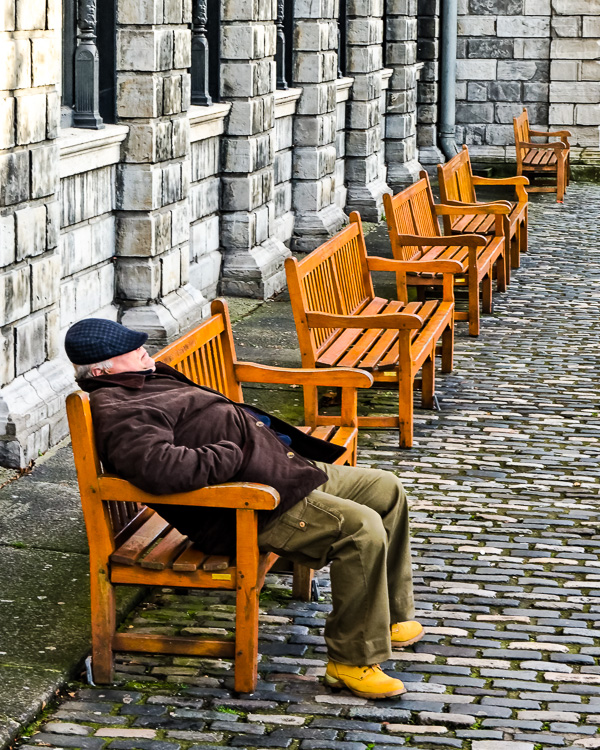
Dublin, Ireland. This one was about my 15th try. Totally worth the time and the shots.

Dublin, Ireland. This one was about my 15th try. Totally worth the time and the shots.

3. Wait for It

Kind of the same advice as the previous one. Just this time I want to point out the time you spend in a certain location after finding your best angle. You worked the scene, you found your composition. Now it’s time to add a little sugar to it.

There are 2 situations in which you may wait some time to get the best shot.

1) The scene is great, but you think it would be perfect with some random person walking by. Or a dog. Or a bird flying. Or a crowd passing by. Or a woman dressed in red. Wait for it until you get it.
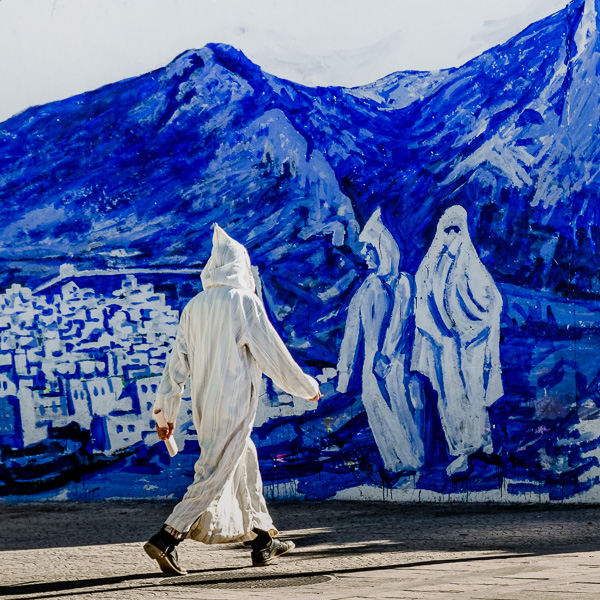
Chefchaouen, Morocco. I wanted to portray someone wearing the same outfit as the people in the painting, so I waited until the perfect subject passed by.

Chefchaouen, Morocco. I wanted to portray someone wearing the same outfit as the people in the painting, so I waited until the perfect subject passed by.

2) Many times you will have to wait for the best light. If that’s the case and it is too soon, take a picture, memorize your position and come back later.
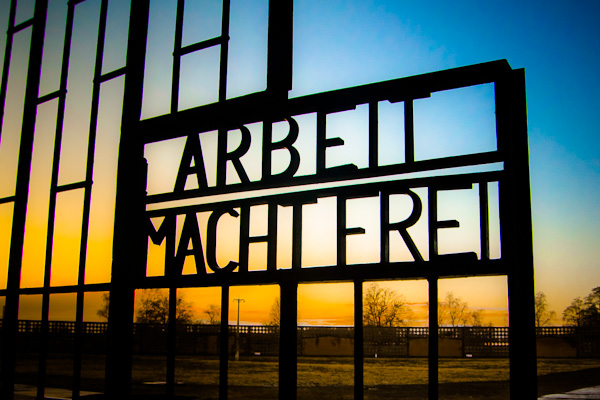
Sachsenhausen Concentration Camp - Oranienburg, Germany. I noticed the potential for a good picture when I arrived there earlier. So I calmly visited the site and, by the time I finished, the light was already perfect.

Sachsenhausen Concentration Camp – Oranienburg, Germany. I noticed the potential for a good picture when I arrived there earlier. So I calmly visited the site and, by the time I finished, the light was already perfect.

In both cases, you will need even more patience than when you were looking for the best framing. Now you just wait there, as long as it takes.

It’s really hard to keep the concentration while you are waiting there. But it’s really easy to regret not having waited when you are home sorting your photos later.

4. Don’t be Lazy

Wake up early and take advantage of the early morning light.

It will sound like the worst possible idea when your alarm clock beep at 5 AM, but you will be pleased with the awesome pictures you will take – a lot better than the ones you’d take around noon.

By shooting in the morning and in the afternoon on both golden hours, you raise 100% your photography time with good light. Plus: Other tourists may take pictures at the same sites, but as most of them won’t wake up early and because the sun in the morning lights up everything from the opposite side, your pictures will look different from theirs. Also, you can take advantage of the fact that it’s usually quieter in the morning than it is in the afternoon.
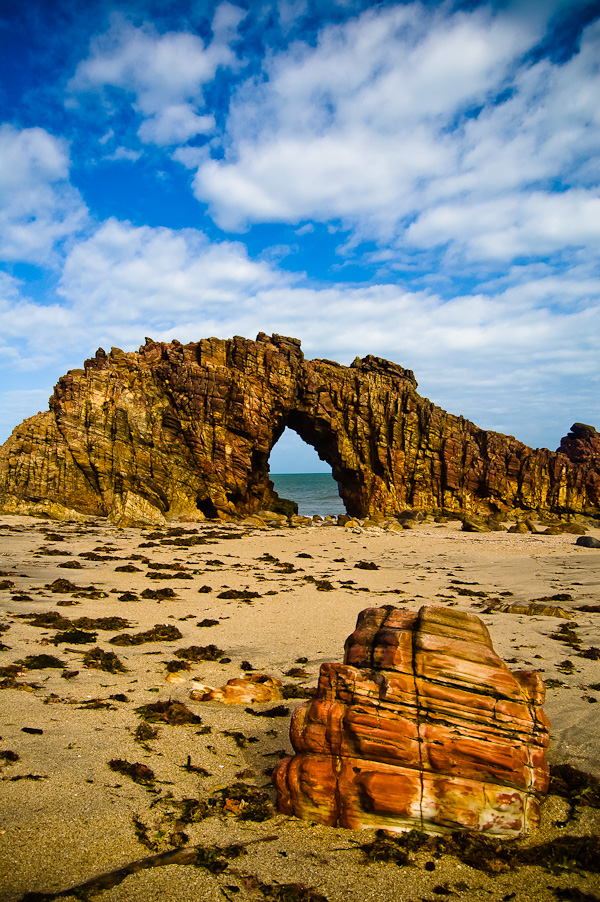
"Bored Stone" - Jericoacoara, Brazil. Many friends question me why this place looked so different when they visited and why their pictures look so dull. The "big" secret is to go there in the morning.

“Bored Stone” – Jericoacoara, Brazil. Many friends question me why this place looked so different when they visited and why their pictures look so dull. The “big” secret is to go there in the morning.

You will never regret having woken up so early when you get home and see the beautiful pictures you brought.

5. Have Options
It’s always good to explore some possibilities and to have more options when you are sorting and cropping your pictures.

For example, even after composing carefully and finding the best image, shoot a horizontal and a vertical photo of the same scene.

If you are using a random person to help composing a shot, do it with a man, a woman, a kid, a couple, etc.

Don’t shoot too tight. It’s better to have a wider picture and crop afterwards if needed – to adequate the picture to the available format in a magazine, for example. Give your editor (and yourself) room to edit.

Choose the best option later, when you can look carefully at each image, or let your editor choose if it’s a paid job.
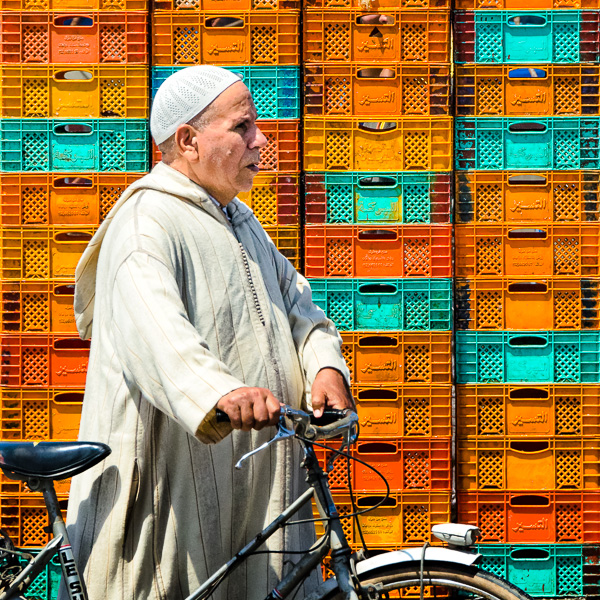
Essaouira, Morocco. I waited many minutes in front of this colored plastic boxes wall and took the same picture with other men, women, couples and kids. In the end, the guy in a white dress with a bicycle seemed like the best choice.

Essaouira, Morocco. I waited many minutes in front of this colored plastic boxes wall and took the same picture with other men, women, couples and kids. In the end, the guy in a white dress with a bicycle seemed like the best choice.

6. Ask Strangers to take their Portrait

How many times I have regretted not having asked someone to take his picture!

It’s a big think to step up and go ask a stranger to take his photo. I’ve lost count of the many thousands of great portraits I’ve lost in the past because I was too shy to ask permission.

But what has to be done has to be done. At one point you stop being silly and go ask the first stranger.

The second one will be almost as difficult as the first one. And the third just a little less. But by the 100th time you do it, it will be as easy as 1, 2, 3. The first no’s are very disappointing, but at some point you get used to it. Trust me.
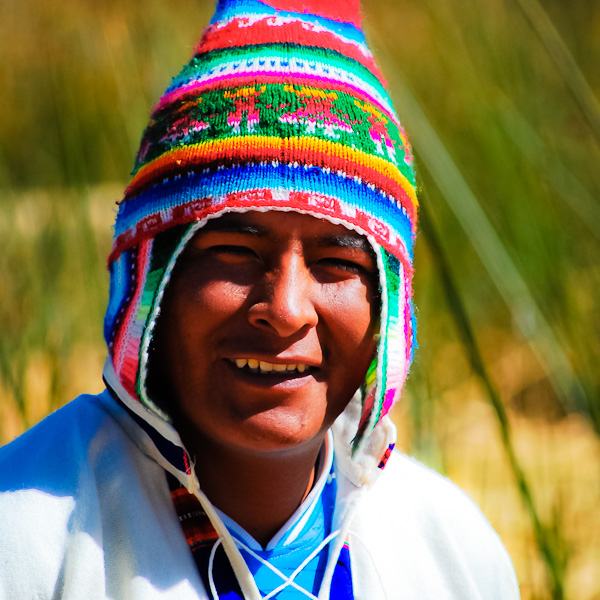
Peruvian man. "Can I take your picture?". "It's my pleasure!".

Peruvian man. “Can I take your picture?”. “It’s my pleasure!”.

7. Check it out Before Moving On

When you finally make that great picture, check carefully on your LCD screen if it’s not shaky or out of focus.

Also check the histogram and observe if the picture isn’t under or over exposed (don’t trust the image on the LCD to check this, especially in a bright day).

8. Always Keep your Gear Clean

Sometimes you’ll only find out how dirty your camera’s sensor or lenses’ glass were when you tweak the contrast of your photos while editing and see the dark spots pop out.
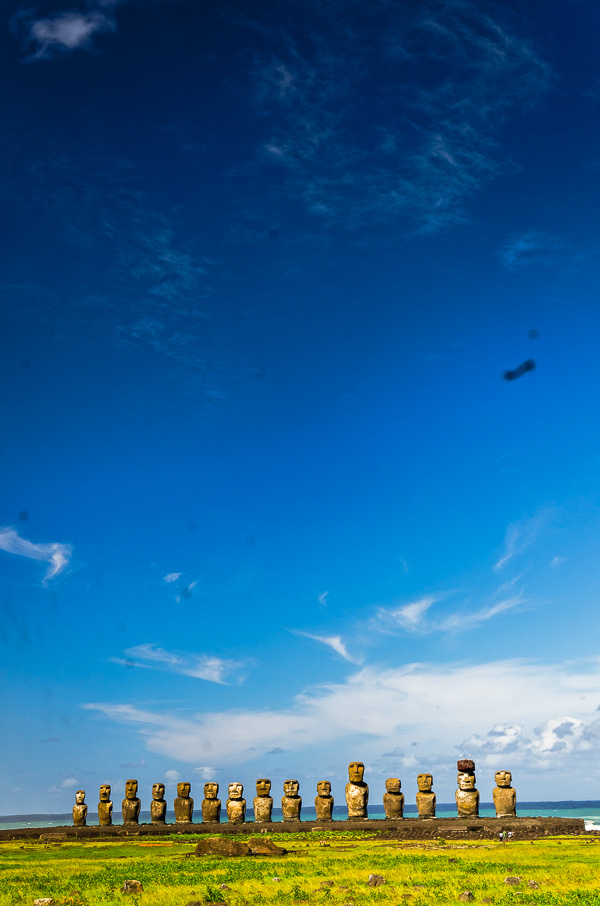
Ahu Tongariki, Easter Island. It's been a while, but I'm still cleaning out all the dirty spots on many pictures from that trip.

Ahu Tongariki, Easter Island. It’s been a while, but I’m still cleaning out all the dirty spots on many pictures from that trip.

Use a bulb blower, a brush or proper cleaning fluid to clean your camera’s sensor, and a clean cloth to clean your lenses’ glass and filters.

You could clean those spots later on Photoshop, but it’s really annoying and will take some time. Better to avoid the extra work.

9. Take Notes

When you get to the PC to sort and organize your travel photos you will want to know the names of the places and landmarks you photographed, especially when you find yourself uploading a picture and need a caption for it.

Take notes or, if it’s possible, take a picture of a sign or plaque related to the subject.

Sometimes you can find the information you need later on the internet, but even then it’s more time consuming than just writing it down in a small notebook.

10. Take Care

Be safe. Watch your stuff.

You can buy new equipment, but the pictures on your stolen memory card are lost forever.
Reduce the risks. Be prudent.

The best picture I've ever taken, from my trip to Colombia. Lost by carelessness. Put the memory card in my pocket, and when I looked for it, it was gone.

The best picture I’ve ever taken, from my trip to Colombia. Lost by carelessness. Put the memory card in my pocket, and when I looked for it, it was gone.

What about you? What have you already regretted?

Hélio Dias is a Brazilian photographer and travel writer. Visit his website and follow him on Facebook and on Twitter at @diashelio.

Post originally from: Digital Photography Tips.

Check out our more Photography Tips at Photography Tips for Beginners, Portrait Photography Tips and Wedding Photography Tips.

10 Travel Photography Tips to Help Avoid Regrets When You Get Home


Digital Photography School

 
Comments Off on 10 Travel Photography Tips to Help Avoid Regrets When You Get Home

Posted in Photography


Readers Shoot Back: Sergey Zaytsev

03 Jul

I sometimes kill an afternoon scanning the excellent work that Strobist readers upload to the site's Flickr group. Every now and then one will really stop you in your tracks, as did Georgian photographer Sergey Zaytsev's homage to his country's Queen Tamar, seen above. Very cool that it was done with more creativity than dollars (or lari, I should say?) and with a strong historical inspiration, to boot.

Would it surprise you to find this was done with a Nikon D300s and a few bare Cactus KF36 Vivitar 285 knockoffs? 'Cause that's what he used.

Read more »
Strobist

 
Comments Off on Readers Shoot Back: Sergey Zaytsev

Posted in Photography


3 July, 2013 – Antarctica 2015 by Air – 7 Top Instructors

03 Jul

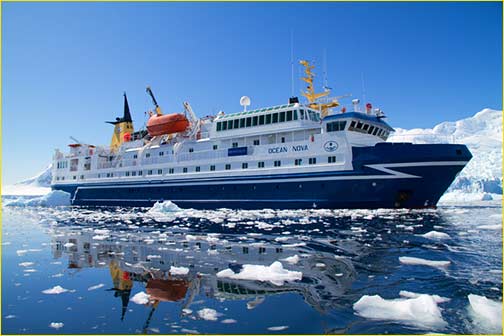
The best ship, the best tour operator, and seven of the world’s best photographic instructors. The Luminous Landscape today announces two spectacular new Antarctic Photographic Expeditions for January and February 2015.

It just doesn’t get better than this…Art Wolfe, Joe Cornish, Christian Fletcher, Charlie Cramer, Jackie Rankin, Katrin Eiseman, and Kevin Raber. The top instructors from the U.S., the U.K., Australia and New Zealand.

And even better – you’ll fly from the tip of South America straight to your ship and the calm waters of the Antarctic penninsula. Two hours by air instead of the two stomach wrenching days in heavy seas on the Drake Passage that other voyages provide.


The Luminous Landscape – What’s New

 
Comments Off on 3 July, 2013 – Antarctica 2015 by Air – 7 Top Instructors

Posted in News