RSS
 

Archive for June, 2013

25 June, 2013 – Fuji New Camera, Lenses and Firmware

25 Jun

Fujifilm officially announced (surprise) their new X-M1 camera as well as new Fujinon XF 27mm f/2.8 R and XC 16-50mm f/3.5-5.6 OIS lenses. Many sites around the web have full write ups and test reports.

Of particular interest, to me at least, is new firmware for the X-Pro1 and X-E1 cameras that features focus peaking.

Fuji is to be lauded for continuing to update their existing camera line with firmware enhancements, something which other companies seem not to do with as great frequency.

It’s curious to note though that there are two firmware updates available, one dated today, June 25, for V2.05 and another dated July 23! for Version 3.0. Both for the X-Pro 1. Ooops!?

"Michael’s and Jeff’s tutorial videos are absolutely awesome, not only because of the information transmitted but also because of the casual, conversational style which somehow really makes things stick in your memory."


The Luminous Landscape – What’s New

 
Comments Off on 25 June, 2013 – Fuji New Camera, Lenses and Firmware

Posted in News


Type Face: Monumental Figurative Sculptures Made of Text

25 Jun

[ By Steph in Art & Sculpture & Craft. ]

Jaume Plensa Typeface Sculptures 1

Giant human figures made of jumbled steel letters loom over public spaces in a series of monumental typographic sculptures by artist Jaume Plensa. The contemplative seated figures seem to watch over the landscapes and city squares where they have been installed around the world, from London to Rio de Janeiro.

Jaume Plensa Typeface Sculptures 3

(images via: chris huggins, jaume plensa)

Jaume Plensa Typographic Sculpture 2

(images via: terry madeley)

The text seems to wrap around invisible human forms, looking at times as if it is incomplete. Plensa’s work is not just thought-provoking, it is about thought itself and how words can shape our world and the way we interact with it.

Jaume Plensa Typeface Sculptures 4

(images via: terry madeley, jw sherman, anders sandberg)

Plensa has borrowed paragraphs from biblical texts, classic literature like Dante’s Divine Comedy, and poetry by William Blake. Stand beneath or inside one of these massive sculptures and you likely won’t be able to read much of the text – but that’s not the point.

Jaume Plensa Typeface Sculptures 5

Jaume Plensa Typeface Sculptures 6

(images via: tim green, lorraine 1 + 2, liza31337)

Conceptual dualities, like the play between negative and positive space, are intended to stimulate intellectual engagement, connecting the sculptures with the viewers on an intuitive level. The pieces often include ‘doorways’ so viewers can interact with the work, temporarily becoming a part of it.

Share on Facebook


[ By Steph in Art & Sculpture & Craft. ]

[ WebUrbanist | Archives | Galleries | Privacy | TOS ]


WebUrbanist

 
Comments Off on Type Face: Monumental Figurative Sculptures Made of Text

Posted in Creativity


Fujifilm updates X-Pro1 and X-E1 firmware for lens compatibility

25 Jun

xp1news.png

Fujifilm has announced a set of firmware updates for its X-Pro1 and X-E1 mirrorless cameras. Versions 2.05 for the X-Pro1 and 1.06 for the X-E1 will be available to download on 25th June; they offer compatibility with lenses that don’t have aperture rings, and allow easier focus area selection when shooting with the eye-level viewfinder. The company has also pre-announced further updates (Versions 3.00 for the X-Pro1, and 2.00 for the X-E1) which promise to improve autofocus speed with existing XF lenses, and add the much-requested ‘focus peaking’ function to aid manual focus. These are due to be available for download on 23rd July.   

News: Digital Photography Review (dpreview.com)

 
Comments Off on Fujifilm updates X-Pro1 and X-E1 firmware for lens compatibility

Posted in Uncategorized


Just posted: Our Fujifilm X-M1 hands-on preview

25 Jun

xm1preview2.png

Just posted: Our detailed Fujifilm X-M1 hands-on preview. Fujifilm’s latest miniaturised mirrorless model represents something of a design departure from its previous X-system cameras, eschewing the traditional control dials seen on the X-E1 and X-Pro1 for a more contemporary control layout. It also forgoes an eye-level viewfinder, making do with a tilting rear screen instead. Is this a betrayal of everything Fujifilm owners have grown to love about their cameras, or is there more to the little X-M1 than meets the eye? Read our preview to find out.

News: Digital Photography Review (dpreview.com)

 
Comments Off on Just posted: Our Fujifilm X-M1 hands-on preview

Posted in Uncategorized


Fujifilm introduces XF 27mm F2.8 ‘pancake’ lens

25 Jun

27mm-black-520.png

Fujifilm has introduced the XF 27mm F2.8, a compact ‘pancake’ lens for its X-system cameras. It’s just 23mm thick and weighs only 78g, making it by far the smallest X-mount lens. This means there’s no space for an aperture ring, so X-Pro1 and X-E1 owners will need to update their firmware to allow aperture setting from the camera’s rear control dial. It’ll be available in either black or silver, at an MSRP of $ 449.95.

News: Digital Photography Review (dpreview.com)

 
Comments Off on Fujifilm introduces XF 27mm F2.8 ‘pancake’ lens

Posted in Uncategorized


Fujifilm announces X-M1 mirrorless camera and XC 16-50mm OIS lens

25 Jun

XM1_news-520-2.png

Fujifilm has announced the X-M1, a compact-bodied mirrorless camera that features a rather different design to its previous models. Instead of ‘traditional’ shutter speed and exposure compensation dials, the X-M1 uses twin electronic control dials to change exposure parameters. It has a tilting 920k dot 3″ LCD screen but no eye-level viewfinder, and uses the same 16MP APS-C X-Trans CMOS sensor as the X-Pro1 and X-E1. It comes with a new kit zoom, the XC 16-50mm F3.6-5.6 OIS that offers a 24-75mm equivalent range and optical stabilisation, but has no aperture ring. 

News: Digital Photography Review (dpreview.com)

 
Comments Off on Fujifilm announces X-M1 mirrorless camera and XC 16-50mm OIS lens

Posted in Uncategorized


11 Tips for Photographing Senior Portraits

25 Jun

A Guest Contribution by Meghan Newsom.

When it comes to planning for sessions, seniors are some of my favorite people to work with. Don’t get me wrong, I love families, children, engaged couples and wedding ceremonies.. but seniors are close to the top of my list.

Dps1Ashleyedited21

Why, you may ask? It’s simple: seniors are excited to model, seniors are some of my best marketing tools, and seniors know what they want. They also have a great sense of style, which translates well in their photographs.

When a high school senior books a session with me, I do several things right from the start to help them know I am excited about working with them. I also do my best to get to know them so I can tailor their shoot to fit them perfectly. I find that if you do these things, your session will not only run smoothly, but you will have a client who LOVES to refer you to their friends.
Dps2Ashleyedited52

Before the Shoot

1. First things first, let them know how excited you are to work with them. Since seniors are all about social media, I tweet about how excited I am to work with them and plan their session a few days after they book with me.

2. Next, I send each senior I book a tailored questionnaire so I can get to know them better. Some of these questions found in their questionnaire include:

  • What are some of your favorite features about yourself?
  • What do you want to remember most about this time in your life?
  • Are there any specific locations you have in mind for your shoot?
  • How would you spend your ideal Saturday?
  • How would you describe your personal style?

3. Even though seniors are on top of the latest styles, they often need help when it comes to deciding what to wear to their session. So, a week before their session I send them a link to a pinterest board I have created to help give them specific ideas of what to bring with them. This small act not only helps your client, but it will also help you achieve the look you want in your own portfolio.


Dps3edittaryn17

Dps4elamgirls2012christmas112

At the Shoot

The morning of the session, I contact my client to make sure they know what time and where we are meeting up. I make sure they have their outfits picked out, and give them one more opportunity to ask me any questions they see fit.

During the session I do several things to make the couple of hours I have with them memorable and stress free (and fun!!) for my senior client. You can do this too by doing the following things:

1. Seniors are at an awesome stage in their lives, they have their whole future ahead of them. Talk with them, ask them questions, find out what their plans for the future are. Encourage them and invest in them while you are with them. They will feel appreciated, valued, and will feel confident hearing assuring words from an adult that isn’t their parent.

2. Most seniors have never been in front of a professional photographer other than the cheesy pictures their parents had them take when they were younger. Make them feel comfortable. Praise them when they look good in front of the camera. I love to turn my camera around and show them some little peaks of how well they are doing. THEY LOVE THIS! It will encourage them to keep up the good work, and will give them confidence in their appearance.

3. Posing. You may have some go-to poses you use for your seniors. But since each person is uniquely different, you need to have several tricks up your sleeve. Enter my i-phone. Recently I have been taking screen shots of poses I am inspired them and putting them into albums on my i phone. When I hit a rut, I whip out my phone and look at my posing guides. At first I thought this was like “cheating” during a shoot, but my seniors LOVE IT! They think it is so cool that I thought of them enough before hand to plan for their poses during their session. Again, this makes them feel valued. I have a great Pinterest board to help you out if your stuck in a rut.

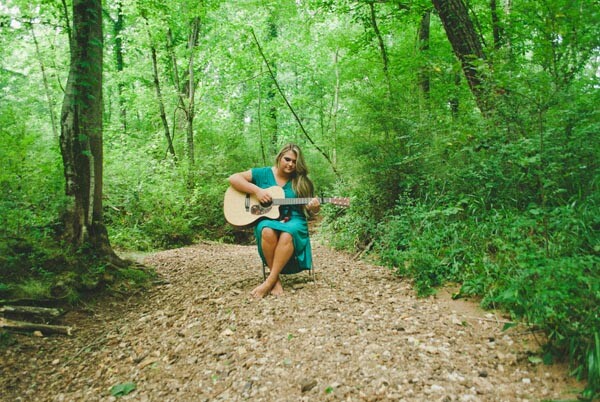
4. Props. I love to bring small props for my seniors to hold or sit on during their session. This could mean an old folding chair, a cute beach hat, an old quilt.. or even some books. Some people feel really awkward in front of the camera at first, so these little props give them something to do with their hands while they are adjusting to your presence.

Dps5katie44

After the Shoot

After their session, you can keep up the “hype” by doing several things:

1. The following day post a “teaser” or “sneak peak” photo from their session onto facebook. This is another reason why I love seniors. They will share that teaser with all of their friends through social media, which means more publicity for you and your business!

2. The following week, after I have edited all of their images, I will send ten images to them through PASS. They will also share these images through facebook, and it will give them a great idea of why they should purchase a disc with ALL of their high-resolution images from me.

3. As soon as I have all of their images edited, I will order a custom book for my seniors and send it to them along with a really appealing package. The package includes a hand written note, business cards, and other little goodies I sneak in for them. They always love how personal I make these for each of them (another great reason so send them a questionnaire and get to know them well during the session!)

4. After they have their images, blog all about their session, including images they haven’t seen in the ten I sent them. This blog post will also be shared through social medial to their friends and family (more free advertising!).

Dps6kirk8

In post processing senior photos, always remember that you are photographing for their parents as much as you are your senior client. I keep “fad” type editing out of the equation because I know ten years from now their parents will want a solid (not overly processed) image on their wall.

Instead of using “fad” editing techniques, I always let the style speak through the locations I choose. You can easily do this by choosing old brick buildings, abandoned farm houses, fields of cotton etc. The seniors love this, and their parents will appreciate the timelessness of the photographs they receive.

Dps7kamieditedw

It is not hard to rock a session with your seniors, it just takes some extra things to go above and beyond so they know you appreciate them and want to know them. All of those extra things will make your client feel special, and will translate into those coveted word of mouth referrals for you and your growing business!

Meghan Newsom is a lifestyle and wedding photographer located in Northern Alabama. When she’s not writing for her lifestyle blog, cooking up gluten free recipes, or taking pictures, you can find her exploring outside with her husband and pup.

Post originally from: Digital Photography Tips.

Check out our more Photography Tips at Photography Tips for Beginners, Portrait Photography Tips and Wedding Photography Tips.

11 Tips for Photographing Senior Portraits


Digital Photography School

 
Comments Off on 11 Tips for Photographing Senior Portraits

Posted in Photography


Lowepro introduces Transit AW series bags for urbanites

25 Jun

logo_lowepro.jpg

Lowepro’s new Transit Sling 250 AW and Transit Backpack 350 AW aim to help photographers keep a low profile in the heart of the city. The smaller Sling 250 has only one strap and will comfortably house a mirrorless camera or compact DSLR with a couple of lenses, while the Backpack 350, with two straps, provides a bit more room for a standard DSLR, larger lenses and a laptop. Click through for details and pricing.

News: Digital Photography Review (dpreview.com)

 
Comments Off on Lowepro introduces Transit AW series bags for urbanites

Posted in Uncategorized


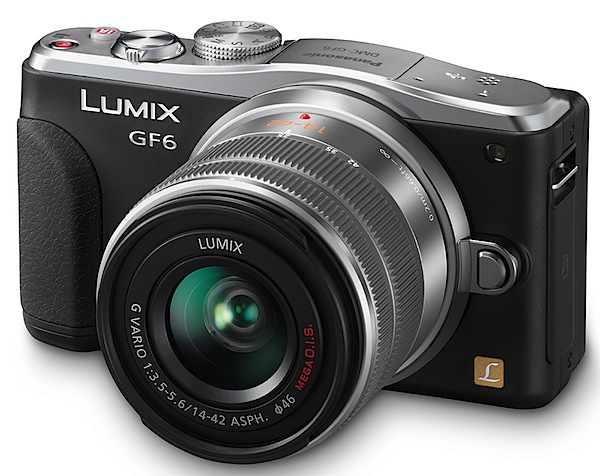
Panasonic Lumix DMC-GF6 Review

25 Jun

Panasonic Lumix DMC-GF6 Review.jpg

The advance of mirrorless interchangeable lens cameras is still a developing tale.

The GF6 is a good example of where we’re at, but don’t think for one moment that what the camera offers is indicative of what a MILC camera should offer.
Panasonic Lumix DMC-GF6 top.jpg

Panasonic Lumix DMC-GF6 back.jpg

Panasonic Lumix DMC-GF6 side.jpg

The beauty of this style of camera is that it’s small, with access to a range of lenses that are similarly compact in size. It can be used as a point-and-shoot, it’s pocketable (with lens removed) and equipped with a sufficient number of controls that most people will cotton on to.

One price you pay with the GF6 is that there is no turret viewfinder, a big help in bright ambient light, nor is there access to an optional finder. There is however, a vari-angle touch screen LCD that tilts vertically through an approximate 180 degrees arc.

The CMOS captures a maximum image size of 4592×3448 pixels, leading to a 39x29cm print.

Video can be shot in AVCHD or MPEG4 formats, up to Full HD 1920×1080 pixels resolution. And you can shoot stills during a video recording.

Panasonic Lumix DMC-GF6 Features

At first sight, the camera is attractive. A soft chrome top deck and the rest in black.

Controls

Top deck: at left is a button to activate the flash cell; just right of the latter is the mode dial holding positions for auto, PASM, ‘creative’ video; two custom settings; panorama shooting; scene modes (23 in all) and a creative control mode that takes you into a magic world of 19 shooting styles that include a retro look, high and low key effects, mono, cross processing etc.
Scene modes.jpg

Creative control.jpg

If you get the feeling, from the scene modes and creative control effects in the GF6, that this is a dabbler’s camera … you’d be right! The more expert may scoff at this situation but, if it helps photographers to get more out of their camera, I’m all for it.

Moving further to the right you see the shutter button, on/off button, direct access to the intelligent auto mode and the video record button.

One annoyance: the video record button is only mills away from the iAuto button … too easy to hit the latter when you really wanted to activate the former. Far better to have placed the video button on an edge as most other camera do.

The camera’s rear is fairly simple in layout: replay; screen display options; four way control dial offering exposure variation, AF modes, white balance options, single/continuous shooting and self timer. Central is the menu/set button.

Beneath the control dial is a quick access menu button and a Function button.
My main gripe with this arrangement is that the control dial has four positions (AWB, etc) but each of these is identified by tiny white text on a silver background. Impossible to see!
Menu 1.jpg

The menus are clearly laid out.

But there are some novel aspects to this camera that are unique: one is the stop motion feature. You can set the camera to shoot images at predetermined intervals or fire them off manually.
Buddha.JPG

Pots 1.JPG

Cinema 2.JPG

There is easy wireless connectivity via Wi-Fi with compliant smart phones and tablets that lets you monitor the camera’s view from a smartphone and set zoom, focus, shutter release, shutter speed, aperture and exposure compensation.

With High Dynamic Range, the camera merges three shots with differing exposure levels into a single picture; this will help with subjects of an extreme bright to dark brightness range.

The Instant Transfer feature allows data to be transferred automatically to the device whenever the shutter is fired. You can also do this via the touch screen.

ISO Tests

Panasonic Lumix DMC-GF6 ISO 160.JPG

Panasonic Lumix DMC-GF6 ISO 400.JPG

Panasonic Lumix DMC-GF6 ISO 800.JPG

Panasonic Lumix DMC-GF6 ISO 1600.JPG

Panasonic Lumix DMC-GF6 ISO 3200.JPG

Panasonic Lumix DMC-GF6 ISO 6400.JPG

Panasonic Lumix DMC-GF6 ISO 12800.JPG

Only at ISO 6400 did noise begin to intrude. At ISO 25600 the noise was much higher but resolution held up surprisingly well.

Panasonic Lumix DMC-GF6 Review Verdict

Quality: above average with precise colour rendering and fine resolution.

Why buy the Panasonic Lumix DMC-GF6: budget level entrée into the world of interchangeable lens photography.

Why not by the Panasonic Lumix DMC-GF6: no viewfinder.

In other respects I found the camera to be quite spiffy and easy to use. If you’re keen to dip your toe into interchangeable lens photography, want to post process RAW files, shoot decent video etc … this one’s for you!

The beauty of the GF6 is that you can get around the various modes with great ease. Not too challenging.

Panasonic Lumix DMC-GF6 Specifications

Image Sensor: 16 million effective pixels.
Metering: Multiple, centre-weighted and spot.
Effective Sensor Size: Four thirds 17.3×13.0mm CMOS.
Lens Factor: 2x.
Compatible lenses: Micro Four Thirds.
Exposure Modes: Auto, Program AE, shutter and aperture priority, manual.
Shutter Speed: 60 to 1/4000 second; flash sync 1/160 sec.
Burst Speed: 4.2 fps.
Memory: SD/SDHC/SDXC cards.
Image Sizes (pixels): 4592×3448 to 1712×1712. Movies: 1920×1080, 1280x720p, 640×480.
Viewfinder: 7.6cm LCD screen (1,040,000 pixels).
File Formats: JPEG, RAW, JPEG+RAW, AVCHD/MPEG4, MPO (3D).
Colour Space: Adobe RGB, sRGB.
ISO Sensitivity: Auto, 160 to 12800 (25,600 with boost).
Interface: USB 2.0, AV, HDMI mini, WiFi, DC input.
Power: Rechargeable lithium ion battery, AC adaptor.
Dimensions: 111x65x38 WHDmm.
Weight: Approx. 323 (inc battery).
Price: Get a price on the Panasonic DMC-GF6 16MP Mirrorless Compact System Camera with Lens Kit at Amazon.

Post originally from: Digital Photography Tips.

Check out our more Photography Tips at Photography Tips for Beginners, Portrait Photography Tips and Wedding Photography Tips.

Panasonic Lumix DMC-GF6 Review


Digital Photography School

 
Comments Off on Panasonic Lumix DMC-GF6 Review

Posted in Photography


Forum update: polls added

24 Jun

forumpoll.png

Forums update: We’ve just added a new ‘create a poll’ option for forum threads. Head over to the forums to try it out for yourself. We’ve also created a test poll here where you can see how it works and give us feedback at the same time!

News: Digital Photography Review (dpreview.com)

 
Comments Off on Forum update: polls added

Posted in Uncategorized