RSS
 

Archive for April, 2013

Adjusting White Balance in Lightroom

12 Apr

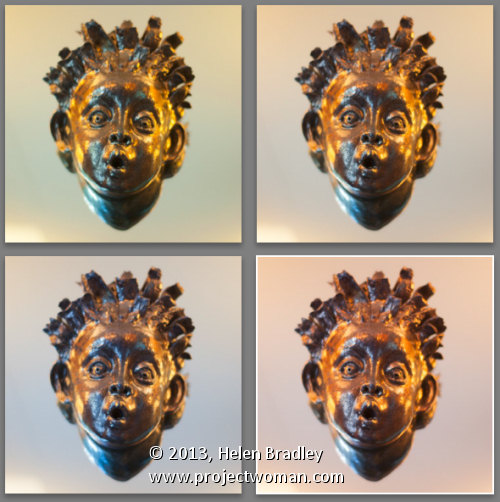
Lightroom white balance opener

Lightroom has a set of tools that you can use to adjust white balance in your images. To see these at work open an image in the Develop module. At the top of your Basic panel are the white balance adjustment tools.

White Balance Options

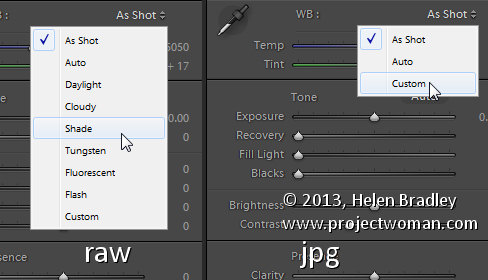
The dropdown list will show you some options for adjusting white balance – what is shown here will vary depending on how your images are captured. If you capture in raw then the white balance dropdown list will contain the same options as you have on your camera for setting white balance. If you’re capturing jpg images then there are fewer options – As Shot, Auto and Custom.
Lightroom white balance 1

On the left are the options for a raw image and on the right those for a jpeg image.

The Temperature and Tint sliders also have different units of measure depending on whether you’re working with jpgs or raw images. For jpg images both the sliders range from +100 to -100. If you’re working on a raw image then the Temperature slider shows degrees Kelvin from 2000 – 50,000 and the Tint slider ranges between + 150 and – 150.

Kelvin is a measurement of the color of light – daylight is around 5,500 degrees Kelvin. Lights we consider to be warm or pink/orange in color including tungsten globes are around 3,000 degrees Kelvin and cool lights which are blue in color such as overcast daylight are around 7,000 degrees Kelvin and higher.

Adjust White Balance

To adjust the white balance in the selected image you can select an option from the White Balance dropdown list to use to fix the image or you can use it as a starting point and then fine tune the result.

You can also manually adjust the Temp slider to add warmth or remove it from the image. Drag the sider to the left to add a blue tint to the image (to cool it down), or to the right to add a yellow tint to it to warm the image.

Use the Tint slider to balance out any excess magenta or green in the image. Drag towards the right to add magenta to the image cancelling out any green tint and drag to the left to add a green tint cancelling out any unwanted magenta.

White Balance Selector

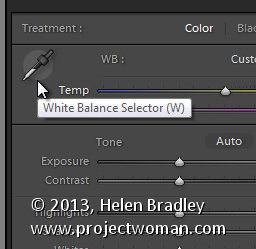
You can also use the White Balance Selector to adjust white balance. You can select the tool by clicking on it or press W.
Lightroom white balance 2

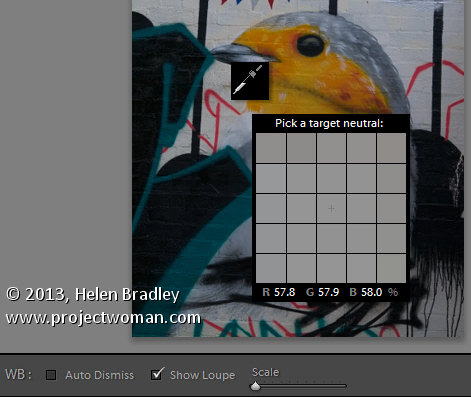
From the White Balance toolbar under the image you can select options that make the White Balance tool easier to use. I suggest you deselect Auto Dismiss as you can then click on the image in various places to attempt to fix it. If you have Auto Dismiss enabled you’ll only be able to click once before the selector is dismissed so, if that fix isn’t perfect then you’ll need to select the tool again to attempt another fix. This is a cumbersome way to work so I prefer to disable Auto Dismiss and put the tool away only when I am done with it.

If you click the Show Loupe checkbox then you’ll see a 5 by 5 pixel grid beside the mouse cursor. The center point in the grid is the pixel that you are currently targeting and which will be used to adjust the image if you click. This grid makes it easier for you to pick the correct point in the image to adjust to. The scale itself can be increased or decreased using the Scale option on the toolbar.

At the bottom of the loupe itself are the RGB percentage values of the pixel under the cursor. These values tell you if the pixel is neutral or not. If it is neutral then the percentages of R, G and B will all be equal – if they are not equal then there is color in that pixel.
Lightroom white balance 3

To balance the image using the White Balance selector, click on a pixel that should be neutral grey – not white or black. When you do so, Lightroom will adjust the image so that the selected pixel is a neutral grey and, as a result, all the color in the image will change. At the same time Lightroom adds an entry to the image History for that adjustment. This means that you can wind back the history to return to an earlier white balance fix, if desired.
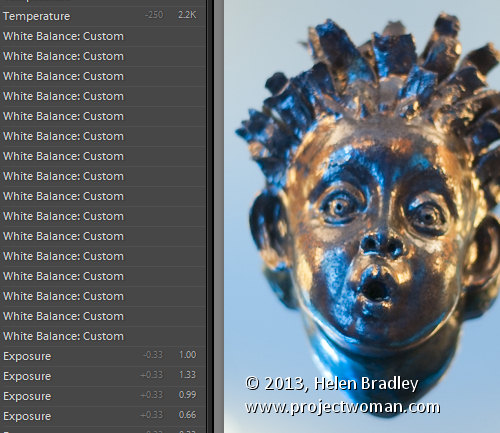
Lightroom white balance 4

You should be aware that adjusting image white balance is to an extent a subjective assessment – so there is no one value that is “correct”. There are, instead, a myriad of different results that can be achieved so look for one that is it pleasing to you. In most cases viewers prefer to see some warmth in photos as they are more pleasing to the eye if they are warmer rather than cool.

I find that a good approach to take is to experiment with the white balance selector to see the effect on the image by selecting different pixels to adjust to. Then choose the most aesthetically pleasing result.

Post originally from: Digital Photography Tips.

Check out our more Photography Tips at Photography Tips for Beginners, Portrait Photography Tips and Wedding Photography Tips.

Adjusting White Balance in Lightroom


Digital Photography School

 
Comments Off on Adjusting White Balance in Lightroom

Posted in Photography


Samsung stretches smartphone sizing with new Galaxy Mega ‘phablets’

12 Apr

samsung.png

Samsung has announced two ‘phablet’-sized additions to its line of smartphones, the Galaxy Mega 6.3 and Galaxy Mega 5.8. At 6.3 and 5.8 inches respectively, the large-display phablets push far beyond Samsung’s 5.5-inch Samsung Galaxy Note II, and the larger of the two sets a new industry-record for smartphone size. Learn more about when and where the devices will be available, and what the camera specs will be at connect.dpreview.com.

News: Digital Photography Review (dpreview.com)

 
Comments Off on Samsung stretches smartphone sizing with new Galaxy Mega ‘phablets’

Posted in Uncategorized


Surfrigger 2 Video – Paddling Outrigger Canoe in Colorado

12 Apr

10 years ago: paddling outrigger canoe, Surfrigger, on Horsetooth and Boyd Lakes in northern Colorado, winter and summer.

Surfrigger (24′x13.5″, ~28lb) built by John Diller from Savage River Works arrived to Fort Collins in the very end of January 2003. This solo outrigger canoe designed by Kris Kjeldsen, a New Zealand designer and has won many races in that area and in the west coast. A very light and stiff carbon/kevlar lay-up, rudder, the small volume cockpit with sprayskirt, two small hatches allow me to do some light overnight paddling.

I’ve been paddling Surfrigger on local waters in Colorado including Horsetooth Reservoir, Boyd Lake, Gross Reservoir and Lake Pueblo. I also paddled her during 2003 WaterTribe Everglades Challenge in Florida and 2009 Missouri River 340 Race.

Surfrigger is an interesting platform for photography and videomaking providing a variety of shooting angles.

Related posts:
Bent Shaft Paddle and Racing Outrigger Canoe
Surfrigger Canoe on the Boyd Lake
Crocks or Everything Turns Green in Springtime
Photo Impressions on Surfrigger, My Outrigger Canoe


paddling with a camera

 
Comments Off on Surfrigger 2 Video – Paddling Outrigger Canoe in Colorado

Posted in Photography


Canon updates firmware for EOS 6D Wi-Fi capable full-frame DSLR

11 Apr

canon6d2.png

Canon has posted the first firmware update for its EOS 6D Wi-Fi capable full frame digital SLR for enthusiast photographers. Version 1.1.3 of the firmware fixes a bug related to date and time settings of the camera. The firmware is available for immediate download from Canon’s support website. Click through for the download link.

News: Digital Photography Review (dpreview.com)

 
Comments Off on Canon updates firmware for EOS 6D Wi-Fi capable full-frame DSLR

Posted in Uncategorized


Tag Before the Tide: Temporary 3D Sand Graffiti by DAIM

11 Apr

[ By WebUrbanist in Art & Street Art & Graffiti. ]

3d graffiti wall sand

Artist Mirko Reisser has long developed a highly personalized (and profoundly cool) approach to making two-dimensional tags appear three-dimensional on surfaces, but in this unusual project, he created an actual physical object out of sand.

sand graffiti start finish

Like anyone building a fort or castle on the beach, DAIM was well aware of the time limits and necessarily temporary nature of this little installation – he documents the role of the tide in first encircling, then destroying this sculptural graffiti.

3d graffiti daim letters

And in case you have not seen is other work, here are some more traditional spray-painted pieces. He has plenty of street tags too, but it’s clear that with the time, space and security of an indoor venue, his attention to detail is able to add incredible depth and dimension to his work.

Share on Facebook


[ By WebUrbanist in Art & Street Art & Graffiti. ]

[ WebUrbanist | Archives | Galleries | Privacy | TOS ]


WebUrbanist

 
Comments Off on Tag Before the Tide: Temporary 3D Sand Graffiti by DAIM

Posted in Creativity


11 Core Principles To Help You Win An International Fine Art Photography Award

11 Apr

Have you ever won a photography competition? The answer, for most of us, is no. As with the lottery, we always enter with hope, but the reality is that the winners’ circle is a pretty exclusive club. Why do we enter? Because we want to have our work seen by a wider audience. (Cash prizes and opportunities for exhibition are Continue Reading

The post 11 Core Principles To Help You Win An International Fine Art Photography Award appeared first on Photodoto.


Photodoto

 
Comments Off on 11 Core Principles To Help You Win An International Fine Art Photography Award

Posted in Photography


Samsung US ships NX1100 mirrorless APS-C camera for $599.99

11 Apr

samsung_nx1100.png

Samsung has announced the US price and availability of the NX1100 20MP mirrorless camera with built-in Wi-fi, which was initially sold only via the camera retail store B&H. Priced at $ 599.99, the camera is available now in black or white with a free copy of Adobe Photoshop Lightroom. Similar to its predecessor the NX1000, it includes 8fps continuous shooting, a 3-inch/921k-dot rear display and Full HD video recording. It also includes the company’s Autoshare feature that automatically sends full resolution images and videos to mobile devices. There is currently no information about its European price and availability.

News: Digital Photography Review (dpreview.com)

 
Comments Off on Samsung US ships NX1100 mirrorless APS-C camera for $599.99

Posted in Uncategorized


11. April 2013

11 Apr

Ein Beitrag von: Thomas Babut

Generations © Thomas Babut


kwerfeldein – Fotografie Magazin

 
Comments Off on 11. April 2013

Posted in Equipment


Photography Communities — Where to Share Your Photos (Plus, we’re hiring!)

11 Apr

Extra photos for bloggers: 1, 2, 3

We’ve all got them. That perfect shot hidden away on our hard drive or waiting in a negative sleeve.

But, with 80 bajillion photo sharing sites out there the question of where to share our masterpieces is not always an easy answer.

Getting your photos in the right place means getting your photos seen, so Photojojo has come up with a foolproof guide to help you figure out:

A) What type of photographer you are?
B) Where you should share your stuff?

Sound simple? It is!

You can finally give ImageHive the heave ho and find the sharing service that’s right for you.

A Personalized Guide to Photo Sharing

p.s. Now’s a great time to order photo prints! You can get up to 80% off with the Photojojo promo code at Nation’s Photo Lab.

p.p.s. We’re looking for the World’s Most Friendly Full Stack Web Developer in San Francisco, CA (relocation available) to join Photojojo (a.k.a. “Team Awesome”) Tell your friends! ? Here’s the details… ?

The Globetrotting Travel Snapper

beforeWhat They’re About: Hopping from hotel to hostel in search of graffiti filled alleyways and temples shrouded in fog.

Where They Share:
Flickr: The Flickr Travel Photography Group boasts over 75,000 members and the improved mobile app makes it easy to share while on safari.

Instagram: This photo-sharing app incorporates a neat map showing all your geotagged photos and makes it easy to share your travels across all your favorite social media sites at once.

Postagram: This app revolutionized the postcard. Simply take a pic on your phone, write a message, and hit send. The Italian postal system could learn a thing or two from these guys.

Their Cameras:Waterproof compacts, mirrorless interchangeable-lens cameras, dinged up DSLRs

Famous Travel Photogs: Steve McCurry, Robert Frank, Trey Ratcliff

The Fashionista Portrait Popper

beforeWhat They’re About:The Portrait Popper assures that the fashions of their generation don’t go undocumented.

Where They Share:
Pinterest: A place to share and keep track of your best fashion photos. A digital dream board that serves fashion-fans as a well of inspiration.

Pose: Similar in design to Pinterest but much more fashion centered. Pose offers some fantastic features like the ability to tag items of clothing when you post!

Lookbook: The fashion-inclined share not only their best daily ensembles, but their best shots, too.

Their Cameras: Holgas, Polaroids, 85mm lenses

Famous Portrait Photogs: Richard Avedon, Annie Leibovitz, Steven Klein

The Light Bending Experimenter

beforeWhat They’re About: Photographic mavericks that set the shutter to their own tune and have no fright of the night.

Where They Share:
Flickr: Has a number of experimental groups such as: Experimentation, Experimental Techniques, Light Painting, Digital Abstract, and Illusions

DeviantArt: While not a solely photography based site DeviantArt showcases some fantastic abstract and digital art that overlaps with photography.

Reddit: Subreddits cover all manner of niche photography including: /r/toycameras, /r/PerfectTiming, /r/lightpainting, and the tantalizingly titled yet completely safe for work /r/exposureporn/

Their Cameras: Anything that will take a photo! From paper pinhole cameras, to giant walk-in camera rigs, to glitchy phone cameras and Rebels

Famous Experimental Photogs: Andy Warhol, Troy Paiva, Kyle Thompson

The Foodie Chronicler

beforeWhat They’re About: Each day brings a new opportunity to fill their bellies and Instagram feeds with the best of both worlds.

Where They Share:
Instagram: To the foodie photog Instagram is like brushing your teeth, something you do everyday at least 2-3 times.

Foodspotting: This foodcentric photo app makes it easy to tag food types and find other users’ yummy stuff.

Serious Eats: The Photograzing section of Serious Eats offers up some of the finest food photography on the net.

Their Cameras: Their phone, DSLR or anything that will shoot macro

Famous Foodie Photogs: Carl Warner, Marcus Nilsson

The Family Memory Machine

beforeWhat They’re About: Pictorially protecting holidays, graduations, and family vacations from the inevitable fade of memory.

Where They Share:
Facebook: The popularity of Facebook, it’s simple design, and the ability to simply tag family members makes Facebook the social network of choice when it comes to family photo sharing.

Shutterfly: This popular print making service makes it easy to create photo books, stationery, and calendars from your own shots. It even has an app so you can use photos from your iPhone!

Their Cameras: Point-and-shoots, DSLRs, iPads, and zooming cameras for capturing various sporting events

Famous Family Photogs: Sally Mann, Jock Sturges, and Dorothea Lange

The Landscape Lover

beforeWhat They’re About: The Landscape Lover can’t get enough of the outdoors and they have the camouflage tripod to prove it.

Where They Share:
Google+: Nature photography based communities, built in photo editing, and extra large image uploads.

500px: Contributions from amazing landscape photographers from all around the world help to make 500px the gold standard of social photo sites. If you are interested in selling prints, this may be a good place to start.

Their Cameras: Million mega pixel DSLRs, medium format film holdouts

Famous Landscape Photogs: Ansel Adams, Charles O’Rear, Galen Rowell

The Analogue Enthusiast

beforeWhat They’re About:35mm, medium format or Polaroid, these retro revivalists love affair with analogue borders on religious.

Where They Share:
Tumblr: Powerful blogging resource and treasure trove of analogue projects. Search ‘film photography’ tag for some fine examples, and check out I Still Shoot Film and Filmspiration.

Flickr: There are tons of film photography groups on Flickr including this aptly titled group: I Shoot Film, which has a pool of over 2 million film shots. Whew, thats over 50 miles of film!

Meetup: This website is great for finding passionate people with similar interests and has loads of groups that are tailored towards film fanatics. (Ahem, photo walks!)

Their Cameras: Nikon F3s, Bronica S2s, Canon A-1s

Famous Film Photogs: Henri Cartier-Bresson, Robert Capa, William Eggleston, Robert Doisneau, pretty much any photographer before 1999

The DIY Photo Crafter

beforeWhat They’re About: While most people are content with a photo’s standard two dimensions, Photo Crafters like to see it in all three.

Where They Share:
Pinterest: The DIY and Crafts section of Pinterest is a mecca for those seeking crafty inspiration and looking to share their latest creations.

Instructables: This is where the mad scientists and fearless explorers of the photo world come to hand out their crafty camera hacks.

Their Cameras: DSLRs sporting a Holga lens, home modified IR cameras, their phone with a fisheye lens attached

Famous DIY Photogs: Justin Quinnell, Maurizio Galimberti, Enrico Nagel

The Micro Macro Marvel

beforeWhat They’re About: This specialized breed of shutter bug goes mad for all things small miniscule.

Where They Share:
Flickr: Boasting a number of fantastic macro groups such as Flower Closeups, Closer and Closer, Macro in Black and White, Macro Liquid, and Secret Forrest.

Small World: For thirty six years, Nikon’s Small World competition has been showing the world that the microscope can be just as effective as a paint brush for showcasing life’s natural beauty.

Their Cameras: Even your phone takes pretty sweet macro shots these days, but pros and enthusiasts shoot DSLRs with specialized lens so they feel special

Famous Macro Photogs: Thomas Shahan, Lester Lefkowitz, Michael Keniston

Related posts:

  1. Valentine’s Day: 5 Fun Ways to Share Your Love With Photos! Extra photos for bloggers: 1, 2, 3 Valentine’s Day: that…
  2. The Mailable Photo Frame: The Best Way Ever to Share and Show Off Your Photos The minute we saw these Mailable Photo Frames, we knew…
  3. Prism Yard — A Place to Share & Browse Camera Collections You consider your cameras family. You remember the day each…


Photojojo

 
Comments Off on Photography Communities — Where to Share Your Photos (Plus, we’re hiring!)

Posted in Equipment


Toys Stories

11 Apr

Es gibt immer wieder Fotoserien, die berühren. Besonders beeindruckt hat mich in der letzten Zeit das Projekt „Toys Stories“ des italienischen Fotografen Gabriele Galimberti.

Die Serie begann als Einzelbild mit der Tochter eines befreundeten Paares in der Toskana. Die Eltern baten ihn um ein Bild der Tochter, also zog er mit seiner Kamera los und besuchte sie im Kuhstall, wo sie gerade den Kühen spielerisch Futter brachte.

alessia-toscana

Einige Monate später erst, als er einen Trip um die Welt plante, überlegte er sich, mit diesem Bild eine Serie zu starten. Er wollte Kinder auf der ganzen Welt zusammen mit ihrem Lieblingsspielzeug fotografieren.

Gabriele reiste zwei Jahre lang durch 58 Länder und portraitierte dabei etwa 50 Kinder. Die Bilder zeigen große Unterschiede: Kinder mit einem abgenutzten Stofftier und andere mit einer fast unüberschaubaren Ansammlung von diversen Spielsachen.

Chiwa-Mwafulirwa-Malawi

Gabriele macht jedoch vor allem auf die Gemeinsamkeiten aufmerksam. „Sie alle wollen nur spielen“, fasst er es zusammen. Ob der 6-jähige Junge aus Texas oder das 5-jährige Mädchen aus Malawi. Beide hatten Plastikdinos in ihrer Auswahl, die sie vor Gefahren beschützen. Alle Kinder schaffen sich eine eigene Realität, in der sie spielen.

Den größten und überraschendsten Unterschied sah Gabriele darin, dass die Kinder in den ärmsten Ländern weniger an ihren Spielsachen hingen. Oft spielten sie kaum damit und trafen sich lieber mit anderen Kindern, während Gabriele manche Spielsachen reicherer Kinder zunächst nicht berühren durfte. Viel mehr sagen die Spielsachen für Gabriele über die Eltern als über die Kinder aus.

Orly-Brownsville-Texas

Was hätte Gabriele fotografiert, wäre er vor 20 Jahren nach Sachsen gekommen, um mich zu portraitieren? Murmeln, Lego, Stofftiere, Bücher, Barbies, eine Kiste mit verschiedensten Knöpfen – damals ein großer Schatz für mich.

Wenn ich die Fotoserie ansehe, hat sich seit meiner Kindheit kaum etwas verändert. Auch Gabriele kam bei seiner Arbeit zu dieser Auffassung: „Ich sah oft die Art von Spielsachen, mit denen ich auch spielte. Es war schön, zurück in meine Kindheit zu gehen, irgendwie.“


kwerfeldein – Fotografie Magazin

 
Comments Off on Toys Stories

Posted in Equipment