RSS
 

Archive for April, 2013

How to Lose Control of Your Photos With Getty Images

11 Apr

Facebook Thomas Hawk Image

Last week photographer Remi Thornton penned a post about why he quit working with Getty Images. Remi alerted photographers to a new scheme by Getty Images whereby they were “loaning” photographer images (without pay) to Cafe Press for marketing purposes. The idea is that Cafe Press could use photographers’ images without paying, unless a sale was made, then a photographer might receive a royalty.

Allowing Cafe Press free use of photographers’ images for marketing did not sit right with Remi or other photographers, Remi felt that Cafe Press should have to pay a royalty for using the image at all and not get to use the images to market Cafe Press for free.

On March 25th, I submitted my own resignation to Getty Images. Shortly thereafter on March 27th I received acknowledgement from Getty along with the following:

“As per your recent request where you expressed your desire to terminate your outstanding contract with Getty Images, this is your official notice of termination of the Agreement between yourself and Getty Images, which had a Commencement Date of 3/11/2009.”

A few days later my images disappeared from Getty’s website for sale.

One would think that upon termination with Getty Images, the pilfering of images by Cafe Press would cease, but not so. Not only are my images still up for sale with Cafe Press (being marketed in a large font as “Thomas Hawk Gifts”), Cafe Press is additionally ADVERTISING them to me to buy on Facebook (again without pay — see image above).

Even though I no longer have a relationship with Getty and have NEVER had a relationship with Cafe Press, they want to sell me a dry erase board of a dog image of mine. I can also buy a wine charm thing or a beer coaster if I want.

I’m sure in the super fine print of my contract with Getty there is some loophole that is allowing this, but frankly it’s bad enough that Getty is allowing Cafe Press to market our images without pay. To further allow our images to be marketed in Facebook ads (again, without pay) seems a bit far fetched — especially when my relationship with Getty is supposed to be terminated. And why is Cafe Press specifically targeting me on Facebook trying to sell me my own images?

I have no idea how long my images must remain for sale at Cafe Press, but this just serves as an example of how a photographer can lose control over their images with Getty.

I wonder how much money Getty was paid to allow Cafe Press to use our images for free on Facebook?

I’d ask Getty what the deal is in the Contributor forum, but alas, I’ve been permanently banned from the Contributor forum for daring to criticize Getty’s paltry 20% payout.


Thomas Hawk Digital Connection

 
Comments Off on How to Lose Control of Your Photos With Getty Images

Posted in Photography


Art or Intrusion? Photographer Johnny Tergo’s ‘drive-by’ Portraits

11 Apr

MG_7543_printed_V2.jpg

Street photography isn’t everyone’s cup of tea, and for every Cartier Bresson, watching from a distance, there’s a Weegee, pushing a camera into the faces of their bemused subjects without asking permission. Los Angeles-based photographer Johnny Tergo has taken this approach to a new level, rigging up his truck with a camera and bright studio strobes in order to ‘bring the studio lighting aspect to everyday real life on the streets’. Click through for the full story, and images (via wired.com)

News: Digital Photography Review (dpreview.com)

 
Comments Off on Art or Intrusion? Photographer Johnny Tergo’s ‘drive-by’ Portraits

Posted in Uncategorized


Sleeping Around: Pop-Up Hotel in a Shipping Container

11 Apr

[ By Steph in Boutique & Art Hotels & Global. ]

Sleeping Around Hotel 1

Do you want to spend a night on a river bank, a cliff, a meadow or a busy urban street? The ‘Sleeping Around’ pop-up hotel concept can go virtually anywhere you like, setting up quickly in locations where static architecture isn’t possible or practical. Made from four recycled 1950s shipping containers, this traveling hotel opens up possibilities for travelers who want more than just a night of comfort.

Sleeping Around hotel 2

Sleeping Around consists of six shipping containers – four are individual hotel rooms, one serves as a sauna and the sixth is a breakfast and lounge area. Each of the hotel rooms has a floating bed, spacious rain shower, iPod docking station and air conditioning system.

Sleeping Around Hotel 3

The hotel has already spent a few weeks on the banks of the Scheldt in Antwerp, where the containers were procured, and is now on the move. Travelers interested in staying there can track its location on the website, and put in requests for future spots. It can be set up and ready to go within five hours of arriving.

Sleeping Around Hotel 4
This hotel may not be quite as mobile as the super-compact Hotello, which is basically a self-contained hotel room setup in a wheeled trunk, but it opens intriguing possibilities for the future of travel accommodations. If you could choose any location to set up a temporary hotel, where would it be?

Share on Facebook


[ By Steph in Boutique & Art Hotels & Global. ]

[ WebUrbanist | Archives | Galleries | Privacy | TOS ]


WebUrbanist

 
Comments Off on Sleeping Around: Pop-Up Hotel in a Shipping Container

Posted in Creativity


Citizen Finetech Miyota creates 3.69m dot equivalent EVF

11 Apr

130409vf.png

Citizen Finetech Miyota has developed an LCD panel for electronic viewfinders of digital cameras its claiming is the highest resolution available. It offers a 1280×960 pixel display (equivalent to 3.69 million dots). This exceeds the 2.36m dot (1024 x 768 pixel) resolution of the current Sony OLED and Epson LCD units. It uses a field-sequential design, showing red, green and blue information in sequence rather than being able to show them all at the same time, but the panels 120Hz design should avoid color breakup (tearing) the company says. The panel will enter mass produced in summer 2013.

News: Digital Photography Review (dpreview.com)

 
Comments Off on Citizen Finetech Miyota creates 3.69m dot equivalent EVF

Posted in Uncategorized


Perseverance and Patience Will Payoff

11 Apr

When I look at my collection of photographs, my favourites are always the ones I really had to work for.

75% of the time I photograph what is in front of me, what is there when I get there, and I make the best of whatever weather conditions and light are present. But the other 25% I chock up to sheer stubbornness, or in other words, perseverance and patience.

Fire Wave, Valley of Fire

Recently I was in Nevada in the Valley of Fire State Park where I stayed at an RV park that was an hour away from the park entrance. I spent hours doing research about the park and learned about a specific location I wanted to photograph called “Fire Wave” which was not on the park maps.

It took about 1.5 hours to drive to the trail head and another half an hour or so to hike there (it sure seemed longer in the heat). When I got there, the light was just terrible. It was a grey sky day. I was hoping at the last minute the light would break through and give me the drama I wanted but it didn’t happen.

What was worse was a group of rude photographers who had also discovered the location. Usually I find other photographers are helpful to each other, staying out of each other’s way, and taking turns making images. But not these people. They were purposefully leaving bags and tripods in the way of specific points of view while they were photographing a different point of view, preventing other photographers from getting the shot. They were all together and I believe they drove out from Las Vegas for the day, so I guess they felt they owned the shot.

It just wasn’t to be. But I persevered.

A couple of days later I tried again. Another 3 hour drive round trip, another $ 10 park entrance fee, another hike in even greater heat to a place I had already seen, but this time it was different. There were a few other photographers there, but they were nice people. There was some lovely light, some puffy clouds, and I got the shot.
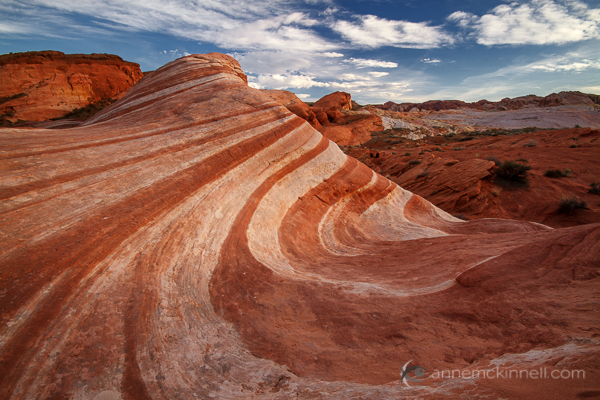
Fire Wave at the Valley of Fire State Park, Nevada, by Anne McKinnell

Ding Darling Wildlife Refuge

When I visited Florida, I really wanted to make some images of wading birds with reflections. It was one of the dream images I always wanted to make — the image I had in my mind before I ever went to Florida. In hopes of getting the shot, I rented a lens specifically for the occasion.

First I did a trip out to the park one afternoon to scout the location and figure out where I might be able to make such a shot. I found a section of water that was somewhat protected from the wind where a few birds were hanging out and I figured it was a good candidate.

The next day I got up long before the sun rose and drove to the park to be there as soon as it opened in the morning. I drove along the park drive to the location I picked, got my gear out, positioned myself on the shore, and waited. I waited and waited and nothing happened. Eventually the light got bright and the wind came up and there was no longer a possibility of getting the shot I wanted. I went on to make other images, but I didn’t get the one I really wanted.

So I went back the next morning and did the same thing. Drove to the location, got my gear out, sat and waited and waited. This time some birds came, but so did the wind and while I got some nice images, I still didn’t get the one I dreamed of.

So I persevered and went yet again. I think the man who opens the park gate in the morning was wondering why I was the first person there three days in a row. But on the third day, my fourth visit, it was as calm as calm can be. The light was perfect. I sat motionless waiting and waiting and then payoff!! I got three birds with perfect reflections: a spoonbill (this is the image I always dreamed of), a wood stork and an egret.
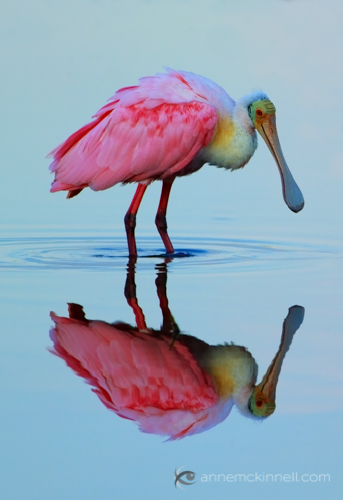
Roseate Spoonbill at the Ding Darling Wildlife Refuge, Florida, by Anne McKinnell

Never have I had a bigger payoff for my stubbornness.

Bandon Beach

At Bandon Beach in Oregon, I wanted to make an image of the sun setting behind the rocks. There was lovely colour in the sky, but just as the sun starting making its descent towards the horizon the wind came up. It got windier and colder and I got pelted with sand and soaked with sea spray until finally I was the only photographer left on the beach. I was shivering cold, but determined to make the image I wanted.

I used a UV filter on my lens to protect it from the ocean spray that soaked everything and the blowing sand that felt like a sand blaster. I was getting the odd image, but they were always clouded with water, salt and sand. I turned my lens away from the wind as best I could, blocking it with my body, cleaned it and quickly put the lens cap on.

Then I got everything set up exactly the way I wanted it, quickly removed the lens cap, and took the shot. Then I repeated that whole process with cleaning the filter and quickly taking the lens cap off to make the image. Rinse and repeat — literally!

Finally, after about twenty attempts, I got a clean shot that was just what I wanted, made only moments before it would have been too late.
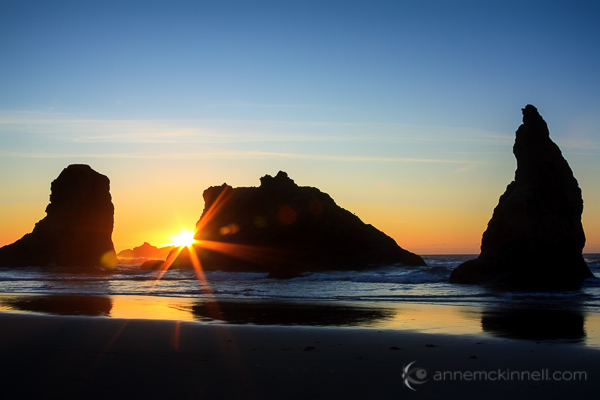
Sunset at Bandon Beach, Oregon, by Anne McKinnell

Occasionally getting a great image is pure luck. Usually we can make pretty good images at any time by using the light to our advantage. But more often than not I find the images that hit it out of the park are the ones I really worked for — when I planned everything out, persevered by going back to a location again and again, and tested my patience by waiting for the right light and enduring sea spray, blowing sand, freezing cold, or bug bites.

Those are the occasions that had the biggest payoff. Now, when I look at my collection, those are the images I am most proud of.

Post originally from: Digital Photography Tips.

Check out our more Photography Tips at Photography Tips for Beginners, Portrait Photography Tips and Wedding Photography Tips.

Perseverance and Patience Will Payoff


Digital Photography School

 
Comments Off on Perseverance and Patience Will Payoff

Posted in Photography


How to Easily Create Selective Color Using Lightroom

11 Apr

This is a guest post by: John Davenport

Selective color photography has been around for ages. It’s something that has been used in the movies – Schindler’s List and Sin City come to mind – and more recently Chase Freedom and Budweiser have used it in their ad campaigns to highlight their products. So even if you dislike selective color, or if haven’t given it much thought, you have to admit it’s a great technique to use when you’re trying to draw attention to a certain subject and is something useful to have in your tool belt.

Today I’m going to show you how to create simple selective color images using only Lightroom as your processing software.

What Makes a Good Selective Color Image?

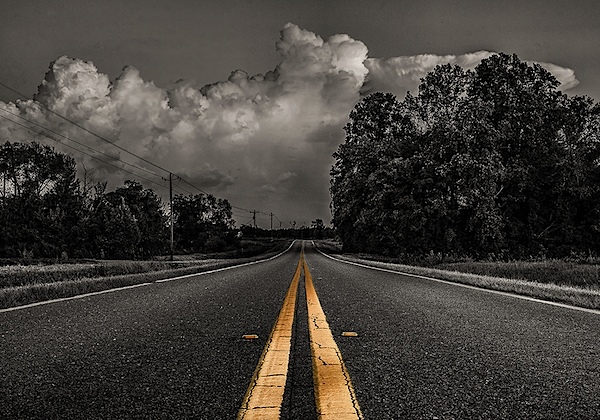
Double Yellow.jpg

First we need to make sure we know what to look for when we’re out photographing our subjects because selective color photography is not something suited for every situation. Whether you’re a landscape photographer, a portrait photographer, or someone shooting on the city streets it’s important to keep the idea in the back of your head that selective color shouldn’t be forced.

Typically you’ll want to pull a vibrant color out of a rather drab scene so fall foliage can work really well, blue eyes in portraits are a very common theme, bright dresses and clothing work well too.

One final point is that you should make sure that whatever you’re keeping in color adds value to the photograph and isn’t something that will detract from the overall scene.

How to Create Selective Color in Lightroom

One of the limitations of Lightroom is that it does not have the ability to do true layers like Photoshop does. We can get around this for selective color processing by working with the HSL tab and working with the Adjustment Brush tool. In short, what we’re going to be doing today is turning the saturation down on all the colors and areas of the photograph that we don’t want color in. The following is a step by step guide on how I created the image at the top of this post.

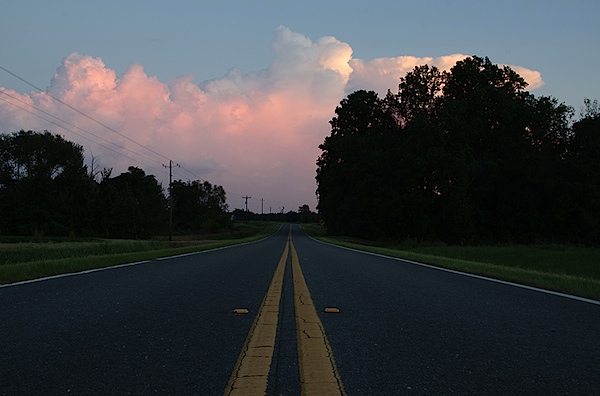
Here’s the original image for your reference.

original.jpg

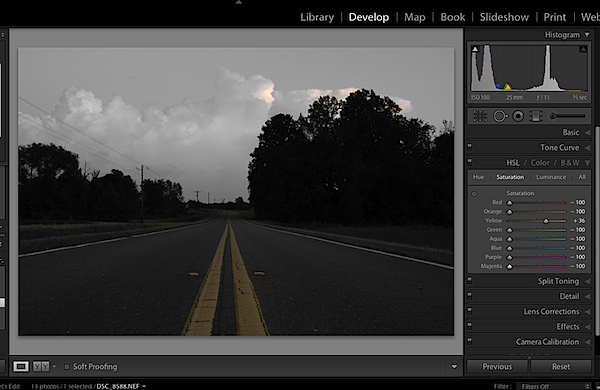
The first step would be to go into the HSL tab in Lightroom and remove the saturation from all the colors you don’t want in your photograph. In my case I wanted to keep yellow so all the other sliders have been pulled to the far left.

Screen Shot 1.png

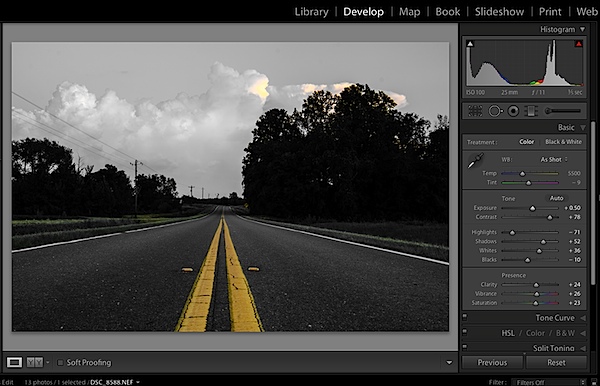
Next step would be to tune the image to your liking – this is a rough tuning just something to get you close to where the final image will be. Simply go into the Basic editing tab of Lightroom and get the overall image set up how you like. You might notice as you do this, some colors start creeping back into the photograph, that’s okay we’ll fix this in the next step.

Screen Shot 2.png

Cleaning up any colors that have reappeared after your tuning process can be done easily with the Adjustment Brush. Simply create a new adjustment brush layer and turn the saturation to the far left. Paint anywhere you don’t want color. If you accidentally paint over something you want to keep switch to the erase mode and go back over that area until you get it right.

Screen Shot 3.png

After you get to this point it’s up to you to finalize the photograph for your own unique look with final touches and cropping.

I find that this workflow does a good job at creating selective color images without the confusion and time consuming nature that dealing with layers in Photoshop has. Of course it should be noted that with a program like Photoshop you’ll have a lot more control over your selective color processing, but for many of us this Lightroom trick is a great alternative.

Let’s Hear From You

Now that we’ve learned how to perform selective color edits I’d love to hear what your opinions are of this kind of processing do you use it? Do you hate it? Have you ever done this kind of thing in Lightroom before?

John Davenport is an avid amateur photographer who shares daily photos on Facebook. For more tips on Lightroom editing check out John’s weekly series which focuses on how to edit photos in Lightroom.

Post originally from: Digital Photography Tips.

Check out our more Photography Tips at Photography Tips for Beginners, Portrait Photography Tips and Wedding Photography Tips.

How to Easily Create Selective Color Using Lightroom


Digital Photography School

 
Comments Off on How to Easily Create Selective Color Using Lightroom

Posted in Photography


Free Online Tool creates ‘Hyperlapse’ videos using Google Street View

11 Apr

google.png

Online user experience company Teehan + Lax has created a free tool for creating ‘hyperlapse’ videos using Google Street View. The term ‘hyperlapse’ describes timelapse videos which incorporate camera movement – something that is typically extremely difficult and time-consuming to perfect. The team at Teehan + Lax began experimenting with Google Street View as a guide for choosing locations, but realised that it could be used as source material. Click through for more details. 

News: Digital Photography Review (dpreview.com)

 
Comments Off on Free Online Tool creates ‘Hyperlapse’ videos using Google Street View

Posted in Uncategorized


Manfrotto launches StilePlus line of stylish camera bags

11 Apr

diva.png

Manfrotto has launched the StilePlus line of camera bags with fashion sense. Aimed at shutterbugs who want a practical but stylish camera bag, the company offers this range in three varieties: the  Diva 15 Tote Bag, Bravo 50 Backpack and Amica 10 shoulder bag. 

News: Digital Photography Review (dpreview.com)

 
Comments Off on Manfrotto launches StilePlus line of stylish camera bags

Posted in Uncategorized


Performance Architecture: 10 Dramatic Opera Sets & Stages

10 Apr

[ By Steph in Architecture & Public & Institutional. ]

Amazing Opera Stages Main

Magnificent, surreal stages rise from the depths of Austria’s Lake Constance, rotating, glowing, rising and falling in time with the plots of famed operas, plays and musicals. Unparalleled in their scale and complexity, these stages are built every two years for the Bregenz Opera Festival, which began in 1946. With each season that passes, the sets get even more impressive. Here are 10 standouts.

Andre Chenier

Amazing Opera Stages Andre Chenier

AMazing Opera Stages Andrew Chenier 2

Amazing Opera Stages Andre Chenier 3

Looking like the remains of some fallen civilization, a statue emerges from the lake, its head draped. Then the fabric begins to fall away, revealing a set of stairs that lead right up to the figure’s eye. This interactive set for Andre Chenier, an opera set during the French Revolution, grows even more amazing as the night goes on: the neck of the statue is severed, the head falling back to reveal an additional set.

A Masked Ball

Amazing Opera Stages A Masked Ball

Amazing Opera Stages A Masked Ball 2

A massive skeleton looms over an open book as the scene for A Masked Ball, an opera by Guiseppe Verde. One of the Bregenz Festival’s most iconic sets, this one from 1999 is fairly simple compared to the amazingly complex ones seen in more recent years.

Tosca

Amazing Opera Stage Tosca

Amazing Opera Stages Tosca 2

Puccini’s Tosca played out against this unforgettable backdrop, which featured a giant eye with an iris that actually rotates to reveal a hidden room. Scenes for the James Bond movie Quantum of Solace were filmed in the front of the building and in the audience while this stage was still active, in 2008.

La Boheme

Amazing Opera Stages La Boheme

The 2001-2002 seasons of the Bregenz Festival featured three giant bistro tables and chairs for Puccini’s La Boheme, one of the world’s most popular operas.

Aida

Amazing Opera Stages Aida

Life-sized replicas of the Statue of Liberty – or at least, bits and pieces of it – made a dramatic setting for a contemporary adaptation of Verdi’s Aida, symbolic of the breakdown of human rights. The pieces were mounted to cranes, and seemingly floated up into the sky at various points in the opera.

Carmen

Amazing Opera Stages Carmen

Though not as surreal as many of the other sets,  the 1991-1992 stage for Georges Bizet’s Carmen was no less epic.

West Side Story

Amazing Opera Stages West Side Story

Abstract representations of a rather futuristic-looking city rose and curved as a surprising stage for Leonard Bertstein’s musical West Side Story in 2003.

The Magic Flute

Amazing Opera Stages Die Zauberflote

Last seen at Bregenz nearly twenty years ago with this magnificent rocky stage, The Magic Flute (Die Zauberflote, presented in German with English subtitles) will return for 2013 and 2014 with a new set.

The Troubadour

Amazing Opera Stages Troubadour

Il Trovatore, or The Troubadour, had a very industrial-looking stage – a recreation of an oil refinery in stark red, which spewed fire from those smokestacks during its run in 2005.

Fidelio

Amazing Opera Stages Fidelio

A prison rears up right amidst a life-sized Cardiff street as the set for Fidelio, an Italian opera about insidious evil in the world.

Share on Facebook


[ By Steph in Architecture & Public & Institutional. ]

[ WebUrbanist | Archives | Galleries | Privacy | TOS ]


WebUrbanist

 
Comments Off on Performance Architecture: 10 Dramatic Opera Sets & Stages

Posted in Creativity


10. April 2013

10 Apr

Ein Beitrag von: Sebastian Kahl

© Sebastian Kahl


kwerfeldein – Fotografie Magazin

 
Comments Off on 10. April 2013

Posted in Equipment